Title here
Summary here

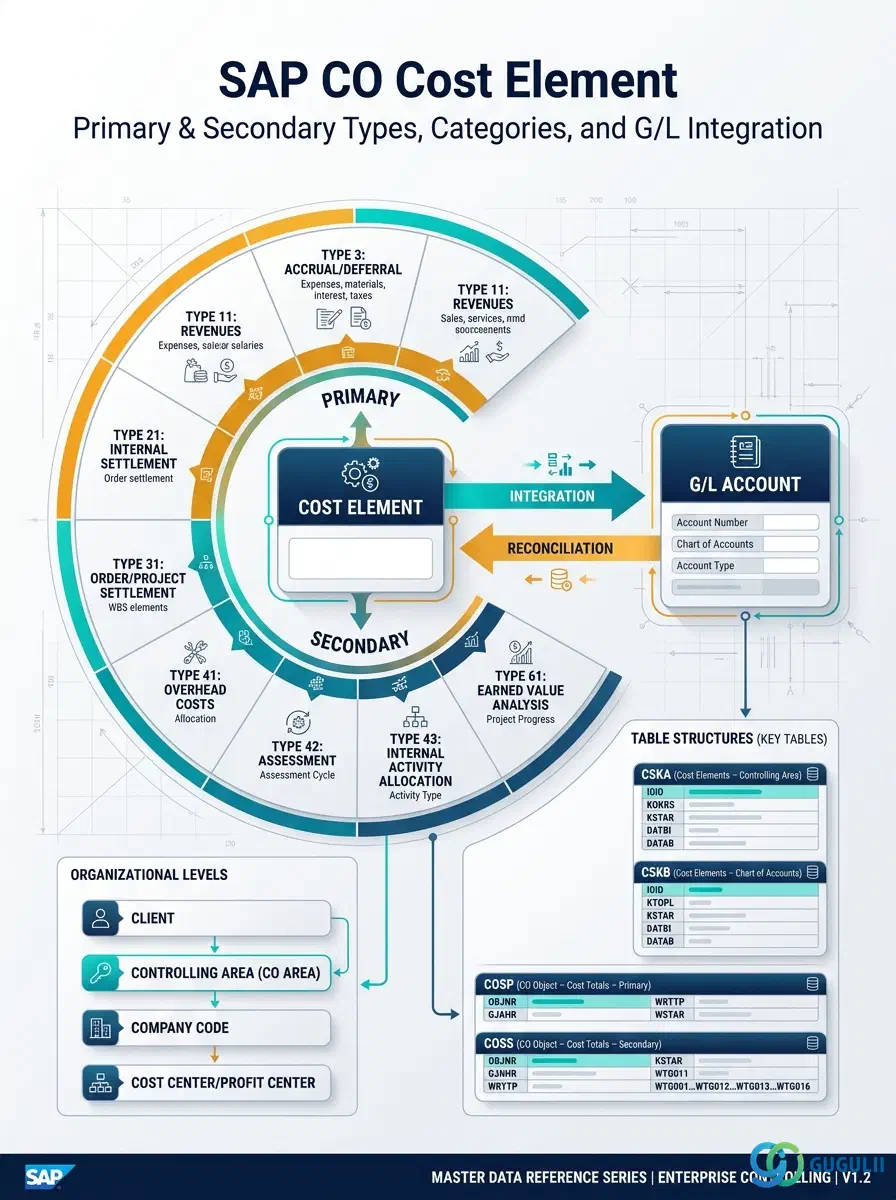
The Cost Element is the foundational classification object for every cost and revenue posting in SAP Controlling. It defines what kind of cost or revenue a posting represents — raw material, labor, overhead, settlement, or revenue — and links Financial Accounting (FI) G/L accounts to the Controlling (CO) cost objects that receive the posting. In S/4HANA, primary cost elements are fully integrated with G/L accounts, eliminating the prior ECC requirement to maintain them separately. Understanding the Cost Element — its categories, organizational scope, and field semantics — is prerequisite knowledge for every CO module implementation.
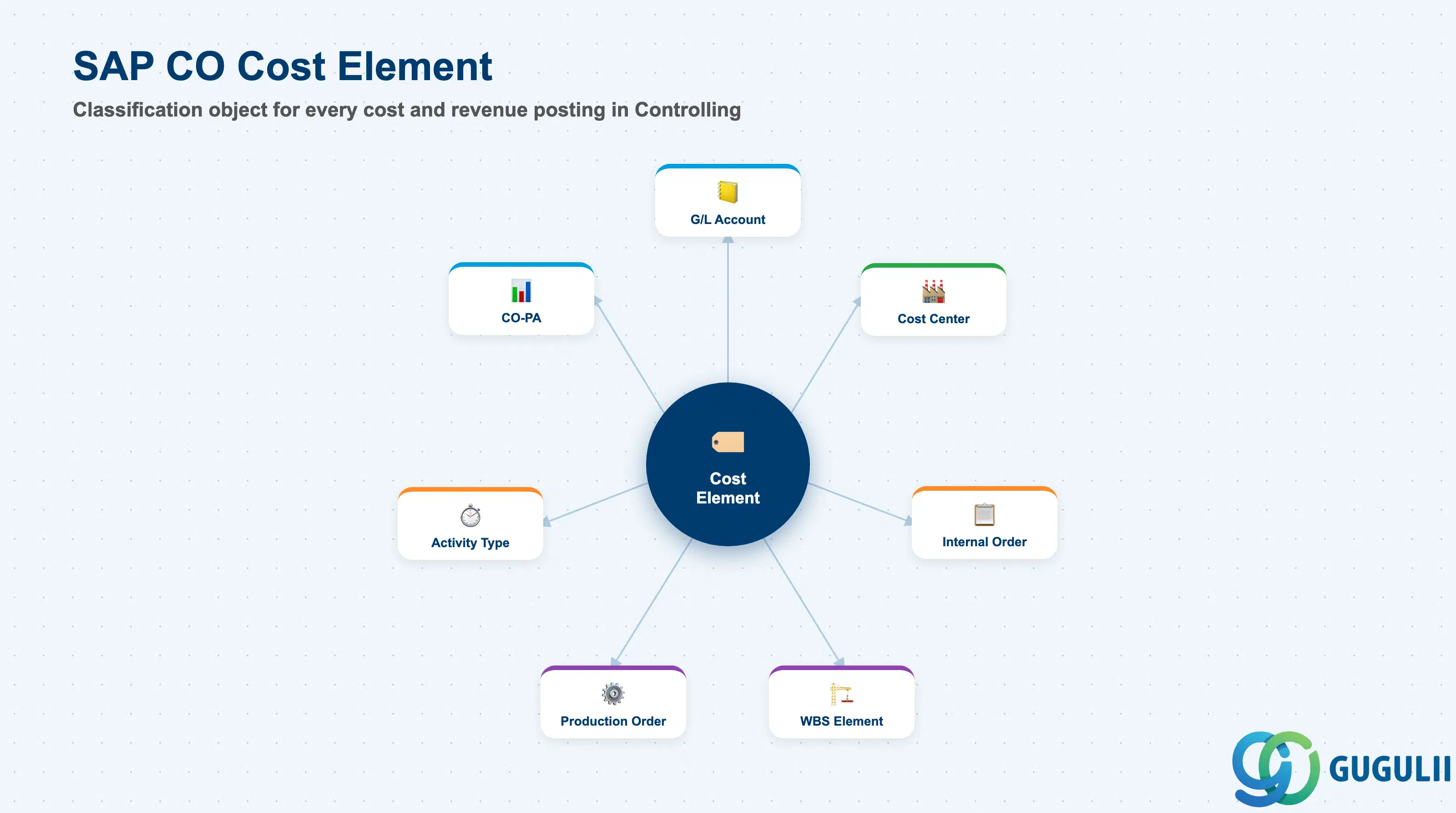
The Cost Element is SAP CO’s mechanism for classifying every financial transaction that flows into Controlling. Where the G/L Account records where a transaction is posted in Financial Accounting, the Cost Element records what kind of cost or revenue it represents in Controlling. The two are tightly linked: every CO posting references a Cost Element, and in S/4HANA every primary Cost Element corresponds 1:1 with a G/L Account.
| Aspect | Details |
|---|---|
| Role | Classifies costs and revenues by type in CO — determines which cost object category can receive a posting and how it is settled |
| Modules using it | CO (primary owner — all sub-modules: CCA, PCA, IO, Product Costing, CO-PA), FI (G/L account integration — primary cost elements), PP (manufacturing order actual costs), PS (WBS element cost posting), PM/SM (maintenance/service order cost classification) |
| Transactions | KA01 (Create Primary), KA06 (Create Secondary), KA02 (Change), KA03 (Display), KA23 (Cost Element List) |
| Key Tables | CSKA (Cost Elements — general data), CSKB (Cost Elements by Controlling Area — operational data), CSKU (Cost Element Texts) |
| S/4HANA note | In S/4HANA, primary cost elements (Category 1 and 11) are no longer created via KA01. They are defined by setting the Cost Element Category on the G/L Account (FS00 / Fiori: Manage G/L Accounts). Secondary cost elements (Category 21, 41, 42, 43, etc.) continue to be created via KA01 or KA06. Fiori app: Manage Cost Elements (F2336). |
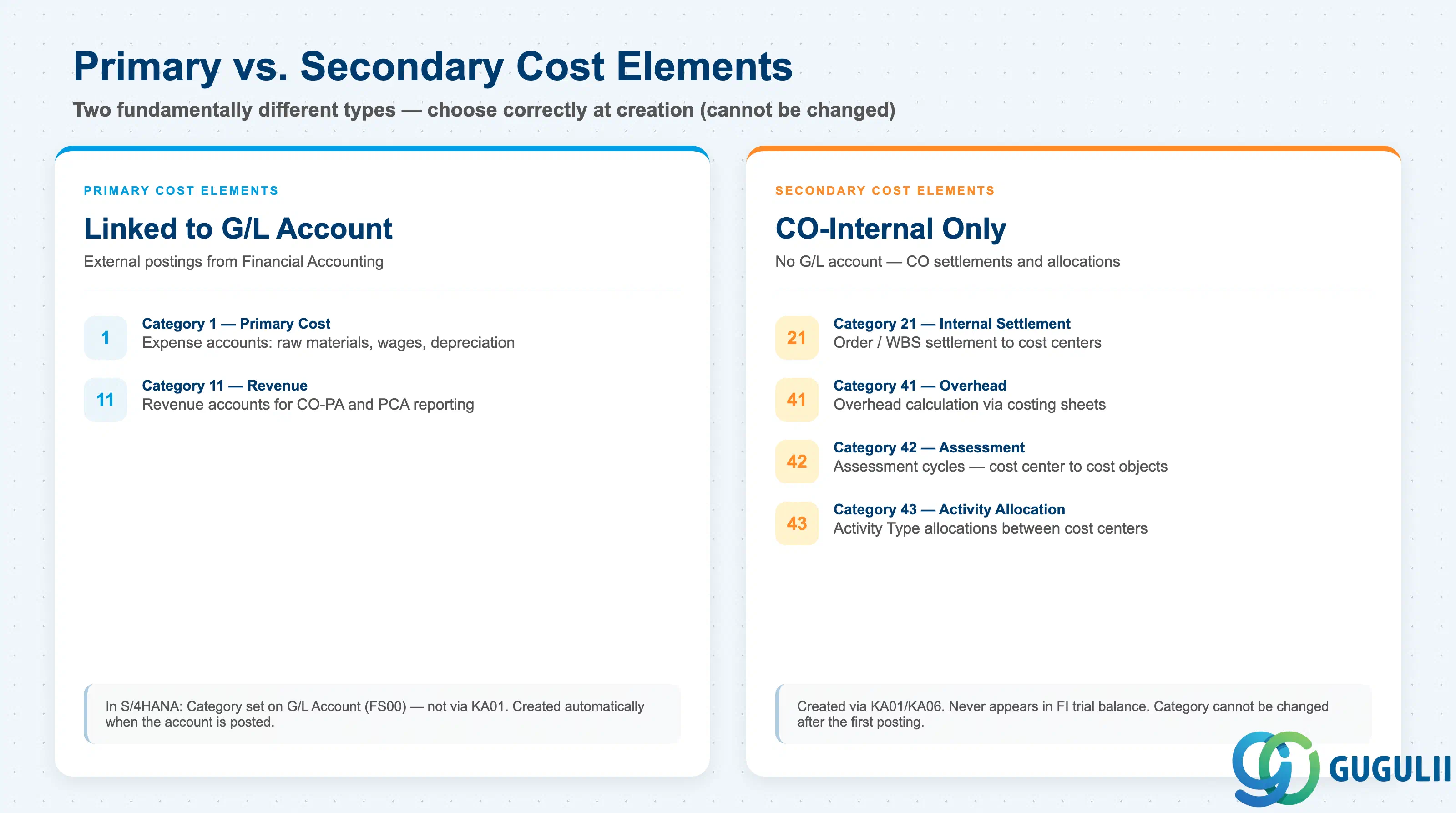
The most critical design decision for Cost Elements is the distinction between Primary and Secondary types. This choice is permanent — a Cost Element’s category cannot be changed after the first posting.
| Type | Category | Description | Use Case |
|---|---|---|---|
| Primary — Cost | 1 | External cost postings from FI (expense accounts) | Raw material consumption, labor wages, overhead expenses, depreciation |
| Primary — Revenue | 11 | External revenue postings from FI (revenue accounts) | Sales revenue, service income — for CO-PA and PCA reporting |
| Secondary — Internal Settlement | 21 | Internal settlement of order/WBS results to cost centers or assets | Period-end settlement of Internal Orders, Production Orders, WBS Elements |
| Secondary — External Settlement | 22 | Settlement to external receivers (FI assets, CO-PA) | AuC settlement to fixed asset, settlement to profitability analysis |
| Secondary — Overhead | 41 | Overhead calculation via costing sheets | Allocation of overhead rates based on direct costs in Product Costing |
| Secondary — Assessment | 42 | Assessment cycle from cost center to other cost objects | Period-end distribution of service center costs to production cost centers |
| Secondary — Activity Allocation | 43 | Activity allocation from one cost center to another | Machine hours or labor hours charged between cost centers via activity types |
Design principle: Secondary cost elements are CO-internal records — they have no corresponding G/L account and never appear in the FI trial balance. Define the full list of required secondary cost elements during blueprint based on the planned assessment, distribution, and settlement design.
Cost Element is scoped at the Controlling Area level — it is created once per CO Area and is available to every Company Code assigned to that CO Area. It sits alongside the other CO-Area-scope masters (Cost Element Group, Internal Order, Cost Component Structure, Costing Variant) as an independent sibling in the same zone.
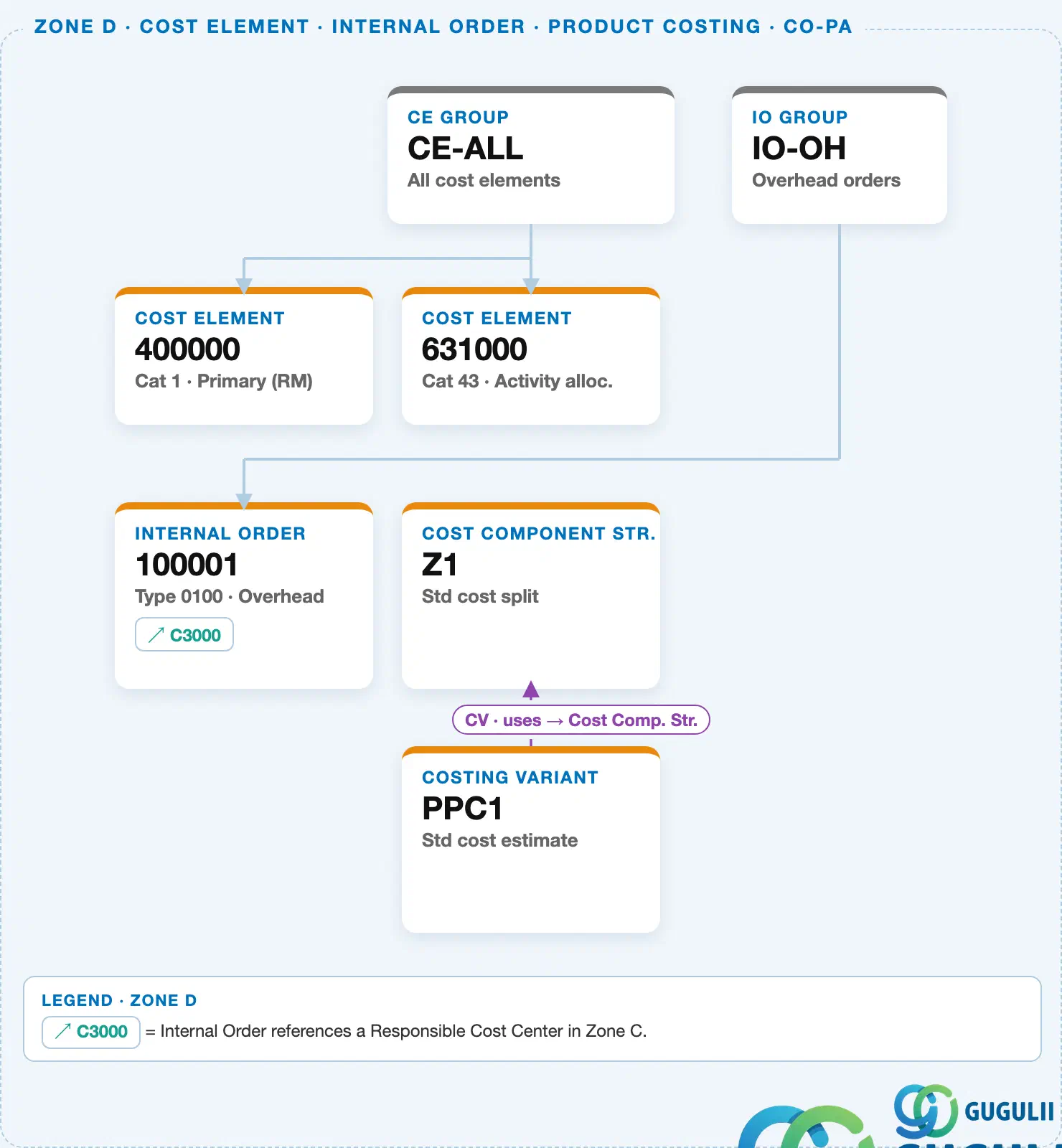
Cost Elements come in two flavors that this diagram distinguishes by category: Primary cost elements mirror a G/L Account and capture externally-sourced costs (material, labor purchased from outside CO), while Secondary cost elements exist only inside CO and are used for internal allocations — most commonly as the “allocation Cost Element” that an Activity Type charges against when one Cost Center performs work for another.
Data hierarchy with a concrete example
Controlling Area 1000
   │
   ├── CE Group "CE-ALL"          All cost elements
   │      │
   │      ├── Cost Element "400000"   Cat 1 · Primary (RM)
   │      │      mirrors G/L Account 400000
   │      │
   │      └── Cost Element "631000"   Cat 43 · Activity allocation
   │             ↑
   │             └── referenced by ── Activity Type "MH-01"   Machine hrs (Cost Center C1100)
Design principle: Reserve Category 43 (Activity Allocation) secondary cost elements exclusively for Activity Type postings, and Category 1 (Primary Costs) for anything that should mirror a G/L Account. Mixing the two categories on the same cost element number makes CO-PA and cost-center reports harder to reconcile back to FI.
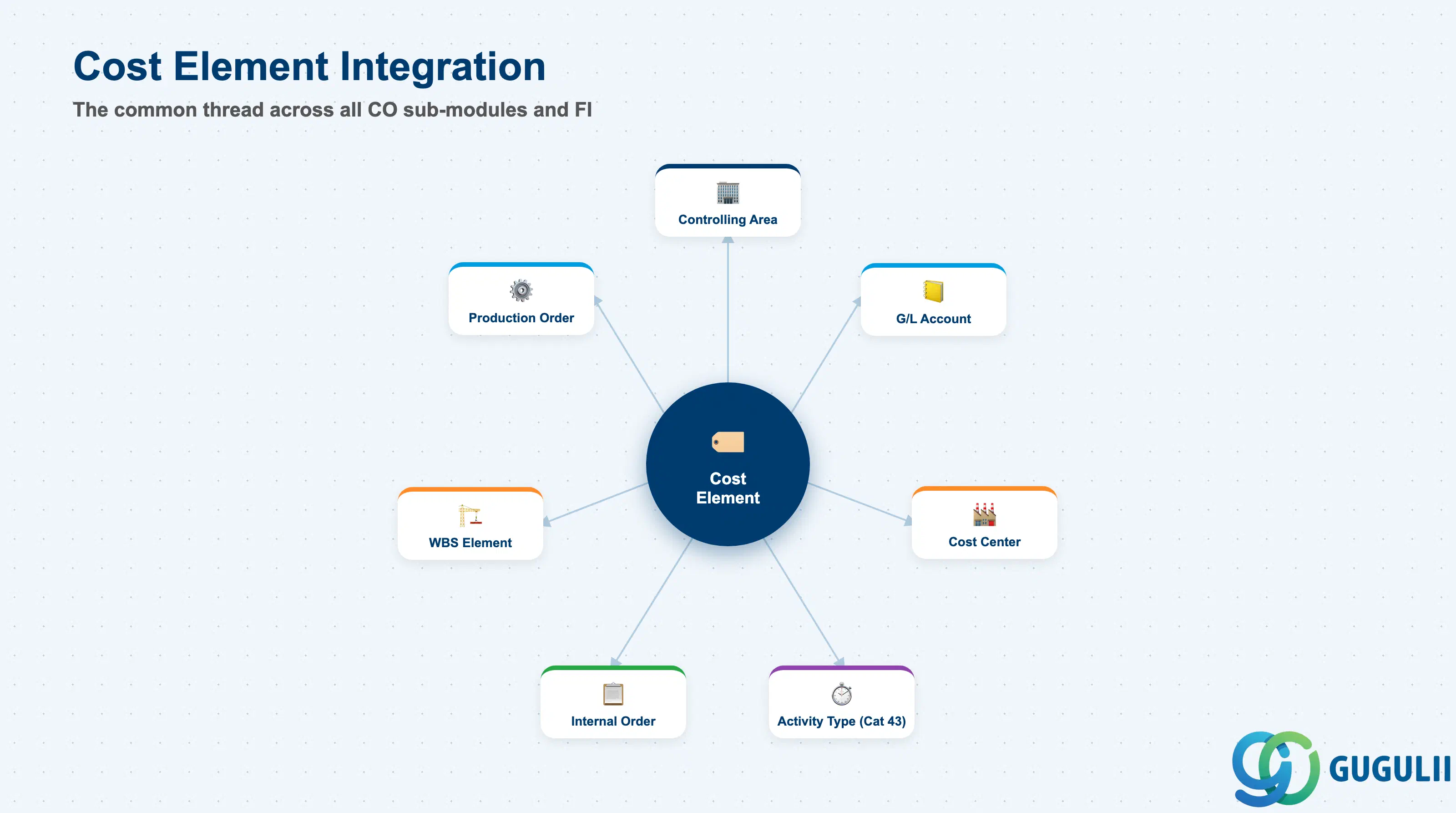
The Cost Element does not stand alone. Every cost or revenue posting in CO references a Cost Element and routes to a cost object. The Cost Element is the common thread across all CO sub-modules.
| Object | Relationship | Practical Notes |
|---|---|---|
| Controlling Area (OKKP) | Cost Element is defined within a Controlling Area | The Controlling Area is the mandatory parent structure. A Cost Element cannot be used in a different Controlling Area than the one it was created in. |
| G/L Account (FS00) | Primary cost elements are linked 1:1 to G/L Accounts | In S/4HANA, the Cost Element Category is set on the G/L Account directly. When an FI posting hits a cost-element-enabled account, the CO posting follows automatically to the assigned cost object. |
| Cost Center (KS01) | Primary cost centers receive Cost Element postings | The combination of Cost Element + Cost Center is the basic CO posting unit for overhead cost management. Budget and plan values are entered per Cost Element per Cost Center. |
| Activity Type (KL01) | Activity Types use secondary cost elements (Category 43) | The Activity Type references a secondary cost element to record the credit on the sending cost center and the debit on the receiving cost object during activity allocation. |
| Internal Order (KO01) | Internal Orders collect postings by Cost Element | Orders settle their balance to cost centers or G/L accounts via settlement cost elements (Category 21 or 22). |
| WBS Element (PS) | Project costs are classified by Cost Element | All actual costs posted to WBS elements appear in CO line item reports by Cost Element. Settlement of WBS elements uses secondary cost elements (Category 21/22). |
| Production Order (PP) | Manufacturing orders receive component and overhead costs | BOM components, activity allocations, and overhead calculations all post to the production order using the relevant primary and secondary cost elements. |
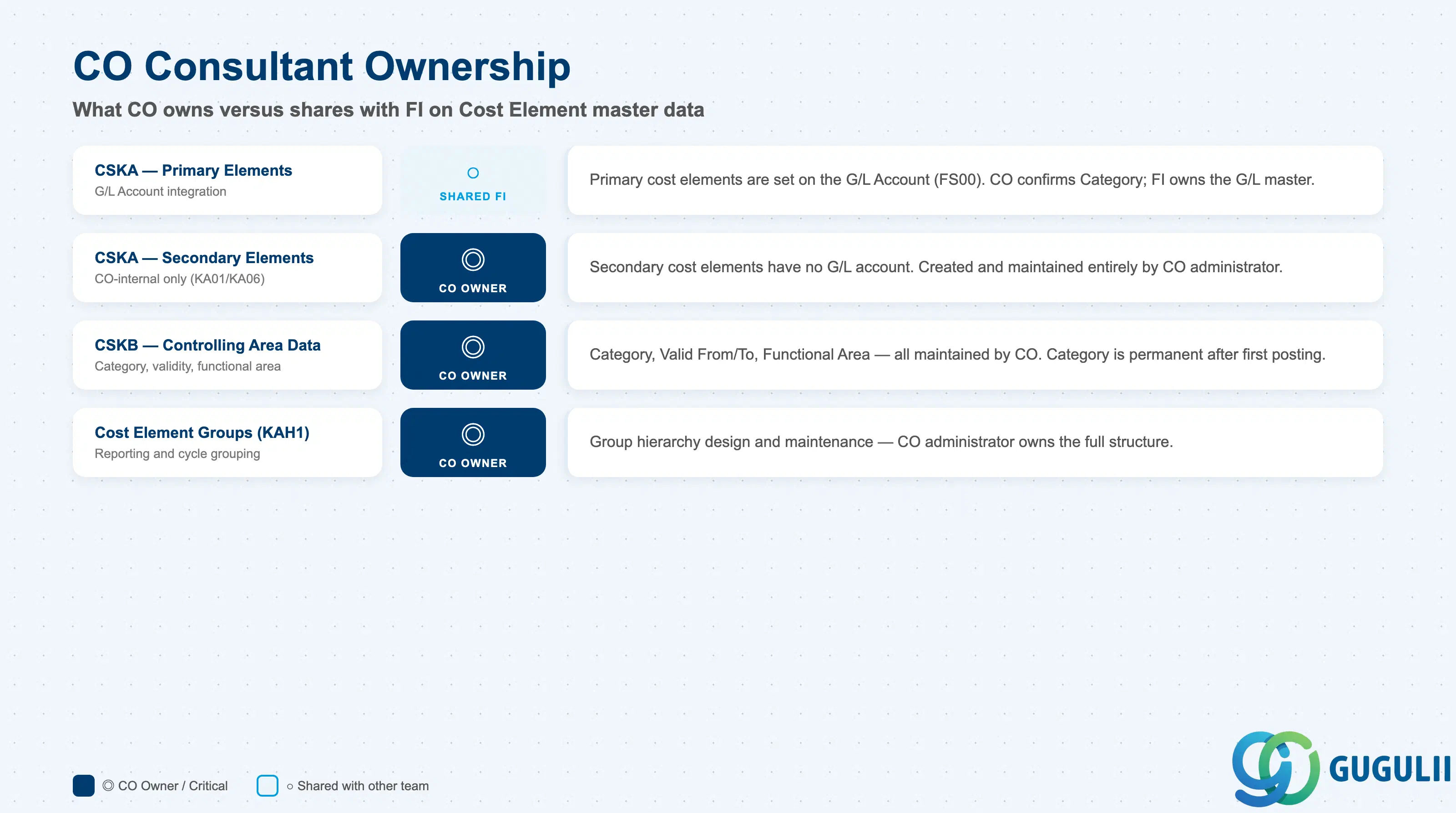
| Data Section | CO Involvement | Notes |
|---|---|---|
| General Data (CSKA) — Primary elements | ○ Shared with FI | Primary cost elements are defined on the G/L Account (FS00). CO consultant confirms the Cost Element Category setting; FI consultant maintains the G/L Account master. |
| General Data (CSKA) — Secondary elements | ◎ Owner | Secondary cost elements have no G/L Account. Created and maintained entirely by CO (KA01/KA06). |
| Controlling Area Data (CSKB) | ◎ Owner | Cost Element Category, validity period, functional area defaults — all maintained by CO. |
| Cost Element Group (KAH1) | ◎ Owner | Grouping structure used in reports and allocation cycles — CO administrator owns the hierarchy design. |
Legend: ◎ = Owner / Critical, ○ = Direct involvement
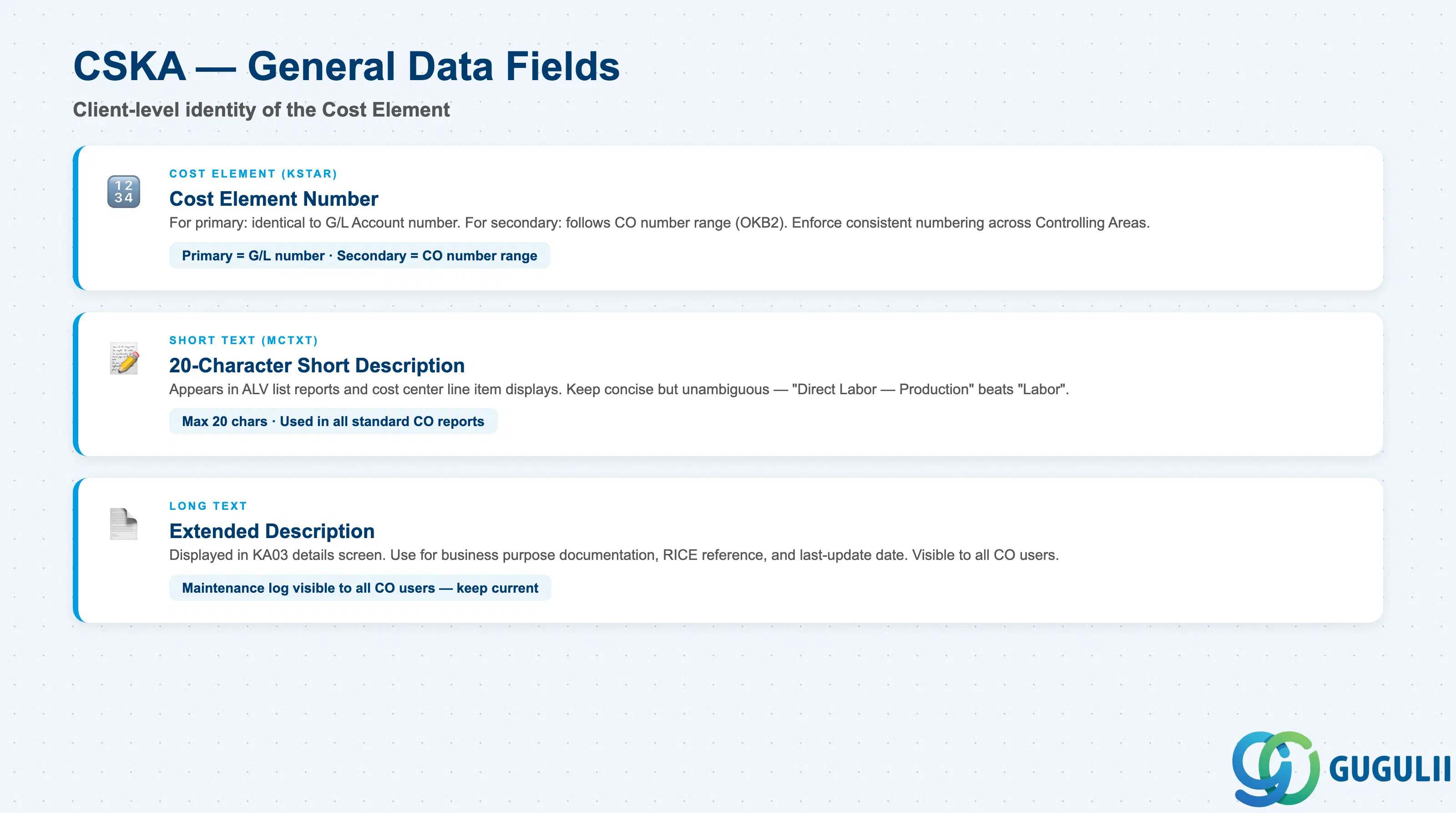
General Data is the client-level record containing the identity of the Cost Element. For primary cost elements, this record mirrors the G/L Account number and description set in FI.
| Field | Description | Practical Usage |
|---|---|---|
| Cost Element (KSTAR) | Cost element number | For primary cost elements, this is identical to the G/L Account number. For secondary cost elements, the number follows a CO-specific number range (defined in Customizing via OKB2 / number range object KOSTL). In global rollouts, enforce a consistent numbering policy across Controlling Areas to simplify cross-company reporting and consolidated cost reports. |
| Short Text (MCTXT) | 20-character short description | Used in ALV list reports, cost center line item displays, and most standard CO reports. Keep it concise but unambiguous — “Labor” is too generic; “Direct Labor — Production” gives planners and approvers a clear category. For secondary cost elements, the name should reflect the CO-internal purpose (e.g., “Assessment — Building Costs”, “Settlement — Internal Orders”). |
| Long Text | Extended description | Displayed in KA03 details screen. Use for documentation of the business purpose, the originating requirement (RICE ID or project document reference), and the date of last update. This is the maintenance log visible to every CO user — keep it current. |
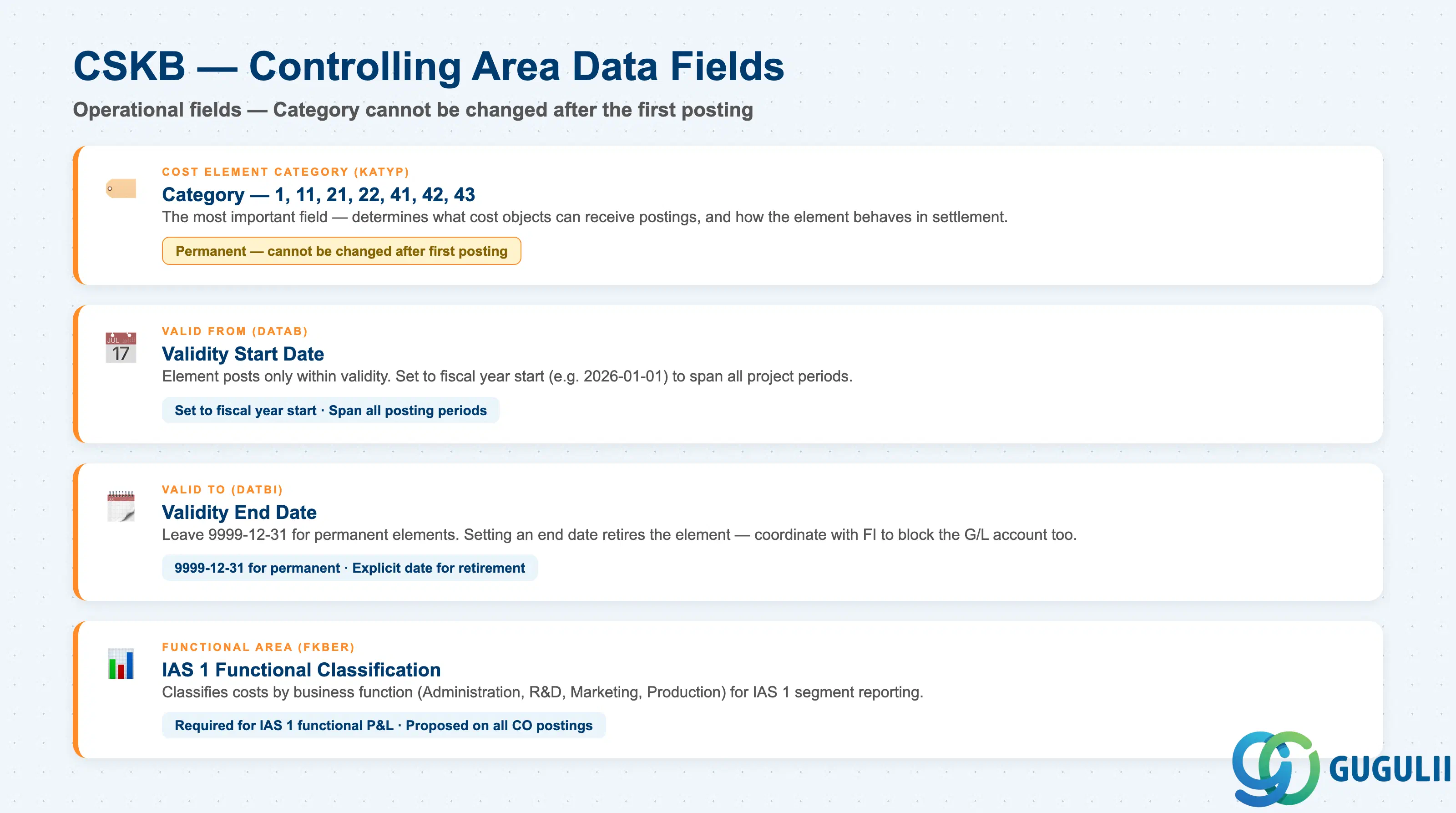
The Controlling Area Data section is the operationally critical record. It determines what kind of postings the Cost Element accepts and during which periods it is active.
| Field | Description | Practical Usage |
|---|---|---|
| Cost Element Category (KATYP) | Classification code (1, 11, 21, 22, 41, 42, 43) | The single most important field on the Cost Element. Determines which cost object types can receive a posting to this element and how the element behaves in settlement, allocation, and costing. This field cannot be changed after the first posting. Set it correctly during master data setup — errors require creating a new Cost Element and migrating existing plan/actual data. |
| Valid From (DATAB) | Start date of validity | A Cost Element is only available for postings within its validity period. In most projects, set Valid From to the fiscal year start date (e.g., 2026-01-01) and leave Valid To open (9999-12-31) unless the element is planned to be retired at a known date. For year-changeover projects, confirm that the validity period spans all posting periods in the implementation scope. |
| Valid To (DATBI) | End date of validity | Setting an explicit Valid To date effectively retires the Cost Element. No new postings are accepted after the end date. Useful for legacy elements being phased out — set Valid To = last day of the last posting period, then create a successor element. Confirm with FI that the corresponding G/L Account is also blocked for posting (primary elements only). |
| Functional Area (FKBER) | Default functional area | Functional Area classifies costs by business function (Administration, Research, Marketing, Production) for external segment reporting under IAS 1. If your implementation requires functional area reporting (common in publicly listed companies and group reporting scenarios), set the default here. It will be proposed on every CO posting to this Cost Element. Override is allowed at posting time. |
| ID | Category | Title |
|---|---|---|
| co-001 | Overview | What is SAP CO? |
| ID | Category | Title |
|---|---|---|
| co-a01 | Overview | SAP CO Master Data: Overview, Hierarchy & Relationships |
| co-a02-01 | Master Data | SAP CO Material Master |
| co-a03-01 | Master Data | SAP CO Cost Element 📍 |
| co-a03-02 | Master Data | SAP CO Cost Element Group |
| co-a04-01 | Master Data | SAP CO Profit Center Group |
| co-a04-02 | Master Data | SAP CO Profit Center |
| co-a05-01 | Master Data | SAP CO Cost Center Group |
| co-a05-02 | Master Data | SAP CO Cost Center |
| co-a05-03 | Master Data | SAP CO Activity Type Group |
| co-a05-04 | Master Data | SAP CO Activity Type |
| co-a05-05 | Master Data | SAP CO Statistical Key Figure |
| co-a06-01 | Master Data | SAP CO Internal Order Group |
| co-a06-02 | Master Data | SAP CO Internal Order |
| co-a07-01 | Master Data | SAP CO Cost Component Structure |
| co-a07-02 | Master Data | SAP CO Costing Variant |
| co-a08-01 | Master Data | SAP CO Operating Concern |
| ID | Category | Title |
|---|---|---|
| co-b01 | Overview | SAP CO Transactions: Process Flow, Hierarchy & Relationships |