Title here
Summary here

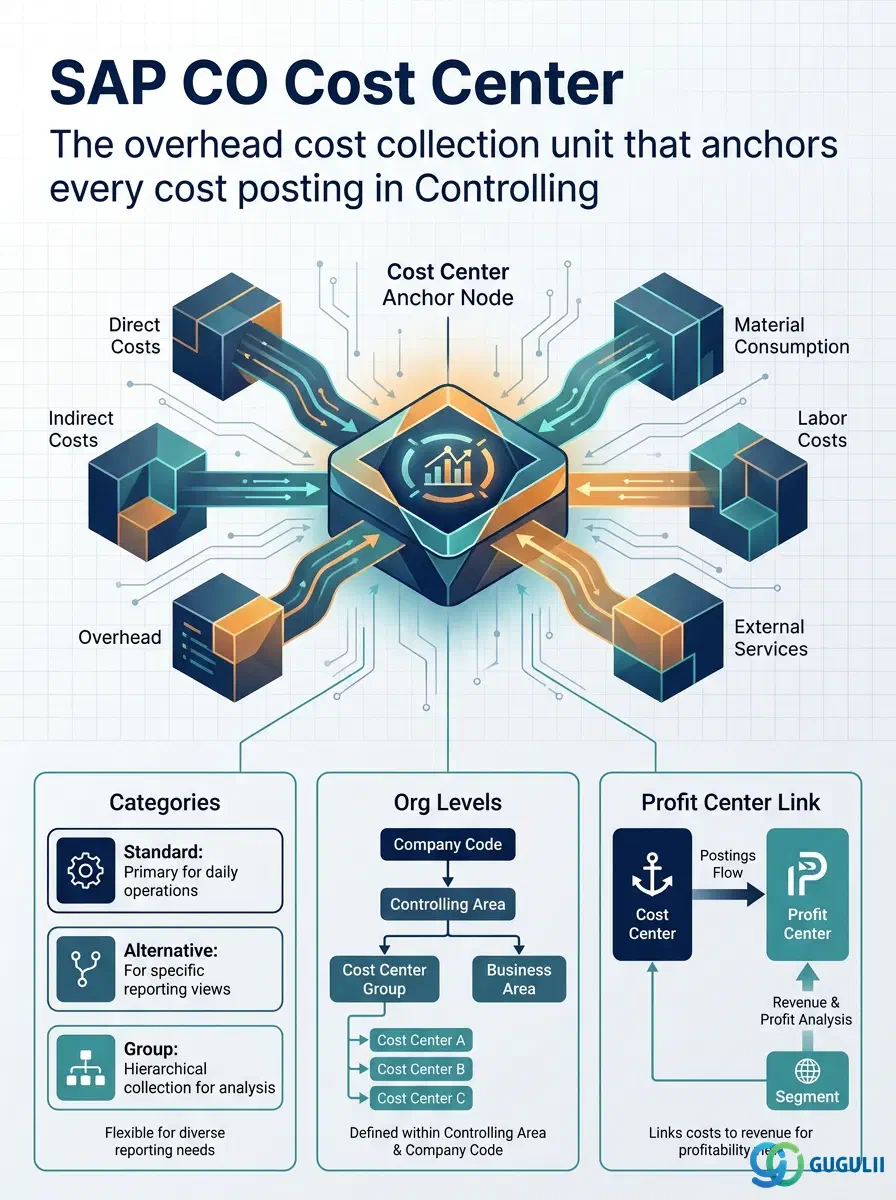
The Cost Center is the primary cost collection and responsibility unit in SAP Controlling. It is the CO object that receives overhead cost postings from Financial Accounting, accumulates planned and actual costs by Cost Element, and forms the basis for budget tracking, variance analysis, activity allocation, and period-end assessment cycles. Every implementation of SAP CO starts with the Cost Center design — it is the backbone of the entire cost management architecture.
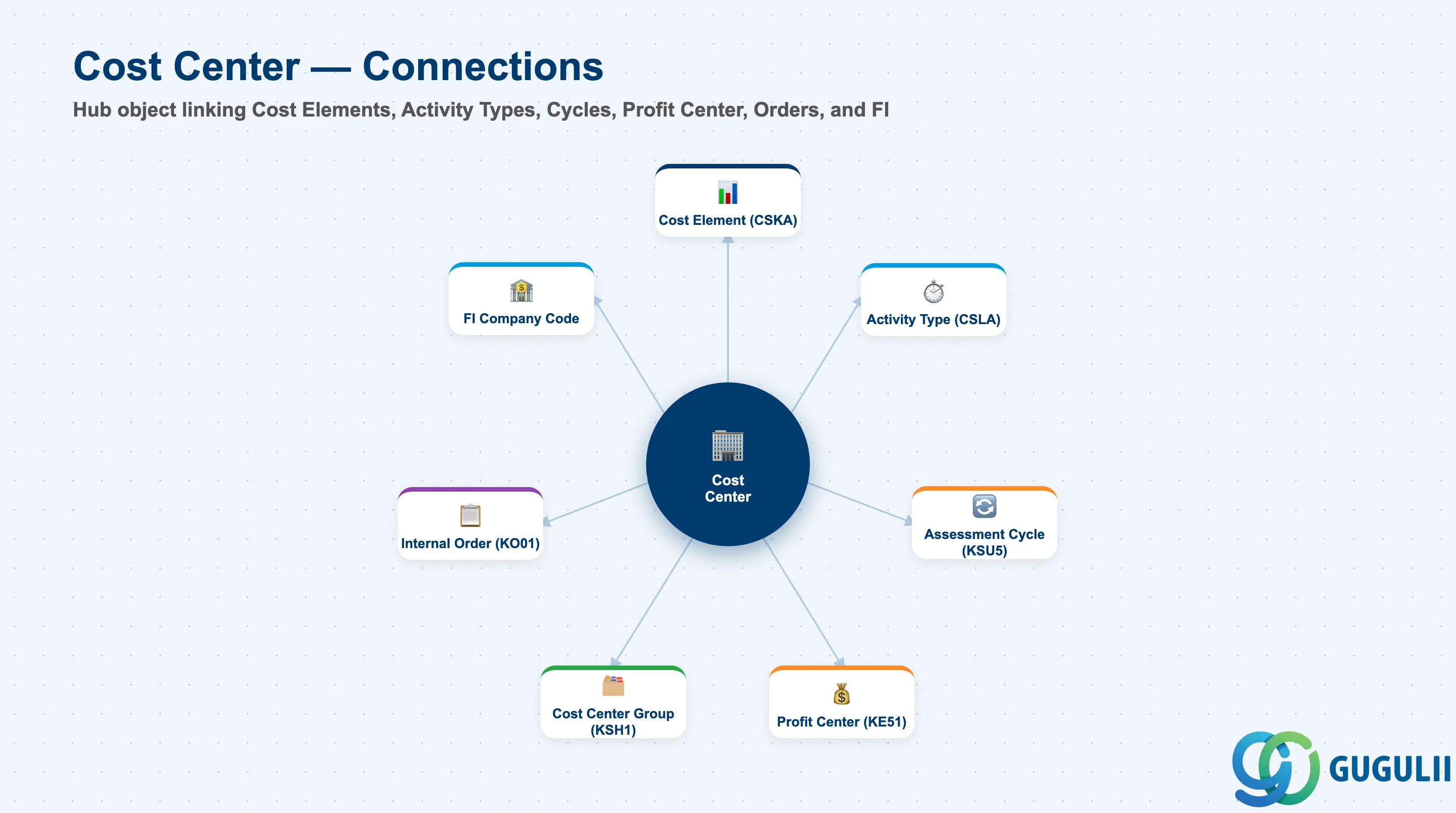
The Cost Center is an organizational unit that collects costs for a defined area of responsibility — a department, machine group, plant function, or any logical management unit where costs are incurred. Every FI posting to an expense account that has a CO-relevant Cost Element automatically requires a Cost Center assignment (or another CO cost object). In S/4HANA, the Cost Center must always be linked to a Profit Center, ensuring that all overhead costs flow into Profit Center Accounting for management P&L reporting.
| Aspect | Details |
|---|---|
| Role | Collects overhead costs by period and Cost Element; basis for budget tracking, variance analysis, and period-end allocation to product and order costs |
| Modules using it | CO-CCA (Cost Center Accounting — primary), CO-PCA (via mandatory Profit Center assignment), CO-PC (Activity Types on Cost Centers drive product cost calculations), HR (personnel costs posted to Cost Centers), FI (expense posting requires Cost Center or another CO object) |
| Transactions | KS01 (Create), KS02 (Change), KS03 (Display), KS04 (Delete), KS12/KS13 (Mass change/display), KS99 (Copy) |
| Key Tables | CSKS (Cost Center master data), CSKT (Cost Center texts), CSLA (Activity Type linkage) |
| S/4HANA note | In S/4HANA, Profit Center assignment on the Cost Center is mandatory (was optional in ECC). The Account-Based CO-PA framework means every Cost Center posting also creates a CO-PA line item with the Profit Center populated. The Fiori app “Manage Cost Centers” (F2201) replaces KS01 for day-to-day operations. |
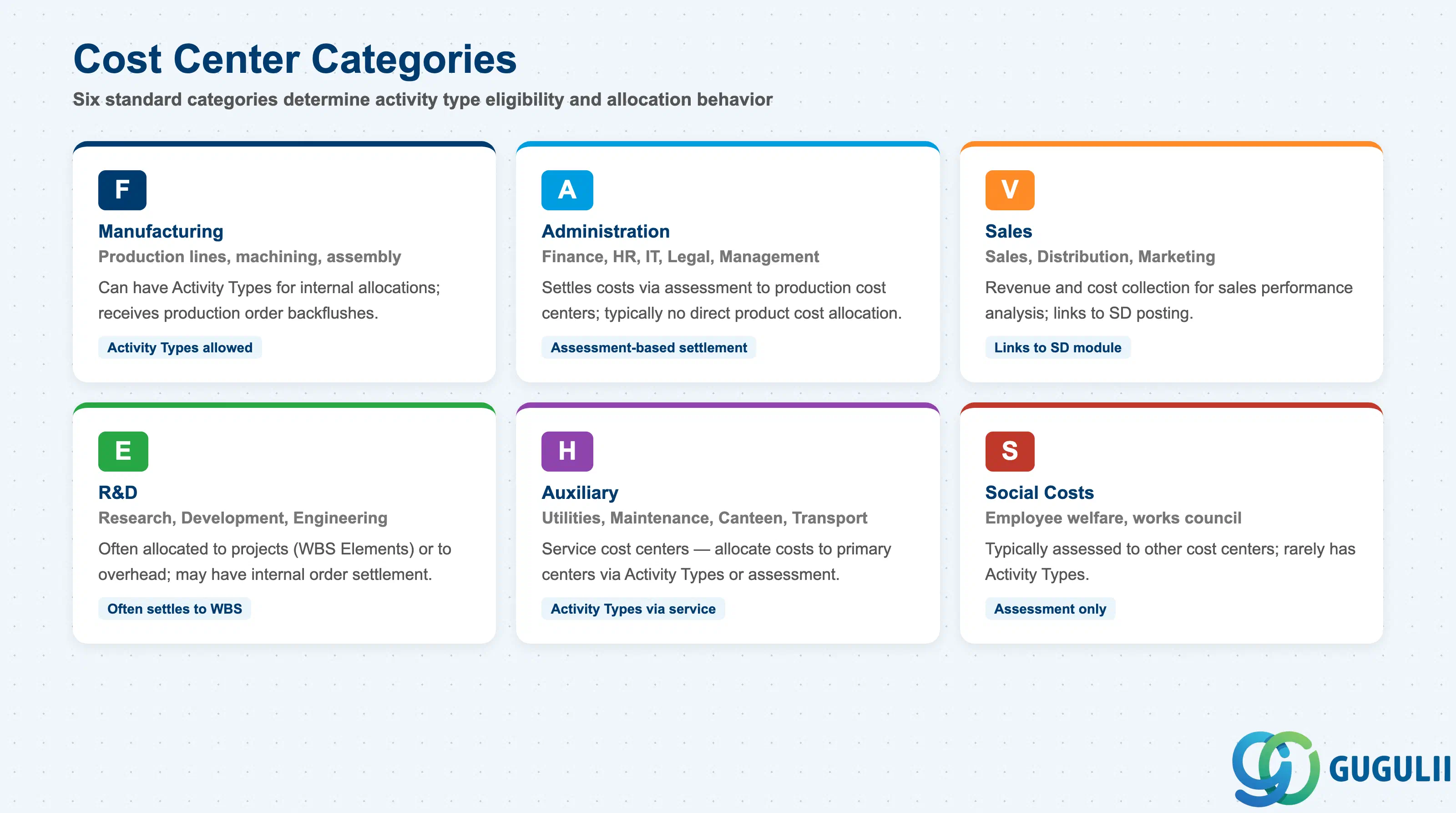
The Cost Center Category classifies the nature of the cost center’s activity. It controls which Activity Types can be assigned and drives certain validation and reporting behaviors.
| Category Code | Description | Typical Use | Key Behavior |
|---|---|---|---|
| F | Manufacturing | Production lines, machining, assembly, fabrication | Can have Activity Types for internal allocations; receives production order backflushes |
| A | Administration | Finance, HR, IT, Legal, Management | Typically settles costs via assessment to production cost centers; no direct product cost allocation |
| V | Sales | Sales, Distribution, Marketing, Customer Service | Revenue and cost collection for sales performance analysis; links to SD posting |
| E | R&D | Research, Development, Engineering, Quality | Often allocated to projects (WBS Elements) or to overhead; may have internal order settlement |
| H | Auxiliary | Utilities, Maintenance support, Canteen, Transport | Service cost centers — allocate their costs to primary cost centers via Activity Types or assessment |
| S | Social Costs | Employee welfare, works council, sports facilities | Typically assessed to other cost centers; rarely has Activity Types |
Design principle: Define the Category for each Cost Center based on its functional role in the overhead cost flow. Manufacturing (F) and Auxiliary (H) cost centers typically have Activity Types for quantity-based allocation. Administration (A) and Sales (V) cost centers typically settle via percentage-based assessment. Document the planned allocation method for each Category in the blueprint.
Cost Center is scoped at the Controlling Area level, and must be assigned into the Standard Hierarchy (Cost Center Group).
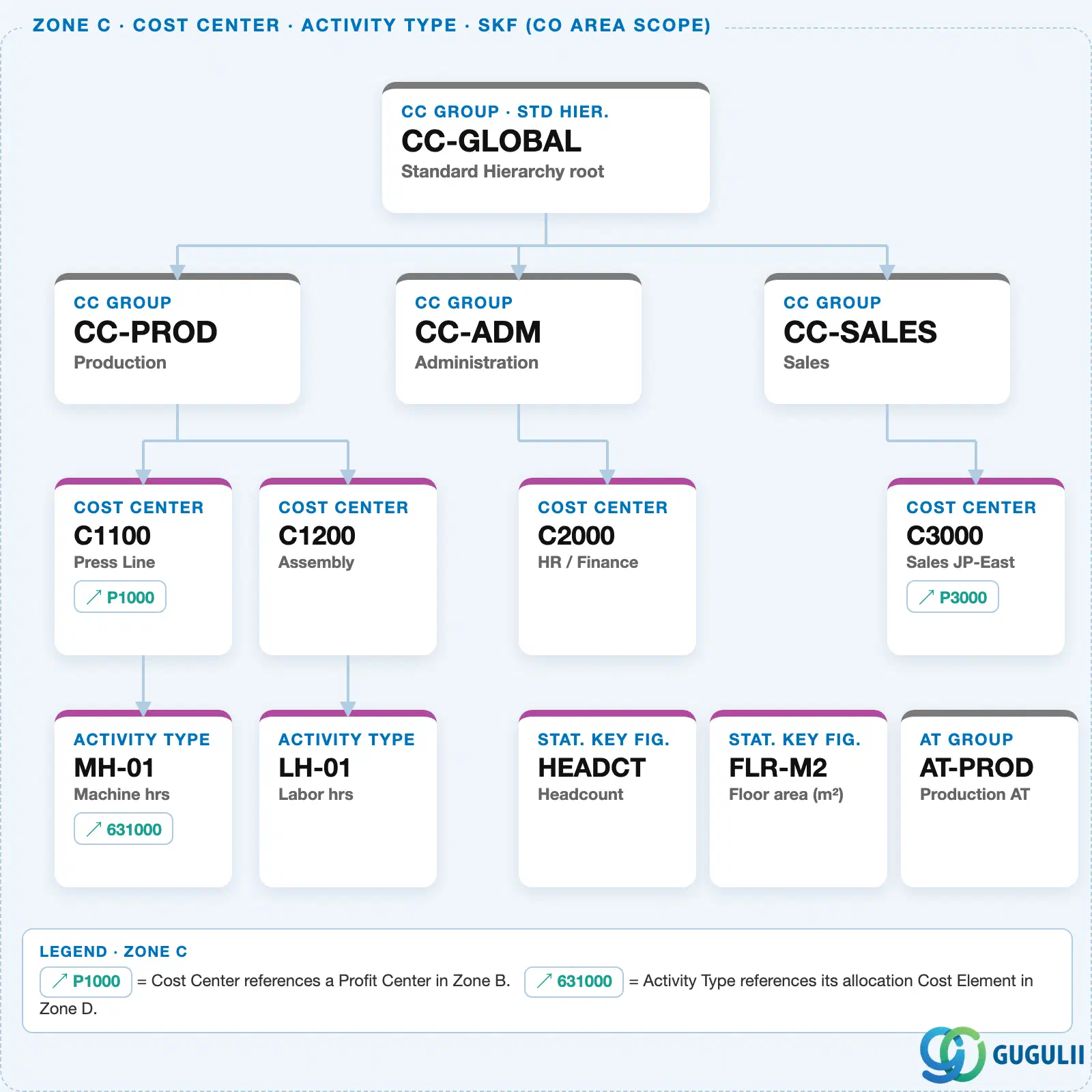
In S/4HANA, every Cost Center must also reference exactly one Profit Center — this is how costs collected on the Cost Center roll up into management P&L reporting.
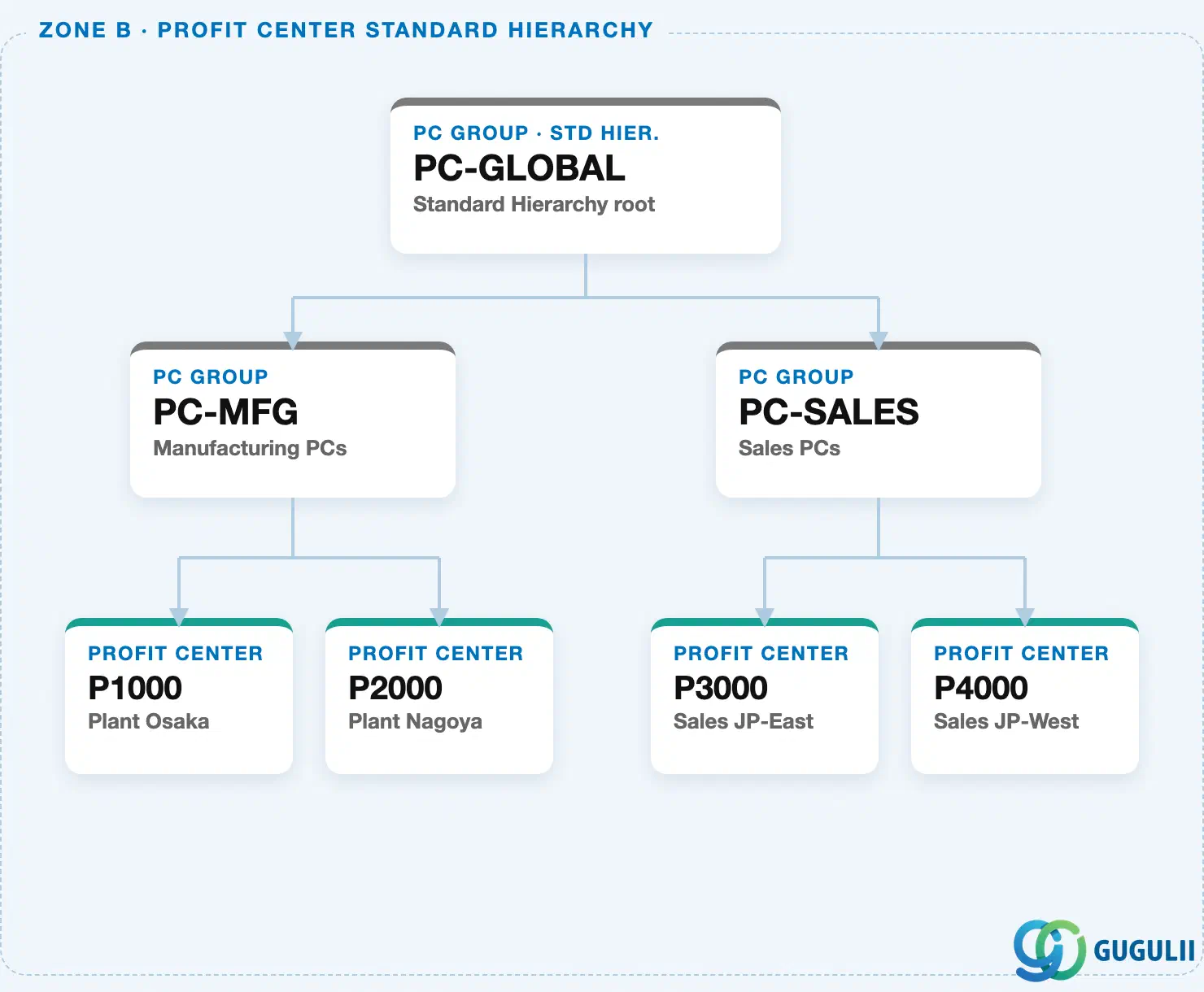
Data hierarchy with a concrete example
Controlling Area 1000
   │
   └── CC Group "CC-SALES"        Sales
          │
          └── Cost Center "C3000"   Sales JP-East
                 ── assigned to ──> Profit Center "P3000"   Sales JP-East
Design principle: Keep the Cost Center’s Profit Center assignment stable once set — changing it mid-year splits cost history across two Profit Centers and complicates year-over-year P&L comparison. Model organizational changes as a new Cost Center where possible, rather than reassigning an existing one’s Profit Center.
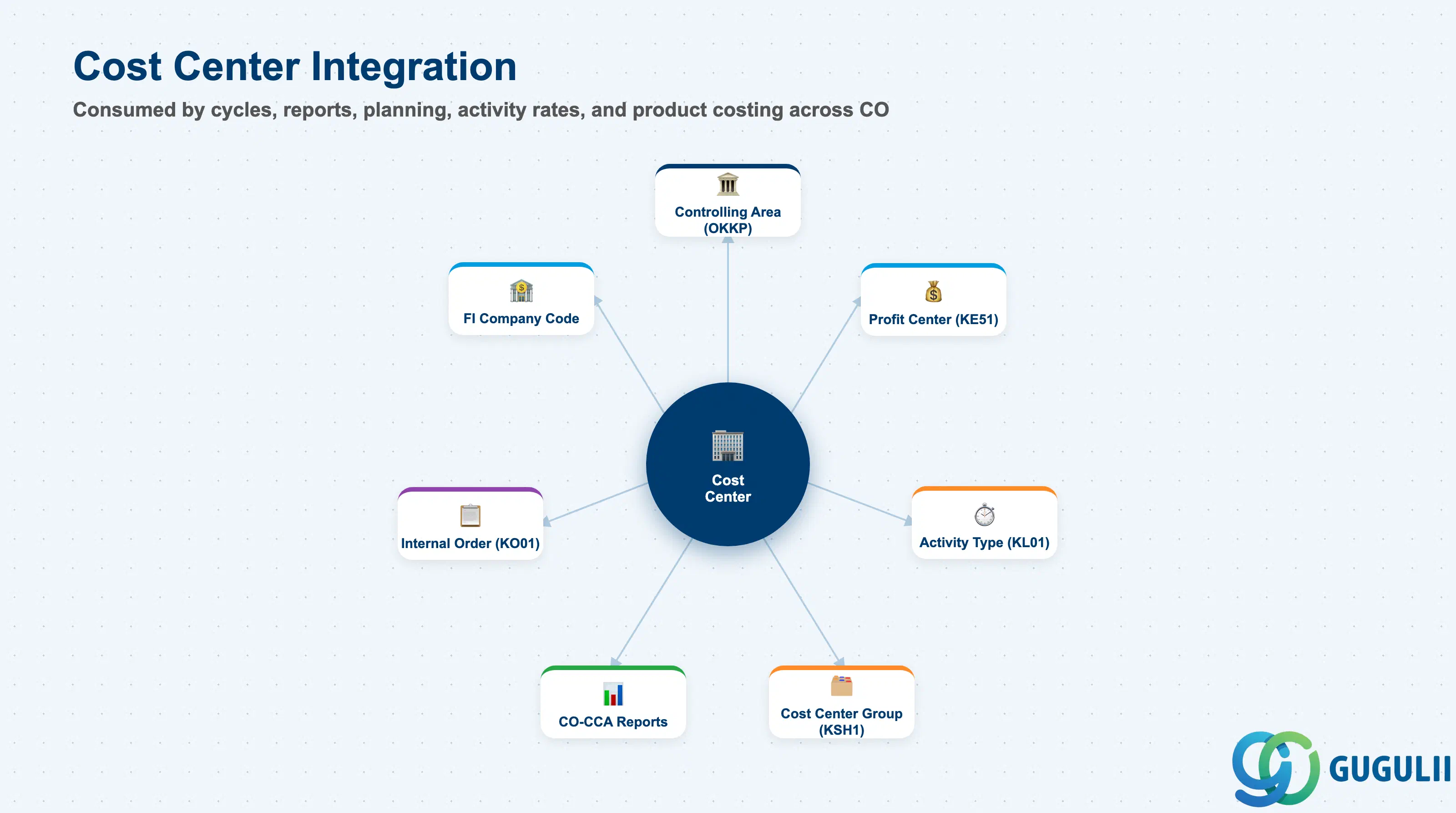
| Object | Relationship | Practical Notes |
|---|---|---|
| Controlling Area (OKKP) | Cost Center is defined within a Controlling Area | The CA is the organizational parent. All CO postings referencing the Cost Center must originate from the same CA. |
| Profit Center (KE51) | Cost Center references a Profit Center — mandatory in S/4HANA | All actual costs posted to the Cost Center flow to the linked Profit Center automatically. This is the mechanism for CO-PCA. Ensure the Profit Center assignment reflects the actual management reporting structure. |
| Activity Type (KL01) | Activity Types are performed by Cost Centers | A Cost Center that provides activities (machine hours, labor hours) to other cost objects must have Activity Types assigned. The Activity Type references a secondary cost element (Category 43) for the activity cost posting. |
| Cost Center Group (KSH1) | Cost Center is a member of the Standard Hierarchy | Mandatory membership in the Standard Hierarchy ensures the Cost Center appears in all CO-CCA reports. Additional alternative group memberships are optional. |
| Internal Order (KO01) | Internal Orders reference a Responsible Cost Center | The Responsible Cost Center on an Internal Order determines where the order’s settlement proceeds flow when the settlement rule points to a cost center. |
| Business Area | Cost Center references a Business Area (optional) | Business Area is an FI organizational concept. If the implementation uses Business Area reporting, populate this field consistently to enable Business Area balance sheets. |
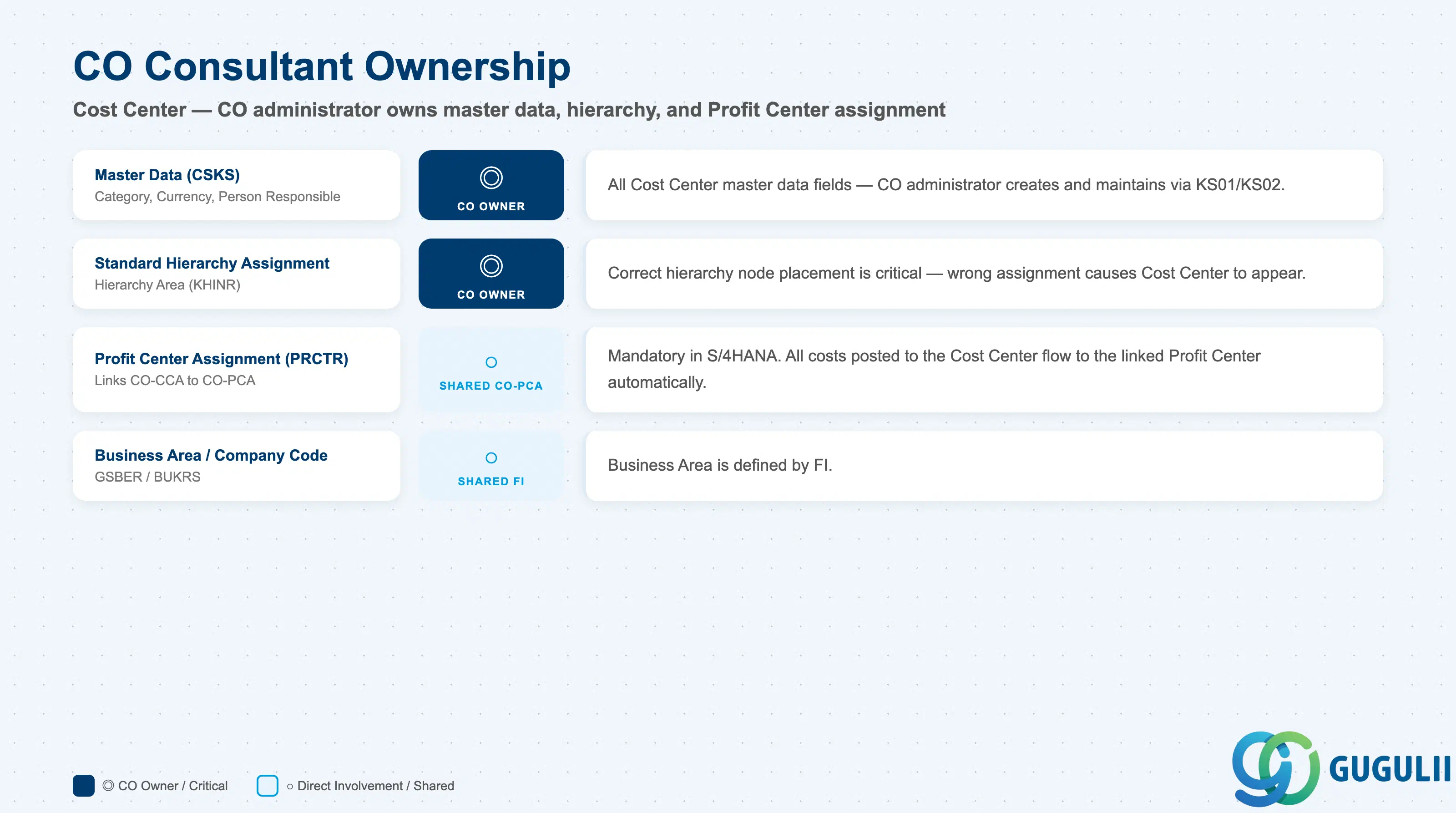
| Data Section | CO Involvement | Notes |
|---|---|---|
| Master Data (CSKS) | ◎ Owner | All Cost Center master data fields — CO administrator creates and maintains |
| Standard Hierarchy Assignment | ◎ Owner | Correct hierarchy node placement — critical for all CO-CCA reports |
| Profit Center Assignment (CSKS.PRCTR) | ○ Shared with CO-PCA | The Profit Center assignment links CO-CCA and CO-PCA — alignment between both teams is required during blueprint |
| Business Area (CSKS.GSBER) | ○ Shared with FI | Business Area is defined by FI — CO consultant assigns the value as directed by the FI design |
| Company Code (CSKS.BUKRS) | ○ Shared with FI | Company Code assignment restricts posting eligibility — confirm with FI during blueprint |
Legend: ◎ = Owner / Critical, ○ = Direct involvement
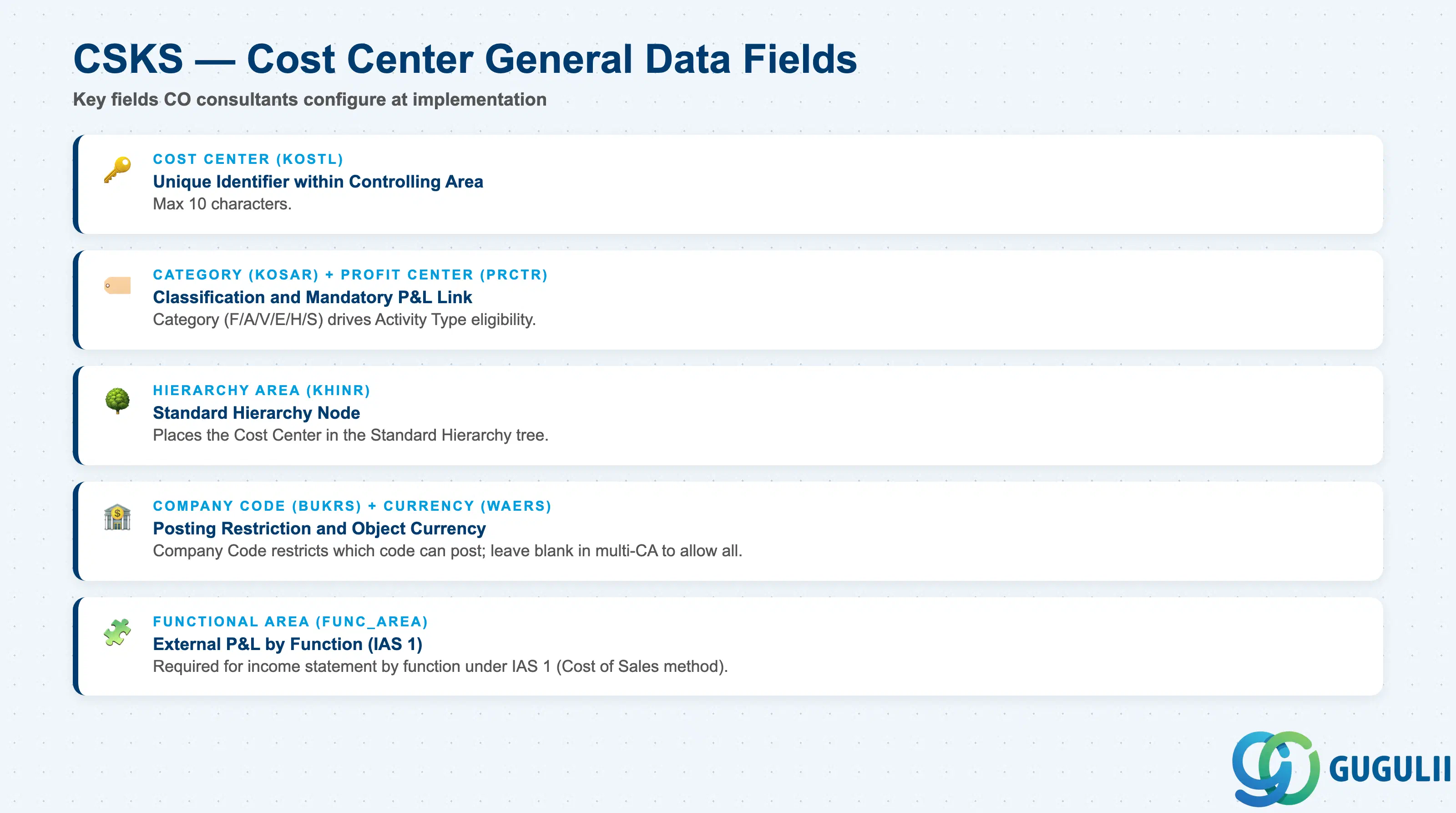
| Field | Description | Practical Usage |
|---|---|---|
| Cost Center (KOSTL) | Unique identifier within the Controlling Area | Maximum 10 characters. Use a structured naming convention (e.g., “1000” = Machining, “2000” = Finance) that reflects the organizational structure and allows range-based grouping in Cost Center Groups. In global projects, include a company or country prefix (e.g., “JP-1000”) to distinguish same-function Cost Centers across company codes. |
| Cost Center Category (KOSAR) | Classification code (F, A, V, E, H, S, etc.) | Determines which Activity Types can be assigned and drives certain system validations. Define during blueprint based on the overhead cost flow design. Changing the Category after go-live requires a new validity period (date-dependent change) or deletion and recreation of the Cost Center — avoid post-go-live changes by confirming categories during UAT. |
| Profit Center (PRCTR) | The Profit Center this Cost Center reports to | Mandatory in S/4HANA. Every cost posted to this Cost Center flows to the assigned Profit Center in CO-PCA. Misassignment here causes all CO-PCA reports for this Cost Center to show costs in the wrong Profit Center. Validate all Profit Center assignments before go-live using a Cost Center vs. Profit Center cross-reference report. |
| Person Responsible (VERAK) | Name of the department manager or responsible person | Appears in Cost Center reports for accountability. Update when organizational responsibility changes. Consider using employee number rather than name to avoid update burden on name changes (though employee number format varies by company). |
| Hierarchy Area (KHINR) | Standard Hierarchy node for this Cost Center | Places the Cost Center in the Standard Hierarchy tree. Must reference an existing hierarchy node (SETNODE in the Standard Hierarchy). Incorrect hierarchy placement causes the Cost Center to appear in the wrong section of CO-CCA reports — one of the most common go-live issues in CO implementations. |
| Currency (WAERS) | Object currency for the Cost Center | Typically matches the Controlling Area currency (which matches the company code local currency for single-CA implementations). Multi-currency implementations may allow Cost Centers with different currencies — confirm the currency design with FI and the Controlling Area configuration. |
| Company Code (BUKRS) | Company Code restriction | Limits which Company Code can post to this Cost Center. In a single-company-code CA, set to that company code. In a multi-company-code CA, leave blank to allow all company codes, or restrict as needed. Restricting prevents cross-company postings but requires careful planning for shared service center Cost Centers that receive postings from multiple company codes. |
| Functional Area (FUNC_AREA) | Classification for external P&L by function | Required for income statement reporting by function under IAS 1 (Cost of Sales method). Drives the “function” dimension in FI external reports. If the implementation requires functional area reporting, set this field consistently on all Cost Centers. |
| ID | Category | Title |
|---|---|---|
| co-001 | Overview | What is SAP CO? |
| ID | Category | Title |
|---|---|---|
| co-a01 | Overview | SAP CO Master Data: Overview, Hierarchy & Relationships |
| co-a02-01 | Master Data | SAP CO Material Master |
| co-a03-01 | Master Data | SAP CO Cost Element |
| co-a03-02 | Master Data | SAP CO Cost Element Group |
| co-a04-01 | Master Data | SAP CO Profit Center Group |
| co-a04-02 | Master Data | SAP CO Profit Center |
| co-a05-01 | Master Data | SAP CO Cost Center Group |
| co-a05-02 | Master Data | SAP CO Cost Center 📍 |
| co-a05-03 | Master Data | SAP CO Activity Type Group |
| co-a05-04 | Master Data | SAP CO Activity Type |
| co-a05-05 | Master Data | SAP CO Statistical Key Figure |
| co-a06-01 | Master Data | SAP CO Internal Order Group |
| co-a06-02 | Master Data | SAP CO Internal Order |
| co-a07-01 | Master Data | SAP CO Cost Component Structure |
| co-a07-02 | Master Data | SAP CO Costing Variant |
| co-a08-01 | Master Data | SAP CO Operating Concern |
| ID | Category | Title |
|---|---|---|
| co-b01 | Overview | SAP CO Transactions: Process Flow, Hierarchy & Relationships |