Title here
Summary here

The Material Master is the foundation of warehouse execution in SAP EWM. Putaway strategy determination, picking strategy, bin assignment, and handling unit configuration all depend on settings in this master. This article covers the Material Master’s structure, views, organizational levels, and the field-level detail EWM consultants must own.
The Material Master is the central repository that stores all information about every material (item/product) a company handles — raw materials, semi-finished goods, finished products, consumables, and everything else that flows through the enterprise.
| Aspect | Details |
|---|---|
| Role | Single Source of Truth for all material attributes across the enterprise |
| Modules using it | MM (Purchasing, Inventory), PP (Production Planning, MRP, BOM), SD (Sales, Shipping, ATP), WM/EWM (Warehouse Mgmt, Putaway/Pick), QM (Quality Inspection, CoA), FI (Inventory Valuation, Auto Posting), CO (Standard Cost, Variance Analysis), PM (Plant Maintenance, MRO Procurement), PS (Project Procurement, Material Allocation), CS (Customer Service, Spare Parts), EHS (Hazardous Material Mgmt, Environmental Compliance), GTS (Trade Compliance, HS Code, Export Control) |
| Transactions | MM01 (Create) / MM02 (Change) / MM03 (Display) |
| S/4HANA change | Material number length extended from 18 to 40 digits (MATNR field) |
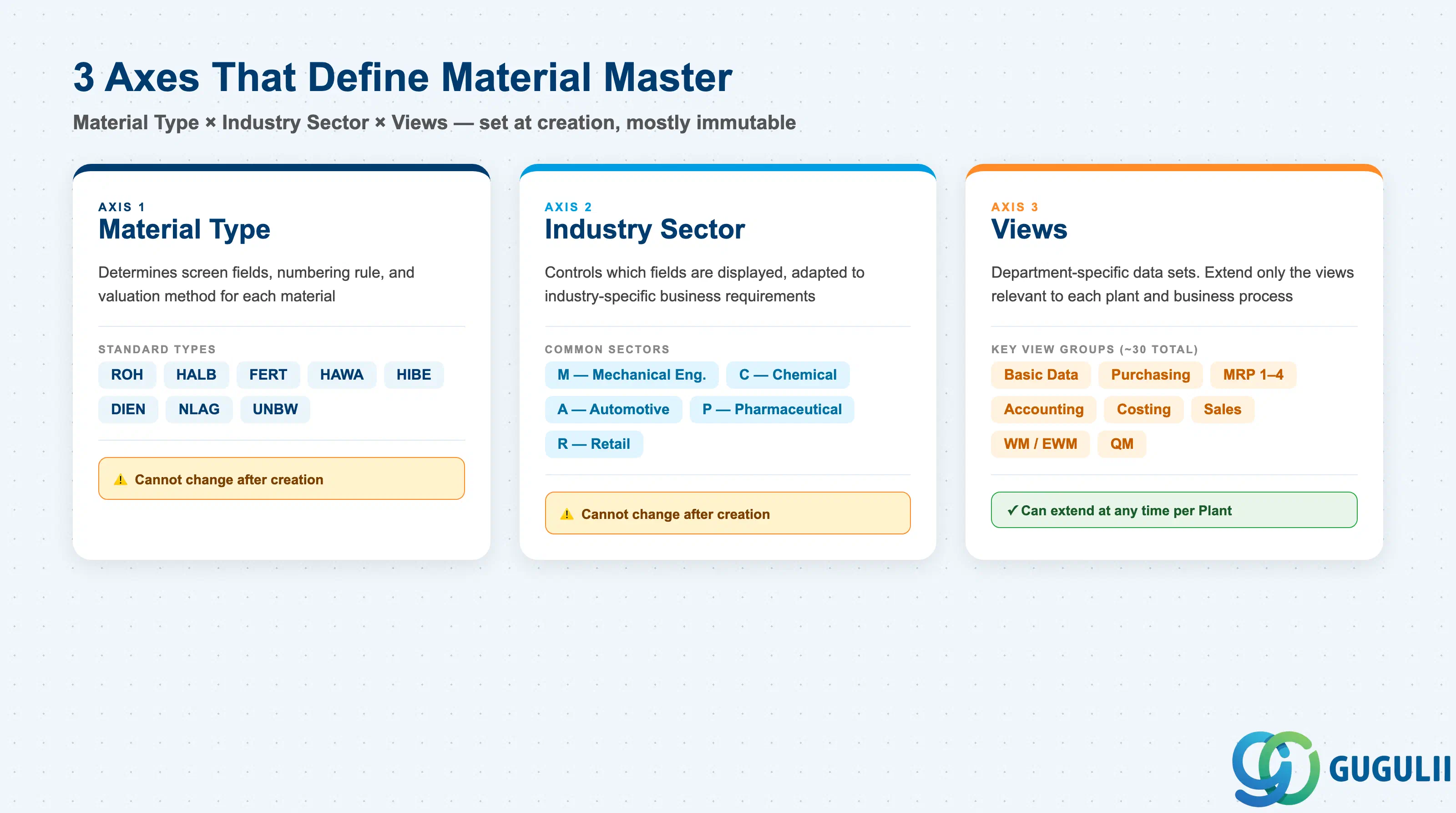
The structure of a Material Master record is determined by the combination of three axes:
| Axis | Description | Examples |
|---|---|---|
| Material Type | Classifies the material. Controls screen layout, number assignment, and valuation method | ROH, FERT, HALB |
| Industry Sector | Industry branch. Controls which fields are displayed based on industry characteristics | M (Mechanical), C (Chemical), A (Automotive) |
| Views | Data sets organized by department. Only relevant views need to be extended | Basic Data, MRP, Accounting |
Important: Once created, Material Type and Industry Sector cannot be changed as a general rule. Lock these in during design.
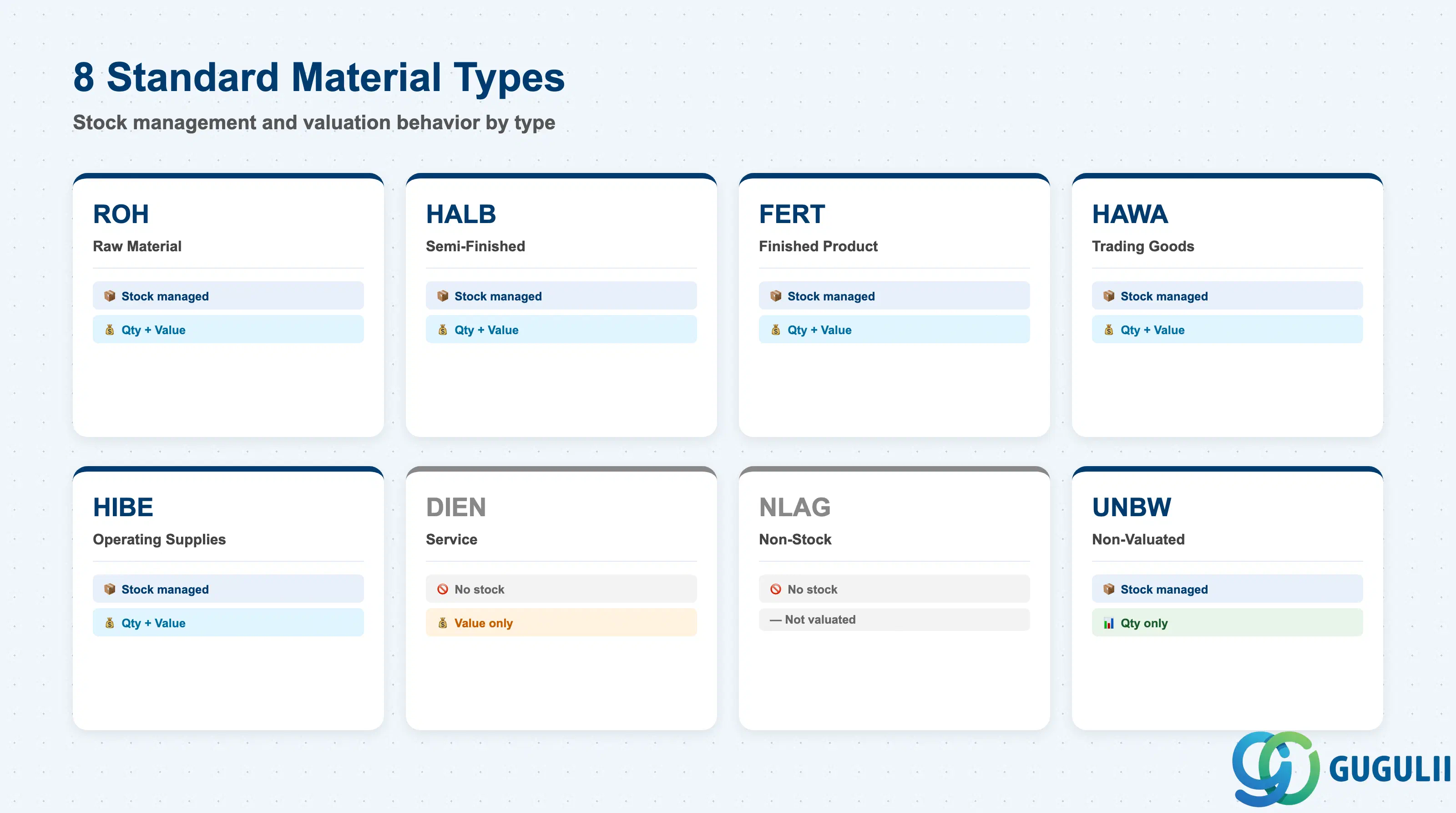
| Code | Name | Use Case | Stock-Managed | Qty / Value |
|---|---|---|---|---|
| ROH | Raw Material | Input materials | Yes | Both |
| HALB | Semi-Finished | Internally produced intermediates | Yes | Both |
| FERT | Finished Product | Internally produced / sold goods | Yes | Both |
| HAWA | Trading Goods | Buy-and-sell merchandise | Yes | Both |
| HIBE | Operating Supplies | Indirect materials, consumables | Yes | Both |
| DIEN | Service | Service items | No | Value only |
| NLAG | Non-Stock | No inventory management | No | — |
| UNBW | Non-Valuated | Quantity tracking only | Yes | Qty only |
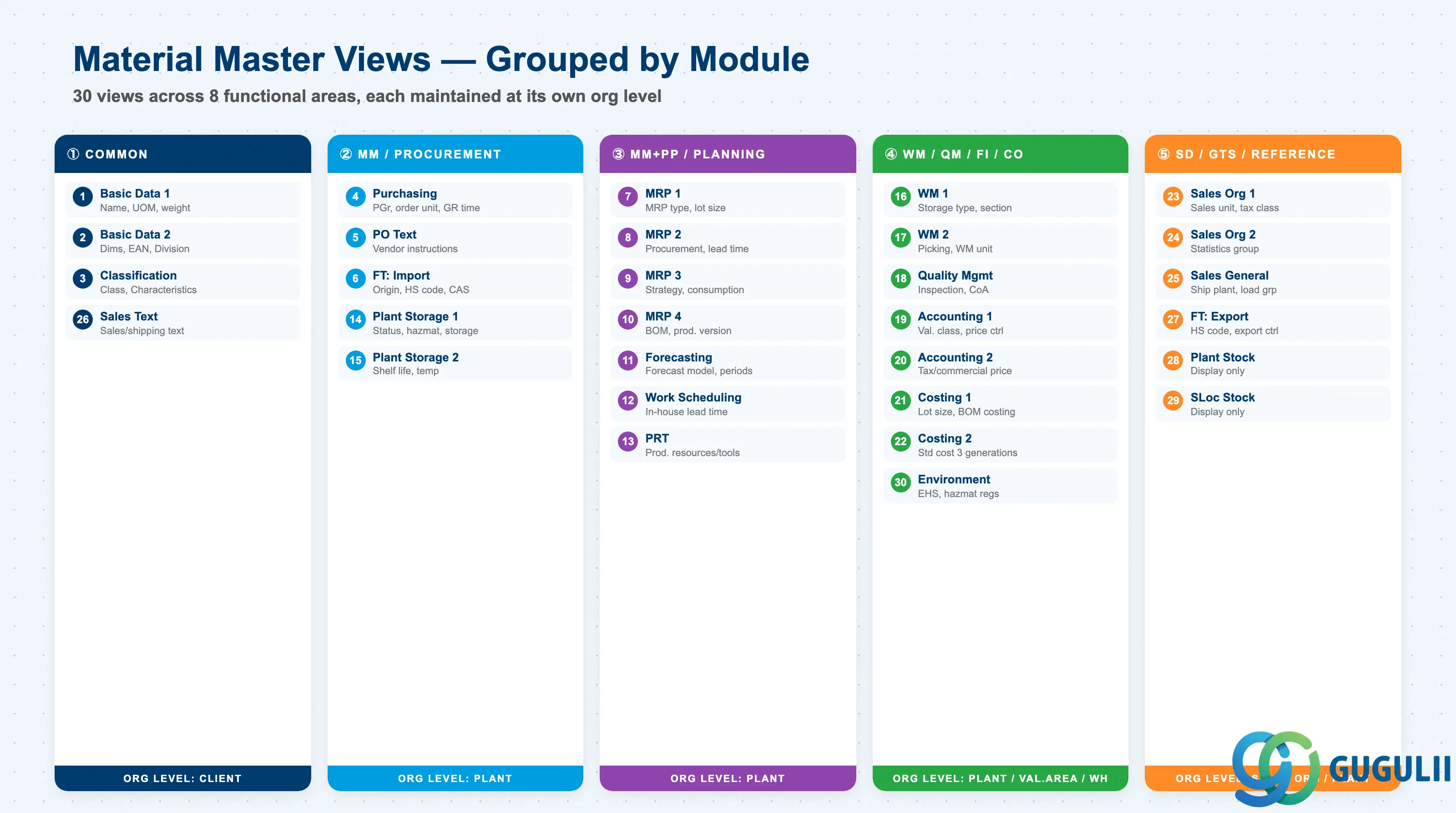
The Material Master is divided into department-specific Views. Only the views required by each department need to be extended. Approximately 30 standard views exist; the views to extend are selected based on Material Type and business requirements.
| # | View | Owning Dept | Key Fields | Org Level |
|---|---|---|---|---|
| 1 | Basic Data 1 | Cross-module | Material description, Base UoM, Material group, Weight/Volume | Client |
| 2 | Basic Data 2 | Cross-module | Dimensions, EAN/UPC, Old material number, Division | Client |
| 3 | Classification | Cross-module | Class assignment, Characteristic values | Client |
| 4 | Purchasing | Purchasing (MM) | Purchasing group, Order unit, GR processing time, Source list required flag | Plant |
| 5 | Purchase Order Text | Purchasing (MM) | PO text, Text ID, Language | Plant |
| 6 | Foreign Trade: Import | Purchasing (MM) / GTS | Country of origin, HS code (import), CAS number, Import license | Plant |
| 7 | MRP 1 | Purchasing / PP (MM/PP) | MRP type, MRP controller, Lot size, Reorder point | Plant |
| 8 | MRP 2 | Purchasing / PP (MM/PP) | Procurement type, Special procurement, Planned delivery time, Safety stock | Plant |
| 9 | MRP 3 | Purchasing / PP (MM/PP) | Strategy group, Consumption mode, Availability check | Plant |
| 10 | MRP 4 | PP-oriented | BOM selection, Individual/collective requirements, Discontinuation flag | Plant |
| 11 | Forecasting | Purchasing / PP (MM/PP) | Forecast model, Historical/forecast periods, Smoothing factors | Plant |
| 12 | Work Scheduling | Production (PP) | Production unit, Receiving storage location, In-house production time | Plant |
| 13 | Production Resources/Tools | Production (PP) | Production resource/tool data | Plant |
| 14 | General Plant Data / Storage 1 | Inventory (MM) / EHS | Plant-specific material status, Storage conditions, Hazardous material number, EHS hazard data | Plant |
| 15 | General Plant Data / Storage 2 | Inventory (MM) | Shelf life management, Minimum remaining shelf life, Temperature conditions | Plant |
| 16 | Warehouse Management 1 | Warehouse (WM/EWM) | Warehouse number, Storage type, Storage section | Warehouse |
| 17 | Warehouse Management 2 | Warehouse (WM/EWM) | Picking type, WM unit of measure | Warehouse |
| 18 | Quality Management | Quality (QM) | QM procurement key, Inspection type, Certificate type | Plant |
| 19 | Accounting 1 | Finance (FI) | Valuation class, Price control (S/V), Standard price / Moving average price | Valuation Area |
| 20 | Accounting 2 | Finance (FI) | Tax-based valuation, Commercial valuation, Devaluation flag | Valuation Area |
| 21 | Costing 1 | Controlling (CO) | Costing lot size, With/without quantity structure, Variance key | Plant |
| 22 | Costing 2 | Controlling (CO) | Standard cost (Future/Current/Previous), Costing status | Plant |
| 23 | Sales: Sales Org 1 | Sales (SD) | Sales unit, Tax classification, Item category group | Sales Org / DCh |
| 24 | Sales: Sales Org 2 | Sales (SD) | Material statistics group, Material group 1–5 | Sales Org / DCh |
| 25 | Sales: General/Plant | Sales (SD) | Delivering plant, Transportation group, Loading group, Profit center | Plant |
| 26 | Sales Text | Sales (SD) | Sales/shipping texts | Client |
| 27 | Foreign Trade: Export | Trade (SD/GTS) | HS code (export), Export statistics group, Preference status, Export control | Plant |
| 28 | Plant Stock | Reference (display only) | Plant stock quantity / value (read-only) | Plant |
| 29 | Storage Location Stock | Reference (display only) | Storage location-level stock (read-only) | Storage Loc |
| 30 | Environment (EHS) | EHS | Hazardous substance regulations, Waste code | Plant |
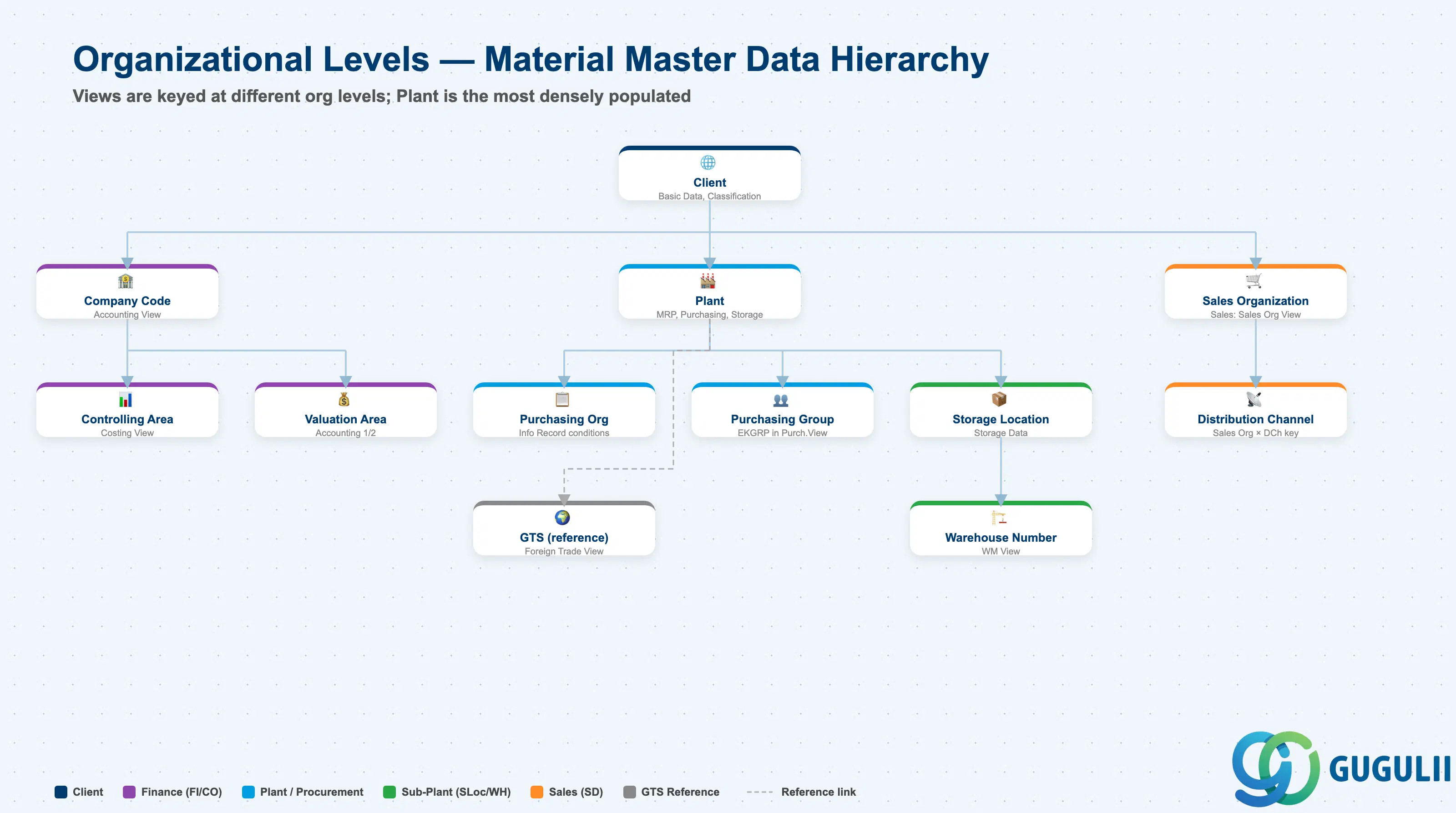
Each view stores its data at a different organizational level. This is the core design challenge of the Material Master.
Client (300)
   │
   ├── Basic Data, Classification ← Client-level (one record for entire enterprise)
   │
   ├── Plant (1000, 2000, ...)
   │      │
   │      ├── MRP, Purchasing, Work Scheduling ← Plant-level
   │      │
   │      ├── Storage Location (0001, 0002, ...)
   │      │      └── Storage Data ← Storage Location-level
   │      │
   │      └── Warehouse Number (WH1, ...)
   │             └── WM Data ← Warehouse-level
   │
   ├── Valuation Area = Plant ← Accounting is typically at Plant level
   │      └── Valuation class, Standard cost
   │
   └── Sales Org × Distribution Channel
└── Sales Data ← Sales Org-level| Org Level | Primary Use | Representative Fields | Notes |
|---|---|---|---|
| Client | Enterprise-wide common attributes | Material description, Base UoM, Classification | One record shared across entire enterprise |
| Company Code | Financial accounting unit | Accounting View (valuation class, price control) | When Valuation Area = Company Code |
| Controlling Area | Management accounting unit | Costing View (cost estimate, variance analysis) | May span multiple Company Codes |
| Purchasing Organization | Purchasing org unit | Purchasing Info Record (price, conditions) | Material Master itself is at Plant level; purchase conditions are at Purch. Org level |
| Plant | Factory / site unit | MRP, Purchasing, Work Scheduling, General Plant Data | The primary level with the most views |
| Purchasing Group | Buyer group | Purchasing View: Purchasing Group (EKGRP) | Buyer group within a Plant; starting point for PO release strategy routing |
| Valuation Area | Inventory valuation unit | Accounting 1 (valuation class, standard price) | Typically = Plant; Company Code-level valuation is also configurable |
| Storage Location | Storage area unit | General Plant Data / Storage (storage location stock) | Warehouse / bin area within a Plant |
| Warehouse Number | Warehouse management unit | WM View (storage type, picking strategy) | Used in Plants with WM/EWM |
| Sales Organization | Sales org unit | Sales: Sales Org View (sales unit, tax classification) | Keyed together with Distribution Channel |
| Distribution Channel | Distribution channel unit | Sales: Sales Org View | Extended in combination with Sales Org |
| (GTS reference) | Trade compliance management | Foreign Trade View (HS code, country of origin, export control) | No GTS-specific org level key in Material Master; GTS references the Foreign Trade View data |
| # | View | Primary Module | EWM Involvement |
|---|---|---|---|
| 1 | Basic Data 1 | Cross-module | ◎ (weight, volume, dimensions drive bin determination) |
| 2 | Basic Data 2 | Cross-module | ◎ (dimensions, EAN for barcode scanning) |
| 3 | Classification | Cross-module | ○ |
| 4 | Purchasing | MM | △ |
| 5 | Purchase Order Text | MM | × |
| 6 | Foreign Trade: Import | MM | × |
| 7 | MRP 1 | MM / PP | × |
| 8 | MRP 2 | MM / PP | × |
| 9 | MRP 3 | MM / PP | × |
| 10 | MRP 4 | PP | × |
| 11 | Forecasting | MM / PP | × |
| 12 | Work Scheduling | PP | × |
| 13 | Production Resources/Tools | PP | × |
| 14 | General Plant Data / Storage 1 | MM / EHS | ◎ (storage conditions feed putaway strategy) |
| 15 | General Plant Data / Storage 2 | MM | ◎ (shelf life management) |
| 16 | Warehouse Management 1 | WM/EWM | ◎ (Owner) |
| 17 | Warehouse Management 2 | WM/EWM | ◎ (Owner) |
| 18 | Quality Management | QM | ○ (inspection lot blocks putaway) |
| 19 | Accounting 1 | FI | × |
| 20 | Accounting 2 | FI | × |
| 21 | Costing 1 | CO | × |
| 22 | Costing 2 | CO | × |
| 23 | Sales: Sales Org 1 | SD | × |
| 24 | Sales: Sales Org 2 | SD | × |
| 25 | Sales: General/Plant | SD | △ (transportation group affects outbound) |
| 26 | Sales Text | SD | × |
| 27 | Foreign Trade: Export | SD / GTS | × |
| 28 | Plant Stock | Reference | — |
| 29 | Storage Location Stock | Reference | — |
| 30 | Environment (EHS) | EHS | ○ (hazmat storage zone determination) |
Legend: ◎ = Owner / Critical, ○ = Direct involvement, △ = Reference / Integration, × = Other module owns, — = Display-only view
Dimensions and weight in Basic Data 1 directly drive bin determination and handling unit configuration in EWM.
| Field | Description | Practical Usage |
|---|---|---|
| Gross Weight / Net Weight | Material weight | Used in HU (Handling Unit) weight capacity checks. If blank, EWM cannot validate pallet weight limits — causing overload scenarios in automated warehouses. Mandatory for all warehouse-managed materials. |
| Volume / Volume Unit | Material volume | Used in storage bin capacity calculation (volume strategy). If blank in high-bay warehouse environments, the system cannot determine bin capacity usage — causing incorrect bin assignments. |
| Size / Dimensions (Length × Width × Height) | Physical dimensions | Required for dimension-based putaway strategies. For ASRS (Automated Storage and Retrieval Systems), dimension data must be accurate to millimeter level — incorrect data causes physical jams. |
| Base Unit of Measure | Stock management unit | EWM picks and puts away in this unit unless an Alternative Unit is defined. For materials with pallet-level WM unit (e.g., PAL), define the conversion factor in Additional Units of Measure. |
| EAN / UPC | Barcode | Used in RF (radio frequency) and voice picking for barcode scan confirmation. Multiple EANs (e.g., unit EAN + case EAN + pallet EAN) are registered as Additional EANs and linked to alternative units. |
| Field | Description | Practical Usage |
|---|---|---|
| Additional EAN / UPC | Additional barcodes | Register case-level and pallet-level EANs here, linked to their respective alternative units. Enables multi-level barcode scanning in inbound (receiving) and outbound (shipping confirmation) processes. |
Storage conditions in this view are inputs to EWM’s putaway strategy determination.
| Field | Description | Practical Usage |
|---|---|---|
| Storage Conditions | Storage environment key | EWM putaway strategy reads this to assign materials to the correct storage type (e.g., freezer, refrigerated, ambient, hazmat zone). A missing or incorrect value causes the system to default to the standard zone — potentially storing temperature-sensitive goods in the wrong area. |
| Temperature Conditions | Temperature zone | For cold chain materials, this determines the target temperature-controlled zone. Must align with the EWM storage type definition in Customizing (/SCWM/SPRO). |
| Hazardous Material Number | Hazmat reference | EWM uses this to route materials to hazmat-approved storage areas and to enforce segregation rules (e.g., flammables not near oxidizers). Required for materials subject to ADR/IATA transport regulations. |
| Shelf Life Expiration Date Required | SLED management flag | When checked, EWM enforces SLED (Shelf Life Expiration Date) entry at GR. Enables FEFO (First Expired, First Out) picking strategy. Without this flag, FEFO is not possible even if the strategy is configured. |
| Minimum Remaining Shelf Life | SLED acceptance threshold | EWM checks this at GR and blocks putaway if the remaining shelf life is below the minimum. Prevents short-dated stock from entering the warehouse. |
| Total Shelf Life | Maximum shelf life (days) | Used to calculate the expiration date from the production date when no explicit SLED is provided at GR. |
| Field | Description | Practical Usage |
|---|---|---|
| Period Indicator for SLED | SLED unit (D/M/Y) | Defines whether the shelf life is measured in days, months, or years. Must be consistent with the EWM FEFO strategy configuration. |
In classic WM, these views are maintained directly in the Material Master. In EWM (Embedded or Decentralized), the equivalent settings are in the Warehouse Product (/SCWM/MAT1), but WM views still serve as the transfer source for initial data synchronization.
| Field | Description | Practical Usage |
|---|---|---|
| Warehouse Number | Warehouse number | 3-digit code identifying the EWM warehouse. In Embedded EWM, the Warehouse Number is defined in S/4HANA and the Material Master WM view is extended per warehouse. |
| Storage Type Indicator | Putaway storage type key | Input to the putaway strategy search sequence. Determines which storage type is checked first for available bin. |
| Storage Section Indicator | ABC velocity zone | A = fast-mover (near output gate), B = medium, C = slow-mover (deep storage). Drives the storage section determination step in the putaway strategy. |
| Storage Bin | Fixed bin assignment | Used in fixed bin storage strategies. If maintained, EWM always directs this material to this specific bin, regardless of capacity. |
| Picking Storage Type | Source storage type for picking | The storage type EWM checks first when generating a pick warehouse task. Typically the forward pick area or flow rack. |
| WM Unit of Measure | WM management unit | If different from Base UoM (e.g., stock in EA, WM in PAL), define conversion here. EWM uses this unit for bin capacity and HU management. |
| Field | Description | Practical Usage |
|---|---|---|
| Transportation Group | Transport mode group | Input to shipping point determination in outbound logistics. EWM uses this to route materials to the correct outbound dock or staging area. |
| Loading Group | Loading equipment group | Combined with Transportation Group and Shipping Condition to determine the Shipping Point (outbound door). In EWM, affects the wave and outbound delivery order grouping strategy. |
For EWM deployments, the S/4HANA Material Master WM views are supplemented by the Warehouse Product (/SCWM/MAT1). This is the EWM-specific extension and must be maintained after the S/4HANA Material Master is created.
| Field | Description | Practical Usage |
|---|---|---|
| Maximum Bin Quantity | Maximum qty per bin | Limits the quantity that can be stored in a single bin. Required for high-bay ASRS where overloading a compartment is a physical safety concern. |
| Minimum Bin Quantity | Minimum qty per bin | Triggers replenishment from reserve storage to forward pick area when bin quantity drops below this level. Key parameter for two-zone warehouse designs (bulk + pick face). |
| Putaway Control Indicator | Putaway behavior override | Overrides the standard putaway strategy for this material. Used for special-handling materials (e.g., always put to fixed bin, never consolidate with existing stock). |
| Stock Removal Control Indicator | Pick behavior override | Overrides the standard removal strategy. Example: always pick FEFO regardless of the zone-level default strategy. |
| Handling Unit Type | Default HU type | Specifies the standard handling unit (pallet, carton, tote) for this material. Used in packing proposals and HU management during inbound. |
| Stacking Factor | Stacking height limit | Maximum number of units that can be stacked vertically. Prevents bin overflow in floor storage and ensures physical stability calculations in ASRS. |
| ID | Category | Title |
|---|---|---|
| ewm-001 | Overview | What is SAP EWM? |
| ID | Category | Title |
|---|---|---|
| ewm-b01 | Overview | SAP EWM Transactions: Process Flow, Hierarchy & Relationships |