Title here
Summary here

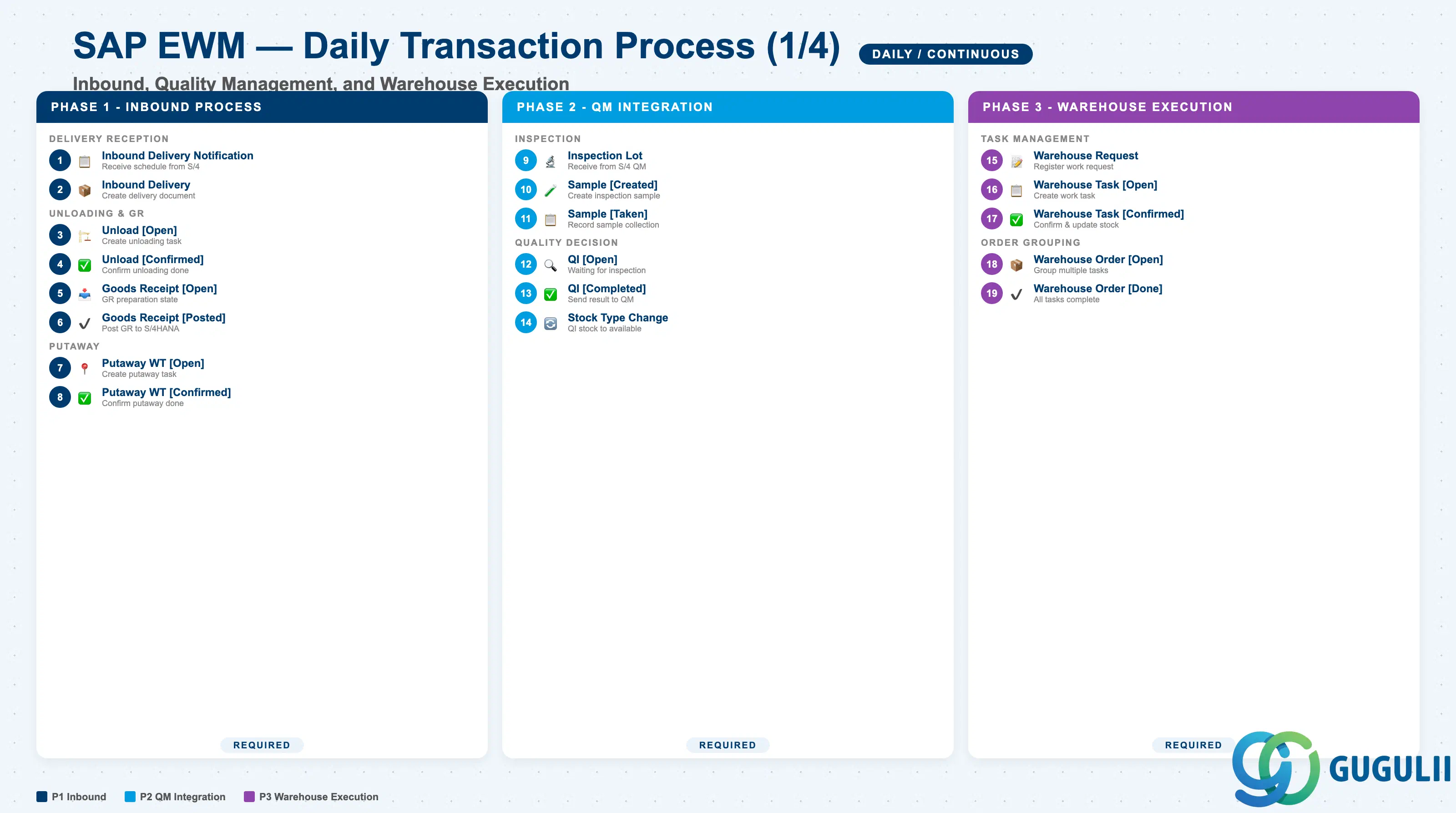
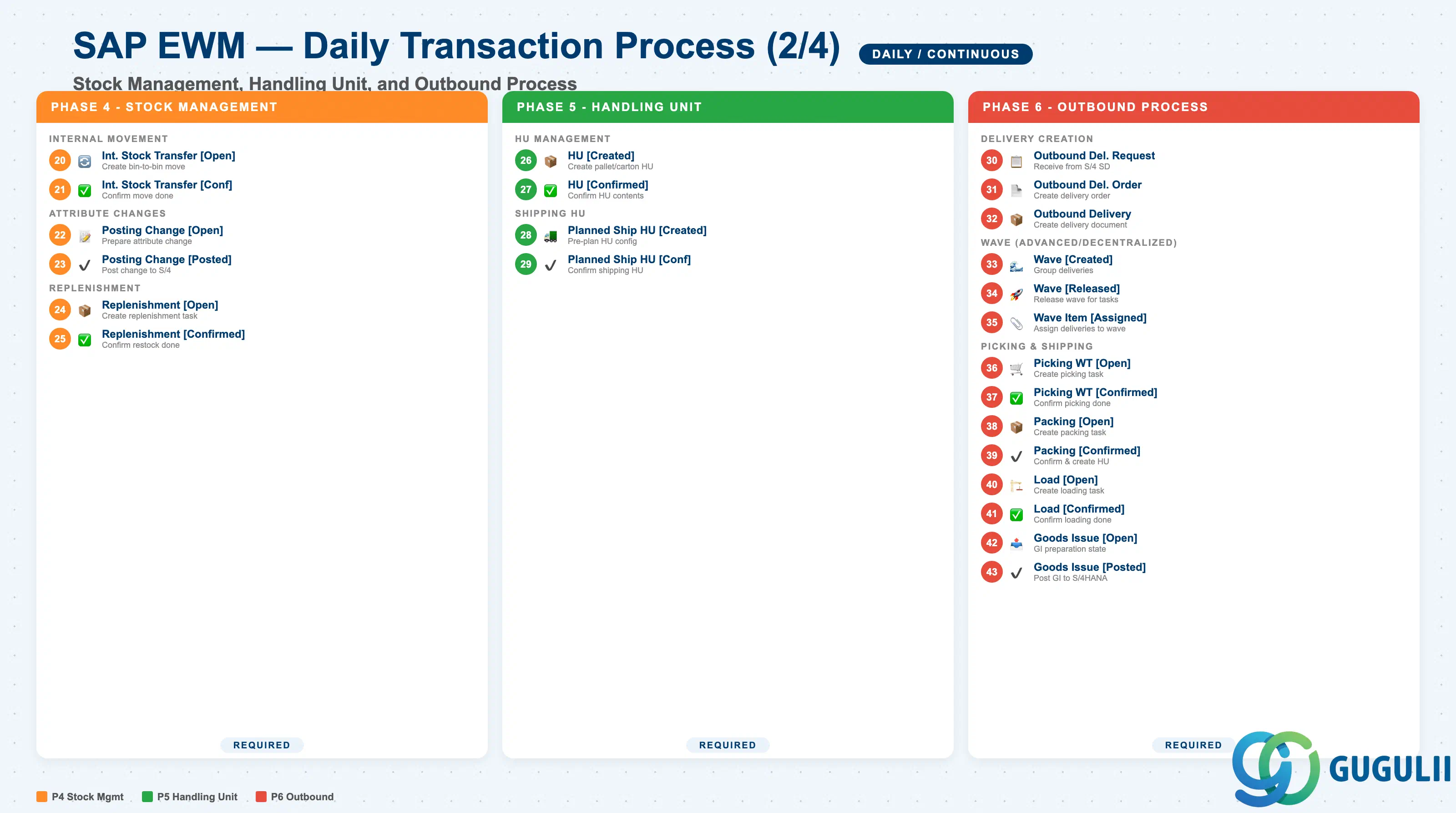
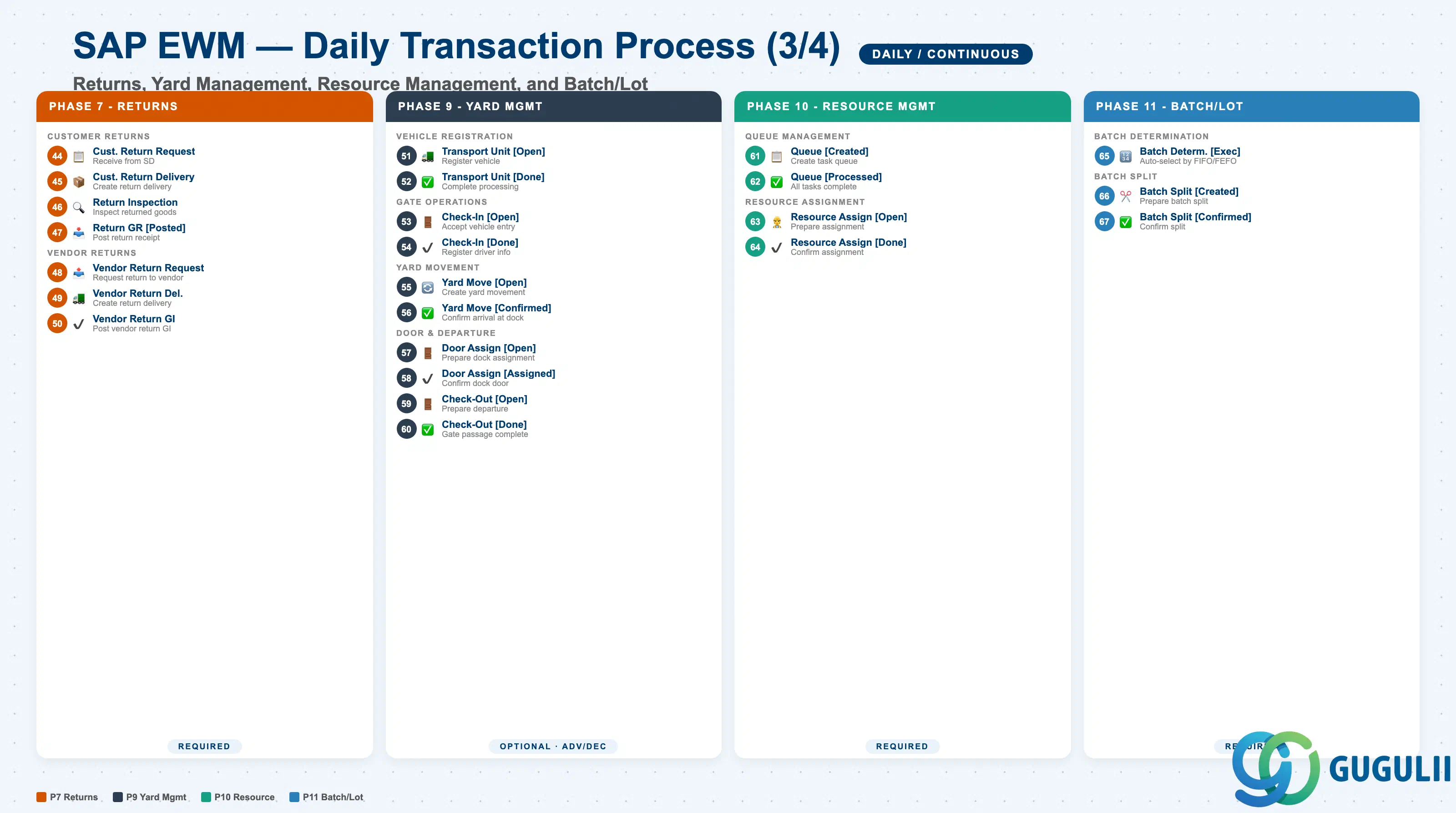
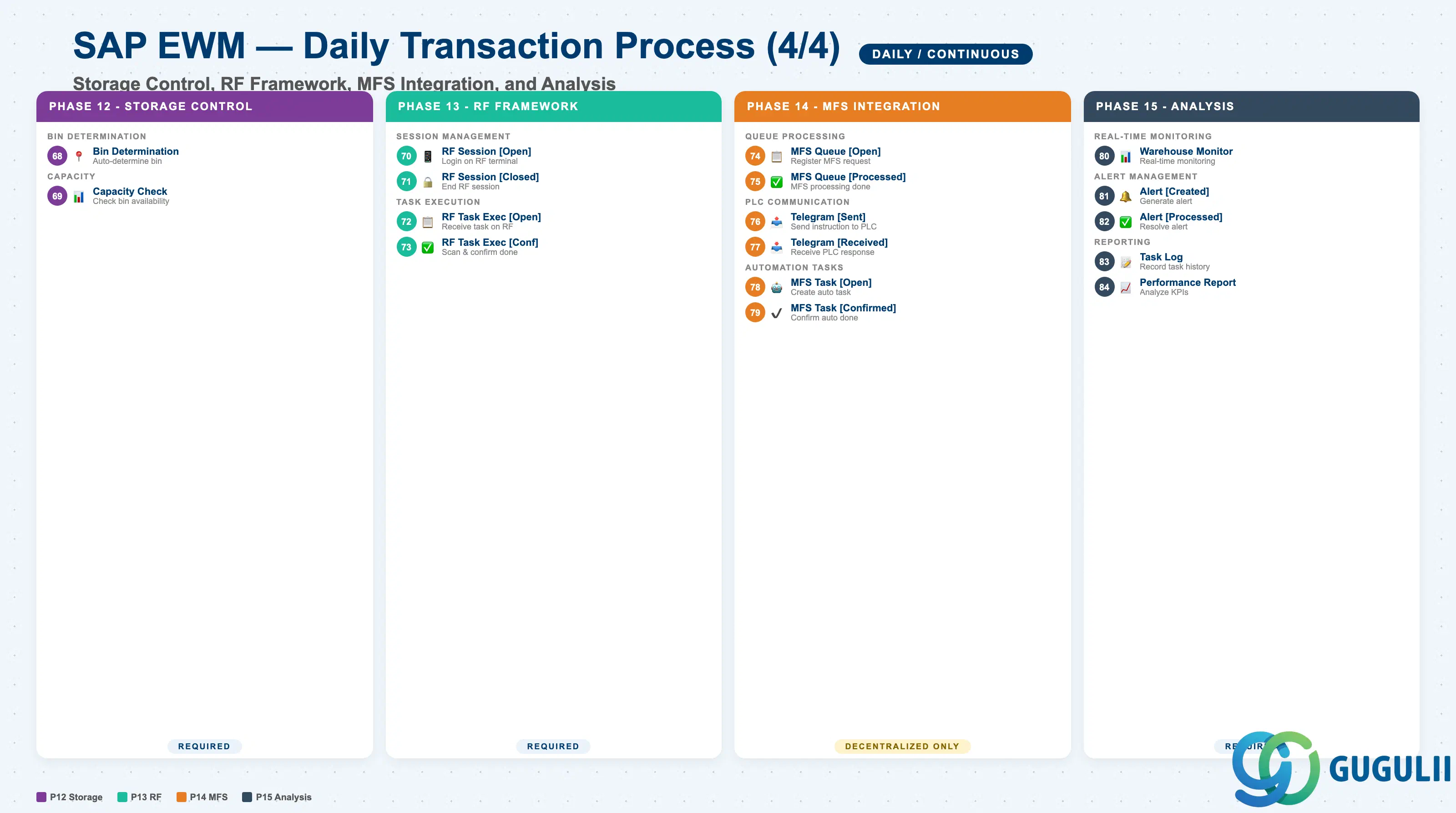
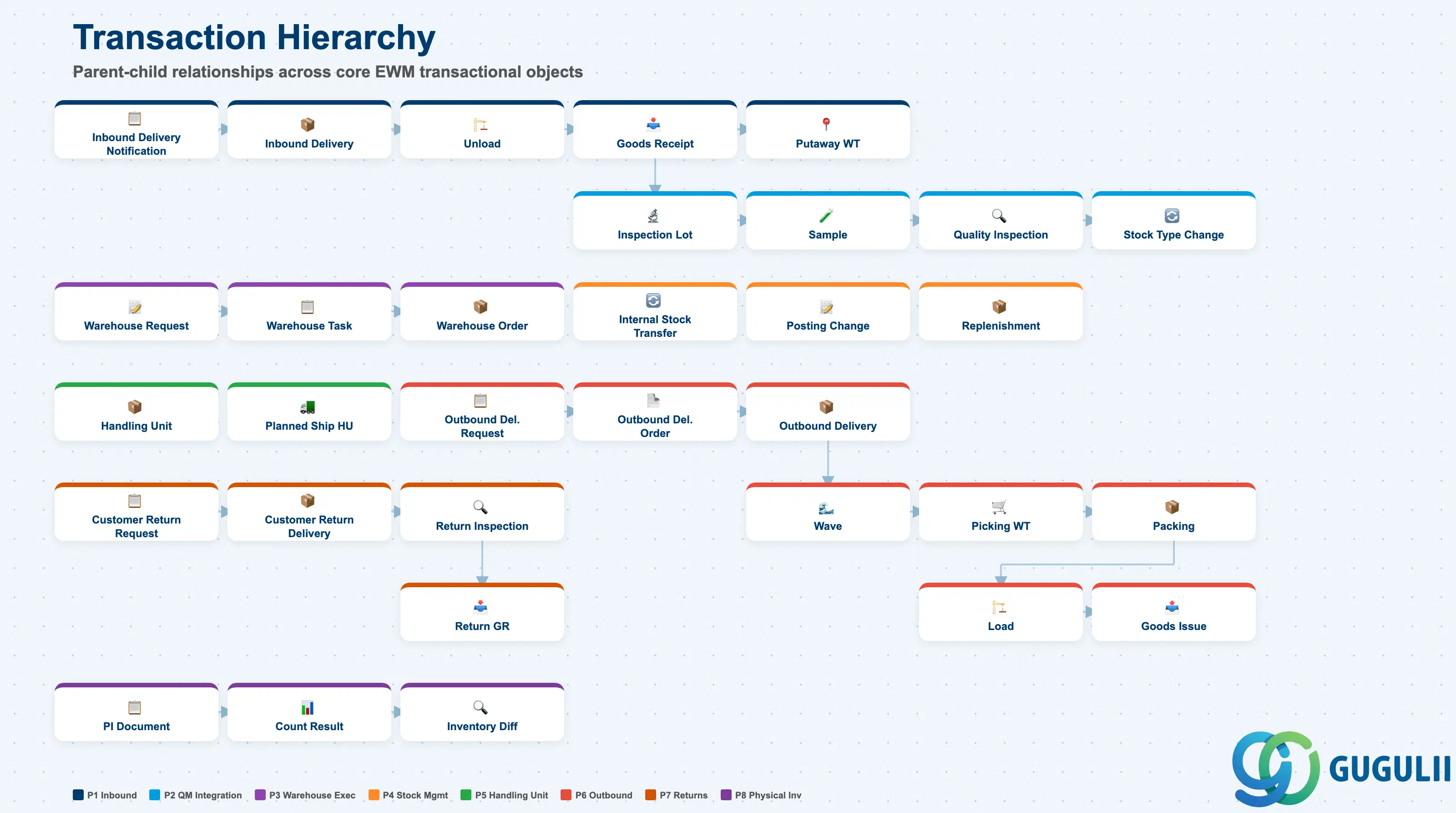
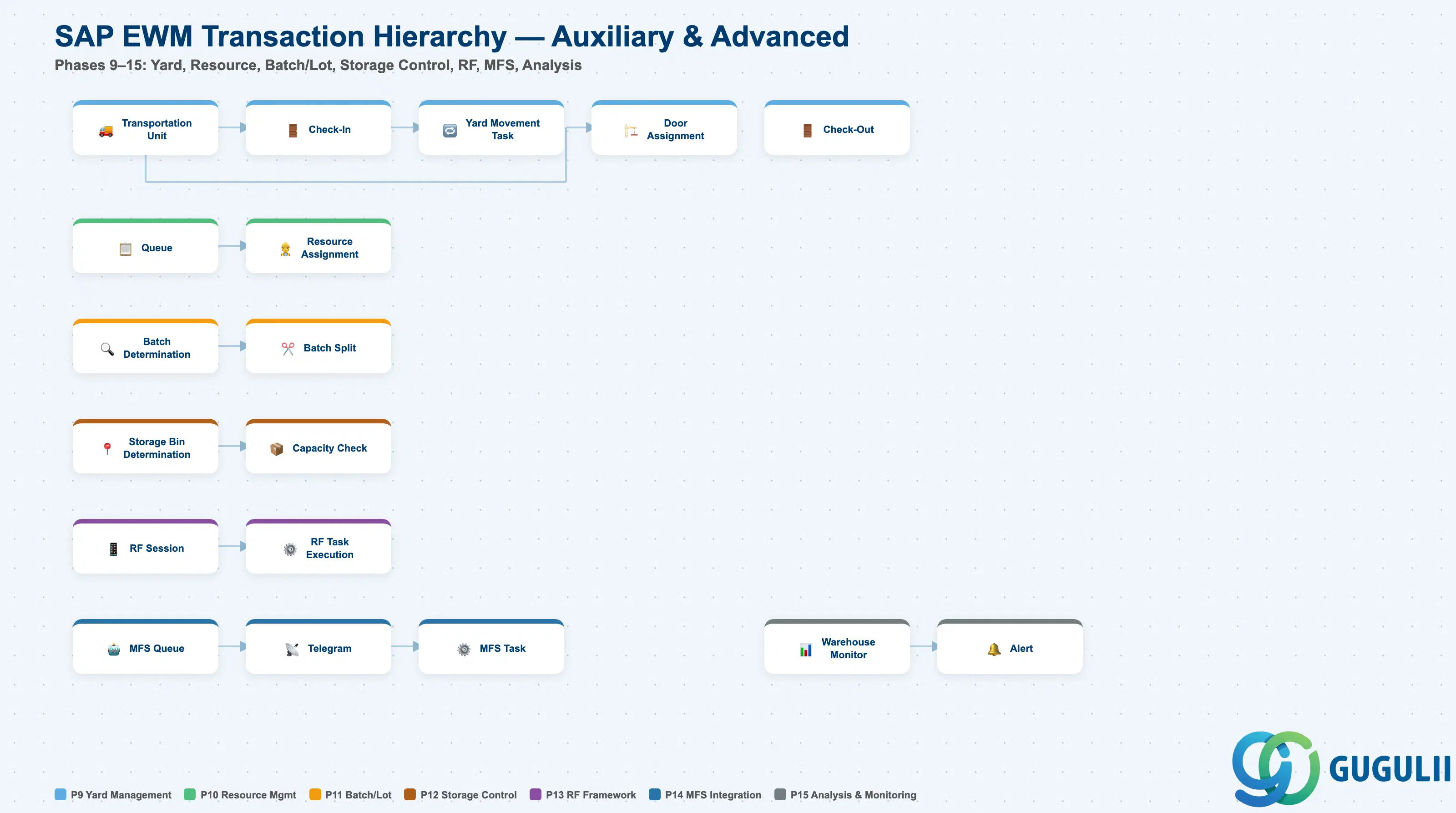
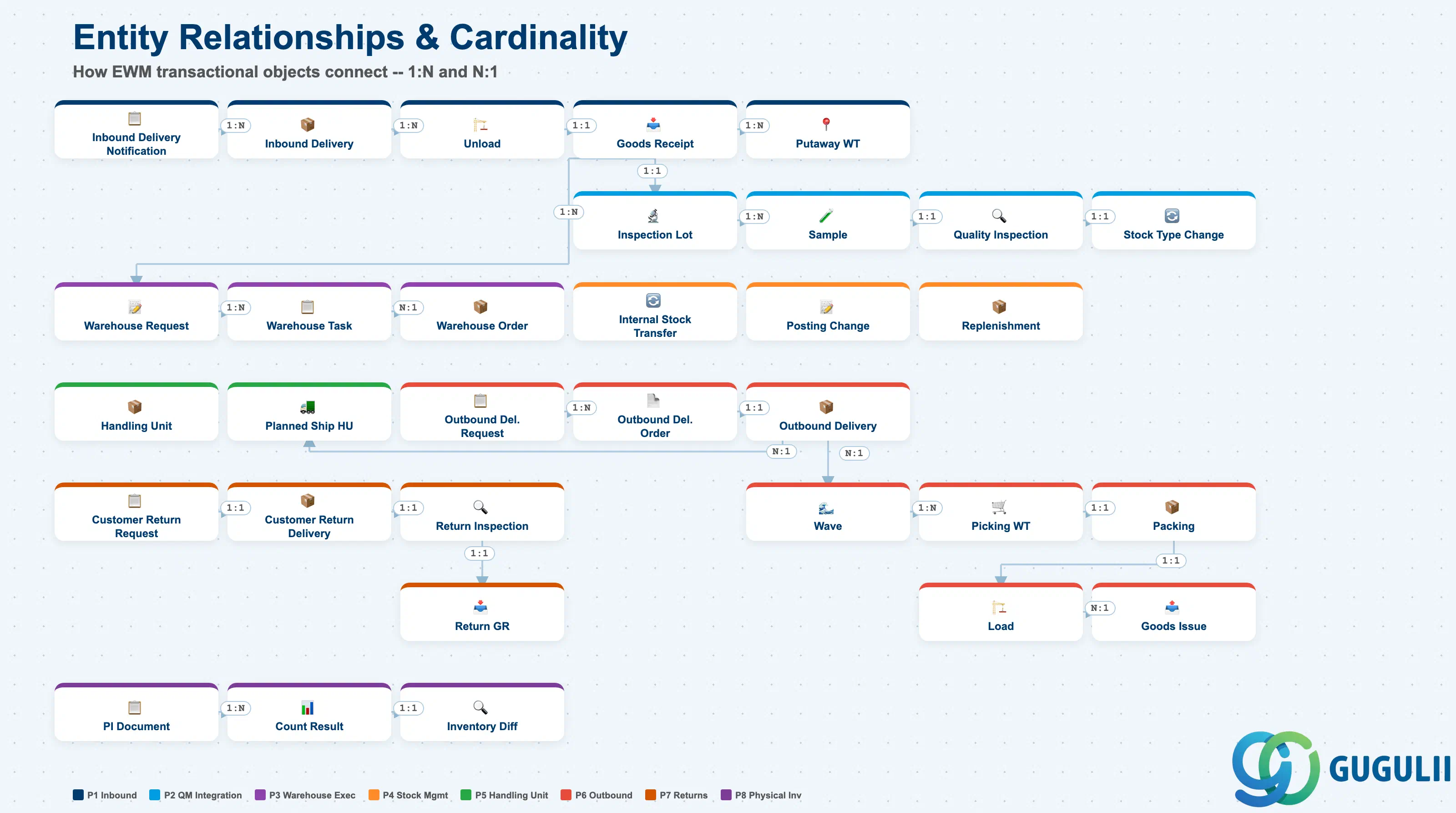
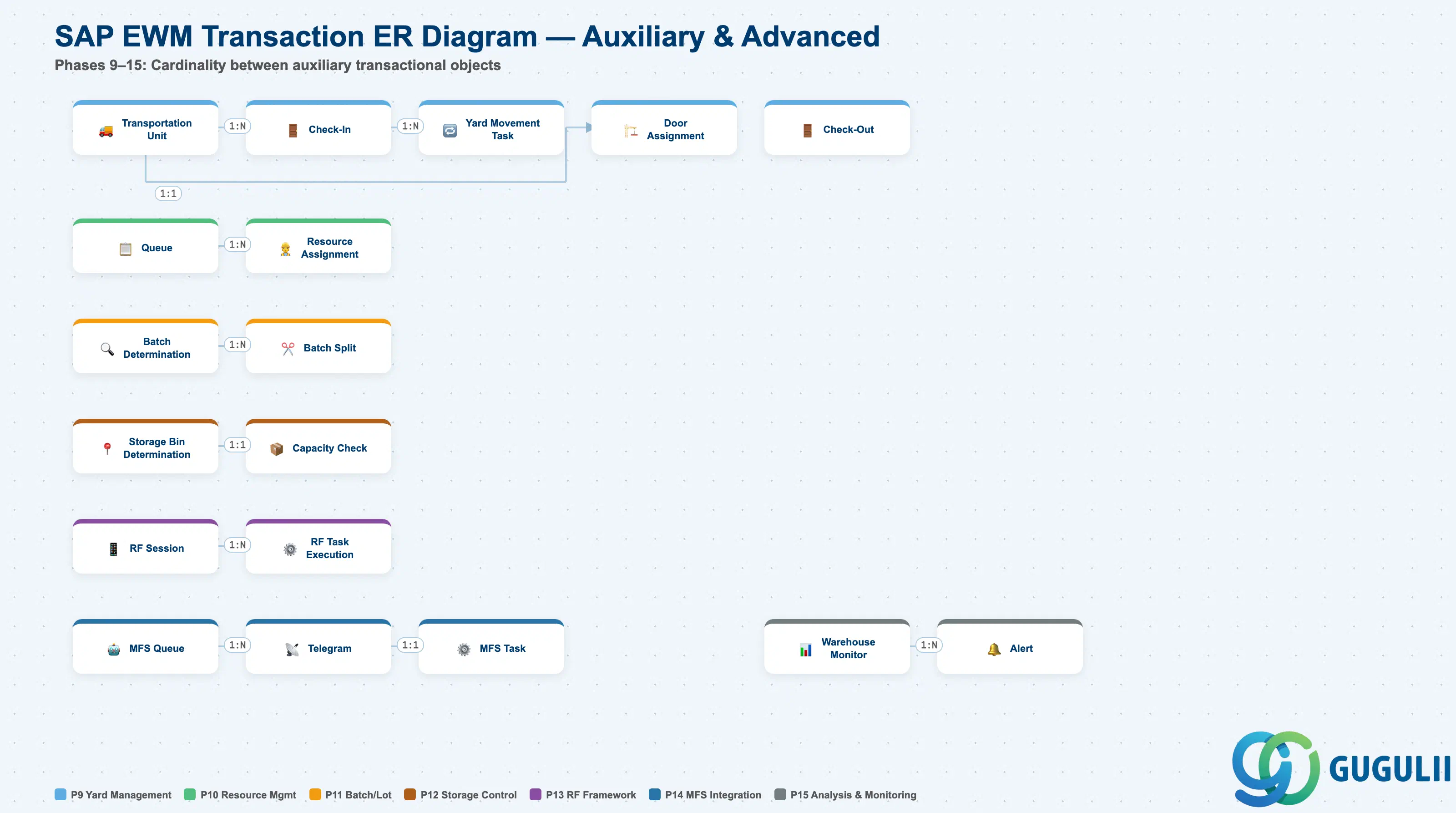
| Phase | Object | Integration | Planned | Actual | Prerequisite | B | A | D | Tr-Cd | Description | Practical Examples | Role |
|---|---|---|---|---|---|---|---|---|---|---|---|---|
| 1 Inbound Process | Inbound Delivery Notification | MM | - | - | Purchase Order (S/4HANA) | x | x | x | /SCWM/IDN | Receive inbound delivery schedule from S/4HANA | Receive inbound schedule for purchase order 4500001234 into EWM | Warehouse Clerk |
| Inbound Delivery | MM | - | - | Inbound Delivery Notification | x | x | x | /SCWM/PRDI | Create inbound delivery based on delivery notification | Create inbound delivery 180000001 from delivery notification | Warehouse Clerk | |
| Unload [Open] | - | Unload [Open] | - | Inbound Delivery | x | x | x | /SCWM/UNLOAD | Create unloading task from vehicle | Create unloading task at Dock 1 on truck arrival | Warehouse Operator | |
| Unload [Confirmed] | - | - | Unload [Open] | Unload [Open] | x | x | x | /SCWM/UNLOAD | Confirm and record unloading completion | Scan completion of 10 pallets unloaded via RF terminal | Warehouse Operator | |
| Goods Receipt [Open] | MM | Goods Receipt [Open] | - | Unload [Confirmed] | x | x | x | /SCWM/GR | Goods receipt in preparation state | Transition to goods receipt ready status after unloading | Warehouse Clerk | |
| Goods Receipt [Posted] | MM | - | Goods Receipt [Open] | Goods Receipt [Open] | x | x | x | /SCWM/GR | Post goods receipt to S/4HANA | Execute goods receipt posting, update stock in S/4HANA | Warehouse Clerk | |
| Putaway Warehouse Task [Open] | - | Putaway Warehouse Task [Open] | - | Goods Receipt [Posted] | x | x | x | /SCWM/MON | Create warehouse task to move received goods to storage bin | Create movement task to bin A-01-01 based on putaway strategy | Warehouse Operator | |
| Putaway Warehouse Task [Confirmed] | - | - | Putaway Warehouse Task [Open] | Putaway Warehouse Task [Open] | x | x | x | /SCWM/TO_CONF | Confirm and record putaway completion | Scan storage completion at bin A-01-01 via RF terminal | Warehouse Operator | |
| 2 Quality Management Integration | Inspection Lot | QM | - | - | Goods Receipt | x | x | x | /SCWM/QM | Receive quality inspection lot from S/4HANA QM | Receive inspection lot 030000001 from QM at time of goods receipt | Quality Inspector |
| Sample [Created] | QM | Sample [Created] | - | Inspection Lot | x | x | x | /SCWM/SAMPLE | Create quality inspection sample | Instruction to take 5 samples from lot | Quality Inspector | |
| Sample [Taken] | QM | - | Sample [Created] | Sample [Created] | x | x | x | /SCWM/SAMPLE | Record sample collection completion | 5 samples collected and transferred to inspection room | Quality Inspector | |
| Quality Inspection [Open] | QM | Quality Inspection [Open] | - | Sample [Taken] | x | x | x | /SCWM/QM | Waiting for quality inspection execution | Sample arrived, waiting for inspection start | Quality Inspector | |
| Quality Inspection [Completed] | QM | - | Quality Inspection [Open] | Quality Inspection [Open] | x | x | x | /SCWM/QM | Send quality inspection result to S/4HANA QM | Inspection passed, result sent to QM | Quality Inspector | |
| Stock Type Change [Posted] | MM | - | - | Quality Inspection [Completed] | x | x | x | /SCWM/IM_PC | Change quality-approved stock to available stock | Change inspected stock to available inventory | Quality Inspector | |
| 3 Warehouse Execution | Warehouse Request | - | - | - | Delivery / Internal Request | x | x | x | /SCWM/MON | Accept and register warehouse work request | Auto-generate warehouse request from inbound/outbound document | Warehouse Clerk |
| Warehouse Task [Open] | - | Warehouse Task [Open] | - | Warehouse Request | x | x | x | /SCWM/MON | Create work task based on warehouse request | Create putaway/picking task from warehouse request | Warehouse Clerk | |
| Warehouse Task [Confirmed] | - | - | Warehouse Task [Open] | Warehouse Task [Open] | x | x | x | /SCWM/TO_CONF | Confirm task completion and update stock | Scan task completion on RF terminal, real-time stock update | Warehouse Operator | |
| Warehouse Order [Open] | - | Warehouse Order [Open] | - | Warehouse Task [Open] | x | x | x | /SCWM/MON | Create order grouping multiple tasks | Group 5 tasks in the same area into 1 order | Warehouse Planner | |
| Warehouse Order [Completed] | - | - | Warehouse Order [Open] | Warehouse Order [Open] | x | x | x | /SCWM/MON | Complete when all tasks in order are finished | Complete order after all 5 tasks within order are done | Warehouse Operator | |
| 4 Stock Management | Internal Stock Transfer [Open] | - | Internal Stock Transfer [Open] | - | Quant | x | x | x | /SCWM/IM_ST | Create stock movement task between storage bins within warehouse | Create movement task from bin A-01-01 to B-02-03 | Warehouse Clerk |
| Internal Stock Transfer [Confirmed] | - | - | Internal Stock Transfer [Open] | Internal Stock Transfer [Open] | x | x | x | /SCWM/IM_ST | Confirm and record stock movement completion | Scan movement completion on RF terminal, update stock location | Warehouse Operator | |
| Posting Change [Open] | MM | Posting Change [Open] | - | Quant | x | x | x | /SCWM/IM_PC | Prepare attribute change such as stock type or owner | Prepare change of quality inspection stock to available stock | Warehouse Clerk | |
| Posting Change [Posted] | MM | - | Posting Change [Open] | Posting Change [Open] | x | x | x | /SCWM/IM_PC | Execute attribute change and post to S/4HANA | Execute stock type change, synchronize with S/4HANA | Warehouse Clerk | |
| Replenishment [Open] | - | Replenishment [Open] | - | Fixed Storage Bin / Quant | x | x | x | /SCWM/REPL | Create replenishment task to fixed bin | Auto-create replenishment task when picking area falls below minimum stock | Warehouse Clerk | |
| Replenishment [Confirmed] | - | - | Replenishment [Open] | Replenishment [Open] | x | x | x | /SCWM/REPL | Confirm and record replenishment completion | Scan replenishment completion on RF terminal, update fixed bin stock | Warehouse Operator | |
| 5 Handling Unit | Handling Unit [Created] | - | Handling Unit [Created] | - | Packaging Specification | x | x | x | /SCWM/ADHU | Create HU such as pallet or carton | Create pallet HU 340000001 at goods receipt | Warehouse Operator |
| Handling Unit [Confirmed] | - | - | Handling Unit [Created] | Handling Unit [Created] | x | x | x | /SCWM/ADHU | Confirm HU contents and status | Confirm HU contents, assign 100 units of product A to HU | Warehouse Operator | |
| Planned Shipping HU [Created] | - | Planned Shipping HU [Created] | - | Outbound Delivery | x | x | x | /SCWM/CAP | Pre-plan HU configuration for shipment | Pre-plan 3-pallet configuration for outbound delivery | Warehouse Planner | |
| Planned Shipping HU [Confirmed] | - | - | Planned Shipping HU [Created] | Planned Shipping HU [Created] | x | x | x | /SCWM/CAP | Confirm planned shipping HU | Compare with actual picking result and confirm HU configuration | Warehouse Planner | |
| 6 Outbound Process | Outbound Delivery Request | SD | - | - | Sales Order (S/4HANA) | x | x | x | /SCWM/ODR | Receive outbound delivery request information from S/4HANA | Receive delivery request for sales order 8000001234 into EWM | Warehouse Clerk |
| Outbound Delivery Order | SD | - | - | Outbound Delivery Request | x | x | x | /SCWM/PRDO | Create outbound delivery order based on delivery request | Create outbound delivery order 280000001 from delivery request | Warehouse Clerk | |
| Outbound Delivery | SD | - | - | Outbound Delivery Order | x | x | x | /SCWM/PRDO | Create outbound delivery document based on delivery order | Create outbound delivery document 80000001 from delivery order | Warehouse Clerk | |
| Wave [Created] | - | Wave [Created] | - | Wave Template / Outbound Delivery | x | x | /SCWM/WAVE | Group multiple outbound delivery orders | Group 50 outbound delivery documents for the 15:00 cutoff into a wave | Warehouse Planner | ||
| Wave [Released] | - | - | Wave [Created] | Wave [Created] | x | x | /SCWM/WAVE | Release wave to create tasks in bulk | Release wave to create 200 picking tasks at once | Warehouse Planner | ||
| Wave Item [Assigned] | - | - | - | Wave [Created] | x | x | /SCWM/WAVE | Assign outbound delivery orders to wave | Assign 30 outbound delivery documents to wave | Warehouse Planner | ||
| Picking Warehouse Task [Open] | - | Picking Warehouse Task [Open] | - | Wave [Released] / Outbound Delivery | x | x | x | /SCWM/MON | Create warehouse task to pick goods from shelf | Create picking task for 100 units of product A from bin B-02-03 | Warehouse Operator | |
| Picking Warehouse Task [Confirmed] | - | - | Picking Warehouse Task [Open] | Picking Warehouse Task [Open] | x | x | x | /SCWM/TO_CONF | Confirm and record picking completion | Scan picking completion from bin B-02-03 via RF terminal | Warehouse Operator | |
| Packing [Open] | - | Packing [Open] | - | Picking Warehouse Task [Confirmed] | x | x | x | /SCWM/PACK | Create packing task for outbound goods | Pack picked items in cardboard boxes at packing station | Warehouse Operator | |
| Packing [Confirmed] | - | - | Packing [Open] | Packing [Open] | x | x | x | /SCWM/PACK | Confirm packing completion and create HU | Packing complete, assign HU number 340000001 | Warehouse Operator | |
| Load [Open] | - | Load [Open] | - | Packing [Confirmed] | x | x | x | /SCWM/LOAD | Create loading task to vehicle | Create loading task at Dock 3 for truck | Warehouse Operator | |
| Load [Confirmed] | - | - | Load [Open] | Load [Open] | x | x | x | /SCWM/LOAD | Confirm and record loading completion | Scan completion of 20 pallets loaded via RF terminal | Warehouse Operator | |
| Goods Issue [Open] | SD | Goods Issue [Open] | - | Load [Confirmed] | x | x | x | /SCWM/SGI | Goods issue in preparation state | Transition to goods issue ready status after loading | Warehouse Clerk | |
| Goods Issue [Posted] | SD | - | Goods Issue [Open] | Goods Issue [Open] | x | x | x | /SCWM/SGI | Post goods issue to S/4HANA | Execute goods issue posting, reduce stock in S/4HANA | Warehouse Clerk | |
| 7 Returns Processing | Customer Return Request | SD | - | - | Return Order (S/4HANA) | x | x | x | /SCWM/PRDI | Receive customer return request from S/4HANA SD | Receive return request from customer company A via SD | Warehouse Clerk |
| Customer Return Delivery | SD | - | - | Customer Return Request | x | x | x | /SCWM/PRDI | Create return delivery document based on return request | Create return delivery document 180000100 from return request | Warehouse Clerk | |
| Return Inspection [Completed] | - | - | - | Customer Return Delivery | x | x | x | /SCWM/GR | Determine processing method based on inspection result | Inspect returned goods, judge as resalable | Quality Inspector | |
| Return Goods Receipt [Posted] | SD | - | - | Return Inspection [Completed] | x | x | x | /SCWM/GR | Post returned goods receipt to S/4HANA | Post returned goods receipt, stock restoration complete | Warehouse Clerk | |
| Vendor Return Request | MM | - | - | Defect Stock | x | x | x | /SCWM/PRDO | Request return to vendor | Create vendor return request for 100 defective units | Warehouse Clerk | |
| Vendor Return Delivery | MM | - | - | Vendor Return Request | x | x | x | /SCWM/PRDO | Create outbound delivery document for vendor return | Create vendor return outbound delivery 280000100 from return request | Warehouse Clerk | |
| Vendor Return Goods Issue [Posted] | MM | - | - | Vendor Return Delivery | x | x | x | /SCWM/SGI | Post vendor return goods issue to S/4HANA | Post vendor return goods issue, stock reduction complete | Warehouse Clerk | |
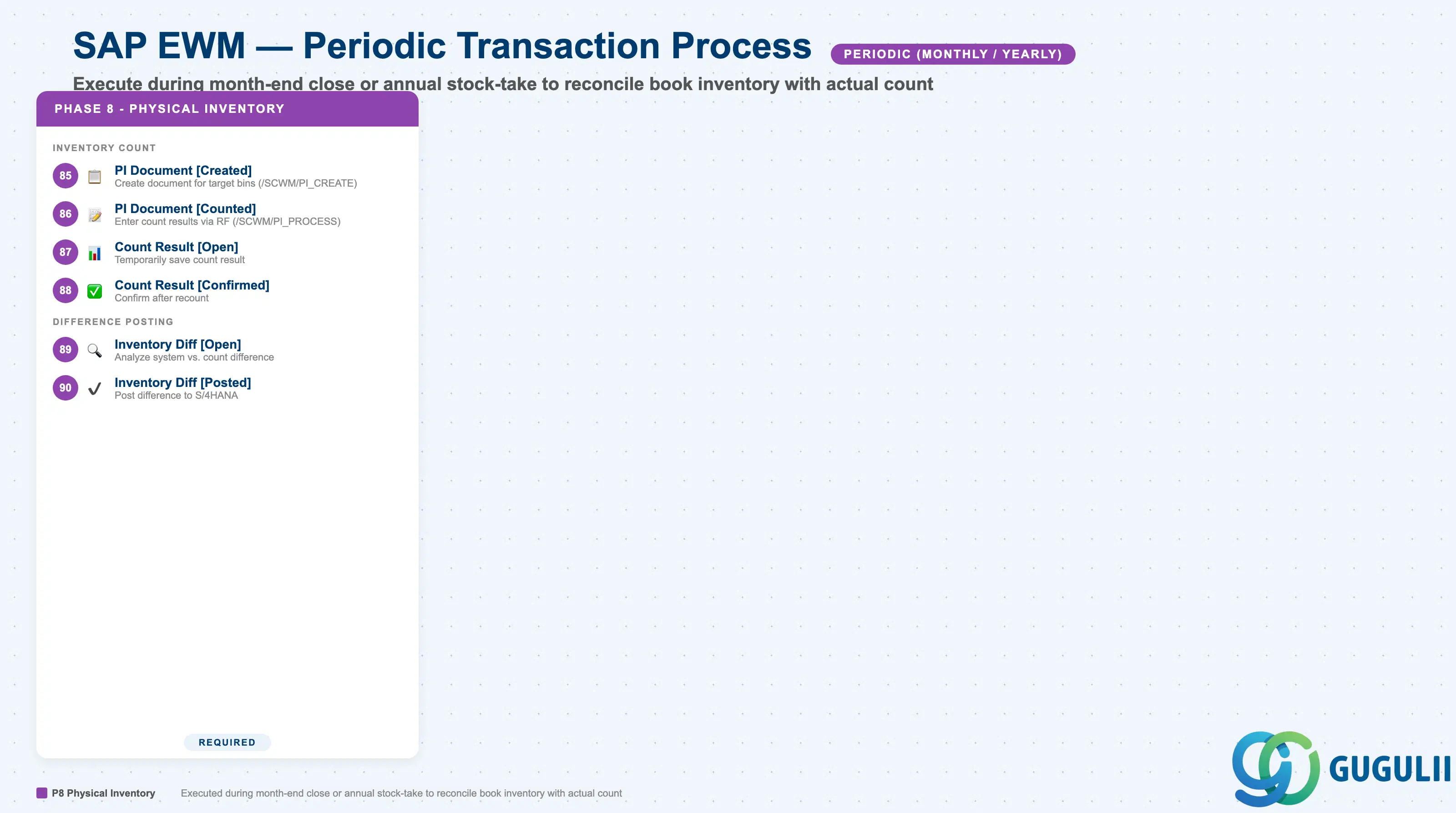
| 8 Physical Inventory | Physical Inventory Document [Created] | - | Physical Inventory Document [Created] | - | Storage Bin | x | x | x | /SCWM/PI_CREATE | Create document specifying target bins and materials for inventory count | Create physical inventory document for all bins in Area A | Inventory Controller |
| Physical Inventory Document [Counted] | - | - | Physical Inventory Document [Created] | Physical Inventory Document [Created] | x | x | x | /SCWM/PI_PROCESS | Enter and record count results | Enter count results for each bin via RF terminal | Warehouse Operator | |
| Count Result [Open] | - | Count Result [Open] | - | Physical Inventory Document [Counted] | x | x | x | /SCWM/PI_PROCESS | Temporarily save count results | Temporarily save first count result of 100 units | Warehouse Operator | |
| Count Result [Confirmed] | - | - | Count Result [Open] | Count Result [Open] | x | x | x | /SCWM/PI_PROCESS | Confirm count results | After recount, confirm final result of 98 units | Inventory Controller | |
| Inventory Difference [Open] | - | Inventory Difference [Open] | - | Count Result [Confirmed] | x | x | x | /SCWM/DIFF_ANALYZER | Analyze difference between system stock and count result | Analyze system stock 100 units vs. count 98 units, difference of -2 | Inventory Controller | |
| Inventory Difference [Posted] | MM | - | Inventory Difference [Open] | Inventory Difference [Open] | x | x | x | /SCWM/DIFF_ANALYZER | Post difference to S/4HANA and adjust stock | Post difference of -2 units to S/4HANA, stock adjustment complete | Inventory Controller | |
| 9 Yard Management | Transportation Unit [Open] | - | Transportation Unit [Open] | - | Inbound/Outbound Delivery | x | x | /SCWM/TU | Register vehicle or trailer as transportation unit | Register truck ABC-1234 as transportation unit | Yard Operator | |
| Transportation Unit [Completed] | - | - | Transportation Unit [Open] | Transportation Unit [Open] | x | x | /SCWM/TU | Complete transportation unit processing | Complete transportation unit processing after cargo handling | Yard Operator | ||
| Check-In [Open] | - | Check-In [Open] | - | Transportation Unit | x | x | /SCWM/CICO | Accept vehicle entry into yard | Accept truck arrival at gate | Yard Operator | ||
| Check-In [Completed] | - | - | Check-In [Open] | Check-In [Open] | x | x | /SCWM/CICO | Record check-in completion | Register driver information and vehicle information | Yard Operator | ||
| Yard Movement Task [Open] | - | Yard Movement Task [Open] | - | Check-In [Completed] | x | x | /SCWM/YMOVE | Create vehicle movement task within yard | Create movement task from waiting area to Dock 3 | Yard Operator | ||
| Yard Movement Task [Confirmed] | - | - | Yard Movement Task [Open] | Yard Movement Task [Open] | x | x | /SCWM/YMOVE | Confirm and record yard movement completion | Truck arrived at Dock 3, movement complete | Yard Operator | ||
| Door Assignment [Open] | - | Door Assignment [Open] | - | Transportation Unit | x | x | /SCWM/DOOR | Prepare dock door assignment for vehicle | Evaluate door assignment for truck ABC-1234 | Yard Planner | ||
| Door Assignment [Assigned] | - | - | Door Assignment [Open] | Door Assignment [Open] | x | x | /SCWM/DOOR | Confirm door assignment | Assign Dock 3 to truck ABC-1234 | Yard Planner | ||
| Check-Out [Open] | - | Check-Out [Open] | - | Load [Confirmed] | x | x | /SCWM/CICO | Prepare vehicle departure from yard | Loading complete, prepare check-out | Yard Operator | ||
| Check-Out [Completed] | - | - | Check-Out [Open] | Check-Out [Open] | x | x | /SCWM/CICO | Record check-out completion | Gate passage, check-out complete | Yard Operator | ||
| 10 Resource Management | Queue [Created] | - | Queue [Created] | - | Resource | x | x | x | /SCWM/MON | Create task assignment queue for resource | Create queue for forklift FL-001 | Warehouse Planner |
| Queue [Processed] | - | - | Queue [Created] | Queue [Created] | x | x | x | /SCWM/MON | Complete processing of tasks in queue | All tasks in FL-001 queue complete | Warehouse Operator | |
| Resource Assignment [Open] | - | Resource Assignment [Open] | - | Warehouse Order / Resource | x | x | x | /SCWM/MON | Prepare resource assignment to warehouse order | Evaluate resource assignment for warehouse order 001 | Warehouse Planner | |
| Resource Assignment [Assigned] | - | - | Resource Assignment [Open] | Resource Assignment [Open] | x | x | x | /SCWM/MON | Confirm resource assignment | Confirm FL-001 assigned to warehouse order 001 | Warehouse Planner | |
| 11 Batch/Lot Management | Batch Determination [Executed] | - | - | - | Outbound Delivery | x | x | x | /SCWM/PRDO | Auto-determine batch by FIFO/FEFO rule at goods issue | Auto-select oldest batch in expiration date order | Warehouse Clerk |
| Batch Split [Created] | - | Batch Split [Created] | - | Quant | x | x | x | /SCWM/BATCH | Split one batch into multiple batches | Prepare to split batch 001 into 001A/001B | Warehouse Clerk | |
| Batch Split [Confirmed] | - | - | Batch Split [Created] | Batch Split [Created] | x | x | x | /SCWM/BATCH | Confirm batch split | Confirm batch split: 001A 50 units, 001B 50 units | Warehouse Clerk | |
| 12 Storage Control | Storage Bin Determination [Executed] | - | - | - | Putaway Strategy | x | x | x | /SCWM/MON | Auto-determine optimal storage bin based on strategy | Auto-determine bin A-01-01 considering available capacity and traffic flow | Warehouse Clerk |
| Capacity Check [Passed] | - | - | - | Storage Bin | x | x | x | /SCWM/MON | Check available capacity of bin and determine if putaway is possible | Available capacity at bin A-01-01 OK, putaway possible | Warehouse Clerk | |
| 13 RF Framework | RF Session [Open] | - | RF Session [Open] | - | RF Profile / User | x | x | x | /SCWM/RFUI | Start login session on RF terminal | Worker logs in on RF terminal | Warehouse Operator |
| RF Session [Closed] | - | - | RF Session [Open] | RF Session [Open] | x | x | x | /SCWM/RFUI | End RF terminal session | Work complete, log out from RF terminal | Warehouse Operator | |
| RF Task Execution [Open] | - | RF Task Execution [Open] | - | RF Session / Warehouse Task | x | x | x | /SCWM/RFUI | Receive and start executing task on RF terminal | Display picking task 001 on RF terminal | Warehouse Operator | |
| RF Task Execution [Confirmed] | - | - | RF Task Execution [Open] | RF Task Execution [Open] | x | x | x | /SCWM/RFUI | Scan and confirm task completion on RF terminal | Scan bin barcode and product barcode to confirm completion | Warehouse Operator | |
| 14 MFS Integration | MFS Queue [Open] | - | MFS Queue [Open] | - | PLC / Communication Point | x | /SCWM/MFS | Register processing request to MFS in queue | Register ASRS goods issue request in MFS queue | MFS Operator | ||
| MFS Queue [Processed] | - | - | MFS Queue [Open] | MFS Queue [Open] | x | /SCWM/MFS | Complete processing of MFS queue | ASRS goods issue complete, queue processing complete | MFS Operator | |||
| Telegram [Sent] | - | Telegram [Sent] | - | MFS Queue | x | /SCWM/MFS | Send instruction telegram to PLC | Send goods issue instruction telegram to PLC001 | MFS Operator | |||
| Telegram [Received] | - | - | Telegram [Sent] | Telegram [Sent] | x | /SCWM/MFS | Receive response telegram from PLC | Receive goods issue completion telegram from PLC001 | MFS Operator | |||
| MFS Task [Open] | - | MFS Task [Open] | - | Telegram [Received] | x | /SCWM/MFS | Create task to be executed by automated equipment | Create conveyor transport task | MFS Operator | |||
| MFS Task [Confirmed] | - | - | MFS Task [Open] | MFS Task [Open] | x | /SCWM/MFS | Confirm automated task completion | Conveyor transport complete, confirm arrival at goods issue point | MFS Operator | |||
| 15 Analysis & Monitoring | Warehouse Monitor | - | - | - | Warehouse | x | x | x | /SCWM/MON | Real-time monitoring of warehouse operations | Monitor outstanding task count and delay alerts | Warehouse Manager |
| Alert [Created] | - | Alert [Created] | - | Alert Rule | x | x | x | /SCWM/ALERT | Generate alert for anomalies or delays | Auto-generate picking delay alert | Warehouse Manager | |
| Alert [Processed] | - | - | Alert [Created] | Alert [Created] | x | x | x | /SCWM/ALERT | Record alert resolution | Deploy additional staff to resolve delay, mark alert processed | Warehouse Manager | |
| Task Log | - | - | - | Warehouse Task | x | x | x | /SCWM/MON | Record and query task execution history | Query task execution history for the past week | Warehouse Manager | |
| Performance Report | - | - | - | Task Log | x | x | x | /SCWM/REPORT | Analyze operational efficiency and KPIs | Output picking efficiency report by worker | Warehouse Manager |
| ID | Category | Title |
|---|---|---|
| ewm-001 | Overview | What is SAP EWM? |
| ID | Category | Title |
|---|---|---|
| ewm-b01 | Overview | SAP EWM Transactions: Process Flow, Hierarchy & Relationships 📍 |