Title here
Summary here

The Material Master is the single most critical integration point between Logistics and Financial Accounting in SAP. Every goods movement, every invoice, and every inventory valuation traces back to settings in this master. This article covers the Material Master’s structure, views, organizational levels, and the field-level detail FI consultants must own.
The Material Master is the central repository that stores all information about every material (item/product) a company handles — raw materials, semi-finished goods, finished products, consumables, and everything else that flows through the enterprise.
| Aspect | Details |
|---|---|
| Role | Single Source of Truth for all material attributes across the enterprise |
| Modules using it | MM (Purchasing, Inventory), PP (Production Planning, MRP, BOM), SD (Sales, Shipping, ATP), WM/EWM (Warehouse Mgmt, Putaway/Pick), QM (Quality Inspection, CoA), FI (Inventory Valuation, Auto Posting), CO (Standard Cost, Variance Analysis), PM (Plant Maintenance, MRO Procurement), PS (Project Procurement, Material Allocation), CS (Customer Service, Spare Parts), EHS (Hazardous Material Mgmt, Environmental Compliance), GTS (Trade Compliance, HS Code, Export Control) |
| Transactions | MM01 (Create) / MM02 (Change) / MM03 (Display) |
| S/4HANA change | Material number length extended from 18 to 40 digits (MATNR field) |
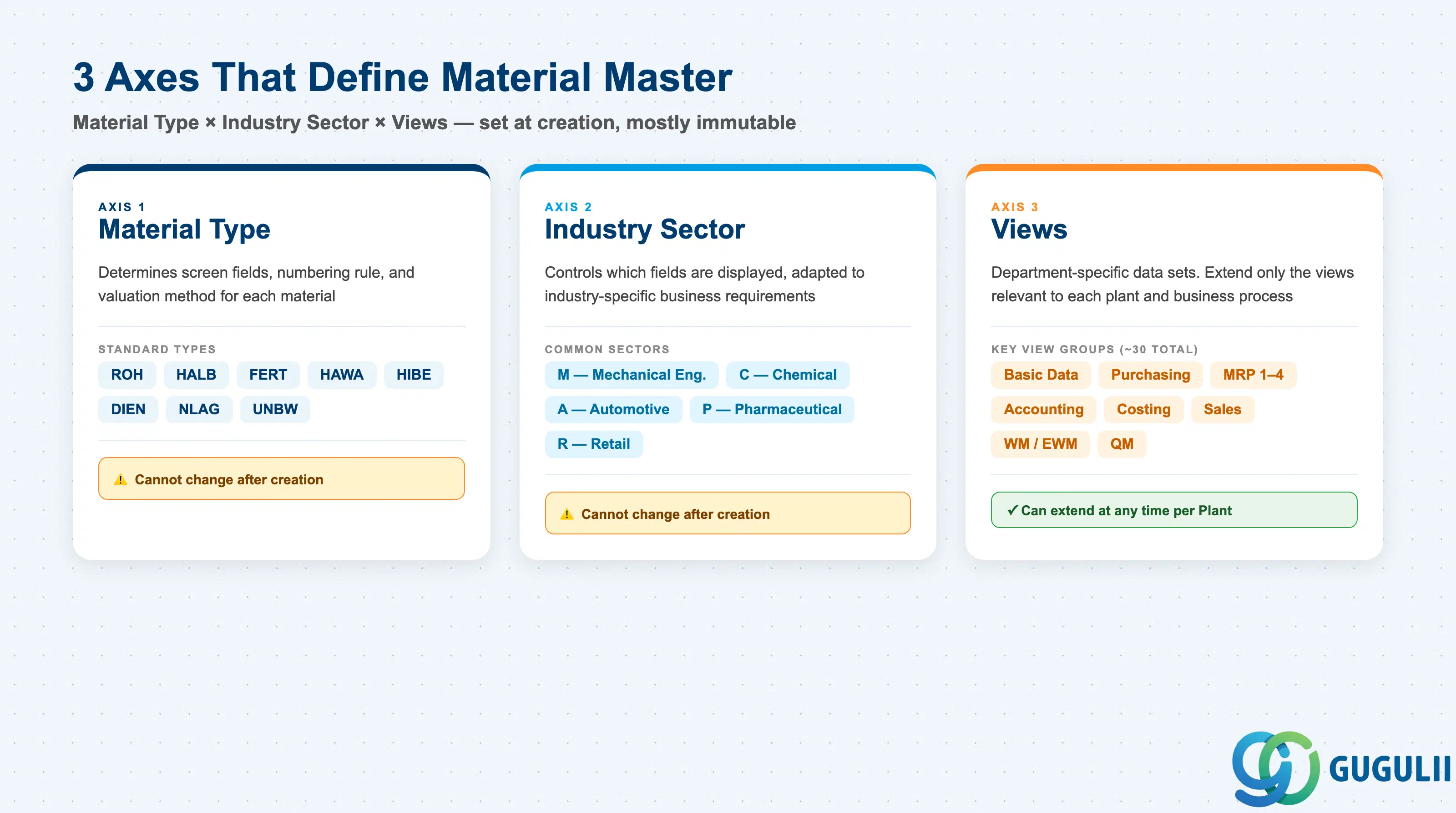
The structure of a Material Master record is determined by the combination of three axes:
| Axis | Description | Examples |
|---|---|---|
| Material Type | Classifies the material. Controls screen layout, number assignment, and valuation method | ROH, FERT, HALB |
| Industry Sector | Industry branch. Controls which fields are displayed based on industry characteristics | M (Mechanical), C (Chemical), A (Automotive) |
| Views | Data sets organized by department. Only relevant views need to be extended | Basic Data, MRP, Accounting |
Important: Once created, Material Type and Industry Sector cannot be changed as a general rule. Lock these in during design.
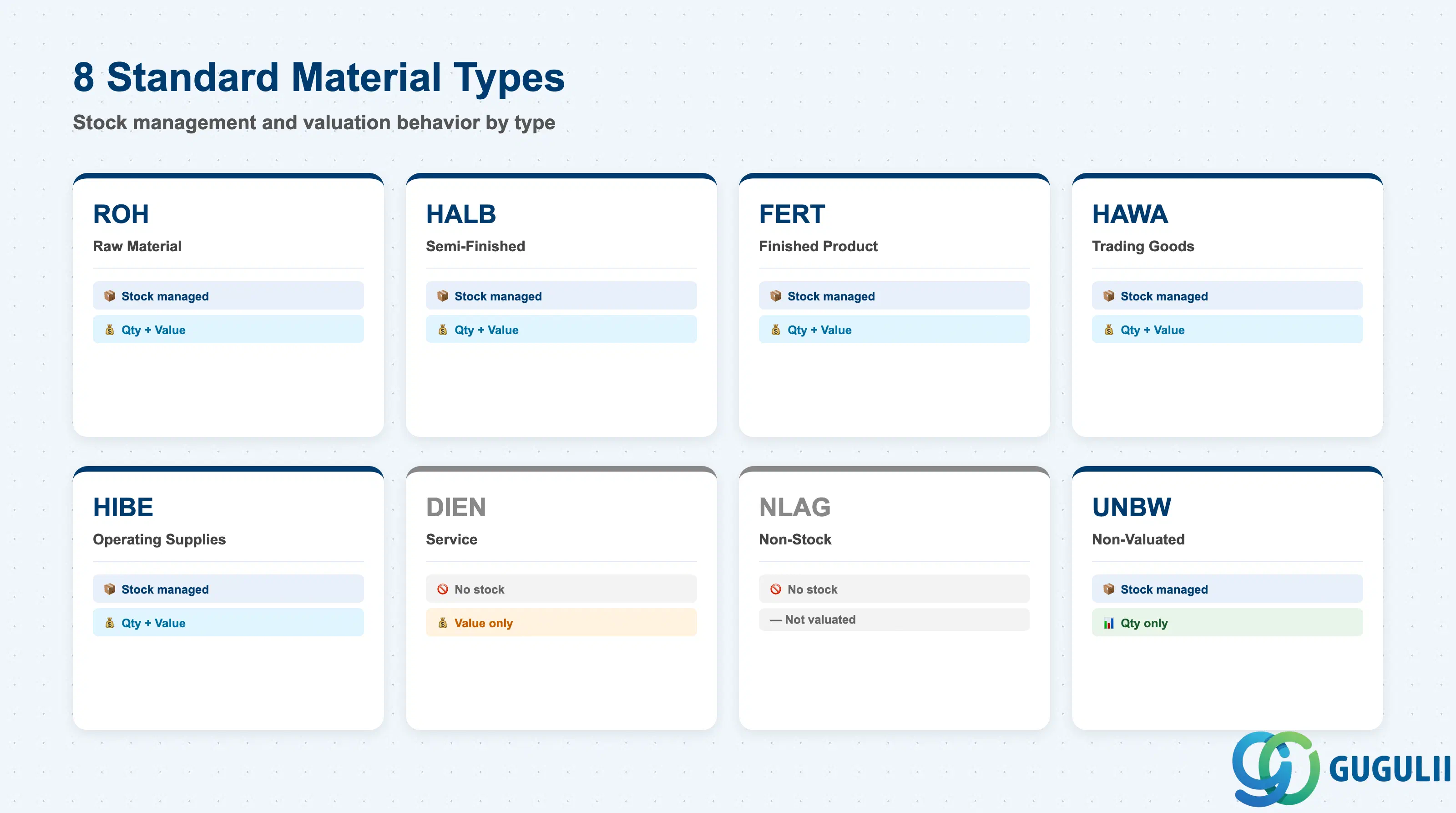
| Code | Name | Use Case | Stock-Managed | Qty / Value |
|---|---|---|---|---|
| ROH | Raw Material | Input materials | Yes | Both |
| HALB | Semi-Finished | Internally produced intermediates | Yes | Both |
| FERT | Finished Product | Internally produced / sold goods | Yes | Both |
| HAWA | Trading Goods | Buy-and-sell merchandise | Yes | Both |
| HIBE | Operating Supplies | Indirect materials, consumables | Yes | Both |
| DIEN | Service | Service items | No | Value only |
| NLAG | Non-Stock | No inventory management | No | — |
| UNBW | Non-Valuated | Quantity tracking only | Yes | Qty only |
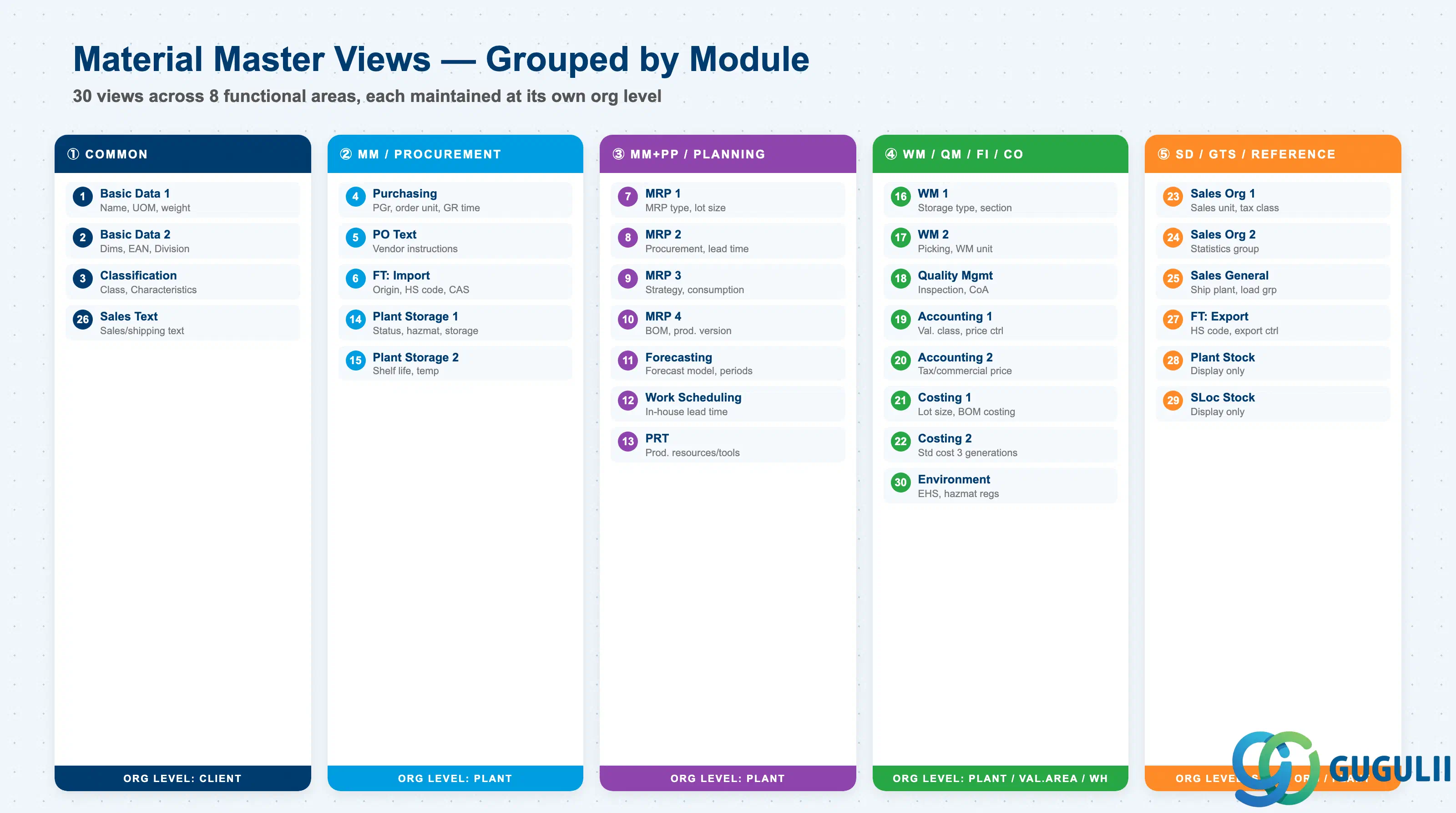
The Material Master is divided into department-specific Views. Only the views required by each department need to be extended. Approximately 30 standard views exist; the views to extend are selected based on Material Type and business requirements.
| # | View | Owning Dept | Key Fields | Org Level |
|---|---|---|---|---|
| 1 | Basic Data 1 | Cross-module | Material description, Base UoM, Material group, Weight/Volume | Client |
| 2 | Basic Data 2 | Cross-module | Dimensions, EAN/UPC, Old material number, Division | Client |
| 3 | Classification | Cross-module | Class assignment, Characteristic values | Client |
| 4 | Purchasing | Purchasing (MM) | Purchasing group, Order unit, GR processing time, Source list required flag | Plant |
| 5 | Purchase Order Text | Purchasing (MM) | PO text, Text ID, Language | Plant |
| 6 | Foreign Trade: Import | Purchasing (MM) / GTS | Country of origin, HS code (import), CAS number, Import license | Plant |
| 7 | MRP 1 | Purchasing / PP (MM/PP) | MRP type, MRP controller, Lot size, Reorder point | Plant |
| 8 | MRP 2 | Purchasing / PP (MM/PP) | Procurement type, Special procurement, Planned delivery time, Safety stock | Plant |
| 9 | MRP 3 | Purchasing / PP (MM/PP) | Strategy group, Consumption mode, Availability check | Plant |
| 10 | MRP 4 | PP-oriented | BOM selection, Individual/collective requirements, Discontinuation flag | Plant |
| 11 | Forecasting | Purchasing / PP (MM/PP) | Forecast model, Historical/forecast periods, Smoothing factors | Plant |
| 12 | Work Scheduling | Production (PP) | Production unit, Receiving storage location, In-house production time | Plant |
| 13 | Production Resources/Tools | Production (PP) | Production resource/tool data | Plant |
| 14 | General Plant Data / Storage 1 | Inventory (MM) / EHS | Plant-specific material status, Storage conditions, Hazardous material number, EHS hazard data | Plant |
| 15 | General Plant Data / Storage 2 | Inventory (MM) | Shelf life management, Minimum remaining shelf life, Temperature conditions | Plant |
| 16 | Warehouse Management 1 | Warehouse (WM/EWM) | Warehouse number, Storage type, Storage section | Warehouse |
| 17 | Warehouse Management 2 | Warehouse (WM/EWM) | Picking type, WM unit of measure | Warehouse |
| 18 | Quality Management | Quality (QM) | QM procurement key, Inspection type, Certificate type | Plant |
| 19 | Accounting 1 | Finance (FI) | Valuation class, Price control (S/V), Standard price / Moving average price | Valuation Area |
| 20 | Accounting 2 | Finance (FI) | Tax-based valuation, Commercial valuation, Devaluation flag | Valuation Area |
| 21 | Costing 1 | Controlling (CO) | Costing lot size, With/without quantity structure, Variance key | Plant |
| 22 | Costing 2 | Controlling (CO) | Standard cost (Future/Current/Previous), Costing status | Plant |
| 23 | Sales: Sales Org 1 | Sales (SD) | Sales unit, Tax classification, Item category group | Sales Org / DCh |
| 24 | Sales: Sales Org 2 | Sales (SD) | Material statistics group, Material group 1–5 | Sales Org / DCh |
| 25 | Sales: General/Plant | Sales (SD) | Delivering plant, Transportation group, Loading group, Profit center | Plant |
| 26 | Sales Text | Sales (SD) | Sales/shipping texts | Client |
| 27 | Foreign Trade: Export | Trade (SD/GTS) | HS code (export), Export statistics group, Preference status, Export control | Plant |
| 28 | Plant Stock | Reference (display only) | Plant stock quantity / value (read-only) | Plant |
| 29 | Storage Location Stock | Reference (display only) | Storage location-level stock (read-only) | Storage Loc |
| 30 | Environment (EHS) | EHS | Hazardous substance regulations, Waste code | Plant |
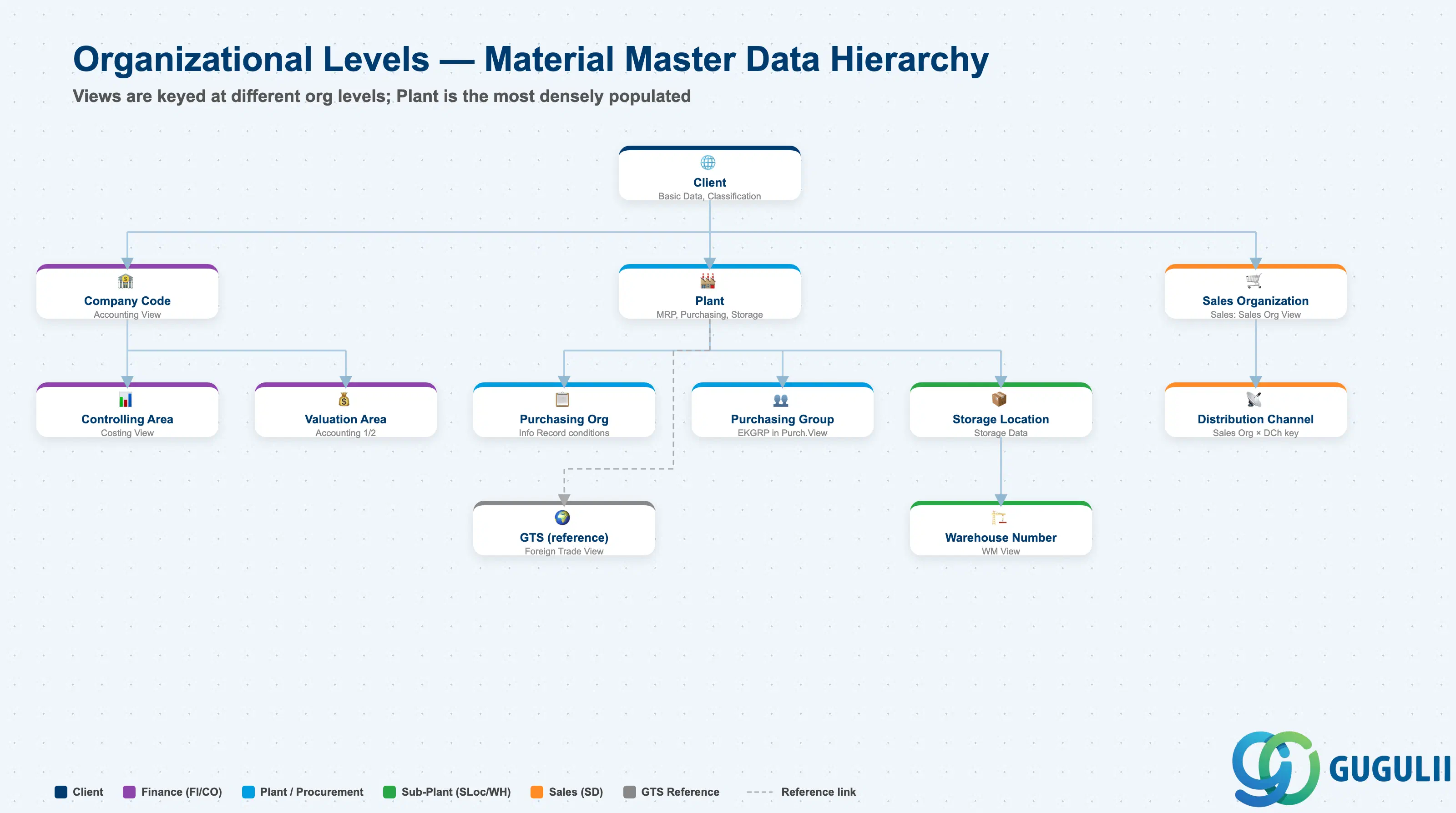
Each view stores its data at a different organizational level. This is the core design challenge of the Material Master.
Client (300)
   │
   ├── Basic Data, Classification ← Client-level (one record for entire enterprise)
   │
   ├── Plant (1000, 2000, ...)
   │      │
   │      ├── MRP, Purchasing, Work Scheduling ← Plant-level
   │      │
   │      ├── Storage Location (0001, 0002, ...)
   │      │      └── Storage Data ← Storage Location-level
   │      │
   │      └── Warehouse Number (WH1, ...)
   │             └── WM Data ← Warehouse-level
   │
   ├── Valuation Area = Plant ← Accounting is typically at Plant level
   │      └── Valuation class, Standard cost
   │
   └── Sales Org × Distribution Channel
└── Sales Data ← Sales Org-level| Org Level | Primary Use | Representative Fields | Notes |
|---|---|---|---|
| Client | Enterprise-wide common attributes | Material description, Base UoM, Classification | One record shared across entire enterprise |
| Company Code | Financial accounting unit | Accounting View (valuation class, price control) | When Valuation Area = Company Code |
| Controlling Area | Management accounting unit | Costing View (cost estimate, variance analysis) | May span multiple Company Codes |
| Purchasing Organization | Purchasing org unit | Purchasing Info Record (price, conditions) | Material Master itself is at Plant level; purchase conditions are at Purch. Org level |
| Plant | Factory / site unit | MRP, Purchasing, Work Scheduling, General Plant Data | The primary level with the most views |
| Purchasing Group | Buyer group | Purchasing View: Purchasing Group (EKGRP) | Buyer group within a Plant; starting point for PO release strategy routing |
| Valuation Area | Inventory valuation unit | Accounting 1 (valuation class, standard price) | Typically = Plant; Company Code-level valuation is also configurable |
| Storage Location | Storage area unit | General Plant Data / Storage (storage location stock) | Warehouse / bin area within a Plant |
| Warehouse Number | Warehouse management unit | WM View (storage type, picking strategy) | Used in Plants with WM/EWM |
| Sales Organization | Sales org unit | Sales: Sales Org View (sales unit, tax classification) | Keyed together with Distribution Channel |
| Distribution Channel | Distribution channel unit | Sales: Sales Org View | Extended in combination with Sales Org |
| (GTS reference) | Trade compliance management | Foreign Trade View (HS code, country of origin, export control) | No GTS-specific org level key in Material Master; GTS references the Foreign Trade View data |
The Material Master has approximately 30 standard views. The table below clarifies the scope FI consultants need to own.
| # | View | Primary Module | FI Involvement |
|---|---|---|---|
| 1 | Basic Data 1 | Cross-module | ○ |
| 2 | Basic Data 2 | Cross-module | △ |
| 3 | Classification | Cross-module | △ |
| 4 | Purchasing | MM | △ (GR triggers FI posting) |
| 5 | Purchase Order Text | MM | × |
| 6 | Foreign Trade: Import | MM | × |
| 7 | MRP 1 | MM / PP | × |
| 8 | MRP 2 | MM / PP | × |
| 9 | MRP 3 | MM / PP | × |
| 10 | MRP 4 | PP | × |
| 11 | Forecasting | MM / PP | × |
| 12 | Work Scheduling | PP | × |
| 13 | Production Resources/Tools | PP | × |
| 14 | General Plant Data / Storage 1 | MM | × |
| 15 | General Plant Data / Storage 2 | MM | × |
| 16 | Warehouse Management 1 | WM / EWM | × |
| 17 | Warehouse Management 2 | WM / EWM | × |
| 18 | Quality Management | QM | × |
| 19 | Accounting 1 | FI | ◎ (Owner) |
| 20 | Accounting 2 | FI | ◎ (Owner) |
| 21 | Costing 1 | CO | ○ (standard cost feeds FI) |
| 22 | Costing 2 | CO | ○ |
| 23 | Sales: Sales Org 1 | SD | △ (tax classification) |
| 24 | Sales: Sales Org 2 | SD | × |
| 25 | Sales: General/Plant | SD | △ (profit center) |
| 26 | Sales Text | SD | × |
| 27 | Foreign Trade: Export | SD / GTS | × |
| 28 | Plant Stock | Reference | — |
| 29 | Storage Location Stock | Reference | — |
| 30 | Environment (EHS) | EHS | × |
Legend: ◎ = Owner / Critical, ○ = Direct involvement, △ = Reference / Integration, × = Other module owns, — = Display-only view
The heart of MM→FI integration. Every goods movement posts to G/L accounts determined by settings in this view.
| Field | Description | Practical Usage |
|---|---|---|
| Valuation Class (BKLAS) | Valuation class | The core of automatic account determination. OBYC maps Valuation Class × Transaction Key (BSX, WRX, GBB, PRD, etc.) to G/L accounts. Permissible valuation classes per Material Type are defined in OMS2. A three-dimensional matrix (Material Type × Valuation Class × G/L Account) must be agreed between MM and FI teams at design time — this is the most important FI deliverable in an MM implementation. |
| Price Control | Price control method | S = Standard Price (manufactured goods — variance-visible), V = Moving Average Price (purchased goods — actual cost). This single field defines the entire cost management philosophy. Enabling Material Ledger allows parallel actual costing under both methods. Cannot be changed once stock exists without a special procedure. |
| Standard Price | Standard price per price unit | When Price Control = S. Released from the standard cost estimate (CK40N). Mid-year corrections via MR21. The delta between GR value and standard price posts to a price difference account — monitor this in MB5L. |
| Moving Average Price (MAP) | Moving average price | When Price Control = V. Recalculated automatically at every GR. Extreme MAP swings occur with near-zero stock or negative stock — implement period-end monitoring and a minimum stock policy. |
| Price Unit | Quantity basis for unit price | For very low-value materials (e.g., 0.001 JPY/EA), set Price Unit = 1000 to express as “1.00 JPY per 1000 EA” — prevents decimal truncation errors in postings. |
| Valuation Category | Split valuation activation | Enables valuation by batch, procurement type, or origin. Batch-level valuation is used where lot-level cost tracking is required (chemicals, food). High configuration overhead — validate the business requirement strictly before enabling. |
| Total Stock | System stock quantity | Read-only. Continuously reconciled against FI via MB5L (stock/value comparison) and MR11 (GR/IR clearing). |
| Total Value | System stock value | Read-only. The product of Total Stock × Standard or MAP. Feeds directly to the balance sheet stock account. |
Supplemental valuation for statutory reporting and write-down programs.
| Field | Description | Practical Usage |
|---|---|---|
| Tax Price 1 / 2 / 3 | Tax-based valuation price | In Japan, used as a basis for tax-effect accounting (deferred tax) calculations. In some countries, tax inventory value differs from book value — maintain here for statutory reports. |
| Commercial Price 1 / 2 / 3 | Commercial law valuation price | For lower-of-cost-or-market (LCM) accounting under commercial law. Used as the comparison price in period-end write-down programs (MRN0). |
| LIFO/FIFO Valuation | LIFO/FIFO pool assignment | Activate for US GAAP LIFO inventory pool management. Japan standard is weighted average or FIFO. |
| Devaluation Indicator | Slow-mover write-down flag | Used by the automatic inventory write-down report (MRN0) to identify aged or obsolete inventory for value adjustment. Define devaluation percentages by indicator in Customizing. |
While CO owns the Costing views, FI consultants must understand how they feed inventory valuation.
| Field | Description | Practical Usage |
|---|---|---|
| Costing Lot Size | Base quantity for cost rollup | Fixed costs and setup costs are allocated per this quantity. If far from the actual production lot, unit costs will be distorted — causing systematic price variances on every GR. |
| With Qty Structure | BOM/Routing cost rollup flag | Checked for FERT/HALB — standard cost is rolled up from BOM × Routing via CK40N. The released cost feeds the Standard Price in Accounting 1. |
| Variance Key | Variance analysis key | Determines how production order variances are categorized (input price variance, quantity variance, etc.) and settled to CO-PA or cost centers. The settlement posting lands in FI as well. |
| Field | Description | Practical Usage |
|---|---|---|
| Standard Cost (Future) | Marked but not yet released | CK40N mark stage. Future cost is visible but does not yet affect inventory value. Used for what-if analysis before annual standard cost release. |
| Standard Cost (Current) | Active standard price | Released via CK40N. This value populates the Standard Price in Accounting 1 and drives all GR postings for the period. |
| Standard Cost (Previous) | Last released standard | Retained for year-over-year variance analysis and audit trail. |
| Costing Status | Mark/release workflow state | KA = Marked, FR = Released. Use to track and control the standard cost release cycle — a key FI period-end activity. |
| Field | Description | Practical Usage |
|---|---|---|
| Material Group | Material grouping | Used as a reporting axis in FI spend analysis and balance sheet subledger reports. Align the Material Group hierarchy with the Chart of Accounts structure for clean financial reporting. |
| Base Unit of Measure | Stock management unit | Unit mismatches between the Material Master Base UoM and GR/GI documents cause systematic valuation errors. Cannot be changed after stock exists. |
| Field | Description | Practical Usage |
|---|---|---|
| Profit Center | CO-PA / PCA assignment | Revenue, COGS, and inventory value flow to this Profit Center. In S/4HANA, Profit Center assignment is mandatory on all inventory-holding materials. Drives the Profit Center P&L and segment reporting. |
| Field | Description | Practical Usage |
|---|---|---|
| GR Processing Time | Days from GR to putaway | Affects the timing of FI postings. GR date is the posting date for inventory and GR/IR — delays in physical putaway while system GR is already posted create reconciliation issues. |
The Valuation Class in Accounting 1 is the master key for automatic account determination. Every stock movement posts via OBYC using the following logic:
| Transaction Key | Movement | Typical G/L Account |
|---|---|---|
| BSX | GR to stock / GI from stock | Inventory (balance sheet) |
| WRX | GR/IR clearing | GR/IR Clearing Account |
| GBB | Goods issue (consumption, scrapping) | Consumption / COGS |
| PRD | Price difference (Standard Price variance) | Price Difference Account |
| KON | Consignment payables | Consignment Liability |
| AUM | Inventory transfer (stock transfer with valuation change) | Gain/Loss on Transfer |
Design principle: For each Material Type used in the project, define the Valuation Class and map it to the G/L account set via OBYC. This matrix is the most important FI configuration deliverable in an SAP implementation.
| ID | Category | Title |
|---|---|---|
| fi-001 | Overview | What is SAP FI? |
| ID | Category | Title |
|---|---|---|
| fi-a01 | Overview | SAP FI Master Data: Overview, Hierarchy & Relationships |
| fi-a02-01 | Master Data | SAP FI Material Master 📍 |
| fi-a03-01 | Master Data | SAP FI Chart of Accounts |
| fi-a03-02 | Master Data | SAP FI G/L Account |
| fi-a04-01 | Master Data | SAP FI Payment Terms |
| fi-a04-02 | Master Data | SAP FI Tax Code |
| fi-a06-01 | Master Data | SAP FI Bank Master |
| fi-a06-02 | Master Data | SAP FI House Bank |
| fi-a07-01 | Master Data | SAP FI Asset Class |
| fi-a07-02 | Master Data | SAP FI Depreciation Key |
| fi-a07-03 | Master Data | SAP FI Asset Master |
| ID | Category | Title |
|---|---|---|
| fi-b01 | Overview | SAP FI Transactions: Process Flow, Hierarchy & Relationships |