Title here
Summary here

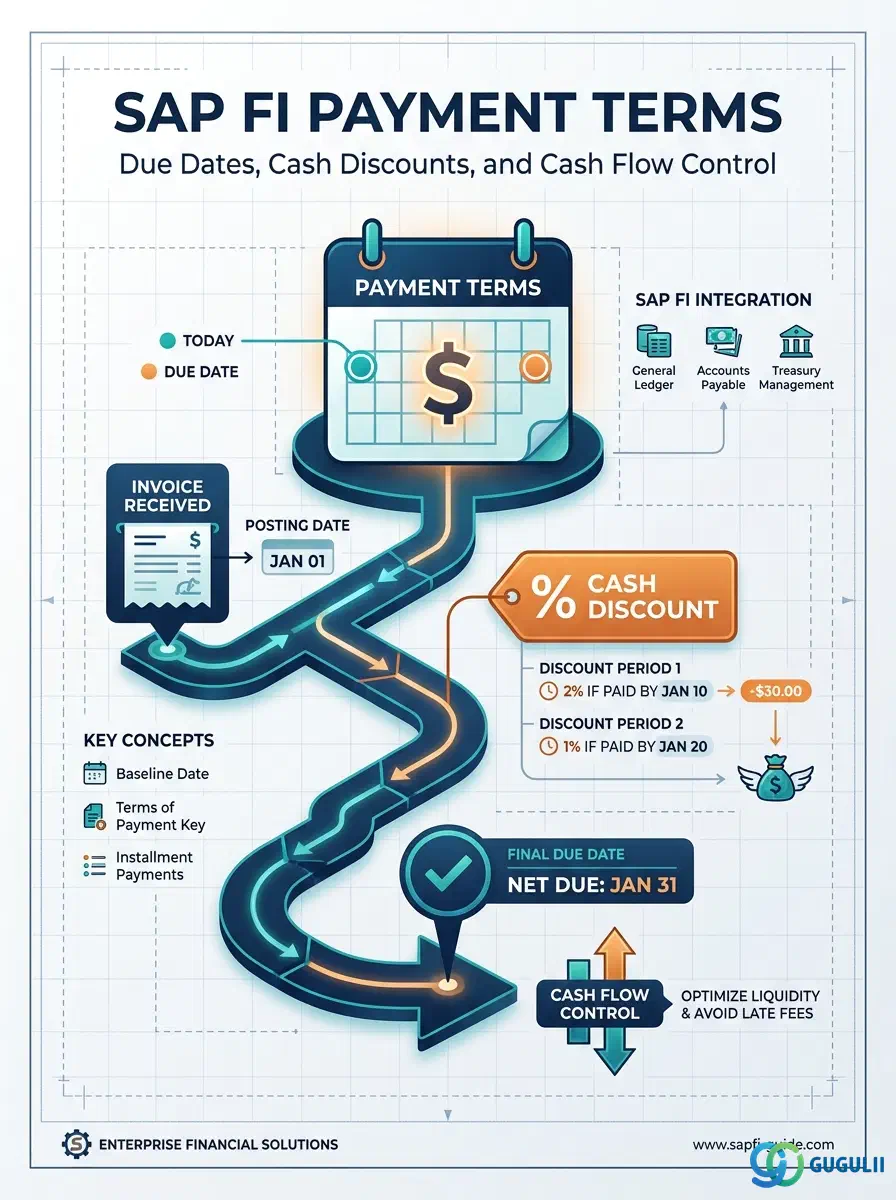
Payment Terms (支払条件) are the master data object that controls when invoices become due and what cash discount incentives are available for early payment. They translate commercial agreements (“2% 10 days, net 30”) into system-enforceable logic for baseline date calculation, due date determination, and discount eligibility. Every invoice in SAP FI — whether Accounts Payable or Accounts Receivable — references a payment term that determines when cash will leave or enter the company.
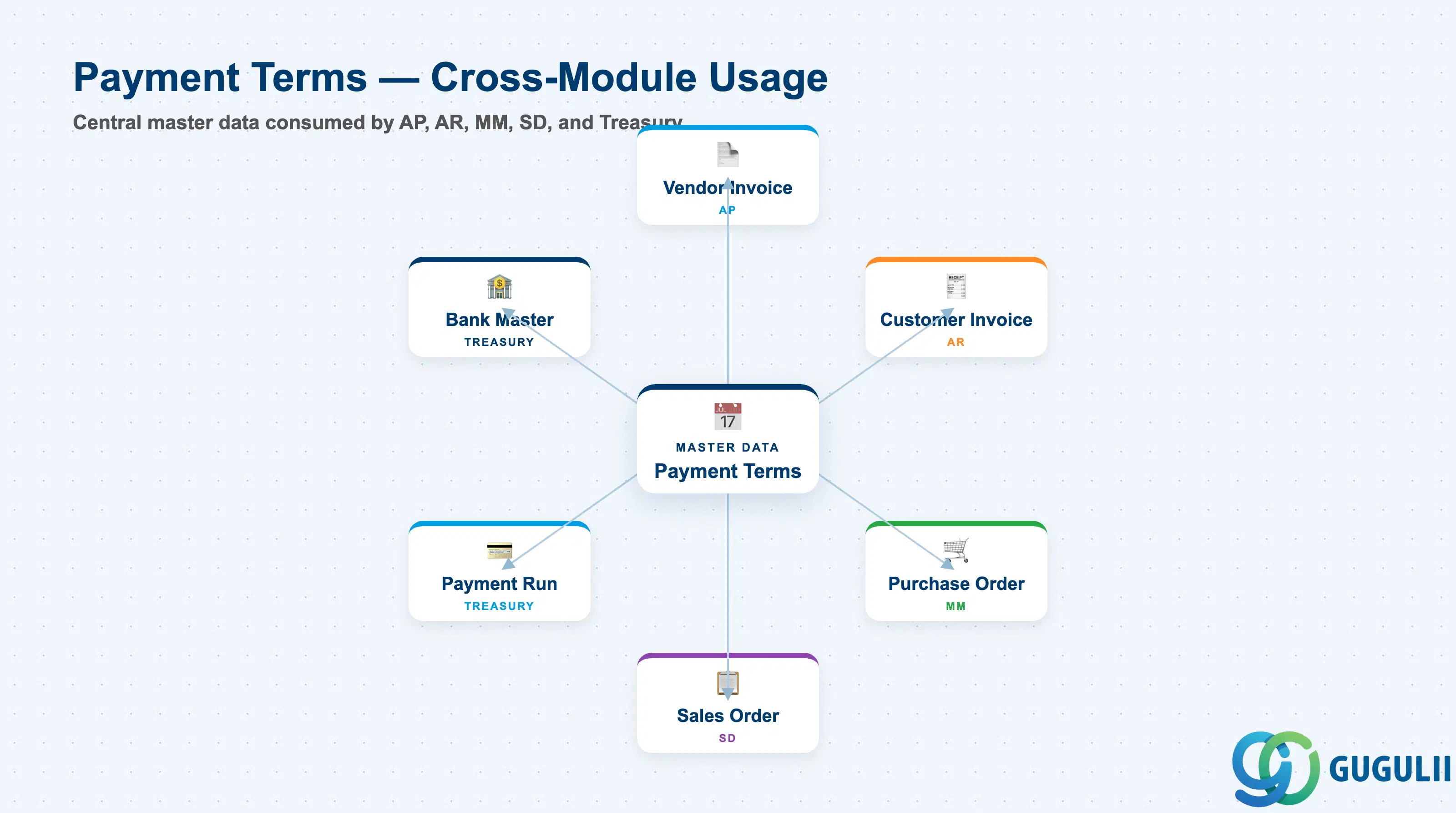
Payment Terms is a cross-module master data record that encodes the timing rules for invoice settlement. It sits at the intersection of commercial negotiation (contract terms), financial planning (cash flow forecasting), and operational execution (when to pay or collect).
| Aspect | Details |
|---|---|
| Role | Defines baseline date, net payment days, cash discount percentages, discount periods, and installment splits for invoices |
| Modules using it | FI (AP/AR — primary owner), MM (default payment terms on Purchase Orders), SD (default payment terms on Sales Orders), TR-CM (cash management and payment execution) |
| Transactions | OBB8 (Configure payment terms) / FB60 (Enter vendor invoice) / FB70 (Enter customer invoice) / F110 (Automatic payment program) |
| Key Tables | T052 (Payment Terms master) / T052E (Payment terms text) / BSEG (Accounting document line items — ZTERM field) / LFA1 (Vendor master general — default payment terms) / KNA1 (Customer master general — default payment terms) |
| S/4HANA note | Payment Terms data structure unchanged from ECC. Payment block key logic and cash discount account determination remain in Customizing. Fiori app “Manage Payment Terms” provides a modern UI wrapper over OBB8 but does not change the underlying T052 logic. |
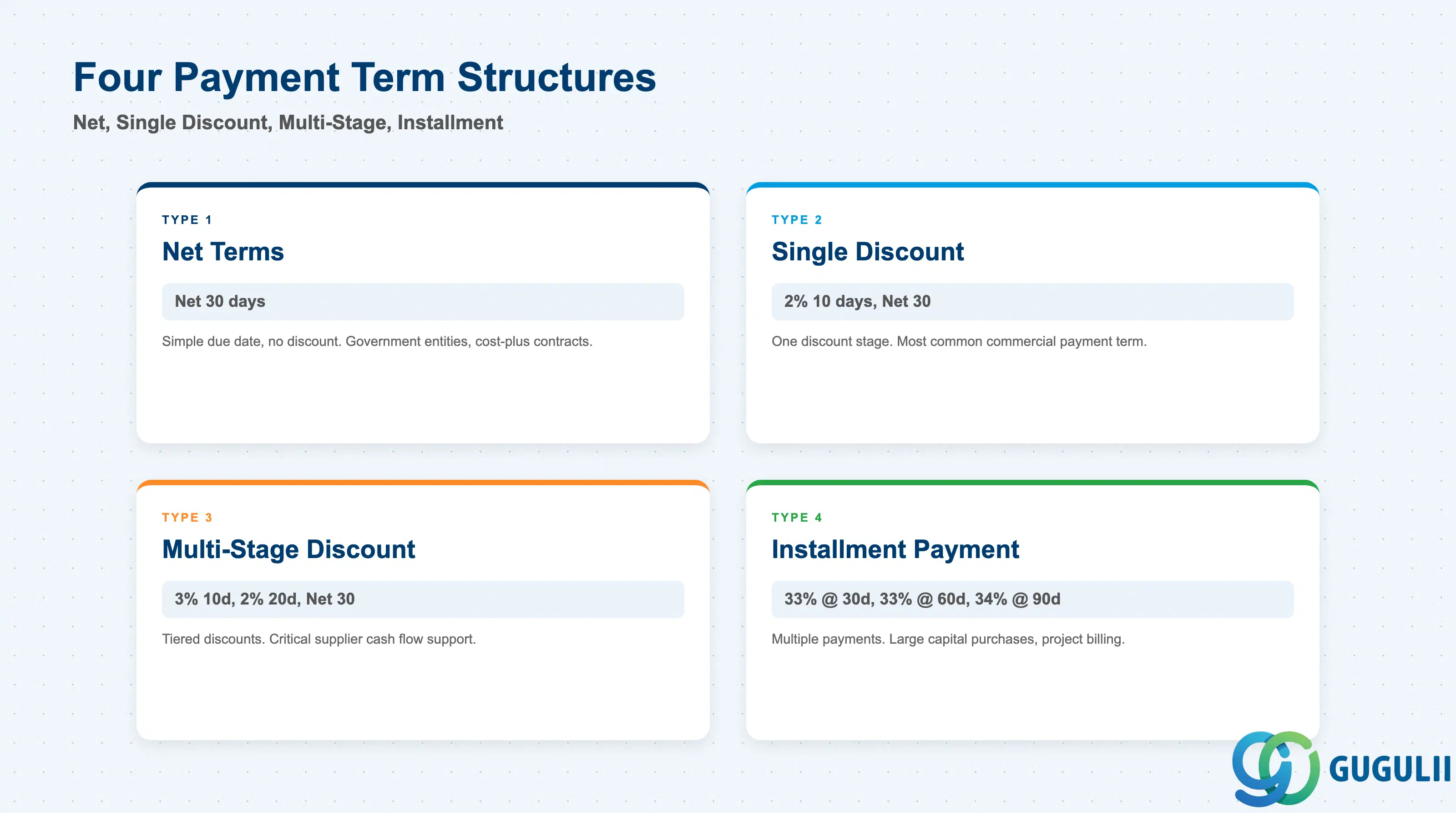
Payment Terms types differ by discount structure and installment options. Selecting the wrong type distorts cash flow forecasting and early payment decisions.
| Payment Structure | Example Key | Use Case | Key Behavior |
|---|---|---|---|
| Net Terms | 0001 | No early payment incentive; simple due date (e.g., Net 30 days) | Baseline date + net days = due date. No discount offered. Most common for government entities and cost-plus contracts. |
| Single Cash Discount | 0002 | One discount stage (e.g., 2% 10 days, Net 30) | Discount available if paid within discount period. Most common commercial payment term. Discount account must be configured in FI-GL. |
| Multi-Stage Discount | 0003 | Tiered discounts (e.g., 3% 10 days, 2% 20 days, Net 30) | Sliding discount scale. Vendor incentivizes very early payment with higher discount. Uncommon but useful for critical supplier cash flow support. |
| Installment Payment | 0004 | Multiple payments over time (e.g., 33% at 30 days, 33% at 60 days, 34% at 90 days) | Splits a single invoice into multiple due dates and payment amounts. Used for large capital purchases or project-based billing. Requires separate configuration of installment percentages and periods. |
Design principle: Payment Terms must be decided during contract negotiation and blueprint. Cash discount percentage directly affects cash flow and working capital metrics; installment payment terms require CFO approval and impact liquidity planning.
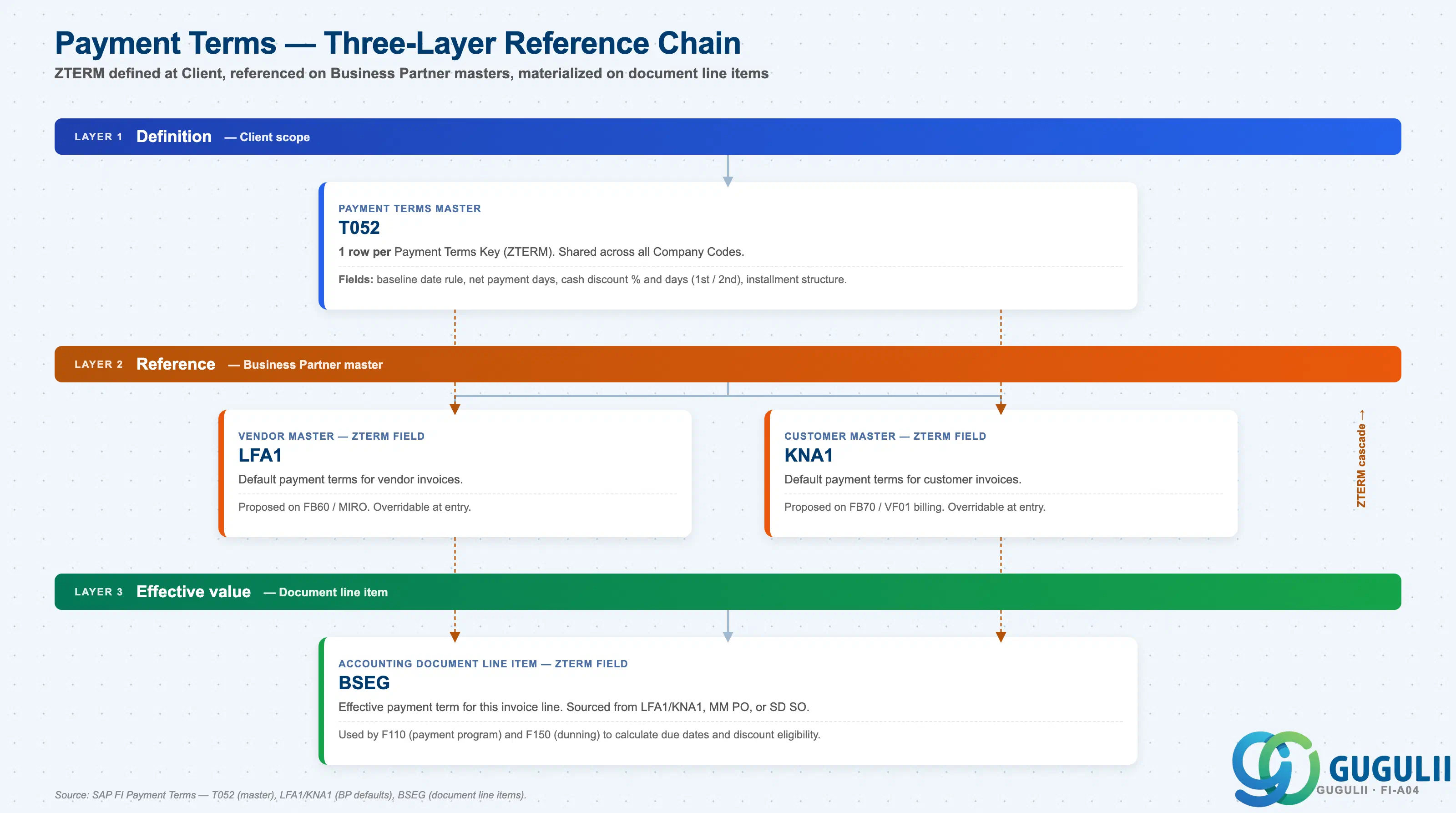
Payment Terms are defined once at Client level (T052), referenced as defaults on Business Partner masters (LFA1, KNA1), and stored as effective values on document line items (BSEG). The ZTERM key flows from definition → reference → effective value.
Layer 1 — Definition (Client scope)
   │
   └── T052 — Payment Terms Master
          One row per Payment Terms Key (ZTERM).
          Fields: baseline date rule, net payment days,
                  cash discount % and days (1st / 2nd),
                  installment structure.
          Shared across all Company Codes.

Layer 2 — Reference (Business Partner master)
   │
   ├── LFA1 — Vendor Master
   │      ZTERM field = default payment terms for vendor invoices.
   │      Proposed on FB60 / MIRO. Overridable at entry.
   │
   └── KNA1 — Customer Master
          ZTERM field = default payment terms for customer invoices.
          Proposed on FB70 / VF01 billing. Overridable at entry.

Layer 3 — Effective value (Document line item)
   │
   └── BSEG — Accounting Document Line Item
          ZTERM field = effective payment term for this invoice line.
          Sourced from LFA1/KNA1 default, MM Purchase Order, or SD Sales Order;
          overridable at entry.
          Used by F110 (payment program) and F150 (dunning)
to calculate due dates and discount eligibility.| Layer | Object | Table | Scope | Notes |
|---|---|---|---|---|
| Definition | Payment Terms Master | T052 | Client | One row per ZTERM key. Defines baseline rule, net days, discount %, installments. Shared across all Company Codes. |
| Reference | Vendor Master | LFA1 | Vendor master | ZTERM field = default payment terms for vendor invoices. Proposed on FB60 / MIRO. |
| Reference | Customer Master | KNA1 | Customer master | ZTERM field = default payment terms for customer invoices. Proposed on FB70 / VF01. |
| Effective value | Accounting Doc Line Item | BSEG | Per document line | ZTERM field stores the effective payment term per invoice line. Used by F110 and F150. |
Key design decision: For global projects with multiple Company Codes, decide whether to maintain a single shared set of payment terms at T052 (and manage differences via Business Partner defaults) or to create separate payment terms per country (e.g., NT30-US, NT30-JP). Shared terms simplify global reporting; localized terms give local finance teams more flexibility for country-specific cash discount practices.
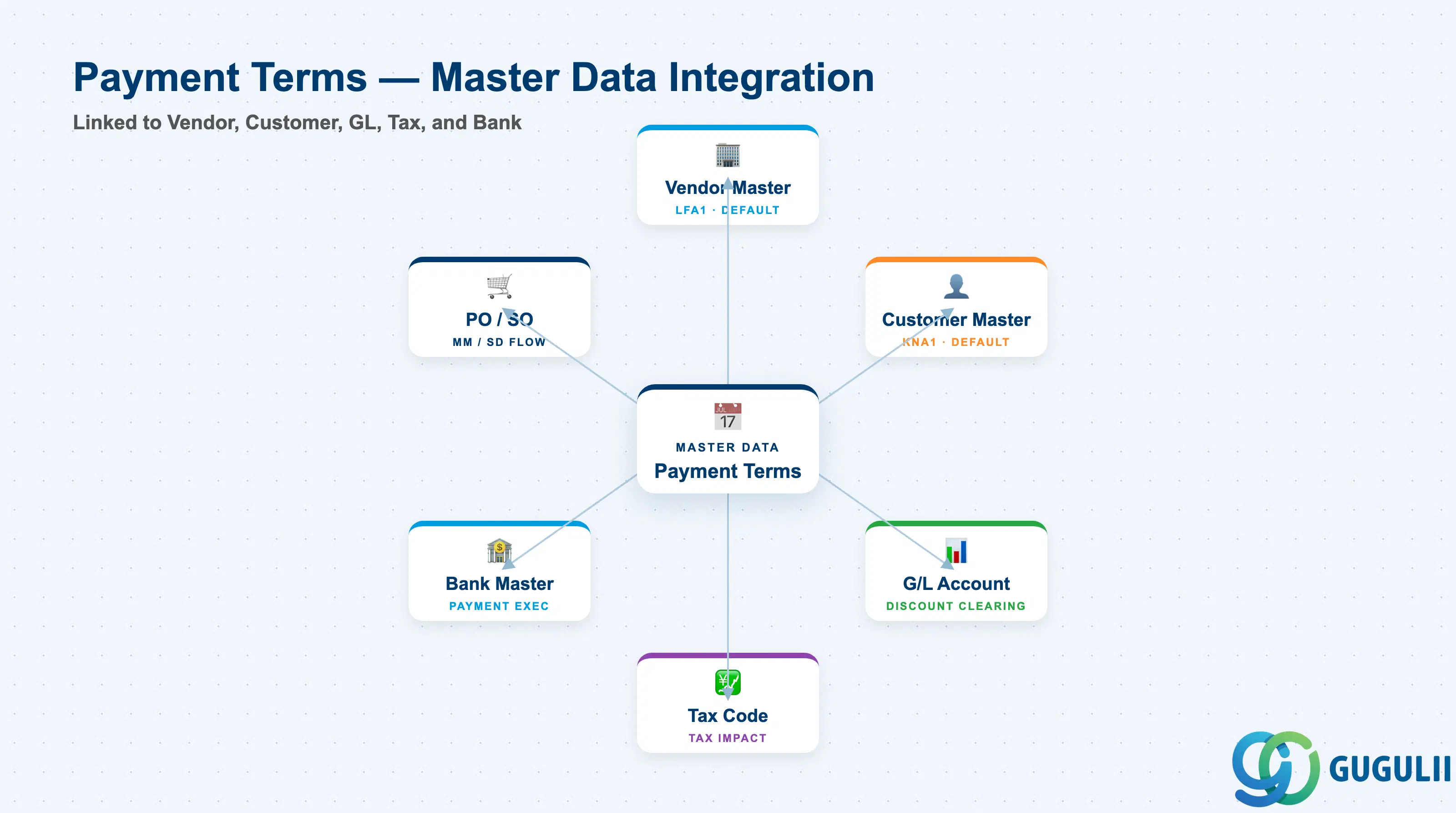
Payment Terms do not operate in isolation. They are consumed by AP/AR posting logic, payment execution, and cash flow forecasting.
| Object | Relationship | Practical Notes |
|---|---|---|
| Vendor Master (LFA1) | Default payment terms for vendor | Payment terms in Vendor Master General Data are proposed on all vendor invoices (FB60, MIRO). Buyer can override at PO entry (ME21N), and invoice verifier can override at invoice posting. |
| Customer Master (KNA1) | Default payment terms for customer | Payment terms in Customer Master General Data are proposed on all customer invoices (FB70) and SD billing documents (VF01). Sales rep can override in Sales Order (VA01). |
| G/L Account (Cash Discount) | Discount accounts for clearing | Cash discount taken is posted to a separate G/L account (typically 6xxxx expense for AP discount taken, 4xxxx revenue reduction for AR discount granted). Must be configured in OBB8 or posting key customizing. |
| Tax Code | Cash discount tax implications | In Japan, cash discount affects consumption tax calculation basis. Tax must be recalculated when discount is taken. Configure via FI-GL tax code settings (FTXP). |
| Bank Master / House Bank | Payment execution timing | Payment program (F110) uses payment terms to calculate payment run date = due date − clearing days. House Bank clearing days (float) are added to the payment term due date to determine when to release the payment file. |
| Purchase Order (MM) | Payment terms on PO | Payment terms are proposed from Vendor Master to PO (ME21N). PO payment terms flow to the invoice (MIRO) and override the Vendor Master default if different. |
| Sales Order (SD) | Payment terms on SO | Payment terms are proposed from Customer Master to SO (VA01). SO payment terms flow to the billing document (VF01) and AR invoice (FB70). |
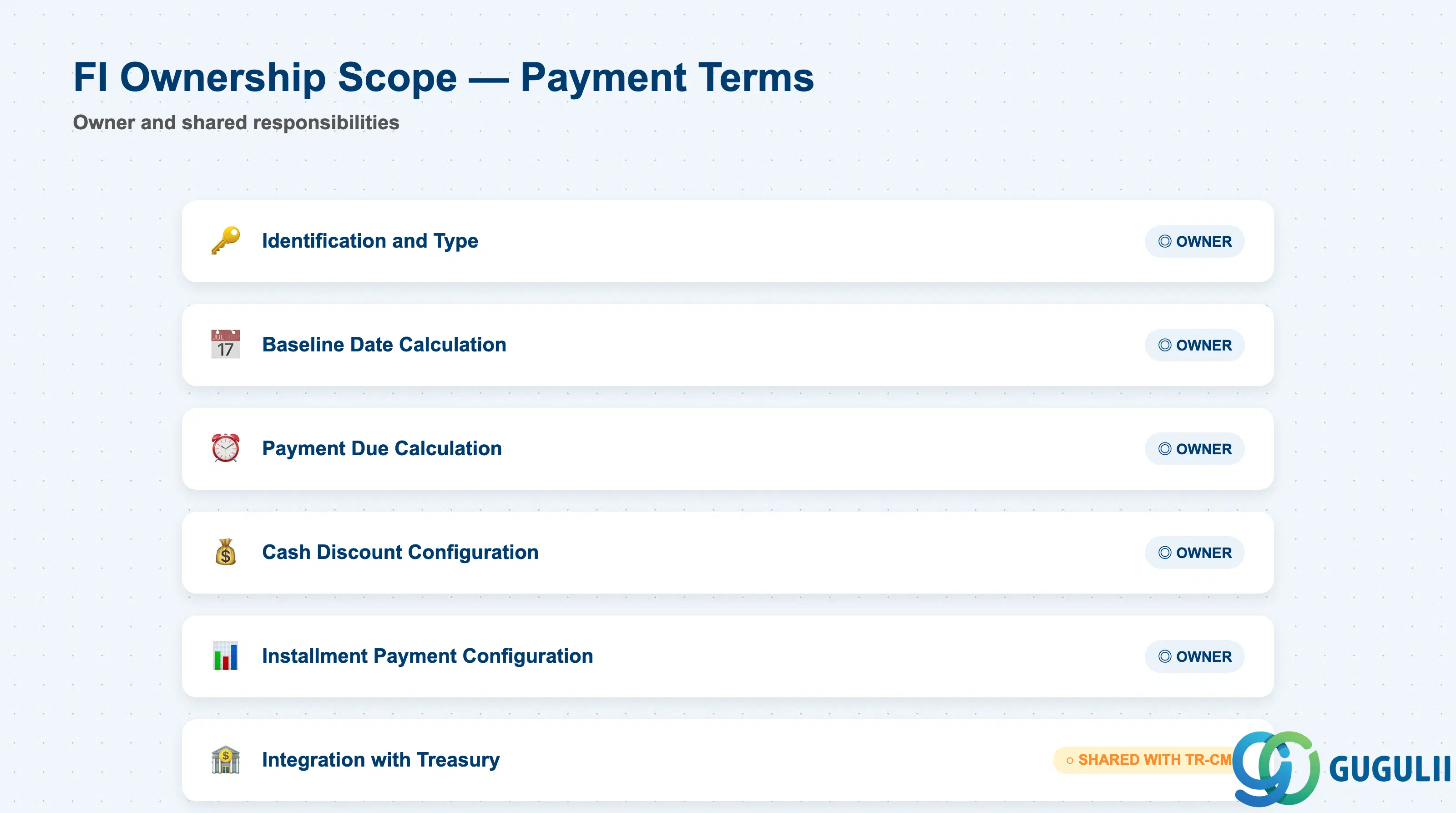
| Data Section | FI Involvement | Notes |
|---|---|---|
| Identification and Type | ◎ Owner | Payment terms key, description, account type restrictions |
| Baseline Date Calculation | ◎ Owner | Which date starts the payment period (document date, posting date, entry date, fixed day) |
| Payment Due Calculation | ◎ Owner | Number of net payment days, day limits |
| Cash Discount Configuration | ◎ Owner | Discount percentages and discount periods (up to 3 stages) |
| Installment Payment Configuration | ◎ Owner | Installment splits for multi-payment invoices |
| Integration with Treasury | ○ Shared with TR-CM | Payment block keys, payment method proposals for payment program (F110) |
Legend: ◎ = Owner / Critical, ○ = Direct involvement
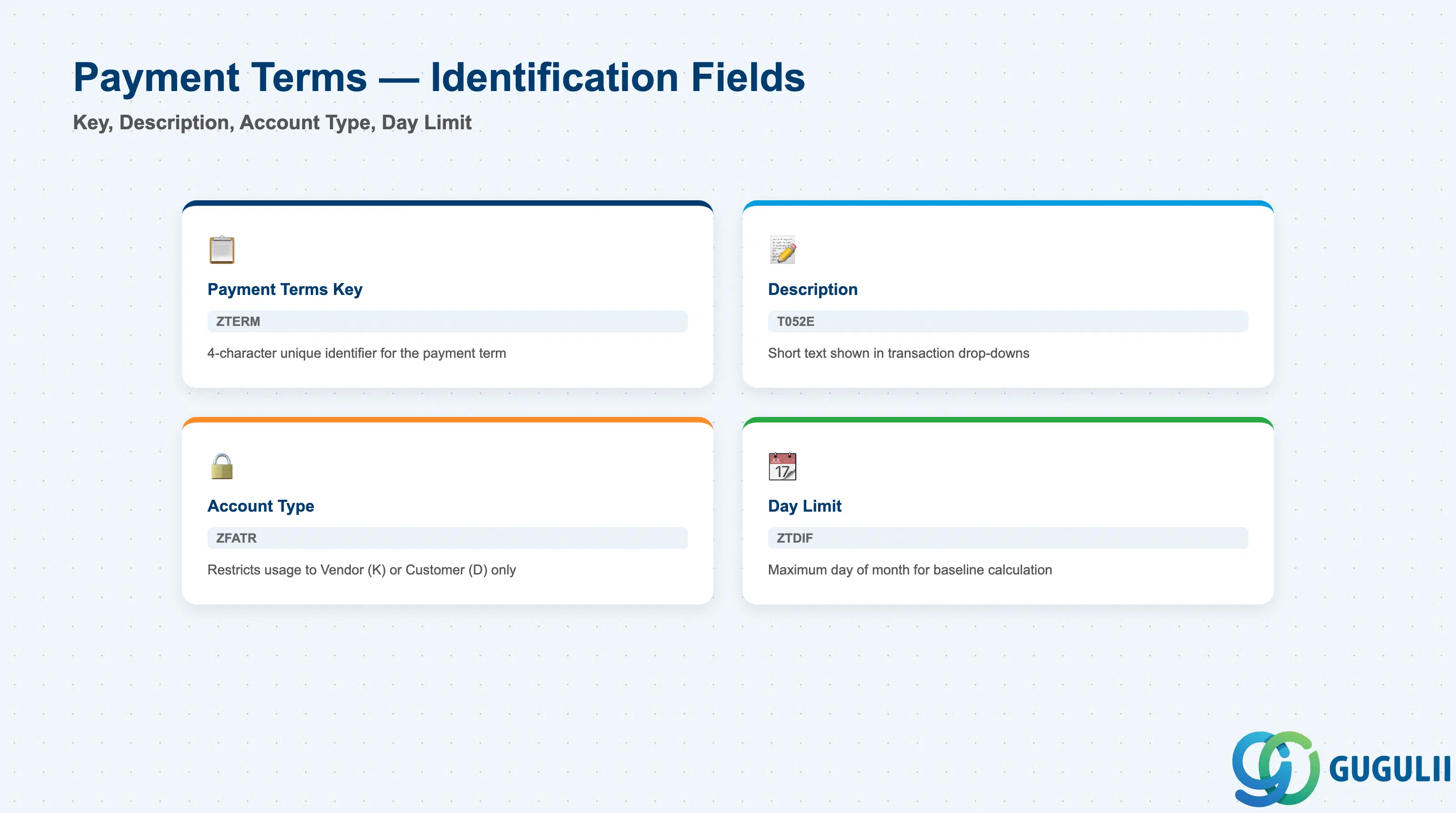
Identification fields control the scope and usage restrictions of the payment term.
| Field | Description | Practical Usage |
|---|---|---|
| Payment Terms Key (ZTERM) | 4-character alphanumeric code | The unique identifier for the payment term. Naming convention matters — many projects use prefix to indicate discount structure (e.g., N030 = Net 30, D210 = 2% 10 days net 30). Non-intuitive codes (0001, 0002) require constant master data lookups and increase data entry error rates. |
| Payment Terms Description | Short text description | Displayed in transaction drop-downs (FB60, ME21N). Must be concise and unambiguous. Example: “2% 10 days, Net 30” beats “Standard Payment Terms” because the user can verify correctness without opening OBB8. Multi-language support via T052E table. |
| Account Type (ZFATR) | Restricts payment term usage to specific account types | Blank = all account types allowed. K = Vendor only, D = Customer only. Use to prevent accidental misuse — e.g., vendor-favorable discount terms (3% 10 days) should be restricted to account type K to block use on customer invoices. |
| Day Limit (ZTDIF) | Maximum day of month for calculation | When set, prevents baseline date from exceeding this day of the month. Example: day limit 15 with baseline date June 20 shifts baseline to July 15. Used for month-end payment consolidation in treasury operations. Rarely configured outside of utility and telecom industries. |
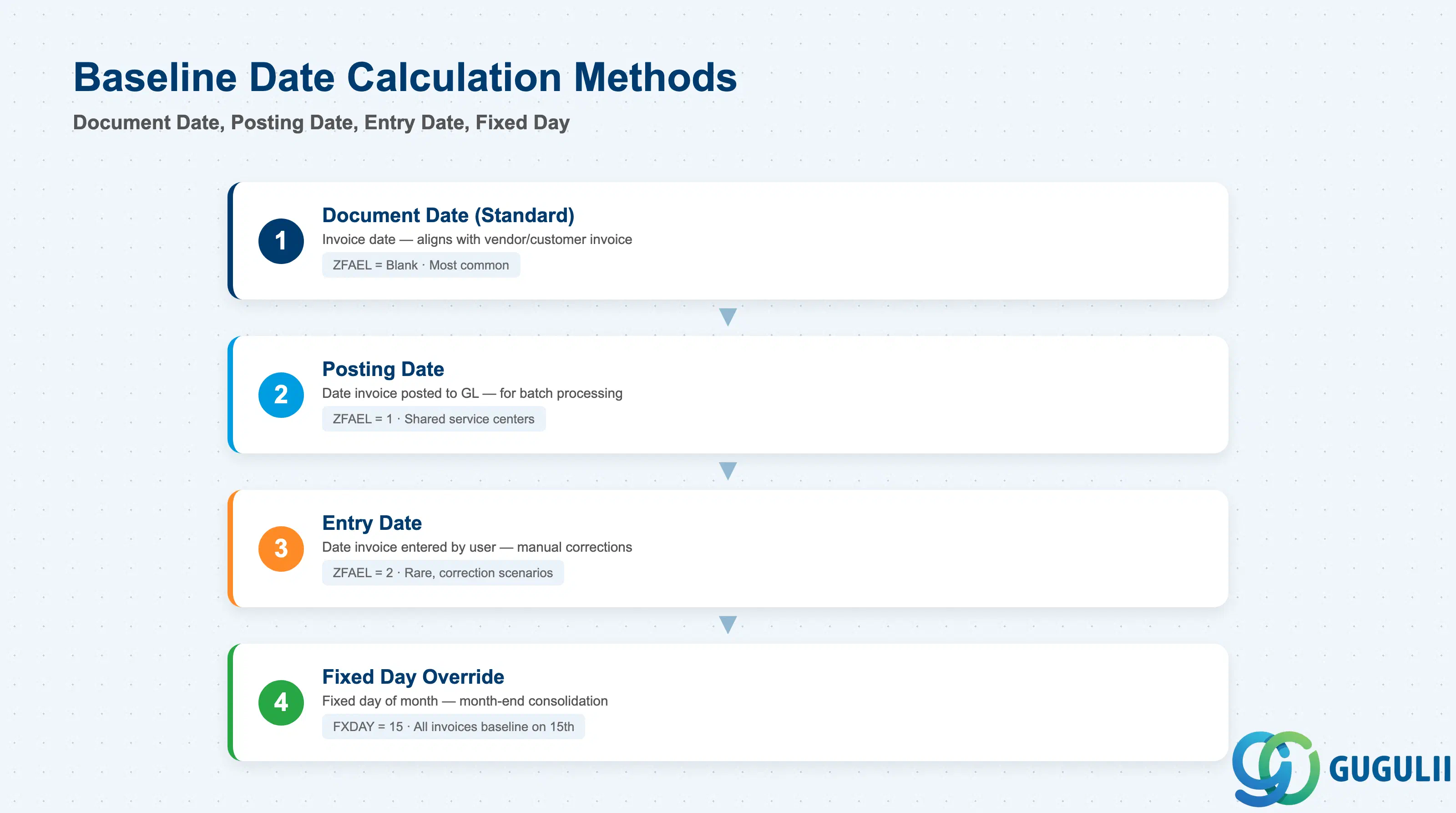
The baseline date is the starting point for all payment term calculations. Misunderstanding this field causes due date mismatches between AP/AR and external parties.
| Field | Description | Practical Usage |
|---|---|---|
| Baseline Date Rule (ZFAEL) | Determines which date starts the payment period | Blank = Document Date. 1 = Posting Date. 2 = Entry Date. 3 = No payment term (used for statistical postings). Document Date is the standard choice — aligns with invoice date on vendor/customer invoice, ensuring external and internal due date calculations match. Posting Date is used when invoices are received in batch weeks after invoice date (common in shared service centers). Entry Date is rare — only for manual correction scenarios. |
| Fixed Day (FXDAY) | Fixed day of the month for baseline | When populated, overrides the Document/Posting/Entry date and sets the baseline to this day of the month. Example: Fixed Day = 15 means all invoices in June have baseline date June 15, regardless of document date. Used for month-end billing consolidation in subscription and utility billing. |
| Additional Months (ZVABL) | Number of months to add to baseline date before applying net days | Shifts the baseline date forward by N months. Example: Additional Months = 1, Net Days = 30, Invoice Date = June 10 → Baseline = July 10 → Due Date = August 9. Used for extended payment terms negotiated with strategic vendors (common in automotive and aerospace where payment terms exceed 90 days). |
| Valuation Date Rule | Links to valuation date for foreign currency invoices | Determines whether FX rate is locked at baseline date or due date. Impacts FX gain/loss calculation timing. Consult with FI-GL team before setting — incorrect configuration causes audit findings on FX valuation. |
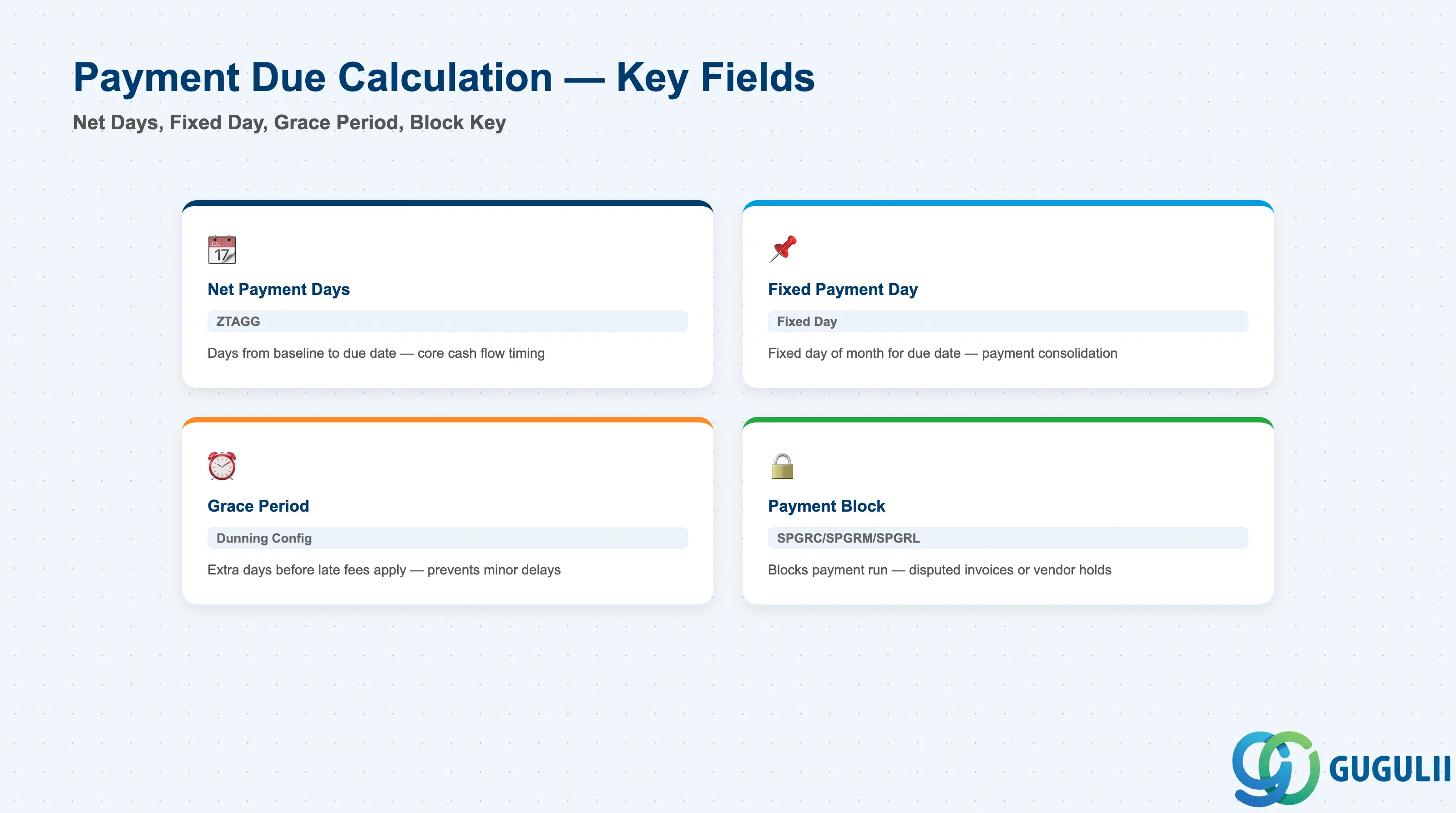
Due date calculation controls when the invoice must be paid (for AP) or collected (for AR). This section directly impacts cash flow timing and working capital.
| Field | Description | Practical Usage |
|---|---|---|
| Net Payment Days (ZTAGG) | Number of days from baseline date to due date | The core field. Example: Net Payment Days = 30, Baseline Date = June 10 → Due Date = July 10. SAP calculates due date as Baseline Date + Net Payment Days, not Baseline Date + Net Payment Days − 1 (common misconception). Verify calculation in DEV during unit testing with actual invoices. |
| Fixed Payment Day | Fixed day of month for payment due | Overrides net payment days calculation. Example: Fixed Payment Day = 25 means all invoices are due on the 25th of the month following baseline date. Used in industries with consolidated payment runs (e.g., construction subcontractors paid on the 25th regardless of invoice date). Conflicts with cash discount logic — rarely used in discount-enabled payment terms. |
| Grace Period | Additional days after due date before late fees apply | Not a standard T052 field — configured in Customizing for dunning (F150) and interest calculation (OBB1). Prevents late fees for minor delays. Example: Grace Period = 3 days means invoices due July 10 do not trigger dunning until July 13. Common in retail and distribution industries. |
| Payment Block (SPGRC, SPGRM, SPGRL, etc.) | Block key for payment runs | Technically stored at document level (BSIK/BSAK), but payment term configuration can propose a default block key. A = Blocked, blank = Payable. Used for disputed invoices or vendor holds. Payment program (F110) skips blocked invoices. Must be manually removed (via FB02 or MIRO) before payment can proceed. |
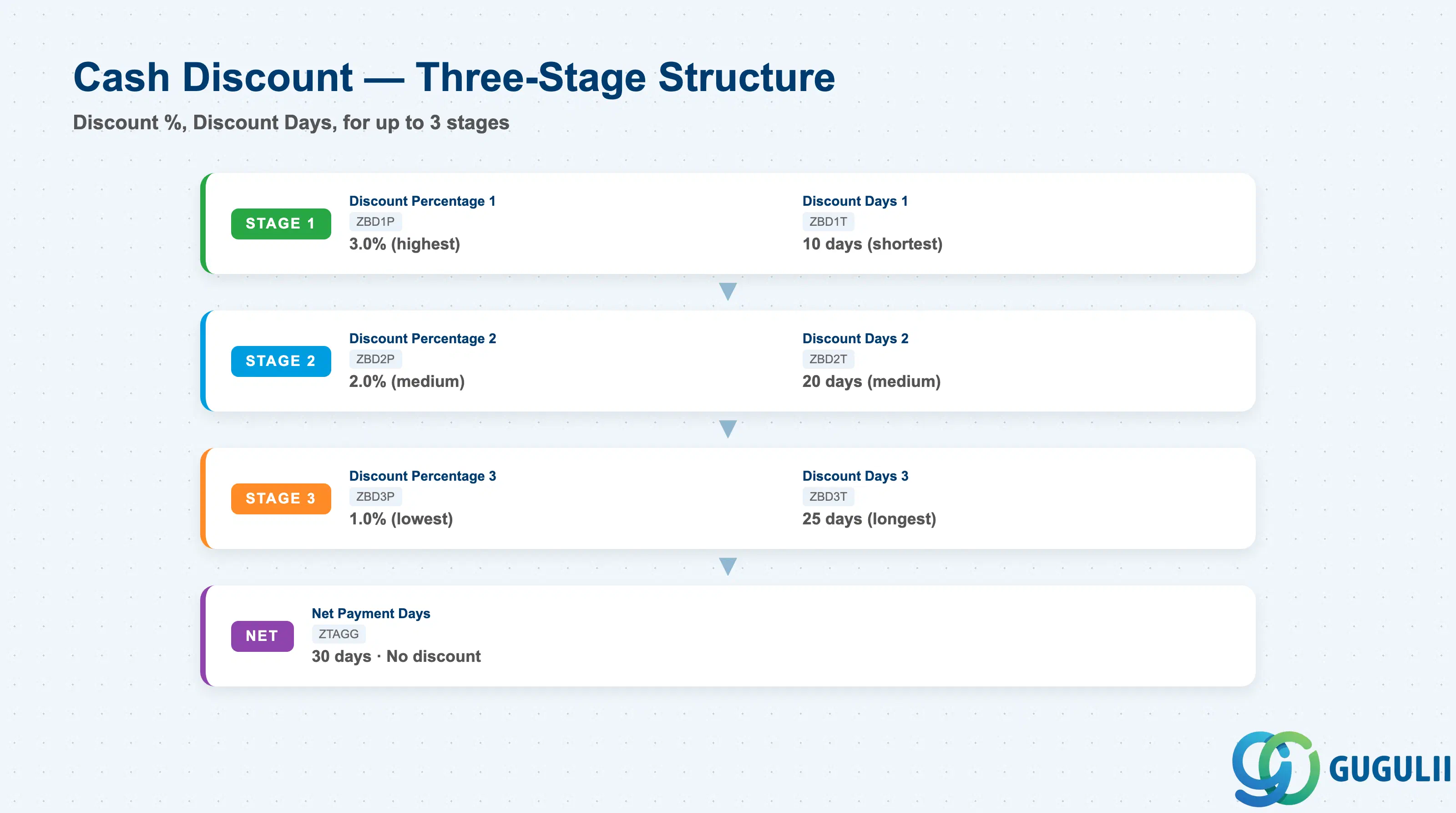
Cash discount configuration defines the early payment incentive structure. Errors here directly impact P&L because discount taken/granted posts to expense/revenue accounts.
| Field | Description | Practical Usage |
|---|---|---|
| Discount Percentage 1 (ZBD1P) | First discount percentage | Example: 2.0 = 2% discount if paid within Discount Days 1. Stored as a decimal (2.0, not 0.02). Most common configuration: Single discount stage (Discount 1 populated, Discount 2/3 blank). Multi-stage discounts are rare outside of high-value capital goods. |
| Discount Days 1 (ZBD1T) | Number of days for first discount eligibility | Example: Discount Days 1 = 10, Baseline Date = June 10 → Discount expires June 20. Payment program (F110) automatically calculates discount if payment date ≤ expiration date. Critical for cash flow optimization: Treasury teams often target payment on the last day of the discount period to maximize float. |
| Discount Percentage 2 (ZBD2P) | Second discount percentage (lower than Discount 1) | Example: Discount 1 = 3%, Discount 2 = 2%. Used for tiered early payment incentives. Discount 2 eligibility starts when Discount 1 expires. Uncommon — adds complexity to AP/AR processes without material benefit. |
| Discount Days 2 (ZBD2T) | Number of days for second discount eligibility | Example: Discount Days 2 = 20. Discount 2 expires 20 days after baseline. Must be greater than Discount Days 1 or system rejects the configuration. |
| Discount Percentage 3 (ZBD3P) | Third discount percentage (lower than Discount 2) | Rarely used. Only configured for exceptional vendor relationships or government incentive programs. Three-stage discounts exceed the complexity threshold for manual AP invoice processing — most AP teams request removal during hypercare. |
| Discount Days 3 (ZBD3T) | Number of days for third discount eligibility | Must be greater than Discount Days 2. System enforces ZBD1T < ZBD2T < ZBD3T < ZTAGG (net payment days). |
| Discount Base | Net amount or gross amount for discount calculation | Configured at Company Code level (OBB8 → Discount Base), not at payment term level. Net = Discount applies to net invoice amount (excludes tax). Gross = Discount applies to gross invoice amount (includes tax). Japan standard is Net — consumption tax is not discounted. Consult with FI and tax advisors before changing. |
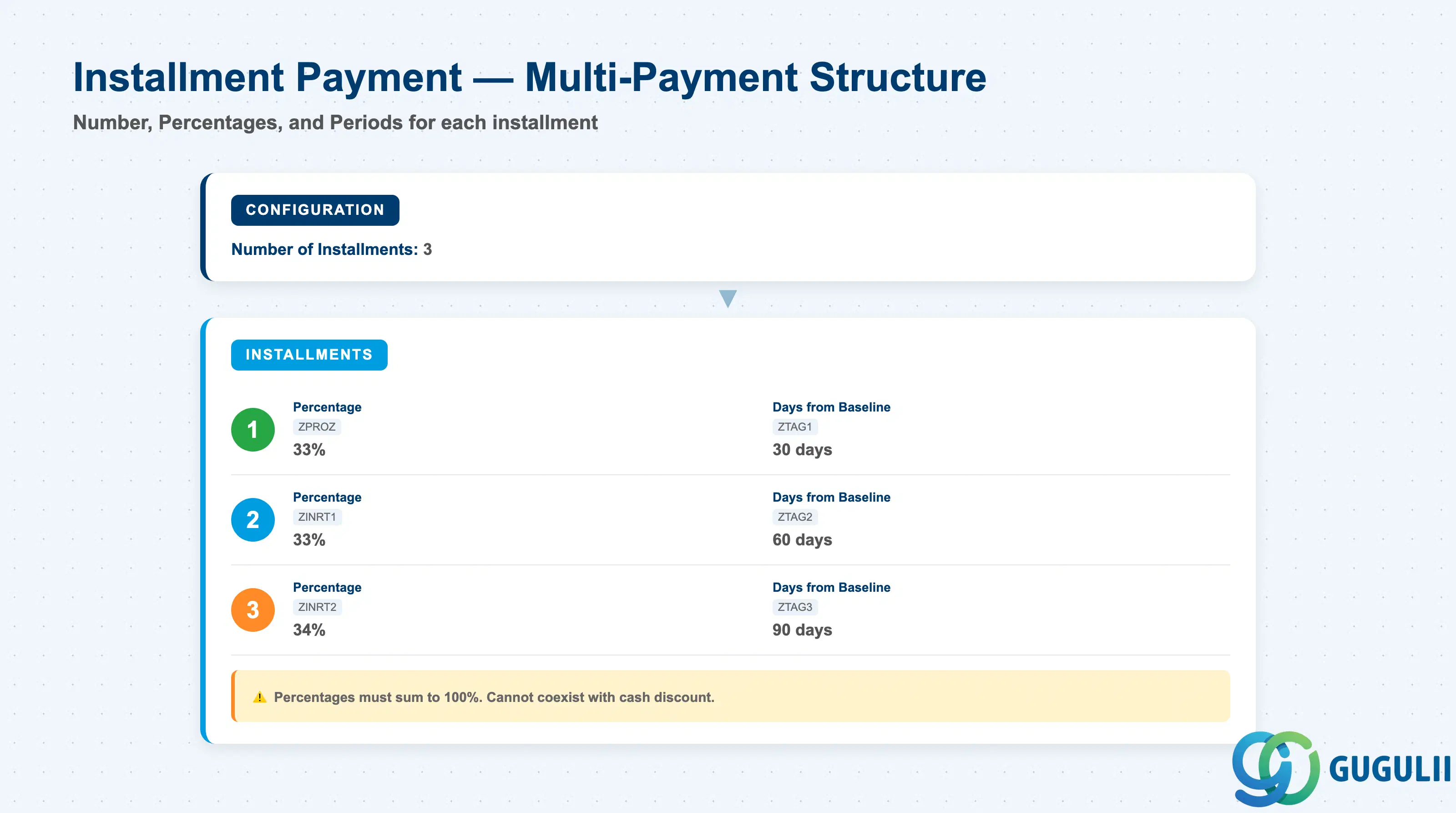
Installment payment configuration splits a single invoice into multiple payment due dates and amounts. This is an advanced feature used for capital purchases, project billing, and milestone-based contracts.
| Field | Description | Practical Usage |
|---|---|---|
| Number of Installments | Total number of payment splits | Example: 3 installments splits the invoice into 3 separate payment items. System creates separate line items in BSEG for each installment. Maximum is typically 12 (configurable in T052 structure). Installment payment terms cannot coexist with cash discount — system blocks configuration if both are populated. |
| Installment Percentage 1/2/3 (ZPROZ, ZINRT1, ZINRT2) | Percentage split for each installment | Example: Installment 1 = 33%, Installment 2 = 33%, Installment 3 = 34%. Percentages must sum to 100%. System enforces this at configuration time (OBB8). Common error: Rounding causes 99.99% or 100.01% — SAP rejects. Use integer percentages only. |
| Installment Days 1/2/3 (ZTAG1, ZTAG2, ZTAG3) | Number of days from baseline for each installment due date | Example: Installment Days 1 = 30, Installment Days 2 = 60, Installment Days 3 = 90. Baseline Date = June 10 → Due Dates = July 10, Aug 9, Sep 8. Used for large capital asset purchases where vendor requires phased payment. Payment program (F110) treats each installment as a separate payment item. |
| Installment Payment Block | Block key for specific installments | Not a standard T052 field. Requires custom development or manual intervention at invoice posting (FB60 → Payment tab → Installment → Block individual installments). Used when specific milestones are not achieved and partial payment is withheld. |
| Split Payment | Alternative to installment payment | Split Payment (configured via SPLT payment term) allows the payer to specify the split at payment time, not at configuration time. Example: Pay 50% now, 50% in 30 days. More flexible than installment payment but requires manual entry at payment program (F110) or payment document posting (F-53). Rarely used outside of treasury operations. |
| ID | Category | Title |
|---|---|---|
| fi-001 | Overview | What is SAP FI? |
| ID | Category | Title |
|---|---|---|
| fi-a01 | Overview | SAP FI Master Data: Overview, Hierarchy & Relationships |
| fi-a02-01 | Master Data | SAP FI Material Master |
| fi-a03-01 | Master Data | SAP FI Chart of Accounts |
| fi-a03-02 | Master Data | SAP FI G/L Account |
| fi-a04-01 | Master Data | SAP FI Payment Terms 📍 |
| fi-a04-02 | Master Data | SAP FI Tax Code |
| fi-a06-01 | Master Data | SAP FI Bank Master |
| fi-a06-02 | Master Data | SAP FI House Bank |
| fi-a07-01 | Master Data | SAP FI Asset Class |
| fi-a07-02 | Master Data | SAP FI Depreciation Key |
| fi-a07-03 | Master Data | SAP FI Asset Master |
| ID | Category | Title |
|---|---|---|
| fi-b01 | Overview | SAP FI Transactions: Process Flow, Hierarchy & Relationships |