Title here
Summary here

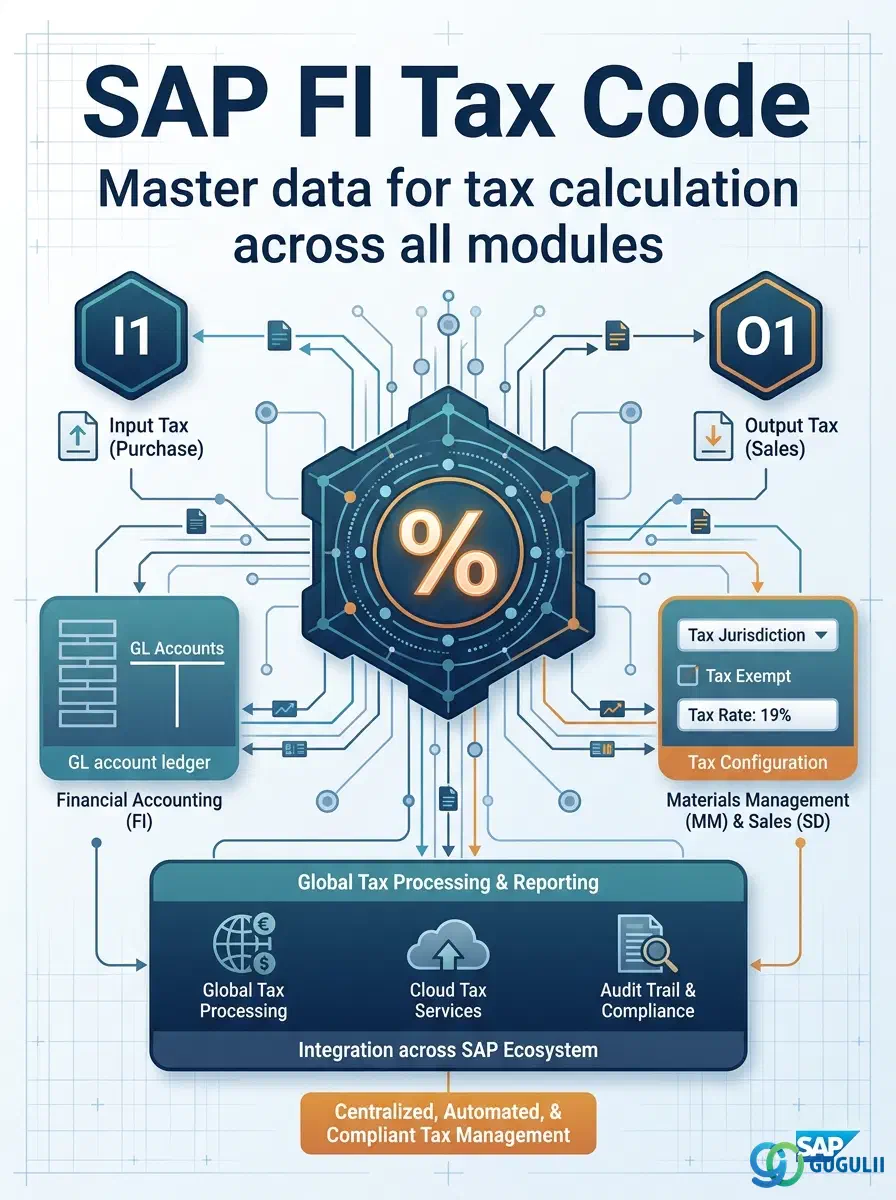
The Tax Code is the central configuration object that defines how SAP calculates, posts, and reports tax amounts for every transaction across FI, MM, SD, and other modules. It encapsulates the tax type (input, output, or non-deductible), the tax rate, the GL account assignment for tax clearing, and jurisdiction-specific rules. Every invoice, purchase order, and sales document references a Tax Code to automate tax computation and compliance reporting.
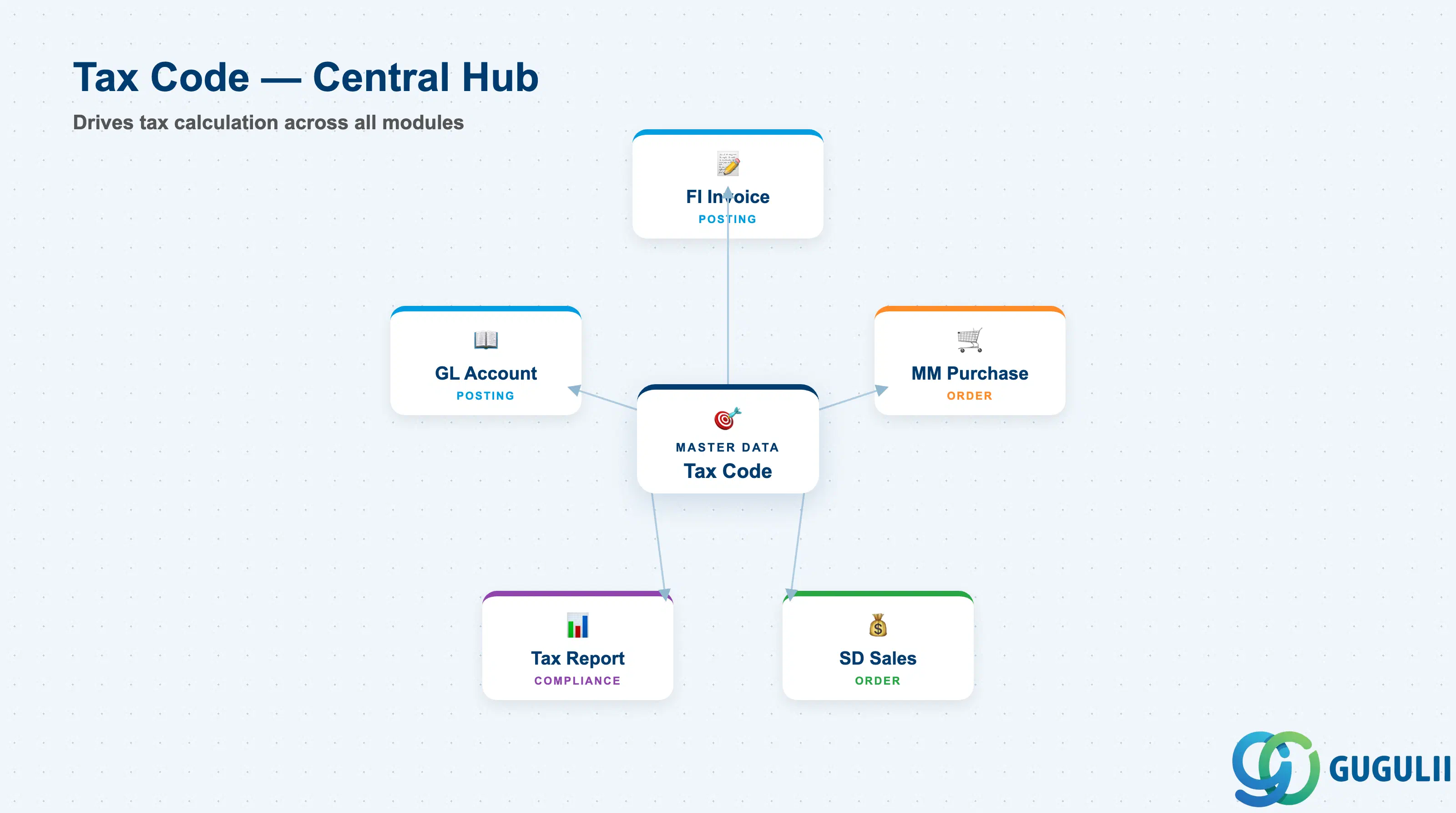
The Tax Code is a two-character configuration key that determines the tax treatment of a transaction. When entered on an invoice line, a PO item, or a sales document, the Tax Code triggers automatic calculation of the tax amount and posts it to the configured GL accounts for tax clearing and tax reporting.
| Aspect | Details |
|---|---|
| Role | Defines tax type, rate, GL account assignment, and calculation logic for tax transactions |
| Modules using it | FI (AP/AR posting — primary owner), MM (purchasing and vendor invoice), SD (customer billing), AA (asset acquisition), CO (internal orders with tax) |
| Transactions | FTXP (Tax Code configuration) / OB40 (Tax Code assignment to country) / OBCL (Tax posting settings) / S_ALR_87012357 (Tax reporting) |
| Key Tables | T007A (Tax Code master) / T007S (Tax Code for each country) / T007V (Tax rate and GL account assignment per tax type) |
| S/4HANA note | Tax Code configuration unchanged from ECC. Enhanced Fiori app “Manage Tax Codes” available for maintenance. Country-specific localization packages (Japan JCT, EU VAT, US Sales Tax) deliver pre-configured Tax Code templates. |
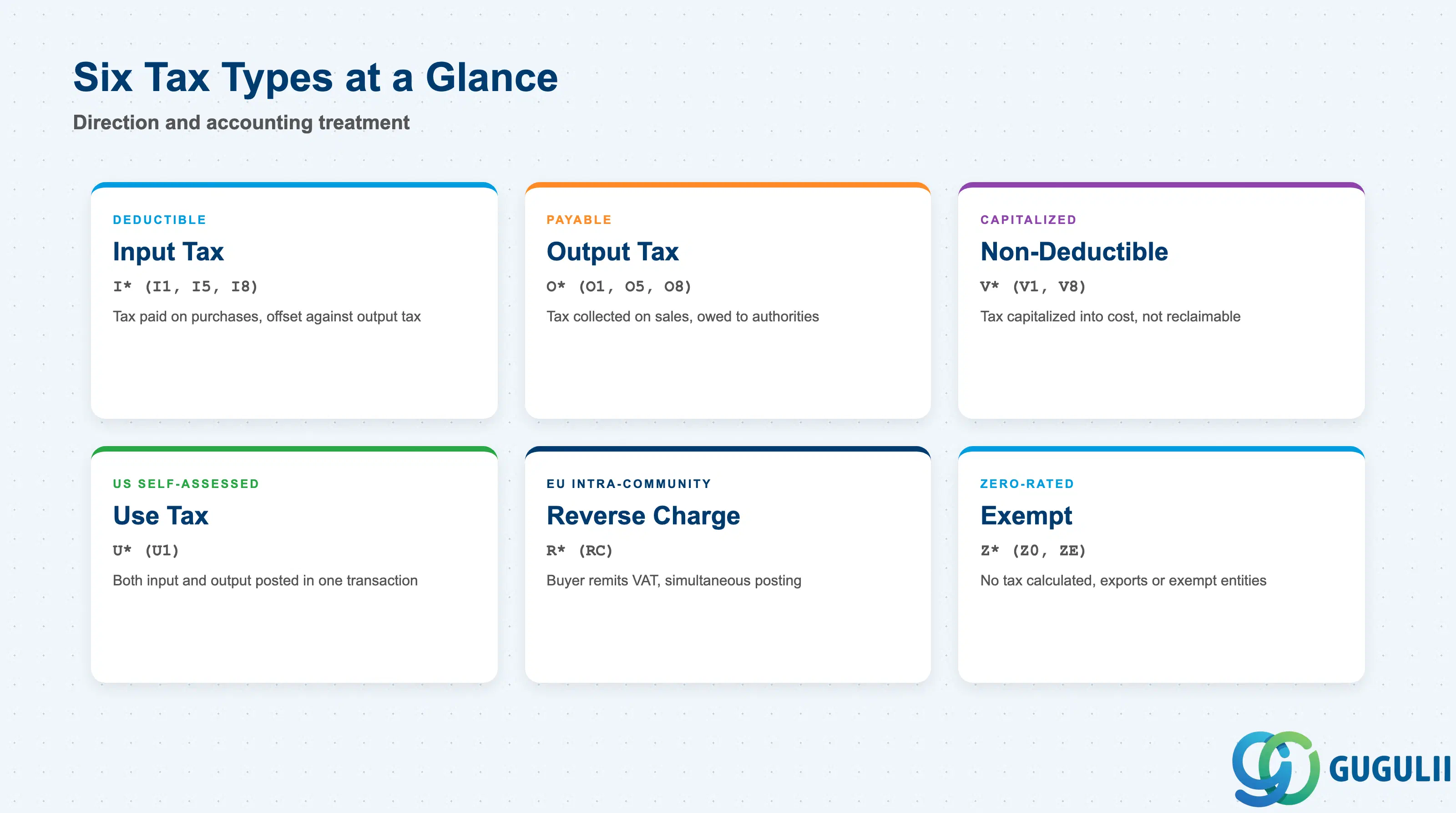
The Tax Code type determines the direction of tax flow and its accounting treatment. Selecting the wrong type causes incorrect GL posting and compliance reporting failures.
| Tax Type | Code Pattern | Use Case | Key Behavior |
|---|---|---|---|
| Input Tax (Deductible) | I* (e.g., I1, I5, I8) | Tax paid on purchases (VAT, consumption tax) that can be offset against output tax | Tax amount is posted to Input Tax Clearing account (e.g., 1171). Used in MM vendor invoices and FI AP posting. |
| Output Tax | O* (e.g., O1, O5, O8) | Tax collected on sales (VAT, sales tax) owed to tax authorities | Tax amount is posted to Output Tax Clearing account (e.g., 2171). Used in SD billing and FI AR posting. |
| Non-Deductible Input Tax | V* (e.g., V1, V8) | Tax paid on purchases that cannot be reclaimed (e.g., entertainment, employee benefits) | Tax amount is capitalized into the expense or asset cost. Not posted to Input Tax Clearing. Used for specific cost centers or asset classes subject to non-deductibility rules. |
| Use Tax | U* (e.g., U1) | Tax self-assessed on inter-state/cross-border purchases (US) | Both Input Tax and Output Tax postings generated in a single transaction. Used in US localization for purchases where supplier does not charge sales tax. |
| Reverse Charge | R* (e.g., RC) | EU intra-community purchases where buyer remits VAT | Output Tax and Input Tax posted simultaneously. Used for EU cross-border B2B transactions under reverse charge mechanism. |
| Exempt / Zero-Rated | Z* (e.g., Z0, ZE) | Transactions exempt from tax or zero-rated | No tax amount calculated. Used for exports, tax-exempt entities, or specific product categories (e.g., medical supplies). |
Design principle: Tax Code naming must follow a strict convention agreed during blueprint. Multi-country projects typically use a two-character scheme: first character = tax type (I/O/V/U/R/Z), second character = rate (0 = exempt, 1 = standard rate, 5 = reduced rate 5%, 8 = reduced rate 8%, etc.). This convention allows tax reporting by pattern matching.
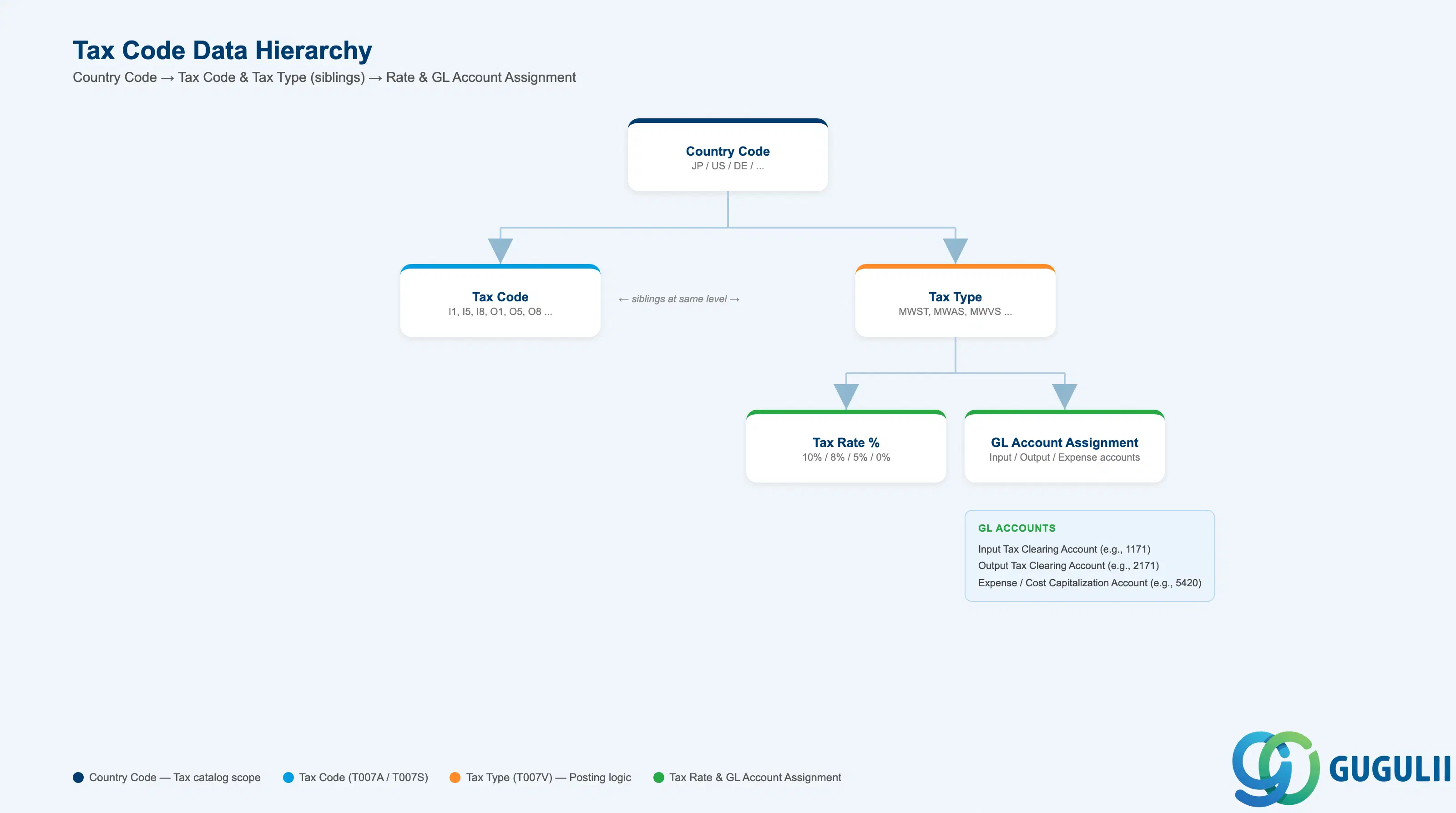
The Tax Code is defined at the Country Code level, not at Company Code or Plant. A single Tax Code can be used across multiple Company Codes within the same Country, but each Country maintains its own Tax Code catalog.
Country Code (JP, US, DE, ...)
   │
   ├── Tax Code (I1, I5, I8, O1, O5, O8, ...)
   │      Defined in FTXP per Country Code
   │      Tax Description, Tax Type, Calculation Procedure
   │
   └── Tax Type (MWST, MWAS, MWVS, ...)
          │
          ├── Tax Rate % (10%, 8%, 5%, 0%)
          │      Defined in T007V per Tax Type
          │
          └── GL Account Assignment
                 Input Tax Clearing Account (e.g., 1171)
                 Output Tax Clearing Account (e.g., 2171)
Expense/Cost Capitalization Account (for Non-Deductible Tax)| Org Level | Table | Primary Fields | Notes |
|---|---|---|---|
| Country Code | T005 | Country Key (JP, US, DE, …) | Tax Codes are country-specific. One Country can have 50+ Tax Codes covering all rate combinations and tax types. |
| Tax Code | T007A / T007S | Tax Code (2-char), Tax Description, Country Code | One Tax Code per rate and type combination (e.g., I1 = Input Tax 10%, I8 = Input Tax 8%, O1 = Output Tax 10%). |
| Tax Type | T007V | Tax Type (MWST, MWAS, …), Tax Rate %, GL Account Assignment | Each Tax Code references one or more Tax Types. Tax Type drives the posting logic (Input Tax Clearing, Output Tax Clearing, or Expense Capitalization). |
Key design decision: For global projects with multiple countries, each country requires its own Tax Code catalog. Japan uses I1/I8/I5 for consumption tax (10%/8%/5%), while Germany uses V0/V1/V2 for VAT (0%/7%/19%). Establish a global naming convention early to prevent conflicts and confusion in multi-country reporting.
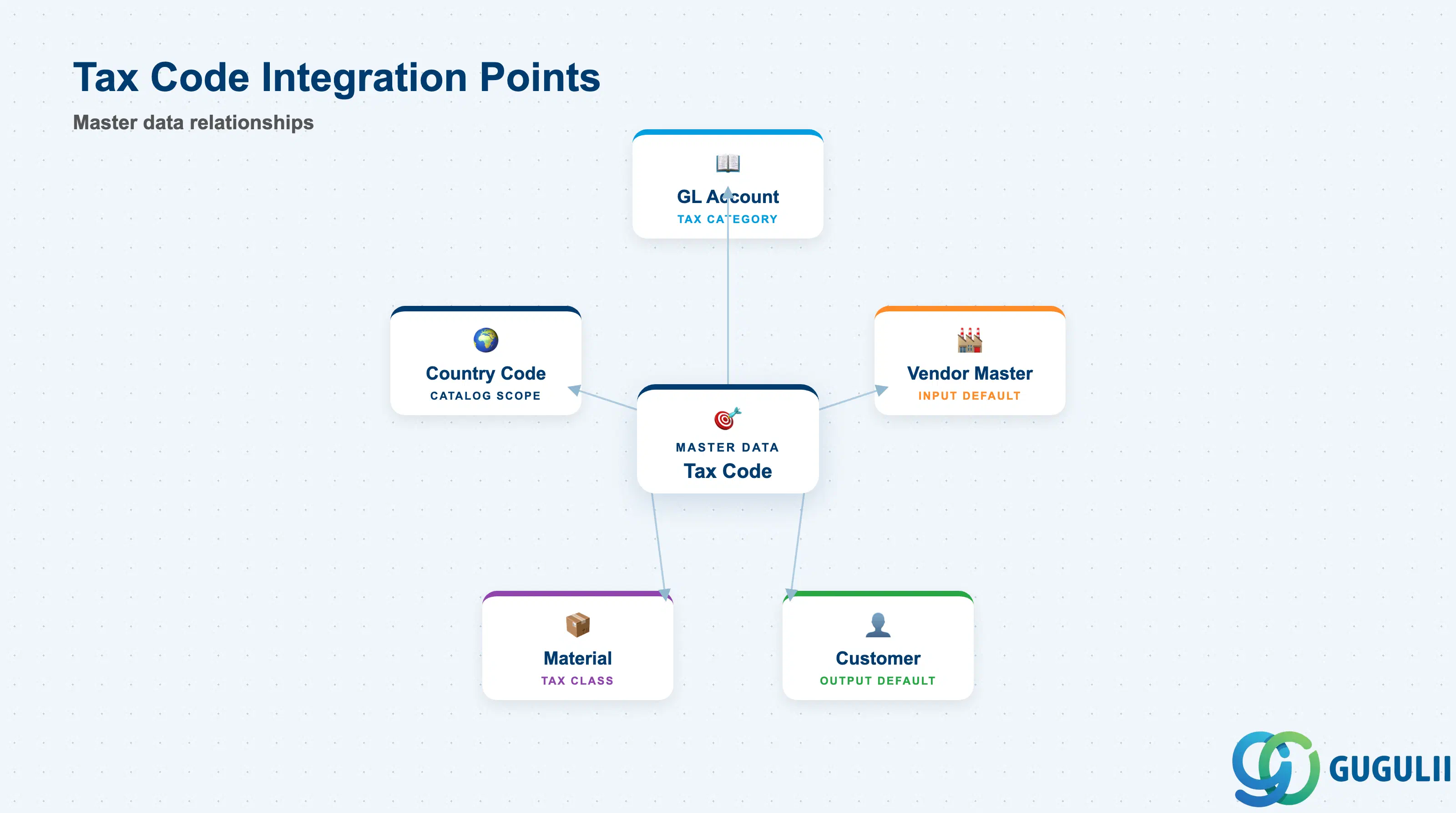
The Tax Code does not stand alone. It is referenced by, and feeds into, multiple master data objects and transactional processes.
| Object | Relationship | Practical Notes |
|---|---|---|
| GL Account | Tax Code constrains which GL Accounts can be posted with tax | GL Account Master (FS00) includes a Tax Category field that controls which Tax Codes are allowed. Example: Tax Category “+” allows all Input Tax Codes; Tax Category “*” allows all Output Tax Codes. Mismatched combinations trigger posting errors at runtime. |
| Vendor Master | Default Input Tax Code stored in Vendor Master Accounting View | Proposed automatically on vendor invoices (FB60, MIRO). Overridable at line-item level. For multi-country vendors, confirm whether the default is set at vendor level or purchasing organization level. |
| Customer Master | Default Output Tax Code stored in Customer Master Billing View | Proposed automatically on customer invoices (FB70, VF01). SD billing typically derives the Tax Code from the Pricing Procedure (tax condition type), not from the Customer Master — confirm the design choice during blueprint. |
| Material Master | Tax Classification stored in Material Master Sales View | For SD, the Material Tax Classification (TAKLV/TAXKM) combined with the Customer Tax Classification drives automatic Tax Code determination via condition technique (transaction VK12). For MM, the Material Master does not store a default Tax Code — it is derived from the Vendor Master or Purchase Info Record. |
| Country Code | Tax Code catalog is scoped to one Country Code | One Tax Code can only be used for transactions involving the assigned Country. Cross-border transactions (e.g., US Company Code purchasing from a Japanese vendor) require careful Tax Code design to handle jurisdiction conflicts — typically resolved via Use Tax or Reverse Charge mechanisms. |
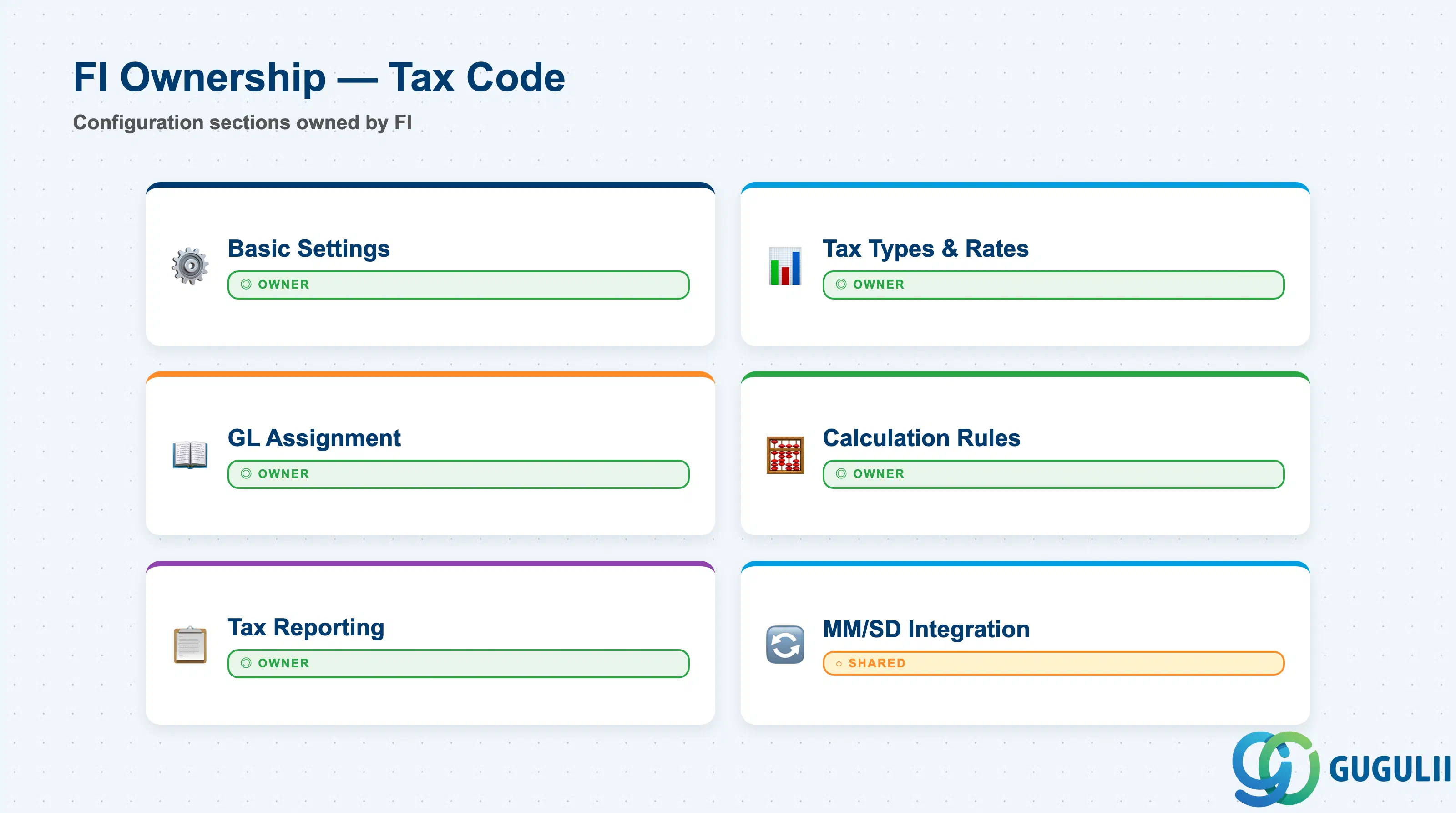
| Data Section | FI Involvement | Notes |
|---|---|---|
| Basic Tax Code Settings | ◎ Owner | Tax Code, Description, Country assignment |
| Tax Types and Rates | ◎ Owner | Tax Type (MWST, MWAS, MWVS), Tax Rate %, Tax Jurisdiction |
| GL Account Assignment | ◎ Owner | Input Tax Clearing, Output Tax Clearing, Expense Capitalization accounts |
| Tax Calculation Rules | ◎ Owner | Tax Base calculation, Rounding rules, Cash Discount treatment |
| Tax Reporting Configuration | ◎ Owner | Tax Report assignment, Tax Code grouping for statutory reporting |
| Integration with MM/SD | ○ Shared with MM/SD | Default Tax Code in Vendor/Customer Master, Tax determination via condition technique (SD only) |
Legend: ◎ = Owner / Critical, ○ = Direct involvement
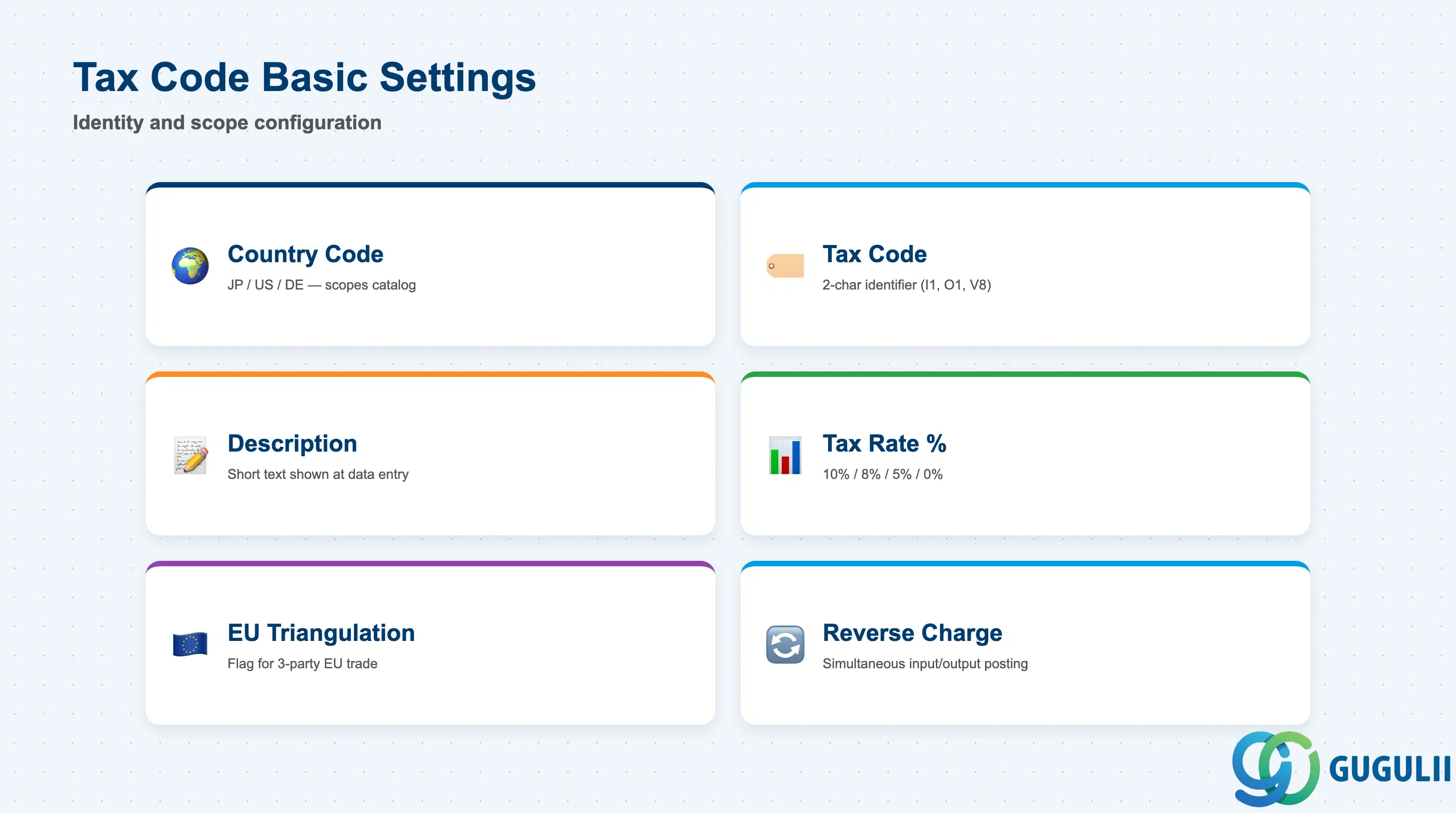
Basic Tax Code settings define the identity and scope of the Tax Code. These fields are maintained in transaction FTXP at the Country Code level.
| Field | Description | Practical Usage |
|---|---|---|
| Country Code | Country key (JP, US, DE, …) | Scopes the Tax Code to one country. A Tax Code defined for JP cannot be used on a transaction involving a US Company Code. For multi-country projects, confirm the Country Code design early — one Tax Code catalog per country is standard, but some global templates merge similar tax regimes (e.g., ASEAN countries) into shared catalogs. |
| Tax Code | 2-character code | Primary identifier. Must follow the agreed naming convention (first character = tax type, second character = rate). Examples: I1 (Input Tax 10%), O5 (Output Tax 5%), V8 (Non-Deductible Input Tax 8%), Z0 (Exempt). SAP enforces uniqueness within a Country Code. |
| Description | Short text | Free-text description displayed at data entry (e.g., “Input Tax 10% (Standard Rate)”). Include the rate and tax type in the description to prevent user selection errors. Avoid cryptic abbreviations — buyers and AP clerks reference this field daily. |
| Tax Percentage Rate | Overall tax rate (%) | Summary field shown in FTXP. Auto-calculated from the sum of all Tax Type rates assigned to this Tax Code. For most Tax Codes, this is a single rate (e.g., 10%). For US local sales tax, this may be a composite rate (State 5% + County 1% + City 0.5% = 6.5%). |
| EU Triangulation | EU triangulation flag | Applicable only for EU localization. Set for Tax Codes used in EU triangular trade (A ships to B via C). Activates additional posting logic and VAT reporting fields. Japan and US implementations leave this blank. |
| Reverse Charge | Reverse charge flag | When checked, both Output Tax and Input Tax postings are generated in the same transaction. Used for EU intra-community purchases and US Use Tax scenarios. Requires both Input Tax and Output Tax GL accounts to be assigned to the Tax Type. |
| Tax Code Blocked | Blocked flag | Prevents new transactions from using this Tax Code. Use for Tax Codes that have been superseded (e.g., after a tax rate change) but must remain visible for historical reporting. Do not delete Tax Codes referenced in posted documents — block them instead. |
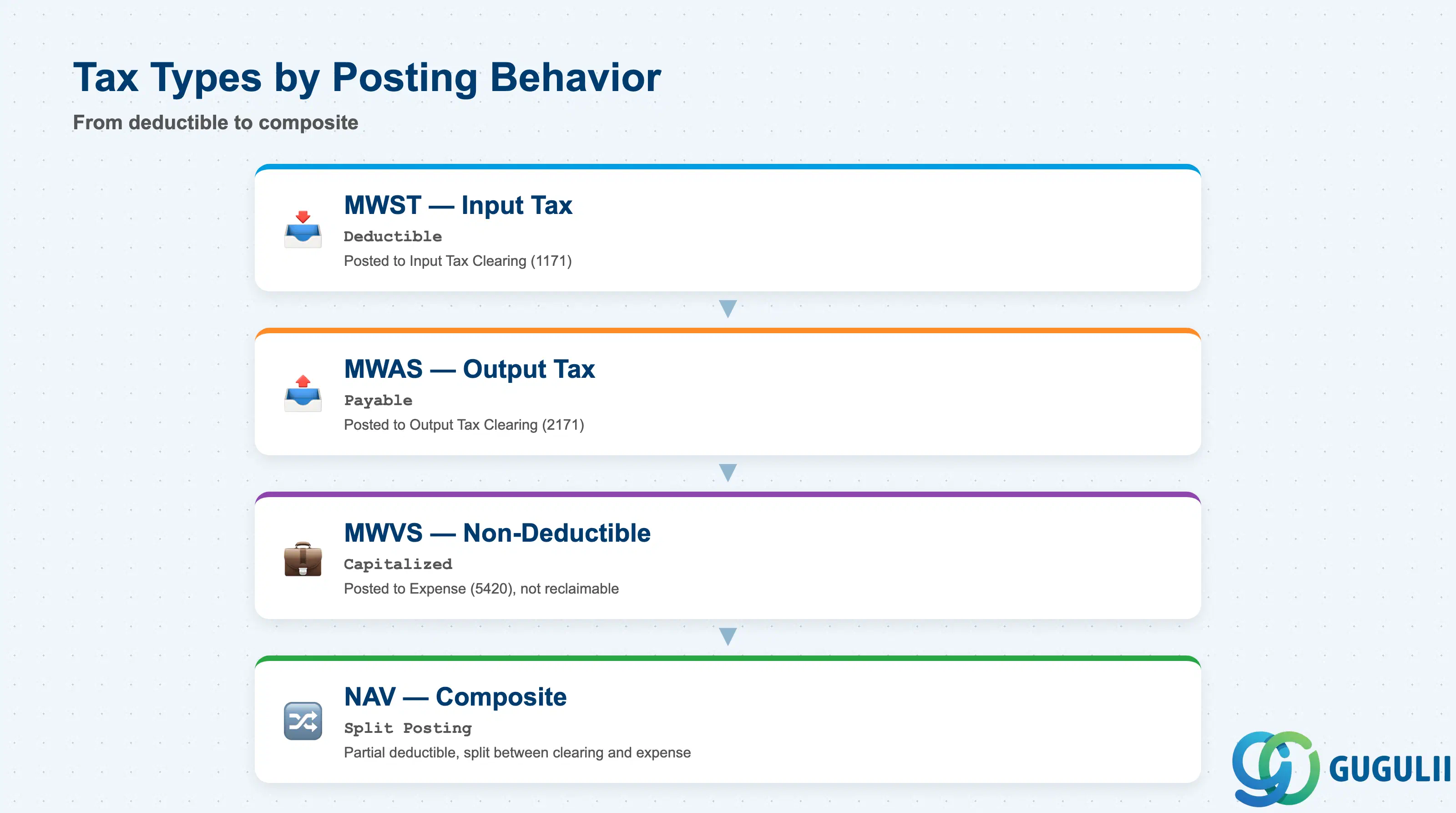
The Tax Type defines the accounting behavior of the tax transaction. Each Tax Code references one or more Tax Types, each with its own rate and GL account assignment.
| Field | Description | Practical Usage |
|---|---|---|
| Tax Type | 4-character code (MWST, MWAS, MWVS, …) | Determines the posting logic. MWST = Input Tax (deductible), MWAS = Output Tax (payable), MWVS = Non-Deductible Input Tax (capitalized), NAV = Non-Deductible portion of partially deductible tax. SAP delivers standard Tax Types per country localization — use them unless custom Tax Types are required (rare except for multi-jurisdiction US implementations). |
| Tax Percentage Rate | Rate for this Tax Type (%) | The rate applied to the tax base. For Japan: 10% (standard), 8% (reduced — food, newspapers), 0% (exports). For composite Tax Codes (e.g., US local sales tax), multiple Tax Types can be assigned, each with its own rate — system sums them to calculate total tax. |
| Account Key | Posting key for GL assignment | Links the Tax Type to the GL Account Assignment table (transaction OB40). Standard keys: MWS (Input Tax), VST (Output Tax), NVV (Non-Deductible Expense posting). Custom account keys can be created for complex tax scenarios (e.g., split posting for partially deductible tax). |
| Posting Level | Posting granularity | Controls whether tax is posted per line item or per document total. “Per Line Item” is standard for most scenarios (tax calculated and posted for each invoice line independently). “Per Document” is used for cash-basis accounting or tax-inclusive pricing scenarios where tax must be derived from the total, not calculated per line. |
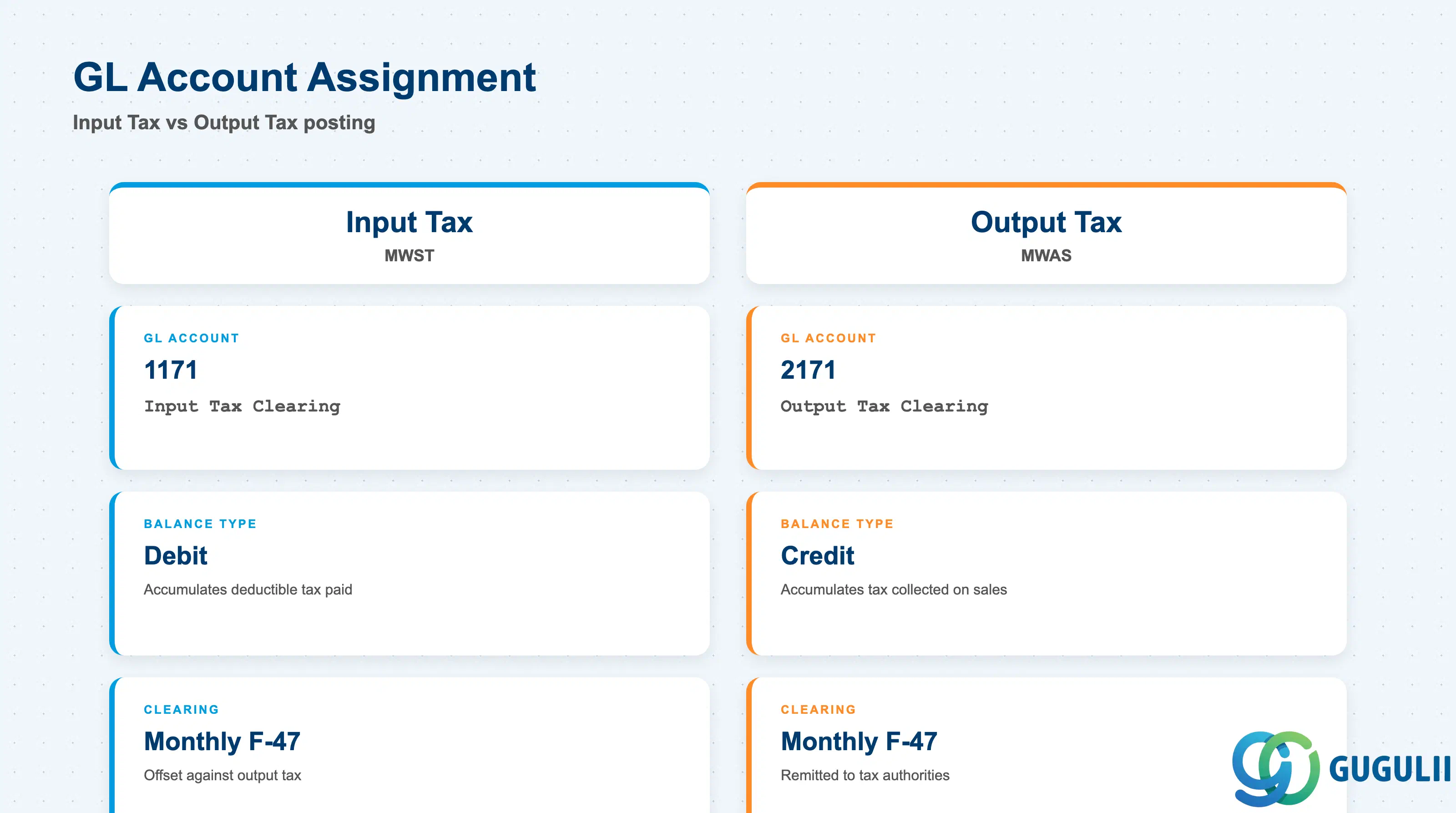
The GL Account Assignment determines which accounts the tax amount is posted to. This configuration is maintained in transaction OB40 (or FTXP integrated view).
| Field | Description | Practical Usage |
|---|---|---|
| Chart of Accounts | Chart of Accounts key | Tax account assignments are defined per Chart of Accounts. For global projects with a shared Chart of Accounts, a single GL assignment applies to all Company Codes using that chart. For multi-chart projects, each chart requires separate tax account configuration. |
| Input Tax Account | GL Account for Input Tax Clearing | Example: 1171 (Input Tax Clearing). Debit balance. Accumulates deductible tax paid on purchases. Cleared monthly via tax return posting (transaction F-47) when tax is offset against Output Tax. |
| Output Tax Account | GL Account for Output Tax Clearing | Example: 2171 (Output Tax Clearing). Credit balance. Accumulates tax collected on sales. Cleared monthly via tax return posting when payment is remitted to tax authorities. |
| Tax Expense Account | GL Account for Non-Deductible Tax | Example: 5420 (Non-Deductible Consumption Tax Expense). Used when the Tax Type is MWVS (Non-Deductible Input Tax). Tax amount is posted as expense or capitalized into the asset/material cost, not to the tax clearing account. |
| Tax on Sales/Purchases Account | Split posting for partially deductible tax | For countries with partial deductibility rules (e.g., company cars with 50% deductible tax), SAP splits the tax amount between Input Tax Clearing (deductible portion) and Expense (non-deductible portion). Requires additional Tax Types (NAV) and account keys to be configured. |
Prerequisite: GL Accounts assigned to Tax Codes must have the correct Tax Category set in FS00. Input Tax Accounts require Tax Category “+”, Output Tax Accounts require Tax Category “*”. Mismatched Tax Categories cause posting failures at runtime with message “Tax Code X not allowed for GL Account Y.”
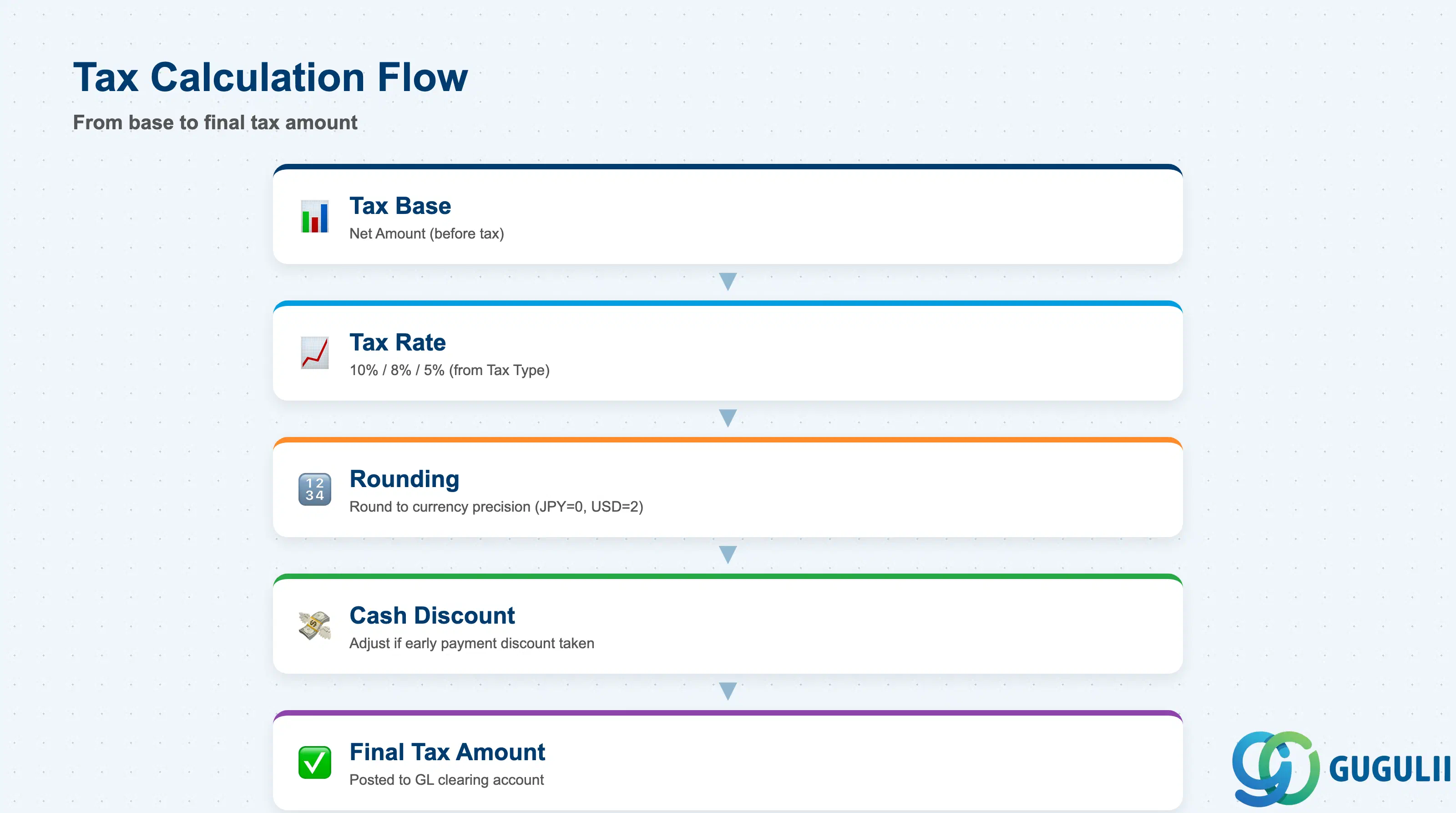
Tax Calculation Rules define how the tax amount is computed from the transaction amount. These settings are maintained in transaction OBCL and FTXP.
| Field | Description | Practical Usage |
|---|---|---|
| Tax Calculation Procedure | Calculation method | Standard procedure: Tax = (Net Amount × Tax Rate) / 100. Alternative procedures available for tax-inclusive pricing (Gross Amount includes tax — system back-calculates net amount) and US-style sales tax (tax on tax for composite rates). Japan uses standard procedure. US implementations often require custom tax procedures for city + county + state tax compounding. |
| Rounding Rule | Rounding precision | Standard: round to currency precision (JPY = 0 decimal places, USD = 2 decimal places). Custom rounding rules can be defined for specific tax jurisdictions (e.g., round down for all tax calculations, round to nearest 5 cents). Mismatched rounding between SAP and vendor invoices causes payment discrepancies. |
| Tax Base | Base amount for tax calculation | Standard: Net Amount (before tax). Alternative: Gross Amount (tax-inclusive — system derives net amount by reverse calculation). For MM, the tax base is the PO line Net Value. For SD, the tax base is the Pricing Procedure subtotal at the tax condition step (typically net price after all discounts). |
| Cash Discount and Tax | Cash discount treatment | Controls whether cash discount is deducted from the tax amount when early payment discount is taken. Japan standard: cash discount reduces the tax base (tax is recalculated on the reduced amount). EU standard: cash discount does not reduce the tax amount (tax is calculated on the original invoice amount). Set via Country Code customizing (transaction OBCL, “Tax amount affected by cash discount” flag). |
| Tax Amount Adjustment | Manual tax adjustment flag | When checked, users can manually override the calculated tax amount on the document line. Strongly discouraged except for exceptional one-time corrections. Manual overrides bypass automatic tax calculation and cause tax reporting discrepancies. Require explicit approval workflow if enabled. |
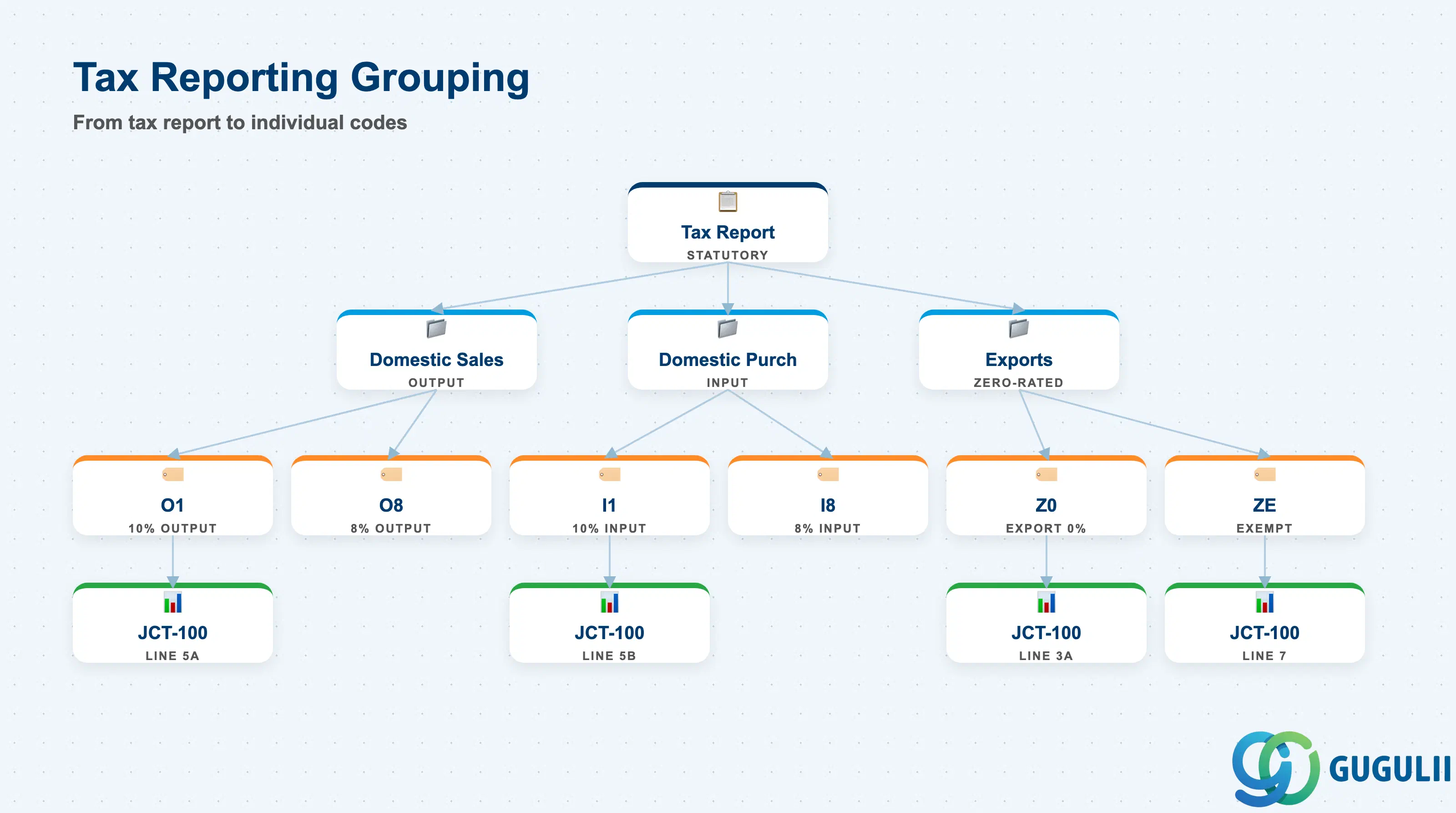
Tax Reporting Configuration groups Tax Codes for statutory tax return preparation and audit reporting. This configuration is maintained in transaction S_ALR_87012357 (Tax Reporting) and the Tax Code master (FTXP).
| Field | Description | Practical Usage |
|---|---|---|
| Tax Report Assignment | Tax report category | Each Tax Code is assigned to one tax report category (e.g., “Domestic Sales — Standard Rate,” “Domestic Purchases — Standard Rate,” “Exports — Zero-Rated”). The category determines which line of the statutory tax return (e.g., Japan National Tax Agency JCT-100 form) the Tax Code’s amounts are aggregated into. Confirm the mapping during blueprint with the tax compliance team. |
| Tax Jurisdiction Code | Sub-national tax jurisdiction | Used in US, Canada, and other federal systems where tax is owed to multiple jurisdictions (federal, state, county, city). Each Tax Code can be assigned to one or more jurisdictions. SAP aggregates tax amounts by jurisdiction for remittance and reporting. Japan does not use jurisdiction codes (single national consumption tax). |
| Tax Code Group | Reporting grouping | Custom grouping for management reporting (e.g., “All Input Tax Codes,” “All Reduced Rate Output Tax”). Used in SAP Query, BW extractors, and custom ABAP reports. Does not affect statutory reporting — only for internal analytics. |
| Exempt Certificate Tracking | Tax exemption documentation | For US sales tax exemption scenarios (e.g., resale certificates, non-profit exemptions), SAP can store the exemption certificate number linked to the Tax Code. When a Tax Code flagged as “Exempt” is used, the system can optionally require the user to enter the certificate number at transaction time. Prevents improper use of exempt Tax Codes. |
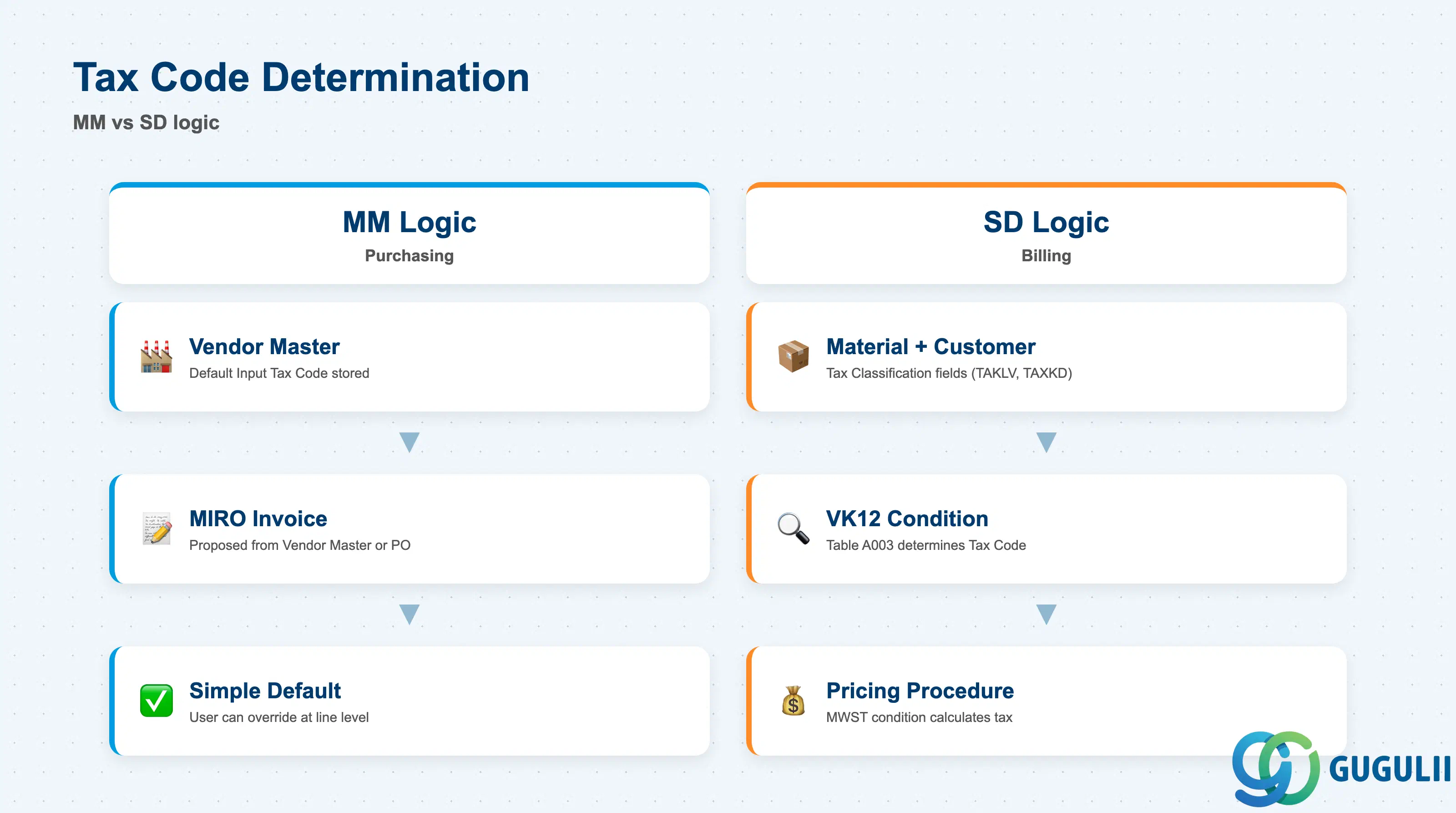
Tax Code integration with MM and SD determines how the Tax Code is automatically proposed on purchasing and sales documents, reducing manual entry errors and ensuring tax compliance.
| Integration Point | Description | Practical Usage |
|---|---|---|
| Vendor Master Default Tax Code | Default Input Tax Code stored in Vendor Master (XK02, Accounting View) | Automatically proposed on vendor invoices (FB60, MIRO, MM invoice verification). Overridable at line-item level. For multi-country vendors, the default Tax Code must match the vendor’s country — confirm during vendor master data governance design whether one Tax Code covers all purchasing organizations or whether purchasing-org-specific defaults are required. |
| Customer Master Default Tax Code | Default Output Tax Code stored in Customer Master (XD02, Billing View) | Proposed on customer invoices (FB70). Note: SD billing typically does NOT use this field — SD derives the Tax Code via the Pricing Procedure using Material Tax Classification + Customer Tax Classification (see below). The Customer Master default is only used for standalone FI AR invoices outside of SD. |
| Material Tax Classification (Sales) | Material Master Sales View field TAKLV / TAXKM | Combined with Customer Tax Classification to determine the Tax Code via condition technique (transaction VK12, condition type MWST). Example: Material Classification “1” (taxable goods) + Customer Classification “0” (domestic, taxable) → Tax Code O1 (Output Tax 10%). This is the standard SD tax determination method. |
| Purchase Info Record Default Tax Code | Tax Code stored in Purchasing Info Record (ME12) | Proposed on PO line items created from the PIR. Overrides the Vendor Master default when the PIR is used. For vendor-material combinations with special tax treatment (e.g., imported materials subject to Use Tax), maintain the correct Tax Code in the PIR to ensure automatic compliance. |
| Tax Code Determination in MM Invoice Verification | MIRO tax code proposal logic | MIRO proposes the Tax Code from: (1) PO line item if the invoice references a PO, or (2) Vendor Master default if no PO reference. Users can override manually. For non-PO invoices, the Vendor Master default is critical — ensure it is maintained correctly for all active vendors. |
| Tax Code Determination in SD Billing | VF01 tax code determination via Pricing Procedure | SD billing uses the Pricing Procedure to calculate tax. The tax condition type (typically MWST) calls the tax determination logic, which combines Material Tax Classification (TAKLV) and Customer Tax Classification (TAXKD) to find the Tax Code via condition table A003 (transaction VK12). The determined Tax Code is used to calculate the tax amount and post to the GL accounts. Critical design choice: confirm whether tax is determined per line item (standard) or per document (alternative for tax-inclusive pricing). |
Prerequisite: For SD tax determination via condition technique to work, the following must be configured: (1) Pricing Procedure must include a tax condition type (e.g., MWST) at the correct step, (2) Condition table A003 (or custom table) must be maintained via VK12 with Material Tax Classification × Customer Tax Classification → Tax Code mappings, (3) Material Master Sales View and Customer Master Billing View must have the Tax Classification fields populated. Missing any of these causes SD billing to fail with “Tax Code could not be determined.”
| ID | Category | Title |
|---|---|---|
| fi-001 | Overview | What is SAP FI? |
| ID | Category | Title |
|---|---|---|
| fi-a01 | Overview | SAP FI Master Data: Overview, Hierarchy & Relationships |
| fi-a02-01 | Master Data | SAP FI Material Master |
| fi-a03-01 | Master Data | SAP FI Chart of Accounts |
| fi-a03-02 | Master Data | SAP FI G/L Account |
| fi-a04-01 | Master Data | SAP FI Payment Terms |
| fi-a04-02 | Master Data | SAP FI Tax Code 📍 |
| fi-a06-01 | Master Data | SAP FI Bank Master |
| fi-a06-02 | Master Data | SAP FI House Bank |
| fi-a07-01 | Master Data | SAP FI Asset Class |
| fi-a07-02 | Master Data | SAP FI Depreciation Key |
| fi-a07-03 | Master Data | SAP FI Asset Master |
| ID | Category | Title |
|---|---|---|
| fi-b01 | Overview | SAP FI Transactions: Process Flow, Hierarchy & Relationships |