Title here
Summary here

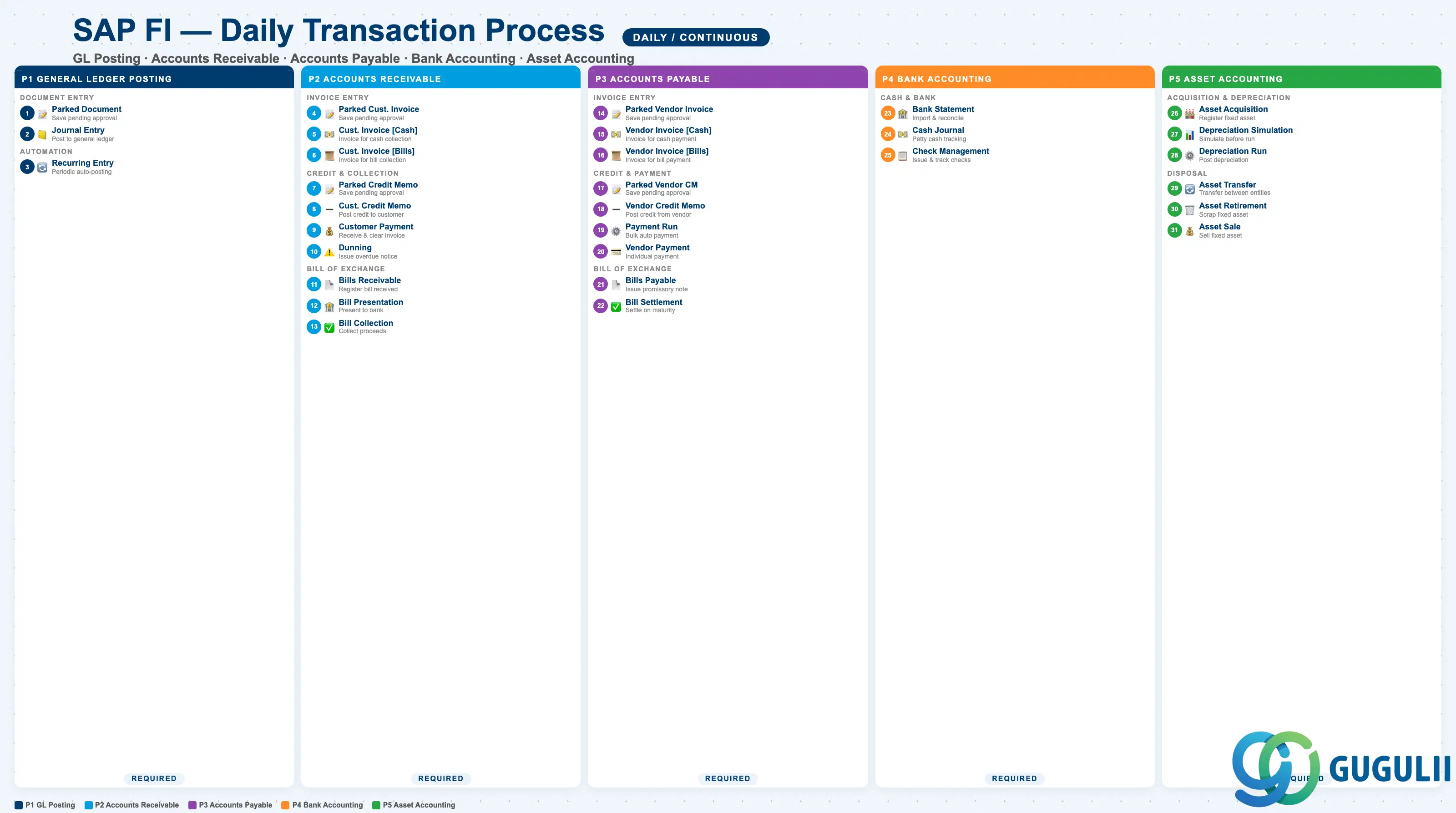
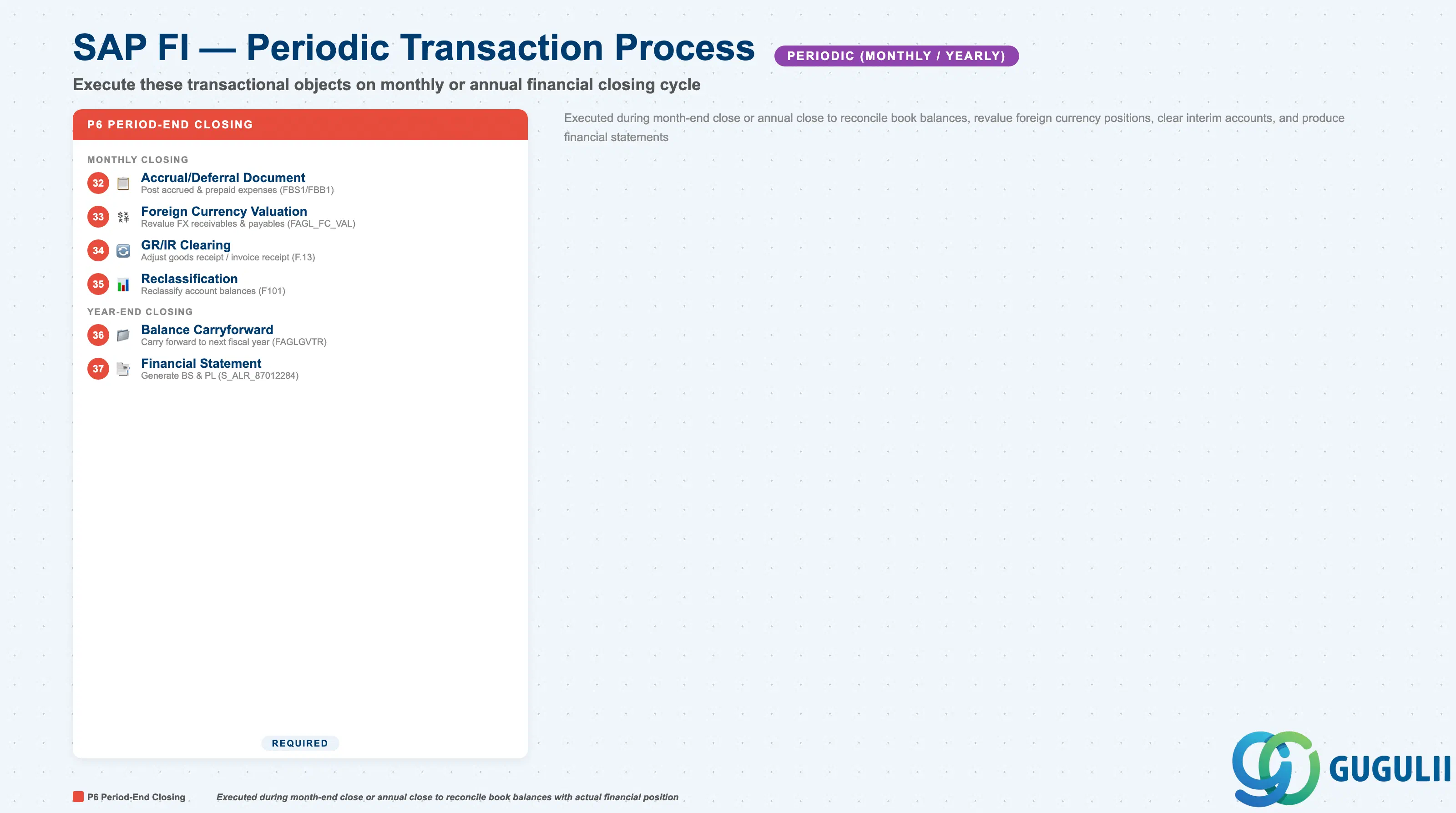
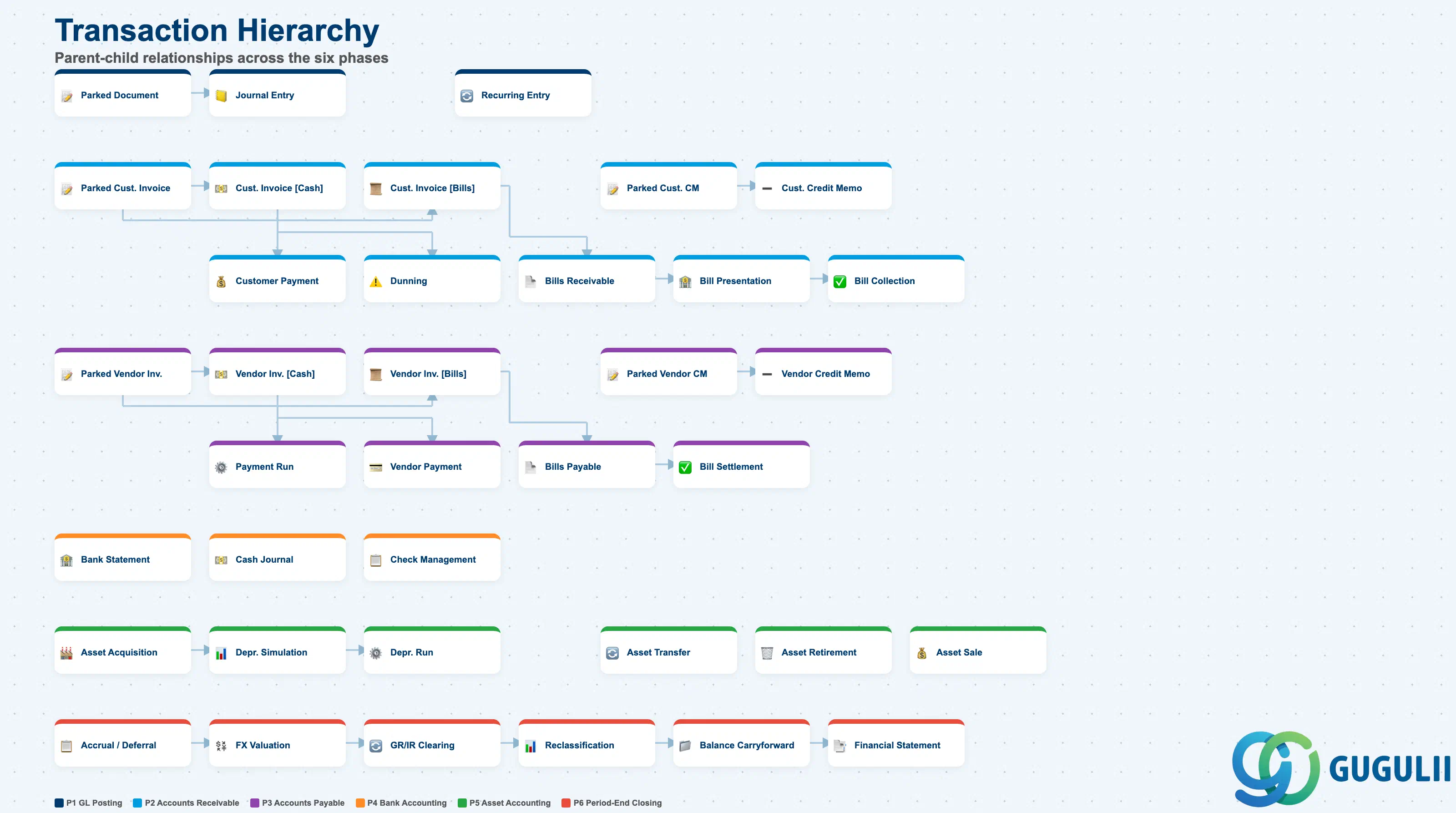
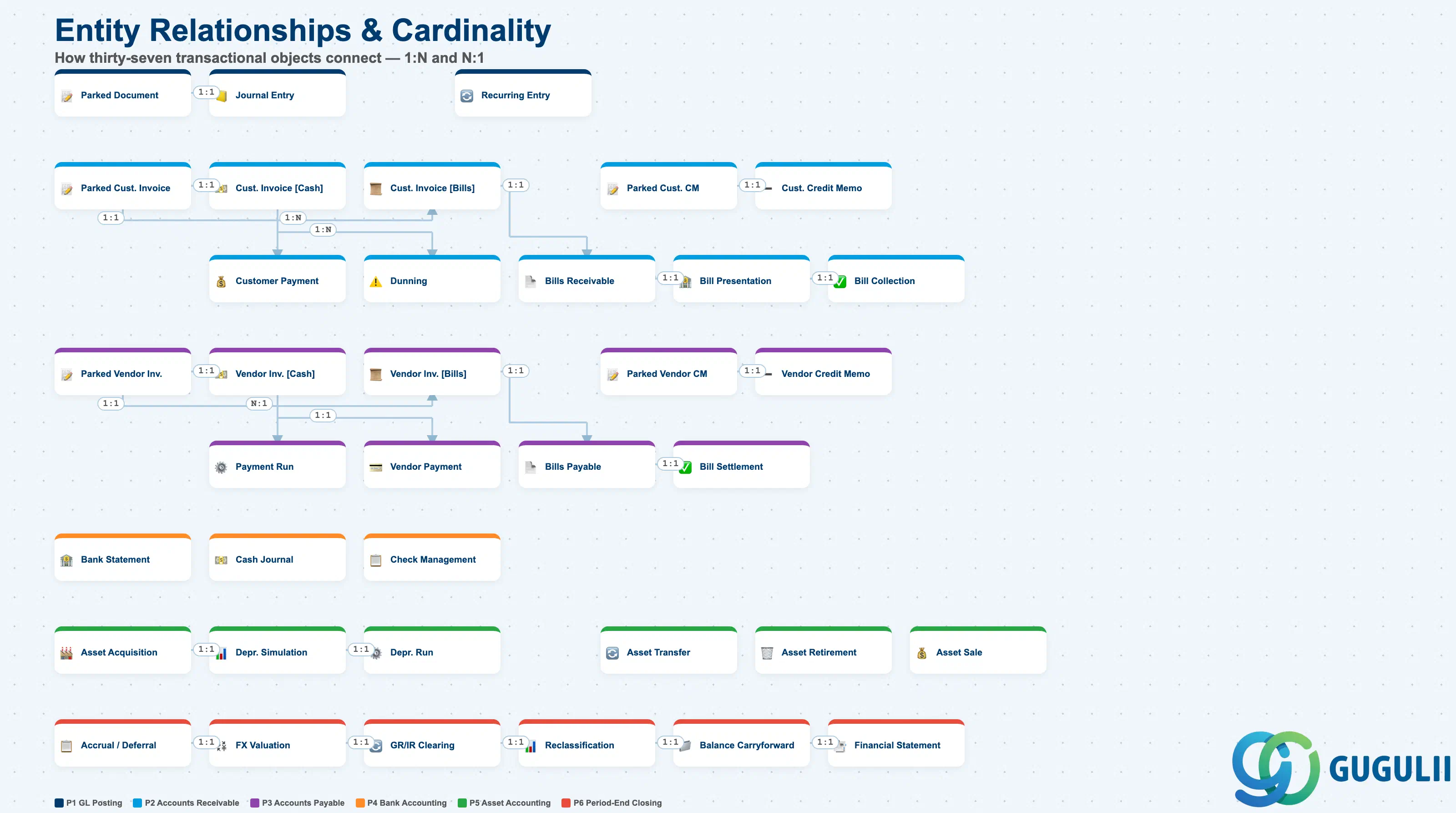
| Phase | Object | Integration | Planned | Actual | Prerequisite | Tr-Cd | Description | Practical Examples | Role |
|---|---|---|---|---|---|---|---|---|---|
| 1 General Ledger Posting | Parked Document | - | Parked Document | - | G/L Account | FV50/FBV2 | Temporarily save a journal entry pending approval | Enter an expense reimbursement document and save pending manager approval | FI End User |
| Journal Entry | CO | - | Parked Document | Parked Document | FBV0/FB50 | Post a journal entry to the general ledger | Post an approved expense reimbursement to update account balances | FI End User | |
| Recurring Entry Document | - | - | - | G/L Account | FBD1/F.14 | Automatically generate periodic journal entries | Automatically post monthly rent payments | FI Administrator | |
| 2 Accounts Receivable | Parked Customer Invoice | - | Parked Customer Invoice | - | Customer Master | FV70 | Temporarily save a customer invoice pending approval | Enter a sales invoice and save pending approval | FI End User |
| Customer Invoice [Cash] | SD | Customer Invoice [Cash] | Parked Customer Invoice | Parked Customer Invoice | FB70/F-22 | Post a customer invoice for cash collection | Post a 1,000,000 JPY product sales invoice | FI End User | |
| Customer Invoice [Bills] | SD | Customer Invoice [Bills] | Parked Customer Invoice | Parked Customer Invoice | FB70/F-22 | Post a customer invoice for bill collection | Post a 2,000,000 JPY invoice under bill settlement terms | FI End User | |
| Parked Customer Credit Memo | - | Parked Customer Credit Memo | - | Customer Master | FV75 | Temporarily save a customer credit memo pending approval | Enter a return credit memo and save pending approval | FI End User | |
| Customer Credit Memo | SD | - | Parked Customer Credit Memo | Parked Customer Credit Memo | FB75/F-27 | Post a credit memo to the customer | Post a 100,000 JPY credit memo for a return | FI End User | |
| Customer Payment | - | - | Customer Invoice [Cash] | Customer Invoice [Cash] | F-28/F-26 | Process incoming payment from customer (includes clearing) | Post a 1,000,000 JPY receipt and clear the invoice | FI End User | |
| Dunning | - | - | - | Customer Invoice | F150 | Issue dunning notice to overdue customers | Issue a dunning notice to a customer 30 days past due | FI Administrator | |
| Bills Receivable | - | Bills Receivable | Customer Invoice [Bills] | Customer Invoice [Bills] | F-36 | Register a bill of exchange receivable | Register a promissory note received from a customer | FI End User | |
| Bill Presentation | - | Bill Presentation | Bills Receivable | Bills Receivable | F-34 | Present the bill to the bank | Present a matured bill to the bank | FI End User | |
| Bill Collection | - | - | Bill Presentation | Bill Presentation | F-33/FBWE | Collect the bill proceeds | Receive 2,000,000 JPY bill proceeds from the bank | FI End User | |
| 3 Accounts Payable | Parked Vendor Invoice | - | Parked Vendor Invoice | - | Vendor Master | FV60 | Temporarily save a vendor invoice pending approval | Enter a purchase invoice and save pending approval | FI End User |
| Vendor Invoice [Cash] | MM | Vendor Invoice [Cash] | Parked Vendor Invoice | Parked Vendor Invoice | FB60/F-43 | Post a vendor invoice for cash payment | Post a 500,000 JPY raw material purchase invoice | FI End User | |
| Vendor Invoice [Bills] | MM | Vendor Invoice [Bills] | Parked Vendor Invoice | Parked Vendor Invoice | FB60/F-43 | Post a vendor invoice for bill payment | Post a 3,000,000 JPY invoice under bill settlement terms | FI End User | |
| Parked Vendor Credit Memo | - | Parked Vendor Credit Memo | - | Vendor Master | FV65 | Temporarily save a vendor credit memo pending approval | Enter a return credit memo and save pending approval | FI End User | |
| Vendor Credit Memo | MM | - | Parked Vendor Credit Memo | Parked Vendor Credit Memo | FB65/F-41 | Post a credit memo from the vendor | Post a 50,000 JPY credit memo for defective goods returned | FI End User | |
| Payment Run | - | - | Vendor Invoice [Cash] | Vendor Invoice [Cash] | F110 | Execute bulk automatic payment to vendors (includes clearing) | Run month-end bulk payment to all vendors | FI Administrator | |
| Vendor Payment | - | - | Vendor Invoice [Cash] | Vendor Invoice [Cash] | F-53 | Process individual vendor payment (includes clearing) | Pay 500,000 JPY to a vendor by bank transfer | FI End User | |
| Bills Payable | - | Bills Payable | Vendor Invoice [Bills] | Vendor Invoice [Bills] | F-40 | Register a bill of exchange payable | Issue a 3,000,000 JPY promissory note to a vendor | FI End User | |
| Bill Settlement | - | - | Bills Payable | Bills Payable | F-20 | Settle the bill on maturity | Settle a 3,000,000 JPY bill on its due date | FI End User | |
| 4 Bank Accounting | Bank Statement | - | - | - | House Bank | FF67/FEBP | Import and reconcile bank statement | Import electronic bank statement and match receipts and payments | FI Administrator |
| Cash Journal | - | - | - | G/L Account | FBCJ | Manage petty cash receipts and disbursements | Record daily petty cash receipts and disbursements | FI End User | |
| Check Management | - | - | - | House Bank | FCH1/FCH5 | Issue and manage payment checks | Issue a payment check and track its number | FI Administrator | |
| 5 Asset Accounting | Asset Acquisition | MM | - | - | Asset Master | F-90/ABZON | Acquire and register a fixed asset | Acquire manufacturing equipment for 10,000,000 JPY and register it as an asset | FI-AA Administrator |
| Depreciation Simulation | - | Depreciation Simulation | - | Asset Master | AR00/S_ALR_87012936 | Simulate depreciation before the actual run | Simulate annual depreciation charges in advance | FI-AA Administrator | |
| Asset Depreciation Run | - | - | Depreciation Simulation | Depreciation Simulation | AFAB | Execute and post depreciation | Batch-post monthly depreciation for all assets | FI-AA Administrator | |
| Asset Transfer | - | - | - | Asset Master | ABUMN | Transfer a fixed asset between entities | Transfer an asset from head office to a plant | FI-AA Administrator | |
| Asset Retirement | - | - | - | Asset Master | ABAON | Retire and scrap a fixed asset | Scrap and retire aging equipment | FI-AA Administrator | |
| Asset Sale | SD | - | - | Asset Master | ABAON | Sell a fixed asset | Sell an idle asset for 3,000,000 JPY | FI-AA Administrator | |
| 6 Period-End Closing | Accrual/Deferral Document | - | - | - | G/L Account | FBS1/FBB1 | Execute accrual and deferral postings | Post accrued expenses and prepaid expenses | FI Administrator |
| Foreign Currency Valuation | - | - | - | G/L Account | FAGL_FC_VAL | Revalue foreign currency receivables and payables | Revalue USD-denominated receivables at month-end exchange rate | FI Administrator | |
| GR/IR Clearing | MM | - | - | G/L Account | F.13 | Adjust goods receipt / invoice receipt account | Adjust the difference between received and invoiced amounts | FI Administrator | |
| Reclassification | - | - | - | G/L Account | F101 | Reclassify account balances | Reclassify long-term receivables to short-term | FI Administrator | |
| Balance Carryforward | - | - | - | G/L Account | FAGLGVTR | Carry forward balances to the next fiscal year | Carry forward balance sheet balances to the new year at year-end | FI Administrator | |
| Financial Statement | - | - | - | G/L Account | S_ALR_87012284 | Generate balance sheet and income statement | Produce monthly and annual financial statements | FI Administrator |
(*1) The Planned/Actual columns follow a 1:1 mapping as a rule. Where a downstream process branches, the source object is shared across multiple targets as a simplification (1:N mapping allowed).
(*2) Payment Run (automatic payment) and Vendor Payment (manual payment) are parallel alternatives. Both execute payment and clearing simultaneously, so both reference the same upstream object as their Actual.
| ID | Category | Title |
|---|---|---|
| fi-001 | Overview | What is SAP FI? |
| ID | Category | Title |
|---|---|---|
| fi-a01 | Overview | SAP FI Master Data: Overview, Hierarchy & Relationships |
| fi-a02-01 | Master Data | SAP FI Material Master |
| fi-a03-01 | Master Data | SAP FI Chart of Accounts |
| fi-a03-02 | Master Data | SAP FI G/L Account |
| fi-a04-01 | Master Data | SAP FI Payment Terms |
| fi-a04-02 | Master Data | SAP FI Tax Code |
| fi-a06-01 | Master Data | SAP FI Bank Master |
| fi-a06-02 | Master Data | SAP FI House Bank |
| fi-a07-01 | Master Data | SAP FI Asset Class |
| fi-a07-02 | Master Data | SAP FI Depreciation Key |
| fi-a07-03 | Master Data | SAP FI Asset Master |
| ID | Category | Title |
|---|---|---|
| fi-b01 | Overview | SAP FI Transactions: Process Flow, Hierarchy & Relationships 📍 |