Title here
Summary here

The Material Master is the most fundamental and most critical master data object in SAP MM. Every procurement, inventory, production, sales, and accounting transaction traces back to this master. This article covers the Material Master’s structure, views, organizational levels, and integration points.
The Material Master is the central repository that stores all information about every material (item/product) a company handles — raw materials, semi-finished goods, finished products, consumables, and everything else that flows through the enterprise.
| Aspect | Details |
|---|---|
| Role | Single Source of Truth for all material attributes across the enterprise |
| Modules using it | MM (Purchasing, Inventory), PP (Production Planning, MRP, BOM), SD (Sales, Shipping, ATP), WM/EWM (Warehouse Mgmt, Putaway/Pick), QM (Quality Inspection, CoA), FI (Inventory Valuation, Auto Posting), CO (Standard Cost, Variance Analysis), PM (Plant Maintenance, MRO Procurement), PS (Project Procurement, Material Allocation), CS (Customer Service, Spare Parts), EHS (Hazardous Material Mgmt, Environmental Compliance), GTS (Trade Compliance, HS Code, Export Control) |
| Transactions | MM01 (Create) / MM02 (Change) / MM03 (Display) |
| S/4HANA change | Material number length extended from 18 to 40 digits (MATNR field) |
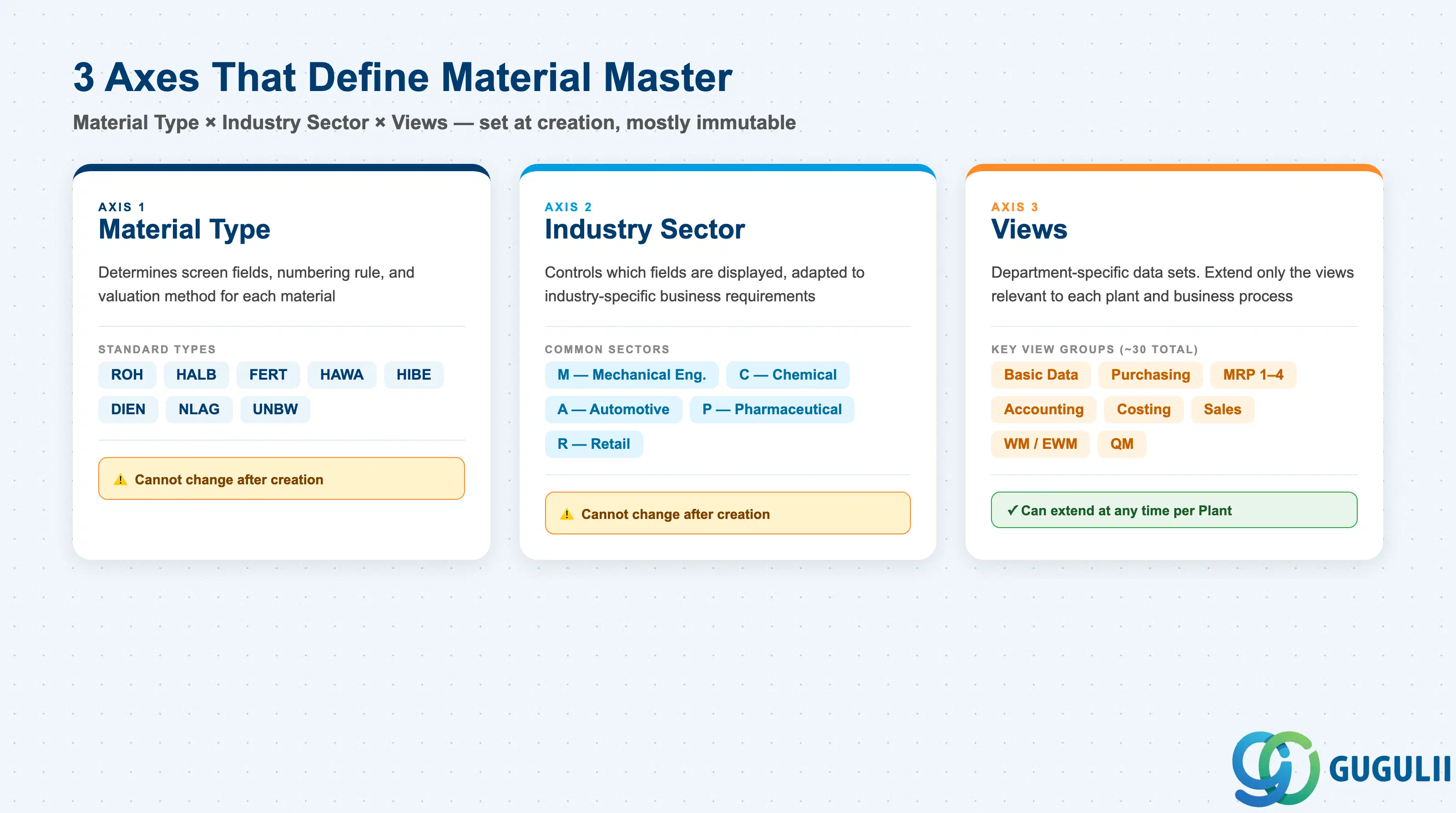
The structure of a Material Master record is determined by the combination of three axes:
| Axis | Description | Examples |
|---|---|---|
| Material Type | Classifies the material. Controls screen layout, number assignment, and valuation method | ROH, FERT, HALB |
| Industry Sector | Industry branch. Controls which fields are displayed based on industry characteristics | M (Mechanical), C (Chemical), A (Automotive) |
| Views | Data sets organized by department. Only relevant views need to be extended | Basic Data, MRP, Accounting |
Important: Once created, Material Type and Industry Sector cannot be changed as a general rule. Lock these in during design.
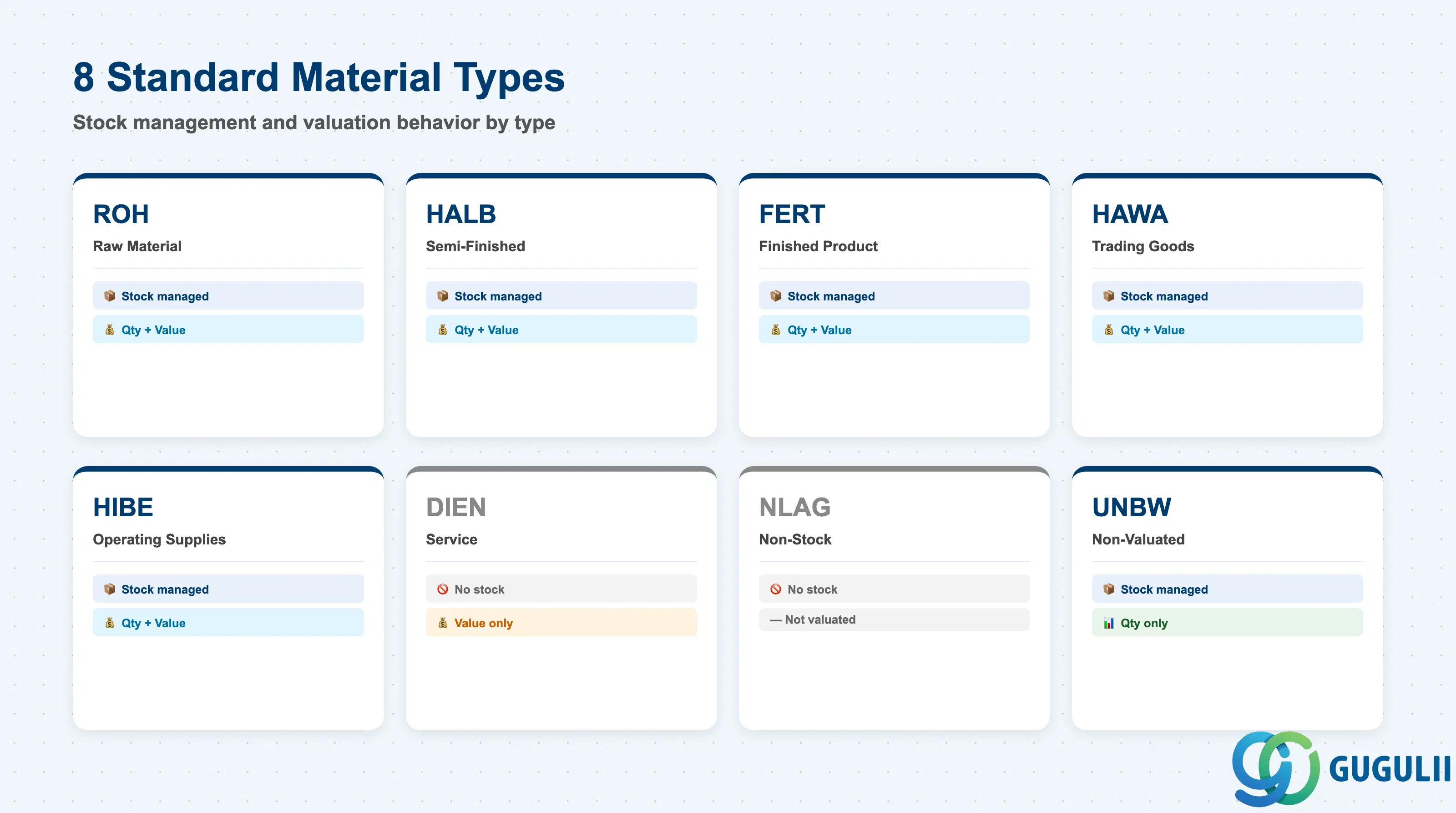
| Code | Name | Use Case | Stock-Managed | Qty / Value |
|---|---|---|---|---|
| ROH | Raw Material | Input materials | Yes | Both |
| HALB | Semi-Finished | Internally produced intermediates | Yes | Both |
| FERT | Finished Product | Internally produced / sold goods | Yes | Both |
| HAWA | Trading Goods | Buy-and-sell merchandise | Yes | Both |
| HIBE | Operating Supplies | Indirect materials, consumables | Yes | Both |
| DIEN | Service | Service items | No | Value only |
| NLAG | Non-Stock | No inventory management | No | — |
| UNBW | Non-Valuated | Quantity tracking only | Yes | Qty only |
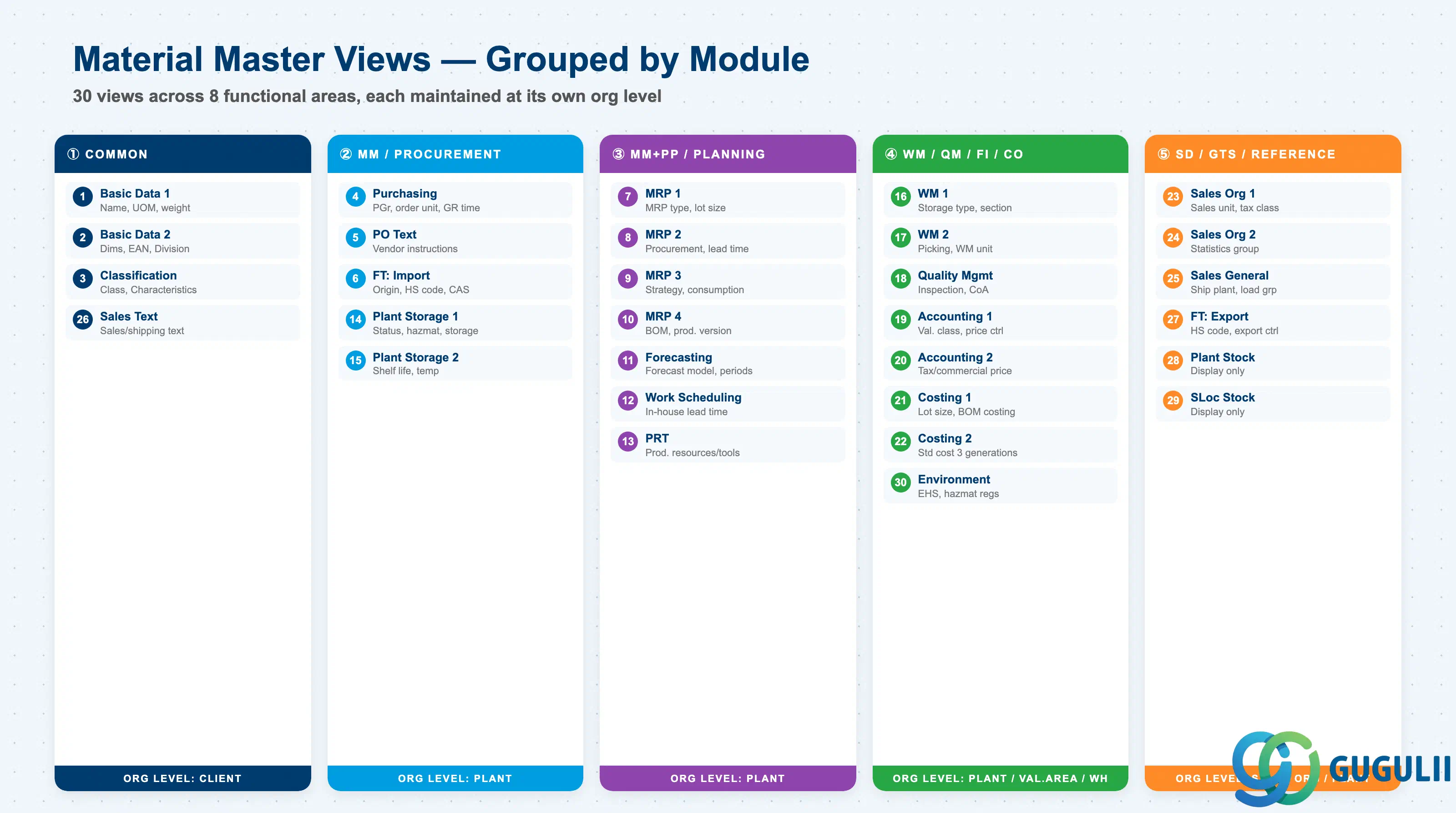
The Material Master is divided into department-specific Views. Only the views required by each department need to be extended. Approximately 30 standard views exist; the views to extend are selected based on Material Type and business requirements.
| # | View | Owning Dept | Key Fields | Org Level |
|---|---|---|---|---|
| 1 | Basic Data 1 | Cross-module | Material description, Base UoM, Material group, Weight/Volume | Client |
| 2 | Basic Data 2 | Cross-module | Dimensions, EAN/UPC, Old material number, Division | Client |
| 3 | Classification | Cross-module | Class assignment, Characteristic values | Client |
| 4 | Purchasing | Purchasing (MM) | Purchasing group, Order unit, GR processing time, Source list required flag | Plant |
| 5 | Purchase Order Text | Purchasing (MM) | PO text, Text ID, Language | Plant |
| 6 | Foreign Trade: Import | Purchasing (MM) / GTS | Country of origin, HS code (import), CAS number, Import license | Plant |
| 7 | MRP 1 | Purchasing / PP (MM/PP) | MRP type, MRP controller, Lot size, Reorder point | Plant |
| 8 | MRP 2 | Purchasing / PP (MM/PP) | Procurement type, Special procurement, Planned delivery time, Safety stock | Plant |
| 9 | MRP 3 | Purchasing / PP (MM/PP) | Strategy group, Consumption mode, Availability check | Plant |
| 10 | MRP 4 | PP-oriented | BOM selection, Individual/collective requirements, Discontinuation flag | Plant |
| 11 | Forecasting | Purchasing / PP (MM/PP) | Forecast model, Historical/forecast periods, Smoothing factors | Plant |
| 12 | Work Scheduling | Production (PP) | Production unit, Receiving storage location, In-house production time | Plant |
| 13 | Production Resources/Tools | Production (PP) | Production resource/tool data | Plant |
| 14 | General Plant Data / Storage 1 | Inventory (MM) / EHS | Plant-specific material status, Storage conditions, Hazardous material number, EHS hazard data | Plant |
| 15 | General Plant Data / Storage 2 | Inventory (MM) | Shelf life management, Minimum remaining shelf life, Temperature conditions | Plant |
| 16 | Warehouse Management 1 | Warehouse (WM/EWM) | Warehouse number, Storage type, Storage section | Warehouse |
| 17 | Warehouse Management 2 | Warehouse (WM/EWM) | Picking type, WM unit of measure | Warehouse |
| 18 | Quality Management | Quality (QM) | QM procurement key, Inspection type, Certificate type | Plant |
| 19 | Accounting 1 | Finance (FI) | Valuation class, Price control (S/V), Standard price / Moving average price | Valuation Area |
| 20 | Accounting 2 | Finance (FI) | Tax-based valuation, Commercial valuation, Devaluation flag | Valuation Area |
| 21 | Costing 1 | Controlling (CO) | Costing lot size, With/without quantity structure, Variance key | Plant |
| 22 | Costing 2 | Controlling (CO) | Standard cost (Future/Current/Previous), Costing status | Plant |
| 23 | Sales: Sales Org 1 | Sales (SD) | Sales unit, Tax classification, Item category group | Sales Org / DCh |
| 24 | Sales: Sales Org 2 | Sales (SD) | Material statistics group, Material group 1–5 | Sales Org / DCh |
| 25 | Sales: General/Plant | Sales (SD) | Delivering plant, Transportation group, Loading group, Profit center | Plant |
| 26 | Sales Text | Sales (SD) | Sales/shipping texts | Client |
| 27 | Foreign Trade: Export | Trade (SD/GTS) | HS code (export), Export statistics group, Preference status, Export control | Plant |
| 28 | Plant Stock | Reference (display only) | Plant stock quantity / value (read-only) | Plant |
| 29 | Storage Location Stock | Reference (display only) | Storage location-level stock (read-only) | Storage Loc |
| 30 | Environment (EHS) | EHS | Hazardous substance regulations, Waste code | Plant |
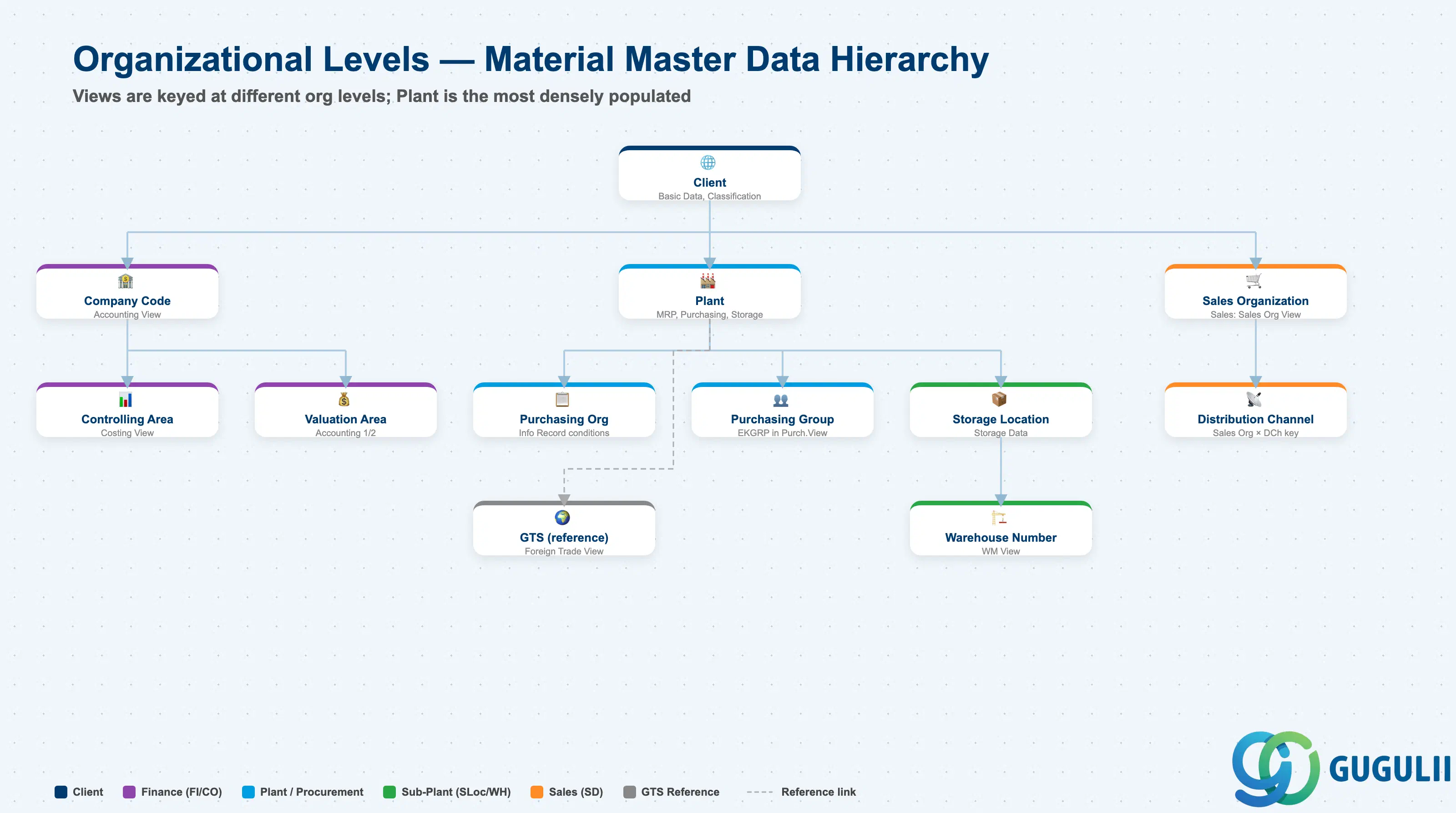
Each view stores its data at a different organizational level. This is the core design challenge of the Material Master.
Client (300)
   │
   ├── Basic Data, Classification ← Client-level (one record for entire enterprise)
   │
   ├── Plant (1000, 2000, ...)
   │      │
   │      ├── MRP, Purchasing, Work Scheduling ← Plant-level
   │      │
   │      ├── Storage Location (0001, 0002, ...)
   │      │      └── Storage Data ← Storage Location-level
   │      │
   │      └── Warehouse Number (WH1, ...)
   │             └── WM Data ← Warehouse-level
   │
   ├── Valuation Area = Plant ← Accounting is typically at Plant level
   │      └── Valuation class, Standard cost
   │
   └── Sales Org × Distribution Channel
└── Sales Data ← Sales Org-level| Org Level | Primary Use | Representative Fields | Notes |
|---|---|---|---|
| Client | Enterprise-wide common attributes | Material description, Base UoM, Classification | One record shared across entire enterprise |
| Company Code | Financial accounting unit | Accounting View (valuation class, price control) | When Valuation Area = Company Code |
| Controlling Area | Management accounting unit | Costing View (cost estimate, variance analysis) | May span multiple Company Codes |
| Purchasing Organization | Purchasing org unit | Purchasing Info Record (price, conditions) | Material Master itself is at Plant level; purchase conditions are at Purch. Org level |
| Plant | Factory / site unit | MRP, Purchasing, Work Scheduling, General Plant Data | The primary level with the most views |
| Purchasing Group | Buyer group | Purchasing View: Purchasing Group (EKGRP) | Buyer group within a Plant; starting point for PO release strategy routing |
| Valuation Area | Inventory valuation unit | Accounting 1 (valuation class, standard price) | Typically = Plant; Company Code-level valuation is also configurable |
| Storage Location | Storage area unit | General Plant Data / Storage (storage location stock) | Warehouse / bin area within a Plant |
| Warehouse Number | Warehouse management unit | WM View (storage type, picking strategy) | Used in Plants with WM/EWM |
| Sales Organization | Sales org unit | Sales: Sales Org View (sales unit, tax classification) | Keyed together with Distribution Channel |
| Distribution Channel | Distribution channel unit | Sales: Sales Org View | Extended in combination with Sales Org |
| (GTS reference) | Trade compliance management | Foreign Trade View (HS code, country of origin, export control) | No GTS-specific org level key in Material Master; GTS references the Foreign Trade View data |
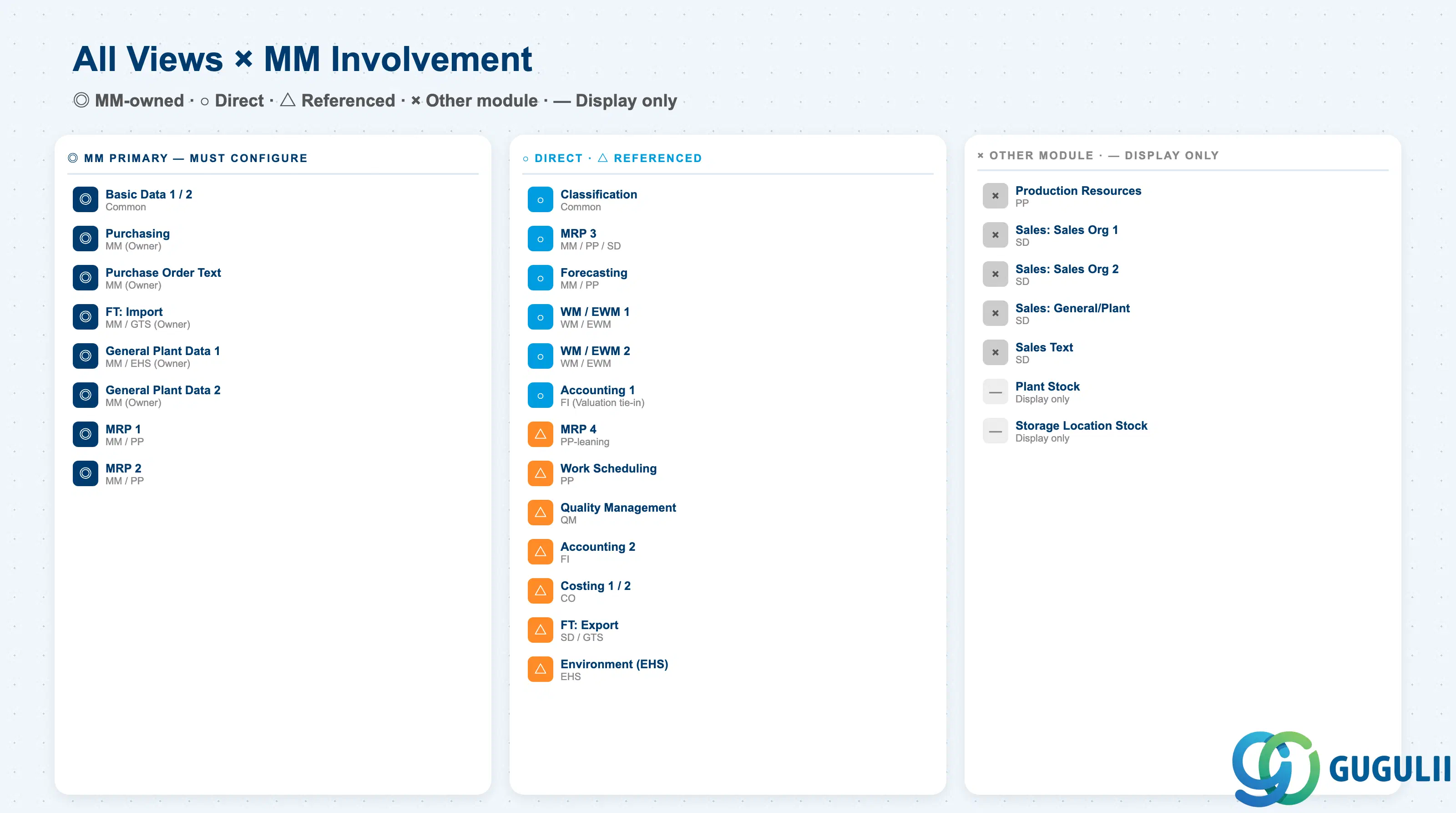
The Material Master has approximately 30 standard views. The table below clarifies the scope MM consultants need to own.
| # | View | Primary Module | MM Involvement |
|---|---|---|---|
| 1 | Basic Data 1 | Cross-module | ◎ |
| 2 | Basic Data 2 | Cross-module | ◎ |
| 3 | Classification | Cross-module | ○ |
| 4 | Purchasing | MM | ◎ (Owner) |
| 5 | Purchase Order Text | MM | ◎ (Owner) |
| 6 | Foreign Trade: Import | MM | ◎ (Owner) |
| 7 | Foreign Trade: Export | SD / GTS | △ |
| 8 | MRP 1 | MM / PP | ◎ |
| 9 | MRP 2 | MM / PP | ◎ |
| 10 | MRP 3 | MM / PP | ○ (SD also references) |
| 11 | MRP 4 | PP-oriented | △ |
| 12 | Forecasting | MM / PP | ○ |
| 13 | Work Scheduling | PP | △ |
| 14 | Production Resources/Tools | PP | × |
| 15 | General Plant Data / Storage 1 | MM | ◎ (Owner) |
| 16 | General Plant Data / Storage 2 | MM | ◎ (Owner) |
| 17 | Warehouse Mgmt 1 | WM / EWM | ○ |
| 18 | Warehouse Mgmt 2 | WM / EWM | ○ |
| 19 | Quality Management | QM | △ |
| 20 | Accounting 1 | FI | ○ (closely linked via valuation) |
| 21 | Accounting 2 | FI | △ |
| 22 | Costing 1 | CO | △ |
| 23 | Costing 2 | CO | △ |
| 24 | Sales: Sales Org 1 | SD | × |
| 25 | Sales: Sales Org 2 | SD | × |
| 26 | Sales: General/Plant | SD | × |
| 27 | Sales Text | SD | × |
| 28 | Plant Stock | Reference | — |
| 29 | Storage Location Stock | Reference | — |
| 30 | Environment (EHS) | EHS | △ (via Hazmat number in General Plant Data) |
Legend: ◎ = Owner / Critical, ○ = Direct involvement, △ = Reference / Integration, × = Other module owns, — = Display-only view
The following sections cover all views rated △ or above in MM involvement.
The first view created for every material — shared across the enterprise. Defines the material’s core identity.
| Field | Description | Practical Usage |
|---|---|---|
| Material (MATNR) | Material number | Design the number assignment method (internal/external) and digit length per Material Type. S/4HANA extended the field to 40 digits, so legacy interface, print form, and custom report impacts must be assessed. Japanese customers often retain the legacy 18-digit format. |
| Material Description | Material name (language-dependent) | For Japanese global projects, maintaining both EN and JA language codes is standard. Mass translation loading via LSMW/BAPI at migration time. |
| Base Unit of Measure (MEINS) | Base unit | Cannot be changed once stock exists — the single most critical field. Use SI units (KG, M, L) and handle trade units (BOX, CASE, etc.) via Alternative Units of Measure to prevent errors. This field gets the most design review time. |
| Material Group | Grouping for analysis and reporting | Used as a key axis in spend analysis, cost aggregation, and MM reports enterprise-wide. Design a 4–5 level hierarchy aligned with procurement, finance, and management perspectives. |
| Old Material Number | Legacy material number | Essential for migration projects. Store the old-to-new mapping here for cross-referencing via SE16 or custom reports. Frequently referenced during migration validation. |
| Division | Product line | Tied to the SD org unit “Division.” Required for FERT/HAWA. Drives Profit Center determination and revenue aggregation — decide together with SD design. |
| Gross/Net Weight, Unit | Weight | Used in delivery planning and freight cost estimation. For export projects, this is the source data for customs documents (Invoice/Packing List); align with shipping terms in the Sales View. |
| Volume, Volume Unit | Volume | Used for warehouse capacity planning (EWM) and container utilization. If blank during EWM implementation, the bin determination strategy will not function. |
| Size/Dimensions | Dimensions | In manufacturing, directly linked to physical labels and bin data. Free text — define a naming convention to ensure data is reportable. |
| EAN/UPC | International product code | Mandatory for retail/consumer goods. Used for barcode picking in WM/EWM. Multiple EANs are registered as Additional EANs. |
Plant-level. Controls purchasing operation behavior.
| Field | Description | Practical Usage |
|---|---|---|
| Purchasing Group (EKGRP) | Responsible buyer group | A critical key that drives the PO release strategy (approval workflow). Design around org structure (direct/indirect materials, regional, or category-based). Standard is 3-digit codes with a naming convention by industry × region. |
| Order Unit | Purchase order unit | Set when the order unit differs from the Base Unit (e.g., stock in EA, order in BOX where 1 BOX = 12 EA). Missing conversion factor in Additional Units of Measure is a common source of quantity errors. |
| Variable Order Unit | Flexible order unit flag | 1 = changeable at PO creation time; blank = fixed. Set to 1 for chemicals/raw materials where the order unit varies by lot. |
| Purchasing Value Key | Reminder and tolerance set | A key bundling reminder lead times and over/underdelivery tolerances. Standard keys like “100” are common industry defaults, but separating strategic materials from commodity items is best practice. |
| GR Processing Time | Goods receipt processing time | Calendar days from receipt to inspection completion and putaway. MRP adds this to delivery date calculations — overestimates inflate lead time; underestimates cause expediting. 3–5 days is realistic for QM-inspected materials. |
| Quota Arrangement Usage | Quota activation key | “4” (apply to PR/PO/MRP) is the most commonly used setting. Required for materials with automatic multi-source splitting (e.g., 60% to Vendor A, 40% to Vendor B). Without this, quotas created in MEQ1 are ignored by MRP. |
| Source List | Source list required flag | When checked, PO creation is blocked for materials without a source in ME01. Effective as a rogue spend control, but blocks emergency purchases — implement together with master data governance rules. |
| JIT Schedule Indicator | JIT delivery call target | Used in the automotive industry with Scheduling Agreements and JIT calls. Required for two-tier operation with Forecast Delivery Schedule (FRC) and JIT calls. |
| Automatic PO | Auto PO conversion (PR → PO) | Enables inclusion in ME59N (automatic PO generation). Requires matching flag in Vendor Master. Commonly used for indirect/MRO materials. |
| Manufacturer Part Number Profile | MPN management profile | Set when managing internal part numbers separately from manufacturer part numbers (MPN). Essential for electronics and EMS (contract manufacturing). Links to AML (Approved Manufacturer List) via MPN Profile. |
This view manages long-form text stored in the Material Master and auto-printed on purchase orders for supplier communication.
| Field | Description | Practical Usage |
|---|---|---|
| Purchase Order Text | Body text auto-copied to PO | Common supplier instructions (e.g., “Attach inspection certificate on delivery,” “Rust-prevention packaging required”) stored here are auto-transferred at PO creation, eliminating repeated manual entry. Multiple texts can be managed by Text ID. |
| Text ID | Text category key | In addition to the standard BEST (Purchase Order Text), additional texts for manufacturing specs, inspection requirements, and transport conditions can be maintained separately. Design the Text ID hierarchy in Customizing (SO10). |
| Language Key | Text language | The same material can hold PO texts in multiple languages. For global plants sharing a common material, registering texts in the supplier’s language is standard. Align with the language setting of the PO print form. |
| Text Editor Content | Free-text body | Can hold dozens to hundreds of lines. Drawing references, specification numbers, and special conditions can be documented. No change history is retained — supplement with change management rules (e.g., Change Number) for audit trail. |
| Reference Text | Text reference from another material/vendor | Allows linking to a common spec registered on a master material, so related materials can reference it. Significantly reduces maintenance effort when a product family shares the same delivery terms. |
| Inclusion Indicator | Auto-copy behavior at PO creation | Checked = auto-copy at PO creation; blank = prompt each time. Priority when both Material Master and Vendor Master texts are flagged is controlled in Customizing (OMFS etc.). Duplicate printing occurs if both are checked — verify design. |
The deepest area in MM-A02. MRP 1–4 together determine the bulk of the procurement logic.
| Field | Description | Practical Usage |
|---|---|---|
| MRP Type | MRP planning method | The foundation of MRP design. PD = Deterministic (requirements-based, standard for manufactured items), VB = Reorder Point Planning (triggers when stock drops below threshold, for consumables), ND = No Planning (for one-time purchases), VV = Forecast-Based Planning, V1 = Automatic reorder point. The choice between PD and VB reflects completely different planning philosophies. |
| MRP Controller (DISPO) | Planning responsible person | A 3-digit org key identifying “who owns planning responsibility for this material.” Used as a filter in MD04 (Stock/Requirements List) and MD06 (Exception Messages). Assign clear ownership rather than rotating — also defines the unit for weekly planning meetings. |
| Lot Size (DISLS) | Lot-sizing procedure | EX = Lot-for-Lot (net requirement, ideal for JIT), FX = Fixed Lot Size (for mass production), HB = Replenish to Maximum Stock Level, SP = Periodic Lot Size. Behavior is determined by the combination with MRP Type — review all combinations in a design matrix. |
| Minimum/Maximum Lot Size | Min/max order quantity | Reflects vendor MOQ (Minimum Order Quantity) or mold cavity count. Setting a Maximum causes split orders — balance against transportation efficiency. |
| Fixed Lot Size | Fixed order quantity | Mandatory when Lot Size = FX. Set to standard pallet quantity, production batch size, etc. Communicate to business that orders are placed at this quantity even when demand is below it. |
| Rounding Value | Rounding quantity | Rounds to multiples of 100 EA, 1 pallet, etc. Rounding Profiles allow stepped rounding (e.g., up to 100 → 100; up to 500 → 500). Directly impacts logistics efficiency. |
| Reorder Point | Reorder point quantity | Mandatory for MRP Type VB/V1/V2. Calculated as safety stock plus lead time consumption. Consider statistical calculation based on service level for high-demand-variability materials. |
| Field | Description | Practical Usage |
|---|---|---|
| Procurement Type | Procurement type | E = In-house production, F = External procurement, X = Both. Use X only when both internal and external sourcing coexist across plants. Incorrectly setting E causes MRP to generate planned orders instead of PRs — a frequent error and the first checkpoint for PP/MM responsibility boundaries. |
| Special Procurement | Special procurement type | 30 = Plant-to-Plant STO (inter-plant replenishment), 40 = Subcontracting, 52 = Withdrawal from alternative plant, 10 = Production in another plant. In global projects, the design of 30 vs. 40 is the most frequently debated topic. Review alongside Customizing (OMD9). |
| Planned Delivery Time | Standard purchase lead time | Calendar days from supplier dispatch to GR at your plant. Material Master value takes priority over Vendor Master Planned Delivery Time. Also used as the benchmark for on-time delivery evaluation. |
| GR Processing Time | Goods receipt processing time | MRP references this field (same name as in Purchasing View, but MRP reads this one). Misalignment between the two fields is common during data loads — establish a rule for which is the master. |
| Planning Calendar | Planning calendar | Reflects factory working days and holidays. Combined with Lot Size = PS (Periodic) to control weekly/monthly order timing. Multi-plant projects require separate calendars per plant. |
| Schedule Margin Key | Float before/after scheduling | A bundled set of buffer days before start and after finish of an order. 000 = none; 001 = 1 day start buffer / 1 day finish buffer, etc. Used to hedge manufacturing lead time risk. |
| Safety Stock | Safety stock | MRP plans to never let stock drop below this level. Ideally calculated statistically from demand and lead time variability, but in practice often set by experience or vendor reliability. |
| Safety Time | Safety time (days early) | Pulls requirements forward by N days. Where safety stock is a quantity buffer, safety time is a time buffer. Useful for long lead time items (e.g., imported goods). |
| Service Level | For automatic safety stock calculation | 95%, 98%, etc. Used with Coverage Profile to dynamically calculate safety stock. Requires clean consumption and lead time data. |
| Field | Description | Practical Usage |
|---|---|---|
| Strategy Group | Planning strategy group | Selects the production model. 10 = MTS (Make-to-Stock), 20 = MTO (Make-to-Order), 40 = MTS with Forecast, 50 = Project-based. Japanese manufacturers predominantly use 10 and 40; Western EMS companies lean toward 20. Mixed Mode (multiple strategies) is also configurable — a common debate for export-sales subsidiaries. |
| Consumption Mode | Consumption mode | Direction for consuming independent requirements (Forecast/Sales Orders). 1 = Backward only, 2 = Forward only, 3 = Backward + Forward, 4 = Forward + Backward. Important for MTO/Make-to-Forecast where sales orders consume planned independent requirements. |
| Bwd/Fwd Consumption Period | Consumption period (days) | Set in conjunction with Consumption Mode. Example: 30 days backward + 30 days forward for sales order consumption. Too long consumes future demand; too short causes double-counting of independent requirements. |
| Availability Check | Availability checking rule | Rule referenced by SD ATP (Available-to-Promise). 02 = Individual/cumulative, 04 = Daily cumulative, etc. Which elements (stock, PO, planned orders, PR, reservations) are included is defined in OVZ9. |
| Period Indicator | Period unit | Unit for viewing stock and demand. M = Month, W = Week, D = Day, P = Custom period. Reflected in MD04 and forecast buckets. |
| Field | Description | Practical Usage |
|---|---|---|
| Selection Method | BOM selection method | 1 = Production Version, 2 = BOM valid-from date, 3 = Lot size range. Set for Plants with PP implementation. Running via Production Version is the modern SAP standard. |
| Individual/Collective Requirements | Individual vs. collective requirements | 1 = Individual (BOM explosion per sales order), 2 = Collective (aggregated BOM explosion). MTO projects use 1; common components of mass-production BOMs use 2 to reduce planning system load. |
| BOM Explosion Number | BOM freeze reference | Links to a project/sales order to freeze the BOM (protecting the order from later design changes). Used in long-duration projects and aerospace. |
| Repetitive Manufacturing | Repetitive manufacturing flag | When checked, REM mode (backflush + cumulative GR for mass production) is enabled. Used on automotive/electronics mass-production lines. Design together with Production Version. |
| Production Version | Production version | Combination of BOM × Routing × Production Line. Critical when the same material is produced on multiple lines or when old and new BOMs run in parallel during a design change. S/4HANA assumes Production Version-based operation. |
| Discontinuation Indicator | Discontinuation flag | 1 = Automatic switchover to follow-up material. Combined with Follow-up Material, plans the successor once stock is depleted. Required for EOL (End-of-Life) material management. |
Used in combination with MRP Type = VV (Forecast-Based Planning). Projects future demand from historical consumption and feeds it into MRP requirements. Particularly effective for consumer goods, seasonal items, and high-demand-variability materials.
| Field | Description | Practical Usage |
|---|---|---|
| Forecast Model | Forecasting model | D = Constant, T = Trend, S = Seasonal, X = Automatic selection. X is convenient initially but model selection fluctuates with data quality — switch to a fixed model once demand patterns become clear. |
| Historical Periods | Number of historical periods | At least 24 periods (2 years) for seasonal patterns; around 12 for constant. New products have no history — design a process to borrow data from similar materials. |
| Forecast Periods | Number of forecast periods | Reflects the planning horizon. Align with Planning Time Fence in MRP 3. |
| Initialization Periods | Initialization period | Learning period for model startup. |
| Alpha/Beta/Gamma/Delta Factor | Smoothing factors | Exponential smoothing parameters. 0.1–0.3 is standard. Higher values make the forecast more reactive to recent data; lower values are more stable but slower to capture trend changes. |
| MRP Type | Forecast-linked MRP | Meaningful only when MRP Type = VV is selected. |
Primarily used for in-house produced materials (FERT/HALB).
| Field | Description | Practical Usage |
|---|---|---|
| Production Scheduler Profile | Production scheduler profile | Scheduler group key. Used for MD04 filtering and workflow responsibility assignment. How to split responsibility between MRP Controller and Production Scheduler is a key design question. |
| Production Unit | Production unit | Set when different from Base Unit. Example: stock in EA, production in KG (chemicals). |
| Production Storage Location | Receiving storage location | Default GR destination after production completion. Critical in Plants with multiple warehouses — incorrect setup causes stock not found at picking. |
| In-house Production Time | In-house production lead time | Fixed lead time independent of lot size. Used in simplified MRP; detailed calculation uses Routing. |
| Setup/Processing/Teardown Time | Setup, processing, teardown time | Breakdown of In-house Production Time. Input values for lot-size-dependent detailed scheduling. |
| Underdelivery/Overdelivery Tolerance | Quantity tolerance | Absorbs yield variance and fractional quantities in production orders. Required in industries with unpredictable yield such as chemicals and food. |
Defines plant-level inventory management and storage conditions. This is the starting point for storage environment (temperature, hazardous materials), material status, and shelf life management. A mandatory design area for food, pharmaceutical, and chemical projects.
| Field | Description | Practical Usage |
|---|---|---|
| Plant-Specific Material Status | Plant-level usage status | Example: 02 = Stop for sales, 03 = Block for procurement. Used during design changes or quality holds. Stored in MARC-MMSTA; triggers warnings or errors in PR/PO/SO/MIGO. |
| Storage Conditions | Storage conditions | Temperature zone, humidity, explosion-proof area, etc. Used as input for EWM Putaway Strategy determination. |
| Temperature Conditions | Temperature zone | Required for food and pharma. Starting point for cold chain management. |
| Container Requirements | Container requirements | For materials requiring dedicated containers or fixtures. |
| Hazardous Material Number | Hazardous material number | Required for EHS (Environmental, Health & Safety) integration. Used for auto-printing on transport documents and storage area restrictions. |
| Shelf Life Expiration Date Required | Shelf life management flag | When checked, entry of expiration date is required at GR. Required for food, pharmaceutical, and chemical materials. |
| Minimum Remaining Shelf Life | Minimum remaining shelf life | Rejects incoming lots with remaining shelf life below this threshold. Used for customer-specified shelf life SLA requirements. |
| Total Shelf Life | Total shelf life | Total valid days from production date. |
| Period Indicator for SLED | Shelf life unit | Day / Month / Year for shelf life. |
In EWM environments, managed via /SCWM/MAT1 (Decentralized) or /SCWM/MAT_* for integrated setups. For classic WM only, data is maintained directly in the Material Master.
| Field | Description | Practical Usage |
|---|---|---|
| Warehouse Number | Warehouse number | 3-digit code. Plant-to-Warehouse is usually 1:1, but large logistics hubs may have multiple warehouses under one Plant. |
| Storage Type Indicator | Storage type determination key | Used in Putaway strategy to determine the target storage type (high-rack, floor, small-parts area). |
| Storage Section Indicator | ABC classification | Zones fast-moving A items near output gates. Key for WM/EWM flow-path optimization. |
| Storage Bin | Default storage bin | Used for fixed bin storage. Blank for dynamic bin determination. |
| Picking Storage Type | Source storage type for picking | First storage type referenced in outbound delivery. |
| WM Unit | WM unit of measure | Pallet, case, etc. Key when different from Base Unit. |
| Putaway/Removal Strategy | Putaway/removal strategy | Strategies defined in EWM Customizing; Material Master provides the determination inputs. |
Controls goods receipt inspection, goods issue inspection, and re-inspection during storage in integration with the QM module. When QM Procurement Active is enabled, an Inspection Lot is automatically generated at goods receipt.
| Field | Description | Practical Usage |
|---|---|---|
| QM Material Authorization | QM usage authorization | Flag indicating whether QM module is active for this material. Explicitly enabled per Plant where QM is deployed. |
| QM Procurement Active | Quality management at procurement | When checked, automatically creates a Quality Inspection Lot at GR. Links to QM Info Record. |
| QM Control Key | QM control key | A bundle enabling GR inspection, GI inspection, and storage inspection. Each Control Key defines certificate requirement, auto Inspection Lot creation, and GR quality hold behavior. |
| Inspection Setup | Inspection type settings | 01 = GR inspection, 04 = GI inspection, 10 = Periodic re-inspection, 09 = In-process inspection. Each type links to an Inspection Plan (set of inspection characteristics). |
| Certificate Type | Certificate type | Auto-printed certificate type at shipment (Certificate of Analysis, Mill Sheet, etc.). |
| Recurring Inspection | Periodic re-inspection flag | Triggers periodic re-inspection of long-stored materials. Used in pharmaceutical and chemical industries. |
The most critical view in terms of financial posting impact.
| Field | Description | Practical Usage |
|---|---|---|
| Valuation Class (BKLAS) | Valuation class | The heart of the MM→FI integration. OBYC (automatic account determination) uses the combination of Valuation Class × Transaction Key (BSX, WRX, GBB, PRD, etc.) to determine G/L accounts. Permissible valuation classes per Material Type are defined in OMS2. A mandatory three-dimensional matrix (Material Type × Valuation Class × G/L Account) must be agreed with FI during design. |
| Price Control | Price control method | S = Standard Price (for manufactured goods), V = Moving Average Price (for purchased goods). This choice defines the cost management philosophy. Standard Price provides clear variance visibility; Moving Average Price tracks actual costs. Enabling Material Ledger allows parallel valuation under both methods. |
| Standard Price | Standard price | Valuation unit price when Price Control = S. Updated from the standard cost released via CK40N (Cost Estimate). Mid-year changes via MR21. |
| Moving Average Price | Moving average price | Valuation unit price when Price Control = V. Automatically recalculated at each GR. Can produce extreme price swings with negative stock or very low stock quantities — requires period-end monitoring. |
| Price Unit | Price unit | The quantity basis for the unit price. Example: for a material priced at 0.01 JPY per unit, set Price Unit = 1000 to express as “10 JPY per 1000 units” — prevents decimal overflow. |
| Total Stock / Total Value | Total stock / value | System-calculated results. Continuously verified via MB5B, MB5L, etc. |
| Valuation Category | Valuation category | Enables batch valuation, country-of-origin valuation, or status-based valuation. Batch valuation is used in chemical/food when lot-level cost management is required. High design cost — verify business requirements strictly. |
| Field | Description | Practical Usage |
|---|---|---|
| Tax Price 1/2/3 | Tax-based valuation price | In Japan, may feed deferred tax accounting calculations. Maintained for corporate/local tax purposes. |
| Commercial Price 1/2/3 | Commercial valuation price | For commercial law accounting (lower-of-cost-or-market). Used for period-end inventory write-downs. |
| LIFO/FIFO Valuation | LIFO/FIFO valuation method | Activated for US GAAP LIFO usage. FIFO or weighted average is standard in Japan. |
| Devaluation Indicator | Devaluation flag | Used with slow-moving/obsolescence write-down programs (MRN0, etc.) for aged or obsolete inventory. |
Controls standard cost rollup, release, and variance analysis in integration with the CO module. Particularly important for in-house produced materials (FERT/HALB). Holds the prerequisite settings for cost estimates run from BOM × Routing (CK40N).
| Field | Description | Practical Usage |
|---|---|---|
| Costing Lot Size | Costing lot size | Base quantity for allocating setup costs and fixed costs. Should be close to the actual production lot size — deviation distorts unit cost. Use the average production lot size over the product lifecycle as a practical approach. |
| With Qty Structure | BOM/Routing cost rollup flag | When checked, standard cost for manufactured materials is automatically rolled up from BOM × Routing. Check for FERT/HALB; leave blank for ROH/HAWA. |
| Material Origin | Source display in product cost | When checked, shows cost by individual material in the cost breakdown. Enable for key raw materials and key components where cost analysis granularity is important. |
| Variance Key | Variance analysis key | Reference set for production order variance analysis. Standard uses 000; split as needed by requirement. |
| Production Version (Costing) | Default production version for costing | When multiple Production Versions exist, this specifies the default. Locks in “which manufacturing method’s cost” at cost estimate time. |
| Standard Cost Estimate (Future/Current/Previous) | Three generations of standard cost | Version management via CK40N mark and release. Typical operation: release at fiscal year start. Mid-year mark is performed for budget revisions or standard cost updates. |
| Costing Status | Cost mark/release status | KA = Marked, FR = Released, etc. Used to visualize the cost release approval workflow. |
Owned by the SD module but maintained in the Material Master.
| Field | Description | Practical Usage |
|---|---|---|
| Sales Unit | Sales unit | Aligning the three tiers — Base Unit / Order Unit / Sales Unit — is the central challenge of master data design. Cases where the Sales Unit follows industry convention and differs from the others (e.g., stock in EA, sales in BOX × dozen) are common. |
| Delivering Plant | Default delivering plant | Automatically determines the shipping origin at sales order entry. In multi-plant projects, design often varies by Sales Org × Material. |
| Material Statistics Group | Statistics grouping | Key for SD sales statistics (SIS) and CO-PA integration. Confirm the management reporting axis during design. |
| Tax Classification | Tax classification | Determines tax rate by shipping country × destination country combination. For global projects, building the country-level tax classification master is a large-scale effort. |
| Material Group 1–5 | Free classification fields | Additional axes for SD reporting. Used for sales channel analysis, regional analysis, etc. |
| Item Category Group | Item category group | NORM (standard), ERLA (configuration), LUMF (component-level), DIEN (service), etc. The starting point for order line item category determination. Controls BOM explosion behavior. |
| Pricing Reference Material | Pricing reference material | For shared pricing, references the price conditions of another material. Used when a product family shares the same pricing structure. |
| Field | Description | Practical Usage |
|---|---|---|
| Transportation Group | Transportation group | Key for route and carrier determination. Split by frozen/ambient, hazardous goods, etc. |
| Loading Group | Loading group | Input for automatic Shipping Point determination (Plant × Loading Group × Shipping Condition). |
| Availability Check | Availability checking rule | Same field as in MRP 3. Used in SD ATP (Available-to-Promise). Typically set in MRP 3 and referenced by Sales. |
| Batch Management | Batch management flag | When checked, batch confirmation is mandatory at goods issue. Cannot be deactivated once stock movements have occurred — finalize during design. |
| Profit Center | Profit center | Axis for CO-PA integration and P&L reporting. Mass maintenance is required in projects where the Profit Center hierarchy changes due to org restructuring. |
Assigns Classes and Characteristics to materials. Forms the foundation for material search, batch management, and Variant Configuration. Class Type determines whether Material (001), Batch (023), or VC (200) is used.
| Field | Description | Practical Usage |
|---|---|---|
| Class Type | Class type | 001 = Material Class, 023 = Batch Class, 200 = Variant Configuration, etc. Strict separation by purpose is essential. Mixing Material search class 001 with batch attribute management class 023 leads to operational breakdown. |
| Class | Assigned class | Multiple classes can be assigned to one material. A hierarchical design such as “Mechanical Parts” → “Bearings” → “Deep Groove Ball Bearings” is common. |
| Characteristic | Characteristic | Examples: dimensions, material composition, surface treatment, manufacturer. In Variant Configuration, used as configurable design parameters. |
| Characteristic Value | Characteristic value | Types include discrete values (master selection), numeric ranges, dates, and free text. Prioritize discrete value type when aggregation in reports is required. |
Manages customs, country of origin, and tariff classification data for import and export. Starting point for auto-generation of export documents, FTA preferential tariff determination, and hazardous goods regulations (EHS integration). A mandatory design area for global projects.
| Field | Description | Practical Usage |
|---|---|---|
| Country of Origin | Country of origin | Auto-printed on export documents (Invoice/Packing List/COO). Starting point for certificate of origin (FTA application). |
| Region of Origin | Region/state of origin | Required in US, EU, etc. where state/region-level management is needed. |
| Commodity Code (HS Code) | Customs tariff classification code | Different HS codes per country can be maintained. Misclassification carries customs penalty risk — mandatory sign-off with the trade compliance team. |
| Export/Import Group | Export/import group | Used for export statistics reporting and license management. |
| CAS Number | Chemical substance number | Management key for chemical export regulations (REACH, TSCA, etc.). |
| Preference Status | Preference status | Flag for FTA/EPA preferential tariff eligibility. Updated by origin calculation programs (GTS integration, etc.). |
| ID | Category | Title |
|---|---|---|
| mm-001 | Overview | What is SAP MM? |
| ID | Category | Title |
|---|---|---|
| mm-a01 | Overview | SAP MM Master Data: Overview, Hierarchy & Relationships |
| mm-a02-01 | Master Data | SAP MM Material Master 📍 |
| mm-a04-01 | Master Data | SAP MM Class |
| mm-a04-02 | Master Data | SAP MM Characteristic |
| mm-a06-01 | Master Data | SAP MM Purchasing Info Record |
| mm-a05-01 | Master Data | SAP MM Batch Master |
| mm-a06-02 | Master Data | SAP MM Source List |
| mm-a06-03 | Master Data | SAP MM Quota Arrangement |
| mm-a06-04 | Master Data | SAP MM Price Condition |
| ID | Category | Title |
|---|---|---|
| mm-b01 | Overview | SAP MM Transactions: Process Flow, Hierarchy & Module Integration |