Title here
Summary here

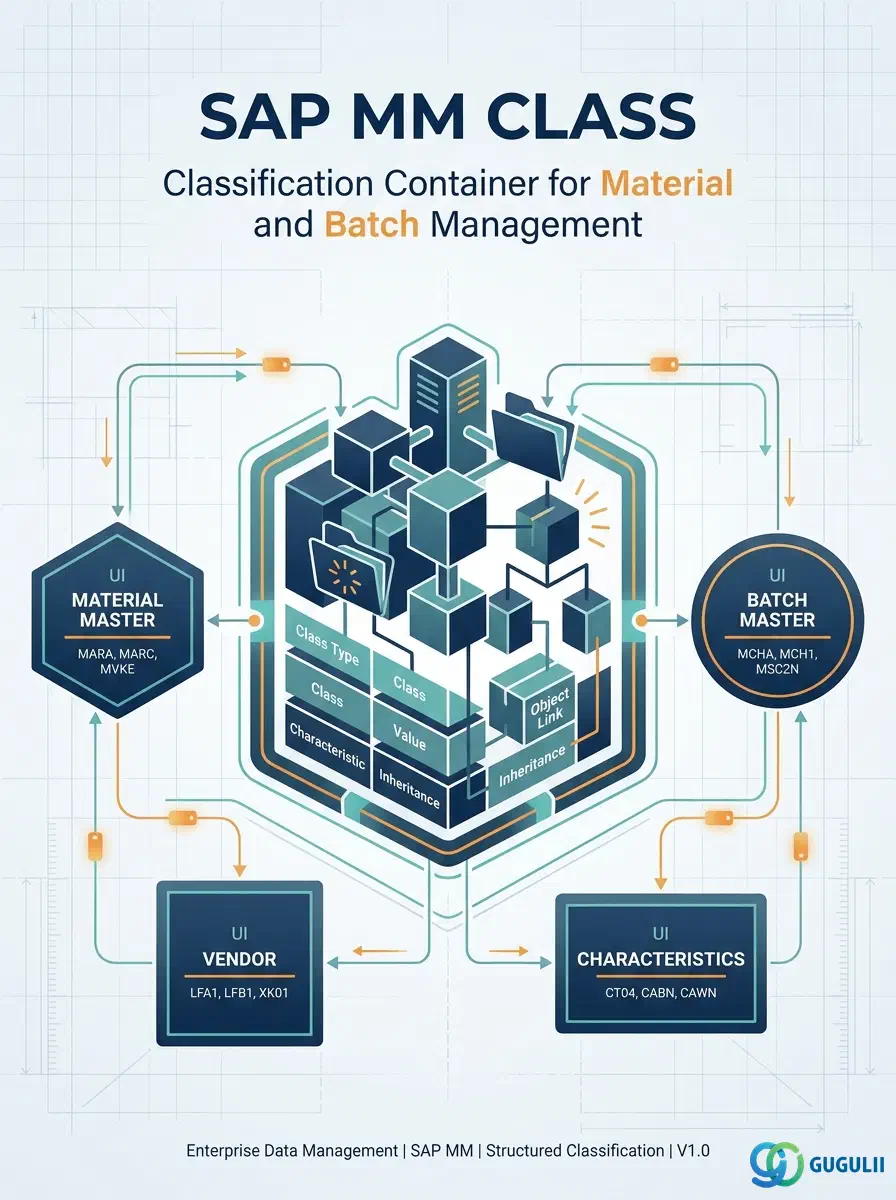
The Class is the master data object that defines a classification container in SAP’s cross-application Classification System (CA-CL). It groups one or more Characteristics into a reusable structure that can be assigned to materials, batches, vendors, equipment, and other SAP objects to enable structured search, reporting, and variant configuration. In the MM context, Classes are most commonly applied to Material Masters and Batch Masters, forming the foundation of classification-based procurement and quality management strategies. This article covers Class structure, types, organizational scope, and field-level details — the Characteristic master data object is covered separately in MM-A04-02.
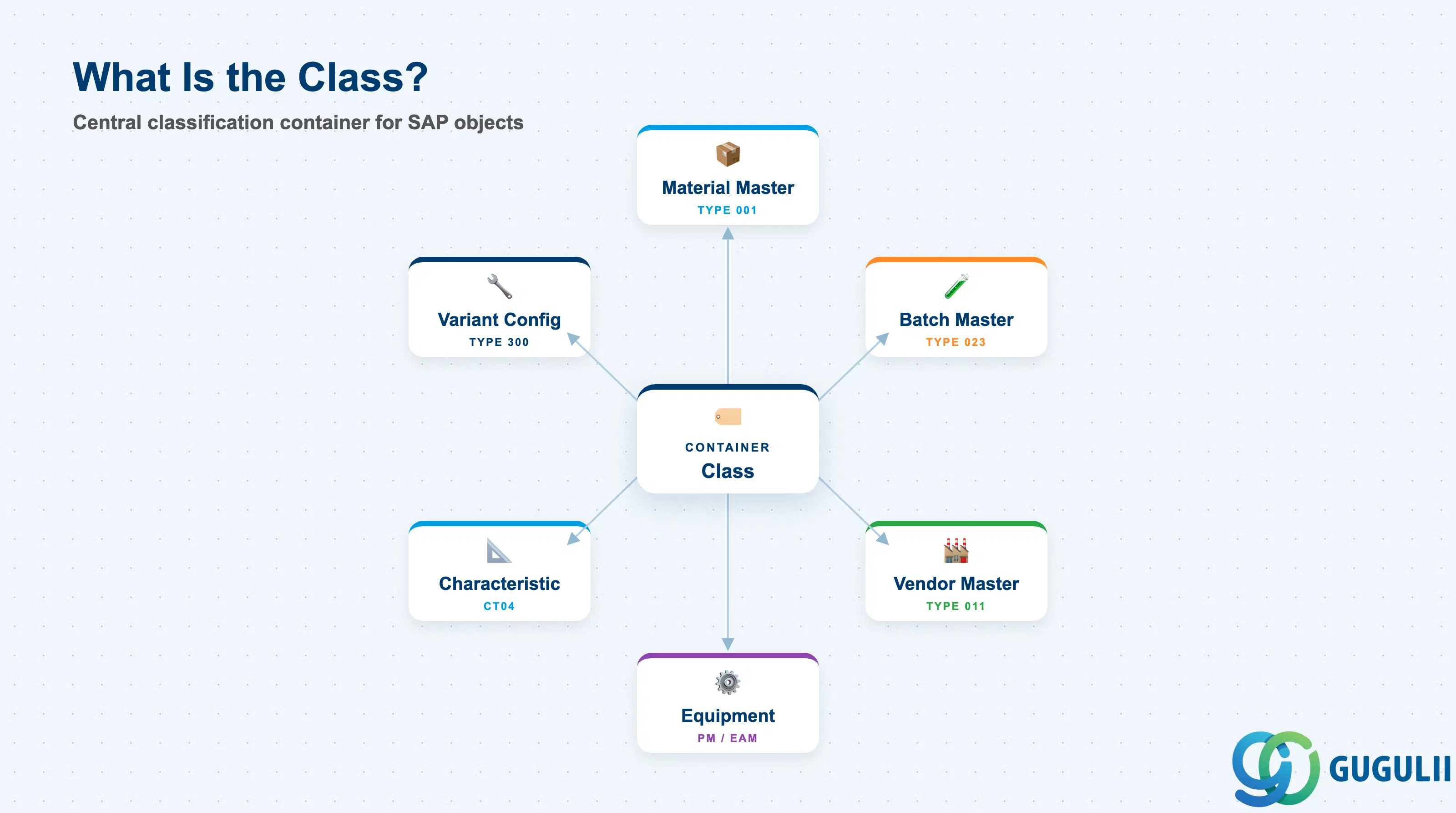
A Class is a user-defined grouping template that holds a set of Characteristics. Any SAP object type that supports classification can be assigned to one or more Classes, and its characteristic values recorded against those classes. The class does not store values — it stores the schema (which characteristics apply, in which order, with which constraints). The assigned objects store the values.
| Aspect | Details |
|---|---|
| Role | Defines a classification schema (set of Characteristics) that can be assigned to SAP objects to enable structured search, filtering, and analysis |
| Modules using it | MM (Material Master, Batch Master — primary user), QM (Batch classification for quality decisions), PM/EAM (Equipment classification), SD (Variant Configuration — Class Type 300), HR (Job classification) |
| Transactions | CL01 (Create Class) / CL02 (Change Class) / CL03 (Display Class) / CL24N (Where-used list) / CL6CN (Class search) |
| Key Tables | KLAH (Class Header) / KSML (Characteristics assigned to class) / INOB (Classification object assignments) / AUSP (Characteristic values per assigned object) |
| S/4HANA note | Classification data model unchanged from ECC. Fiori app “Manage Classes” (F2258) available for class maintenance. Classification search improved through embedded analytics integration. |
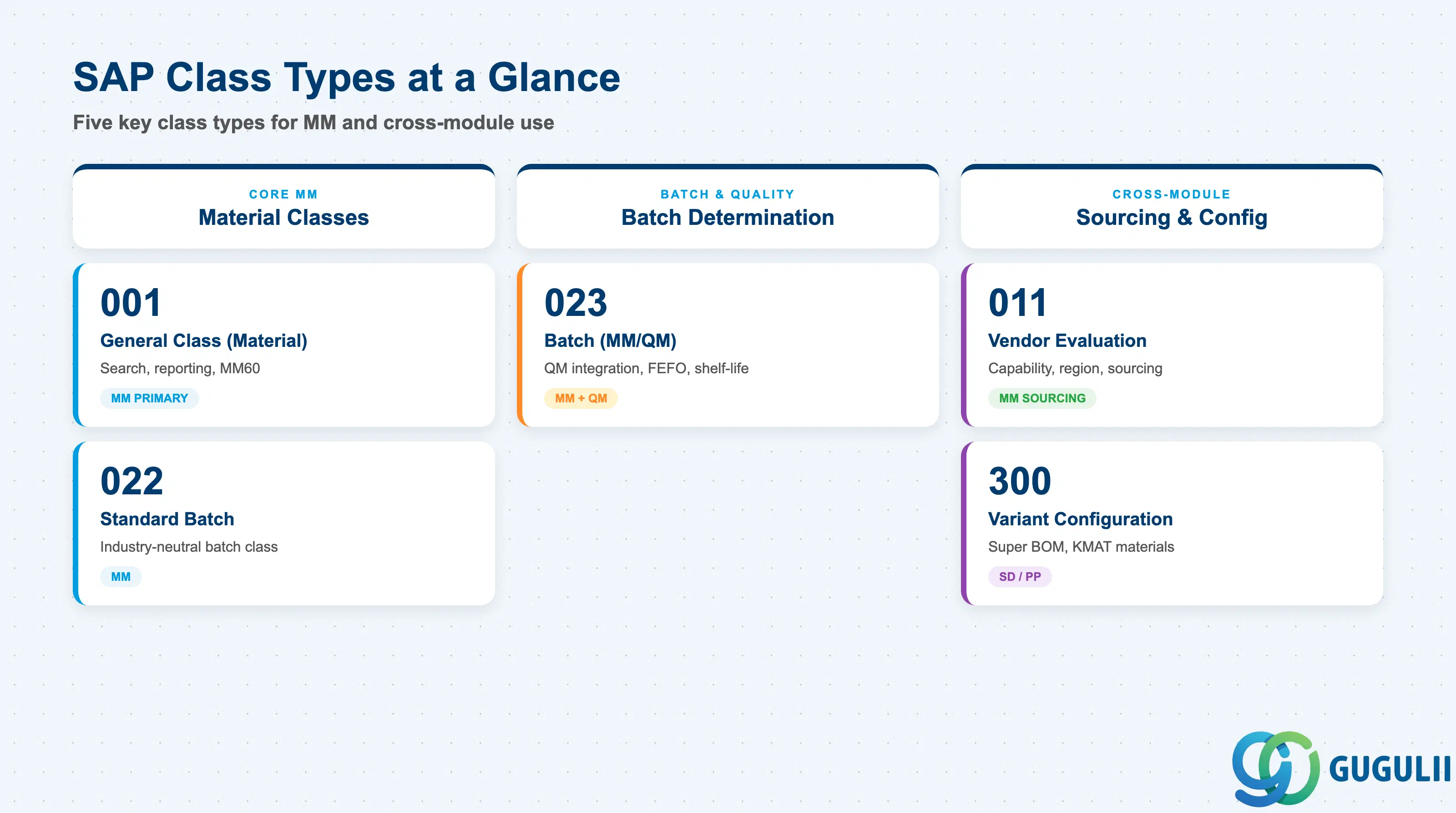
The Class Type determines which SAP object type can be assigned to the class and which business processes can consume the classification data. Selecting the wrong class type makes a class invisible to the intended object and cannot be changed after classes of that type have been used in production.
| Class Type | Code | Use Case | Key Behavior |
|---|---|---|---|
| General Class (Material) | 001 | Classifying materials for search and reporting | Can be assigned to Material Master. Most common in MM projects. Enables classification search in MM60, variant configuration foundation. |
| Standard Batch | 022 | Batch-level classification for industry-neutral scenarios | Assigned at batch level. Used when batch classification is needed without QM integration. Less common than Type 023. |
| Batch (MM/QM) | 023 | Batch-level classification with QM integration | The standard batch class type in MM and QM projects. Enables batch search (MBNL, MSC3N), shelf-life management, and batch determination. Requires “Batch Classification” active in material master. |
| Vendor Evaluation | 011 | Classifying vendors by capability, region, or category | Assigned to Vendor Master. Used in sourcing strategies and spend analysis. Less common — many projects use standard MM vendor evaluation (LiS) instead. |
| Variant Configuration | 300 | Product configurator — configurable materials | Assigned to configurable materials (material type KMAT). The backbone of SD/PP variant configuration. Class 300 enables “super BOM” and routing selection logic. |
Design principle: Class Type must be locked down in the blueprint phase. Mixing types (e.g., using 001 for batch purposes instead of 023) causes batch determination failures and requires master data rework. For projects involving both material and batch classification, maintain separate classes of Type 001 and 023.
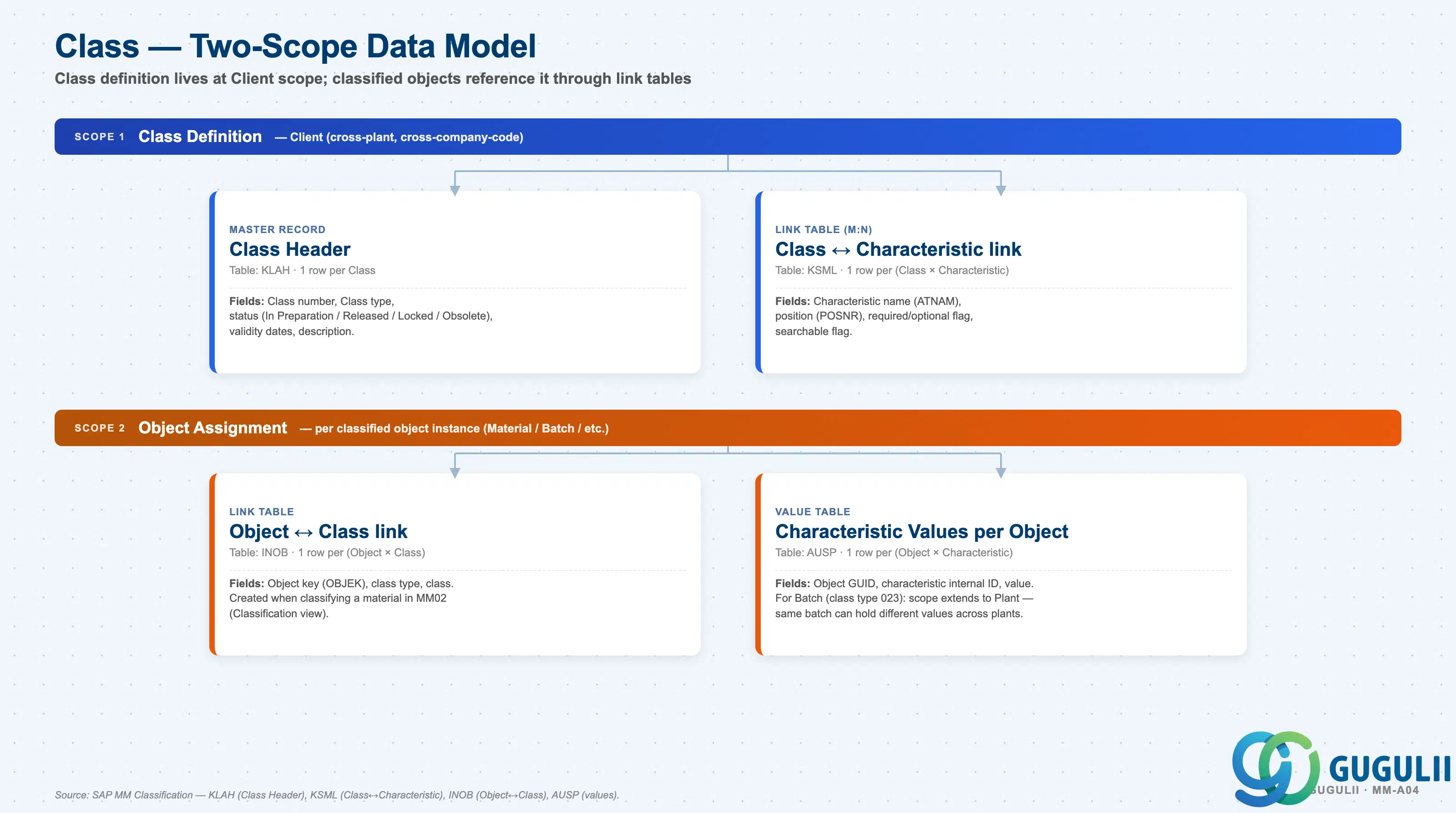
The Class is the definition record; classified Object instances reference the Class through separate link tables. The Classification System operates at the Client level — class definitions are cross-plant and cross-company-code — but value scope can be wider when the object type is batch-scoped.
Client scope — Class Definition
   │
   ├── Class Header (KLAH)
   │      One row per Class.
   │      Fields: Class number, Class type, status, validity dates.
   │
   └── Class ↔ Characteristic link (KSML) — M:N relationship
          One row per (Class × Characteristic).
          Fields: position (POSNR), required/optional flag, searchable flag.
          Defines which characteristics apply to objects in this class.

Object Assignment scope (per classified object instance)
   │
   ├── Object ↔ Class link (INOB)
   │      One row per (Object × Class).
   │      Created when classifying a material in MM02 (Classification view).
   │
   └── Characteristic Values per Object (AUSP)
          One row per (Object × Characteristic).
          For Material Master: Client scope (one set of values per material).
          For Batch (class type 023): scope extends to Plant —
different plants can hold different values for the same batch.| Object (Table) | Scope | Primary Fields | Notes |
|---|---|---|---|
| Class Header (KLAH) | Client | Class number, class type, status, validity dates | One KLAH per class. Shared across all plants and company codes. |
| Class ↔ Characteristic link (KSML) | Client | Characteristic name (ATNAM), position (POSNR), required flag | One KSML row per characteristic assigned. Add/remove allowed in “In Preparation” status; restricted after “Released”. |
| Object ↔ Class link (INOB) | Object instance | Object key (OBJEK), class type, class | One INOB per Material × Class. Created via MM02 Classification view. |
| Characteristic Values per Object (AUSP) | Object instance (Plant for Batch) | Object GUID, characteristic internal ID, value | For Batch (class 023), same batch number can hold different values across plants. |
Key design decision: Determine the classification hierarchy depth in the blueprint. SAP Classification supports hierarchical classes (superordinate classes containing subordinate classes), but deeply nested hierarchies are difficult to maintain and search. A flat or two-level hierarchy is recommended for most MM implementations.
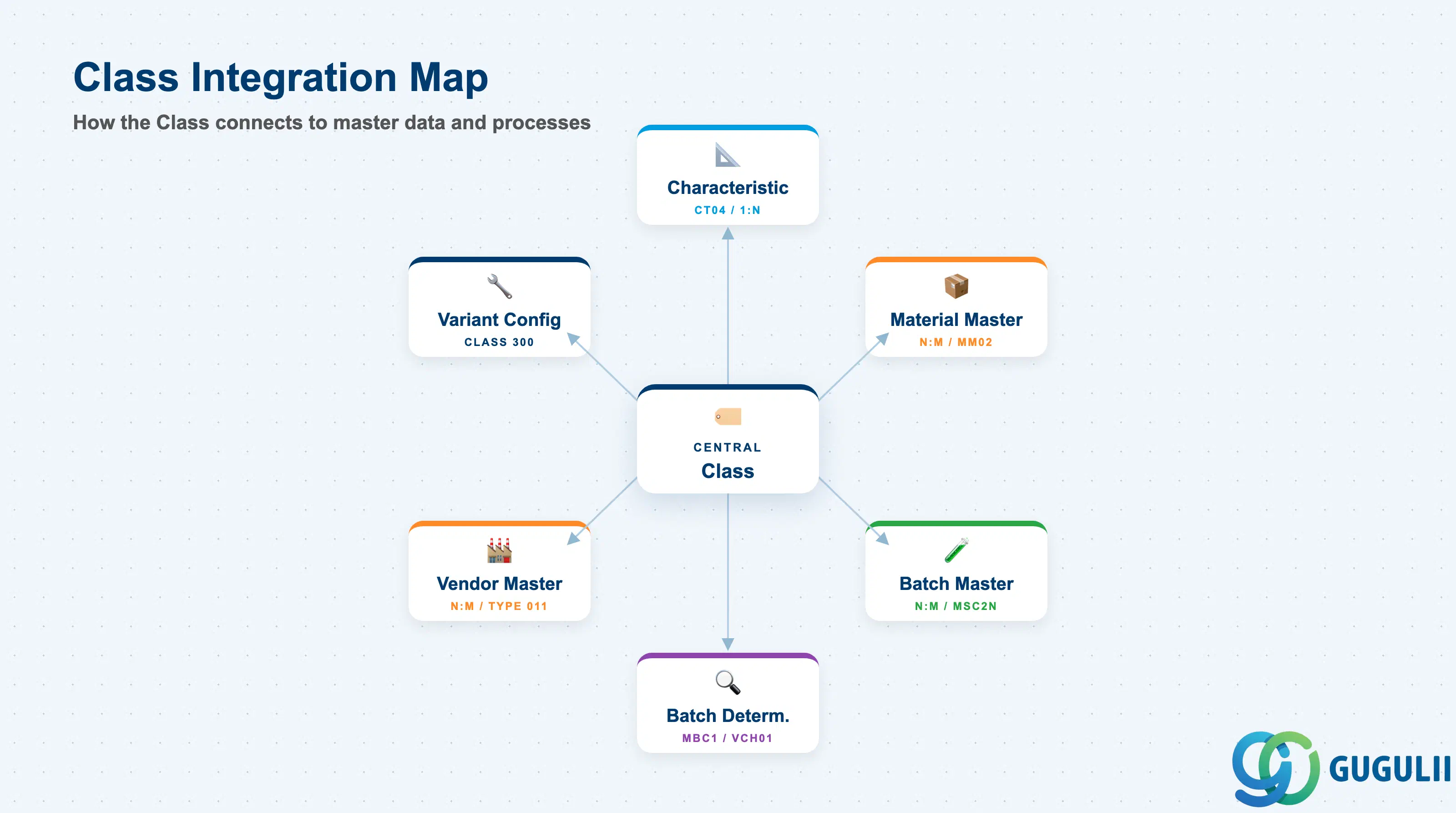
The Class does not stand alone. Its value is realized only when Characteristics are assigned to it and the class is in turn assigned to object masters. The downstream consumers of classification data span multiple modules.
| Object | Relationship | Practical Notes |
|---|---|---|
| Characteristic (CT04) | 1:N — a class contains one or more characteristics | Characteristics must exist before they can be assigned to a class. Changing a characteristic’s data type or value range after class release requires careful impact analysis — all existing classified objects may be affected. |
| Material Master | N:M — a material can be assigned to multiple classes; a class can cover multiple materials | Classification view (MM02 → Additional Data) links the material to one or more classes and stores characteristic values. Class Type 001 required. |
| Batch Master | N:M — a batch can be assigned to one batch class; batch class values stored per plant | Batch classification is triggered at GR or production confirmation. Class Type 023 required. Batch determination (transaction MBC1) uses batch class characteristics to find batches matching process-specific criteria. |
| Vendor Master | N:M — a vendor can be assigned to a vendor evaluation class | Class Type 011. Enables structured vendor search and capability analysis beyond the standard MM vendor evaluation scorecard. |
| Batch Determination | Consumes batch class values | Batch determination conditions (SD, PP, WM) search AUSP for batches with characteristic values meeting the strategy criteria. Poorly maintained batch class values cause batch determination to return no result or wrong batch. |
| Variant Configuration (SD/PP) | Class Type 300 forms the configuration object | In VC scenarios, the configurable material is assigned to a Class 300; the characteristic values drive BOM explosion and routing selection. MM materials may be classified as components of configurable assemblies. |
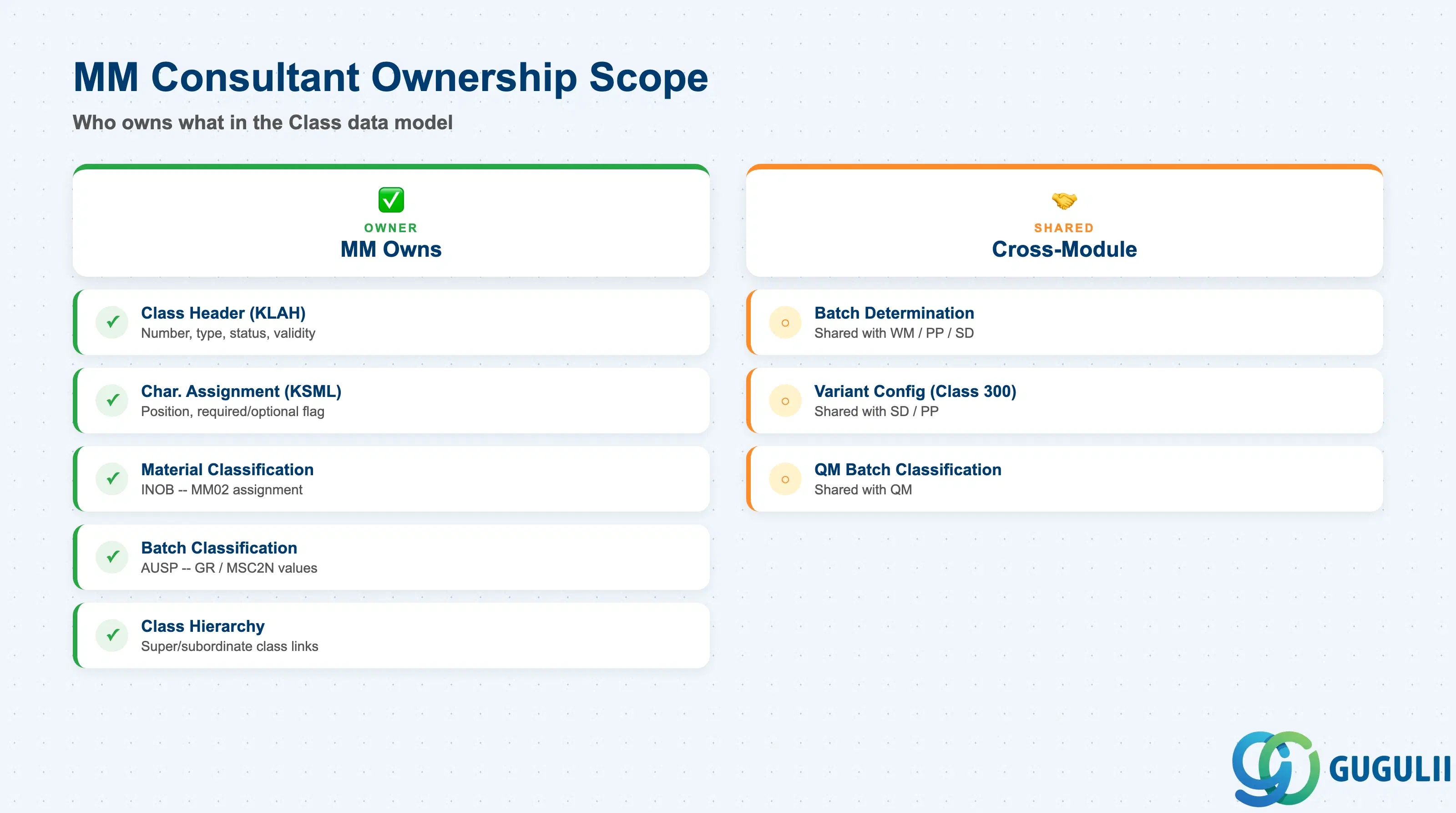
| Data Section | MM Involvement | Notes |
|---|---|---|
| Class Header (KLAH) | ◎ Owner | Class number, type, status, validity — MM administrator defines and maintains |
| Characteristic Assignment (KSML) | ◎ Owner | Which characteristics are assigned to the class, their position and required/optional flag |
| Material Classification (INOB) | ◎ Owner | Assigning materials to classes and entering characteristic values in MM02 |
| Batch Classification (AUSP) | ◎ Owner | Entering batch characteristic values at GR, production confirmation, or MSC2N |
| Class Hierarchy Definition | ◎ Owner | Defining superordinate/subordinate class relationships (if hierarchy used) |
| Batch Determination Strategy | ○ Shared with WM/PP/SD | Batch class drives determination, but strategy conditions are configured by each consuming module |
| Variant Configuration (Class 300) | ○ Shared with SD/PP | SD/PP VC consultants own Class 300 design; MM provides component material master setup |
| QM Batch Classification | ○ Shared with QM | QM may define which characteristics require quality-driven values at GR; MM configures batch class structure |
Legend: ◎ = Owner / Critical, ○ = Direct involvement
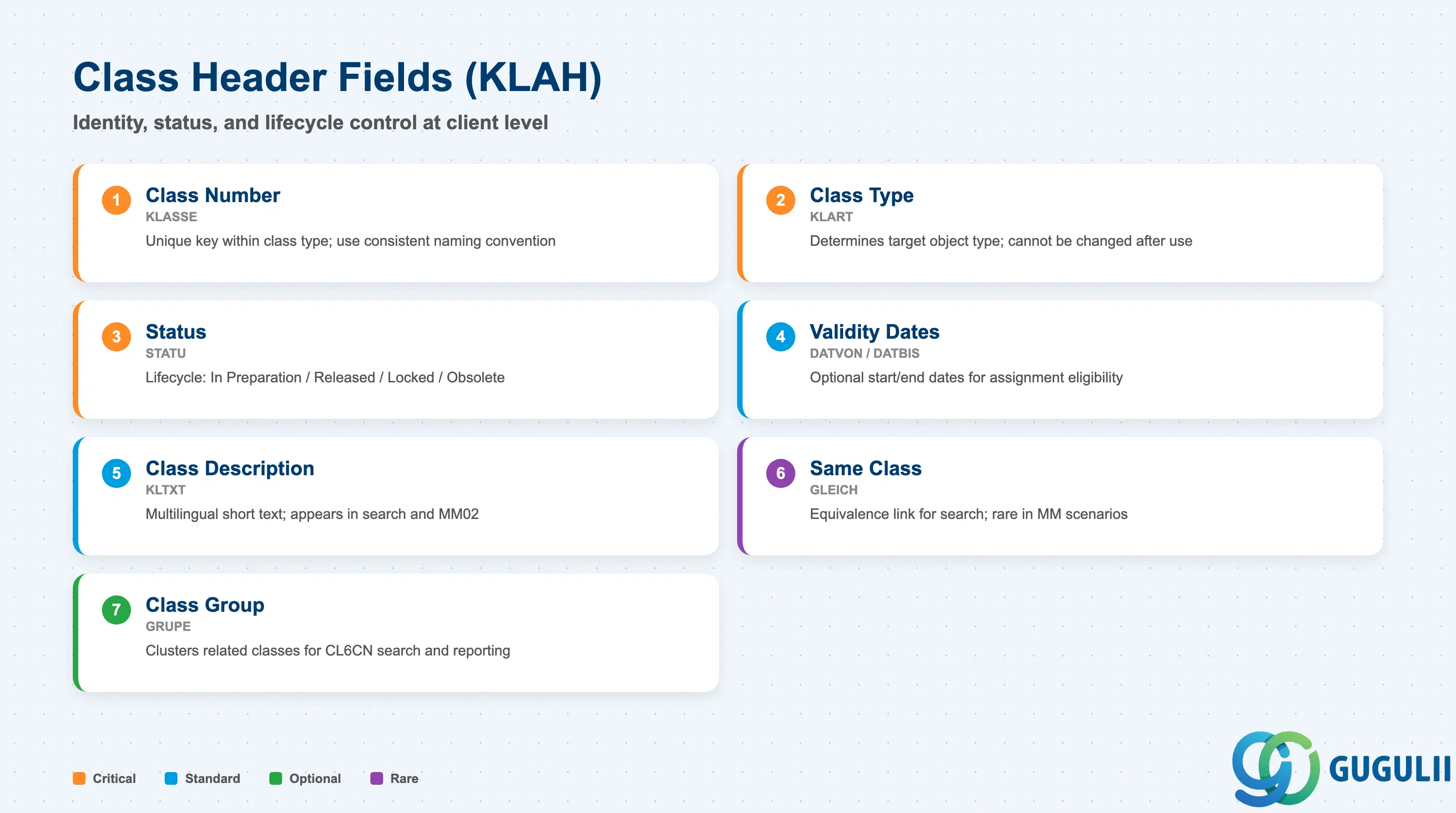
The Class Header (table KLAH) is the root record of every class in the SAP Classification System. It defines the identity and operational state of the class — the class number, the object type it can classify (class type), its release status, and the date range during which it is valid. MM administrators create and maintain KLAH records via CL01/CL02 and must understand every header field because an incorrect status or class type cannot easily be corrected after production data is attached.
| Field | Description | Practical Usage |
|---|---|---|
| Class Number (KLASSE) | The alphanumeric key that uniquely identifies the class within a class type. Internal or external numbering depending on Customizing setting for the class type. | Use a consistent naming convention from the start — for example, prefix material classes with “MAT_” and batch classes with “BAT_”. Once used in production INOB/AUSP assignments, the class number cannot be changed. Retrofit corrections require reclassification of all assigned objects. |
| Class Type (KLART) | Determines which SAP object type (material, batch, vendor, equipment, etc.) can be assigned to this class. See Section 1.2 for codes. | This is the single most consequential header field. Set it correctly in the blueprint phase and do not assume it can be changed later. A class of Type 001 is completely invisible in batch determination (which requires Type 023), even if all characteristics are otherwise correct. |
| Status (STATU) | Controls the lifecycle state of the class: 1 = In Preparation, 2 = Released, 3 = Locked, 4 = Obsolete. | Classes in status “In Preparation” cannot be assigned to objects. Release the class only after the characteristic assignment list is finalized. Locking a class prevents new object assignments without deleting existing ones — useful for obsolete but still-referenced classes in historic data. |
| Validity Date From (DATVON) | Start date from which the class is valid for object assignment. | Leave blank if the class should be valid immediately and indefinitely. Projects that plan a phased rollout (e.g., batch classification goes live 6 months after material classification) can use validity dates to prevent premature use of batch classes in plants not yet in scope. |
| Validity Date To (DATBIS) | End date after which the class is no longer valid for new assignments. | Rarely used in standard MM implementations, but relevant for time-limited classification programs (e.g., promotional product groupings). Setting an end date does not remove existing assignments — it only prevents new ones after expiry. |
| Class Description (KLTXT) | Short text describing the purpose of the class. Stored per language in KLAT. | Maintain descriptions in all languages active in the client system. The description appears in CL6CN search results and in the MM02 classification view — a blank or cryptic description forces users to open the class to understand its purpose, slowing classification data entry. |
| Same Class (GLEICH) | Indicator that flags this class as identical to another class for search equivalence. | Used in advanced classification scenarios where two separately numbered classes should return the same search results. Rare in MM; more common in laboratory or PM classification setups. Document usage carefully — the equivalence link is not immediately visible in standard display screens. |
| Class Group (GRUPE) | Optional grouping label that clusters related classes for search and reporting in CL6CN. | Use class groups to separate master data domains — for example, one group for procurement classification (material classes) and another for logistics classification (batch classes). This makes CL6CN searches faster and prevents users from accidentally assigning objects to the wrong domain’s classes. |
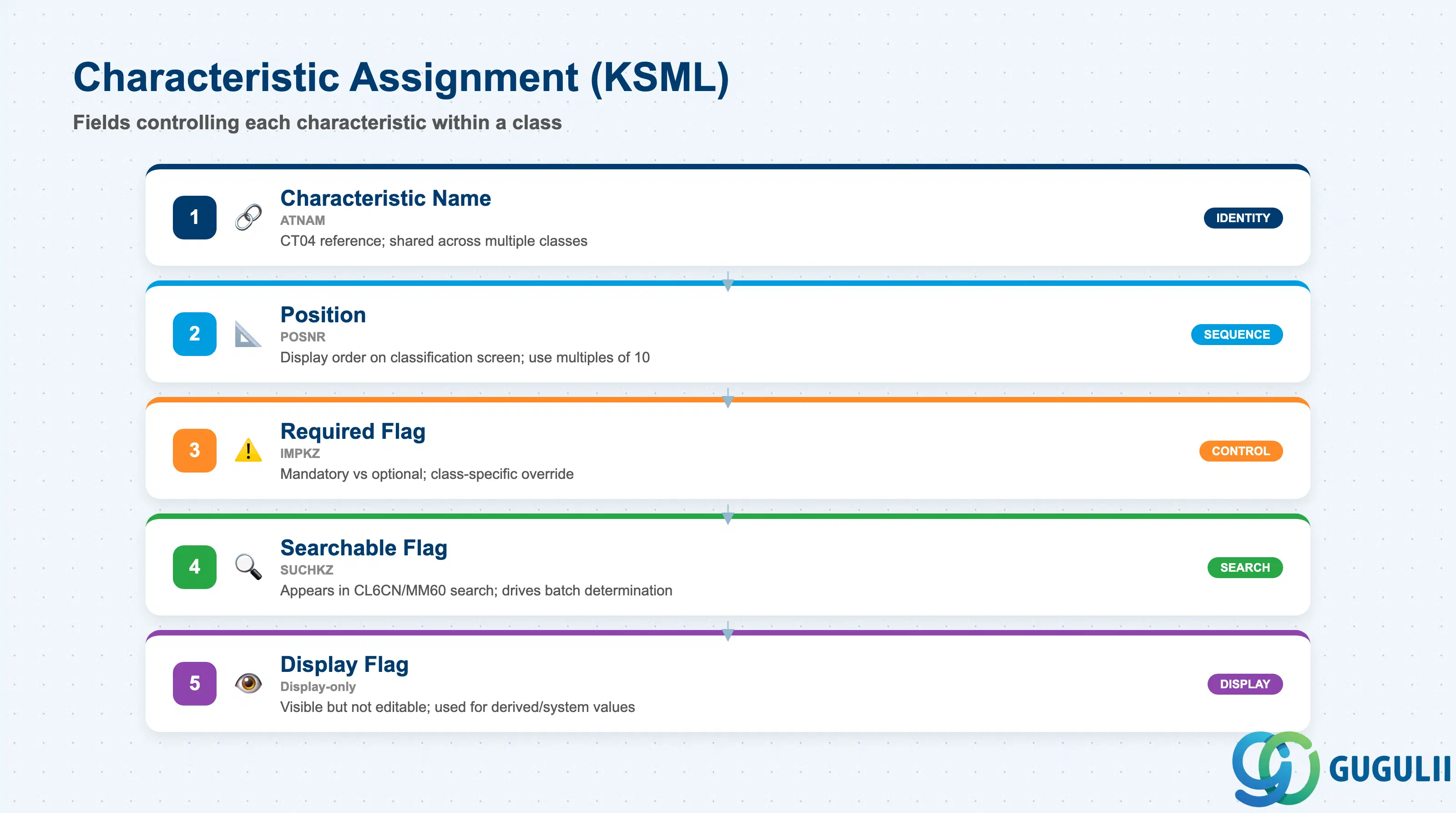
The Characteristic Assignment (table KSML) defines which Characteristics belong to a given class and governs how each characteristic behaves within that class context. An MM consultant assigning characteristics to a class controls the sequence in which they appear on the classification screen, whether each is mandatory or optional for the classifying user, and whether the value entered can be used as a search criterion. Getting this configuration right directly affects the quality and completeness of classification data downstream.
| Field | Description | Practical Usage |
|---|---|---|
| Characteristic Name (ATNAM) | The internal name of the Characteristic (from CT04) being assigned to the class. | Characteristics are shared across classes — the same characteristic (e.g., “STORAGE_TEMP”) can appear in multiple classes. This is an advantage: characteristic values are entered once per object and available across all classes that share the characteristic. Confirm with the CT04 owner that the characteristic data type and value constraints match what the class needs before assigning. |
| Position (POSNR) | The sequence number controlling the display order of the characteristic in the classification entry screen. | Set positions in multiples of 10 (10, 20, 30 …) to leave room for future insertions without renumbering the entire list. The position order should reflect data entry logic — put mandatory search characteristics at the top and optional descriptive characteristics at the bottom to guide users through a natural classification workflow. |
| Required Flag (IMPKZ) | Marks the characteristic as mandatory (must have a value entered) or optional within this class. The “Required” setting is class-specific — the same characteristic can be required in one class and optional in another. | Use the Required flag selectively. If too many characteristics are mandatory, users find workarounds (entering dummy values) that corrupt search results. Reserve mandatory status for characteristics that are genuinely needed for batch determination or compliance reporting, such as shelf-life values or country-of-origin codes. |
| Searchable Flag (SUCHKZ) | Controls whether the characteristic appears as a search field in classification search transactions (CL6CN, MM60). | Mark a characteristic as searchable only if business users actually need to filter objects by that value. Non-searchable characteristics reduce the complexity of the CL6CN search screen and improve query performance. For batch classes, searchable characteristics become criteria available in batch determination conditions (MBC1). |
| Display Flag | Controls whether the characteristic is visible on the classification screen (display-only, not for input). | Used for derived or system-maintained characteristics that should be visible to the user but not editable directly in the classification screen. Common in QM-integrated batch scenarios where the Usage Decision status is a display-only classification field. |
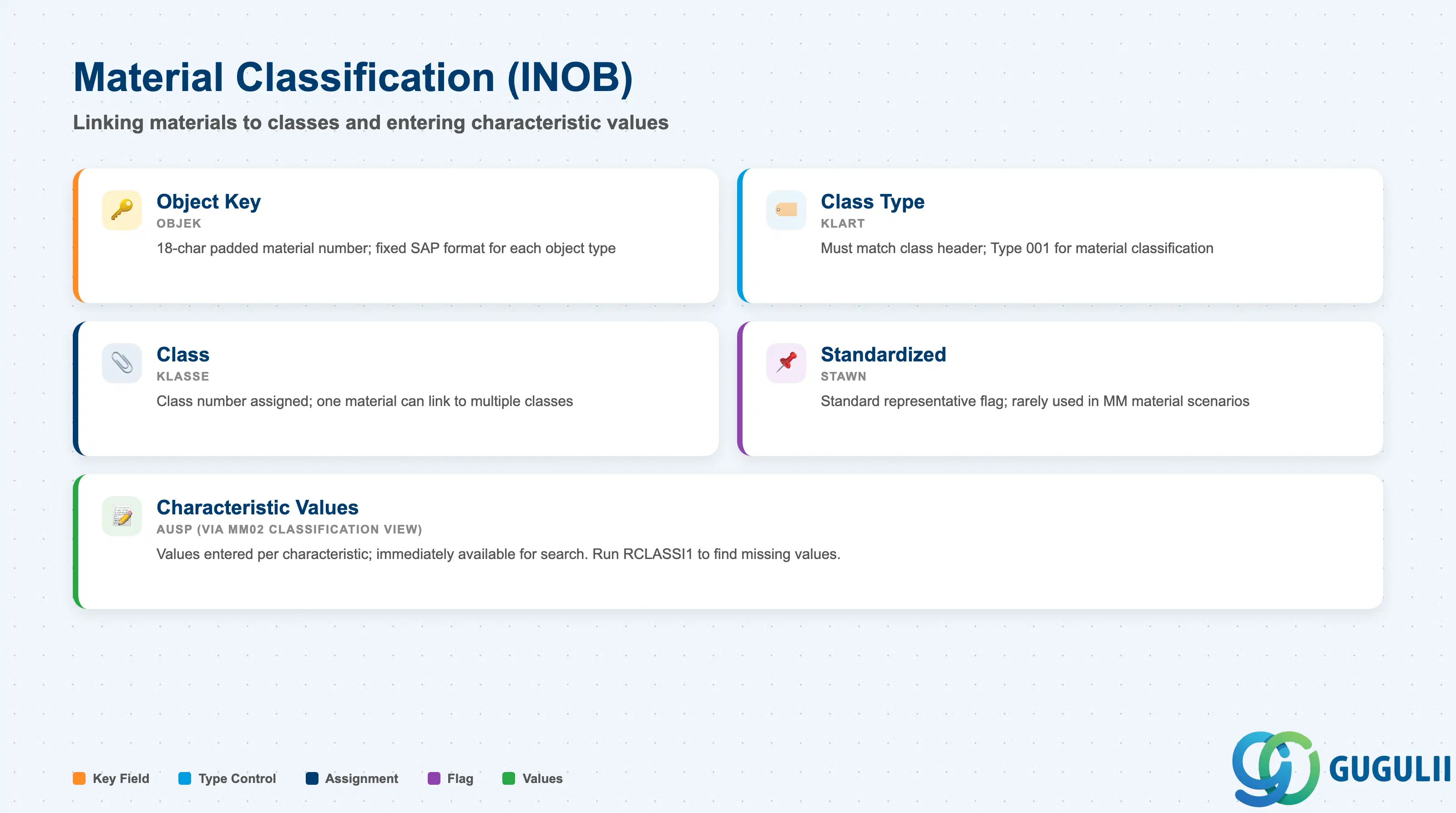
Material Classification is the act of linking a Material Master record to one or more classes and entering the material’s characteristic values for those classes. In SAP, this is done in MM02 via the “Additional Data” tab, which reveals the Classification view. The resulting database record in INOB captures the class assignment, while the characteristic values entered for that assignment are stored in AUSP. MM consultants own this process for material-level classification and must understand both the INOB assignment record and the value-entry mechanics.
| Field | Description | Practical Usage |
|---|---|---|
| Object Key (OBJEK) | The key of the classified object — for materials, this is the 18-character padded material number. | The object key format is fixed by SAP for each object type. For materials it is the left-padded-to-18-characters material number. Custom classification programs that build INOB entries directly must respect this formatting or classifications will not appear in MM02. |
| Class Type (KLART) | The class type of the assigned class — must match the class’s header class type. For material classification, this is typically 001. | When a material is assigned to a Class Type 001 class, it appears in the classification search (CL6CN, MM60). If you also need batch classification, a separate INOB record with Class Type 023 links the material’s batch class. Both class types coexist on the same material without conflict. |
| Class (KLASSE) | The class number to which the material is being assigned. | A single material can be assigned to multiple classes of the same type. Use this to classify a material simultaneously by product family (for procurement reporting) and by hazardous goods group (for logistics restrictions). Consultants should define in the blueprint how many class assignments per material are expected — excessive assignments slow the MM02 classification view load. |
| Standardized (STAWN) | Indicates whether the object is the “standard” representative of the class, used in standard class functions. | Rarely relevant in standard MM material classification. More commonly used in PM Equipment classification scenarios. Leave blank unless explicitly required by the classification design. |
| Characteristic Values (AUSP — entered via classification screen) | The actual values entered for each characteristic belonging to the class, stored in AUSP per characteristic. | Values entered in the MM02 classification view are immediately available for classification search. Ensure data entry is completed at the time of material creation — partial classification (class assigned but no values entered) causes the material to appear in the class but not match any value-based search filter. Run RCLASSI1 periodically to report on materials assigned to a class with missing required characteristic values. |
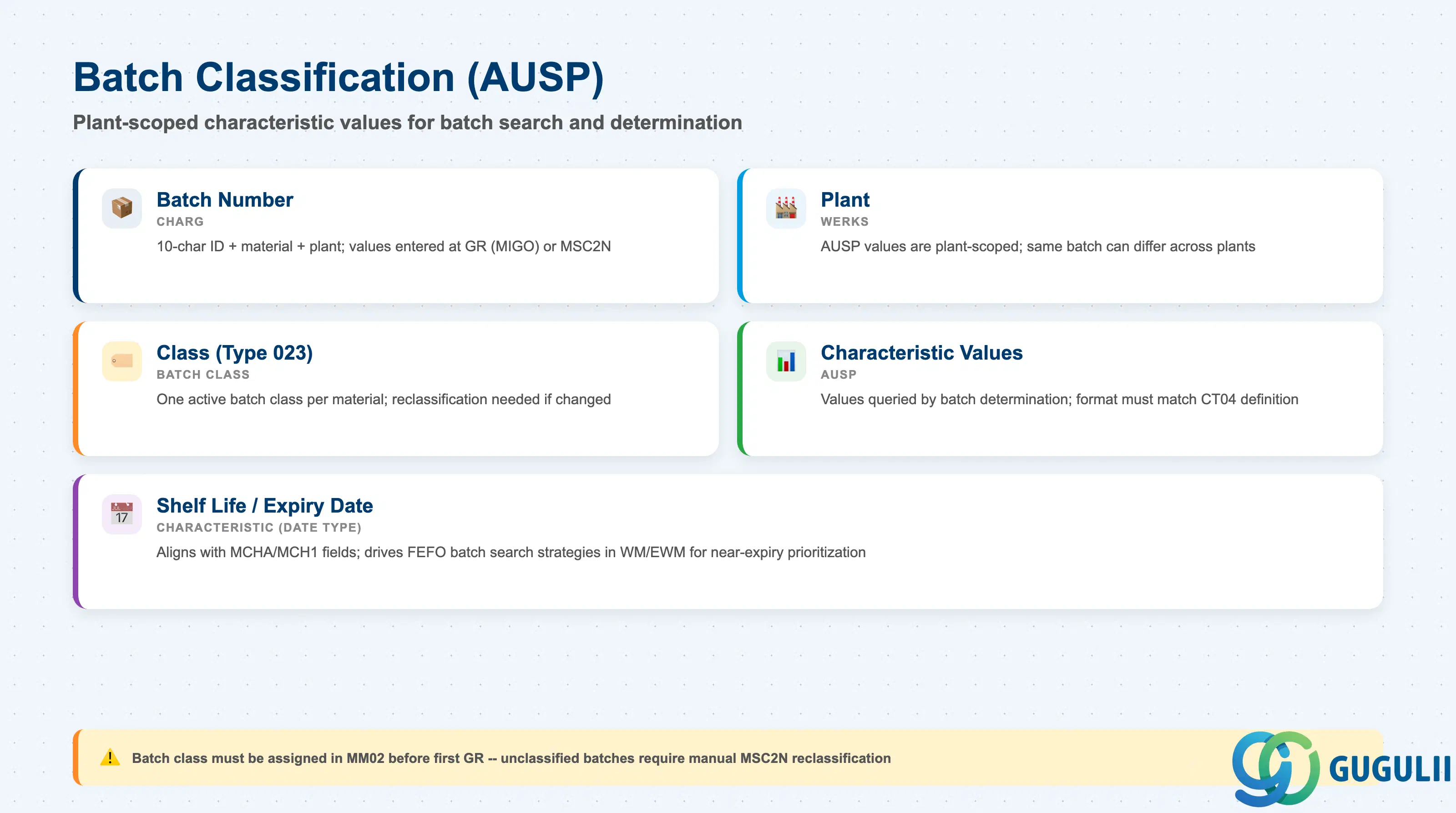
Batch Classification stores characteristic values at the batch level, enabling structured batch search and batch determination. While material classification (Section 2.3) assigns a material to a class, batch classification assigns a specific batch of that material to a class of Type 023 and records values like shelf life remaining, test result, or country of origin for that individual batch. These values are stored in AUSP and are plant-specific — the same batch number at different plants can carry different characteristic values, which is essential for multi-plant quality management.
| Field | Description | Practical Usage |
|---|---|---|
| Batch Number (CHARG) | The 10-character batch identifier combined with the material number and plant to uniquely identify the batch object. | Batch classification values are entered at GR (MIGO), at production order confirmation (CO11N/MFBF), or by direct batch change (MSC2N). Ensure the batch class is assigned to the material’s batch master class field (MM02 → Purchasing or MRP views → “Batch Class”) before the first GR — without this link, the classification entry screen does not appear at GR. |
| Plant (WERKS) | The plant at which the batch classification values apply. AUSP batch values are plant-scoped. | In multi-plant deployment scenarios, verify that the batch class is the same across plants (classification is client-level) but that values entered at GR are captured at the correct plant. A batch transferred between plants via STO may need its classification values re-entered at the receiving plant if quality parameters differ. |
| Class (Type 023) | The batch class assigned to the material and used to store batch-specific characteristic values. | Only one batch class (Type 023) can be active for a material at a time. If the classification design changes mid-project and a new batch class must replace an existing one, the reclassification of all existing batches must be planned — historical AUSP values do not migrate automatically. |
| Characteristic Values (AUSP) | The actual values (numeric, character, or date) entered for each characteristic in the batch class. | The most operationally critical data in batch classification — these are the values that batch determination queries. Values entered at GR must match the format and allowed values defined in CT04. Train warehouse and production users on exact entry requirements; a free-text typo in an allowed-values characteristic causes batch determination to skip the batch even if it is physically correct. |
| Shelf Life / Expiry Date (as characteristic) | Batch class characteristic capturing remaining shelf life or best-before date, if the class includes such a field. | For industries with shelf-life management (food, pharma, chemicals), the batch class shelf-life characteristic must align with the MCHA/MCH1 shelf life fields. Use FEFO (First Expiry First Out) batch search strategies in WM/EWM that reference the shelf-life characteristic to automatically prioritize near-expiry batches. |
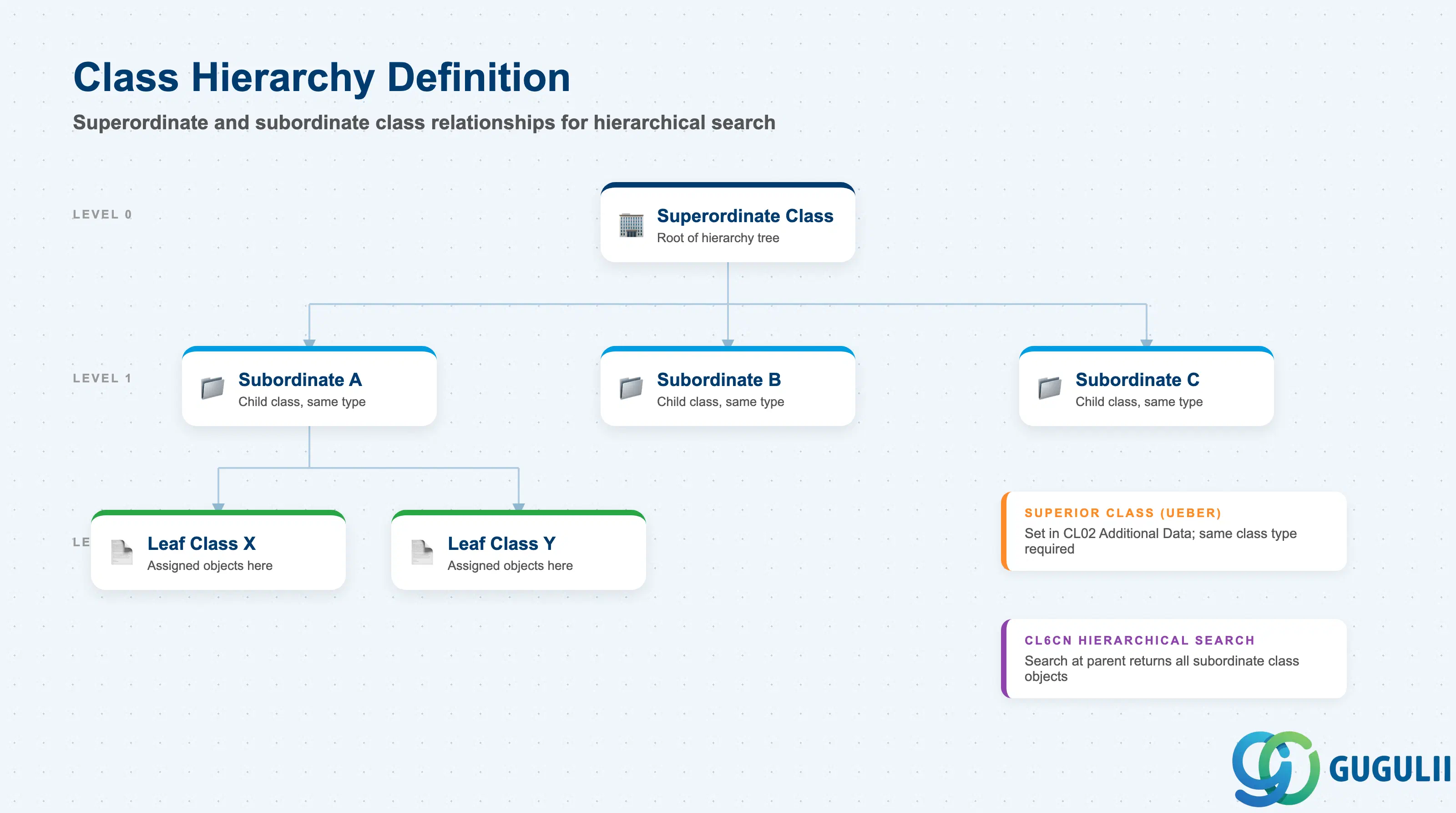
SAP Classification supports an optional class hierarchy in which subordinate classes inherit the position within a structured tree. A class hierarchy is defined in CL02 under “Additional Data” → “Superior Class”, creating a parent–child relationship between classes of the same type. When a hierarchy is active, the transaction CL6CN can perform hierarchical searches — a search at the superordinate class level returns objects assigned to any subordinate class in the tree. This feature is optional and most MM implementations choose a flat structure, but it is valuable for large product catalogs where tiered grouping improves search performance and navigation.
| Field | Description | Practical Usage |
|---|---|---|
| Superior Class (UEBER) | The class number of the parent class in the hierarchy. Entered in CL02 → Additional Data → Superior Class for the subordinate class. | Define hierarchy levels top-down. The superior class must already exist and be of the same class type as the subordinate. Only set a superior class when the hierarchy design is finalized — restructuring a live hierarchy requires updating every affected class record and re-testing all CL6CN search paths that traverse the tree. |
| Hierarchy Level | The depth level of the class within the hierarchy tree, derived automatically from the number of superior class links. | SAP does not enforce a maximum depth, but practical experience on large MM projects shows that hierarchies beyond three levels become difficult to maintain and explain to business users. Document the intended hierarchy structure in a design document and have it signed off before CL02 configuration begins. |
| Hierarchical Search in CL6CN | When searching by a superordinate class in CL6CN, the system returns objects assigned to the superordinate class and all its subordinate classes. | Activate hierarchical search in the CL6CN selection screen by checking “Include subordinate classes.” This is the primary business value of the hierarchy — searching for “all materials in the Chemicals category” without needing to know every individual child class number. Confirm that the search performance is acceptable; large hierarchies with many subordinate classes increase the query scope. |
| Class Hierarchy Report (CL6BN) | Transaction CL6BN displays the class hierarchy tree structure for navigation and verification. | Use CL6BN during the design phase to visualize the planned hierarchy before assigning objects. After go-live, CL6BN is the fastest way to check whether a new class has been correctly placed under its intended superordinate. Include a CL6BN screenshot in the blueprint document as formal documentation of the hierarchy structure. |
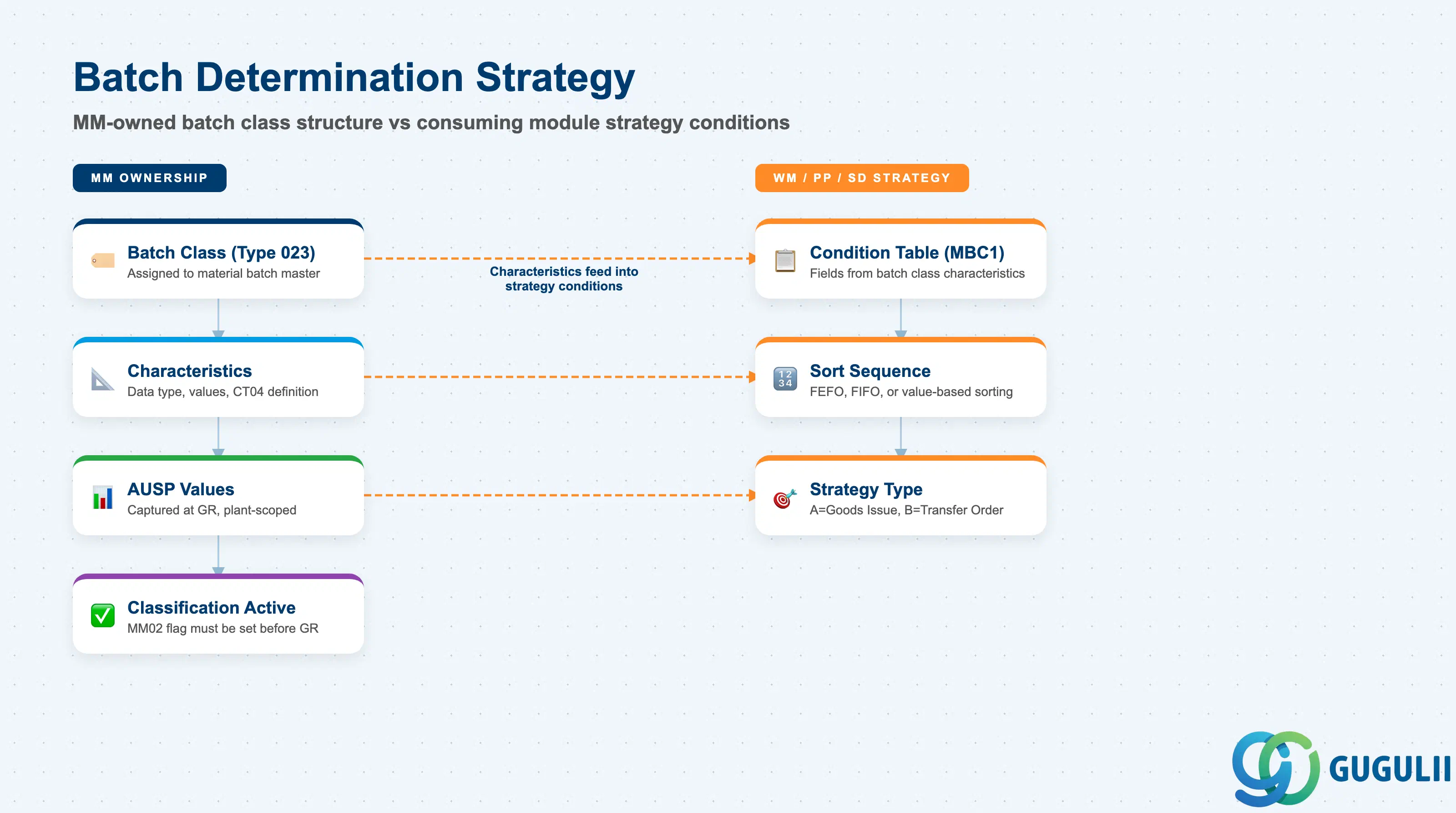
Batch Determination is the process by which SAP automatically proposes a batch for a goods movement, production order, or outbound delivery based on characteristic values stored in the batch class. MM owns the structural foundation — the Batch Class (Type 023) and its characteristics — while the consuming modules (WM, PP, SD) configure the Batch Search Strategy conditions (transaction MBC1) that query those characteristics. An MM consultant must understand both sides of this boundary to troubleshoot determination failures and advise on characteristic design that supports the downstream strategies.
| Field | Description | Practical Usage |
|---|---|---|
| Batch Class (Type 023) | The class assigned to the material’s batch master, defining which characteristics are available for determination conditions. | The batch class is the precondition for any batch determination strategy. If no batch class is assigned to the material (MM02 → Purchasing → Batch Classification field), the consuming module cannot define meaningful determination conditions against that material’s batches. Confirm with WM/PP/SD that the characteristic names in the batch class match the condition table fields used in their strategies. |
| Condition Table (MBC1) | The combination of fields (including batch class characteristics) that form a determination condition in the Batch Search Strategy. | MM’s role is to ensure the batch class characteristics that WM/PP/SD want to use in conditions exist, are of the correct data type, and carry values. For example, if PP wants to select batches by COUNTRY_OF_ORIGIN, that characteristic must exist in the batch class (Type 023), and GR must capture its value. Missing or blank characteristic values are the most common reason batch determination returns no result. |
| Sort Sequence | Within a Batch Search Strategy, the sort sequence defines the priority order in which matching batches are proposed (e.g., FEFO, FIFO, or value-based sorting). | MM influences sort sequence design by ensuring the characteristic used for sorting (e.g., a date characteristic for FEFO) is defined with the correct data type (DATE) and is mandatory in the batch class. A characteristic with incorrectly defined data type (e.g., CHAR instead of DATE for shelf-life date) cannot be used effectively in date-based sort sequences. |
| Strategy Type | The header of the Batch Search Strategy defining the usage context (A = goods issue, B = transfer order, etc.) and the access sequence of condition tables. | MM consultants should be aware of which strategy types exist in the system and which materials/movement type combinations they cover. When a new material type is introduced, check whether an existing strategy type applies or whether a new one is needed — this decision involves WM/PP/SD leads and should be made in the cross-functional design workshop, not post-go-live. |
| Batch Classification Active (MM02) | The “Batch Classification” indicator in MM02 (Purchasing or MRP view) that must be set to activate batch class assignment for the material. | This flag must be set before the first GR creates a batch. If it is forgotten during material creation, the first GR creates an unclassified batch that must be manually reclassified via MSC2N. For high-volume materials this correction can take significant effort. Include a check for this flag in the material creation governance process (data quality template or LSMW upload validation). |
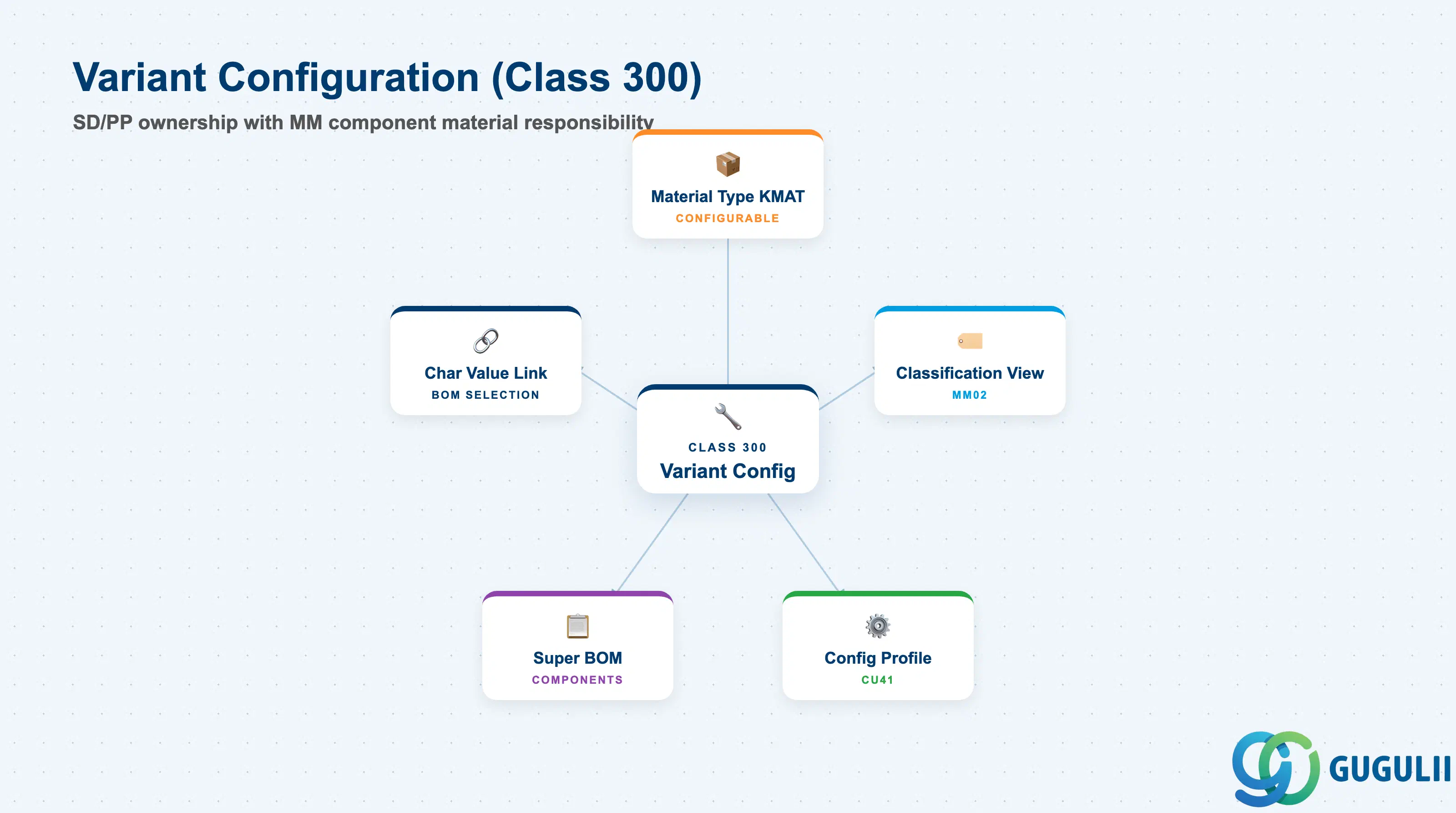
In Variant Configuration (VC) scenarios, the configurable material (material type KMAT) is linked to a Class 300, and SD/PP VC consultants design the configuration object, characteristics, and BOM explosion logic. MM’s role is narrower but essential: MM consultants set up the component materials that appear in the super-BOM and ensure the KMAT material’s classification view is correctly configured so that characteristic values entered during sales order configuration can drive BOM selection. Without a correctly maintained classification view on the KMAT material, the VC engine cannot resolve which BOM items to include in the order BOM.
| Field | Description | Practical Usage |
|---|---|---|
| Material Type KMAT | The material type assigned to the configurable material in MM02 (Basic Data 1 → Material Type = KMAT). KMAT activates the Configuration Profile and VC-related views. | Only materials with material type KMAT can be assigned to Class 300 and participate in VC. If an existing material needs to become configurable, a material type change (via MMAM) is required — this carries risks for existing open orders and stock. Plan the conversion carefully and execute in a test system first. |
| Classification View (MM02) | The Classification view in MM02 (Additional Data → Classification) where the KMAT is assigned to the Class 300. Characteristic values entered here define the default or fixed configuration. | For KMAT materials, the classification view assignment to a Class 300 is mandatory for the VC engine to function. The MM consultant’s job is to ensure this assignment is made during material creation and that any fixed characteristic values entered here (pre-configured defaults) match what the SD VC team expects. Coordinate with SD to avoid overwriting VC-managed values. |
| Configuration Profile | The VC configuration profile (transaction CU41) linked to the KMAT, defining the class assignment and the BOM explosion method. | Owned by the SD/PP VC consultant, but MM must be aware of which Class 300 is referenced. The class number in the configuration profile must match the class assigned in the MM02 classification view. Mismatches between these two cause the VC engine to raise configuration errors during sales order entry. |
| Super BOM Components | Component materials (standard material types: ROH, HALB, etc.) listed in the super BOM of the KMAT, each tied to a characteristic value combination via BOM item selection conditions. | MM creates and maintains the component materials. Each component must be correctly set up with its own material master (purchasing, MRP views) to support procurement and production planning after the BOM explosion resolves the configured BOM. Changes to component material numbers require coordinated updates to the VC BOM selection conditions. |
| Characteristic Value Link | The mapping between characteristic values entered during sales order configuration and which BOM items are included in the order BOM (BOM item selection condition in CS01). | MM ensures that the component materials referenced in selection conditions exist and their material numbers are stable. If a component material is replaced, the BOM selection conditions must be updated simultaneously — otherwise, the VC explosion selects a discontinued or non-existent material. Maintain a cross-reference list of component materials and their associated characteristic value conditions for impact assessment during material master changes. |
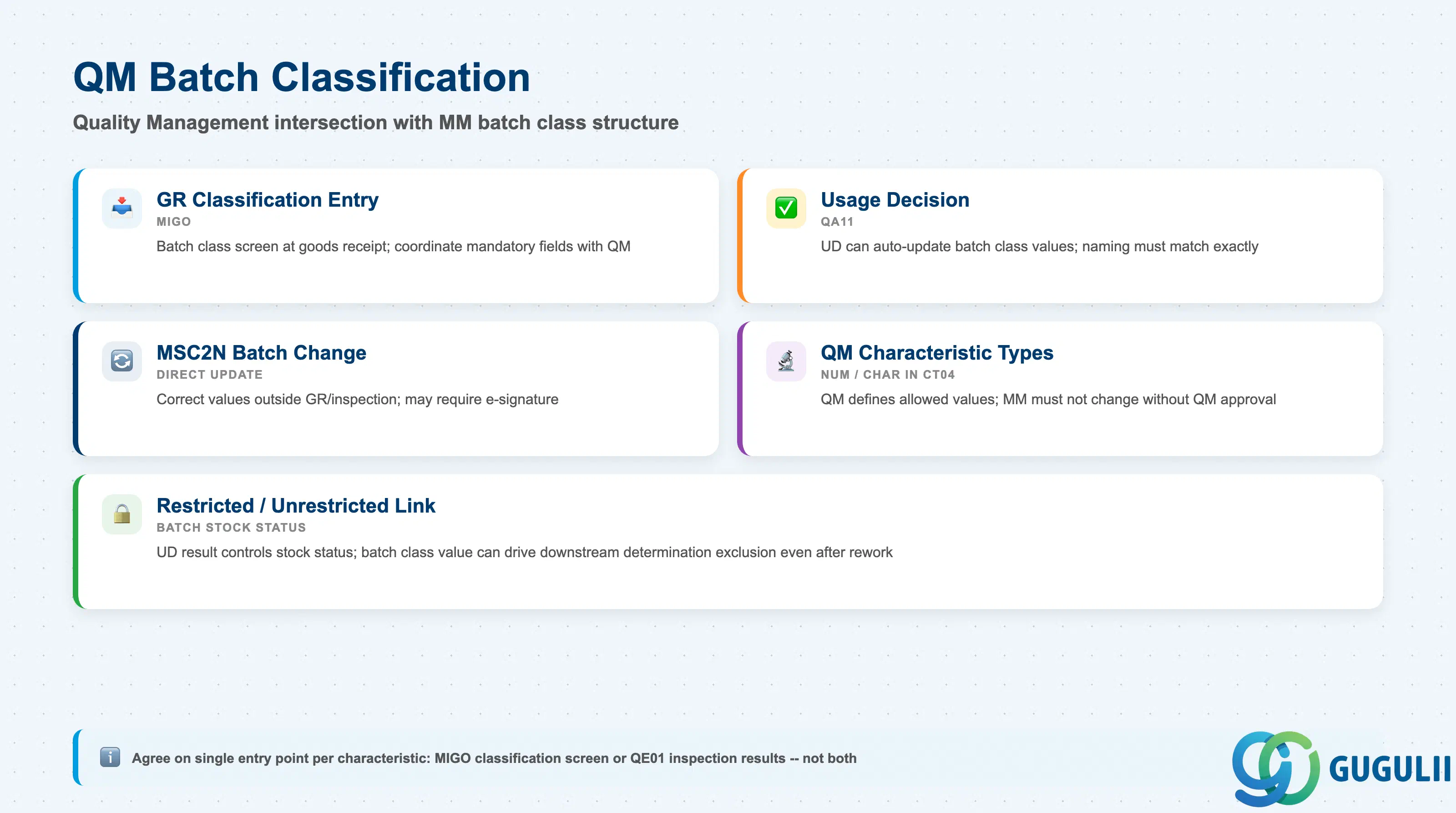
QM Batch Classification is the intersection of Quality Management and MM’s batch class structure. QM may define certain characteristics within the batch class (Type 023) as quality-relevant — values for these characteristics are captured either automatically from inspection results or manually at the time of the Usage Decision (UD). MM owns the batch class structure and the characteristic definitions; QM governs when and how characteristic values are set during inspection processing. Understanding this boundary is critical for MM consultants deploying classification in industries where inspection results drive batch status and downstream use decisions.
| Field | Description | Practical Usage |
|---|---|---|
| GR Classification Entry (MIGO) | At goods receipt, MIGO presents the batch classification screen for any material with a batch class (Type 023) assigned. Users enter characteristic values at this point. | Configure which characteristics are mandatory at GR (KSML Required flag) in coordination with QM. If QM uses an inspection lot at GR (inspection type 01), some characteristic values may be entered via the inspection results recording (QE01) rather than the MIGO classification screen — duplicating entry of the same field creates data inconsistency. Agree on a single entry point per characteristic. |
| Usage Decision (UD) Integration (QA11) | The Usage Decision transaction (QA11) can trigger automatic update of batch classification values based on inspection lot results. For example, a “Passed” UD may set the batch class characteristic STATUS_QM to “RELEASED”. | MM must ensure that the batch class characteristic names referenced by QM’s UD auto-update configuration match the actual characteristic names in the batch class. A naming mismatch (e.g., QM references “BATCH_STATUS” but the class characteristic is “BAT_STATUS”) silently fails — no error is raised, but the characteristic value is not updated, leaving the batch unclassified from a QM perspective. |
| MSC2N Batch Change | Transaction MSC2N (Change Batch) allows direct update of batch classification values outside of goods movements or inspection processing. | Use MSC2N to correct classification values that were entered incorrectly at GR or to update values after a subsequent quality test. In regulated industries (pharma, food), MSC2N changes to QM-relevant characteristics may require an electronic signature (via QM Digital Signature / GRC) — confirm compliance requirements with the QM lead before granting MSC2N authorization to production users. |
| QM-Specific Characteristic Types | Characteristics used by QM in batch classification are typically of type NUM (numeric, for measured values) or CHAR (character, for status codes). QM defines the allowed values or value ranges in CT04. | MM configures the batch class structure (KSML assignment, positions, required flags) but must not change the QM-owned characteristic definitions (CT04 data type, allowed values) without QM approval. Establish a cross-team change control process: any CT04 change to a QM-used characteristic must be reviewed by both MM and QM leads for impact on existing batch data and inspection result transfer logic. |
| Batch Restricted / Unrestricted Link | Certain QM configurations automatically change the batch’s restricted/unrestricted stock status based on classification values set during the UD. | The batch stock status is controlled by QM’s UD result, not by the MM batch class value directly. However, the batch class characteristic value (e.g., an approval status flag) can drive downstream batch determination — ensuring that restricted batches are excluded from WM/SD determination even after stock status is lifted for rework. Coordinate with QM and WM to define the authoritative source of truth for batch usability at your client. |
| ID | Category | Title |
|---|---|---|
| mm-001 | Overview | What is SAP MM? |
| ID | Category | Title |
|---|---|---|
| mm-a01 | Overview | SAP MM Master Data: Overview, Hierarchy & Relationships |
| mm-a02-01 | Master Data | SAP MM Material Master |
| mm-a04-01 | Master Data | SAP MM Class 📍 |
| mm-a04-02 | Master Data | SAP MM Characteristic |
| mm-a06-01 | Master Data | SAP MM Purchasing Info Record |
| mm-a05-01 | Master Data | SAP MM Batch Master |
| mm-a06-02 | Master Data | SAP MM Source List |
| mm-a06-03 | Master Data | SAP MM Quota Arrangement |
| mm-a06-04 | Master Data | SAP MM Price Condition |
| ID | Category | Title |
|---|---|---|
| mm-b01 | Overview | SAP MM Transactions: Process Flow, Hierarchy & Module Integration |