Title here
Summary here

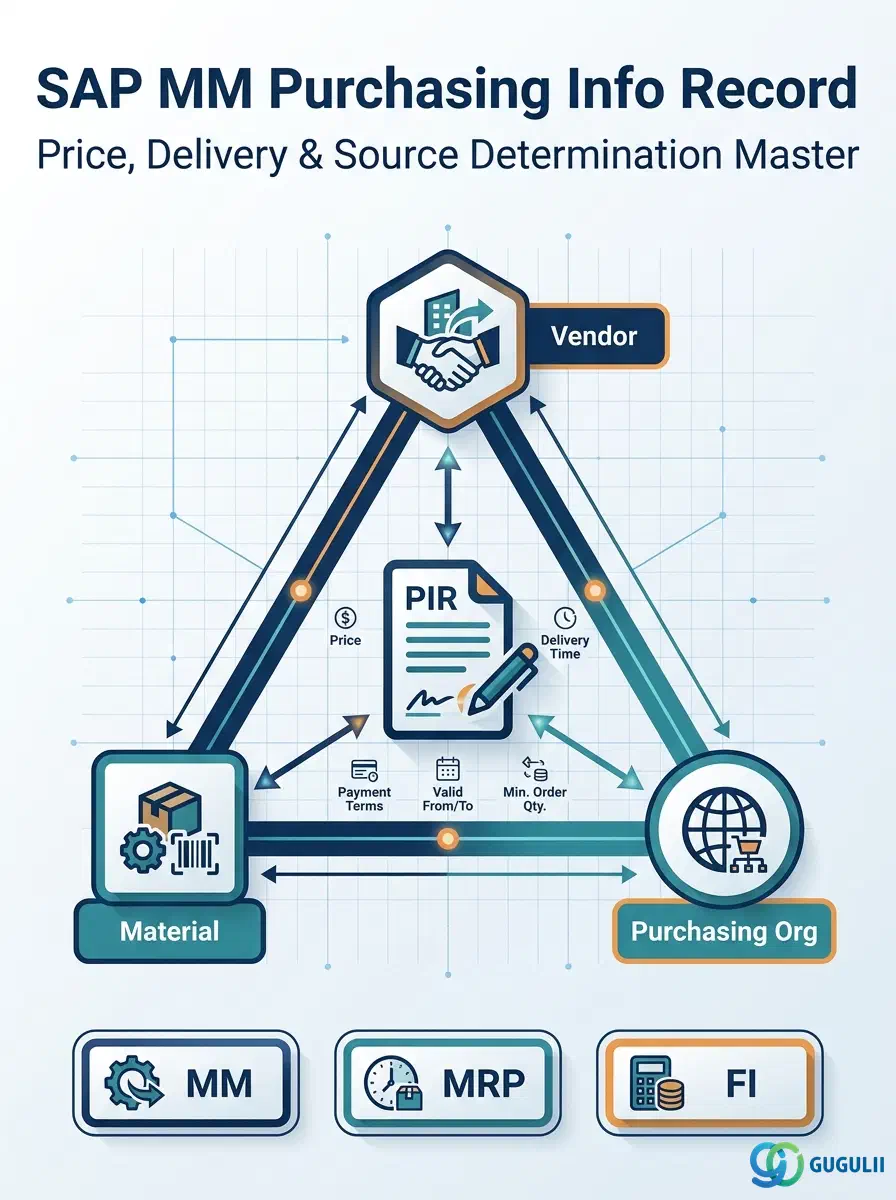
The Purchasing Info Record (PIR) is the master data object that encapsulates the purchasing relationship between a Vendor and a Material. It stores the agreed price, delivery time, tolerances, and order conditions for a specific Vendor × Material × Purchasing Organization combination. Every automatic source determination, price proposal, and contract release in SAP MM traces back to this master.
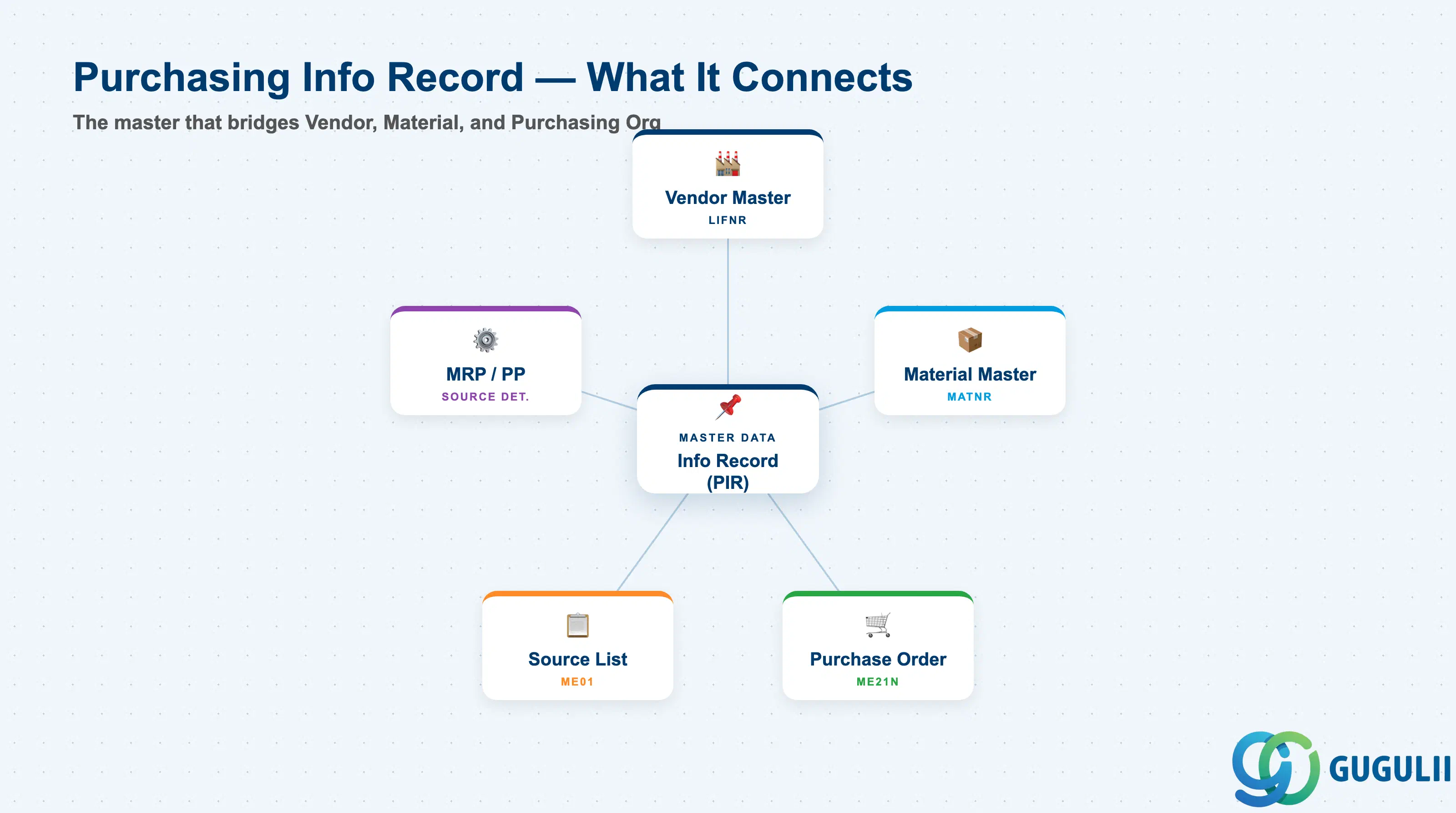
The Purchasing Info Record is a purchasing-specific master data record that stores the terms agreed between a company and a vendor for a specific material. It acts as the bridge between the Material Master and the Vendor Master, holding the procurement conditions at the intersection of these two objects.
| Aspect | Details |
|---|---|
| Role | Stores vendor-material-specific purchasing conditions: price, delivery time, order unit, tolerances |
| Modules using it | MM (Purchasing — primary owner), MRP/PP (automatic source determination), FI (invoice verification tolerance), SD (intercompany STO pricing via PIR) |
| Transactions | ME11 (Create) / ME12 (Change) / ME13 (Display) / ME1A (Display changes) / MEMASSIN (Mass maintenance) |
| Key Tables | EINA (General Data — client level) / EINE (Purchasing Org Data — Purchasing Org level) / KONP (Condition records) |
| S/4HANA note | PIR data model unchanged from ECC. Condition technique for pricing remains standard. Mass maintenance available via Fiori app “Manage Purchasing Info Records.” |
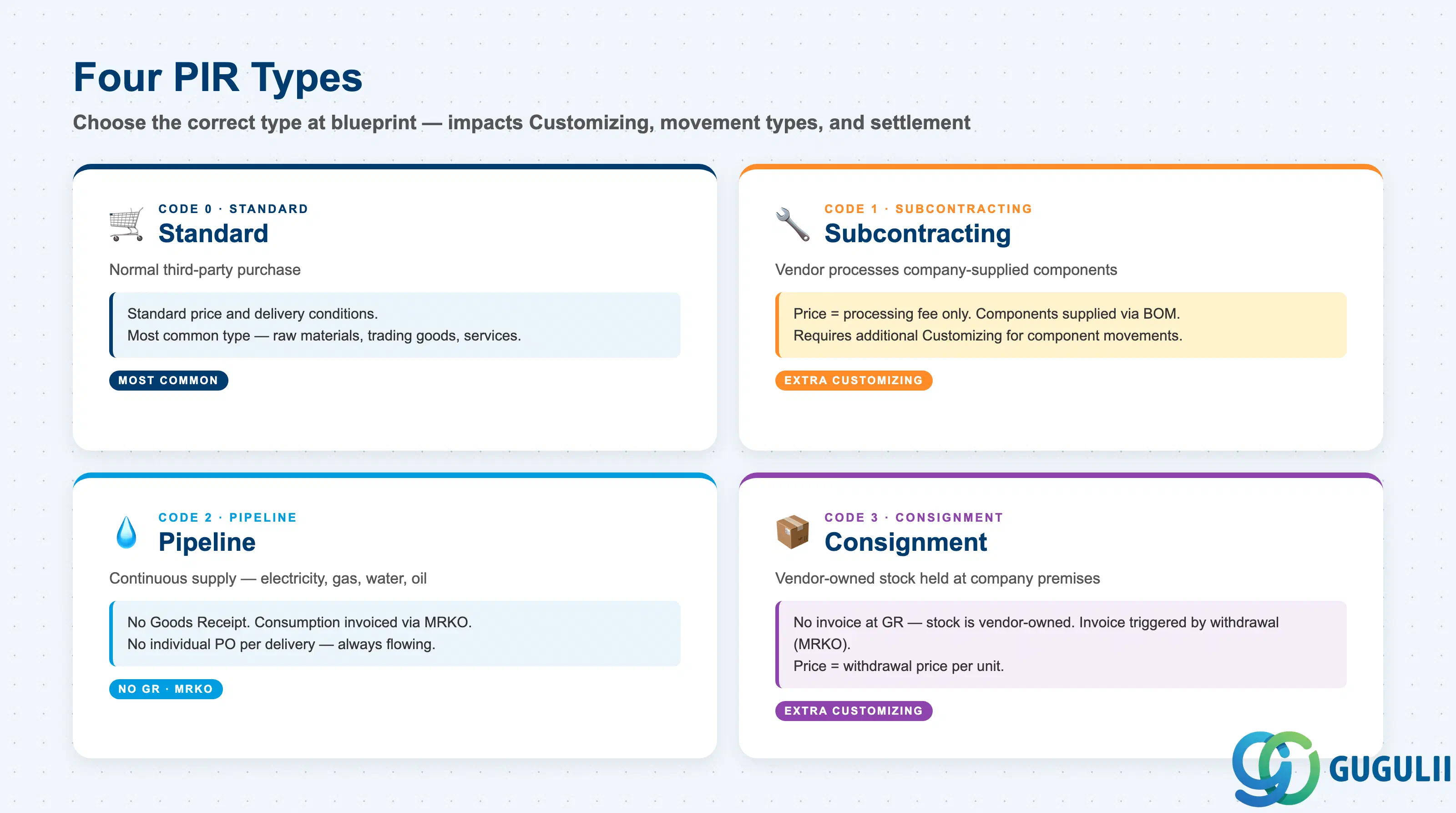
The PIR type determines which procurement scenario the record applies to. Selecting the wrong type causes incorrect behavior in source determination and MRP.
| PIR Type | Code | Use Case | Key Behavior |
|---|---|---|---|
| Standard | 0 | Normal third-party purchase (raw materials, trading goods, services) | Standard price and delivery conditions. Most common type. |
| Subcontracting | 1 | Vendor performs value-add on company-supplied components | Price = processing fee only. Component list is referenced from the Material Master BOM. |
| Pipeline | 2 | Continuous supply via pipeline (electricity, water, gas, oil) | No GR — consumption is invoiced directly via pipeline settlement (MRKO). |
| Consignment | 3 | Vendor-owned stock held at company premises | No invoice at GR. Invoice generated upon withdrawal (MRKO). Price = withdrawal price per unit. |
Design principle: PIR Type must be decided during blueprint. Subcontracting and Consignment PIRs require additional Customizing (account determination, movement types) that Standard does not.
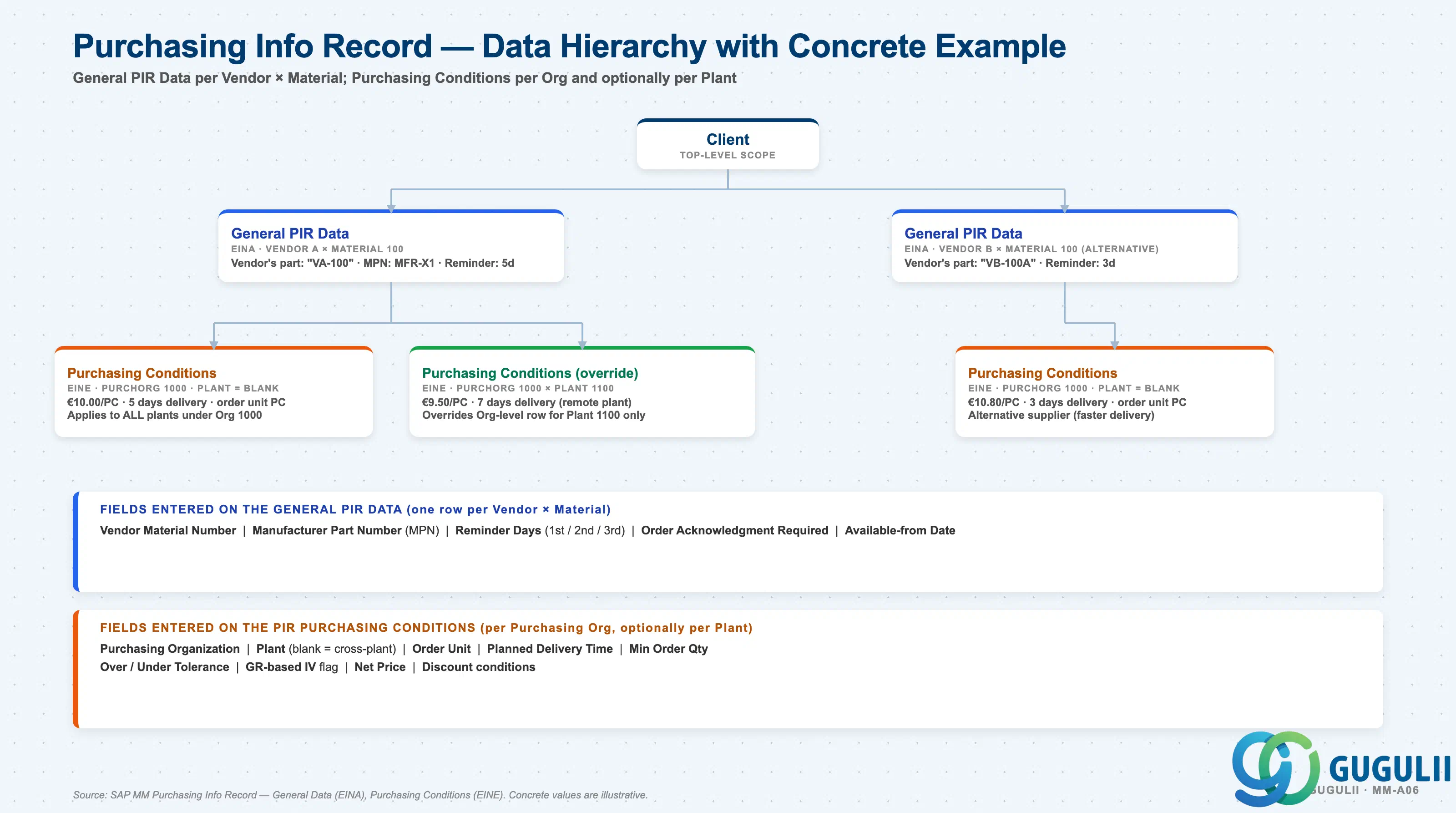
A PIR exists for each Vendor × Material pair, and its purchasing terms are scoped by Purchasing Org and optionally by Plant:
Client
   │
   ├── Vendor A × Material 100 — General PIR Data
   │      vendor's part number "VA-100", MPN, reminder days
   │      │
   │      ├── Purchasing Org 1000 — Purchasing Conditions (cross-plant)
   │      │      €10.00/PC, 5 days delivery, order unit PC
   │      │
   │      └── Purchasing Org 1000 × Plant 1100 — Purchasing Conditions (override)
   │             €9.50/PC, 7 days delivery (remote plant)
   │
   └── Vendor B × Material 100 — General PIR Data (alternative supplier)
          │
          └── Purchasing Org 1000 — Purchasing Conditions
€10.80/PC, 3 days deliveryVendor Material Number | Manufacturer Part Number (MPN) | Reminder Days (1st / 2nd / 3rd) | Order Acknowledgment Required | Available-from Date
Purchasing Organization | Plant (blank = cross-plant) | Order Unit | Planned Delivery Time | Min Order Qty | Over / Under Tolerance | GR-based IV flag | Net Price | Discount conditions
| Business scenario | Role of the PIR |
|---|---|
| Buyer creates a Purchase Order (ME21N) | PIR provides default price, vendor material number, delivery time |
| MRP determines a source | PIR is a source candidate alongside Contracts and Scheduling Agreements |
| New vendor approved after negotiation | Create PIR — eliminates manual price entry on every PO |
| Vendor changes pricing | Update PIR conditions; all future POs pick up the new price |
| Auditor asks “what price was agreed on this date?” | PIR conditions are validity-period scoped — historical pricing is queryable |
| One plant has special delivery terms | Add a Plant-level Purchasing Conditions override |
Technical reference: General PIR Data is stored in table EINA (one row per Vendor × Material). PIR Purchasing Conditions are stored in table EINE, where Plant key field blank indicates Purchasing Org level and Plant key field filled indicates Plant-level override.
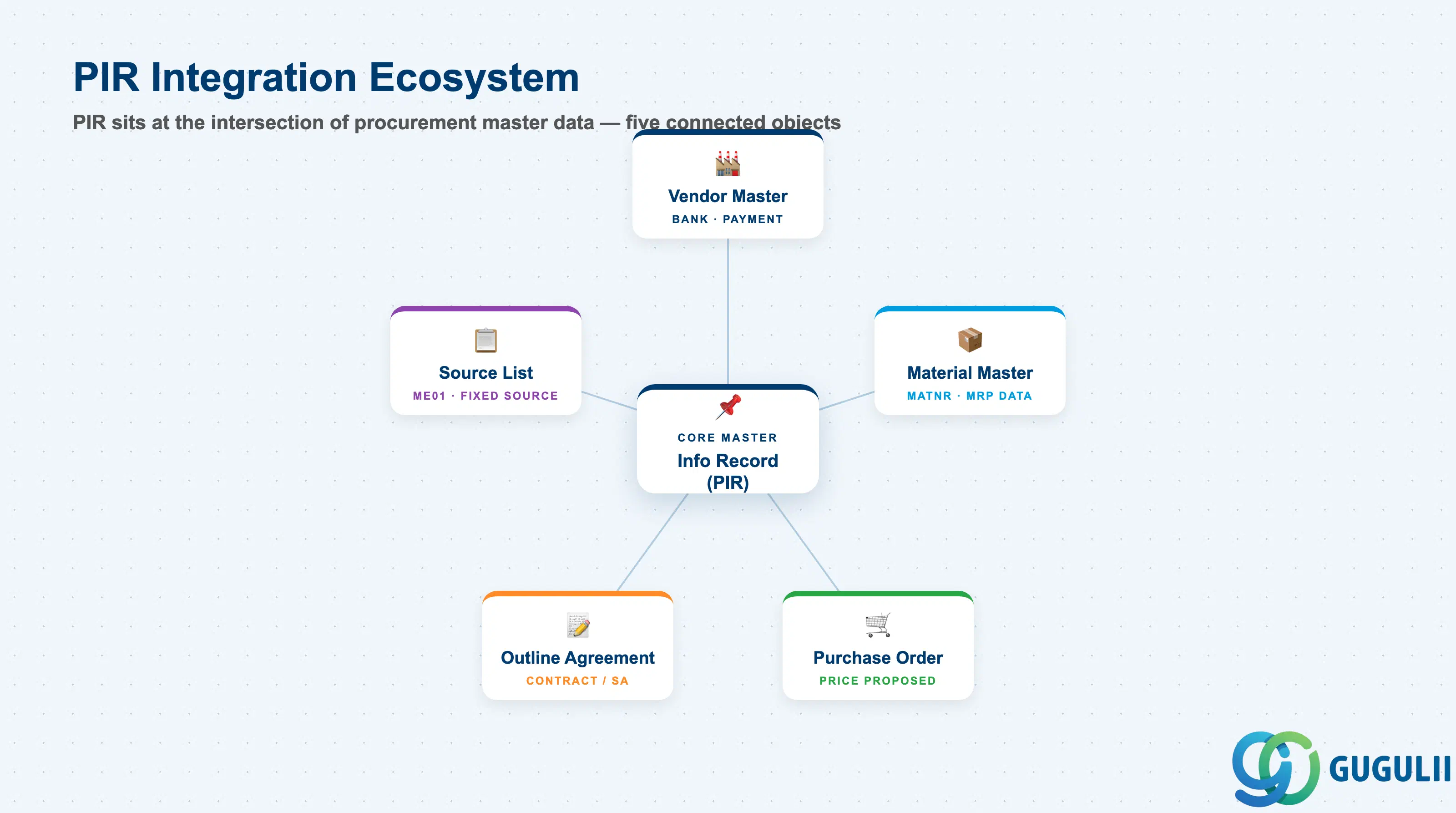
The PIR does not stand alone. It is consumed by, and feeds into, a web of other purchasing master data objects.
| Object | Relationship | Practical Notes |
|---|---|---|
| Material Master | PIR references the material (MATNR) | Purchasing View fields (GR processing time, order unit) may coexist with PIR — PIR values typically take precedence in PO proposals. |
| Vendor Master | PIR references the vendor (LIFNR) | Vendor Master holds bank, payment terms, and communication data; PIR holds procurement conditions. |
| Source List (ME01) | PIR number stored in the Source List record | Source List is the allowed supplier list. Without a Source List entry, the PIR is not used in automatic MRP source determination. |
| Quota Arrangement (MEQ1) | PIR linked via Source List | Multi-source splitting (e.g., 60% Vendor A / 40% Vendor B) requires both a Source List and a Quota Arrangement pointing to PIRs. |
| Outline Agreement (Contract / Scheduling Agreement) | PIR can be referenced or superseded by a Contract | When a Contract exists, it takes priority over the PIR in source determination. The PIR is maintained as a fallback for non-contract periods. |
| Purchase Order | PIR is the price and condition source for PO line items | Conditions from the PIR are automatically proposed at PO creation (ME21N). Last PO price is written back to PIR if the “Update Info Record” indicator is set. |
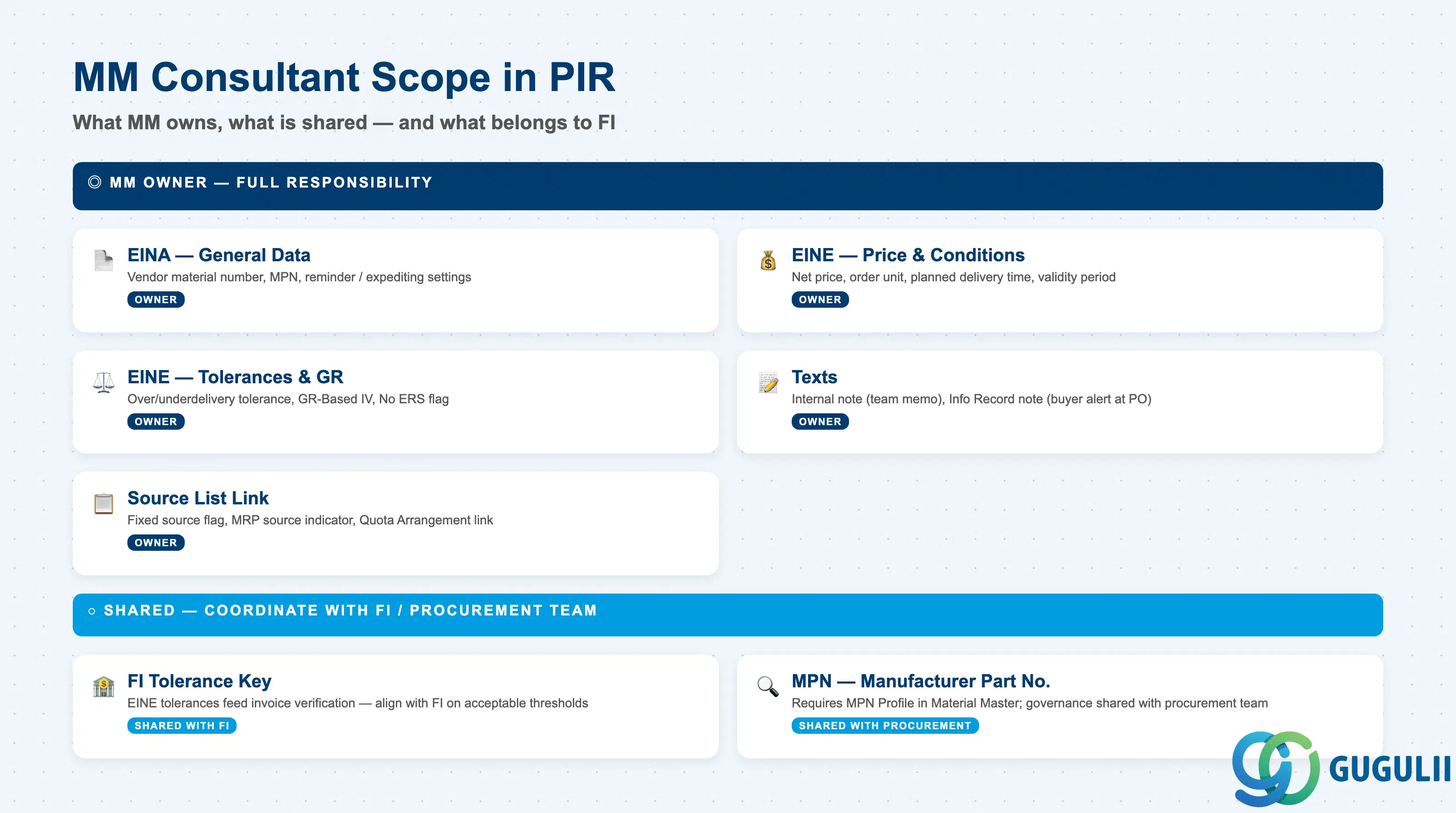
| Data Section | MM Involvement | Notes |
|---|---|---|
| General Data (EINA) | ◎ Owner | Vendor material number, MPN, reminder settings |
| Purchasing Org Data (EINE) — Conditions | ◎ Owner | Price, delivery time, order unit, tolerances |
| Purchasing Org Data (EINE) — Additional Data | ◎ Owner | GR-based IV, acknowledgment required |
| Texts | ◎ Owner | Internal note, info record note |
| Source List link | ◎ Owner | Fixed source, MRP source indicator |
| FI / Invoice verification tolerance | ○ Shared with FI | Tolerance key references EINE over/underdelivery tolerances |
| MPN (Manufacturer Part Number) | ○ Shared with procurement team | Requires MPN Profile in Material Master Purchasing View |
Legend: ◎ = Owner / Critical, ○ = Direct involvement
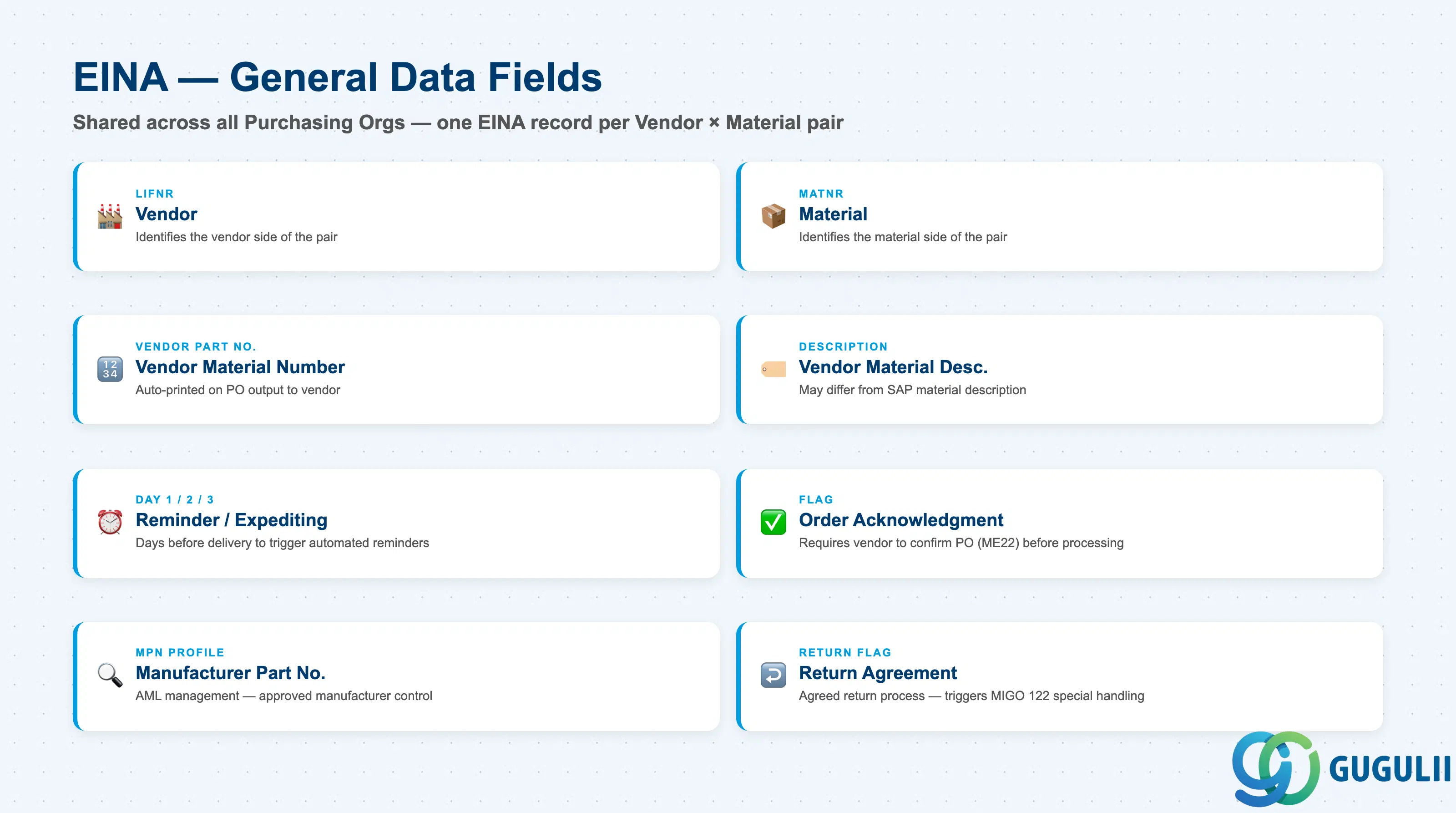
General Data is the top level of the PIR, shared across all Purchasing Organizations. It captures the vendor’s identification of the material and operational reminder settings.
| Field | Description | Practical Usage |
|---|---|---|
| Vendor (LIFNR) | Vendor account number | Drives the Vendor × Material pairing. One EINA per Vendor-Material combination. In multi-Purchasing Org projects, a single EINA is shared — general data changes affect all Purchasing Orgs simultaneously. |
| Material (MATNR) | Material number | Paired with LIFNR to identify the PIR. PIRs can also be created without a Material Master (text-based items), but this is uncommon and should be restricted by data governance policy. |
| Vendor Material Number | Vendor’s part number | The vendor’s own part number for this material. Auto-printed on PO output. Critical for matching internal and external item numbers — often the primary reference in vendor communication and invoice reconciliation. |
| Vendor Material Description | Vendor’s description | May differ from the SAP material description. Use to identify naming mismatches during material master review sessions with vendors. |
| Reminder / Expediting (Day 1/2/3) | Reminder lead times | Number of days before expected delivery to trigger automated reminders (via ME92 or message condition). Useful for critical materials or vendors with poor on-time delivery performance. Requires output condition type setup in Customizing. |
| Order Acknowledgment Required | PO acknowledgment flag | When checked, the system expects the vendor to confirm the PO (entered via ME22). Used for long-lead-time or high-value materials where delivery date confirmation is business-critical. |
| Manufacturer Part Number (MPN) | Manufacturer’s part number | Linked to the MPN Profile set in the Material Master Purchasing View. Enables AML (Approved Manufacturer List) management — source determination can include or restrict based on approved manufacturers. Common in electronics and defense industries. |
| Regular Vendor | Regular vendor flag | Marks this vendor as the preferred regular supplier. Informational only — does not drive system logic, but used in reporting and governance reviews. |
| Return Agreement | Return indicator | Indicates an agreed process for material returns to this vendor. Triggers special processing in return POs (MIGO movement type 122). |
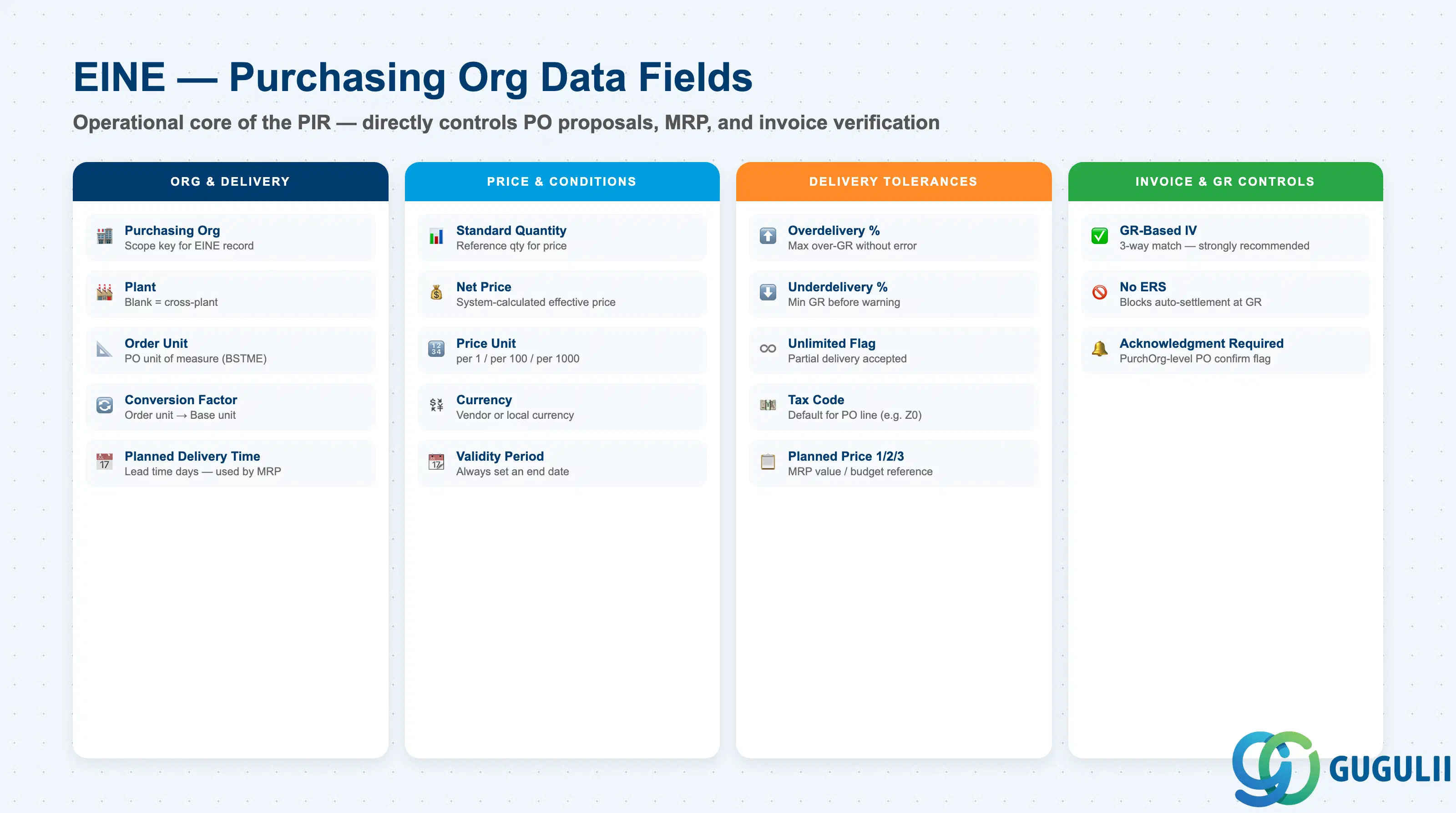
The Purchasing Org Data section is the operational core of the PIR. Fields here directly control PO proposals, MRP planning, and invoice verification.
| Field | Description | Practical Usage |
|---|---|---|
| Purchasing Organization | Purchasing Org key | Scopes this EINE record. Cross-plant when Plant is blank; plant-specific when Plant is populated. |
| Plant | Plant key | Leave blank for a cross-plant PIR (applicable to all plants in the Purchasing Org). Populate for plant-specific override. Most global projects maintain at Purchasing Org level and override only when plant-specific pricing is required. |
| Order Unit (BSTME) | Purchase order unit | The unit used on the PO for this vendor-material. Must have a conversion factor defined in the Material Master Additional Units of Measure if different from Base Unit. Mismatches cause quantity errors at GR and invoice verification. |
| Conversion Factor | Order unit to Base unit | Auto-derived from Material Master if defined there. Can be overridden in the PIR for vendor-specific packaging (e.g., vendor ships in outer cartons of 24 while stock is managed in EA). |
| Planned Delivery Time | Lead time in calendar days | Supplier’s standard delivery lead time from PO creation to expected GR. MRP uses this field for replenishment scheduling when a source is fixed via Source List. Keep synchronized with actual vendor performance; inflated values delay MRP replenishment; underestimates cause stock-outs. |
| Standard Quantity | Base quantity for conditions | Reference quantity for the price condition. Example: price per 100 kg. Important for materials with non-EA base units to avoid rounding distortions. |
| Net Price | Effective price | The net price for the Standard Quantity after all conditions. System-calculated from condition records. Primary field referenced in spend reporting and budget tracking. |
| Price Unit | Price reference quantity | Quantity basis for the price (e.g., per 1, per 100, per 1000). Prevents rounding and truncation issues for very low-unit-price materials such as electronic components. |
| Currency | Price currency | Currency of the price condition. For global projects, confirm whether PIR prices are maintained in vendor currency or local currency — impacts FX exposure management and budget variance analysis. |
| Validity Period | Condition start and end date | Date range for which the price is valid. A PIR without an end date is treated as open-ended. Always set an end date aligned with the contract term or annual price review cycle to prevent stale prices from being proposed on POs. |
| Overdelivery Tolerance | Overdelivery % | Maximum overdelivery percentage accepted at GR without a warning or error. Blank = no restriction. Set based on vendor reliability and available storage capacity. |
| Underdelivery Tolerance | Underdelivery % | Minimum delivery percentage; below this threshold GR triggers a warning. Combined with the Unlimited flag for partial delivery scenarios. |
| Unlimited Underdelivery | Unlimited partial delivery flag | When checked, partial deliveries below the tolerance are accepted without error. Common for bulk and commodity materials. Deactivate for critical single-delivery items where partial receipt is not operationally acceptable. |
| GR-Based Invoice Verification | GR-based IV flag | When checked, invoice items can only be processed after GR is posted. Strongly recommended as a 3-way match control (PO → GR → Invoice). Deactivating requires explicit FI and audit sign-off. |
| No ERS | No ERS flag | Blocks Evaluated Receipt Settlement (automatic settlement at GR) for this PIR. Leave blank for standard purchasing; check for exceptional items intentionally excluded from ERS batch runs. |
| Acknowledgment Required | PO acknowledgment (Purchasing Org level) | Can override the General Data setting at Purchasing Org level. Set here when the requirement varies by Purchasing Org (e.g., required for international POs, not for domestic). |
| Tax Code | Default tax code | Default tax code proposed on the PO line. For Japan: Z0 (input tax exempt for standard procurement). Overridable at PO entry — confirm default design with FI during blueprint. |
| Planned Price 1/2/3 | Manual planned price | For materials where no condition record exists, this stores the reference price. Used in MRP value calculations and budget planning reports (e.g., ME2M with price display). Separate from the condition-based Net Price. |
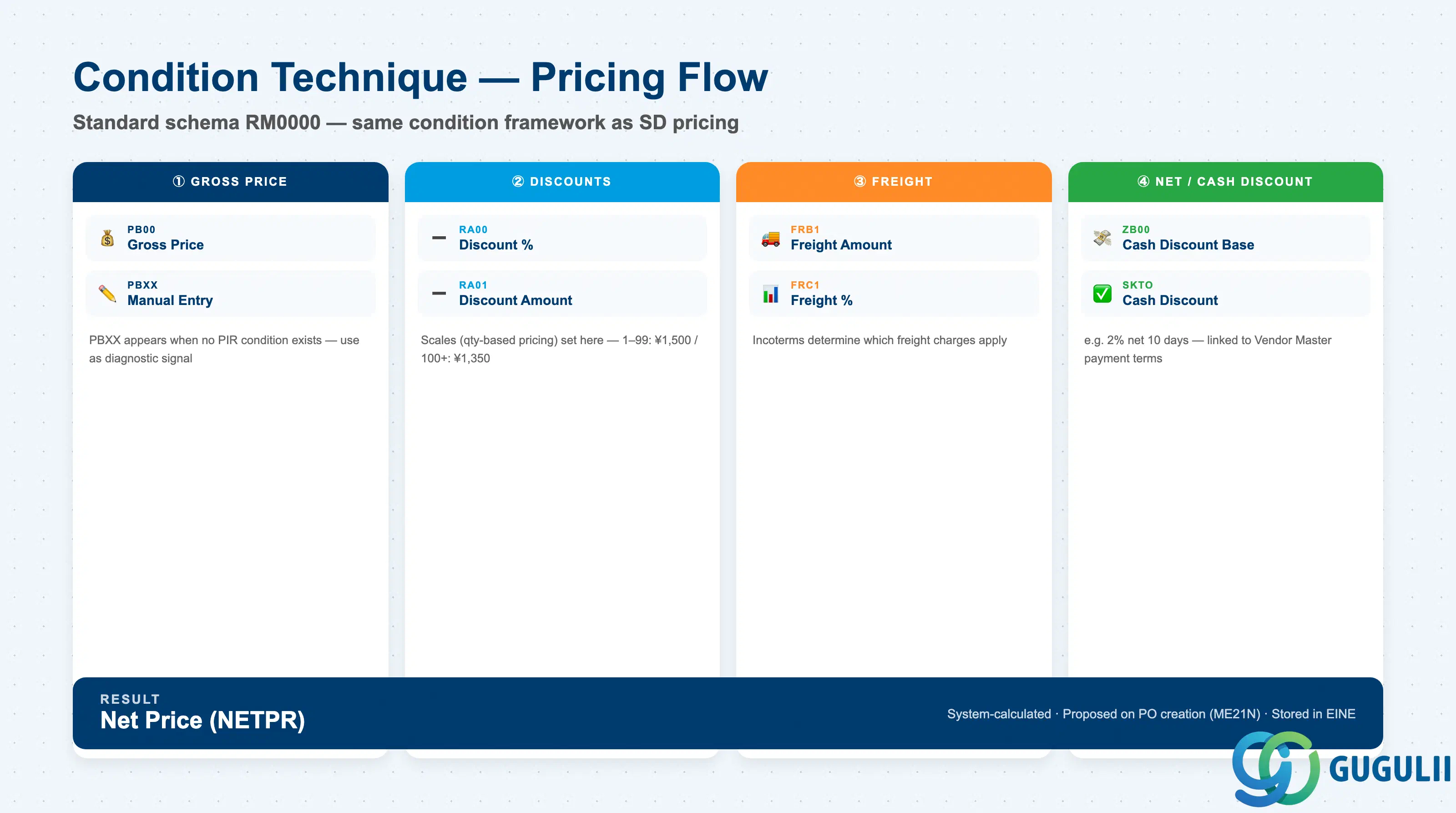
The Purchasing Info Record uses the condition technique to manage prices — the same framework used in SD pricing. This enables multi-level, date-range, and quantity-scale pricing without manual price entry on every PO.
| Condition Type | Description | Practical Usage |
|---|---|---|
| PB00 | Gross price | Base price for the standard quantity. The starting point for all price calculations in the MM pricing procedure. |
| PBXX | Gross price (manual) | Used when price is entered manually on the PO without an active PIR condition. Presence of PBXX in a PO indicates no PIR-based condition was found — a useful diagnostic signal. |
| RA00 | Discount (%) | Percentage discount applied after gross price. Common for volume rebates negotiated as a discount on list price. |
| RA01 | Discount (amount) | Absolute discount amount. Used for fixed rebates or promotional credits. |
| FRB1 | Freight (amount) | Freight surcharge — absolute amount. |
| FRC1 | Freight (%) | Freight surcharge — percentage. |
| ZB00 | Cash discount | Early payment discount (e.g., 2% net 10 days). Linked to payment terms in Vendor Master. |
Condition scales (quantity-based pricing) are a key design element:
| Scale Quantity | Price per 100 EA |
|---|---|
| 1 – 99 | 1,500 JPY |
| 100 – 499 | 1,350 JPY |
| 500+ | 1,200 JPY |
Design note: Condition scales require the Pricing Procedure (transaction M/08, standard schema RM0000) to be defined in Customizing. For Japan-specific requirements (consumption tax as a separate condition type, etc.), a custom pricing procedure is commonly implemented alongside the standard.
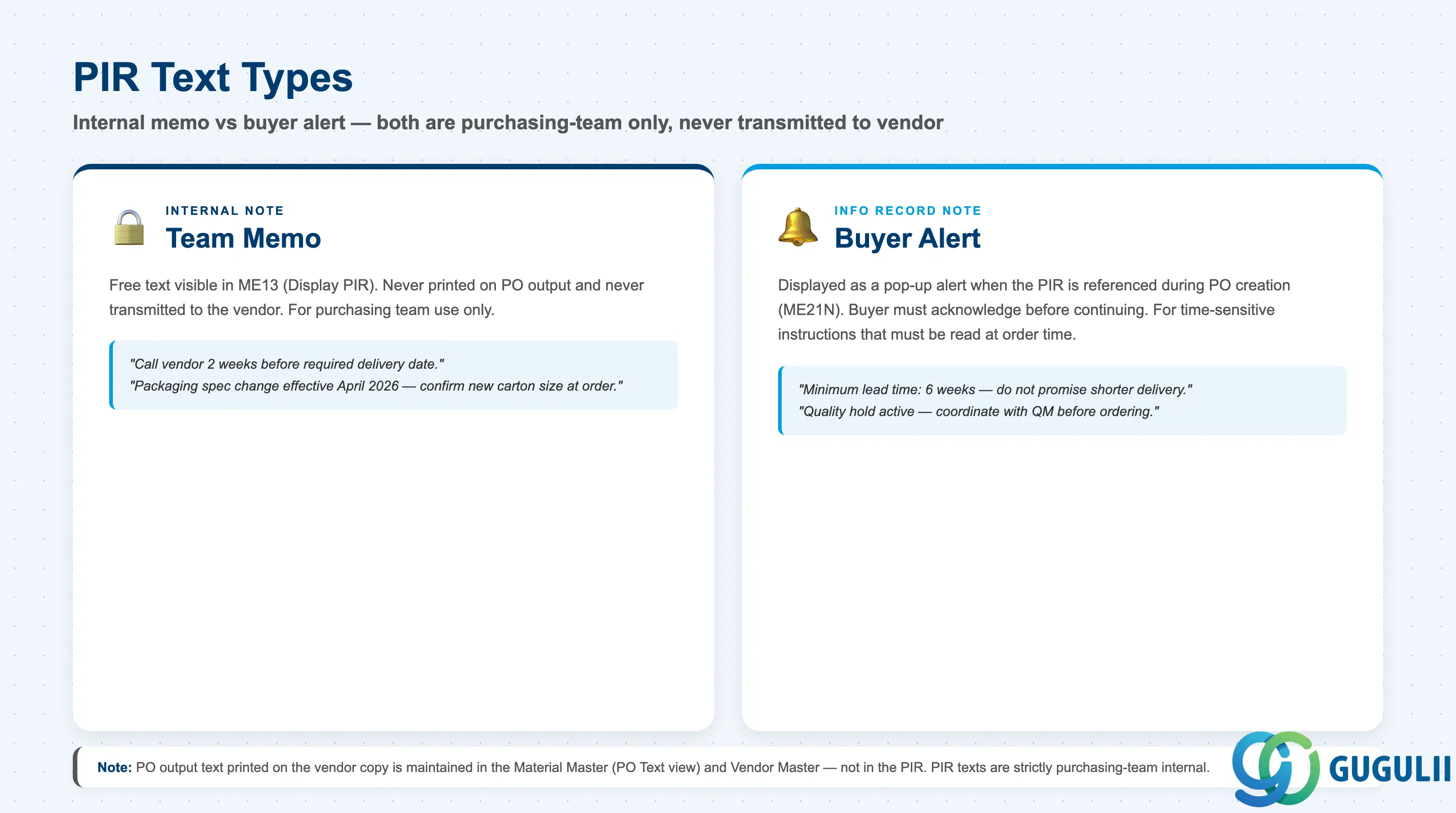
| Text Type | Description | Practical Usage |
|---|---|---|
| Internal Note | Internal memo — not printed on PO output | Free text for the purchasing team. Examples: “Call vendor 2 weeks before required delivery date,” “Packaging spec change effective April 2026.” Visible in ME13 but never transmitted to the vendor. |
| Info Record Note | General purchasing note — displayed at PO creation | Shown as a pop-up alert when the PIR is referenced during PO creation (ME21N). Use for buyer alerts that must be acknowledged at order time, such as minimum lead time warnings or quality hold notifications. |
Note: PO output text printed on the vendor copy is maintained in the Material Master (PO Text View) and the Vendor Master — not in the PIR. PIR texts are purchasing-team-internal only.
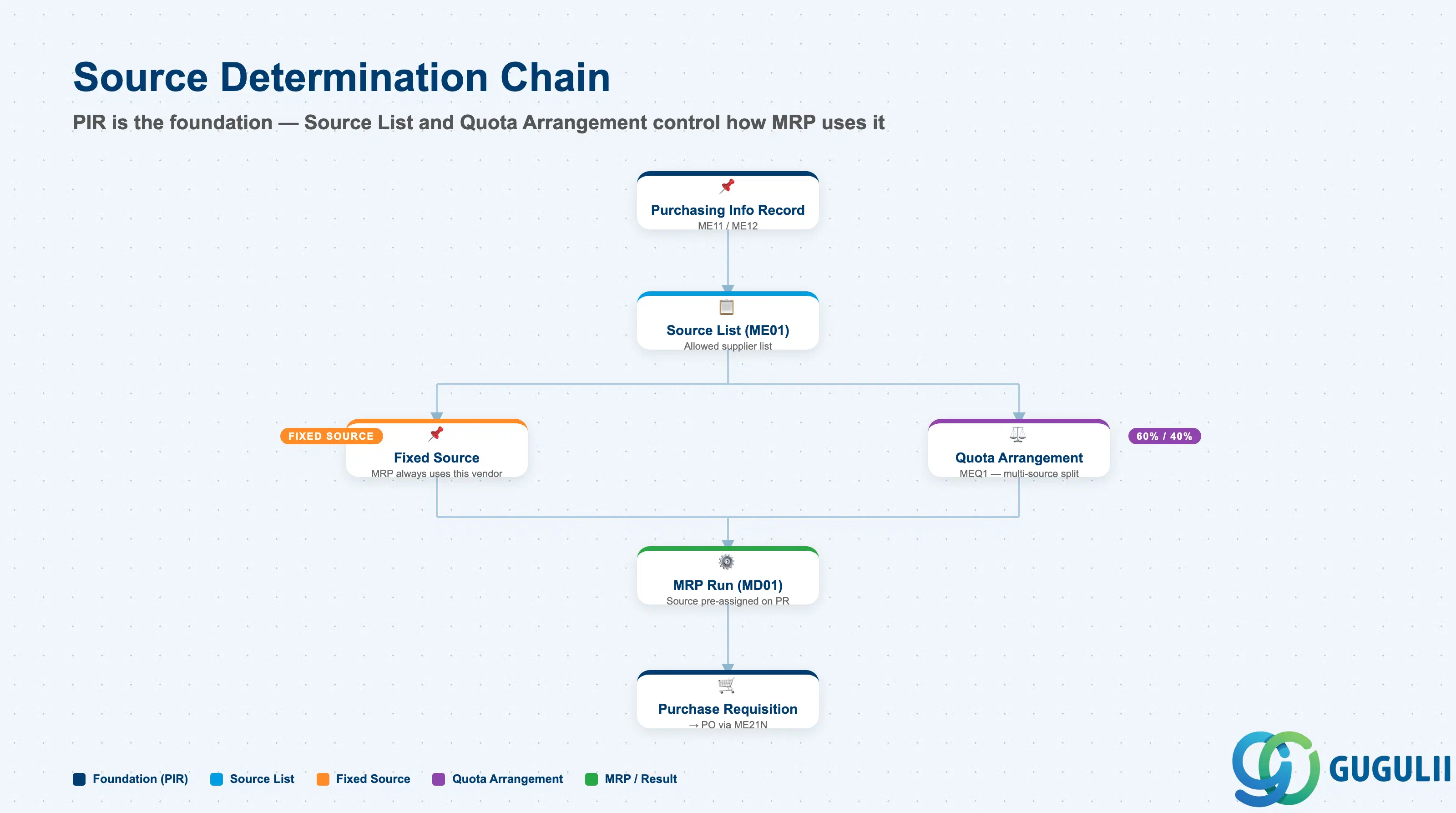
The PIR is the foundational record for SAP’s automatic source of supply determination in both manual purchasing and MRP-driven procurement.
| Field | Description | Practical Usage |
|---|---|---|
| Validity Period | Source list validity | Must overlap with the PIR validity period. Expired source lists silently block source determination — a common root cause of MRP generating PRs without a source assigned. |
| Vendor | Vendor number | References the PIR vendor. |
| Info Record Number | PIR reference | System auto-populates when the source list is created from the PIR (ME11 → “Source list” button, or ME01 directly). |
| Fixed Source | Fixed source flag | When checked, MRP always uses this vendor for the material-plant combination. Only one fixed source is allowed per period. |
| MRP Source Indicator | MRP relevance | 1 = Relevant for MRP automatic source determination (MRP creates PRs with this source pre-assigned). 2 = Blocked for new procurement. Blank = not used in MRP but available for manual PO. |
| Agreement Number | Contract or SA reference | When populated, overrides the PIR as the condition source. Contract or Scheduling Agreement conditions take priority over PIR conditions in source determination. |
| Field | Description | Practical Usage |
|---|---|---|
| Quota | Split percentage per vendor | Example: Vendor A 60%, Vendor B 40%. The quota usage counter increments with each order and drives the next source assignment. Reset the counter periodically (e.g., monthly) to prevent compounding drift. |
| Quota Base Quantity | Base for quota calculation | Handles interactions between minimum order sizes and quota splits. |
| Min. Lot Size | Minimum lot per source | Prevents trivially small split orders that are uneconomical to process or ship. |
| Maximum Lot Size | Maximum lot per source | Caps the order size assigned to any single vendor. |
MRP prerequisite: Quota Arrangement only functions when both (1) the Quota Arrangement Usage field in the Material Master Purchasing View is set (typically “4”) and (2) the Source List is active for the material-plant. Missing either causes MRP to ignore the quota entirely.
| ID | Category | Title |
|---|---|---|
| mm-001 | Overview | What is SAP MM? |
| ID | Category | Title |
|---|---|---|
| mm-a01 | Overview | SAP MM Master Data: Overview, Hierarchy & Relationships |
| mm-a02-01 | Master Data | SAP MM Material Master |
| mm-a04-01 | Master Data | SAP MM Class |
| mm-a04-02 | Master Data | SAP MM Characteristic |
| mm-a06-01 | Master Data | SAP MM Purchasing Info Record |
| mm-a05-01 | Master Data | SAP MM Batch Master |
| mm-a06-02 | Master Data | SAP MM Source List |
| mm-a06-03 | Master Data | SAP MM Quota Arrangement |
| mm-a06-04 | Master Data | SAP MM Price Condition |
| ID | Category | Title |
|---|---|---|
| mm-b01 | Overview | SAP MM Transactions: Process Flow, Hierarchy & Module Integration |