Title here
Summary here

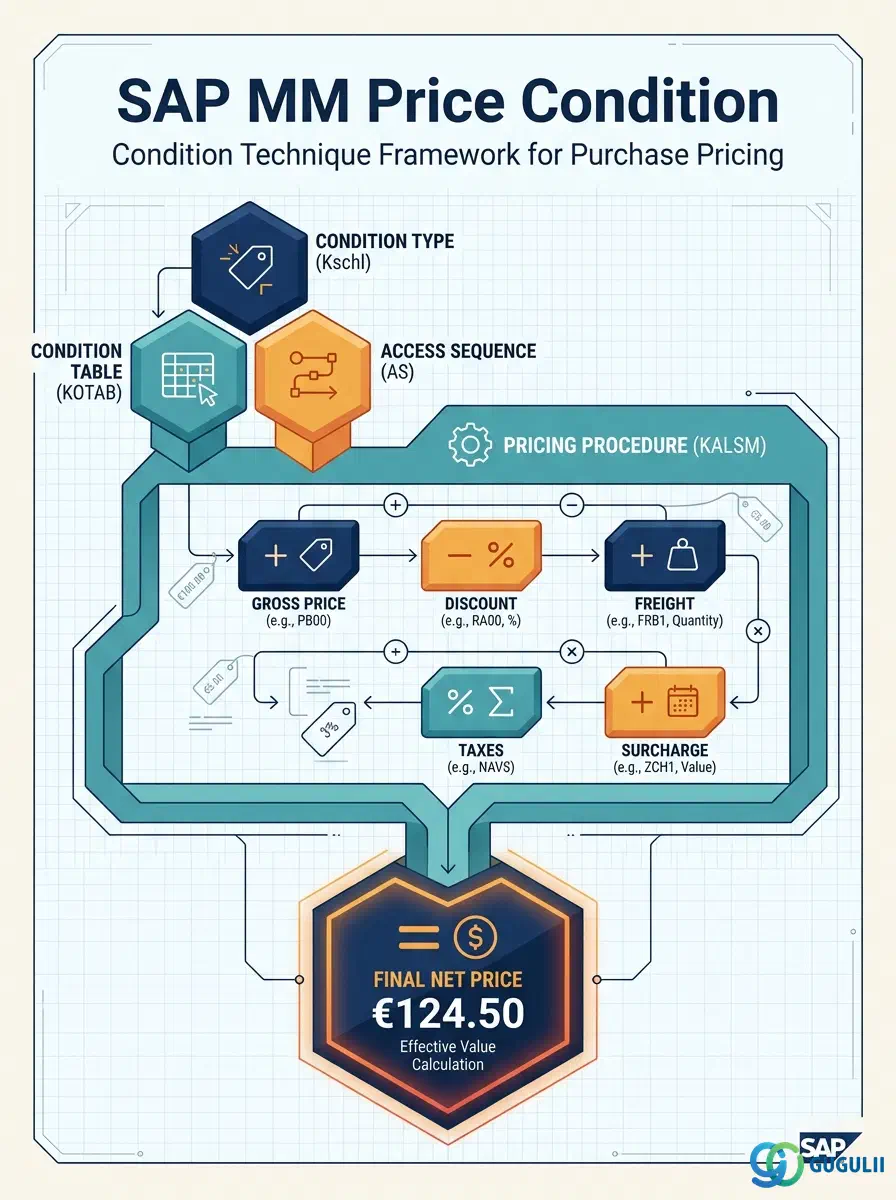
The Price Condition is the master data object that stores vendor-agreed price terms — gross prices, discounts, surcharges, and freight charges — in SAP’s Condition Technique framework for MM purchasing. Unlike the flat net price on the Purchasing Info Record, Price Conditions support multi-level logic: date-range validity, quantity scales, vendor hierarchies, and multi-step calculation schemas. Every PO line item price in a well-configured MM environment is resolved through this framework. This article covers the full architecture of the MM Condition Technique (Part 1) and the MM-specific configuration and field details that consultants define and maintain (Part 2).
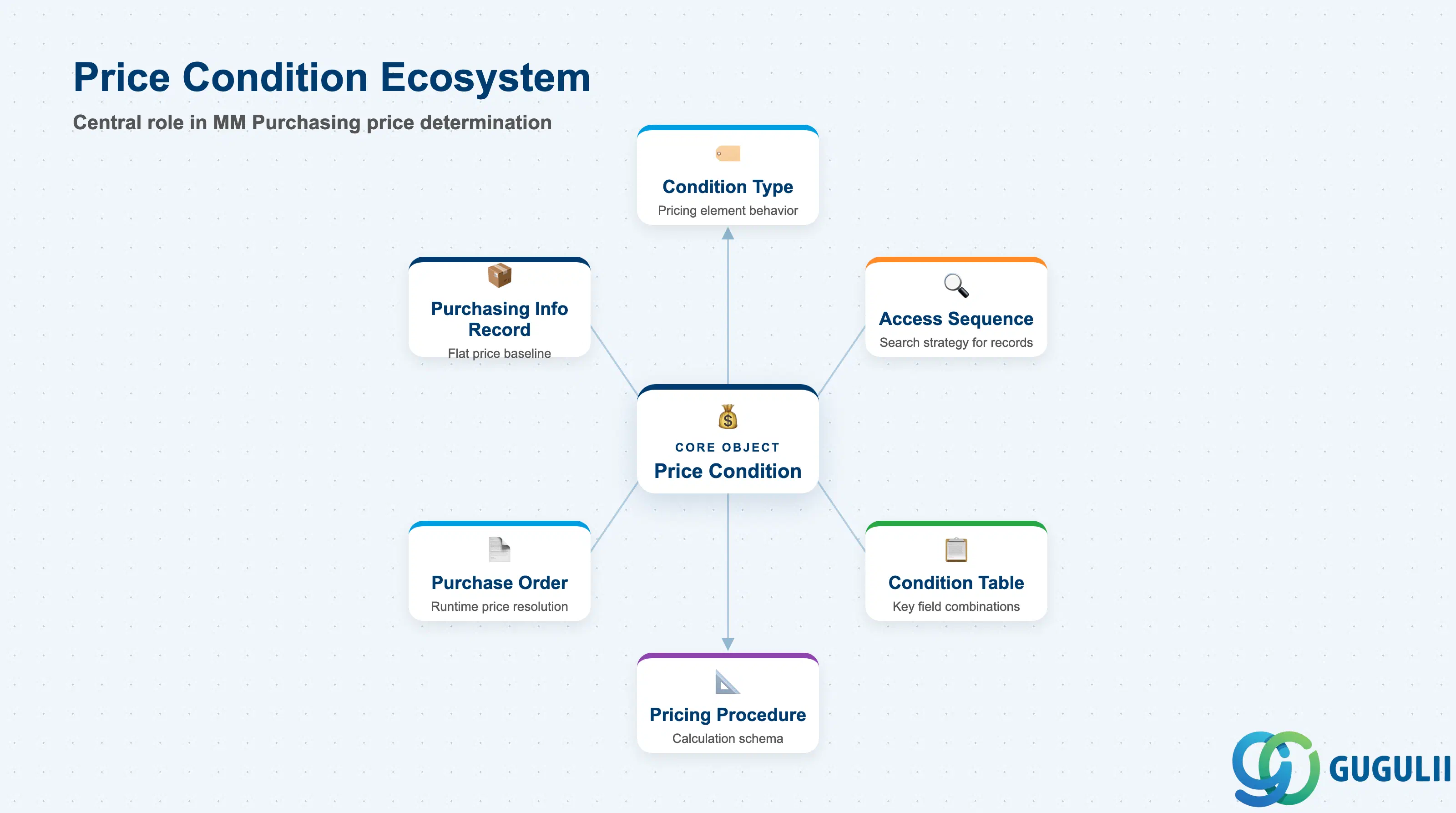
The Price Condition is a structured pricing record maintained within SAP’s Condition Technique — a generalized framework for rule-based price determination used across multiple SAP applications (MM, SD, TM). In MM Purchasing, a Price Condition stores the agreed price or adjustment factor for a specific key combination (e.g., Vendor + Material, or Vendor + Material Group + Purchasing Org) over a defined validity period, optionally with quantity-based scales. At PO creation, the system searches for applicable Price Conditions through the Access Sequence defined in the Pricing Procedure, resolves the applicable records in step order, and calculates the effective PO price.
| Aspect | Details |
|---|---|
| Role | Stores structured price and discount records; drives automatic PO price calculation through the Condition Technique |
| Modules using it | MM (Purchasing — primary owner and sole maintainer of purchasing conditions), FI (uses condition-derived net price for invoice verification baseline) |
| Transactions | MEK1 (Create) / MEK2 (Change) / MEK3 (Display) / MBN1 (Condition list — overview of all records) / MEK31 (Change by condition type) |
| Key Tables | KONP (Condition item data — amount, currency, validity) / KONV (Condition data in purchasing documents — runtime evaluation copy) / A018 (Condition records for vendor + material) / A017 (Condition records for vendor + material group) |
| S/4HANA note | Condition Technique framework unchanged from ECC for purchasing. MEK1/MEK2/MEK3 remain the primary transactions. Fiori app “Manage Purchase Conditions” (F2401) available in S/4HANA 2020+ for condition record maintenance. |
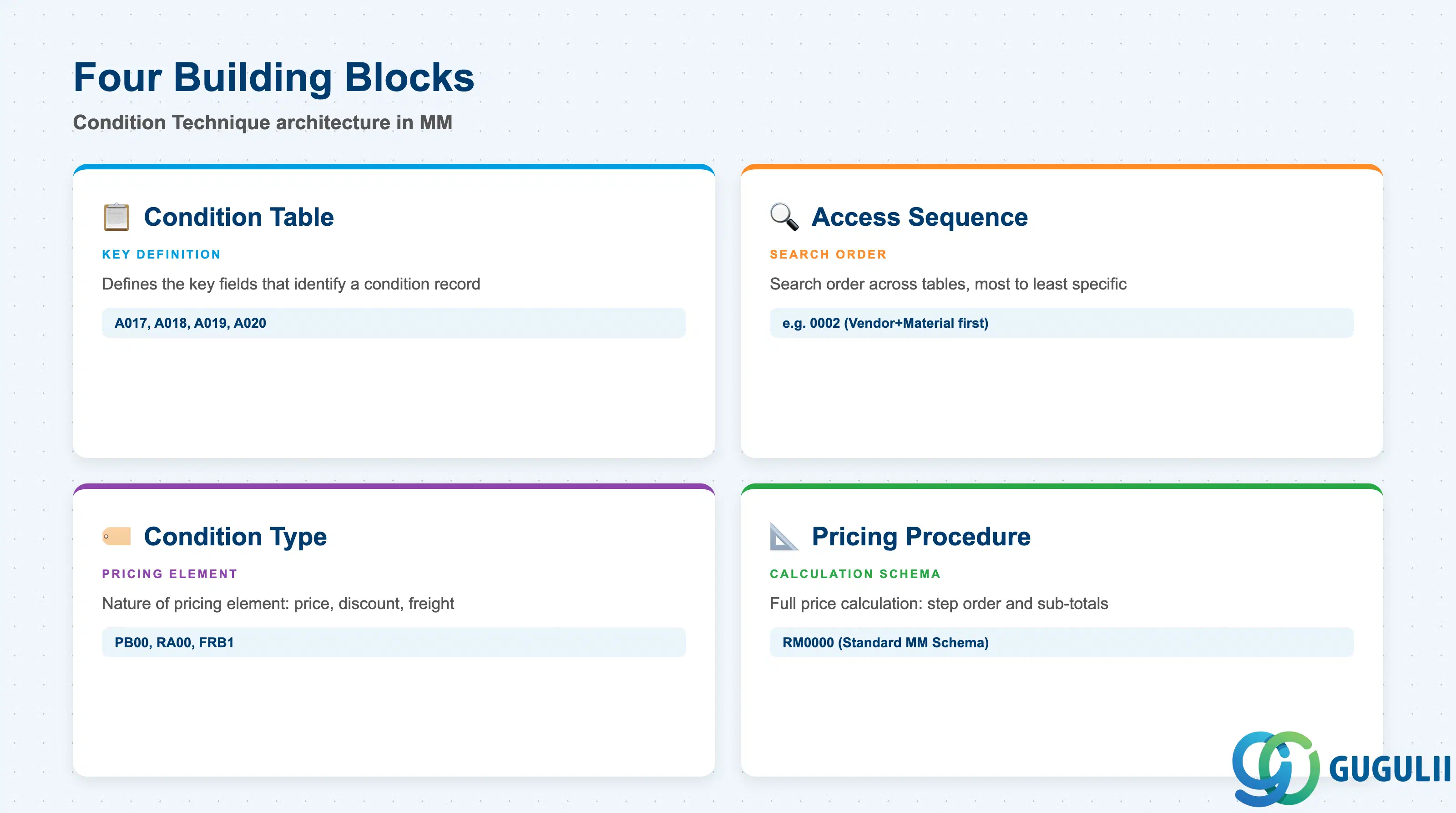
The Condition Technique in MM Purchasing is assembled from four interlocking configuration objects. Understanding how they relate is essential before any pricing master data design decision.
| Building Block | Technical ID | Use Case | Key Behavior |
|---|---|---|---|
| Condition Table | A-table (e.g., A018) | Defines the key fields that uniquely identify a condition record (e.g., Vendor + Material + Purchasing Org + Plant) | One table per key combination. Standard tables (A017–A030) cover most use cases. Custom tables require ABAP development (transaction M/03). |
| Access Sequence | e.g., 0002 | Defines the search order across Condition Tables — from most specific to least specific (e.g., Vendor+Material first, then Vendor+Material Group as fallback) | First match wins. Sequence order determines which condition record is applied when multiple valid records exist for the same step. |
| Condition Type | e.g., PB00, RA00 | Defines the nature of the pricing element: gross price, percentage discount, absolute surcharge, freight, etc. | Each Condition Type is linked to one Access Sequence. Calculation rule (percentage vs. fixed amount vs. quantity-based) is set in Customizing per Condition Type. |
| Pricing Procedure (Calculation Schema) | e.g., RM0000 | Defines the full price calculation: which Condition Types to include, in which order, with which sub-totals, and which base value each step references | Assigned to the Purchasing Org + Vendor Schema Group combination. Determines the complete logic from gross price to net price to effective value. |
Design principle: The Condition Technique is configured top-down (Pricing Procedure → Condition Type → Access Sequence → Condition Table) but evaluated bottom-up at runtime (record search → step calculation → net price). Confusing these two directions is the most common source of pricing misconfigurations.
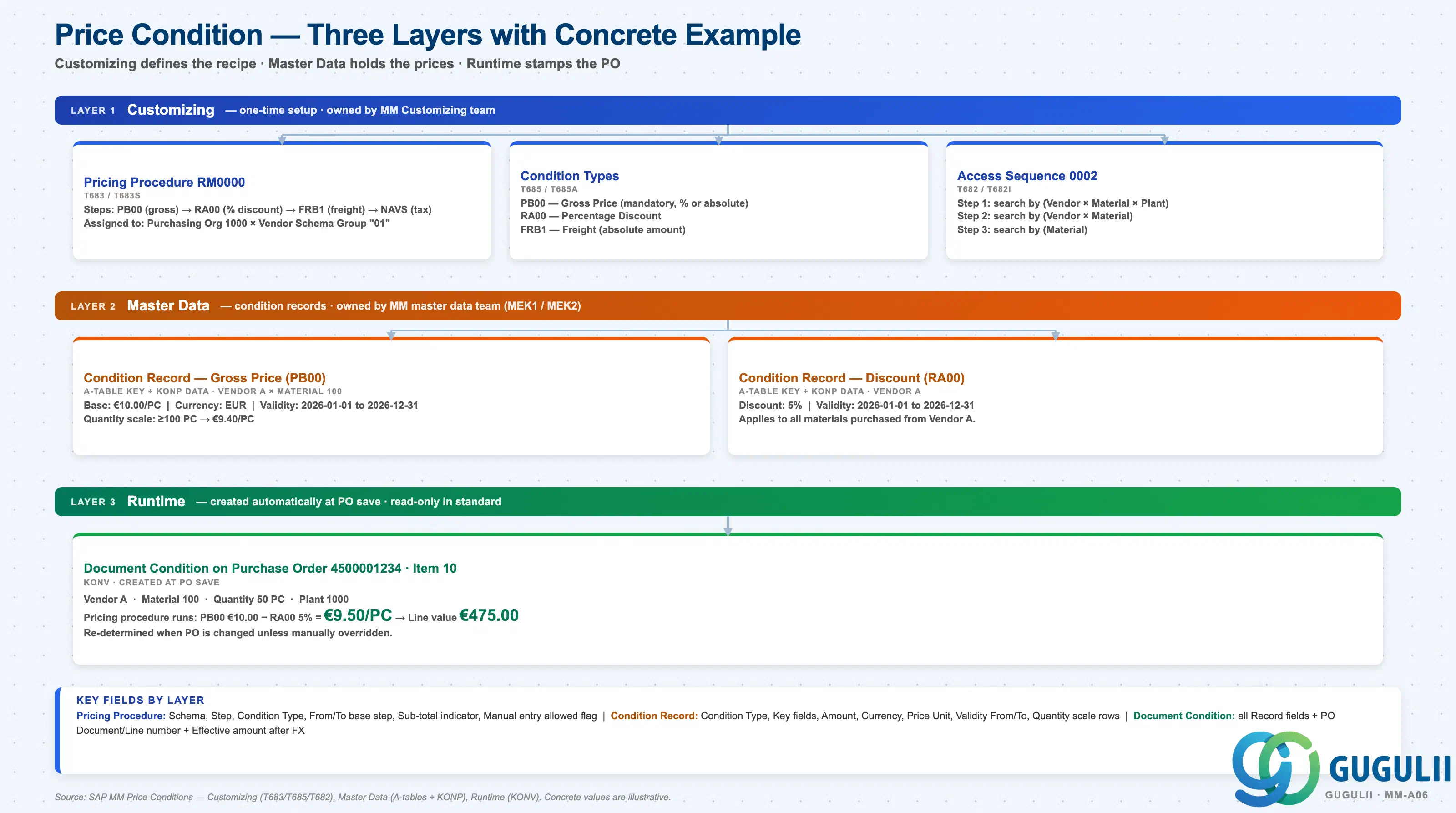
Data hierarchy with a concrete example
Price conditions cascade across three layers:
Layer 1 — Customizing (one-time setup, owned by MM Customizing team)
   │
   ├── Pricing Procedure RM0000
   │      Steps: PB00 → RA00 → FRB1 → NAVS
   │      Assigned to (Purchasing Org 1000 × Vendor Schema Group "01")
   │
   ├── Condition Type PB00 — Gross Price
   │      Condition Type RA00 — % Discount
   │      Condition Type FRB1 — Freight (absolute)
   │
   └── Access Sequence 0002
          Step 1: search by (Vendor × Material × Plant)
          Step 2: search by (Vendor × Material)
          Step 3: search by (Material)

Layer 2 — Master Data (owned by MM master data team, MEK1 / MEK2)
   │
   ├── Condition Record: Vendor A × Material 100 → €10.00/PC (PB00)
   │      Validity 2026-01-01 to 2026-12-31
   │      Scale: ≥100 PC → €9.40/PC
   │
   └── Condition Record: Vendor A → 5% discount (RA00)

Layer 3 — Runtime (created automatically every PO save)
   │
   └── PO 4500001234 Item 10 — Vendor A, Material 100, 50 PC
          Pricing procedure runs → final line value
          Document Condition stores: €10.00 − 5% = €9.50/PC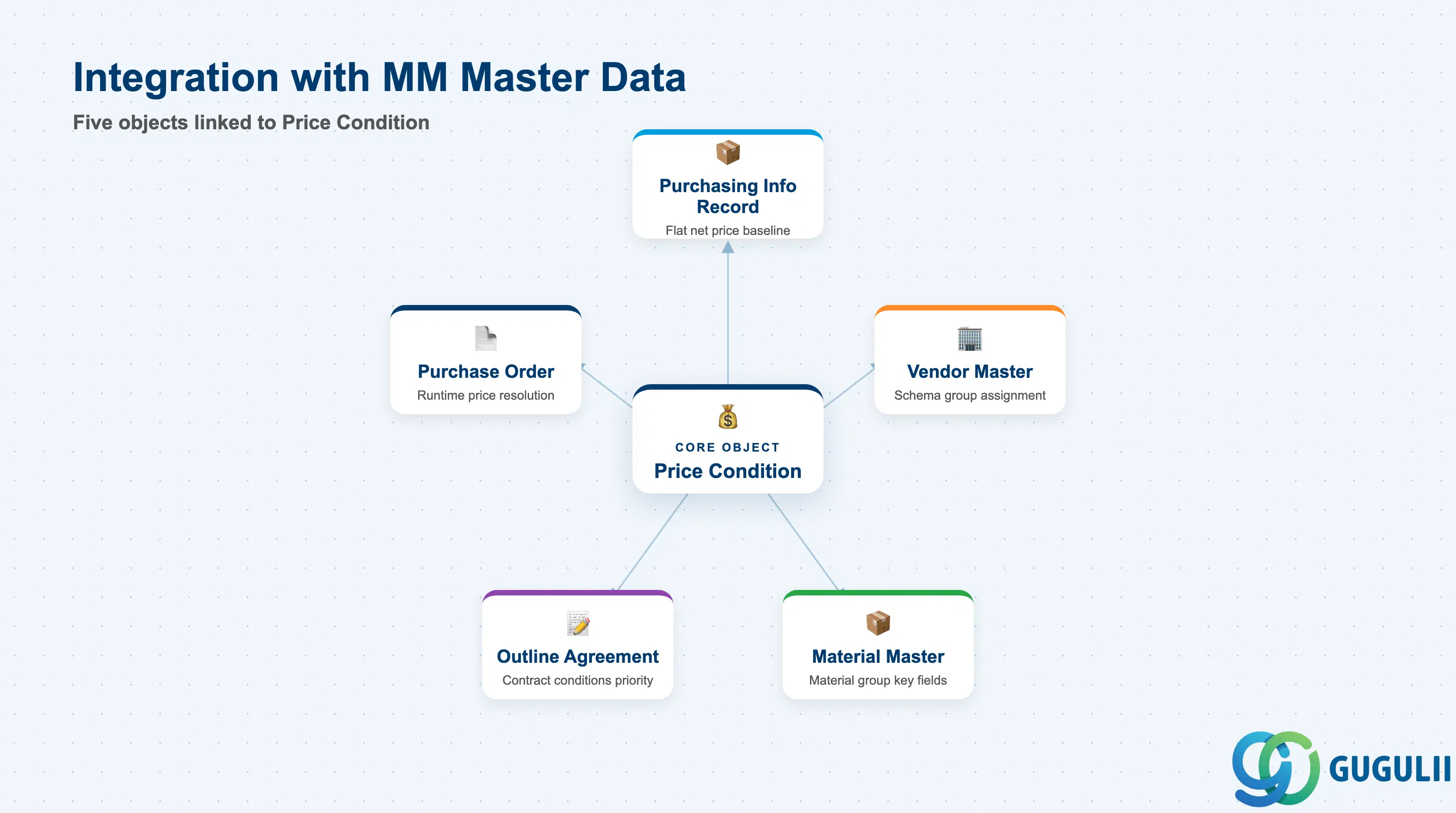
The Price Condition framework does not operate in isolation. Its configuration depends on Customizing objects and its records link tightly to purchasing master data.
| Object | Relationship | Practical Notes |
|---|---|---|
| Purchasing Info Record (PIR) | PIR holds a flat net price (EINE-NETPR); Price Condition records supply the structured condition breakdown behind that price | When a condition record (PB00) is maintained via MEK1, it overrides or supplements the flat PIR price depending on the pricing procedure configuration. Both are visible in ME13. The condition technique price takes priority when active. |
| Vendor Master | Vendor Schema Group in Vendor Master determines which Pricing Procedure applies to POs for that vendor | Schema Group is set in Vendor Master Purchasing Org data. Missing or incorrect Schema Group causes wrong Pricing Procedure assignment — one of the most common go-live defects. |
| Material Master | Material Group and Material-level key fields are used in Condition Tables (A017 = Vendor + Material Group; A018 = Vendor + Material) | Material Master’s Material Group (MATKL) is a common Access Sequence fallback for materials without a material-specific price record. |
| Outline Agreement (Contract / Scheduling Agreement) | Contracts maintain their own condition records (linked to the Agreement number) | Contract conditions take priority over standalone Price Condition records in source determination. Condition records for contracts are maintained separately via ME32 / ME33. |
| Purchase Order | At PO line item creation, the Pricing Procedure is invoked, Access Sequences are evaluated, and matching condition records from KONP are copied to KONV | Changes to condition records after PO creation do not automatically update existing POs — reprocessing or manual update is required. |
| Data Section | MM Involvement | Notes |
|---|---|---|
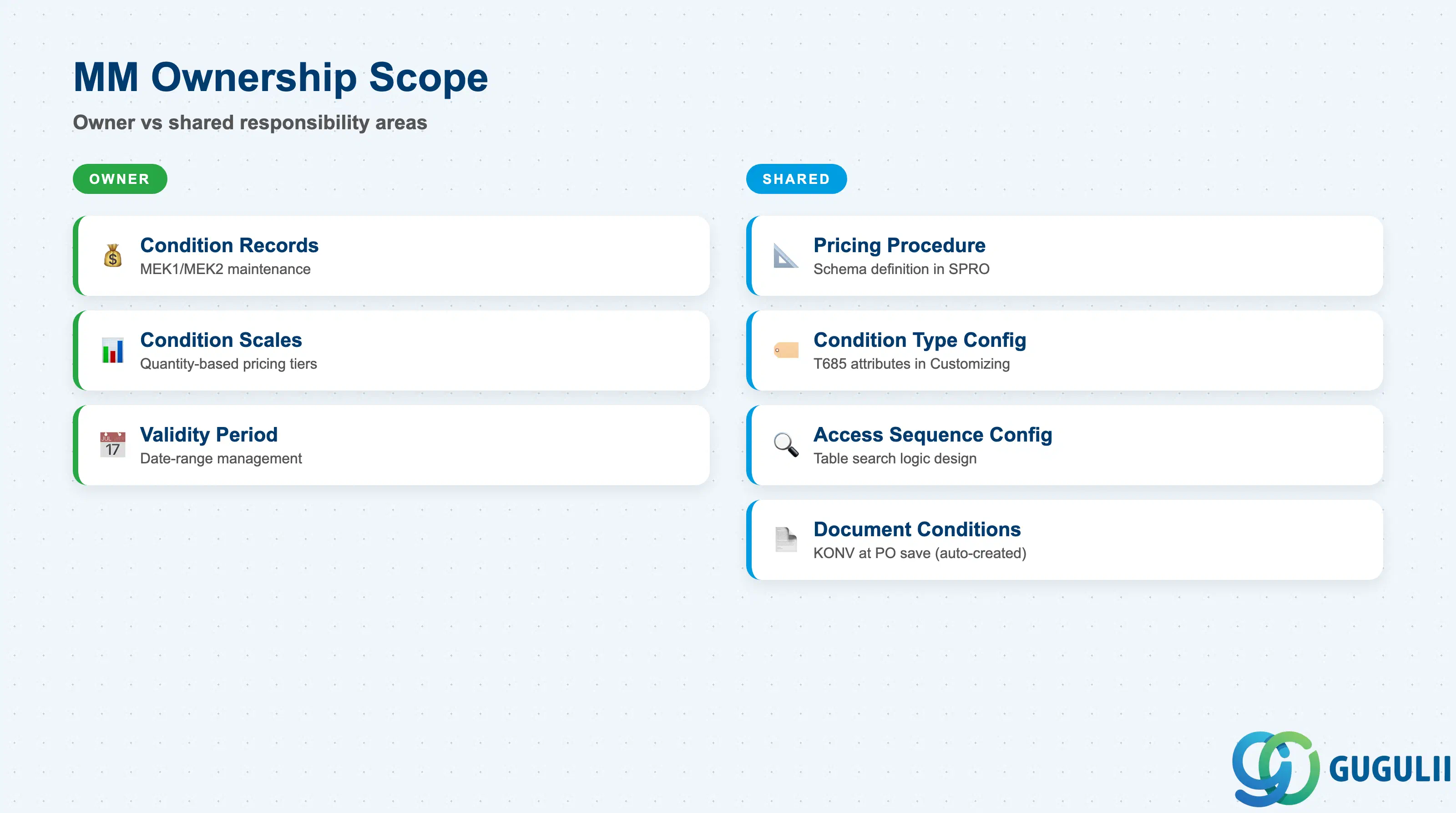
| Pricing Procedure (Calculation Schema) | ○ Shared with MM Customizing | Schema definition is Customizing — MM consultants specify requirements; ABAPer or config team implements in SPRO |
| Condition Type Configuration | ○ Shared with MM Customizing | Condition Type attributes (calculation rule, scale basis) are Customizing. MM master data team does not change T685 directly. |
| Access Sequence Configuration | ○ Shared with MM Customizing | Access Sequence and Condition Table definitions are Customizing. MM specifies the search key logic; config team implements. |
| Condition Records (KONP / A-tables) | ◎ Owner | MM master data team creates and maintains price and discount records via MEK1/MEK2. This is the primary operational ownership area. |
| Condition Scales | ◎ Owner | Quantity-based pricing scales are part of the condition record — maintained by MM in MEK1/MEK2. |
| Validity Period Management | ◎ Owner | MM team controls the date-range validity of each condition record. Expired records must be archived or superseded. |
| Document Conditions (KONV) | ○ Shared with Purchasing | Document conditions are created automatically at PO save. Manual overrides on individual POs are performed by buyers, not by the master data team. |
Legend: ◎ = Owner / Critical, ○ = Direct involvement
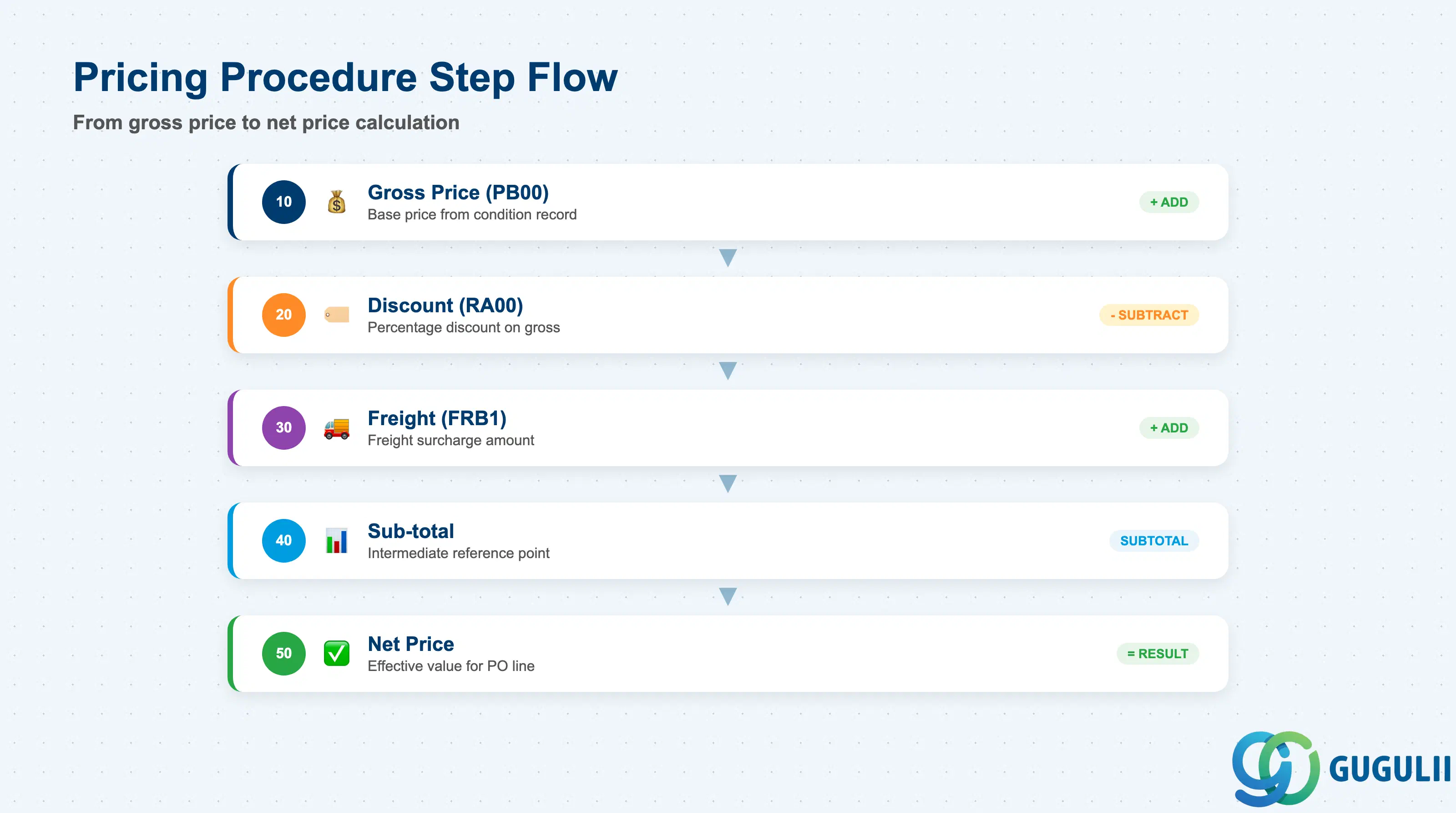
The Pricing Procedure (also called Calculation Schema) defines the complete price calculation logic for PO line items. It is the top-level control object — every Condition Type and its calculation sequence is defined here. MM consultants must understand the standard schema to specify requirements for any customization.
| Field | Description | Practical Usage |
|---|---|---|
| Schema Key | Identifier of the Pricing Procedure (e.g., RM0000) | Standard SAP delivers RM0000 as the default MM purchasing schema. Most implementations use RM0000 as a starting point and copy to a custom schema (Z-prefix) only when local requirements (e.g., Japan consumption tax as a separate condition type) require structural changes. |
| Step Number | Sequence number of each calculation step | Steps are evaluated top to bottom. The “From” and “To” fields reference other step numbers to define which subtotal is the base for percentage calculations. Step gaps (10, 20, 30…) allow later insertions without renumbering. |
| Condition Type | The pricing element used in this step (e.g., PB00, RA00, FRB1) | Each step references exactly one Condition Type. Multiple steps can reference the same type in different contexts (e.g., two discount steps with different base references). |
| From / To | Base value reference (step number range) | For a percentage discount step (RA00), “From = 10, To = 10” means the base is step 10 (gross price). Incorrect From/To assignments cause percentage discounts to apply to the wrong base — a common regression defect after schema modifications. |
| Sub-total | Intermediate result flag | Marks a step as a sub-total reference point (e.g., “net price before freight”). Other steps reference this sub-total as their base. Essential for multi-level discount structures. |
| Requirement | Condition for this step to be evaluated | A requirement routine number filters which document conditions are eligible for a given step. Standard routine 2 = “active condition only.” Custom requirements are ABAP routines developed for complex exclusion logic. |
| Manual | Manual entry flag | When checked, the buyer can enter a value for this condition type directly on the PO, even without a condition record. Common for one-off freight charges or project-specific surcharges. |
| Print control | Controls whether this condition type and its value is printed on the PO output to the vendor. Operational conditions (internal cost allocations) should not be printed. | |
| Statistical | Statistical-only flag | When checked, the condition value is displayed for reference but not added to the net price calculation. Use for tax display steps that must show the tax amount without including it in the net price (common for withholding tax scenarios). |
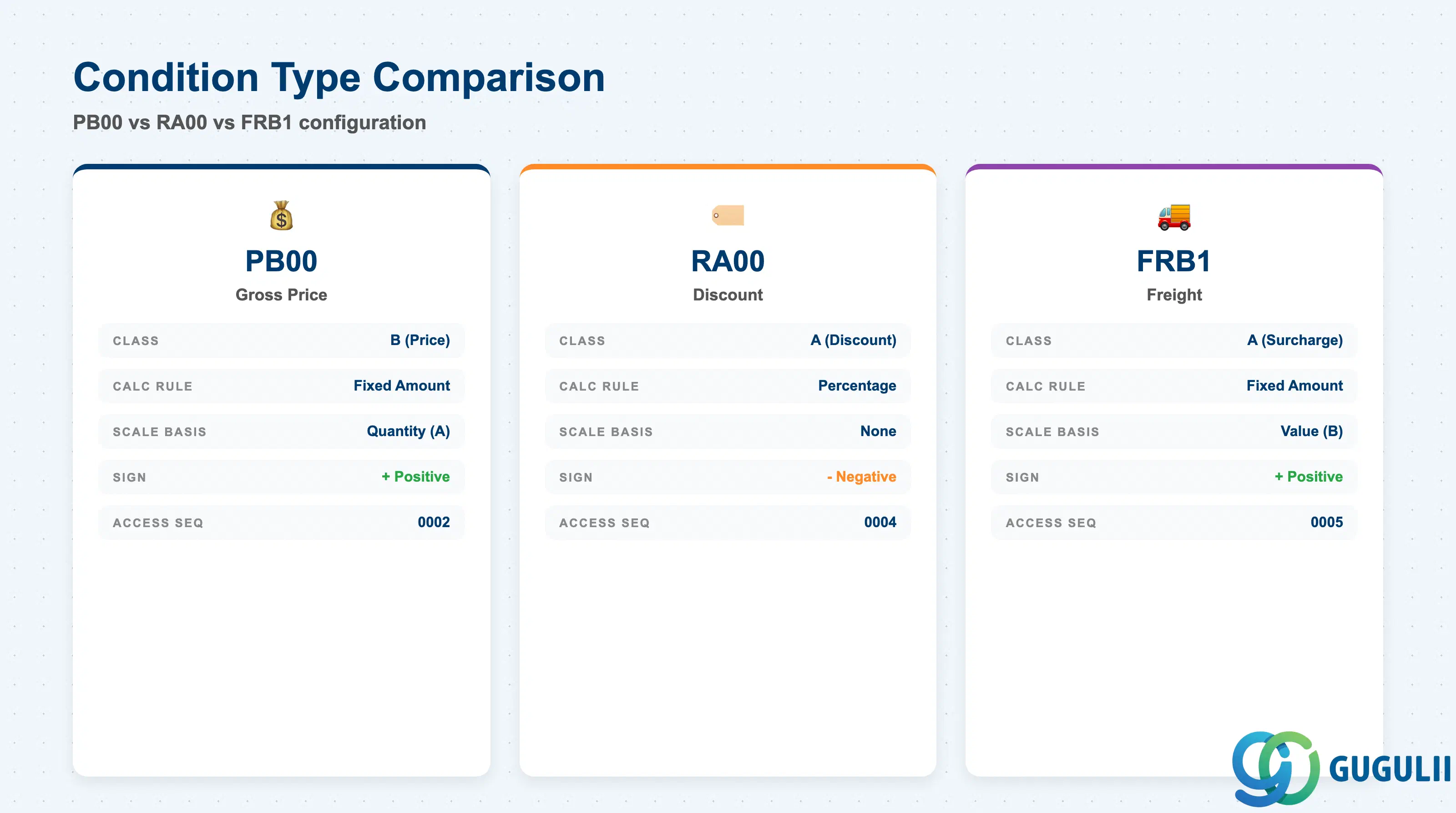
Condition Types define the behavior of each pricing element — how it is calculated, what scale basis applies, and whether it can carry a condition record. MM consultants must be able to read and interpret Condition Type settings to diagnose pricing anomalies.
| Field | Description | Practical Usage |
|---|---|---|
| Condition Type Code | Two-to-four character identifier (e.g., PB00, RA00) | Naming convention: P-prefix = price, R-prefix = discount/rebate, F-prefix = freight/surcharge, Z-prefix = custom types. Reusing standard codes for custom logic is strongly discouraged as SAP may overwrite them during upgrades. |
| Condition Class | Category of the condition (A = Discount/Surcharge, B = Price, C = Expense) | Class B conditions (price) set the base price; Class A conditions (discount/surcharge) modify it. Class C (expense) conditions represent non-price costs carried in the document for accounting purposes. |
| Calculation Rule | Determines how the condition value is computed | A = Percentage (applies the amount as a % of the base), B = Fixed Amount (applies the exact amount), C = Quantity (amount per unit of quantity). PB00 uses rule B; RA00 uses rule A. Using the wrong rule for a new condition type is a frequent configuration error during country-specific rollouts. |
| Plus/Minus | Sign of the condition’s effect | Positive (A) = adds to price; Negative (B) = subtracts from price (discount). A freight surcharge should be positive; a discount should be negative. Incorrect sign causes the system to add discounts instead of subtracting them — a critical defect that inflates PO values. |
| Scale Basis | Determines how quantity scales are evaluated | A = Quantity scale (price changes based on order quantity), B = Value scale (price changes based on order value). Most procurement conditions use quantity-based scales. Value scales are less common in purchasing but appear in freight conditions. |
| Access Sequence | The search logic assigned to this condition type | Determines which Condition Tables are searched in which order to find a valid record. A condition type with no access sequence is “manual only” — the buyer must enter the value on the PO; no automatic lookup occurs. |
| Upper/Lower Limit | Maximum and minimum allowed value | Prevents buyers from accepting abnormally high or low condition values. Triggered during PO price proposal — the system generates a warning or error if the proposed condition value falls outside the tolerance band. |
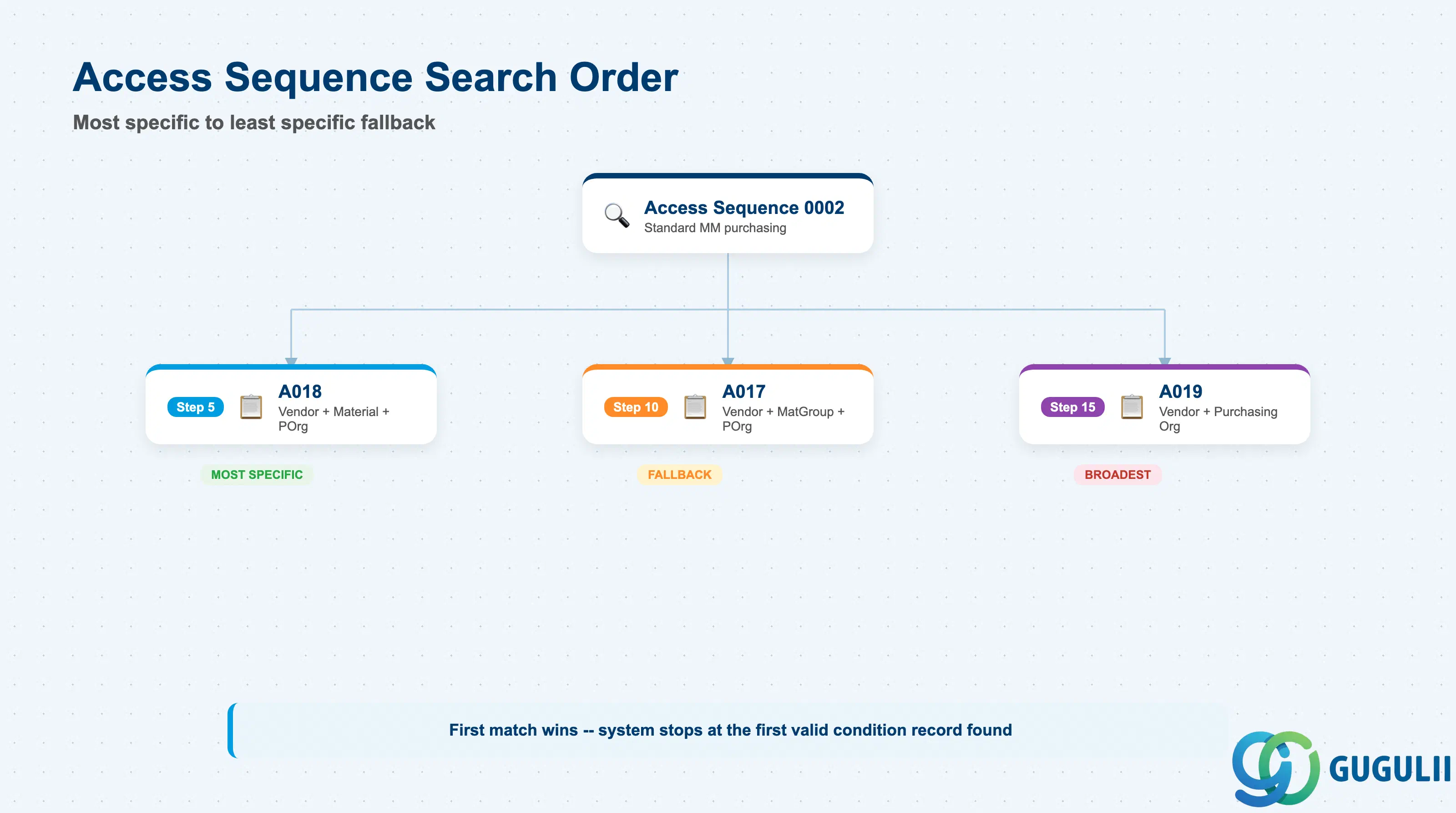
The Access Sequence defines the search strategy the system uses to find the correct condition record at PO creation. A well-designed Access Sequence resolves prices efficiently without requiring condition records at unnecessarily granular levels.
| Field | Description | Practical Usage |
|---|---|---|
| Access Sequence Key | Identifier (e.g., 0002 for standard MM sequence) | Standard SAP delivers Access Sequence 0002 for the PB00 condition type. It searches: (1) Vendor + Purchasing Org + Material, then (2) Vendor + Purchasing Org + Material Group. Most implementations adopt this standard; custom sequences are created (Z-prefix) only when additional key fields (e.g., Plant-level pricing) are required. |
| Step Number (Access) | Order of Condition Table searches within the sequence | Lower step = searched first (most specific). Higher step = fallback (less specific). Step 5 (Vendor+Material) is searched before Step 10 (Vendor+Material Group) in standard Access Sequence 0002. |
| Condition Table | The A-table defining the key fields for this access step | Standard purchasing condition tables: A017 (Vendor + Material Group), A018 (Vendor + Material), A019 (Vendor + Purchasing Org), A020 (Vendor + Plant). Custom tables (Axxx, 900+) require transport and ABAP table regeneration via M/03. |
| Exclusive | Exclusive match flag | When checked, if a record is found at this step, the system stops searching further steps even if the record is outside its validity period. When unchecked, the system continues searching lower-priority steps if no valid record is found. |
| Key Field List | Field combination that identifies the condition record | Example for A018: LIFNR (Vendor) + MATNR (Material) + EKORG (Purchasing Org). All key fields must match for the system to retrieve the condition record. A missing value in any key field causes the access to return no result — a silent failure that defaults to manual price entry. |
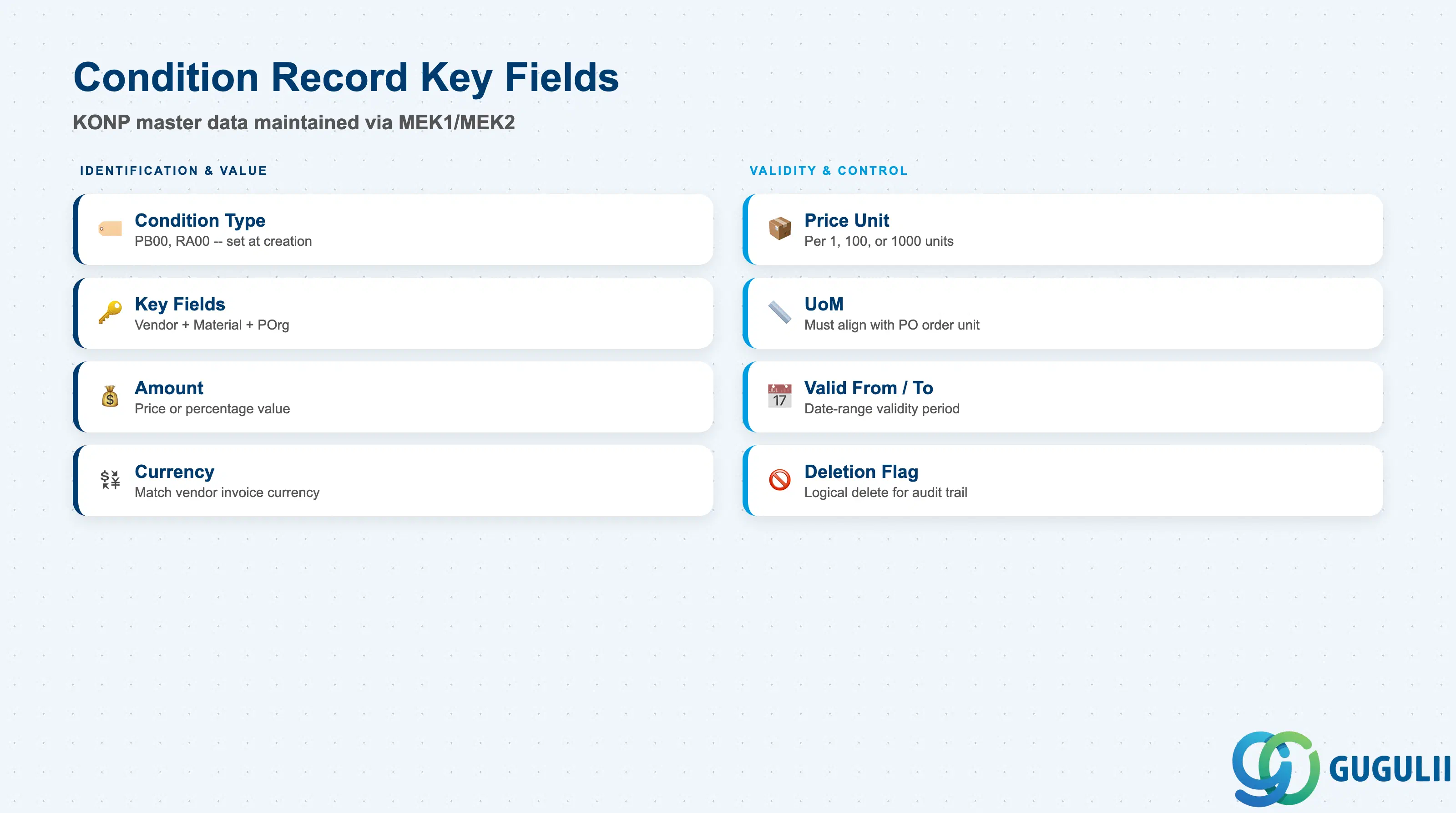
Condition Records are the operational master data maintained by the MM team. Each record stores the agreed price or adjustment factor for a specific key combination over a defined validity period. These are created and maintained via MEK1 (Create), MEK2 (Change), and MBN1 (mass overview).
| Field | Description | Practical Usage |
|---|---|---|
| Condition Type | Identifies the pricing element (e.g., PB00, RA00) | Set at creation — cannot be changed after saving. Creating under the wrong condition type requires deletion and recreation. Maintain a master list of active condition types to prevent duplication. |
| Key Fields (e.g., Vendor, Material, Purchasing Org) | Identifies the record within the Condition Table | The key combination is determined by the Condition Table assigned to the Access Sequence step. For A018 records: Vendor + Material + Purchasing Org. Entering a partial key (e.g., omitting Purchasing Org) creates a broader record that may match unintended Purchasing Orgs. |
| Amount | The condition value (price or percentage) | For PB00: the gross price per Price Unit. For RA00: the discount percentage. For FRB1: the freight amount. Amount field carries the agreed value — always confirm unit and currency alignment with the Vendor and Finance teams before activation. |
| Currency | Currency of the Amount | Match to the vendor’s invoicing currency. For Japan-targeted projects, JPY is common for domestic vendors; USD or EUR for international. Currency mismatch against the PO currency triggers automatic FX conversion using the exchange rate table (OB08). |
| Price Unit | Reference quantity for the Amount | Example: “per 100 EA” means the Amount of 1,500 JPY applies to every 100 units ordered. Incorrect Price Unit causes systematic price calculation errors — e.g., setting Price Unit = 1 when the vendor quotes per 1,000 inflates the PO price 1,000x. |
| UoM (Unit of Measure) | Unit of measure for the Price Unit | Must align with the PO order unit or have a conversion defined in the Material Master. A unit mismatch between the condition record UoM and the PO line UoM causes incorrect price proposals that buyers may not notice until invoice verification. |
| Valid From | Start date of the condition record validity | Cannot be before the agreement date with the vendor. For annual price reviews, set Valid From to the first day of the new fiscal year. Records become active on this date — plan MEK1 maintenance sessions ahead of activation dates to avoid gaps. |
| Valid To | End date of the condition record validity | Always set an explicit end date aligned with the vendor contract or annual review cycle. Open-ended records (blank Valid To) persist indefinitely and may be applied after the agreed price has changed. Governance policy should prohibit blank Valid To for all price condition records. |
| Deletion Flag | Marks a record for logical deletion | Deleted records are excluded from Access Sequence searches but remain in the database for audit. Preferred over physical deletion for traceability. Use MEK2 to set the deletion flag; physical cleanup is a periodic archiving task. |
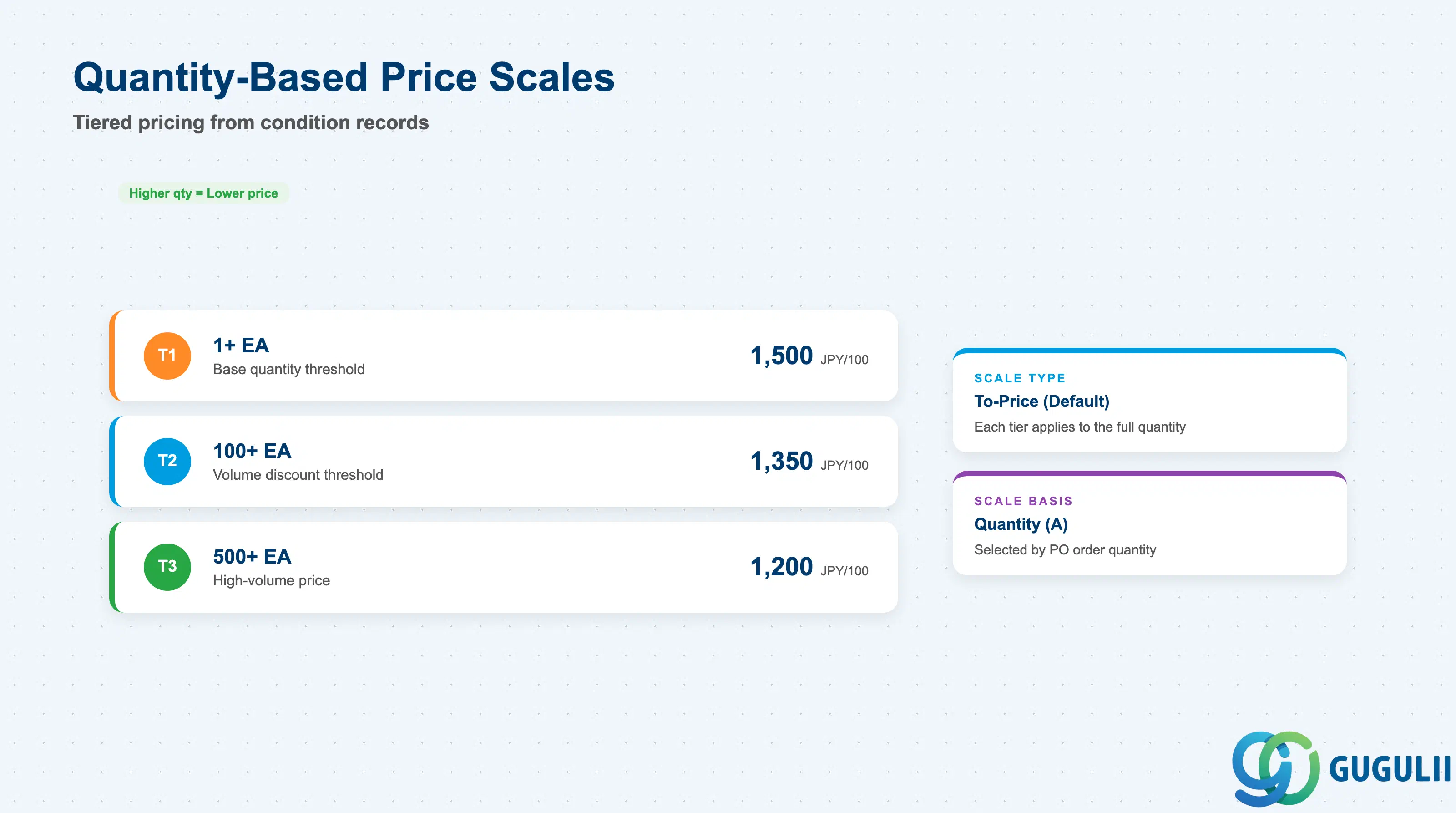
Condition Scales allow a single condition record to carry multiple price tiers based on order quantity or value. They are maintained as part of the condition record in MEK1/MEK2 and are evaluated at the PO line item level.
| Field | Description | Practical Usage |
|---|---|---|
| Scale Basis | Determines whether the scale is quantity-based or value-based | Standard MM purchasing uses Quantity scale (A): the applicable price tier is selected based on the ordered quantity. Value scale (B) is used in freight conditions where the charge varies by total invoice value. |
| Scale Quantity / Value | Threshold at which the next price tier activates | Example: 1 EA = 1,500 JPY/100, 100 EA = 1,350 JPY/100, 500 EA = 1,200 JPY/100. The system selects the highest applicable threshold that does not exceed the PO quantity. Gaps between thresholds are filled by the nearest lower tier. |
| Scale Amount | The condition value (price or %) for this scale tier | For PB00 price scales, this is the gross price per Price Unit at this quantity tier. For RA00 discount scales, this is the discount percentage. Ensure all scale amounts and their Price Units use the same currency and UoM for consistency. |
| Scale Type | Graduated vs. non-graduated scaling | Standard SAP supports “to-price” scaling (each tier applies to the full quantity) and “from-price” scaling (each tier applies only to the incremental quantity above the threshold). To-price scaling is the default and most common in purchasing. From-price scaling is rare and requires custom Customizing. |
Prerequisite: Condition Type configuration must allow scales (Scale Basis field in T685 must be set). If the Scale Basis in the Condition Type is blank, the MEK1 scale entry screen does not appear — a common source of confusion when adding scales to existing condition types that were originally configured as single-price.
| ID | Category | Title |
|---|---|---|
| mm-001 | Overview | What is SAP MM? |
| ID | Category | Title |
|---|---|---|
| mm-a01 | Overview | SAP MM Master Data: Overview, Hierarchy & Relationships |
| mm-a02-01 | Master Data | SAP MM Material Master |
| mm-a04-01 | Master Data | SAP MM Class |
| mm-a04-02 | Master Data | SAP MM Characteristic |
| mm-a06-01 | Master Data | SAP MM Purchasing Info Record |
| mm-a05-01 | Master Data | SAP MM Batch Master |
| mm-a06-02 | Master Data | SAP MM Source List |
| mm-a06-03 | Master Data | SAP MM Quota Arrangement |
| mm-a06-04 | Master Data | SAP MM Price Condition 📍 |
| ID | Category | Title |
|---|---|---|
| mm-b01 | Overview | SAP MM Transactions: Process Flow, Hierarchy & Module Integration |