Title here
Summary here

The Material Master is the foundation of spare parts and MRO management in SAP PM. Maintenance BOM components, spare part procurement, and stock availability for maintenance orders all depend on settings in this master. This article covers the Material Master’s structure, views, organizational levels, and the field-level detail PM consultants must own.
The Material Master is the central repository that stores all information about every material (item/product) a company handles — raw materials, semi-finished goods, finished products, consumables, and everything else that flows through the enterprise.
| Aspect | Details |
|---|---|
| Role | Single Source of Truth for all material attributes across the enterprise |
| Modules using it | MM (Purchasing, Inventory), PP (Production Planning, MRP, BOM), SD (Sales, Shipping, ATP), WM/EWM (Warehouse Mgmt, Putaway/Pick), QM (Quality Inspection, CoA), FI (Inventory Valuation, Auto Posting), CO (Standard Cost, Variance Analysis), PM (Plant Maintenance, MRO Procurement), PS (Project Procurement, Material Allocation), CS (Customer Service, Spare Parts), EHS (Hazardous Material Mgmt, Environmental Compliance), GTS (Trade Compliance, HS Code, Export Control) |
| Transactions | MM01 (Create) / MM02 (Change) / MM03 (Display) |
| S/4HANA change | Material number length extended from 18 to 40 digits (MATNR field) |
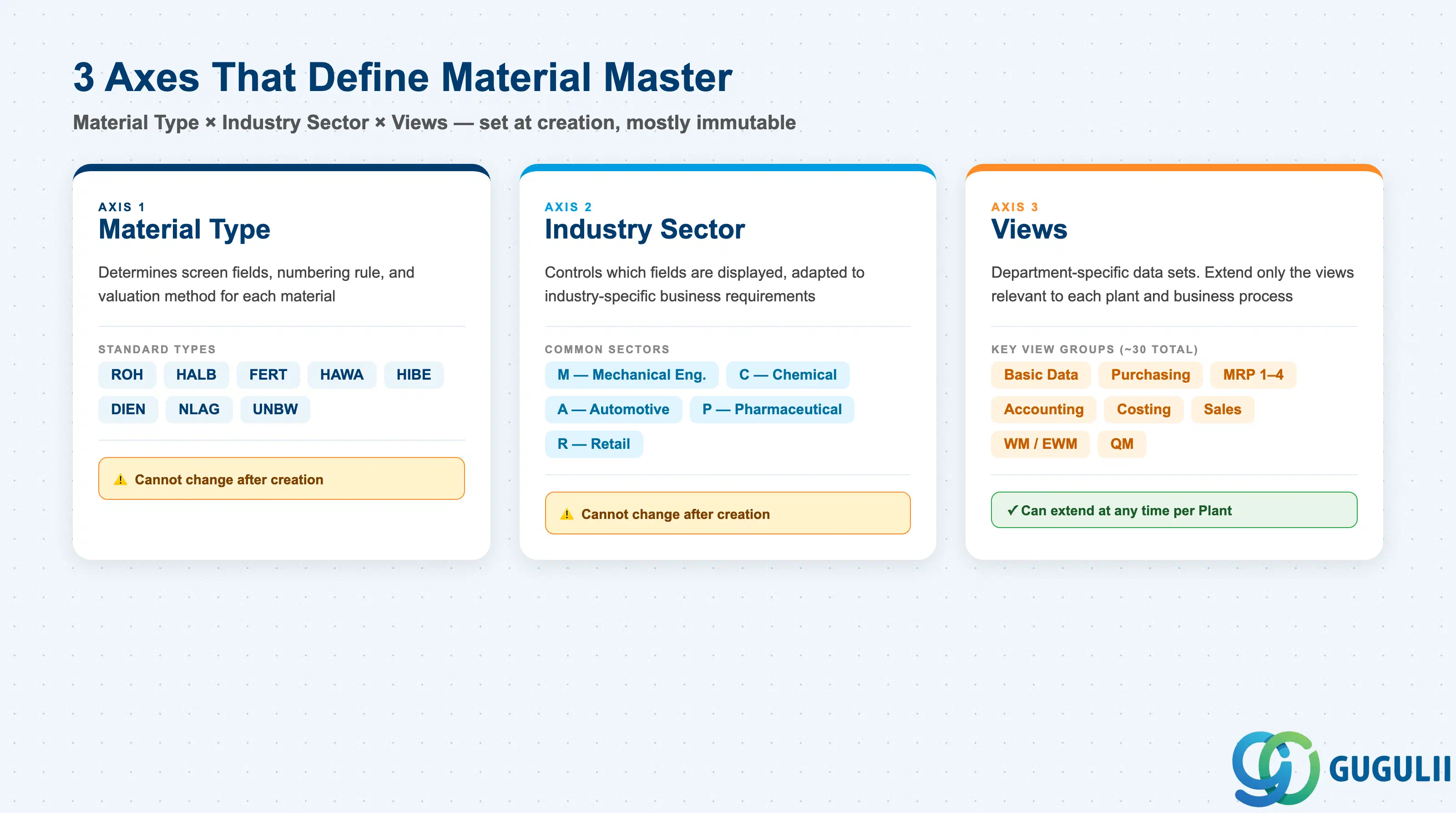
The structure of a Material Master record is determined by the combination of three axes:
| Axis | Description | Examples |
|---|---|---|
| Material Type | Classifies the material. Controls screen layout, number assignment, and valuation method | ROH, FERT, HALB |
| Industry Sector | Industry branch. Controls which fields are displayed based on industry characteristics | M (Mechanical), C (Chemical), A (Automotive) |
| Views | Data sets organized by department. Only relevant views need to be extended | Basic Data, MRP, Accounting |
Important: Once created, Material Type and Industry Sector cannot be changed as a general rule. Lock these in during design.
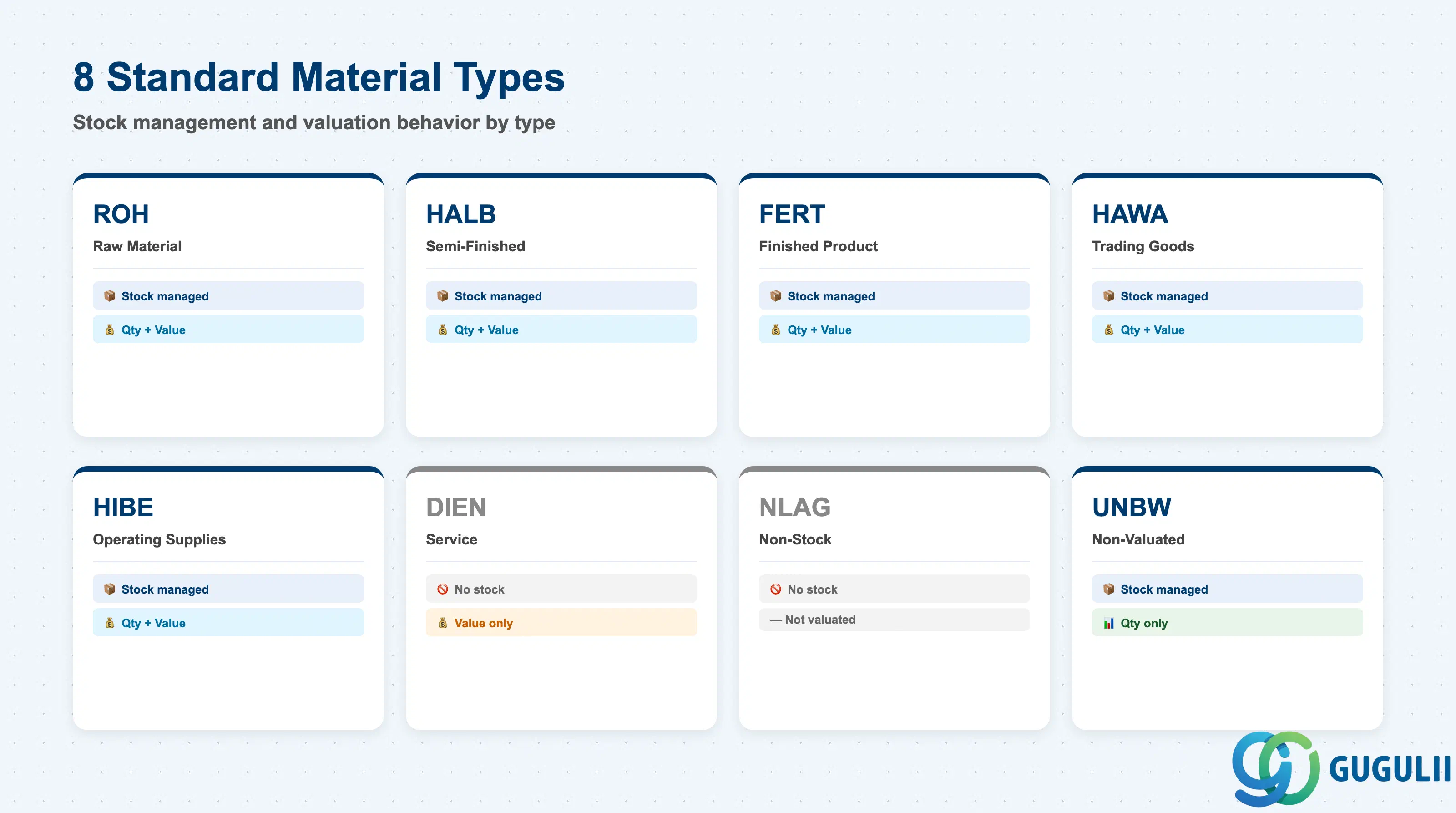
| Code | Name | Use Case | Stock-Managed | Qty / Value |
|---|---|---|---|---|
| ROH | Raw Material | Input materials | Yes | Both |
| HALB | Semi-Finished | Internally produced intermediates | Yes | Both |
| FERT | Finished Product | Internally produced / sold goods | Yes | Both |
| HAWA | Trading Goods | Buy-and-sell merchandise | Yes | Both |
| HIBE | Operating Supplies | Indirect materials, consumables | Yes | Both |
| DIEN | Service | Service items | No | Value only |
| NLAG | Non-Stock | No inventory management | No | — |
| UNBW | Non-Valuated | Quantity tracking only | Yes | Qty only |
PM key material types: ERSA (Spare Parts) for repairable/critical components with stock management, HIBE (Operating Supplies) for lubricants/consumables, NLAG (Non-Stock) for low-value items procured directly to maintenance orders without stock management.
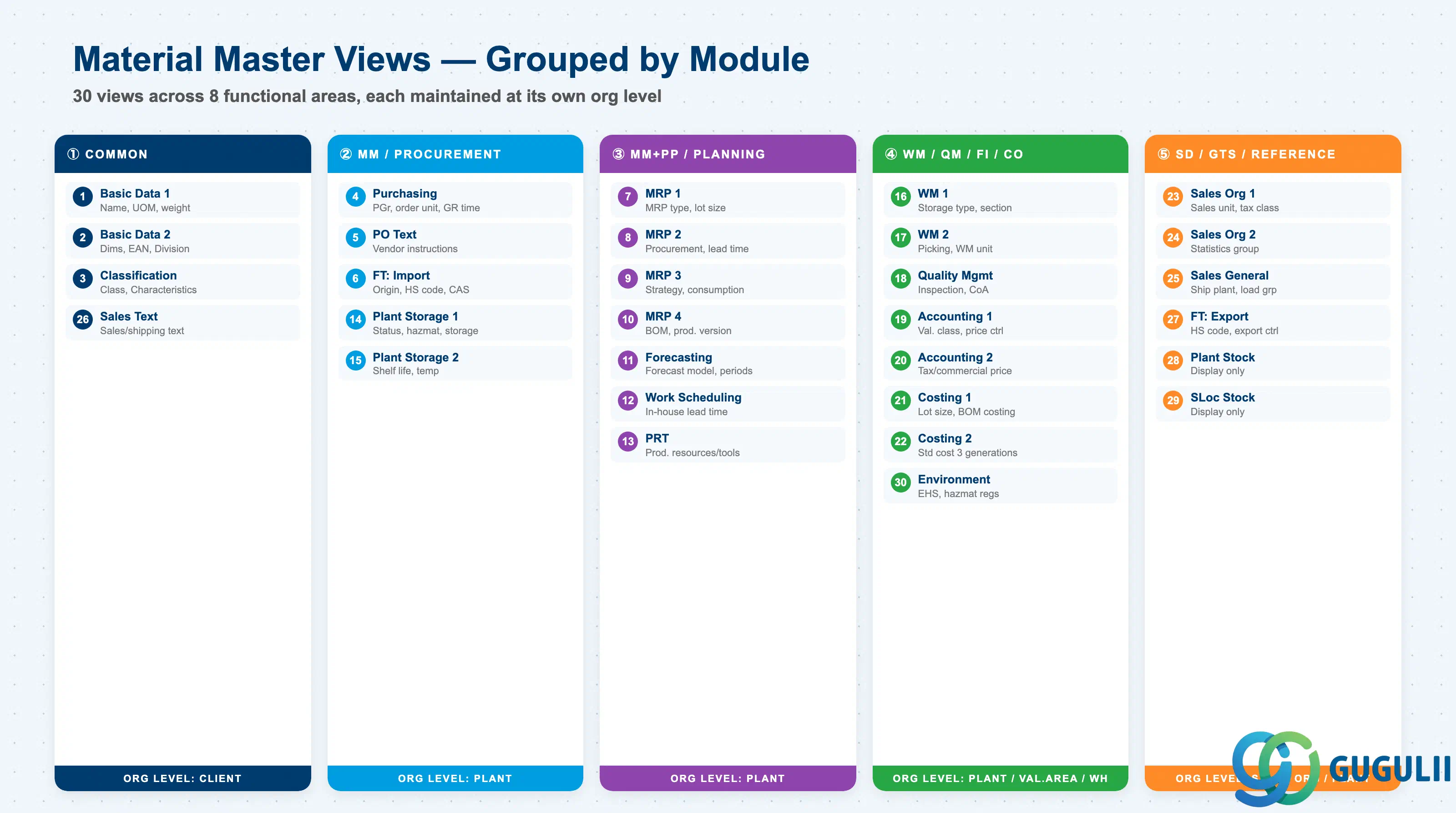
The Material Master is divided into department-specific Views. Only the views required by each department need to be extended. Approximately 30 standard views exist; the views to extend are selected based on Material Type and business requirements.
| # | View | Owning Dept | Key Fields | Org Level |
|---|---|---|---|---|
| 1 | Basic Data 1 | Cross-module | Material description, Base UoM, Material group, Weight/Volume | Client |
| 2 | Basic Data 2 | Cross-module | Dimensions, EAN/UPC, Old material number, Division | Client |
| 3 | Classification | Cross-module | Class assignment, Characteristic values | Client |
| 4 | Purchasing | Purchasing (MM) | Purchasing group, Order unit, GR processing time, Source list required flag | Plant |
| 5 | Purchase Order Text | Purchasing (MM) | PO text, Text ID, Language | Plant |
| 6 | Foreign Trade: Import | Purchasing (MM) / GTS | Country of origin, HS code (import), CAS number, Import license | Plant |
| 7 | MRP 1 | Purchasing / PP (MM/PP) | MRP type, MRP controller, Lot size, Reorder point | Plant |
| 8 | MRP 2 | Purchasing / PP (MM/PP) | Procurement type, Special procurement, Planned delivery time, Safety stock | Plant |
| 9 | MRP 3 | Purchasing / PP (MM/PP) | Strategy group, Consumption mode, Availability check | Plant |
| 10 | MRP 4 | PP-oriented | BOM selection, Individual/collective requirements, Discontinuation flag | Plant |
| 11 | Forecasting | Purchasing / PP (MM/PP) | Forecast model, Historical/forecast periods, Smoothing factors | Plant |
| 12 | Work Scheduling | Production (PP) | Production unit, Receiving storage location, In-house production time | Plant |
| 13 | Production Resources/Tools | Production (PP) | Production resource/tool data | Plant |
| 14 | General Plant Data / Storage 1 | Inventory (MM) / EHS | Plant-specific material status, Storage conditions, Hazardous material number, EHS hazard data | Plant |
| 15 | General Plant Data / Storage 2 | Inventory (MM) | Shelf life management, Minimum remaining shelf life, Temperature conditions | Plant |
| 16 | Warehouse Management 1 | Warehouse (WM/EWM) | Warehouse number, Storage type, Storage section | Warehouse |
| 17 | Warehouse Management 2 | Warehouse (WM/EWM) | Picking type, WM unit of measure | Warehouse |
| 18 | Quality Management | Quality (QM) | QM procurement key, Inspection type, Certificate type | Plant |
| 19 | Accounting 1 | Finance (FI) | Valuation class, Price control (S/V), Standard price / Moving average price | Valuation Area |
| 20 | Accounting 2 | Finance (FI) | Tax-based valuation, Commercial valuation, Devaluation flag | Valuation Area |
| 21 | Costing 1 | Controlling (CO) | Costing lot size, With/without quantity structure, Variance key | Plant |
| 22 | Costing 2 | Controlling (CO) | Standard cost (Future/Current/Previous), Costing status | Plant |
| 23 | Sales: Sales Org 1 | Sales (SD) | Sales unit, Tax classification, Item category group | Sales Org / DCh |
| 24 | Sales: Sales Org 2 | Sales (SD) | Material statistics group, Material group 1–5 | Sales Org / DCh |
| 25 | Sales: General/Plant | Sales (SD) | Delivering plant, Transportation group, Loading group, Profit center | Plant |
| 26 | Sales Text | Sales (SD) | Sales/shipping texts | Client |
| 27 | Foreign Trade: Export | Trade (SD/GTS) | HS code (export), Export statistics group, Preference status, Export control | Plant |
| 28 | Plant Stock | Reference (display only) | Plant stock quantity / value (read-only) | Plant |
| 29 | Storage Location Stock | Reference (display only) | Storage location-level stock (read-only) | Storage Loc |
| 30 | Environment (EHS) | EHS | Hazardous substance regulations, Waste code | Plant |
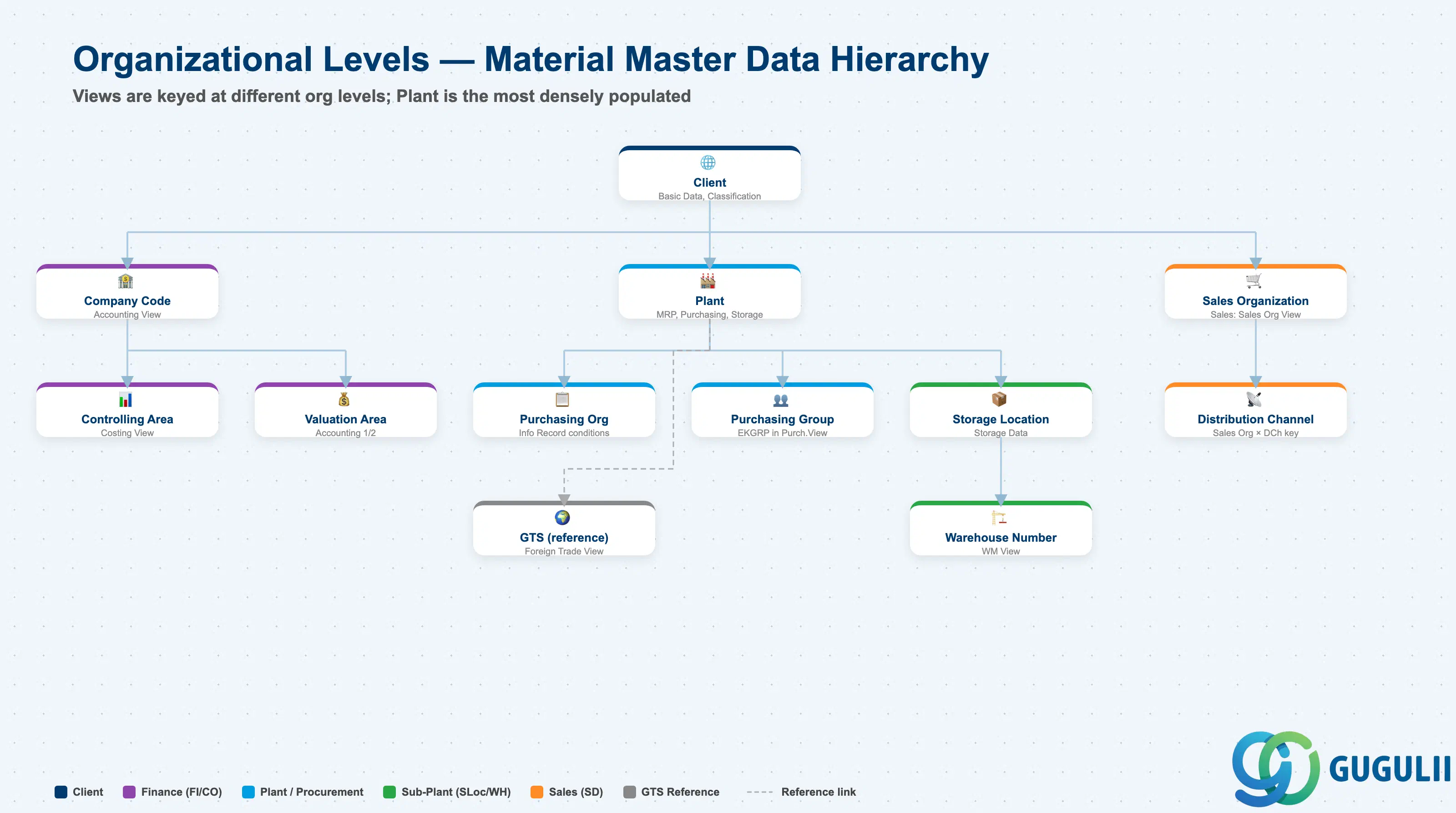
Each view stores its data at a different organizational level. This is the core design challenge of the Material Master.
Client (300)
   │
   ├── Basic Data, Classification ← Client-level (one record for entire enterprise)
   │
   ├── Plant (1000, 2000, ...)
   │      │
   │      ├── MRP, Purchasing, Work Scheduling ← Plant-level
   │      │
   │      ├── Storage Location (0001, 0002, ...)
   │      │      └── Storage Data ← Storage Location-level
   │      │
   │      └── Warehouse Number (WH1, ...)
   │             └── WM Data ← Warehouse-level
   │
   ├── Valuation Area = Plant ← Accounting is typically at Plant level
   │      └── Valuation class, Standard cost
   │
   └── Sales Org × Distribution Channel
└── Sales Data ← Sales Org-level| Org Level | Primary Use | Representative Fields | Notes |
|---|---|---|---|
| Client | Enterprise-wide common attributes | Material description, Base UoM, Classification | One record shared across entire enterprise |
| Company Code | Financial accounting unit | Accounting View (valuation class, price control) | When Valuation Area = Company Code |
| Controlling Area | Management accounting unit | Costing View (cost estimate, variance analysis) | May span multiple Company Codes |
| Purchasing Organization | Purchasing org unit | Purchasing Info Record (price, conditions) | Material Master itself is at Plant level; purchase conditions are at Purch. Org level |
| Plant | Factory / site unit | MRP, Purchasing, Work Scheduling, General Plant Data | The primary level with the most views |
| Purchasing Group | Buyer group | Purchasing View: Purchasing Group (EKGRP) | Buyer group within a Plant; starting point for PO release strategy routing |
| Valuation Area | Inventory valuation unit | Accounting 1 (valuation class, standard price) | Typically = Plant; Company Code-level valuation is also configurable |
| Storage Location | Storage area unit | General Plant Data / Storage (storage location stock) | Warehouse / bin area within a Plant |
| Warehouse Number | Warehouse management unit | WM View (storage type, picking strategy) | Used in Plants with WM/EWM |
| Sales Organization | Sales org unit | Sales: Sales Org View (sales unit, tax classification) | Keyed together with Distribution Channel |
| Distribution Channel | Distribution channel unit | Sales: Sales Org View | Extended in combination with Sales Org |
| (GTS reference) | Trade compliance management | Foreign Trade View (HS code, country of origin, export control) | No GTS-specific org level key in Material Master; GTS references the Foreign Trade View data |
| # | View | Primary Module | PM Involvement |
|---|---|---|---|
| 1 | Basic Data 1 | Cross-module | ◎ (spare part description, base UoM) |
| 2 | Basic Data 2 | Cross-module | ○ (old material number for cross-reference) |
| 3 | Classification | Cross-module | ◎ (equipment classification, spare part search) |
| 4 | Purchasing | MM / PM | ◎ (MRO procurement settings) |
| 5 | Purchase Order Text | MM | ○ (maintenance-specific delivery instructions) |
| 6 | Foreign Trade: Import | MM | △ |
| 7 | MRP 1 | MM / PP | ◎ (reorder point for critical spares) |
| 8 | MRP 2 | MM / PP | ○ (planned delivery time for spare parts) |
| 9 | MRP 3 | MM / PP | × |
| 10 | MRP 4 | PP | × |
| 11 | Forecasting | MM / PP | △ |
| 12 | Work Scheduling | PP | × |
| 13 | Production Resources/Tools | PP | × |
| 14 | General Plant Data / Storage 1 | MM | ◎ (storage conditions for PM parts) |
| 15 | General Plant Data / Storage 2 | MM | ○ |
| 16 | Warehouse Management 1 | WM / EWM | ○ (spare parts warehouse bin) |
| 17 | Warehouse Management 2 | WM / EWM | ○ |
| 18 | Quality Management | QM | ○ (incoming inspection for critical spares) |
| 19 | Accounting 1 | FI | ◎ (valuation class for MRO — separate from production) |
| 20 | Accounting 2 | FI | △ |
| 21 | Costing 1 | CO | △ |
| 22 | Costing 2 | CO | △ |
| 23 | Sales: Sales Org 1 | SD | × |
| 24 | Sales: Sales Org 2 | SD | × |
| 25 | Sales: General/Plant | SD | × |
| 26 | Sales Text | SD | × |
| 27 | Foreign Trade: Export | SD / GTS | × |
| 28 | Plant Stock | Reference | — |
| 29 | Storage Location Stock | Reference | — |
| 30 | Environment (EHS) | EHS | ○ (hazardous lubricants / chemicals) |
Legend: ◎ = Owner / Critical, ○ = Direct involvement, △ = Reference / Integration, × = Other module owns, — = Display-only view
| Field | Description | Practical Usage |
|---|---|---|
| Material Description | Spare part name | Use a structured naming convention: Equipment Category + Component Type + Specification (e.g., “PUMP BEARING DEEP GROOVE 6205”). Avoid generic names like “BEARING” — when maintenance technicians search for a part on a work order, they must be able to identify the correct material from the description alone, without opening the full record. |
| Base Unit of Measure | Stock management unit | For spare parts: EA (each), SET (set of components), M (meters for seals/gaskets). For lubricants/consumables: L (liters), KG. Standardize units across the spare parts catalog — mixing units for the same type of item (some in EA, some in SET) creates confusion in maintenance order component reservations. |
| Material Group | MRO category | Design the Material Group hierarchy from a maintenance perspective: Rotating Equipment, Electrical, Instruments, Hydraulics, Consumables. This grouping drives spare parts spend analysis and ABC classification for safety stock policy. |
| Old Material Number | Legacy / manufacturer cross-reference | Store the manufacturer’s part number or the legacy system’s material number here. Maintenance technicians often know parts by manufacturer code — this field enables cross-reference search in SE16/MM60. |
| Gross Weight / Net Weight | Part weight | Required for heavy spare parts management (crane requirements, transport restrictions). Also used in overseas shipping cost estimation when importing critical spares. |
| Field | Description | Practical Usage |
|---|---|---|
| Purchasing Group (EKGRP) | MRO buyer group | Assign spare parts to a dedicated MRO purchasing group, separate from production materials. This enables separate release strategies (approval workflows) for maintenance procurement — typically requiring maintenance supervisor approval in addition to purchasing approval for high-value critical spares. |
| Planned Delivery Time | Lead time from PO to GR | For critical spare parts (A-class), the planned delivery time must reflect the actual worst-case delivery time — not average. Underestimating lead time for a long-lead critical spare (e.g., 12 weeks for a specialized gearbox) that fails unexpectedly results in extended unplanned downtime. |
| GR Processing Time | Days for receipt handling | For spare parts requiring incoming inspection (QM), add inspection time here. MRP uses this for planned order scheduling — if the inspection adds 3 days, the PR must be created 3 days earlier than the need date. |
| Automatic PO | Auto PR-to-PO conversion | Enable for low-value standard consumables (lubricants, filters) with a fixed approved vendor. Reduces purchase order processing time for routine MRO replenishment. Require a Source List entry to ensure the correct vendor is used. |
| Source List Required | Vendor restriction flag | For critical spare parts with approved vendors only (e.g., OEM parts required for warranty maintenance), enable this flag to prevent unauthorized vendor selection. Combine with a Source List entry for the approved OEM or authorized distributor. |
Spare parts MRP strategy differs fundamentally from production materials — consumption is event-driven (equipment failure) rather than forecast-driven.
| Field | Description | Practical Usage |
|---|---|---|
| MRP Type | Planning method for spare parts | VB (Reorder Point) is standard for most spare parts. PD is used for planned maintenance-driven consumption (e.g., annual overhaul parts). ND = no planning (ultra-low-value or one-time-order parts). Design the MRP Type per ABC/XYZ classification: A-critical spares = VB with safety stock, B = VB with minimal stock, C = ND or one-time order. |
| MRP Controller | Maintenance planner / MM planner | For spare parts, MRP Controller is often the maintenance planner (not a production planner). This clarifies who is responsible for replenishment decisions when MRP generates exception messages — preventing “nobody owns this” situations for critical spare part shortages. |
| Lot Size | Procurement quantity method | EX = Lot-for-Lot (one-time orders for non-stocked items), FX = Fixed (standard order quantity for replenishment), HB = Replenish to Maximum (for items with min-max inventory policy). For consumables with volume discounts, FX with the economic order quantity is most common. |
| Reorder Point | Minimum stock trigger | Safety stock calculation for spare parts differs from production materials. For critical spares: Reorder Point = Safety Stock + Expected consumption during replenishment lead time. For A-critical with long lead time and catastrophic failure impact: safety stock = 1 unit minimum regardless of statistical calculation. |
| Safety Stock | Minimum on-hand quantity | For high-criticality, long-lead-time spares, safety stock is set by engineering judgment (“we must always have at least 1 on hand”) rather than statistical formula. Document the rationale in the material’s long text for auditability. |
| Minimum Lot Size | Minimum order quantity | Reflects supplier MOQ. For specialty spare parts with minimum order quantities from the OEM, set this to prevent ordering less than the MOQ (which the supplier will simply round up anyway, creating a price discrepancy). |
Classification is the most powerful search tool for spare parts in a large maintenance organization.
| Field | Description | Practical Usage |
|---|---|---|
| Equipment Spare Part Class | Spare part classification | Design a Class Type 001 class hierarchy specifically for spare parts: Equipment Category (PUMP, MOTOR, VALVE) → Component Type (BEARING, SEAL, IMPELLER) → Specification (size, rating, material). Enables technicians to find the correct spare part by specification when the exact material number is unknown — critical in emergency breakdown situations. |
| Manufacturer Part Number (Characteristic) | OEM cross-reference | Maintain the manufacturer’s part number as a characteristic. Enables search by OEM part number — the most common scenario when a technician arrives at the storeroom with the manufacturer’s catalog number. Use this in addition to (not instead of) the Old Material Number field. |
| Technical Specifications (Characteristics) | Physical/technical parameters | For bearings: inner diameter, outer diameter, width, load rating. For seals: material, pressure rating, temperature range. For motors: power (kW), voltage, RPM, frame size. These characteristics enable “find all materials meeting specification X” searches — invaluable for finding alternative parts when the standard part is out of stock. |
| Field | Description | Practical Usage |
|---|---|---|
| Storage Conditions | Special storage requirements | Lubrication oils require temperature-controlled storage. Electronic components require ESD-safe storage areas. Hydraulic seals must not be stored near solvents. Define storage conditions to ensure the spare parts warehouse routes incoming items to the correct storage area — wrong storage degrades spare parts before use. |
| Hazardous Material Number | EHS hazmat reference | Lubricants, cleaning agents, and welding gases used in PM are often classified as hazardous materials. The Hazmat Number links to safety data sheets (SDS) and ensures compliance with storage segregation and handling regulations (OSHA, ADR). |
| Shelf Life Expiration Date Required | Shelf life management | Enable for spare parts with limited shelf life: lubricants, adhesives, seals, and gaskets. Prevents the use of expired materials in maintenance work — which can cause premature equipment failure and void OEM warranties. |
| Field | Description | Practical Usage |
|---|---|---|
| Valuation Class | G/L account for MRO inventory | Assign a dedicated Valuation Class for PM spare parts (e.g., separate from production raw materials). This creates a separate MRO inventory balance sheet account — enabling maintenance cost reporting and MRO inventory management independent of production inventory. Design the Valuation Class together with FI/CO to enable maintenance budget vs. actual cost analysis per equipment or cost center. |
| Price Control (V = Moving Average) | MRO valuation method | Moving Average Price (V) is standard for spare parts because prices vary by order. Standard Price (S) is rarely used for MRO unless the spare part is also a production component. Monitor MAP for critical high-value spares — irregular large orders can cause significant MAP fluctuations. |
| ID | Category | Title |
|---|---|---|
| pm-001 | Overview | What is SAP PM? |
| ID | Category | Title |
|---|---|---|
| pm-a01 | Overview | SAP PM Master Data: Overview, Hierarchy & Relationships |
| pm-a02-01 | Master Data | SAP PM Functional Location |
| pm-a02-02 | Master Data | SAP PM Equipment |
| pm-a03-01 | Master Data | SAP PM Class |
| pm-a03-02 | Master Data | SAP PM Characteristic |
| pm-a04-01 | Master Data | SAP PM Measuring Point |
| pm-a05-01 | Master Data | SAP PM Work Center |
| pm-a06-01 | Master Data | SAP PM Material Master |
| pm-a05-02 | Master Data | SAP PM Task List |
| pm-a05-03 | Master Data | SAP PM Production Resource Tool |
| pm-a06-03 | Master Data | SAP PM Maintenance BOM |
| pm-a07-01 | Master Data | SAP PM Maintenance Item |
| pm-a07-02 | Master Data | SAP PM Maintenance Plan |
| ID | Category | Title |
|---|---|---|
| pm-b01 | Overview | SAP PM Transactions: Process Flow, Hierarchy & Relationships |