Title here
Summary here

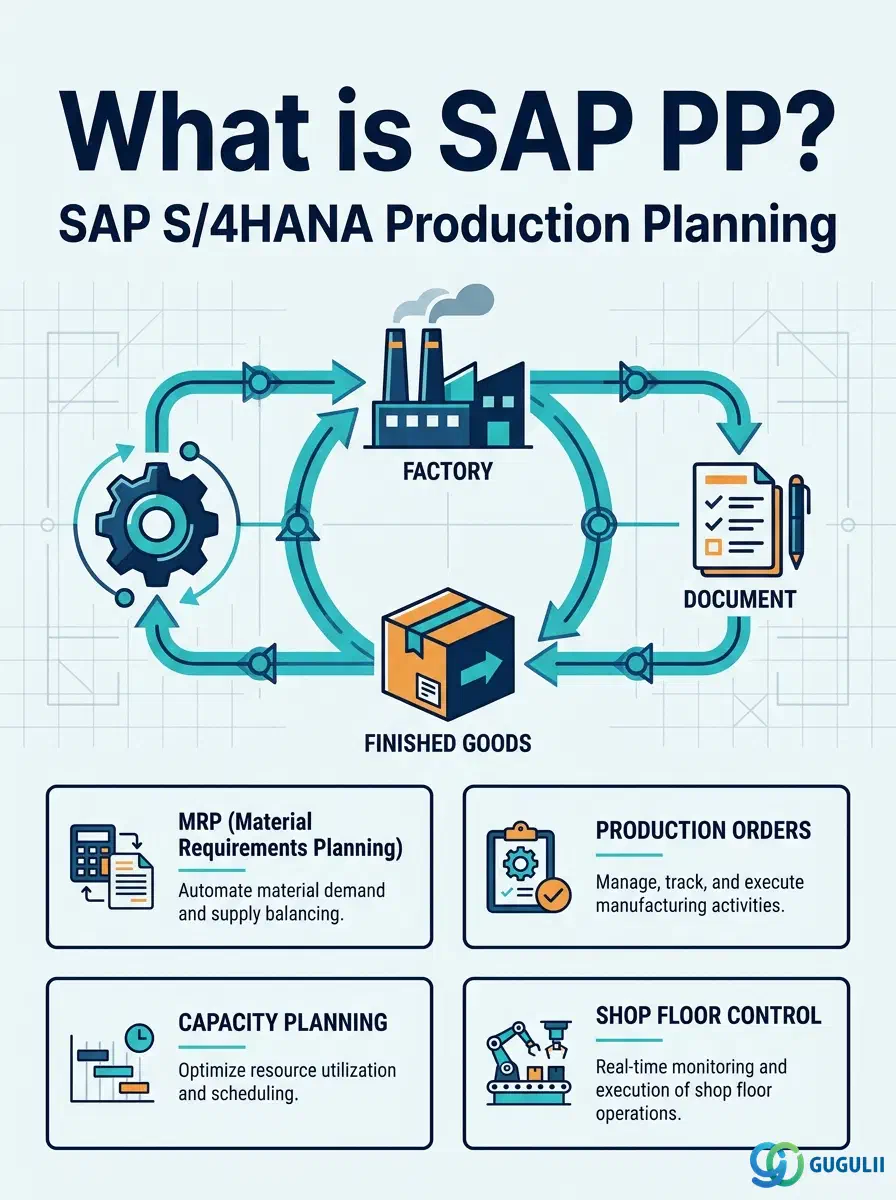
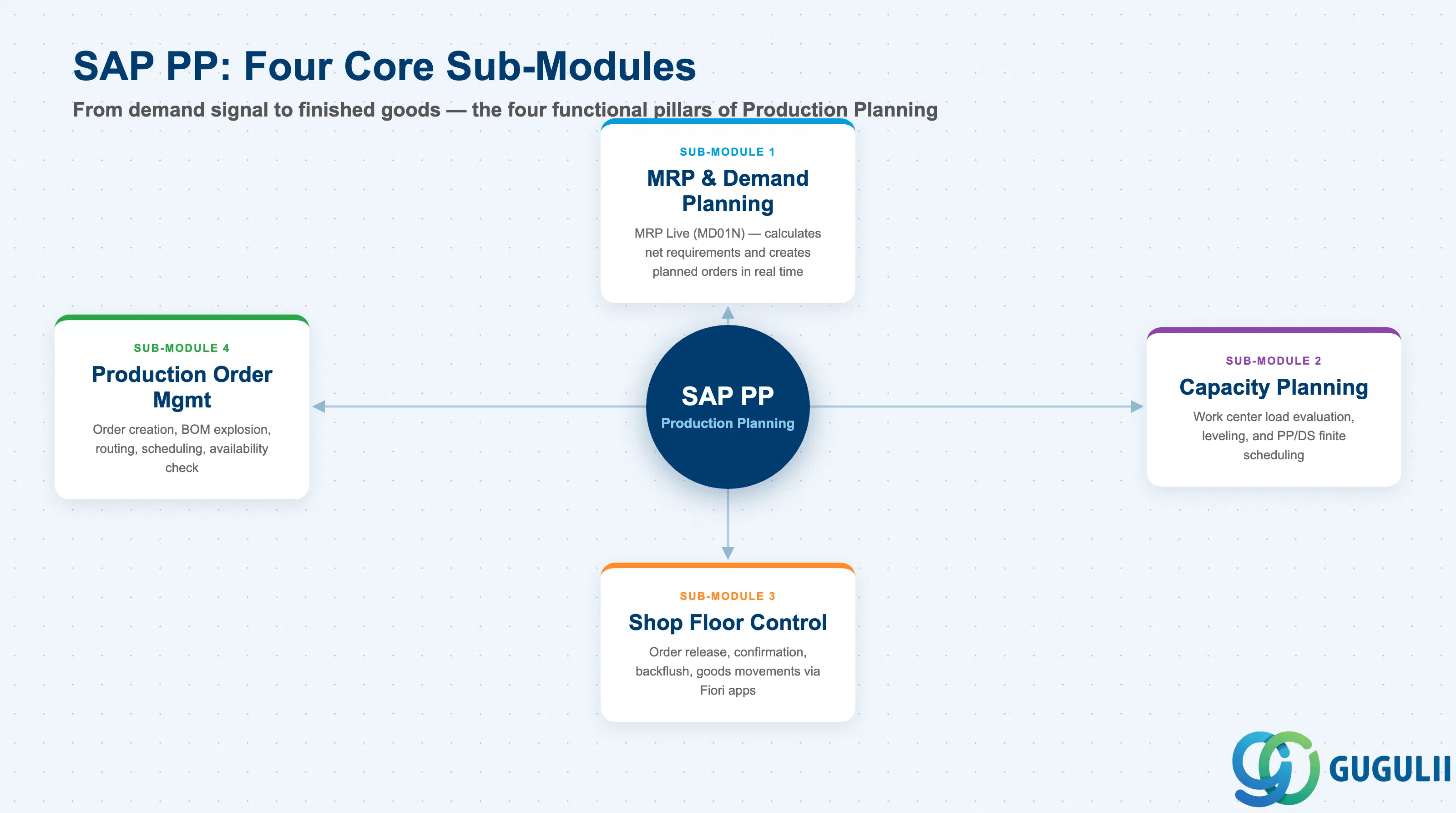
SAP Production Planning (PP) is the module responsible for everything that happens between demand and finished goods. It answers three fundamental manufacturing questions: What do we need to produce? (MRP), How and where do we produce it? (Production Order + Routing + Work Center), and What did it actually cost? (integration with CO).
PP does not operate in isolation. It receives demand signals from SD (sales orders), procures components through MM (purchase requisitions), reports actuals to CO (activity confirmations and order settlement), triggers quality inspections through QM, and provides stock updates back to MM (goods issue and goods receipt). Understanding PP means understanding these integration boundaries — and that is the first task in any requirements definition workshop.
Material Requirements Planning is the planning engine at the center of SAP PP. MRP reads demand (forecast or sales orders), reads supply (existing stock, open purchase orders, production orders), and calculates what gap needs to be covered — creating planned orders for in-house production and purchase requisitions for external procurement.
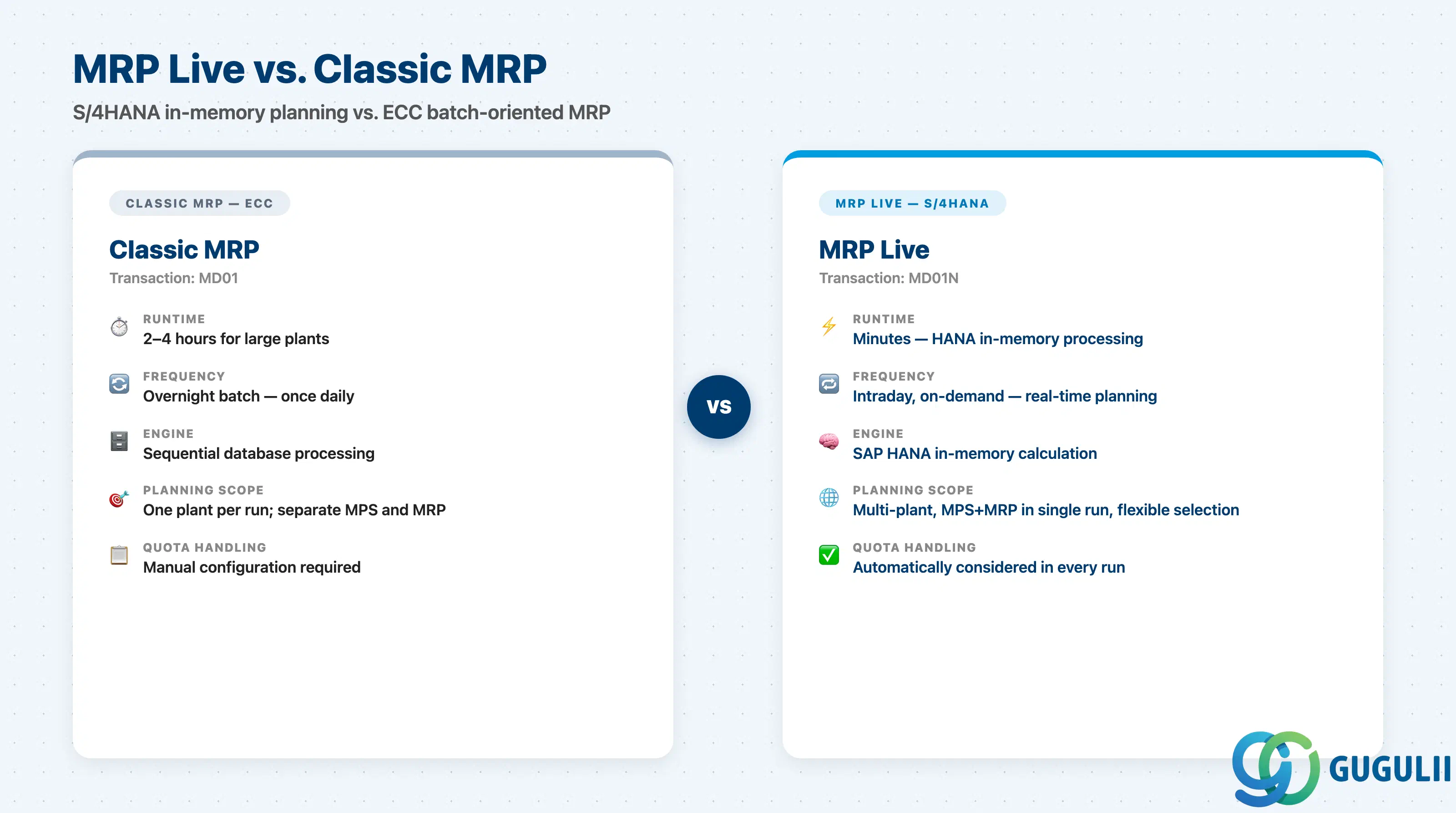
In S/4HANA, MRP runs as MRP Live (transaction MD01N), a complete redesign of the classic ECC MRP engine. Rather than sequentially processing materials in a database loop, MRP Live pushes the entire calculation into SAP HANA’s in-memory processing layer. The practical result: MRP runs that previously took two to four hours now complete in minutes. This enables intraday planning cycles, moving production planning from an overnight batch event to a near-real-time process.
MRP Live also consolidates planning scope. A single MD01N run can cover multiple plants, multiple MRP controllers, or materials matching a specific selection criteria. Quota arrangements (split sourcing rules) are automatically respected during the run without additional configuration steps.
Beyond MRP Live, S/4HANA introduces two additional planning paradigms consultants must be aware of:
Predictive MRP (pMRP) runs MRP in simulation mode — it evaluates what the planning result would look like if a demand change occurred, without committing the result. Planners can assess the impact of an incoming large sales order on the production schedule before accepting it.
Demand-Driven MRP (DDMRP), available since S/4HANA 1709, is a fundamentally different approach. Rather than exploding forecasts through a BOM, DDMRP positions strategic inventory buffers at decoupling points in the supply chain. Replenishment signals are triggered by actual consumption against these buffers — making it pull-based rather than forecast-driven. DDMRP is relevant for consultants working in environments with highly variable demand, long lead time items, or supply chain volatility.
The MRP type (field in the material master MRP 1 view) controls which planning logic applies to each material. The most common types are PD (MRP — demand-driven), VB (reorder point — consumption-driven), and ND (no planning). Setting the correct MRP type per material category is a fundamental requirements definition decision.
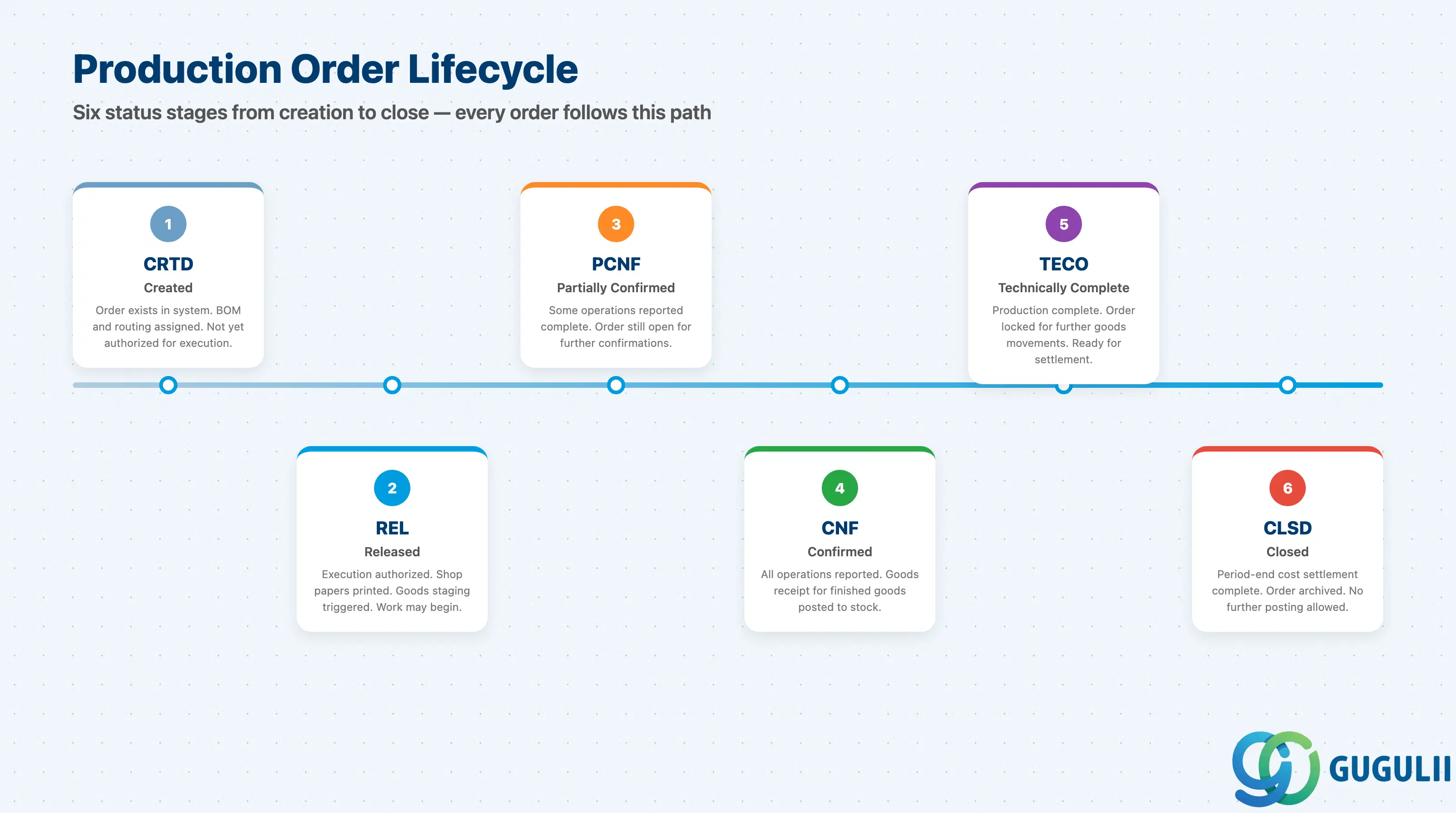
Once MRP generates planned orders, the production execution lifecycle begins. A planned order is converted into a production order — the central document that governs in-house manufacturing.
The production order carries: the material to be produced, the plant, the order quantity, the scheduled start and finish dates, the BOM explosion (as component reservations), and the routing (as operations). As production progresses, the order moves through a defined status sequence:
Before release, the system can perform an availability check — verifying that required components are in stock and that sufficient capacity exists at the relevant work centers. The availability check logic (checking rule, checking horizon) is a configuration decision made during requirements definition.
At confirmation, shop floor workers (or supervisors via Fiori) record the actual yield quantity, scrap quantity, machine hours consumed, and labor hours consumed. These confirmations trigger two critical downstream events: automatic goods movements (component consumption via movement type 261, finished goods receipt via movement type 101) and CO postings (actual activity costs charged to the production order cost object).
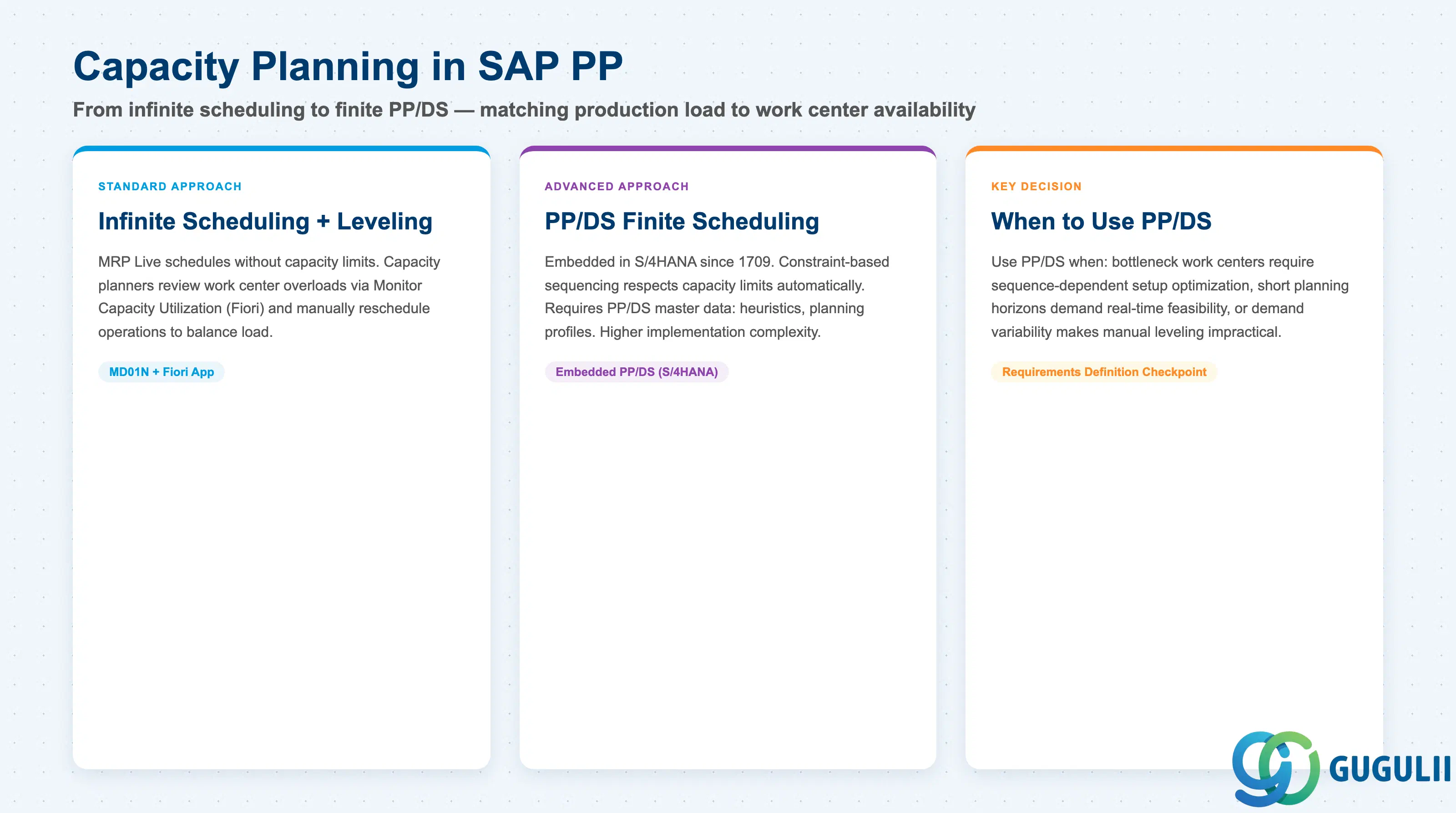
Capacity planning ensures that the production schedule is feasible — that the sum of all planned production orders does not exceed what the factory’s work centers can physically deliver.
Each work center holds a capacity definition: the number of shifts, hours per shift, utilization rate, and efficiency factor. The system calculates available capacity from these parameters using a factory calendar. Capacity requirements accumulate on the work center from all production orders that have operations assigned to it.
In classic SAP ECC, capacity evaluation was performed via transactions CM01 through CM07 — Gantt chart and tabular overviews of work center load by time bucket. In S/4HANA, these are complemented and progressively replaced by the Monitor Capacity Utilization Fiori app, which provides role-based, filterable dashboards for capacity planners.
Standard MRP Live uses infinite scheduling: it calculates planned order dates without considering capacity limits. This is deliberate — MRP’s primary purpose is to signal what is needed, not to guarantee feasibility. The capacity planner’s job is to identify overloads and reschedule operations.
For environments requiring finite scheduling — where the system must automatically account for capacity constraints when scheduling orders — SAP provides PP/DS (Production Planning and Detailed Scheduling). In S/4HANA, PP/DS is embedded natively (in ECC, it required the separate APO system). PP/DS uses constraint-based optimization algorithms to sequence operations across work centers, respecting capacity limits, setup times, and priorities.
The decision of whether to use standard capacity leveling or PP/DS finite scheduling is one of the most consequential architecture choices in PP requirements definition, as PP/DS requires its own master data (heuristics, planning profiles) and significantly increases implementation complexity.
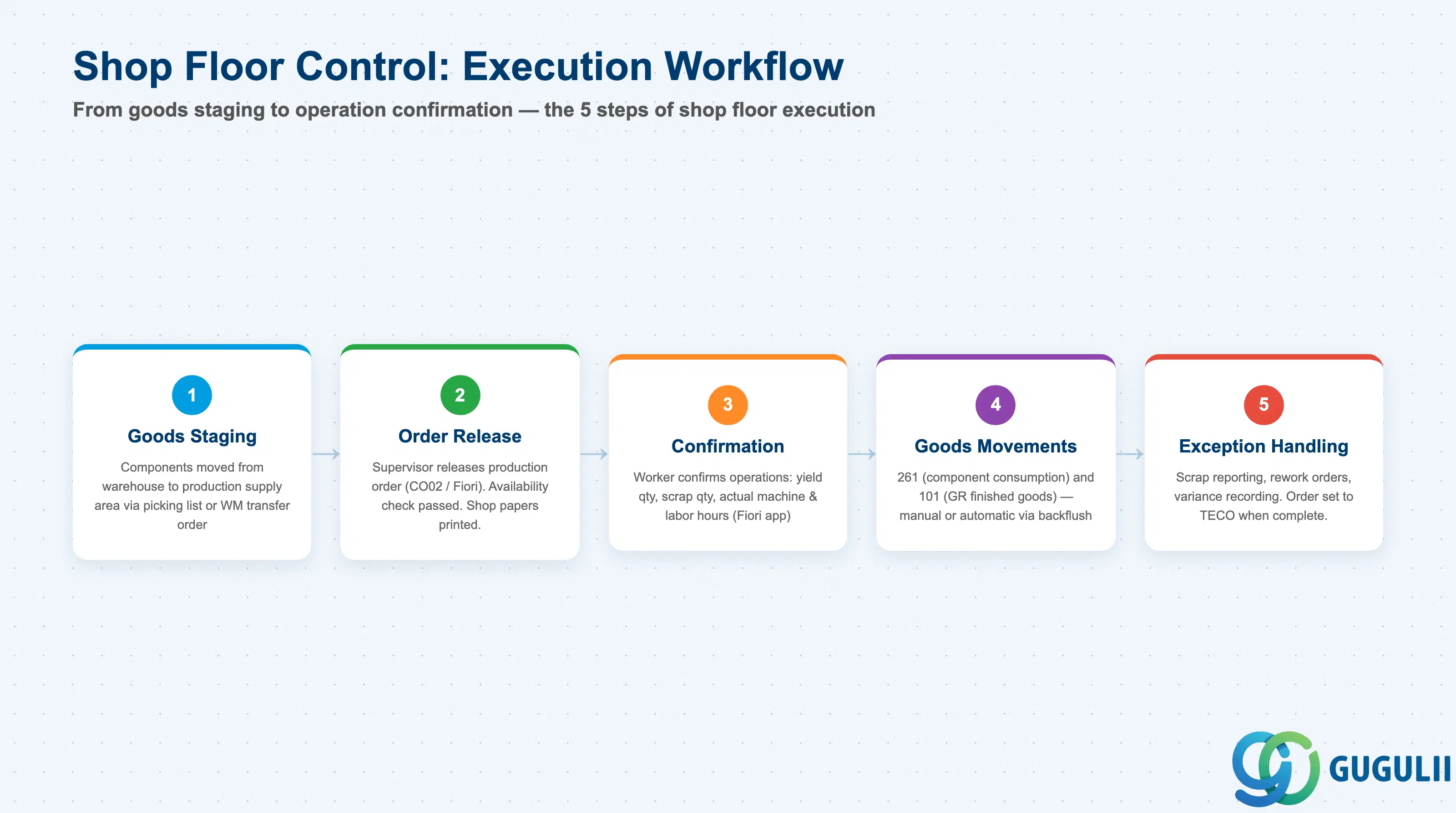
Shop Floor Control (SFC) covers the day-to-day execution activities on the production floor — everything that happens after a production order is released and before the final goods receipt is posted.
The core SFC workflow:
Backflushing deserves specific attention in requirements definition. When backflushing is activated for an operation (set via the control key), the system automatically posts the goods issue (261) for all assigned components at the time of operation confirmation — no separate goods issue transaction required. This simplifies execution significantly but requires that actual consumption matches the BOM quantity reliably. High-scrap or high-variability operations are poor candidates for backflushing.
Milestone confirmations allow the confirmation of a single key operation (the “milestone”) to automatically confirm all preceding operations in the routing. This is useful when intermediate operations do not require separate tracking and supervisors only need to confirm at natural checkpoints in the process.
In S/4HANA, the Fiori-based execution environment significantly improves usability for shop floor roles. The Manage Production Orders app provides supervisors with a cross-order view of status, exceptions, and pending confirmations. Workers can confirm individual operations with yield and scrap quantities directly from a tablet or touch-screen terminal.
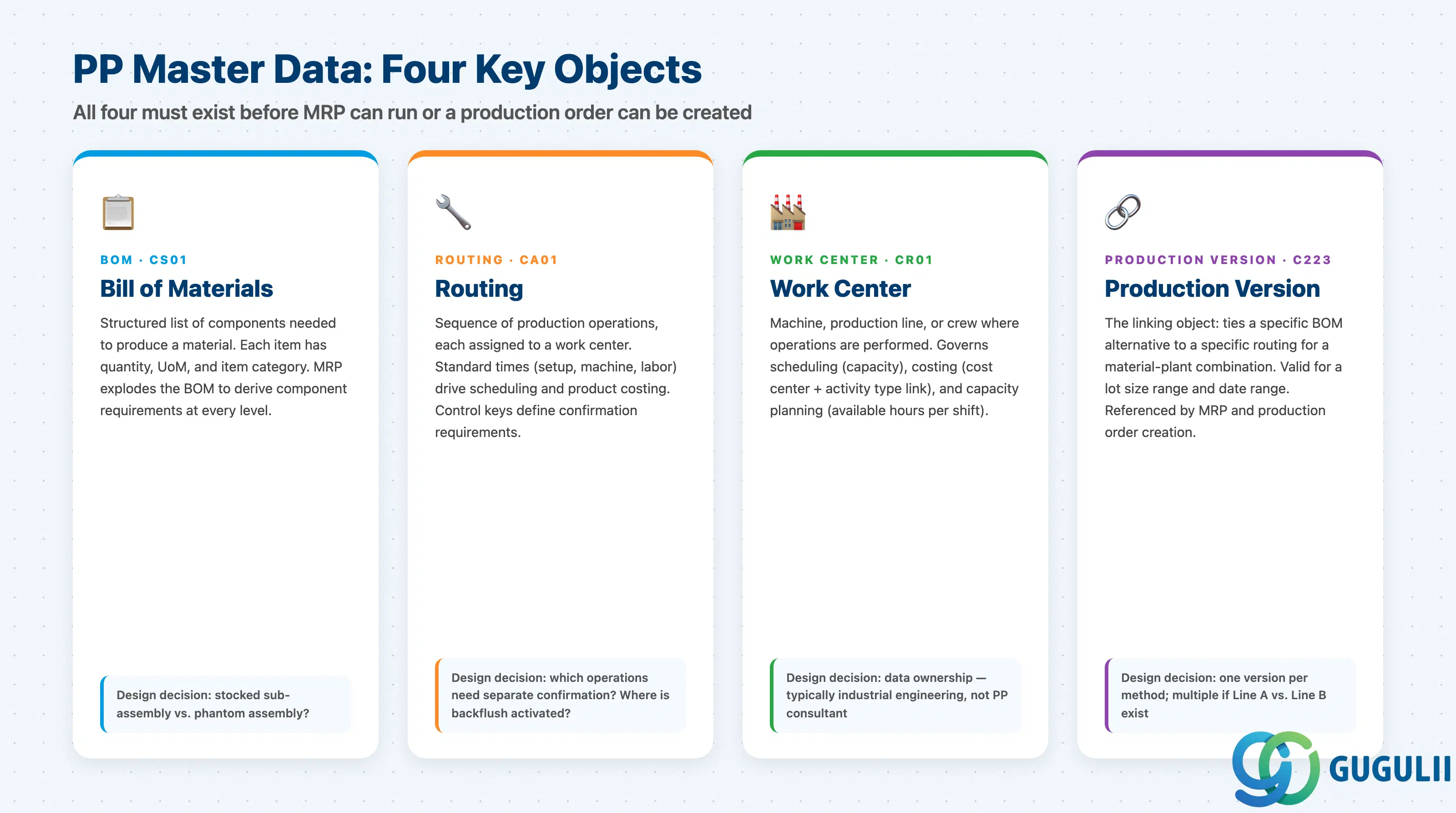
All of PP’s planning and execution logic depends on four master data objects being correctly maintained. These objects are created before MRP can run and before any production order can be created. Requirements definition must explicitly address each object, its design decisions, and its data ownership.
Bill of Materials (BOM): A structured list of components required to produce a finished or semi-finished material. Each component item specifies the material number, quantity, unit of measure, and item category. PP uses BOM usage 1. Alternative BOMs can exist for the same material (e.g., different formulations by production line or lot size range). The production version selects which alternative BOM applies in a given scenario. A key design decision: which sub-assemblies should be stocked (separate production orders) vs. phantom (BOM exploded through without a separate order)?
Routing: A sequence of production operations, each assigned to a work center, with standard times for setup, machine time, and labor. The routing is the template from which production order operations are generated. Standard times are the basis for both scheduling (when will the order be done?) and costing (what should it cost?). Control keys on each operation determine confirmation requirements, backflush behavior, and QM inspection triggers.
Work Center: An organizational unit — a machine, production line, person, or crew — where operations are performed. Work center data governs three downstream processes: scheduling (available capacity, queue time, move time), costing (link to CO cost center and activity type), and capacity planning (capacity categories and available capacity). Work center data is often maintained by industrial engineering or production management — not the SAP PP consultant — so a clear data ownership RACI is essential.
Production Version: The linking object that combines a specific BOM alternative with a specific routing for a material-plant combination, valid for a lot size range and date range. The production version is what MRP and production order creation reference to determine which BOM and routing to use. If multiple production methods exist (Line A vs. Line B, different lot size ranges), each gets its own production version.
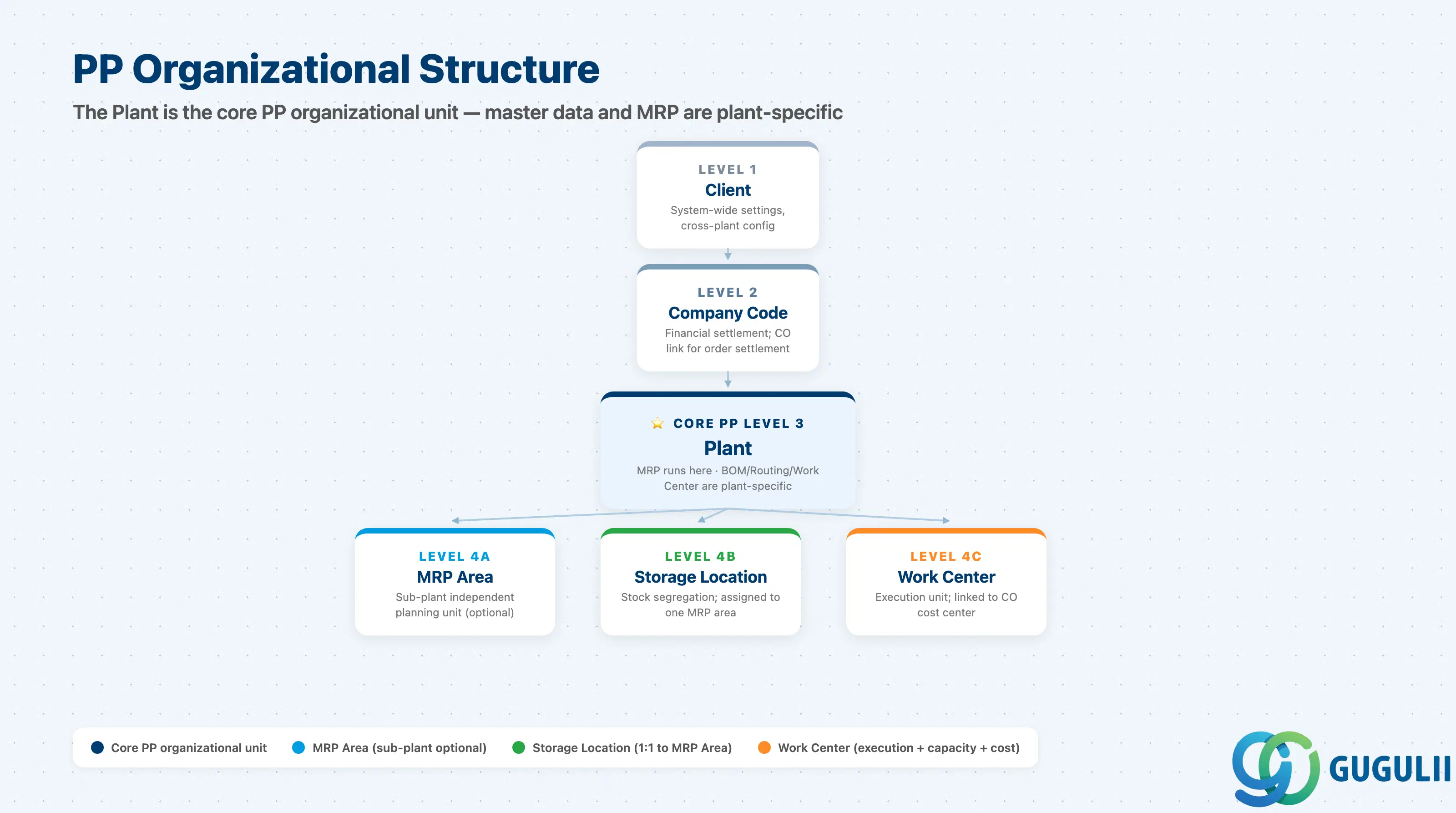
SAP PP is organized around the plant as its primary organizational unit. Every BOM, routing, work center, and production order is plant-specific. Cross-plant production scenarios require explicit integration design.
| Level | Object | PP Relevance |
|---|---|---|
| Client | Client | System-wide settings |
| Company Code | Company Code | Financial settlement; CO link for order settlement |
| Plant | Plant | Core PP org unit; MRP runs at plant level; master data is plant-specific |
| MRP Area | MRP Area | Sub-plant planning unit; allows separate MRP for sub-contractor stock or dedicated storage locations |
| Storage Location | Storage Location | Stock segregation; assigned 1:1 to an MRP area |
| Work Center | Work Center | Execution unit within a plant; linked to cost center in CO |
The MRP Area is an important concept for multi-warehouse or sub-contracting scenarios. By default, the plant-level MRP area covers all storage locations in a plant. However, a specific storage location can be assigned to a separate MRP area, enabling independent MRP for that location — useful for consignment stock, third-party warehouses, or Kanban supply areas.
For requirements definition, the key organizational questions are:
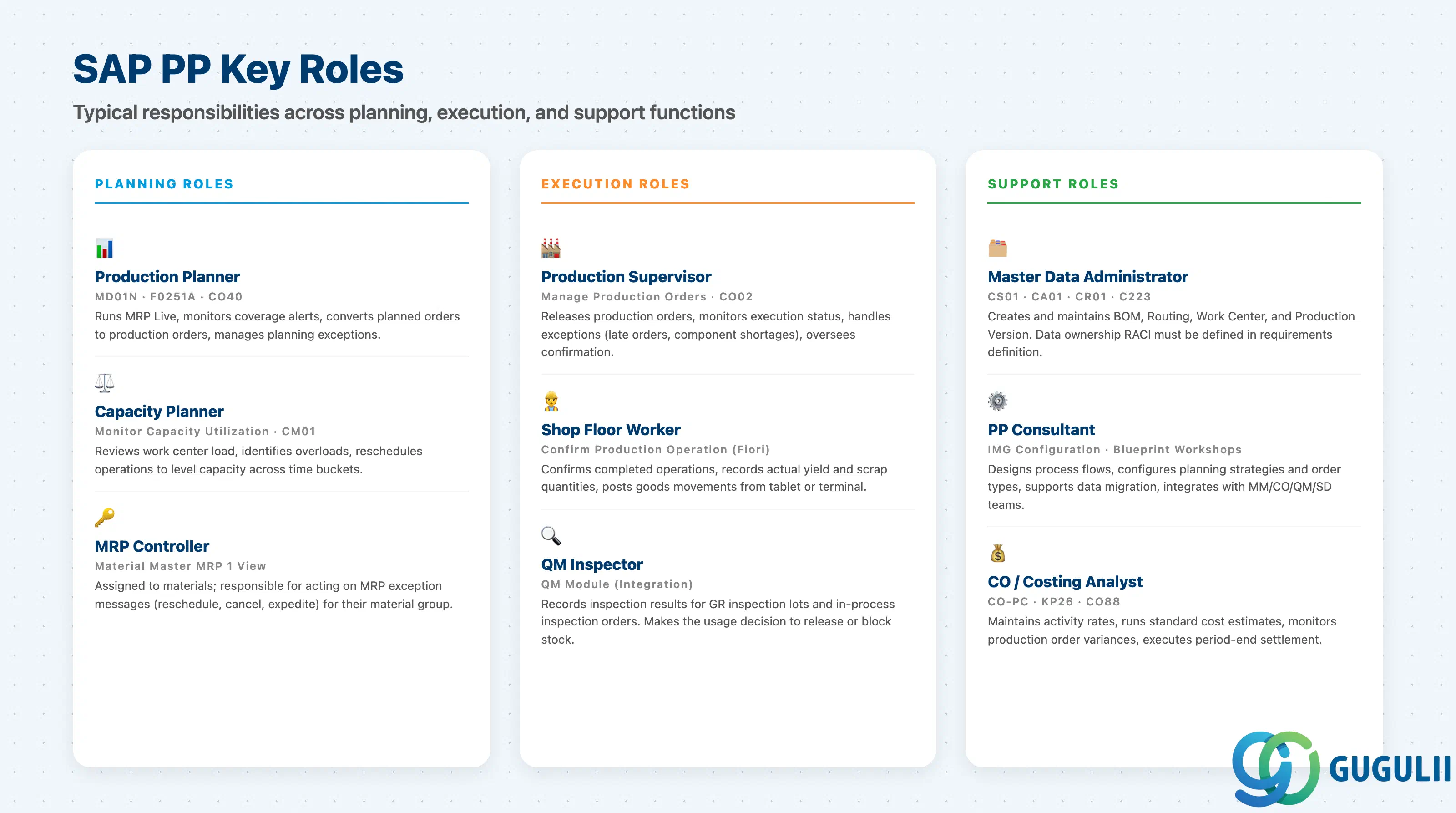
| Role | Primary SAP Transactions / Fiori Apps | Responsibilities |
|---|---|---|
| Production Planner | MD01N (MRP Live), Manage Material Coverage (F0251A), Convert Planned Orders | Runs MRP, monitors coverage alerts, converts planned orders to production orders |
| Capacity Planner | Monitor Capacity Utilization, CM01 (legacy) | Reviews work center load, reschedules overloaded operations |
| Production Supervisor | Manage Production Orders, CO02 | Releases production orders, monitors execution, handles exceptions |
| Shop Floor Worker | Confirm Production Operation (Fiori) | Confirms operations, records yield and scrap, posts goods movements |
| Master Data Administrator | CS01 (BOM), CA01 (Routing), CR01 (Work Center), C223 (Production Version) | Creates and maintains master data objects |
| MRP Controller | Assigned per material in material master; monitors planning exceptions | Owns planning decisions for assigned material group |
| PP Consultant | IMG configuration, blueprint workshops | Designs process flows, configures system, supports data migration |
The MRP Controller role is particularly important to define clearly in requirements definition. Each material in a plant is assigned an MRP controller (a three-character key in the material master MRP 1 view). The MRP controller receives exception messages from MRP (e.g., “reschedule in”, “reschedule out”, “order quantity too small”) and is responsible for acting on them. In organizational terms, the MRP controller is typically the production planner responsible for a specific material group or product family.
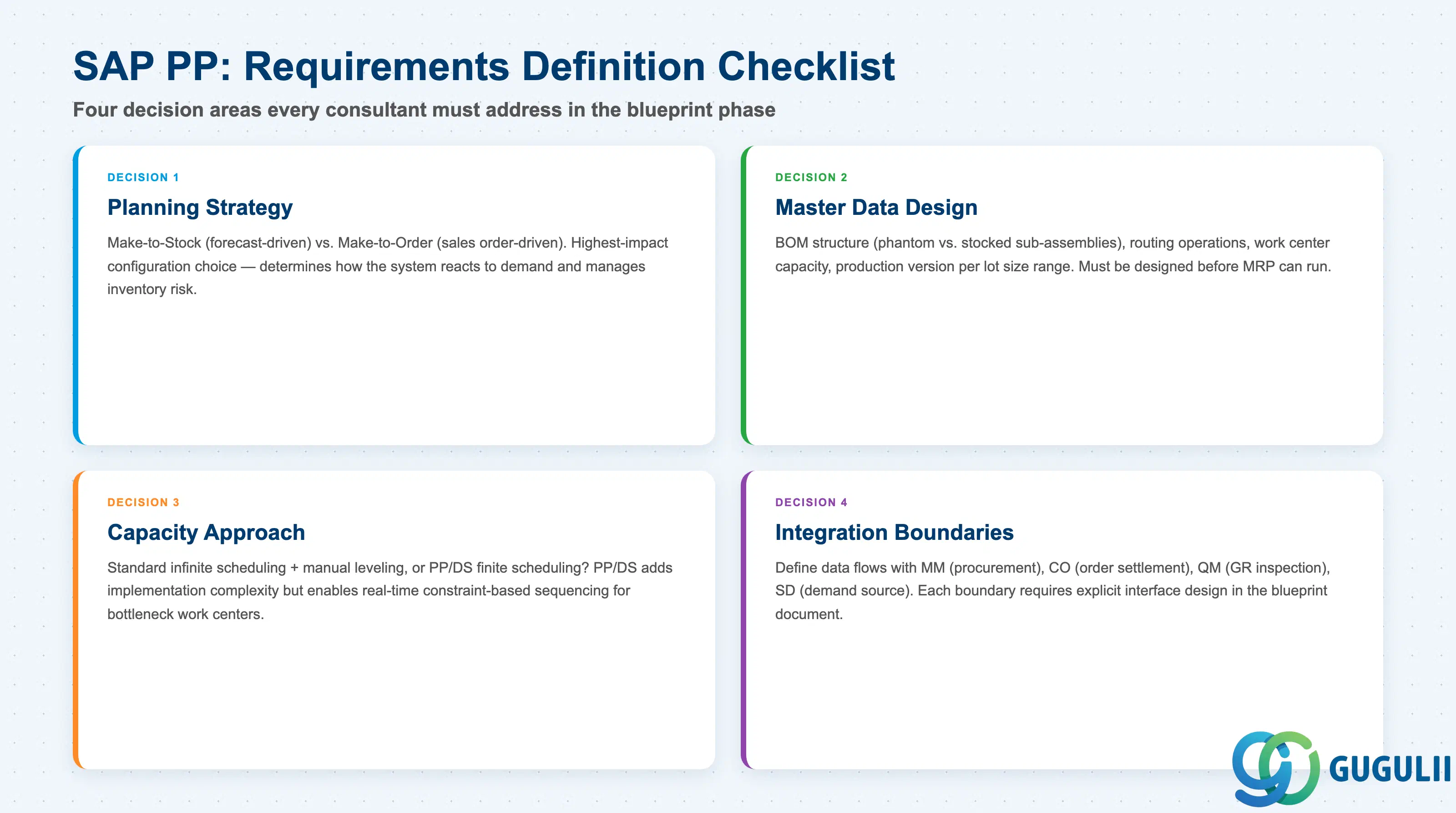
SAP PP in S/4HANA is a deeply integrated module that spans planning (MRP Live), execution (production orders, shop floor control), and costing (CO integration). The four master data objects — BOM, Routing, Work Center, and Production Version — must be correctly designed before any planning or execution can run. The planning strategy decision (MTS vs. MTO, and the specific strategy number) is the highest-impact configuration choice, as it governs how the system reacts to demand and manages inventory risk.
For consultants and key users in requirements definition, the practical agenda is: confirm organizational structure (how many plants?), design master data (BOM structure, routing operations, work center capacity), decide planning strategy per material group, define integration boundaries with MM/CO/QM/SD, and determine whether standard capacity leveling or PP/DS finite scheduling is required.
S/4HANA’s MRP Live and Fiori execution apps represent genuine improvements over ECC — faster planning cycles, better user experience on the shop floor, and embedded PP/DS for advanced scheduling. These S/4HANA-specific capabilities should be evaluated during blueprint to determine where they add value for the client’s specific manufacturing scenario.
| ID | Category | Title |
|---|---|---|
| pp-001 | Overview | What is SAP PP? 📍 |
| ID | Category | Title |
|---|---|---|
| pp-a01 | Overview | SAP PP Master Data: Overview, Hierarchy & Relationships |
| pp-a02-01 | Master Data | SAP PP Material Master |
| pp-a02-02 | Master Data | SAP PP MRP Controller |
| pp-a03-01 | Master Data | SAP PP Work Center |
| pp-a04-01 | Master Data | SAP PP Bill of Materials (BOM) |
| pp-a04-02 | Master Data | SAP PP Routing |
| pp-a05-01 | Master Data | SAP PP Production Version |
| pp-a06-01 | Master Data | SAP PP Class |
| pp-a06-02 | Master Data | SAP PP Characteristic |
| ID | Category | Title |
|---|---|---|
| pp-b01 | Overview | SAP PP Transactions: Process Flow, Hierarchy & Relationships |