Title here
Summary here

The Material Master is the starting point for every MRP run and production order in SAP PP. Planning parameters, BOM selection, routing linkage, and production version all depend on settings in this master. This article covers the Material Master’s structure, views, organizational levels, and the field-level detail PP consultants must own.
The Material Master is the central repository that stores all information about every material (item/product) a company handles — raw materials, semi-finished goods, finished products, consumables, and everything else that flows through the enterprise.
| Aspect | Details |
|---|---|
| Role | Single Source of Truth for all material attributes across the enterprise |
| Modules using it | MM (Purchasing, Inventory), PP (Production Planning, MRP, BOM), SD (Sales, Shipping, ATP), WM/EWM (Warehouse Mgmt, Putaway/Pick), QM (Quality Inspection, CoA), FI (Inventory Valuation, Auto Posting), CO (Standard Cost, Variance Analysis), PM (Plant Maintenance, MRO Procurement), PS (Project Procurement, Material Allocation), CS (Customer Service, Spare Parts), EHS (Hazardous Material Mgmt, Environmental Compliance), GTS (Trade Compliance, HS Code, Export Control) |
| Transactions | MM01 (Create) / MM02 (Change) / MM03 (Display) |
| S/4HANA change | Material number length extended from 18 to 40 digits (MATNR field) |
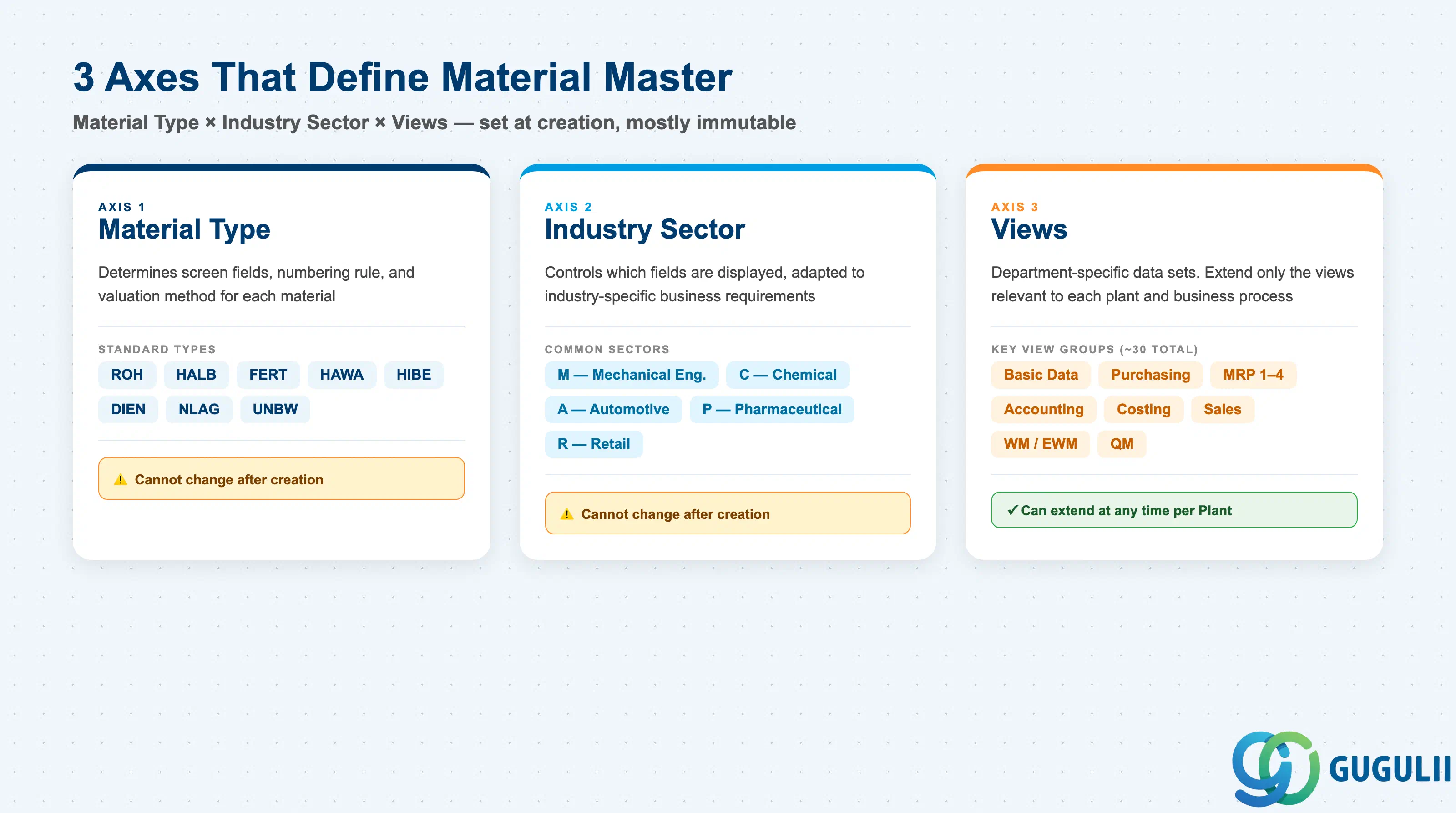
The structure of a Material Master record is determined by the combination of three axes:
| Axis | Description | Examples |
|---|---|---|
| Material Type | Classifies the material. Controls screen layout, number assignment, and valuation method | ROH, FERT, HALB |
| Industry Sector | Industry branch. Controls which fields are displayed based on industry characteristics | M (Mechanical), C (Chemical), A (Automotive) |
| Views | Data sets organized by department. Only relevant views need to be extended | Basic Data, MRP, Accounting |
Important: Once created, Material Type and Industry Sector cannot be changed as a general rule. Lock these in during design.
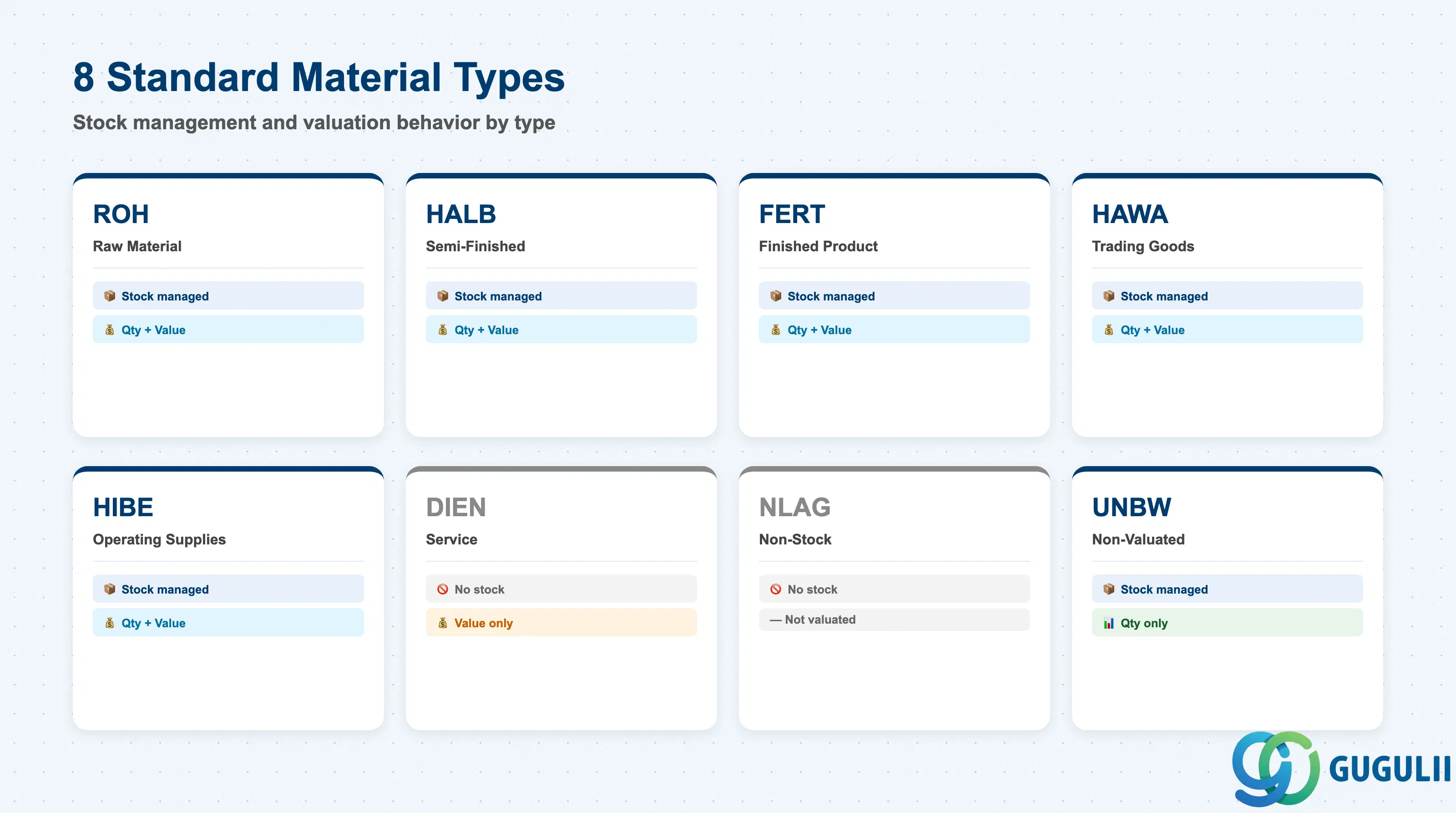
| Code | Name | Use Case | Stock-Managed | Qty / Value |
|---|---|---|---|---|
| ROH | Raw Material | Input materials | Yes | Both |
| HALB | Semi-Finished | Internally produced intermediates | Yes | Both |
| FERT | Finished Product | Internally produced / sold goods | Yes | Both |
| HAWA | Trading Goods | Buy-and-sell merchandise | Yes | Both |
| HIBE | Operating Supplies | Indirect materials, consumables | Yes | Both |
| DIEN | Service | Service items | No | Value only |
| NLAG | Non-Stock | No inventory management | No | — |
| UNBW | Non-Valuated | Quantity tracking only | Yes | Qty only |
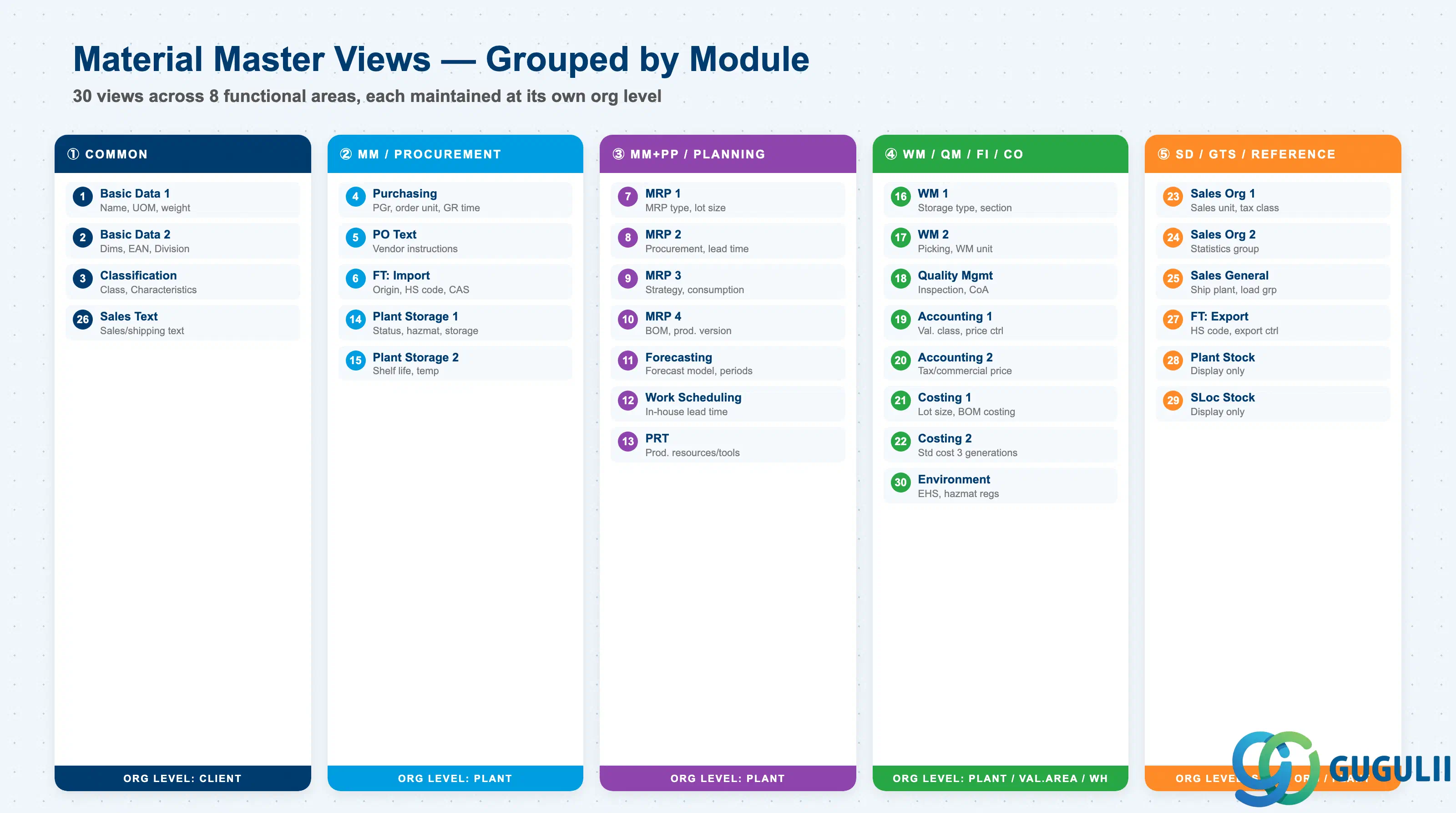
The Material Master is divided into department-specific Views. Only the views required by each department need to be extended. Approximately 30 standard views exist; the views to extend are selected based on Material Type and business requirements.
| # | View | Owning Dept | Key Fields | Org Level |
|---|---|---|---|---|
| 1 | Basic Data 1 | Cross-module | Material description, Base UoM, Material group, Weight/Volume | Client |
| 2 | Basic Data 2 | Cross-module | Dimensions, EAN/UPC, Old material number, Division | Client |
| 3 | Classification | Cross-module | Class assignment, Characteristic values | Client |
| 4 | Purchasing | Purchasing (MM) | Purchasing group, Order unit, GR processing time, Source list required flag | Plant |
| 5 | Purchase Order Text | Purchasing (MM) | PO text, Text ID, Language | Plant |
| 6 | Foreign Trade: Import | Purchasing (MM) / GTS | Country of origin, HS code (import), CAS number, Import license | Plant |
| 7 | MRP 1 | Purchasing / PP (MM/PP) | MRP type, MRP controller, Lot size, Reorder point | Plant |
| 8 | MRP 2 | Purchasing / PP (MM/PP) | Procurement type, Special procurement, Planned delivery time, Safety stock | Plant |
| 9 | MRP 3 | Purchasing / PP (MM/PP) | Strategy group, Consumption mode, Availability check | Plant |
| 10 | MRP 4 | PP-oriented | BOM selection, Individual/collective requirements, Discontinuation flag | Plant |
| 11 | Forecasting | Purchasing / PP (MM/PP) | Forecast model, Historical/forecast periods, Smoothing factors | Plant |
| 12 | Work Scheduling | Production (PP) | Production unit, Receiving storage location, In-house production time | Plant |
| 13 | Production Resources/Tools | Production (PP) | Production resource/tool data | Plant |
| 14 | General Plant Data / Storage 1 | Inventory (MM) / EHS | Plant-specific material status, Storage conditions, Hazardous material number, EHS hazard data | Plant |
| 15 | General Plant Data / Storage 2 | Inventory (MM) | Shelf life management, Minimum remaining shelf life, Temperature conditions | Plant |
| 16 | Warehouse Management 1 | Warehouse (WM/EWM) | Warehouse number, Storage type, Storage section | Warehouse |
| 17 | Warehouse Management 2 | Warehouse (WM/EWM) | Picking type, WM unit of measure | Warehouse |
| 18 | Quality Management | Quality (QM) | QM procurement key, Inspection type, Certificate type | Plant |
| 19 | Accounting 1 | Finance (FI) | Valuation class, Price control (S/V), Standard price / Moving average price | Valuation Area |
| 20 | Accounting 2 | Finance (FI) | Tax-based valuation, Commercial valuation, Devaluation flag | Valuation Area |
| 21 | Costing 1 | Controlling (CO) | Costing lot size, With/without quantity structure, Variance key | Plant |
| 22 | Costing 2 | Controlling (CO) | Standard cost (Future/Current/Previous), Costing status | Plant |
| 23 | Sales: Sales Org 1 | Sales (SD) | Sales unit, Tax classification, Item category group | Sales Org / DCh |
| 24 | Sales: Sales Org 2 | Sales (SD) | Material statistics group, Material group 1–5 | Sales Org / DCh |
| 25 | Sales: General/Plant | Sales (SD) | Delivering plant, Transportation group, Loading group, Profit center | Plant |
| 26 | Sales Text | Sales (SD) | Sales/shipping texts | Client |
| 27 | Foreign Trade: Export | Trade (SD/GTS) | HS code (export), Export statistics group, Preference status, Export control | Plant |
| 28 | Plant Stock | Reference (display only) | Plant stock quantity / value (read-only) | Plant |
| 29 | Storage Location Stock | Reference (display only) | Storage location-level stock (read-only) | Storage Loc |
| 30 | Environment (EHS) | EHS | Hazardous substance regulations, Waste code | Plant |
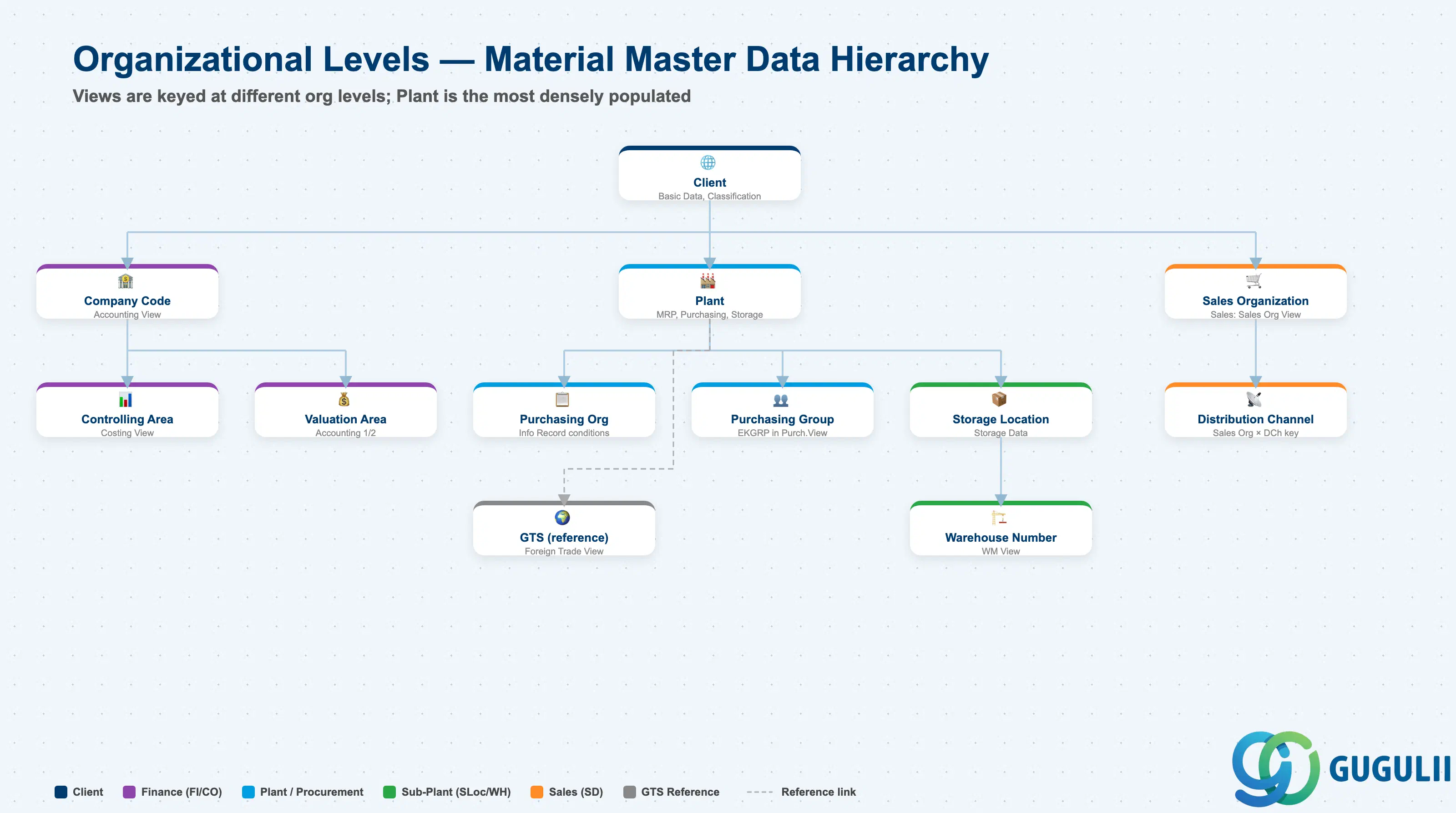
Each view stores its data at a different organizational level. This is the core design challenge of the Material Master.
Client (300)
   │
   ├── Basic Data, Classification ← Client-level (one record for entire enterprise)
   │
   ├── Plant (1000, 2000, ...)
   │      │
   │      ├── MRP, Purchasing, Work Scheduling ← Plant-level
   │      │
   │      ├── Storage Location (0001, 0002, ...)
   │      │      └── Storage Data ← Storage Location-level
   │      │
   │      └── Warehouse Number (WH1, ...)
   │             └── WM Data ← Warehouse-level
   │
   ├── Valuation Area = Plant ← Accounting is typically at Plant level
   │      └── Valuation class, Standard cost
   │
   └── Sales Org × Distribution Channel
└── Sales Data ← Sales Org-level| Org Level | Primary Use | Representative Fields | Notes |
|---|---|---|---|
| Client | Enterprise-wide common attributes | Material description, Base UoM, Classification | One record shared across entire enterprise |
| Company Code | Financial accounting unit | Accounting View (valuation class, price control) | When Valuation Area = Company Code |
| Controlling Area | Management accounting unit | Costing View (cost estimate, variance analysis) | May span multiple Company Codes |
| Purchasing Organization | Purchasing org unit | Purchasing Info Record (price, conditions) | Material Master itself is at Plant level; purchase conditions are at Purch. Org level |
| Plant | Factory / site unit | MRP, Purchasing, Work Scheduling, General Plant Data | The primary level with the most views |
| Purchasing Group | Buyer group | Purchasing View: Purchasing Group (EKGRP) | Buyer group within a Plant; starting point for PO release strategy routing |
| Valuation Area | Inventory valuation unit | Accounting 1 (valuation class, standard price) | Typically = Plant; Company Code-level valuation is also configurable |
| Storage Location | Storage area unit | General Plant Data / Storage (storage location stock) | Warehouse / bin area within a Plant |
| Warehouse Number | Warehouse management unit | WM View (storage type, picking strategy) | Used in Plants with WM/EWM |
| Sales Organization | Sales org unit | Sales: Sales Org View (sales unit, tax classification) | Keyed together with Distribution Channel |
| Distribution Channel | Distribution channel unit | Sales: Sales Org View | Extended in combination with Sales Org |
| (GTS reference) | Trade compliance management | Foreign Trade View (HS code, country of origin, export control) | No GTS-specific org level key in Material Master; GTS references the Foreign Trade View data |
| # | View | Primary Module | PP Involvement |
|---|---|---|---|
| 1 | Basic Data 1 | Cross-module | ○ |
| 2 | Basic Data 2 | Cross-module | △ |
| 3 | Classification | Cross-module | ○ (Variant Configuration) |
| 4 | Purchasing | MM | △ (purchased components) |
| 5 | Purchase Order Text | MM | × |
| 6 | Foreign Trade: Import | MM | × |
| 7 | MRP 1 | MM / PP | ◎ (Owner) |
| 8 | MRP 2 | MM / PP | ◎ (Owner) |
| 9 | MRP 3 | MM / PP | ◎ (Owner) |
| 10 | MRP 4 | PP | ◎ (Owner) |
| 11 | Forecasting | MM / PP | ○ |
| 12 | Work Scheduling | PP | ◎ (Owner) |
| 13 | Production Resources/Tools | PP | ◎ (Owner) |
| 14 | General Plant Data / Storage 1 | MM | ○ (receiving storage location) |
| 15 | General Plant Data / Storage 2 | MM | △ |
| 16 | Warehouse Management 1 | WM / EWM | △ |
| 17 | Warehouse Management 2 | WM / EWM | △ |
| 18 | Quality Management | QM | ○ (in-process inspection) |
| 19 | Accounting 1 | FI | ○ (standard price for production order settlement) |
| 20 | Accounting 2 | FI | × |
| 21 | Costing 1 | CO | ◎ (production version for costing) |
| 22 | Costing 2 | CO | ○ |
| 23 | Sales: Sales Org 1 | SD | △ (item category group) |
| 24 | Sales: Sales Org 2 | SD | × |
| 25 | Sales: General/Plant | SD | △ (delivering plant) |
| 26 | Sales Text | SD | × |
| 27 | Foreign Trade: Export | SD / GTS | × |
| 28 | Plant Stock | Reference | — |
| 29 | Storage Location Stock | Reference | — |
| 30 | Environment (EHS) | EHS | △ |
Legend: ◎ = Owner / Critical, ○ = Direct involvement, △ = Reference / Integration, × = Other module owns, — = Display-only view
The foundation of MRP design. Controls how and when the system generates procurement proposals.
| Field | Description | Practical Usage |
|---|---|---|
| MRP Type | Planning procedure | PD = Deterministic MRP (requirement-driven, standard for FERT/HALB), VB = Reorder Point (consumption-based, for MRO/consumables), ND = No MRP (one-time or obsolete materials). The choice between PD and VB defines the entire planning philosophy — mixed usage within a BOM level causes planning logic inconsistencies. |
| MRP Controller (DISPO) | Planning responsible person | 3-digit code defining “who owns this material’s plan.” Used as filter in MD04 (Stock/Requirements List) and MD06 (Exception Messages). Assign by responsibility area, not by individual — enables team-based planning and clear escalation paths. Also defines the weekly planning meeting unit. |
| Lot Size (DISLS) | Lot-sizing procedure | EX = Lot-for-Lot (JIT, zero excess), FX = Fixed Lot (MOQ-driven), HB = Replenish to Max, SP/WB/MB = Periodic lot. PP must review all BOM levels — using FX at intermediate levels creates wave-effect over-ordering that inflates WIP inventory. |
| Minimum Lot Size | Minimum procurement/production quantity | Reflects supplier MOQ or minimum economic batch size. MRP rounds up to this value — document the business rationale to prevent future “why are we over-producing?” inquiries. |
| Maximum Lot Size | Maximum procurement/production quantity | Splits large demands into multiple orders. Use when production line capacity per run is limited. Causes multiple planned orders per period — verify capacity planning can absorb the split. |
| Fixed Lot Size | Fixed quantity when Lot Size = FX | Standard pallet, production campaign size, or mold cavity quantity. MRP orders exactly this quantity even when demand is lower — results in deliberate safety stock build-up. |
| Rounding Value | Quantity rounding multiple | Rounds calculated quantity to multiples (e.g., 50 EA, 1 pallet). Rounding Profiles allow stepped rounding. Reduces partial pallet scenarios in inbound logistics. |
| Reorder Point | Stock trigger level for VB/V1 planning | For consumables and MRO using consumption-based planning. Set as safety stock + average consumption during replenishment lead time. Review quarterly as consumption patterns change. |
Controls the procurement type and lead time parameters that determine MRP scheduling.
| Field | Description | Practical Usage |
|---|---|---|
| Procurement Type (E/F/X) | In-house vs. external | E = Planned Order (production), F = Purchase Requisition, X = Both. Setting E on a purchased component prevents PR generation — one of the most common PP/MM interface errors. Establish a clear design rule: all purchased materials = F, all manufactured = E. |
| Special Procurement | Subcontracting / STO | 40 = Subcontracting (MRP issues components to vendor), 30 = Inter-plant STO. When set to 40, MRP creates a subcontracting PR and generates dependent requirements for the components to be sent to the subcontractor. Verify the component assignment in the subcontracting BOM. |
| Planned Delivery Time | Lead time for external procurement (days) | Calendar days from PO creation to GR. MRP uses this to backward-schedule the PR creation date. If shorter than reality, MRP constantly creates “overdue” requisitions — build in realistic buffer, or use Safety Time instead. |
| In-house Production Time | Lead time for internal production (days) | Used when no Routing exists (simplified scheduling). When a Routing is defined, this field is overridden by routing-based scheduling. For FERT/HALB with Routing, leave this blank to avoid confusion. |
| GR Processing Time | Days for goods receipt processing | Added to delivery/production lead time in MRP scheduling. Accounts for inspection, putaway, and system GR. Aligns with QM Inspection Lot processing time for GR-inspected materials. |
| Safety Stock | Minimum stock buffer | MRP plans to keep stock above this level. For critical components with long lead times, set safety stock = daily consumption × minimum acceptable buffer days. |
| Safety Time | Lead time buffer (days) | Shifts all planned orders N days earlier. Conceptually a time buffer rather than a quantity buffer. Useful for long-lead-time imports where variability is high but the average lead time is predictable. |
| Planning Calendar | Working days calendar | Controls the days on which MRP can schedule orders and deliveries. Required for materials following customer-specific delivery schedules or when the plant calendar differs from the standard. |
Controls the demand management strategy and availability check behavior.
| Field | Description | Practical Usage |
|---|---|---|
| Strategy Group | Planning strategy | 10 = MTS (Make-to-Stock, plan against PIR), 20 = MTO (Make-to-Order, plan against sales order), 40 = MTS with forecast consumption, 50 = Planning without final assembly. This is the single most strategic design decision in PP master data. Mixed strategies within a product family require careful demand management design to avoid double-counting. |
| Consumption Mode | Forecast consumption direction | Controls how sales orders consume Planned Independent Requirements (PIR). 1 = backward, 2 = forward, 3 = backward+forward, 4 = forward+backward. Wrong consumption mode causes forecast to persist alongside actual demand — inflating planned production. |
| Bwd/Fwd Consumption Period | Consumption window (days) | The time window within which sales orders consume the forecast. Too wide = historical demand is consumed, reducing future requirements. Too narrow = sales orders and PIR coexist, doubling requirements. |
| Availability Check | ATP rule | Controls which stock elements are included in the Available-to-Promise check for sales orders. 02 = individual requirements (most common for MTO), 04 = daily ATP (MTS). Misalignment with the SD team on this field causes incorrect delivery date confirmations. |
BOM and production version controls for manufacturing execution.
| Field | Description | Practical Usage |
|---|---|---|
| BOM Selection Method | Which BOM to explode | 1 = Production Version (recommended in S/4HANA), 2 = BOM valid-from date, 3 = lot size range. Production Version is the modern standard — it explicitly links BOM + Routing and enables parallel BOM management for line switching and design changes. |
| Individual / Collective Requirements | Requirements aggregation | 1 = Individual (separate BOM explosion per sales order — MTO), 2 = Collective (aggregate then explode — MTS). Using Individual requirements for MTS materials dramatically increases planning run time and MRP list size. |
| Discontinuation Indicator | EOL material handling | 1 = Discontinue this material and switch to follow-up material. Combined with Follow-up Material field, MRP automatically plans the successor once the current material’s stock is depleted — essential for model changeover planning in automotive and electronics. |
| Production Version | Manufacturing method definition | Links a specific BOM + Routing + Production Line combination. Required for multi-line plants where the same product can be made on different lines with different cycle times and costs. Selection Method = 1 (Production Version) must be set to use this field. |
Production execution parameters for manufactured materials (FERT/HALB).
| Field | Description | Practical Usage |
|---|---|---|
| Production Scheduler Profile | Scheduler grouping | Groups materials by scheduler responsibility. Used to filter MD04 and the production order worklist by scheduler. Design with the same rigor as MRP Controller — one clear owner per material. |
| Production Unit | Manufacturing unit of measure | Set when the manufacturing unit differs from the Base UoM (e.g., stock in EA, production in KG for chemicals or m² for sheet materials). The conversion must be maintained in Additional Units of Measure. |
| Production Storage Location | GR destination storage location | The storage location where the production order’s GR is posted. In multi-warehouse plants, an incorrect value means newly produced goods are invisible to downstream picking processes. |
| In-house Production Time | Fixed production lead time (days) | Used in simplified (routing-free) scheduling. For materials with a Routing, the Routing-calculated lead time overrides this — set to 0 or align with the Routing to avoid confusion in scheduling reports. |
| Underdelivery Tolerance | Partial completion % | Allows a production order to be technically completed when the confirmed quantity is within N% of the order quantity. Used for process industries where exact yield is unpredictable. |
| Overdelivery Tolerance | Excess production % | Allows GR beyond the order quantity by N%. Prevents the system from blocking warehouse transfer of excess production when yield varies. |
Used with MRP Type VV (Forecast-Based Planning) for demand-driven replenishment without explicit PIR.
| Field | Description | Practical Usage |
|---|---|---|
| Forecast Model | Statistical forecasting model | D = Constant, T = Trend, S = Seasonal, X = Auto-select. Auto-select is convenient during initial implementation but can produce volatile model switches as data accumulates — fix the model once the demand pattern is confirmed. |
| Historical Periods | Number of past periods to analyze | Minimum 24 for seasonal patterns (2 full years), 12 for constant demand. New materials with no history require manual seeding from analogous materials — plan this as a data preparation activity. |
| Forecast Periods | Number of future periods to project | Should match the MRP planning horizon. Align with the Demand Planning (DP) cycle if SAP IBP is also deployed. |
| Alpha Factor | Smoothing factor for level | 0.1–0.3 is standard. Higher values react faster to demand shifts but amplify noise. Lower values are more stable but slower to respond to genuine trend changes. |
| Seasonal Factor | Smoothing factor for seasonality | Used with Seasonal model (S). Calibrate from at least 2 years of history for statistically valid seasonality indices. |
| ID | Category | Title |
|---|---|---|
| pp-001 | Overview | What is SAP PP? |
| ID | Category | Title |
|---|---|---|
| pp-a01 | Overview | SAP PP Master Data: Overview, Hierarchy & Relationships |
| pp-a02-01 | Master Data | SAP PP Material Master 📍 |
| pp-a02-02 | Master Data | SAP PP MRP Controller |
| pp-a03-01 | Master Data | SAP PP Work Center |
| pp-a04-01 | Master Data | SAP PP Bill of Materials (BOM) |
| pp-a04-02 | Master Data | SAP PP Routing |
| pp-a05-01 | Master Data | SAP PP Production Version |
| pp-a06-01 | Master Data | SAP PP Class |
| pp-a06-02 | Master Data | SAP PP Characteristic |
| ID | Category | Title |
|---|---|---|
| pp-b01 | Overview | SAP PP Transactions: Process Flow, Hierarchy & Relationships |