Title here
Summary here

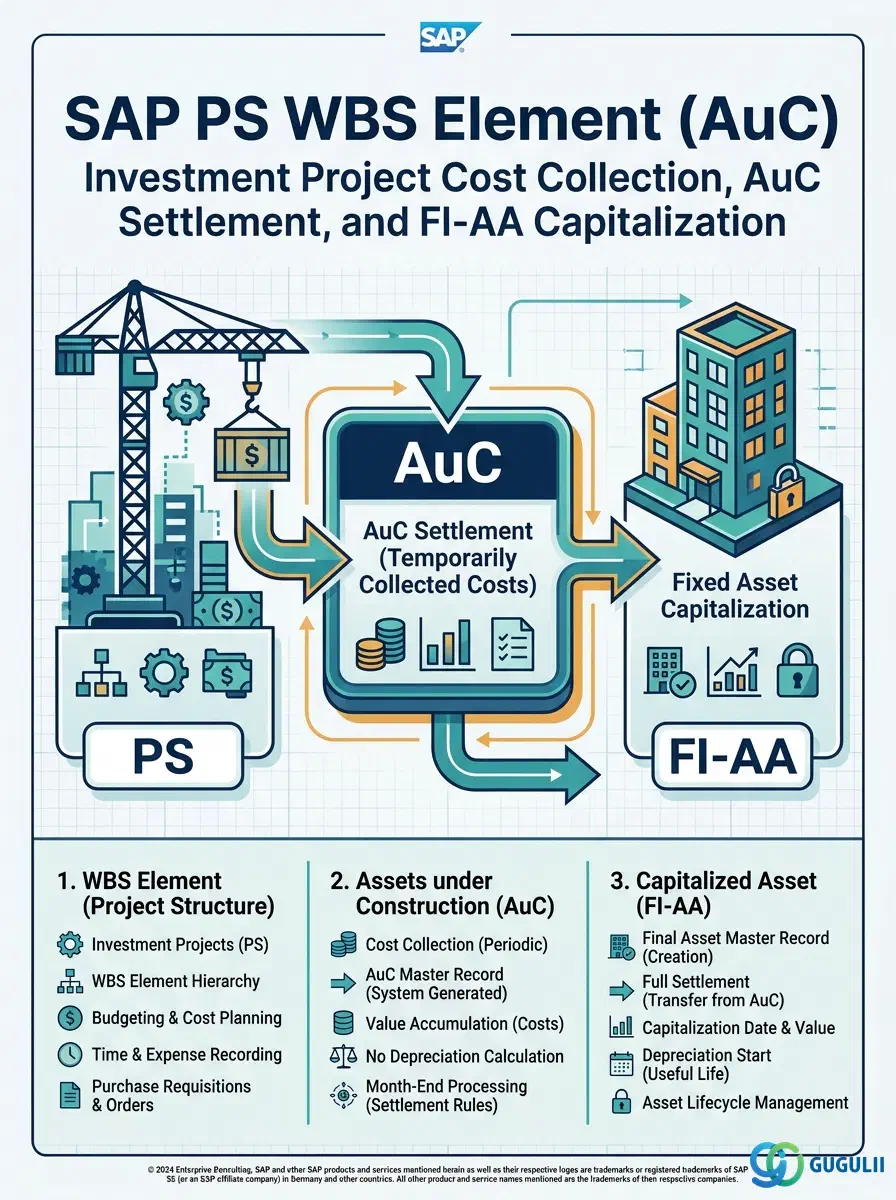
The WBS Element for Assets under Construction (AuC) is the investment-project-specific variant of the WBS Element that bridges SAP Project System (PS) and Fixed Asset Accounting (FI-AA). While a standard WBS Element collects project costs for operational reporting and settlement to cost centers or G/L accounts, the AuC WBS Element routes those costs through an Asset under Construction object in the asset ledger — enabling capital expenditure tracking, depreciation staging, and eventual capitalization to a productive Fixed Asset. It is optional in the PS master data hierarchy but mandatory in any investment project where fixed asset creation is the end goal. The rest of this article covers its prerequisites, AuC WBS types and constraints, settlement flow architecture, and every field that PS and FI consultants must configure together.
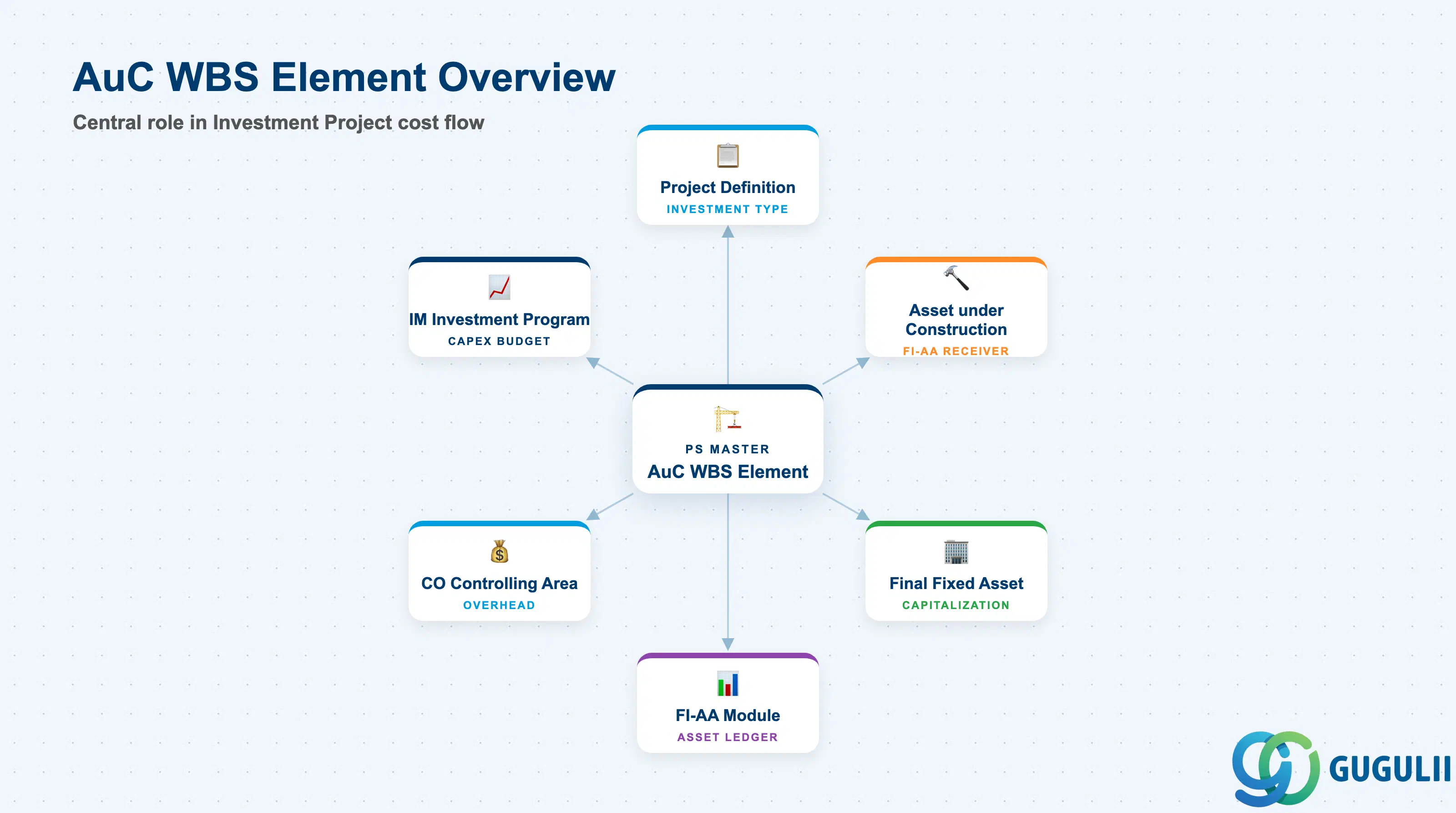
The WBS Element (AuC) is a WBS Element configured to collect investment project costs and settle them into the FI-AA module as an Asset under Construction (AuC). The AuC is an asset class in FI-AA that accumulates costs without depreciation during the construction or development period; at project completion (or at year-end in line-item settlement), the AuC balance is transferred to a final productive Fixed Asset and depreciation begins. The AuC WBS Element is the PS-side gateway for this flow.
| Aspect | Details |
|---|---|
| Role | Collects actual project costs (procurement, time, overhead) and settles them periodically to an Asset under Construction in FI-AA |
| Modules using it | PS (primary — cost collection, settlement rules), FI-AA (Asset under Construction, final Fixed Asset), CO (Controlling Area, overhead calculation), IM (Investment Management — investment program linkage) |
| Transactions | CJ11 (Create WBS Element) / CJ12 (Change) / CJ13 (Display) / CJ20N (Project Builder) / CJ88 (Project Settlement) / AIAB (AuC Distribution) / AIBU (Settle AuC to Final Asset) |
| Key Tables | PRPS (WBS Element master data) / ANLB (Depreciation terms) / ANLA (Asset master — general data) / ANLC (Asset values by period) / ANEK (Asset document header) |
| S/4HANA note | In S/4HANA, the AuC settlement flow integrates directly with the Universal Journal (ACDOCA). Line-item settlement (asset-line-item transfer) is the recommended method over summary settlement. Fiori app “Manage Fixed Assets” enables AuC monitoring. The IM module linkage (investment program position) remains unchanged from ECC. |
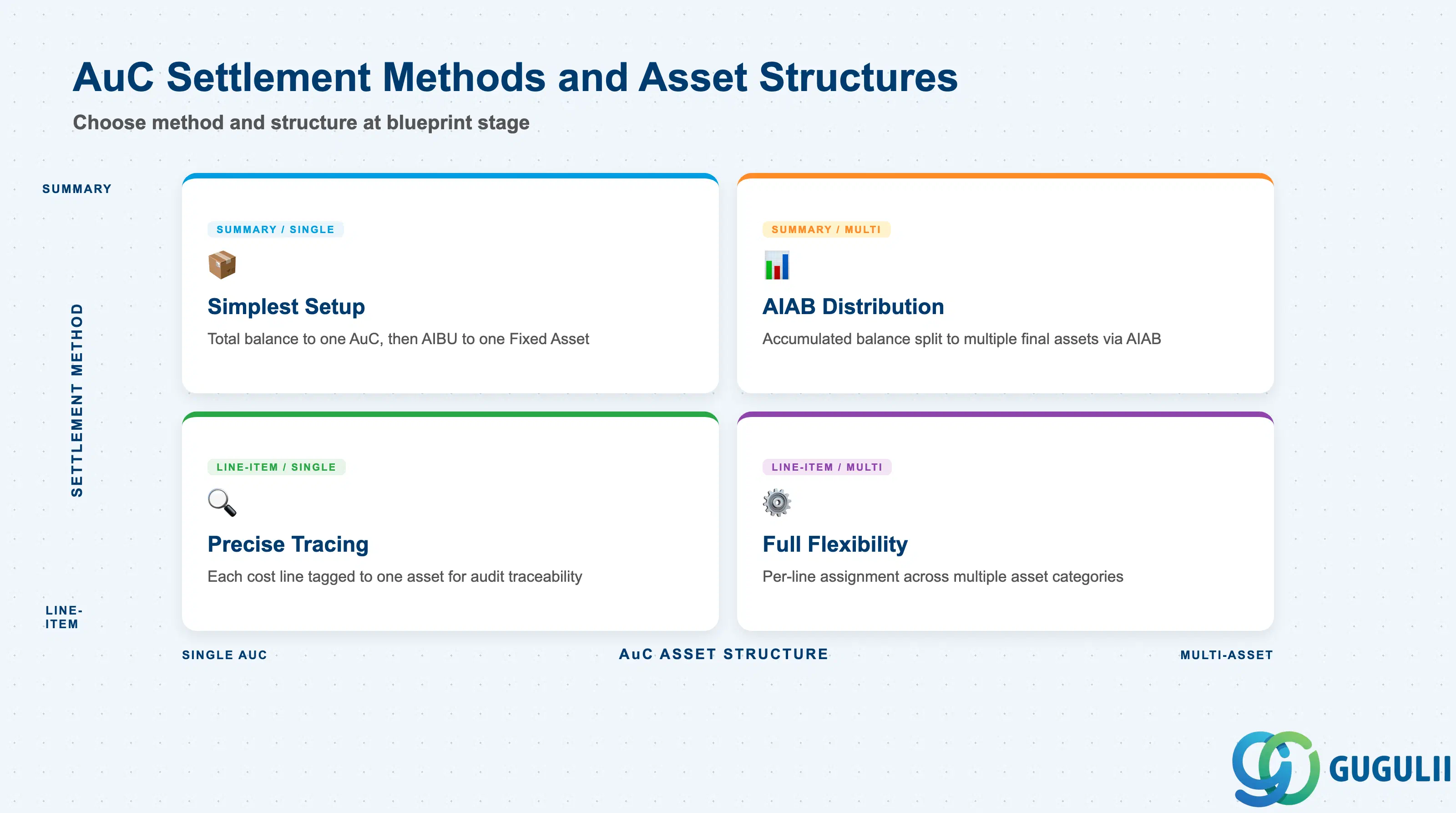
The AuC WBS Element has fewer type variants than a standard WBS Element, but the settlement method and the AuC asset structure choices carry significant downstream impact on asset accounting. Getting these decisions wrong at blueprint stage causes asset reclassification work at project close.
| Variant / Dimension | Option | Use Case | Key Behavior |
|---|---|---|---|
| Settlement Method | Summary Settlement | Projects where the total capitalization goes to a single fixed asset; simpler setup | Accumulated WBS balance settles in total to the AuC asset; distribution to final assets is done via AIAB (AuC distribution) after project close |
| Settlement Method | Line-Item Settlement | Projects with mixed asset types or multiple final assets known in advance | Each cost document line item is tagged with an asset assignment at posting time and settled individually — enables precise tracing of which costs go to which asset |
| AuC Asset Structure | Single AuC | Projects producing one homogeneous capital asset (e.g., one machine) | One AuC asset record per project or WBS; entire balance transfers to one final asset via AIBU |
| AuC Asset Structure | Multi-Asset AuC | Projects producing multiple capital assets (e.g., a plant building, equipment, and infrastructure) | Multiple AuC assets (or asset sub-numbers) under the same investment measure; AIAB distributes balance across final assets by percentage or amount |
| Planning Element Flag | Enabled | WBS Nodes where investment plan values are entered for IM reporting | Required when the WBS is linked to an IM investment program position; plan values flow up to the investment program for capex budget monitoring |
Design principle: Choose the settlement method (summary vs. line-item) in the blueprint phase — it cannot be changed after actual postings are made. For complex investment projects with multiple asset categories, line-item settlement provides audit traceability that summary settlement cannot.
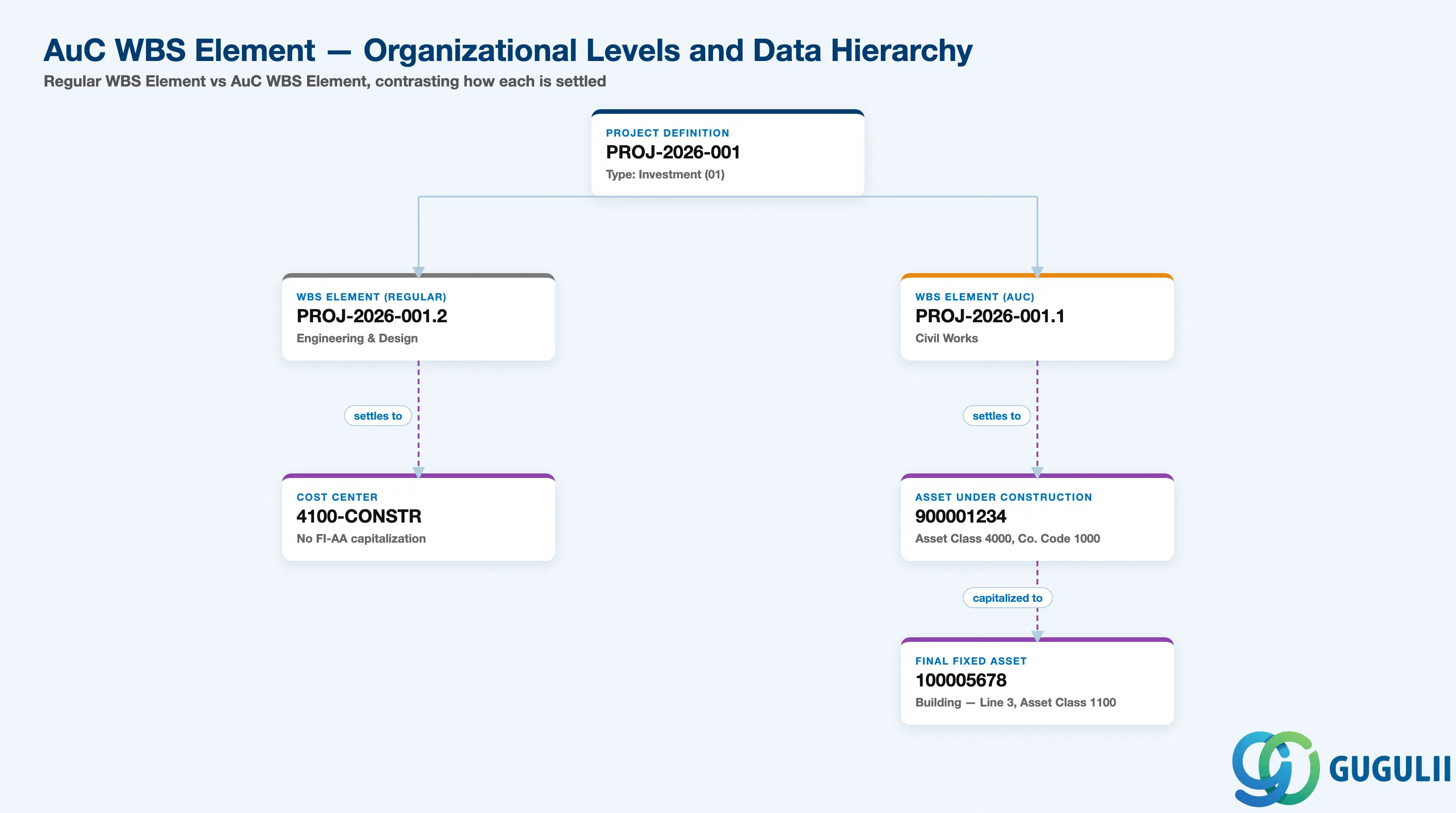
Data hierarchy with a concrete example
Controlling Area 1000
   │
   └── Project Definition PROJ-2026-001
          Plant Expansion — Line 3 Capacity Increase
          Type: Investment (01)
          │
          ├── WBS Element PROJ-2026-001.2 (Regular)
          │      Engineering & Design
          │      ── settles to ──> Cost Center 4100-CONSTR
          │      No FI-AA capitalization
          │
          └── WBS Element PROJ-2026-001.1 (AuC)
                 Civil Works
                 ── settles to ──> AuC Asset 900001234 (FI-AA)
                                       Asset Class 4000, Company Code 1000
                                       ── capitalized to ──> Final Asset 100005678
                                                                 Building — Line 3 Expansion
                                                                 Asset Class 1100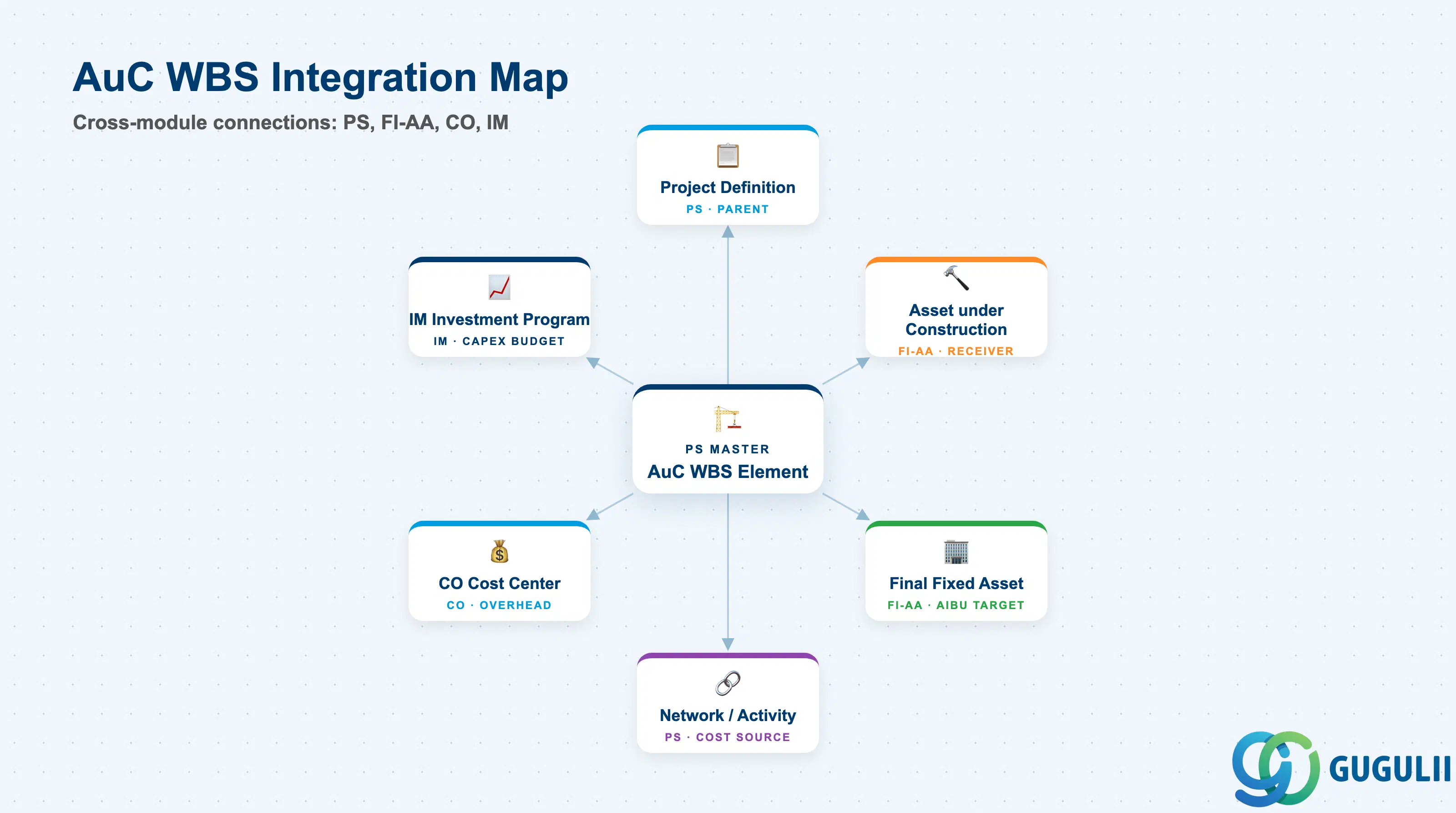
The AuC WBS Element sits at the intersection of three functional modules. Its integration scope is deeper and more cross-module than a standard WBS Element, requiring close collaboration between PS, FI-AA, and CO consultants.
| Object | Relationship | Practical Notes |
|---|---|---|
| Project Definition | Parent (1:N) — must be Investment Project type (01) | Without Project Type 01, the AuC WBS configuration fields are hidden in the WBS Element transaction. Project type is locked after WBS Elements are created. |
| Asset under Construction (FI-AA) | Settlement receiver — WBS costs flow here via CJ88 | The AuC asset record must be created in FI-AA before maintaining the settlement rule. Its asset class (typically 4000-series) must be mapped to AuC in asset class Customizing. Cost center and company code on the AuC must align with the WBS Element’s organizational assignment. |
| Final Fixed Asset (FI-AA) | Ultimate receiver — AuC balance transferred here via AIBU at project close | The final asset may not exist at project start; it is created when the asset is ready to enter productive use. AIBU (Settle AuC to Asset) performs the capitalization and sets the depreciation start date. |
| IM Investment Program (IM) | Referenced from WBS via Investment Profile and Program Position | Enables capex budget monitoring at program level across multiple projects. The investment program position carries the approved budget; the AuC WBS Element draws against it. Not required if IM module is not in scope. |
| CO Cost Center | Referenced from WBS Element Responsible Cost Center | Overhead calculation (template allocation) flows through the cost center assignment on the AuC WBS Element just as for standard WBS Elements. Overhead settled to the WBS is included in the AuC balance and ultimately capitalized. |
| Network / Activity | Associated — actual costs from Activities assigned to this WBS roll up here | Time confirmations, goods issues, and external service costs from assigned Activities post to the AuC WBS Element and are included in the next settlement run (CJ88). |
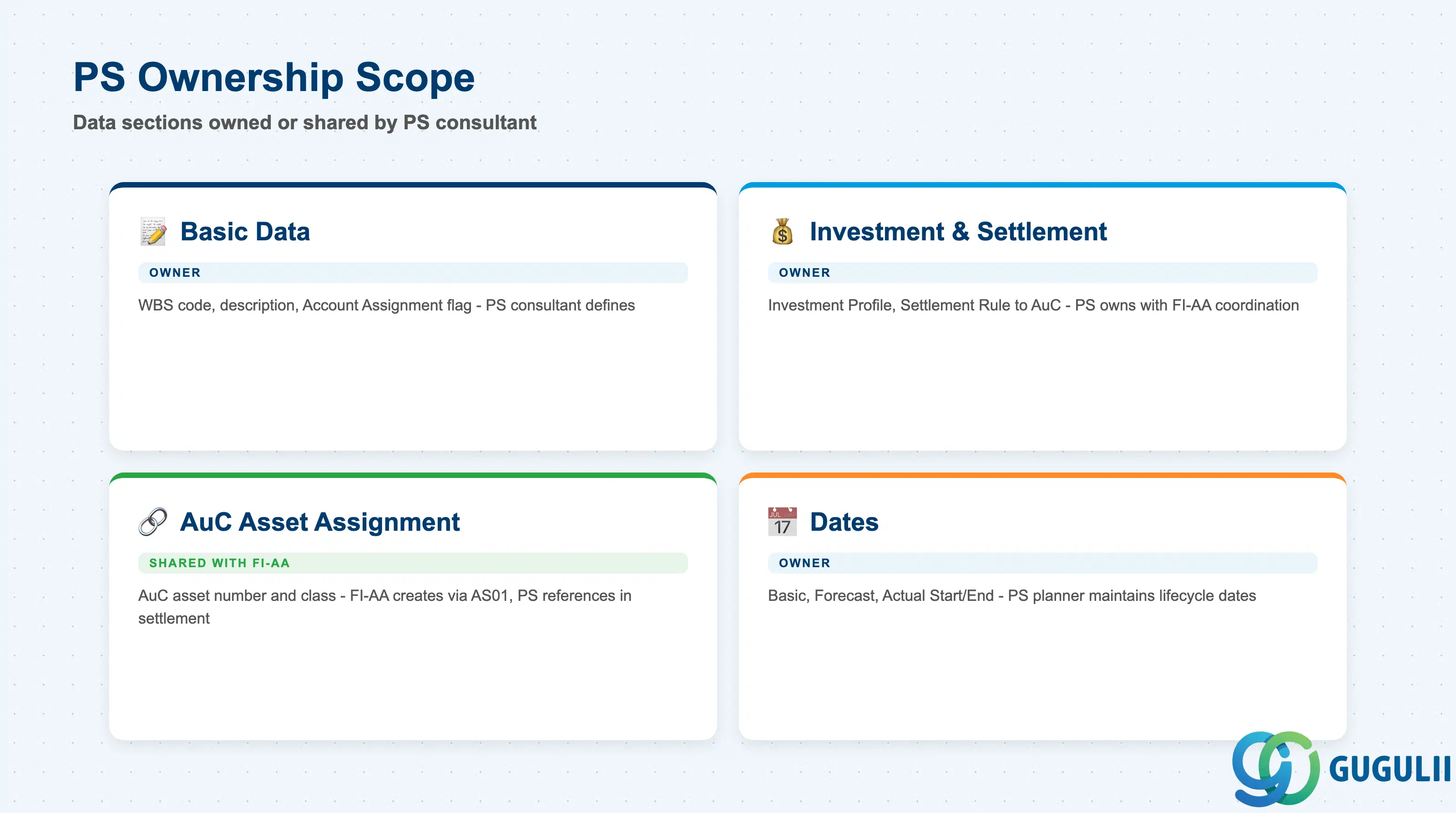
| Data Section | PS Involvement | Notes |
|---|---|---|
| Basic Data | ◎ Owner | WBS code, description, Account Assignment flag — same as standard WBS Element; PS consultant defines |
| Investment and Settlement Data | ◎ Owner | Investment Profile, Settlement Profile, Settlement Rule → AuC — core of the AuC WBS; PS owns in coordination with FI-AA |
| AuC Asset Assignment | ○ Shared with FI-AA | AuC asset number, asset class, cost center on asset — FI-AA creates the AuC (AS01); PS references it in the settlement rule |
| Dates | ◎ Owner | Basic, Forecast, and Actual Start/End dates — same lifecycle fields as standard WBS; PS planner maintains |
Legend: ◎ = Owner / Critical, ○ = Direct involvement
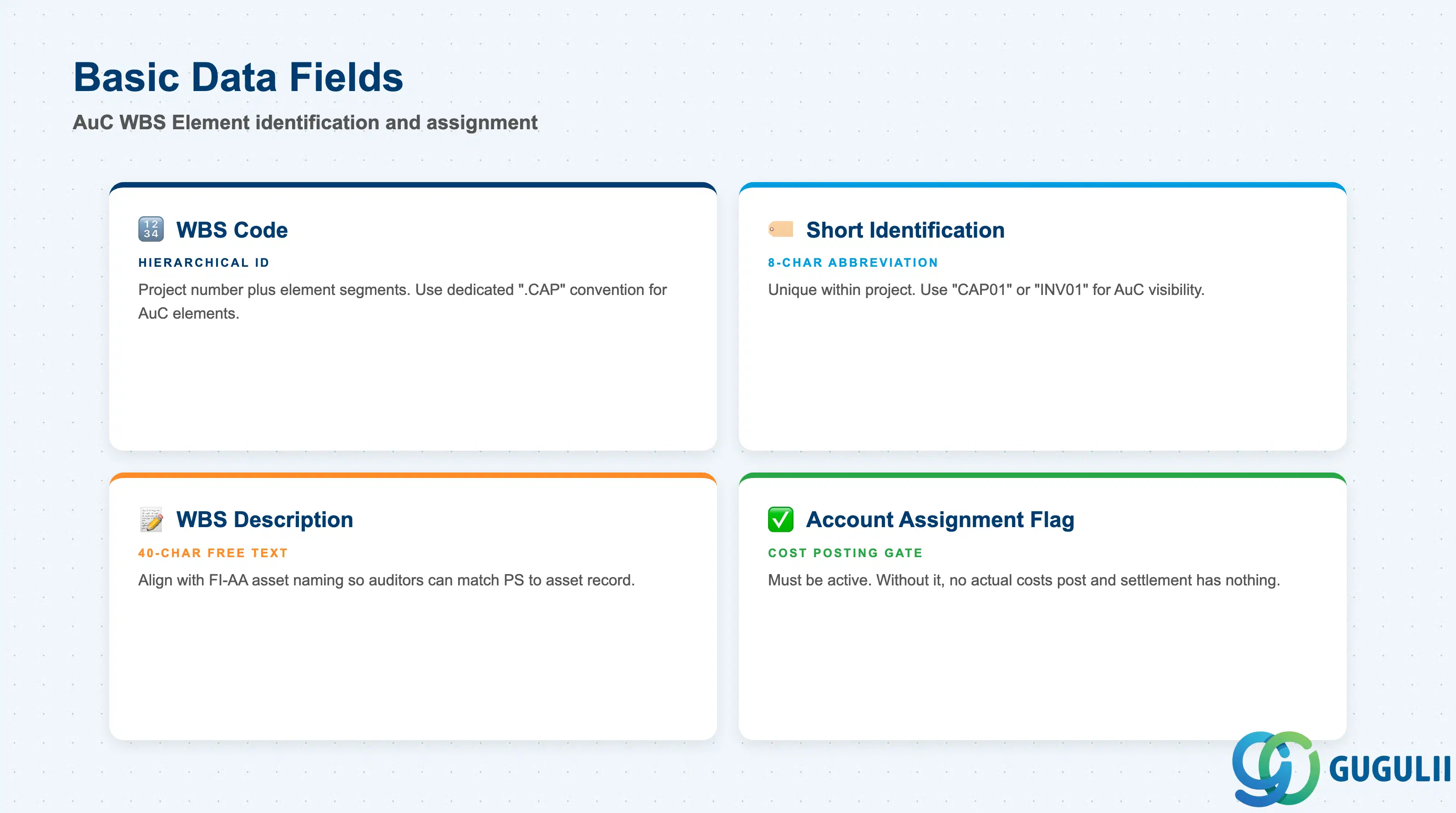
The Basic Data fields of an AuC WBS Element are structurally identical to those of a standard WBS Element — the AuC behavior is activated by the Investment Profile and Settlement Rule, not by a separate master data type switch. All standard WBS naming conventions apply.
| Field | Description | Practical Usage |
|---|---|---|
| WBS Code | Hierarchical project identifier using project number plus element segments (e.g., JP01-2026-0001.CAPEX) | For investment projects, use a dedicated segment convention to distinguish AuC WBS Elements from operational WBS Elements in the same project (e.g., append “.CAP” or a separate level for capital items). This makes AuC elements immediately visible in the project structure reports without opening individual records. |
| Short Identification | Abbreviated WBS code for use in network assignments and compact reports (up to 8 characters) | Must be unique within the project. For AuC elements, a convention like “CAP01” or “INV01” helps distinguish them visually in network assignment screens and in the FI-AA Asset Explorer where the originating WBS is displayed. |
| WBS Description | Free-text description of the capital item or construction scope (40 characters) | Write descriptions that align with the asset naming convention in FI-AA — the WBS description and the AuC asset text should be consistent so that auditors and controllers can immediately match the PS side to the FI-AA asset record without cross-referencing. |
| Account Assignment Element Flag | Marks the WBS Element as eligible to receive actual cost postings | Must be active on every AuC WBS Element. Purchase orders, goods receipts, CATS time entries, and manual postings to this element are what feeds the AuC balance. Without this flag, no actual costs can be assigned and the settlement run has nothing to capitalize. |
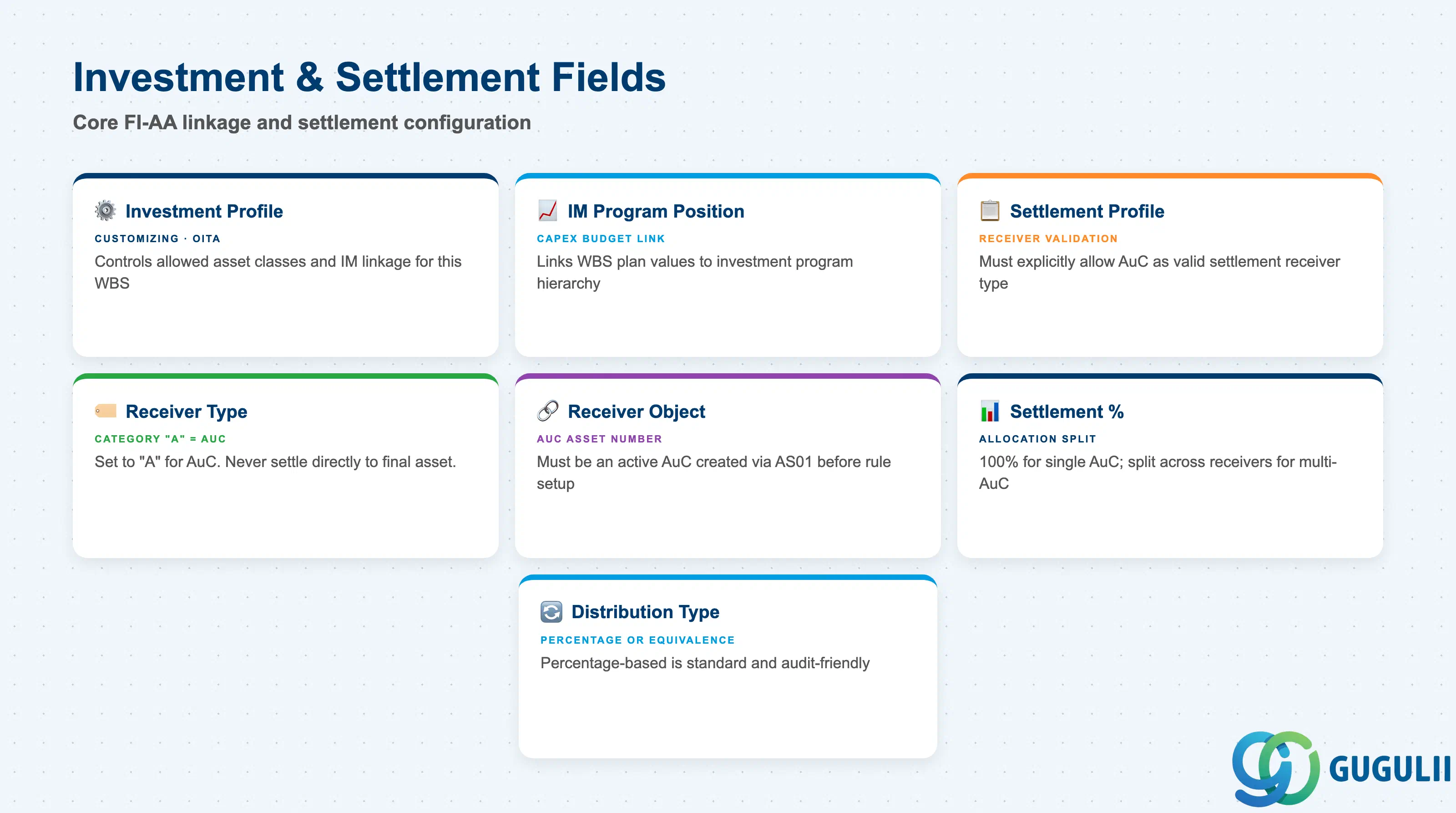
Investment and Settlement Data is the functional core of the AuC WBS Element. These fields activate the FI-AA linkage and define the settlement flow. Errors in this section are the most common root cause of failed settlement runs and incorrect asset capitalization.
| Field | Description | Practical Usage |
|---|---|---|
| Investment Profile | Controls which IM and FI-AA functions are available for this WBS Element (e.g., allowed asset classes, IM linkage, capitalization rules) | Maintained in Customizing (transaction OITA). The Investment Profile must allow the AuC asset class used in the settlement rule. If IM is in scope, the Investment Profile also controls which IM investment program positions can be linked. Assign one Investment Profile per project scenario — do not share profiles between Investment and Customer project types. |
| IM Investment Program Position | References the specific budget position in the IM investment program hierarchy | Populated when the company manages capital budgets via the IM module. Links the WBS Element’s planned and actual values to the program-level capex budget, enabling portfolio-level budget monitoring across all projects under the same investment program. If IM is not in scope, leave blank. |
| Settlement Profile | Defines valid settlement receiver types and rules for this WBS Element’s costs | Must be configured in Customizing to explicitly allow settlement to Asset under Construction (receiver category “A”). If the Settlement Profile does not list AuC as a valid receiver, the CJ88 settlement run terminates with an error. Align the Settlement Profile with the FI-AA team before go-live testing. |
| Settlement Rule — Receiver Type | Specifies the category of the settlement receiver (AuC = “A”) | For AuC WBS Elements, the receiver type must be “A” (Fixed Asset — AuC phase). Do not use “FXA” (Final Fixed Asset) as a direct settlement receiver from the WBS — the correct flow is WBS → AuC → Final Asset. Settling directly to the final asset bypasses the AuC accumulation logic and can cause depreciation to start prematurely. |
| Settlement Rule — Receiver Object | The specific Asset under Construction number in FI-AA | Must be a valid, active AuC asset created via AS01. Verify that the company code, cost center, and asset class on the AuC are consistent with the WBS Element’s organizational assignment before maintaining the settlement rule. |
| Settlement Rule — Percentage | Allocation percentage to each settlement receiver (100% for single AuC; split for multi-AuC) | For multi-AuC scenarios, ensure that the percentages across all receivers sum to 100% and that the business rationale for each split is documented. Review percentages at each reporting period — the split may need adjustment if the project scope changes mid-execution. |
| Distribution Type | Method of distributing settled amounts (by percentage or equivalence number) | Percentage-based distribution is standard and audit-friendly. Equivalence numbers are rarely used in AuC scenarios but can be applicable when capital cost proportions change dynamically with quantity milestones. |
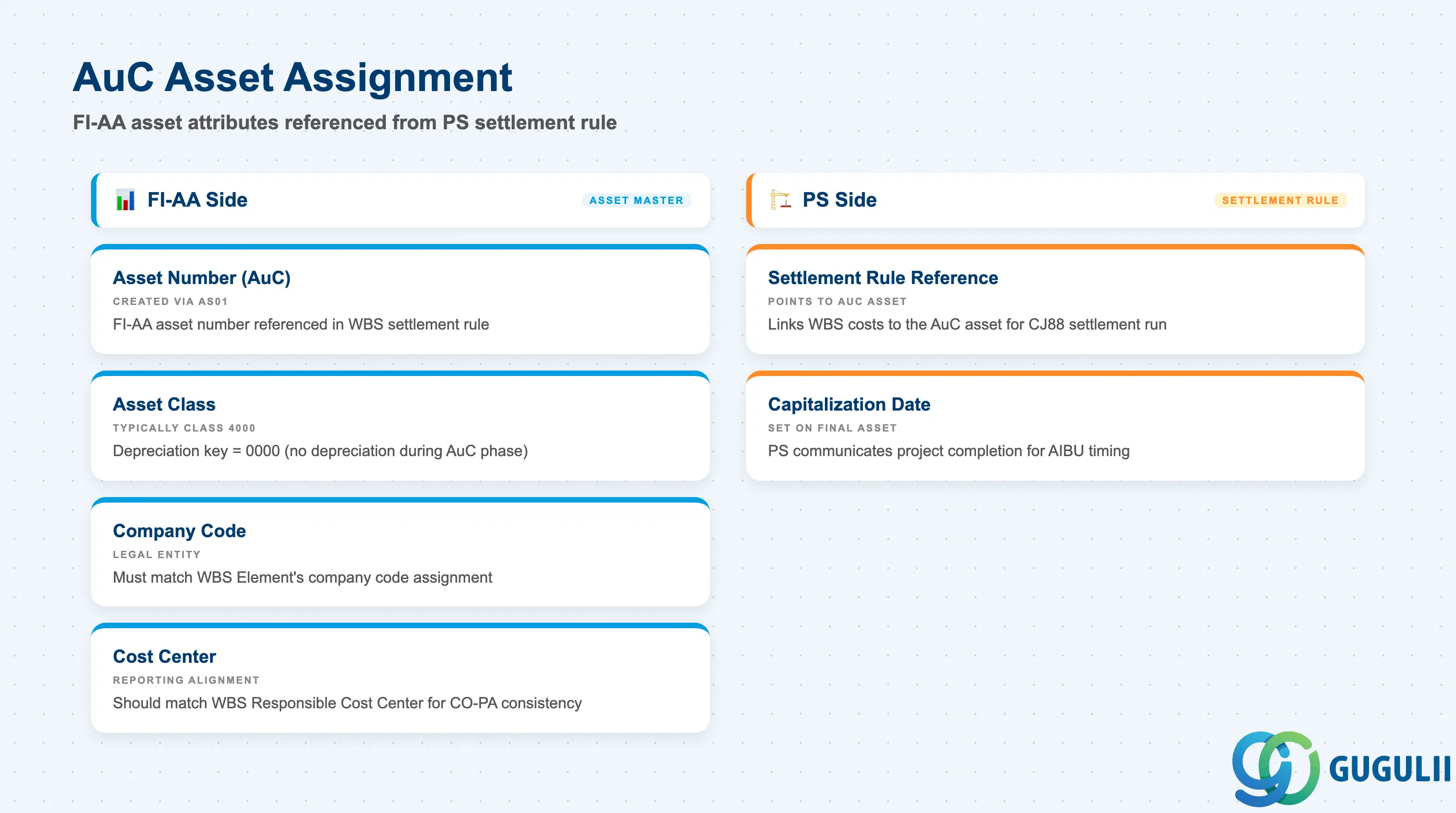
The AuC Asset Assignment section captures the FI-AA attributes of the Asset under Construction that the WBS Element settles into. While these fields are maintained in FI-AA (via AS01 or AS02), PS consultants must confirm them during the settlement rule setup to avoid organizational mismatches that block settlement posting.
| Field | Description | Practical Usage |
|---|---|---|
| Asset Number (AuC) | The FI-AA asset number of the Asset under Construction referenced in the WBS settlement rule | Created in FI-AA via AS01 before the WBS settlement rule is set. For large investment projects, a dedicated AuC asset numbering convention (e.g., plant code + year + sequence) helps the FI-AA team manage the asset register. The PS team must communicate the required AuC asset number to FI-AA during blueprint so that the creation sequence is coordinated. |
| Asset Class (AuC) | The FI-AA asset class assigned to the AuC (typically a designated AuC class, e.g., class 4000) | Asset class determines account determination (G/L accounts for AuC postings) and whether depreciation is active during the AuC phase (it must NOT be). In standard configuration, AuC asset classes carry a depreciation key of “0000” (no depreciation) to prevent premature write-downs. Verify with the FI-AA consultant that the AuC class is correctly configured in OAYZ and AO90. |
| Company Code (on AuC) | The legal entity of the AuC asset record | Must match the Company Code inherited by the WBS Element from the Project Definition. Cross-company AuC settlement (WBS in Company Code A settling to AuC in Company Code B) requires intercompany configuration and is rarely implemented — flag any cross-company requirement to the FI-AA and FI teams immediately. |
| Cost Center (on AuC) | The cost center assigned to the AuC asset master | In some configurations, the FI-AA cost center on the AuC asset is used for internal overhead allocation and asset reporting. It should be consistent with the Responsible Cost Center on the WBS Element. Discrepancies between the WBS cost center and the AuC asset cost center are a common source of confusion in CO-PA reporting on investment projects. |
| Capitalization Date | The date from which depreciation begins on the final Fixed Asset after AIBU settlement | Not set on the AuC itself; set on the final Fixed Asset when AIBU is executed. The PS team must communicate the project completion date to FI-AA so that the correct capitalization date is used. An incorrect capitalization date (too early or too late) affects the depreciation calculation and the period-end closing schedule. |
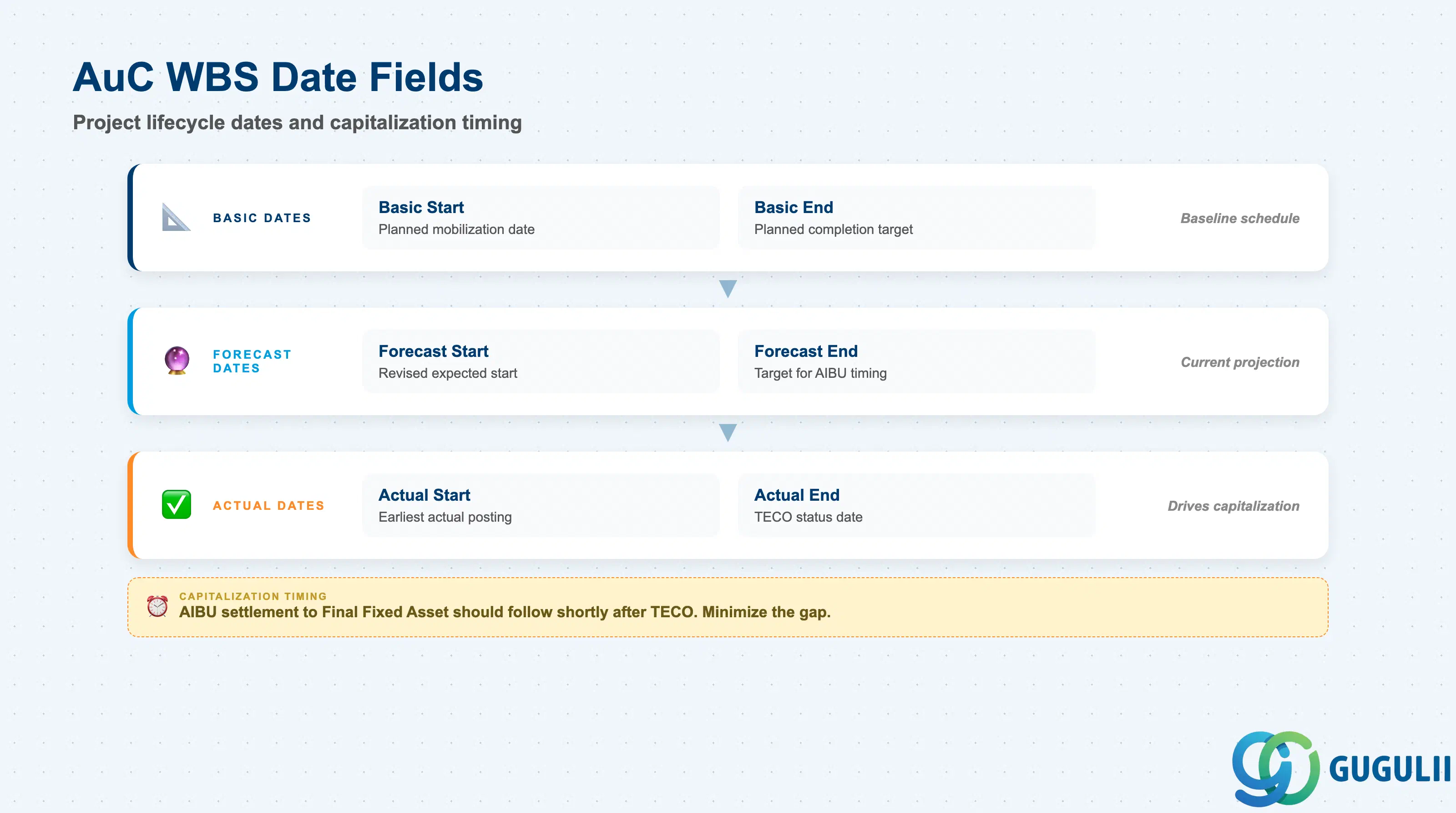
The AuC WBS Element carries the same set of Basic, Forecast, and Actual dates as a standard WBS Element, with one additional business significance: the Actual End Date (or Technical Completion date) drives the timing of the final capitalization settlement from AuC to the productive Fixed Asset. PS and FI-AA teams must agree on the TECO and AIBU timing during the period-end closing calendar.
| Field | Description | Practical Usage |
|---|---|---|
| Basic Start Date | Planned start date for the construction or development work at project baseline | Set this to the planned mobilization or procurement start date. For IM-linked WBS Elements, this date feeds into the investment program’s schedule monitoring view — ensure it aligns with the IM program’s approved project timeline. |
| Basic End Date | Planned completion date of the capital construction or development work | Should align with the planned capitalization date agreed with the FI-AA team. If the Basic End Date significantly precedes the expected AIBU execution, alert the project controller — a large gap between planned end and actual capitalization creates prolonged AuC balances that auditors may flag. |
| Forecast Start Date | Revised expected start date reflecting current project status | Update whenever the construction start date shifts materially. For investment projects, the Forecast Start Date affects IM program reporting and may trigger a capital budget review if it slips into a subsequent fiscal year. |
| Forecast End Date | Revised expected completion date — the operational target for capitalization timing | The most operationally critical date field on the AuC WBS. Project controllers and FI-AA coordinators use this date to plan the AIBU settlement run timing and to communicate capitalization dates to the fixed asset ledger team. Keep it current throughout project execution. |
| Actual Start Date | Date on which construction or procurement activity actually commenced | Derived from the earliest actual posting date or set manually. Used in EVM analysis and in investment controlling reports that compare actual spend curves against planned timelines. |
| Actual End Date | Date on which the capital project was technically completed (linked to TECO) | Populated at TECO (Technical Completion) status. The AIBU settlement to the final Fixed Asset should follow shortly after TECO. The gap between the Actual End Date and the AIBU capitalization date is scrutinized in fixed asset audits — minimize this gap by pre-creating the final Fixed Asset (AS01) before TECO is set. |
| ID | Category | Title |
|---|---|---|
| ps-001 | Overview | What is SAP PS? |
| ID | Category | Title |
|---|---|---|
| ps-a01 | Overview | SAP PS Master Data: Overview, Hierarchy & Relationships |
| ps-a02-01 | Master Data | SAP PS Material Master |
| ps-a03-01 | Master Data | SAP PS Project Profile |
| ps-a03-02 | Master Data | SAP PS Network Profile |
| ps-a03-03 | Master Data | SAP PS Milestone Group |
| ps-a04-01 | Master Data | SAP PS Project Definition |
| ps-a04-02 | Master Data | SAP PS WBS Element |
| ps-a04-03 | Master Data | SAP PS WBS Element (AuC) 📍 |
| ps-a04-04 | Master Data | SAP PS WBS Hierarchy |
| ps-a05-01 | Master Data | SAP PS Network |
| ps-a05-02 | Master Data | SAP PS Activity |
| ps-a05-03 | Master Data | SAP PS Activity Element |
| ps-a05-04 | Master Data | SAP PS Milestone |
| ID | Category | Title |
|---|---|---|
| ps-b01 | Overview | SAP PS Transactions: Process Flow, Hierarchy & Relationships |