Title here
Summary here

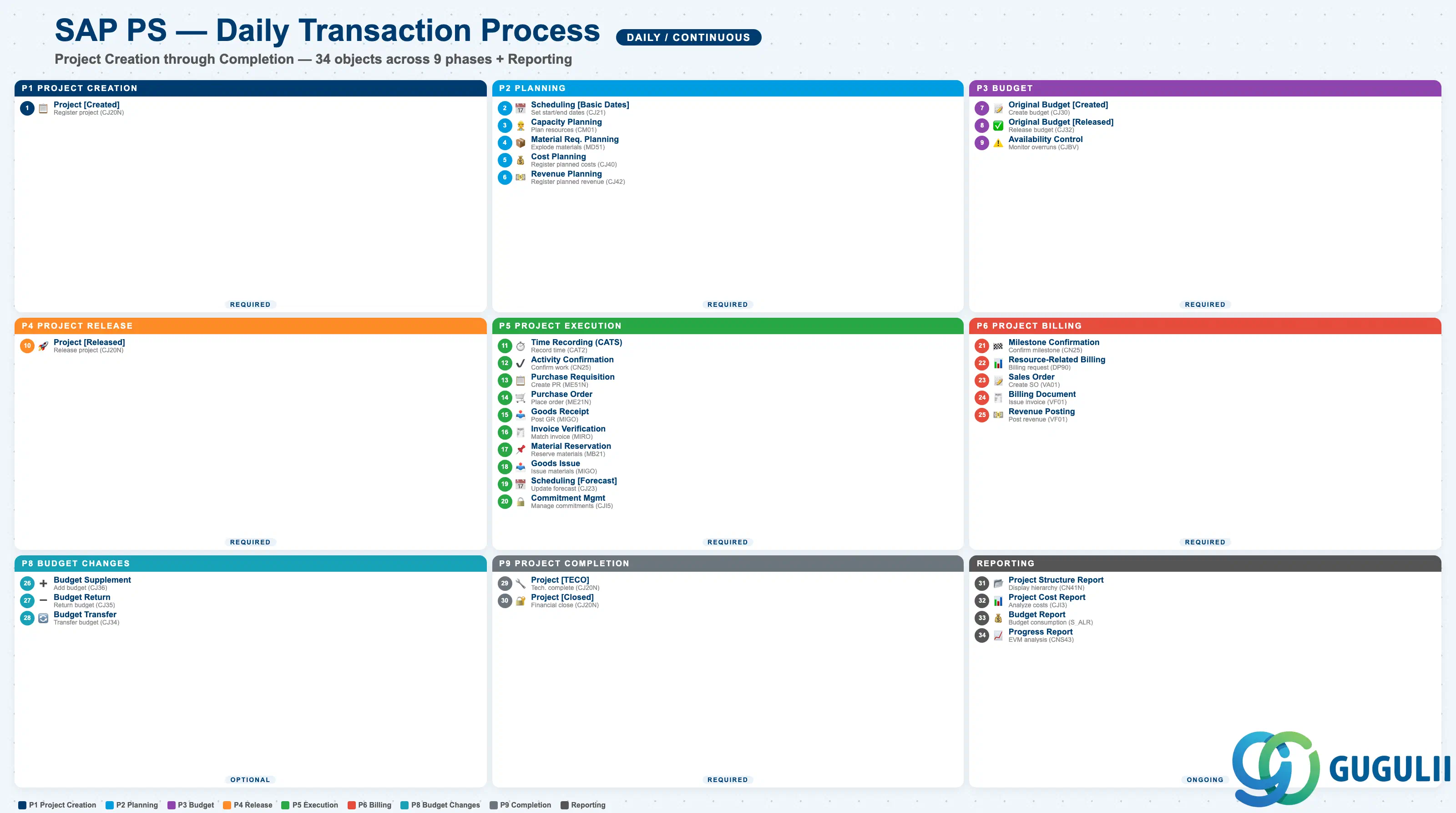
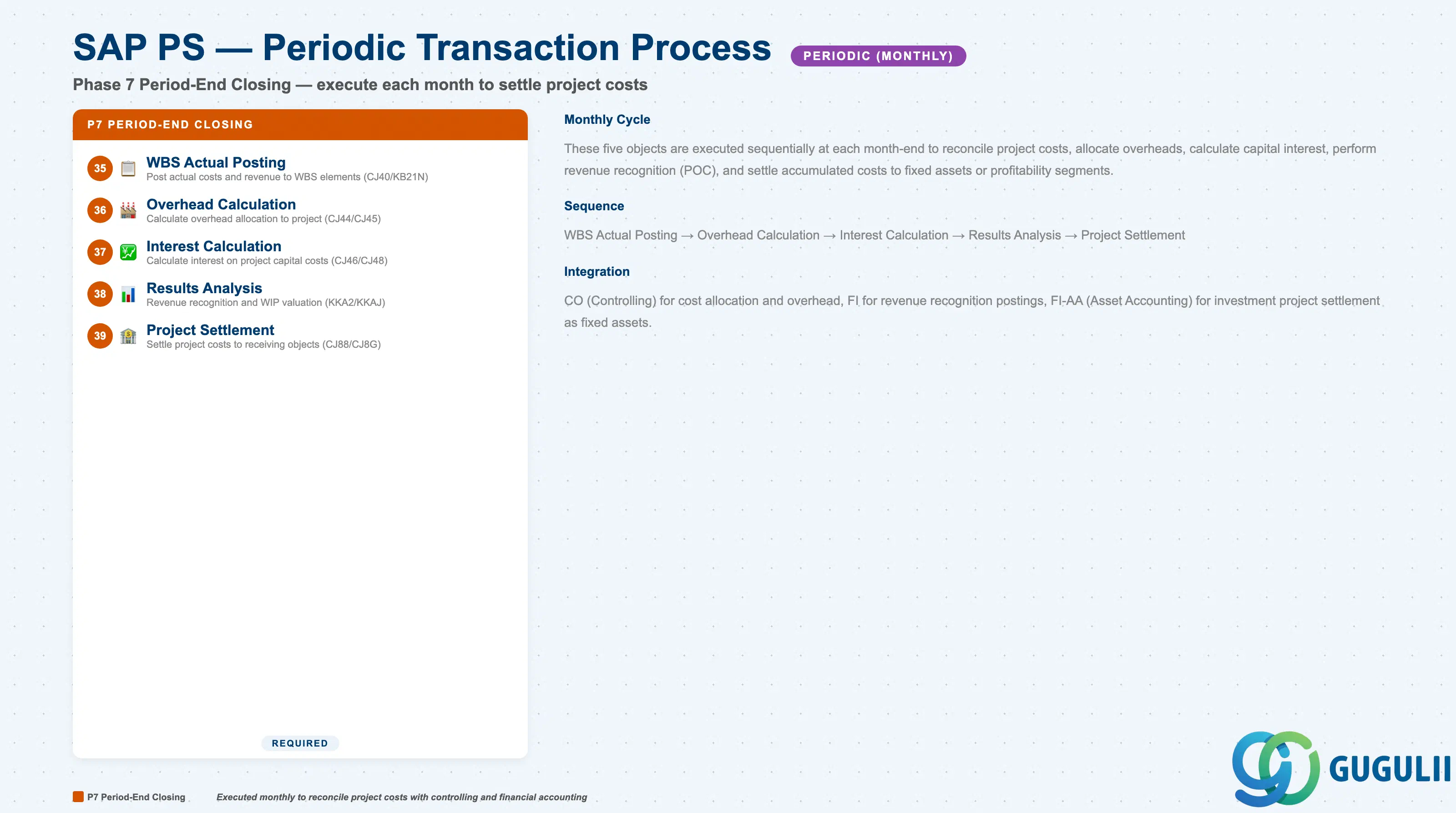
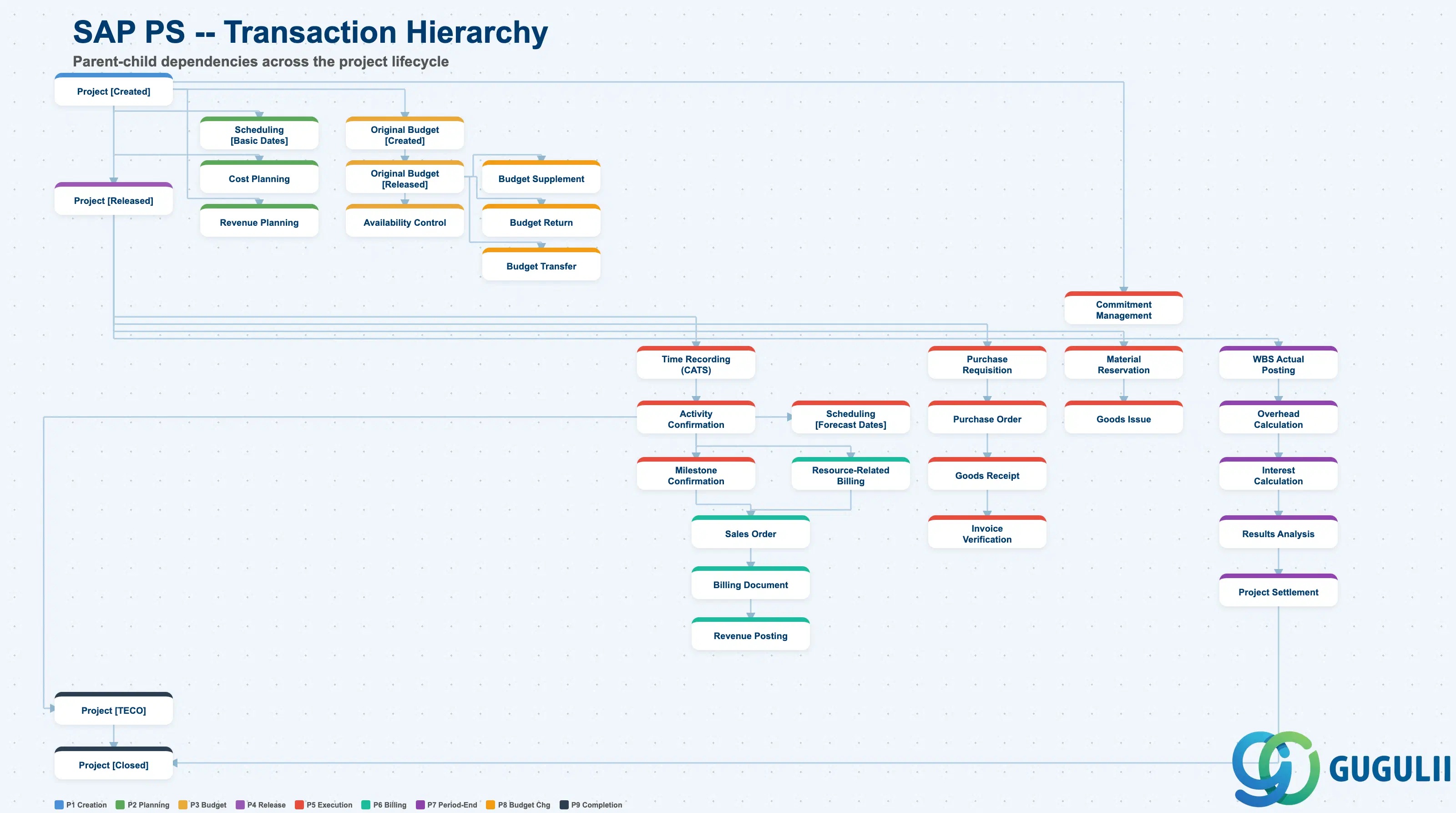
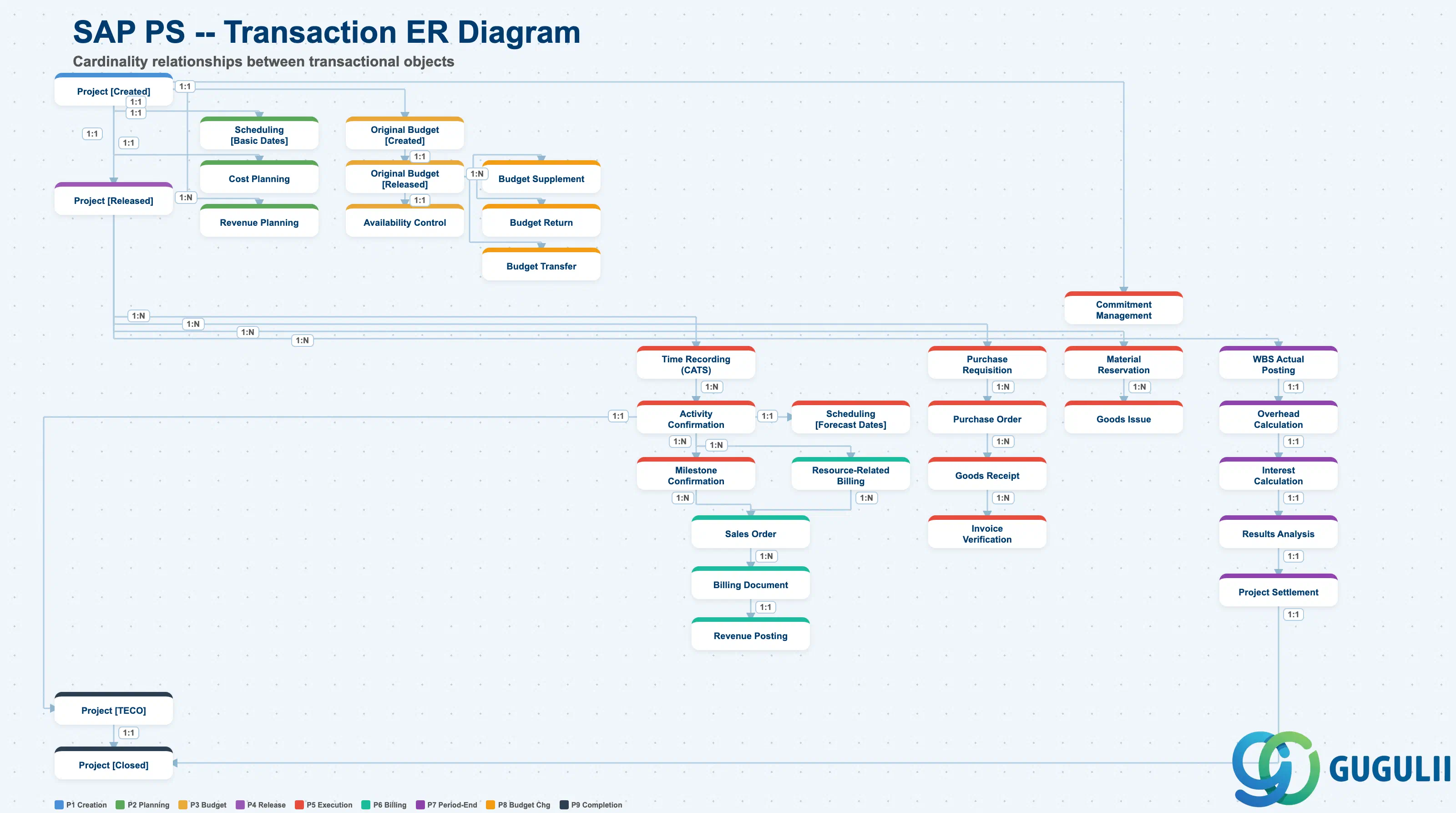
| Phase | Object | Integration | Planned | Actual | Prerequisite | Tr-Cd | Description | Practical Examples | Role |
|---|---|---|---|---|---|---|---|---|---|
| 1 Project Creation | Project [Created] | - | Project [Created] | - | Project Definition | CJ20N | Register project with Created status | Register a new construction project in the system | Project Manager |
| 2 Planning | Scheduling [Basic Dates] | - | - | - | Project [Created], WBS Element, Network | CJ21/CJ29 | Set basic start and end dates for the project | Set project start date Apr 1, end date Mar 31 | Project Planner |
| Capacity Planning | PP | - | - | Scheduling [Basic Dates], Network, Activity | CM01/CMP2 | Plan work center and resource capacity requirements | Plan 30 workers x 6 months for construction site | Project Planner | |
| Material Requirements Planning | MM | - | - | Scheduling [Basic Dates], Network, Activity | MD51/MD52 | Plan project material requirements | Explode construction material requirements from network | Project Planner | |
| Cost Planning | CO | Cost Planning | Project [Created] | Capacity Planning, Material Requirements Planning, WBS Element | CJ40/CJ41 | Register planned costs per WBS/Network | Register annual labor and material cost budget for construction project | Project Controller | |
| Revenue Planning | CO | Revenue Planning | Project [Created] | Cost Planning, WBS Element | CJ42/CJ43 | Register planned revenue per WBS element | Register planned billing amount of 100M JPY for customer project | Project Controller | |
| 3 Budget | Original Budget [Created] | - | Original Budget [Created] | - | Cost Planning, WBS Element | CJ30/CJ31 | Create cost budget per WBS element | Allocate total project budget of 500M JPY to WBS elements | Project Controller |
| Original Budget [Released] | - | Original Budget [Released] | Original Budget [Created] | Original Budget [Created] | CJ32/CJ33 | Release created budget to executable state | Release approved budget to enable purchase orders | Project Controller | |
| Availability Control | - | - | - | Original Budget [Released] | CJBV | Monitor and warn on budget overruns | Issue warning when budget consumption exceeds 90% | System | |
| 4 Project Release | Project [Released] | - | Project [Released] | Project [Created] | Project [Created], Cost Planning, Original Budget [Released] | CJ20N | Release project after planning and budget completion | Release project after approval to enable purchasing and cost posting | Project Manager |
| 5 Project Execution | Time Recording (CATS) | HR-TM | Time Recording | Project [Released] | Project [Released] | CAT2/CATM | Record worker time against project | Record 8 hours of on-site work by Worker A | Employee |
| Activity Confirmation | PP | Activity Confirmation | Time Recording (CATS) | Project [Released], Time Recording (CATS) | CN25/CN27 | Confirm and record actual work on activities | Confirm completion of foundation work with 200 actual hours | Project Planner | |
| Purchase Requisition | MM | Purchase Requisition | Project [Released] | Project [Released], WBS Element | ME51N | Create purchase requisition for project materials and services | Create purchase requisition of 5M JPY for construction materials | Project Planner | |
| Purchase Order | MM | Purchase Order | Purchase Requisition | Purchase Requisition | ME21N | Execute purchase order based on purchase requisition | Place order with supplier based on approved requisition | Purchaser | |
| Goods Receipt | MM | Goods Receipt | Purchase Order | Purchase Order | MIGO | Post goods receipt for ordered items | Record delivery of construction materials to site | Warehouse | |
| Invoice Verification | MM/FI | Invoice Verification | Goods Receipt | Goods Receipt | MIRO | Match and post vendor invoice | Match supplier invoice against purchase order and goods receipt, post payable | AP Accountant | |
| Material Reservation | MM | Material Reservation | Project [Released] | Project [Released], WBS Element | MB21 | Create reservation for project materials | Reserve 100 m3 of concrete for construction site | Project Planner | |
| Goods Issue | MM | Goods Issue | Material Reservation | Material Reservation | MIGO | Post goods issue for reserved materials | Issue reserved concrete from warehouse to site | Warehouse | |
| Scheduling [Forecast Dates] | - | - | - | Activity Confirmation | CJ23/CJ24 | Update forecast dates based on actual progress | Update forecast completion date to Mar 15 based on actual progress | Project Planner | |
| Commitment Management | - | - | - | Purchase Requisition, Purchase Order | CJI5 | Manage budget commitments from purchase requisitions and orders | Record 30M JPY commitment from issued purchase orders | System | |
| 6 Project Billing | Milestone Confirmation | SD | Milestone Confirmation | Activity Confirmation | Milestone, Activity Confirmation | CN25 | Confirm milestone reached and release billing | Confirm foundation completion milestone, release billing | Project Planner |
| Resource-Related Billing | SD | Resource-Related Billing | Activity Confirmation | Activity Confirmation | DP90/DP91 | Create billing request based on actual costs | Create billing request of 80M JPY based on actual costs for the month | Project Controller | |
| Sales Order | SD | Sales Order | Milestone Confirmation, Resource-Related Billing | Milestone Confirmation, Resource-Related Billing | VA01/VA02 | Create customer sales order | Create sales order of 30M JPY for milestone billing | Sales Admin | |
| Billing Document | SD/FI | Billing Document | Sales Order | Sales Order | VF01 | Issue customer invoice | Issue invoice of 30M JPY based on sales order | Billing Admin | |
| Revenue Posting | FI | - | Billing Document | Billing Document | VF01/VF04 | Post project revenue | Post revenue of 30M JPY upon invoice issuance | AR Accountant | |
| 7 Period-End Closing | WBS Actual Posting | CO/FI | - | Cost Planning, Revenue Planning | Cost Planning, Revenue Planning | CJ40/KB21N | Post actual costs and revenue to WBS elements | Post 50M JPY actual costs for the month to WBS element | Cost Accountant |
| Overhead Calculation | CO | - | - | WBS Actual Posting | CJ44/CJ45 | Calculate overhead allocation to project | Allocate 10% headquarters overhead to project costs | Cost Accountant | |
| Interest Calculation | CO | - | - | Overhead Calculation | CJ46/CJ48 | Calculate interest on project capital costs | Post 2% capital cost interest on investment project | Cost Accountant | |
| Results Analysis | CO | - | - | Interest Calculation | KKA2/KKAJ | Execute revenue recognition and WIP valuation for customer project | Calculate revenue 60M JPY and WIP 40M JPY at 60% POC | Cost Accountant | |
| Project Settlement | CO/FI/FI-AA | - | - | Results Analysis | CJ88/CJ8G | Settle project costs to receiving objects | Settle completed building as fixed asset of 500M JPY | Cost Accountant | |
| 8 Budget Changes | Budget Supplement | - | - | Original Budget [Released] | Original Budget [Released] | CJ36/CJ37 | Execute additional budget allocation to existing budget | Approve additional budget of 50M JPY due to design change | Project Controller |
| Budget Return | - | - | Original Budget [Released] | Original Budget [Released] | CJ35/CJ38 | Execute return of unused budget | Return unused budget of 20M JPY upon phase completion | Project Controller | |
| Budget Transfer | - | - | Original Budget [Released] | Original Budget [Released] | CJ34 | Execute budget transfer between WBS elements | Transfer 30M JPY from design phase to construction phase | Project Controller | |
| 9 Project Completion | Project [TECO] | - | Project [TECO] | Activity Confirmation, Invoice Verification, Goods Issue | Activity Confirmation | CJ20N | Technically complete project and stop logistics processing | Complete construction, stop further purchase orders and goods receipts | Project Manager |
| Project [Closed] | - | - | Project [TECO] | Project [TECO], Project Settlement | CJ20N | Financially close project and stop all postings | Close project after final settlement, stop all postings | Project Manager | |
| Reporting | Project Structure Report | - | - | - | - | CN41N/CN42N | Display project structure and hierarchy | Display WBS hierarchy and network structure in list view | Project Manager |
| Project Cost Report | CO | - | - | - | CJI3 | Analyze project costs and revenue | Display actual costs 400M JPY vs budget 500M JPY, remaining 100M JPY | Project Controller | |
| Budget Report | - | - | - | - | S_ALR_87013558 | Analyze budget consumption and balance | Display 80% budget consumption, 95% including commitments | Project Controller | |
| Progress Report | - | - | - | - | CNS43/CNS44 | Analyze project progress and EVM | Display EV 400M JPY, PV 450M JPY, SPI 0.89 | Project Manager |
| ID | Category | Title |
|---|---|---|
| ps-001 | Overview | What is SAP PS? |
| ID | Category | Title |
|---|---|---|
| ps-a01 | Overview | SAP PS Master Data: Overview, Hierarchy & Relationships |
| ps-a02-01 | Master Data | SAP PS Material Master |
| ps-a03-01 | Master Data | SAP PS Project Profile |
| ps-a03-02 | Master Data | SAP PS Network Profile |
| ps-a03-03 | Master Data | SAP PS Milestone Group |
| ps-a04-01 | Master Data | SAP PS Project Definition |
| ps-a04-02 | Master Data | SAP PS WBS Element |
| ps-a04-03 | Master Data | SAP PS WBS Element (AuC) |
| ps-a04-04 | Master Data | SAP PS WBS Hierarchy |
| ps-a05-01 | Master Data | SAP PS Network |
| ps-a05-02 | Master Data | SAP PS Activity |
| ps-a05-03 | Master Data | SAP PS Activity Element |
| ps-a05-04 | Master Data | SAP PS Milestone |
| ID | Category | Title |
|---|---|---|
| ps-b01 | Overview | SAP PS Transactions: Process Flow, Hierarchy & Relationships 📍 |