Title here
Summary here

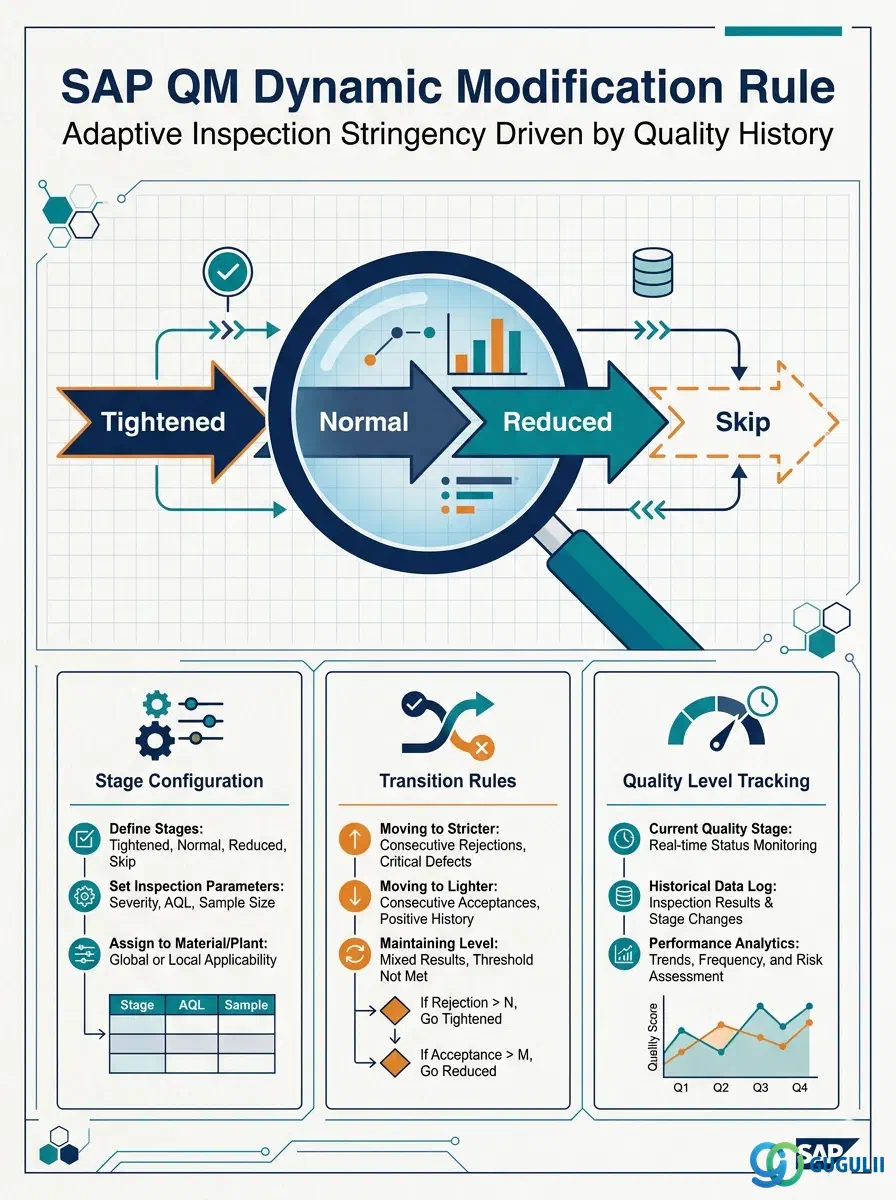
The Dynamic Modification Rule (DMR) is the master data object in SAP QM that encodes the adaptive logic for adjusting inspection severity over time. By evaluating inspection lot history — consecutive accepts, rejects, or skip counts — the DMR determines which inspection stage is active and when to escalate, relax, or bypass sampling. It sits downstream of the Sampling Procedure in Phase 2 (Sampling) of the QM master data setup flow, and its configuration choices directly affect inspection workload, supplier qualification signals, and quality assurance coverage.
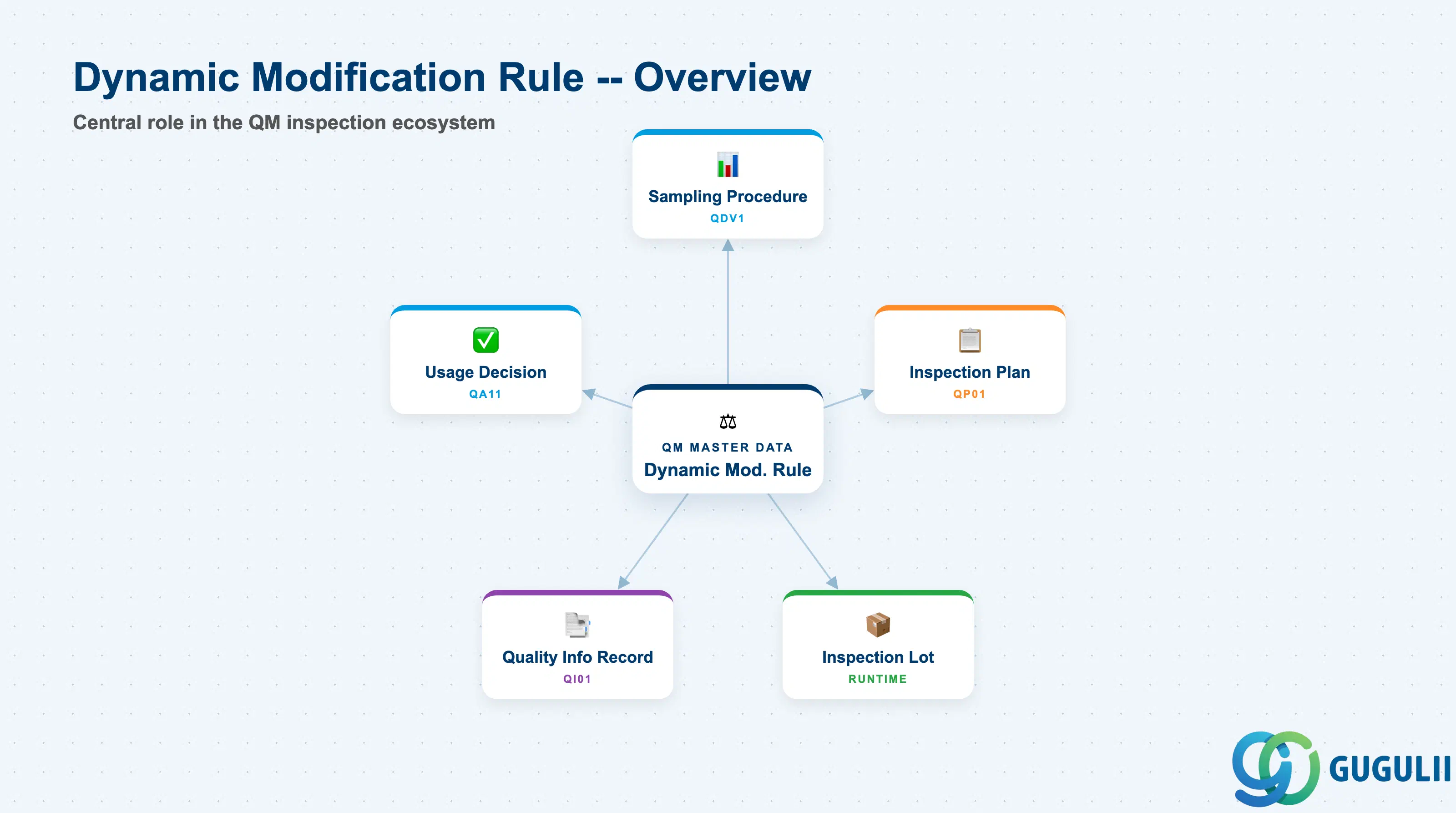
The Dynamic Modification Rule (DMR) is a quality management master data object that defines a set of numbered inspection stages, each associated with a specific inspection severity, and the conditions under which the system moves between them. Rather than holding a fixed sample size, the DMR introduces state: the current active stage for a given material-vendor combination advances or retreats based on the inspection lot outcomes recorded through the Usage Decision.
| Aspect | Details |
|---|---|
| Role | Defines the multi-stage, history-driven logic for adjusting inspection severity (Normal, Tightened, Reduced/Skip) across successive inspection lots |
| Modules using it | QM (primary — Incoming Inspection, In-Process Inspection, Final Inspection) |
| Transactions | QDR1 (Create) / QDR2 (Change) / QDR3 (Display) |
| Key Tables | QDRS (DMR header) / QDRSP (DMR stages) |
| S/4HANA note | DMR data model is unchanged from ECC. Fiori app “Manage Dynamic Modification Rules” (F2369) provides list/edit capability alongside the classic QDR1/2/3 transactions. |
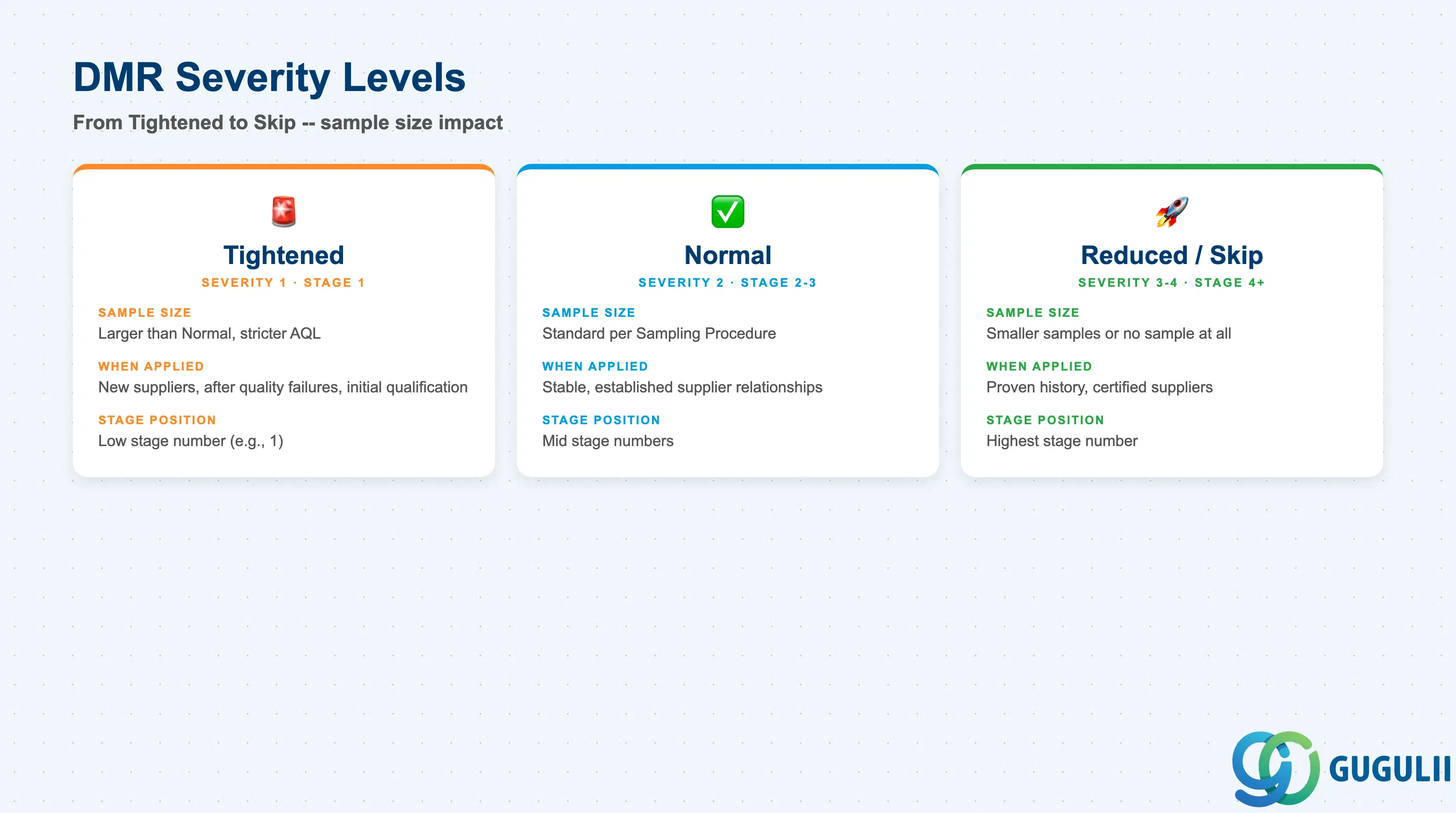
A DMR is composed of ordered stages. Each stage has a severity level that links to a Sampling Procedure and defines how aggressively the system inspects a lot. Choosing the wrong stage design — for example, making Reduced too easy to reach — undermines the statistical validity of the sampling program.
| Severity Level | Typical Stage Number | Sampling Behavior | Use Case |
|---|---|---|---|
| Tightened | Low stage (e.g., 1) | Larger sample sizes, stricter AQL | New suppliers, after quality failures, initial qualification |
| Normal | Mid stage (e.g., 2–3) | Standard sample sizes per the associated Sampling Procedure | Stable, established supplier relationships |
| Reduced | High stage (e.g., 4) | Smaller sample sizes | Long-running acceptable quality history |
| Skip | Highest stage (optional) | No physical sample taken; lot is accepted without inspection | Certified suppliers with sustained excellent history |
Design principle: The total number of stages and the Sampling Procedures assigned to each stage must be agreed with both the quality assurance team and the purchasing team before go-live. Post-go-live changes to stage definitions reset history interpretation and must be change-controlled.
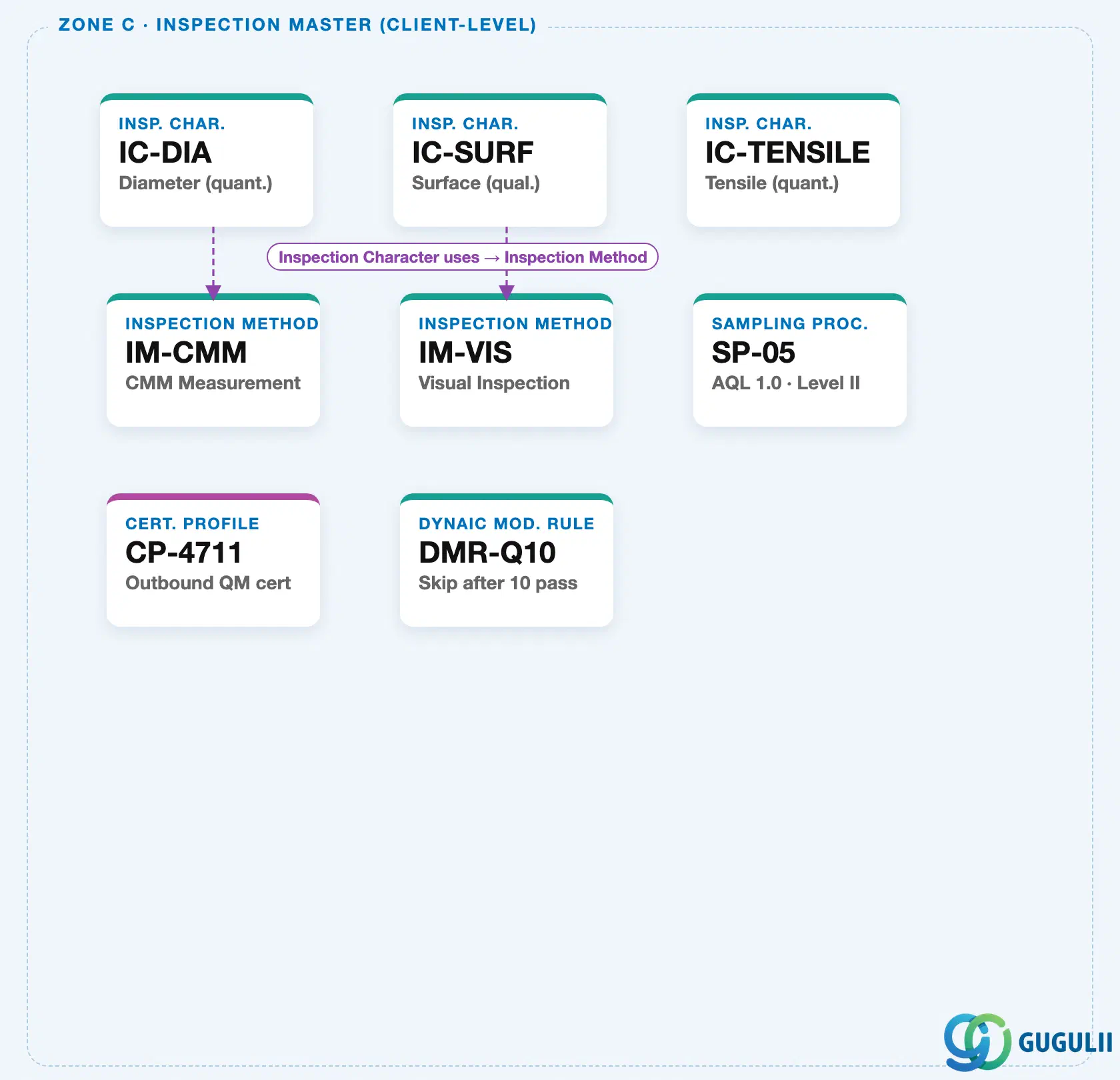
Dynamic Modification Rule is client-level, just like the Sampling Procedure it works with. It is defined once and referenced by any Sampling Procedure that needs automatic severity escalation/relaxation. It is not nested under Sampling Procedure or any other master — the two are independent client-level records that reference each other.
Data hierarchy with a concrete example
Client 100
   │
   ├── Dynamic Mod. Rule "DMR-Q10"          Skip after 10 pass
   │      ↑
   │      └── referenced by ── Sampling Procedure "SP-05"   AQL 1.0 · Level II
   │
   ├── IC "IC-DIA"                          Diameter (quant.)
   ├── Inspection Method "IM-CMM"           CMM Measurement
   └── Certificate Profile "CP-4711"        Outbound QM cert
Design principle: Name Dynamic Modification Rules after the escalation policy they implement (e.g., “Skip after 10 pass”), not after a specific material or vendor. One rule, referenced by many Sampling Procedures, keeps the escalation logic centrally governed and auditable.
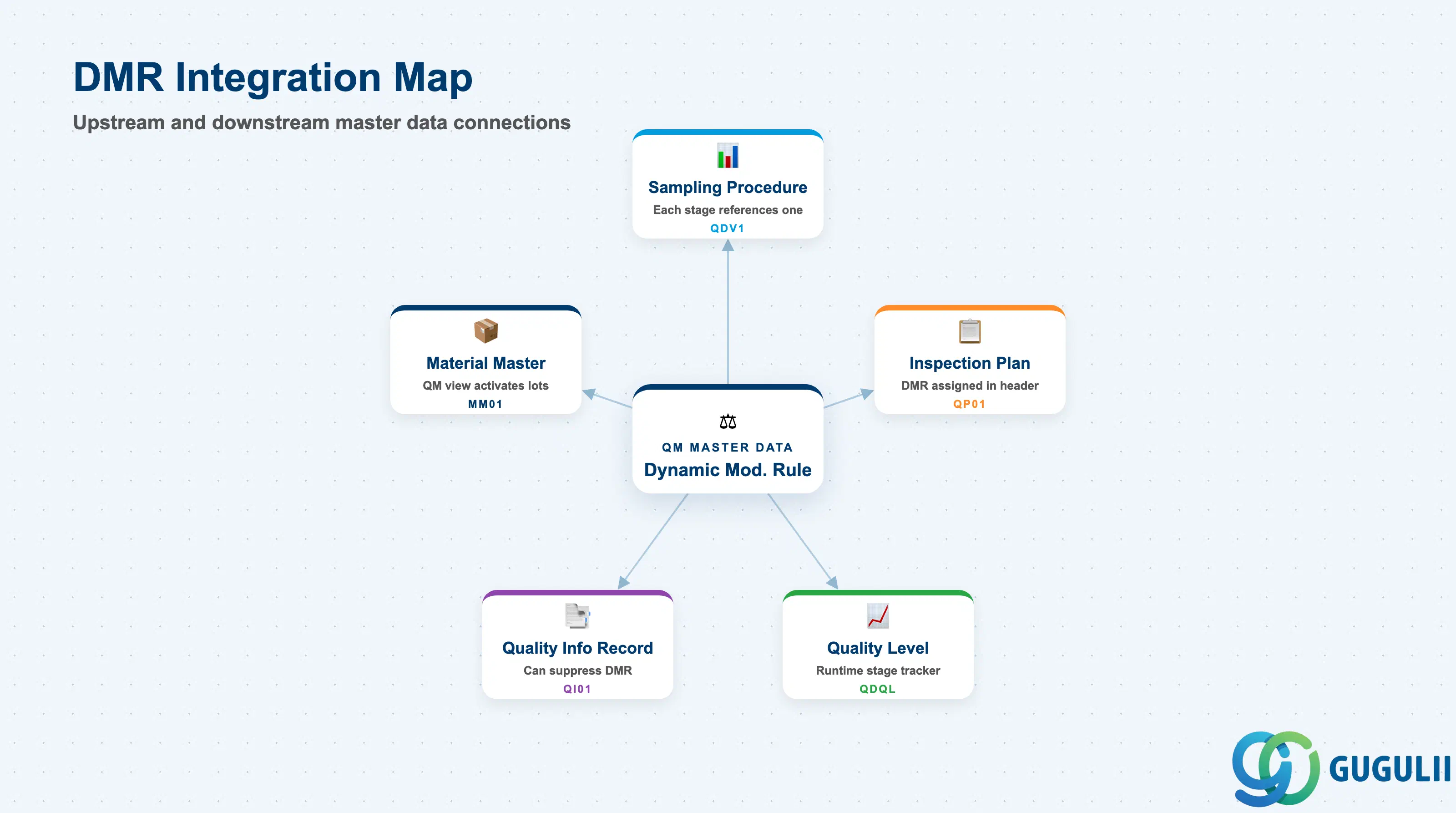
The DMR does not stand alone. It is the upper link in a chain that connects sampling policy to runtime quality level tracking.
| Object | Relationship | Practical Notes |
|---|---|---|
| Sampling Procedure (QDV1) | Each DMR stage references one Sampling Procedure | The Sampling Procedure defines sample size and AQL for that stage. The DMR references the Sampling Procedure by key — if the Sampling Procedure is changed, all DMRs referencing it inherit the change. Design Sampling Procedures before DMRs. |
| Inspection Plan (QP01) | The DMR key is assigned in the Inspection Plan header or at the operation level | The Inspection Plan determines which DMR applies to a given material inspection. Without an Inspection Plan assignment, the DMR is never activated at runtime. |
| Quality Level (runtime) | The Quality Level stores which stage is currently active for a material-vendor-plant combination | The Quality Level is updated automatically after each Usage Decision. Consultants can manually reset or adjust the Quality Level in QDR4/QDL1. |
| Quality Info Record (QI01) | The Quality Info Record can suppress dynamic modification for a specific vendor-material pair | If inspection is suppressed or skipped at the Quality Info Record level, the DMR stage counter does not advance. |
| Material Master (QM View) | Inspection types activated in the Material Master determine when inspection lots are created | DMR is only meaningful when inspection lots are generated. If the QM view does not activate the relevant inspection type, no lots are created and the DMR remains idle. |
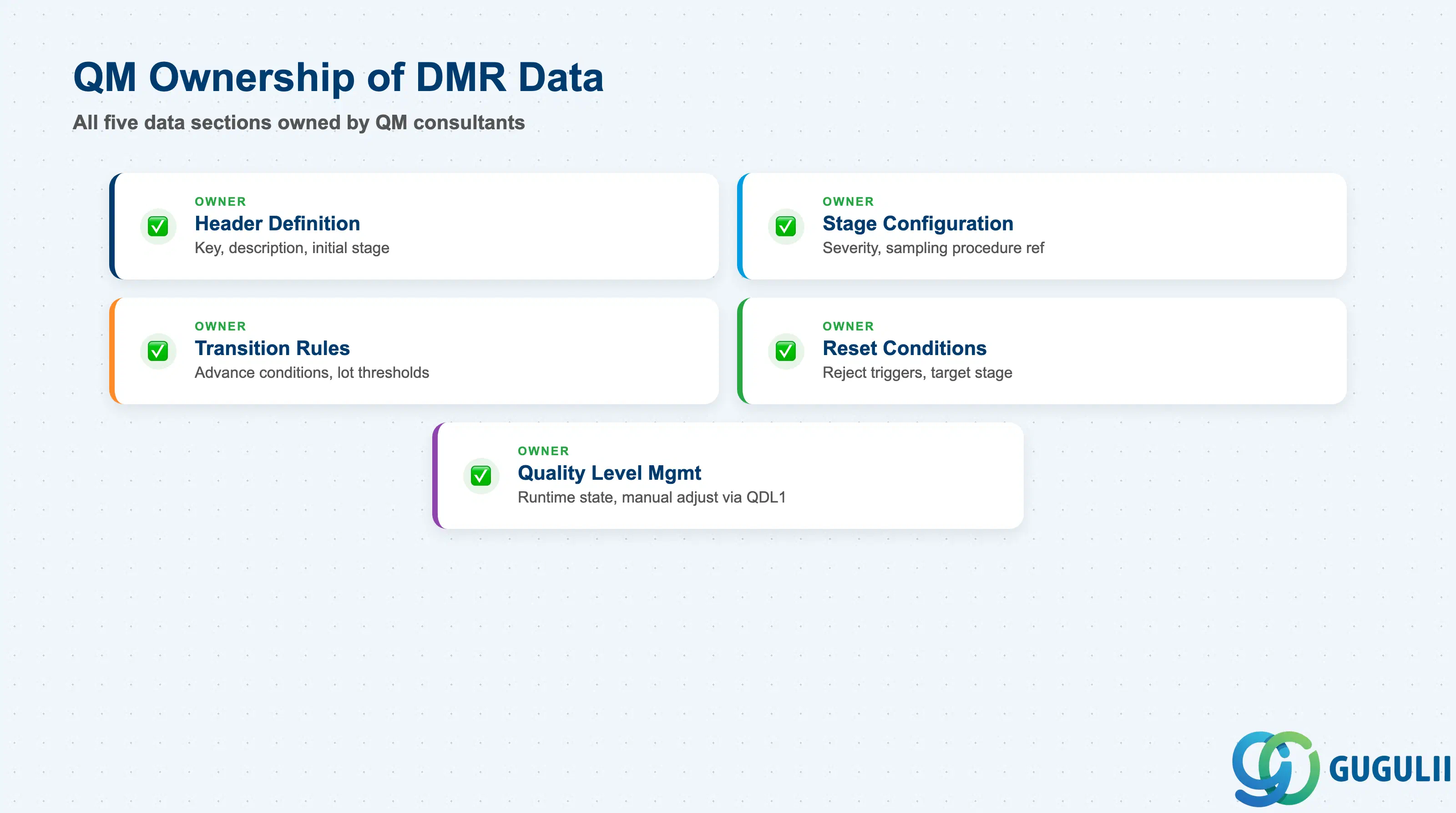
| Data Section | QM Involvement | Notes |
|---|---|---|
| Header Definition | ◎ Owner | DMR key, description, initial stage assignment |
| Stage Configuration | ◎ Owner | Stage number, inspection severity, Sampling Procedure reference |
| Transition Rules (Advance) | ◎ Owner | Conditions to move to a more relaxed (higher) stage |
| Reset Conditions (Reject) | ◎ Owner | Conditions to drop back to Tightened stage upon failure |
| Quality Level Management | ◎ Owner | Runtime stage state; manually adjustable via QDL1 |
Legend: ◎ = Owner / Critical
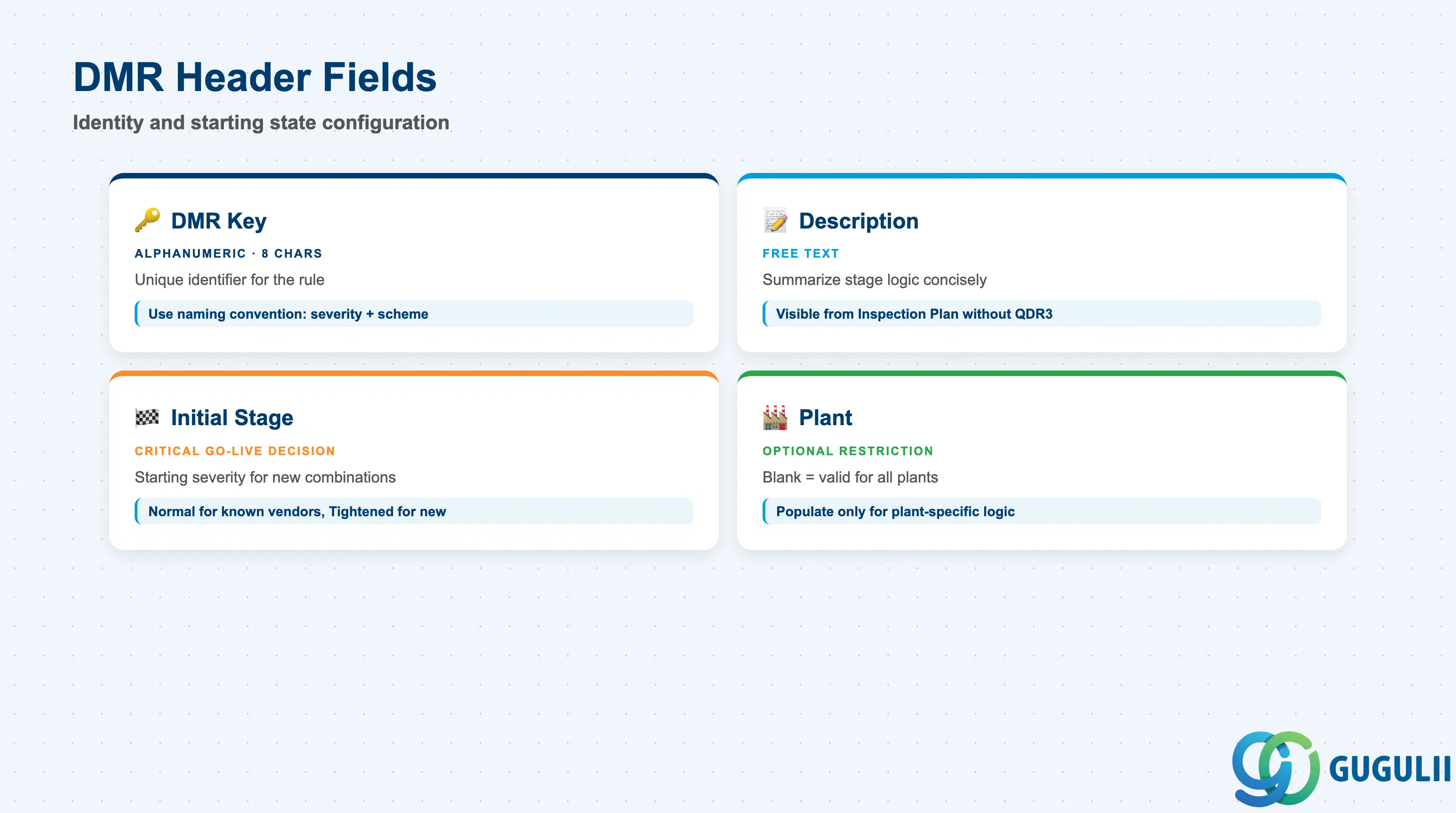
The DMR header establishes the identity and starting state of the rule. The initial stage setting is a critical go-live decision — it determines whether every new vendor-material combination begins under Normal, Tightened, or another severity.
| Field | Description | Practical Usage |
|---|---|---|
| Dynamic Modification Rule Key | Alphanumeric identifier for the DMR (up to 8 characters) | Naming convention matters for long-term maintainability. Common patterns: severity-scheme code (e.g., “STD-3ST” for standard 3-stage), commodity class, or supplier tier. A clear naming convention prevents the accumulation of functionally duplicate DMR records. |
| Description | Free-text description of the DMR | Use the description to summarize the stage logic concisely — e.g., “3-Stage: Tightened → Normal → Reduced. Advance on 5 accepts; reset on 2 rejects.” Consultants viewing the Inspection Plan will only see this description without opening QDR3. |
| Initial Stage | Stage number assigned when the Quality Level is first created | Determines the inspection severity for a brand-new vendor-material-plant combination before any history exists. Most companies start at Normal (stage 2) for known vendors and Tightened (stage 1) for new or problem vendors. Define the policy during blueprint and document it explicitly. |
| Plant | Plant restriction (optional) | If blank, the DMR is valid for all plants. Populate only if a specific stage logic applies to one plant exclusively — a rare configuration. |
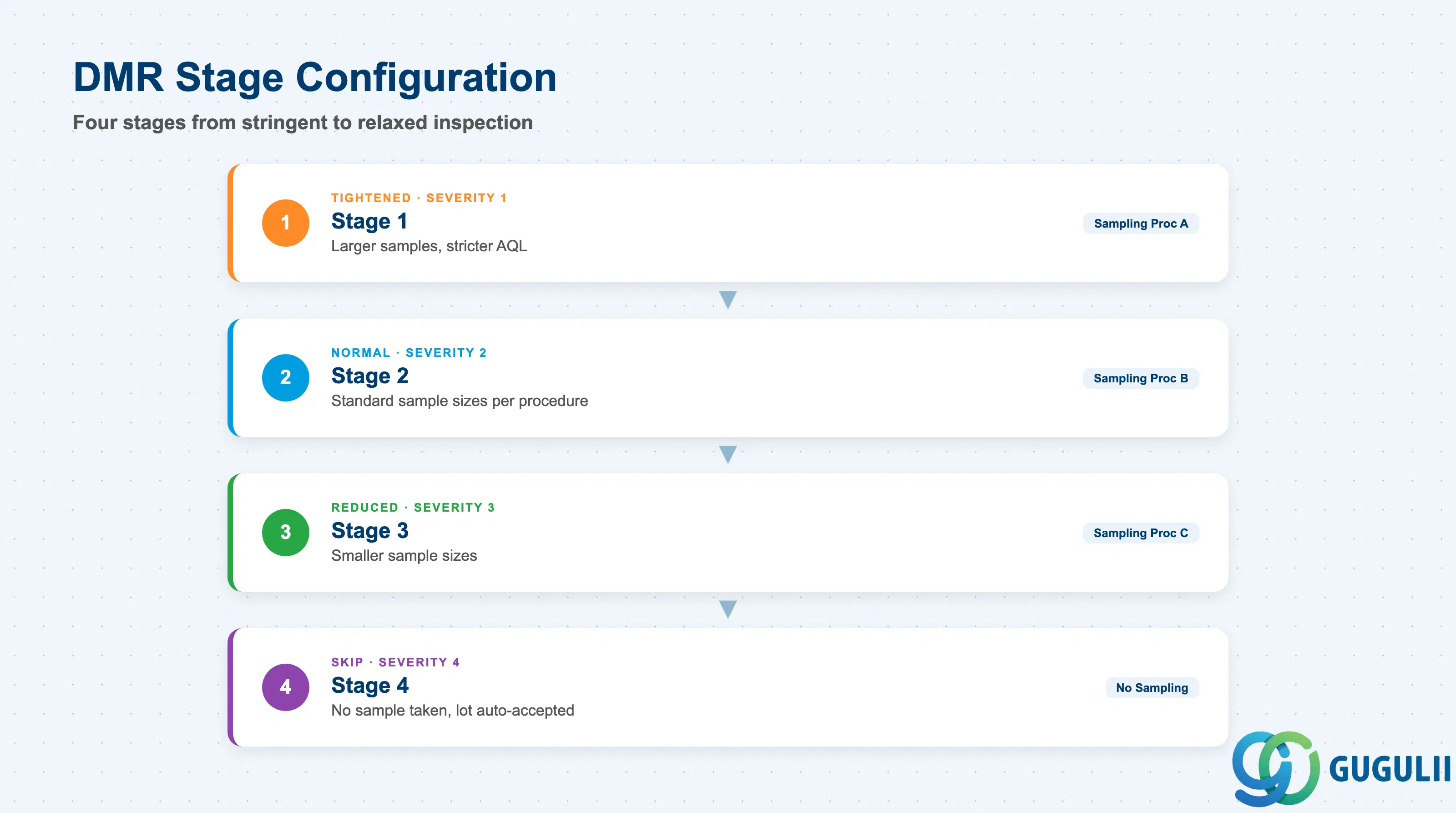
Each stage row in the DMR defines the inspection behavior for that level of quality history maturity. The number of stages is open — most implementations use three to four stages.
| Field | Description | Practical Usage |
|---|---|---|
| Stage Number | Sequential integer identifying the stage (1, 2, 3, …) | Stages must be numbered consecutively with no gaps. Stage 1 is conventionally the most stringent (Tightened). The highest stage is the most relaxed (Reduced or Skip). |
| Inspection Severity | Standard code for the severity level: 1 = Tightened, 2 = Normal, 3 = Reduced, 4 = Skip | Drives the sampling behavior. Skip (severity 4) means the lot is accepted without drawing any sample — use only for suppliers with a multi-year track record of zero defects and a certified quality management system. |
| Sampling Procedure | Reference to the Sampling Procedure (QDV1 key) used at this stage | Each stage should reference a distinct Sampling Procedure with sample sizes appropriate for the severity. For Skip stages, no Sampling Procedure is referenced. Confirm that the Sampling Procedures assigned at each stage are consistent with any applicable ISO 2859 or internal standards. |
| Number of Lots for Inspection | Minimum number of consecutive acceptable lots required before the system can consider advancing to the next stage | Setting this too low (e.g., 2 lots) makes stage advancement too easy and undermines the statistical basis of dynamic modification. Industry guidance for Normal-to-Reduced is typically 5–10 consecutive acceptable lots. |
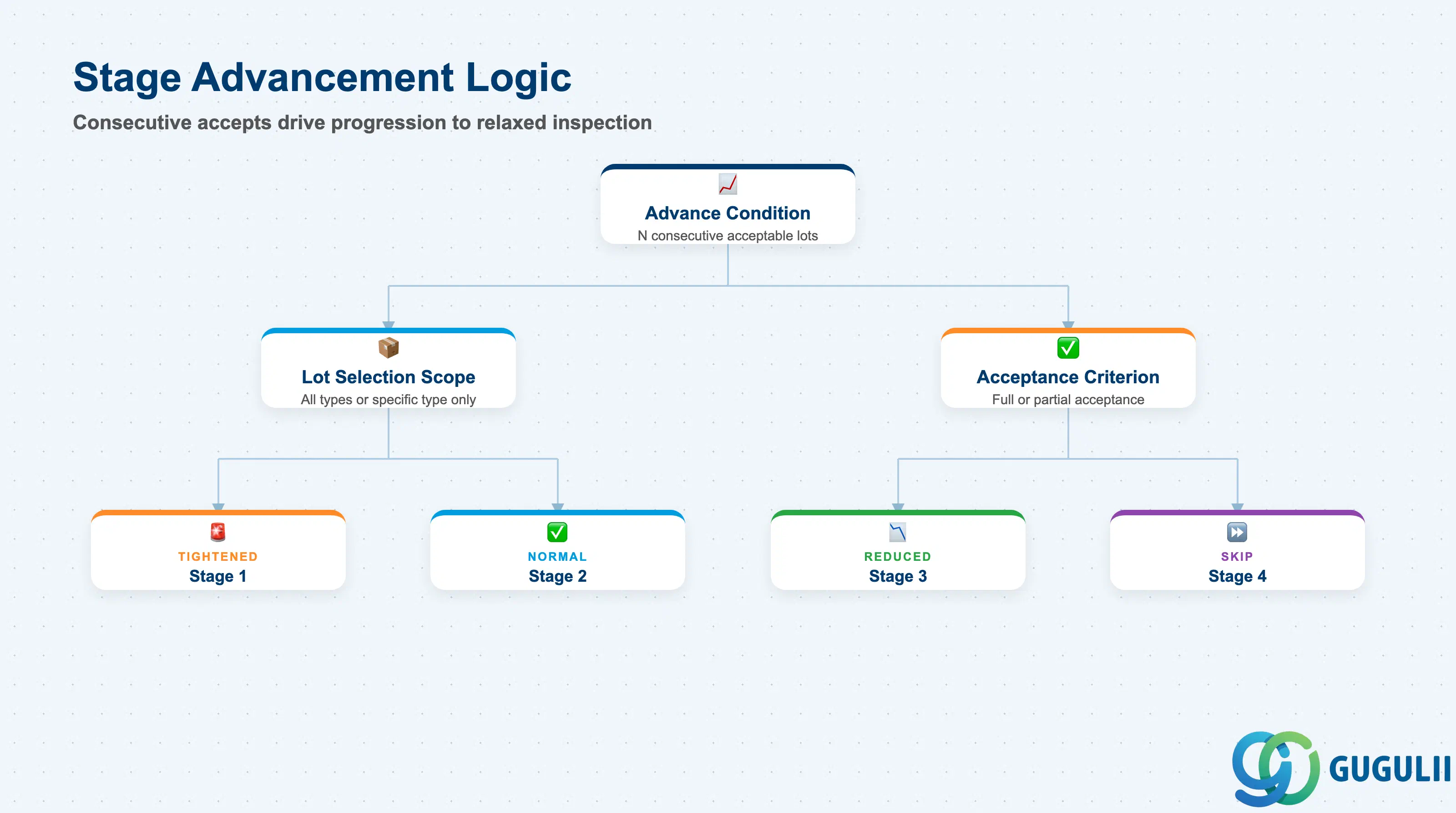
Transition rules define the conditions under which the system advances the Quality Level to a more relaxed stage. These rules are the core of the dynamic modification concept.
| Field | Description | Practical Usage |
|---|---|---|
| Advance Condition | Count of consecutive acceptable inspection lots required to advance one stage | The threshold should reflect the statistical confidence needed to justify relaxed inspection. For incoming inspection of safety-critical components, a threshold of 10 or more consecutive accepts at Normal before reaching Reduced is not uncommon. Document the rationale for each threshold in the DMR description or a separate design specification. |
| Inspection Lot Selection | Scope of lots counted toward the advance condition: all lots, or only lots of a specific inspection type | When a material is inspected under multiple inspection types (e.g., type 01 incoming and type 04 final), decide whether the DMR counts history across all types or tracks each type independently. Mixing types can produce misleading stage advancement signals. |
| Acceptance Criterion | Whether the lot must achieve full acceptance (all characteristics passed) or partial acceptance (usage decision code of “Accept” regardless of individual characteristic results) | A lot with one minor defect waived by the Quality Engineer may still carry a positive Usage Decision. Ensure the Acceptance Criterion aligns with the company’s definition of “acceptable” for the purposes of stage advancement. |
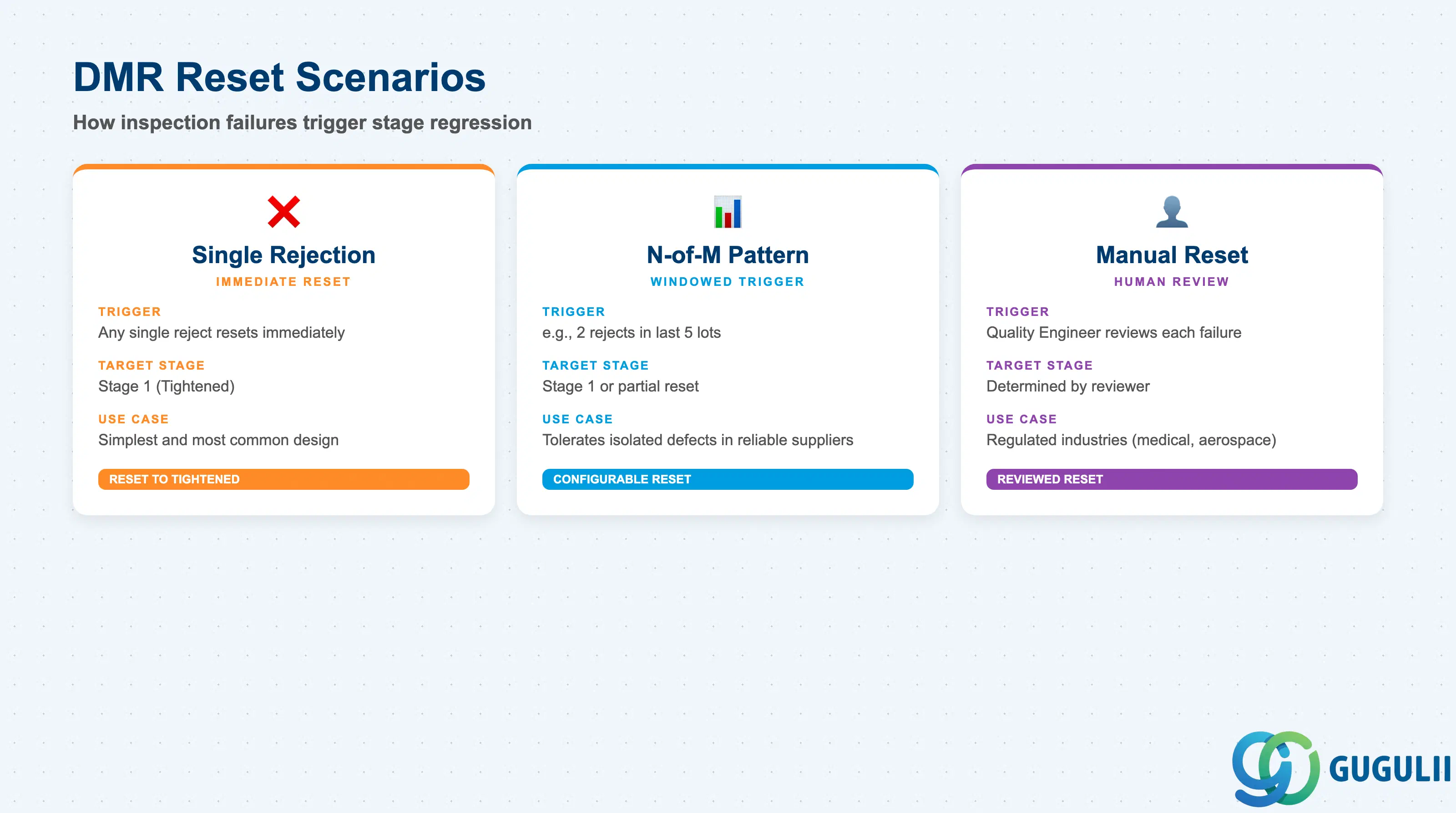
Reset conditions define when the Quality Level is dropped back to a more stringent stage (typically Stage 1 Tightened) following inspection failures. Robust reset logic is as important as the advancement logic — without it, a single bad lot in a long acceptance run is overlooked.
| Field | Description | Practical Usage |
|---|---|---|
| Reset Stage | Target stage number after a reset event (typically Stage 1 Tightened) | Some implementations configure a partial reset (e.g., from Reduced to Normal rather than all the way to Tightened) for minor deviations. This is acceptable if the quality team formally defines what constitutes a minor versus major deviation. |
| Rejection Trigger | Number of rejected lots within a defined window of recent lots (e.g., 1 reject in last 5 lots) | A single-rejection trigger (any reject immediately resets) is the simplest and most common design. An N-of-M trigger (e.g., 2 rejects in 5 lots) is used when occasional isolated defects occur even in otherwise reliable suppliers. Avoid overly complex trigger combinations that are difficult to explain to the quality team. |
| Automatic vs. Manual Reset | Whether the system resets the Quality Level automatically upon a reject Usage Decision, or requires manual intervention | Automatic reset is the standard design. Manual reset is used in environments where the Quality Engineer reviews each failure before deciding on the stage impact — common in regulated industries (medical devices, aerospace) where documented human review of each quality event is required. |
| ID | Category | Title |
|---|---|---|
| qm-001 | Overview | What is SAP QM? |
| ID | Category | Title |
|---|---|---|
| qm-a01 | Overview | SAP QM Master Data: Overview, Hierarchy & Relationships |
| qm-a02-01 | Master Data | SAP QM Catalog |
| qm-a02-02 | Master Data | SAP QM Master Inspection Characteristic |
| qm-a02-03 | Master Data | SAP QM Inspection Method |
| qm-a03-01 | Master Data | SAP QM Sampling Procedure |
| qm-a03-02 | Master Data | SAP QM Dynamic Modification Rule 📍 |
| qm-a05-01 | Master Data | SAP QM Material Master |
| qm-a04-01 | Master Data | SAP QM Work Center |
| qm-a04-02 | Master Data | SAP QM Inspection Plan |
| qm-a05-02 | Master Data | SAP QM Quality Info Record |
| ID | Category | Title |
|---|---|---|
| qm-b01 | Overview | SAP QM Transactions: Process Flow, Hierarchy & Relationships |