Title here
Summary here

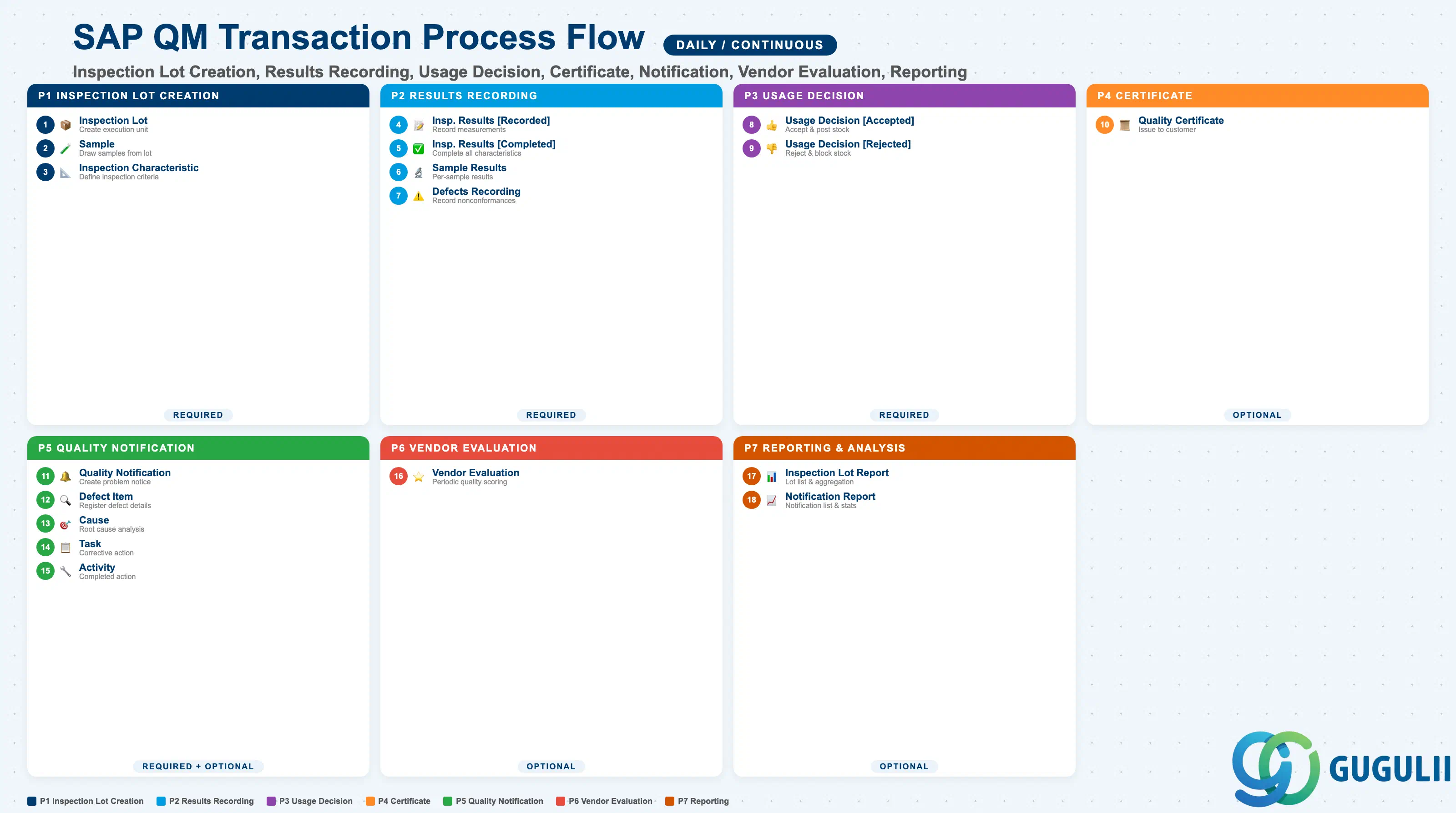
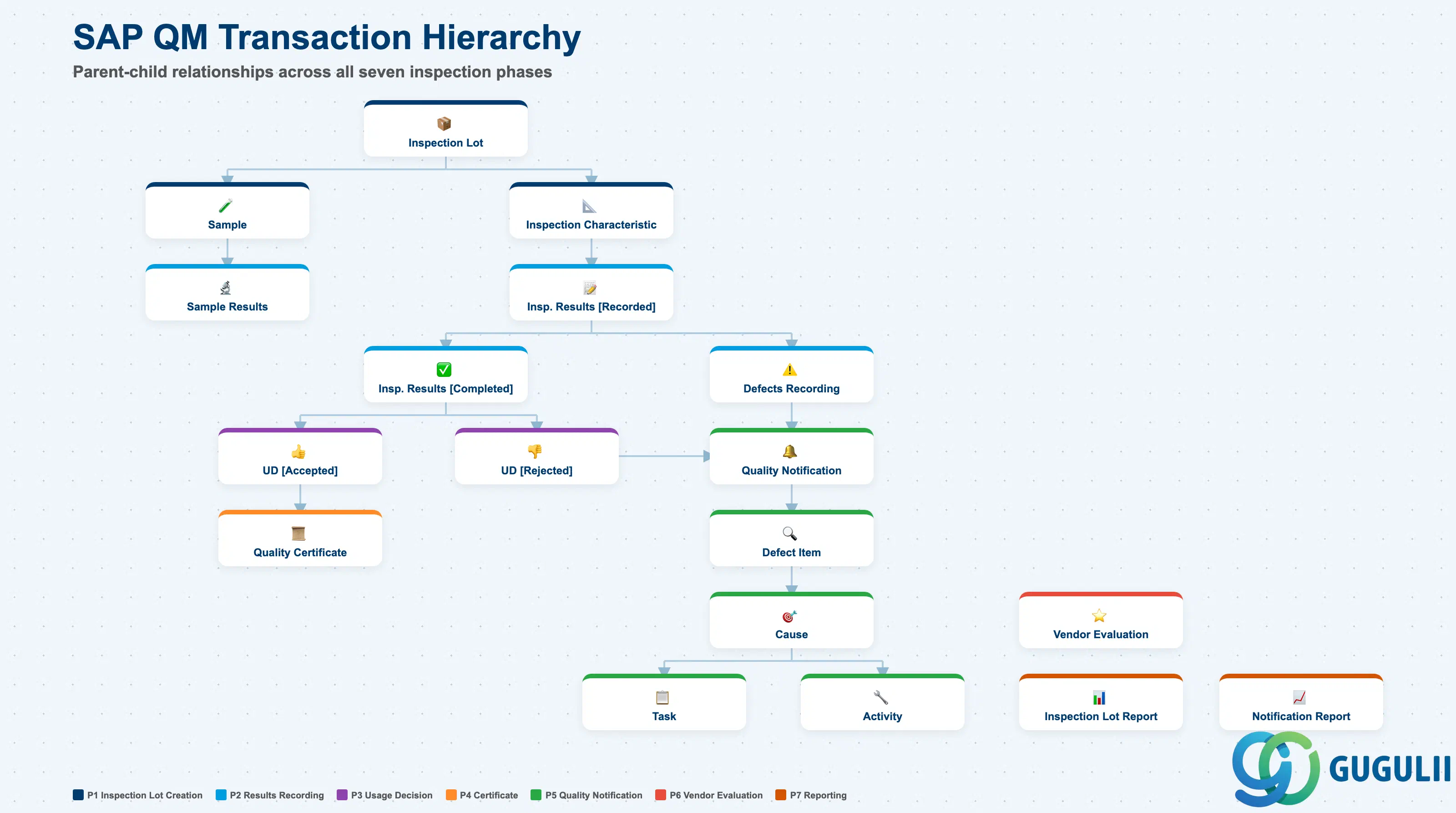
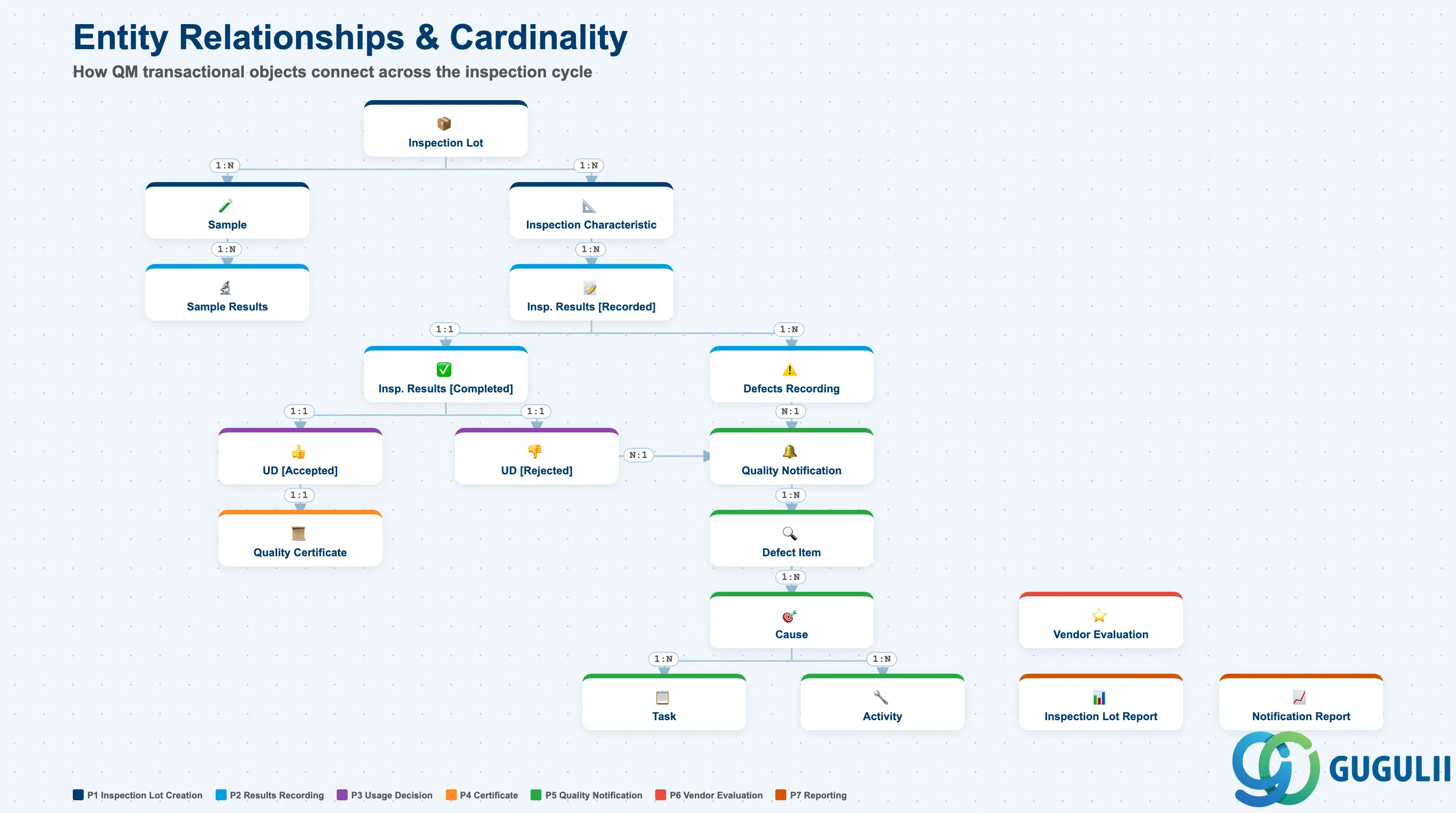
| Phase | Object | Integration | Planned | Actual | Prerequisite | Tr-Cd | Description | Practical Examples | Role |
|---|---|---|---|---|---|---|---|---|---|
| 1 Inspection Lot Creation | Inspection Lot | - | Inspection Lot (*1) | - | Material Master (QM View), Inspection Plan | QA01/QA02/QA03 | Create the execution unit for quality inspection (auto-generated or manually created) | Goods receipt inspection lot (inspection type 01), production inspection lot (inspection type 02), manual creation via QA01 | QM Administrator |
| Sample | - | Sample | Inspection Lot (*1) | Inspection Lot, Sampling Procedure | QPR1/QPR2 | Draw and define samples for the inspection lot | Draw 5 samples from a lot size of 1,000; 100% inspection uses full quantity as sample | QM Administrator | |
| Inspection Characteristic | - | Inspection Characteristic | Inspection Lot (*1) | Inspection Lot, Inspection Plan | QA02 | Expand and define inspection characteristics for the inspection lot | Outer diameter measurement (quantitative), visual inspection (qualitative), tensile strength (quantitative) | QM Administrator | |
| 2 Results Recording | Inspection Results [Recorded] | - | Inspection Results [Recorded] (*2) | Inspection Characteristic | Inspection Characteristic | QA32/QE01 | Record measurement results for each inspection characteristic | Measured outer diameter 10.05 mm (spec 10.0 ± 0.1 mm → pass), visual check OK | QM Administrator |
| Inspection Results [Completed] | - | Inspection Results [Completed] (*3) | Inspection Results [Recorded] (*2) | Inspection Results [Recorded] | QA32/QE01 | Complete result recording for all inspection characteristics | All 5 characteristics recorded — transitions to usage decision ready state | QM Administrator | |
| Sample Results | - | - | Sample | Sample | QA32/QE51N | Record inspection results at the individual sample level | Sample #1: outer diameter 10.02 mm, Sample #2: outer diameter 10.05 mm | QM Administrator | |
| Defects Recording | - | Defects Recording | Inspection Results [Recorded] (*2) | Inspection Results [Recorded] | QA32/QF01 | Record defect and nonconformance data | Defect code “01: Dimension nonconformance”, defect quantity 3 units, defect rate 0.3% | QM Administrator | |
| 3 Usage Decision | Usage Decision [Accepted] | MM | Usage Decision [Accepted] | Inspection Results [Completed] (*3) | Inspection Results [Completed] | QA11/QA12 | Accept the inspection lot based on results (includes stock posting) | UD code A (accepted), movement type 321 (quality inspection stock → unrestricted stock) | QM Administrator |
| Usage Decision [Rejected] | MM | Usage Decision [Rejected] | Inspection Results [Completed] (*3) | Inspection Results [Completed] | QA11/QA12 | Reject the inspection lot based on results (includes stock posting) | UD code R (rejected), movement type 322 (quality inspection stock → blocked stock) | QM Administrator | |
| 4 Certificate | Quality Certificate | SD | - | Usage Decision [Accepted] | Usage Decision [Accepted] | QC01/QC02/QC03 | Create and issue quality certificate for the customer | Certificate profile “CERT01”, output inspection results and acceptance decision | QM Administrator |
| 5 Quality Notification | Quality Notification | - | Quality Notification | Defects Recording, Usage Decision [Rejected] | Defects Recording, Usage Decision [Rejected] | QM01/QM02/QM03 | Create quality problem or complaint notification | Q1 (customer complaint), Q2 (vendor complaint), Q3 (internal problem) | QM Administrator |
| Defect Item | - | Defect Item | Quality Notification | Quality Notification | QM02 | Register defect items within the quality notification | Defect code “dimension nonconformance”, defective material and lot number recorded | QM Administrator | |
| Cause | - | Cause | Defect Item | Defect Item | QM02 | Analyze and register the root cause of the defect | Cause code “01: Equipment failure”, “02: Operator error”, root cause analysis | QM Administrator | |
| Task | - | Task | Cause | Cause | QM02 | Register corrective and preventive action tasks | Task “conduct equipment inspection”, “revise work instruction”, set due date | QM Administrator | |
| Activity | - | - | Task | Task | QM02 | Register the action taken against the task | Activity “bearing replacement completed”, “work instruction Rev.2 issued” | QM Administrator | |
| 6 Vendor Evaluation | Vendor Evaluation | MM | - | - | - | ME61/ME63 | Evaluate vendors based on inspection results (periodic processing) | Automatic quality score calculation, vendor ranking updated | MM/QM Administrator |
| 7 Reporting & Analysis | Inspection Lot Report | - | - | - | - | QA32/QA33 | Display inspection lot list and details | Open lot list, aggregation by inspection type | QM Administrator |
| Notification Report | - | - | - | - | QM10/QM11 | Display quality notification list and details | Open notification list, aggregation by type and month | QM Administrator |
(*1) Sample, Inspection Characteristic, and Inspection Lot are defined in parallel from the Inspection Lot, allowing 1:N correspondence.
(*2) Inspection Results [Recorded] branches from Inspection Characteristic, allowing 1:N correspondence.
(*3) Inspection Results [Completed] branches into Accepted / Rejected at Usage Decision, allowing 1:N correspondence.
| ID | Category | Title |
|---|---|---|
| qm-001 | Overview | What is SAP QM? |
| ID | Category | Title |
|---|---|---|
| qm-a01 | Overview | SAP QM Master Data: Overview, Hierarchy & Relationships |
| qm-a02-01 | Master Data | SAP QM Catalog |
| qm-a02-02 | Master Data | SAP QM Master Inspection Characteristic |
| qm-a02-03 | Master Data | SAP QM Inspection Method |
| qm-a03-01 | Master Data | SAP QM Sampling Procedure |
| qm-a03-02 | Master Data | SAP QM Dynamic Modification Rule |
| qm-a05-01 | Master Data | SAP QM Material Master |
| qm-a04-01 | Master Data | SAP QM Work Center |
| qm-a04-02 | Master Data | SAP QM Inspection Plan |
| qm-a05-02 | Master Data | SAP QM Quality Info Record |
| ID | Category | Title |
|---|---|---|
| qm-b01 | Overview | SAP QM Transactions: Process Flow, Hierarchy & Relationships 📍 |