Title here
Summary here

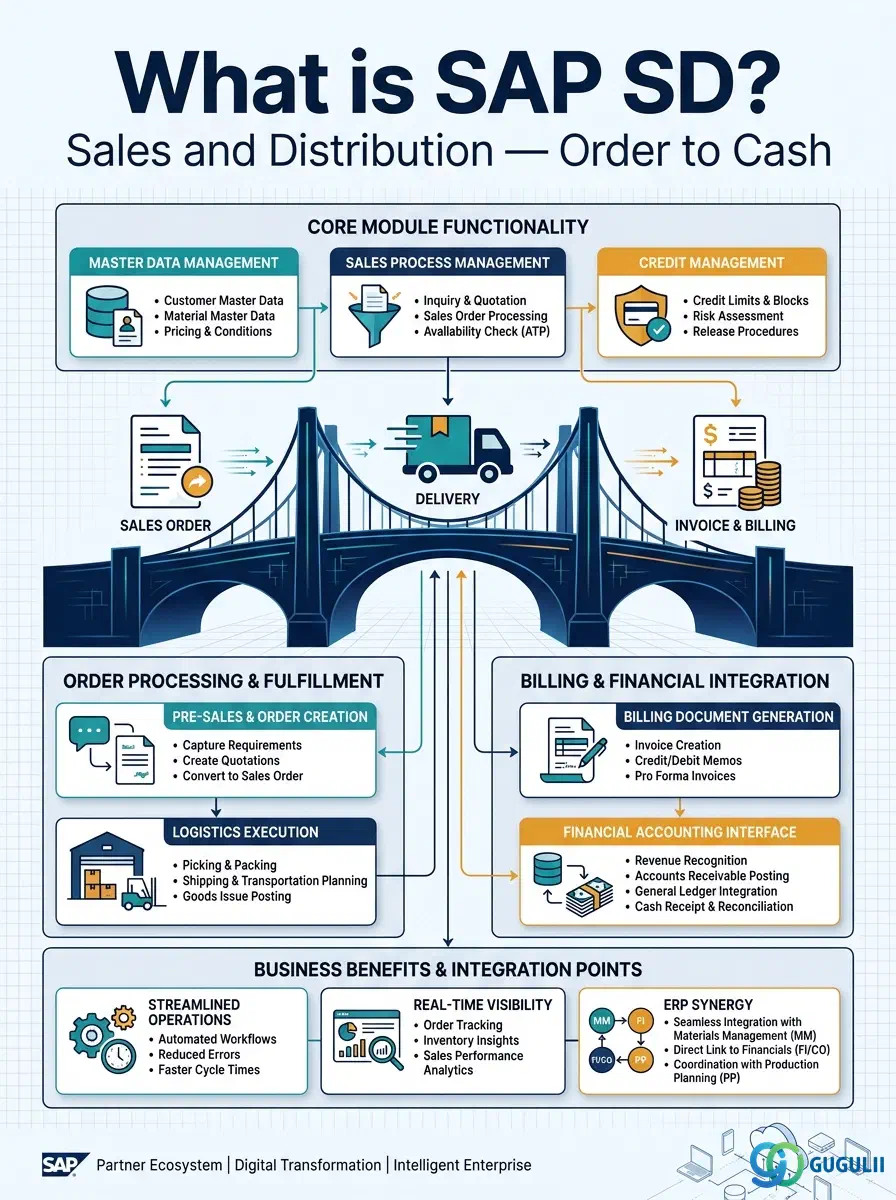
SAP Sales and Distribution (SD) is the module of SAP ERP and SAP S/4HANA that manages every step from receiving a customer’s order to collecting payment. It is organized around the order-to-cash (O2C) cycle: pre-sales activities → sales order → outbound delivery → goods issue → billing → cash receipt.
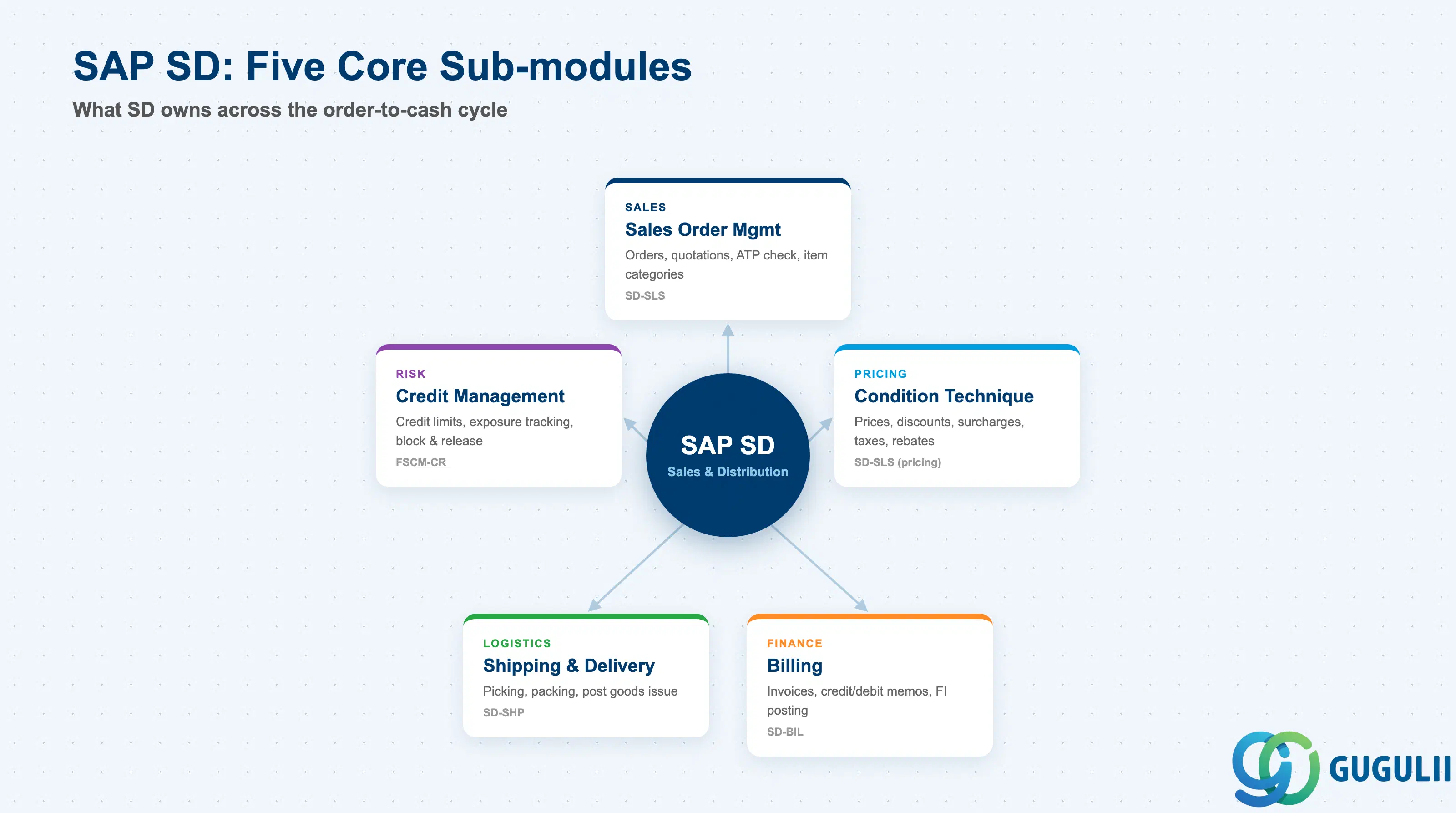
The module is formally divided into the sub-modules SD-MD (Master Data), SD-SLS (Sales), SD-SHP (Shipping), SD-BIL (Billing), SD-TBA (Transportation), SD-CAS (Sales Support), and SD-FTT (Foreign Trade). In practice, requirements definition projects focus most heavily on five functional domains.
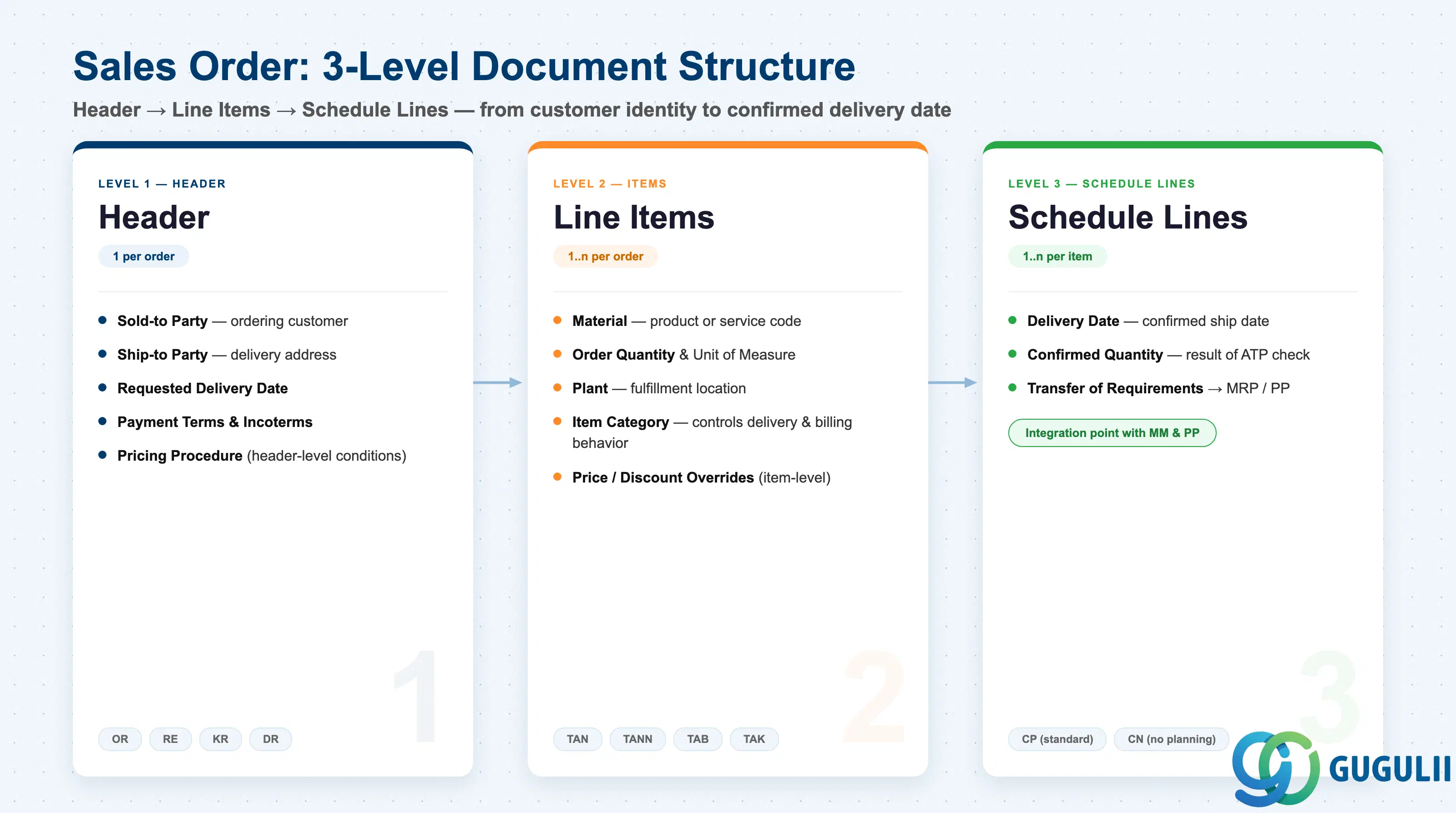
The sales order is the central document of SD. Every order has a three-level structure:
Order types define document behavior. Standard delivery-based orders use type OR. Returns use RE. Credit memo requests use KR and debit memo requests use DR. Rush orders (RO) and cash sales (CS) have streamlined delivery flows. Quotations (QT) and inquiries (IN) are pre-sales documents that feed into order creation via copy control.
Item categories control what happens at the item level. TAN is the standard deliverable item; TANN is a free-of-charge item that triggers delivery but no billing. TAB routes a third-party order to an external vendor via a purchase requisition. TAK is a make-to-order item that ties the production order to the sales order via a special stock indicator. Item categories are determined automatically from the sales document type + item category group on the material master, with manual override allowed.
Schedule line categories (e.g., CP for standard purchasing, CN for no planning) determine whether a transfer of requirements flows to MRP and which inventory movement type is used at goods issue.
Availability to Promise (ATP) is checked at the schedule line level. The system reads unrestricted stock plus scheduled receipts against demand, using a checking rule that defines the scope of the check (stock only, purchase orders included, production orders included, etc.). In S/4HANA, advanced ATP (aATP) extends this with product substitution, multilevel ATP, and capable-to-promise capabilities.
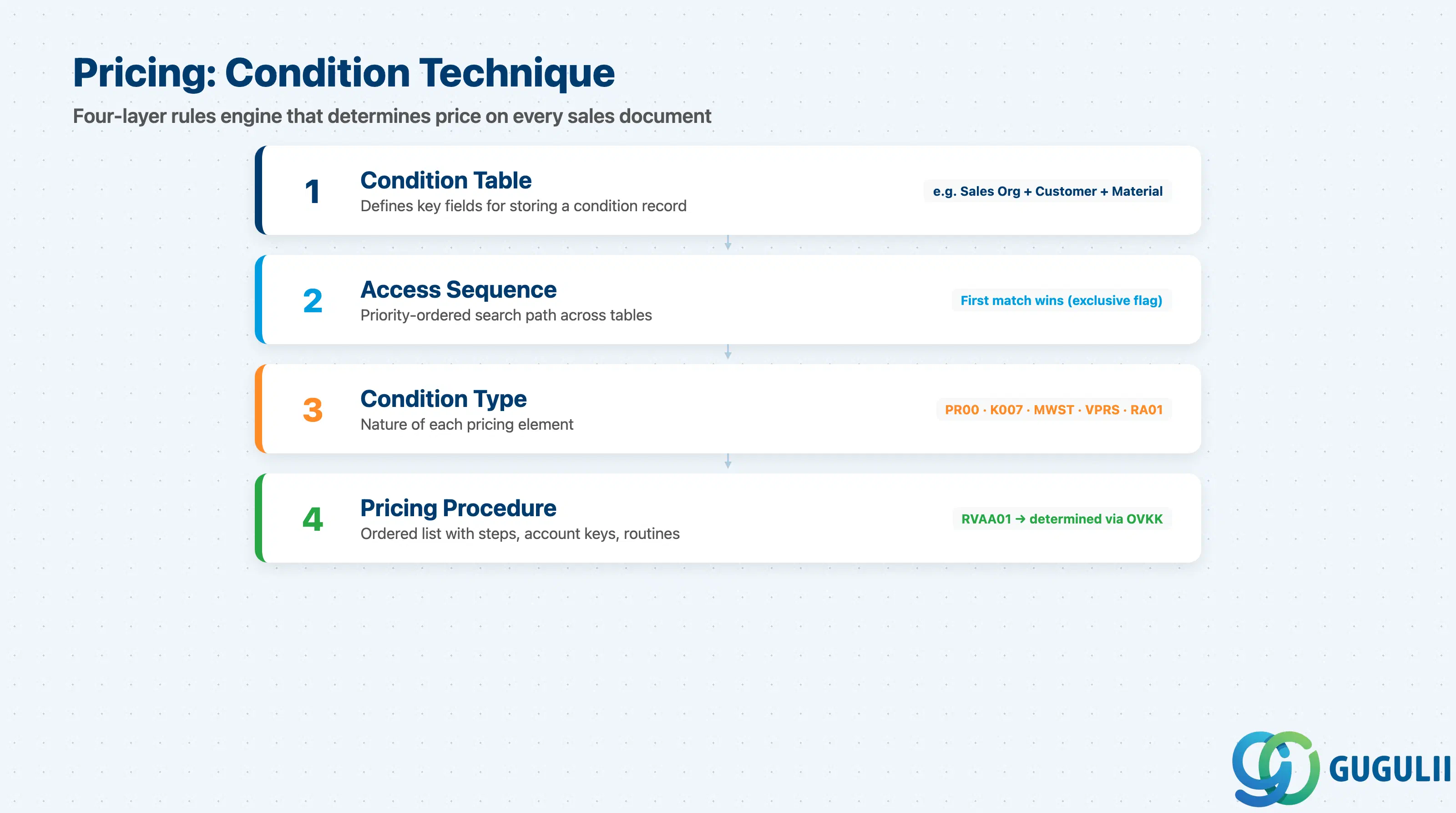
SD pricing is governed by the condition technique — a four-layer rules engine:
Pricing procedure determination happens in transaction OVKK: the combination of Sales Area + Customer Pricing Procedure (from customer master) + Document Pricing Procedure (from order type) returns the correct pricing procedure.
VPRS (cost condition) draws the moving average price or standard cost from the material master. It is not visible to the customer but flows to CO-PA as the cost component of profitability.
For rebate processing, condition types of the HB class accrue a provision to an accrual account at each billing; the rebate settlement run later creates a credit memo against that accrual.
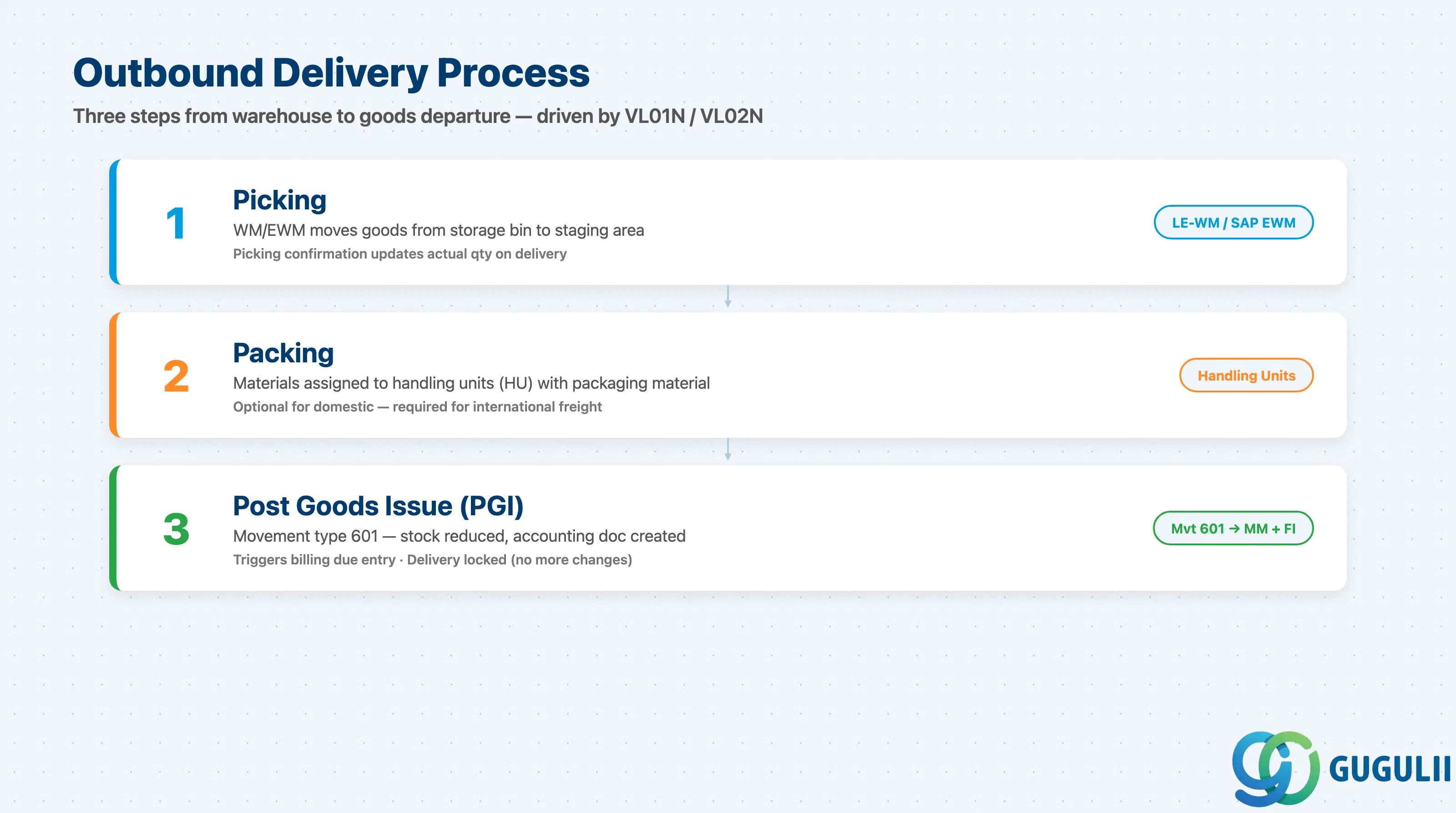
The outbound delivery document (transaction VL01N) is created from a sales order or a delivery due list (VL10). It copies the ship-to party, delivery address, materials, quantities, and the requested delivery date from the sales order.
Key steps in the delivery process:
Shipping point determination is automatic: Loading Group (from material master) + Shipping Condition (from customer master or order header) + Plant → Shipping Point. A single delivery can only have one shipping point, so mixed items sometimes cause a delivery split.
Route determination uses the departure zone (from shipping point), the transportation zone (from ship-to address), the shipping condition, and the transportation group (from material master) to derive a route. Routes carry transit time, which feeds backward scheduling of pick/pack activities.
Backorder processing (transaction V_V2) identifies schedule lines with unconfirmed quantities and reassigns newly available stock according to priority rules.
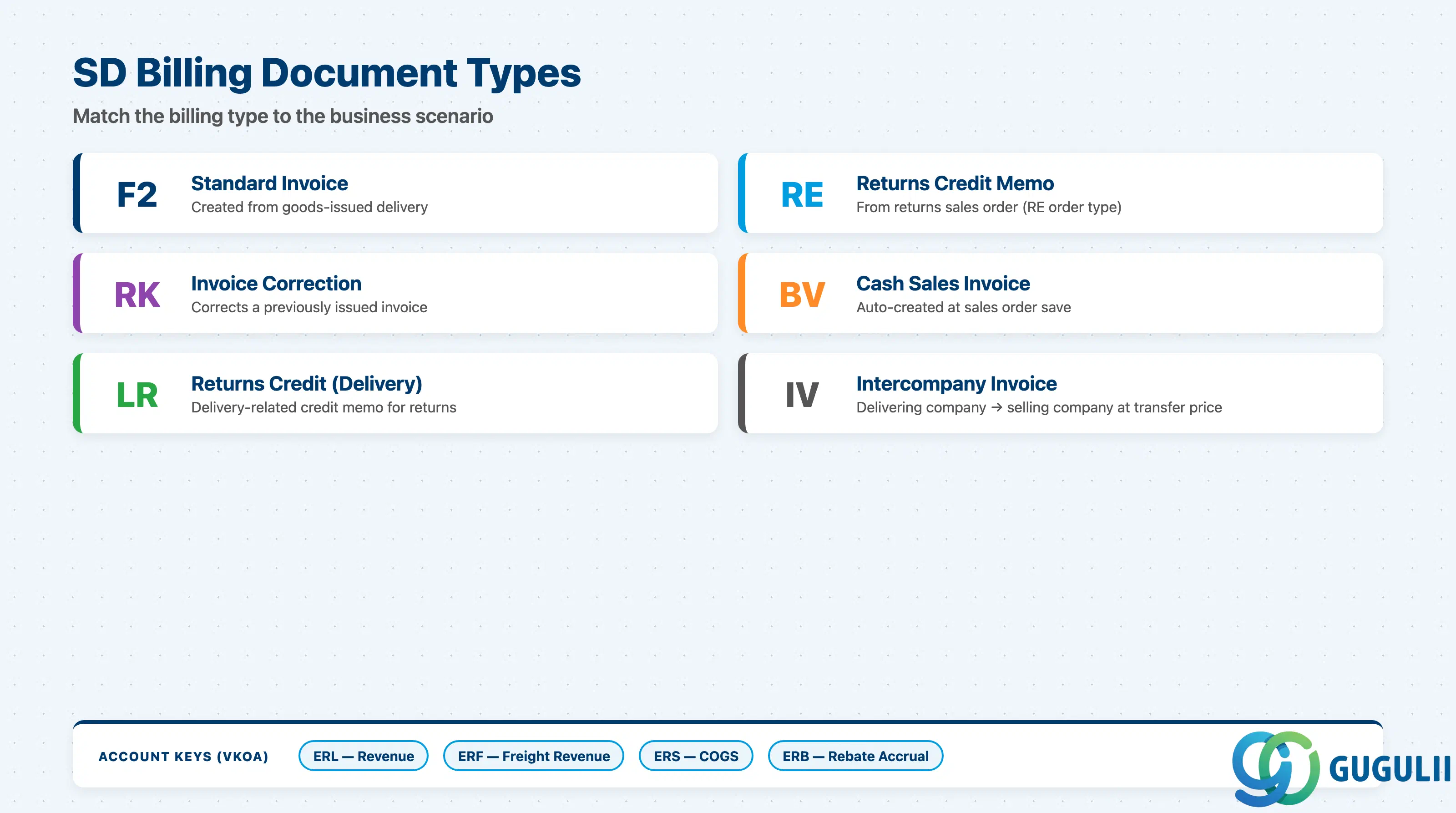
The billing document (transaction VF01 or the billing due list VF04) is created from a goods-issued delivery or, for services, directly from a sales order. Common billing types:
For project or subscription scenarios, billing plans separate invoicing from delivery. Milestone billing creates partial invoices when project milestones are completed; periodic billing generates fixed-amount invoices on a calendar schedule (monthly, quarterly).
Account determination (transaction VKOA) maps the combination of chart of accounts + sales organization + account assignment group (customer) + account assignment group (material) + account key to a GL account. Common account keys: ERL (revenue), ERF (freight revenue), ERS (cost/COGS offset), ERS (rebate accrual).
Billing releases an FI accounting document automatically: accounts receivable is debited against the reconciliation account, and revenue accounts are credited. This is the primary SD-FI integration point.
Intercompany billing involves two documents: a standard invoice to the external customer from the selling company code, and an intercompany invoice (type IV) from the delivering company code to the selling company code at transfer price.
Revenue recognition in S/4HANA can follow ASC 606/IFRS 15 rules. Event-based revenue recognition (VBREVENI) uses revenue recognition keys on condition types and posts deferred revenue at billing, recognizing it when the performance obligation is satisfied.
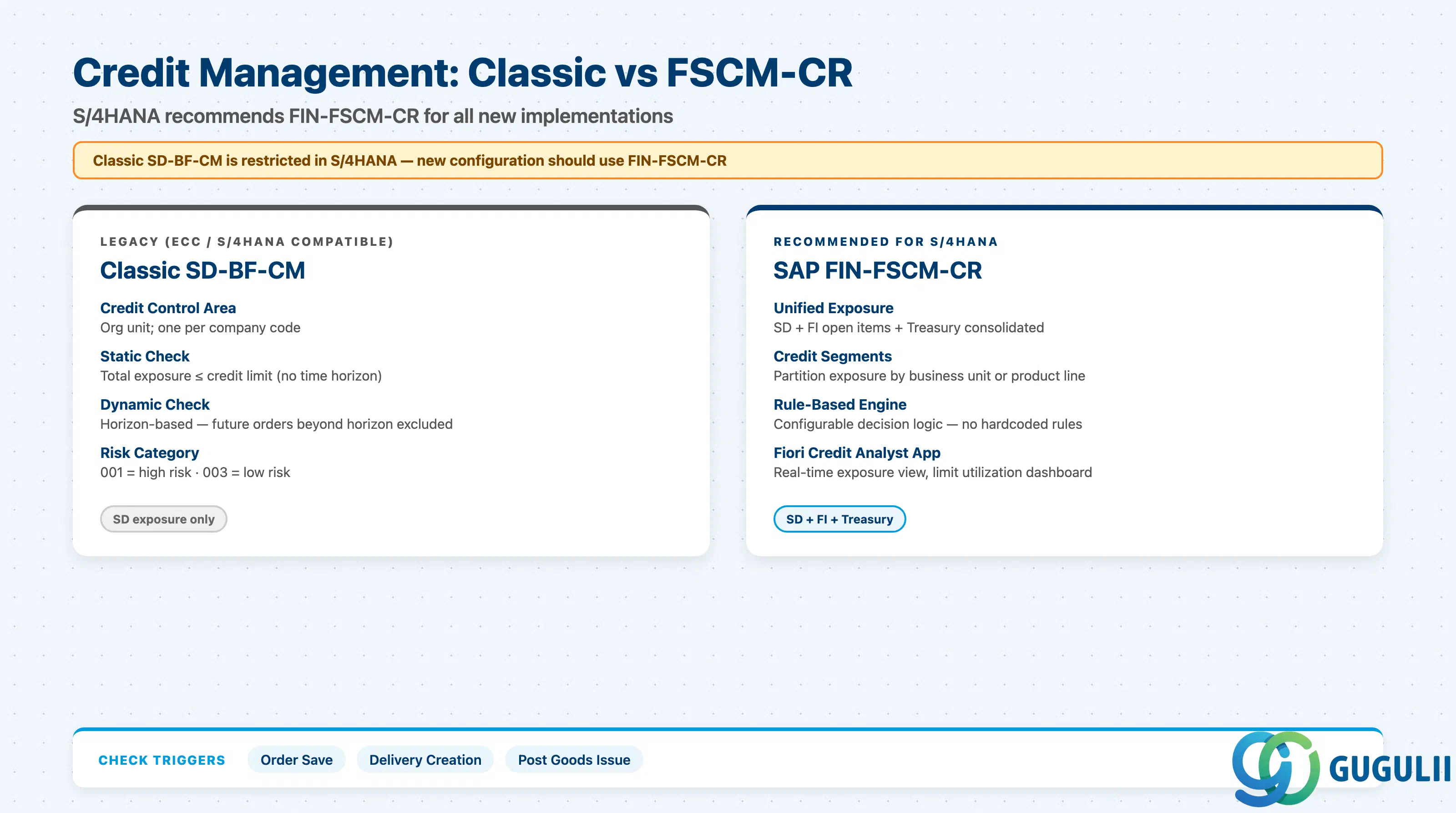
Credit management in SD checks whether a customer’s total exposure (open orders + open deliveries + open invoices + open FI items) exceeds their credit limit before allowing a business transaction to proceed.
Classic SD Credit Management (SD-BF-CM):
SAP Credit Management / FIN-FSCM-CR (recommended for new S/4HANA implementations): Classic SD credit management is restricted in S/4HANA — new configurations should use FIN-FSCM-CR. It provides a unified credit exposure drawing from SD, FI, and treasury. Credit segments allow partitioning exposure by business unit. A rule-based decision engine evaluates credit worthiness, and Fiori apps (e.g., “Credit Limit Utilization”) give the credit analyst a real-time view.
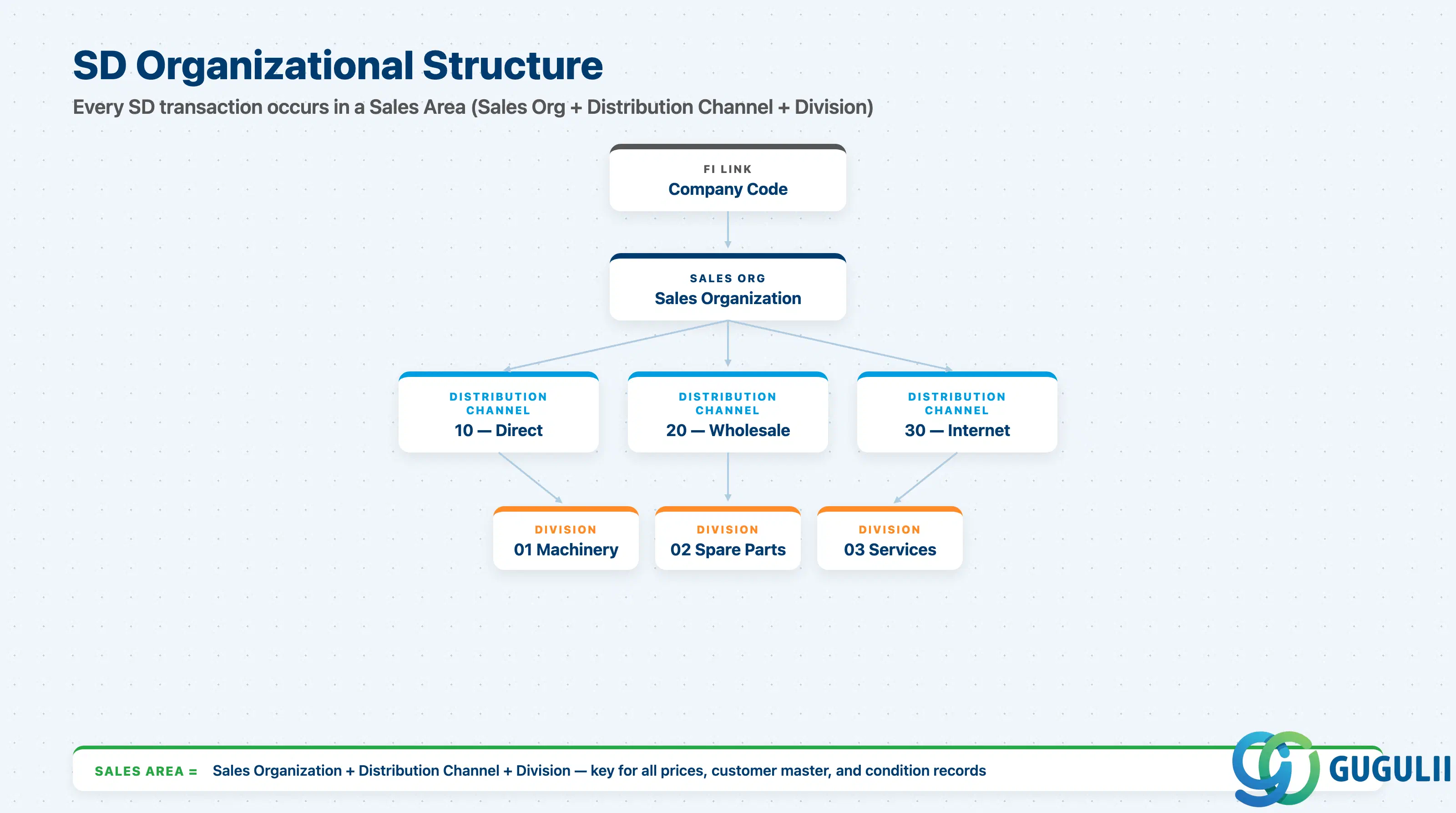
SAP SD’s organizational units form a hierarchy that must be designed before master data can be created. Every sales-relevant transaction occurs in the context of a Sales Area, which is the combination of three units:
The Sales Organization (German: Verkaufsorganisation, table T001W) is the top-level unit for sales. It represents the legal or regional entity responsible for selling and distributing products. Sales Organization is assigned to exactly one Company Code, creating the SD-FI link at the organization level.
Design considerations:
The Distribution Channel (Vertriebsweg) represents the means by which goods and services reach the customer. Common examples: 10 = Direct Sales, 20 = Wholesale, 30 = Internet/eCommerce, 40 = Retail.
Distribution Channel is assigned to a Sales Organization. Each channel can have distinct:
The Common Distribution Channel (SPRO: Define Common Distribution Channels) allows one channel to share condition records and/or customer master data with another, reducing maintenance.
The Division (Sparte) groups products or services by business line (e.g., 01 = Machinery, 02 = Spare Parts, 03 = Services). Materials must have a Division in their basic data. When a material is placed on a sales order, the Sales Area (including Division) must match the Division on the material unless cross-division sales are activated.
Division is relevant for:
The Common Division (SPRO: Define Common Divisions) allows customer master data to be shared across divisions.
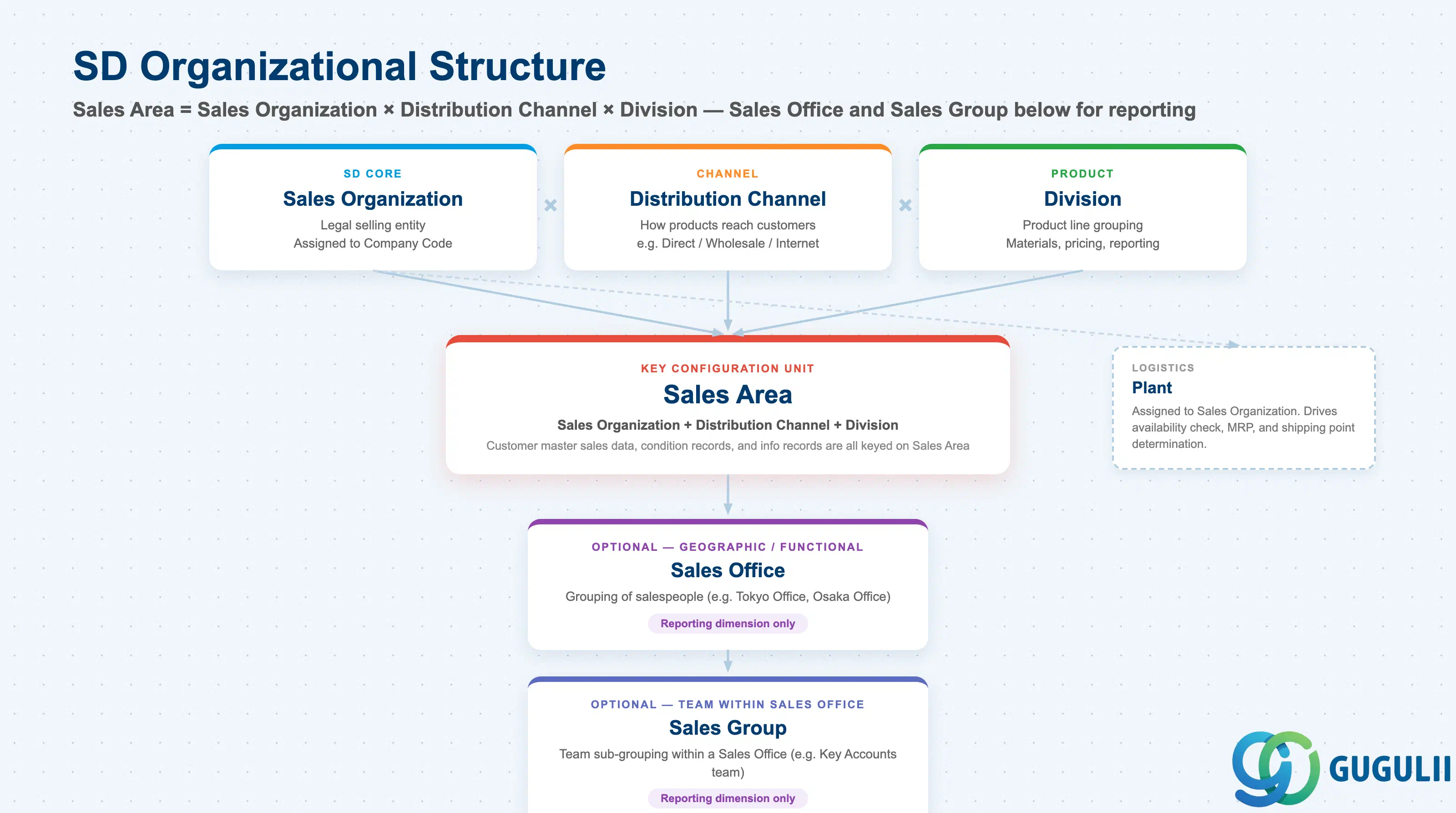
The Sales Area = Sales Organization + Distribution Channel + Division. All of the following are keyed on Sales Area:
Below the Sales Area, two optional organizational units help with reporting and workload assignment:
Neither Sales Office nor Sales Group affects pricing or document determination — they are primarily reporting dimensions and can be assigned to sales documents manually or via defaults.
Plant is the logistics unit responsible for inventory and production. Each plant is assigned to a Sales Organization. When a sales order item is created, a plant is proposed based on customer master and/or material master defaults; it can be overridden. The plant drives availability check, MRP, and shipping point determination.
| Role | What They Use SD For |
|---|---|
| Sales Representative | Creating and managing sales orders, quotations, and customer contracts via Fiori or VA01/VA05 |
| Sales Manager | Reviewing order backlog, credit situations, pricing approvals, and sales analysis reports |
| Billing Clerk | Running billing due lists (VF04), correcting billing blocks, managing intercompany invoices |
| Credit Analyst | Monitoring credit exposure, releasing blocked orders, maintaining credit limits (BP or FSCM) |
| Logistics Coordinator | Creating and confirming outbound deliveries, managing shipping point backlogs, PGI |
| SD Consultant (configuration) | Defining org structure, pricing procedures, condition types, copy control, account determination |
| Basis/IT | Transport management for SD customizing, Fiori tile configuration, output form maintenance |
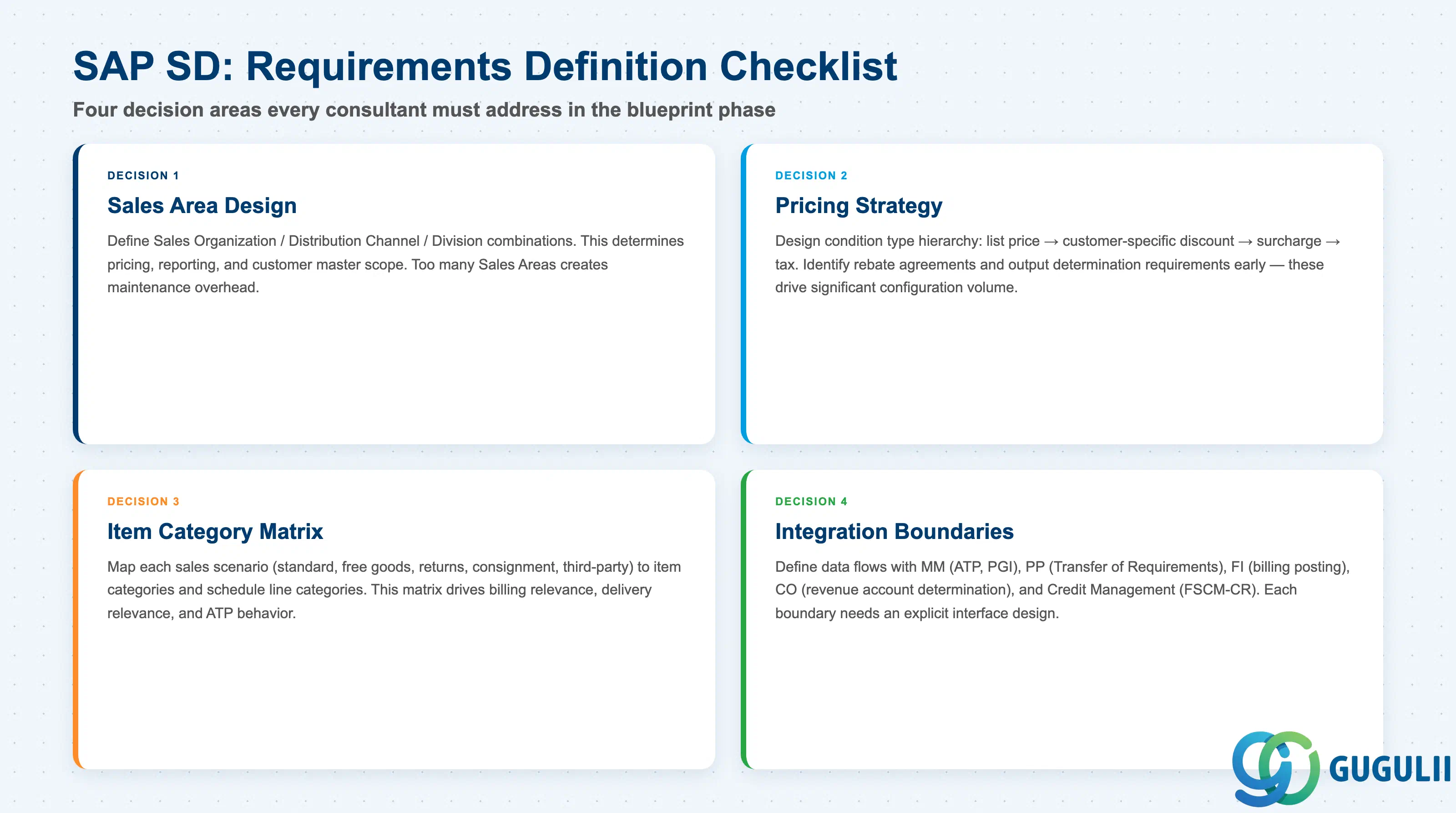
SAP SD is the module that connects a company’s selling activities to its logistics and financial back-end. Its five core sub-modules — Sales Order Management, Pricing, Shipping and Delivery, Billing, and Credit Management — together implement the order-to-cash cycle. Organizational structure design (Sales Organization, Distribution Channel, Division) is foundational; decisions made here determine the shape of master data, pricing maintenance, and reporting for years after go-live.
In S/4HANA, the most significant structural change is the replacement of the Customer Master (XD01) with the Business Partner (BP transaction). Credit management moves from classic SD-BF-CM to FIN-FSCM-CR for new implementations. Fiori apps replace the SAP GUI as the primary interface for sales processing, credit analysis, and delivery management.
For a requirements definition project, the critical early decisions are: how many Sales Organizations and Distribution Channels are needed, which pricing procedure strategy to adopt, which credit check approach (classic vs. FSCM-CR) to implement, and where the integration boundaries with MM (ATP), FI (account determination), CO (CO-PA characteristics), and PP (MTO scenario) lie.
| ID | Category | Title |
|---|---|---|
| sd-001 | Overview | What is SAP SD? 📍 |
| ID | Category | Title |
|---|---|---|
| sd-a02-01 | Master Data | SAP SD Material Master |