SAP Consultant | BTP · S/4HANA · US Global Rollout
·14 min read
SAP SD Material Master
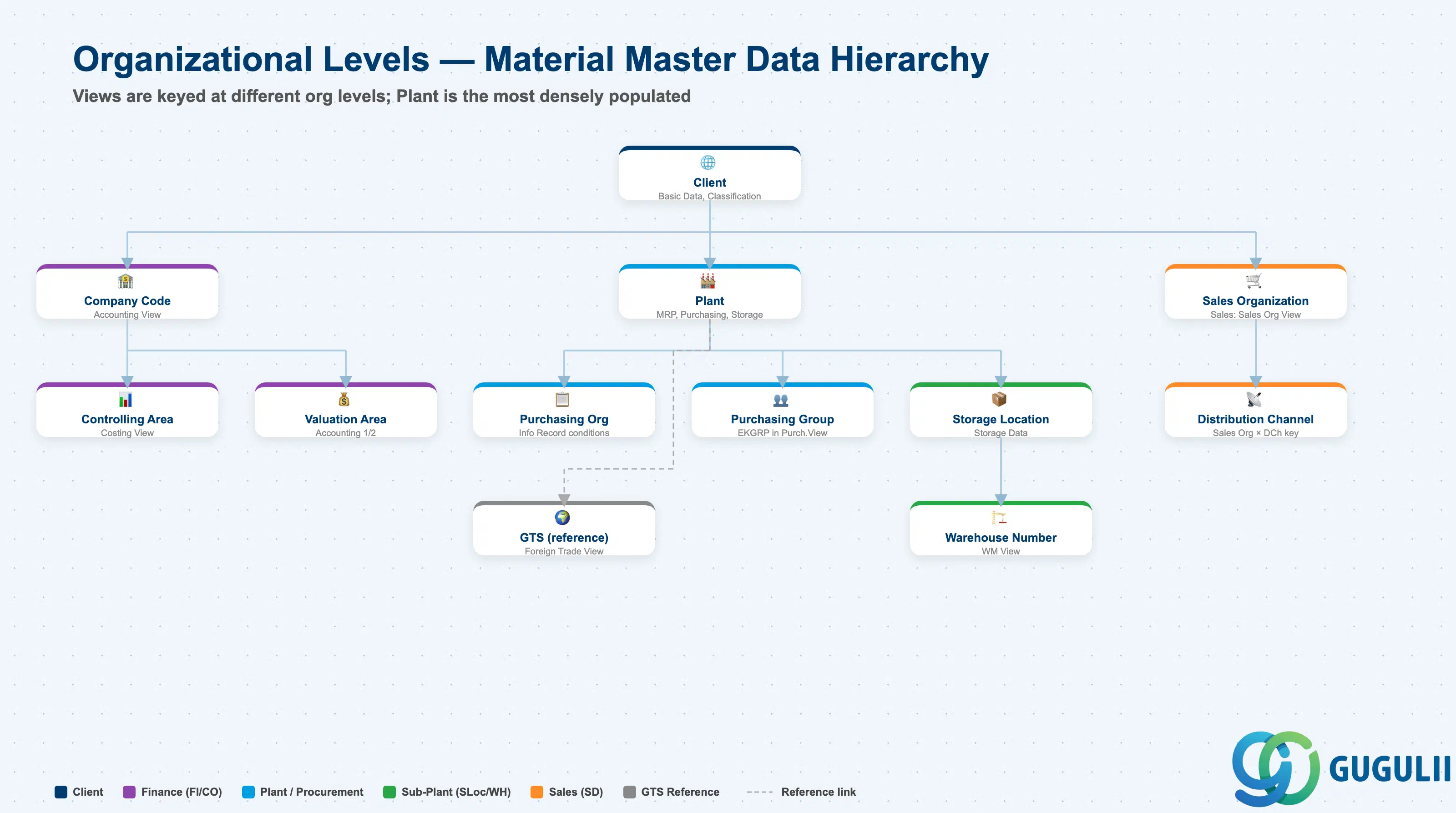
The Material Master is the foundation of the order-to-cash process in SAP SD. Sales pricing, ATP availability check, delivery, billing, and revenue account determination all depend on settings in this master. This article covers the Material Master’s structure, views, organizational levels, and the field-level detail SD consultants must own.
Part 1: Material Master — Core Concepts (All Modules)#
The Material Master is the central repository that stores all information about every material (item/product) a company handles — raw materials, semi-finished goods, finished products, consumables, and everything else that flows through the enterprise.
Aspect
Details
Role
Single Source of Truth for all material attributes across the enterprise
Modules using it
MM (Purchasing, Inventory), PP (Production Planning, MRP, BOM), SD (Sales, Shipping, ATP), WM/EWM (Warehouse Mgmt, Putaway/Pick), QM (Quality Inspection, CoA), FI (Inventory Valuation, Auto Posting), CO (Standard Cost, Variance Analysis), PM (Plant Maintenance, MRO Procurement), PS (Project Procurement, Material Allocation), CS (Customer Service, Spare Parts), EHS (Hazardous Material Mgmt, Environmental Compliance), GTS (Trade Compliance, HS Code, Export Control)
Transactions
MM01 (Create) / MM02 (Change) / MM03 (Display)
S/4HANA change
Material number length extended from 18 to 40 digits (MATNR field)
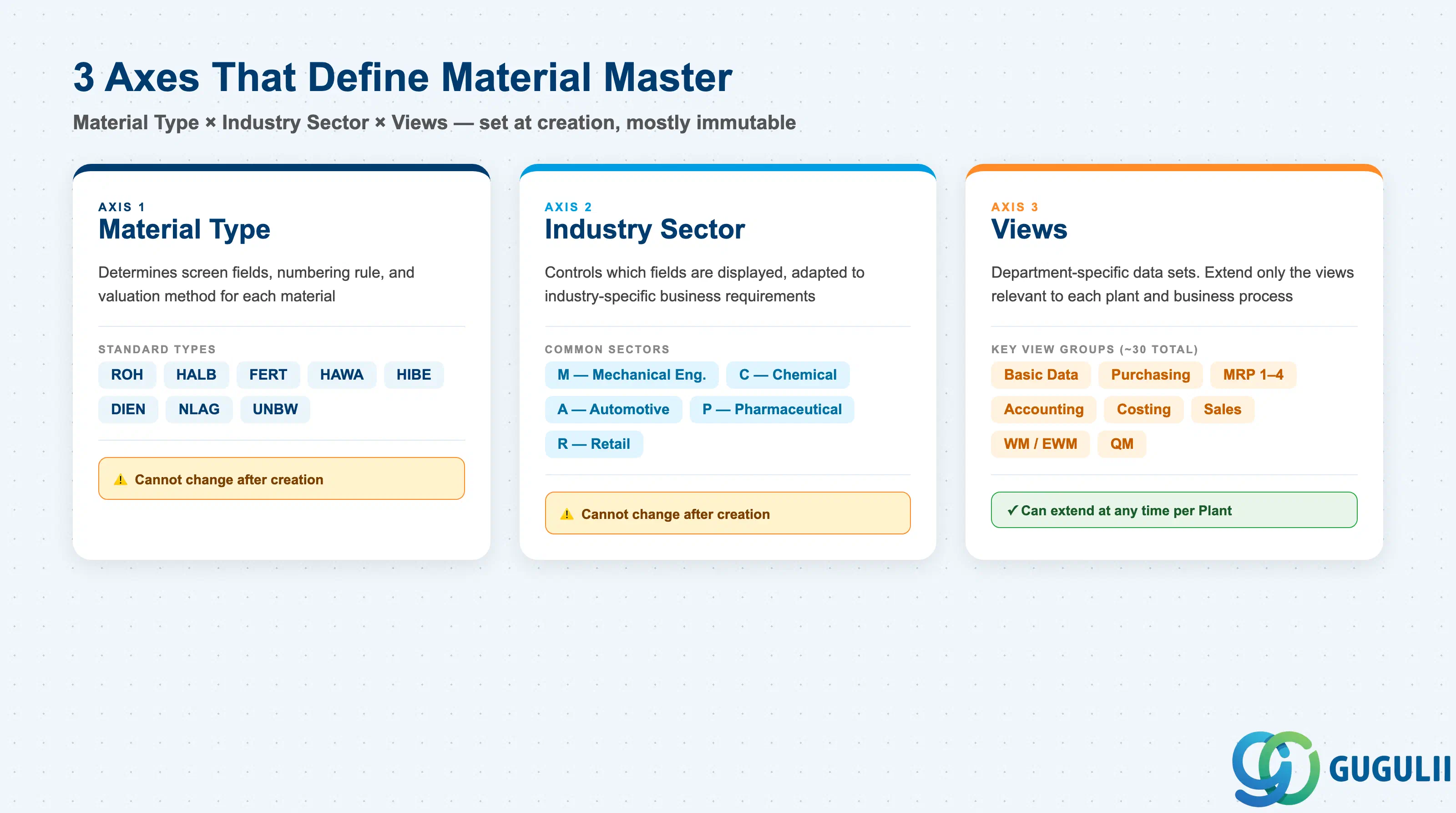
1.2 Three Defining Axes: Material Type × Industry Sector × Views#
The structure of a Material Master record is determined by the combination of three axes:
Axis
Description
Examples
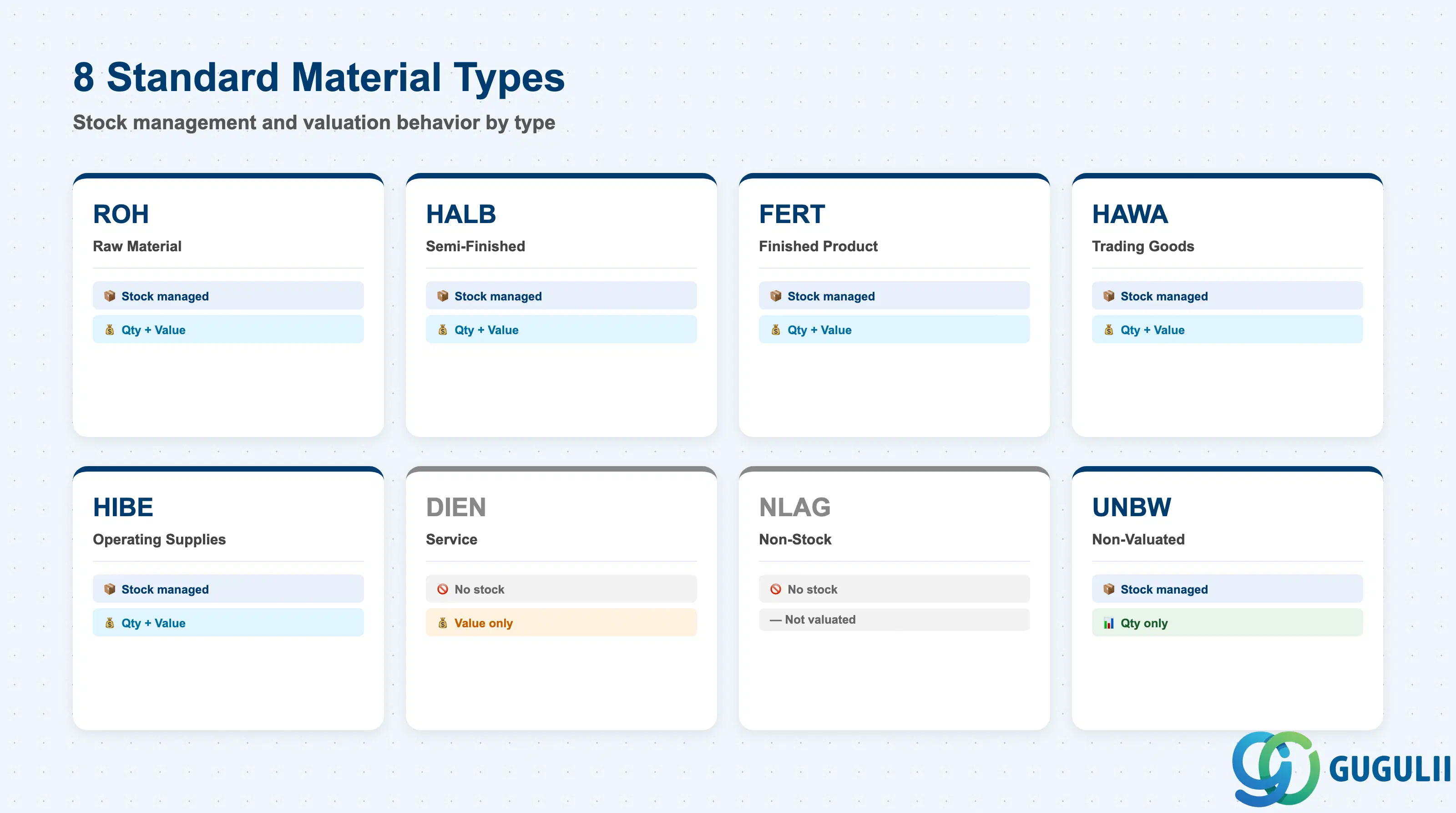
Material Type
Classifies the material. Controls screen layout, number assignment, and valuation method
ROH, FERT, HALB
Industry Sector
Industry branch. Controls which fields are displayed based on industry characteristics
M (Mechanical), C (Chemical), A (Automotive)
Views
Data sets organized by department. Only relevant views need to be extended
Basic Data, MRP, Accounting
Important: Once created, Material Type and Industry Sector cannot be changed as a general rule. Lock these in during design.
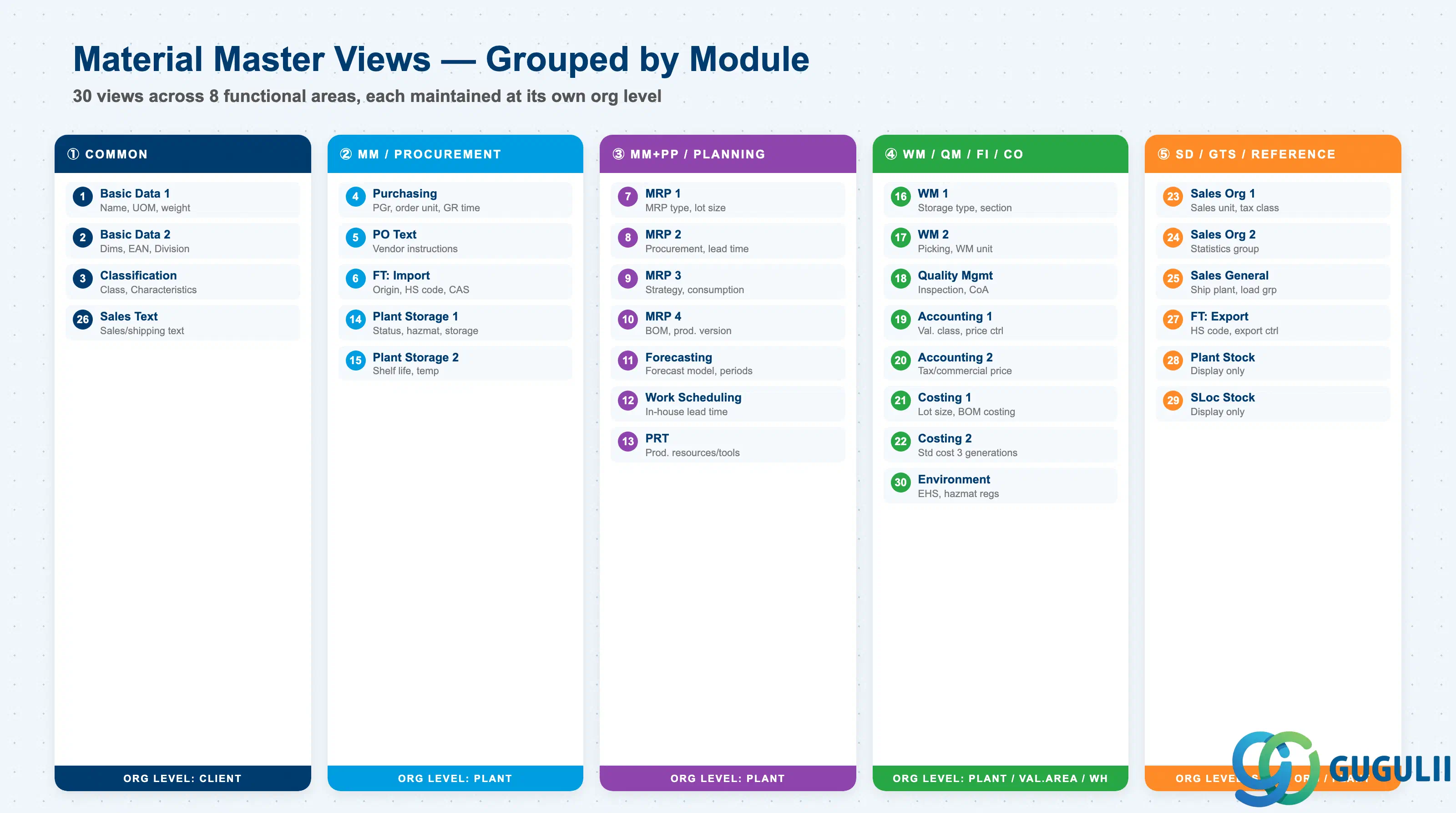
The Material Master is divided into department-specific Views. Only the views required by each department need to be extended. Approximately 30 standard views exist; the views to extend are selected based on Material Type and business requirements.
#
View
Owning Dept
Key Fields
Org Level
1
Basic Data 1
Cross-module
Material description, Base UoM, Material group, Weight/Volume
Client
2
Basic Data 2
Cross-module
Dimensions, EAN/UPC, Old material number, Division
Client
3
Classification
Cross-module
Class assignment, Characteristic values
Client
4
Purchasing
Purchasing (MM)
Purchasing group, Order unit, GR processing time, Source list required flag
Plant
5
Purchase Order Text
Purchasing (MM)
PO text, Text ID, Language
Plant
6
Foreign Trade: Import
Purchasing (MM) / GTS
Country of origin, HS code (import), CAS number, Import license
Plant
7
MRP 1
Purchasing / PP (MM/PP)
MRP type, MRP controller, Lot size, Reorder point
Plant
8
MRP 2
Purchasing / PP (MM/PP)
Procurement type, Special procurement, Planned delivery time, Safety stock
Keyed at Sales Organization × Distribution Channel level. The primary SD view for pricing, tax, and order processing control.
Field
Description
Practical Usage
Sales Unit
Order quantity unit
The unit in which the customer orders. Set when the sales unit differs from Base UoM (e.g., stock in EA, sales in BOX × 12 EA). The conversion factor must be defined in Additional Units of Measure — missing conversions cause incorrect invoice quantities.
Min Order Quantity
Minimum order quantity
The system checks this at sales order entry and issues a warning (or error, depending on config) if the customer’s order quantity is below this threshold. Used to enforce commercial minimums and prevent uneconomic small orders.
Min Delivery Quantity
Minimum delivery quantity
Controls partial delivery: if the open quantity in a delivery is below this value, the system blocks creation of a partial delivery. Relevant for materials with high fixed logistics cost per shipment.
Delivery Unit
Delivery rounding quantity
Rounds delivery quantity to this multiple (e.g., full pallet = 48 EA). Prevents partial pallet deliveries for materials where partial quantities are operationally impractical.
Item Category Group
Sales order line item category
NORM = standard stocked goods, DIEN = service (non-deliverable), LEIS = service with delivery reference, ERLA = configurable product header, LUMF = configurable product components. This field drives the Item Category determination in VOV4 — incorrect setting causes wrong billing relevance, wrong delivery processing, or wrong revenue recognition behavior.
Tax Classification
Output tax class for this material
Combined with the customer’s tax classification and the tax determination procedure to determine the tax code on the sales order line. In Japan: 1 = Taxable (10%), 0 = Tax-exempt. For cross-border sales, maintain per-country as needed.
Material Statistics Group
SD statistics grouping
Key axis for SD reporting, LIS (Logistics Information System), and CO-PA characteristic derivation. Agree the grouping hierarchy with Controlling — once set and data exists, changing it creates gaps in historical reports.
Account Assignment Group
Revenue G/L determination key
Combined with the customer’s Account Assignment Group in VKOA (revenue account determination) to find the revenue G/L account. Example: Y1 = Services, Y0 = Standard Goods. Misalignment with FI causes revenue to post to the wrong G/L account.
Pricing Reference Material
Shared pricing material
When set, this material uses the pricing conditions of the referenced material. Used when a product family shares the same price list but needs separate material numbers. Reduces condition record maintenance.
Five freely configurable grouping fields. Use for sales channel analysis (domestic/export), customer segment analysis, product line analysis, and CO-PA characteristic mapping. Coordinate with the CO-PA characteristic design — these fields are commonly used as CO-PA derivation sources.
Commission Group
Salesperson commission basis
Used in commission calculation programs. Assign materials to commission groups reflecting the commercial margin or strategic importance.
Material Pricing Group
Pricing condition grouping
Used in pricing condition records as a grouping key (e.g., group discounts by product category). Enables a single discount condition record to apply to multiple materials in the same group.
Keyed at Plant level. Controls delivery execution and shipping logistics.
Field
Description
Practical Usage
Delivering Plant
Default shipping plant
The plant from which this material is shipped when no explicit delivering plant is specified on the sales order. For multi-plant companies, this default is the first step in delivery routing — verify it matches the actual stocking location to prevent delivery from the wrong plant.
Transportation Group
Transport mode grouping
Combined with Shipping Condition (from customer master) and Loading Group to determine the Shipping Point via Shipping Point Determination (SPRO). Incorrect Transportation Group = wrong shipping point assigned = wrong dock = operational chaos.
Loading Group
Loading equipment type
Specifies the equipment needed to load this material (e.g., 0001 = forklift, 0002 = crane, 0003 = hand truck). Input to Shipping Point Determination alongside Transportation Group.
Availability Check
ATP rule
Controls which stock and supply elements are included in the Available-to-Promise (ATP) check. Must align with the MRP 3 setting — inconsistency between the two causes different ATP results depending on whether the check is triggered from the sales order or the MRP run.
Batch Management
Batch management required flag
When checked, a batch number must be assigned at every goods issue. Cannot be deactivated once stock movements exist — finalize this decision during design. For serial-number-managed materials or pharma/food with lot traceability requirements, this is mandatory.
Profit Center
Profit center for revenue/inventory
In S/4HANA, mandatory for all inventory-holding materials. Revenue, COGS, and inventory value flow here. The Profit Center on the Sales order line item is derived from this field unless overridden. Drives CO-PA profitability analysis.
Negative Stocks Allowed
Allow negative inventory
Permits stock to go negative (e.g., in cross-plant sales scenarios where billing precedes physical goods transfer). Use with caution — negative stocks distort inventory valuation and MRP planning. Enable only where the business process explicitly requires it.
Free text that appears on customer-facing documents (order confirmations, delivery notes, invoices). Unlike the material description in Basic Data, this field is specifically formatted for commercial documents. Maintain in the customer’s language for export materials.
Text ID
Text category
Multiple text types can be maintained (e.g., internal note, invoice text, delivery note text). The print program pulls the specific Text ID defined in the output configuration. Agree the Text ID structure with the SD print form developer.
Language
Text language
Maintain the sales text in each language used by customers or sales organizations. The system selects the text language based on the sales document’s language setting.
The Harmonized System (HS) code for export customs declarations. Different from the import HS code (in the Purchasing View) — export and import classifications can differ between trading countries. Misclassification is a customs compliance risk with potential fines and shipment delays. Validate with the trade compliance team and update when HS code revisions occur (typically every 5 years).
Country of Origin
Manufacturing country
Printed on export documents (Commercial Invoice, Packing List, Certificate of Origin). The origin declaration is the basis for FTA preferential tariff eligibility — incorrect country of origin invalidates FTA claims.
Export Group
Export statistics grouping
Used in export statistics reporting (e.g., Intrastat in EU). Assign the correct statistical product code per the target reporting country’s classification system.
Preference Status
FTA preferential origin status
Indicates whether this material qualifies for preferential tariff treatment under a specific FTA/EPA. Updated by the origin calculation program (GTS integration or manual). Drives the automatic preferential origin declaration on export documents.
Export Control Classification Number (ECCN)
Export control classification
The US Export Administration Regulations (EAR) classification. Required for dual-use goods — technology or products with military application potential. Incorrect ECCN can result in export license violations.
The SD organizational unit “Division.” Required for FERT/HAWA. Determines which Sales Division is relevant for this product — drives Profit Center assignment and Sales Organization reporting hierarchy. Agree the Division structure with the SD organizational design early, as it affects the entire pricing and reporting setup.
Material Group
Product grouping
Used in SD pricing conditions (e.g., group discounts by material group), SD reporting, and CO-PA characteristic derivation. The Material Group in Basic Data is the “commercial” grouping visible to SD, while Material Groups 1–5 in the Sales Org 2 view are SD-specific extensions.
Defines which supply/demand elements are included in the ATP check triggered at sales order entry. 02 = daily individual requirements (MTO), 04 = cumulative ATP (MTS). Coordinate with PP — the rule set in MRP 3 must be consistent with the production strategy (Strategy Group) to avoid conflicting ATP signals.
Strategy Group
Make-to-Stock / Make-to-Order flag
Indirectly affects SD: Strategy 10 (MTS) means ATP checks against unrestricted stock + planned receipts; Strategy 20 (MTO) creates a sales-order-specific planned order and ATP is confirmed against that order’s completion date. SD must understand which strategy applies per material to set correct delivery date expectations with customers.
This field on the material (combined with the customer’s Account Assignment Group) is the primary key in VKOA for finding the revenue G/L account at billing. A common implementation error is setting all materials to the same group, which merges all revenue into one G/L account — preventing product-line P&L visibility in FI. Design the Account Assignment Group matrix together with FI and CO.