Title here
Summary here

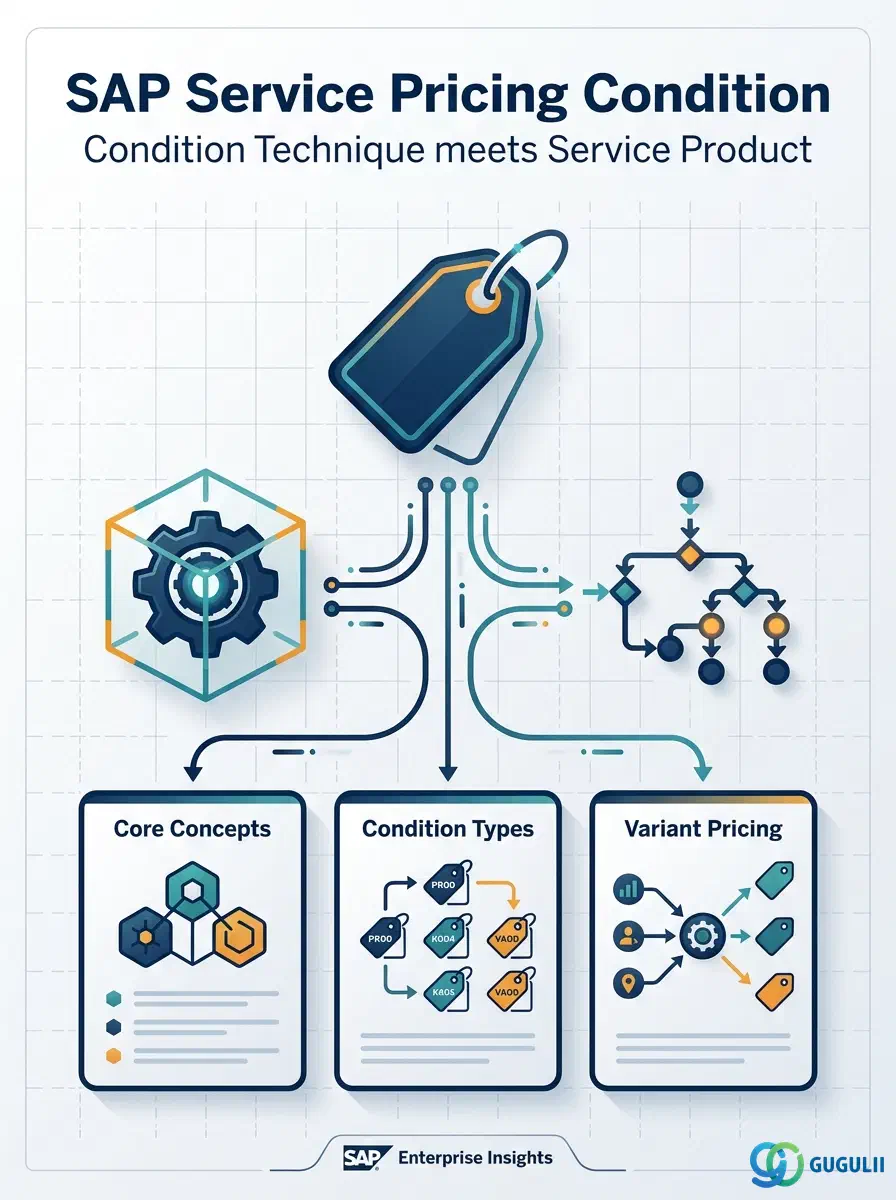
The Pricing Condition is the master data record produced by SAP’s Condition Technique — a rule-based lookup engine, shared across SD, Service, and other sales-facing modules, that resolves a price, discount, surcharge, or tax value for a document line item from a combination of key fields such as Service Product, Customer, and Sales Organization. In SAP S/4HANA Service, this is the mechanism that sets the price of a Service Product (Material Type DIEN) once the Service Product itself has been defined. This article first covers the Condition Technique as a general concept (Part 1), then the Service-specific configuration and field detail (Part 2).
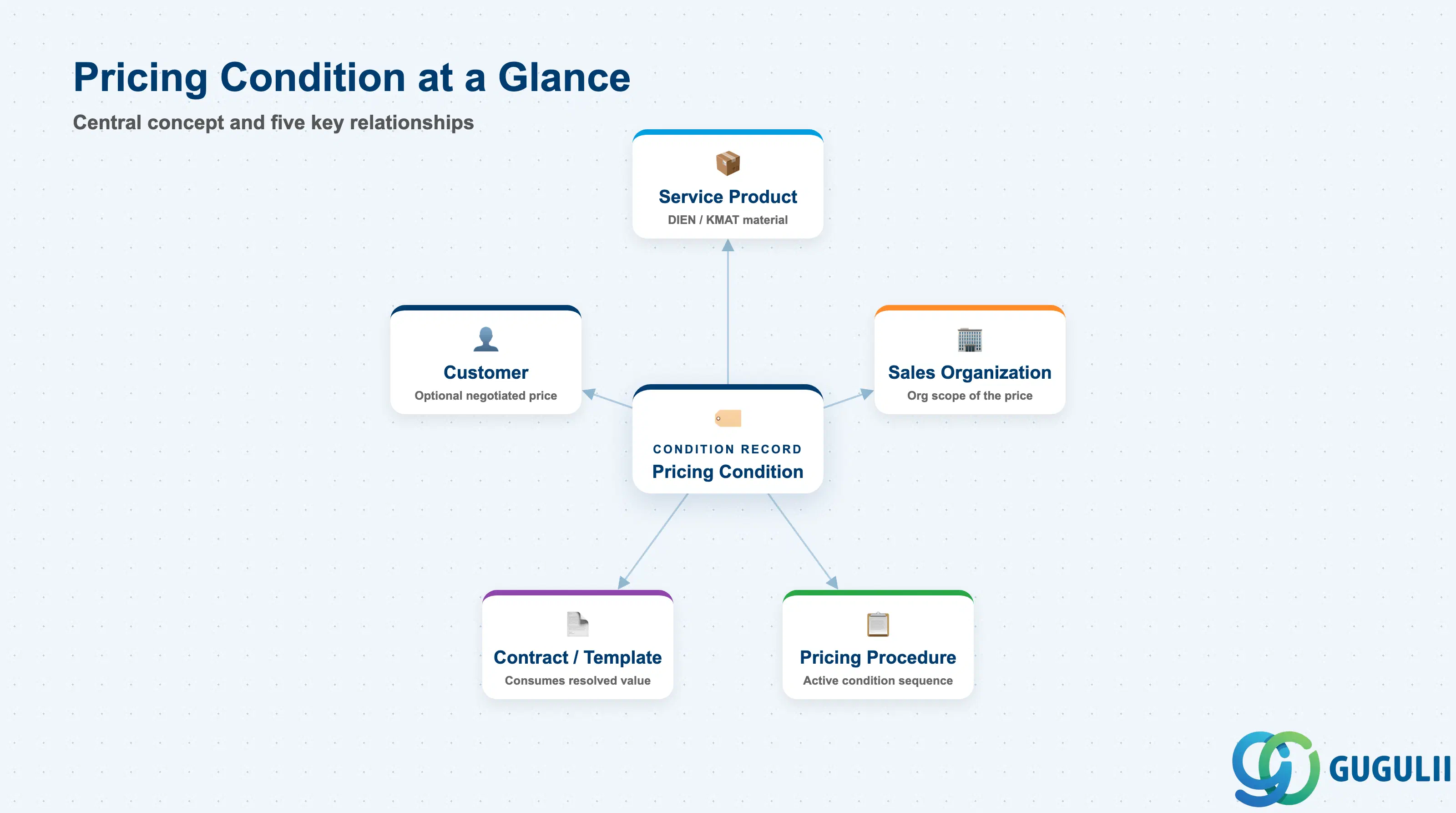
A Pricing Condition (commonly called a “Condition Record”) is not a price typed directly onto a document — it is a maintained master record that the system looks up at runtime, using a defined sequence of key-field combinations, to calculate the value that applies to a specific line item. Rather than hard-coding a number, business users maintain Condition Records against Condition Types, and SAP resolves the applicable record following an Access Sequence and a Pricing Procedure assigned to the document type.
| Aspect | Details |
|---|---|
| Role | Determines a monetary or percentage value (price, discount, surcharge, tax, freight) applied to a document line item via SAP’s rule-based Condition Technique |
| Modules using it | SD (Sales pricing — primary owner of the technique), Service/CS (Service Order and Service Contract pricing), MM (Purchasing conditions — a separate condition infrastructure, same underlying technique), FI-CA (Convergent Invoicing) |
| Transactions | VK11 / VK12 / VK13 (Create / Change / Display Condition Record), V/06 (Condition Type Customizing), V/07 (Access Sequence), V/08 (Pricing Procedure) |
| Key Tables | KONP (Condition Item), KONH (Condition Header), condition-table-specific A-tables (e.g. A305), T685 (Condition Type) |
| S/4HANA note | Fiori app Manage Pricing Conditions is the primary UI for day-to-day condition record maintenance, replacing manual VK11/VK12 navigation for business users. The underlying Condition Type → Access Sequence → Condition Table → Condition Record technique is unchanged from ECC. |
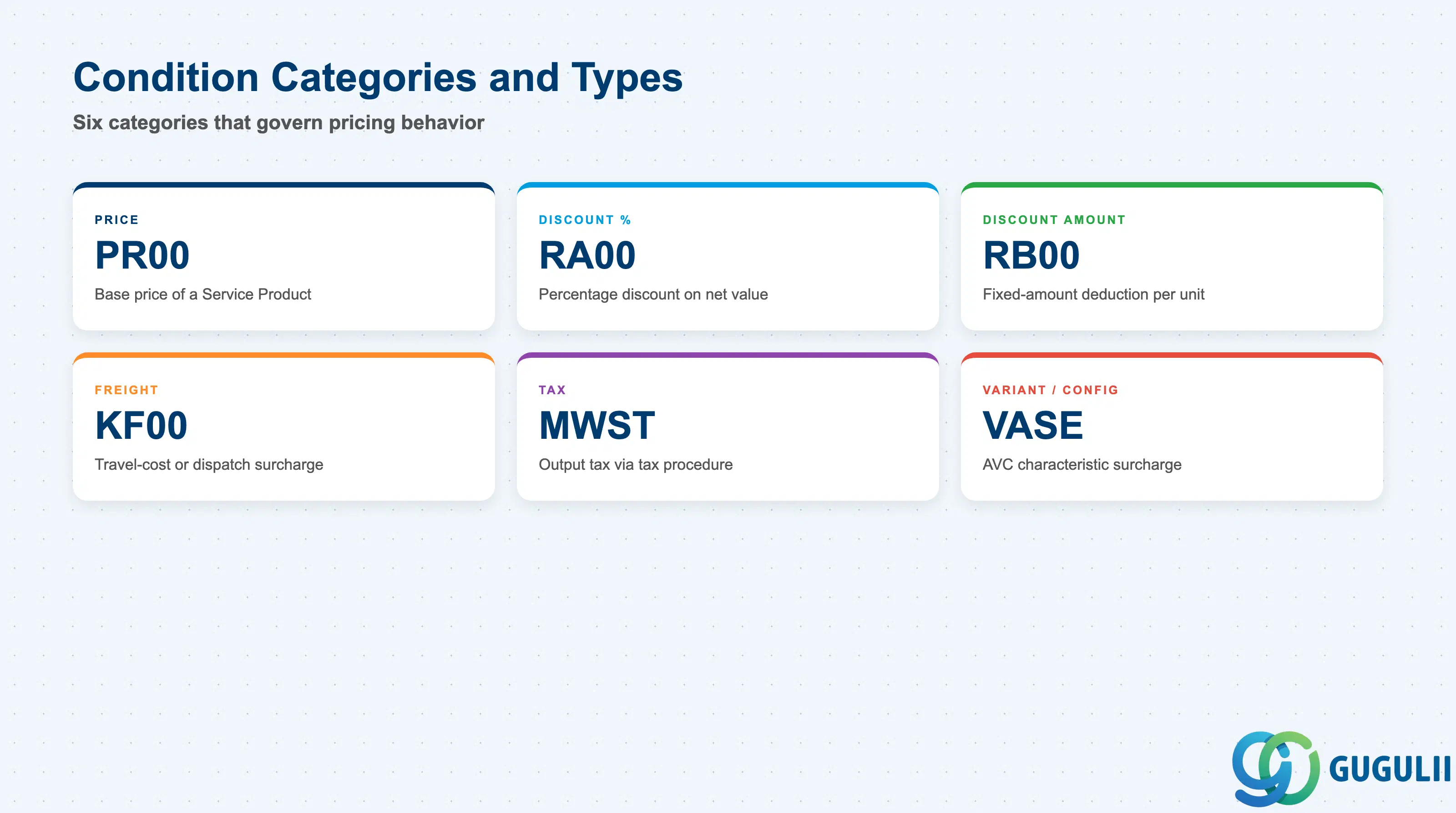
Every Condition Type is assigned a Condition Class that governs how its value behaves in the pricing procedure’s running total — whether it adds to net value, is purely informational (statistical), or feeds a separate tax calculation. Getting the class wrong is a common configuration mistake: a discount configured with the wrong class either fails to reduce net value or silently disappears from the invoice.
| Condition Class | Example Code | Use Case | Key Behavior |
|---|---|---|---|
| Price | PR00 | Base price of a Service Product | Mandatory in most pricing procedures; forms the starting net value that subsequent conditions adjust |
| Discount/Surcharge (%) | RA00 | Contract-level percentage discount | Calculated on the cumulative net value of preceding steps in the procedure; scale-able by quantity or value |
| Discount/Surcharge (Amount) | RB00 | Fixed-amount deduction | Absolute value per unit or per document, independent of the base price |
| Freight/Delivery Cost | KF00 | On-site dispatch or travel-cost surcharge | Common in field service to recover technician travel cost separately from the service fee itself |
| Tax | MWST | Output tax determination | Resolved via a dedicated tax procedure rather than the sales pricing procedure, but uses the identical Condition Technique |
| Variant/Configuration | VASE | Price surcharge driven by a characteristic value on a configurable Service Product | Requires Advanced Variant Configuration (AVC); one condition record per relevant characteristic value combination |
Design principle: Choose the Condition Class based on how the value must behave in the running total (add to net value vs. statistical/informational only) — not by what the value is called in a business conversation.
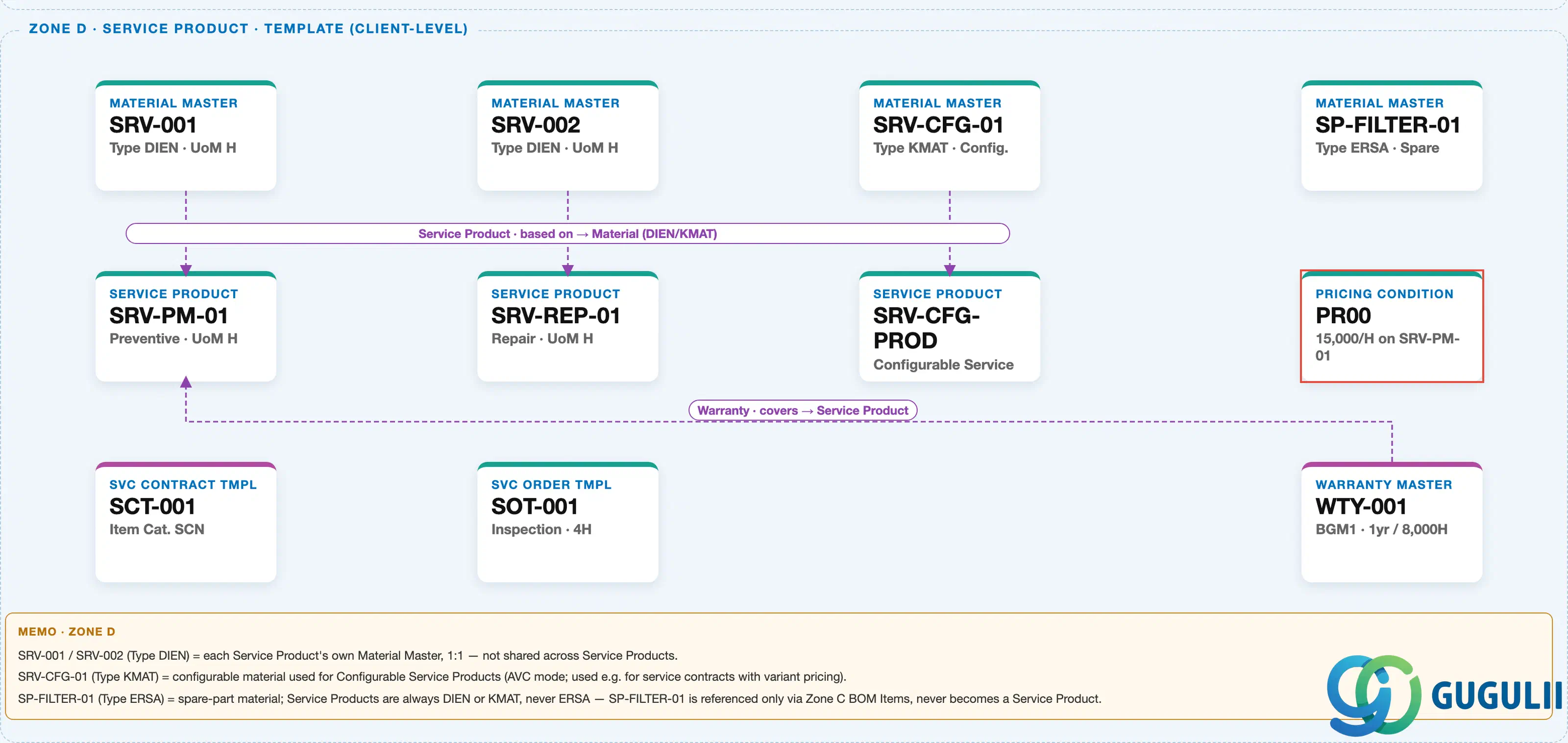
The diagram above crops Zone D — Service Product & Template (Client-Level) from the Service module’s Master Data Landscape, showing where the Pricing Condition sits relative to the Service Product it prices and the templates that consume it.
Data hierarchy with a concrete example
Material Master "SRV-001" (Type DIEN · UoM H)
   │
   └── ── based on ──> Service Product "SRV-PM-01" (Preventive Maintenance · UoM H)
                              │
                              ├── ── priced by ──> Pricing Condition "PR00" — Base Price, JPY 15,000 / H
                              │
└── ── used in ──> Service Contract Template "SCT-001" (Item Cat. SCN)Note: Sales Organization and Distribution Channel are not shown as separate hierarchy nodes here — in this client-level zone they are key fields carried within the Condition Record itself (see 2.3), not standalone org-level nodes.
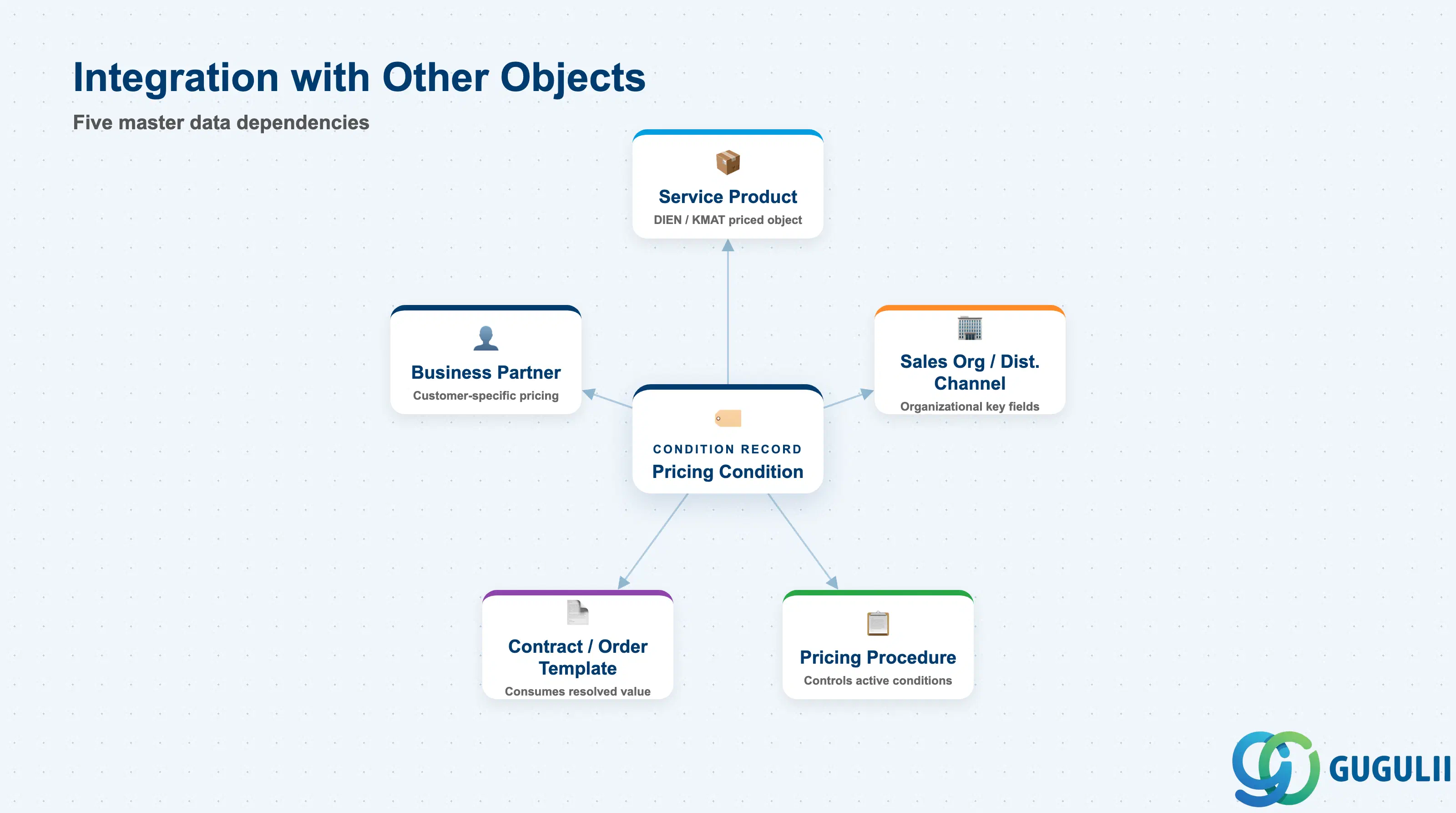
A Pricing Condition never stands alone — it is only meaningful in combination with the object it prices and the organizational context in which it was maintained.
| Object | Relationship | Practical Notes |
|---|---|---|
| Service Product (Material Master, Type DIEN/KMAT) | Priced object — the Condition Record’s material/service key field | Every Condition Record for service pricing carries the Service Product number as one of its key fields; recreating a Service Product under a new number orphans its existing condition records. |
| Business Partner (Customer/Payer) | Optional key field enabling customer-specific negotiated pricing | Condition Tables that include Customer as a key field let the same Service Product carry different prices per customer; without it, pricing is uniform across the Sales Area. |
| Sales Organization / Distribution Channel | Organizational key fields on the Condition Record | The same Service Product can carry different prices across Sales Organizations — e.g. a domestic price list versus an export price list. |
| Pricing Procedure | Determines which Condition Types are active, in what sequence, and whether each is mandatory | The Pricing Procedure assigned to the Service Order/Contract document type controls which condition types the system searches for at all; a maintained Condition Record with no matching active Condition Type in that procedure is silently ignored. |
| Service Contract Template / Service Order Template | Consumes the resolved condition value at billing plan or item creation | Templates standardize which conditions default onto new documents; ad-hoc override at document level remains possible unless the condition is marked non-editable. |
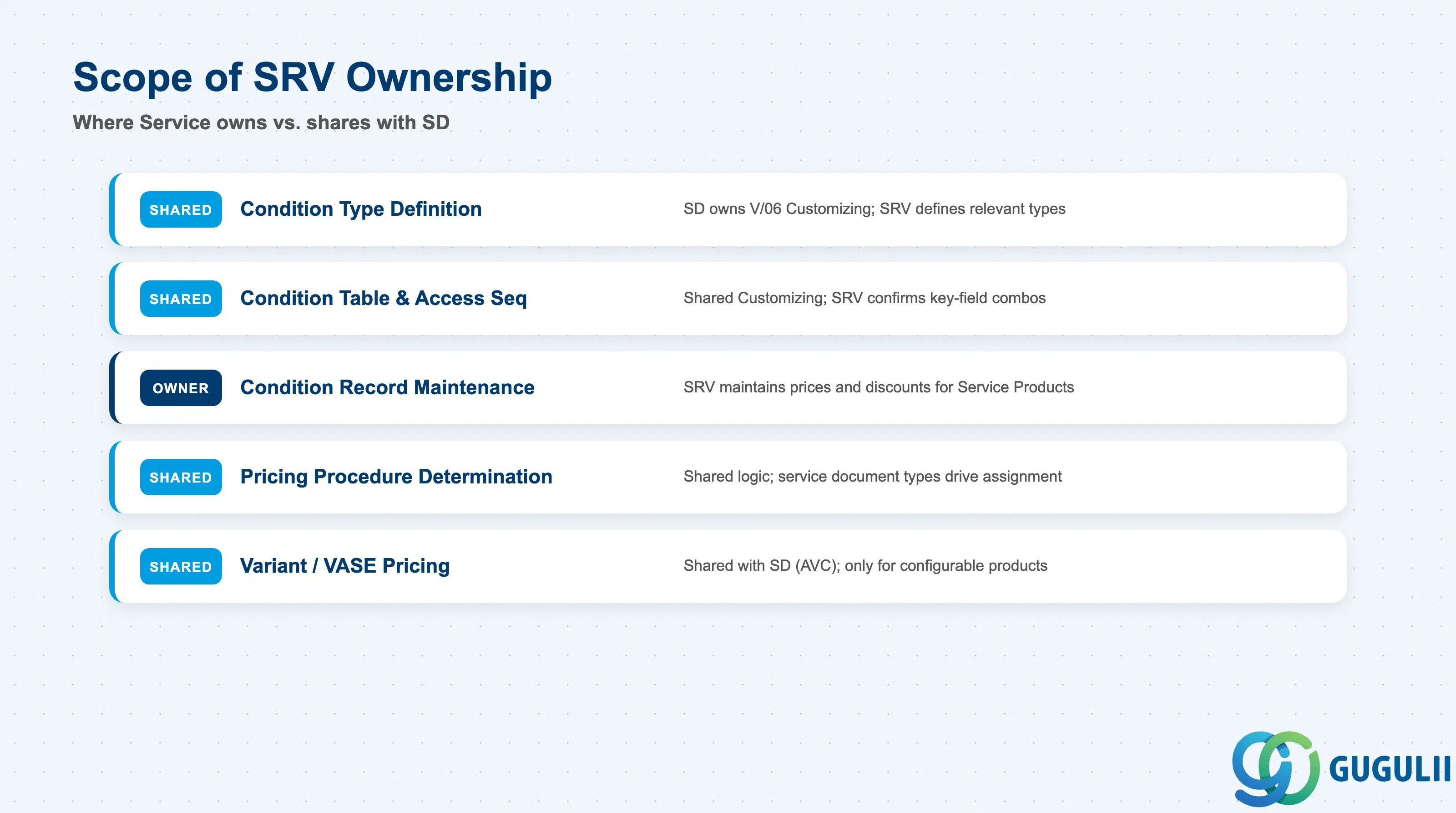
| Data Section | SRV Involvement | Notes |
|---|---|---|
| Condition Type Definition | ○ Shared with SD | SD Pricing Configuration typically owns the Customizing transaction (V/06); Service defines which condition types (PR00, RA00, RB00, VASE) are relevant to service pricing scenarios. |
| Condition Table & Access Sequence | ○ Shared with SD | Shared Customizing objects; Service confirms which key-field combinations (e.g. Service Product + Sales Org + Customer) are required for service-specific pricing. |
| Condition Record Maintenance | ◎ Owner | The Service Administrator/Manager maintains the actual price and discount values for Service Products on an ongoing basis. |
| Pricing Procedure Determination | ○ Shared with SD | Sales Area determination logic is shared; Service-specific document types (Service Contract, Service Order) drive their own pricing procedure assignment. |
| Variant / Configurable Service Pricing (VASE) | ○ Shared with SD (AVC) | Relevant only when the Service Product uses Material Type KMAT under Advanced Variant Configuration. |
Legend: ◎ = Owner / Critical, ○ = Direct involvement
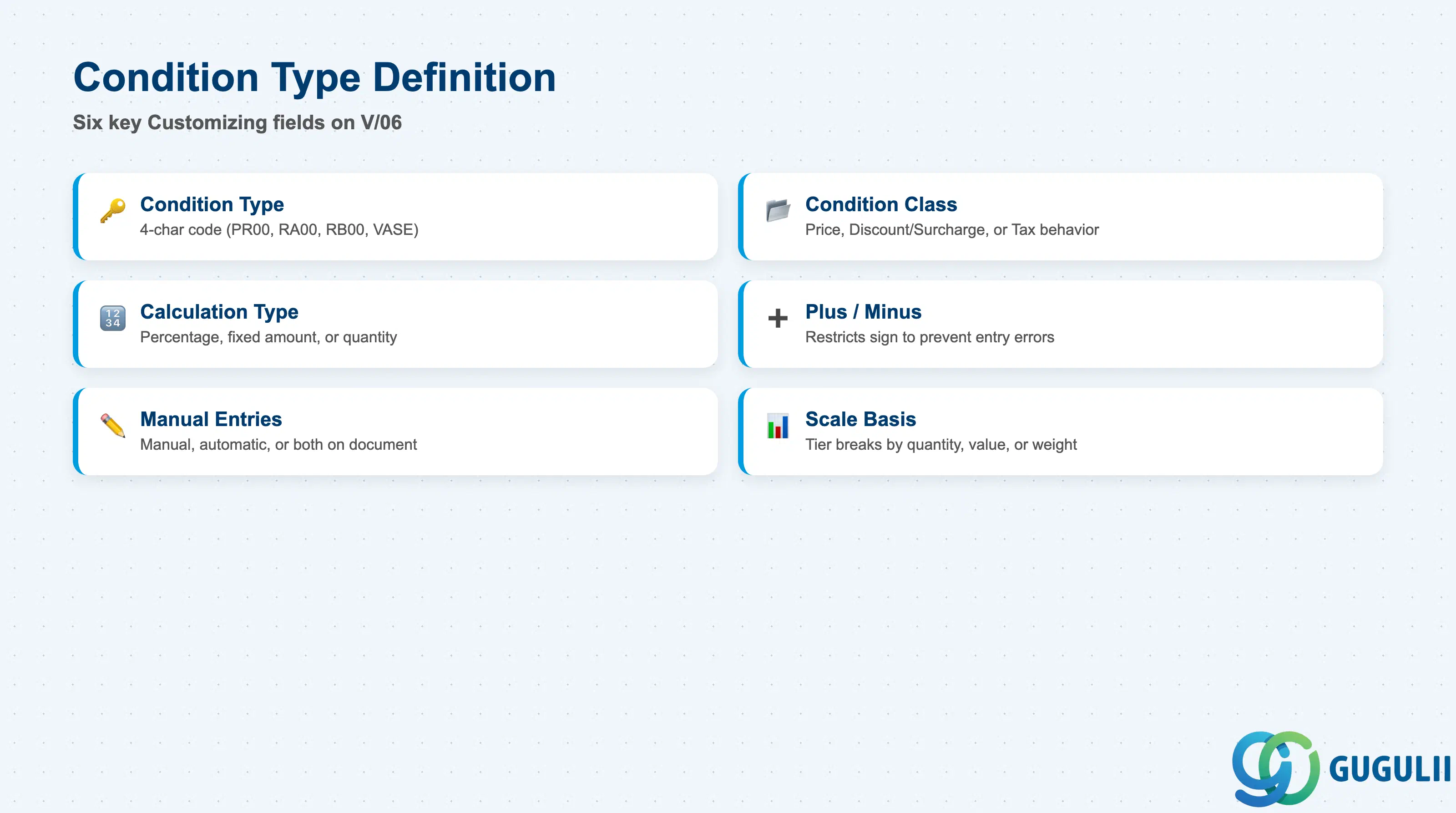
Condition Type is the Customizing object (transaction V/06) that defines how a given kind of price, discount, or surcharge behaves before any actual value is ever entered.
| Field | Description | Practical Usage |
|---|---|---|
| Condition Type | Four-character code identifying the condition (PR00, RA00, RB00, VASE) | PR00 is the de-facto standard base-price condition for Service Products; do not repurpose it for discounts — copy it to a Z-code instead so standard SAP behavior and future upgrades remain predictable. |
| Condition Class | Governs whether the value is a Price, a Discount/Surcharge, or a Tax | Determines how the value participates in the pricing procedure’s running total. Setting this incorrectly on a custom discount condition is the most common cause of a discount that “doesn’t reduce the invoice total.” |
| Calculation Type | Percentage, fixed amount, or quantity-based | For time-based service pricing (JPY per hour), use quantity-based calculation tied to the confirmed service hours; percentage-based conditions should reference the correct base-value formula in the procedure. |
| Plus/Minus | Restricts the condition to positive, negative, or either sign | Set discounts (RA00, RB00) to negative-only to prevent a data-entry mistake from accidentally inflating a customer’s invoice. |
| Manual Entries | Controls whether the value can be entered manually on the document, only automatically from the Condition Record, or both | For contract-negotiated pricing, allow manual entry only with a reason code so ad-hoc overrides remain auditable. |
| Scale Basis | Defines whether scale breaks (tiered pricing) are by quantity, value, or weight | Volume-based service contracts (e.g. per-visit discounts above a threshold) require a quantity-based scale on the relevant discount condition type. |
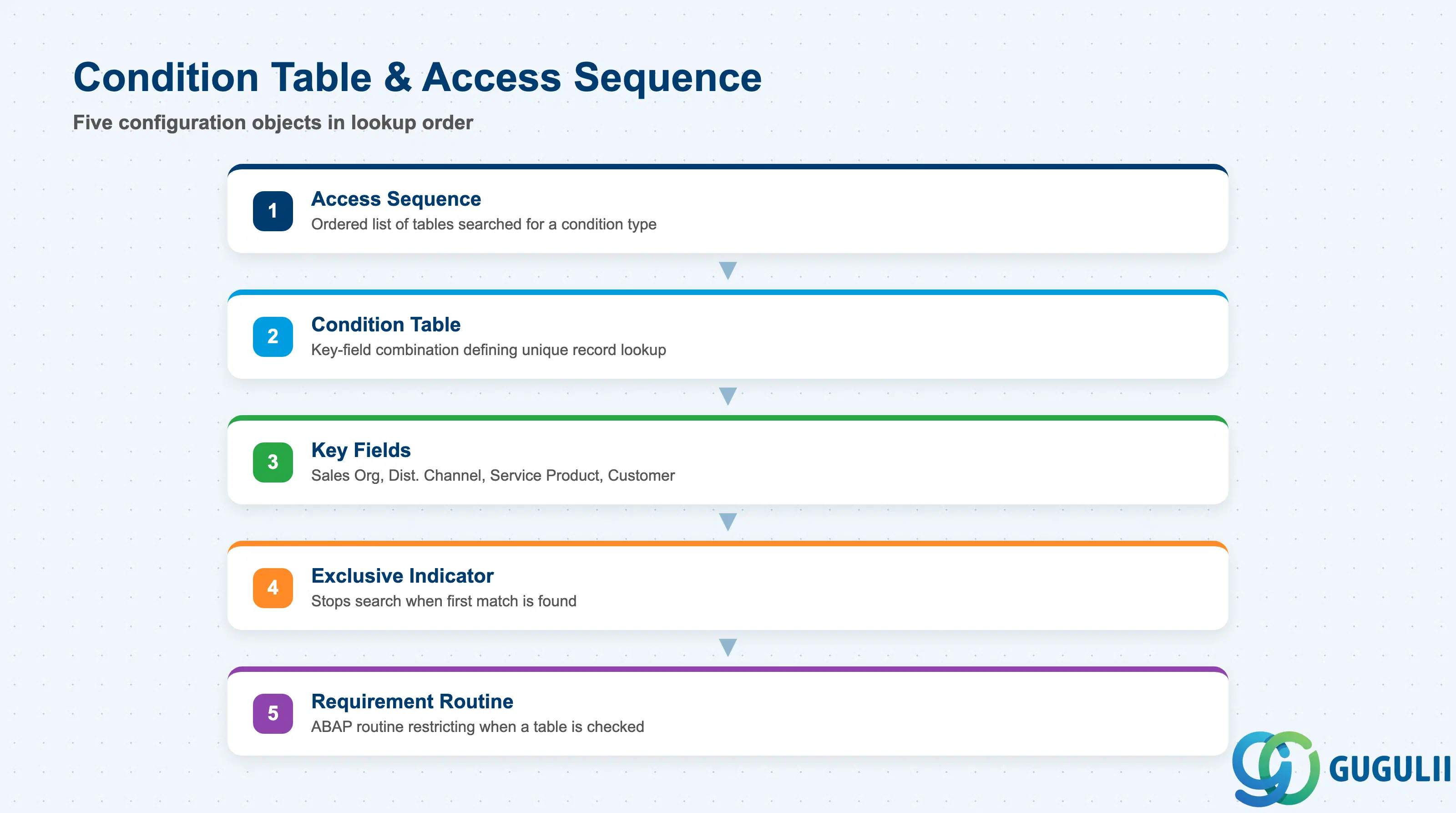
The Access Sequence is the ordered list of Condition Tables the system checks, from most specific to least specific, to find a valid Condition Record for a line item.
| Field | Description | Practical Usage |
|---|---|---|
| Condition Table | Defines the key-field combination that identifies a unique condition record (e.g. Sales Org + Distribution Channel + Service Product + Customer) | Design the most specific table first in the access sequence — e.g. Customer-specific pricing before Service-Product-only pricing — so customer-negotiated rates always win over the general price list. |
| Access Sequence | Ordered list of Condition Tables searched for a given Condition Type | Keep the sequence short and well-documented; an overly long access sequence with many near-duplicate tables is the most common root cause of “wrong price applied” incidents in service pricing. |
| Key Fields | The specific fields (Sales Org, Distribution Channel, Service Product, Customer, etc.) that make a Condition Table’s entries unique | Adding Customer as a key field is what enables customer-specific service pricing; omitting it means all customers in a Sales Area share the same price. |
| Exclusive Indicator | Stops the access sequence search once a match is found in a given table | Use for tables where a match should always win outright (e.g. customer-specific contract price) rather than allowing a later, less specific table to also apply. |
| Requirement Routine | ABAP routine that further restricts when a table is checked (e.g. only for certain document types) | Useful to skip customer-specific tables entirely for cash-sale service orders where no negotiated contract exists, improving pricing performance. |
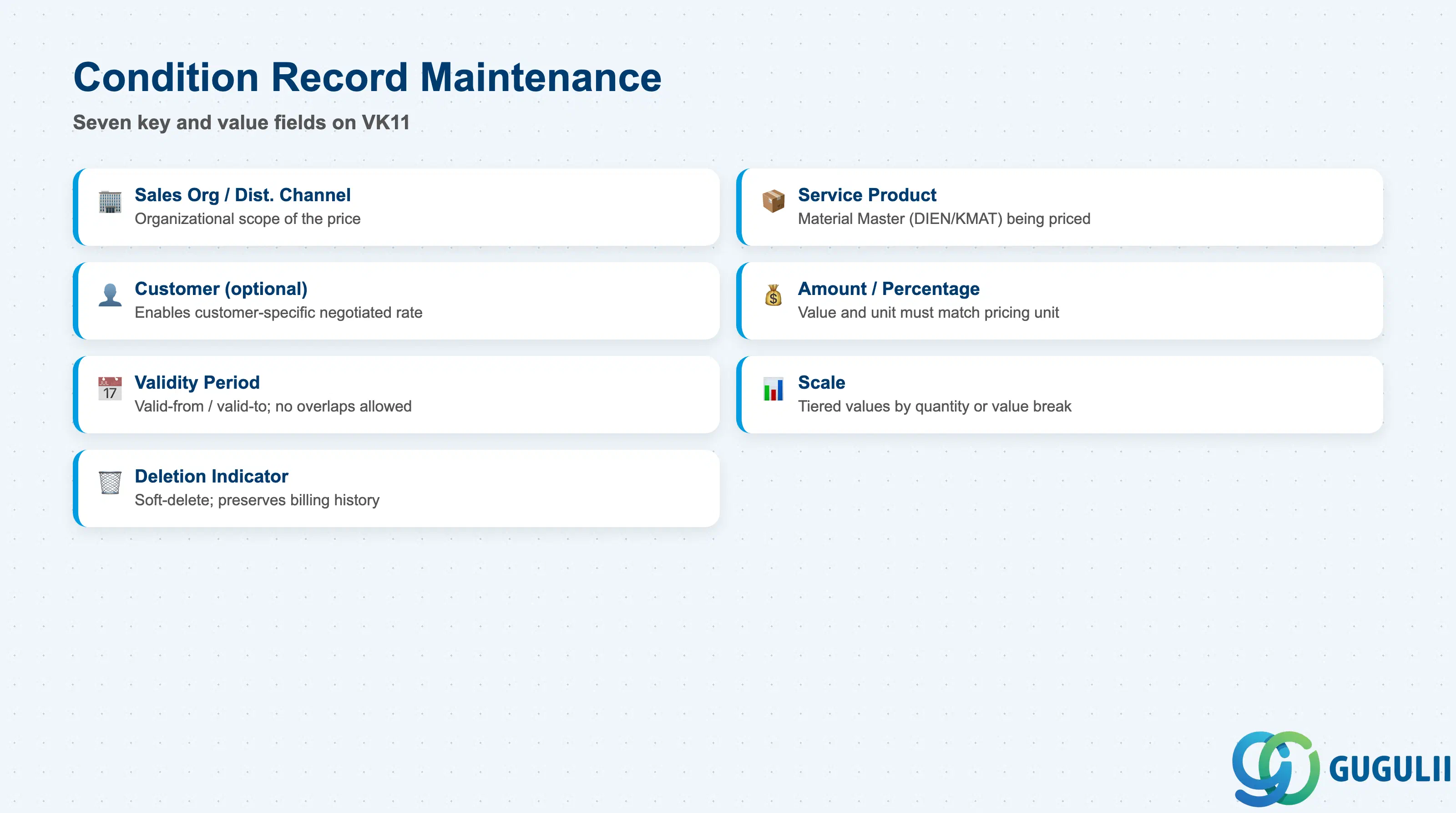
The Condition Record is the actual maintained data — the specific price or discount value tied to a specific key combination — created via VK11 or the Fiori “Manage Pricing Conditions” app.
| Field | Description | Practical Usage |
|---|---|---|
| Sales Organization / Distribution Channel | Organizational scope of the price | Maintain separate records per Sales Organization when the same Service Product is sold domestically and internationally at different price levels. |
| Service Product | The Material Master (Type DIEN/KMAT) the record prices | Confirm the Service Product’s Base Unit of Measure before entry — a per-hour rate entered against an EA-based Service Product produces an incorrect billing amount silently. |
| Customer (optional) | Restricts the record to a specific customer, if the Condition Table includes it | Customer-specific records take priority in the access sequence over the general price list; use them for negotiated framework agreements rather than editing the base PR00 record. |
| Amount / Percentage & Unit | The maintained value and its unit of measure | For time-based services, the unit must match the Service Product’s pricing unit (e.g. JPY per H) exactly, or the billing document calculates an incorrect total. |
| Validity Period | Valid-from / valid-to dates for the record | Overlapping validity periods for the same key combination cause ambiguous pricing; always close out the prior record’s valid-to date before creating a new rate. |
| Scale | Tiered values by quantity or value break | Common for volume service contracts — e.g. a lower per-hour rate once cumulative confirmed hours in a period exceed a threshold. |
| Deletion Indicator | Soft-deletes the record from future determination without removing history | Preferred over hard deletion so historical billing documents can still reference the condition record that was active at the time. |
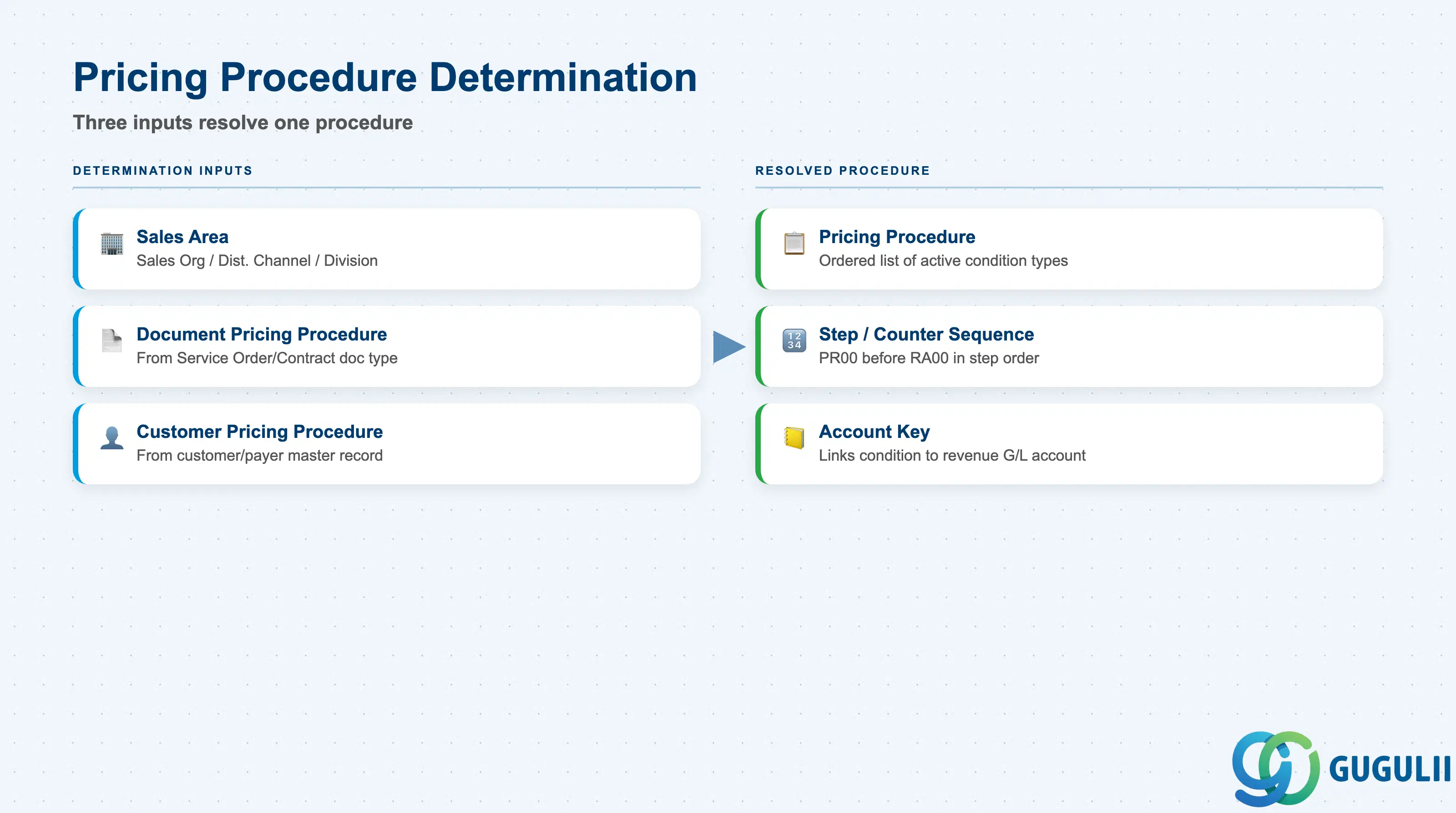
The Pricing Procedure determines which Condition Types are even searched for on a given Service Order or Service Contract, and in what sequence they are calculated.
| Field | Description | Practical Usage |
|---|---|---|
| Pricing Procedure | The ordered list of Condition Types and their calculation logic assigned to a document | Design a dedicated pricing procedure for Service documents rather than reusing an SD sales-order procedure verbatim — service-specific conditions (e.g. VASE for configurable services) need to sit at the correct step. |
| Sales Area (Sales Org / Dist. Channel / Division) | One of the three determination keys for pricing procedure assignment | Confirm the Sales Area used on Service Contract/Order document types matches the Sales Area used to maintain PR00 records, or the record will never be found. |
| Document Pricing Procedure | Determination key derived from the sales document type | Assign a distinct Document Pricing Procedure indicator to Service Contract and Service Order document types so each can route to its own Pricing Procedure. |
| Customer Pricing Procedure | Determination key derived from the customer/payer master | Segment customers (e.g. Key Account vs. Standard) via this field to route to procedures with different discount condition types available. |
| Step / Counter & Condition Type Sequence | The calculation order of condition types within the procedure | Base price (PR00) must precede percentage discounts (RA00) in step order, since RA00’s calculation base is typically the net value of the prior step. |
| Account Key | Links a condition type’s value to a specific revenue/discount G/L account via account determination | Assign distinct account keys for base service revenue versus contract discounts so FI reporting can separate gross revenue from discount deductions. |
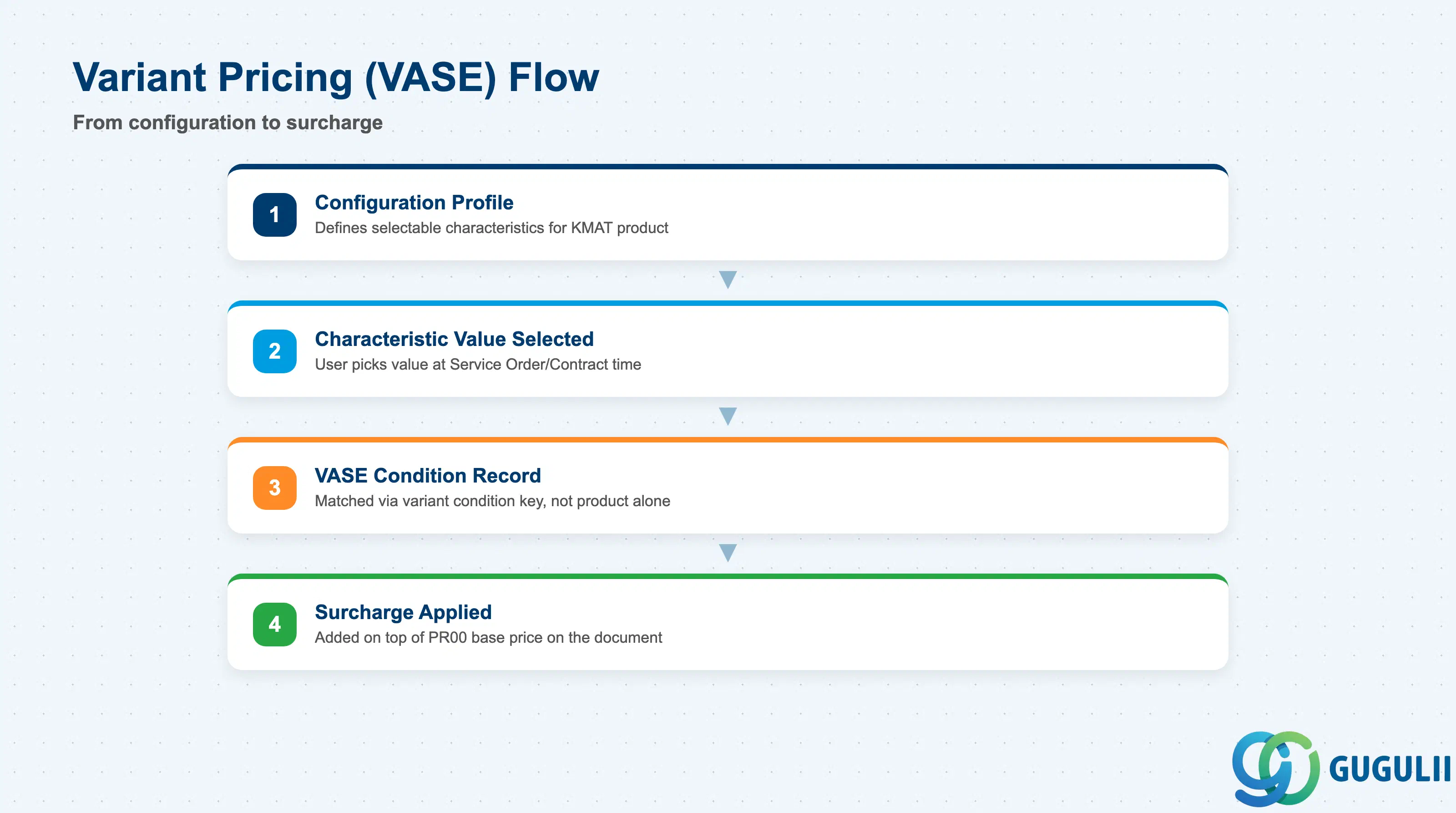
When a Service Product is configurable (Material Type KMAT under Advanced Variant Configuration), a standard single Condition Record cannot capture every possible characteristic combination — VASE exists precisely for this case.
Prerequisite: Configurable Service Products require AVC (Advanced Variant Configuration) mode; the Classic Variant Configuration mode is not supported for this scenario.
| Field | Description | Practical Usage |
|---|---|---|
| Condition Type VASE | The dedicated variant-pricing condition type | Confirm VASE is included in the pricing procedure assigned to configurable Service Contract/Order document types — it is not part of a standard non-configurable procedure by default. |
| Variant Condition Key | Internal key generated from the characteristic value combination | This key, not the Service Product number alone, is the actual lookup key for a VASE record — two orders for the same Service Product with different selected characteristic values resolve to different VASE records. |
| Characteristic Value Dependency | The specific characteristic value (from the Configuration Profile) that triggers a surcharge or discount | Maintain one VASE record per characteristic value that carries a price impact — e.g. an “Expedited Response SLA” characteristic value adding a fixed surcharge on top of PR00. |
| Configuration Profile Link | Reference to the Configuration Profile governing which characteristics and values are selectable | Changes to the Configuration Profile (adding/removing characteristic values) must be coordinated with VASE record maintenance, or new configuration options will price at zero. |
| ID | Category | Title |
|---|---|---|
| srv-001 | Overview | What is SAP Service? |
| ID | Category | Title |
|---|---|---|
| srv-a01 | Overview | SAP Service Master Data: Overview, Hierarchy & Relationships |
| srv-a03-01 | Master Data | SAP Service Product Master |
| srv-a04-01 | Master Data | SAP Spare Parts Master |
| srv-a03-02 | Master Data | SAP Service Pricing Condition 📍 |
| srv-a05-01 | Master Data | SAP Service Functional Location |
| srv-a05-02 | Master Data | SAP Service Equipment |
| srv-a05-03 | Master Data | SAP Service Bill of Material |
| srv-a06-01 | Master Data | SAP Service Service Contract Template |
| srv-a06-02 | Master Data | SAP Service Service Order Template |
| srv-a07-01 | Master Data | SAP Service Warranty Master |