Title here
Summary here

SAP Business Technology Platform (SAP BTP) has become the strategic foundation for enterprise cloud transformation. As the connective layer beneath SAP’s entire application portfolio, BTP enables organizations to integrate systems, extend applications, automate processes, and deploy AI — all within a unified platform. An IDC study commissioned by SAP in July 2025 projected a three-year ROI of 516% for organizations combining SAP BTP with SAP Business Applications, underscoring the platform’s growing commercial significance.
Yet for many SAP architects and project teams, BTP can appear complex: dozens of services, multiple runtime environments, and a layered account hierarchy. This article provides a structured walkthrough of BTP’s core architecture — from the account model to runtime choices to AI capabilities — designed for architects and senior consultants who need to make informed design decisions.
SAP BTP is a Platform-as-a-Service (PaaS) offering that connects, extends, and automates SAP and non-SAP systems. According to SAP’s official product page, BTP serves as the foundation of SAP Business Suite, helping customers:
The platform is designed around one guiding principle: keep the ERP core clean. Rather than modifying SAP S/4HANA directly, organizations build extensions and integrations as side-by-side applications on BTP. This preserves upgrade paths while enabling continuous innovation.
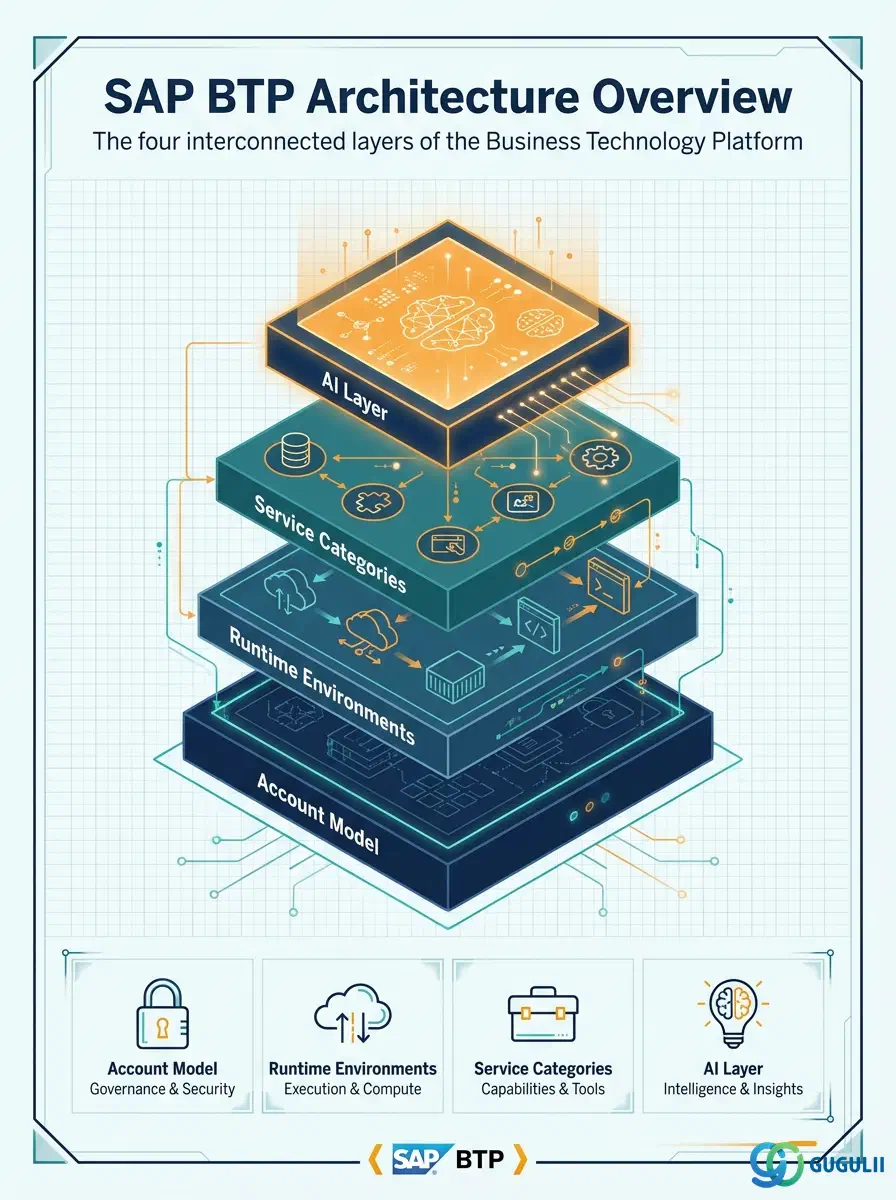
Understanding BTP architecture requires looking at four interconnected layers: the account model, runtime environments, service categories, and the AI layer. Each layer is distinct but interdependent. Skipping a solid grasp of the account model, for example, leads to governance and cost-transparency problems downstream — a common pattern among organizations that rushed their BTP adoption.
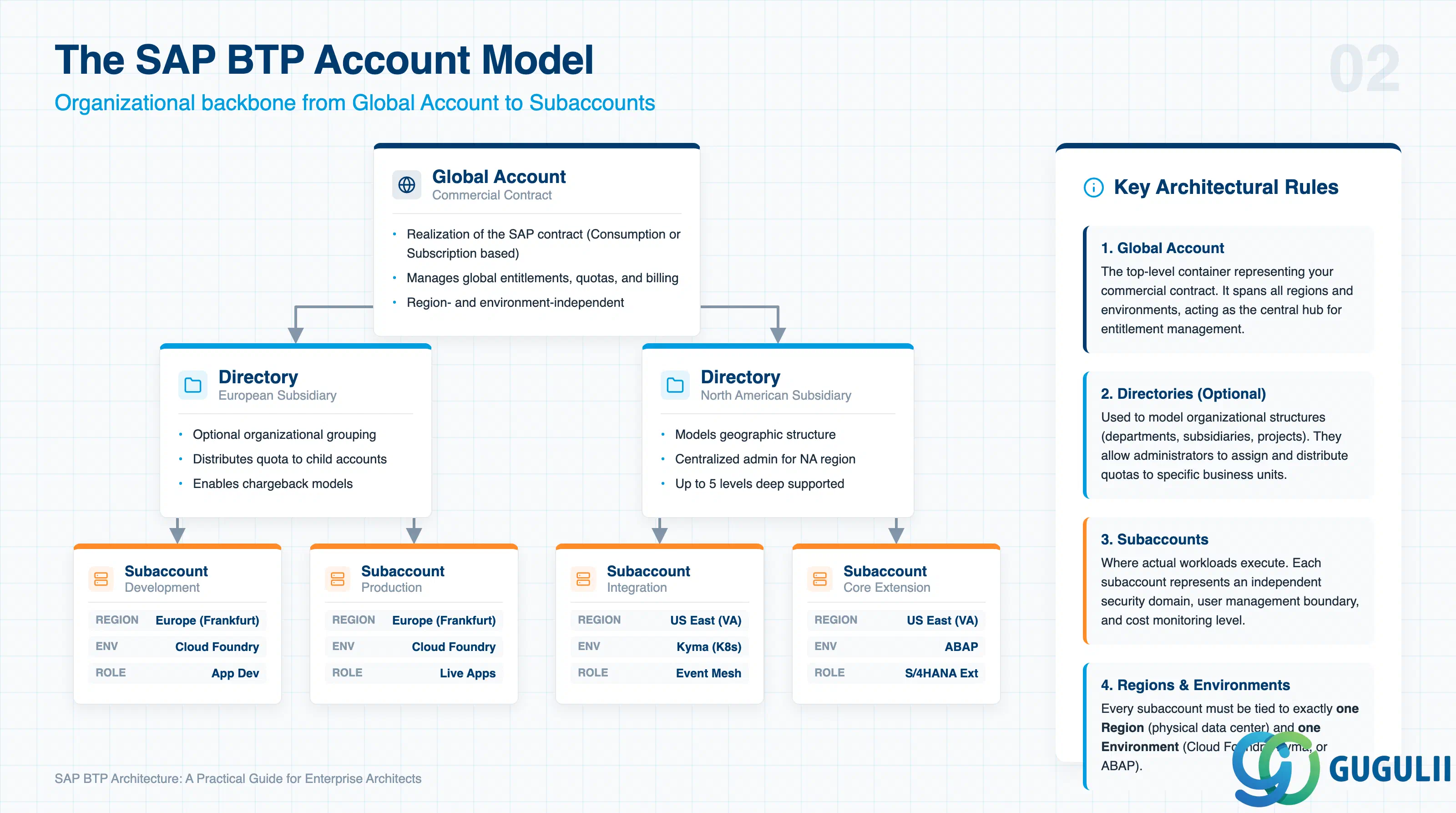
The account model is the organizational backbone of SAP BTP. According to SAP’s official documentation, accounts are structured across three levels:
A global account is the realization of a commercial contract with SAP. It manages subaccounts, members, entitlements, and quotas. There are two commercial models: a consumption-based model (pay-as-you-go) and a subscription-based model (committed capacity). Global accounts are region- and environment-independent, meaning they span all the subaccounts beneath them regardless of where those subaccounts run.
Directories are optional grouping constructs that sit between the global account and subaccounts. They allow architects to model organizational structures — by department, geography, subsidiary, or project — within the platform. A directory can contain other directories and subaccounts, enabling a hierarchy up to seven levels deep (global account + up to five directory levels + subaccount).
Directories support optional entitlement management: administrators can assign a quota at the directory level, which then distributes to child subaccounts. This is particularly useful for chargeback models and multi-business-unit deployments.
Subaccounts are where actual work happens. Each subaccount is tied to a specific region (a physical data center) and an environment (Cloud Foundry, Kyma, or ABAP). Subaccounts within a global account are fully independent of each other — separate security domains, user management, and data boundaries. SAP recommends a standard pattern of at least three subaccounts per workload: development, testing, and production.
Cost monitoring operates at the subaccount level (or directory/Cloud Foundry space level). Architects designing for cost transparency should map subaccounts to the granularity at which they want to track consumption.
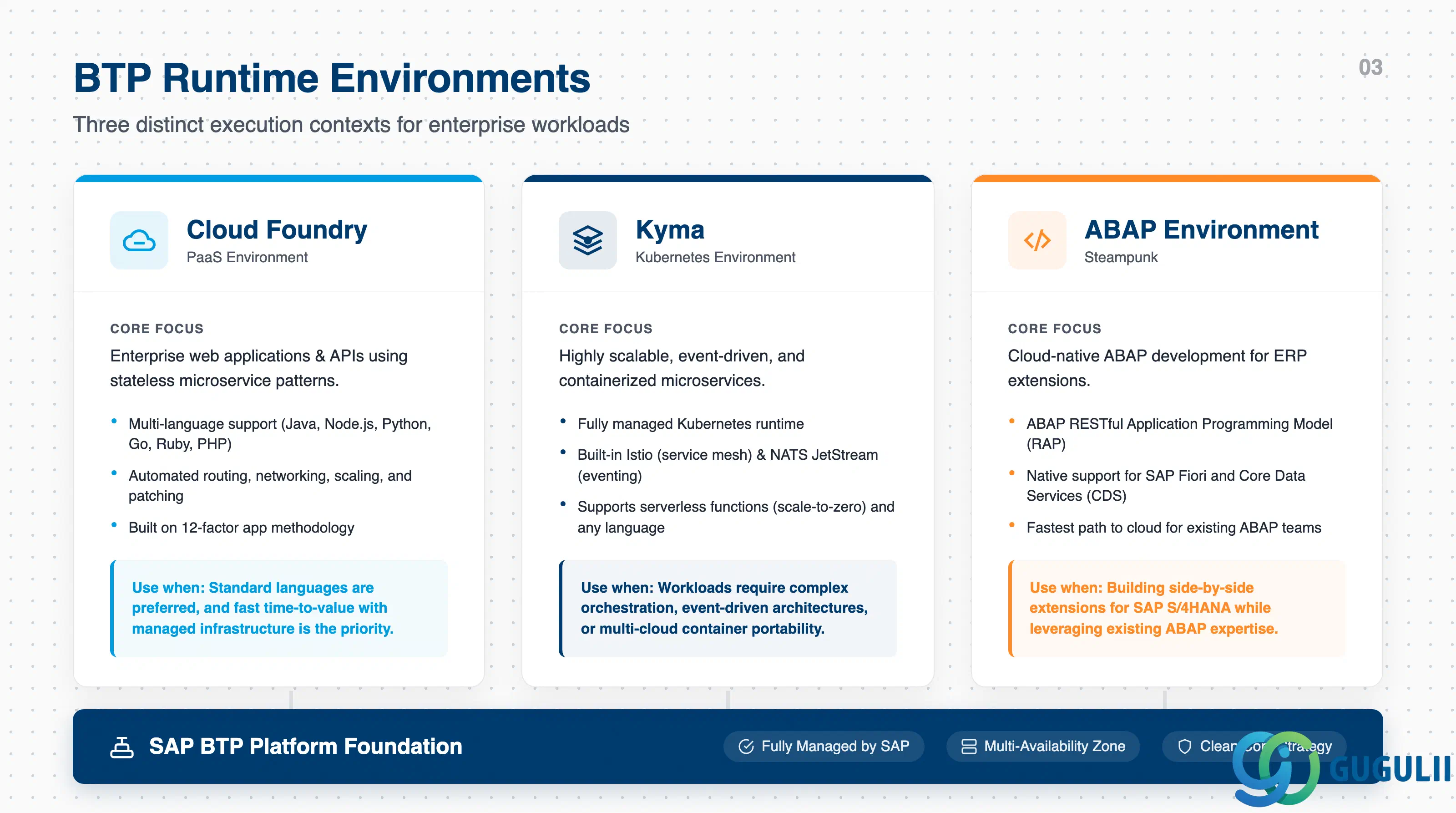
The environment chosen in a subaccount defines the runtime, toolset, and operational model available to developers. As of 2026, SAP BTP offers three active environments; the legacy Neo environment is scheduled for sunset on December 31, 2028.
Cloud Foundry is the mature, enterprise-grade environment for building cloud applications. Based on the open-source platform managed by the Cloud Foundry Foundation, it supports multiple programming languages — Java, Node.js, Python, Ruby, Go, and PHP — and provides a high degree of automation. According to SAP’s runtime comparison documentation, Cloud Foundry automatically handles routing, networking, scaling, and patching, allowing developers to focus on business logic rather than infrastructure.
Cloud Foundry is the right choice when teams need broad language support, faster time-to-value, and do not require fine-grained control over container orchestration. It uses the 12-factor app methodology and stateless microservice patterns.
Kyma is a fully managed Kubernetes runtime based on the open-source Kyma project. As described in SAP’s technical documentation, Kyma extends Kubernetes with best-in-class open-source tools: Istio for service mesh, NATS JetStream for event-driven messaging, and SAP BTP Operator for service consumption. It supports serverless functions (scale-to-zero) and containerized microservices in any programming language.
Kyma is the right choice for teams with Kubernetes expertise, highly scalable workloads, event-driven architectures, or complex multi-cloud integration requirements. The tradeoff is greater operational complexity and a steeper learning curve compared to Cloud Foundry.
Importantly, SAP’s own documentation emphasizes that the choice between Cloud Foundry and Kyma does not need to be binary. Both share the same SLA levels and multi-availability-zone infrastructure, and both are fully managed by SAP. Organizations can — and often should — use both within the same landscape.
Introduced in 2018, the ABAP Environment brings the ABAP platform to the cloud as a PaaS offering. It supports the ABAP RESTful Application Programming Model (RAP), SAP Fiori interfaces, and Core Data Services (CDS). For organizations with existing ABAP expertise and ABAP-based custom code, this environment provides the fastest path to cloud-native ABAP development without retraining the team.
As of late 2022, embedded Steampunk on SAP S/4HANA Cloud enables on-stack developer extensibility for scenarios that cannot be addressed through pure side-by-side BTP extensions.
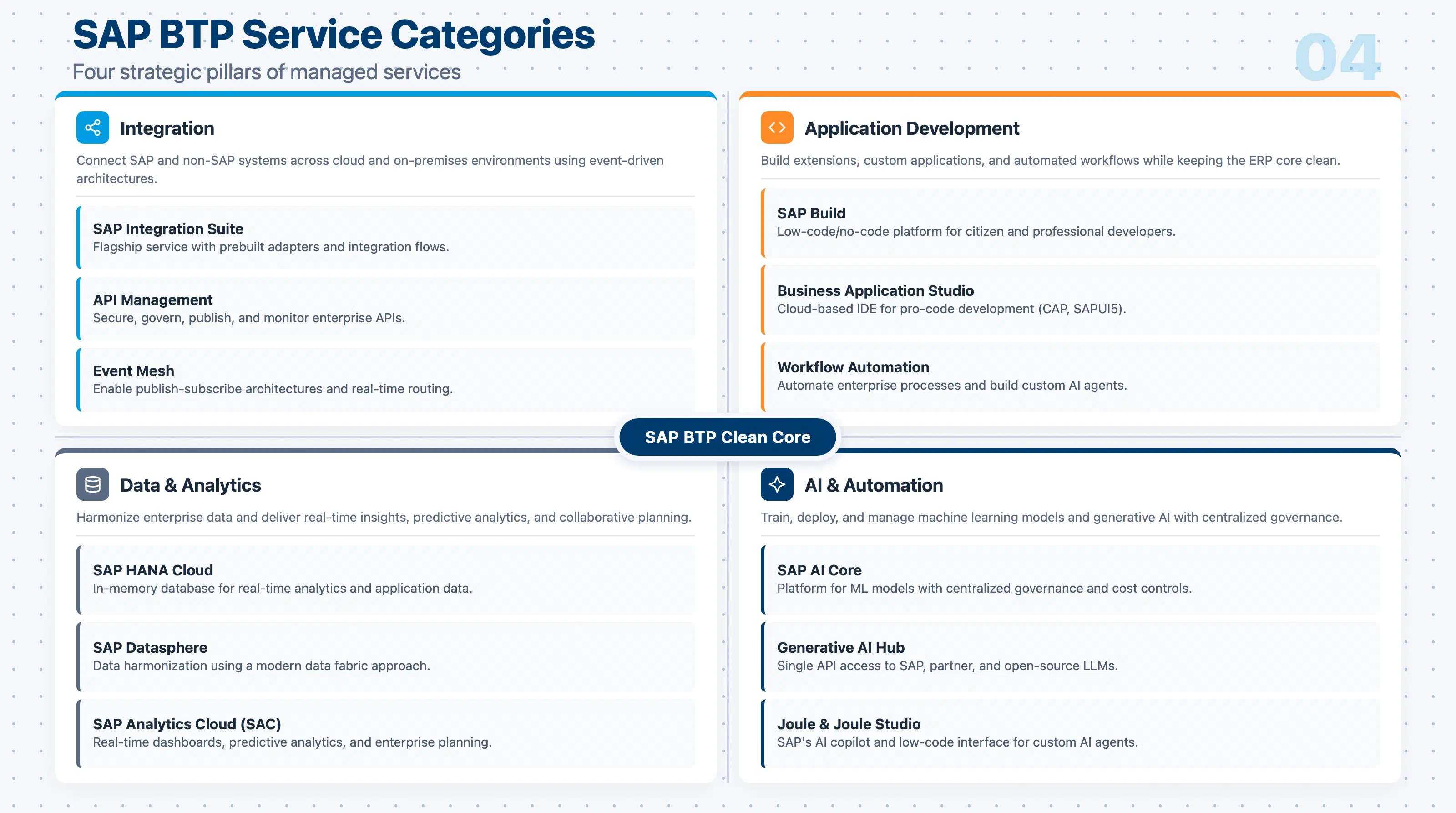
Beyond runtimes, SAP BTP provides a broad catalog of managed services. These fall into four strategic categories:
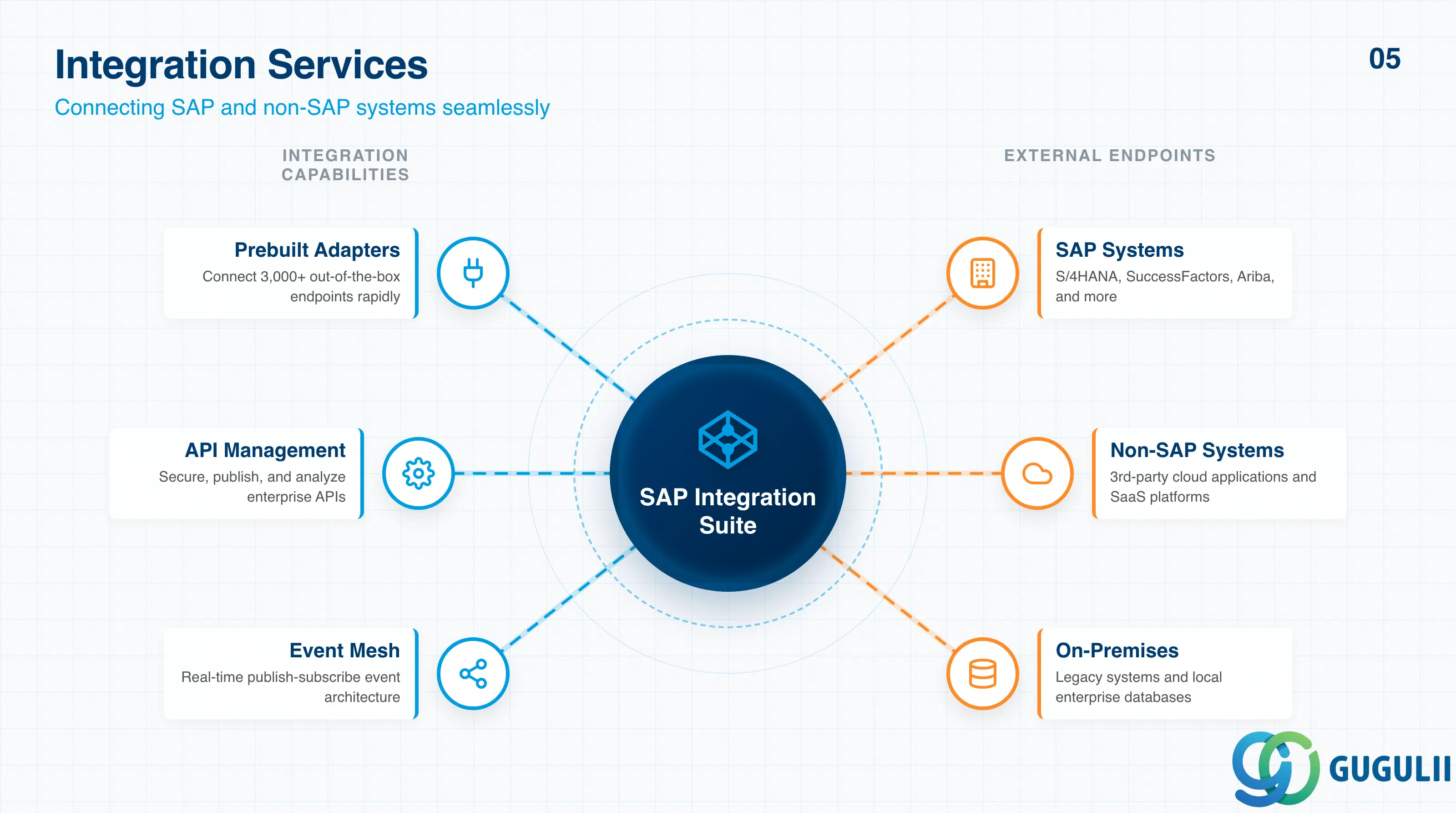
SAP Integration Suite is the flagship integration service. It connects SAP and non-SAP systems — cloud and on-premises — using prebuilt adapters, API management, event mesh, and integration flows. McDonald’s, for example, built over 100 SuccessFactors integrations and 16 Ariba integrations using Integration Suite and Advanced Event Mesh, shifting from point-to-point integrations to a publish-subscribe architecture that improved scalability across 23 countries, as reported by erp.today in February 2026.
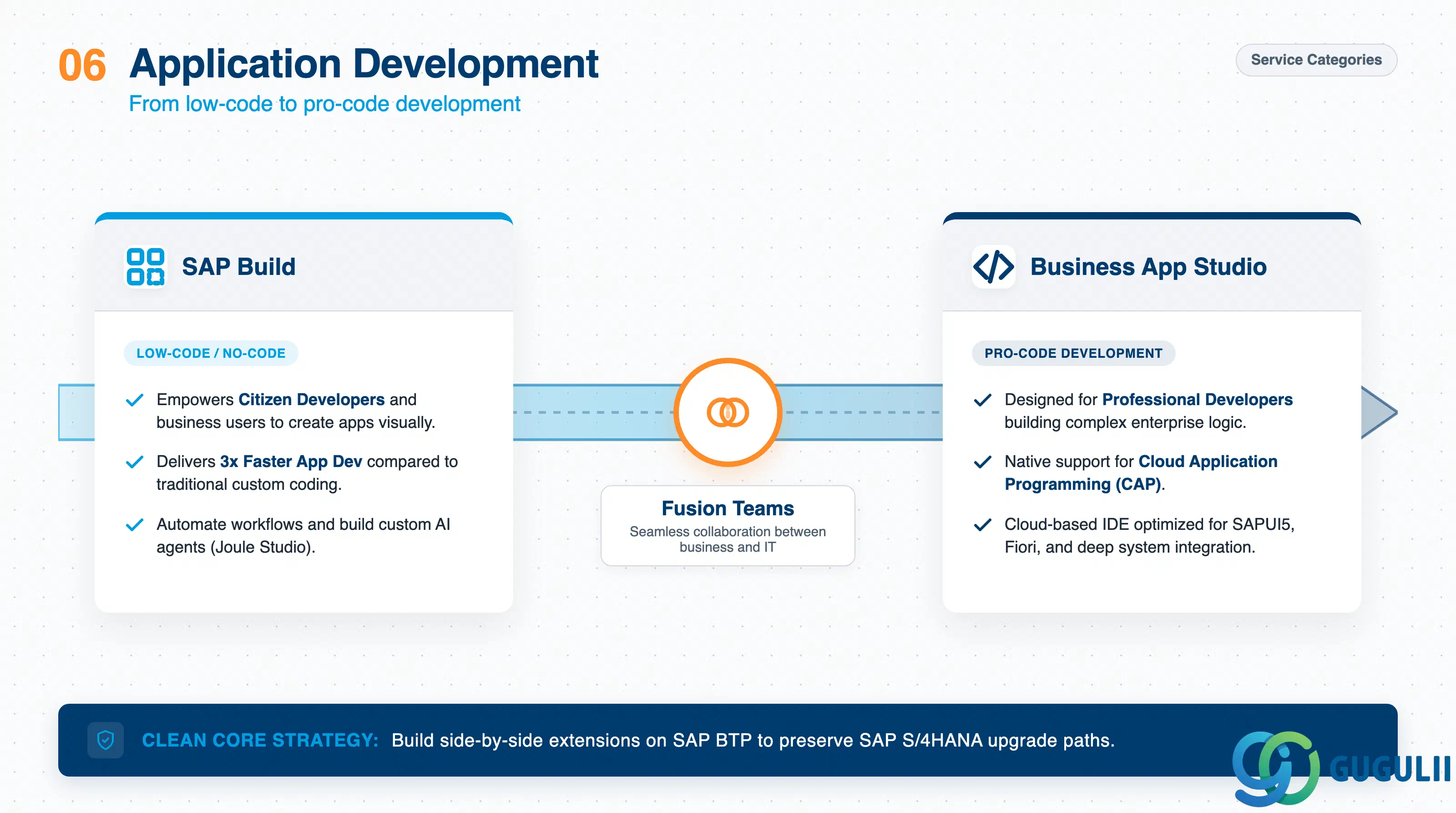
SAP Build is the primary low-code/no-code development platform. It enables both citizen developers and professional developers to create applications, automate workflows, and build AI agents. A GigaOm field test from February 2025 showed SAP Build delivering approximately 3x faster application development compared to custom coding. For pro-code development, SAP Business Application Studio (BAS) provides a cloud-based IDE supporting CAP (Cloud Application Programming Model), SAPUI5, and other frameworks.
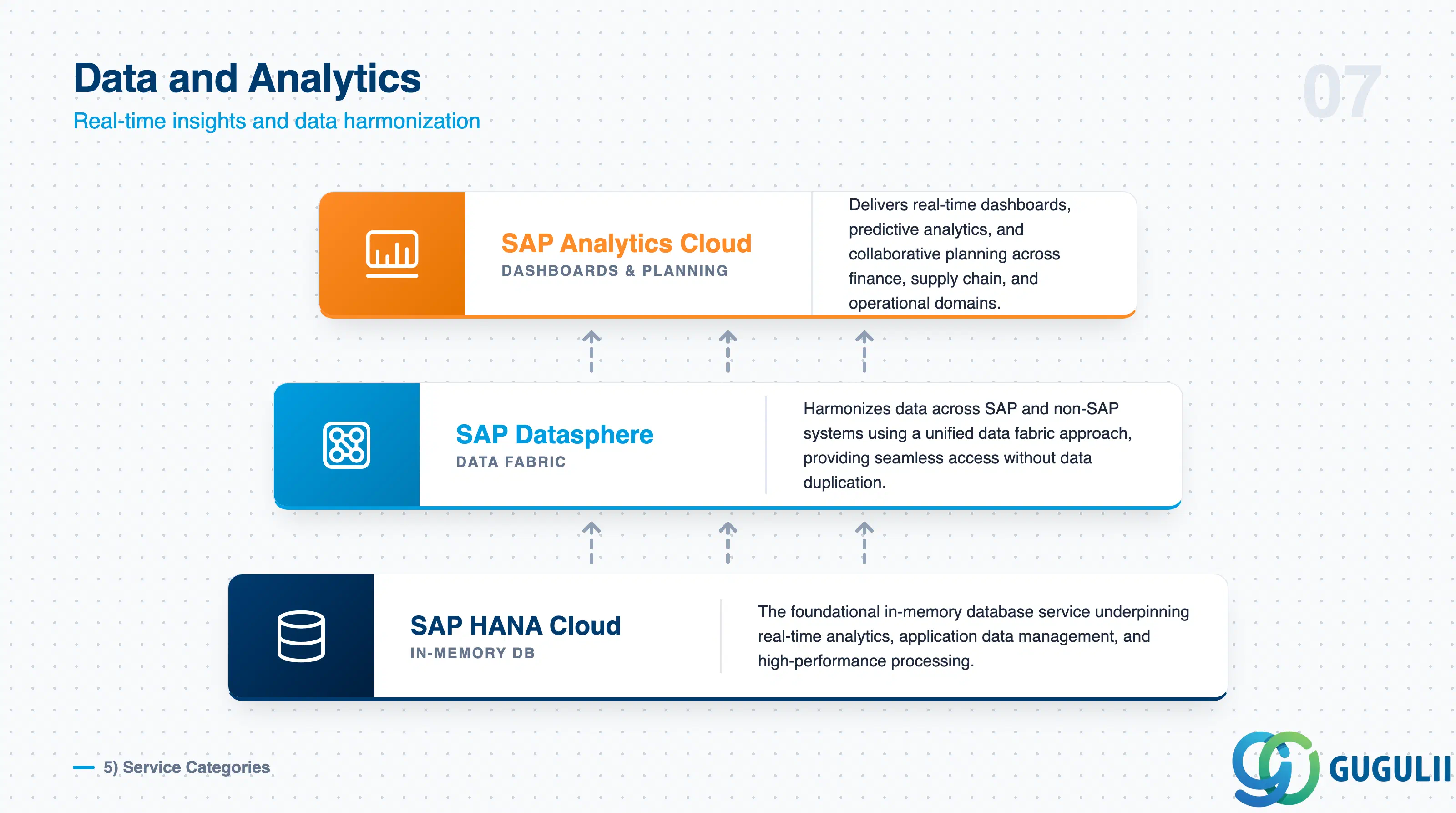
SAP HANA Cloud is the in-memory database service underpinning real-time analytics and application data management. SAP Datasphere provides data harmonization across systems using a data fabric approach. SAP Analytics Cloud (SAC) delivers real-time dashboards, predictive analytics, and collaborative planning across finance, supply chain, and operational domains.
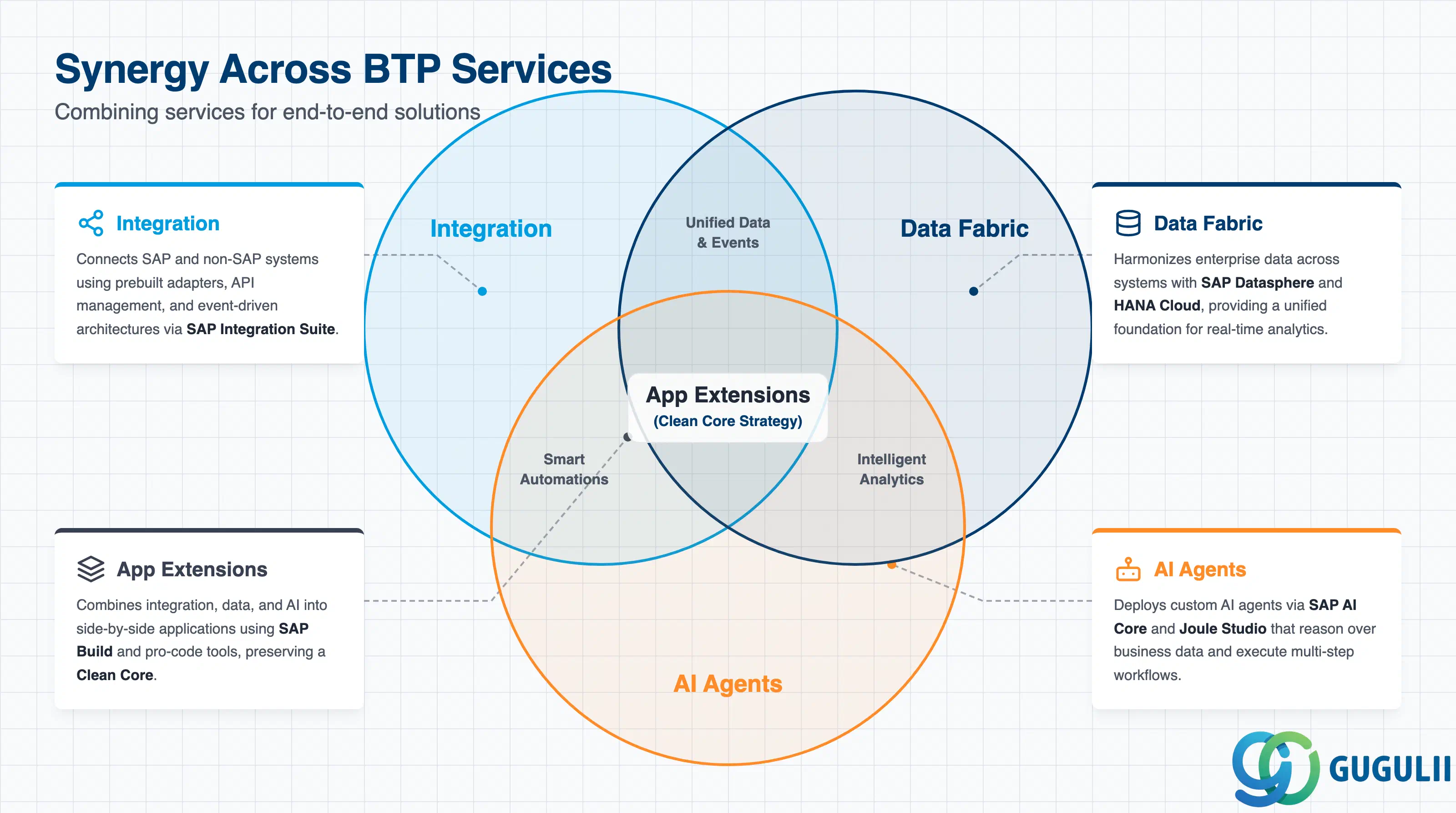
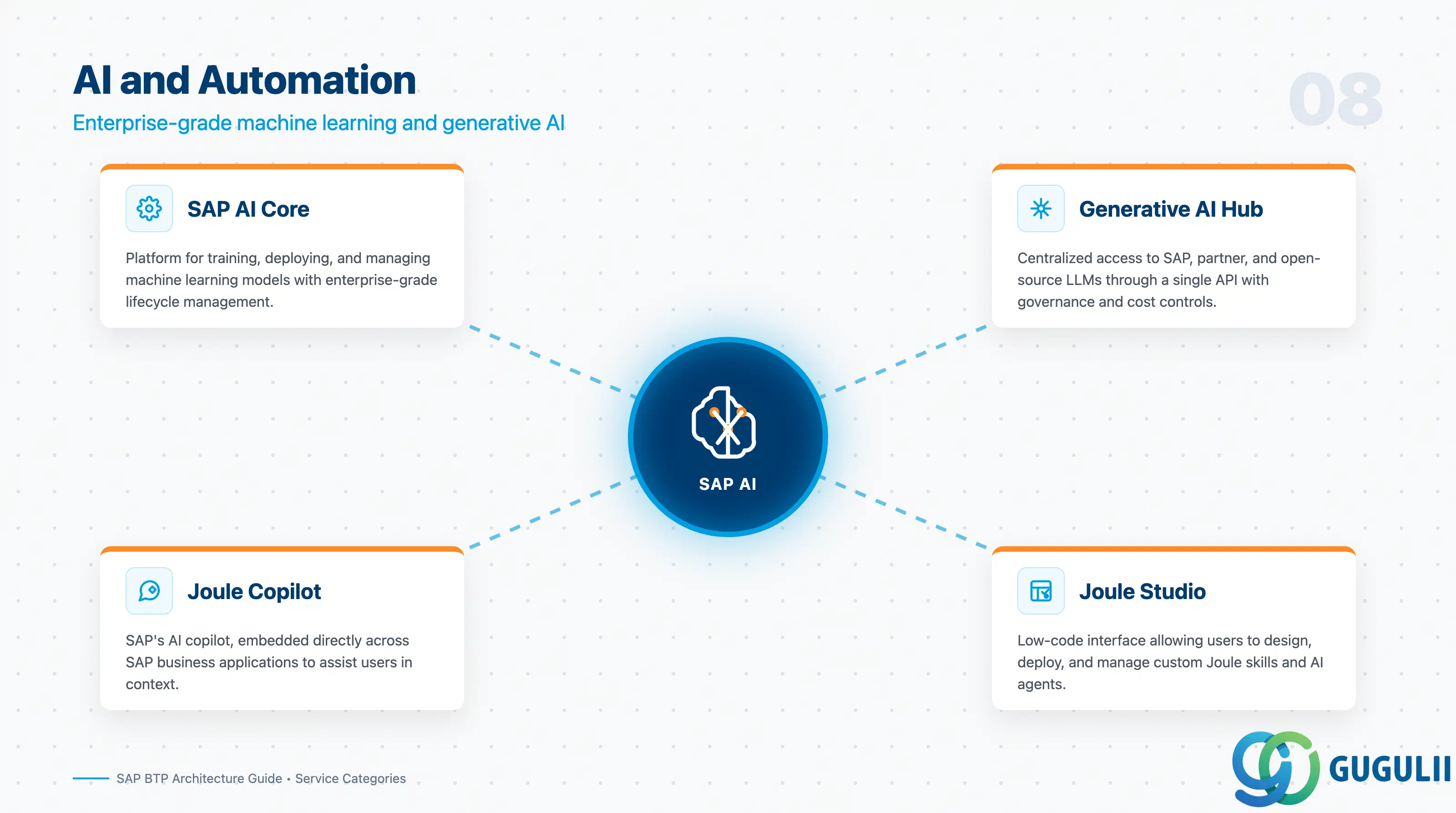
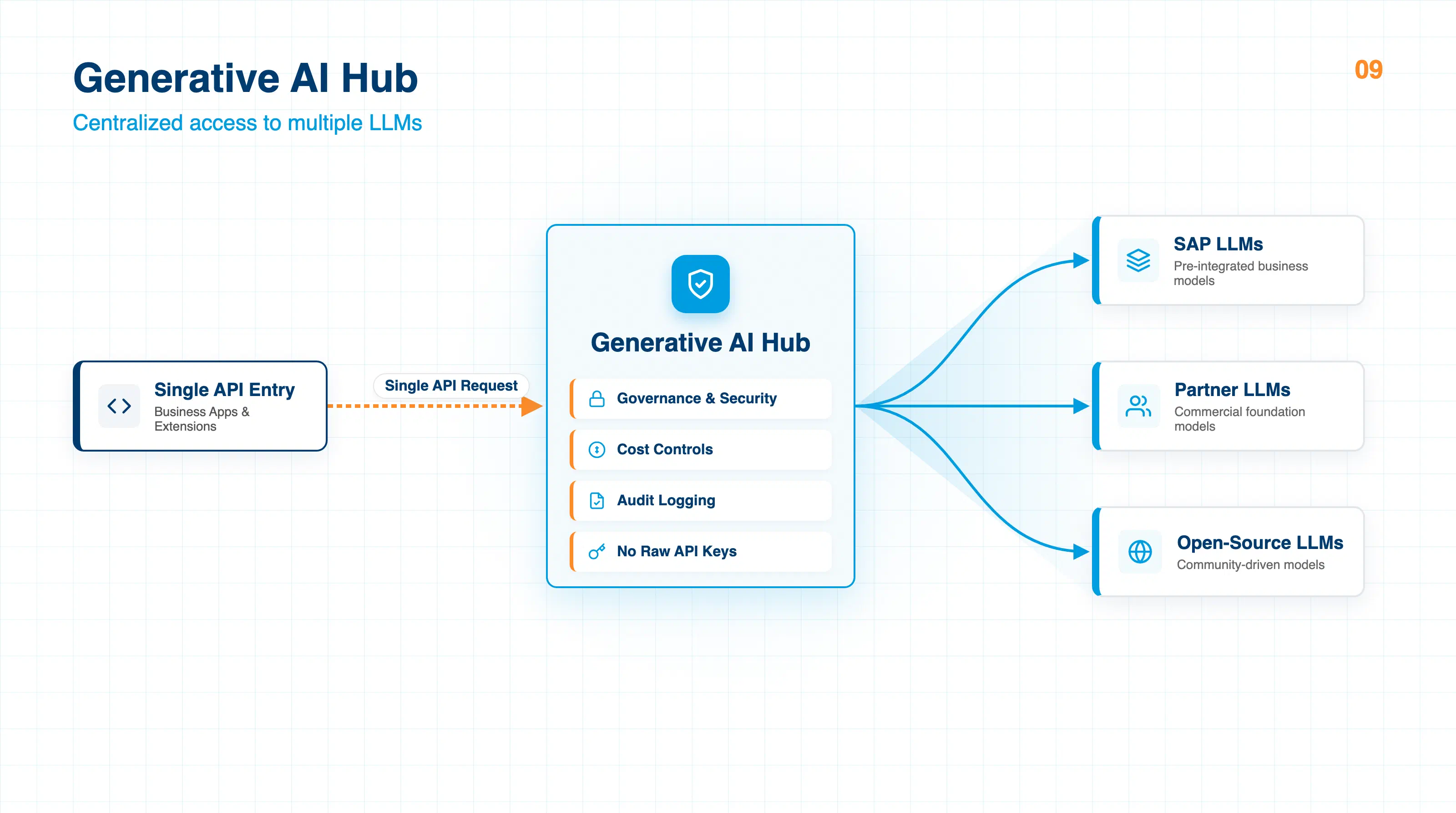
SAP AI Core is the platform for training, deploying, and managing machine learning models. The generative AI hub within AI Core provides centralized access to SAP, partner, and open-source large language models (LLMs) through a single API with governance and cost controls — a critical capability for organizations that need to manage multiple models without exposing raw API keys or losing audit trails.
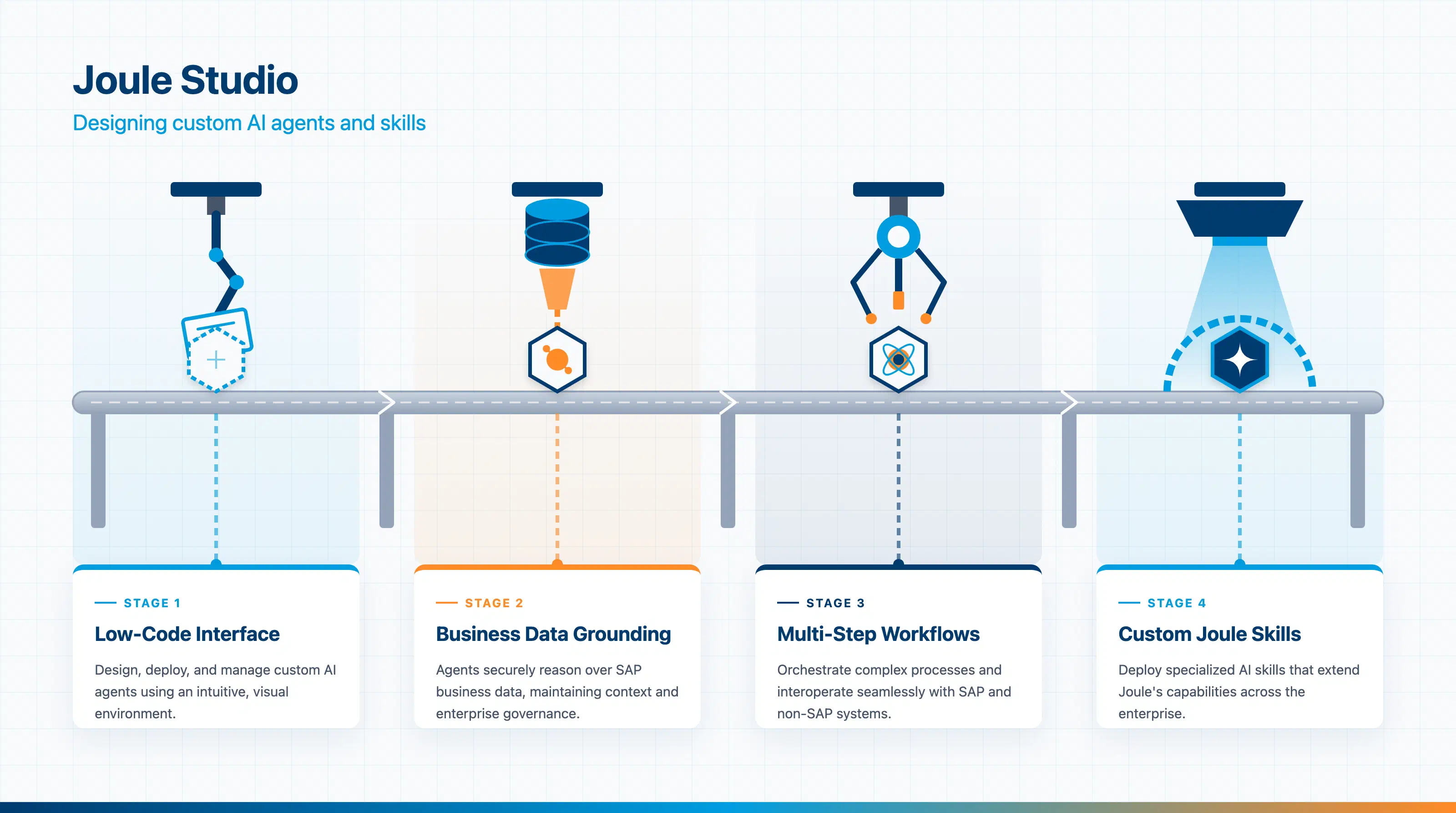
Joule, SAP’s AI copilot, is embedded across SAP applications. Joule Studio (generally available since June 2025) extends this further, allowing users to design, deploy, and manage custom Joule skills and AI agents using a low-code interface. These agents can reason over SAP business data, execute multi-step workflows, and interoperate with non-SAP systems.
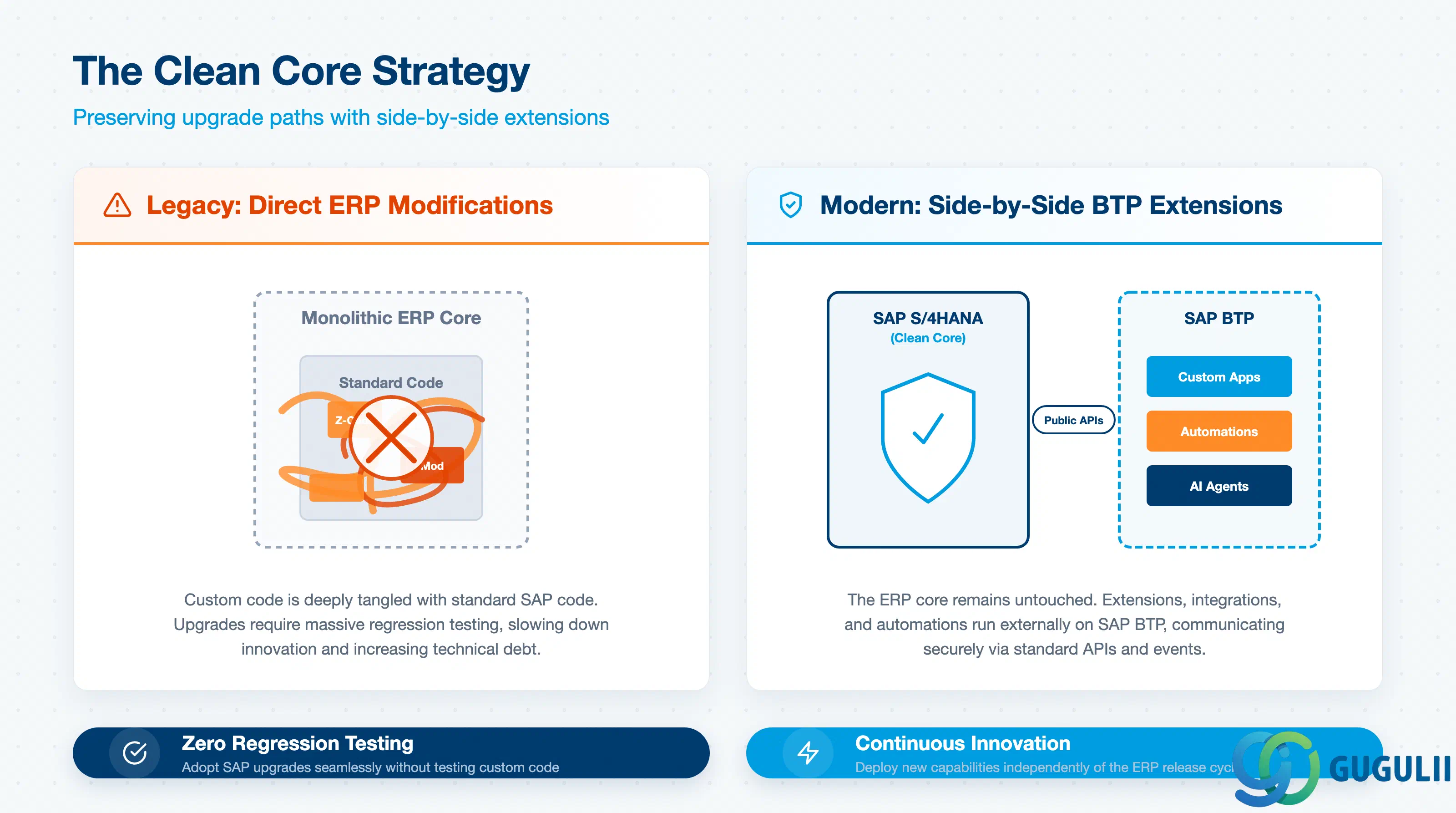
A recurring theme across all four service categories is the clean core strategy. The fundamental principle is simple: do not modify the SAP ERP core. Instead, place all extensions, integrations, and automations on SAP BTP as side-by-side applications. This approach, as documented across multiple real-world deployments, preserves the ability to adopt SAP upgrades without regression testing custom code.
A global consulting firm cited in erp.today’s February 2026 coverage reduced an intercompany transaction processing step from 15 minutes to under 10 seconds after implementing BTP Business Process Automation — while maintaining a clean core across 20 countries and 40,000+ employees. The architecture they used — spanning HANA Cloud, Integration Suite, Event Mesh, Analytics Cloud, and Datasphere — is now a reference pattern for large-scale BTP adoption.
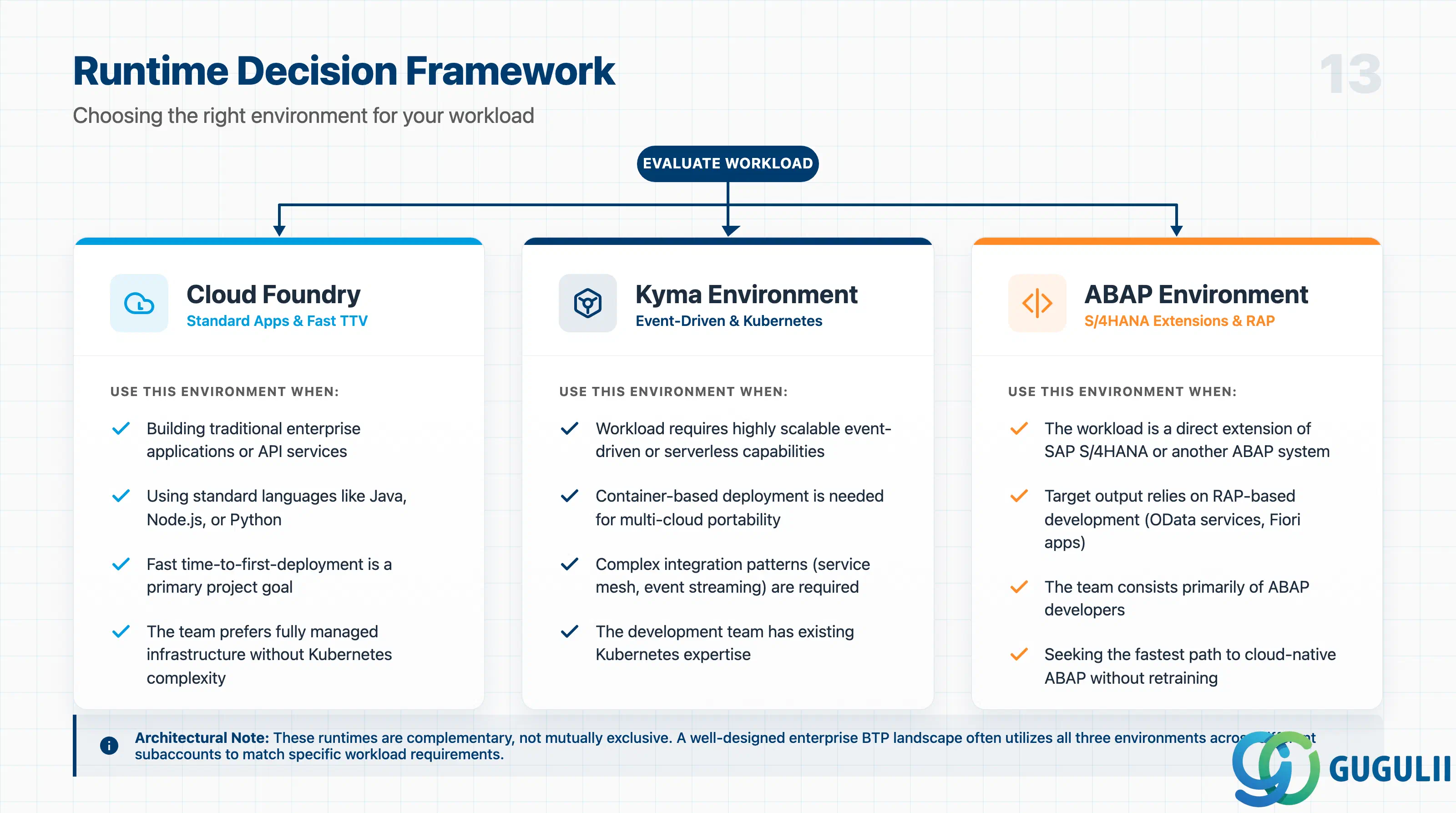
Architects frequently face the question of which runtime to use for a given workload. The following framework, informed by SAP’s official guidance and community best practices, provides a starting point:
Use Cloud Foundry when:
Use Kyma when:
Use ABAP Environment when:
The runtimes are complementary. A well-designed BTP landscape for a large enterprise will often use all three: Kyma for event-driven integrations, Cloud Foundry for web applications, and ABAP Environment for core SAP extensions.
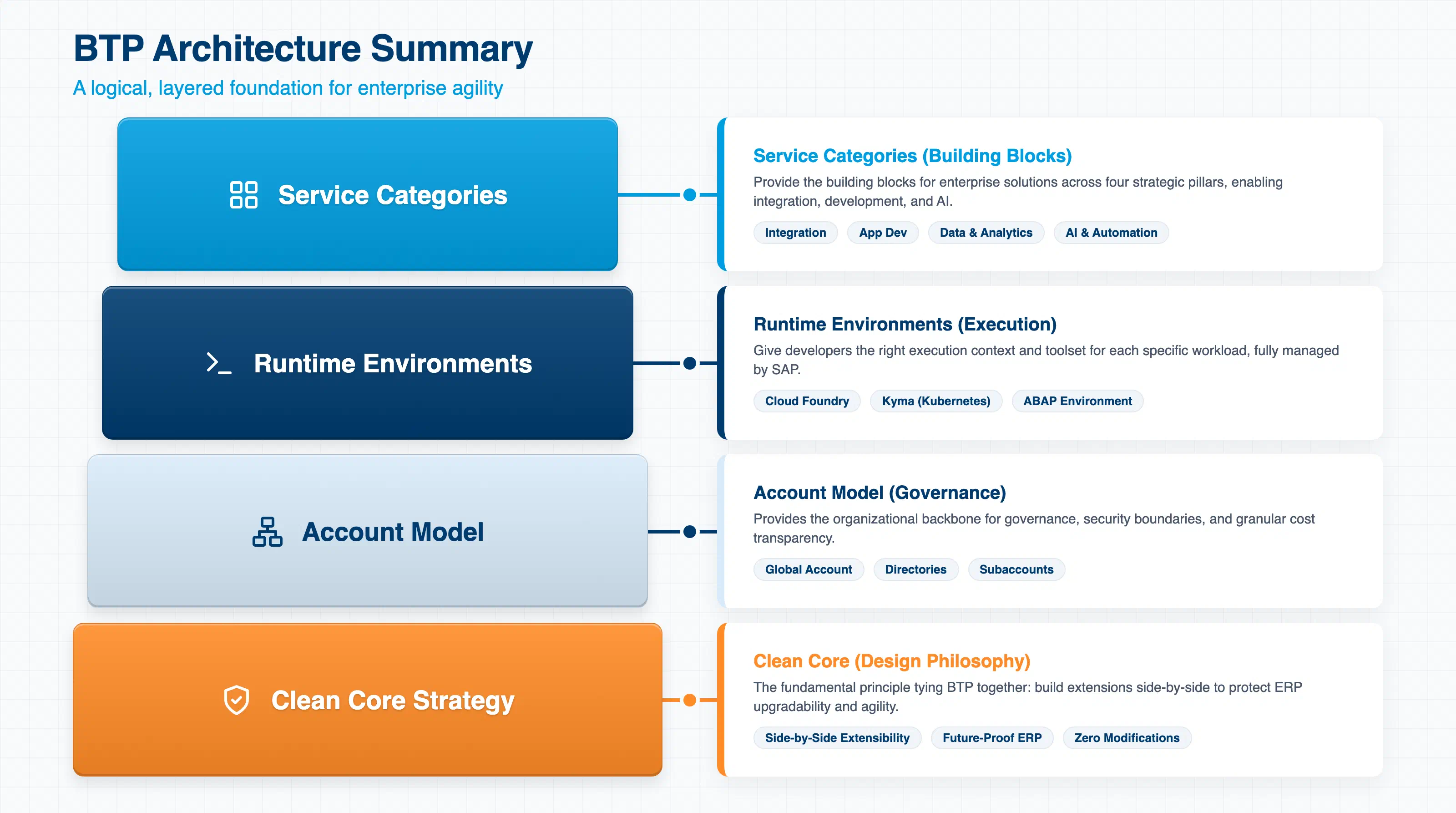
SAP BTP’s architecture is layered but logical. The account model (global account → directories → subaccounts) provides the governance and cost management framework. The runtime environments (Cloud Foundry, Kyma, ABAP) give developers the right execution context for each workload. The service categories (integration, application development, data, AI) provide the building blocks for enterprise solutions. And the clean core strategy ties everything together with a design philosophy that protects long-term agility.
For architects and senior consultants evaluating BTP, the most important first step is not choosing a runtime — it is designing the account model. A well-structured account hierarchy directly enables governance, security, cost transparency, and development lifecycle management. Get the foundation right, and the rest of the platform becomes significantly easier to operate.
Q: Can I use multiple environments in a single subaccount? A: No. Each subaccount is tied to a single environment (Cloud Foundry, Kyma, or ABAP). To use multiple environments, create multiple subaccounts under a shared directory.
Q: What is the difference between a directory and a subaccount?
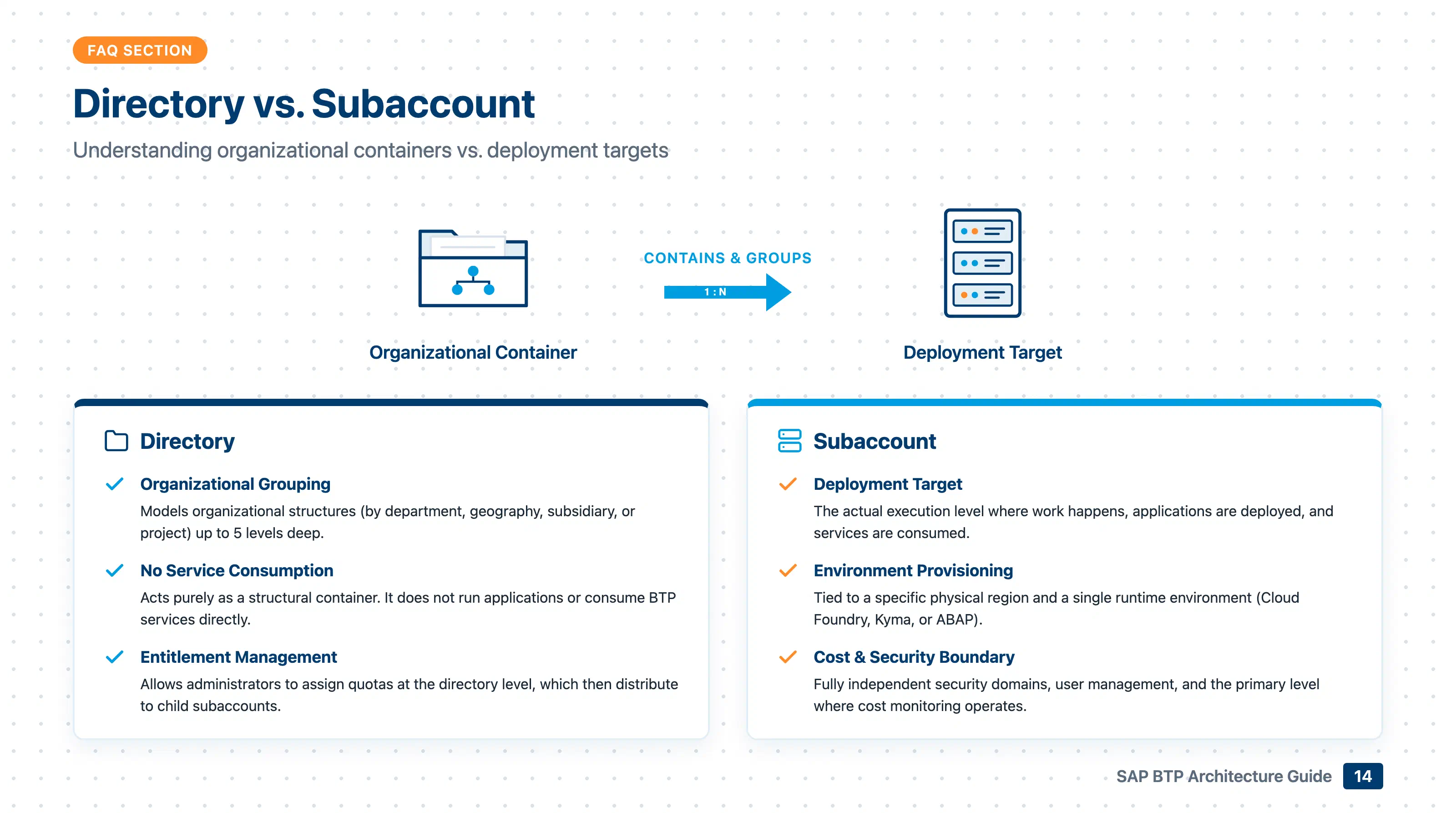
A: Directories are organizational containers — they group subaccounts but do not run applications or consume services. Subaccounts are the actual deployment targets where environments are provisioned and services are consumed.
Q: Is the Neo environment still available? A: Neo is still in operation but is scheduled for sunset on December 31, 2028. New projects should not use Neo. SAP strongly recommends migrating existing Neo workloads to Multi-Cloud environments.
Q: What is the generative AI hub? A: The generative AI hub is a capability within SAP AI Core that provides a single API for accessing multiple LLMs — from SAP, partners, and open-source providers — with centralized governance, cost controls, and audit logging. It eliminates the need to manage separate API credentials and endpoints for each model.
Q: How does SAP BTP relate to RISE with SAP? A: RISE with SAP is a business transformation offering that bundles SAP S/4HANA Cloud with BTP capabilities. BTP itself is available independently. In a RISE context, BTP serves as the extension and integration layer for the included S/4HANA system.
This site organizes BTP knowledge into the following structure:
| L1. Big Picture | L2. Functional Domains |
|---|---|
| BTP-001 What is BTP | L2-A. Integration |
| BTP-002 BTP Architecture (this article) | L2-B. Application Development & Automation |
| BTP-003 BTP Capability Map | L2-C. Data & Analytics |
| BTP-004 Deployment Models | L2-D. AI |
| BTP-005 Licensing Models | L2-E. Foundation Services |
| BTP-006 Clean Core Strategy | L2-F. Architecture & Operations |
| L2-G. Use Cases & Patterns |