Title here
Summary here

| ID | Category | Component | Scope |
|---|---|---|---|
| BTP-B01 | Application Development | Overview | Capability Map |
| BTP-B02 | Application Development | Business Application Studio | Architecture and Use |
| BTP-B03 | Application Development | CAP and Build Code | Architecture and Use |
| BTP-B04 | Application Development | ABAP Environment | Architecture and Use |
| BTP-B05 | Application Development | Build Apps | Architecture and Use (this article) |
| BTP-B06 | Application Development | Build Process Automation | Architecture and Use |
| BTP-B07 | Application Development | Build Work Zone | Architecture and Use |
| BTP-B08 | Application Development | Decision Patterns | Use Cases and Decision Patterns |
| Resource | URL |
|---|---|
| What Is SAP Build Apps? | help.sap.com → |
| Best Practices: A Strategic Approach to SAP Build Apps | help.sap.com → |
| SAP Build Apps — Visual Cloud Functions | help.sap.com → |
| SAP Build product family | sap.com → |
| SAP Build Apps — features | sap.com → |
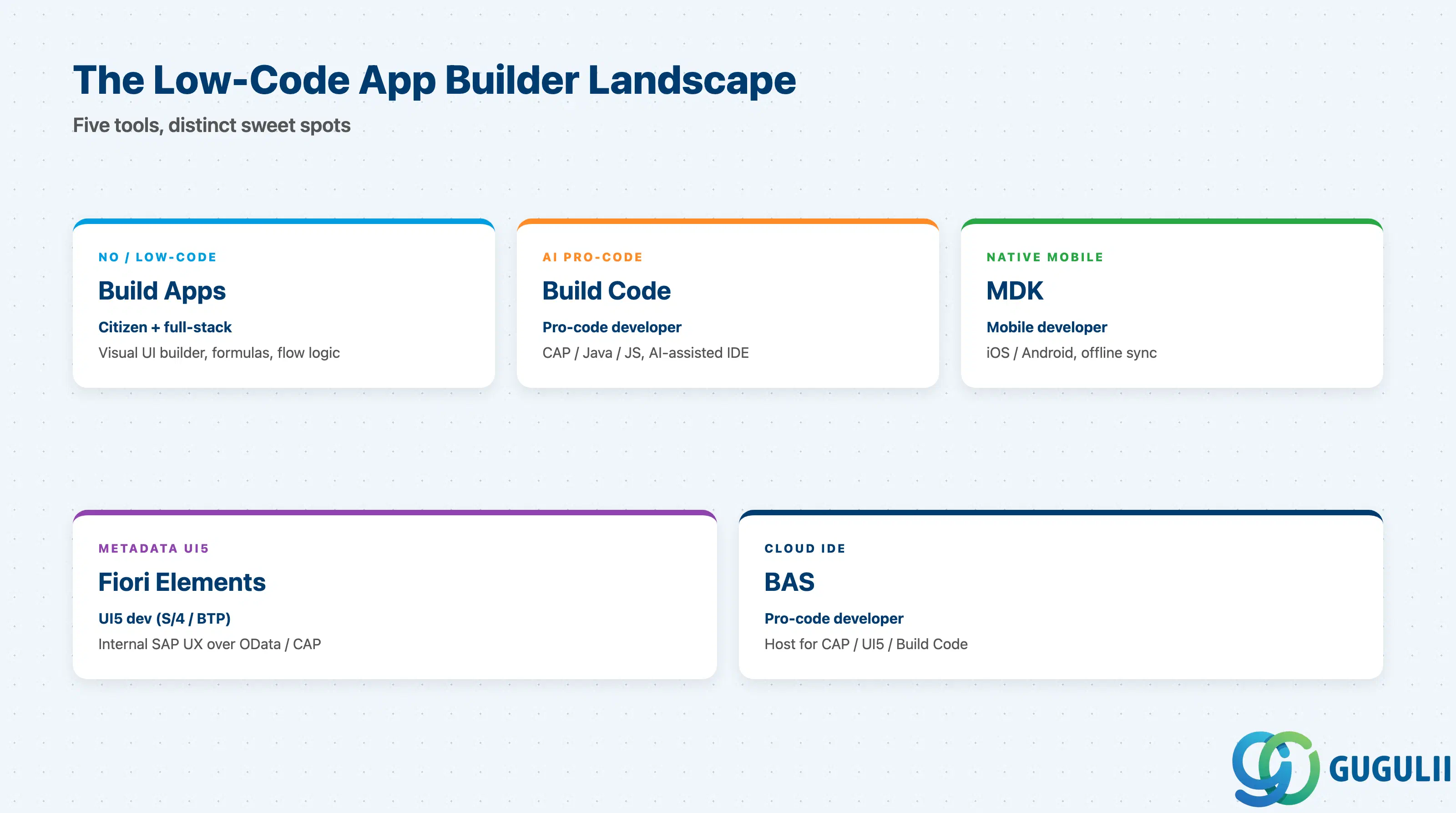
Build Apps does not stand alone — it sits inside a portfolio with overlapping but distinct tools. Consultants get burned when they treat them as substitutes. They are not.
| Tool | What it does | Primary user |
|---|---|---|
| SAP Build Apps | Visual no/low-code app builder for web and mobile UIs | Citizen developer + business technologist |
| SAP Build Code | AI-assisted pro-code IDE (CAP/Java/JS) for service-heavy backends | Pro-code developer |
| SAP Mobile Development Kit (MDK) | Metadata-driven native iOS/Android with offline sync | Mobile developer |
| SAP Fiori Elements | Metadata-driven Fiori UIs over OData/CAP — internal SAP UX | UI5 developer in S/4 / BTP context |
| SAP Business Application Studio | Cloud IDE — host for CAP / UI5 / Build Code work | Pro-code developer |
They are not substitutes.
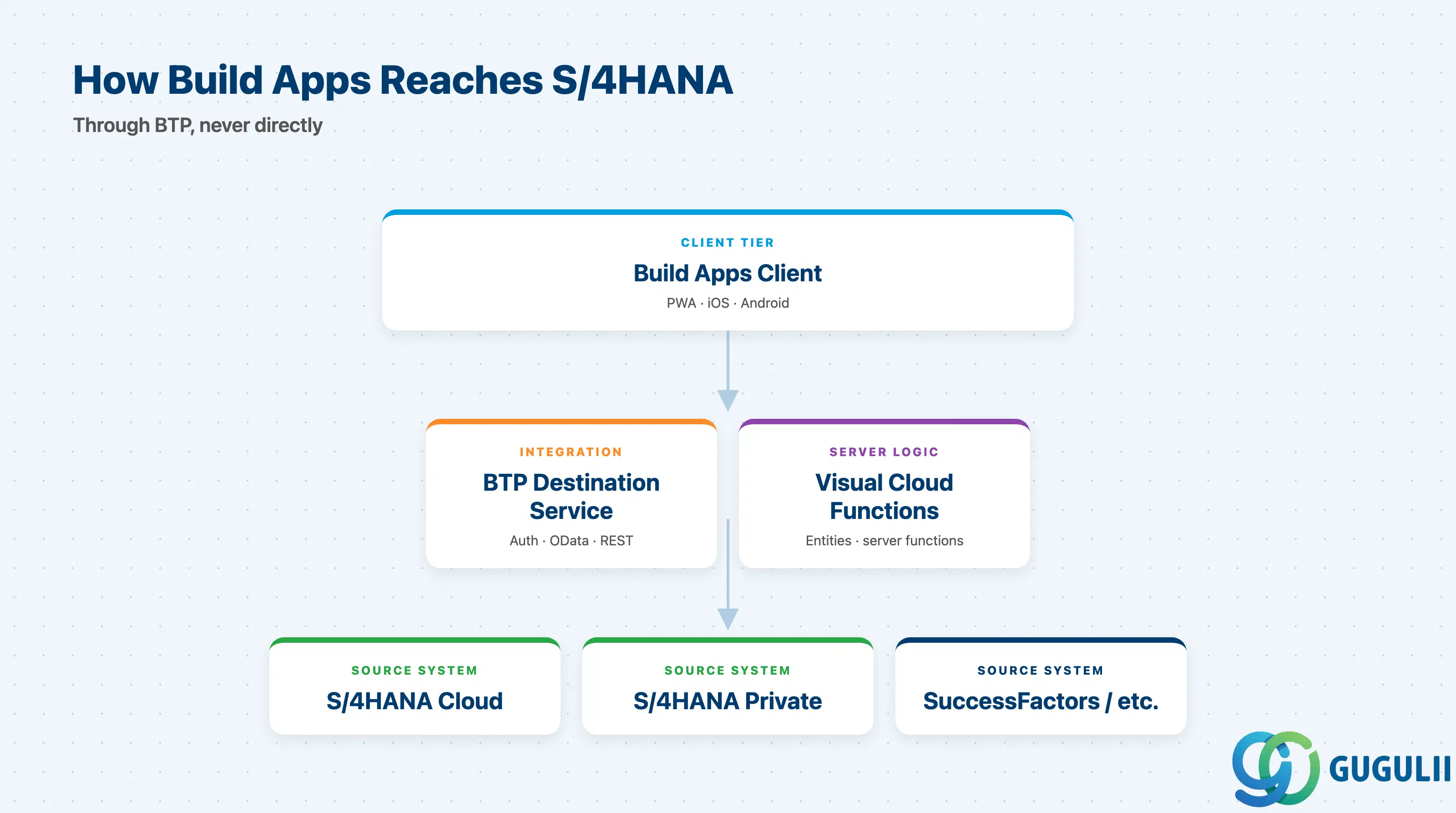
Build Apps does not talk to S/4HANA directly. It talks through BTP.
+----------------------+         +------------------------+
|  Build Apps client   |  HTTPS  |  BTP Destination       |
|  (PWA / iOS / And.)  +-------->+  Service / Connectivity|
+----------+-----------+         +------------+-----------+
           |                                  |
           |  flow functions                  |  OData / REST
           |  formula bindings                |  (with auth)
           v                                  v
+----------------------+         +------------------------+
|  Visual Cloud        |         |  S/4HANA Cloud /       |
|  Functions (BTP K8s) |<------->|  S/4HANA Private /     |
|  (entities + funcs)  |         |  SuccessFactors / etc. |
+----------------------+         +------------------------+
VCF is where you put server-side logic that would otherwise leak into the client — transformations, rule evaluation, scheduled tasks, narrowed read-only endpoints over a wider OData service. Authentication and credential management stay on BTP, not in the app.
Key point: The S/4 connection lives in the BTP destination, not in Build Apps. If you treat the app as the integration layer you will rebuild that integration on every Build App you ship.
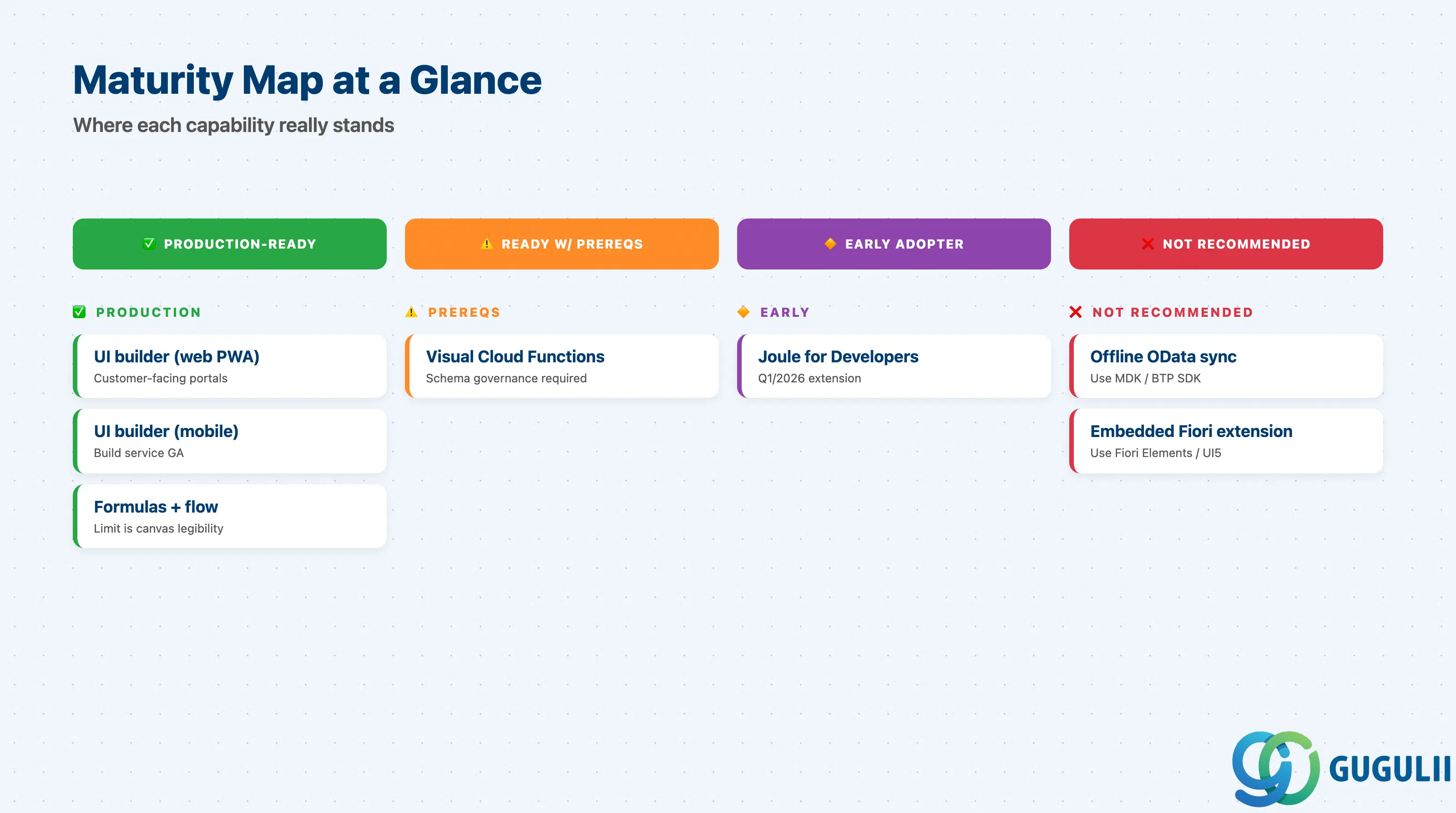
| Capability | Maturity | Notes |
|---|---|---|
| Visual UI builder (web PWA) | ✅ Production-ready | Mature, used in customer-facing portals |
| Visual UI builder (mobile iOS/Android) | ✅ Production-ready | Build service produces installable apps; preview app for dev cycles |
| Formula editor + Flow Functions | ✅ Production-ready | Core / By-Me / Installed libraries; limit is logic-canvas legibility, not engine |
| Visual Cloud Functions (low-code backend) | ⚠️ Ready with prerequisites | Needs governance — who owns the entities, who reviews schema changes |
| Joule for Developers in Build Apps | 🔶 Early adopter | Q1/2026 extension; treat AI suggestions as drafts, not authoritative |
| Offline OData sync | ❌ Not recommended | Not natively supported — use MDK or BTP SDK instead |
| Embedded extension inside Fiori launchpad | ❌ Not recommended | Use Fiori Elements / UI5 / Build Code |
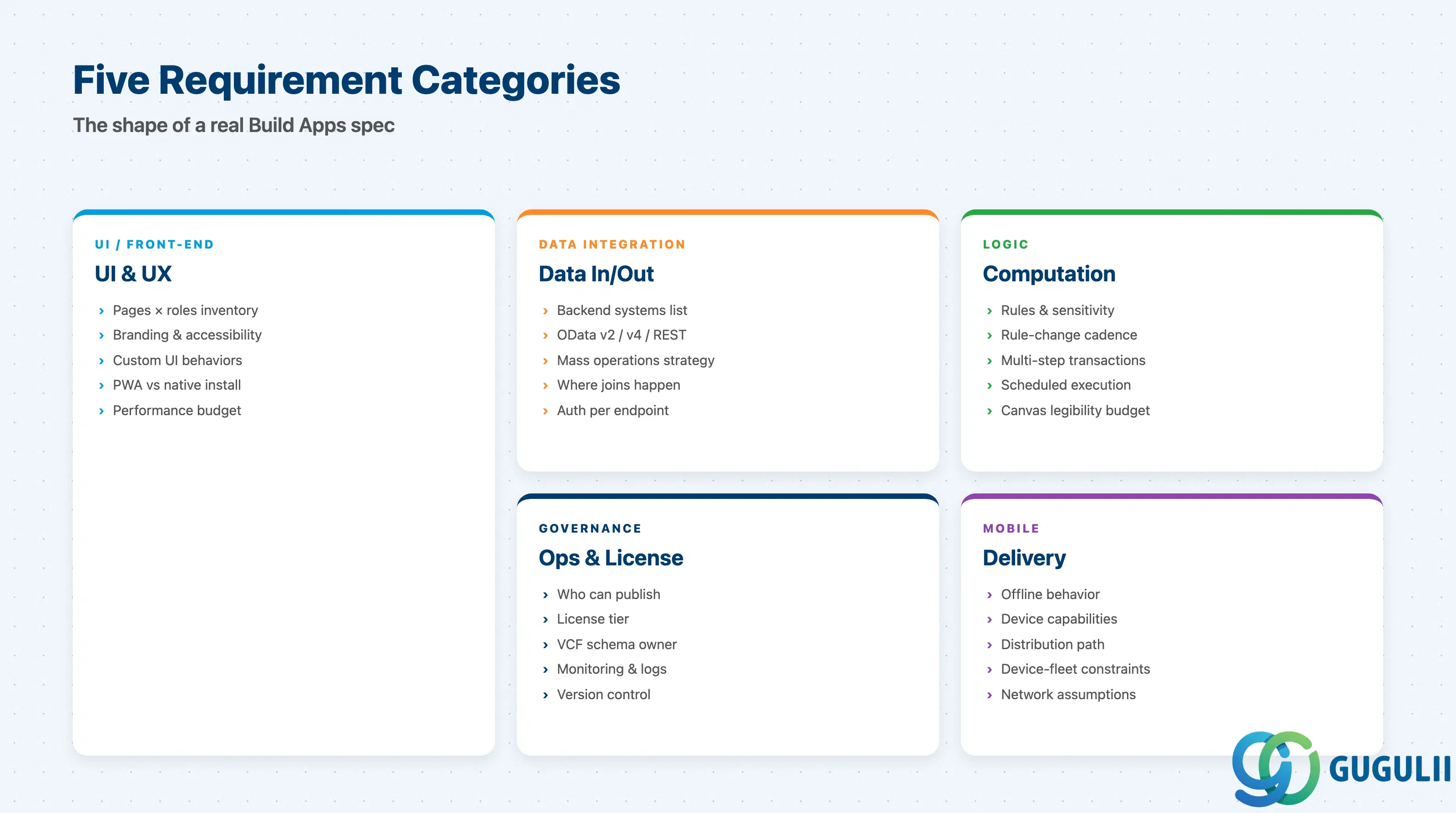
This is the part the requirements doc usually misses. Each table covers one capability area; rows are requirements-stage items, not implementation steps.
| Checklist item | Why it matters |
|---|---|
| Inventory every page and the role(s) who see each page | Drives the page-collection structure and per-page logic-canvas scope |
| Capture branding constraints (colors, logo, accessibility level) | Build Apps theming has limits; deviations from the marketplace components cost time |
| List required custom UI behaviors (gestures, animations, charts) | These are the most common “Build Apps cannot do this” surprises |
| Decide PWA vs native install per persona | PWA covers most office users; field/scanner workflows usually need native build |
| Define performance budget (first paint, list size, search latency) | If budgets are tighter than ~2s first paint, raise the pro-code question early |
| Checklist item | Why it matters |
|---|---|
| List every backend system the app reads from / writes to | One BTP destination per system — and one set of ownership questions per destination |
| Confirm OData v2 vs v4 vs REST for each endpoint | Build Apps connectors differ; mixing v2 and v4 in the same app is fine but governance differs |
| Identify mass operations or large result sets | The visual data binding is not optimized for large pages; pagination is mandatory |
| Decide where joins / aggregations happen | Prefer server-side in the source or in VCF; client-side joins do not scale |
| Confirm authentication mode per endpoint | OAuth2 / SAML / API key — managed in BTP destinations, not Build Apps |
| Checklist item | Why it matters |
|---|---|
| Catalogue every business rule and its sensitivity | Sensitive rules belong in VCF, not in flow functions visible to the client |
| Define the rule-change cadence | Frequent changes by non-developers are exactly Build Apps’ sweet spot |
| Identify any multi-step transactional logic | If atomic write across systems is required, push the orchestration into a backend (CAP / Build Code) |
| Note logic that needs scheduled execution | Build Apps client cannot schedule; use VCF or Build Process Automation |
| Set a flow-canvas legibility budget | A useful empirical limit is ~30 nodes per page; beyond that, refactor or move to pro-code |
| Checklist item | Why it matters |
|---|---|
| Confirm offline behavior expectations | Native offline sync is not Build Apps territory — flag MDK / BTP SDK as fallback |
| List device capabilities required (camera, GPS, scanner, push) | Marketplace flow functions cover the common ones; exotic peripherals require pro-code |
| Confirm app-store distribution path | Enterprise distribution (MDM) vs public store changes the build-service config |
| Capture device-fleet constraints | iOS/Android version floor, locked-down devices, MDM policies |
| Define network assumptions | Fully online vs intermittent vs disconnected — a one-line answer changes the whole tool choice |
| Checklist item | Why it matters |
|---|---|
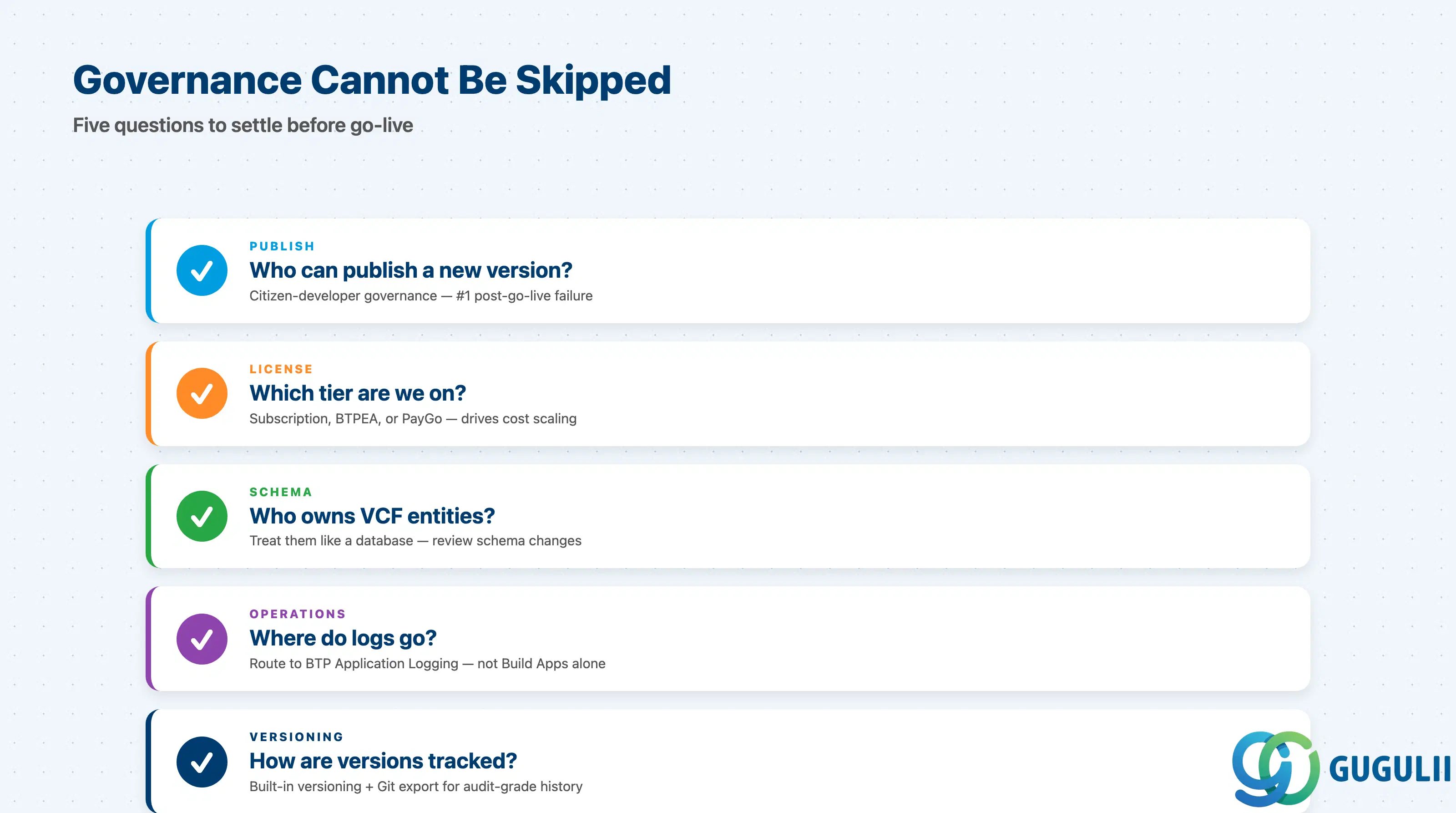
| Identify who can publish a new app version | Citizen-developer governance is the #1 thing that fails post-go-live |
| Confirm the license tier (subscription vs BTPEA vs PayGo) | Determines how cost scales with usage |
| Decide who owns Visual Cloud Functions schemas | Treat VCF entities like a database — schema reviews are not optional |
| Define monitoring & alerting | Build Apps does not replace BTP-level observability; route logs to BTP Application Logging |
| Plan version control for app artifacts | Build Apps’ built-in versioning is convenient; for audit-grade history, exporting to Git is the pattern |
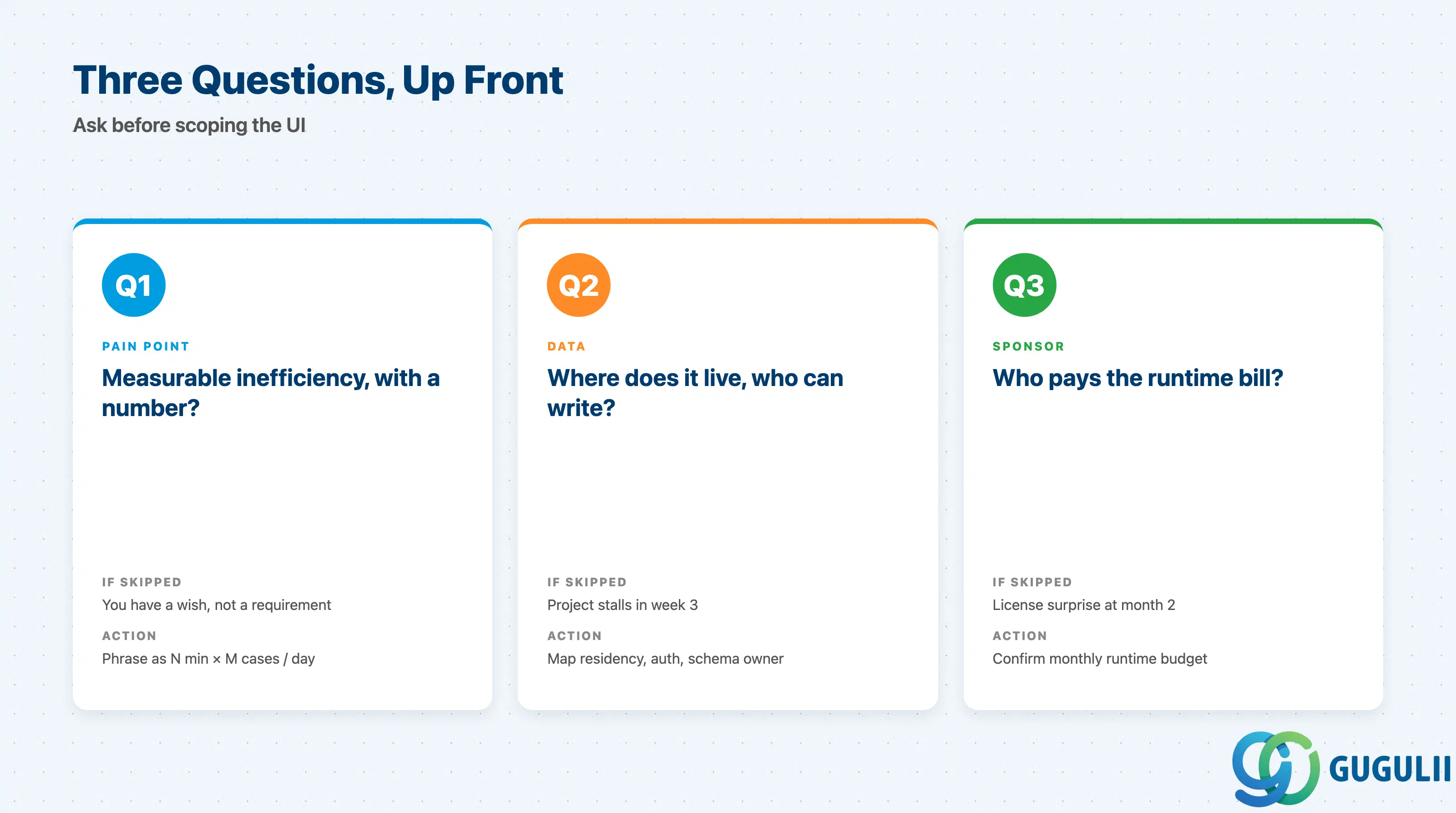
Q1. Is there a measurable inefficiency that Build Apps can remove, with a number attached?
If you cannot phrase it as “today this takes N minutes per case for M cases per day,” you do not have a Build Apps requirement yet — you have a wish. Walk away from the build conversation and go back to discovery. Build Apps’ speed advantage only shows up when there is something concrete to compress.
Q2. Where does the data live, and who is allowed to read or write it?
Build Apps connects through BTP destinations to S/4, SuccessFactors, third-party APIs, or VCF. Before scoping the UI, write down the data residency, the auth path, and the rule for who can change schema on each side. Many “Build Apps projects” stall in week three because nobody owns the OData service the app depends on.
Q3. Who is the internal sponsor and who pays the runtime bill?
Build Apps is consumption-priced under BTPEA/PayGo, or flat under subscription. The sponsor needs to understand both license cost and runtime cost (Visual Cloud Functions, mobile build minutes, AI usage when the Joule promo period ends). If the sponsor cannot answer “what is your monthly runtime budget?” the project is not yet sized.
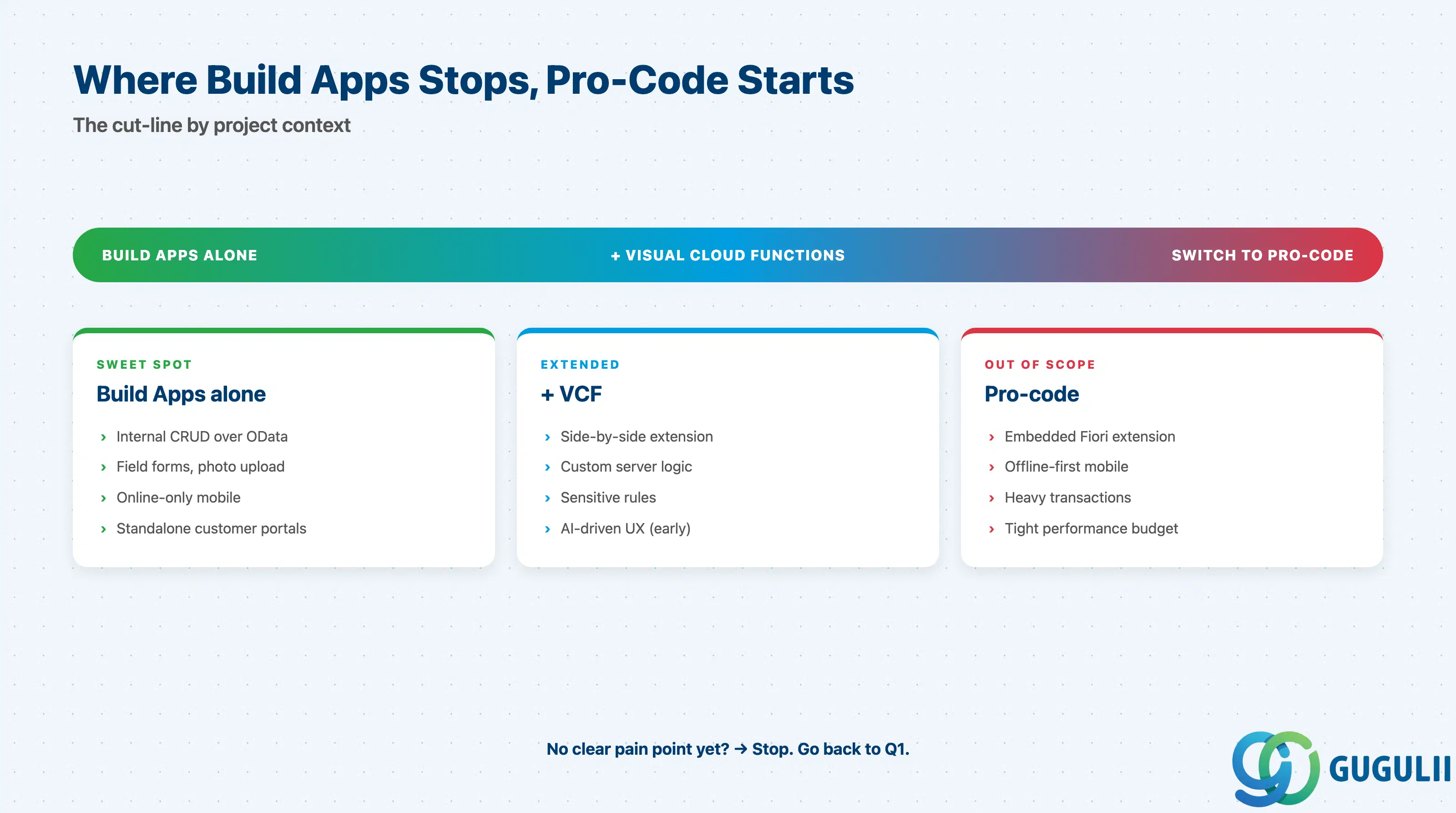
| Project context | Recommended starting capability |
|---|---|
| Internal CRUD over an existing OData service | Build Apps alone, web PWA |
| Field/mobile data capture, photo upload, barcode scan | Build Apps + native build, online-only |
| Side-by-side extension to S/4 with custom logic | Build Apps + Visual Cloud Functions |
| Embedded extension in S/4 / Sales Cloud V2 launchpad | Switch to Fiori Elements or Build Code (UI5) |
| Offline-first mobile workforce app | Switch to SAP Mobile Development Kit (MDK) |
| Heavy transactional logic, high concurrency | Switch to CAP + UI5 (pro-code) |
| Custom AI-driven UX or agent integration | Build Apps + Joule Studio agents (early adopter) |
| No clear pain point identified yet | Stop. Go back to Q1. |
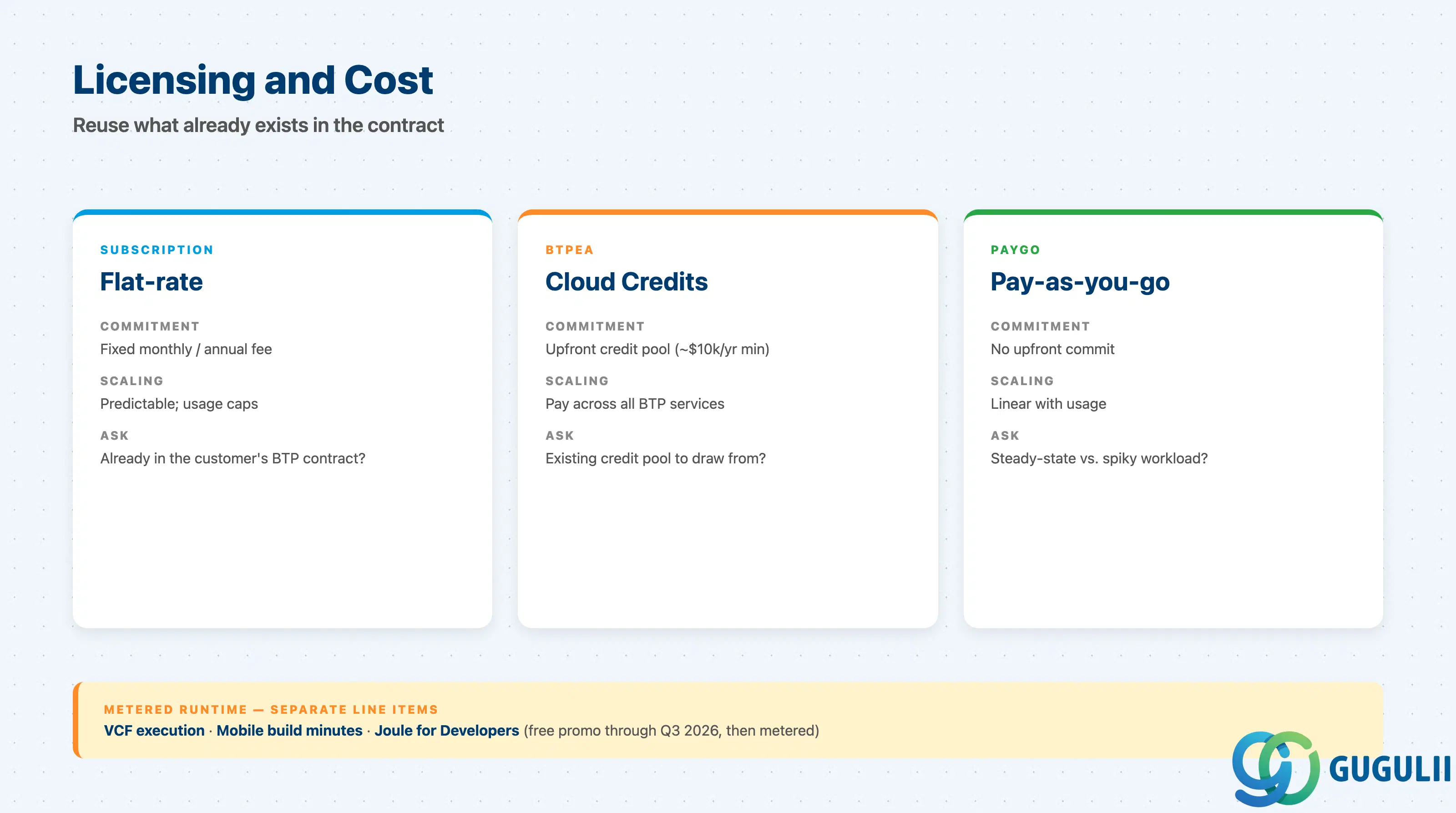
| Capability | Licensing model | Key question to ask |
|---|---|---|
| SAP Build (unified) | Subscription, BTPEA, or PayGo | Which model already exists in the customer’s SAP contract? Reuse before adding new SKU |
| Visual Cloud Functions | Consumed under SAP Build; runtime metered | What is the expected request volume per app per month? |
| Build Apps mobile build service | Included | What is the release cadence? Build minutes are not infinite |
| Joule for Developers (in Build Apps) | Free of charge through Q3 2026 (promo) | Document Q4/2026 pricing assumption — do not promise indefinite free use |
| BTP Destination Service / Connectivity | Standard BTP | Already in scope for any BTP customer — should not be a surprise line item |
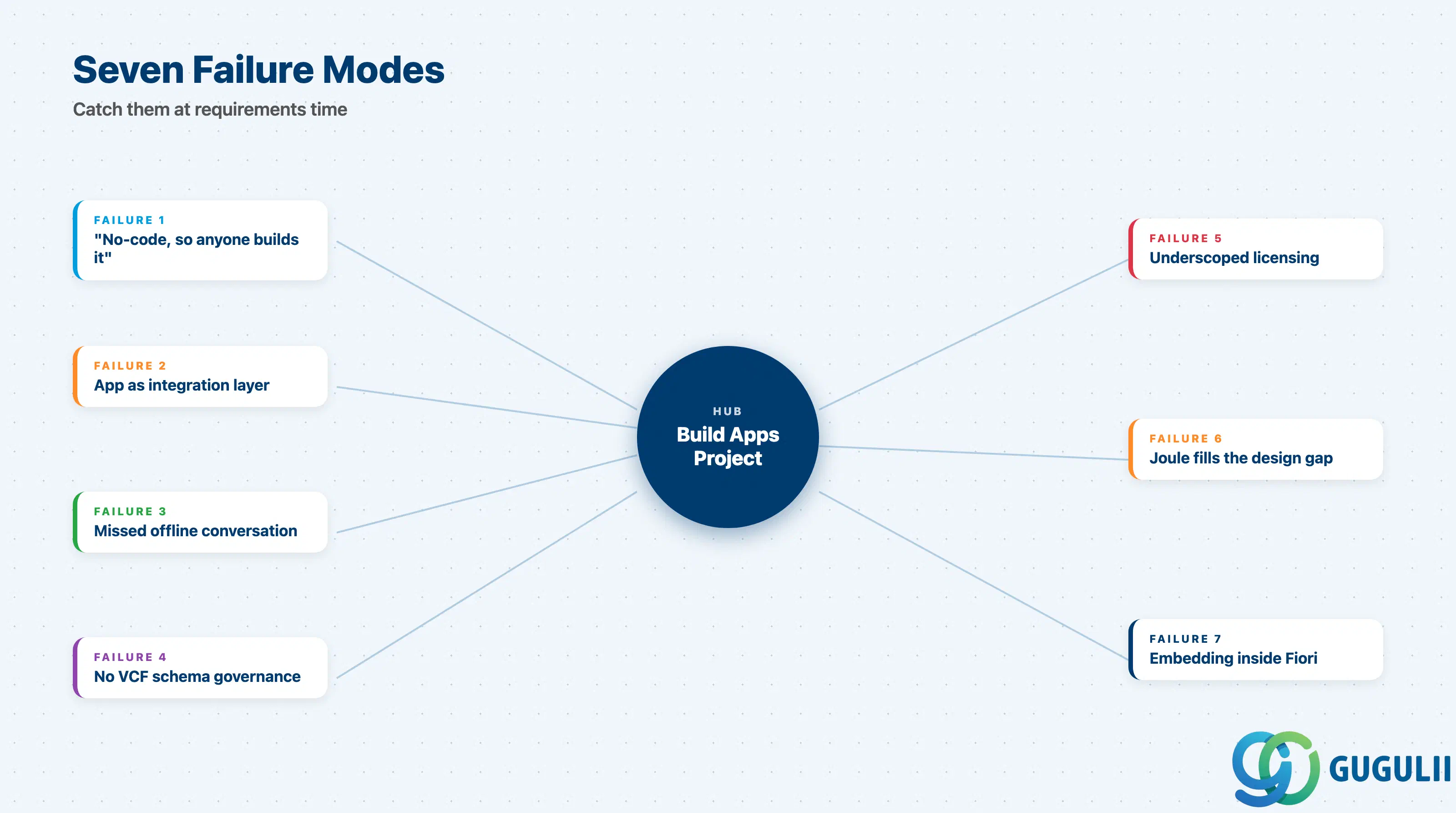
Failure 1: “It is no-code, so anyone can build it”
This kills more Build Apps projects than any technical issue. Citizen developers can absolutely deliver real value, but the moment the app touches production data — destinations, auth, governance — a pro side is required. Plan a fusion team from day one, not after the first incident.
Failure 2: Treating the app as the integration layer
A common anti-pattern is wiring the Build App directly to multiple back-ends and stitching the data together in flow functions. This is fast at first and unmaintainable by month three. Push integration into BTP destinations and Visual Cloud Functions; treat the app as a presentation layer.
Failure 3: Missing the offline conversation
Stakeholders say “it is mobile” and assume offline. Build Apps does not do offline OData sync. If the conversation about offline does not happen at requirements time, it shows up at UAT — and the rebuild is in MDK, not Build Apps. Ask the offline question on day one and write the answer down.
Failure 4: No governance on Visual Cloud Functions schemas
VCF entities behave like a database. Citizen developers will happily add fields and rename properties; downstream consumers will silently break. Define a schema-change process at project kickoff, not after the first regression.
Failure 5: Underscoping the licensing conversation
Build Apps got cheaper and simpler in 2025 packaging, but the runtime line items (VCF execution, mobile build, Joule beyond the promo) still surprise customers. List each metered item in the requirements doc and put a placeholder cost against each.
Failure 6: Pretending Joule will fill the design gap
Joule for Developers is helpful for boilerplate, formula explanation, and starter components. It is not a substitute for an information architect or a UX reviewer. Treat AI suggestions as drafts; have a human review the page collection, the data model, and the navigation.
Failure 7: Choosing Build Apps to embed inside Fiori
Build Apps standalone is great. Build Apps embedded inside the Fiori launchpad as if it were UI5 is consistently a poor experience — theming drifts, the navigation model fights, and accessibility is harder to certify. For embedded extensions, default to Fiori Elements or UI5 / Build Code.
Q: Does SAP Build Apps work for on-premise S/4HANA, or only S/4HANA Cloud?
Both. The connection is via the BTP Destination Service plus Cloud Connector for on-premise systems. From the Build App’s perspective the call is identical; from the customer’s perspective the prerequisites are different — Cloud Connector deployment, on-premise OData service activation, and network rules.
Q: How is SAP Build Apps licensed in 2026?
In 2025 SAP consolidated the Build family into a unified SAP Build license. Customers can consume it via subscription, BTPEA cloud credits, or PayGo. Build Apps, Build Code, Build Process Automation, and Build Work Zone share the unified entitlement; runtime usage (Visual Cloud Functions, mobile build minutes, Joule beyond the promo period) is metered.
Q: When should the project descope Build Apps and switch to pro-code?
Concrete signals: offline sync is required, performance budget is tighter than ~2s first paint, the app must embed inside Fiori, custom UI behavior exceeds the marketplace, the logic canvas exceeds ~30 nodes per page, or the audit/source-control story needs full Git workflow. Any one of these is enough to raise the question; two or more usually settles it.
Q: How do we document a Build Apps requirement in a way that survives the project?
For each page: persona, data sources (with destination names), rules (with rule owner), failure modes, and acceptance criteria. For each Visual Cloud Function: input schema, output schema, side effects, and rule owner. The requirements doc should let a different team rebuild the app cold from the spec — that test catches most “implicit knowledge” failures.
Q: Can Build Apps replace Fiori for internal users?
Sometimes — for standalone, finite-scope apps. Not for embedded extensions inside the S/4 launchpad, and not for very large list/edit interactions. The honest answer is “Build Apps for new finite apps, Fiori Elements / UI5 for the long tail of S/4-embedded UX.”
Q: Is offline support coming to Build Apps?
SAP has not committed publicly to offline OData sync in Build Apps. Plan as if it is not coming. If offline is a hard requirement, MDK is the supported path today.
Q: How does Joule for Developers actually help in Build Apps day-to-day?
In Q1/2026 it covers code/formula generation, explanation of existing flow functions, and starter-template suggestions. It is most useful as a productivity layer for the pro side of a fusion team. Citizen developers benefit too, but the safety review still needs a human.
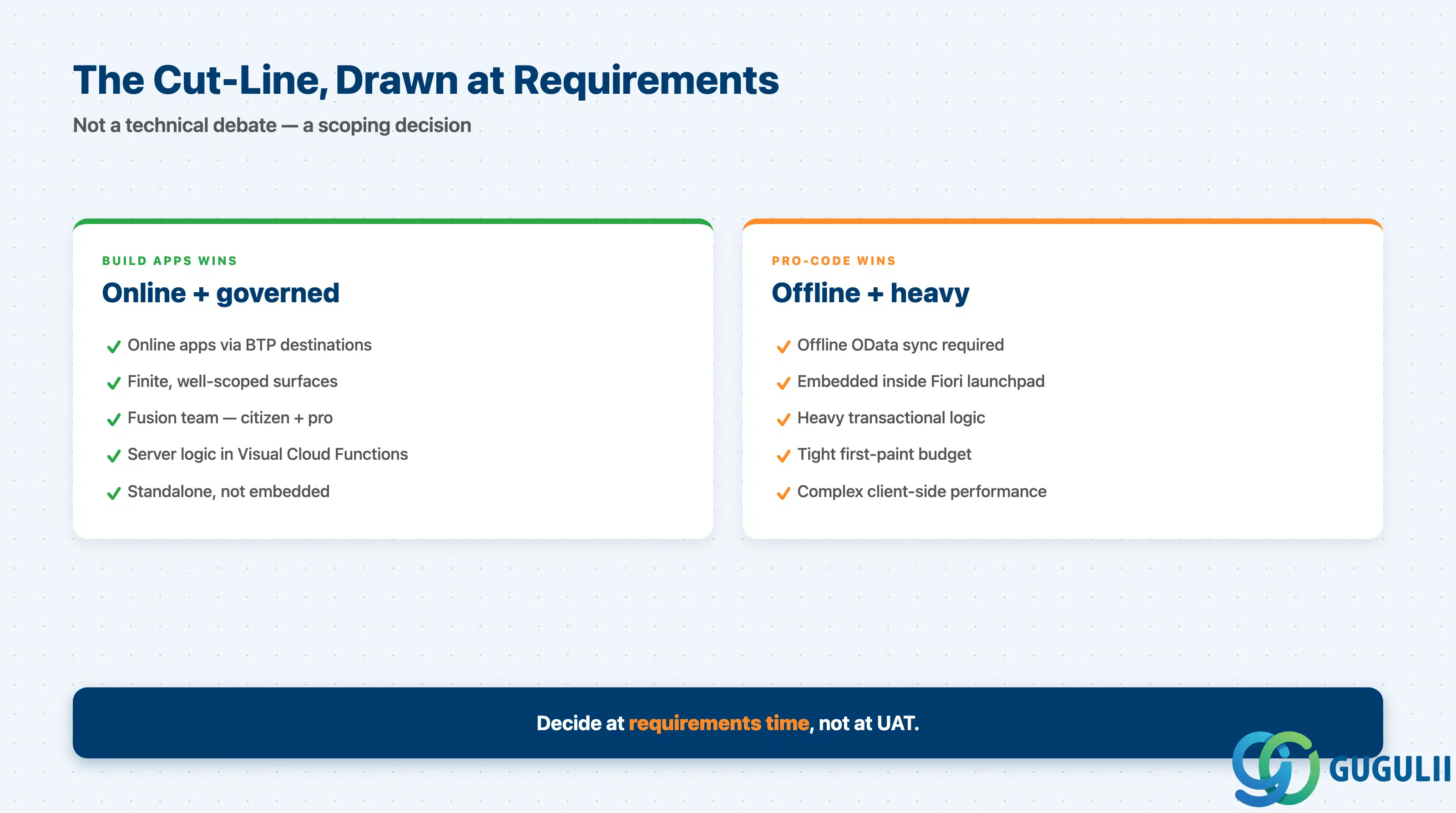
SAP Build Apps is mature for online apps that talk to BTP-connected systems, weak for offline mobile and embedded Fiori extension, and in early-adopter territory for AI-driven UX. Treat it as the front-end of a fusion team, governed like any other production system. Lean on Visual Cloud Functions for server-side logic. Walk away from any project that cannot answer “what number does this app move?” — Build Apps’ speed only shows up when there is something concrete to compress. The cut-line between low-code and pro-code is not a technical debate; it is a scoping decision you make at requirements time.
| ID | Title |
|---|---|
| BTP-B01: Application Development Overview and Capability Map | The map this article slots into |
| BTP-B02: Business Application Studio: Architecture and Use | The IDE host for CAP / UI5 / Build Code work |
| BTP-B03: CAP and Build Code: Architecture and Use | The pro-code backend most often paired with Build Apps |
| BTP-B04: ABAP Environment: Architecture and Use | When the extension target is ABAP, not Java/Node |
| BTP-B05: Build Apps: Architecture and Use | (this article) |
| BTP-B06: Build Process Automation: Architecture and Use | Workflow + RPA companion to Build Apps |
| BTP-B07: Build Work Zone: Architecture and Use | Where Build Apps surfaces are aggregated for end users |
| BTP-B08: Use Cases and Decision Patterns | The cross-domain decision guide for Application Development on BTP |