Title here
Summary here

| ID | Topic |
|---|---|
| BTP-B01 | Application Development on SAP BTP: Overview and Capability Map |
| BTP-B02 | Business Application Studio: Architecture and Use |
| BTP-B03 | CAP and Build Code: Architecture and Use |
| BTP-B04 | ABAP Environment: Architecture and Use |
| BTP-B05 | Build Apps: Architecture and Use |
| BTP-B06 | Build Process Automation: Architecture and Use |
| BTP-B07 | Build Work Zone: Architecture and Use (this article) |
| BTP-B08 | Use Cases and Decision Patterns |
| Resource | URL |
|---|---|
| SAP Build Work Zone, standard edition (Help Portal) | help.sap.com → |
| SAP Build Work Zone, advanced edition (Help Portal) | help.sap.com → |
| About Roles and Role Assignment (Advanced edition) | help.sap.com → |
| Build Work Zone product page | sap.com → |
| Provisioning of Users and Roles (SAP Learning) | learning.sap.com → |
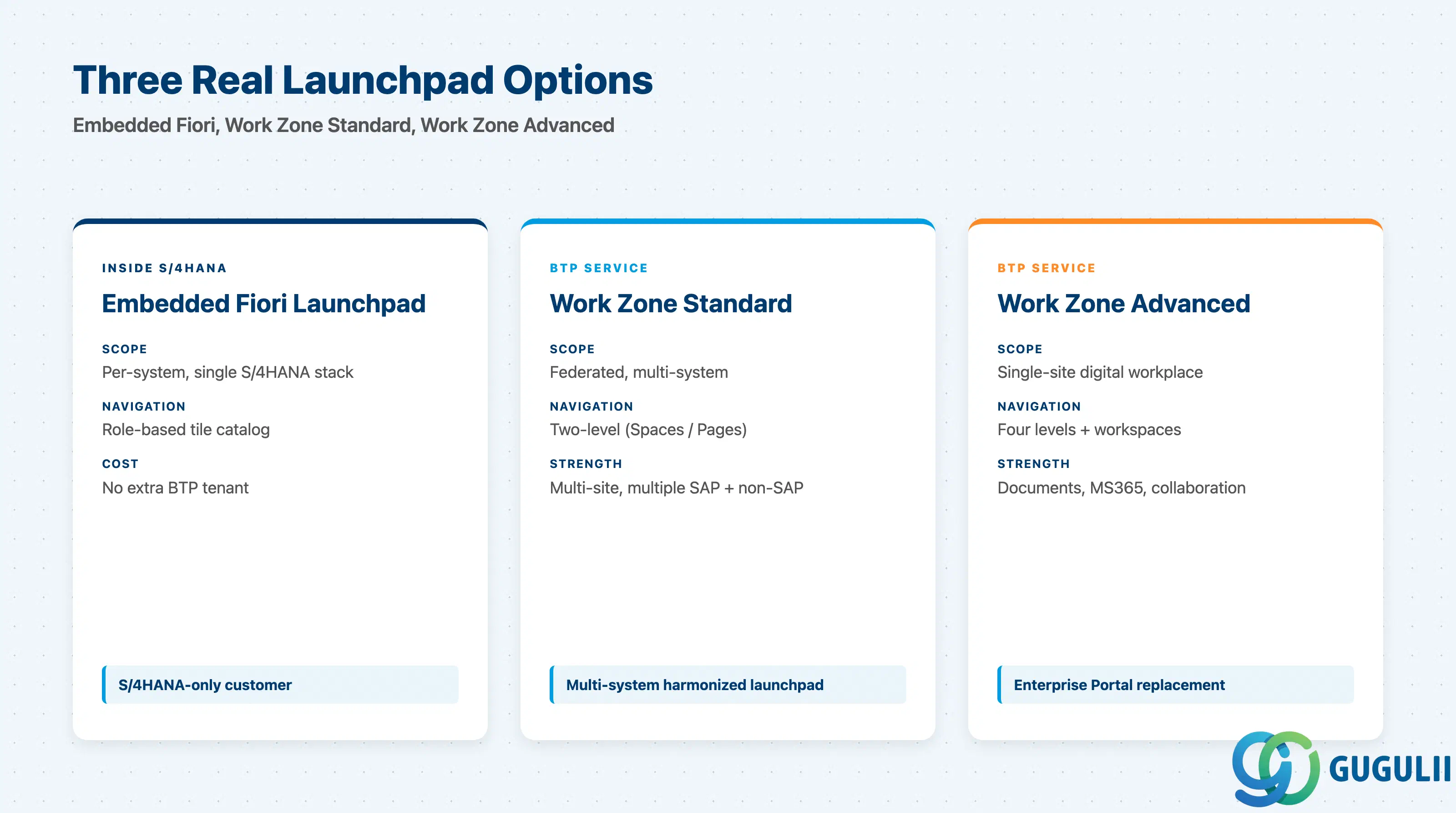
SAP customers face three real entry-point options in 2026, and “Build Work Zone” is two of those three:
| Option | What it does | Primary user |
|---|---|---|
| Embedded Fiori launchpad (in S/4HANA) | Per-system role-based launchpad for one S/4HANA stack | S/4HANA-only customer with a single ERP |
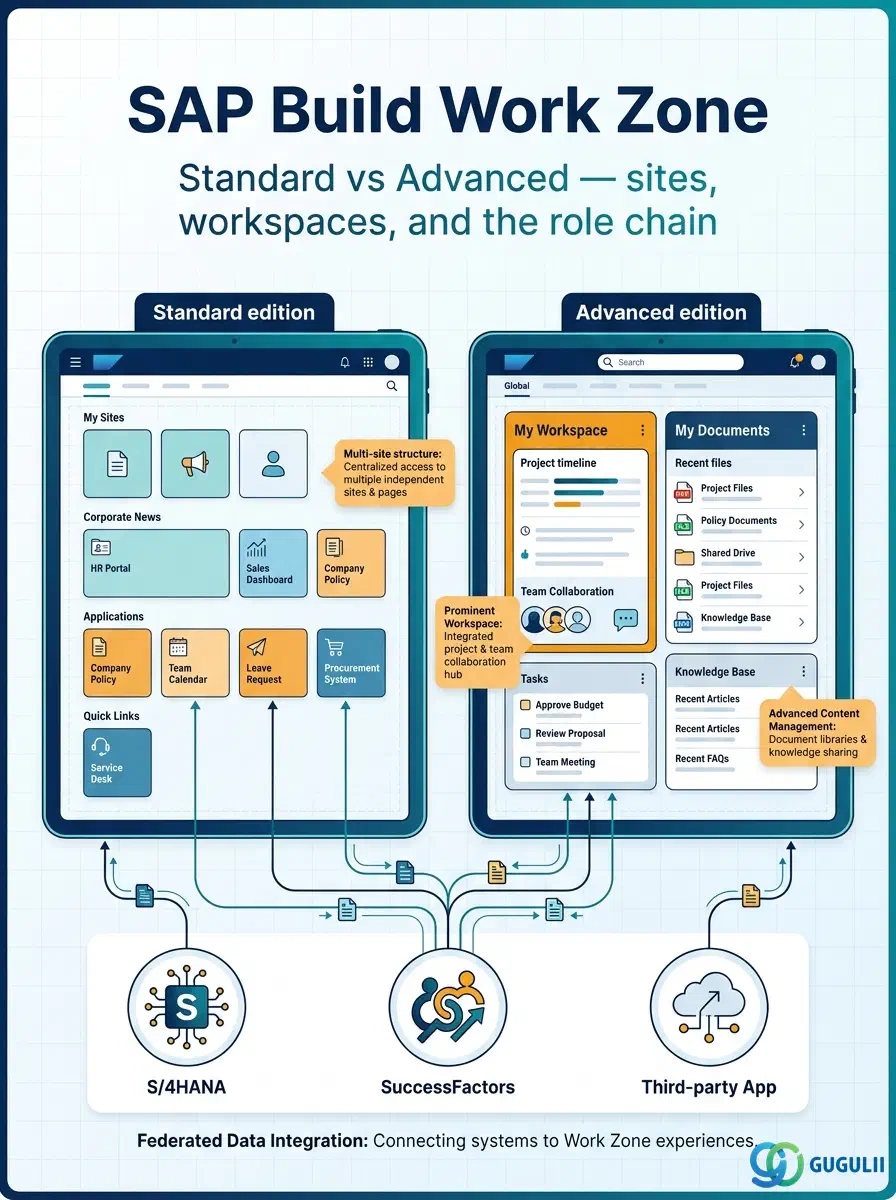
| Build Work Zone, standard edition | Federated multi-site launchpad across SAP and non-SAP systems; two-level navigation | Multi-system landscape needing one harmonized entry |
| Build Work Zone, advanced edition | Single-site digital workplace with workspaces, documents, collaboration, Microsoft 365 integration | Customers replacing SAP Enterprise Portal or building an intranet |
Embedded Fiori is a feature inside S/4HANA; both Build Work Zone editions are separate BTP services. Standard and Advanced share branding but diverge on site, content, and role models. They are not substitutes.
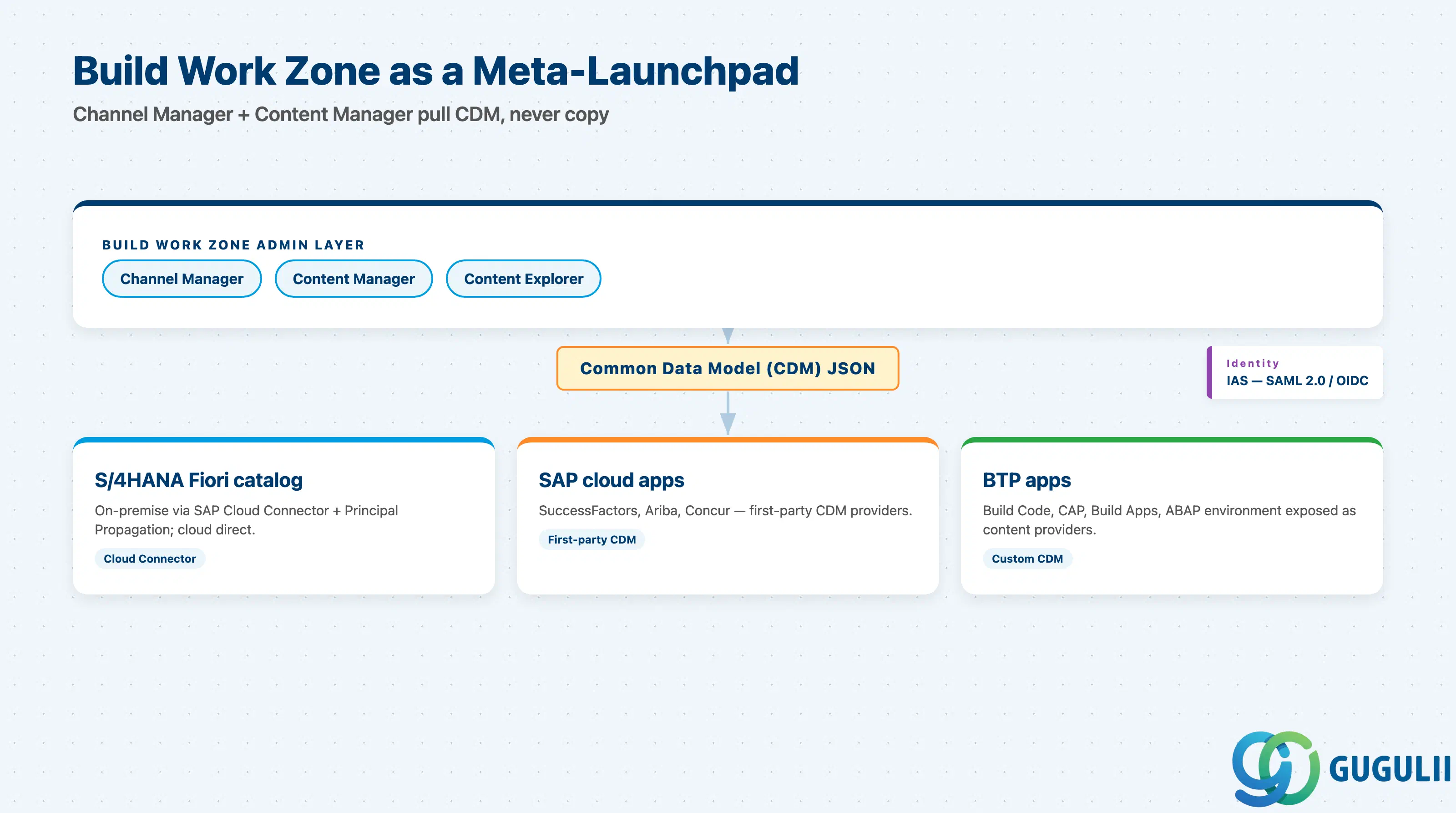
Build Work Zone never owns business apps; it aggregates references to them. The pattern is the same for both editions:
   SAP Build Work Zone (standard or advanced)
   ┌──────────────────────────────────────────────────┐
   │  Sites / pages / roles  (admin-defined)          │
   │  Channel Manager — Content Manager — Explorer    │
   └──────────────┬───────────────────────────────────┘
                  │ Common Data Model (CDM) JSON
                  ▼
   ┌──────────────┴───────────────────────────────────┐
   │ S/4HANA Fiori catalog (Cloud Connector)          │
   │ SuccessFactors / Ariba / Concur                  │
   │ BTP apps: Build Code, CAP, Build Apps, ABAP env  │
   └──────────────────────────────────────────────────┘
The contract is CDM JSON from each content provider. The provider keeps ownership of its app catalog, business catalogs, and roles; Work Zone reads the CDM and presents the right tiles to the right user via SAP Cloud Identity Services (IAS over SAML 2.0 or OIDC). On-premise S/4HANA is reached via SAP Cloud Connector with Principal Propagation.
Key point: Build Work Zone is a meta-launchpad, not a content store. Content lifecycle stays in the source system — “decentralized ownership” is SAP’s design principle for the product.
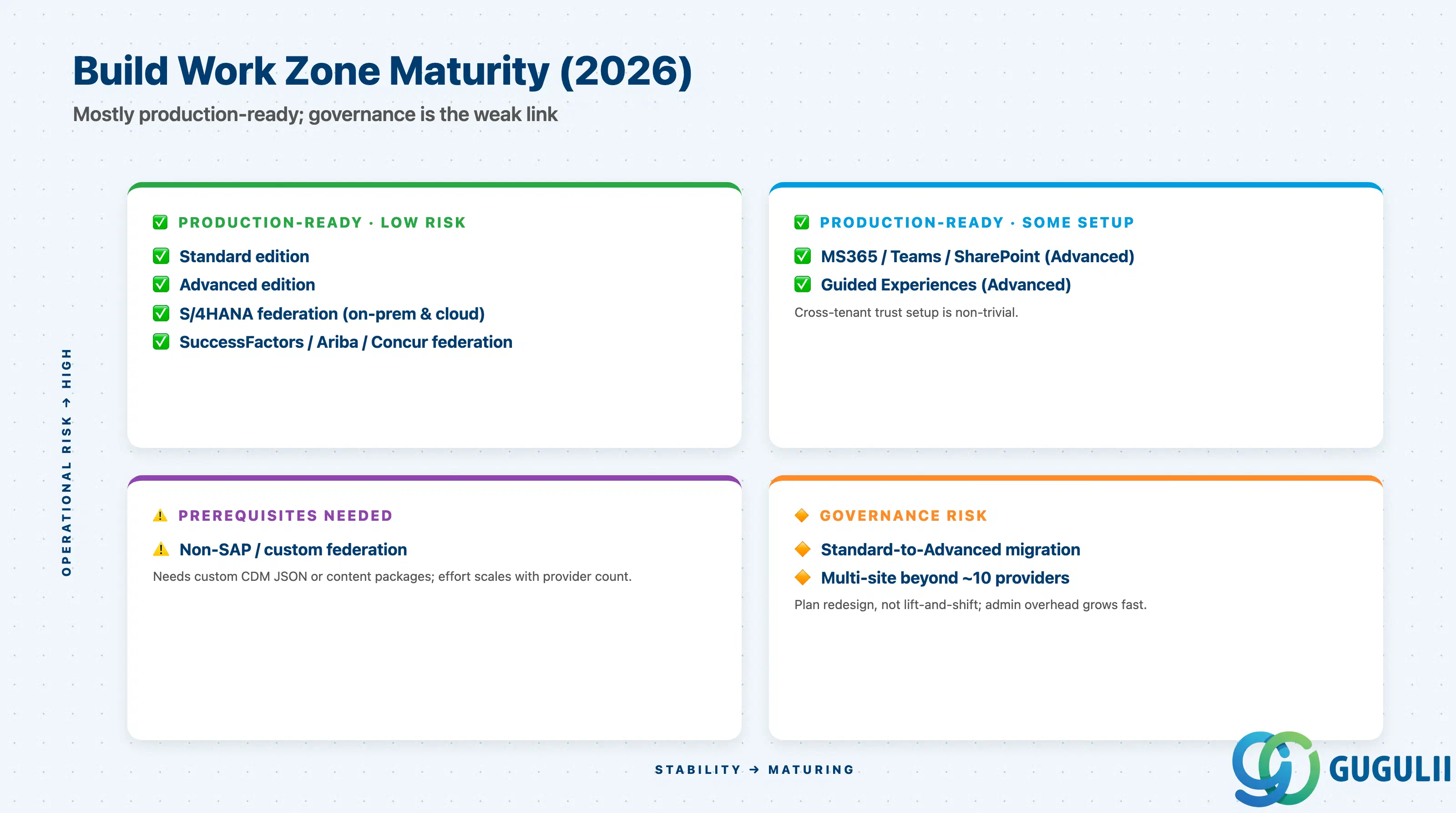
| Capability | Maturity | Notes |
|---|---|---|
| Build Work Zone, standard edition | ✅ Production-ready | Successor to SAP Launchpad service; stable since 2022 rebrand |
| Build Work Zone, advanced edition | ✅ Production-ready | Successor to SAP Work Zone (formerly Portal / Jam); demands more governance |
| Federated content from on-premise S/4HANA | ✅ Production-ready | Requires Cloud Connector + Principal Propagation; well documented |
| Federated content from SAP cloud apps (SuccessFactors, Ariba) | ✅ Production-ready | First-party CDM providers maintained by each product team |
| Federated content from non-SAP / custom systems | ⚠️ Ready with prerequisites | Needs custom CDM or content packages; effort scales with provider count |
| Microsoft 365 / Teams / SharePoint integration (Advanced) | ✅ Production-ready | Native connectors; tenant-to-tenant trust is non-trivial setup |
| Guided Experiences (Advanced wizard layouts) | ✅ Production-ready | GA; used to onboard joiners or trigger SBPA processes |
| Standard-to-Advanced migration | 🔶 Early adopter | Site models do not match; plan for redesign, not lift-and-shift |
| Multi-site beyond ~10 federated providers | 🔶 Early adopter | No published limit; admin overhead grows quickly past this point |
This is where most Build Work Zone projects either succeed or fail at the requirements stage. The five sub-checklists below cover what must be settled before configuration starts.
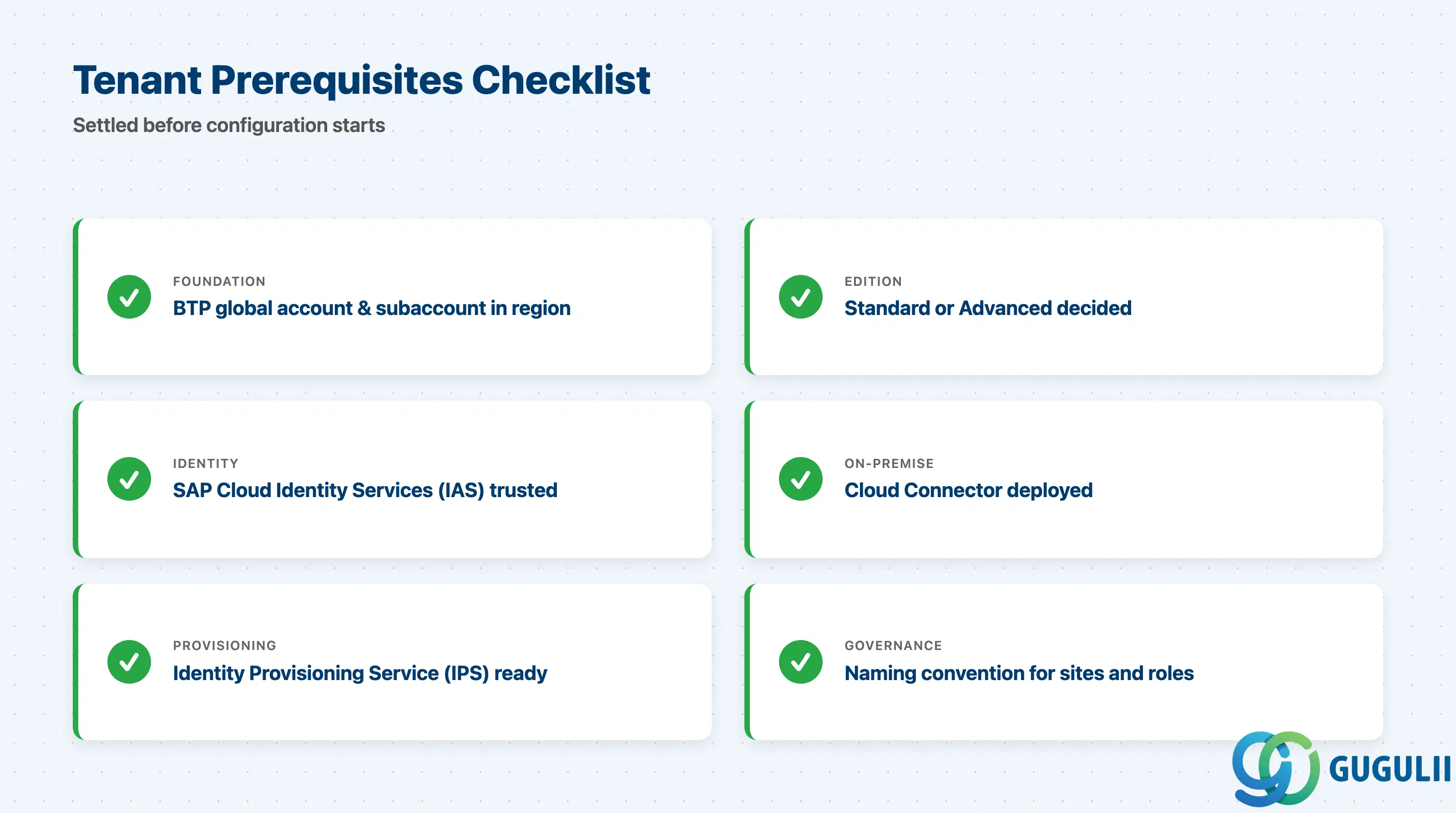
| Checklist item | Why it matters |
|---|---|
| BTP global account + subaccount in the correct region | Build Work Zone is a regional service; cross-region moves are expensive |
| Edition decision (standard or advanced) before tenant provisioning | The two editions provision different tenant types; switching is a redesign |
| SAP Cloud Identity Services (IAS) tenant provisioned and trusted | Without IAS, neither SSO nor user provisioning works |
| Cloud Connector deployed for any on-premise backend | Required for Principal Propagation to S/4HANA on-premise content |
| Identity Provisioning Service (IPS) tenant prepared | Needed for SCIM-based role assignment at non-trivial scale |
| Naming convention for sites, role collections, content provider IDs | Rename mid-project breaks SCIM mappings and audit trails |
| Checklist item | Why it matters |
|---|---|
| Number of sites and what each represents (geography, BU, persona) | Multi-site is supported but each site doubles admin surface; do not split without reason |
| Spaces and Pages structure per site (two-level navigation) | Two levels is the limit; force-fitting three levels is the common day-2 pain |
| Role catalog mapping business roles to Pages and Apps | Role design is harder than site design; budget a workshop, not a meeting |
| Content provider list per site (which systems federate into where) | Missing a provider means missing apps for whole user groups |
| Theming policy (one global theme vs. per-site theme) | Per-site theming is supported but every theme is a maintenance item |
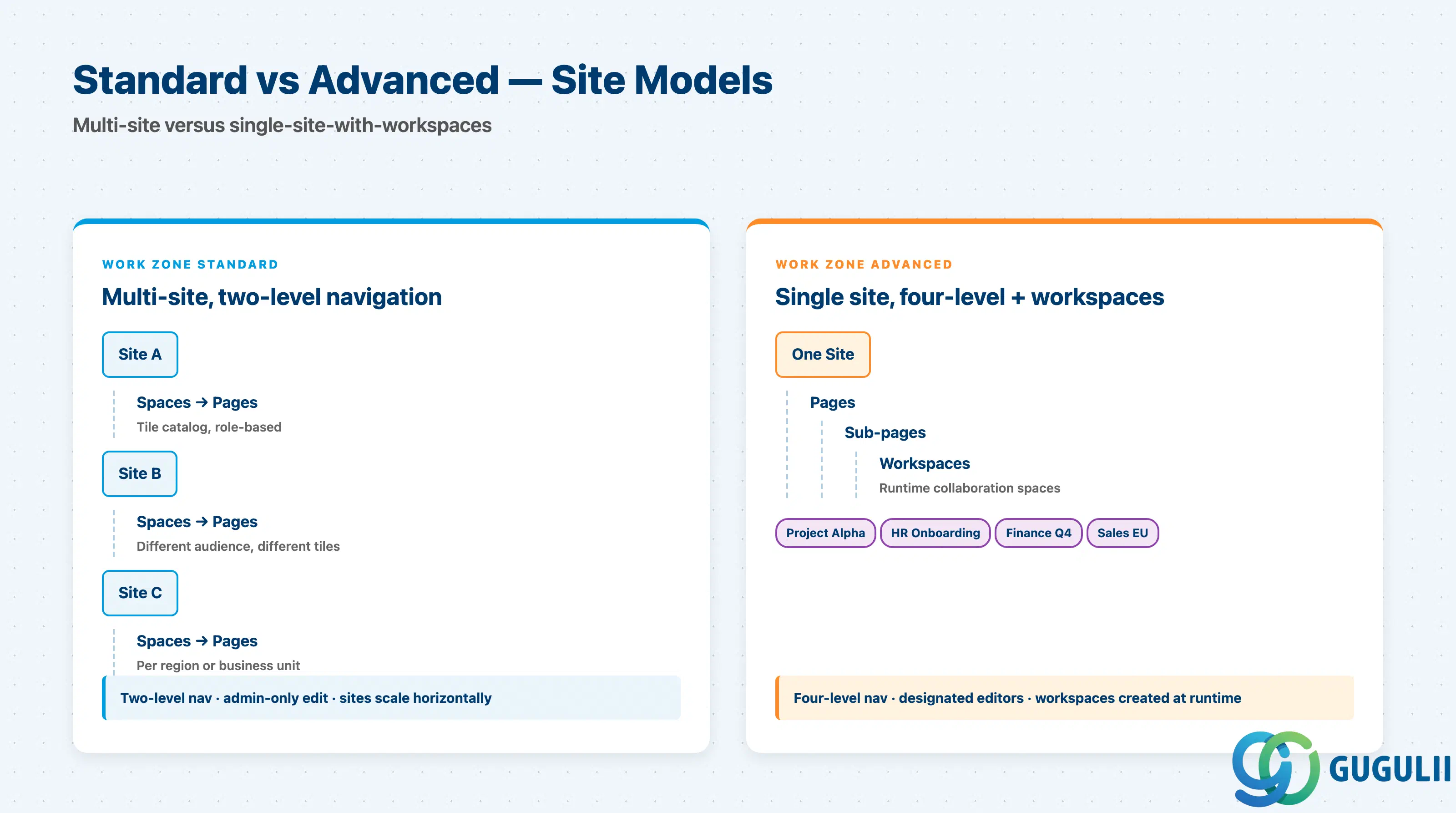
| Checklist item | Why it matters |
|---|---|
| Single-site assumption confirmed (Advanced has one default site) | Customers expecting multi-site like Standard get blocked here; Advanced uses workspaces instead |
| Workspace governance: who creates, who joins, public vs. internal default | Workspace sprawl is the #1 day-2 complaint on Advanced; settle the rules first |
| Three-level navigation plus runtime workspaces — drawn end-to-end | Sketch real user journeys, not a tree diagram, before sign-off |
| Microsoft 365 / Teams / SharePoint integration scope | If in scope, the cross-tenant trust is its own IT-security workstream |
| Document management retention and access policy | Legal sign-off required for customer-facing or HR documents |
| Editor model: which non-admin roles edit pages at runtime | Advanced supports designated editors; Standard does not |
| Checklist item | Why it matters |
|---|---|
| IAS-trusted IdP for each content provider | Federated content fails silently if IdP trust is incomplete |
| CDM JSON availability per provider | First-party SAP cloud apps ship CDM; custom providers must expose it |
| Content packages (SAPUI5 cards as ZIP) inventory | Each package has its own version lifecycle |
| Channel Manager connection plan (provider, roles, refresh) | Documented before configuration, not during |
| UI Integration Cards scope (vs. plain tile/link references) | Cards add data contracts and CSP rules; do not promise them casually |
| Lifecycle ownership per content provider | “Broken tile” tickets are owned by no one without explicit assignment |
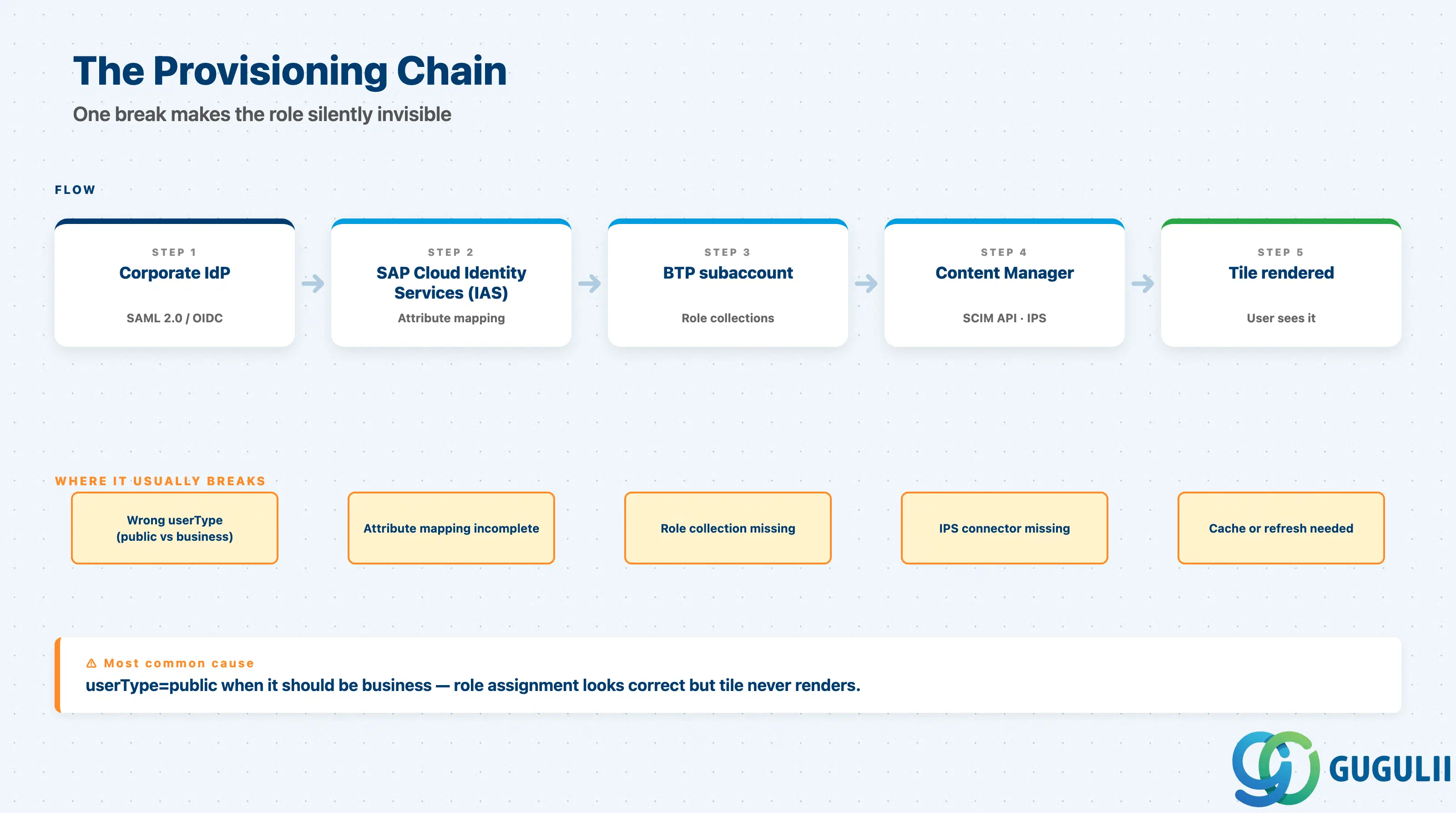
| Checklist item | Why it matters |
|---|---|
| Shadow user creation method (manual, IPS-SCIM, or auto on IdP login) | Pick one and document it; mixing methods causes audit conflicts |
| Role collection design with naming convention | Names are referenced in attribute mappings; rename cascades into IdP and IPS |
| IAS / corporate IdP attribute mapping to role collections | Without this, users land logged-in but role-less |
| Content Manager role assignment via SCIM API + IPS connector | Required for federated provider roles to reach actual users |
| (Advanced only) DWS user and group provisioning (second SCIM API) | Workspaces and groups stay empty without DWS provisioning |
Employee vs. Public user-type policy (SCIM userType) | Mis-classifying internal users as Public locks them out of workspaces |
| Checklist item | Why it matters |
|---|---|
| SAP Mobile Start configuration if mobile is in scope | Native mobile entry on both editions; tenant binding must be explicit |
| Theme and branding lifecycle owner | UI Theme Designer themes are versioned artefacts; assign a maintainer |
| Monitoring of login and federation health | Federation breaks are user-visible; plan a dashboard or alert |
| BTP audit log retention requirement | Many customers need 1+ year retention; default may be shorter |
| Disaster-recovery and tenant-export approach | Export is supported but not a one-click backup |
Use these three questions before you propose an edition. If any answer is unclear, the requirements are not ready.
Q1. What is the measurable user pain that justifies a new launchpad?
If the customer has one S/4HANA system and the embedded Fiori launchpad already works, Build Work Zone is rarely worth the BTP-tenant overhead. Build Work Zone is justified by aggregation pain: users log into multiple systems and miss apps because no single page shows them. Quantify it — how many systems, how many roles, how many minutes per day lost to system hunting? If the answer is “we want it to look modern,” push back.
Q2. Who owns the content, and where do their identities live today?
Build Work Zone is a meta-launchpad. It only works if every connected source has a recognizable identity (via IAS-trusted IdP) and a content surface (CDM JSON, content packages, or custom integration). Map providers and their identity stories before committing dates. Fragmented identity (Active Directory islands, Okta-only contractors, no IAS) means a parallel identity workstream.
Q3. Is there a sponsor for collaboration features, or only for the launchpad?
Workspaces, document management, and Microsoft 365 integration only deliver value with a real internal sponsor — HR, IT, or corporate communications — who will produce content and govern access. If the only sponsor is “ERP IT wants a launchpad,” Standard is the answer; Advanced is over-spec.
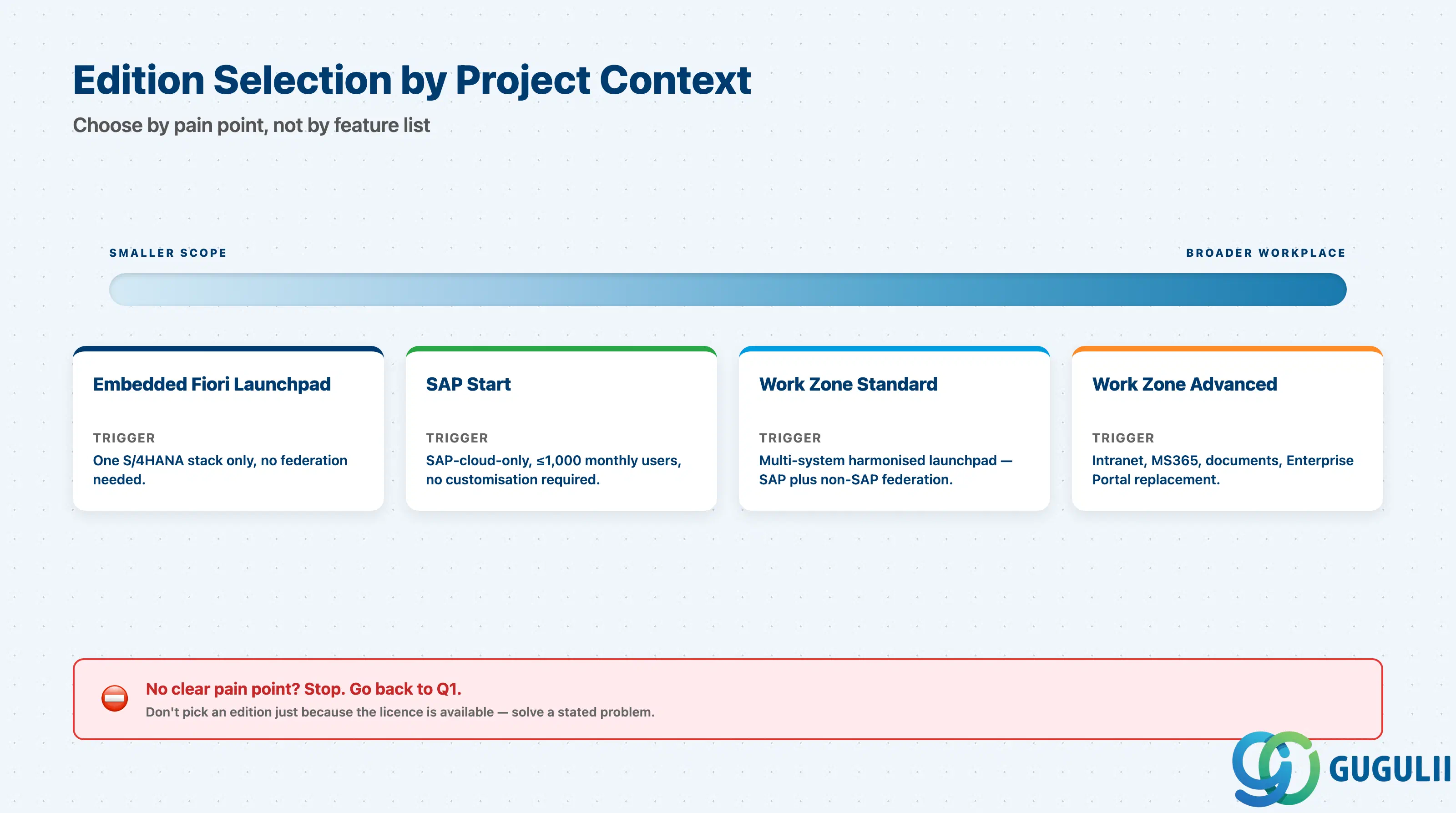
| Project context | Recommended edition |
|---|---|
| Single S/4HANA, no cloud apps, modest user base | Embedded Fiori launchpad — Build Work Zone not justified |
| Multi-system SAP landscape (S/4HANA + SuccessFactors + Ariba) needing harmonized entry | Build Work Zone, standard edition |
| Multi-system SAP plus non-SAP, with custom federated content | Build Work Zone, standard edition with content packages or custom CDM |
| Replacement of SAP Enterprise Portal | Build Work Zone, advanced edition |
| Real intranet need (HR communications, documents, collaboration) | Build Work Zone, advanced edition |
| Microsoft 365 / Teams co-existence is a key requirement | Build Work Zone, advanced edition |
| Customer is SAP-cloud-only and ≤ 1,000 monthly users | Consider SAP Start (free, preconfigured) before licensing Work Zone |
| No clear pain point identified yet | Stop. Go back to Q1. |
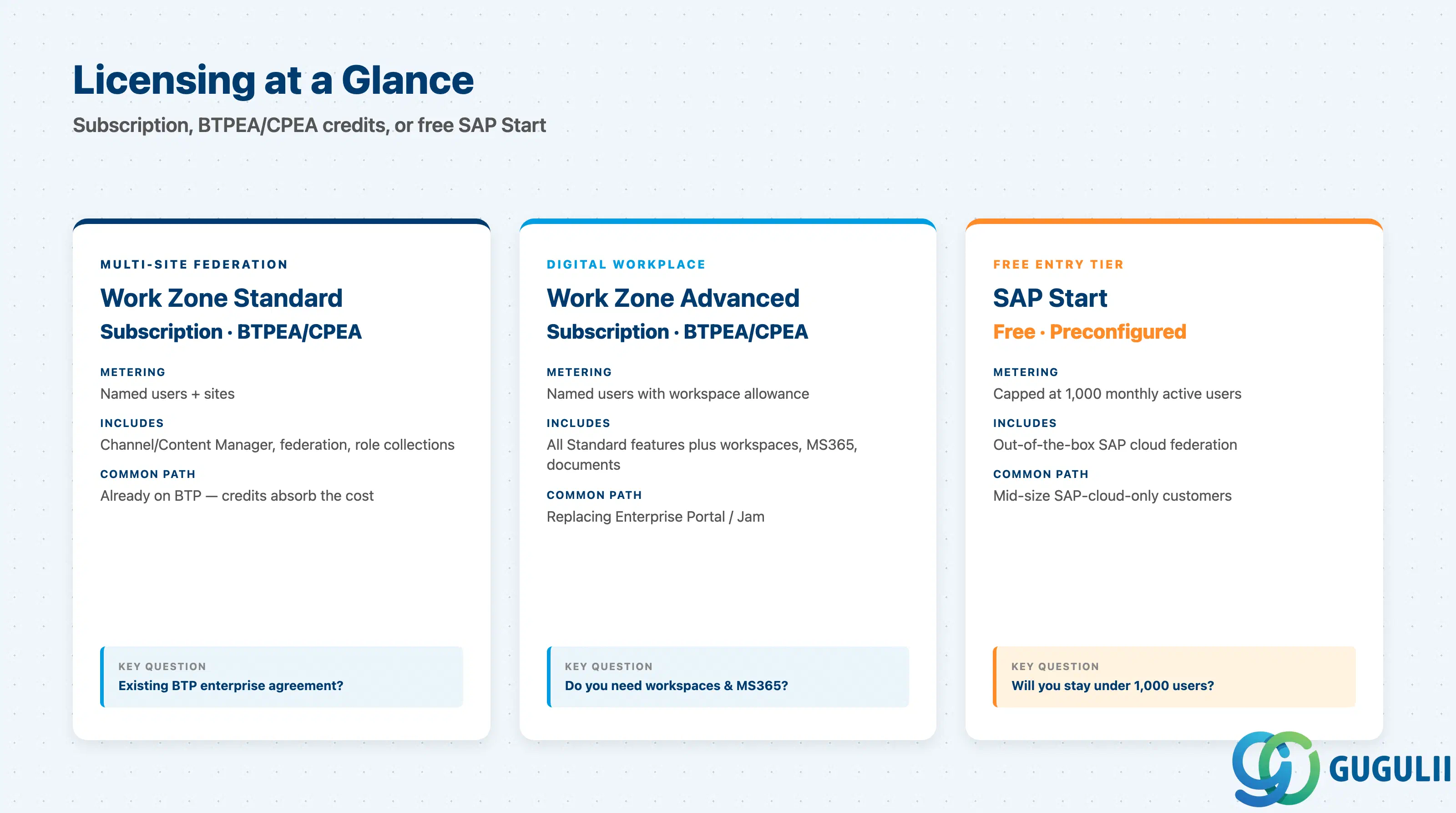
| Edition | Licensing model | Key question to ask |
|---|---|---|
| Build Work Zone, standard edition | Subscription or BTPEA / CPEA credits; metered by named users and/or sites | “Do we already have a BTP enterprise agreement, and what is the named-user count at year two?” |
| Build Work Zone, advanced edition | Subscription or BTPEA / CPEA credits; metered by named users with workspace allowance | “Are workspaces actually going to be created, or are we paying for capacity nobody uses?” |
| SAP Start (SAP-cloud-only alternative) | Free, preconfigured, capped at 1,000 monthly users | “Can we live with the cap and the lack of customization?” |
Public list prices are not published; both editions require an SAP account executive quote. Customers on a BTPEA / CPEA agreement can usually consume Work Zone against existing credits, which is simpler than a separate subscription.
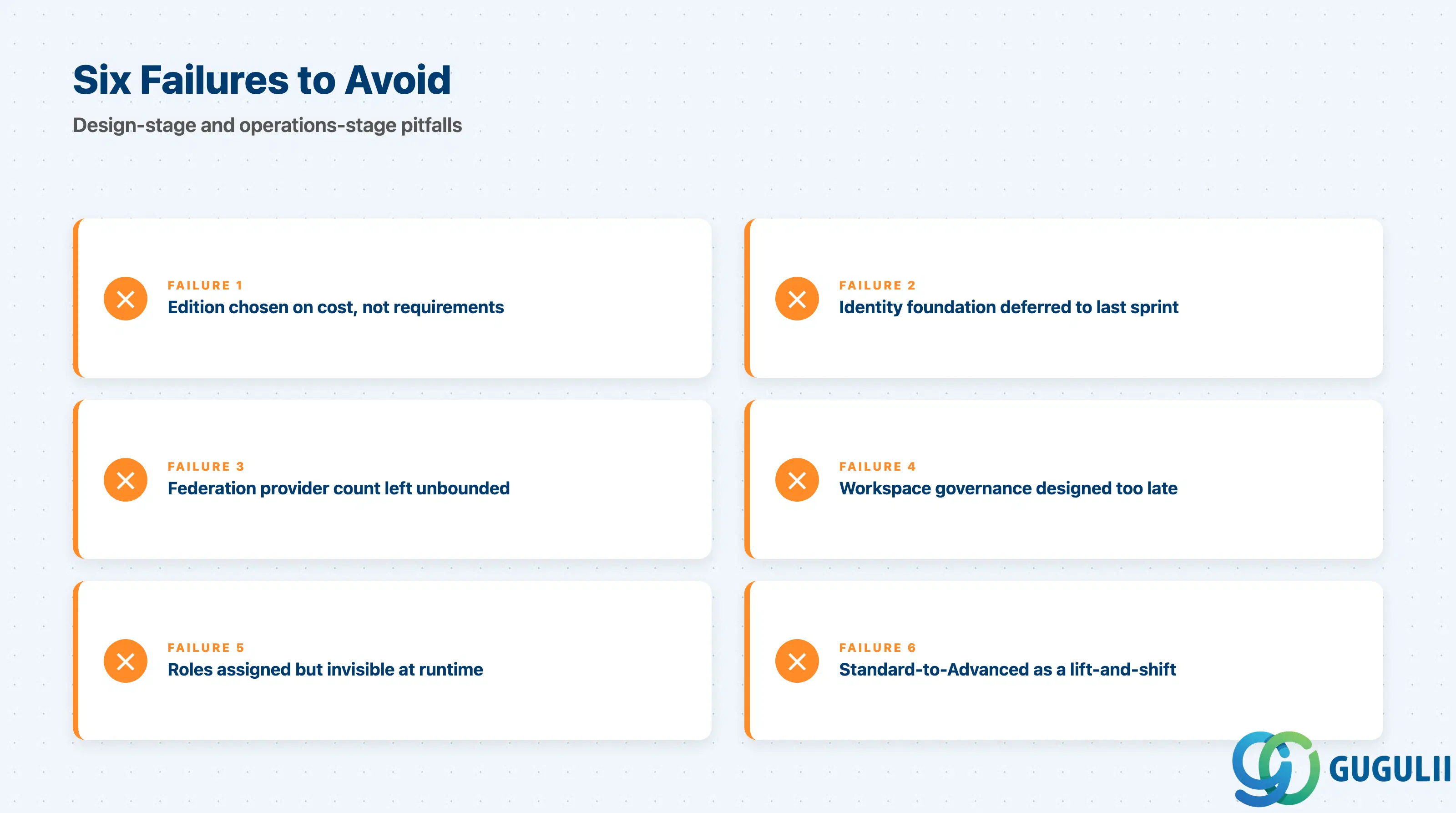
Failure 1: Edition chosen on cost first, requirements second
The common mistake is “Standard is cheaper” — discovered later when HR wants document management. The reverse is “Advanced sounds more complete” — discovered when the only feature used is the launchpad page. Pick from requirements, then negotiate price.
Failure 2: Identity foundation deferred
Customers commit to Build Work Zone before they have IAS, IPS, or a clean corporate IdP attribute model. Go-live slips because shadow users, role collections, and SCIM provisioning must come first, not in parallel with site design. Treat identity as a prerequisite.
Failure 3: Federation provider count unbounded
Standard can connect many providers, but admin and role-mapping effort grow per provider. “We’ll federate everything” discovers at integration that two or three providers lack first-party CDM and need custom adapters. Constrain provider count; defer the rest to phase two.
Failure 4: Workspace governance designed after go-live (Advanced)
Advanced workspaces are self-service: any authorized user can create one. Without a policy (naming, expiry, public/internal default, owner mandate), customers see hundreds of stale workspaces within a year. Governance must ship at go-live.
Failure 5: Roles assigned but not visible at runtime
The most common operational issue is “I assigned the role, but the user does not see the tile.” The root cause is almost always a broken provisioning chain: missing role collection, missing IAS attribute mapping, missing SCIM propagation, or wrong userType. Document the chain end-to-end and rehearse a fresh-user trace as a smoke test.
Failure 6: Standard-to-Advanced migration assumed lift-and-shift
Customers who outgrow Standard often expect a tooling migration to Advanced. The site models do not match — Standard’s multi-site does not collapse into Advanced’s single-site-plus-workspaces. Plan a redesign workshop.
Q: Can we just use the embedded Fiori launchpad and skip Build Work Zone?
Yes, if the customer has one S/4HANA system and no cross-system aggregation pain. Embedded Fiori is a feature inside S/4HANA — no extra BTP tenant or licensing. The moment the requirement is “show tiles from SuccessFactors and Ariba next to S/4HANA,” embedded launchpad is the wrong tool and Build Work Zone Standard is the answer.
Q: How is Build Work Zone licensed in 2026?
Both editions are BTP services consumable through subscription, BTPEA, or CPEA. Customers on a BTP enterprise agreement usually consume Work Zone against existing credits. Public list prices are not published; quotes come from an SAP account executive. SAP Start is the free alternative for SAP-cloud-only customers below 1,000 monthly users.
Q: When should we descope Advanced edition from a project?
Descope when the only sponsor is ERP IT and the only requirement is “a launchpad that aggregates apps.” Advanced’s collaboration and document features need a content sponsor (HR, IT, communications) who will produce and govern content. Without that sponsor, the customer pays for capacity that stays empty.
Q: How do we document the role and content design properly?
Three artefacts settle most disputes: a role catalog (business role → Work Zone role → tiles → backend auth), a content-provider matrix (provider → CDM endpoint → roles → owner), and a provisioning trace (one example user from IdP login to tile render). Sign off on all three before go-live; informal pages will not survive the first audit.
Q: Does Build Work Zone work with SAP S/4HANA on-premise?
Yes — via SAP Cloud Connector with Principal Propagation, federating content from the on-premise S/4HANA Fiori front-end server’s CDM endpoint. Requires Cloud Connector, mTLS, and an IAS-corporate-IdP trust path. Customers without those building blocks need a parallel identity workstream.
Q: Can business users edit content at runtime?
On Standard, no — page editing is admin-only. On Advanced, yes — designated editors edit pages and authorized users create workspaces. If runtime editing is a real requirement, Advanced is the right edition. Build Work Zone also composes with the rest of SAP Build: Build Apps and Build Code apps register as content providers, and Build Process Automation processes surface as workspace cards or Guided Experiences on Advanced.
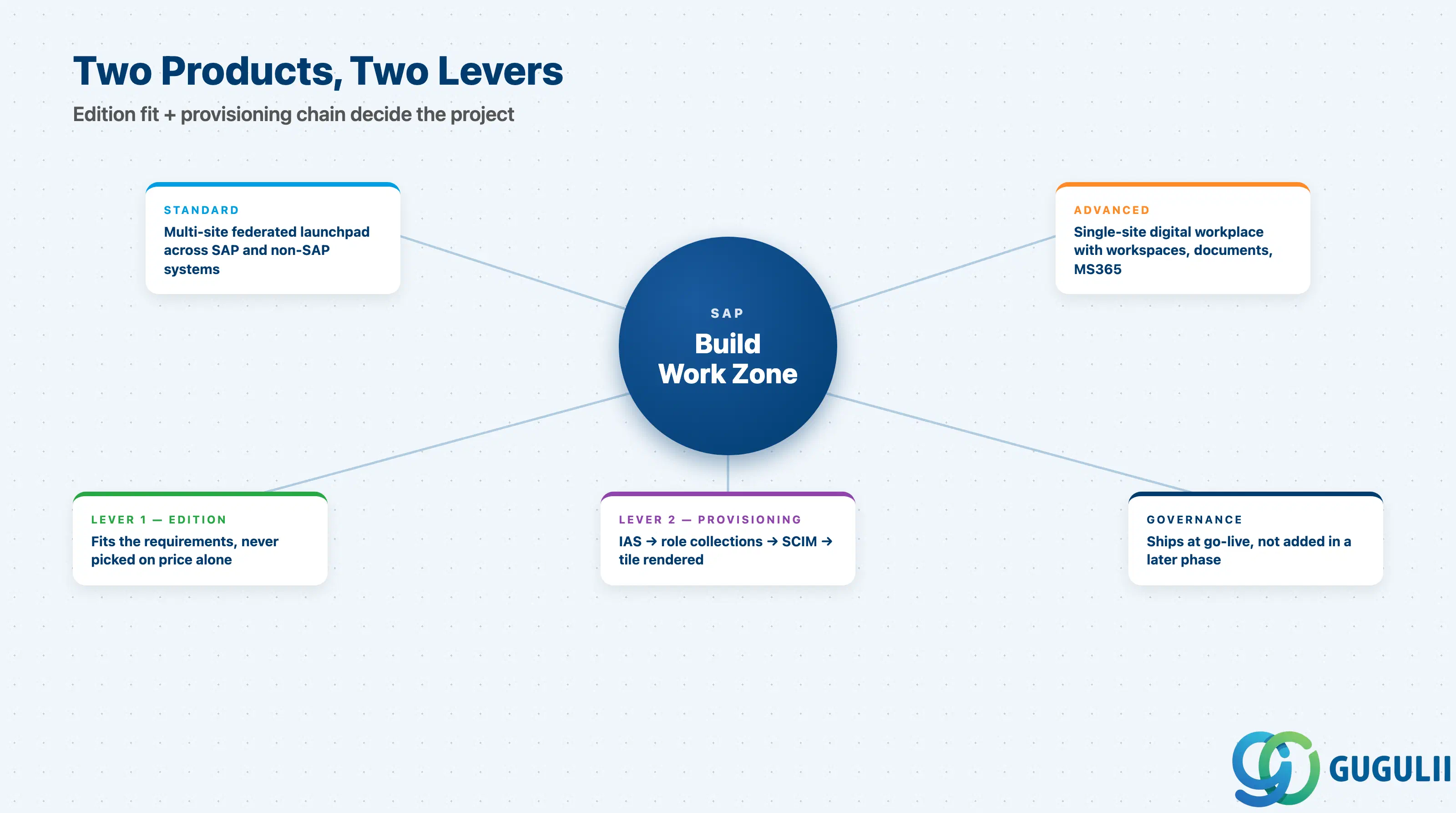
SAP Build Work Zone is two products under one name. Standard is the multi-site federated launchpad — the right answer for most multi-system SAP landscapes. Advanced is the digital workplace, justified when collaboration, documents, and Microsoft 365 are sponsored requirements. Both are mature; failures cluster at the requirements stage and the provisioning chain. Get edition and provisioning right, and Build Work Zone is a low-drama deliverable.
| ID | Title |
|---|---|
| BTP-B01 | Application Development on SAP BTP: Overview and Capability Map |
| BTP-B02 | Business Application Studio: Architecture and Use |
| BTP-B03 | CAP and Build Code: Architecture and Use |
| BTP-B04 | ABAP Environment: Architecture and Use |
| BTP-B05 | Build Apps: Architecture and Use |
| BTP-B06 | Build Process Automation: Architecture and Use |
| BTP-B07 | Build Work Zone: Architecture and Use (this article) |
| BTP-B08 | Use Cases and Decision Patterns |