Title here
Summary here

| ID | Category | Component | Scope |
|---|---|---|---|
| BTP-C01 | Overview | Data and Analytics | Overview and Capability Map |
| BTP-C02 | Integration | Data Integration Suite | Architecture and Use |
| BTP-C03 | Data Platform | SAP Datasphere | Architecture and Use (this article) |
| BTP-C04 | Analytics | SAP Analytics Cloud | Architecture and Use |
| BTP-C05 | AI and Data | Business Data Cloud | Architecture and Use |
| BTP-C06 | Governance | Data Governance and Catalog | Architecture and Use |
| Resource | URL |
|---|---|
| SAP Datasphere Product Page | sap.com → |
| SAP Datasphere Help Portal | help.sap.com → |
| Business Data Fabric Architecture Overview | sap.com → |
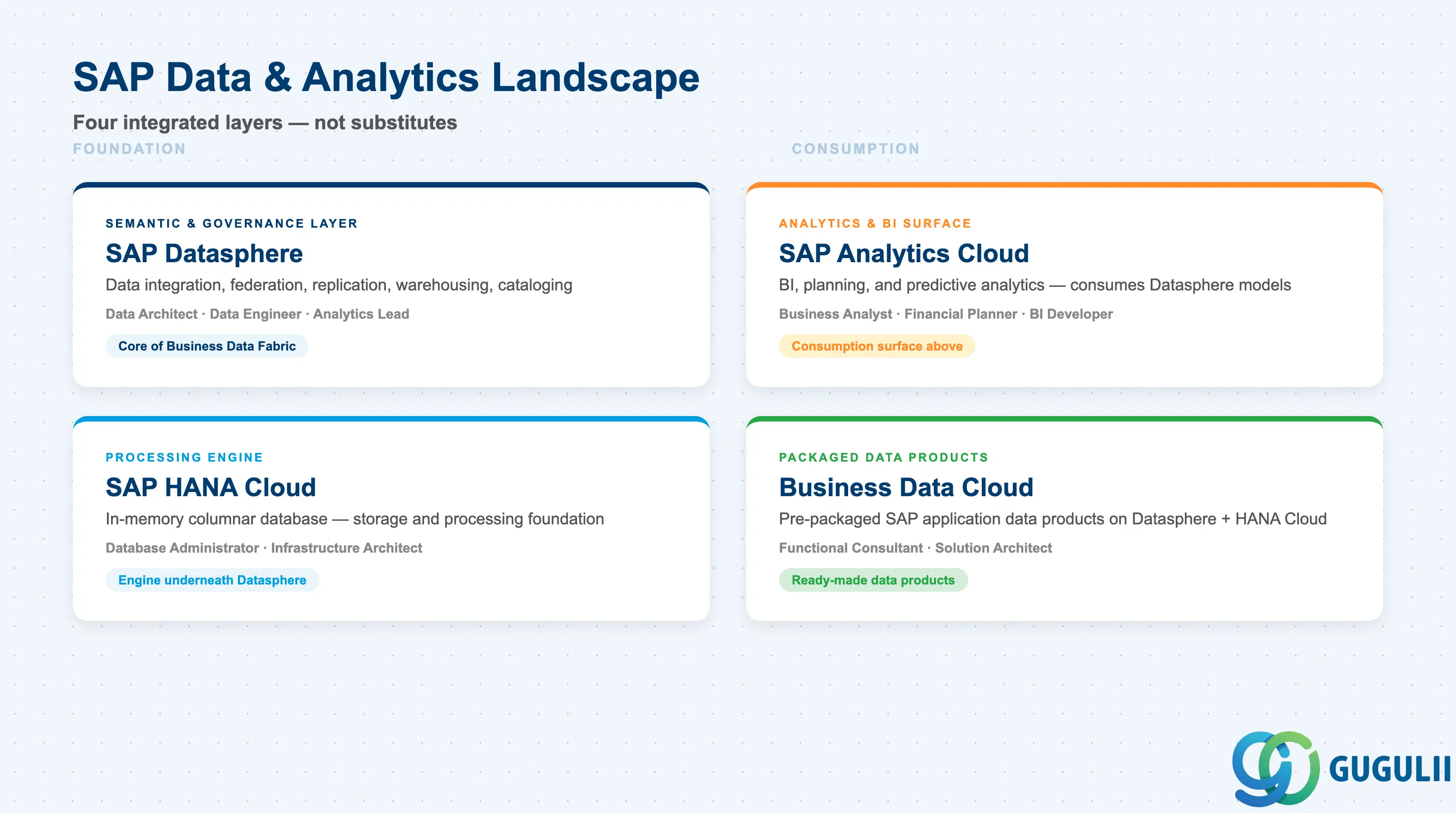
SAP Datasphere is a cloud-native data platform on SAP BTP that combines data integration, federation, replication, semantic modeling, warehousing, cataloging, and governance in a single service. Understanding it requires situating it among the capabilities it orchestrates — and the ones it does not replace.
| Domain | What it does | Primary user |
|---|---|---|
| SAP Datasphere | Unified semantic layer combining data integration, federation, replication, warehousing, cataloging, and governance | Data architect, data engineer, analytics lead |
| SAP HANA Cloud | In-memory columnar database providing storage, processing, and data lake capabilities that underpin Datasphere | Database administrator, infrastructure architect |
| SAP Analytics Cloud (SAC) | Business intelligence, planning, and predictive analytics platform that consumes Datasphere models | Business analyst, financial planner, BI developer |
| Business Data Cloud (BDC) | Pre-packaged SAP application data products built on Datasphere and HANA Cloud, aligned with SAP best practices | Functional consultant, solution architect |
They are not substitutes. Datasphere provides the semantic and governance layer; HANA Cloud is the engine underneath it; SAC is the consumption surface above it; BDC delivers ready-made data products on top of both.
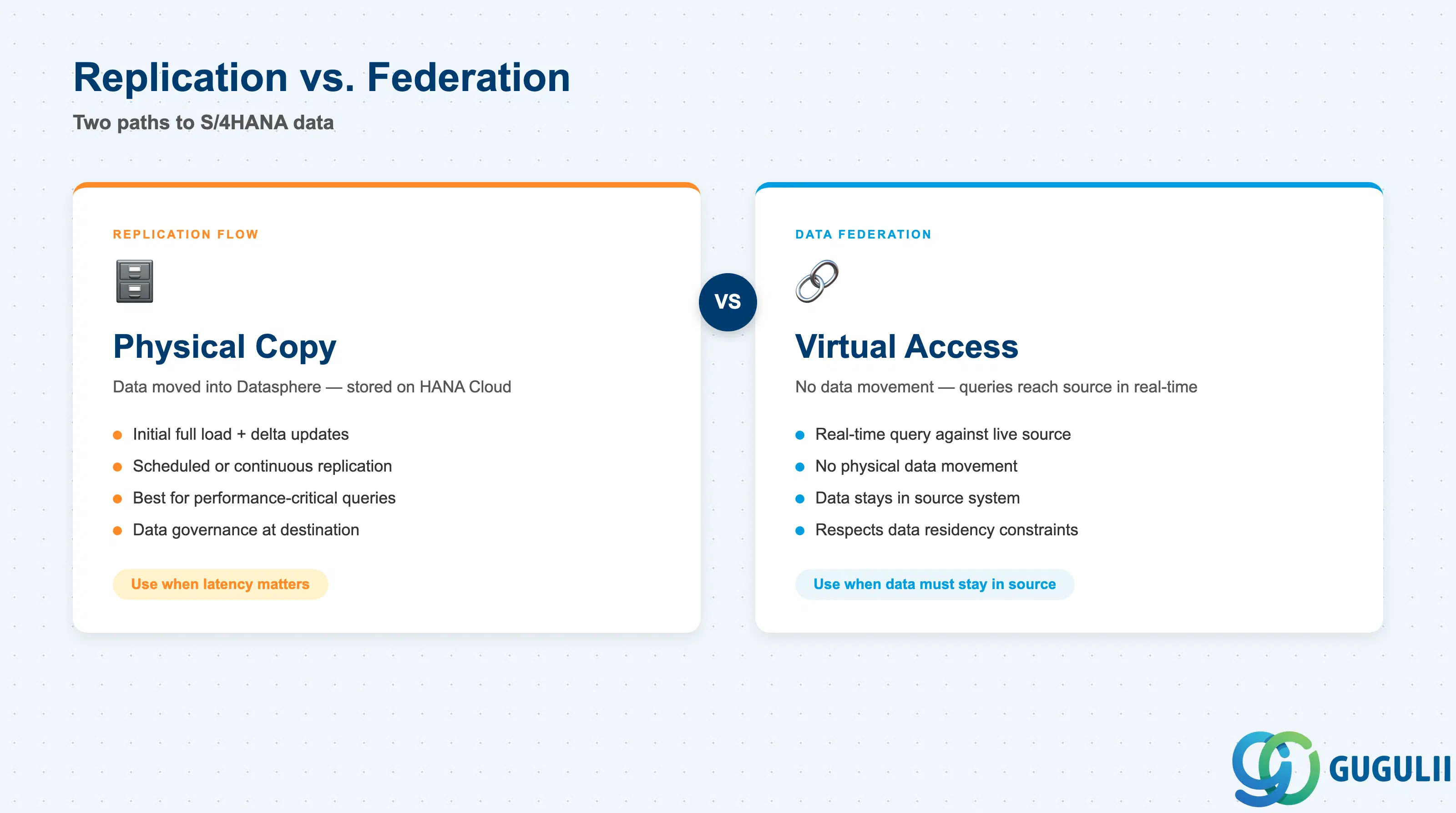
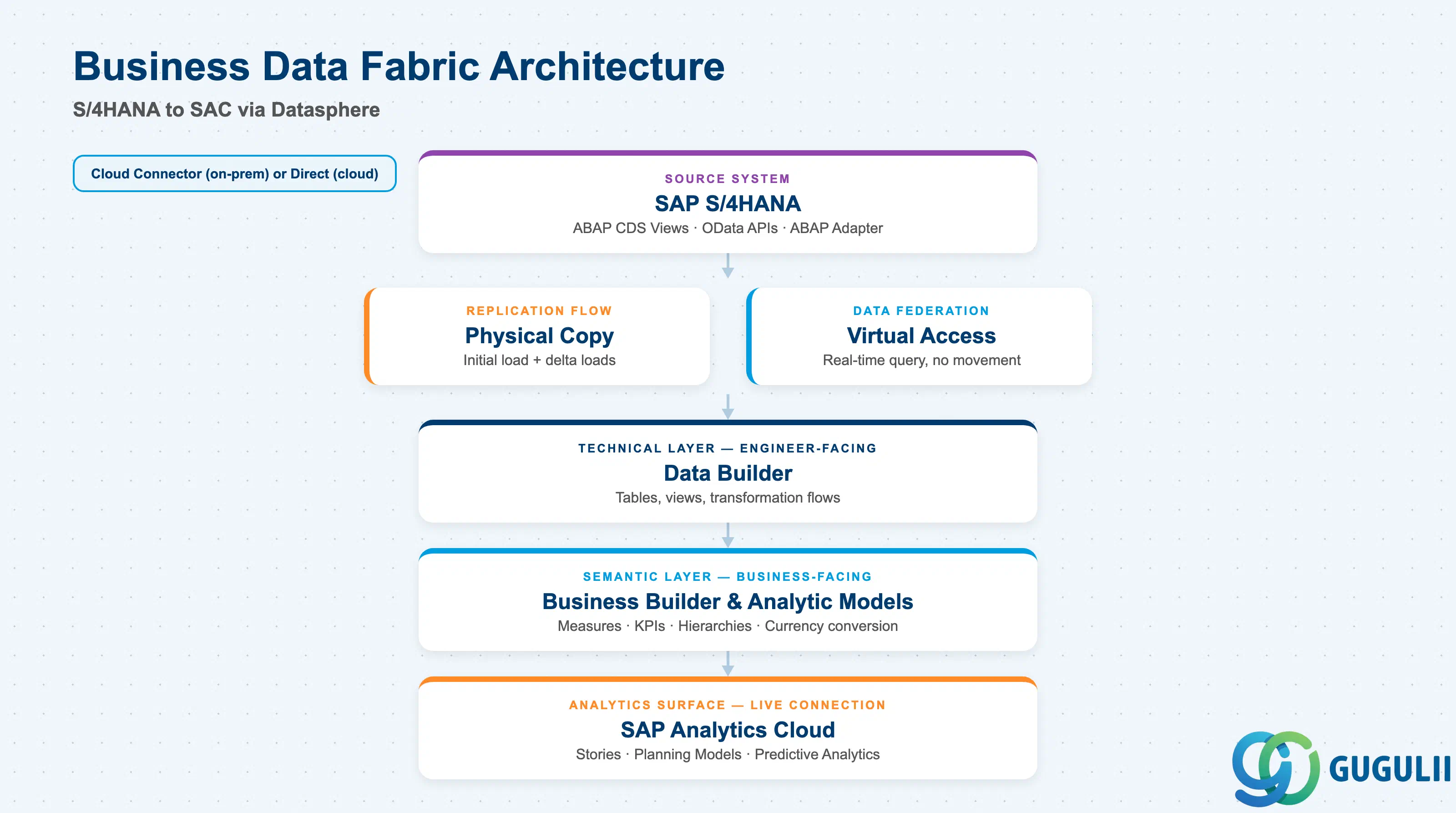
The Business Data Fabric architecture that Datasphere implements is designed to deliver a semantically rich data layer without requiring complete data migration — data can be federated where it lives or replicated when performance demands it.
┌─────────────────────────────────────────────────────────────┐
│  SAP S/4HANA (on-prem or cloud)                              │
│  ABAP CDS Views / OData APIs / ABAP Adapter                  │
└────────────────┬─────────────────────────────────────────────┘
                 │  Cloud Connector (on-prem) or direct (cloud)
                 ▼
┌─────────────────────────────────────────────────────────────┐
│  SAP Datasphere — Integration Layer                          │
│                                                              │
│  ┌──────────────────┐   ┌────────────────────────────────┐  │
│  │  Replication Flow │   │  Data Federation (virtual)     │  │
│  │  (initial + delta)│   │  (no physical data movement)   │  │
│  └──────────┬───────┘   └──────────────┬─────────────────┘  │
│             │                          │                     │
│  ┌──────────▼───────────────────────────▼─────────────────┐ │
│  │  Data Builder  (Data Layer — technical, engineer-facing)│ │
│  └──────────────────────────┬──────────────────────────────┘ │
│                             │                                │
│  ┌──────────────────────────▼──────────────────────────────┐ │
│  │  Business Builder / Analytic Models  (Business Layer)   │ │
│  │  (semantic naming, hierarchies, measures, KPIs)         │ │
│  └──────────────────────────┬──────────────────────────────┘ │
│                             │                                │
│  ┌──────────────────────────▼──────────────────────────────┐ │
│  │  Data Catalog  (lineage, glossary, classifications)     │ │
│  └─────────────────────────────────────────────────────────┘ │
└─────────────────────────────┬───────────────────────────────┘
                              │  Live Connection (trusted origin)
                              ▼
┌─────────────────────────────────────────────────────────────┐
│  SAP Analytics Cloud                                         │
│  Stories, Planning Models, Predictive Analytics             │
└─────────────────────────────────────────────────────────────┘
S/4HANA data reaches Datasphere through one of two paths: Replication Flows (physical copy supporting initial full loads, delta loads, and scheduled periodic loads) or federated virtual access (real-time query with no data movement). Cloud Connector bridges on-premises S/4HANA to BTP; cloud-deployed S/4HANA connects directly. ABAP CDS views are the recommended extraction surface. Once in Datasphere, Analytic Models expose data to SAP Analytics Cloud through live connections — eliminating latency between source updates and BI visualization.
Key point: The SAP Cloud Connector is required for any on-premises source connectivity and must be sized, secured, and monitored as infrastructure — it is a critical path dependency, not a configuration footnote.
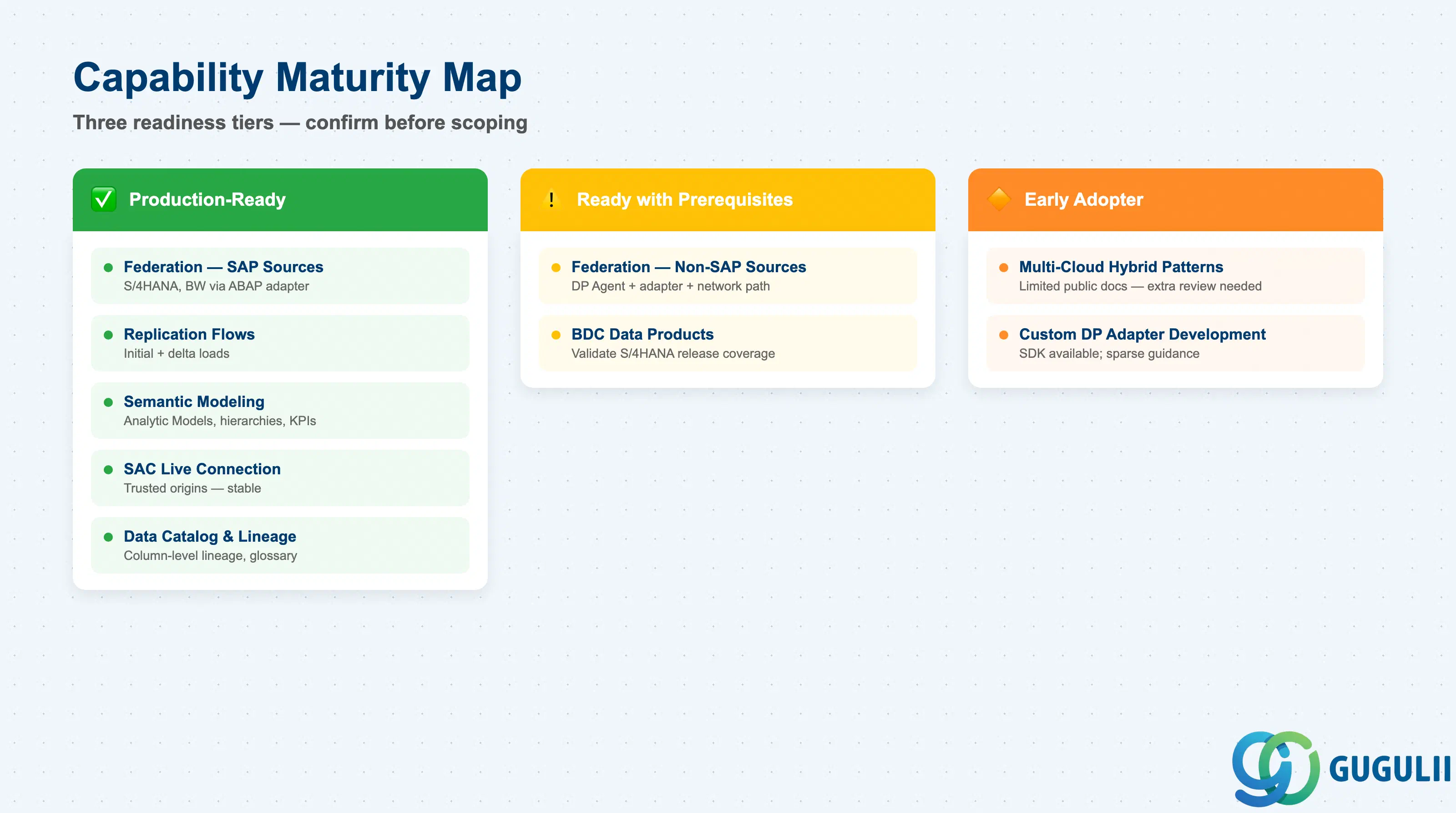
The SAP Datasphere Help Portal is the authoritative reference for capability status; the maturity assessments below reflect publicly documented patterns as of this article’s publication date.
| Capability | Maturity | Notes |
|---|---|---|
| Data federation — SAP sources (S/4HANA, BW) | ✅ Production-ready | Stable connectors, ABAP adapter, CDS view support. Well-documented in SAP Help Portal. |
| Data replication — Replication Flows | ✅ Production-ready | Supports initial + delta loads. Recommended as first-choice ETL pattern by SAP. |
| Semantic modeling — Analytic Models | ✅ Production-ready | Multi-dimensional, calculated measures, restricted measures, exception aggregation, currency conversion, hierarchies. |
| SAP Analytics Cloud live connection | ✅ Production-ready | Trusted origins configuration is stable. Primary consumption pattern for SAC stories and planning. |
| Data catalog and lineage | ✅ Production-ready | Column- and table-level lineage available. Business glossary, classification tags, KPIs supported. |
| Data federation — non-SAP sources | ⚠️ Ready with prerequisites | Requires DP Agent deployment, adapter selection, and network path validation. Non-SAP adapter support varies by vendor. |
| Business Data Cloud (BDC) data products | ⚠️ Ready with prerequisites | Available for supported SAP applications. Coverage and update cadence depend on BDC release schedule. Validate availability for your target S/4HANA version before committing to BDC-first strategy. |
| Multi-cloud and hybrid cross-cloud patterns | 🔶 Early adopter | Limited public documentation for multi-hyperscaler scenarios. Treat as requiring additional architecture review. |
| Custom DP adapter development | 🔶 Early adopter | Possible via SDK but public guidance is sparse. Engage SAP presales or partner channels before committing to custom adapter development. |
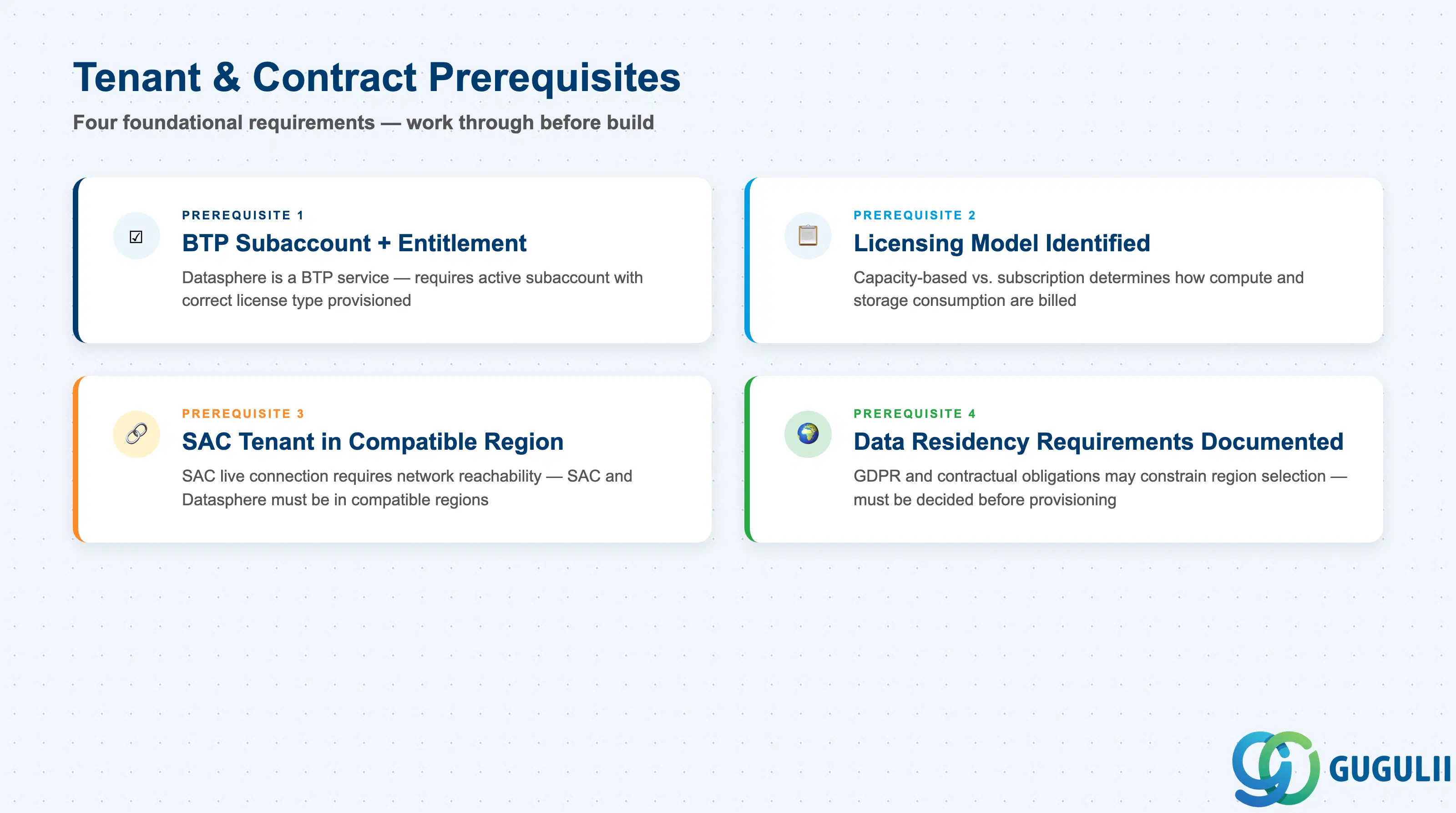
The checklist items below align with the provisioning and configuration requirements documented in the SAP Datasphere Help Portal. Work through them in order — items in later sections depend on decisions made in earlier ones.
| Checklist item | Why it matters |
|---|---|
| Confirm SAP BTP subaccount and Datasphere service entitlement are provisioned | Datasphere is a BTP service; provisioning requires an active subaccount with the correct entitlement and license type |
| Identify the licensing model (capacity-based vs. subscription) and current consumption baseline | Determines how storage, compute, and Data Integration Unit consumption are tracked and billed |
| Confirm SAP Analytics Cloud tenant is accessible from the same BTP subaccount and region | SAC live connection requires network reachability and trusted origin configuration; SAC and Datasphere must be in compatible regions |
| Document data residency and sovereignty requirements for each data domain | GDPR and contractual obligations may require data to remain within specific geographic boundaries; this constrains region selection |
| Checklist item | Why it matters |
|---|---|
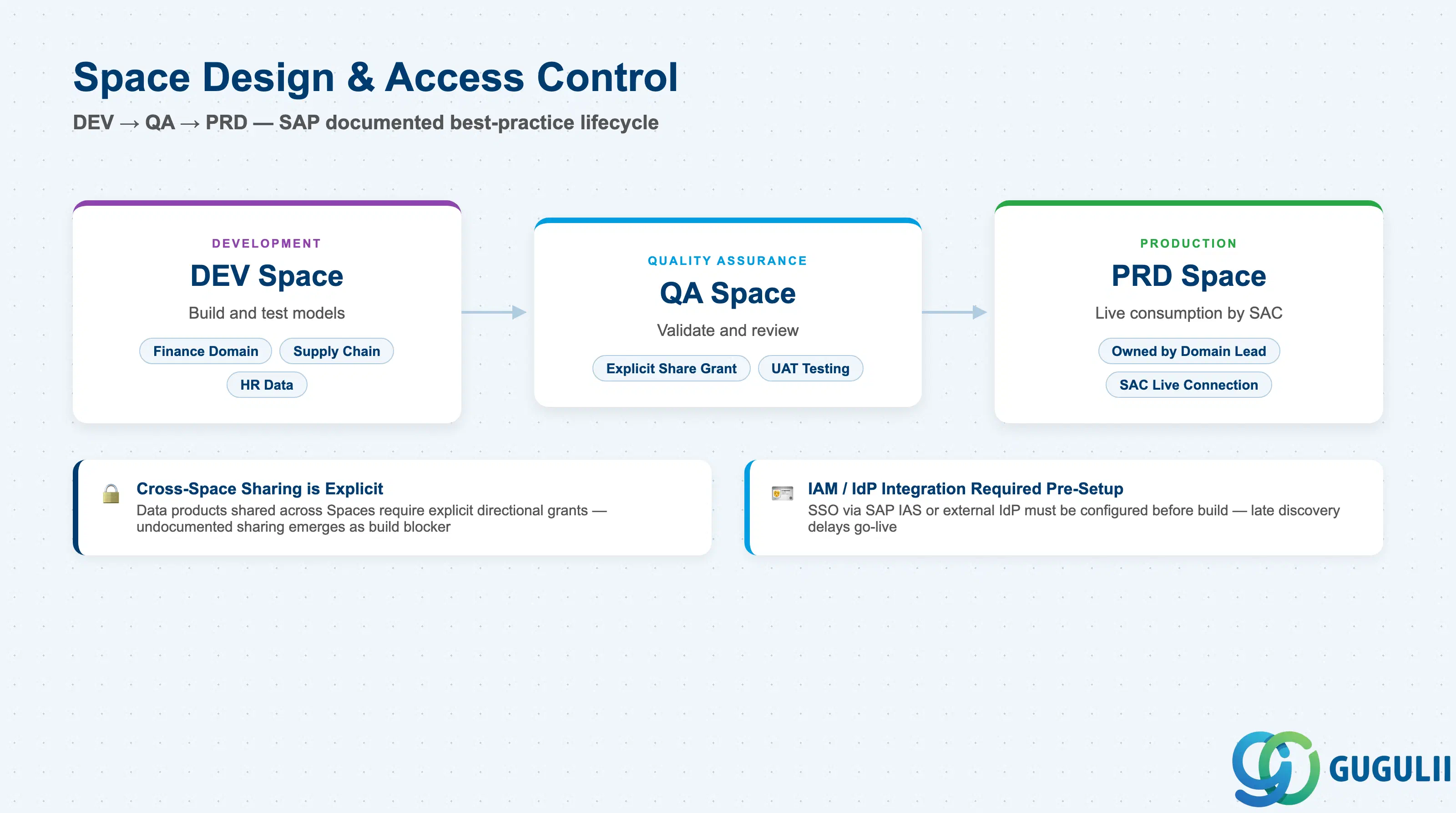
| Define the Space topology (Development, Quality Assurance, Production minimum) | Spaces are the primary isolation boundary; a DEV→QA→PRD pipeline is SAP’s documented best-practice lifecycle |
| Map business domains to Spaces and document who owns each Space | Cross-Space sharing requires explicit grants; ownership must be defined before build starts |
| Identify data products that must be shared across Spaces and design the sharing model | Cross-Space data sharing is explicit and directional; undocumented sharing requirements emerge as blockers during build |
| Confirm that the customer’s IAM/IdP is integrated with BTP and Datasphere | SSO via SAP IAS or external IdP requires pre-setup; late discovery of IdP integration gaps delays go-live |
| Checklist item | Why it matters |
|---|---|
| Inventory all source systems and classify each as SAP cloud, SAP on-premises, or non-SAP | Integration path, required components, and support maturity differ for each class |
| Confirm SAP Cloud Connector is deployed, network-accessible, and sized for expected throughput for each on-premises source | Cloud Connector is a critical-path dependency; it must be treated as managed infrastructure, not a one-time setup |
| Document ABAP CDS view availability and authorization assignments on the source S/4HANA system | CDS views must exist, be released for extraction, and have correct authorization objects assigned to the extraction user |
| Confirm available delta-change mechanism for each source (change document, trigger-based, timestamp) | Absence of a reliable delta mechanism forces full loads, increasing cost and latency |
| Checklist item | Why it matters |
|---|---|
| Identify which data domains require Analytic Models (multi-dimensional) vs. Views (relational) | Analytic Models are required for SAC live connections with full measure and hierarchy support |
| Document the business glossary terms, KPIs, and hierarchies that must be defined before modeling begins | Late-stage glossary definition forces rework of Analytic Model definitions |
| Assign Data Catalog stewards responsible for metadata enrichment and lineage validation | Without assigned stewards, catalog entries decay and data lineage becomes untrustworthy |
| Confirm currency conversion requirements and verify exchange rate table availability | Exchange rate data must be replicated or loaded separately; missing rate tables produce incorrect analytics at runtime |
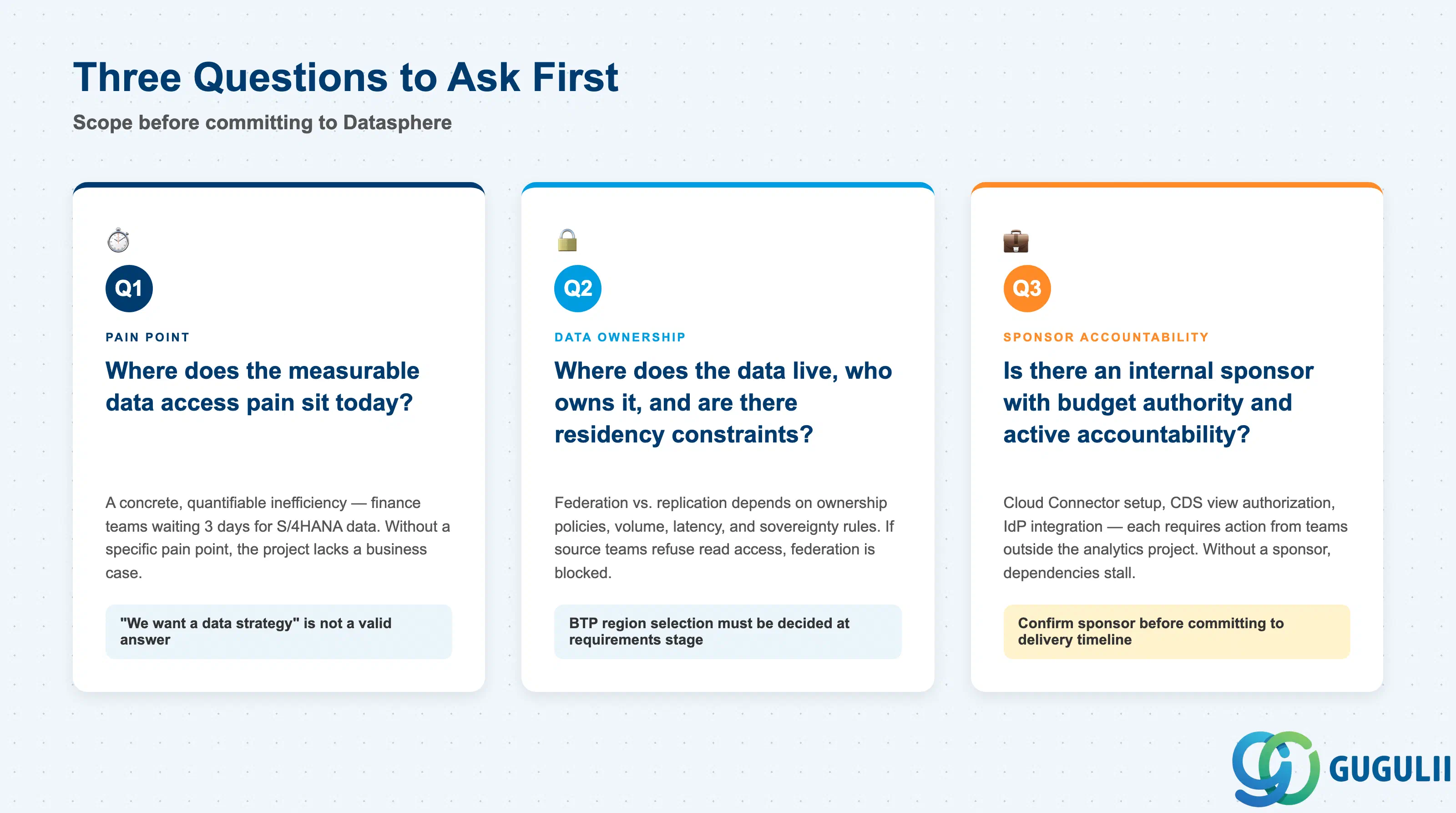
Q1. Where does the measurable data access pain sit today?
Identify a concrete, quantifiable inefficiency — for example, finance teams waiting 3 days for S/4HANA month-end data to be extracted, transformed, and loaded into the BI layer; or analytics teams rebuilding context manually each time a source schema changes. Without a specific pain point with a measurable cost, a Datasphere project lacks a business case and will face sponsorship attrition. “We want a data strategy” is not a valid Q1 answer.
Q2. Where does the data live, who owns it, and are there residency constraints?
Datasphere’s federation capability allows data to stay in source systems; replication brings it physically onto BTP. The choice between the two is driven by data ownership policies, data volume, query latency requirements, and data residency/sovereignty rules. If a source system team refuses to grant Datasphere read access, federation is blocked. If GDPR or contractual obligations prevent data from leaving a specific geographic zone, the BTP region selection and replication strategy must be decided at requirements stage, not during build.
Q3. Is there an internal sponsor with budget authority and active accountability for the initiative?
Datasphere implementations require sustained engagement from data owners, security teams, and source-system administrators across multiple systems. Projects without an identified sponsor who holds budget and can resolve cross-team dependencies stall at integration. Cloud Connector setup, CDS view authorization on S/4HANA, and IdP integration each require action from teams outside the analytics project. Confirm the sponsor is accountable for these cross-team dependencies before committing to a delivery timeline.
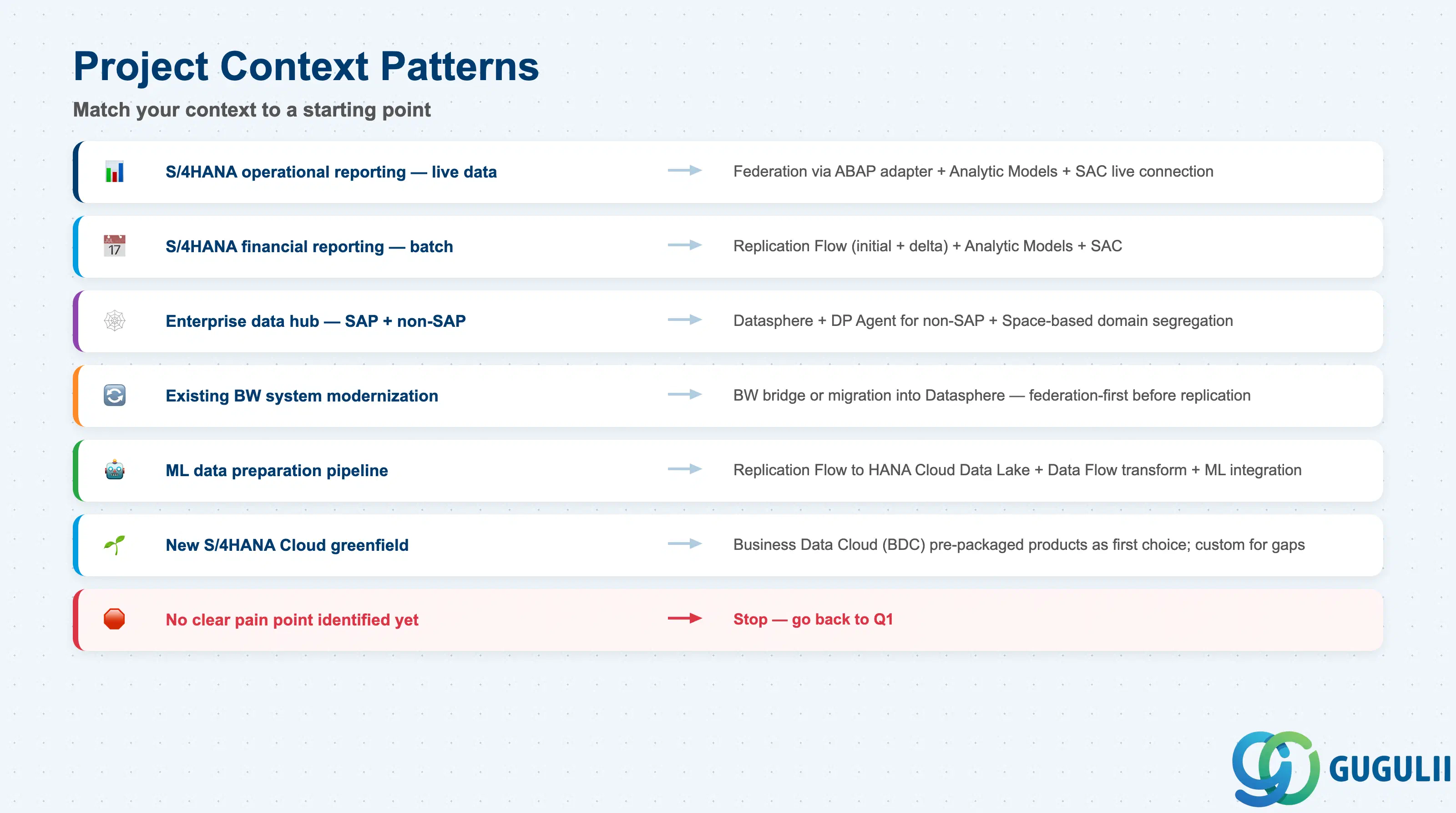
The table below maps common project contexts to starting-point patterns. Confirm licensing and regional availability against the SAP Datasphere product page before committing to a pattern.
| Project context | Recommended starting point |
|---|---|
| S/4HANA operational reporting with live data requirements | Data federation via ABAP adapter + Analytic Models + SAC live connection |
| S/4HANA financial reporting with month-end batch processing | Replication Flow (initial + delta) + Analytic Models + SAC |
| Enterprise data hub integrating SAP and non-SAP sources | Datasphere with DP Agent for non-SAP + Space-based domain segregation |
| Existing BW system modernization | BW bridge or migration into Datasphere; assess federation-first before replication |
| Machine learning data preparation pipeline | Replication Flow to HANA Cloud Data Lake + Data Flow for transformation + ML integration |
| New SAP S/4HANA Cloud greenfield implementation | Business Data Cloud (BDC) pre-packaged data products as first choice; Datasphere custom modeling for gaps |
| No clear pain point identified yet | Stop. Go back to Q1. |
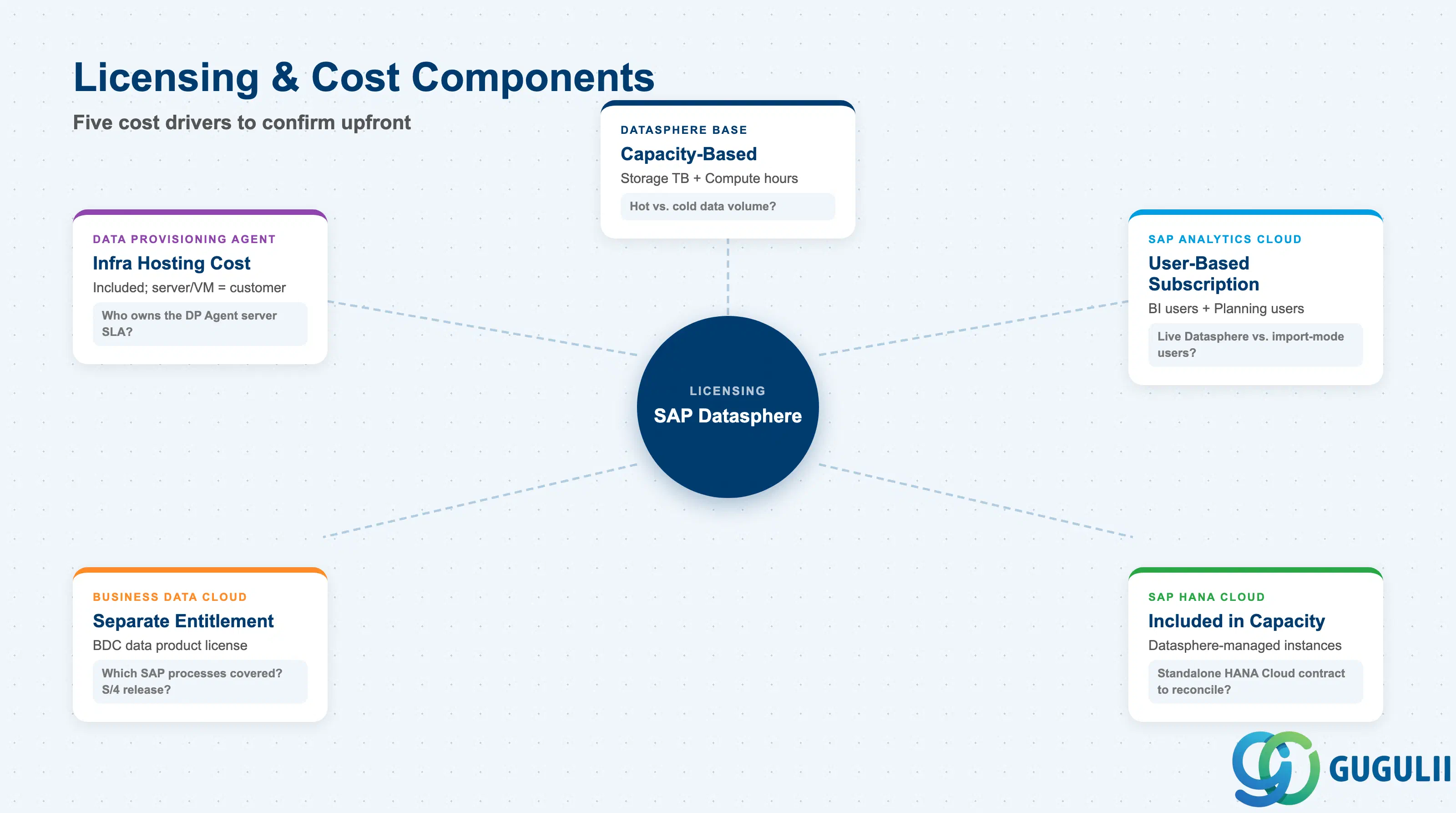
| Capability | Licensing model | Key question to ask |
|---|---|---|
| SAP Datasphere base | Capacity-based (storage TB + compute hours) or subscription tier | What is the estimated data volume in hot storage vs. cold storage? Hot (in-memory) drives the majority of cost. |
| SAP Analytics Cloud | User-based subscription (Business Intelligence users, Planning users) | How many named users need live Datasphere connections vs. import-mode access? |
| SAP HANA Cloud (underlying) | Included within Datasphere capacity entitlement for Datasphere-managed instances | Confirm whether customer already has a standalone HANA Cloud contract that needs to be reconciled. |
| Business Data Cloud (BDC) data products | Separate BDC entitlement required | Which SAP application processes are covered by BDC? Is the customer’s S/4HANA release supported? |
| Data Provisioning Agent (for non-SAP) | Included; infrastructure hosting cost is customer responsibility | Who owns the server/VM for DP Agent? What is the SLA for that infrastructure? |
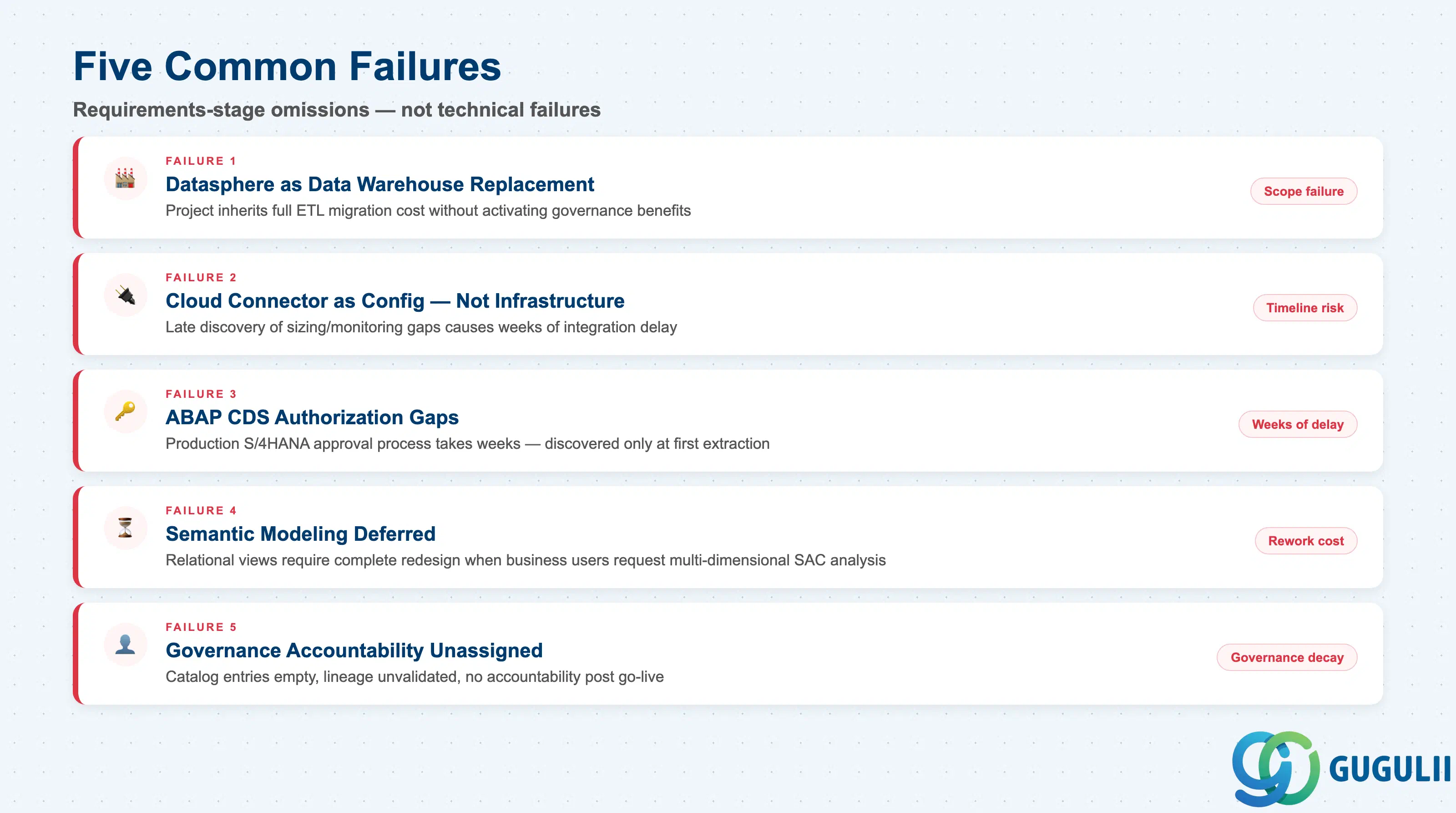
Detailed technical guidance for each failure mode is available in the SAP Datasphere Help Portal; the patterns below reflect common requirements-stage omissions observed in field engagements.
Failure 1: Treating Datasphere as a data warehouse replacement
The most frequent scope failure. Datasphere can physically store data, but its primary architecture value is as a semantic and governance overlay. When requirements are written as “migrate all data into Datasphere,” the project inherits full ETL migration cost, data validation effort, and storage cost — often without the governance and semantic benefits being activated. Scope federation-first for operational data; replicate only where latency or query performance justifies it.
Failure 2: Cloud Connector treated as a configuration step rather than infrastructure
Cloud Connector is a critical-path dependency for every on-premises source. Projects that discover late that Cloud Connector has not been sized, secured, or monitored face integration delays of weeks. Cloud Connector sizing, deployment zone (DMZ vs. trusted zone), and monitoring responsibility must be defined at requirements stage — not after the DEV environment is built.
Failure 3: ABAP CDS view authorization gaps on S/4HANA
Datasphere’s ABAP-based integration relies on CDS views being released for extraction and having correct authorization objects assigned. These are governed by the S/4HANA Basis and security teams. Projects that fail to engage S/4HANA administrators during requirements phase discover CDS authorization gaps only when attempting first data extractions — and the approval process in production S/4HANA systems can take weeks.
Failure 4: Semantic modeling deferred until after data integration is complete
Analytic Models, business glossary terms, hierarchies, and KPI definitions are not post-processing details — they are the core of what Datasphere delivers. When semantic modeling requirements are not captured at the start, data engineers build relational views that then require complete redesign when business users request multi-dimensional analysis in SAC. Semantic design and data integration design must proceed in parallel.
Failure 5: Data governance accountability left unassigned
Data Catalog stewardship, metadata enrichment, data quality thresholds, and lineage validation require named owners from the business. Datasphere’s governance features create the infrastructure for governance programs; they do not self-populate. Projects that deploy Datasphere without assigning data stewards produce catalogs with empty descriptions, unvalidated lineage, and no accountability when data quality issues emerge post-go-live.
Q: Can Datasphere be used with on-premises S/4HANA systems, or is it cloud-only?
SAP Datasphere supports both on-premises and cloud-deployed S/4HANA systems. On-premises connectivity requires the SAP Cloud Connector deployed in the customer’s network, which establishes a secure HTTPS tunnel to BTP. Cloud Connector handles ABAP CDS view extraction, Replication Flows, and Model Import. SAP S/4HANA Cloud (public and private editions) can connect directly without Cloud Connector. The connectivity pattern differs — scope accordingly at requirements stage.
Q: What licensing does Datasphere require, and what is the typical cost driver?
Datasphere uses a capacity-based licensing model where the dominant cost driver is hot data — data stored in SAP HANA Cloud in-memory columnar storage. Cold data stored in HANA Cloud Data Lake carries lower cost. Projects that replicate large data volumes without a tiering strategy (hot for recent, high-query data; cold for historical or archival data) frequently exceed budgets. Confirm the data tiering design and estimated hot storage volume before presenting cost estimates.
Q: When should we descope Datasphere and use a simpler alternative?
Datasphere is most valuable when the use case requires semantic governance across multiple source systems, live or near-real-time data access from SAC, or a federated architecture that avoids data migration. If the requirement is limited to a single source system with batch reporting and no federation or governance needs, a simpler BTP Data Integration pipeline feeding a standalone HANA Cloud or SAC import model may be sufficient. Datasphere’s value scales with the number of source systems, domains, and consumers — small single-source scenarios rarely justify the governance and licensing overhead.
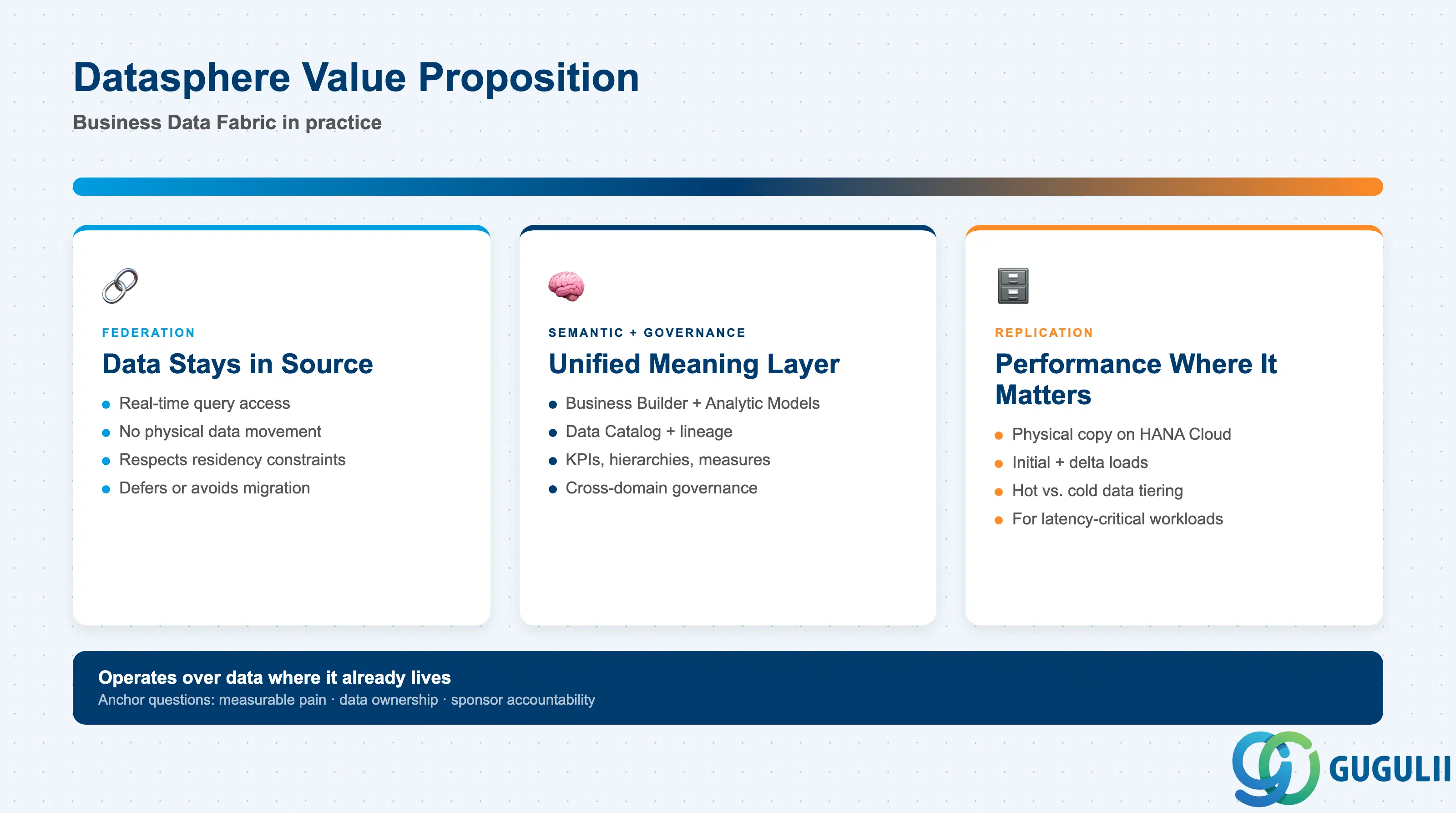
SAP Datasphere is the operational foundation of SAP’s Business Data Fabric strategy. It delivers a unified semantic and governance layer that can operate over data where it already lives — federating access without migration — while also supporting physical replication where performance demands it. The architecture spans a Data Builder for technical modeling, a Business Builder for semantic modeling, and a Data Catalog for governance, all sitting on SAP HANA Cloud and integrating directly with SAP Analytics Cloud through live connections.
Successful implementations are scoped around three anchor questions: where the measurable pain sits, who owns the data and under what residency constraints, and whether a sponsor with budget authority can resolve cross-team dependencies. The most common failures are not technical — they are requirements-stage omissions: Cloud Connector treated as configuration, CDS view authorization not engaged early, semantic modeling deferred, and governance accountability left unassigned. Consultants who treat these as build-phase concerns will recover them at the cost of timeline and trust.