Title here
Summary here

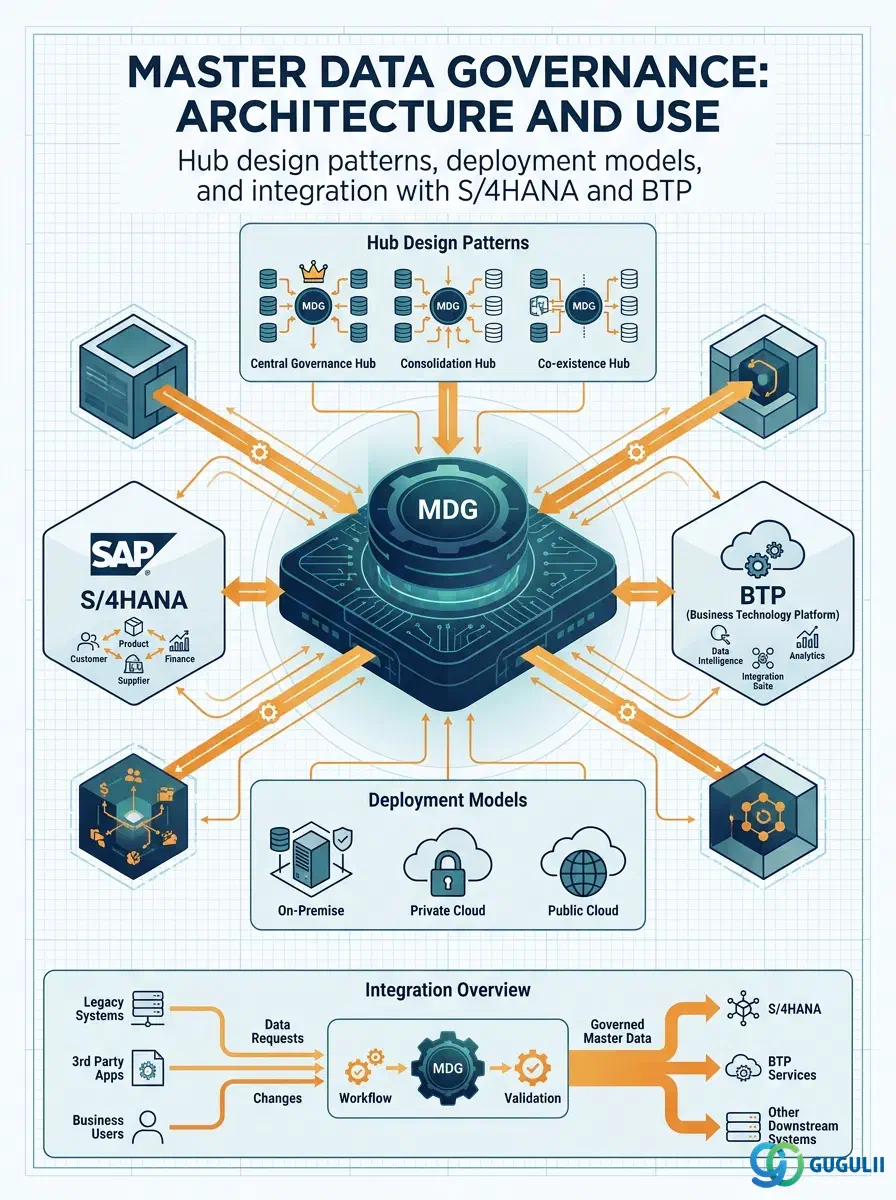
| ID | Category | Component | Scope |
|---|---|---|---|
| BTP-C01 | Overview | Data and Analytics | Overview and Capability Map |
| BTP-C02 | Integration | Data Integration Suite | Architecture and Use |
| BTP-C03 | Data Platform | SAP Datasphere | Architecture and Use |
| BTP-C04 | Analytics | SAP Analytics Cloud | Architecture and Use |
| BTP-C05 | Governance | Master Data Governance | Architecture and Use (this article) |
| BTP-C06 | Governance | Data Governance and Catalog | Architecture and Use |
| Resource | URL |
|---|---|
| SAP Master Data Governance Product Page | sap.com → |
| MDG Consolidation and Central Governance (Help Portal) | help.sap.com → |
| Data Replication Framework for MDG (Help Portal) | help.sap.com → |
| SAP Fiori Apps for Master Data Governance | help.sap.com → |
| MDG on S/4HANA FAQ (SAP Community) | sap.com → |
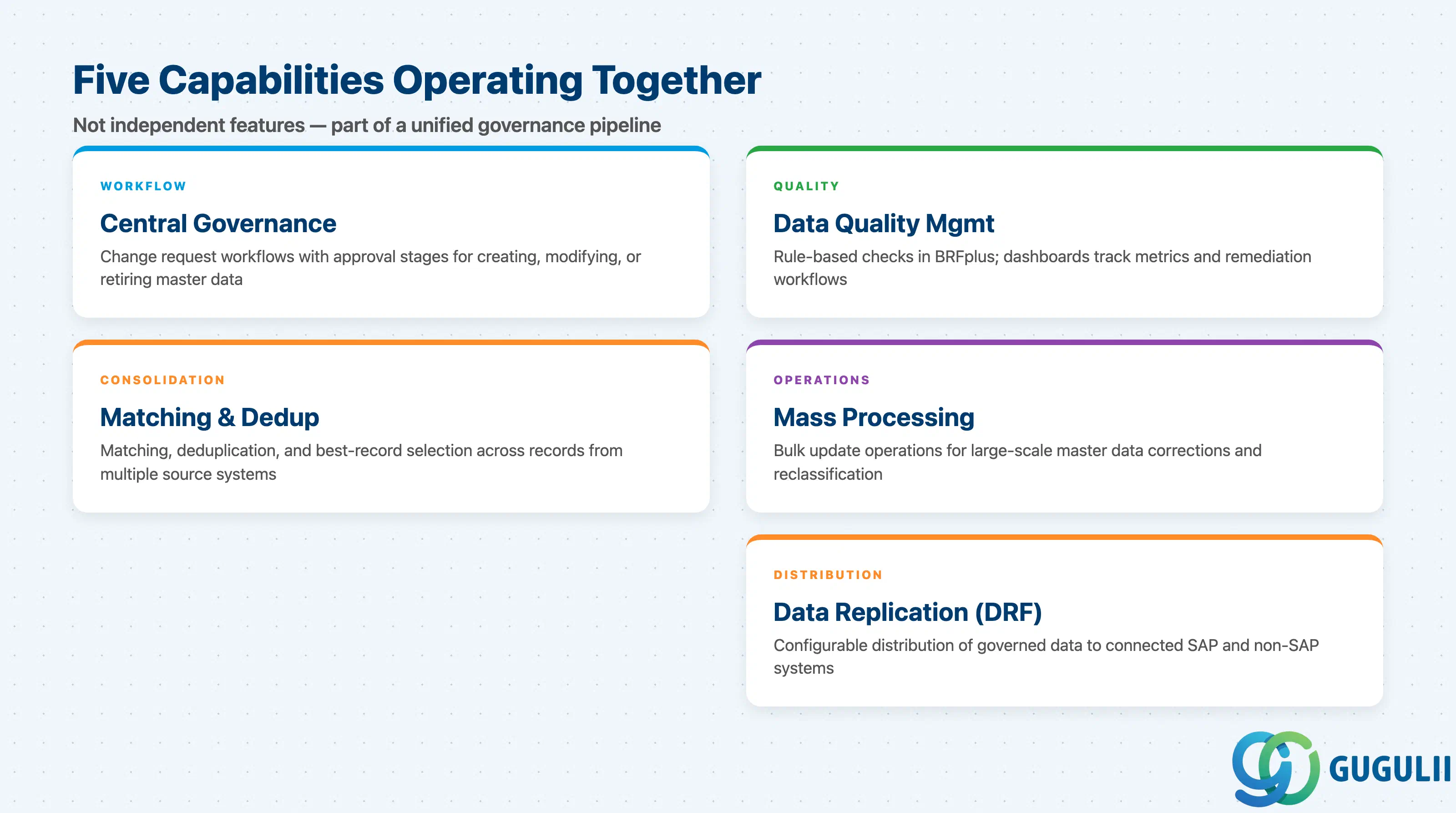
SAP Master Data Governance combines distinct capabilities addressing different phases of the master data lifecycle. Understanding which capability applies to a given requirement prevents misscoping.
| Capability | What it does | Primary user |
|---|---|---|
| Central Governance | Change request workflows with approval stages; authorized users create, modify, or retire master data through defined business processes | Data steward, data owner, approver |
| Consolidation | Matching, deduplication, and best-record selection across records from multiple source systems | Data migration lead, MDM team |
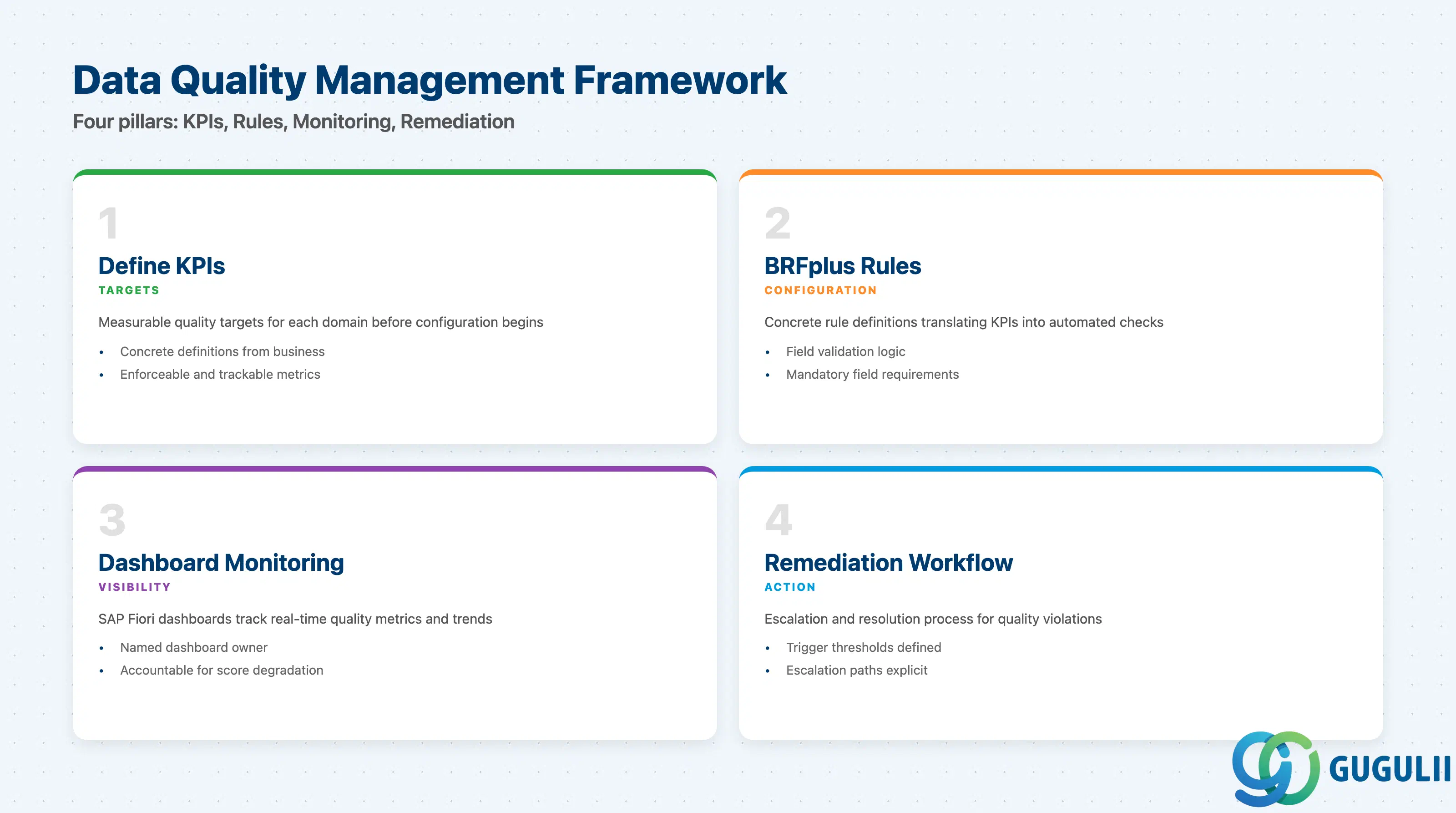
| Data Quality Management | Rule-based quality checks defined in BRFplus; dashboards track real-time metrics and historical trends; remediation workflows triggered on violations | Chief data officer, data quality analyst |
| Mass Processing | Bulk update operations for large-scale master data corrections and reclassification | Data operations team |
| Data Replication (DRF) | Configurable distribution of governed master data to connected SAP and non-SAP systems, with field-level mapping and transformation | Integration architect, basis team |
These capabilities operate together in a governance pipeline, not independently. They are not substitutes.
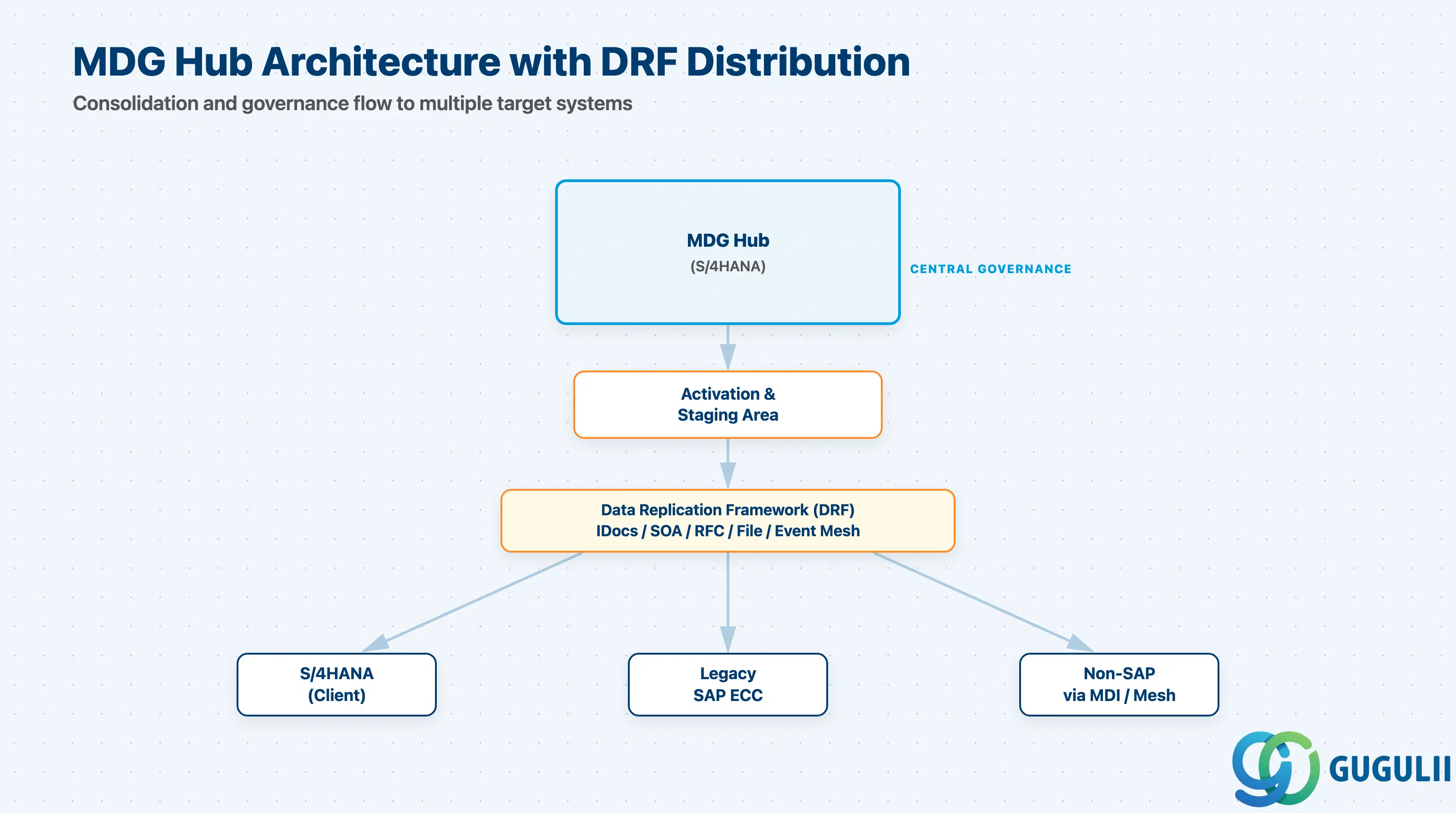
MDG is embedded in SAP S/4HANA — not a separate SaaS service bolted on. Every deployment involves an S/4HANA system acting as the MDG platform, either exclusively (hub) or alongside transactional work (co-deployment).
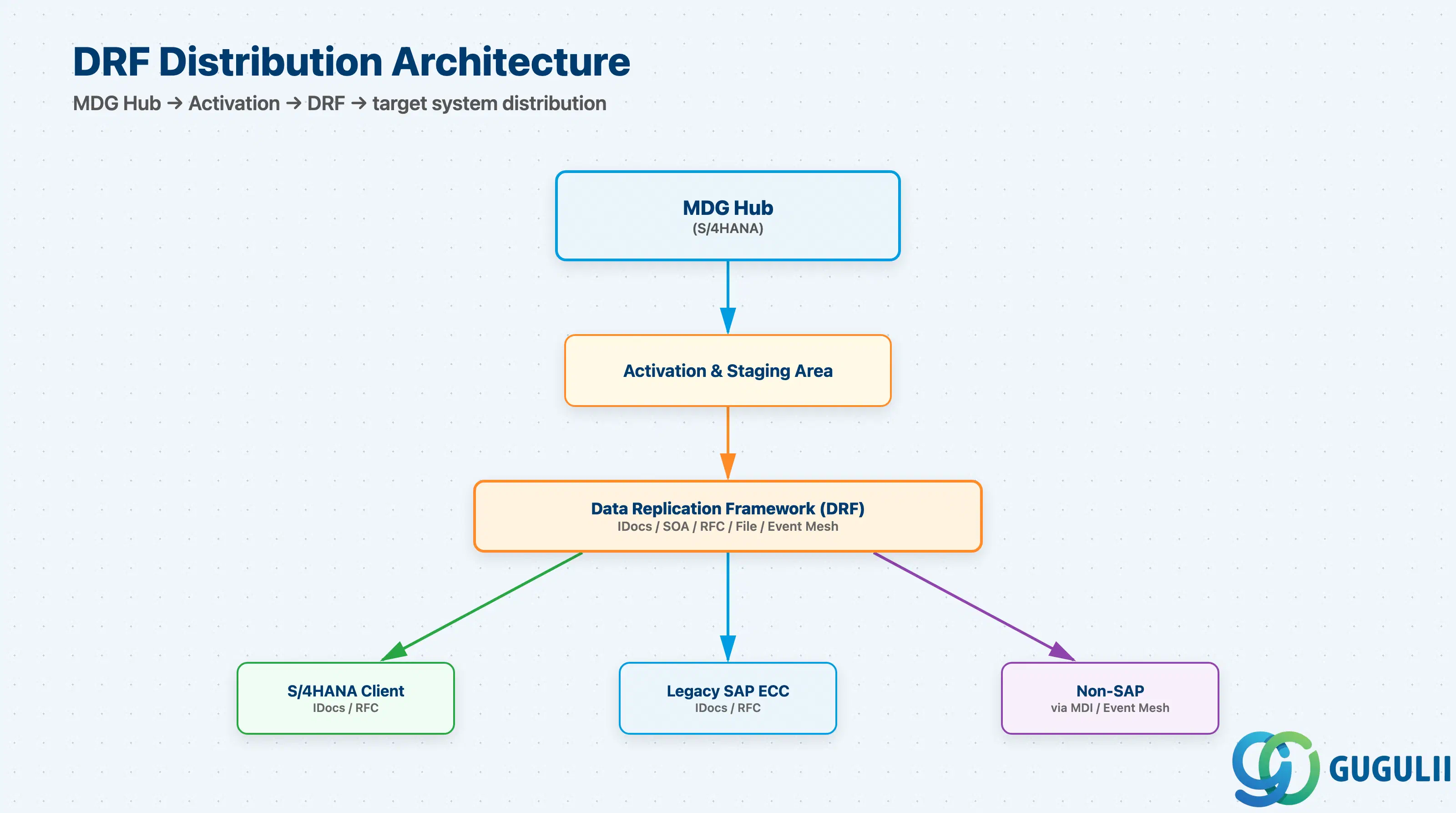
                    ┌─────────────────────────────────────┐
                    │        MDG Hub (S/4HANA)            │
                    │                                     │
  Source Systems ──►│  Consolidation  ──►  Central Gov.  │
  (ECC, legacy)     │  (dedup, match)     (CR workflow)   │
                    │                         │           │
                    │                    Activation &     │
                    │                    Staging Area     │
                    │                         │           │
                    └─────────────────────────┼───────────┘
                                              │
                            ┌─────────────────▼──────────────────────┐
                            │    Data Replication Framework (DRF)    │
                            │   IDocs / SOA / RFC / File             │
                            └─────┬──────────┬──────────┬────────────┘
                                  │          │          │
                         ┌────────▼──┐  ┌────▼────┐  ┌─▼──────────┐
                         │ S/4HANA   │  │ Legacy  │  │ Non-SAP    │
                         │ (client)  │  │ SAP ECC │  │ via MDI /  │
                         └───────────┘  └─────────┘  │ Event Mesh │
                                                      └────────────┘
In cloud scenarios, SAP Master Data Integration (MDI) on BTP sits between MDG and cloud line-of-business applications, using the SAP One Domain Model to normalize data across the intelligent suite. SAP Cloud Integration (CPI) handles legacy and non-SAP system connections as middleware.
Key point: DRF is the distribution backbone in all MDG deployments — even co-deployment scenarios using MDG-F (Flex mode) require DRF configuration to distribute data to consuming processes.
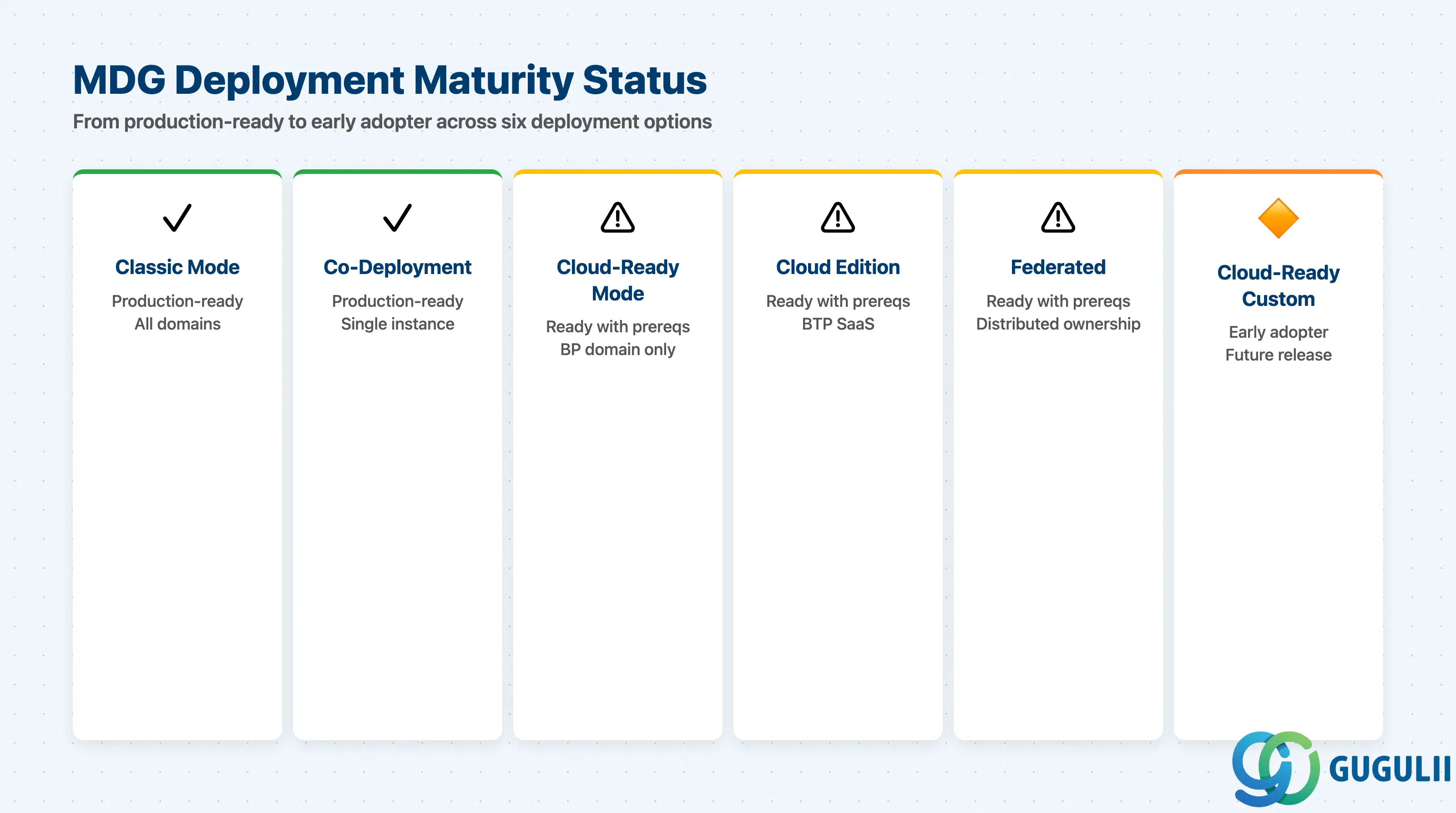
Cloud-ready mode was introduced with SAP S/4HANA 2023 and follows clean core principles; classic mode remains available for all domains from earlier releases.
| Deployment / Mode | Maturity | Notes |
|---|---|---|
| MDG Classic Mode (hub, S/4HANA 2020+) | ✅ Production-ready | Covers business partner, product, financial, and custom domains; well-documented; large implementation community |
| MDG Co-Deployment (S/4HANA) | ✅ Production-ready | Eliminates replication latency; preferred for single-instance S/4HANA organizations; requires careful authorization design to separate MDG and transactional users |
| MDG Cloud-Ready Mode (S/4HANA 2023+) | ⚠️ Ready with prerequisites | Business partner domain only; requires S/4HANA 2023 minimum; clean core extensions only; coexistence with classic mode supported during migration |
| MDG Cloud Edition (BTP SaaS) | ⚠️ Ready with prerequisites | Business partner domain only; follows BTP ABAP Environment maintenance schedules; PaaS variant announced but not yet released; limited domain scope compared to on-premise MDG |
| Federated Master Data Governance | ⚠️ Ready with prerequisites | Available from S/4HANA 2023; requires multi-instance coordination design; more complex monitoring; best suited for large enterprises with distributed data ownership |
| Cloud-Ready Mode on Custom Domains | 🔶 Early adopter | Planned for future releases; not available as of S/4HANA 2023; classic mode remains the option for product and financial domains |
The MDG Consolidation and Central Governance documentation describes the change request model that all checklists below are designed to scope.
| Checklist item | Why it matters |
|---|---|
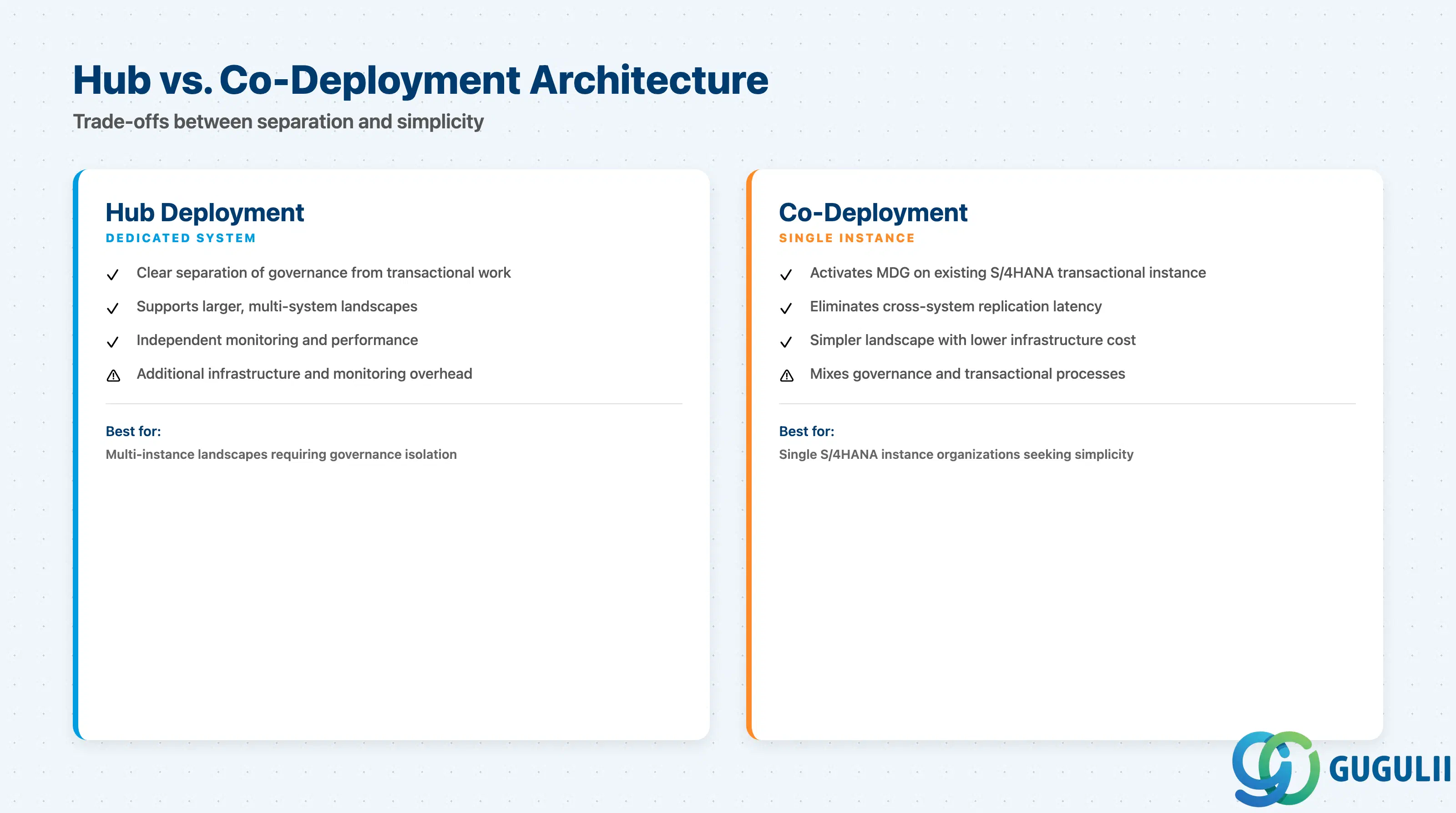
| Confirm whether a dedicated MDG hub system or co-deployment is required | Hub adds infrastructure cost and monitoring overhead; co-deployment simplifies the landscape but mixes governance and transactional processes |
| Identify if the organization has an S/4HANA instance suitable for MDG co-deployment | Co-deployment avoids a new system provision but requires authorization design review to prevent transactional users from bypassing governance workflows |
| Verify SAP S/4HANA release version (2020, 2022, 2023+) | Cloud-ready mode and federated governance require S/4HANA 2023 minimum; classic mode is available from earlier releases |
| Determine whether MDG Cloud Edition (SaaS on BTP) is a viable alternative | Cloud Edition covers business partner only; confirm this scope is sufficient before selecting it over on-premise MDG |
| Confirm system landscape — number of master data clients receiving replicated data | DRF configuration complexity scales with connected systems; each target needs its own replication configuration and monitoring |
| Check if existing MDG classic-mode customizations are in scope for migration to cloud-ready mode | Migration must account for custom workflows and BRFplus rules that may not yet have cloud-ready equivalents |
| Checklist item | Why it matters |
|---|---|
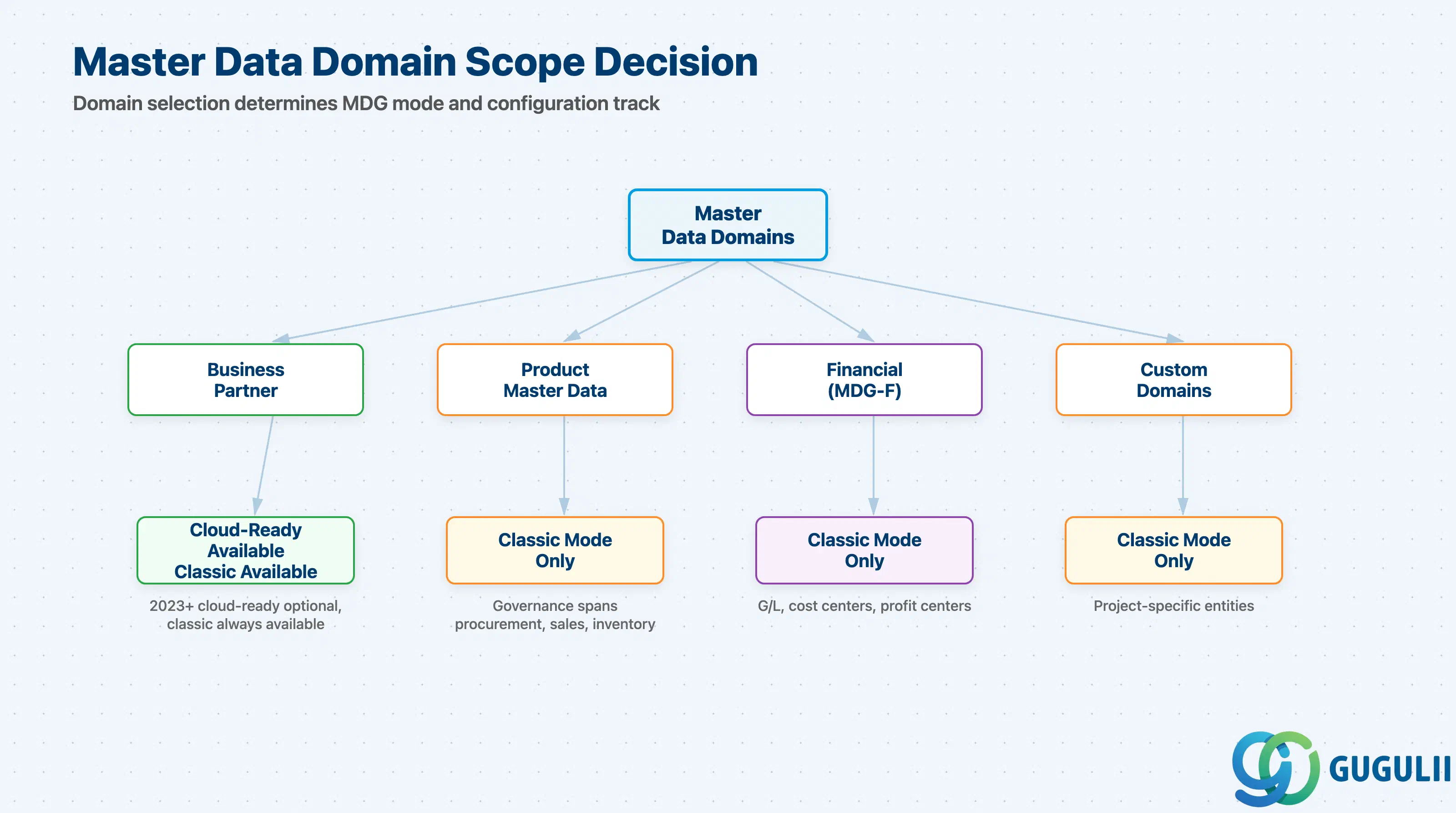
| Identify which master data domains are in scope (business partner, product, financial, custom) | Scoping determines which MDG mode is applicable — cloud-ready mode covers business partner only as of S/4HANA 2023 |
| Confirm whether custom domain definition is required | Custom domains require classic mode; do not assume cloud-ready mode supports custom objects |
| Document volume and distribution of existing master data records per domain | Consolidation complexity and deduplication effort depend on existing record volumes; affects timeline and resourcing |
| Identify all source systems feeding master data into MDG | Each source system integration requires its own mapping, transformation rules, and error handling in DRF or consolidation |
| Confirm whether the financial domain (G/L accounts, cost centers, profit centers) is in scope | MDG-F has a distinct configuration path from business partner and product domains |
| Validate that product master data scope (procurement, sales, inventory) is explicitly bounded | Product domain governance can expand rapidly; unclear scope leads to requirements creep during design |
| Checklist item | Why it matters |
|---|---|
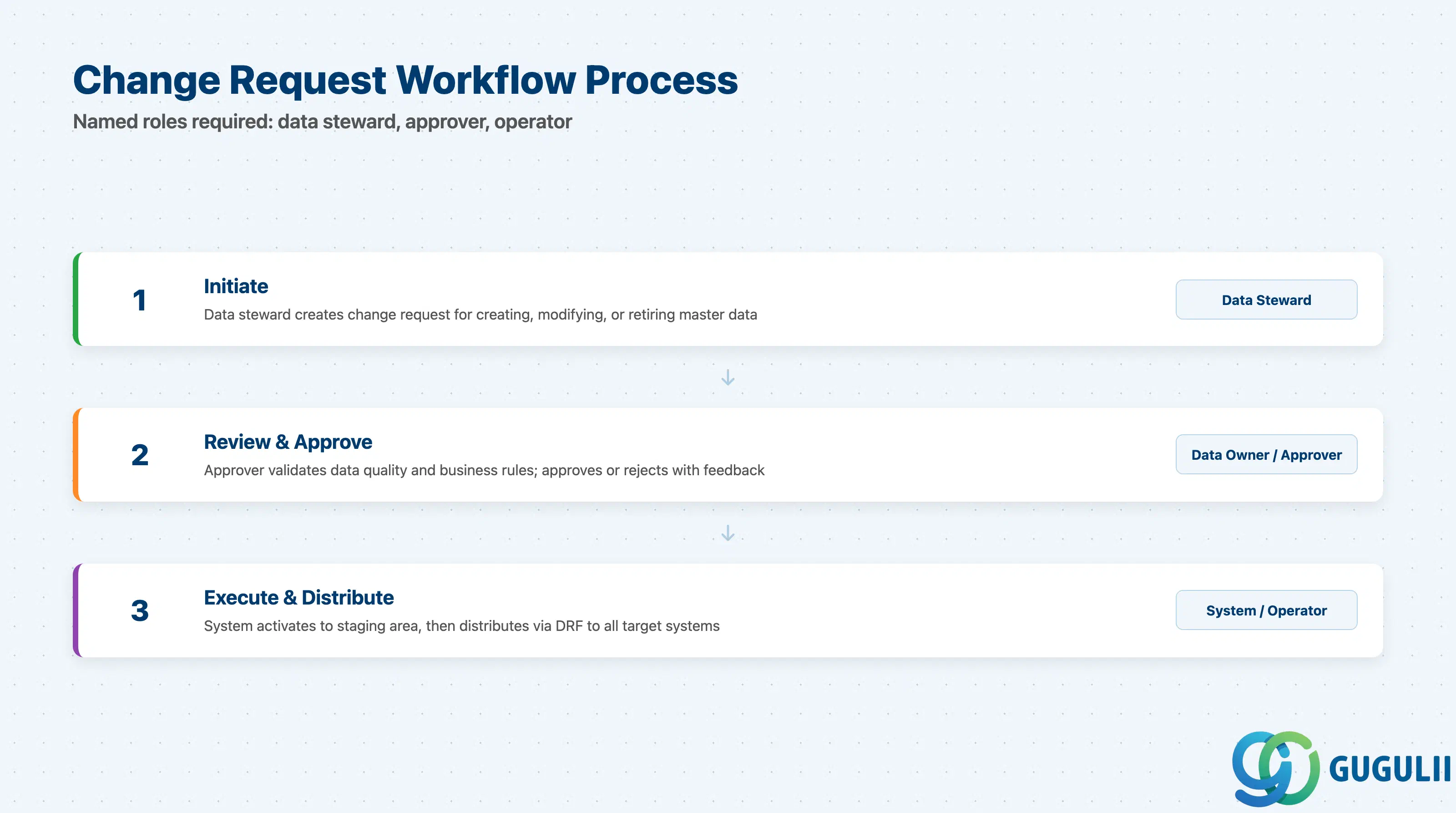
| Identify named data owners for each master data domain in scope | MDG workflows require designated approvers; without committed data owners, workflow design cannot progress |
| Document the change request process — who initiates, who approves, in what sequence | BRFplus rule configuration depends on the agreed process; retrofitting workflow rules after go-live is expensive |
| Confirm authorization concept aligns with MDG roles (data steward, approver, operator) | SAP standard roles usually require project-specific customization |
| Establish mass change governance process — which mass changes require approval | Ungoverned mass changes in an MDG system defeat the purpose of the governance layer |
| Identify audit trail and compliance requirements (ISO, SOX, GDPR) | MDG change request history provides audit trail; confirm retention periods and field-level logging requirements before configuration |
| Define escalation handling for workflow rejections and open change requests | Rejection paths must be explicitly configured; stalled change requests block downstream distribution |
| Checklist item | Why it matters |
|---|---|
| Inventory all target systems receiving governed master data from MDG via DRF | Each target system requires a configured outbound replication (replication model, filter, field mapping) in DRF |
| Confirm replication method per target system (IDoc, SOA, RFC, file, Event Mesh) | The choice determines interface complexity, error handling pattern, and monitoring setup |
| Determine whether SAP Master Data Integration (MDI) is used in the landscape | If MDI is part of the architecture, MDG must be configured as a core data owner feeding MDI — a distinct integration track from DRF replication |
| Assess whether SAP Cloud Integration (CPI) is required for non-SAP or legacy ECC connectivity | CPI adds middleware complexity; confirm existing CPI licenses and capacity cover the MDG integration scope |
| Define error handling and retry strategy for failed replication events | A defined operational process must exist before go-live, including SLA for resolving failed replications |
| Confirm Event Mesh subscription design if using event-driven integration | Subscriber systems must be configured to consume and process events reliably |
| Checklist item | Why it matters |
|---|---|
| Define measurable data quality KPIs for each domain before configuration | BRFplus rules need concrete definitions; vague quality goals produce vague rules that are unenforceable |
| Identify who owns the data quality dashboard and acts on score degradation | SAP Fiori dashboards available from MDG on S/4HANA 2020+ are only useful if an accountable person reviews and acts on them |
| Confirm whether duplicate check configuration is required in consolidation | Matching algorithms require tuning based on domain-specific data patterns; a pilot with sample data is needed before go-live |
| Establish remediation workflow for quality violations — define trigger thresholds and escalation paths | Automated violation detection without a remediation workflow generates alerts that no one acts on |
| Document data quality rule governance — who approves new rules and changes | BRFplus rules are configuration artifacts; uncontrolled changes in production can silently affect governance behavior |
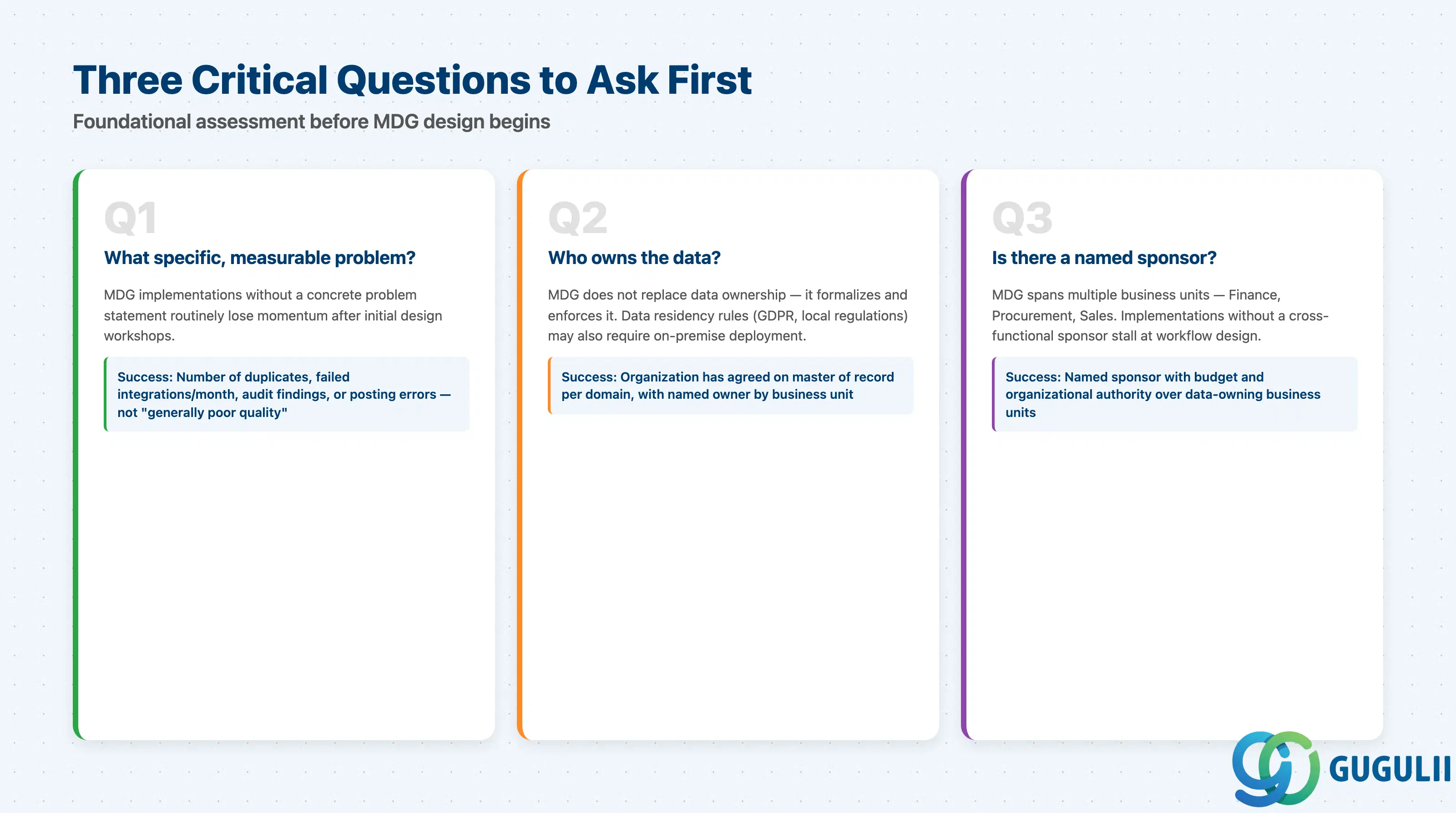
Q1. What specific, measurable master data problem is driving this project?
MDG implementations without a concrete problem statement routinely lose momentum after initial design workshops. Before selecting any deployment model, the project sponsor must articulate the pain point in measurable terms: number of duplicate records, failed integrations per month, audit findings, or data-related posting errors. If the answer is “data quality is generally poor,” that is a research finding, not a project scope.
Q2. Who owns the master data and where does it currently live?
MDG does not replace data ownership — it formalizes and enforces it. If the organization has not agreed on which system is the master of record for each domain, no workflow configuration will resolve the underlying political problem. Data residency requirements (GDPR, local regulations) also affect whether MDG Cloud Edition on BTP is permitted or whether on-premise deployment is mandatory.
Q3. Is there a named sponsor with budget authority and organizational authority over the data-owning business units?
MDG spans multiple business units — Finance owns G/L accounts, Procurement owns vendor data, Sales owns customer data. Implementations without a cross-functional sponsor who can commit named data owners and approvers from each domain stall at workflow design.
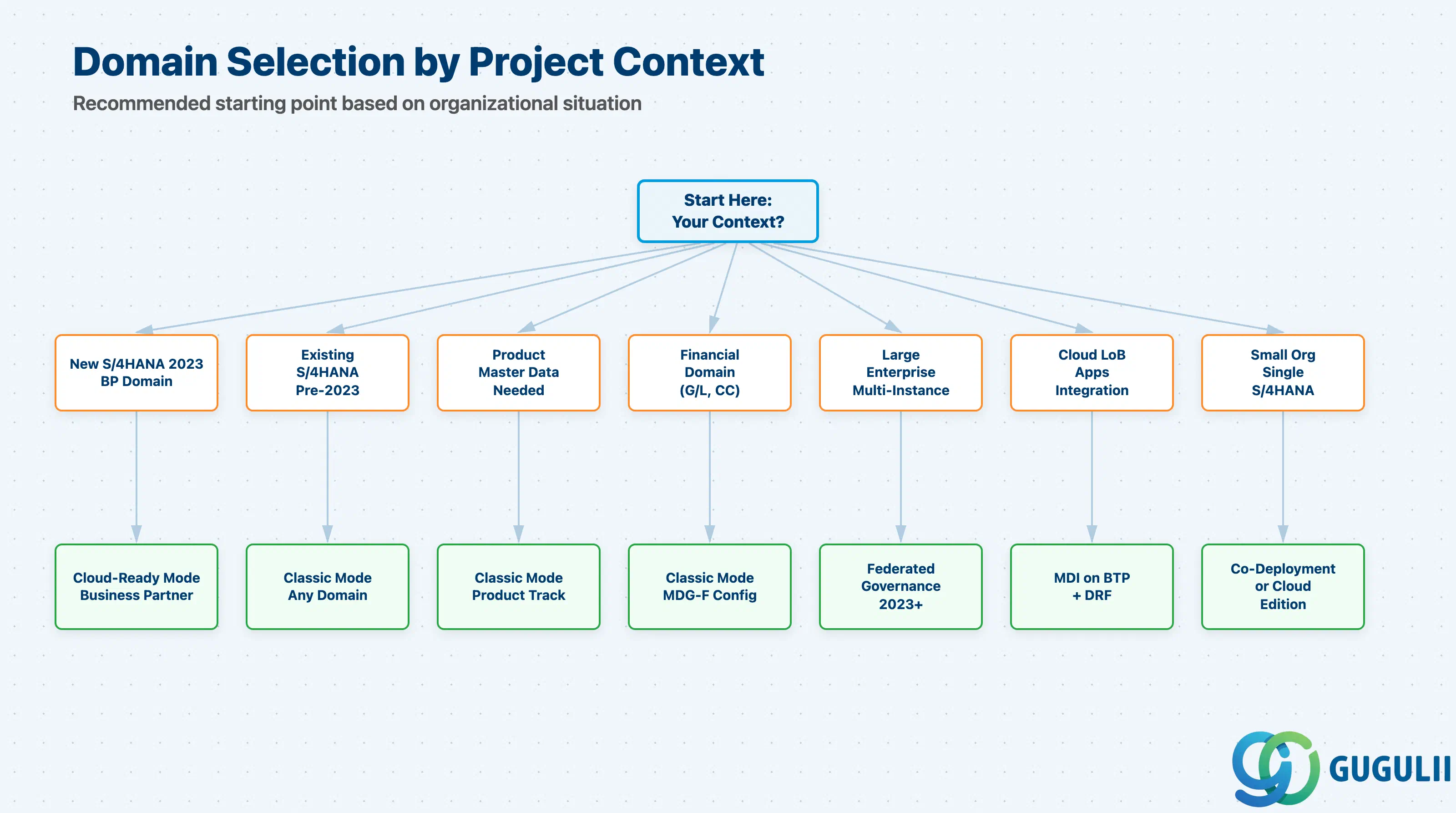
Per the MDG S/4HANA FAQ, the recommended starting point varies by organizational context:
| Project context | Recommended starting point |
|---|---|
| New S/4HANA 2023 implementation, business partner domain needed | Cloud-ready mode for business partner; avoid classic mode where cloud-ready coverage is sufficient |
| Existing S/4HANA (pre-2023), business partner domain needed | Classic mode; plan cloud-ready mode migration in a future release cycle |
| Product master data governance required | Classic mode (cloud-ready mode not yet available for product domain) |
| Financial master data governance (G/L, cost centers) required | Classic mode with MDG-F configuration track |
| Large enterprise, distributed data ownership across multiple S/4HANA instances | Federated governance pattern on S/4HANA 2023+; requires core-data-owner and application-data-owner role design |
| Organization running SAP cloud LoB applications needing unified master data | MDI on BTP as synchronization hub; MDG as core data owner feeding MDI |
| Small organization, single S/4HANA instance, business partner domain only | MDG co-deployment on existing S/4HANA instance; or evaluate MDG Cloud Edition if on-premise footprint is undesirable |
| No clear pain point identified yet | Stop. Go back to Q1. |
| Deployment option | Licensing model | Key question to ask |
|---|---|---|
| MDG on SAP S/4HANA (classic or cloud-ready) | Included with SAP S/4HANA license for standard domains in most packages; no separate MDG license required | Confirm with SAP account executive which MDG capabilities are covered under the existing S/4HANA contract |
| MDG Cloud Edition (BTP SaaS) | Separate SaaS subscription; priced per domain and user count; maintenance aligned with BTP ABAP Environment | Confirm whether the SaaS subscription scope covers only business partner or additional domains when available |
| SAP Master Data Integration (MDI) | Separate BTP service subscription; consumption-based | Confirm whether existing BTP contracts cover MDI entitlement |
| SAP Cloud Integration (CPI) for MDG integration | BTP Integration Suite license (message-pack or subscription model) | Confirm whether existing CPI capacity covers MDG replication message volume |
| Data Replication Framework (DRF) | Included in S/4HANA; no separate license | No licensing question — verify configuration resource availability instead |
Note: detailed pricing for hub vs. co-deployment infrastructure is not publicly documented by SAP; engage the SAP licensing team or an SAP partner for specific cost modelling.
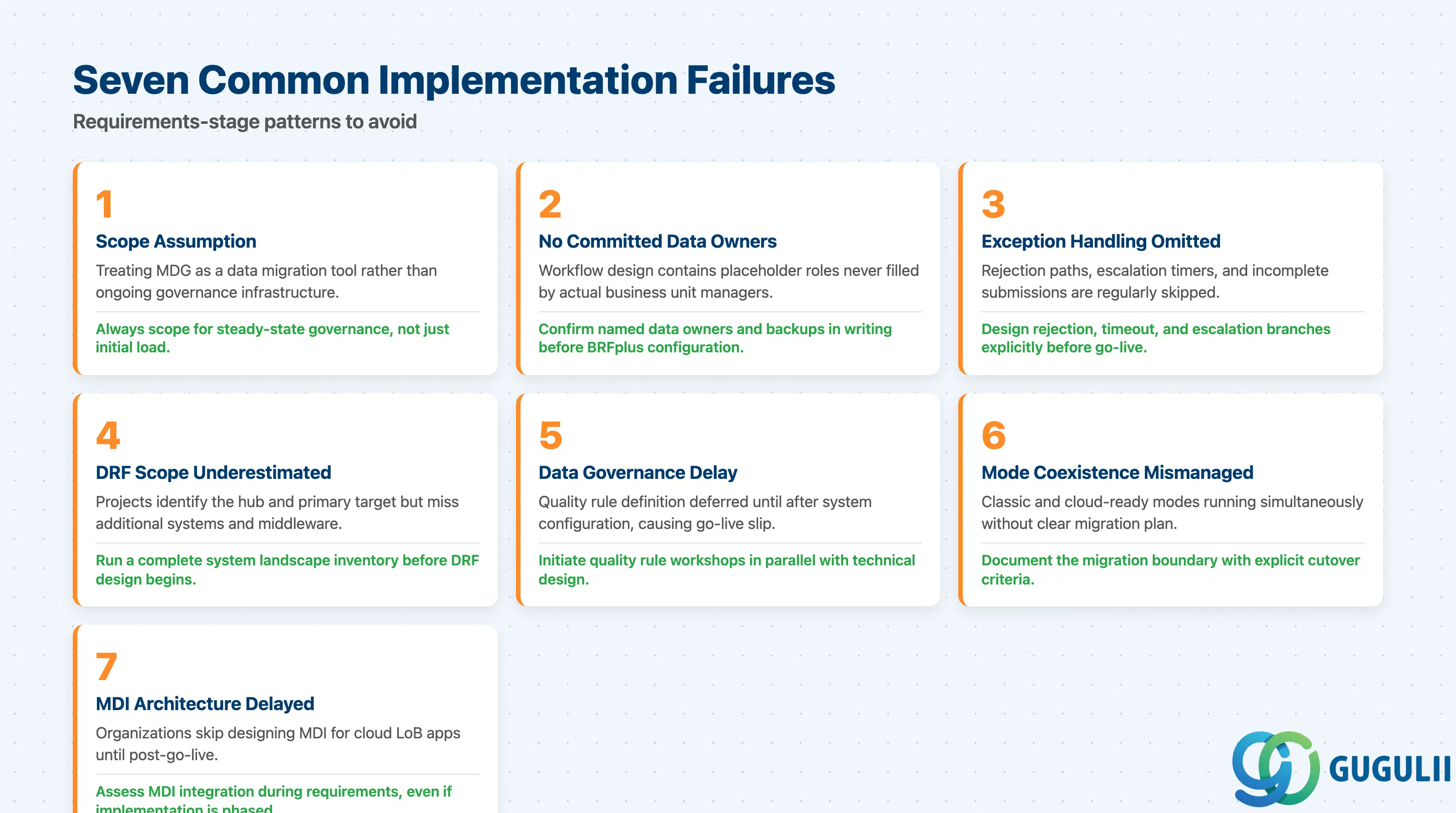
The following failures are documented patterns at the requirements stage, not implementation bugs. See the MDG on S/4HANA FAQ for additional integration and scoping guidance.
Failure 1: Scope assumption — treating MDG as a data migration tool
MDG’s consolidation capability handles deduplication and best-record selection, making it useful during data migration phases. Projects that treat MDG purely as a migration tool fail to scope the central governance and distribution layers that deliver ongoing value. MDG is configured, migration completes, and MDG is then effectively abandoned — governance workflows never go live because the business case for post-migration operation was never established. Always scope MDG for steady-state governance, not just initial load.
Failure 2: No committed data owners before workflow design begins
Change request workflows require named approvers. Workshop participants often agree conceptually on who should approve what, but without explicit commitment from business unit managers, the workflow design contains placeholder roles that are never filled. This surfaces during testing when approval steps have no assignees and change requests stall. Confirm named data owners and their backup arrangements in writing before BRFplus workflow configuration starts.
Failure 3: Exception handling omitted from workflow design
BRFplus workflows are configured for the happy path — creation and approval of standard change requests. Rejection paths, escalation timers, and handling for incomplete submissions are regularly skipped. In production, rejected change requests with no escalation path sit in queues indefinitely, blocking master data distribution. Every workflow must have explicitly designed rejection, timeout, and escalation branches before go-live.
Failure 4: DRF configuration scope underestimated
Projects identify the MDG hub and the primary receiving system but miss additional targets: reporting systems, archived legacy ECC instances, third-party middleware. DRF requires a separate replication configuration per target, including field mapping and error handling. Discovering additional target systems during integration testing — rather than requirements — extends the timeline and requires rework of the replication design. Run a complete system landscape inventory before DRF design begins.
Failure 5: Data governance delay — quality rules defined too late
BRFplus data quality rules require concrete definitions from the business: what constitutes a valid address, which fields are mandatory for which business partner roles, acceptable ranges for financial account attributes. These definitions depend on business input that data teams cannot substitute. When quality rule definition is deferred to after system configuration, the go-live date slips or the system goes live with placeholder checks that do not enforce real governance. Initiate quality rule workshops in parallel with technical design, not after it.
Failure 6: Classic mode and cloud-ready mode coexistence mismanaged
Organizations upgrading to S/4HANA 2023 and adopting cloud-ready mode for business partner while retaining classic mode for other domains must maintain two parallel governance configurations. The coexistence is supported, but it requires a clear migration plan with explicit cutover criteria. Projects that begin cloud-ready mode adoption without documenting the classic-to-cloud-ready migration boundary end up with inconsistent governance behavior — some records governed through cloud-ready workflows, others still routed through classic mode.
Failure 7: MDI integration architecture not scoped until post-go-live
When an organization runs both on-premise MDG and SAP cloud LoB applications (SuccessFactors, Ariba, field service), MDI on BTP is the integration hub for synchronizing master data across these systems. Projects that go live with DRF-only replication without designing the MDI architecture later discover that cloud LoB applications are receiving master data through ad-hoc point-to-point connections or not at all. MDI scope must be assessed during requirements, even if implementation is phased.
Q: Does MDG run on SAP S/4HANA Cloud (public cloud) or only on S/4HANA on-premise?
MDG classic mode and cloud-ready mode are available on SAP S/4HANA on-premise and SAP S/4HANA Private Cloud Edition. They are not available on SAP S/4HANA Cloud (public cloud / multi-tenant). For organizations on S/4HANA public cloud, SAP Master Data Governance Cloud Edition (SaaS on BTP ABAP Environment) is the relevant option, currently scoped to the business partner domain.
Q: What licenses are required for MDG, and is it included in a standard S/4HANA contract?
MDG on SAP S/4HANA is generally included in S/4HANA licensing for standard domains in most packages, but the exact entitlement depends on the specific edition and contract. MDG Cloud Edition requires a separate SaaS subscription. SAP Master Data Integration (MDI) on BTP is a separate service. Always verify entitlement with the SAP account executive before scoping — do not assume MDG is included without explicit confirmation.
Q: When should MDG be descoped from a project?
MDG should be descoped when the organization cannot commit named data owners and approvers to operate governance workflows after go-live. Without committed human governance, MDG becomes an expensive change request queue that no one processes. It should also be descoped if the master data domain is fully managed by a third-party system with no requirement for centralized S/4HANA governance, or if organizational maturity for formalized data governance does not yet exist.
Q: What is the difference between hub deployment and co-deployment, and how do I choose?
Hub deployment provisions a dedicated SAP S/4HANA instance running only MDG processes. It provides clear separation of governance from transactional workloads and supports larger multi-system landscapes. Co-deployment activates MDG on an existing S/4HANA transactional instance, eliminating a separate system and removing cross-system replication latency. Co-deployment is preferred when the organization standardizes on a single S/4HANA instance; hub deployment is preferred in complex multi-system landscapes where governance must be independent of any single transactional system.
Q: How should the MDG requirement be documented in a business case or scope document?
The MDG requirement should document: (a) the specific master data domain in scope, (b) the governance problem expressed as a measurable current-state metric, (c) the named data owner(s) and their organizational position, (d) the target systems that will receive governed master data via DRF, and (e) the deployment model selected with rationale. A scope document that states only “implement MDG for master data quality” has insufficient specificity to begin design workshops.
Q: Can MDG coexist with classic mode and cloud-ready mode at the same time?
Yes, coexistence of classic mode and cloud-ready mode is supported on SAP S/4HANA 2023. Organizations adopting cloud-ready mode for business partner can continue operating classic mode for product and financial domains simultaneously. The coexistence requires explicit configuration to route change requests to the correct mode, and a migration plan should document when classic-mode configurations will be retired.
Q: How does federated master data governance differ from centralized MDG hub governance?
In centralized hub governance, a single MDG instance is the authoritative master and all change requests flow through it before distribution. In federated governance (available from S/4HANA 2023), data ownership is distributed: a core data owner manages core attributes (name, address, identifiers) while application data owners manage their application-specific attributes independently. The core data owner coordinates the process and distributes the final state. Federated governance suits large enterprises where different business units have legitimate ownership of distinct attribute sets.
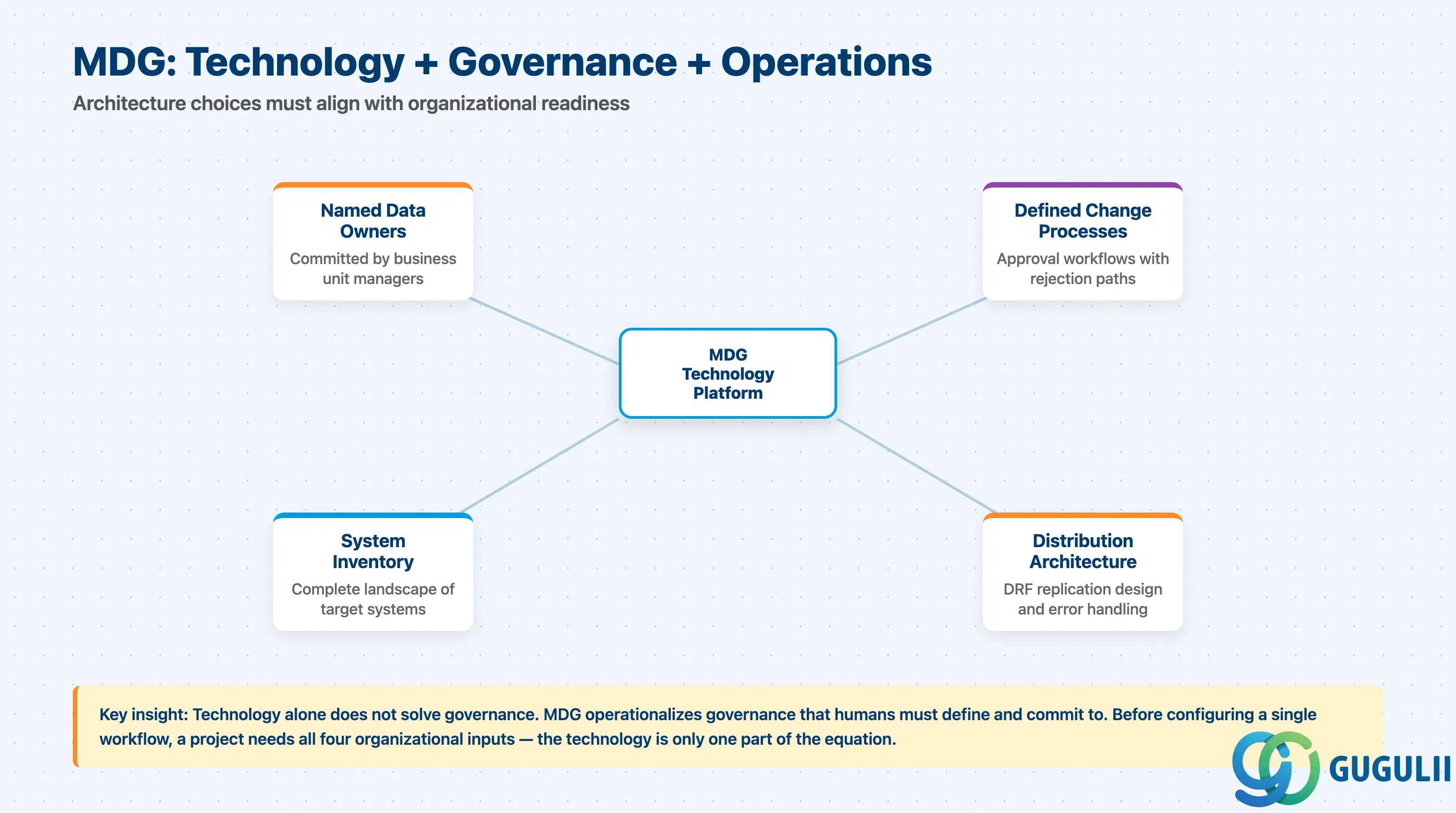
SAP Master Data Governance provides the workflow, quality, and distribution infrastructure needed to turn master data management from an aspiration into an operational process. The architecture choices — hub vs. co-deployment, classic vs. cloud-ready mode, centralized vs. federated governance — reflect organizational, landscape, and roadmap constraints that must be surfaced in requirements.
The most dangerous assumption in MDG implementations is that the technology solves the governance problem. MDG operationalizes governance that humans must define and commit to. Before configuring a single workflow, a project needs named data owners, defined change processes, scoped domains, and a complete inventory of systems that will receive distributed data. The SAP MDG product documentation details the capabilities; getting these four organizational inputs in place before design is the highest-value activity a consultant can perform on an MDG engagement.