Title here
Summary here

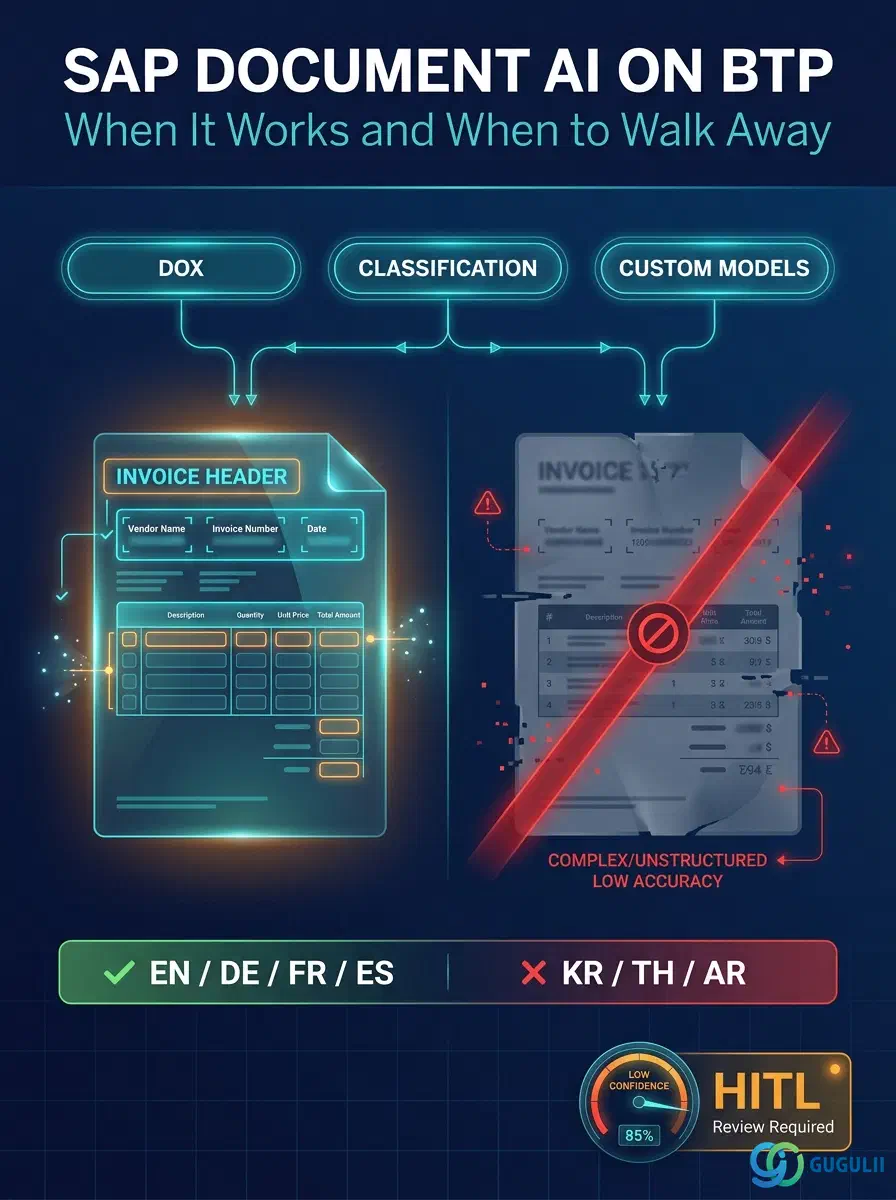
This is the Document AI installment of the L2-D AI series. Each article in the series is independent, but consultants framing a Business AI scoping conversation usually need at least D01 (overview), D03 (GenAI Hub), and this one.
| ID | Title |
|---|---|
| BTP-D01 | Business AI: Overview and Capability Map |
| BTP-D02 | Joule: Architecture and Use |
| BTP-D03 | AI Core and GenAI Hub: Architecture and Use |
| BTP-D04 | Document AI: Architecture and Use (this article) |
| BTP-D05 | Responsible AI: Principles and Implementation |
| BTP-D06 | Business AI: Use Cases and Decision Patterns |
| Resource | URL |
|---|---|
| Document Information Extraction | help.sap.com → |
| SAP AI Core Service Guide (PDF) | help.sap.com → |
| Business AI on SAP BTP | sap.com → |
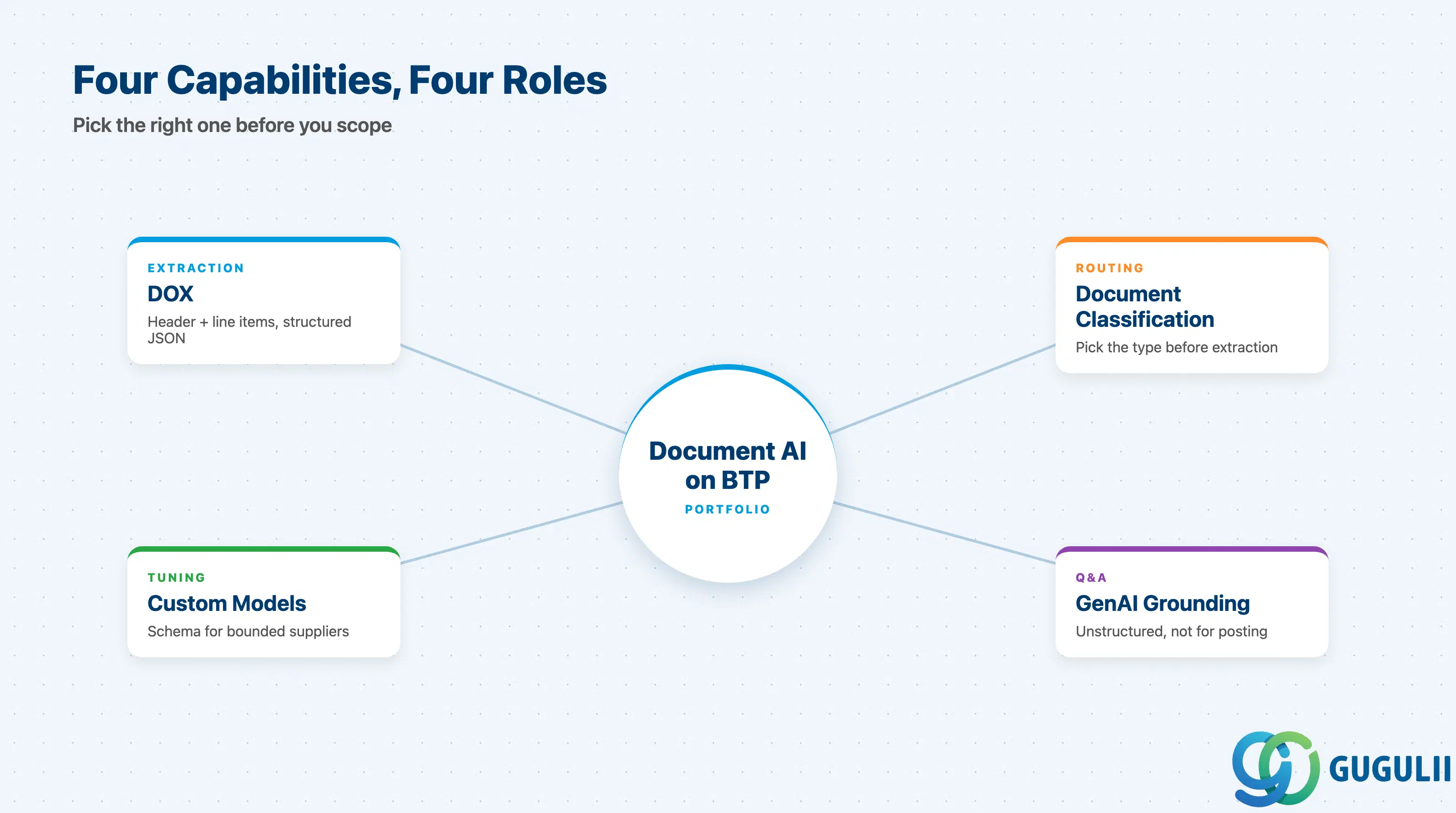
“Document AI” on BTP is an umbrella for four distinct capabilities. Knowing which one a requirement maps to is the first decision a consultant makes — and the most common scoping mistake is choosing the wrong one.
| Capability | What it does | Primary user |
|---|---|---|
| Document Information Extraction (DOX) | Extracts structured header + line-item fields from semi-structured business documents | AP / procurement / HR teams via SPA or Fiori |
| Document Classification | Routes a document to one of N customer-defined classes before extraction | Upstream of DOX, in mixed-document inboxes |
| DOX Custom Models | Fine-tunes DOX for non-standard layouts or low-coverage languages | Customers with bounded supplier populations |
| GenAI Hub document grounding | Answers natural-language questions over arbitrary document text | Knowledge-worker self-service, not posting |
They are not substitutes.
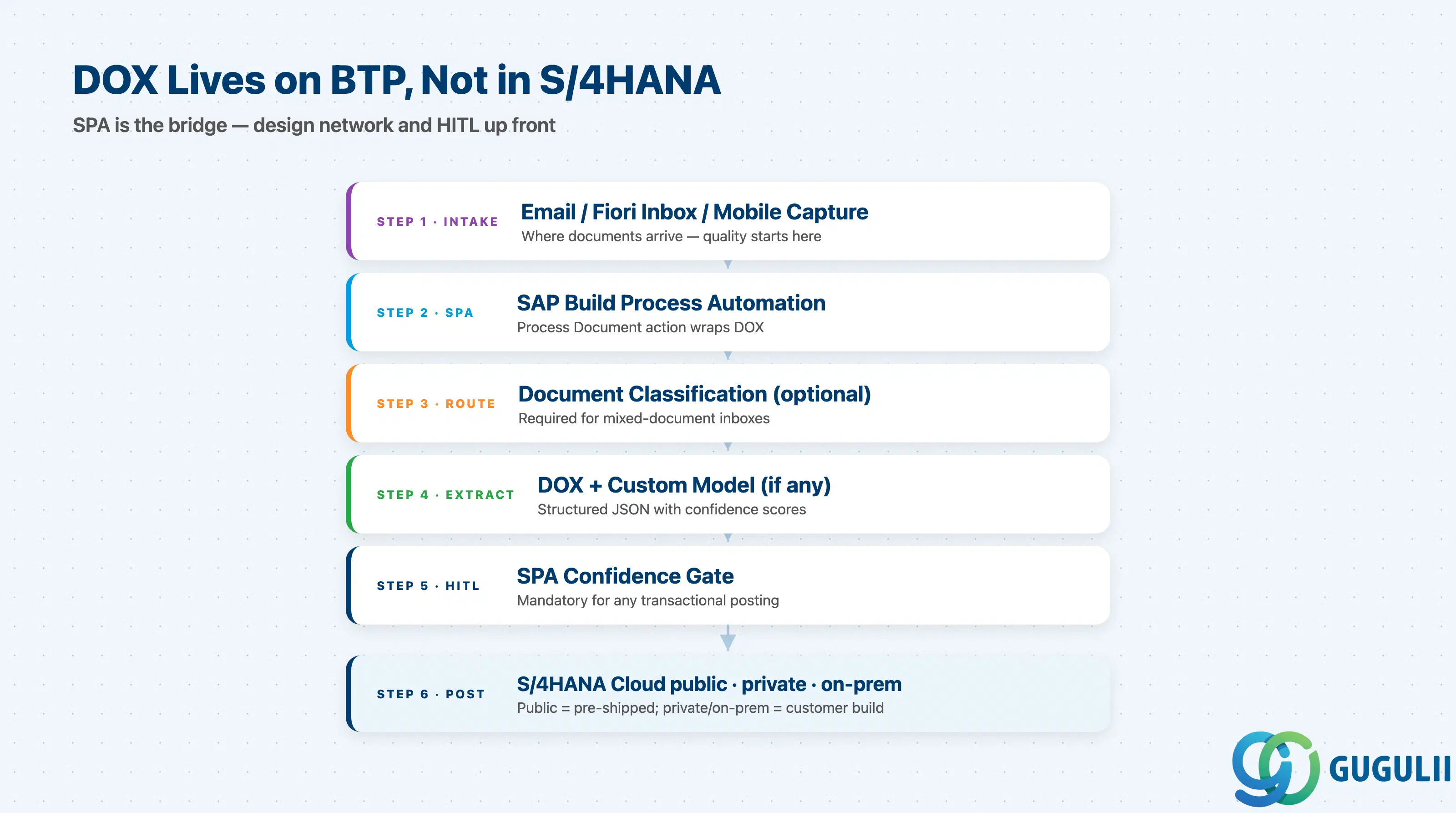
                            ┌──────────────────────────┐
   Email / Fiori Inbox  ───►│ SAP Build Process Auto.  │
   Upload / Mobile Cap.     │  Process Document action │
                            └──────┬───────────────────┘
                                   ▼
                            ┌──────────────────────────┐
                            │ Document Classification  │ (optional but recommended
                            │  -> document_type        │  in mixed-document channels)
                            └──────┬───────────────────┘
                                   ▼
                            ┌──────────────────────────┐
                            │ DOX (BTP)                │
                            │  + Custom Model (if any) │
                            └──────┬───────────────────┘
                                   ▼
                            ┌──────────────────────────┐
                            │ SPA confidence gate      │
                            │  (human-in-the-loop UI)  │
                            └──────┬───────────────────┘
                                   ▼
                       ┌──────────────────────────────────┐
                       │ S/4HANA Cloud (public)  via      │
                       │   pre-shipped DOX scenario       │
                       │ S/4HANA Cloud (private) / on-prem│
                       │   via OData destination service  │
                       └──────────────────────────────────┘
For S/4HANA Cloud public edition, SAP ships pre-configured DOX content for supplier invoices and PO confirmations — integration is a configuration exercise. For S/4HANA Cloud private and on-premise, it is a customer build, including the Cloud Connector or equivalent egress. GenAI Hub grounding sits on a different path entirely: it does not feed S/4HANA postings.
Key point: Document AI is not “an S/4HANA feature.” It is a BTP service that S/4HANA consumes. Treating it as a Fiori toggle leads to under-scoped network and licensing work in every project.
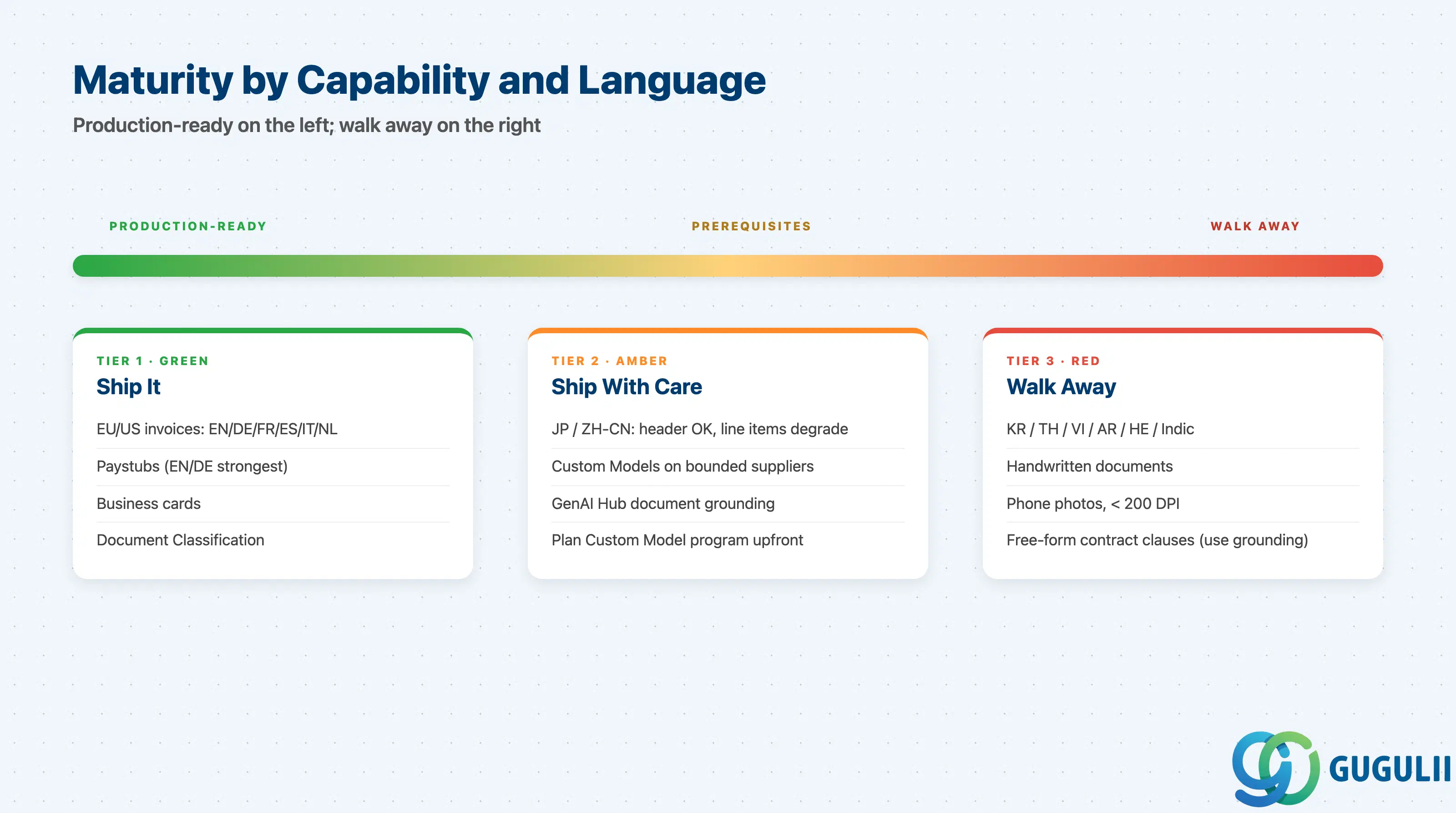
Maturity is not uniform across the family. The same project can use one capability that is production-ready and another that is still early adopter — judge each one on its own.
| Capability | Maturity | Notes |
|---|---|---|
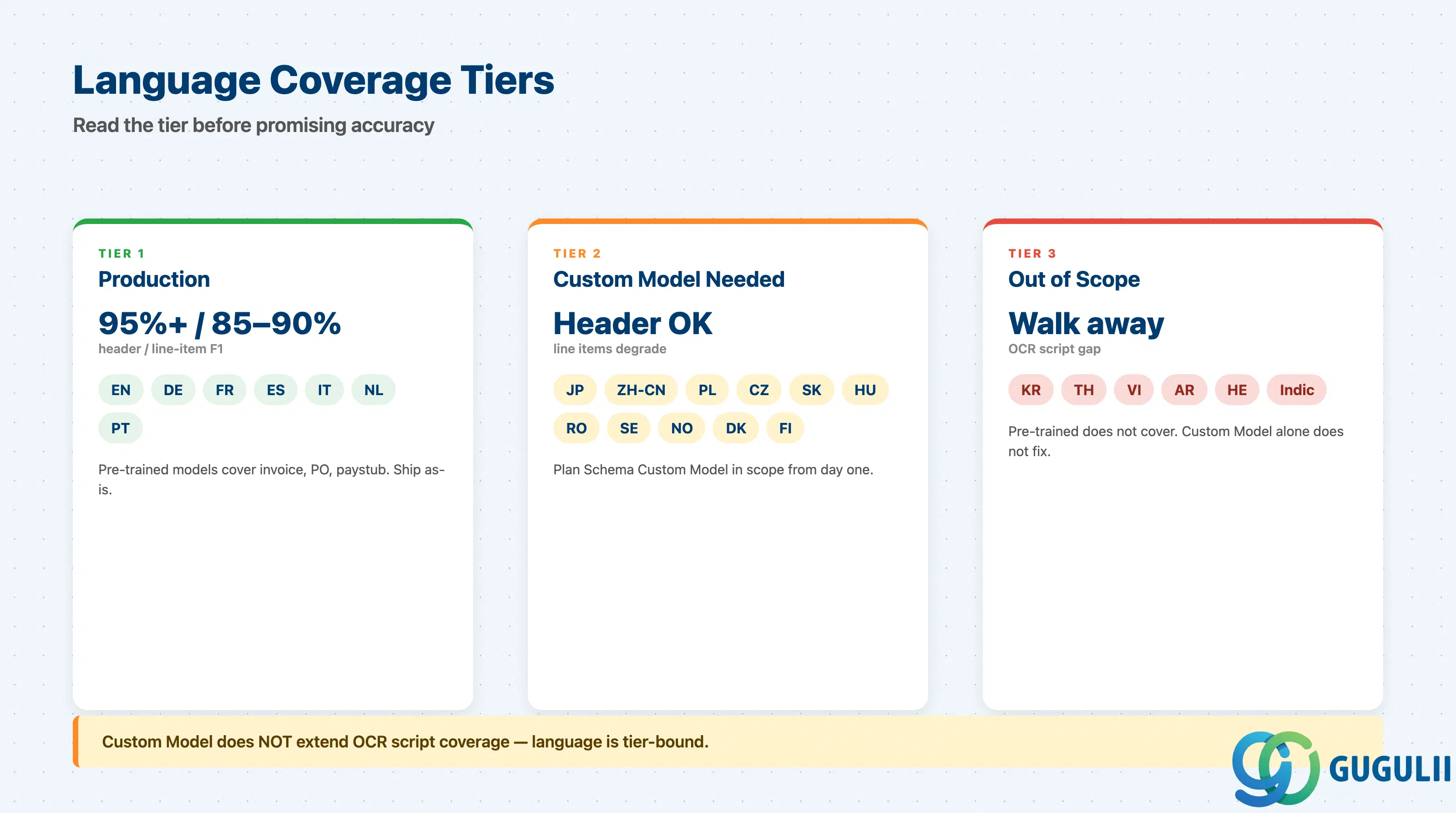
| DOX — typed EU/US invoices | ✅ Production-ready | EN/DE/FR/ES/IT/NL: 95%+ header accuracy, 85–90% line-item F1. Most rolled-out scenario in 2026. |
| DOX — paystubs, business cards | ✅ Production-ready | Stable, low risk. Paystub coverage strongest in EN/DE. |
| DOX — JP / ZH-CN | ⚠️ Ready with prerequisites | Header fields supported, line-item granularity degrades. Plan a Custom Model program upfront. |
| DOX — KR / TH / VI / AR / HE / Indic | ❌ Not recommended | Pre-trained models do not cover these. Custom Model alone does not fix OCR script coverage. |
| DOX — handwriting, phone photos, < 200 DPI | ❌ Not recommended | Below the floor where any document AI works. Re-scope intake. |
| Document Classification | ✅ Production-ready | Solid with 50+ samples per class. The most under-used capability in DOX rollouts. |
| Custom Models (Schema) | ⚠️ Ready with prerequisites | Bounded supplier sets only. 50–100+ labeled docs per schema plus a lifecycle owner. |
| GenAI Hub document grounding | 🔶 Early adopter | Unstructured Q&A only. Not a replacement for DOX on transactional posting. |
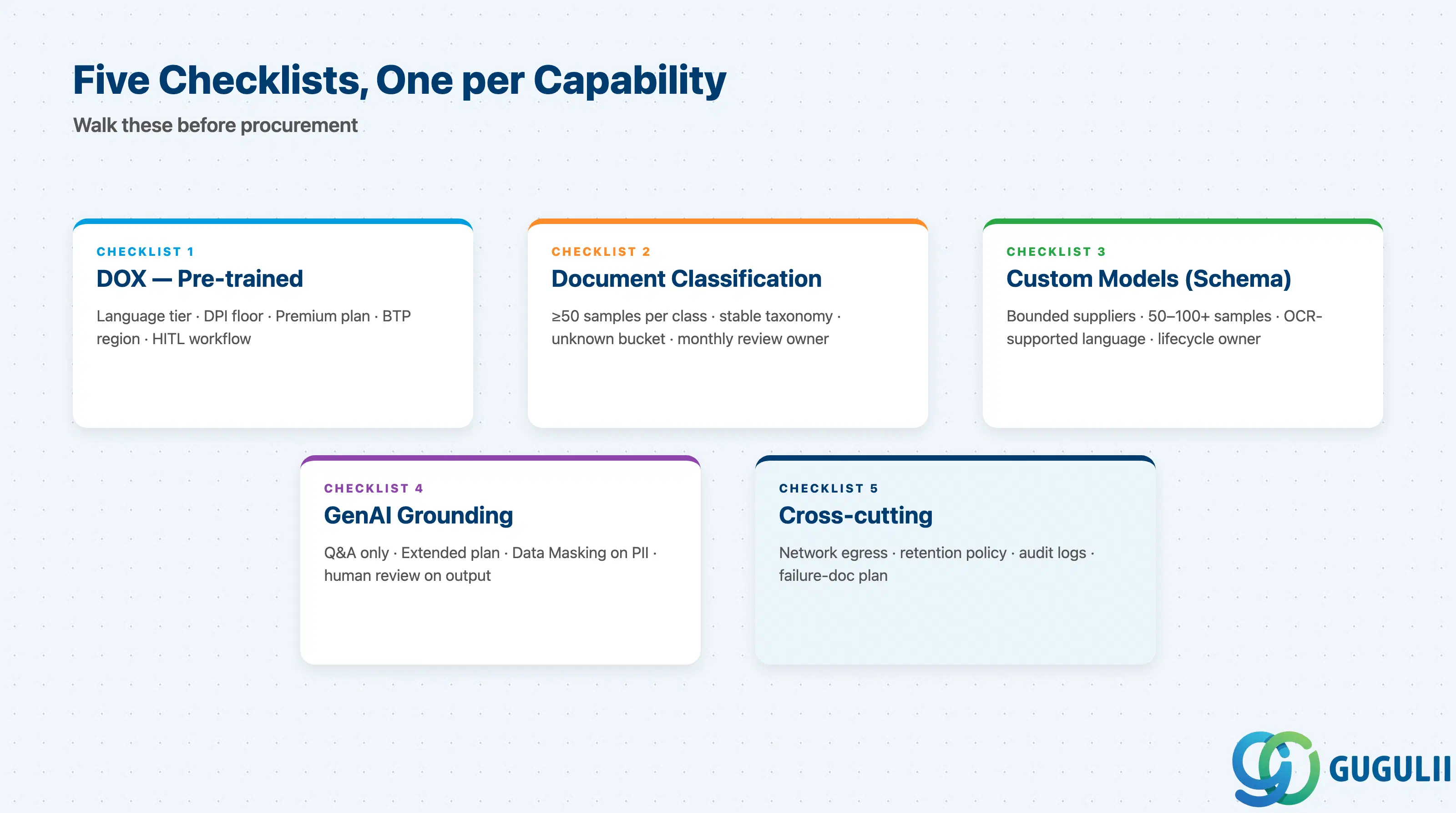
The §3 Maturity Map answers “is it ready?” This section answers “are we ready?” Build one per-capability checklist into every Business AI scoping document.
| Checklist item | Why it matters |
|---|---|
| Document language is in the pre-trained list for the chosen document type | Outside the list, accuracy drops to unusable; assume no for KR/TH/VI/AR/HE/Indic. |
| Inbound channel produces PDF or scanned image at ≥ 200 DPI, not phone photos | Skew, glare, partial pages, low DPI destroy OCR; intake post-processing is required for phone capture. |
| Each PDF contains exactly one document, not a batch | DOX assumes one document per request; multi-doc PDFs must be split upstream. |
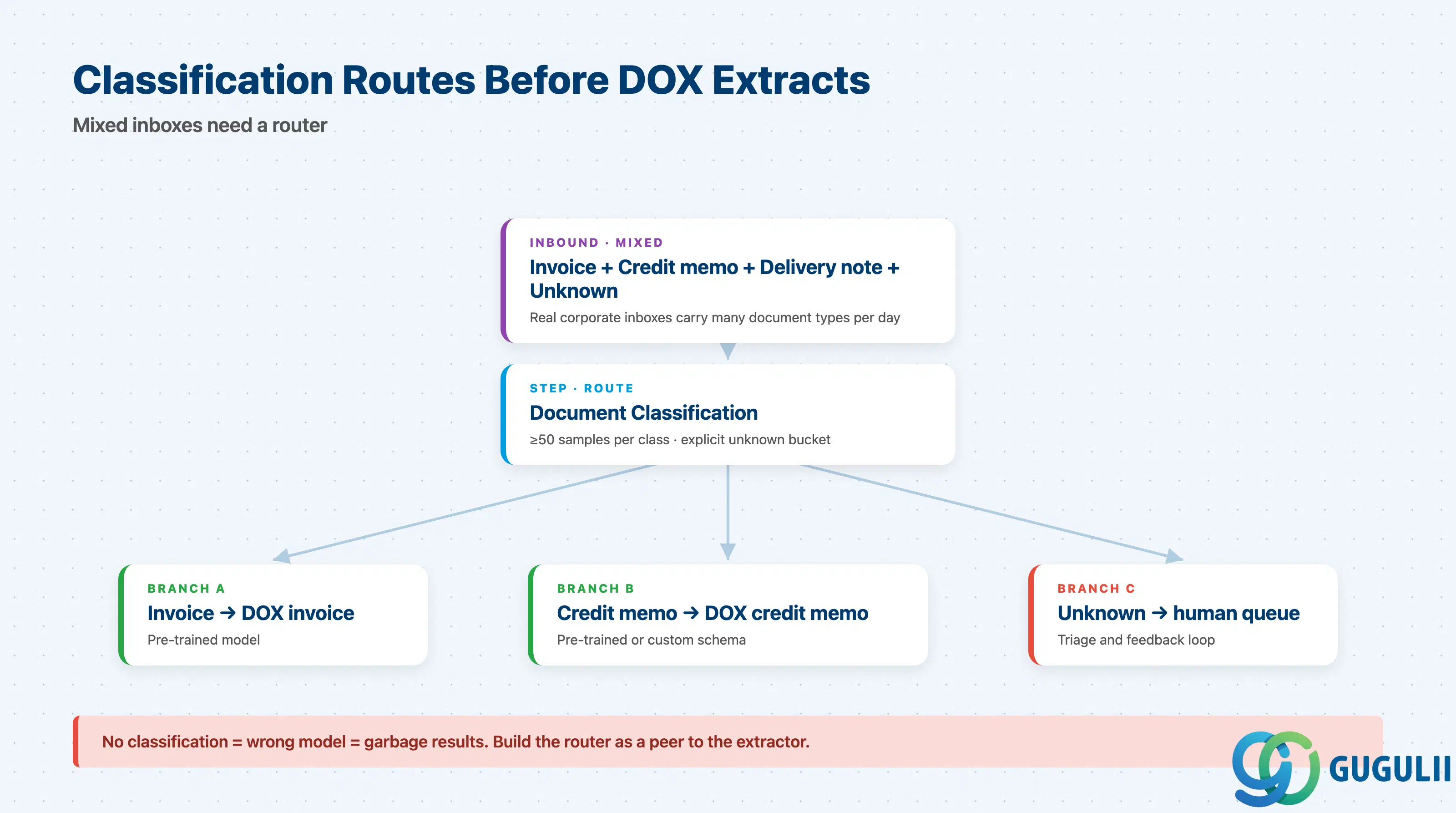
| Document type is known before submission, or Document Classification is in scope | DOX cannot infer type; submitting an invoice to the PO model returns garbage. |
| Confidence-based human-in-the-loop step is part of the workflow design | Without HITL, low-confidence postings reach finance and erode business trust. |
| Premium plan is in scope if file size > 20 MB or > 10 pages per request | Standard plan limits will block real-world supplier intake otherwise. |
| Data residency requirement maps to a BTP region where DOX is provisioned | DOX does not route cross-region; check the region before raising entitlements. |
| Checklist item | Why it matters |
|---|---|
| Customer can provide ≥ 50 labeled samples per class | Below this, F1 is too low to act as a routing decision. |
| Class taxonomy is finite and stable for the next 12 months | Adding a class later requires re-training and re-validation. |
| A “none of the above” / “unknown” class is included | Real inboxes contain noise; without an escape hatch, these are misrouted. |
| Owner exists for monthly review of misclassified samples | Without ownership, the model decays silently as document mix changes. |
| Downstream system tolerates classification latency | Classification adds latency before extraction — design the SLA accordingly. |
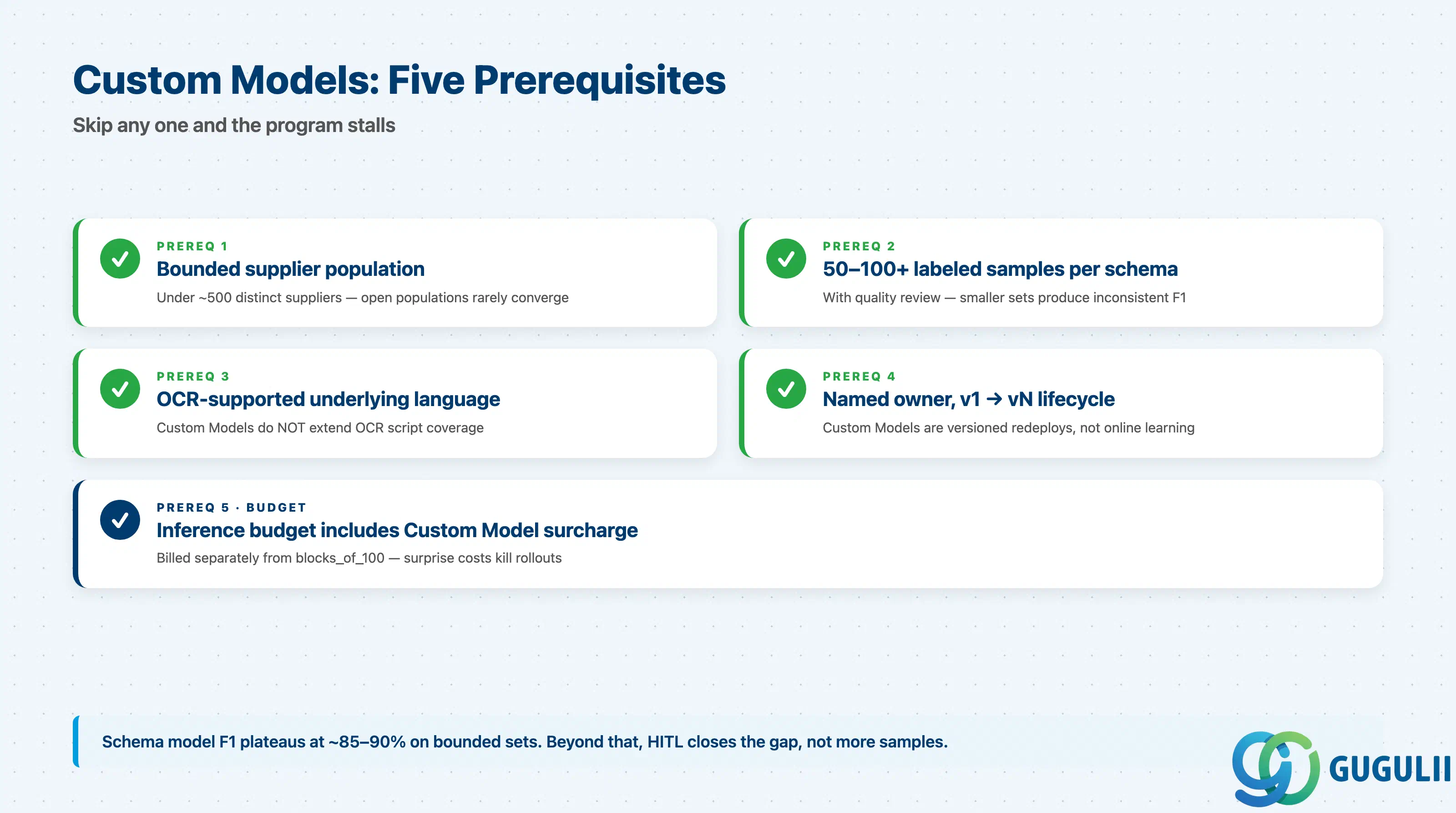
| Checklist item | Why it matters |
|---|---|
| Supplier or document-source population is bounded (e.g., < 500 distinct suppliers) | Schema Models work best on a manageable layout space. Open populations rarely converge. |
| Customer can label 50–100+ samples per schema, with quality review | Smaller training sets produce inconsistent F1 across fields. |
| Underlying language is OCR-supported | Custom Models do not extend OCR script coverage. Korean / Thai docs will not work even with samples. |
| Model owner is named, with a published v1 → v2 → vN lifecycle | Custom Models are versioned redeploys; without ownership the model freezes at v1. |
| Inference budget includes Custom Model surcharge | This is billed separately from blocks_of_100; surprises here have killed projects mid-rollout. |
| Checklist item | Why it matters |
|---|---|
| Use case is natural-language Q&A, not transactional field extraction | If the answer must post to S/4HANA as structured fields, use DOX, not grounding. |
| Source documents fit within the document store quota and ingestion latency | Grounding ingestion is not real-time; design for batch refresh. |
| Generative AI Hub is licensed (Extended plan of AI Core, not Standard) | Grounding sits behind GenAI Hub; without it, this path is closed. |
| Output is reviewed by a human before being acted on | LLM answers are non-deterministic; do not chain them into automated postings without HITL. |
| PII handling: Data Masking module configured if documents contain personal data | Without masking, PII reaches the LLM endpoint, which most data-residency reviews will block. |
| Checklist item | Why it matters |
|---|---|
| Network path from S/4HANA on-prem to BTP is approved (Cloud Connector or egress) | Most common project blocker for non-cloud S/4HANA. Raise this in week one, not week six. |
| Document retention policy aligns with the 24-hour DOX retention default | Some legal frameworks require shorter retention; configure explicitly rather than rely on defaults. |
| Audit log destination is decided | Finance audits need “this invoice was extracted then posted” events; not provided automatically. |
| A named go/no-go threshold per workflow is documented | “Auto-post if confidence > X” must be a written decision, not implicit. |
| Plan for documents that fail extraction is written | Manual entry queue, supplier escalation, or scope exclusion — but it must exist. |
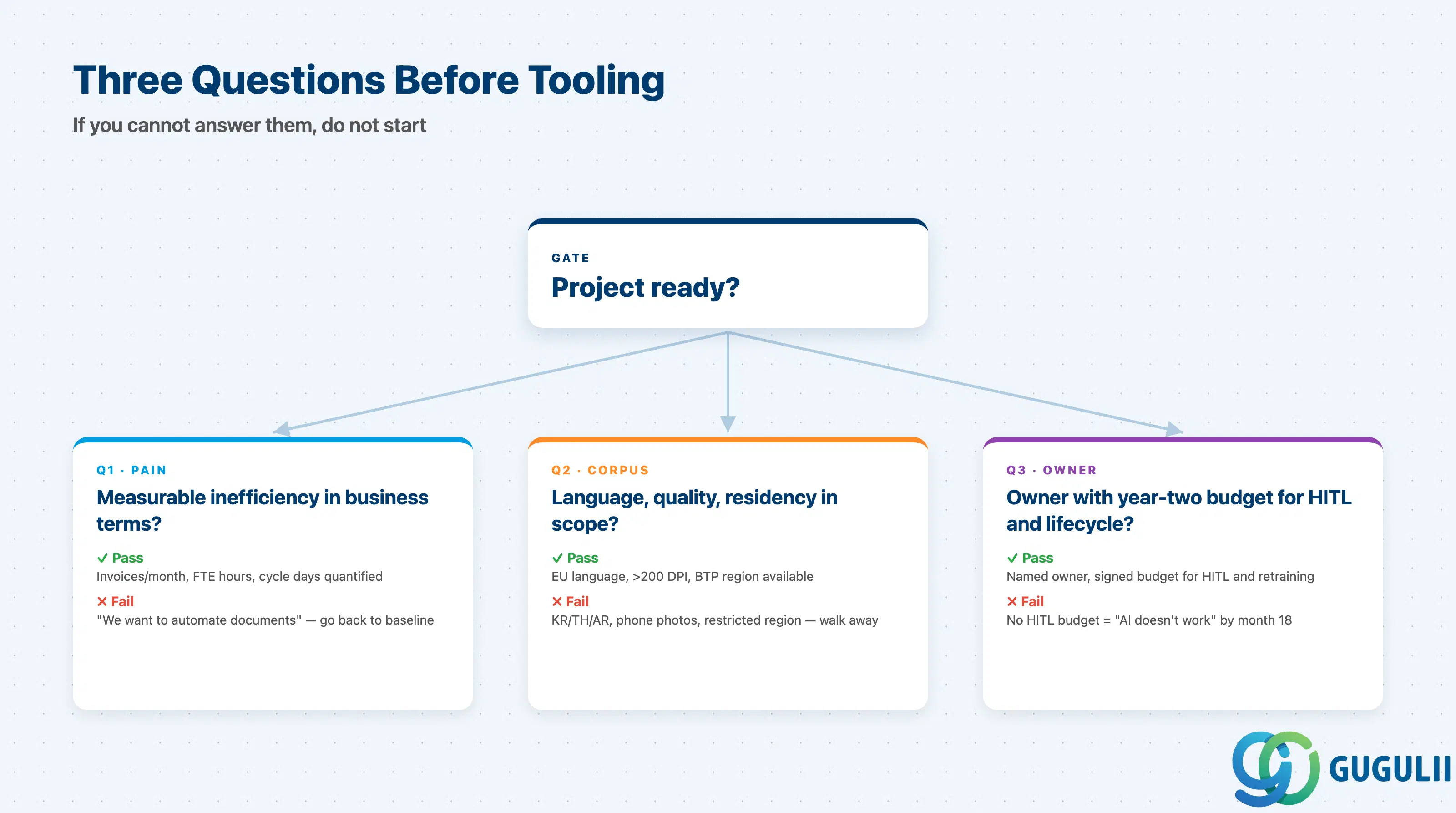
Q1. What measurable inefficiency in document handling are we removing, and what is its current cost?
If the customer cannot describe the pain in business terms — invoices per month, FTE hours of data entry, days of cycle time — Document AI is not the right project to start. A vague “we want to automate documents” almost always becomes a stalled PoC.
Q2. Where do these documents come from, in what languages, in what quality, and where must the data sit?
Answer this before talking about models. Unsupported scripts, phone photos, or handwritten markups are not rescued by fine-tuning. If the data must remain in a region where DOX is not provisioned, the conversation is about regional rollout, not AI.
Q3. Who owns the post-extraction process — the confidence threshold, the human review queue, the model lifecycle — and do they have budget?
Document AI is not a one-time install. Custom Models age, supplier mixes change, classification taxonomies expand. Without a named owner with year-two budget, someone declares “the AI doesn’t work” within 18 months.
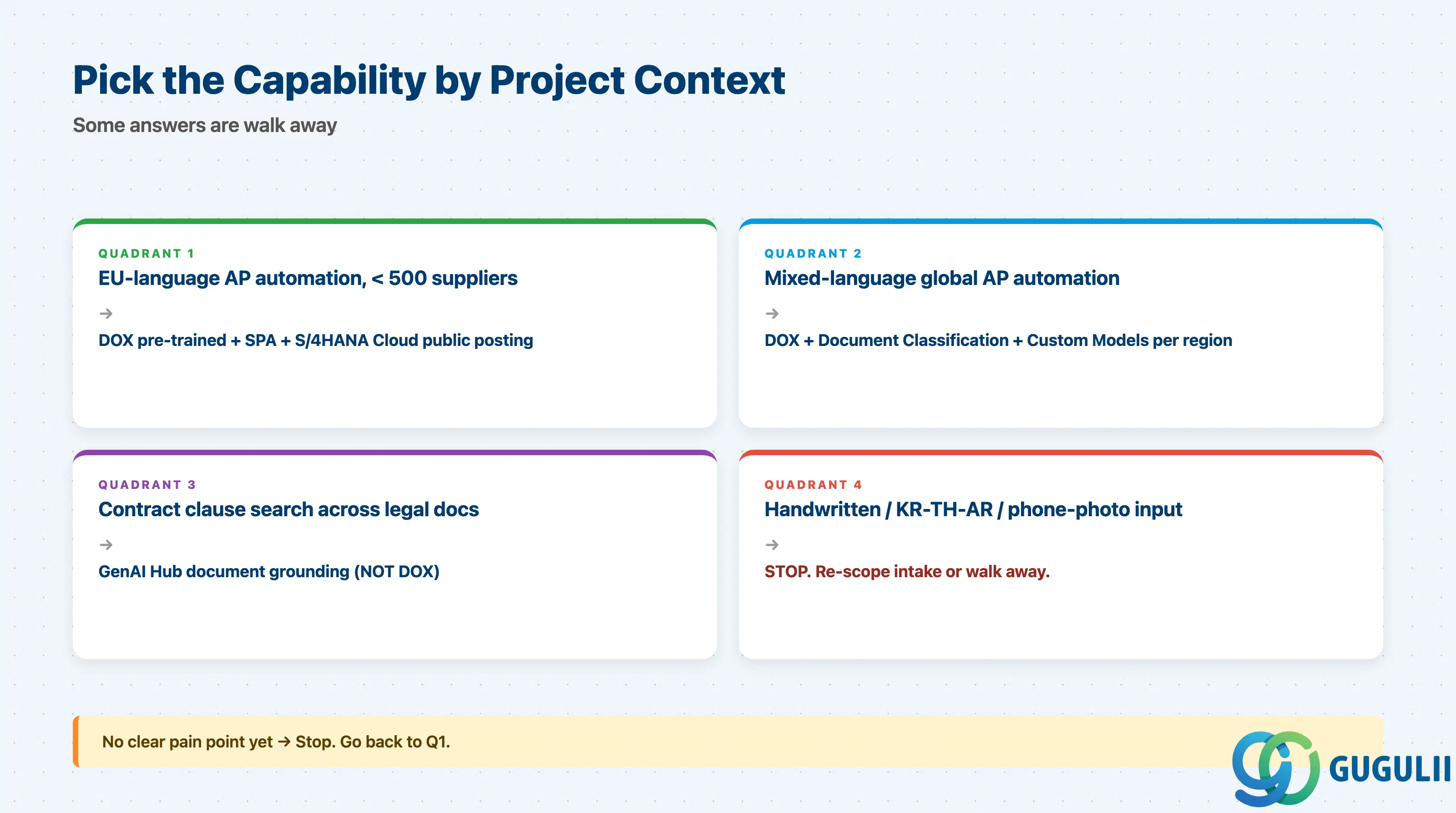
| Project context | Recommended starting capability |
|---|---|
| AP automation, EU-language invoices, < 500 suppliers | DOX pre-trained invoices + SPA + S/4HANA Cloud public posting |
| AP automation, mixed-language global suppliers | DOX + Document Classification + Custom Models per region |
| HR self-service paystub upload | DOX paystub model (EN / DE strongest) |
| Multi-document inbox (invoices + credit memos + notes) | Document Classification first, then DOX per type |
| Contract clause search across legal docs | GenAI Hub document grounding, not DOX |
| Handwritten or phone-photographed input | Stop. Re-scope intake or do not promise AI. |
| Korean / Thai / Vietnamese / Arabic / Indic documents | Stop. DOX is not in scope. |
| No clear pain point identified yet | Stop. Go back to Q1. |
| Capability | Licensing model | Key question to ask |
|---|---|---|
| DOX (production) | Per 100-document blocks (blocks_of_100), via CPEA / cloud credits | What is the projected monthly document volume in year 2, not just at go-live? |
| DOX Premium plan | Higher SLA / larger files; quoted by SAP, not on public price list | Are file size > 20 MB or > 10 pages required, or is Standard sufficient? |
| Custom Models | Separate per-model training charge plus per-inference surcharge | Who pays for retraining when supplier formats drift? |
| Document Classification | Per-document metering, separate from DOX | How many documents pass through classification but never reach DOX (the “unknown” class)? |
| GenAI Hub document grounding | Tokens via AI Core Extended plan + document store storage | What is the token cost per Q&A interaction, and how many will the workflow trigger per month? |
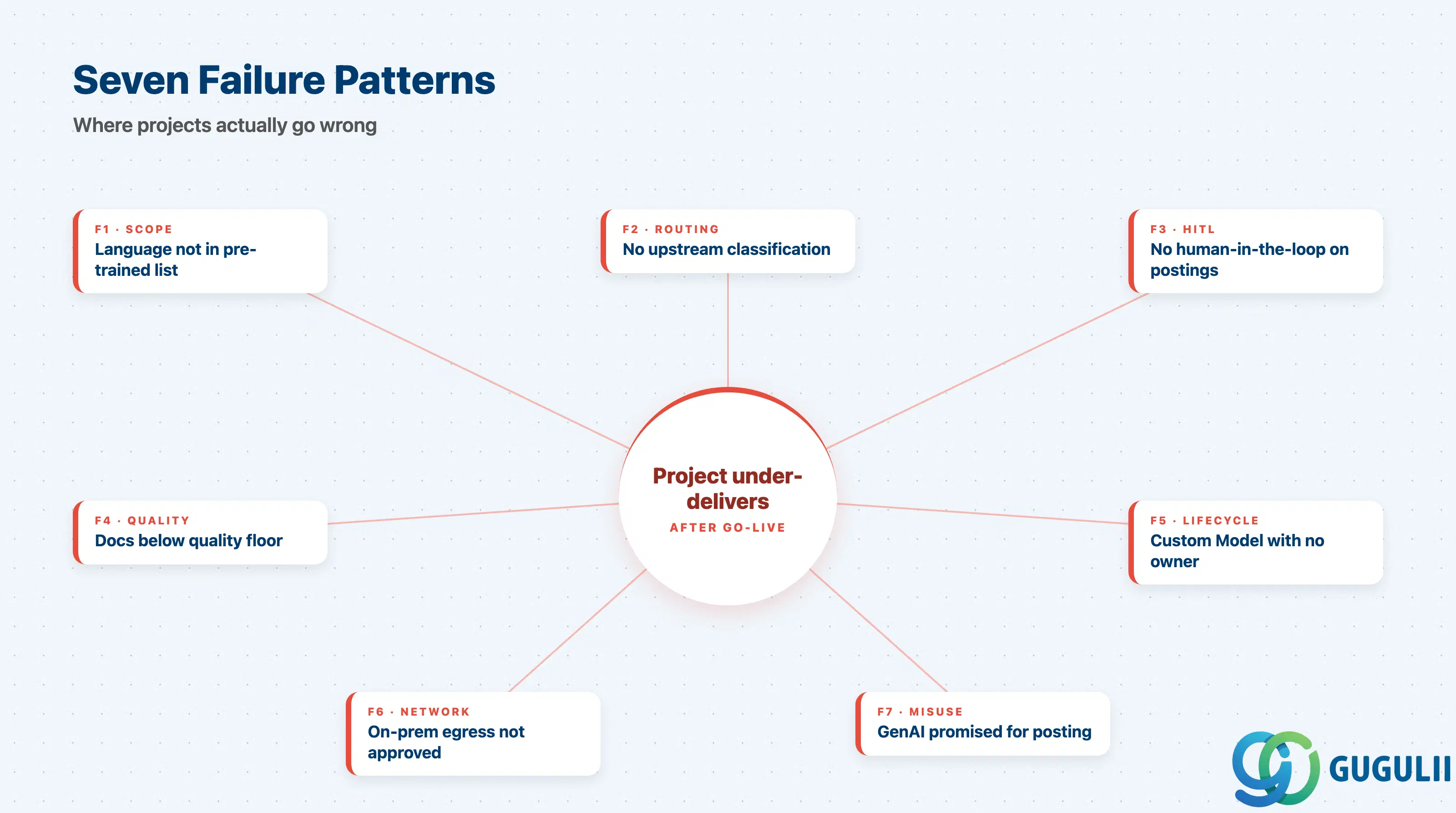
These are not implementation bugs. They are requirements-stage failures that cause Document AI projects to under-deliver after go-live, and every one of them is preventable in scoping.
Failure 1: Language and document-type assumed in scope without checking the pre-trained list
Korean / Thai / Arabic invoices return useless output in PoC. The fix becomes a Custom Model program nobody scoped. Avoid this by reading the per-document-type language coverage table during requirements, not during testing.
Failure 2: No upstream Document Classification in a mixed-document inbox
The calling system submits a credit memo to the invoice model. Every field is wrong. The team blames the model when the cause is missing routing. Always design Classification + DOX as a pair when the inbound channel carries more than one document type.
Failure 3: No human-in-the-loop on transactional postings
Without a confidence gate, low-confidence postings reach finance, get reversed manually, and the business loses trust within one quarter. SPA provides the HITL pattern out of the box; not using it is a scoping decision, not a constraint.
Failure 4: Source documents are below the operating envelope
Phone photos, handwritten markups, scans below 200 DPI — below the floor where any document AI works. Treat document-quality as a real requirement and fix the intake channel before automating it.
Failure 5: Custom Model program with no owner and no lifecycle plan
A Custom Model is published at go-live, then nothing changes for 18 months. Suppliers add new layouts; F1 silently degrades; nobody is accountable. Custom Models require a named owner, a labeled-sample backlog, and a publish-and-retire cadence.
Failure 6: Network path from on-prem S/4HANA to BTP not approved
The project assumes BTP services are reachable; security review opens in month four; integration blocks for two months waiting for Cloud Connector or egress approval. Raise this in week one of architecture work, not week six.
Failure 7: GenAI Hub grounding promised for structured posting
A stakeholder sees an LLM answer “what is the invoice total” correctly during demo and asks for the same flow to post invoices. Grounding is non-deterministic and bypasses confidence semantics. Use DOX for structured extraction; reserve grounding for unstructured Q&A.
Q: Does Document AI work on SAP S/4HANA on-premise, or only S/4HANA Cloud?
Both, but the integration shape differs. S/4HANA Cloud public edition has pre-shipped DOX content for supplier invoices and PO confirmations — turn it on and configure. S/4HANA Cloud private and on-premise are customer build projects: BTP entitlement, destination service, and (for on-prem) Cloud Connector or approved egress.
Q: How is DOX licensed, and where is the surprise cost?
Production usage is metered in blocks of 100 documents (blocks_of_100), billed via CPEA / cloud credits. The free default plan is evaluation-only. Two surprises in real projects: (a) Custom Model training and inference are charged separately on top of base DOX; (b) Premium plan is required for files over 20 MB or 10 pages and is quoted, not list-priced. Build both into year-one and year-two budgets.
Q: When should we descope Document AI from a project?
When any of the following is true: documents in unsupported scripts; handwritten or phone-photographed input; unbounded supplier population with no Custom Model budget; no HITL budget for low-confidence rows; the customer cannot quantify the inefficiency. “Walk away” is a real consultant deliverable here — promising 95% accuracy on Korean handwritten delivery notes is malpractice.
Q: Can Generative AI Hub replace DOX for invoice extraction?
Not as of 2026, and SAP does not market it as a replacement. GenAI Hub grounding solves a different problem (Q&A over arbitrary text). For structured extraction with confidence semantics and predictable per-document cost, DOX remains the path. Combining DOX for structured fields with GenAI for free-form clauses is increasingly common, but each side keeps its own confidence and review pattern.
Q: How do we document a Document AI requirement so it survives handover to delivery?
Write it as a quartet: (1) the named capability (DOX pre-trained invoice / Classification / Custom Model schema X / GenAI grounding), (2) the in-scope language and document-type list with per-language field-coverage tables attached, (3) the confidence threshold and human-review workflow, (4) the network and licensing prerequisites with a named owner. Without all four, the requirement is incomplete and will be reshaped during delivery.
Q: How accurate is DOX in practice, and how should we handle suppliers that change layouts?
For typed European-language invoices on a bounded supplier set, header field accuracy reaches 95%+ and line-item F1 lands at 85–90% after several weeks of feedback-loop tuning. The “last 5%” comes from constraining the supplier population or human-in-the-loop on low-confidence rows — it is not delivered by the model alone. For high-volume suppliers that change layouts, train a per-supplier Schema Custom Model and own its lifecycle. For long-tail suppliers with frequent drift, do not chase each format with a model; route them through a confidence gate and accept higher human review on that segment.
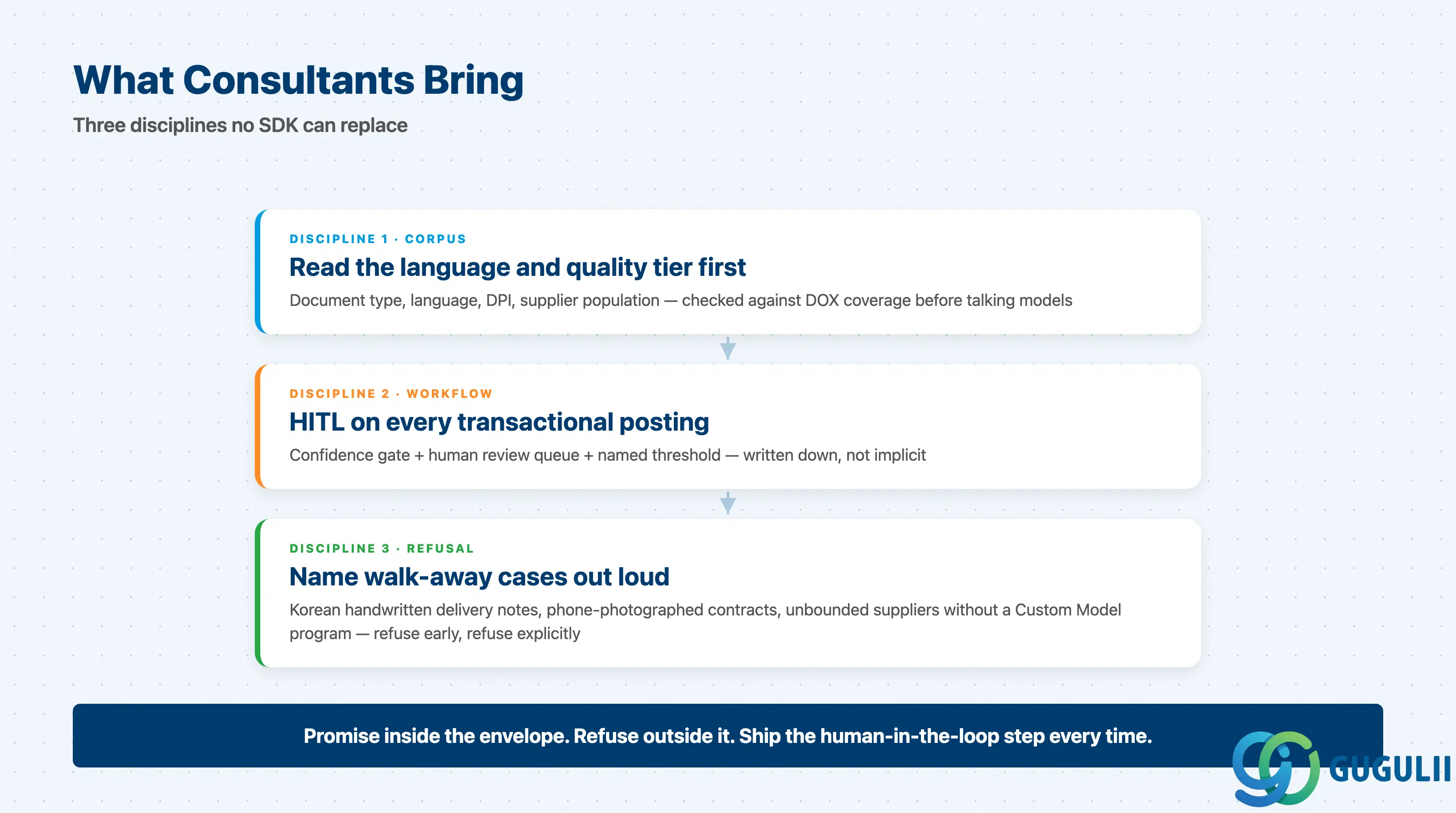
Document AI on BTP is a portfolio, not a product. DOX with pre-trained models is production-ready for typed EU/US invoices, POs, and paystubs; Document Classification is the under-used routing layer; Custom Models extend coverage when suppliers are bounded and labeling budget exists; GenAI Hub grounding is for unstructured Q&A, not transactional postings. The consultant value is reading the customer’s document corpus, language tier, quality floor, and posting workflow and saying — accurately — which capability fits, what the prerequisites are, and where the honest answer is to walk away. Promise inside the envelope, refuse outside it, and ship the human-in-the-loop step every time.
| L1. Big Picture | L2. Functional Domains |
|---|---|
| BTP-001: What is BTP | L2-A. Integration |
| BTP-002: BTP Architecture | L2-B. Application Development |
| BTP-003: BTP Capability Map | L2-C. Data & Analytics |
| BTP-004: Deployment Models | L2-D. AI — BTP-D04 Document AI (this article) |
| BTP-005: Licensing Models | L2-E. Foundation Services |
| BTP-006: Clean Core Strategy | L2-F. Architecture & Operations |