Title here
Summary here

| ID | Category | Component | Scope |
|---|---|---|---|
| BTP-E01 | Overview | Foundation Services | Overview and Capability Map |
| BTP-E02 | IAM | Identity and Access Management | Architecture and Use (this article) |
| BTP-E03 | Connectivity | Cloud Connector | Architecture and Use |
| BTP-E04 | Connectivity | Private Link | Architecture and Use |
| BTP-E05 | Operations | Cloud ALM | Architecture and Use |
| BTP-E06 | Operations | Cloud Transport Management | Architecture and Use |
| BTP-E07 | Overview | Foundation Services | Use Cases and Decision Patterns |
| Resource | URL |
|---|---|
| SAP Cloud Identity Services Administration Guide | help.sap.com → |
| What Is Identity Provisioning | help.sap.com → |
| SAP Authorization and Trust Management Service (XSUAA) | help.sap.com → |
| Establish Trust and Federation with UAA Using SAML Identity Provider | help.sap.com → |
| Authorization with SAP Cloud Identity Services (Architecture Center) | sap.com → |
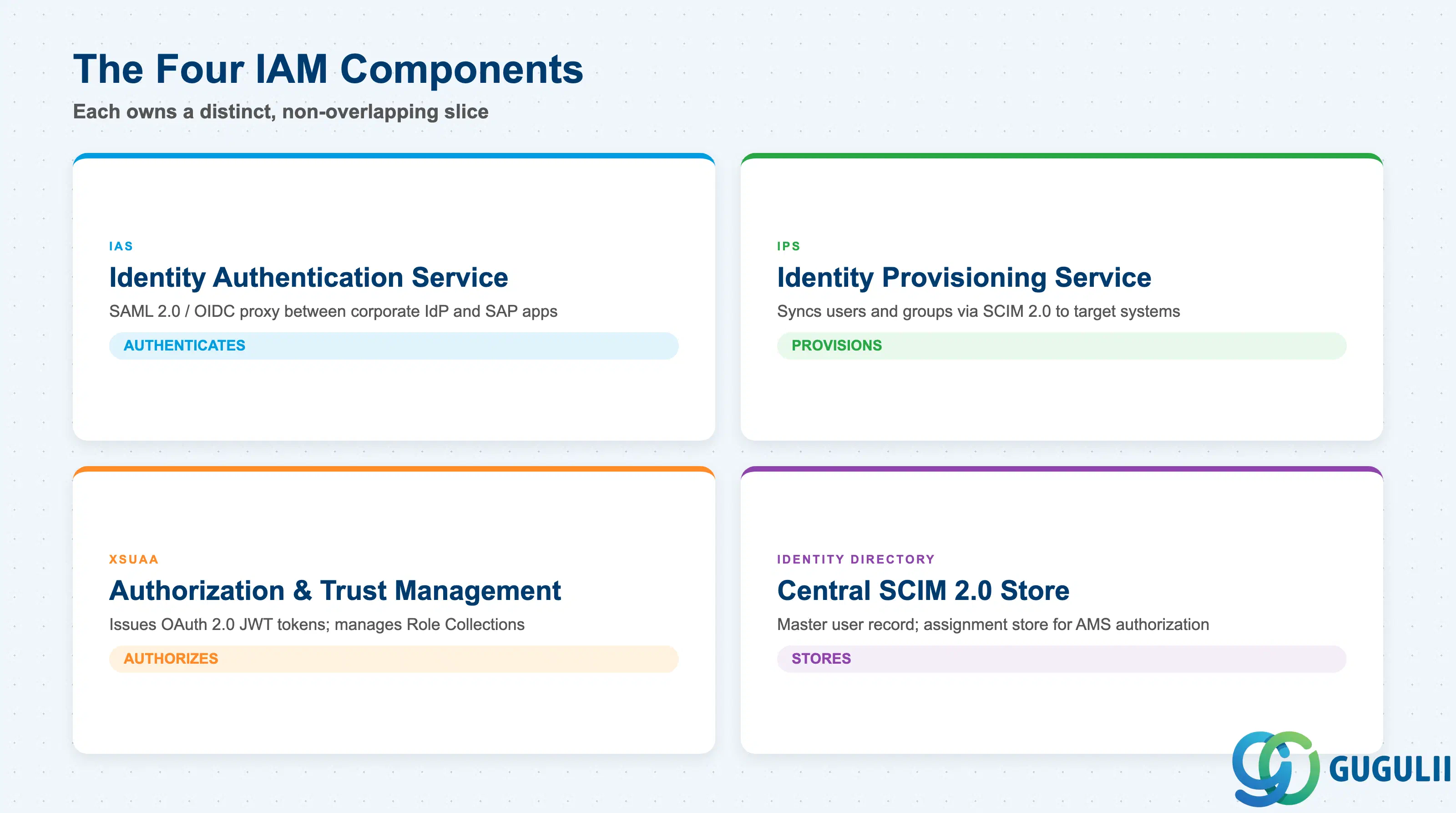
SAP BTP identity management is a layered stack of four distinct components, each owning a well-defined slice of the identity lifecycle ( SAP Cloud Identity Services Administration Guide).
| Component | What it does | Primary user |
|---|---|---|
| IAS (Identity Authentication Service) | Authenticates users; acts as SAML 2.0 / OIDC proxy between SAP applications and corporate identity providers; applies MFA, risk-based auth, and attribute enrichment | End users, BTP application trust configurations |
| IPS (Identity Provisioning Service) | Synchronizes users and groups from source systems (Active Directory, Entra ID, SuccessFactors) to target systems (BTP subaccounts, SAP S/4HANA, Build Work Zone) using SCIM 2.0 | Identity administrators, HR-to-IT provisioning workflows |
| XSUAA (Authorization and Trust Management Service) | Issues OAuth 2.0 JWT access tokens for Cloud Foundry applications; manages Role Collections; enforces scope-based authorization at the approuter layer | BTP Cloud Foundry application developers and administrators |
| Identity Directory | Central SCIM 2.0 user and group store; the master user record for IAS; the assignment store for AMS-based application authorization | AMS, IPS replication targets |
They are not substitutes. IAS authenticates; IPS provisions; XSUAA authorizes; Identity Directory stores and centralizes assignment.
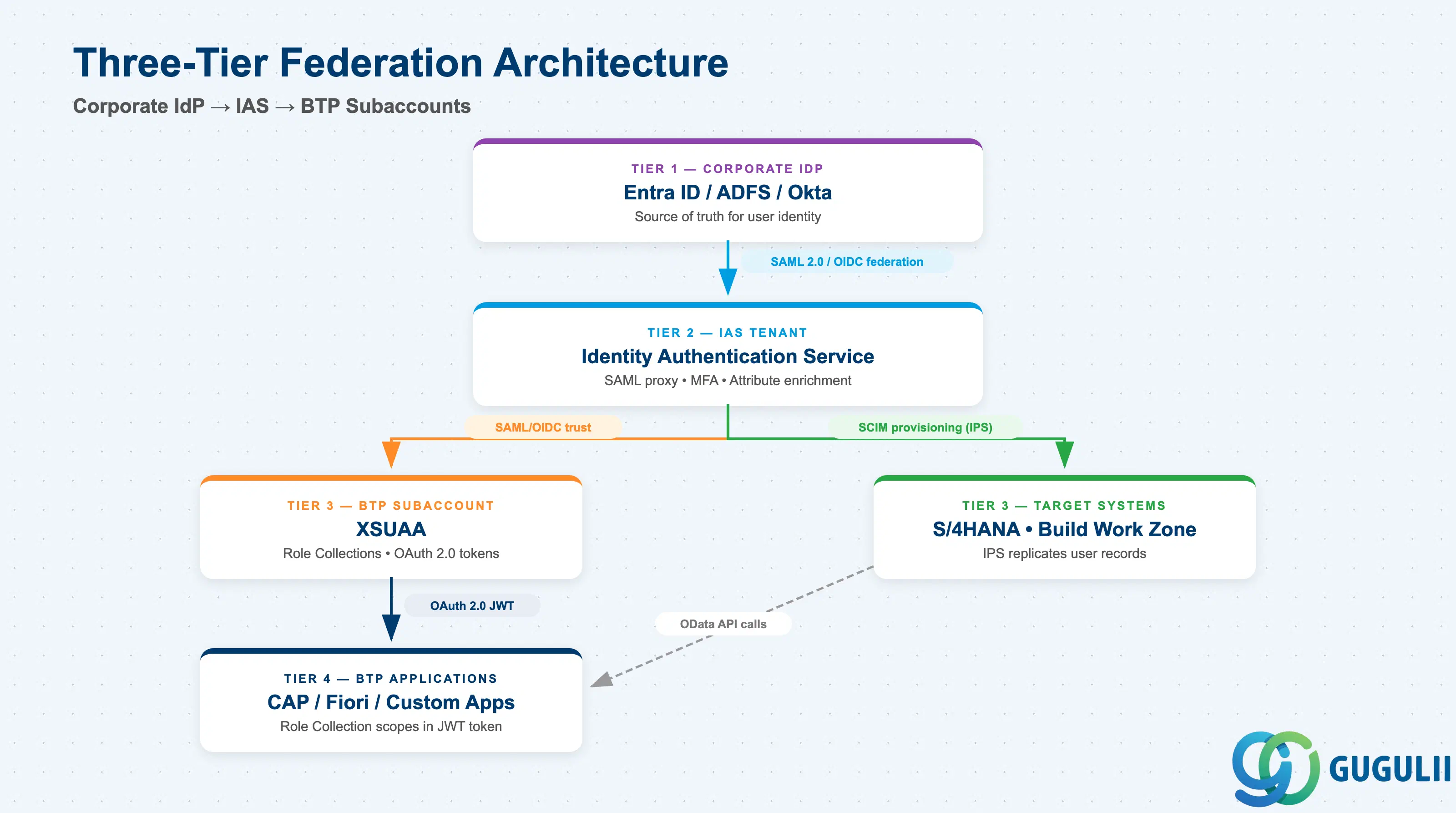
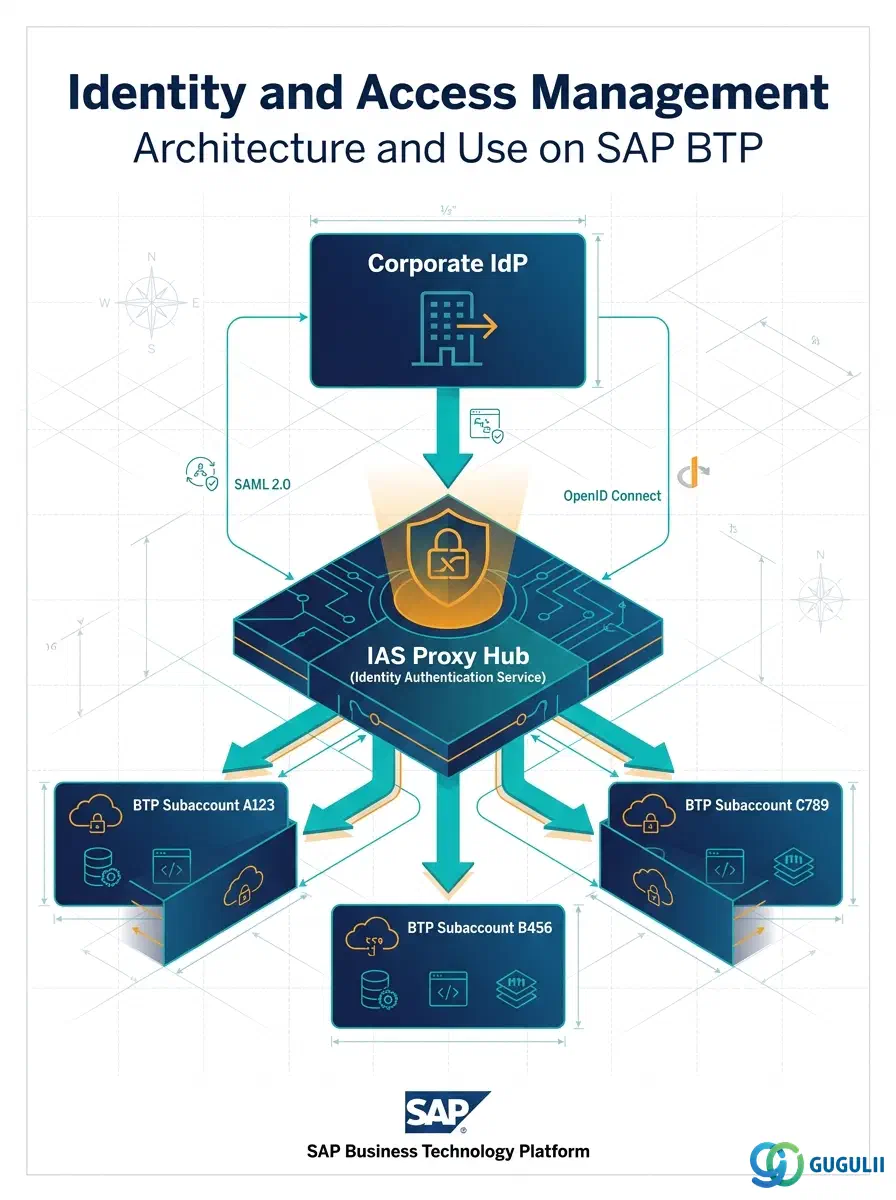
The recommended architecture places IAS as the central authentication proxy between the corporate identity provider and all BTP subaccounts ( Establish Trust and Federation with UAA). S/4HANA sits as a target for IPS provisioning and as a service provider in its own right.
[Corporate IdP — Entra ID / ADFS / Okta]
         |
         |  SAML 2.0 or OIDC federation
         v
[IAS Tenant — SAML Proxy / OIDC Broker]
         |                        |
         | SAML/OIDC trust        | SCIM provisioning (IPS)
         v                        v
[BTP Subaccount — XSUAA]    [SAP S/4HANA Cloud / On-premise]
         |                   [Build Work Zone / SuccessFactors]
         | OAuth 2.0
         v
[BTP Applications — Role Collections → JWT tokens]
Users authenticate once at the corporate IdP. IAS validates the SAML assertion, applies risk-based policies, and issues an OIDC ID token to the BTP subaccount. XSUAA exchanges that token for an OAuth 2.0 JWT containing Role Collection scopes. In parallel, IPS replicates user and group records from the corporate directory into Identity Directory and target SAP systems on a scheduled basis.
For S/4HANA Cloud Public Edition, the same IAS tenant serves as the SAML IdP, so a single federation covers both BTP applications and S/4HANA login. For on-premise S/4HANA, IPS pushes user records into the ABAP user store via a dedicated connector, while authentication is brokered through IAS when Fiori Launchpad runs on BTP.
Key point: Centralizing trust in one IAS tenant means a single federation configuration covers every subaccount — certificate rotations and SSO endpoint changes need to be made in one place, not per subaccount.
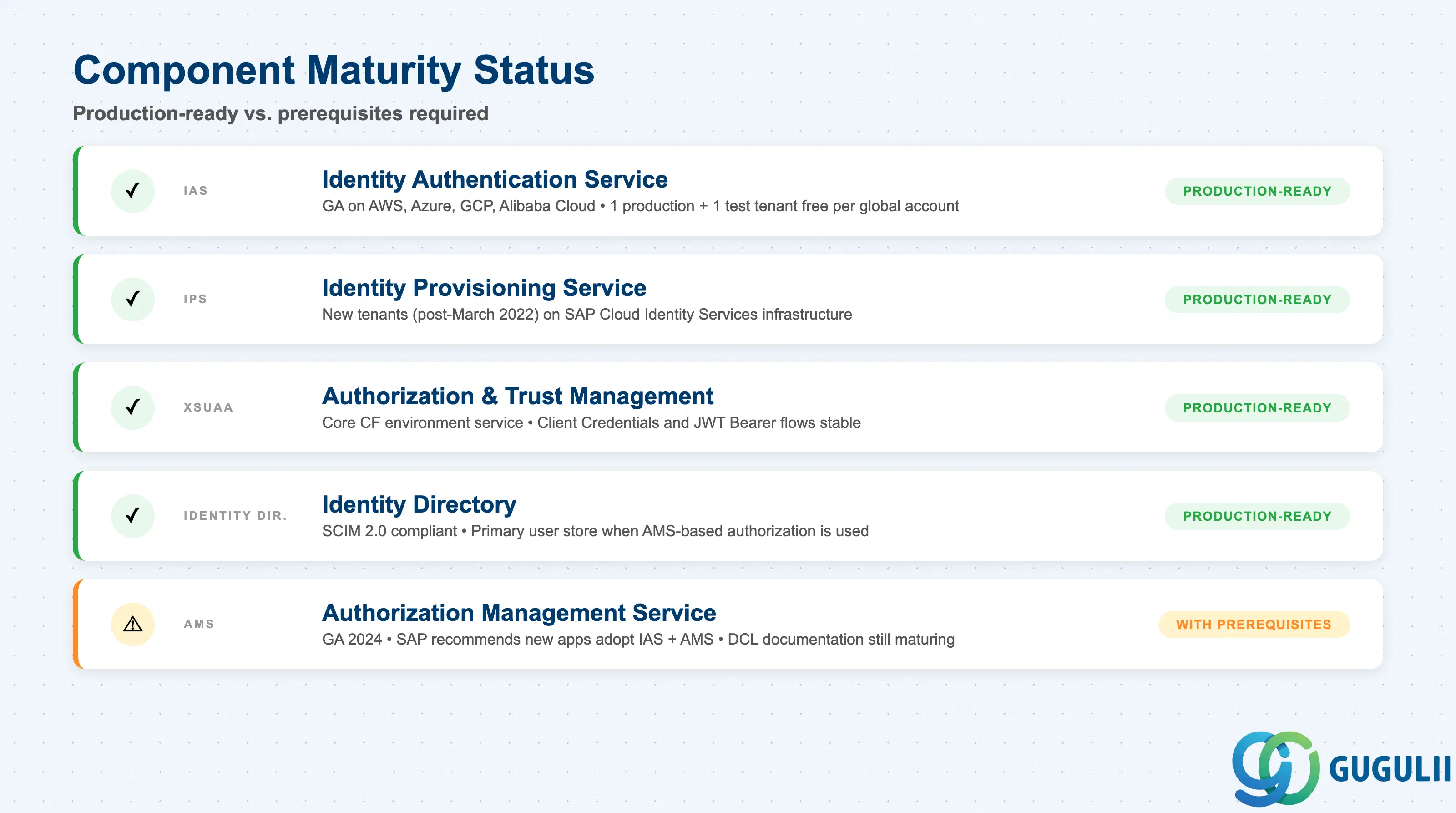
All four core components are production-ready ( What Is Identity Provisioning). AMS is the one area with prerequisites.
| Component | Maturity | Notes |
|---|---|---|
| IAS (Identity Authentication) | ✅ Production-ready | GA service on all major cloud providers (AWS, Azure, GCP, Alibaba Cloud). Free tier: one production + one test tenant per BTP global account. |
| IPS (Identity Provisioning) | ✅ Production-ready | New tenants since March 2022 run on SAP Cloud Identity Services infrastructure. Neo-environment IPS (pre-September 2020 tenants) remains supported but separate. |
| XSUAA (Authorization and Trust Management) | ✅ Production-ready | Core CF environment service. Migration path to AMS exists but is not mandatory. Client Credentials and JWT Bearer flows are stable and widely used. |
| Identity Directory | ✅ Production-ready | SCIM 2.0 compliant. Primary user store when AMS-based authorization is used. Role Collections replicate into Identity Directory via IPS. |
| AMS (Authorization Management Service) | ⚠️ Ready with prerequisites | GA in 2024; SAP recommends new applications adopt IAS + AMS. Existing XSUAA apps remain fully supported. AMS policy language (Decision Control Language) documentation is still maturing. |
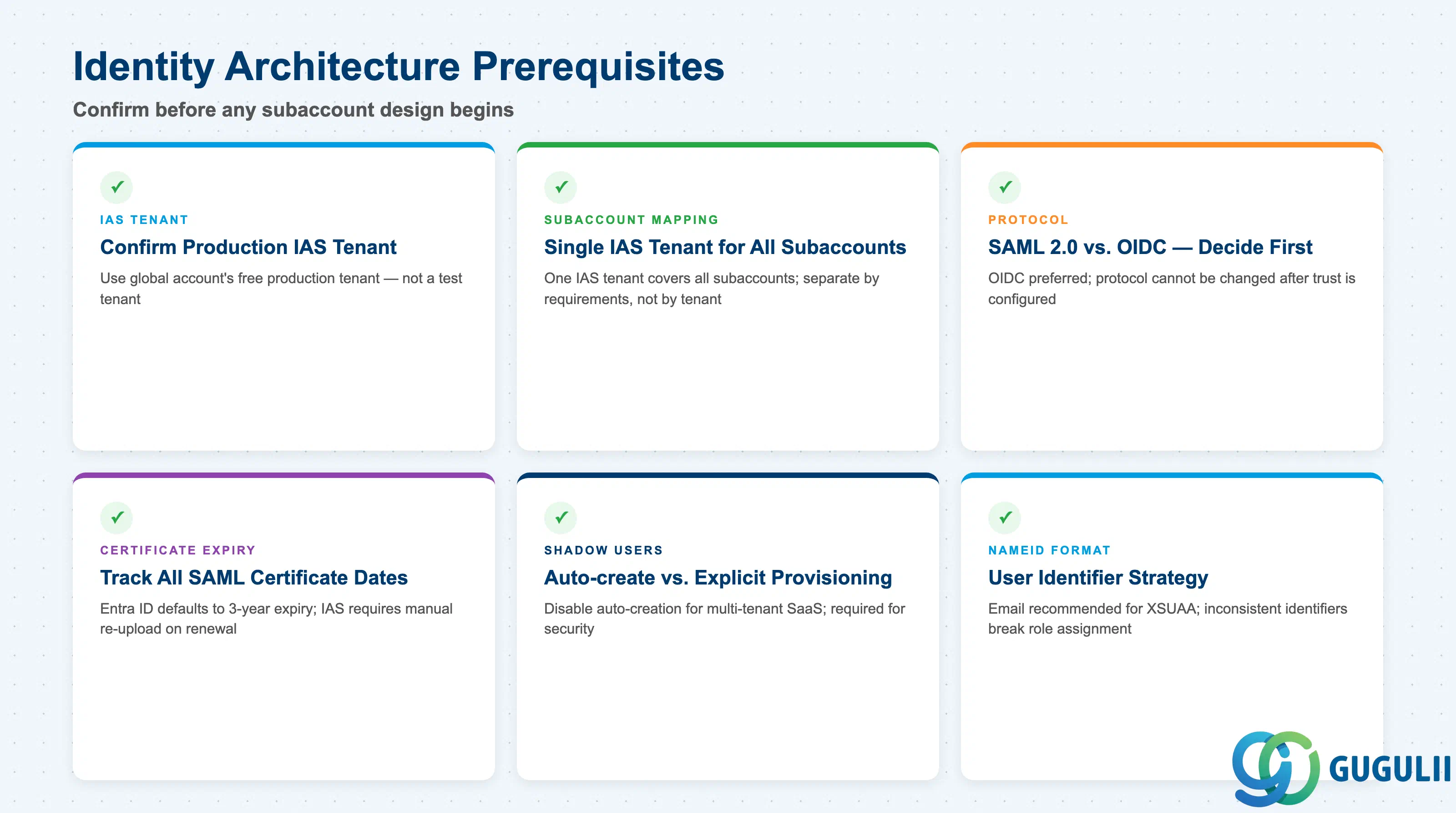
| Checklist item | Why it matters |
|---|---|
| Confirm the production IAS tenant for the BTP global account before subaccount design | Each global account includes one free production IAS tenant. Using a test tenant or a different global account’s tenant creates divergent federation configurations over time. |
| Map all BTP subaccounts to a single IAS tenant for end-user authentication | Applications with different identity requirements should be in separate subaccounts, but all should point to the same IAS tenant. |
| Decide federation protocol (SAML 2.0 vs. OIDC) before design begins | OIDC is preferred (no XML metadata exchange). Once a trust is set with one protocol, a second trust for the same IdP using the other protocol cannot be added. |
| Identify SAML certificate expiry dates for all parties (corporate IdP, IAS, BTP subaccount) | IAS does not support dynamic metadata refresh from Entra ID. Entra ID Enterprise Application certificates default to 3-year expiry; expired certificates cause complete federated login outage. |
| Determine whether “Create Shadow Users During Logon” should be enabled or disabled | Enabled = automatic provisioning on first login (suitable for single-tenant apps). Disabled = explicit provisioning required (mandatory for multi-tenant SaaS to prevent cross-tenant login). |
| Define user identifier strategy (NameID format) | Email is the recommended NameID format for XSUAA. Inconsistent identifiers across systems break user lookup and role assignment. |
| Checklist item | Why it matters |
|---|---|
| Design Role Collection naming convention before go-live | Role Collection names appear in SAML assertions. Excessively long or numerous names can exceed assertion size limits (SAP Note 2732890, requires S-User login), causing authorization failures. |
| Use Entra ID group Object IDs — not display names — as the “Groups” claim value | Object IDs are globally unique and immutable. Display names can be reused after group deletion, granting unintended access to a recreated group with the same name. |
| Confirm “Groups” attribute name is case-sensitive in IAS attribute mapping | The exact string “Groups” is required. A lowercase “groups” attribute does not map to XSUAA Role Collections. |
| Plan for SAML assertion size: estimate maximum Role Collections per user | Exceeding the assertion size limit causes intermittent login failures for users with many roles. Restructure into fewer, broader Role Collections if the estimate is high. |
| Determine which applications will use XSUAA vs. AMS authorization | New applications should use AMS; existing applications remain on XSUAA. Document the split to avoid operational confusion. |
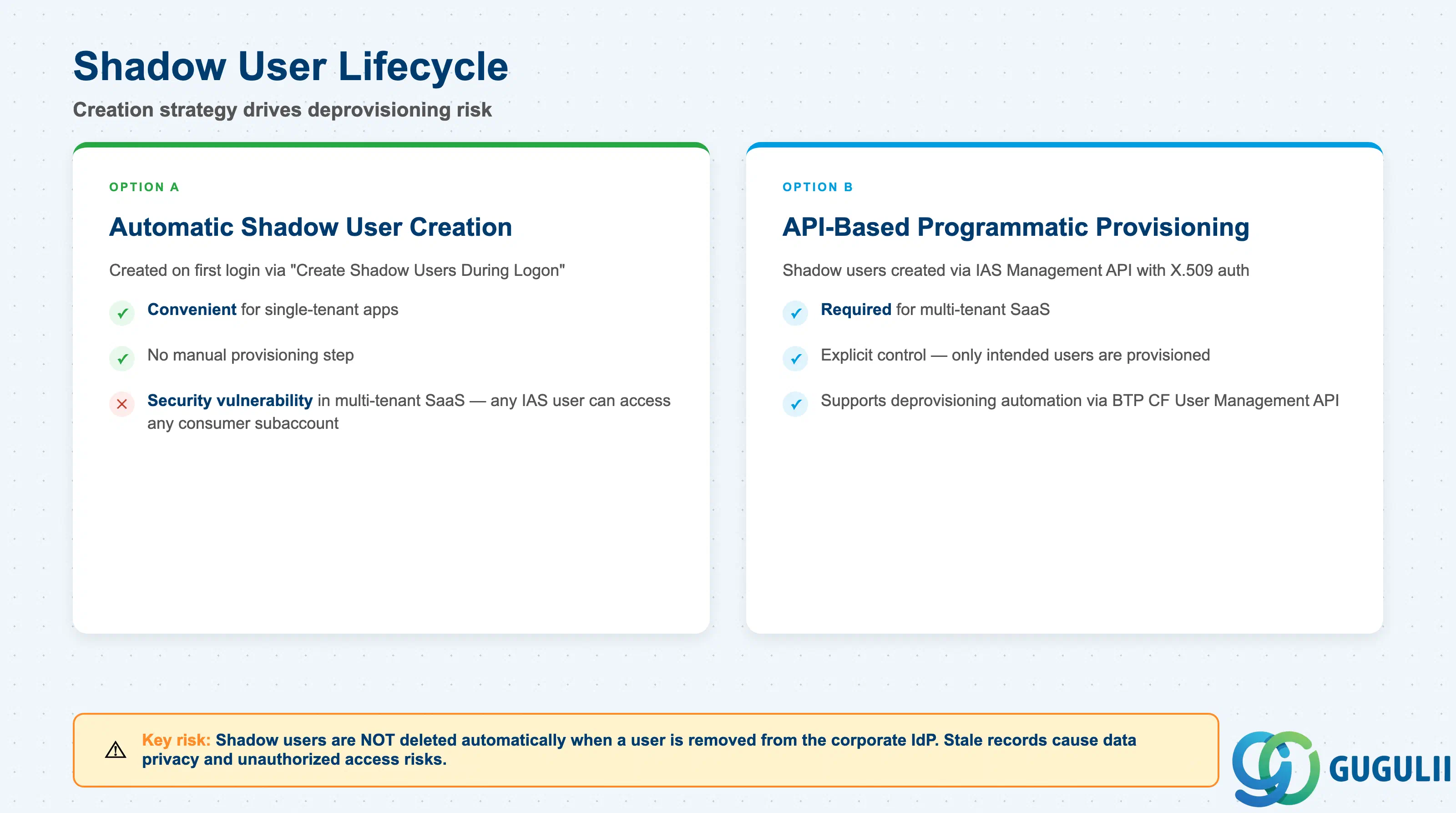
| Checklist item | Why it matters |
|---|---|
| Design shadow user creation: automatic vs. API-based programmatic provisioning | Automatic creation is convenient for single-tenant apps but is a security vulnerability in multi-tenant SaaS (see Failure 4). API-based provisioning via IAS APIs requires X.509-authenticated calls. |
| Define the deprovisioning process for BTP CF shadow users | Shadow users in BTP CF subaccounts are NOT deleted automatically when the user is removed from the IdP. Stale shadow users pose data privacy and unauthorized access risks. |
| Document which IdP each shadow user is associated with | Shadow users must be tied to the IdP used for application login, not the platform-level BTP Cockpit IdP. Misconfiguring this is a frequent cause of login failures where users can access BTP Cockpit but not the application. |
| For multi-tenant SaaS: plan for two separate IAS application registrations per consumer | One registration for consumer subaccount authentication trust; one centralized registration for programmatic user management via IAS APIs. These two cannot be substituted. |
| Include shadow user cleanup in the offboarding runbook | Offboarding that only removes a user from the corporate IdP leaves shadow users in every subaccount the user accessed. |
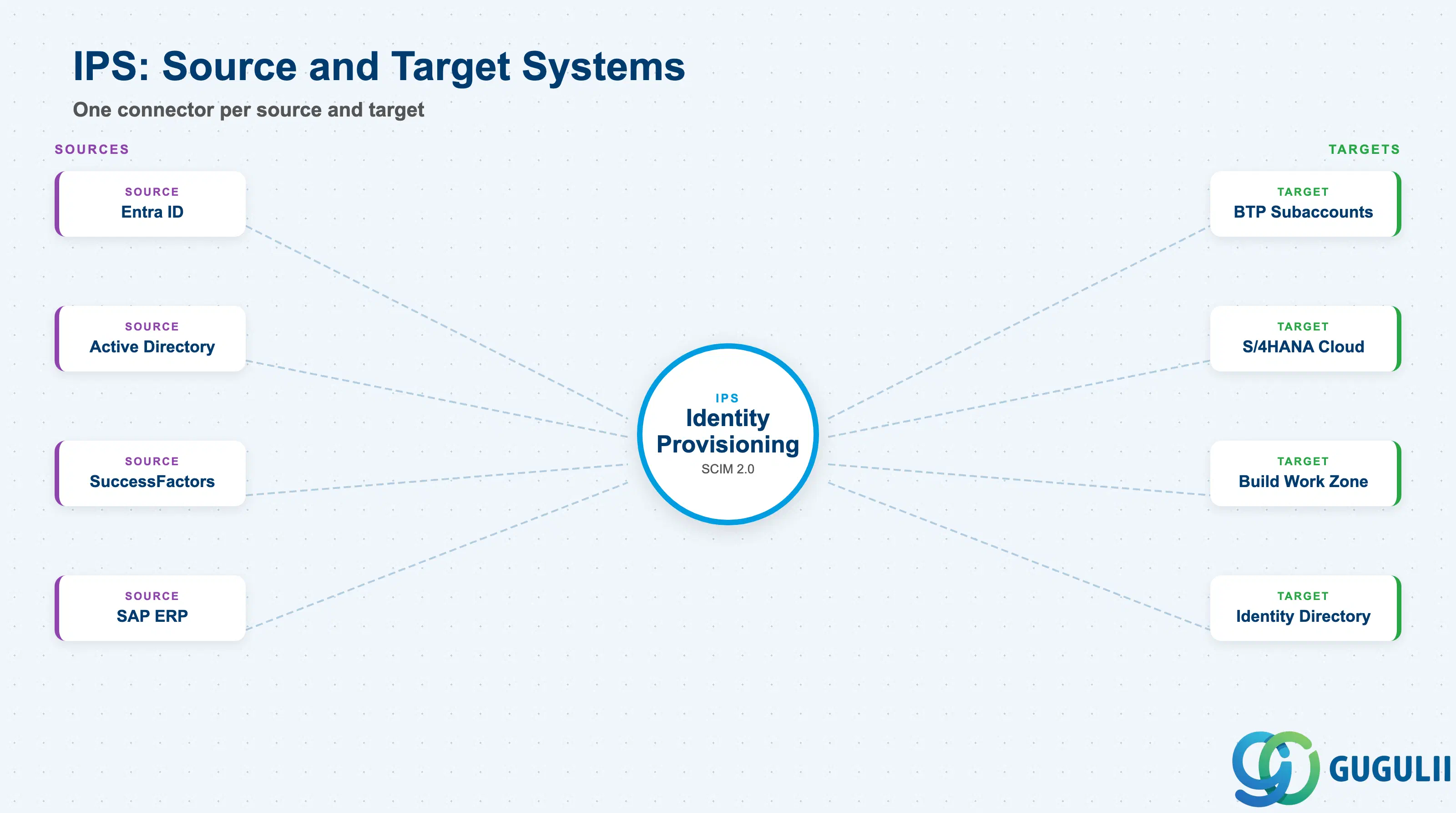
| Checklist item | Why it matters |
|---|---|
| Identify all source systems for user provisioning (Entra ID, Active Directory, SuccessFactors, SAP ERP) | IPS requires a separate source system configuration for each. Connector type determines available attributes and sync capabilities. |
| Confirm network connectivity for IPS to reach on-premise source systems | Cloud Connector is required for IPS to connect to on-premise Active Directory or SAP ERP. This dependency must be planned alongside Cloud Connector architecture. |
| Define provisioning job schedule (periodic vs. real-time) | Periodic provisioning introduces lag between directory changes and access updates. Real-time triggers reduce this lag but require additional setup. |
| Plan for IPS job monitoring and alerting | Provisioning job failures are silent by default. A failed job leaves user access out of sync until the next run. |
| Define transformation rules for attribute mapping between source and target systems | Transformation rules determine which attributes are replicated. Poorly designed transformations can over-provision or under-provision access at target systems. |
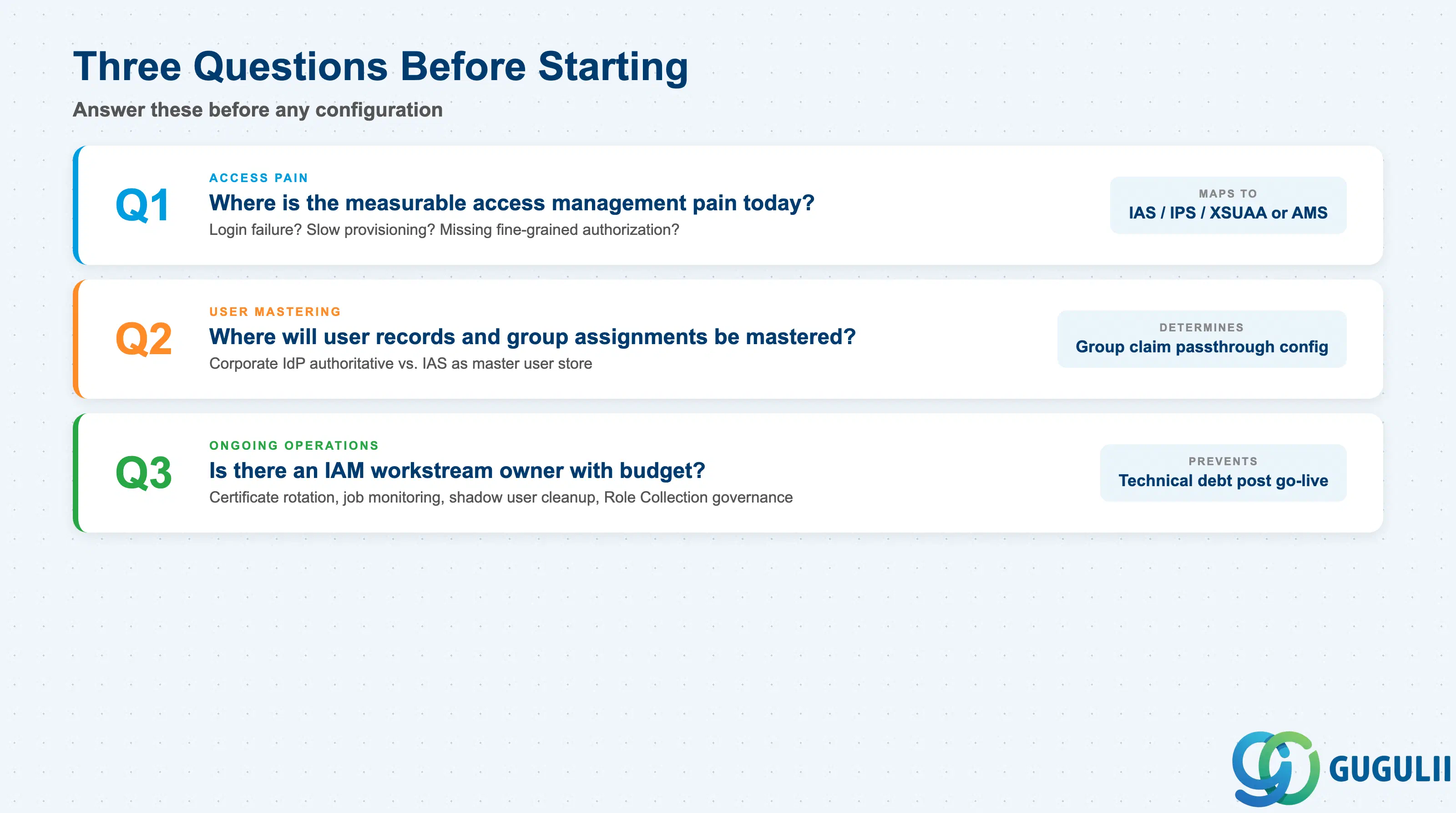
Q1. Where is the measurable access management pain today?
Identify the specific operational failure before committing to a configuration pattern. “Users cannot log in with corporate credentials” points to IAS federation. “New employees get BTP access weeks after joining” points to IPS automation. “Developers cannot define fine-grained authorization” points to XSUAA or AMS. Each symptom maps to a different component; solving the wrong one adds complexity without fixing the underlying issue ( XSUAA documentation).
Q2. Where will user records and group assignments be mastered?
This determines whether the architecture is “corporate IdP authoritative” (groups flow from Entra ID to IAS to BTP) or “IAS authoritative” (users created directly in Identity Directory, IPS pushes to targets). For most enterprises the corporate IdP is the master — but the group claim passthrough configuration in IAS must be set correctly. Mixing both models in the same deployment creates reconciliation problems.
Q3. Is there an IAM workstream owner with budget for certificate management and lifecycle automation?
IAM requires ongoing operational investment: certificate rotation every 1–3 years, provisioning job monitoring, shadow user cleanup, and Role Collection governance. If no owner is identified at requirements time, these tasks accumulate as technical debt. Confirm the operational owner before go-live.
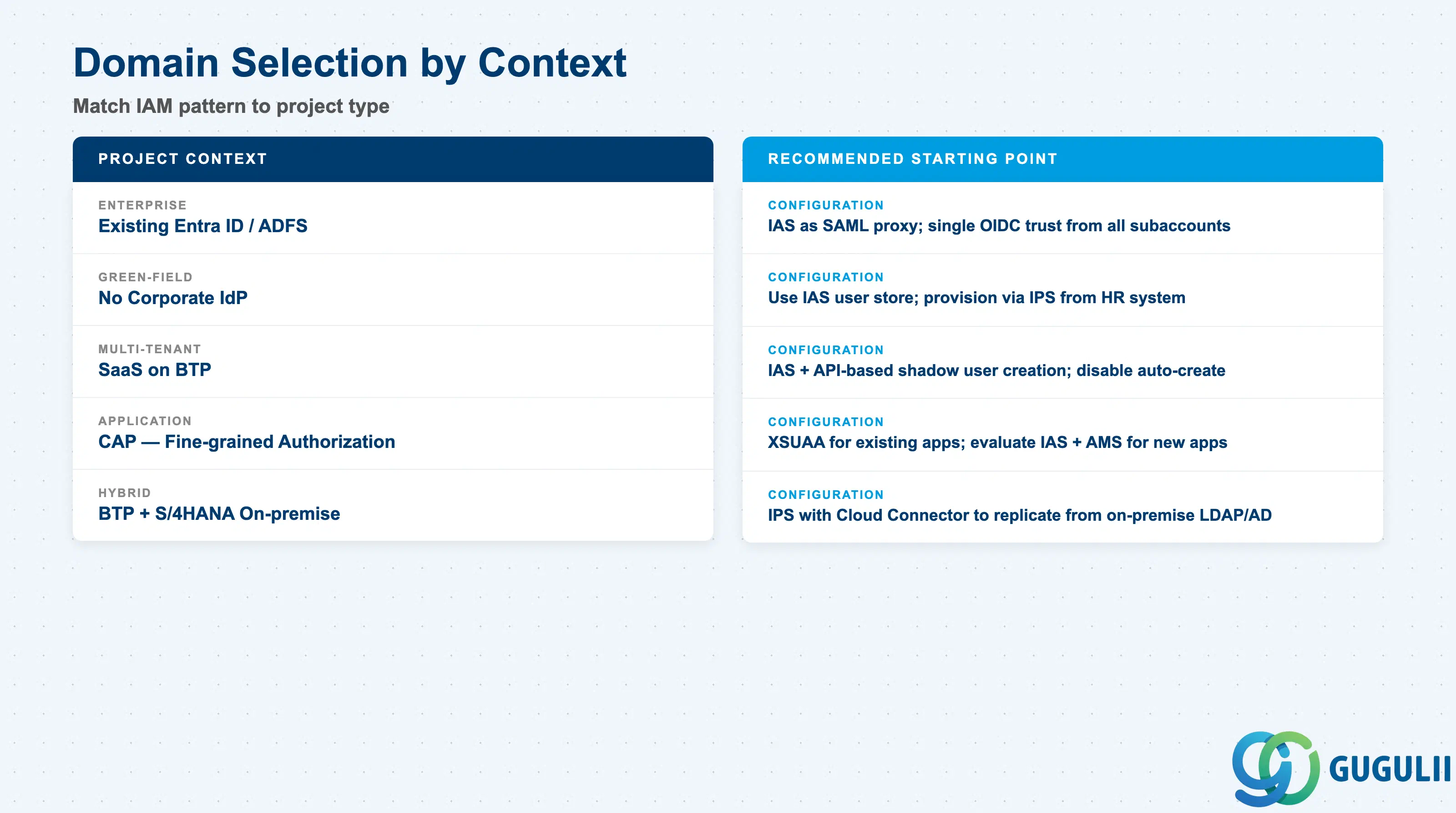
| Project context | Recommended starting point |
|---|---|
| Enterprise BTP rollout with existing Entra ID / ADFS | Configure IAS as SAML proxy; establish single OIDC trust from all subaccounts to IAS |
| Green-field BTP with no corporate IdP | Use IAS user store directly; provision users via IPS from HR system |
| Multi-tenant SaaS on BTP | IAS + programmatic shadow user creation via API; disable automatic shadow user creation in all subaccounts |
| CAP application requiring fine-grained authorization | XSUAA for existing apps; evaluate IAS + AMS for new apps |
| Hybrid: BTP applications + SAP S/4HANA on-premise | IPS with Cloud Connector to replicate users from on-premise LDAP/Active Directory |
| Regulatory requirement for strong MFA | Configure risk-based authentication policy in IAS; applied centrally across all subaccounts |
| No clear access management pain point identified yet | Stop. Go back to Q1. |
| Component | Licensing model | Key question to ask |
|---|---|---|
| IAS | Included: 1 production + 1 test tenant free per BTP global account. Additional tenants are subscription-based. | Does the project need additional IAS tenants beyond the free allocation? Usually no for a single enterprise. |
| IPS | Bundled with BTP enterprise agreements for standard connectors. Some connectors may require additional licensing. | Which source/target systems need provisioning? Confirm connector availability before architecture commitment. |
| XSUAA | Included in BTP Cloud Foundry environment; no separate charge. | No additional cost for XSUAA. Role Collection governance overhead is the real cost driver. |
| AMS | Part of SAP Cloud Identity Services for new applications. | Is the application net-new or migrating from XSUAA? Migration costs for existing apps should be evaluated case by case. |
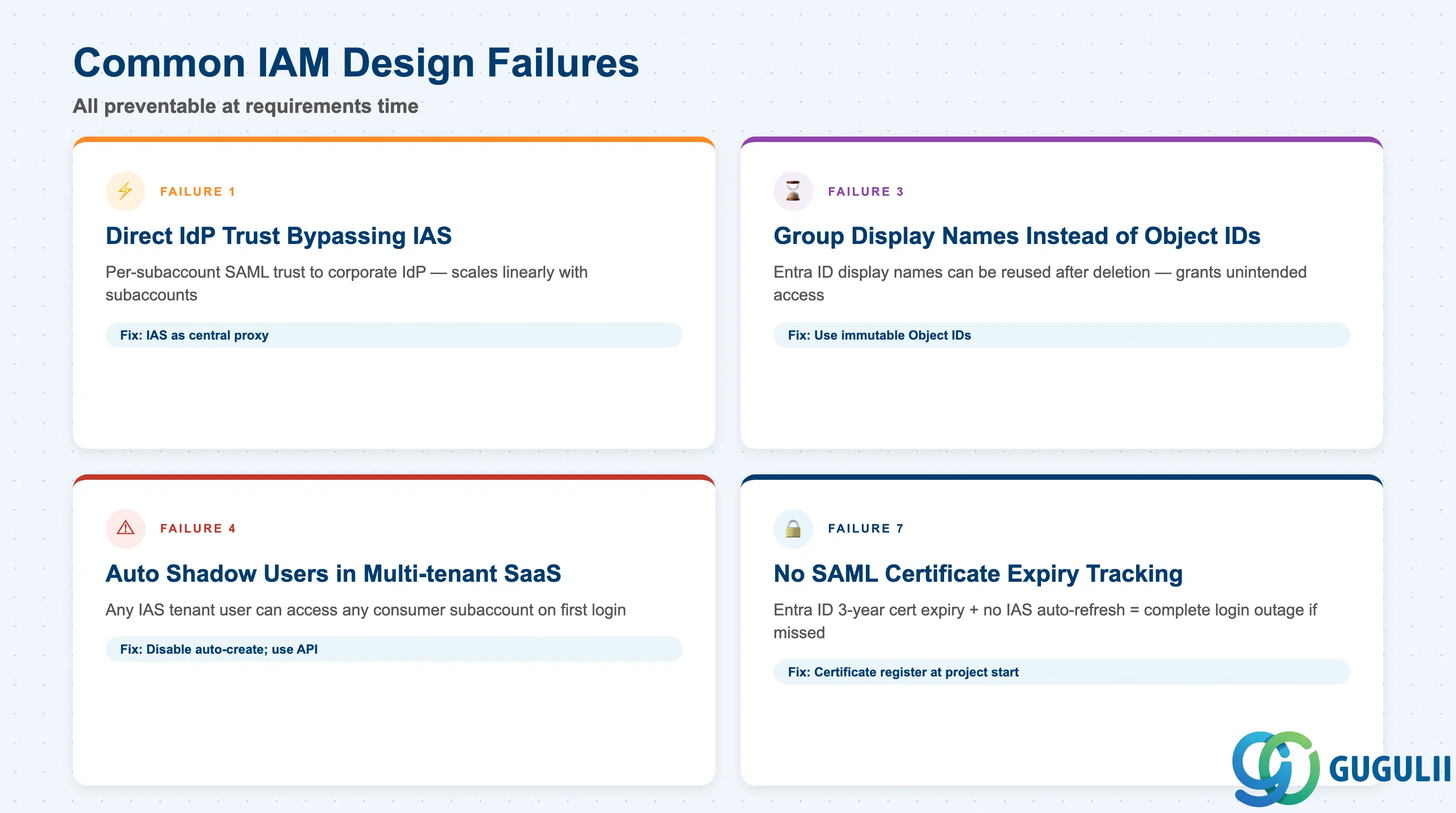
Failure 1: Direct subaccount-to-corporate-IdP federation without IAS
Each BTP subaccount is configured with a direct SAML trust to the corporate IdP, bypassing IAS entirely. Trust setup, certificate rotation, MFA policy changes, and attribute mapping must then be repeated independently for every subaccount. As the subaccount count grows, maintenance scales linearly. Insert IAS as the central proxy: one corporate IdP federation in IAS covers all subaccounts simultaneously.
Failure 2: “Use Identity Authentication user store” left enabled when corporate IdP groups are needed
When IAS acts as a SAML proxy, the “Use Identity Authentication user store” setting controls whether IAS passes through attributes from the corporate IdP. When enabled (the default), group claims from the corporate IdP are dropped by IAS and never reach XSUAA Role Collection mapping. Users authenticate successfully but receive no Role Collections. Disable this setting on the corporate IdP configuration in IAS, or re-declare the passthrough using ${corporateIdP.Groups} syntax in IAS Default Attributes.
Failure 3: Group display names used instead of Object IDs for Entra ID Role Collection mapping
Teams use Entra group display names as the mapping key because they are human-readable. If a group is deleted and recreated with the same display name, the new group inherits the Role Collection mapping — potentially granting unintended access. If the group is renamed, the mapping breaks. Always use the Entra group Object ID as the “Groups” claim value and as the mapping key in BTP Trust Configuration.
Failure 4: “Create Shadow Users During Logon” left enabled in multi-tenant SaaS subaccounts
In single-tenant enterprise deployments, automatic shadow user creation is a convenience feature. In multi-tenant SaaS architectures it is a critical security vulnerability: any user present in the IAS tenant can authenticate to any consumer subaccount on first access. Disable “Create Shadow Users During Logon” in both the provider and every consumer subaccount, and provision shadow users programmatically via the IAS Management API (X.509-authenticated from the centralized IAS application registration).
Failure 5: Shadow user stale records after user offboarding
When a user is removed from the corporate IdP, shadow user records in BTP Cloud Foundry subaccounts are not deleted automatically. IPS deprovisioning does not extend to CF shadow user cleanup. Stale records pose data privacy and unauthorized access risks. Build a custom cleanup automation that calls the BTP CF User Management API on user deactivation events, or include shadow user deletion explicitly in the offboarding runbook with a defined SLA.
Failure 6: SAML assertion size exceeded due to excessive Role Collections
Users with many Role Collections generate SAML assertions that can exceed the size limits in SAP BTP Cloud Foundry (SAP Note 2732890 — requires S-User login to access). The symptom is intermittent authentication failures for users with many roles while users with few roles log in normally. Redesign Role Collections into a smaller number of broader, function-level collections; reduce the number of groups mapped via SAML claims.
Failure 7: No SAML certificate expiry tracking process
Federation between a corporate IdP and IAS relies on SAML signing certificates. Entra ID Enterprise Application certificates default to 3-year expiry. When a certificate expires, all federated logins fail immediately. IAS does not support dynamic metadata refresh from Entra ID — every certificate renewal requires manual metadata re-upload in IAS and in BTP Trust Configuration. Build a certificate expiry tracking register at project inception, set calendar alerts 90 days before each expiry, and document the re-upload procedure.
Failure 8: Using a non-production IAS tenant for end-user authentication in dev/test environments
Teams provision a separate test or non-production IAS tenant for dev and test environments to keep configurations isolated. The result is duplicate federation setups that diverge over time: corporate IdP metadata, group mappings, and risk-based auth policies differ between tenants, so users experience inconsistent authentication behavior across environments. Use the production IAS tenant for all end-user authentication — including dev and test application environments. Reserve the test IAS tenant only for isolated identity-configuration testing that must not affect any user.
Failure 9: Shadow user associated with the wrong IdP
BTP subaccounts can have multiple trust configurations: one for the platform (used for BTP Cockpit administrator access) and one or more for applications. A shadow user must be associated with the IdP that is configured in the application trust, not the platform-level trust. When shadow users are accidentally associated with the platform IdP, users can log into BTP Cockpit but receive authentication failures when accessing the application — or vice versa. Create and audit shadow users explicitly against the IdP referenced in the application trust configuration.
Failure 10: Mixing applications with different identity requirements in a single BTP subaccount
Each BTP subaccount has one trust configuration, one set of Role Collections, and one set of access policies for IAS. When applications with materially different identity requirements (for example, internal employees vs. external partners, or applications requiring different MFA policies) are placed in the same subaccount, any trust configuration change or role collection change affects every application in the subaccount simultaneously. Separate applications with different identity requirements into dedicated subaccounts at the architecture stage.
Q: Can we configure BTP IAM without IAS, using only XSUAA and a direct corporate IdP trust?
Direct corporate IdP to XSUAA SAML trust is supported, but SAP’s architecture guidance strongly discourages it for enterprise deployments. Every subaccount needs its own trust configuration, certificate upload, and attribute mapping. There is no central place to apply MFA policies or attribute enrichment. IAS as a proxy is the correct architecture for any deployment with more than one subaccount.
Q: What is the licensing situation for IAS — do we need a separate contract?
No separate contract is needed for the standard case ( SAP Cloud Identity Services Administration Guide). Every BTP global account includes one production IAS tenant and one test tenant at no additional charge. Additional tenants require a subscription. IPS is bundled into BTP enterprise agreements for standard connectors; confirm which specific connectors are included with your SAP account executive.
Q: When should IAM be descoped from the initial BTP project phase?
IAM cannot be descoped from any project that includes end-user-facing applications — authentication and authorization are prerequisites for go-live. What can be phased is the sophistication: Phase 1 delivers basic IAS federation with manual Role Collection assignment; Phase 2 adds IPS-automated provisioning, group-based Role Collection assignment, and shadow user lifecycle automation. Attempting to deliver the full lifecycle in Phase 1 often delays the primary application unnecessarily.
Q: Does this architecture apply to SAP S/4HANA on-premise, or only to BTP Cloud?
Both. For S/4HANA Cloud Public Edition, IAS is the SAML IdP and the same tenant covers BTP and S/4HANA login. For S/4HANA on-premise, IPS can replicate user records from the corporate directory into the ABAP user store via a Cloud Connector. When Fiori Launchpad is deployed on BTP for an on-premise backend, the full authentication chain — corporate IdP → IAS → BTP (XSUAA) → Fiori → S/4HANA — runs through the same IAS tenant.
Q: How do we document the IAM architecture requirement for a project sign-off?
An IAM requirements document should cover: (1) identity provider type and federation protocol; (2) user mastering strategy (corporate IdP vs. IAS authoritative); (3) group-to-Role Collection mapping design including claim attribute name and identifier type; (4) shadow user creation strategy with rationale; (5) user deprovisioning process; (6) certificate expiry register with owner and rotation SLA; and (7) subaccount-to-application identity boundary definition. Items 4, 5, and 6 are the ones most commonly missing from sign-off documents and the most expensive to add retroactively.
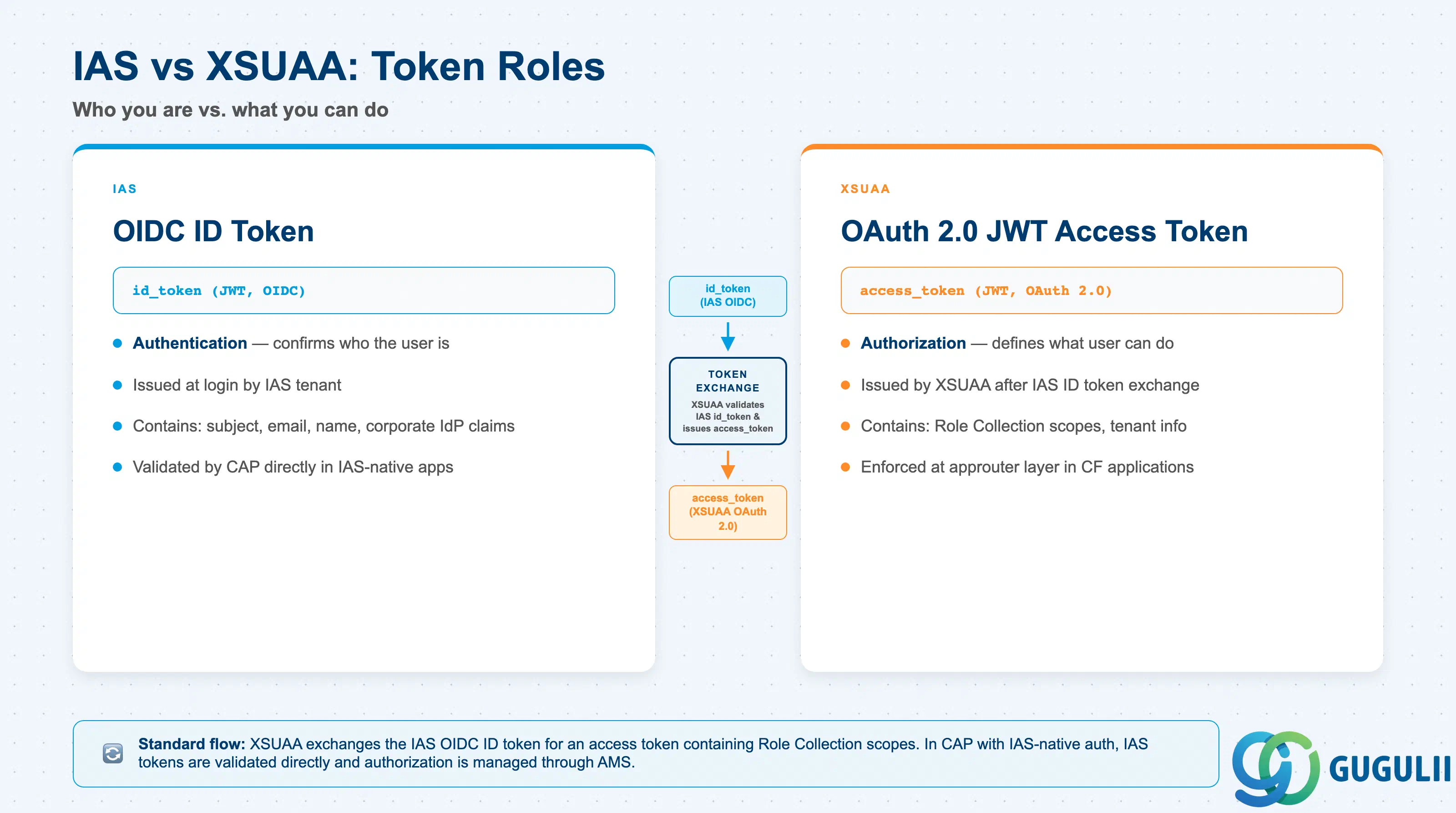
Q: What is the difference between IAS and XSUAA and when does each issue a token?
IAS issues OIDC ID tokens — these confirm who the user is (authentication). XSUAA issues OAuth 2.0 JWT access tokens — these define what the user is allowed to do within a specific BTP Cloud Foundry application (authorization). In the standard flow, XSUAA exchanges the IAS ID token for an access token containing Role Collection scopes; the application receives the XSUAA token, not the IAS token. In CAP applications with IAS-native authentication, IAS tokens can be validated directly by CAP, with authorization then managed through AMS rather than XSUAA ( CAP IAS/XSUAA documentation).
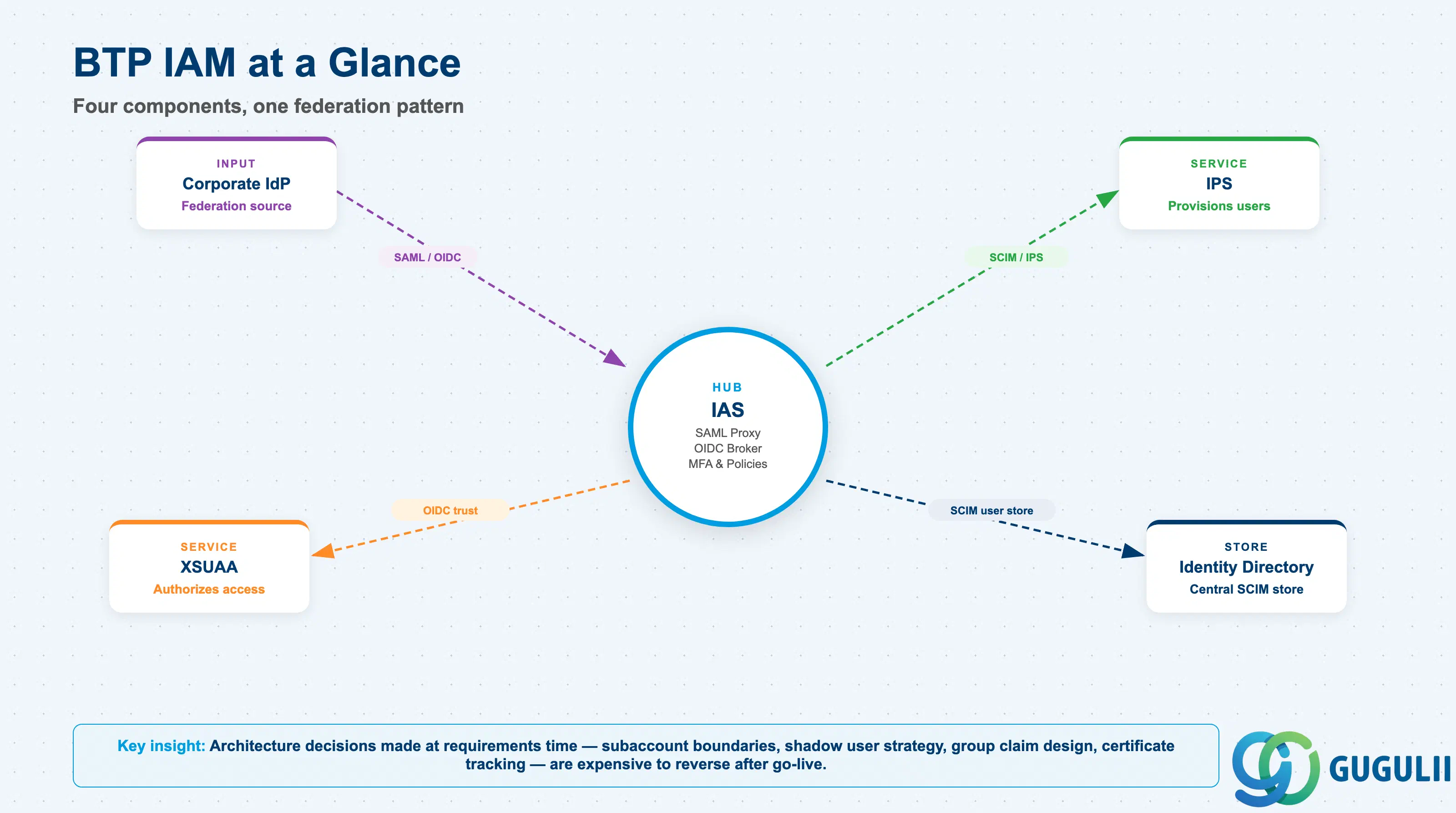
SAP BTP identity management is a four-component stack: IAS authenticates, IPS provisions, XSUAA authorizes, and Identity Directory stores centralized group assignments. The recommended enterprise pattern is three-tier federation — corporate IdP delegates to IAS, IAS delegates to BTP subaccounts — reducing per-subaccount configuration overhead to near zero ( SAP Architecture Center). The most consequential decisions are made at requirements time: subaccount segmentation by identity boundary, shadow user creation strategy, group claim design using Object IDs rather than display names, and certificate expiry tracking. All ten common failures documented in this article are preventable with deliberate architecture choices before any configuration is written.