Title here
Summary here

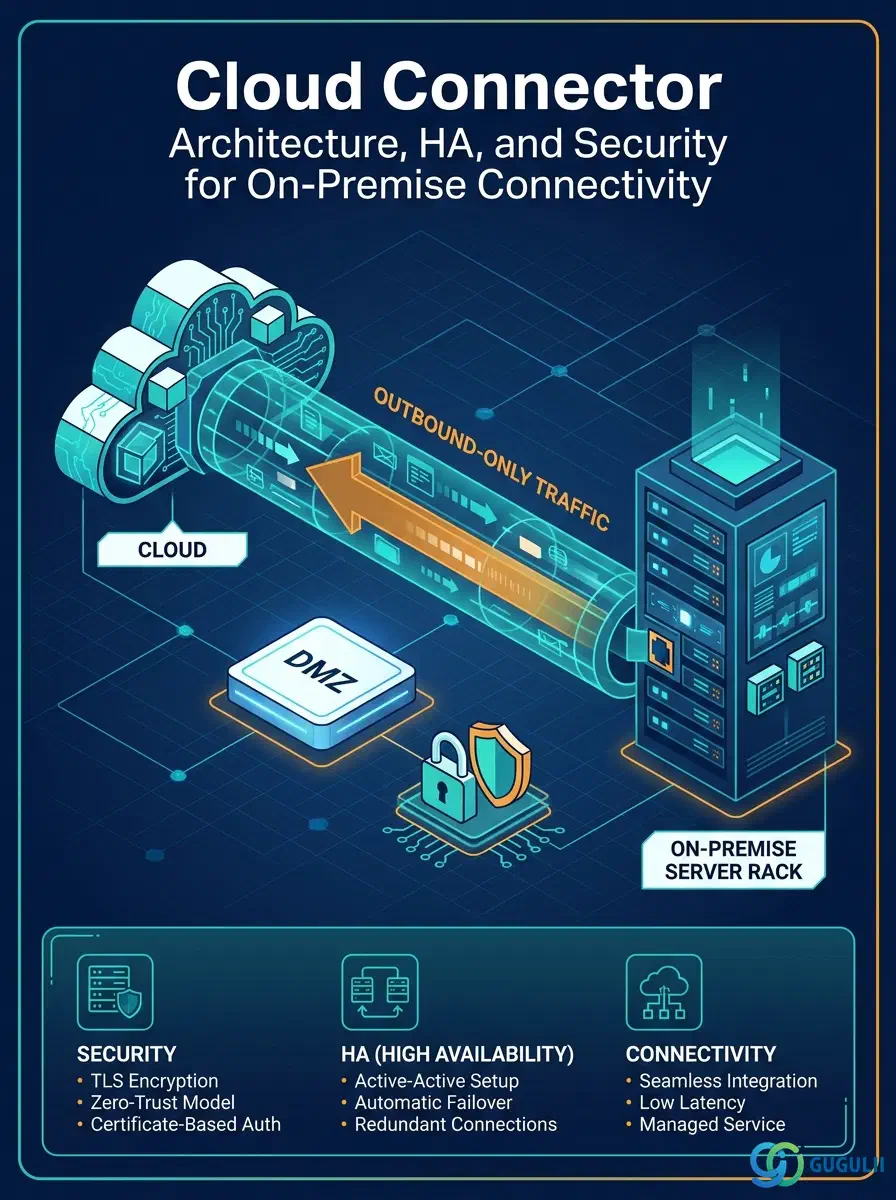
| ID | Category | Component | Scope |
|---|---|---|---|
| BTP-E01 | Foundation Services | Destination Service | Architecture and Use |
| BTP-E02 | Foundation Services | Connectivity Service | Architecture and Use |
| BTP-E03 | Foundation Services | Cloud Connector | Architecture and Use (this article) |
| BTP-E04 | Foundation Services | Private Link Service | Architecture and Use |
| BTP-E05 | Foundation Services | SAP BTP Connectivity — Principal Propagation | Configuration Guide |
| Resource | URL |
|---|---|
| Cloud Connector — SAP BTP Connectivity (CF) | help.sap.com → |
| High Availability Setup | help.sap.com → |
| Cloud Connector Security | help.sap.com → |
| Configure Access Control (RFC) | help.sap.com → |
| Installation on Linux OS | help.sap.com → |
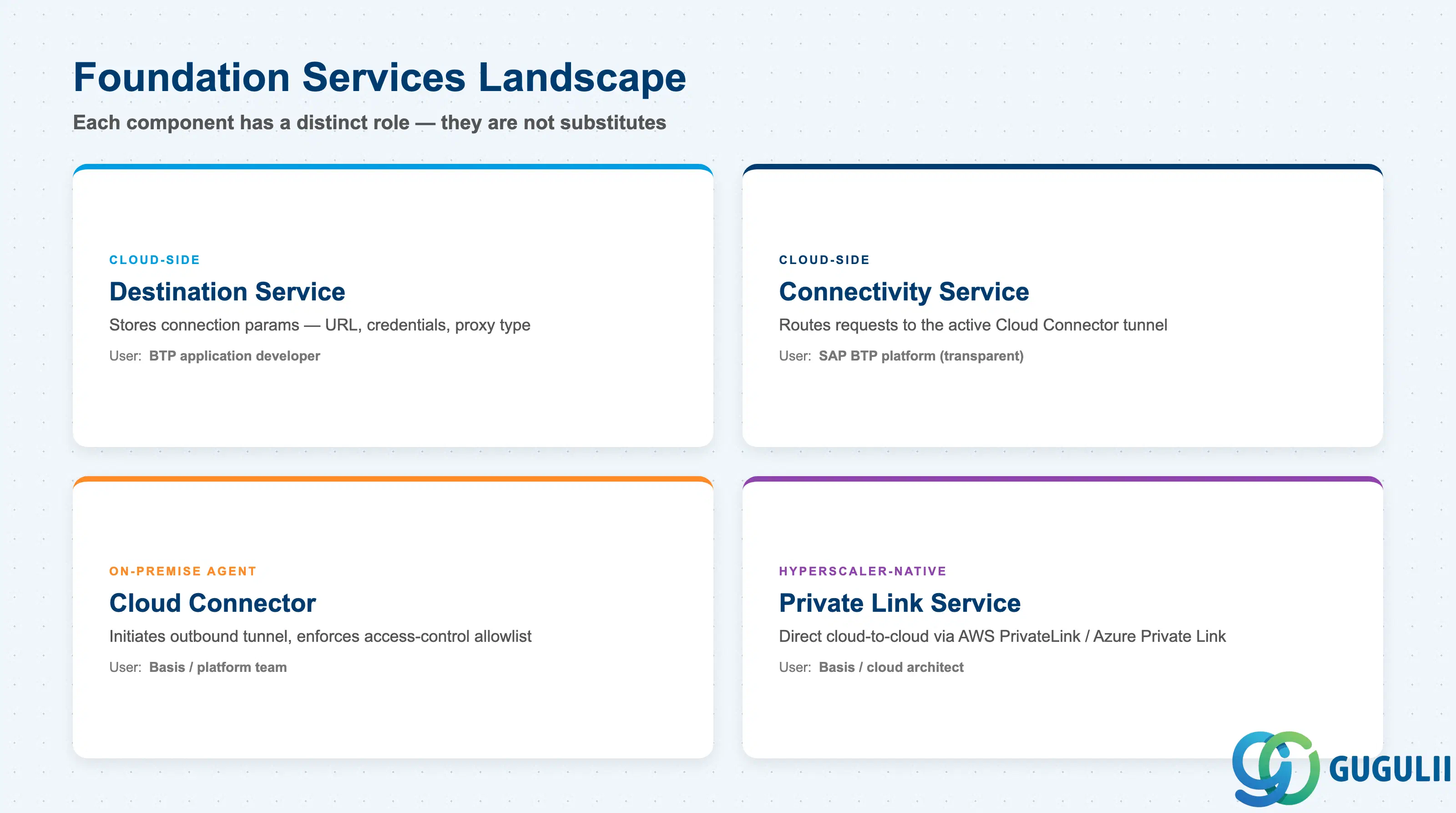
Cloud Connector does not operate in isolation. It is one component in a stack of SAP BTP Foundation Services that together handle all connectivity between cloud and on-premise systems. Understanding which component does what is essential before designing any integration.
| Component | What it does | Primary user |
|---|---|---|
| Destination Service | Stores connection parameters (URL, auth credentials, proxy type) for outbound calls from BTP applications | BTP application developer |
| Connectivity Service | Cloud-side broker that routes requests from BTP applications to the active Cloud Connector tunnel | SAP BTP platform (transparent) |
| Cloud Connector | On-premise agent that initiates the outbound tunnel, enforces access-control allowlists, and proxies requests to backend systems | Basis / platform team |
| Private Link Service | Hyperscaler-native private endpoint for direct cloud-to-cloud traffic without internet exposure (AWS PrivateLink, Azure Private Link) | Basis / cloud architect |
They are not substitutes. Cloud Connector handles on-premise systems reached through a corporate network; Private Link handles cloud-hosted services on the same hyperscaler. A customer using both is common.
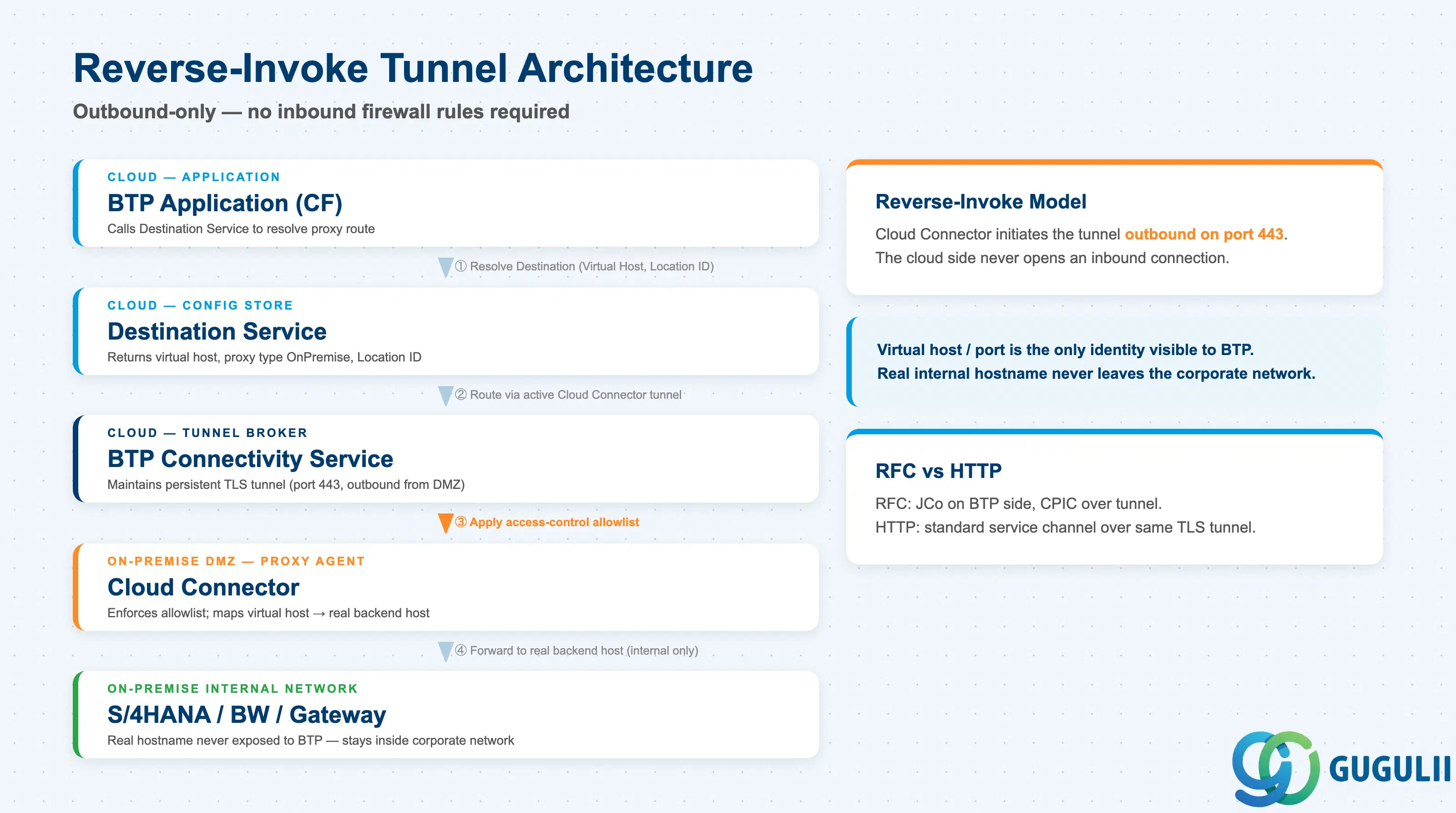
Cloud Connector acts as the on-premise leg of a four-hop request chain between a BTP application and an S/4HANA backend. The critical property of this chain is that the tunnel is always initiated outbound from the corporate network — the cloud side never opens an inbound connection. This reverse-invoke model is the foundation of the Cloud Connector architecture.
BTP Application (CF)
    |
    | (1) Resolve Destination (Proxy Type: OnPremise, Virtual Host, Location ID)
    v
Destination Service
    |
    | (2) Route via active Cloud Connector tunnel
    v
BTP Connectivity Service  ←→  [persistent TLS tunnel on port 443, outbound]
                                      |
                               Cloud Connector (on-premise host in DMZ)
                                      |
                               (3) Apply access-control allowlist
                                      |
                               (4) Forward to real backend host
                                      v
                              S/4HANA (ABAP) / BW / Gateway
                              (real internal hostname never exposed to BTP)
Key point: The virtual host/port configured in Cloud Connector is the only network identity visible to BTP. The real internal hostname never leaves the corporate network. This isolation is not optional — it is the architecture’s primary security guarantee, and it must be maintained even for development subaccounts.
For RFC connections, SAP Java Connector (JCo) runs on the BTP application side and communicates through the same tunnel. For HTTP connections, standard HTTP/HTTPS service channels are used.
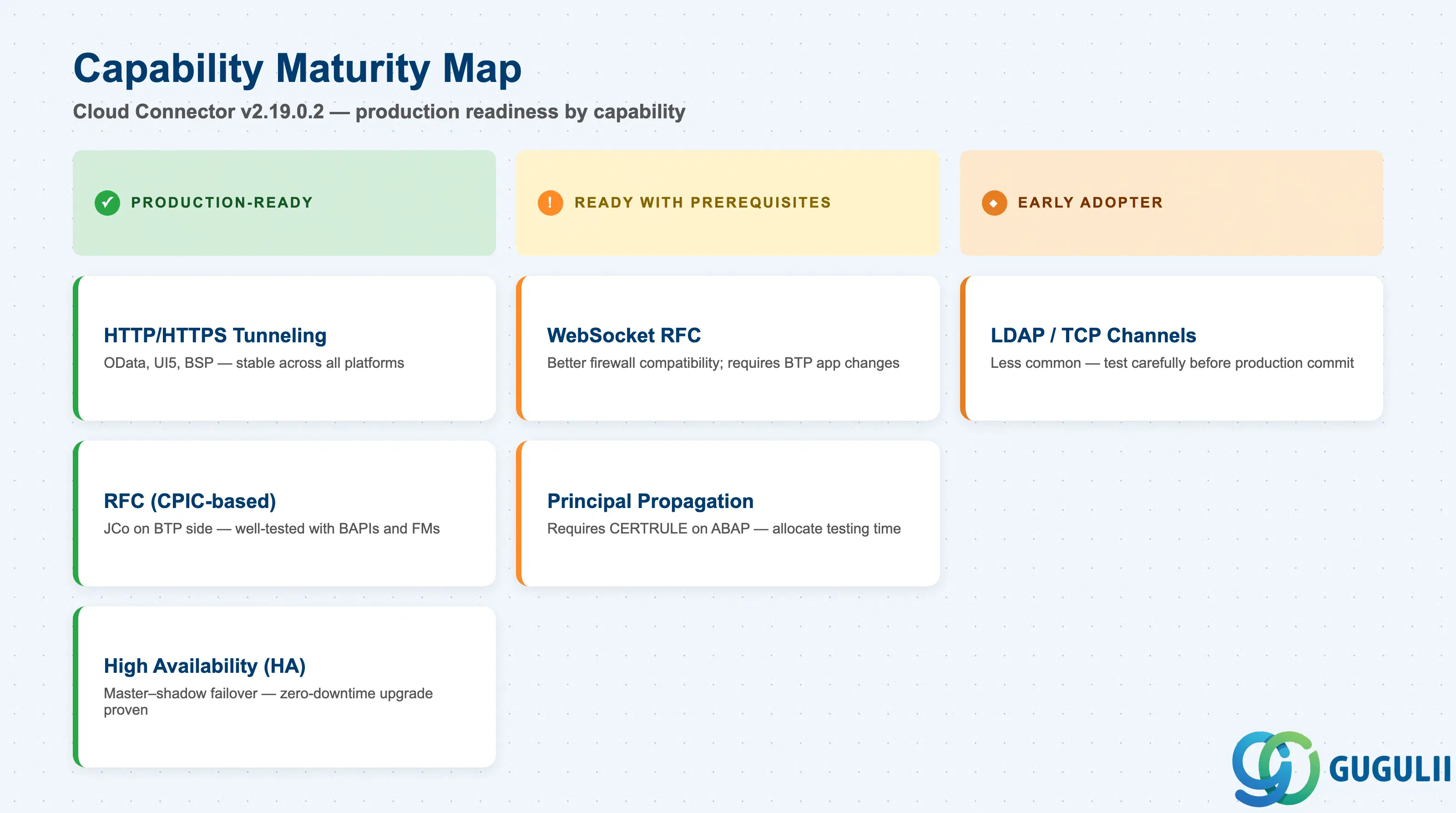
The following table reflects the production readiness of each Cloud Connector capability as of v2.19.0.2. For the full version history and newly supported platforms, see the Cloud Connector documentation on SAP Help Portal.
| Capability | Maturity | Notes |
|---|---|---|
| HTTP/HTTPS tunneling | ✅ Production-ready | Stable across all supported platforms; used by thousands of production integrations. ICF-based OData, UI5, BSP all work reliably. |
| RFC (CPIC-based) tunneling | ✅ Production-ready | Requires JCo on the BTP application side. Well-tested with ABAP Function Modules and BAPIs. |
| WebSocket RFC | ⚠️ Ready with prerequisites | Alternative to CPIC RFC. Improves firewall compatibility but requires BTP application changes and ABAP-side configuration. Validate with SAP support before using in production. |
| Principal Propagation | ⚠️ Ready with prerequisites | Requires certificate mapping configuration on the ABAP backend (CERTRULE transaction). Setup is well-documented but error-prone; allocate dedicated testing time. |
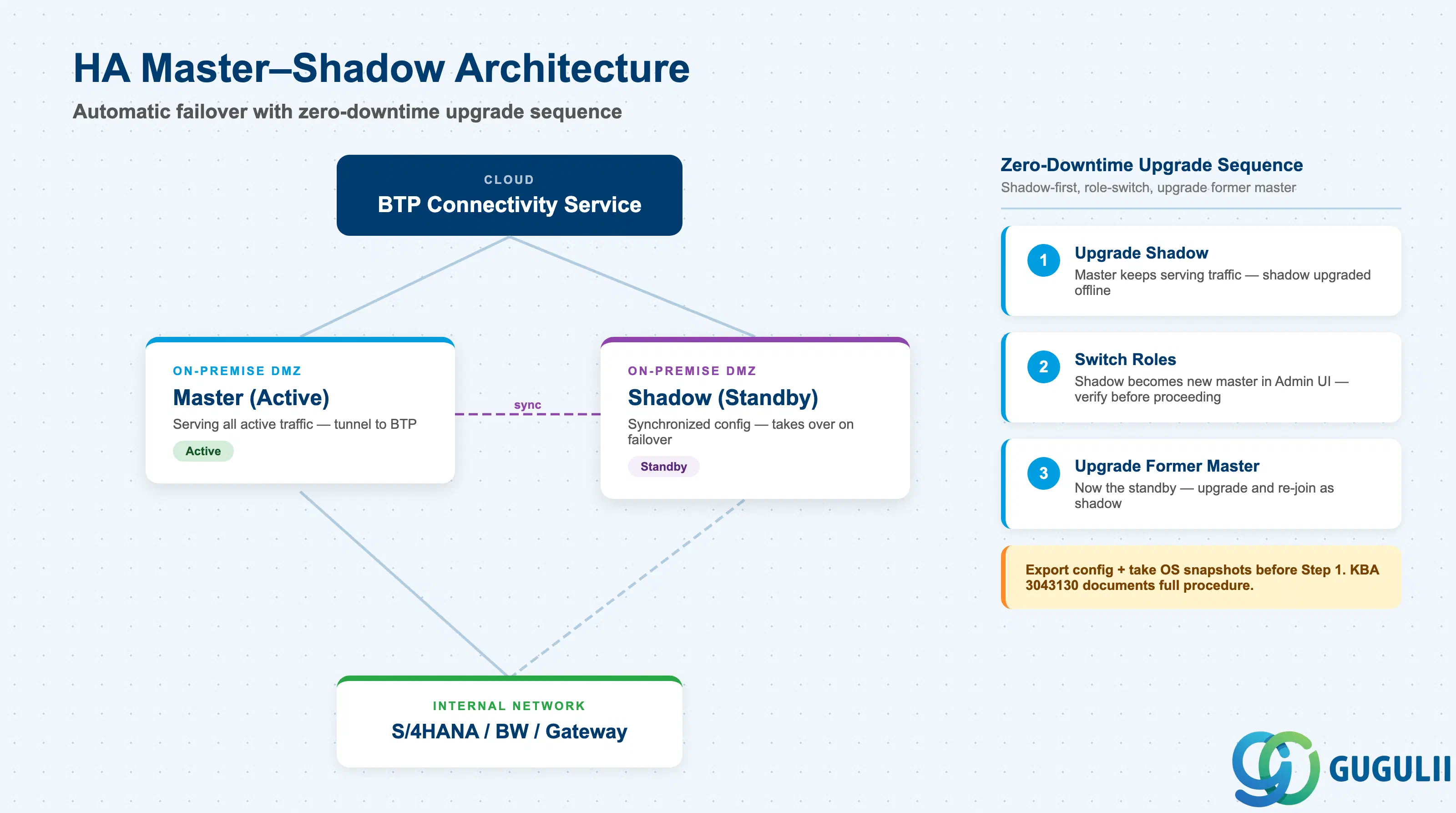
| High Availability (master–shadow) | ✅ Production-ready | Automatic failover is reliable. HA upgrade procedure (shadow-first, role-switch, upgrade old master) achieves zero downtime. |
| LDAP / TCP service channels | 🔶 Early adopter | Less commonly used; test carefully with your specific directory or TCP service before committing to production. |
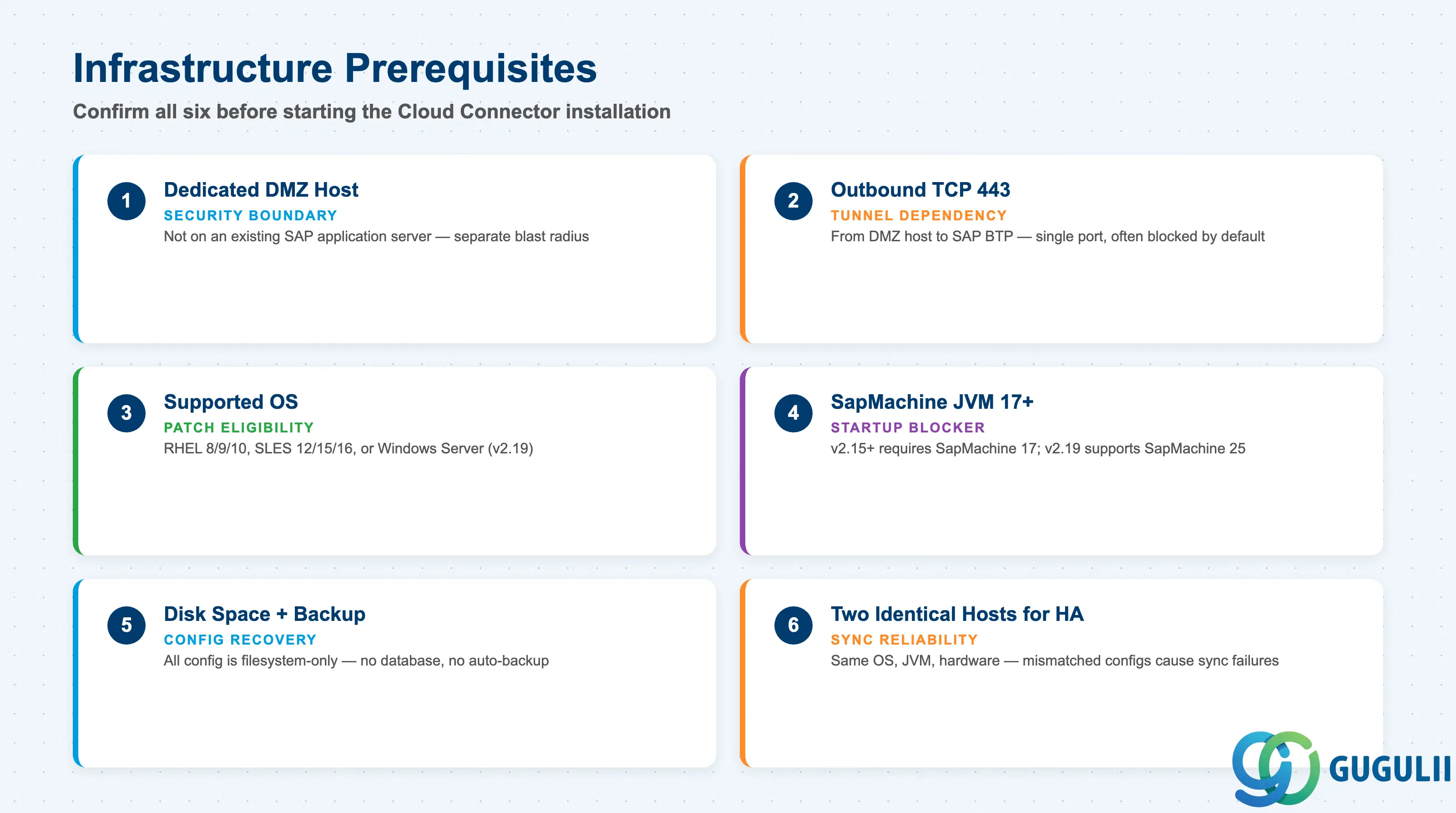
Refer to Installation on Linux OS for the supported OS list and step-by-step daemon setup before completing this checklist.
| Checklist item | Why it matters |
|---|---|
| Confirm a dedicated server (physical or VM) is available in the DMZ — not on an existing SAP application server | Hosting Cloud Connector on an application server broadens the blast radius of any compromise and is explicitly against security guidance |
| Validate outbound connectivity from the DMZ host to SAP BTP on TCP port 443 | The entire tunnel depends on this single outbound port; many DMZ firewall policies block all outbound by default |
| Confirm the host OS is on the supported list for the target Cloud Connector version (RHEL 8/9/10, SLES 12/15/16, Windows Server — as of v2.19) | Installing on an unsupported OS is not a supported configuration; SAP will not provide patches for OS-specific issues |
| Confirm available Java runtime: SapMachine 17 minimum for v2.15+; SapMachine 25 supported from v2.19 | Mismatched JVM version prevents Cloud Connector from starting; this is a common first-day blocker |
| Verify disk space for configuration files and audit logs; plan OS-level backup of the Cloud Connector data directory | Cloud Connector stores all configuration on the local filesystem — no database. A failed host without backup means full reconfiguration |
| For HA: provision two hosts with identical OS, JVM version, and hardware configuration in the same network segment | Shadow synchronization fails or produces unpredictable results on mismatched hardware/OS configurations |
| Checklist item | Why it matters |
|---|---|
| Confirm the BTP subaccount(s) are in Cloud Foundry environment (not Neo) | This article covers CF; Neo has different connector behavior and a separate configuration path |
| Identify which BTP subaccounts Cloud Connector must serve; one connector can pair to multiple subaccounts simultaneously | Failure to plan subaccount mapping leads to either under-provisioned connectors or security boundary violations between business units |
| Define a unique Location ID for each Cloud Connector if multiple connectors will connect to the same subaccount | Duplicate or missing Location IDs cause Destination Service routing failures that are difficult to diagnose at runtime |
| Confirm BTP Connectivity Service entitlement is active on each subaccount | Cloud Connector cannot establish a tunnel to a subaccount without the Connectivity Service subscription |
| Plan who holds the BTP subaccount administrator credentials used to pair the connector | Pairing requires subaccount-level credentials; if the person who did the initial setup leaves, pairing must be re-established |
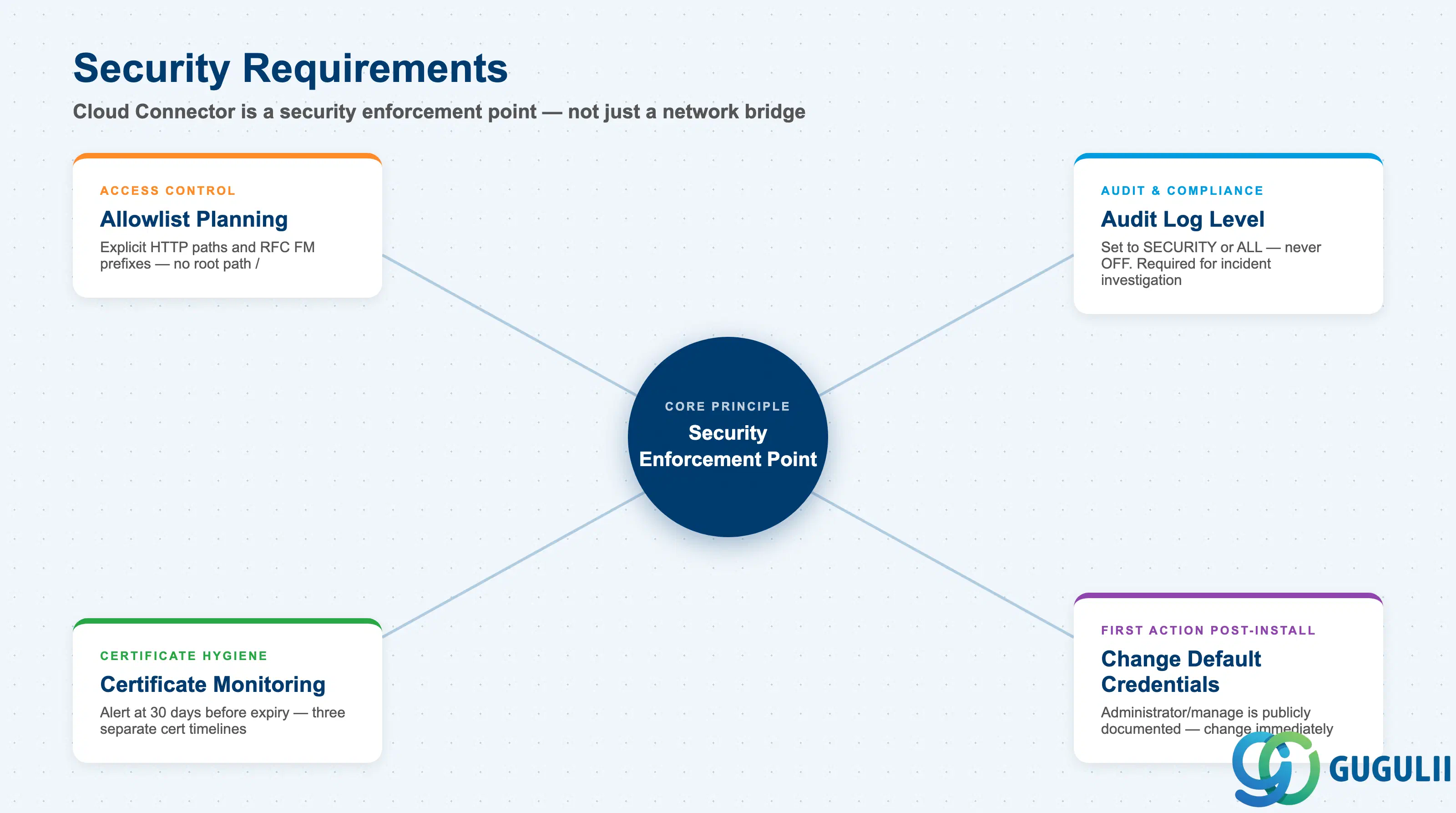
The Cloud Connector Security documentation specifies the full set of security controls and certificate requirements; this checklist covers the requirements-stage items to confirm before implementation begins.
| Checklist item | Why it matters |
|---|---|
| List every backend system to be exposed and define the virtual host/port alias for each | Only systems with explicit system mappings are reachable; missing any backend means integration goes live with errors |
For each HTTP backend: enumerate the specific URL paths to expose (e.g., /sap/opu/odata, /sap/bc/adt) — do not use root / unless explicitly justified | Granting root path access exposes all ICF services, including debug and admin endpoints not intended for integration |
For each RFC backend: enumerate permitted function module prefixes (e.g., BAPI_*, RFC_*) explicitly | RFC access is deny-by-default; all required function modules must be allowlisted before integration testing begins |
| Confirm audit log level will be set to SECURITY or ALL — never OFF | Blocked access attempts and configuration changes must be logged for security incident investigation; disabling logging is a compliance risk |
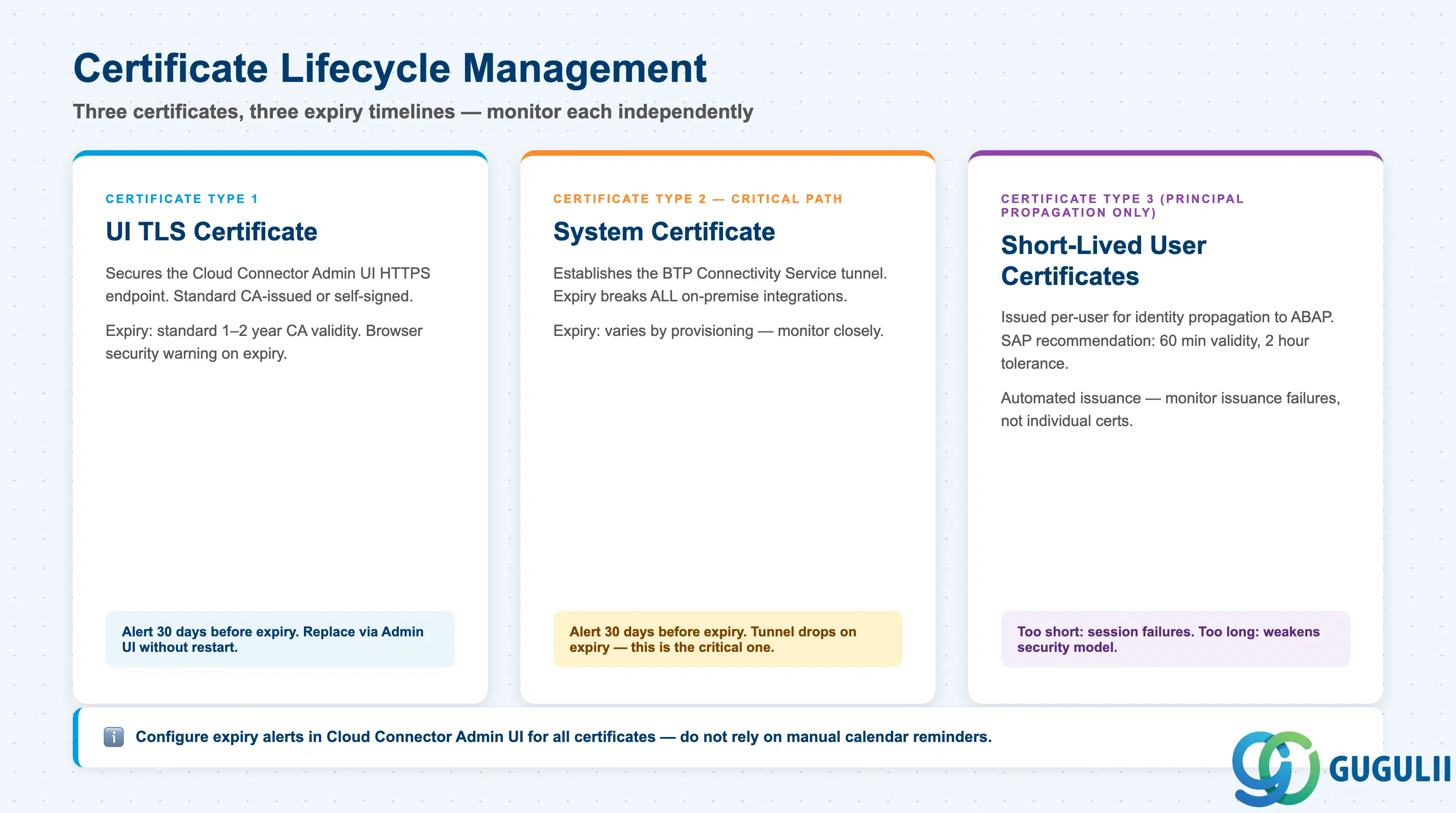
| Plan certificate expiration monitoring for the Cloud Connector’s own system certificate and the UI certificate | Expired certificates silently break connectivity or trigger browser security warnings; configure alerting at minimum 30 days before expiry |
| Confirm the default Administrator/manage credentials will be changed immediately after installation | Default credentials are publicly documented; any unpatched default login is a critical security finding in customer audits |
| Checklist item | Why it matters |
|---|---|
Confirm the ABAP backend supports certificate-based login (login parameter login/certificate_mapping_rulebased=1) | If the ABAP system is not configured to accept certificate logon, Principal Propagation will silently fall back to or fail with authentication errors |
| Allocate time to configure CERTRULE transaction on each ABAP backend that will receive propagated identities | Rule-based certificate mapping requires a dedicated configuration step that is frequently missed in project plans |
| Agree on certificate validity window for short-lived user certificates (SAP recommendation: 60-minute validity, 2-hour expiration tolerance) | Too-short validity causes session failures during long-running transactions; too-long validity weakens the security model |
| Confirm IDP (Identity Provider) user attribute used as the certificate subject matches available ABAP user attributes | A mismatch between IDP claims and ABAP user attributes causes mapping failures that appear as generic authentication errors at runtime |
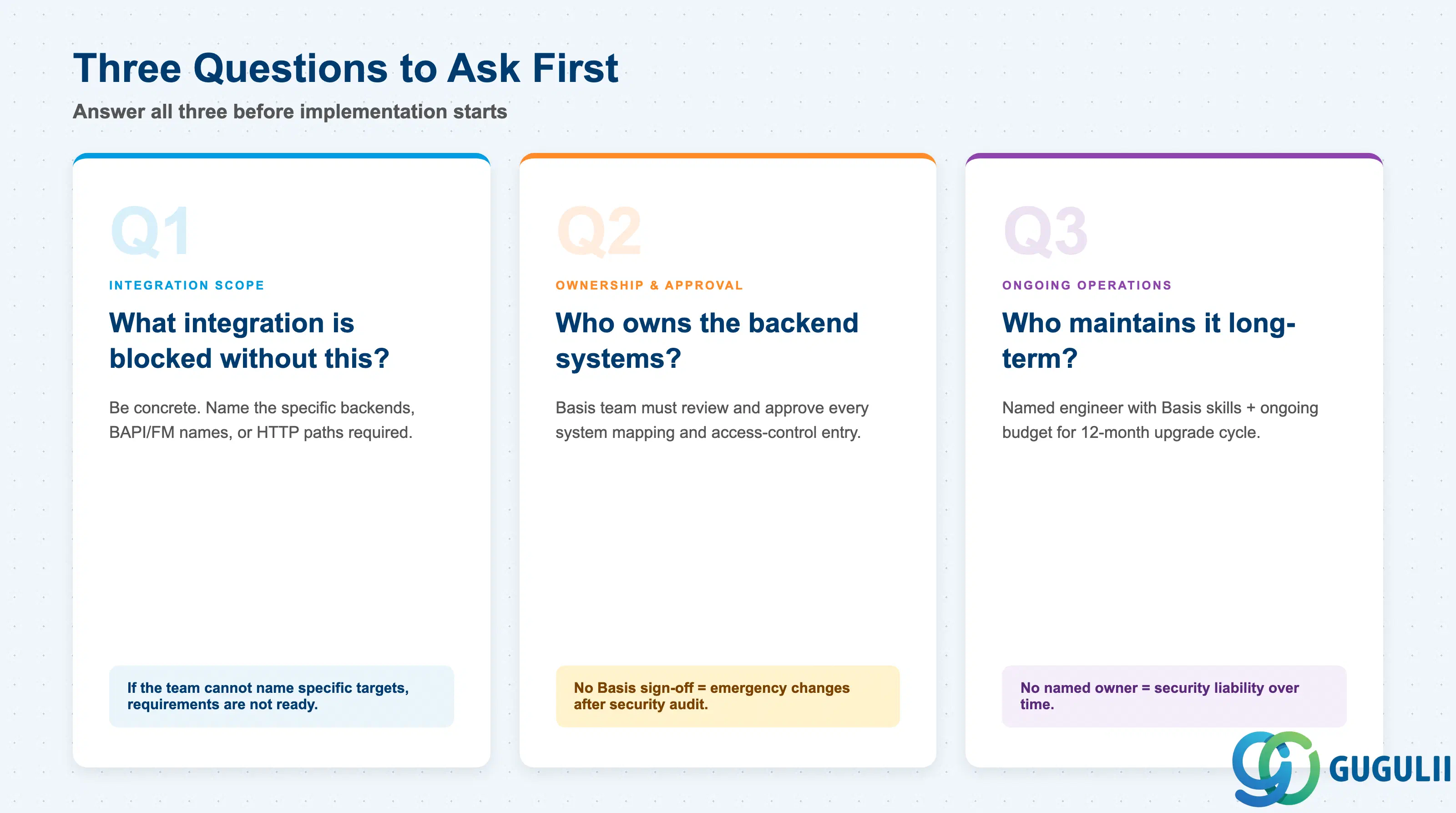
Q1. What specific on-premise integration is blocked or broken without this connectivity?
Be concrete. “We need to call BAPI_SALESORDER_CREATEFROMDAT2 from our BTP extension” is a valid answer. “We need to connect to on-premise” is not. If the team cannot name specific backends, function modules, or HTTP paths, the requirements are not ready for implementation. Cloud Connector configuration is driven entirely by the allowlist — without knowing what to allow, the deployment will either be over-permissive (security risk) or under-permissive (broken integrations).
Q2. Who owns the on-premise systems being exposed, and have they approved the system mapping?
Cloud Connector exposes internal systems to BTP-hosted applications. The Basis team owning the backend systems must review and approve every system mapping and access-control entry. Projects that configure Cloud Connector without Basis sign-off frequently face emergency changes when security teams audit the allowlist.
Q3. Is there an identified platform engineer with Basis-level skills and an ongoing maintenance budget?
Cloud Connector versions are supported for exactly 12 months. HA upgrades, certificate rotation, access-control changes, and audit log review are recurring operational tasks. Without a named owner and allocated time, Cloud Connector becomes a security liability rather than an asset.
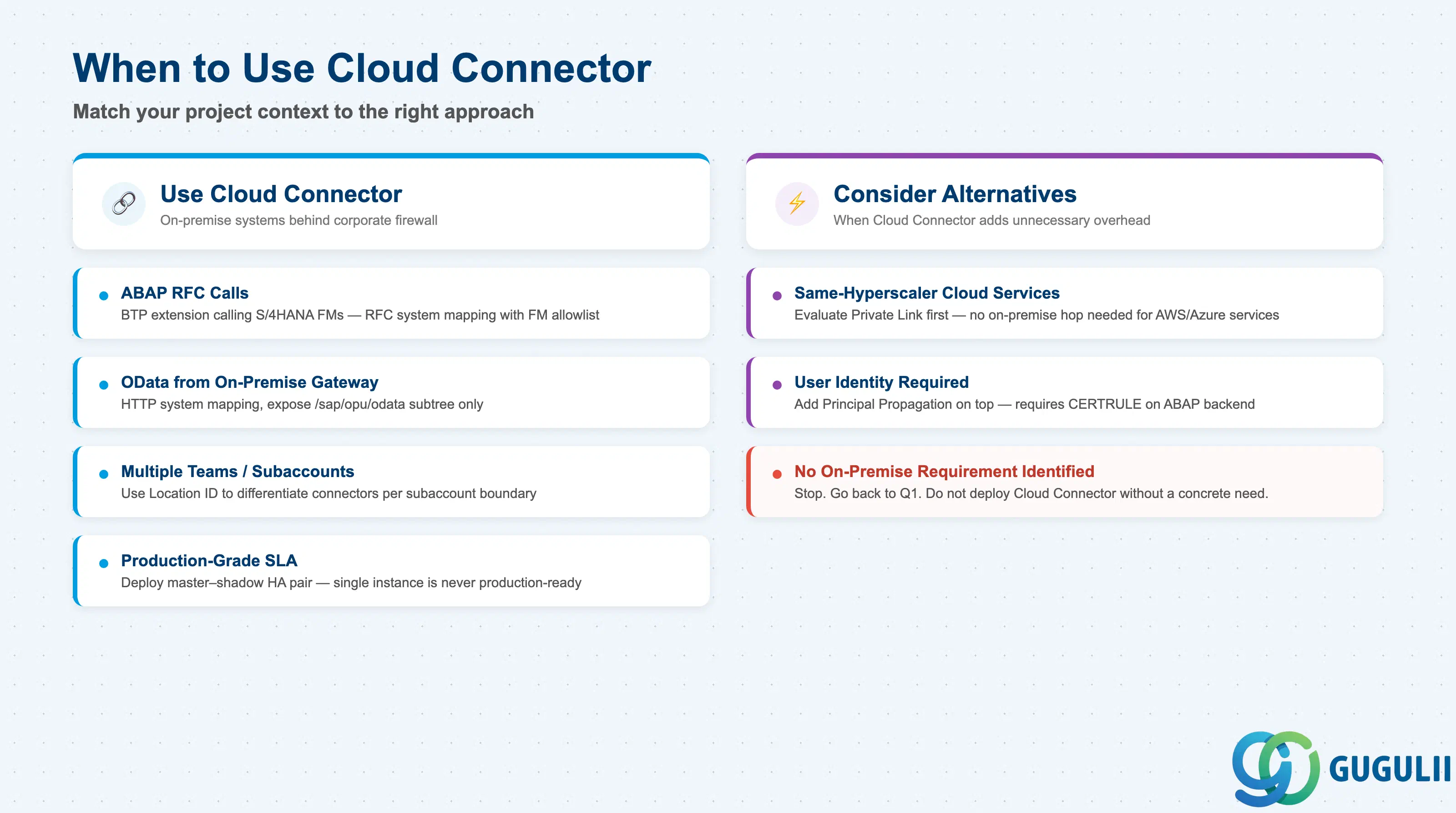
| Project context | Recommended approach |
|---|---|
| BTP extension calling ABAP function modules in existing S/4HANA | Cloud Connector with RFC system mapping; define function module allowlist with Basis team |
| BTP app consuming OData APIs from on-premise S/4HANA or Gateway | Cloud Connector with HTTP system mapping; expose only the /sap/opu/odata subtree |
| Multiple teams needing separate access to the same backend | Use Location ID to differentiate connectors; configure separate system mappings per subaccount boundary |
| Accessing cloud-hosted systems on the same hyperscaler (AWS/Azure) | Evaluate Private Link Service first; Cloud Connector adds unnecessary on-premise hop for cloud-to-cloud traffic |
| End users must authenticate to on-premise backend with their own identity (no shared service account) | Add Principal Propagation on top of Cloud Connector; requires additional ABAP backend configuration |
| High availability required (production-grade SLA) | Deploy master–shadow HA pair; do not use a single Cloud Connector instance for any production workload |
| No clear on-premise integration requirement identified yet | Stop. Go back to Q1. |
| Component | Licensing model | Key question to ask |
|---|---|---|
| Cloud Connector (software) | Free to download and use; included with SAP BTP entitlement | Is the customer’s BTP contract active? Cloud Connector itself has no separate license fee |
| BTP Connectivity Service | Consumed as part of the BTP Connectivity service plan; typically included in BTP standard subscription | Confirm the Connectivity service plan is entitled on each target subaccount |
| Host infrastructure (VM / server) | Customer-managed; Cloud Connector requires a dedicated server or VM in customer’s own infrastructure | Who provisions and pays for the dedicated DMZ host? This is frequently an unplanned cost in initial project estimates |
| HA infrastructure | Two hosts required (master + shadow); doubles infrastructure cost | HA is not a Cloud Connector license question — it is an infrastructure budget question |
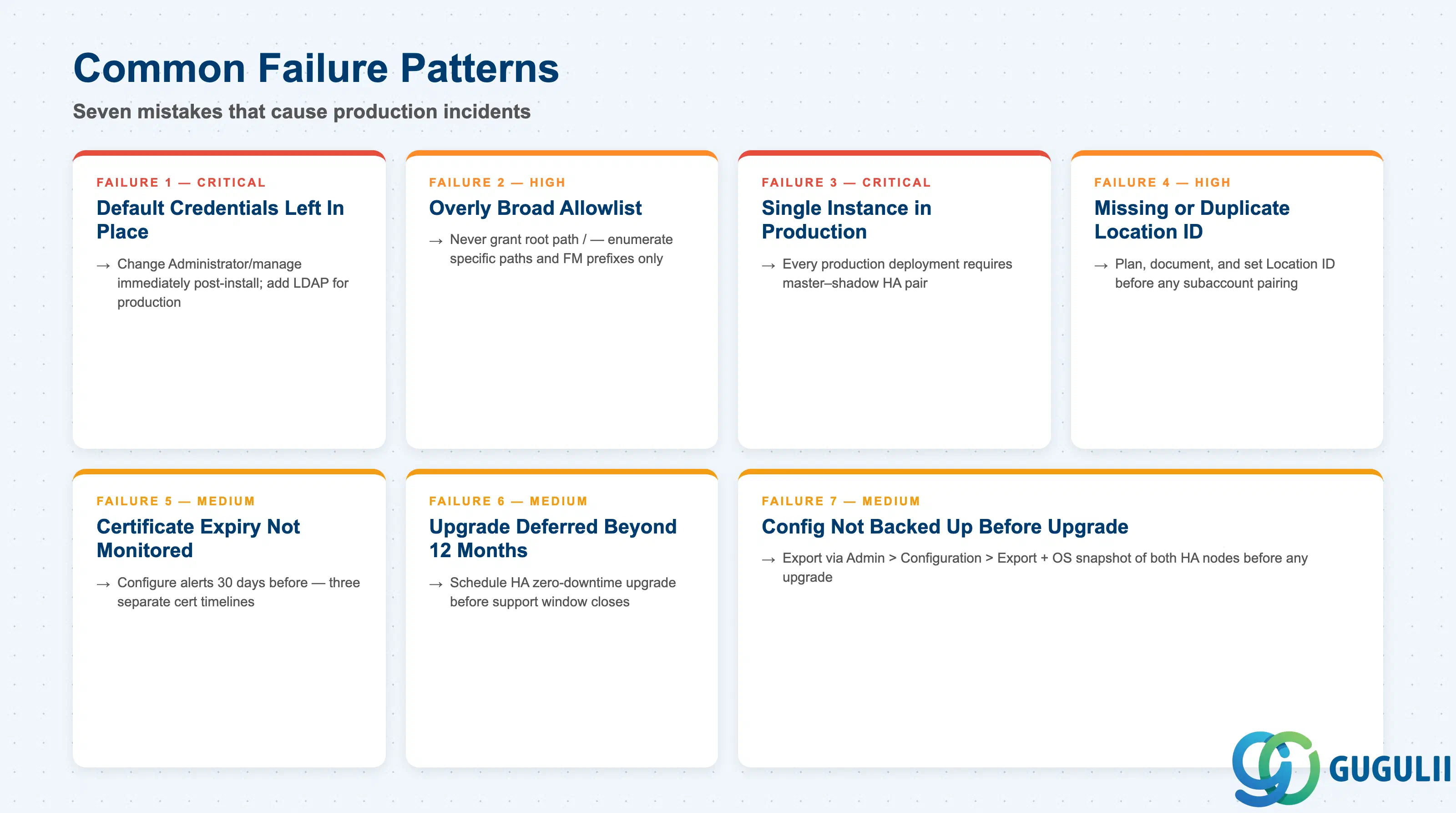
Failure 1: Default credentials left in place
Cloud Connector ships with default login Administrator / manage. These credentials are publicly documented. Projects that go live without changing them — including development and QA instances — are a common audit finding. The first step after any Cloud Connector installation must be changing the Administrator password and, for production, replacing file-based authentication with LDAP. See
Cloud Connector Security for the full credential hardening guidance.
Failure 2: Overly broad access-control allowlist
The temptation during initial setup is to grant root path / access to an HTTP system or to use wildcard prefixes for RFC function modules. This passes initial testing but exposes ICF debug services, admin endpoints, and function modules that were never intended for integration access. Access-control entries must be reviewed against the actual list of integration scenarios before go-live. Consult
Configure Access Control (RFC) for the explicit allowlist model.
Failure 3: Single Cloud Connector instance for production
Cloud Connector without HA is a single point of failure for all on-premise integrations. When the host goes down for patching, restart, or hardware failure, every BTP-to-on-premise integration stops. Projects consistently underestimate the operational impact of this until the first production outage. Every production deployment must use the master–shadow HA pair; consult the High Availability Setup documentation before any production go-live.
Failure 4: Location ID not defined — or duplicate Location IDs
When multiple Cloud Connectors connect to the same BTP subaccount, the Destination Service uses the Location ID to route requests to the correct tunnel. If Location ID is left blank or duplicated, Destination-based routing is undefined. The typical symptom is intermittent connection failures that are extremely difficult to reproduce. Location ID must be planned, documented, and set consistently in both the Cloud Connector admin UI and the BTP Destination configuration.
Failure 5: Certificate expiry not monitored
Cloud Connector uses X.509 certificates for three distinct purposes: the UI TLS certificate, the system certificate used to establish the BTP tunnel, and (if Principal Propagation is used) the short-lived user certificates. Each has its own expiry timeline. Without configured alerting, expired certificates produce cryptic connectivity failures that are difficult to diagnose under production incident pressure. Configure expiration alerts in the Cloud Connector admin UI for all certificates at least 30 days before expiry. The full certificate management guidance is in Cloud Connector Security.
Failure 6: Upgrade deferred beyond the 12-month support window
Each Cloud Connector version is supported for exactly 12 months. Organizations that treat Cloud Connector as “set it and forget it” infrastructure quickly find themselves running unsupported versions. SAP provides zero-downtime HA upgrade procedures precisely to remove the barrier to regular upgrades. Failure to plan the 12-month upgrade cycle results in an accumulation of unsupported instances that cannot receive security patches.
Failure 7: Configuration not backed up before upgrade
Cloud Connector stores all configuration on the local filesystem. Unlike a database-backed application, there is no automated configuration backup. Before any upgrade or host migration, administrators must export configuration from Admin > Configuration > Export and take OS-level snapshots of both HA nodes. Projects that skip this step face full reconfiguration after a failed upgrade, with no record of which backends were mapped or which paths were allowed.
Q: Can Cloud Connector be installed on the same host as the SAP application server?
No — and this is a hard security recommendation, not merely a preference. Installing Cloud Connector on an SAP application server means that a compromise of the Cloud Connector process (which has outbound internet connectivity) would also have direct access to the ABAP file system and memory. Cloud Connector must run on a dedicated host in the DMZ, with firewall rules permitting only the specific outbound traffic to SAP BTP on port 443 and the inbound calls to the specific backend hosts in the allowlist.
Q: Does Cloud Connector require a VPN?
No. The fundamental design of Cloud Connector eliminates the VPN requirement. The connector establishes an outbound TLS tunnel on port 443 — a port that is almost universally permitted for outbound traffic even in corporate firewall policies. This is the “reverse invoke” model: the cloud side never initiates an inbound connection. No VPN, no inbound firewall rule, and no DMZ rule allowing inbound connectivity from the internet are required.
Q: What is the license cost for Cloud Connector?
The Cloud Connector software itself is free to download and use as part of an SAP BTP entitlement. There is no separate license fee for Cloud Connector. The real cost is infrastructure: a dedicated host (or two for HA), the operational effort to maintain it, and the BTP Connectivity service entitlement on each subaccount. Projects frequently miss the dedicated-host cost in their initial budget estimates.
Q: When should we descope Cloud Connector from a project?
Descope Cloud Connector when there is no genuine on-premise backend to connect to. If the target system is already in the cloud (e.g., an S/4HANA Cloud subscription-based instance, or a hyperscaler-hosted service on the same cloud provider as BTP), Private Link Service or direct outbound connectivity is often more appropriate. Cloud Connector adds latency and operational overhead that is only justified when accessing systems behind a corporate firewall.
Q: How do we document the Cloud Connector requirement properly in a project?
For each system mapping, document: the real backend hostname and port, the virtual hostname and port alias, the protocol (HTTP/RFC), the specific paths or function module prefixes in the allowlist, the authentication method (Basic, Principal Propagation, Client Certificate), and the owner of the backend system who approved the mapping. This documentation serves as both the configuration reference and the evidence for security audits. Store it in the project’s architecture decision records, not in the Cloud Connector admin UI comments alone.
Q: What happens to active connections when a Cloud Connector master fails and the shadow takes over?
Active in-flight requests at the moment of failover will fail and must be retried by the calling application. The shadow becomes the new master and re-establishes the BTP tunnel; new requests proceed normally. Applications must be designed to handle transient connectivity errors with retry logic — Cloud Connector HA provides infrastructure-level availability but does not provide transparent session failover at the application request level.
Q: How do we upgrade Cloud Connector without downtime?
Use the zero-downtime HA upgrade sequence: (1) upgrade the shadow first while the master continues serving traffic, (2) switch roles in the admin UI so the shadow becomes the new master, (3) upgrade the former master (now the shadow). Each step can be verified before proceeding. Export configuration and take OS snapshots before starting. This procedure is documented in SAP Knowledge Base Article 3043130.
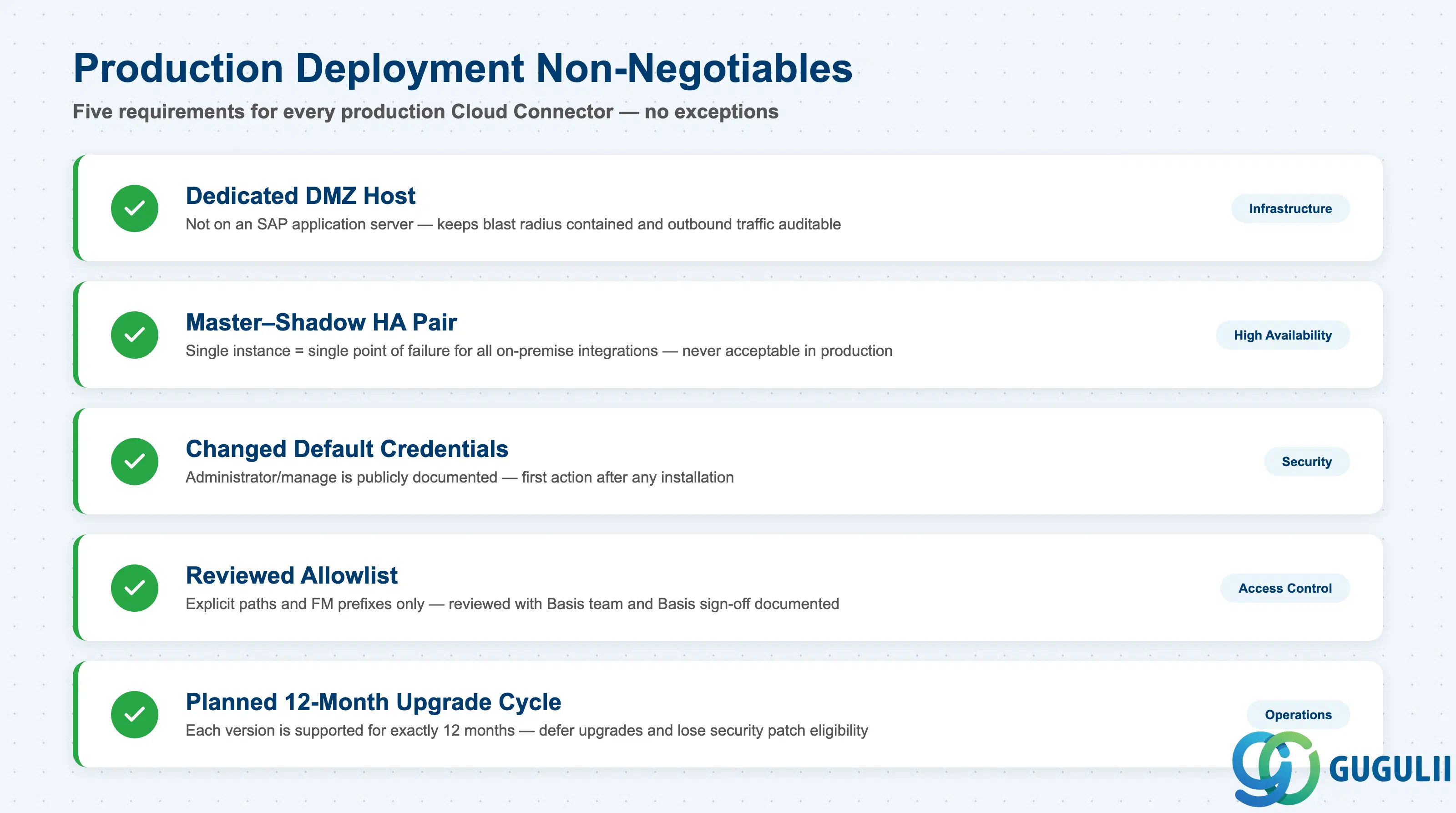
Cloud Connector is the production-proven solution for connecting SAP BTP applications to on-premise backends over RFC and HTTP. Its reverse-invoke tunnel model eliminates inbound firewall requirements and its access-control allowlist enforces an explicit deny-by-default security posture. For any project with on-premise integration requirements, the non-negotiables are: a dedicated DMZ host, a master–shadow HA pair, changed default credentials, a reviewed allowlist, and a planned 12-month upgrade cycle. The Cloud Connector documentation covers the full configuration reference; for security hardening, consult Cloud Connector Security. The connector’s simplicity — no database, single outbound port, flat filesystem configuration — is a strength for operations but demands disciplined backup and monitoring practices. Get the access-control model right at requirements stage; retrofitting it after go-live is costly and disruptive.