Title here
Summary here

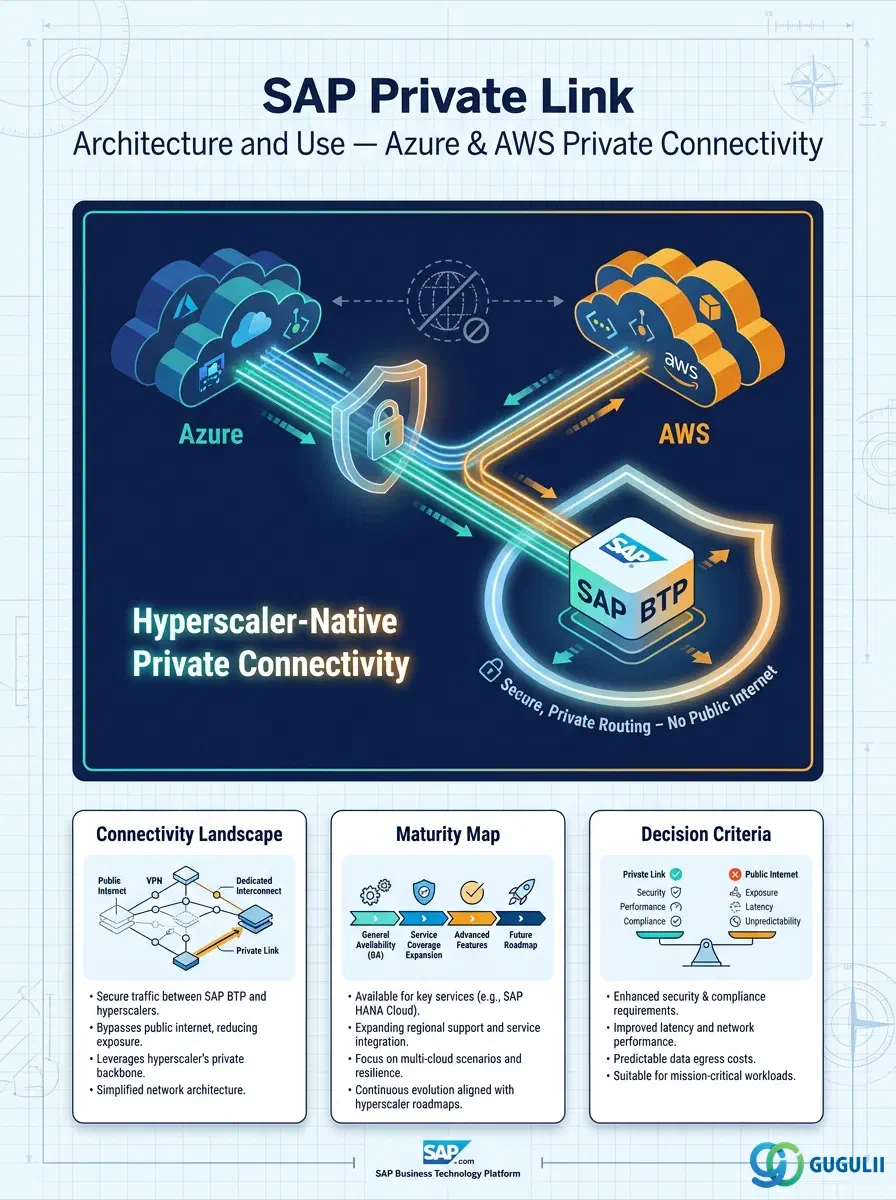
| ID | Category | Component | Scope |
|---|---|---|---|
| BTP-E01 | Overview | Foundation Services | Overview and Capability Map |
| BTP-E02 | Identity | Identity and Access Management | Architecture and Use |
| BTP-E03 | Connectivity | Cloud Connector | Architecture and Use |
| BTP-E04 | Connectivity | Private Link | Architecture and Use (this article) |
| BTP-E05 | Operations | Cloud ALM | Architecture and Use |
| BTP-E06 | Operations | Cloud Transport Management | Architecture and Use |
| BTP-E07 | Overview | Foundation Services | Use Cases and Decision Patterns |
| Resource | URL |
|---|---|
| What Is SAP Private Link Service | help.sap.com → |
| Using SAP Private Link Service | help.sap.com → |
| Supported Services for Amazon Web Services | help.sap.com → |
| Secure Connectivity with SAP Private Link — Reference Architecture | help.sap.com → |
| Connect SAP Private Link to Microsoft Azure Private Link — Tutorial Mission | help.sap.com → |
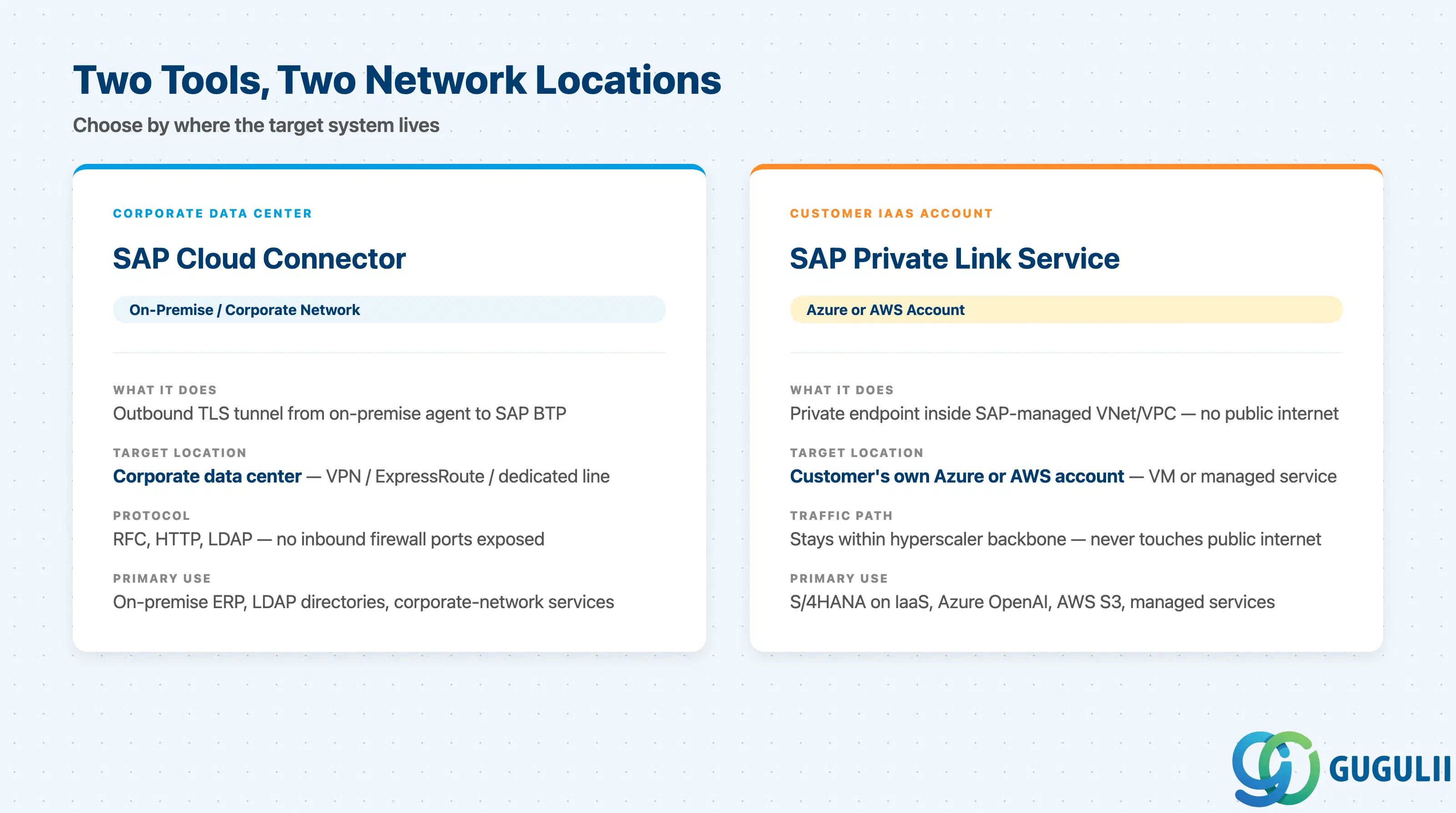
The connectivity layer of SAP BTP Foundation Services covers two distinct tools. Understanding where each one applies is a prerequisite to every project that extends SAP BTP toward external systems. The SAP Help Portal overview defines Private Link service as a connection between BTP applications and services in the customer’s own IaaS provider accounts, with traffic kept entirely within the hyperscaler infrastructure.
| Tool | What it does | Primary user |
|---|---|---|
| SAP Cloud Connector | Opens a TLS tunnel from an on-premise agent to SAP BTP, bridging corporate data center systems (RFC, HTTP, LDAP) without exposing inbound firewall ports | Project teams connecting to on-premise ERP, LDAP directories, or corporate-network services |
| SAP Private Link service | Creates a private endpoint inside the SAP-managed hyperscaler VNet/VPC that routes to a service in the customer’s own Azure or AWS account — all traffic stays within the hyperscaler backbone | Project teams whose target system is already hosted in the customer’s Azure or AWS account (VM, managed service, or SAP RISE PCE) |
Both tools can run in the same BTP subaccount simultaneously and are not mutually exclusive. They are not substitutes.
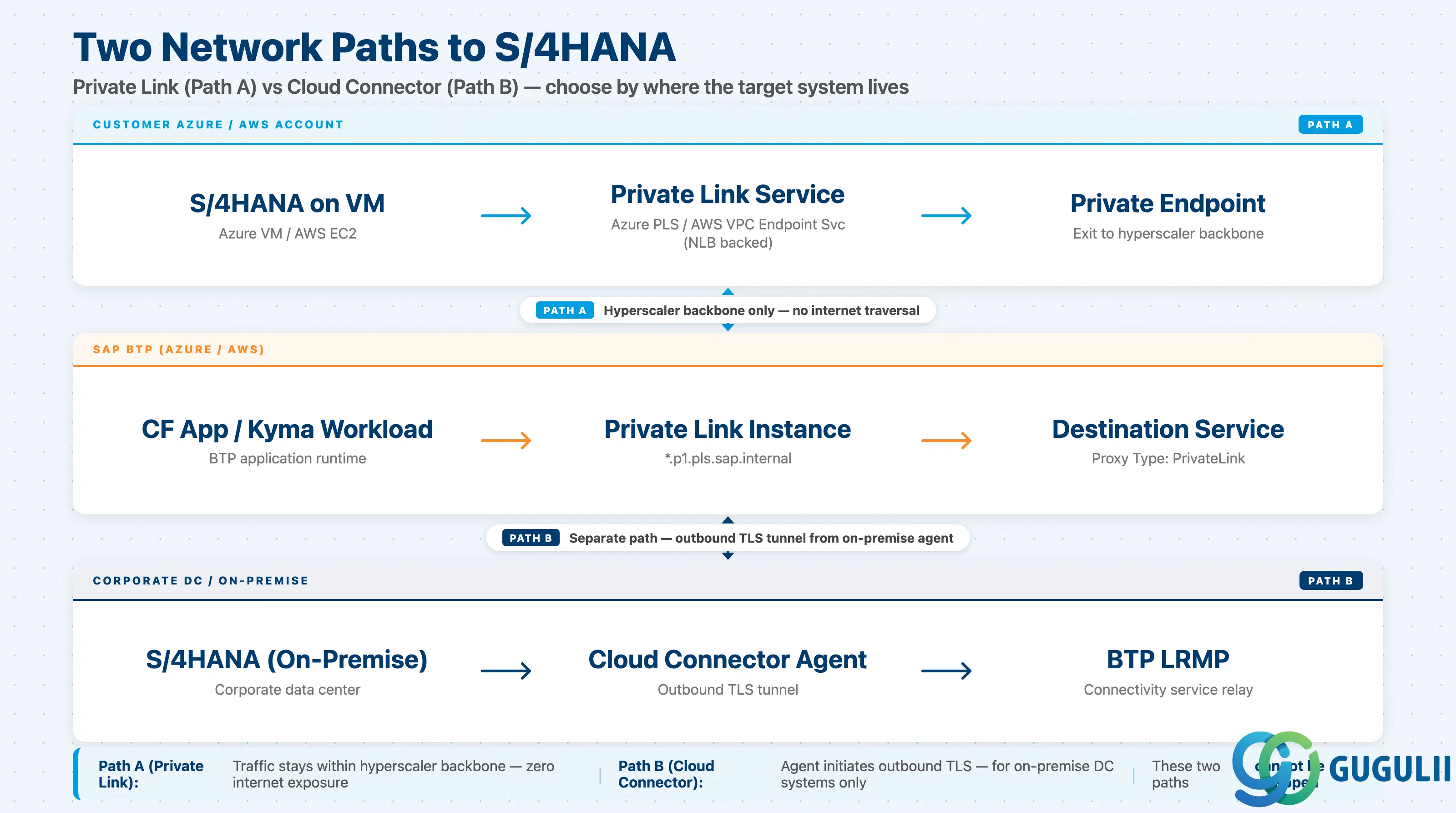
The architecture differs between Cloud Connector and Private Link at the network layer, which is why the choice of tool depends on where S/4HANA (or any other target) is physically running. The SAP Architecture Center reference architecture documents both Azure and AWS flows, with the core components being the Private Link service instance, the Destination Service, and the IaaS-side endpoint service (Azure Private Link Service or AWS VPC Endpoint Service).
 ┌─────────────────────────────────────────────────────────────────────┐
 │                     Customer Azure / AWS Account                    │
 │                                                                     │
 │  ┌──────────────────────────────────────────────────────────────┐   │
 │  │  (A) S/4HANA on VM  ──► Azure Private Link Svc / VPC Endpt  │   │
 │  │                          Service (backed by NLB)             │   │
 │  └───────────────────────────────┬──────────────────────────────┘   │
 │                                  │ Private endpoint                 │
 └──────────────────────────────────┼──────────────────────────────────┘
                                    │ Hyperscaler backbone only
 ┌──────────────────────────────────┼──────────────────────────────────┐
 │          SAP BTP (Azure / AWS)   │                                  │
 │                                  ▼                                  │
 │  SAP Private Link service instance  ── private hostname             │
 │        (*.p1.pls.sap.internal)       ── Destination Service         │
 │               ▲                          (Proxy Type: PrivateLink)  │
 │               │ CF app / Kyma workload                              │
 └───────────────┼─────────────────────────────────────────────────────┘
                 │
                 │  (B) On-premise S/4HANA path (different tool):
                 │
 ┌───────────────┴─────────────────────────────────────────────────────┐
 │  Corporate DC / On-premise network                                  │
 │  S/4HANA ──► Cloud Connector agent (TLS tunnel) ──► BTP LRMP       │
 └─────────────────────────────────────────────────────────────────────┘
Path (A) uses Private Link — traffic stays entirely within the hyperscaler backbone. Path (B) uses Cloud Connector — an agent on-premise initiates an outbound TLS tunnel. The two paths serve different network topologies and cannot be swapped.
Key point: If S/4HANA is running on a VM in the customer’s Azure or AWS account, Private Link is the correct and architecturally preferred path. If S/4HANA is in a corporate data center connected via VPN, ExpressRoute, or a dedicated line, Cloud Connector remains the correct choice.
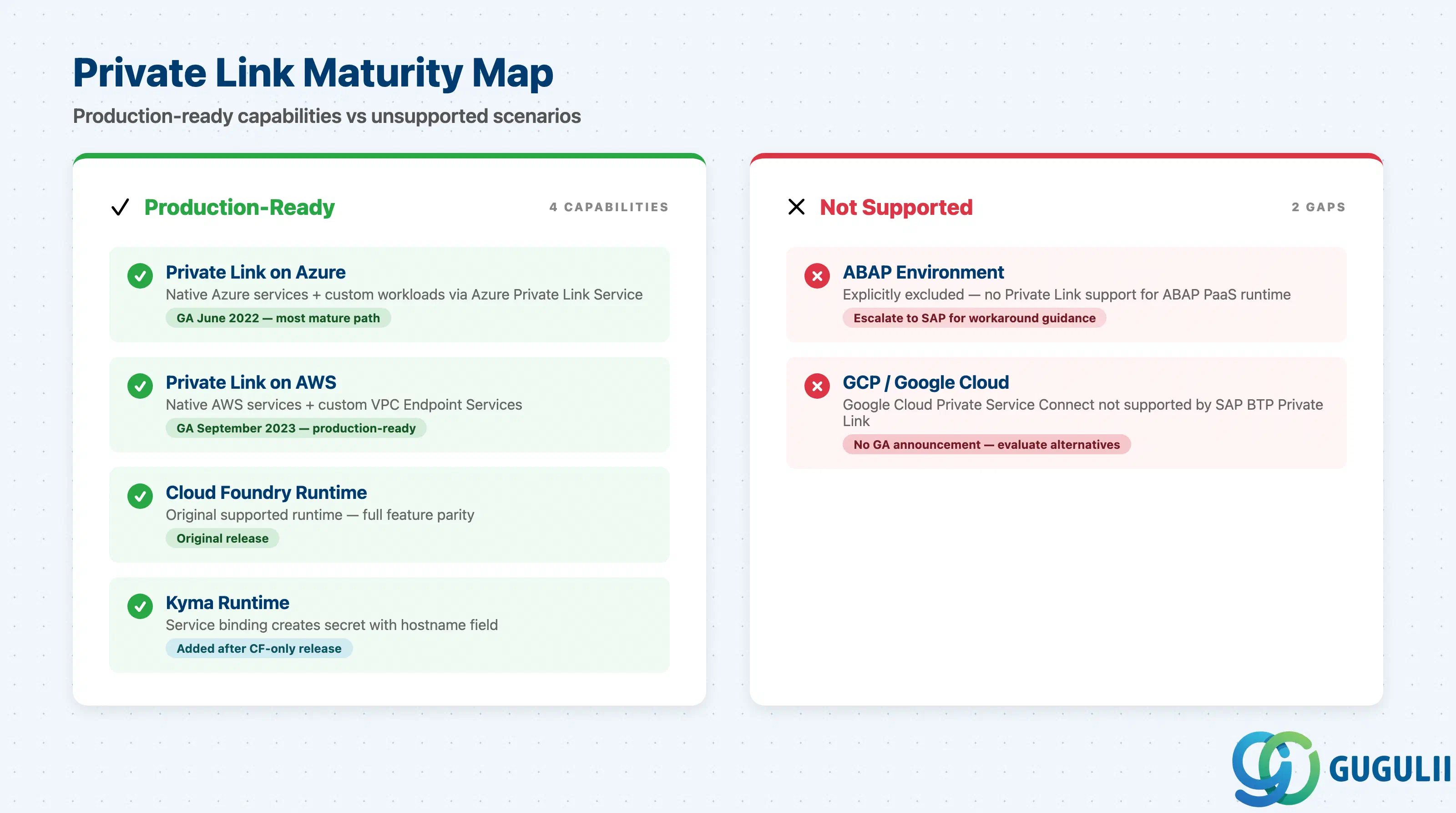
Azure Private Link reached GA in June 2022; AWS Private Link reached GA in September 2023 — a gap of approximately 15 months. Both dates are confirmed in SAP’s own blog announcements. The Kyma runtime integration was added after the initial Cloud Foundry-only release, as documented in the SAP Architecture Center reference.
| Capability | Maturity | Notes |
|---|---|---|
| Private Link on Azure | ✅ Production-ready | GA since June 2022. Native Azure services (Key Vault, Storage, Cosmos DB, OpenAI, Redis, IoT Hub, Functions) and custom workloads via Azure Private Link Service are supported. Most mature path. |
| Private Link on AWS | ✅ Production-ready | GA since September 2023. Native AWS services (S3, SQS, SNS, SES, Lambda, RDS Aurora Data API, IoT Core, KMS) and custom VPC Endpoint Services supported. Functionally equivalent to Azure for most patterns. |
| Private Link on Cloud Foundry runtime | ✅ Production-ready | Original supported runtime. Full feature parity. |
| Private Link on Kyma runtime | ✅ Production-ready | Added after initial CF-only release. Service binding creates a secret with the hostname field. Functionally complete. |
| Private Link on ABAP environment | ❌ Not supported | The ABAP environment is explicitly excluded. If an ABAP workload needs to reach an IaaS-hosted service privately, the recommended workaround pattern is not publicly documented — escalate to SAP support for guidance. |
| Private Link on GCP | ❌ Not recommended | GCP / Google Cloud Private Service Connect is not supported by SAP BTP Private Link service as of the research date. No official GA announcement found. |
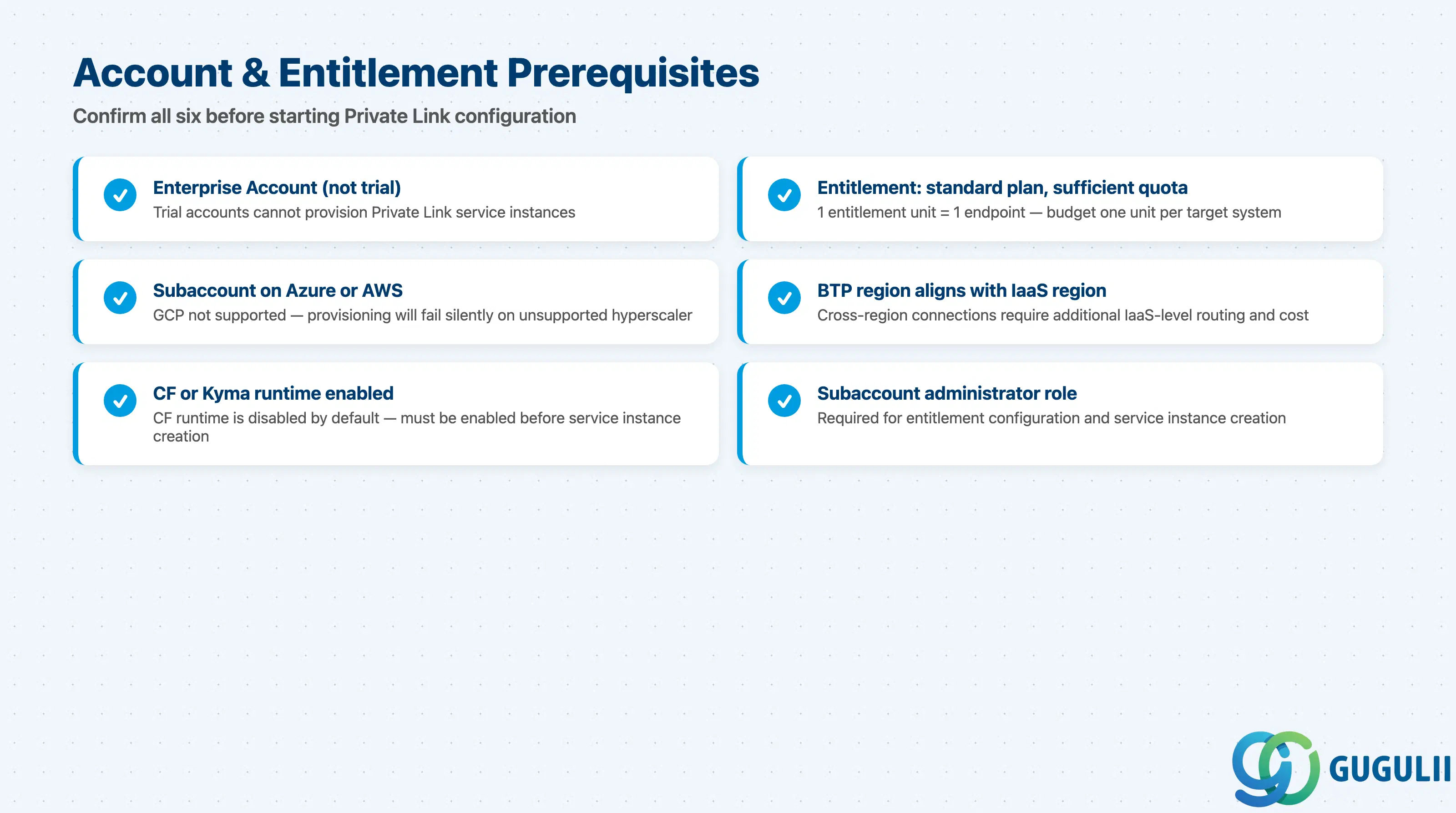
One entitlement unit of SAP Private Link service (standard plan) equals one Private Link endpoint. Entitlement configuration steps are described in the SAP Private Link onboarding tutorial.
| Checklist item | Why it matters |
|---|---|
| Confirm SAP BTP enterprise account (not trial) | Trial accounts cannot provision Private Link service |
| Add entitlement: SAP Private Link service, standard plan, with sufficient quota | One unit = one endpoint; budget one unit per target system |
| Confirm the target subaccount runs on Azure or AWS (not GCP, not Alibaba Cloud) | GCP is not supported; provisioning will fail |
| Confirm the BTP subaccount region aligns with the customer’s IaaS region | Cross-region connections require additional IaaS-level routing |
| Enable Cloud Foundry runtime or Kyma runtime in the subaccount | CF runtime is disabled by default; enabling it is required before service instance creation |
| Confirm the project team has an SAP BTP subaccount administrator role | Required for entitlement configuration and service instance creation |
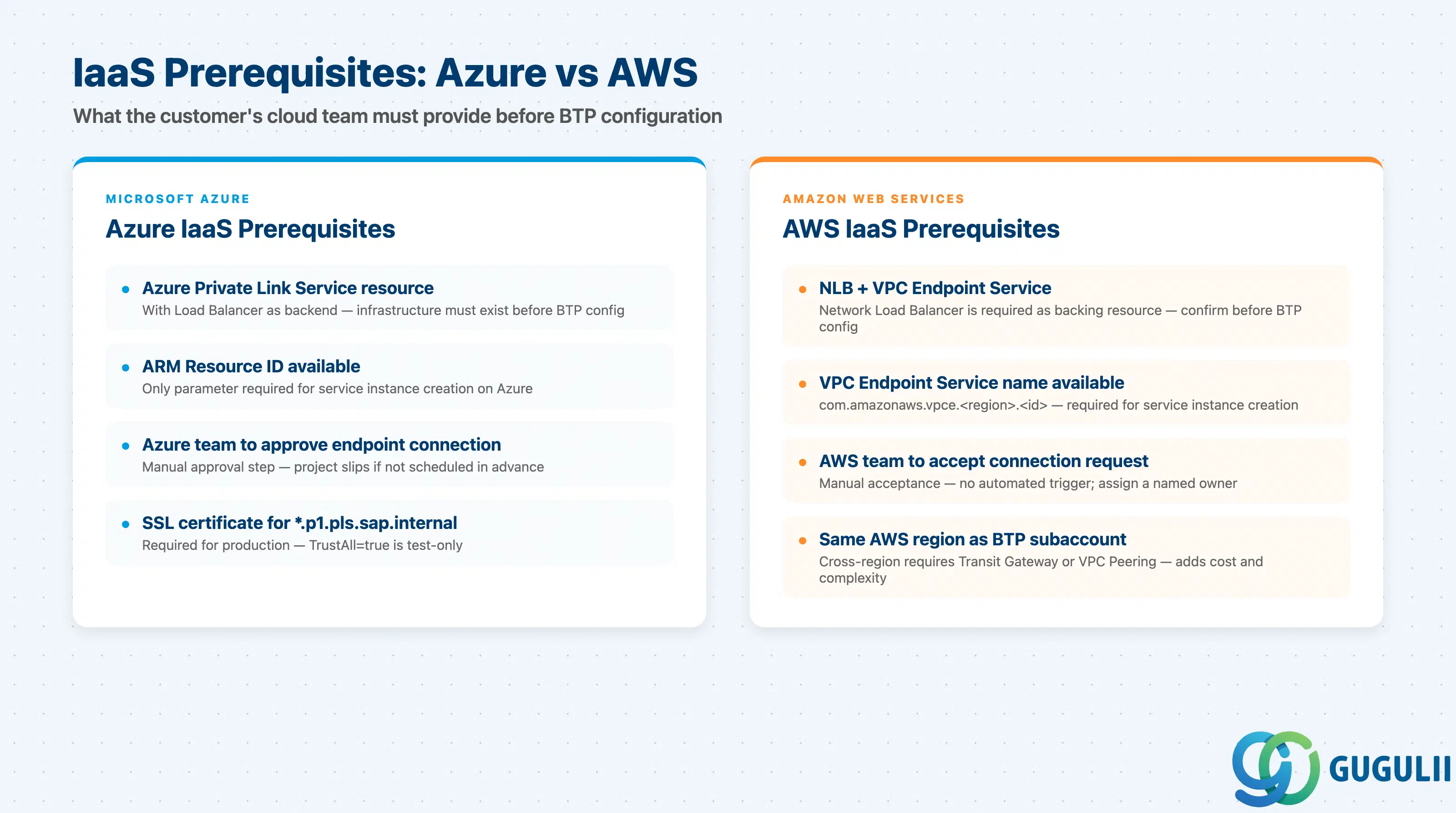
The Azure connection pattern requires an Azure Private Link Service resource that exposes a Load Balancer routing traffic to the target system. See the Azure Private Link tutorial mission for setup steps.
| Checklist item | Why it matters |
|---|---|
| Customer has an Azure subscription with permissions to create Azure Private Link Services | Customer’s Azure team must approve the endpoint connection request; without this, BTP service instance stays in “pending” state |
| Target system is exposed via an Azure Load Balancer fronted by an Azure Private Link Service resource | Load Balancer is required as backend; confirm infrastructure exists before BTP configuration |
| Azure Private Link Service resource ID (full ARM resource path) is available before starting BTP configuration | Only parameter required for service instance creation on Azure |
| Customer Azure team is available to approve the endpoint connection request within the project timeline | Endpoint approval is manual; project schedules that assume automatic approval will slip |
SSL certificate is available for the private hostname (*.p1.pls.sap.internal) | Required for production; TrustAll=true is test-only |
| Checklist item | Why it matters |
|---|---|
| Target system is exposed via an AWS Network Load Balancer (NLB) with a VPC Endpoint Service | NLB is required as backing resource; confirm before BTP configuration |
| Customer AWS account team is available to accept the VPC endpoint connection request | Endpoint acceptance is a manual approval step |
AWS VPC Endpoint Service name (e.g., com.amazonaws.vpce.<region>.<service-id>) is available before BTP configuration begins | Required parameter for service instance creation on AWS |
| BTP subaccount is in the same AWS region as the NLB backing the VPC Endpoint Service | Cross-region requires Transit Gateway or VPC Peering |
| SSL certificate / CA chain is available for the private DNS hostname generated by the endpoint | Same as Azure; TrustAll=true is test-only |
The
Using SAP Private Link Service page confirms that all Private Link connections to external systems are routed through the Destination Service using Proxy Type PrivateLink, distinct from OnPremise and Internet.
| Checklist item | Why it matters |
|---|---|
| BTP Destination Service is available in the subaccount | All Private Link connections require Proxy Type PrivateLink — required dependency |
Destination Proxy Type PrivateLink is understood by the integration team | Wrong proxy type routes traffic via the wrong path |
| Application framework (CAP, Cloud Integration, Approuter) is confirmed to support Private Link destination proxy type | Not all BTP services support Proxy Type PrivateLink |
TrustAll=true is flagged as test-only and replaced with proper PSE-based SSL configuration before production | The most common security misconfiguration — eliminates the benefit of private routing |
| Change management process is in place for endpoint approval steps | IaaS team action required; may be a separate organizational unit |
| Exception handling strategy is defined for endpoint connection failure | Define fail-fast, retry, or fallback behavior for endpoint failure |
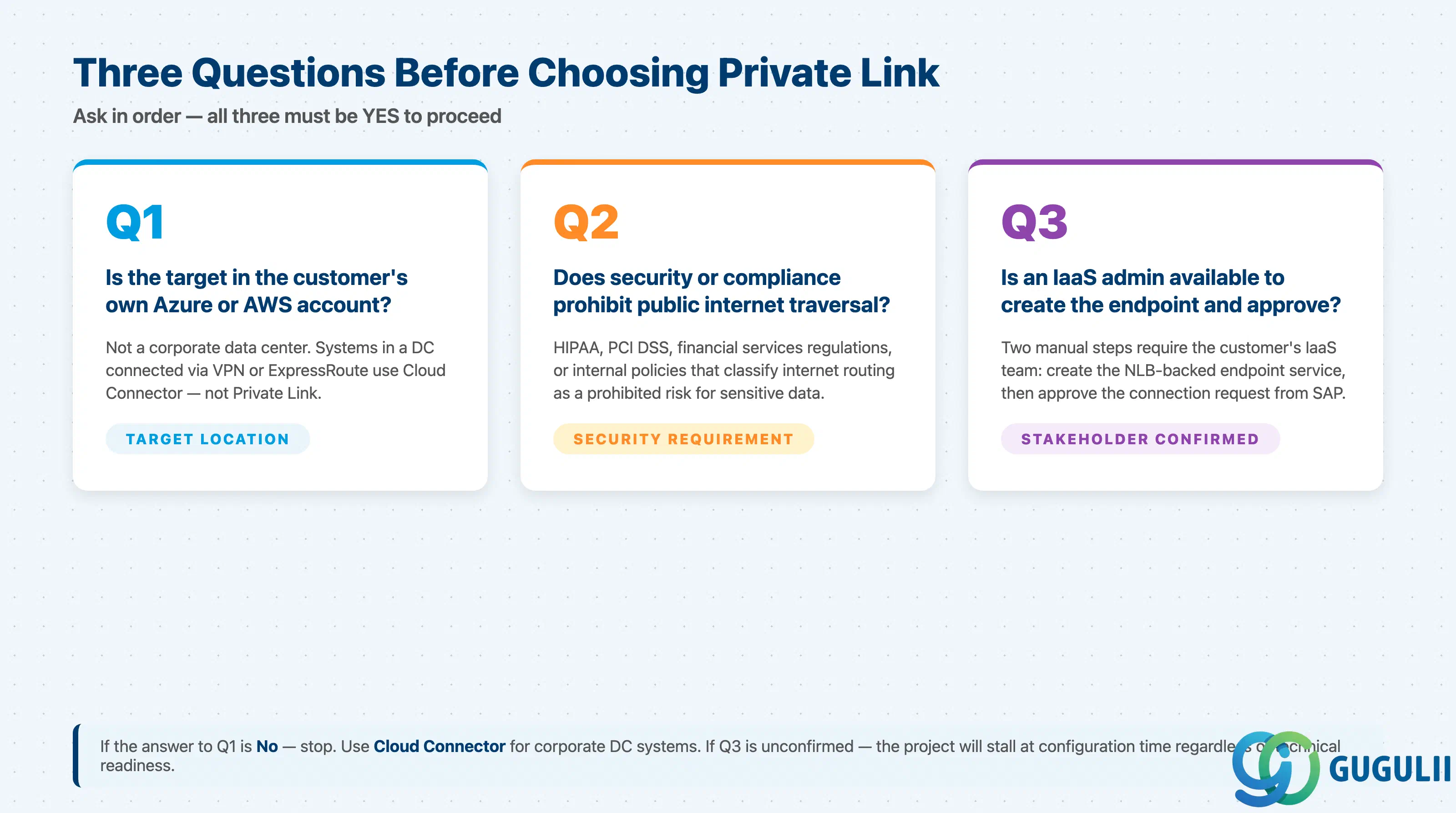
Q1. Is the target system’s primary hosting location the customer’s own Azure or AWS account — not a corporate data center?
Private Link applies only when the target is in the customer’s own Azure or AWS account. Systems in a corporate data center (connected via VPN, ExpressRoute, or a dedicated line) use Cloud Connector instead. If the target is an Azure VM or a managed AWS service like S3 or RDS, Private Link is the correct starting point. See the What Is SAP Private Link Service page for the official scope statement.
Q2. Does the project’s security or compliance requirement prohibit any traffic from traversing the public internet?
Private Link eliminates public internet routing entirely — traffic stays within the hyperscaler backbone. This is the key differentiator for environments subject to HIPAA, PCI DSS, financial services regulations, or internal security policies that classify internet traversal as a prohibited risk for sensitive data flows. If the requirement is simply “encrypt traffic”, HTTPS over the standard internet path may be sufficient. Know which requirement you are actually solving.
Q3. Is there an IaaS platform administrator with budget authority and availability to create the endpoint service and approve endpoint connections?
Private Link setup requires active participation from the customer’s IaaS team at two points: creating the NLB-backed endpoint service, and approving the connection request from the SAP side. Without a named sponsor who can authorize and execute these steps on the IaaS side, the project will stall at configuration time. Confirm this before putting Private Link in the architecture.
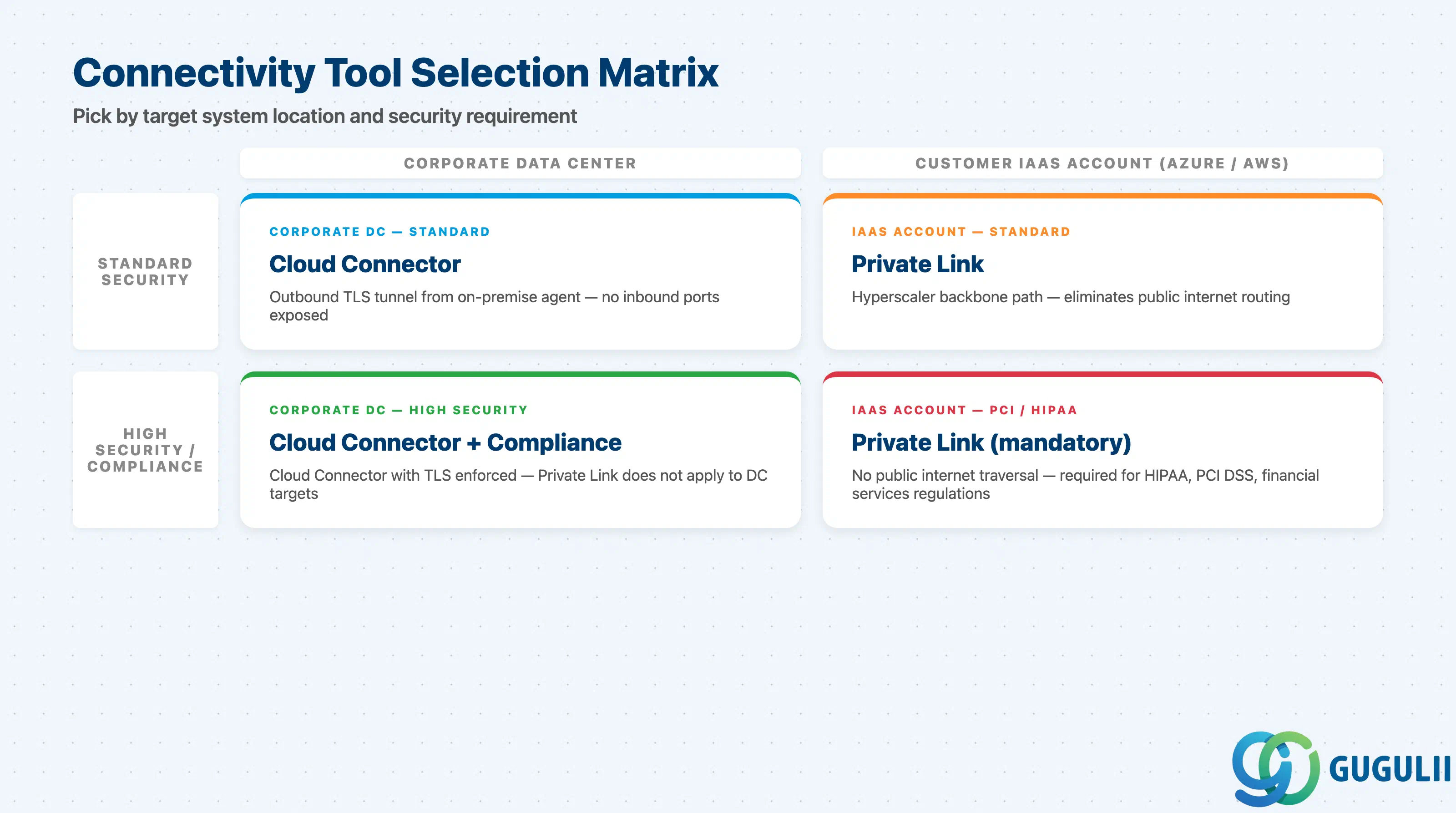
| Project context | Recommended connectivity approach |
|---|---|
| Target system is S/4HANA on an Azure VM or AWS EC2 instance | Private Link via custom Azure Private Link Service or AWS VPC Endpoint Service |
| Target system is a managed cloud service (Azure OpenAI, AWS S3, Azure Key Vault, AWS SQS) | Private Link using native service support for that Azure or AWS service |
| Target system is S/4HANA or middleware in a corporate data center (VPN/ExpressRoute/dedicated line) | Cloud Connector |
| Both corporate DC and IaaS systems need to be reached from the same BTP subaccount | Both — Cloud Connector for DC systems, Private Link for IaaS systems; they coexist |
| Target system is in GCP or another unsupported IaaS | Neither; no Private Link support — evaluate alternatives (internet with mTLS, Cloud Connector via VPN to IaaS) |
| ABAP environment workload needs to reach an IaaS-hosted service | Gap — Private Link is not supported for ABAP environment; escalate to SAP for workaround |
| No clear pain point identified yet | Stop. Go back to Q1. |
| Component | Licensing model | Key question to ask |
|---|---|---|
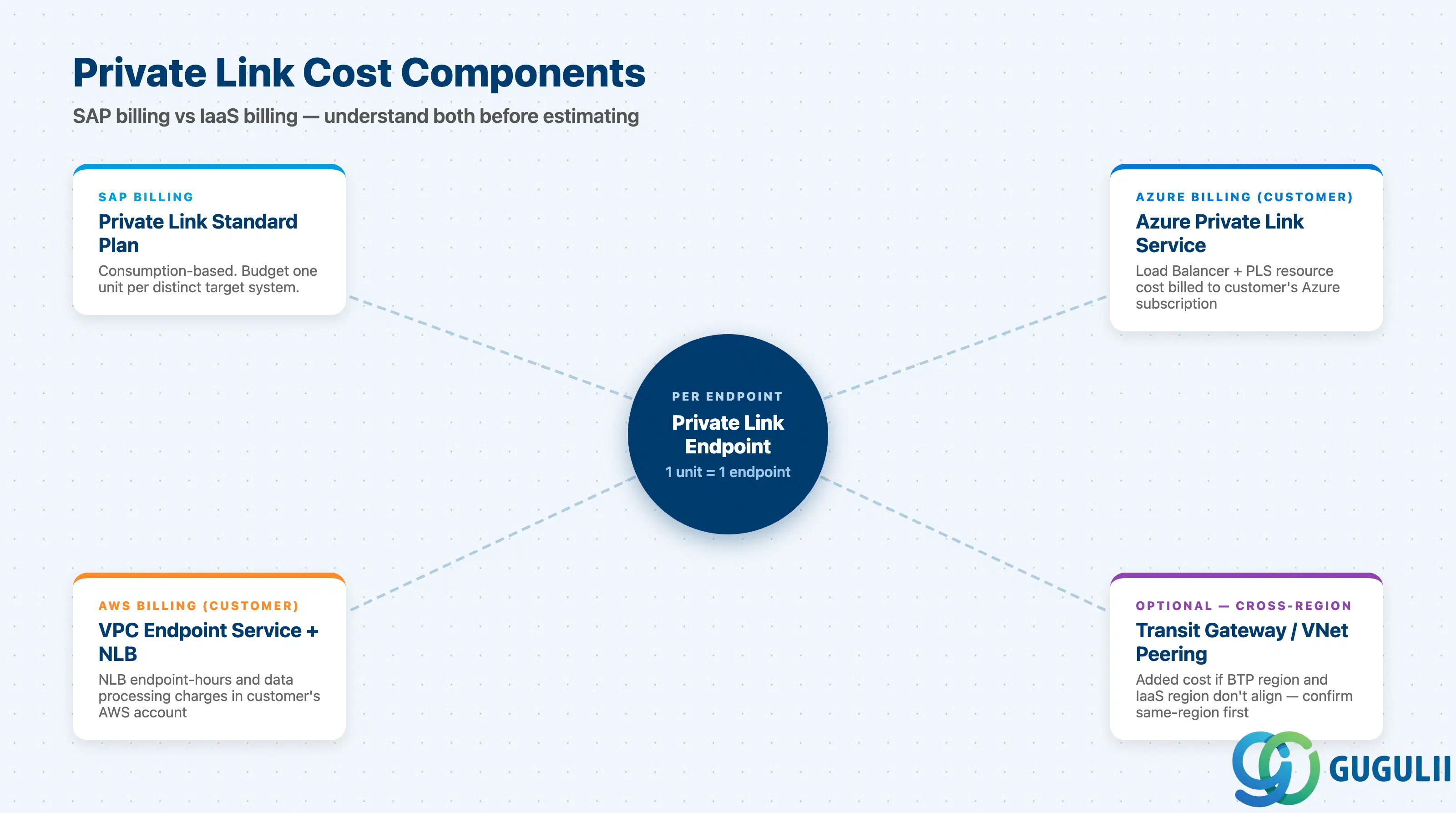
| SAP Private Link service — standard plan | Consumption-based; one entitlement unit = one Private Link endpoint | How many distinct target systems need private connectivity? Each one consumes one unit |
| SAP BTP enterprise account | Required (no trial account support) | Is the BTP account an enterprise account? Confirm before requesting entitlements |
| Azure Private Link Service | Azure resource cost (customer’s Azure subscription, not SAP) | Has the customer’s Azure team budgeted for Load Balancer + Private Link Service resource costs? |
| AWS VPC Endpoint Service + NLB | AWS resource cost (customer’s AWS account) | Has the customer’s AWS team budgeted for NLB endpoint-hours and data processing charges? |
| Cross-region connectivity (if needed) | Additional AWS Transit Gateway or Azure Global VNet Peering charges | Is same-region deployment feasible? Cross-region adds cost and complexity |
Note: Specific pricing for the SAP Private Link service standard plan is not publicly listed. Obtain current pricing from the SAP Discovery Center or your SAP account team before estimating project costs.
Failure 1: Assuming Private Link replaces Cloud Connector for all connectivity
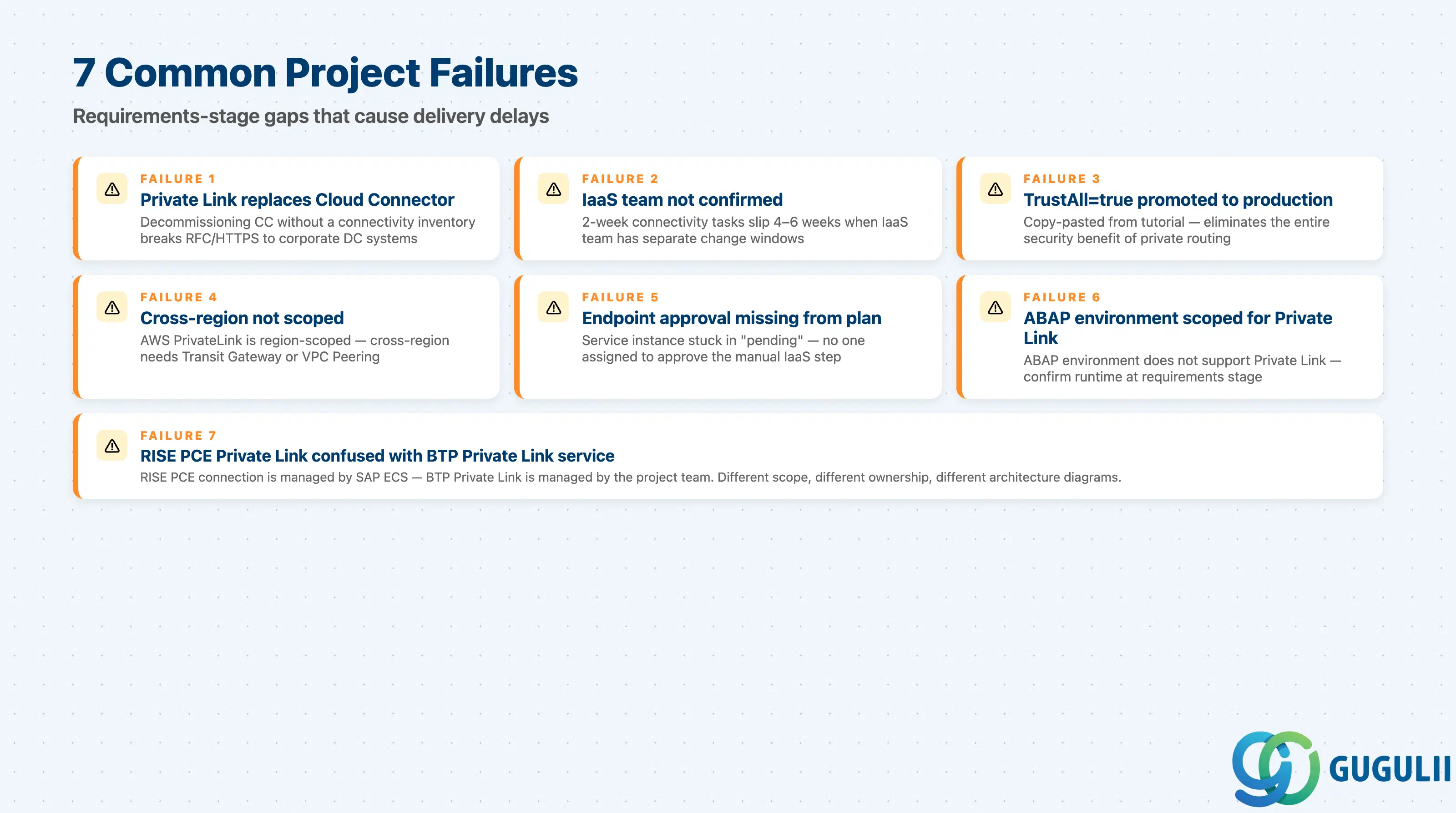
Teams adopting Private Link as a “cloud-native upgrade” sometimes decommission Cloud Connector without verifying all targets are IaaS-hosted. Cloud Connector is still required for any system in a corporate data center. Decommissioning it without a full connectivity inventory results in broken RFC or HTTPS connections. Always produce a connectivity inventory before any decommission decision.
Failure 2: Scoping the project without confirming IaaS team availability
Private Link requires the customer’s IaaS team to create the endpoint service and manually approve the connection request. In large enterprises the IaaS team operates on its own change windows and approval processes. Projects that scope a 2-week connectivity task without securing IaaS team availability regularly slip by 4–6 weeks.
Failure 3: Using TrustAll=true in the BTP destination — promoted to production
The SAP Private Link setup tutorials mention TrustAll=true as an Additional Property that simplifies initial testing by bypassing SSL certificate validation. In multiple projects, this configuration is copy-pasted from the tutorial into the production destination without replacement. This eliminates the security benefit of private connectivity. Per
Using SAP Private Link Service, production destinations must configure proper SSL handling using the SAP BTP PSE. Mark TrustAll=true as a test-only property in your requirements documentation before the implementation phase begins.
Failure 4: Cross-region connectivity assumed without cost or complexity review
SAP BTP subaccount regions and customer IaaS regions do not always align. AWS PrivateLink is region-scoped — a cross-region connection requires AWS Transit Gateway or VPC Peering to bridge the regions, adding cost and architectural complexity. Always confirm region alignment in the requirements phase.
Failure 5: Missing endpoint approval step from project plan
After creating the SAP Private Link service instance, the corresponding endpoint connection appears in the customer’s Azure portal or AWS console in a “pending” state and must be approved by the customer’s IaaS administrator. This approval step has no automated trigger. Projects that omit this step from the project plan frequently report “the service instance is stuck” when the real issue is an unapproved endpoint that no one has been assigned to approve.
Failure 6: ABAP environment scoped for Private Link without checking runtime support
When a project scope includes both ABAP environment workloads and IaaS-hosted target systems, teams sometimes assume that Private Link applies to all BTP runtimes. The ABAP environment does not support SAP Private Link service. Confirm runtime support at requirements stage, and flag this gap explicitly if the scope includes ABAP environment.
Failure 7: Confusing SAP RISE PCE Private Link with SAP BTP Private Link service
SAP RISE PCE uses native Azure/AWS PrivateLink for the SAP-managed environment connection — a distinct concept from SAP BTP Private Link service. Teams conflating the two produce incorrect architecture diagrams. The RISE PCE connection is managed by SAP Enterprise Cloud Services; BTP Private Link service is managed by the project team for BTP application-to-IaaS connectivity.
Q: Can SAP Private Link service replace Cloud Connector on all projects?
No. SAP Private Link service and Cloud Connector solve different connectivity problems. As stated in the What Is SAP Private Link Service documentation, Private Link applies when the target system is hosted in the customer’s own Azure or AWS account. Cloud Connector applies when the target system is in a corporate data center or on-premise network. The two tools can coexist in the same BTP subaccount. Whether a project needs one, both, or neither depends on where each target system lives.
Q: Does Private Link work for the ABAP environment?
No. The ABAP environment (ABAP PaaS) is explicitly excluded from SAP Private Link service support. The supported runtimes are Cloud Foundry and Kyma only. If an ABAP environment workload needs to reach an IaaS-hosted service privately, the recommended pattern is not publicly documented; escalate to SAP support for guidance specific to your landscape.
Q: What does the licensing cost look like in practice?
The SAP Private Link service uses the standard plan with a consumption model where one entitlement unit equals one Private Link endpoint. If a project connects to three distinct target systems (for example, an S/4HANA VM, an Azure Key Vault, and an AWS S3 bucket), it consumes three units. The IaaS-side resources (NLB, Azure Private Link Service, VPC Endpoint Service) are billed in the customer’s Azure or AWS account — not through SAP. Specific per-unit pricing is not publicly listed; obtain current pricing from the SAP Discovery Center or your SAP account team.
Q: When should Private Link be descoped from a project?
Descope Private Link when: (a) the target system is in a corporate data center — Cloud Connector is the correct tool; (b) the customer’s IaaS team cannot commit to creating the endpoint service and approving the connection within the project timeline; (c) the BTP subaccount is on GCP or an unsupported hyperscaler; or (d) the runtime is exclusively ABAP environment. If private connectivity is genuinely required but Private Link is not feasible, document the gap and discuss alternatives with the project sponsor.
Q: How should the Private Link connectivity requirement be documented at requirements stage?
Document per connection: target system hosting location (Azure/AWS region) and account ID; the Azure resource ID or AWS VPC Endpoint Service name; IaaS team approval contact and timeline; SSL/PSE configuration plan; and Destination Service Proxy Type PrivateLink settings. See
Using SAP Private Link Service for technical reference.
Q: Is there a difference between Azure and AWS in terms of which services you can connect to?
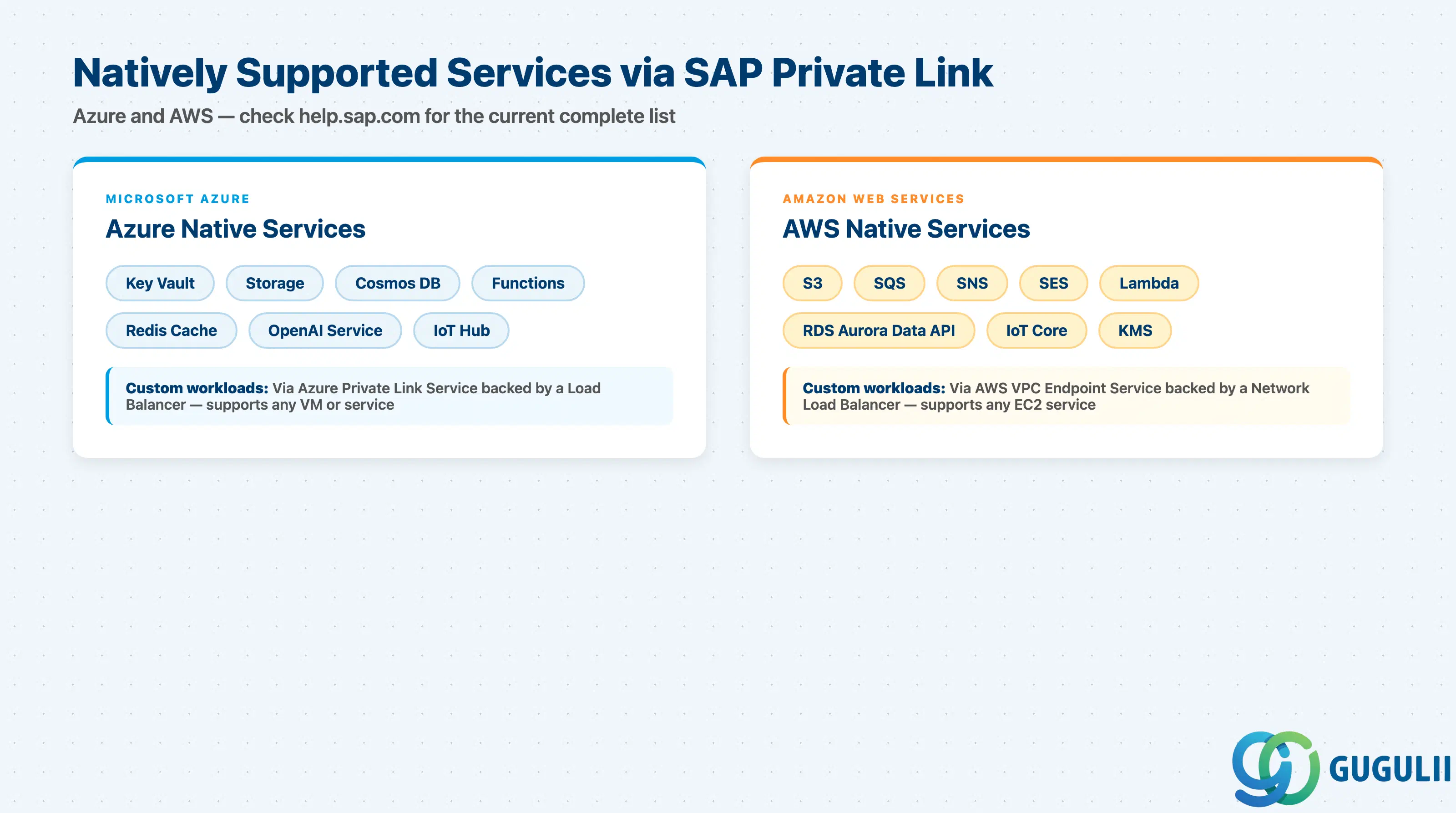
Yes. On Azure, natively supported services include Key Vault, Storage, Cosmos DB, Functions, Cache for Redis, OpenAI Service, and IoT Hub. On AWS, natively supported services include S3, SQS, SNS, SES, Lambda, RDS Aurora Data API, IoT Core, and KMS — see the Supported Services for Amazon Web Services page for the current list. Both hyperscalers also support custom workloads via the custom endpoint service pattern (Azure Private Link Service with a Load Balancer, or AWS VPC Endpoint Service with an NLB).
Q: Does Private Link support RFC protocol for calling SAP ABAP systems?
Based on currently available public documentation, SAP Private Link service supports HTTP and HTTPS via private endpoints. RFC-based communication over Private Link is not explicitly confirmed in available sources. If your use case requires RFC protocol (for example, calling function modules on an ABAP system hosted in IaaS), verify RFC support directly with SAP before designing the architecture around Private Link.
SAP Private Link service is the correct connectivity tool when the target system is hosted in the customer’s own Azure or AWS IaaS account. It routes all traffic within the hyperscaler backbone, eliminating public internet traversal and reducing the attack surface for high-security environments including those subject to PCI DSS, HIPAA, or internal security policies that classify internet routing as a prohibited risk. The What Is SAP Private Link Service page remains the primary reference for scope, supported runtimes, and supported IaaS providers.
The tool is not a replacement for Cloud Connector — the two solve different connectivity problems and can coexist in the same subaccount. The key decision driver is location: corporate data center means Cloud Connector; customer IaaS account means Private Link.
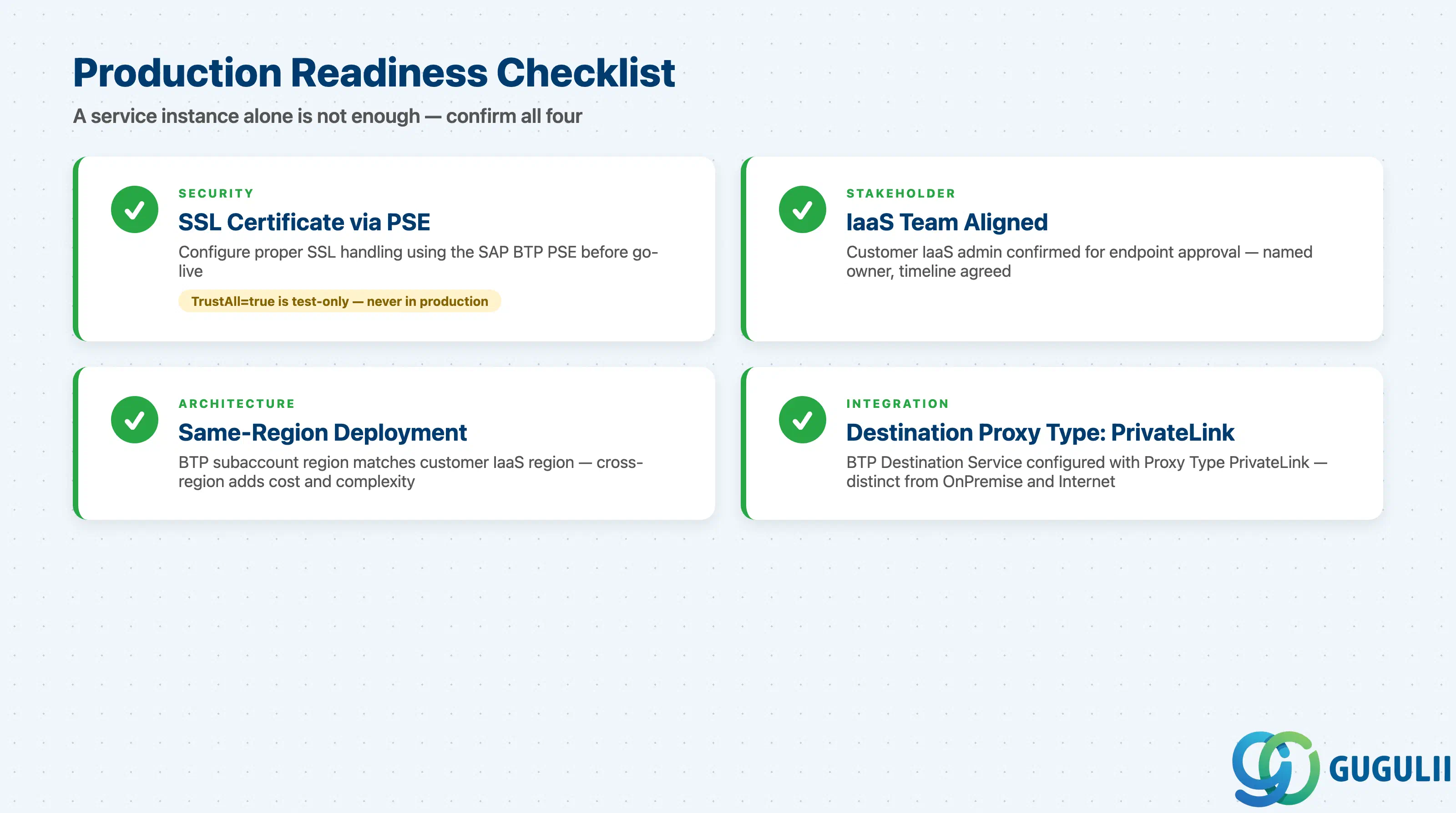
Production readiness requires more than a service instance: SSL certificate handling via PSE (not TrustAll=true), IaaS team alignment for endpoint approval, same-region deployment where possible, and Destination Service configuration with Proxy Type PrivateLink. The most common project failures stem from skipping these requirements-stage checks, not from the technology itself.