Title here
Summary here

| ID | Category | Component | Scope |
|---|---|---|---|
| BTP-E01 | Overview | Foundation Services | Overview and Capability Map |
| BTP-E02 | IAM | Identity and Access Management | Architecture and Use |
| BTP-E03 | Connectivity | Cloud Connector | Architecture and Use |
| BTP-E04 | Connectivity | Private Link | Architecture and Use |
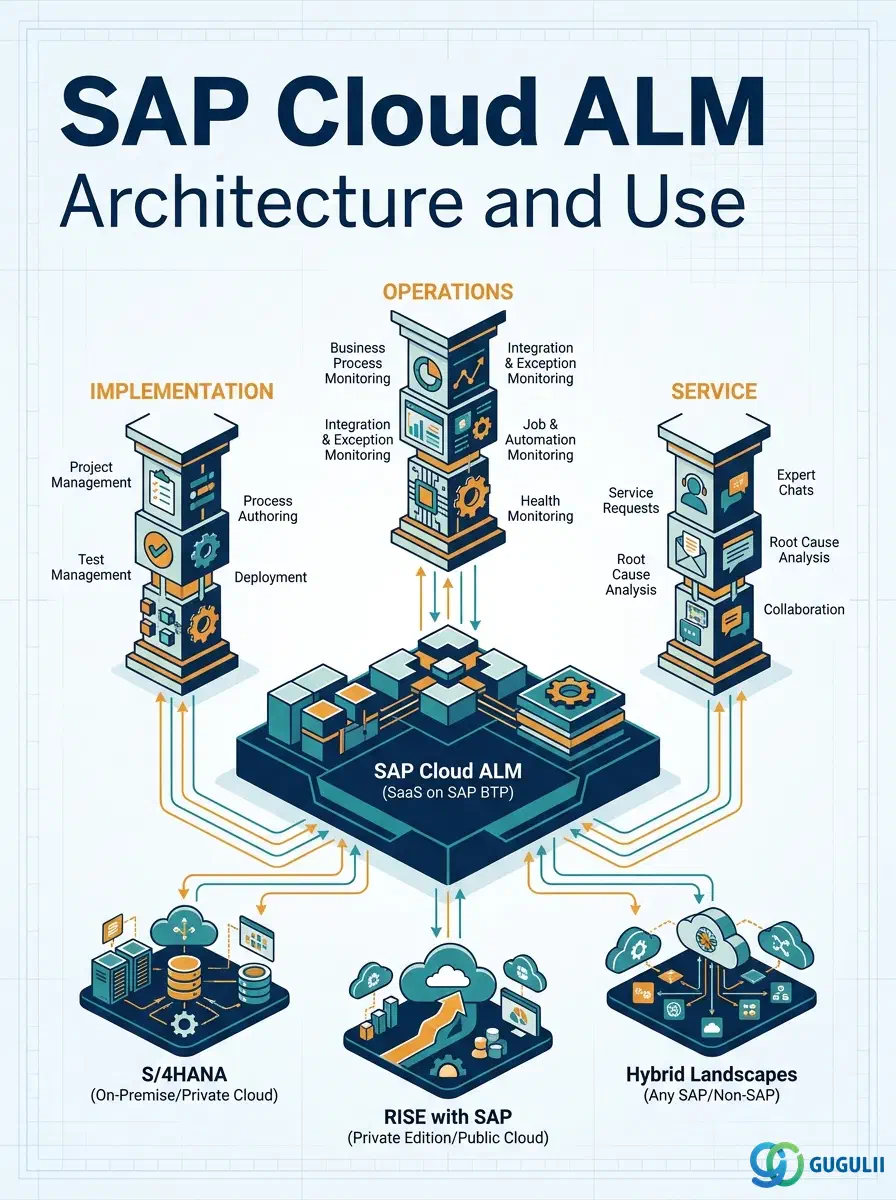
| BTP-E05 | Operations | Cloud ALM | Architecture and Use (this article) |
| Resource | URL |
|---|---|
| SAP Cloud ALM — Main Product Page | support.sap.com → |
| SAP Cloud ALM Help Portal (all documentation) | help.sap.com → |
| SAP Cloud ALM for Implementation | support.sap.com → |
| SAP Cloud ALM for Operations | support.sap.com → |
| Transition to SAP Cloud ALM | support.sap.com → |
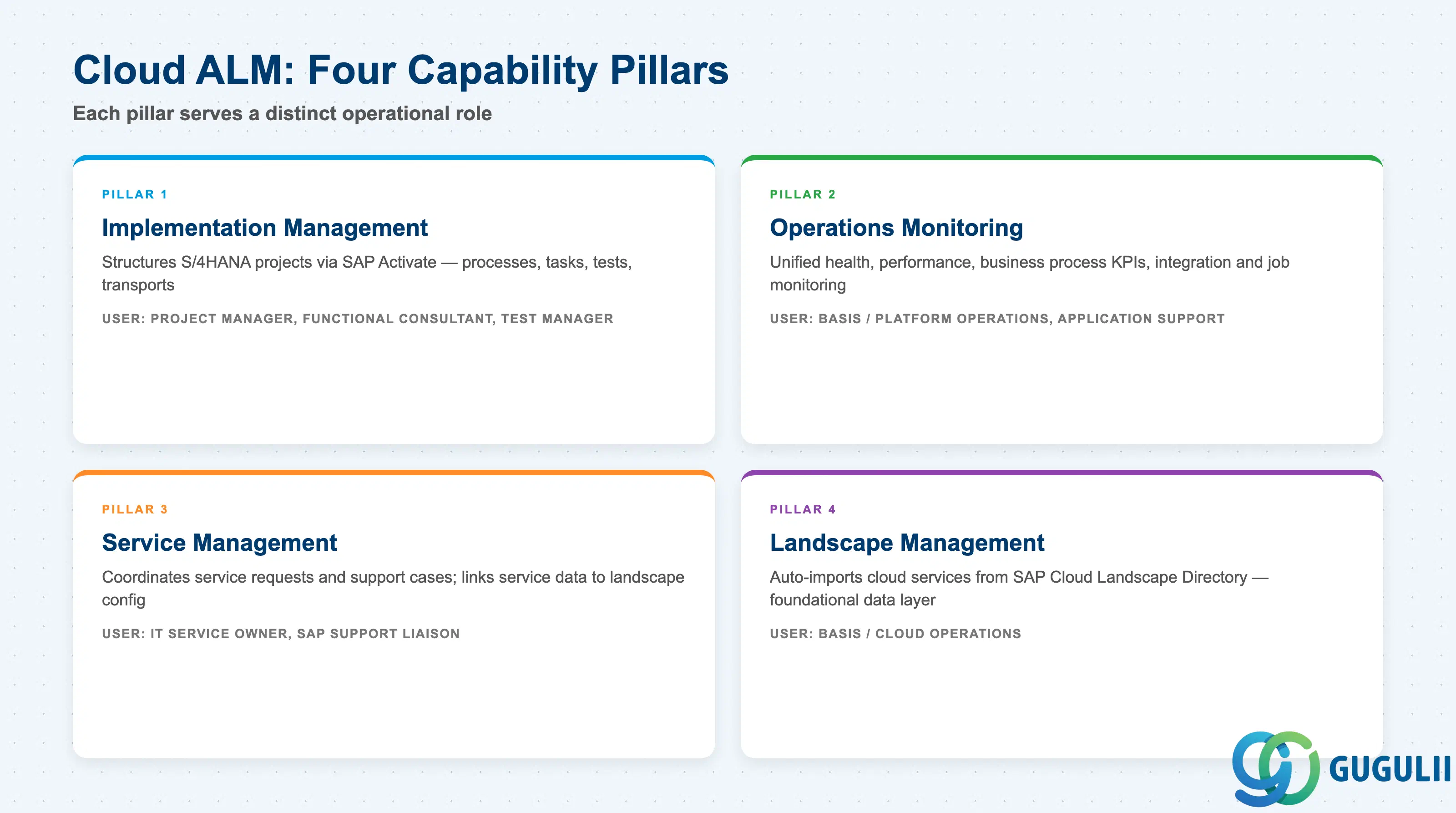
SAP Cloud ALM is an out-of-the-box SaaS application on SAP BTP that serves as the central management platform for SAP landscapes, supporting 100+ solutions and approximately 6,000 active customers ( SAP Cloud ALM — Main Product Page).
| Capability Pillar | What it does | Primary user |
|---|---|---|
| Implementation Management | Structures SAP S/4HANA and cloud implementation projects using SAP Activate; manages processes, requirements, tasks, tests, and transport deployments in one place | Project manager, functional consultant, test manager |
| Operations Monitoring | Provides unified visibility into health, performance, business process KPIs, integration flows, and job execution across cloud and hybrid landscapes | Basis / platform operations, application support |
| Service Management | Coordinates service requests and support cases with SAP; links service data to landscape configuration | IT service owner, SAP support liaison |
| Landscape Management | Auto-imports cloud services from SAP’s Cloud Landscape Directory; serves as the foundational data source for all other Cloud ALM apps | Basis / Cloud operations |
These four pillars serve distinct roles in the SAP operational lifecycle. They are not substitutes.
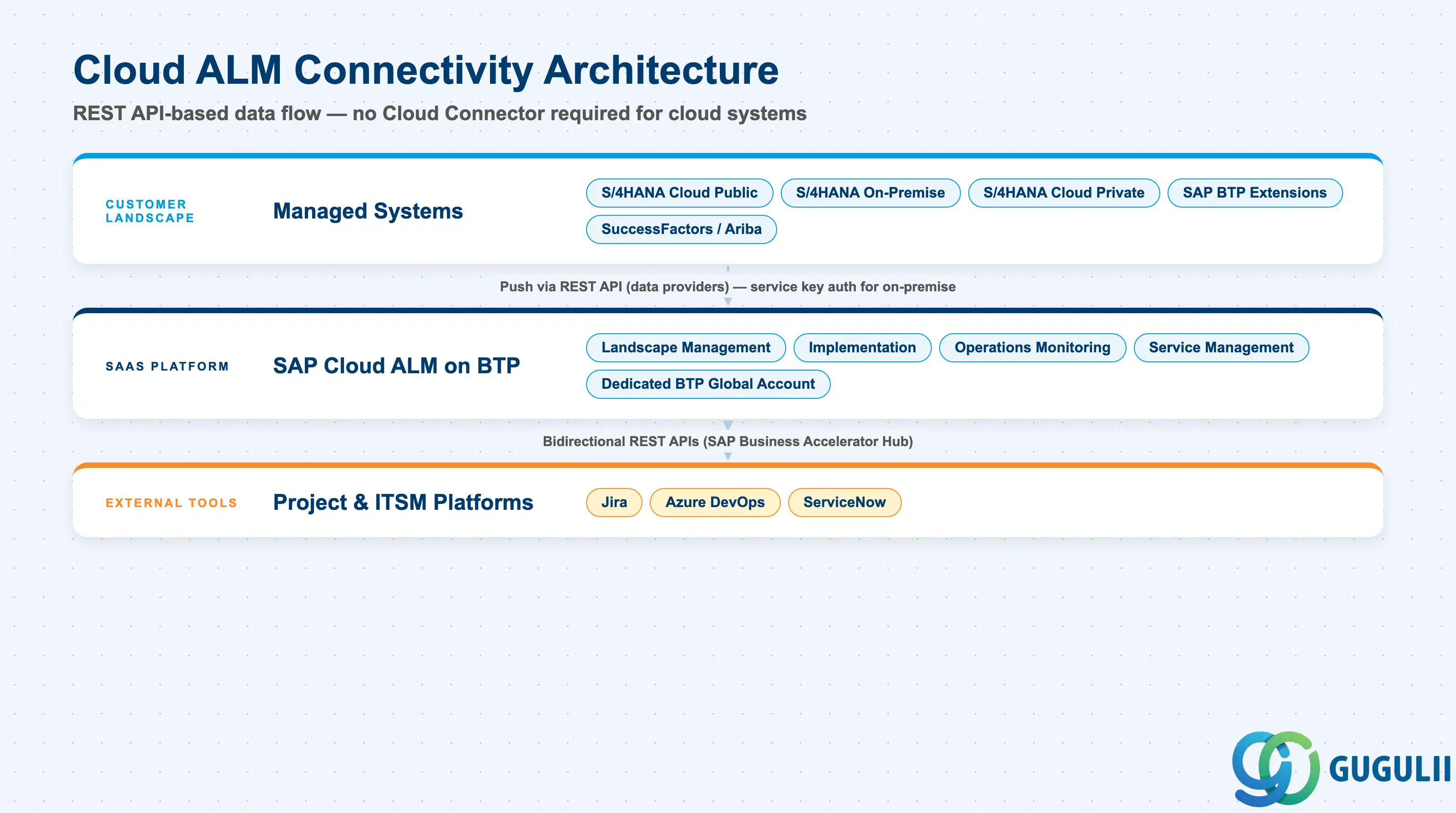
  Customer landscape
  ┌────────────────────────────────────────────────────┐
  │  S/4HANA Cloud Public Ed.  S/4HANA Cloud Private  │
  │  S/4HANA On-Premise        SAP BTP Extensions     │
  │  SuccessFactors / Ariba / non-SAP SaaS             │
  └──────────────┬─────────────────────────────────────┘
                 │  Push via REST API (data providers)
                 │  No Cloud Connector required (cloud systems)
                 │  SAP Cloud ALM REST API + service key (on-premise)
                 ▼
  ┌──────────────────────────────────────────────────────────────┐
  │              SAP Cloud ALM (SaaS on SAP BTP)                 │
  │                                                              │
  │  ┌─────────────┐  ┌────────────────────┐  ┌─────────────┐   │
  │  │ Landscape   │  │  Implementation    │  │ Operations  │   │
  │  │ Management  │→ │  (Processes, Tasks,│  │ (Health,    │   │
  │  │ (auto-import│  │   Reqs, Tests,     │  │  RUM, BPMon,│   │
  │  │  from Cloud │  │   Change/Deploy)   │  │  Job Mon,   │   │
  │  │  Directory) │  └────────────────────┘  │  Int. Mon.) │   │
  │  └─────────────┘                           └─────────────┘   │
  │                                                              │
  │  Dedicated BTP Global Account + Subaccount (auto-created)   │
  │  Contains: Cloud ALM app, Cloud Integration Automation, CTM  │
  └──────────────────────────────────────────────────────────────┘
                 │
                 │  Bidirectional REST APIs (SAP Business Accelerator Hub)
                 ▼
       Jira / Azure DevOps / ServiceNow (external tools)
When a Cloud ALM tenant is provisioned, a dedicated BTP Global Account and Subaccount are created automatically — separate from any customer development accounts on BTP ( SAP Cloud ALM Help Portal). Managed systems push monitoring data using SAP-provided data providers. On-premise systems authenticate through a service key generated in the Cloud ALM BTP subaccount; the SAP Cloud Connector is not required for this API-based pattern. External project tools such as Jira and Azure DevOps connect via bidirectional REST APIs published on SAP Business Accelerator Hub.
Key point: Cloud ALM is the single system of record for SAP Activate project execution and landscape operations monitoring; it is not a reporting layer on top of existing tools — it replaces the tools (Solution Manager, stand-alone test management, manual change tracking) for customers who adopt it fully.
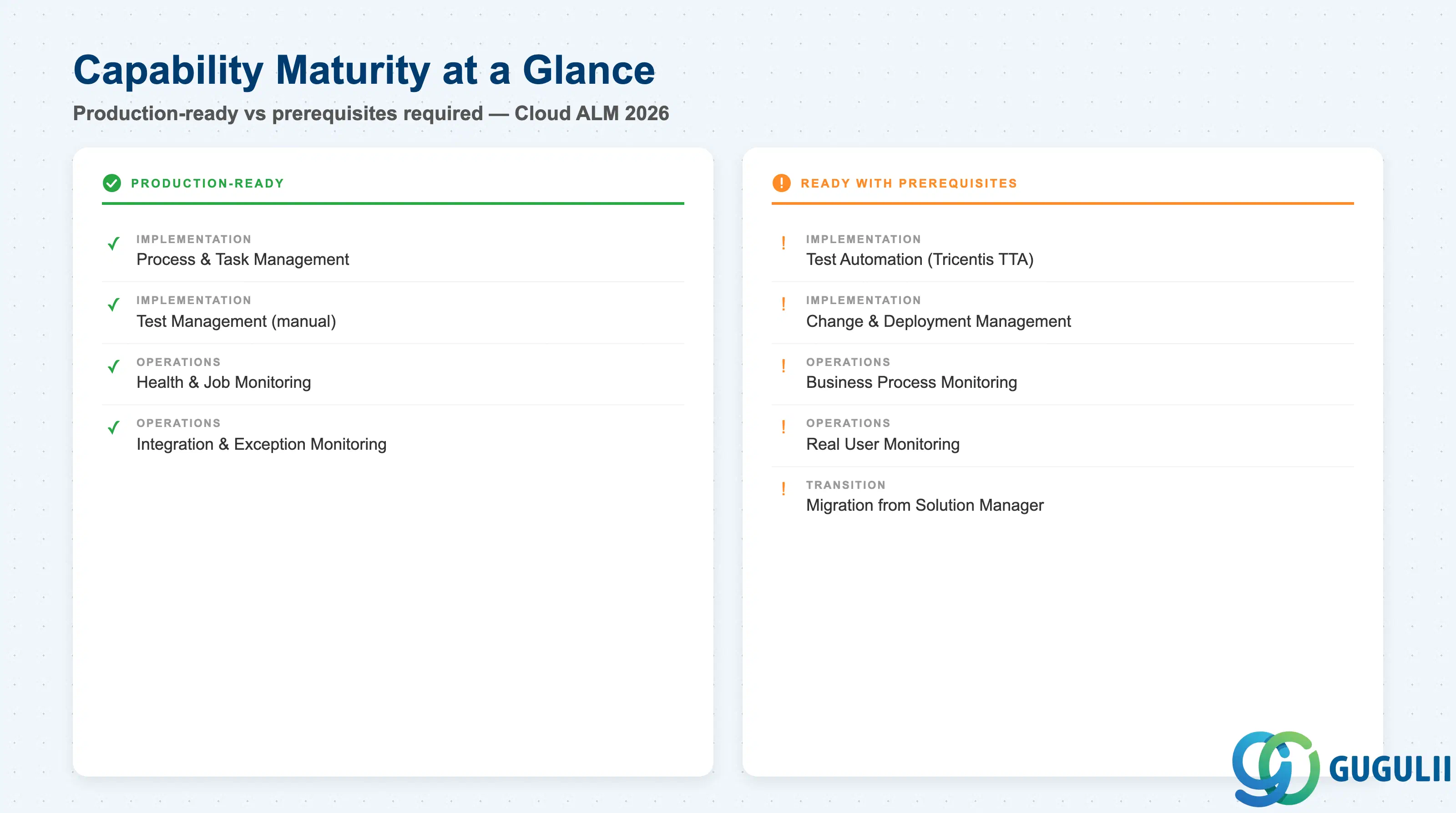
Operations monitoring tracks 6.3 billion IDOCs daily across active deployments, reflecting the platform’s production scale ( SAP Cloud ALM for Operations).
| Capability | Maturity | Notes |
|---|---|---|
| Implementation — Process & Task Management | ✅ Production-ready | SAP Activate content embedded; stable for RISE and cloud-first projects since 2022 |
| Implementation — Test Management (manual) | ✅ Production-ready | Browser-based execution with defect linking; well-adopted in active S/4HANA projects |
| Implementation — Test Automation (Tricentis TTA) | ⚠️ Ready with prerequisites | Included at no extra cost; requires separate Tricentis tenant provisioning and team training before Realize phase |
| Implementation — Change & Deployment Management | ⚠️ Ready with prerequisites | Feature-based transport works for standard ABAP/cloud; advanced ChaRM features (sequencing, critical object checks, automated retrofit) not yet available |
| Operations — Health Monitoring & Job Monitoring | ✅ Production-ready | Covers cloud services and ABAP-based systems; data provider setup required per managed system |
| Operations — Business Process Monitoring | ⚠️ Ready with prerequisites | Five out-of-the-box end-to-end processes; custom KPIs require initial configuration; 4–6 weeks baseline build-up before anomaly detection activates |
| Operations — Real User Monitoring | ⚠️ Ready with prerequisites | SAP Fiori and browser apps well-covered; non-SAP apps require custom instrumentation |
| Operations — Integration & Exception Monitoring | ✅ Production-ready | IDOC, API, and integration flow tracking at production scale |
| Transition from Solution Manager (data migration) | ⚠️ Ready with prerequisites | SDT tool covers processes and test cases; ChaRM, ITSM, and reporting history do not transfer |
( SAP Cloud ALM Setup and Administration and Transition to SAP Cloud ALM are the authoritative sources for all prerequisites below.)
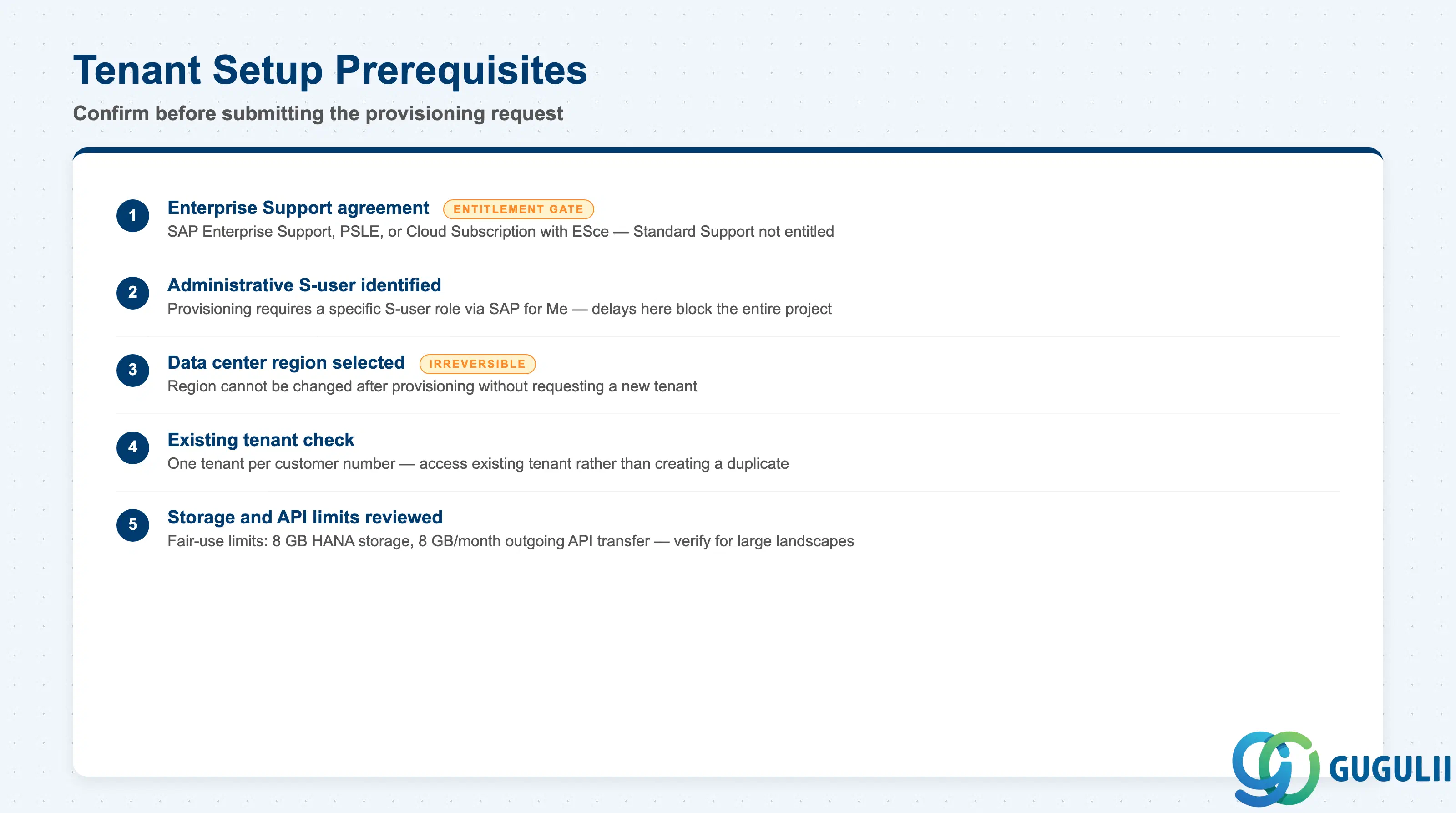
| Checklist item | Why it matters |
|---|---|
| Confirm the customer holds SAP Enterprise Support, Product Support for Large Enterprises, or a Cloud Subscription with Enterprise Support cloud edition | Cloud ALM entitlement is tied to these agreements; Standard Support customers are not entitled |
| Identify the S-user with administrative rights who will submit the provisioning request via SAP for Me | Provisioning requires this specific S-user role; delays here block the entire project |
| Select the target data center region at provisioning time | Data residency decisions cannot be changed after provisioning without requesting a new tenant |
| Clarify whether a tenant already exists for this customer number | One tenant per customer number is included; access an existing tenant rather than requesting a duplicate |
| Review the 8 GB HANA storage and 8 GB/month outgoing API data transfer limits | For large landscapes with high IDOC volumes, confirm these limits are sufficient |
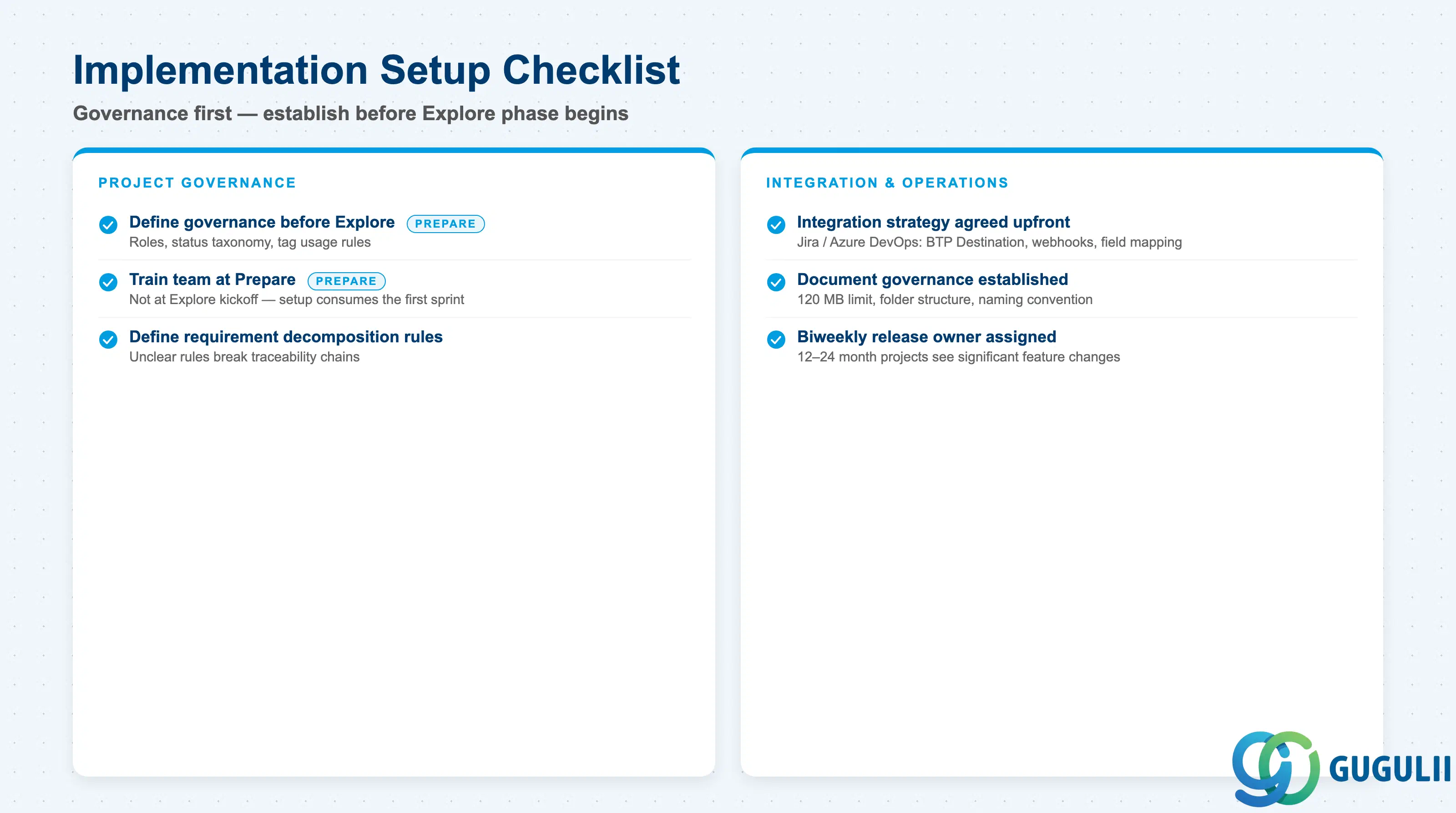
| Checklist item | Why it matters |
|---|---|
| Define project governance before Explore phase: roles (Project Manager, Agile Coach, Release Manager, Test Manager), status taxonomy, tag usage rules | Reporting reliability depends on status and tag consistency; absent governance produces inaccurate traceability |
| Train the team during Prepare phase, not at Explore kickoff | Teams unfamiliar with the tool at Explore lose the first sprint to setup rather than process scoping |
| Agree on integration strategy for external tools (Jira, Azure DevOps) before project start | Bidirectional sync requires BTP Destination configuration, webhook setup, and field mapping; retroactive integration is costly |
| Establish document governance: file size limit (120 MB), folder structure, naming convention, access permissions | Cloud ALM stores documents on BTP Document Management Service; external content servers are unsupported |
| Define Requirements-to-User-Story decomposition rules | Unclear decomposition rules break traceability chains and skew project completion metrics |
| Plan for biweekly Cloud ALM updates during long-running transformations | 12–24 month projects will see significant feature changes; assign an owner to review release notes |
| Checklist item | Why it matters |
|---|---|
| Decide upfront: manual-only, Tricentis TTA automated, or hybrid test strategy | Automated test authoring requires Tricentis tenant provisioning and training before Realize phase |
| Confirm TTA coverage for the target technology stack | TTA supports SAP Fiori, SAP GUI, browser apps, and APIs; non-SAP UI may require a different approach |
| Define defect classification and triage process | Defects link automatically to test cases and user stories; agree triage rules before testing starts |
| Establish test data management strategy | Cloud ALM manages test execution but does not supply test data; a separate provisioning approach is required |
| Checklist item | Why it matters |
|---|---|
| Identify all managed systems to be registered in Landscape Management | Systems not registered are invisible to all monitoring apps |
| Plan data provider installation per managed system type | Each monitoring capability requires a specific data provider; system count directly affects setup effort |
| Define Business Process Monitoring KPI thresholds before go-live | Default thresholds are uncalibrated to business risk; incorrect values generate alert fatigue or missed deviations |
| Allow 4–6 weeks post-activation for Business Process Monitoring baselines | Anomaly detection uses historical data; go-live decisions before baselines stabilize produce false positives |
| Document alerting and escalation procedures | Without escalation rules, alert notifications generate noise but no remediation action |
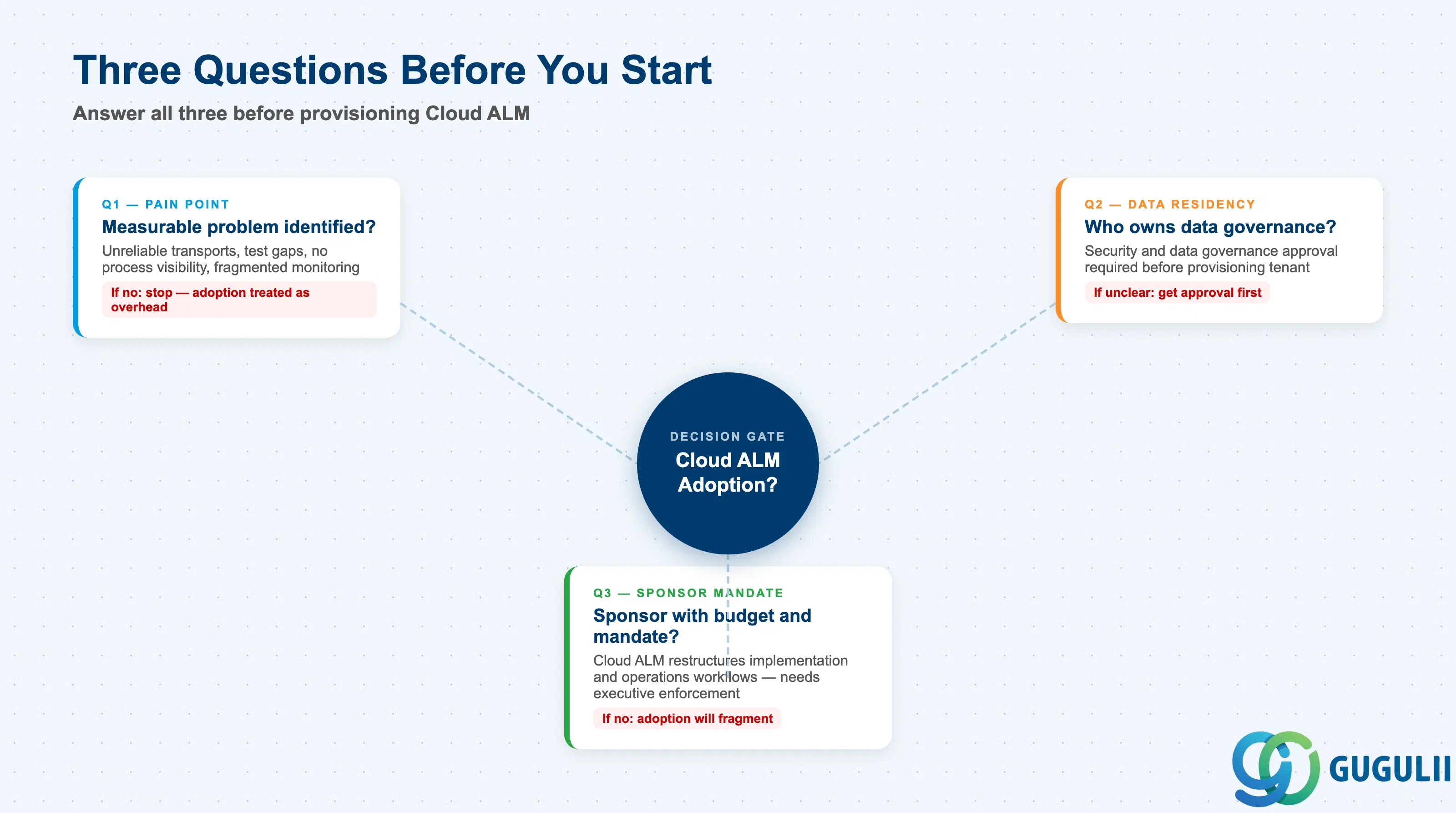
Q1. Is there a measurable pain point in the current ALM or operations process?
If the customer cannot identify a specific problem — unreliable transport tracking, incomplete test coverage, no visibility into business process deviations, or fragmented monitoring tooling — Cloud ALM adoption will be treated as overhead. Make the pain point explicit and measurable before proceeding.
Q2. Who owns data residency and integration security decisions for the managed systems?
Cloud ALM collects operational data from all managed systems. The tenant’s data residency region and the data transmitted by each managed system’s data provider must align with the customer’s information security policies. Confirm approval from security and data governance stakeholders before provisioning ( SAP Cloud ALM for Operations).
Q3. Is there an identified sponsor with budget authority and organizational mandate to drive adoption?
Cloud ALM restructures how implementation projects are managed and how operations teams work. Without a sponsor who can enforce the SAP Activate-aligned process model and mandate data consistency, adoption fragments into partial use that delivers less value than the predecessor tools it replaces.
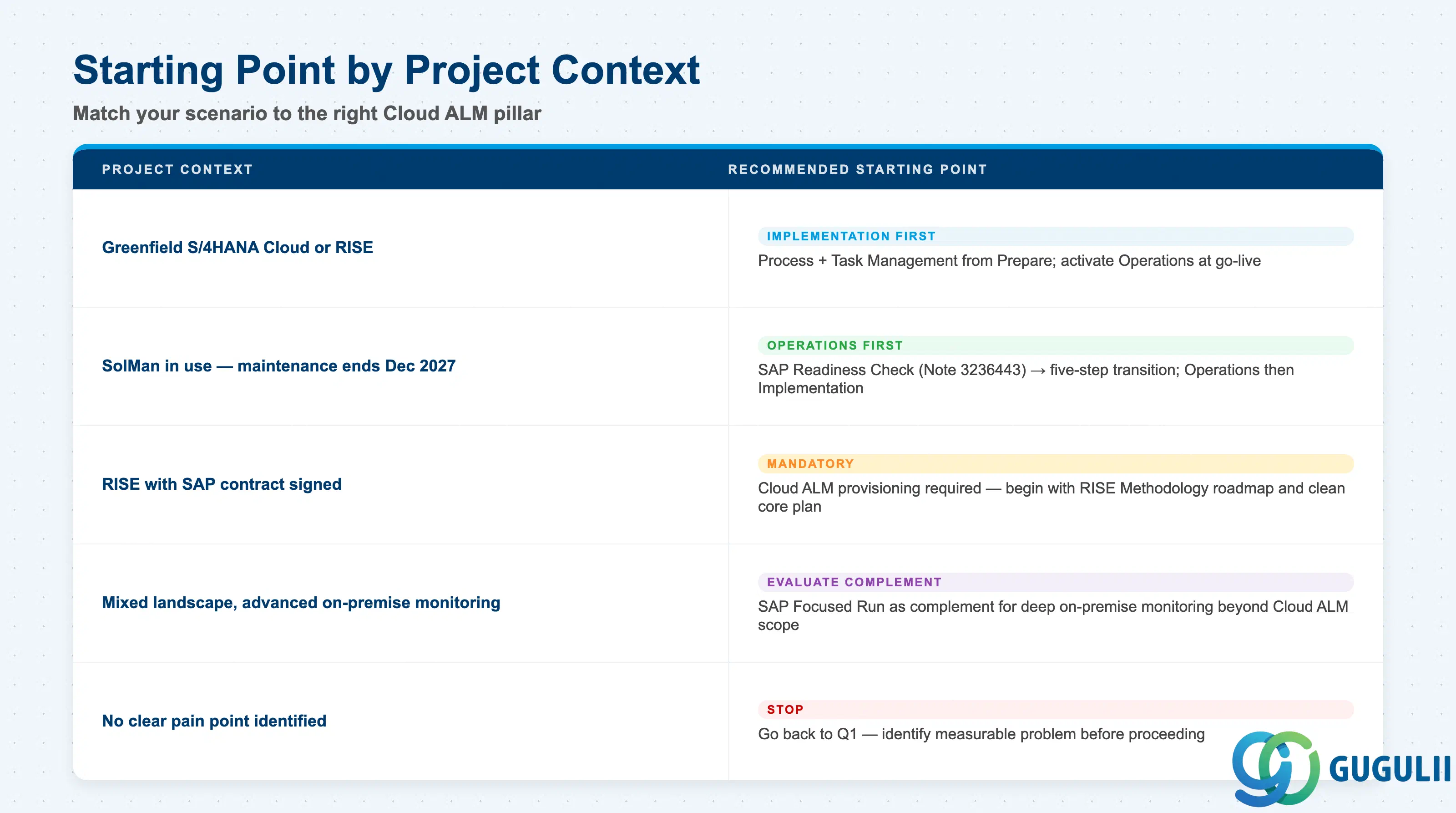
| Project context | Recommended starting point |
|---|---|
| New S/4HANA Cloud or RISE implementation, greenfield | Start with Implementation pillar (Process + Task Management) from Prepare phase; activate Operations monitoring at go-live |
| Solution Manager in use, SolMan maintenance end approaching (December 2027) | Run SAP Readiness Check (SAP Note 3236443); follow five-step transition; prioritize Operations monitoring first, then Implementation for new projects |
| RISE with SAP contract signed | Cloud ALM provisioning is mandatory; begin with RISE with SAP Methodology roadmap and clean core success plan setup |
| Mixed landscape with advanced monitoring needs beyond Cloud ALM scope | Evaluate SAP Focused Run as complement for deep on-premise monitoring |
| BTP application development needing CI/CD and change management | Assess ChaRM gaps; plan for third-party ITSM tool to cover the ITSM gap |
| No clear pain point identified yet | Stop. Go back to Q1. |
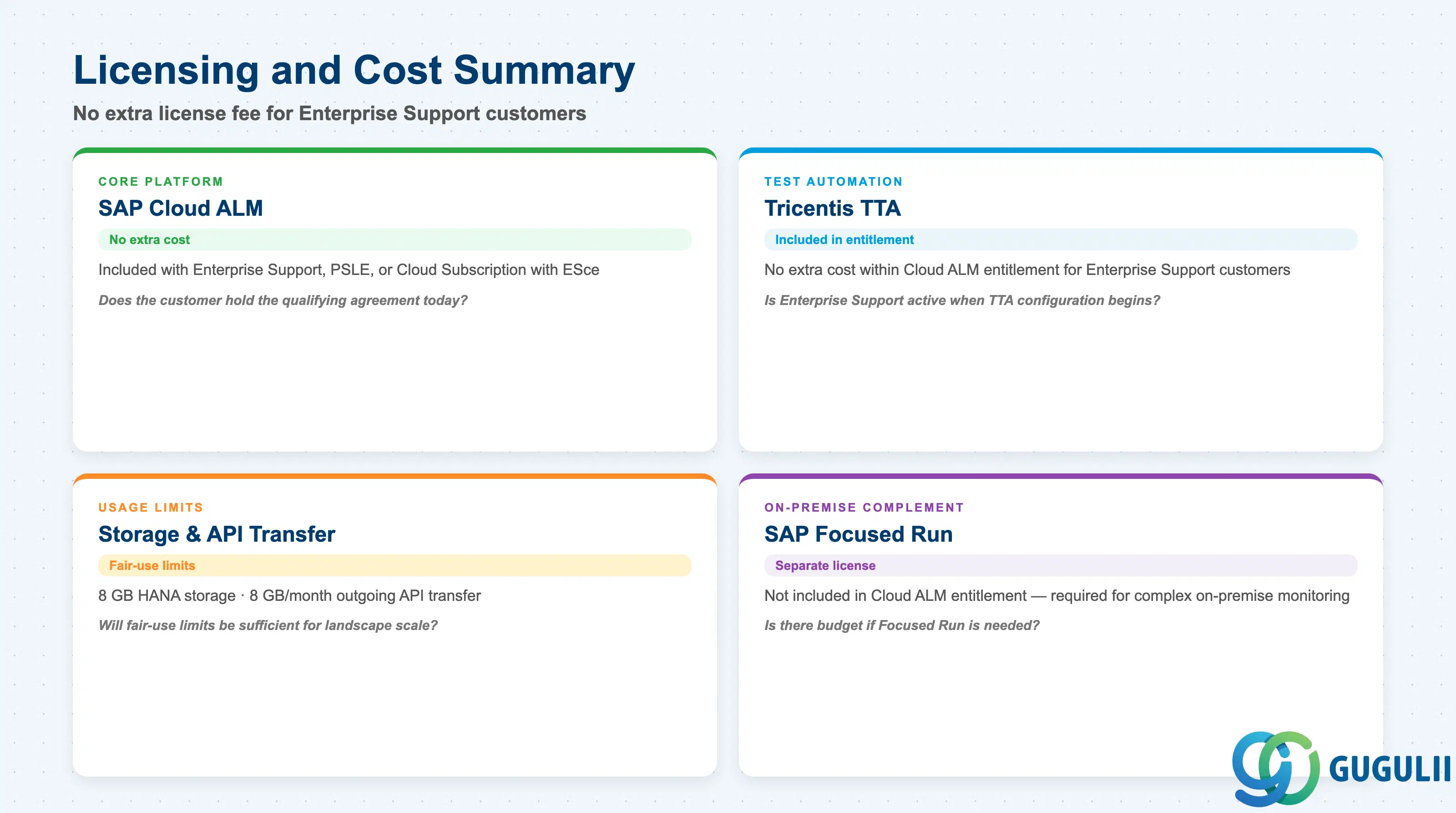
| Capability | Licensing model | Key question to ask |
|---|---|---|
| SAP Cloud ALM (core platform) | Included at no extra cost with SAP Enterprise Support, Product Support for Large Enterprises, or Cloud Subscription with Enterprise Support cloud edition | Does the customer have the qualifying support agreement today, or will they acquire it as part of RISE? Timing affects project start date. |
| Tricentis TTA | Included within Cloud ALM entitlement at no extra cost for Enterprise Support customers | Is Enterprise Support active when test automation configuration begins? Verify scope with the account team. |
| Cloud ALM storage (HANA + API transfer) | Fair-use limits: 8 GB HANA storage, 8 GB/month outgoing API transfer | For large landscapes with high monitoring volumes, will the fair-use limits be sufficient? Clarify with the account team. |
| SAP Focused Run (on-premise complement) | Separate licensed product; not included in Cloud ALM entitlement | Is there budget for Focused Run if complex on-premise monitoring is required? |
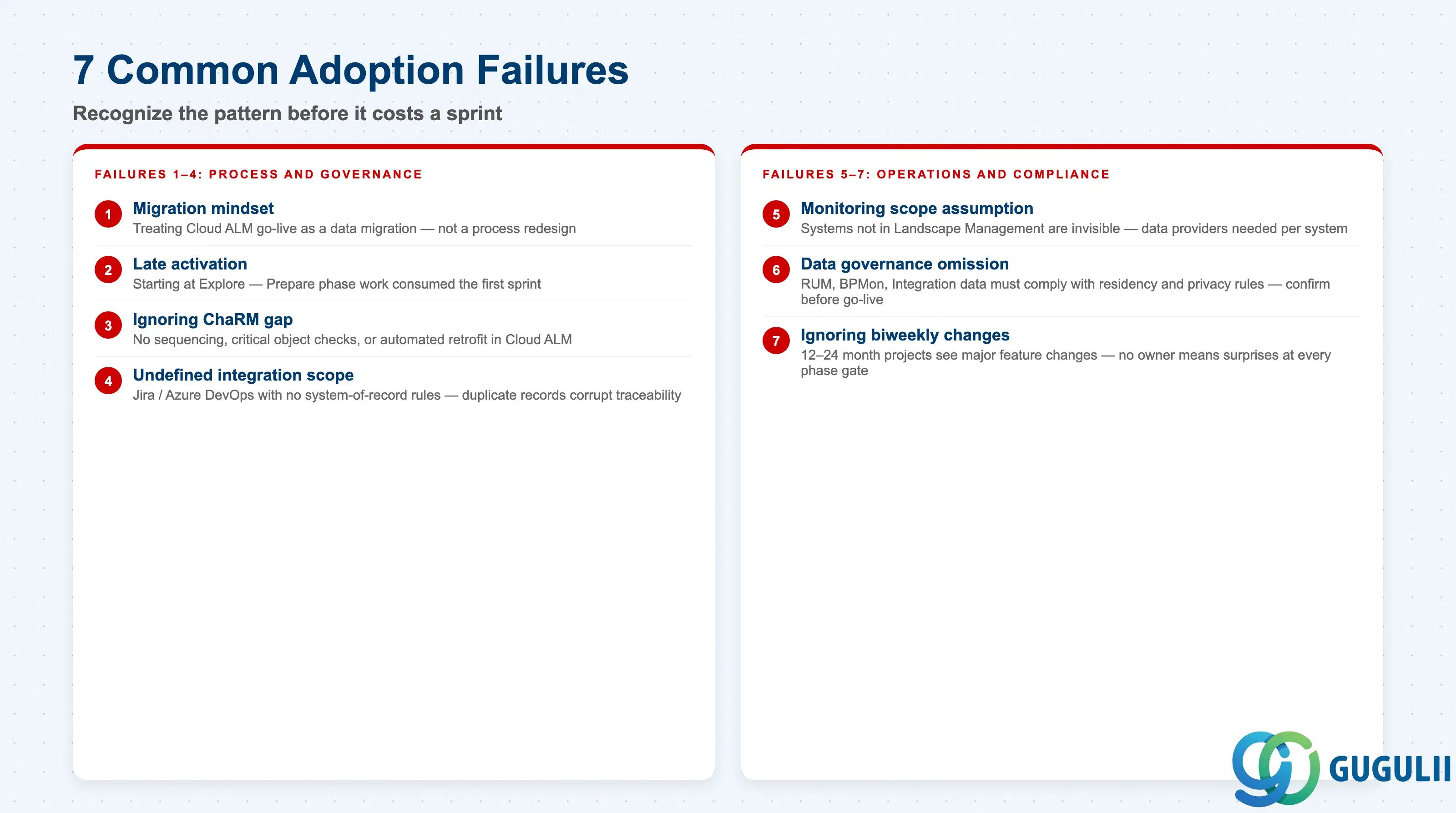
Failure 1: Treating Cloud ALM go-live as a migration project
Teams approach Cloud ALM as a technical migration of Solution Manager data: extract processes, import test cases, replicate ChaRM workflows. The Selective Data Transfer (SDT) tool (requires SAP Note 3358439) migrates business processes and test cases, but ChaRM data does not transfer, ITSM functionality does not exist in Cloud ALM, and reporting history starts fresh after activation ( Transition to SAP Cloud ALM). Teams that allocate migration budget without a parallel process redesign workstream discover mid-project that they are running both tools simultaneously.
Failure 2: Starting Cloud ALM too late in the implementation project
Project teams activate Cloud ALM at Explore phase kickoff, assuming it is ready to use out of the box. Prepare phase work is required first: role definitions, status and tag governance, integration strategy for parallel tools, test data strategy, and team training. When these prerequisites land in Explore, the first sprint is consumed by tool setup instead of process scoping, and workshop content is captured outside Cloud ALM, creating a documentation gap that is never fully closed.
Failure 3: Ignoring the ChaRM functional gap
Solution Manager’s Change Request Management provided sequencing, critical object checks, and automated retrofit capabilities with no direct equivalent in Cloud ALM’s Feature-based Change & Deployment Management. Teams that assume Cloud ALM covers their ChaRM use cases without mapping the gap encounter transport management problems during Realize phase. The mitigation requires either accepting Cloud ALM’s more standardized transport approach, implementing an ISV solution to fill gaps, or explicitly descoping advanced change management with a documented fallback.
Failure 4: Undefined integration boundaries when running parallel tools
When Jira or Azure DevOps is used alongside Cloud ALM, each system’s scope must be explicit: which system is the record for which data, which direction sync flows, how conflicts are resolved. Projects that treat the integration as a technical step to configure at convenience discover that duplicate records and conflicting statuses corrupt the traceability data that Cloud ALM was adopted to provide.
Failure 5: Scope assumption failure on Operations monitoring coverage
Operations teams assume Cloud ALM monitors all systems automatically after provisioning. Each managed system requires explicit registration in Landscape Management and individual data provider installation. Non-SAP applications require custom instrumentation. Teams that discover mid-operations that key systems are unmonitored must retrofit data provider setup under production pressure, compressing the baseline build-up period needed for anomaly detection.
Failure 6: Exception handling omission for data governance on monitoring data
Organizations in regulated industries must confirm that operational data collected by Cloud ALM data providers — user performance data (Real User Monitoring), business transaction data (Business Process Monitoring), and integration message content (Integration & Exception Monitoring) — complies with data residency and privacy regulations. Teams that treat data governance approval as a post-go-live activity face delayed production monitoring activation.
Failure 7: Ignoring biweekly feature changes during long-running projects
S/4HANA transformations typically span 12 to 24 months. Cloud ALM releases new features and changes existing workflows biweekly with additional daily background deployments. Teams without an owner tracking release notes discover at each phase gate that the tool has changed since they last trained on it — particularly acute for test management and deployment workflows.
Q: Does Cloud ALM replace Solution Manager for on-premise-only landscapes?
Cloud ALM covers both cloud-native and hybrid landscapes. On-premise ABAP systems connect via the Cloud ALM REST API using a service key generated in the Cloud ALM BTP subaccount; the SAP Cloud Connector is not required. However, organizations with exclusively on-premise landscapes and advanced monitoring requirements should evaluate SAP Focused Run as a complement. SAP’s position is that Cloud ALM is the strategic platform, but Focused Run remains recommended for on-premise-heavy scenarios beyond Cloud ALM’s current scope ( Transition to SAP Cloud ALM).
Q: What is the licensing model and is there any cost?
SAP Cloud ALM carries no additional license fee for customers with SAP Enterprise Support, Product Support for Large Enterprises, or a Cloud Subscription contract containing Enterprise Support cloud edition. Tricentis Test Automation for SAP (TTA) is also included at no extra cost within this entitlement. Provisioning is self-service through SAP for Me. Fair-use storage limits apply (8 GB HANA storage, 8 GB/month outgoing API transfer); customers should verify these limits against landscape scale with the SAP account team. SAP Focused Run, if needed, requires a separate license.
Q: When should test automation be descoped from the Cloud ALM project scope?
Descope Tricentis TTA when: (1) the project timeline does not allow the 4–6 week runway needed for TTA tenant provisioning and initial test case authoring before the first regression cycle; (2) the test scope is dominated by non-standard UI components or batch processes that TTA does not support without significant custom scripting; or (3) the customer has an established automated test suite in another tool with significant organizational expertise. In these cases, manual test management in Cloud ALM remains fully functional and retains traceability ( SAP Cloud ALM for Implementation).
Q: How should we document the Cloud ALM requirement in the requirements specification?
Treat Cloud ALM adoption as a platform requirement under “Tooling and Infrastructure Requirements” with: (1) the specific capabilities being activated, (2) the qualifying support agreement, (3) the data residency region selection rationale, (4) the integration points with external tools, (5) the governance structure (roles, status taxonomy), and (6) the Solution Manager decommission timeline if in scope. This framing ensures IT governance approves Cloud ALM as an infrastructure decision.
Q: What happens to ITSM processes when migrating from Solution Manager?
Solution Manager’s ITSM functionality has no equivalent in Cloud ALM — this is a confirmed functional gap. Organizations using SolMan ITSM must migrate those processes to a dedicated ITSM platform (ServiceNow, Jira Service Management, or similar) as a separate workstream. Cloud ALM provides REST APIs for integration with external ITSM tools for incident correlation, but it does not provide ITSM workflow functionality itself.
Q: How does Cloud ALM support clean core and RISE with SAP?
For RISE with SAP customers, Cloud ALM is the mandatory ALM platform and activates the RISE with SAP Methodology roadmap including quality gates and a clean core success plan covering five dimensions: Processes, Extensibility, Data, Integrations, and Operations. SAP Joule integrates into the RISE Methodology dashboard within Cloud ALM to provide guidance on clean core criteria ( SAP Cloud ALM and Clean Core Adoption). The Fit-to-Standard approach enforced through Process Management uses SAP Best Practice content as the baseline.
Q: How far in advance should we request the Cloud ALM tenant?
Request the tenant at the start of the Prepare phase, not when the project is ready to use it. Provisioning itself is fast — typically within 30 minutes via SAP for Me — but the prerequisite checks (confirming support agreement entitlement, identifying the administrative S-user, selecting the data center region, getting IT security approval) can take days to weeks in larger organizations. Treating provisioning as a last-minute administrative step is the single most avoidable project start delay in Cloud ALM adoptions.
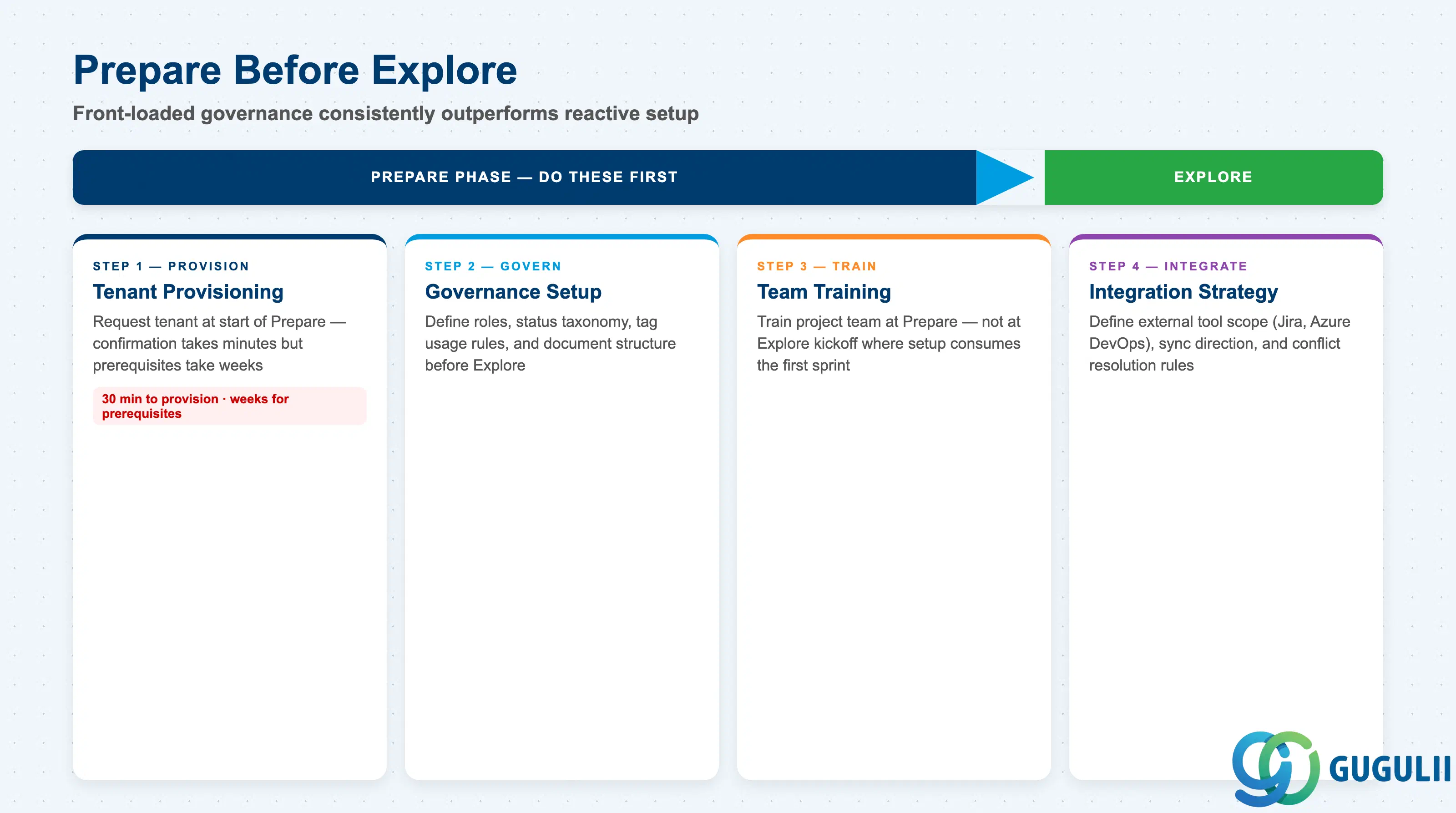
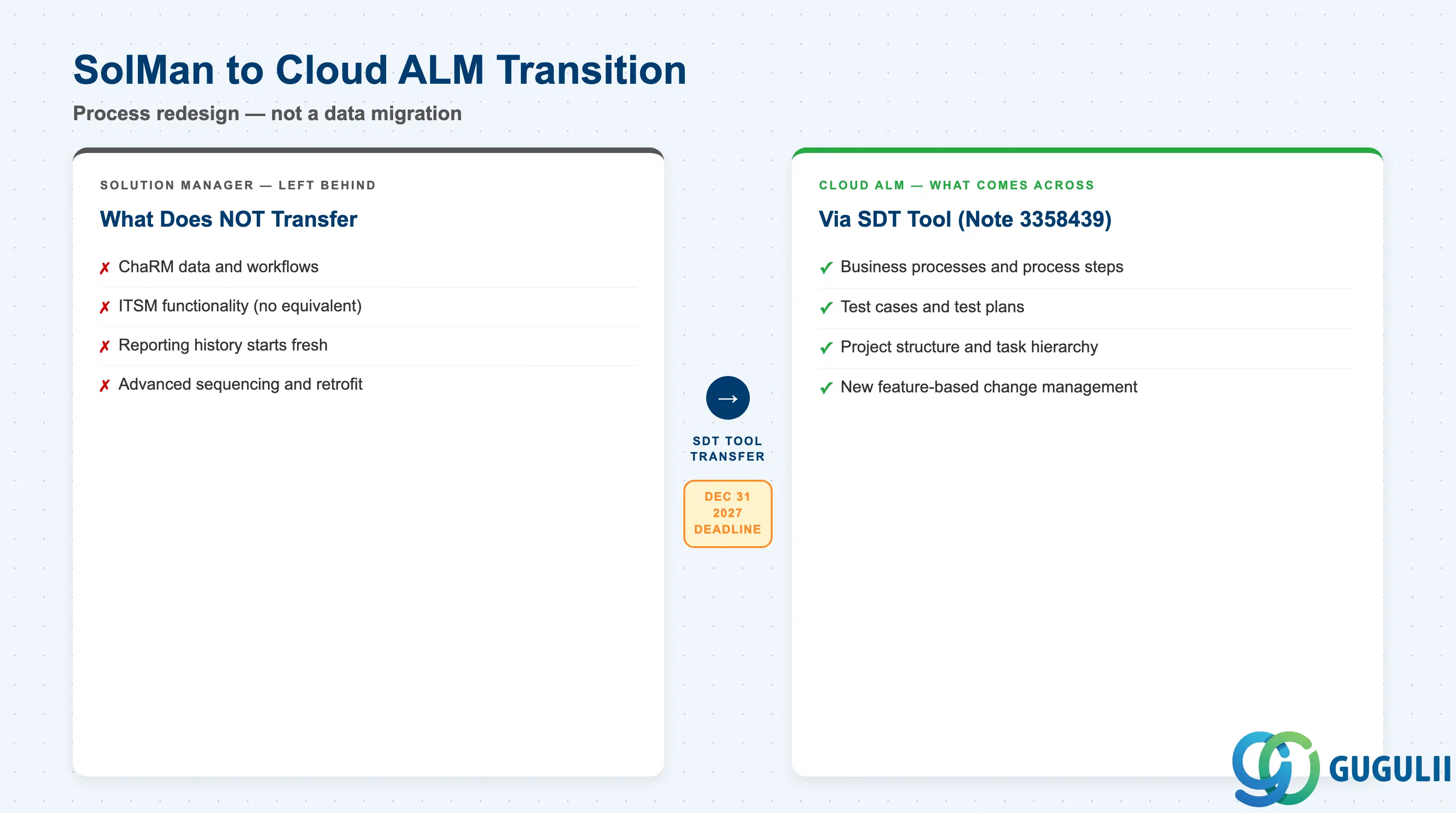
SAP Cloud ALM is the strategic ALM platform for SAP’s cloud and hybrid landscape management, delivered as a SaaS application on SAP BTP with no additional license cost for Enterprise Support customers ( SAP Cloud ALM — Main Product Page). Its three functional pillars — Implementation, Operations, and Service — are at different maturity levels: Implementation and core Operations monitoring are production-ready, while Change & Deployment Management retains gaps relative to Solution Manager’s ChaRM. The transition from Solution Manager is not a data migration; it is a process redesign that must account for the ITSM gap, the ChaRM gap, and the fact that historical reporting data does not transfer. Projects that establish governance, role definitions, and integration strategies during Prepare — before Explore begins — consistently outperform those that treat Cloud ALM as a tool to be configured mid-implementation. Solution Manager mainstream maintenance ends December 31, 2027; organizations without a transition roadmap should initiate the SAP Readiness Check now.