Title here
Summary here

| ID | Category | Component | Scope |
|---|---|---|---|
| BTP-E01 | Foundation Services | Foundation Services | Overview and Capability Map |
| BTP-E02 | Foundation Services | Identity and Access Management | Architecture and Use |
| BTP-E03 | Foundation Services | Cloud Connector | Architecture and Use |
| BTP-E04 | Foundation Services | Private Link | Architecture and Use |
| BTP-E05 | Foundation Services | Cloud ALM | Architecture and Use |
| BTP-E06 | Foundation Services | Cloud Transport Management | Architecture and Use (this article) |
| BTP-E07 | Foundation Services | Foundation Services | Use Cases and Decision Patterns |
| Resource | URL |
|---|---|
| SAP Cloud Transport Management — What Is cTMS | help.sap.com → |
| Create Transport Nodes | help.sap.com → |
| Using the Import Queue | help.sap.com → |
| SAP Cloud Transport Management Service (top-level) | help.sap.com → |
| DevOps with SAP BTP Reference Architecture | sap.com → |
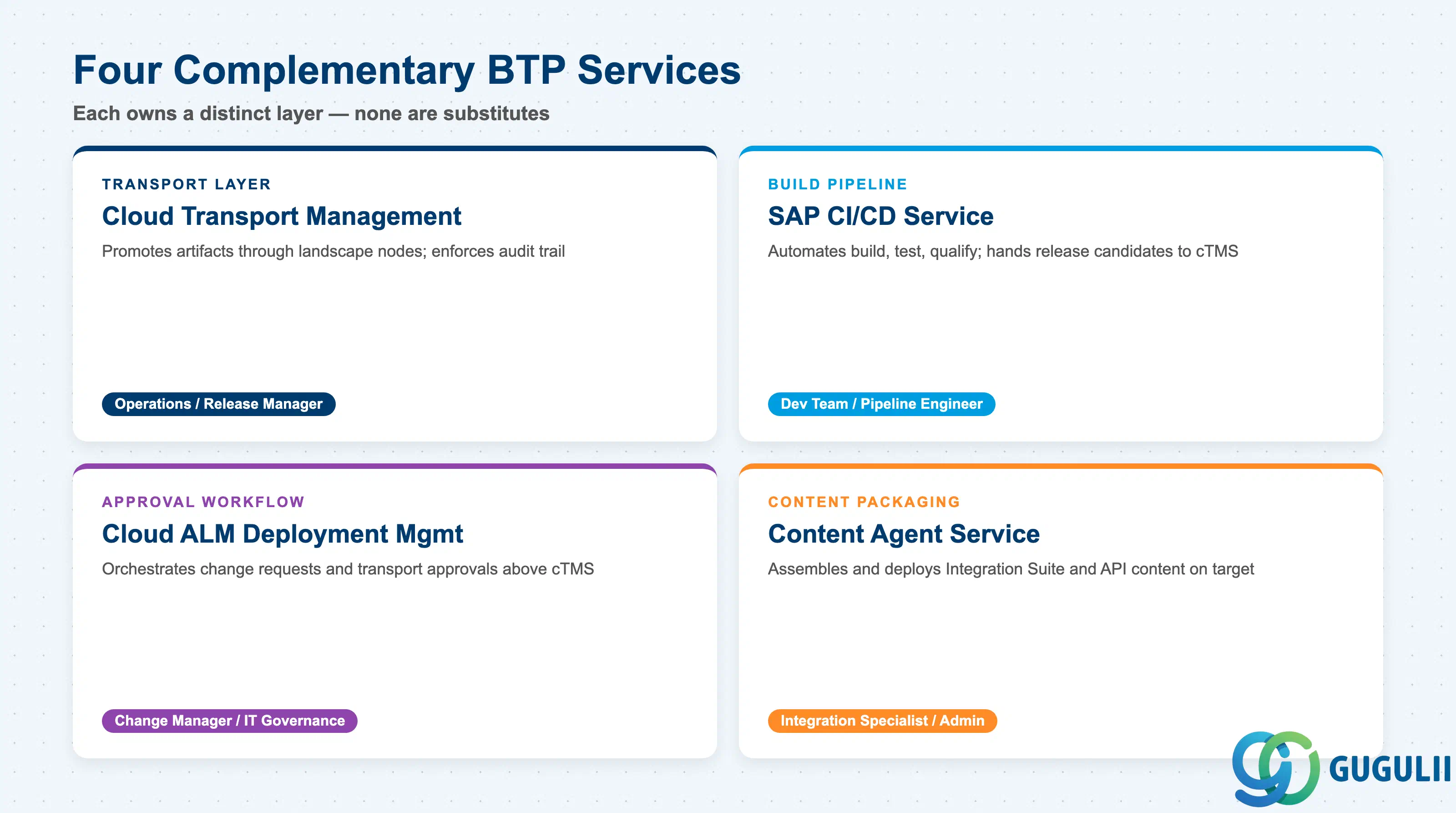
SAP BTP Foundation Services include several services that overlap at the change-management boundary. Understanding which one does what prevents incorrect scoping decisions. ( SAP Help Portal)
| Domain | What it does | Primary user |
|---|---|---|
| SAP Cloud Transport Management (cTMS) | Manages the promotion of build artifacts and content through a defined landscape of nodes; provides audit trail and import queue control | Central operations team / release manager |
| SAP Continuous Integration and Delivery service | Automates build, test, and qualification of BTP applications; hands off release candidates to cTMS | Development team / pipeline engineer |
| SAP Cloud ALM — Deployment Management | Orchestrates change requests and transport approvals across systems at a higher governance level; connects to cTMS for execution | Change manager / IT governance |
| SAP Content Agent Service | Assembles and deploys Integration Suite, API Management, and Build Work Zone content; acts as the packaging layer cTMS calls on target systems | Integration specialist / platform administrator |
These four services are complementary, not substitutes. cTMS handles the transport lane; Content Agent handles the packaging; SAP CI/CD handles the build pipeline; SAP Cloud ALM handles the approval workflow above all of them.
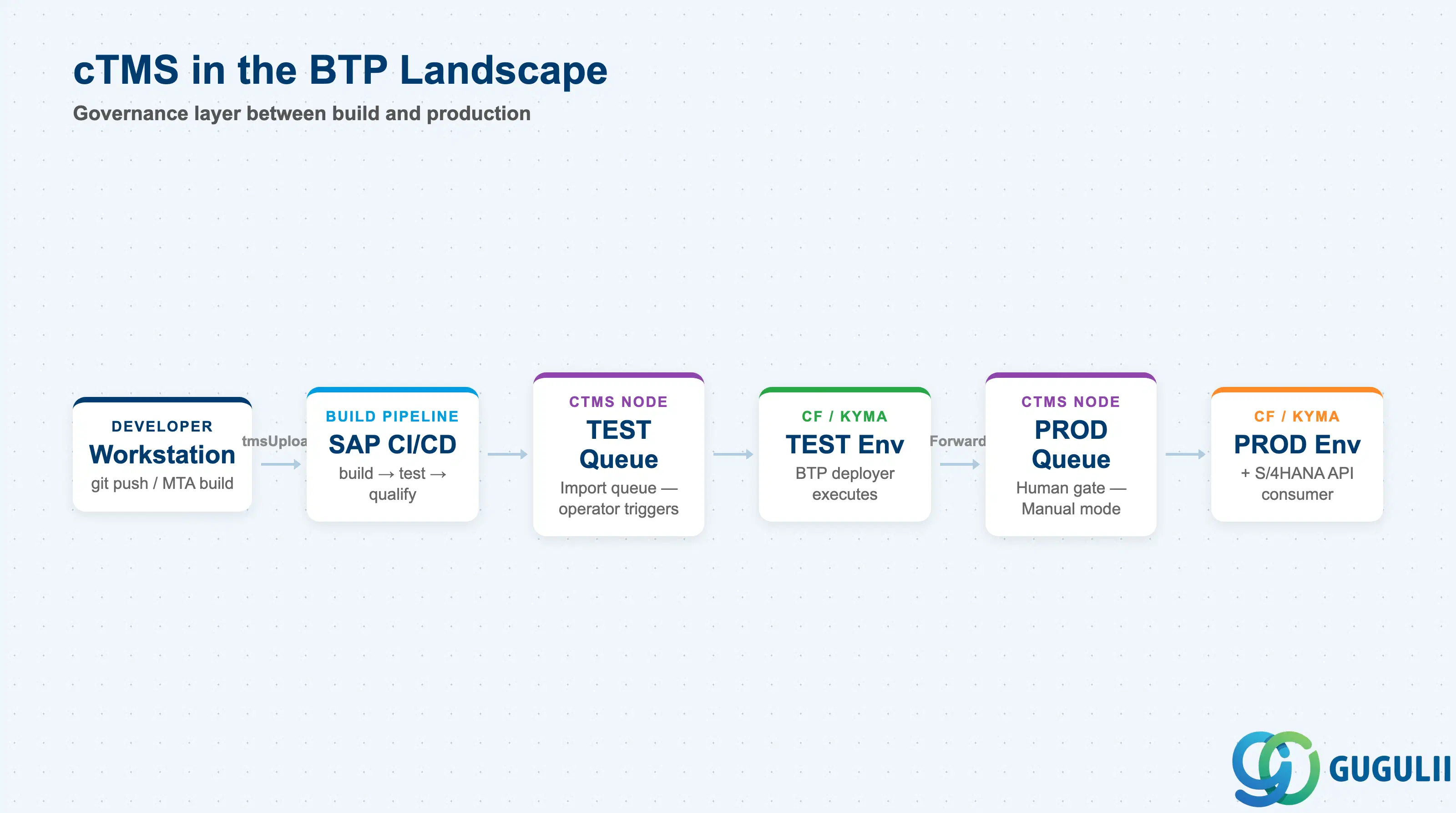
In a typical BTP + S/4HANA landscape, cTMS sits at the boundary between the development environment and production-facing systems. The recommended architecture places cTMS in its own dedicated subaccount alongside other shared services, separate from application workload subaccounts. ( SAP Architecture Center)
Developer workstation
      |
      | git push / MTA build
      v
SAP CI/CD Service (or Jenkins / Piper)
  [build → test → qualify]
      |
      | tmsUpload (POST /v2/files/upload)
      v
cTMS — Source Node (e.g., TEST)
  [import queue]
      |
      | operator imports → import triggers BTP deployer
      v
Cloud Foundry / Kyma subaccount (TEST environment)
      |
      | forwarded (Auto or Manual)
      v
cTMS — Target Node (e.g., PROD)
  [import queue]
      |
      | operator imports (human gate before production)
      v
Cloud Foundry / Kyma subaccount (PROD environment)
      |
      | (Side channel) Integration Suite iFlows
      | content deployed via Content Agent Service
      v
S/4HANA — API consumer side (OData / RFC calls from BTP app)
cTMS does not reach inside S/4HANA. Classic ABAP transport requests travel through the on-premise ABAP TMS. In hybrid landscapes, the two transport systems operate in parallel; SAP Cloud ALM or SAP Solution Manager can provide a unified view across both. ( SAP BTP Best Practices Guide)
Key point: cTMS enforces the promotion boundary between environments — it does not perform the deployment itself. The BTP deployer (for MTA/CF) or the Content Agent Service (for Integration Suite) executes the actual deployment once cTMS triggers the import.
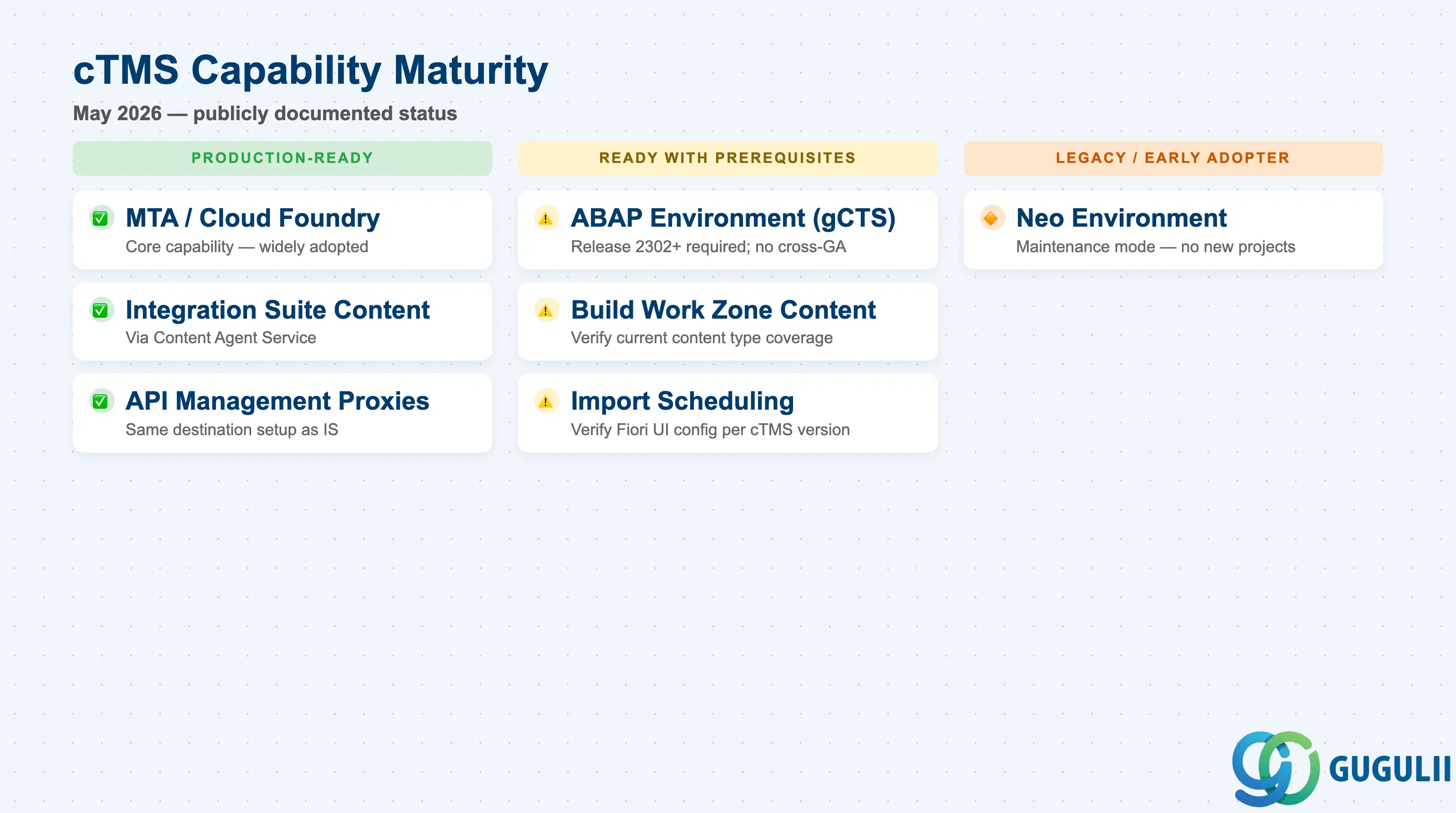
The following table reflects publicly documented capabilities as of May 2026. ( SAP Help Portal)
| Component | Maturity | Notes |
|---|---|---|
| MTA archive transport (Cloud Foundry) | ✅ Production-ready | Core capability; well-documented, widely adopted. File size limit 1 GB per archive; 50 GB total storage on standard plan. |
| Integration Suite content (via Content Agent Service) | ✅ Production-ready | Requires four destinations on the source subaccount and the WorkspacePackagesTransport role. Additional setup overhead but stable. |
| API Management proxy transport | ✅ Production-ready | Supported via Content Agent Service; same destination setup as Integration Suite. |
| BTP ABAP Environment software components (gCTS extension) | ⚠️ Ready with prerequisites | Generally available since release 2302 (Feb 2023). Requires cTMS service key in ABAP environment and gCTS integration configuration. Cross-global-account transport not supported for ABAP content. |
| Build Work Zone content | ⚠️ Ready with prerequisites | Supported via Content Agent Service. Verify current content type coverage in the official SAP Help Portal before committing to this pattern. |
| Neo environment | 🔶 Early adopter | Neo is in maintenance mode. New projects should not be on Neo; existing Neo-based cTMS setups are considered legacy. |
| Import scheduling (timer-based auto-import) | ⚠️ Ready with prerequisites | Referenced in SAP documentation. Verify the exact Fiori UI configuration path against the current cTMS version in your tenant before designing this into a workflow. |
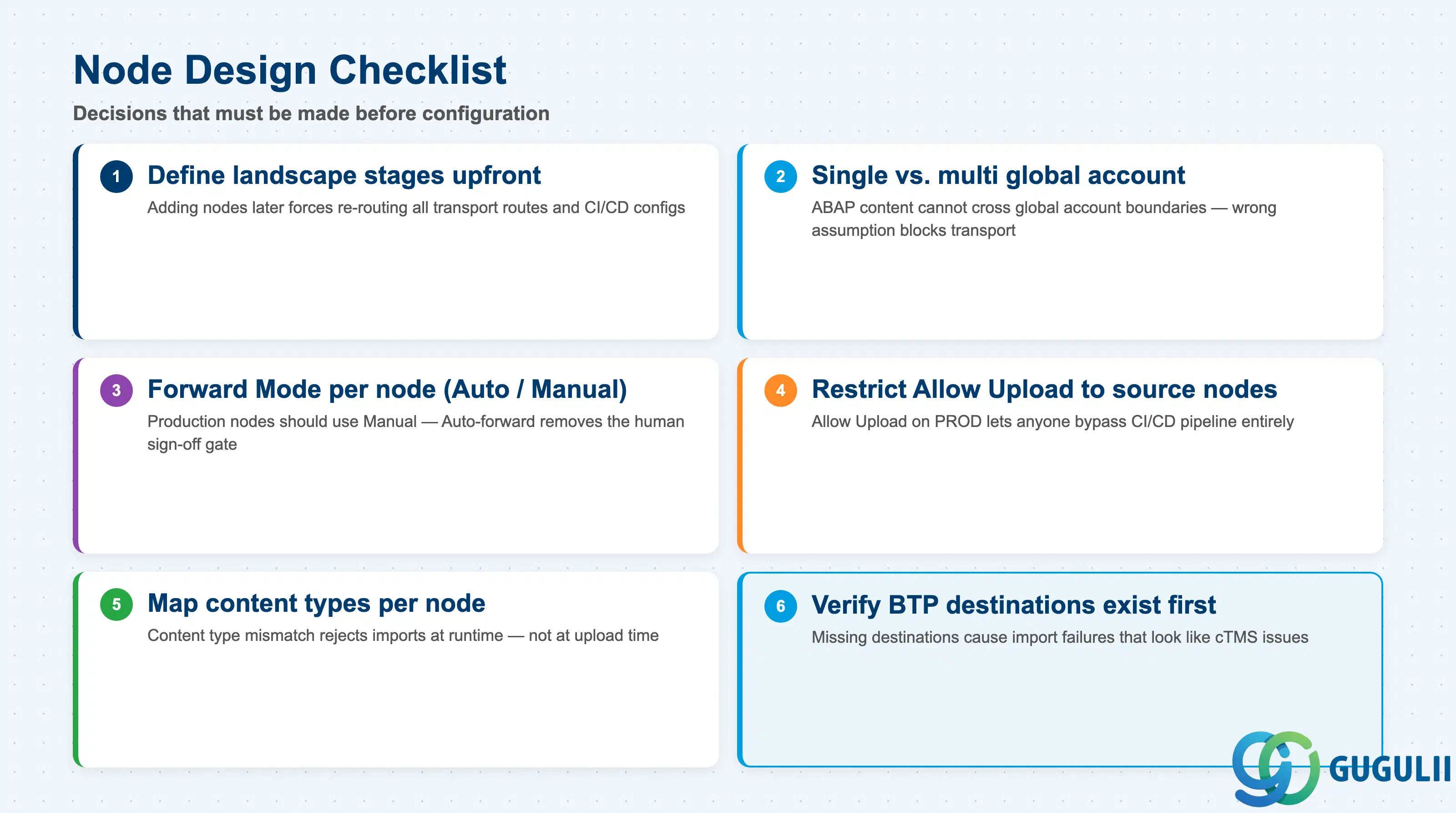
| Checklist item | Why it matters |
|---|---|
| Define the minimum number of landscape stages (TEST, PROD, or more) before any cTMS configuration | Adding nodes later requires re-routing all existing transport routes and updating CI/CD pipeline configs. |
| Confirm whether the landscape spans a single global account or multiple global accounts | ABAP environment content cannot cross global account boundaries; Cloud Foundry and Integration Suite content can. Wrong assumption here blocks ABAP transport entirely. |
| Decide Forward Mode (Auto vs. Manual) per node before go-live | Auto-forward removes the human gate between nodes. Production nodes should almost always use Manual to preserve a sign-off checkpoint. |
| Identify which nodes receive direct file uploads (Allow Upload = true) | Only source/dev-adjacent nodes should have Allow Upload enabled. Enabling it on PROD opens an unintended bypass of the CI/CD pipeline. |
| Map content types per node (MTA, Application Content, or both) | A node with mismatched content type rejects incoming transport requests at import time — not at upload time. Discovering this in production causes avoidable incidents. |
| Verify BTP destinations exist for every target node before creating the route | cTMS uses BTP destinations to reach target subaccounts at import time. A missing destination causes import failures that look like cTMS issues but are connectivity issues. |
| Document the BTP role collections required (TMS Import Operator, TMS Admin) and assign them before the first import | Missing role collections cause permission errors during the first import drill, introducing unnecessary risk during time-sensitive deployments. |
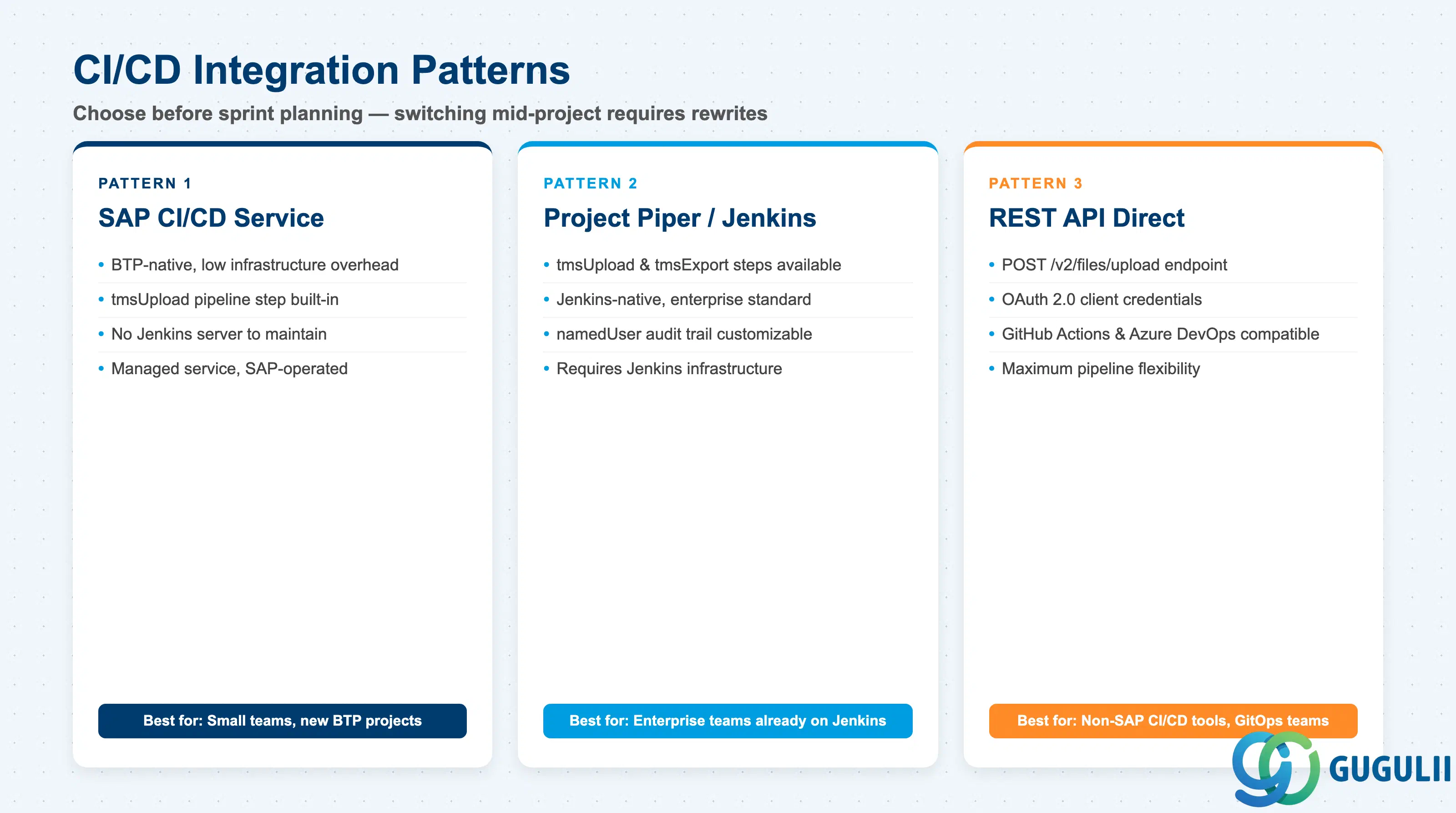
| Checklist item | Why it matters |
|---|---|
| Choose CI/CD integration pattern (SAP CI/CD service, Project Piper/Jenkins, or REST API) before sprint planning | Each pattern has different infrastructure dependencies. Switching mid-project requires pipeline rewrites. |
| Confirm that a cTMS service key exists and is stored as a secured credential in the chosen CI/CD tool | The tmsUpload step and REST API both require OAuth 2.0 client credentials from the service key. Storing the service key in plain text is a security finding. |
| Define the nodeName for the CI/CD upload target explicitly in pipeline configuration | Uploading to the wrong node (e.g., PROD instead of TEST) bypasses the intended promotion path and places untested artifacts directly in the production queue. |
| Plan MTA extension descriptor (.mtaext) mapping per node if the MTA carries environment-specific credentials | Credentials embedded in the base .mtar file are the same across all environments. Environment-specific values must be injected via .mtaext files mapped to each node via nodeExtDescriptorMapping. |
| Confirm the customDescription setting for each pipeline upload | In Project Piper’s tmsUpload step, customDescription defaults to the Git commit ID — which is the correct value. Explicitly confirming this setting (or standardising it to the CI pipeline run ID) ensures the cTMS audit trail can be cross-referenced against both source history and build logs. |
| Set namedUser to a traceable actor identity for the audit trail | namedUser (default: “Piper-Pipeline” in tmsExport) identifies who triggered the transport. Override it to record the actual pipeline user or service account so the audit trail is actionable during post-mortems. |
| Confirm that the CI pipeline only uploads release candidates, not every feature branch build | Uploading every build floods import queues with noise and makes it harder for operators to identify the correct request to import. |
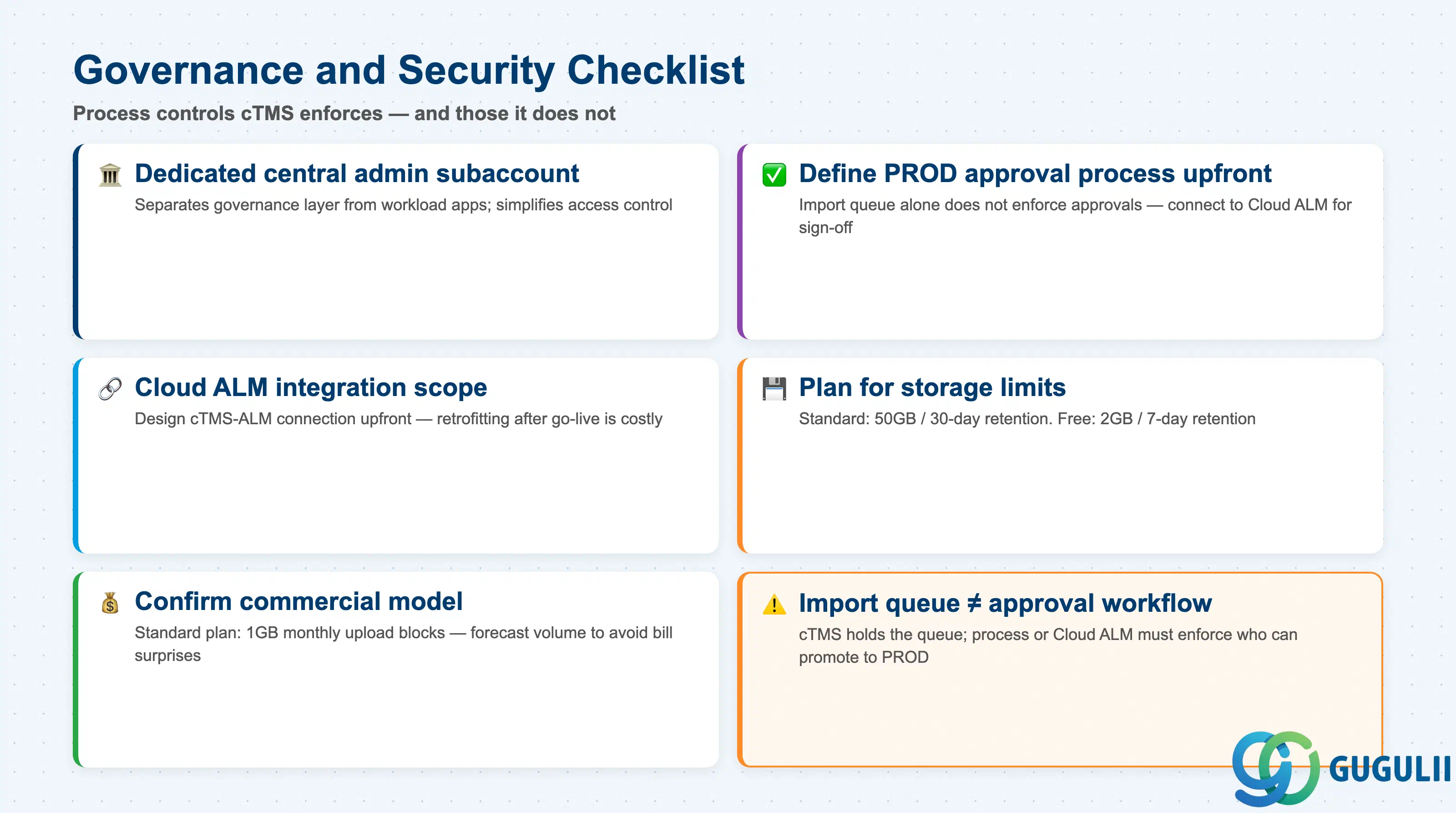
| Checklist item | Why it matters |
|---|---|
| Confirm that the cTMS subscription resides in a dedicated central administrative subaccount | Co-locating cTMS with workload applications makes access control harder and creates dependency between the governance layer and individual application deployments. |
| Define the approval process for importing into the production node before go-live | The import queue alone does not enforce an approval process. If the customer’s change management process requires a sign-off, that approval must be enforced by process or by connecting cTMS to SAP Cloud ALM. |
| Confirm SAP Cloud ALM Deployment Management integration scope if the customer already uses SAP Cloud ALM | cTMS integrates with SAP Cloud ALM since May 2022. The cTMS-ALM connection should be designed upfront rather than retrofitted. |
| Plan for the cTMS storage limits under the chosen service plan | Standard plan: 50 GB, 1 GB per file, artifacts retained 30 days post-import. Free tier: 2 GB, 7-day retention. Archive cleanup cadence must be defined for high-frequency deployment landscapes. |
| Confirm commercial model for cTMS (CPEA, PAYG, or Enterprise Agreement) | cTMS standard plan is consumption-based (1 GB monthly data upload blocks). Forecast upload volume to avoid unexpected cost surprises at month-end billing. |
| Checklist item | Why it matters |
|---|---|
| Verify that the ABAP environment system is on release 2302 (February 2023) or later | cTMS integration for ABAP environment became available in release 2302. Earlier releases cannot use this integration path. |
| Confirm that all ABAP environment systems in the landscape share the same BTP global account | Cross-global-account transport is not supported for ABAP content. This constraint affects multi-region or multi-global-account landscape designs. |
| Plan the software component version release process using the Manage Software Components app | Developers release software component versions in the ABAP Fiori launchpad, not directly in cTMS. Operations teams must understand this indirect trigger model. |
| Store the cTMS service key as a credential in the ABAP environment system | The gCTS integration uses the service key to communicate with cTMS. It must be registered in the ABAP system before transport can be initiated. |
| Confirm that a five-node versus three-node ABAP landscape is justified | A five-node landscape (DEV → TST → QAS → PRE-PROD → PROD) introduces significant operational overhead. Only add nodes beyond DEV → TEST → PROD if there is a concrete business requirement — for example, a regulatory QA gate or a dedicated performance testing environment. |
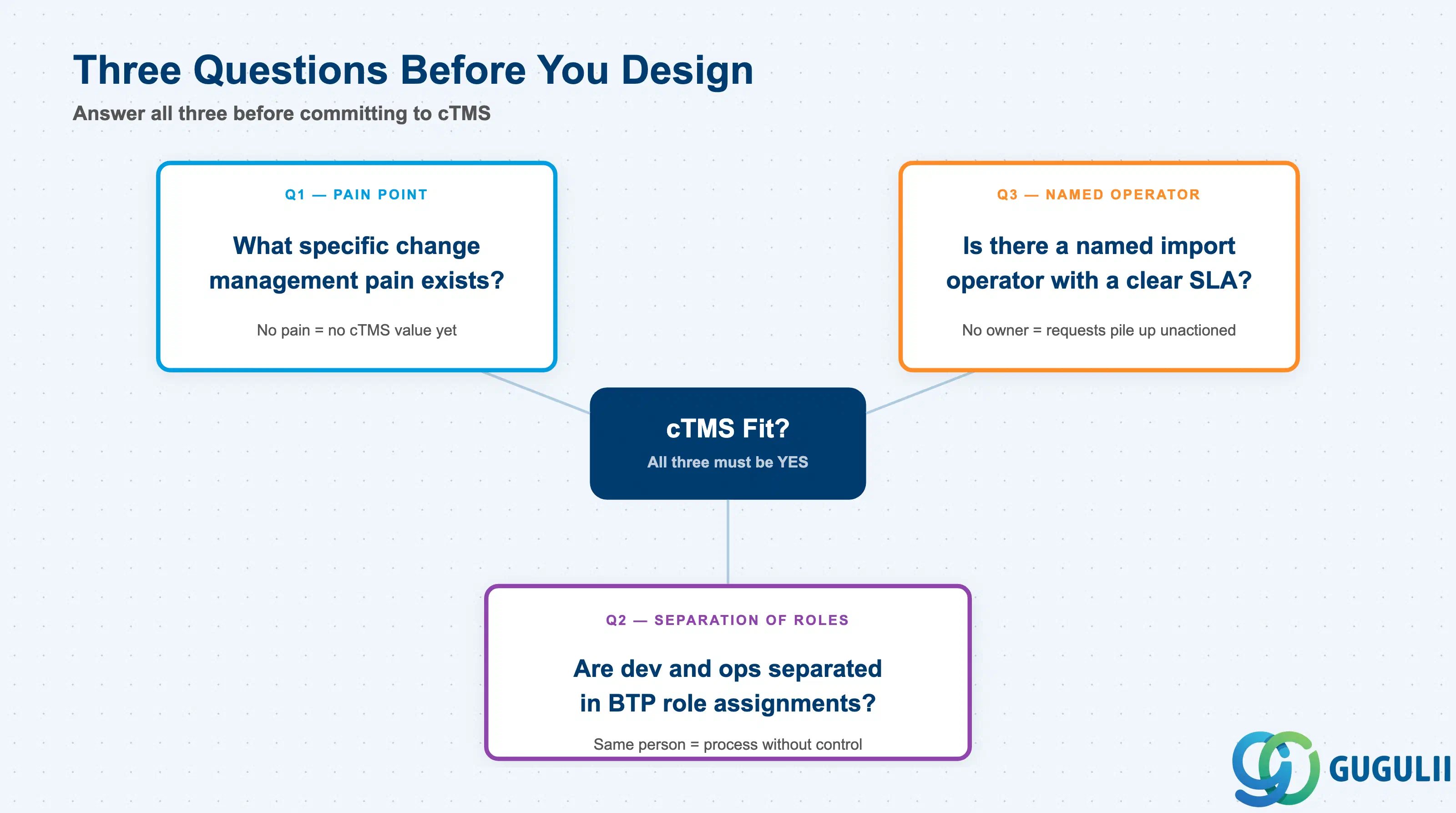
Q1. What specific change management pain point is the customer experiencing today?
Without a clear pain point, cTMS adds governance overhead without offsetting value. Common valid pain points: developers can directly deploy to production without any approval gate; there is no audit trail of what was deployed and when; MTA archives are being manually copied between subaccounts. If none of these apply, the customer may not need cTMS yet.
Q2. Who owns the production subaccount, and is there a clear separation between developers and operations?
cTMS enforces separation of concerns by design: developers upload artifacts, operations imports them. If the same people control both the CI/CD pipeline and the production subaccount, cTMS adds process without changing the underlying access control reality. The separation must exist in BTP role assignments before cTMS provides its governance value.
Q3. Is there a named operations owner with authority to approve production imports?
cTMS creates an import queue, but someone must act on it. Implementations fail operationally when the import operator role is undefined at go-live. Confirm the role owner and their on-call availability before committing to a production import SLA.
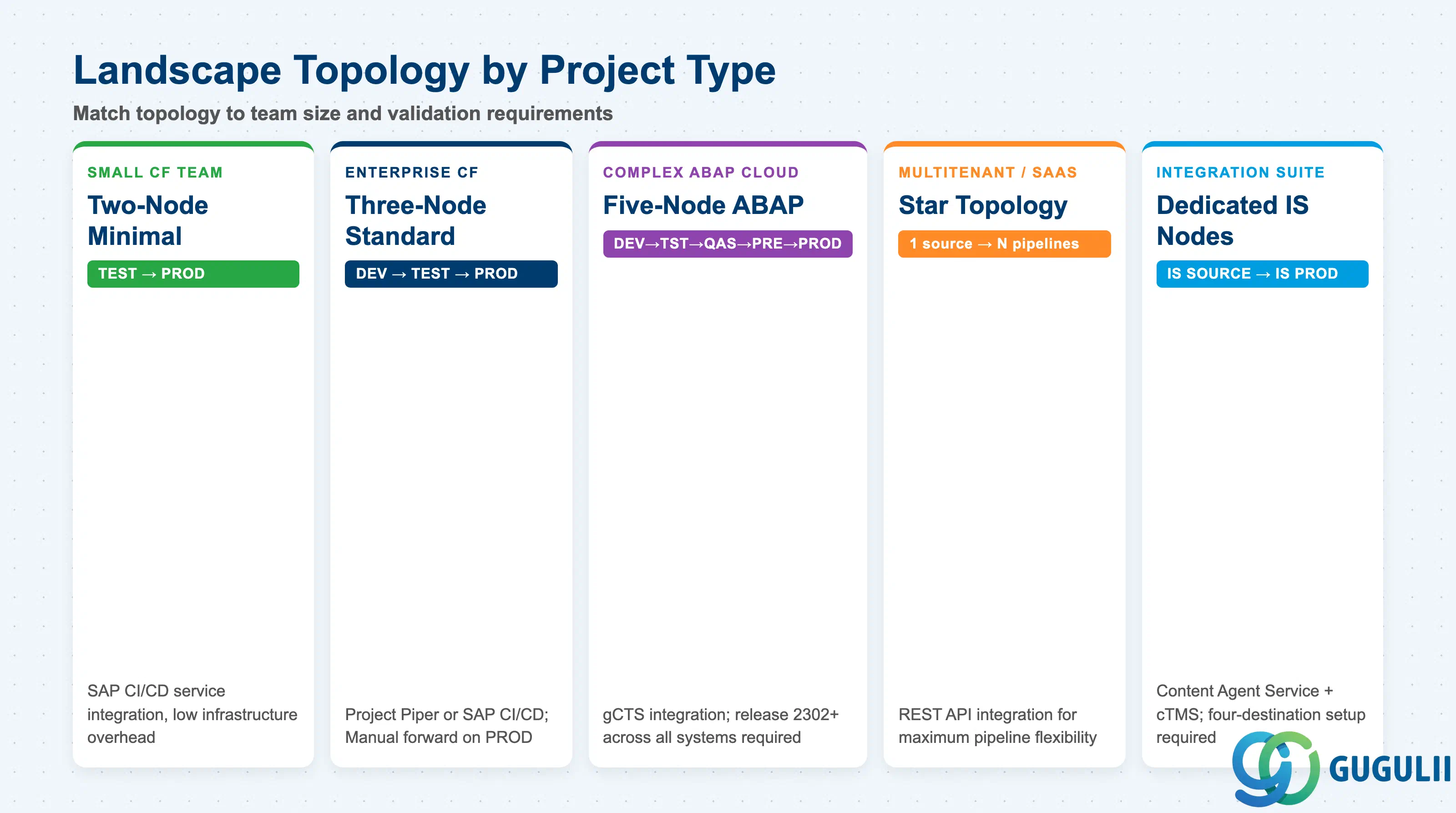
| Project context | Recommended starting point |
|---|---|
| New BTP Cloud Foundry application, small team, startup | Two-node minimal landscape (TEST → PROD); SAP CI/CD service integration (low infrastructure overhead) |
| Enterprise BTP application with separate dev, test, and release teams | Three-node standard landscape (DEV → TEST → PROD); Project Piper or SAP CI/CD service; Manual forward mode on PROD node |
| Complex ABAP cloud development, multiple validation stages | Five-node ABAP landscape (DEV → TST → QAS → PRE-PROD → PROD); gCTS integration; confirm release 2302+ across all systems |
| Multitenant SaaS application or parallel regional rollouts | Star topology (one source node feeding multiple independent pipelines); REST API integration for maximum pipeline flexibility |
| Integration Suite content transport (iFlows, API proxies) | Dedicated Integration Suite landscape nodes; Content Agent Service + cTMS; four-destination setup on source subaccount |
| Customer already using SAP Cloud ALM | Connect cTMS to Cloud ALM Deployment Management from the start; do not design a standalone cTMS approval process in parallel |
| Hybrid landscape with existing SAP Solution Manager ChaRM | SolMan 7.2 SPS10+ integration with cTMS; confirm Focused Build Release Management scope if applicable |
| No clear pain point identified yet | Stop. Go back to Q1. |
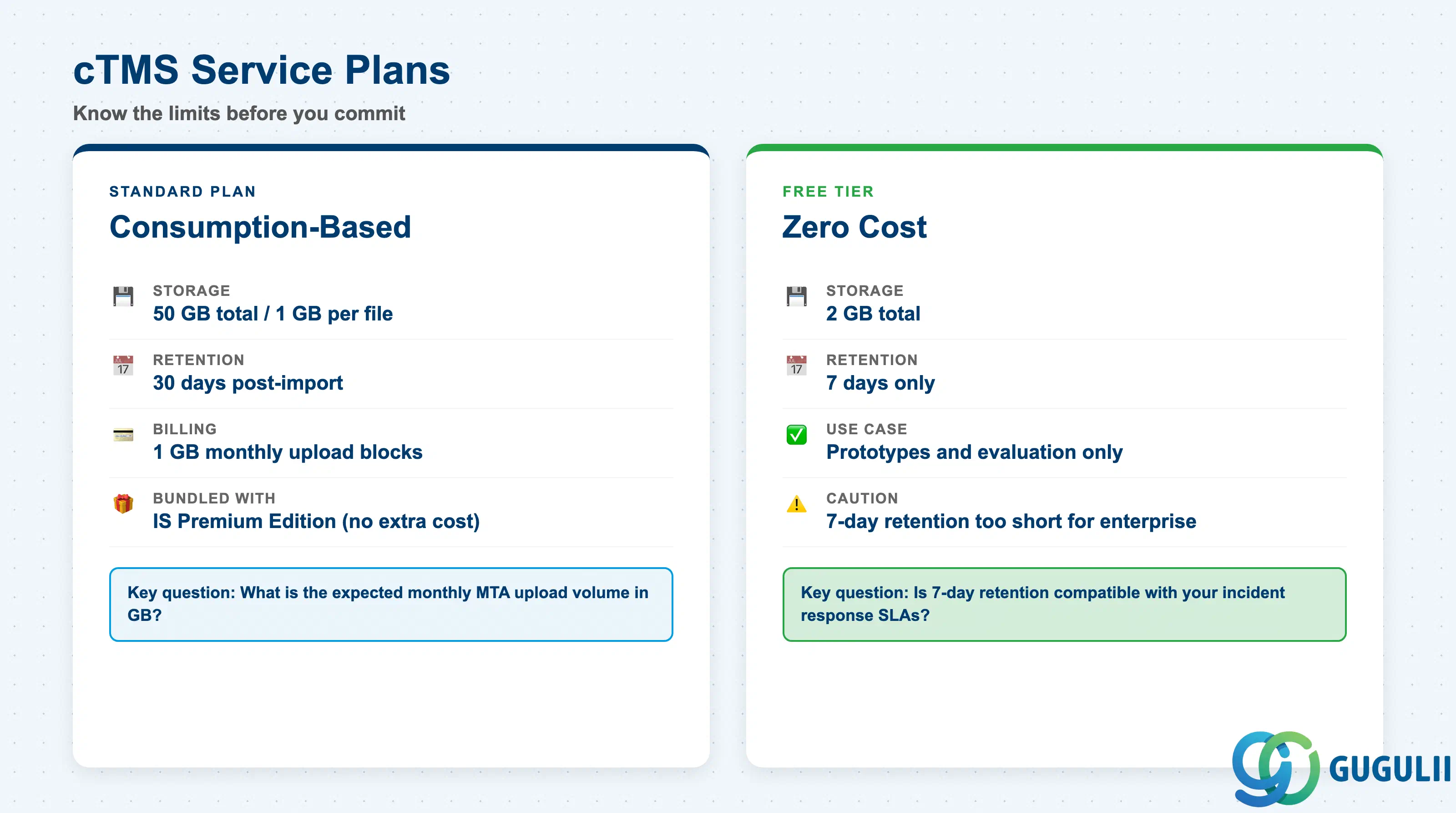
| Service | Licensing model | Key question to ask |
|---|---|---|
| cTMS Standard plan | Consumption-based (1 GB monthly upload data blocks); available under CPEA, PAYG, Enterprise Agreement; bundled with SAP Integration Suite Premium Edition | What is the expected monthly MTA upload volume in GB? Is Integration Suite Premium Edition already licensed? |
| cTMS Free tier | Free; 2 GB storage; 7-day artifact retention | Is the 7-day retention window compatible with the deployment cadence and incident response SLAs? |
| SAP Content Agent Service | Included with SAP Integration Suite entitlements; verify current entitlement model | Is Integration Suite already in scope? If not, Content Agent Service cost must be factored separately. |
| SAP Cloud ALM | Covered by SAP Enterprise Support (no separate license for core features) | Is SAP Enterprise Support active for this customer? |
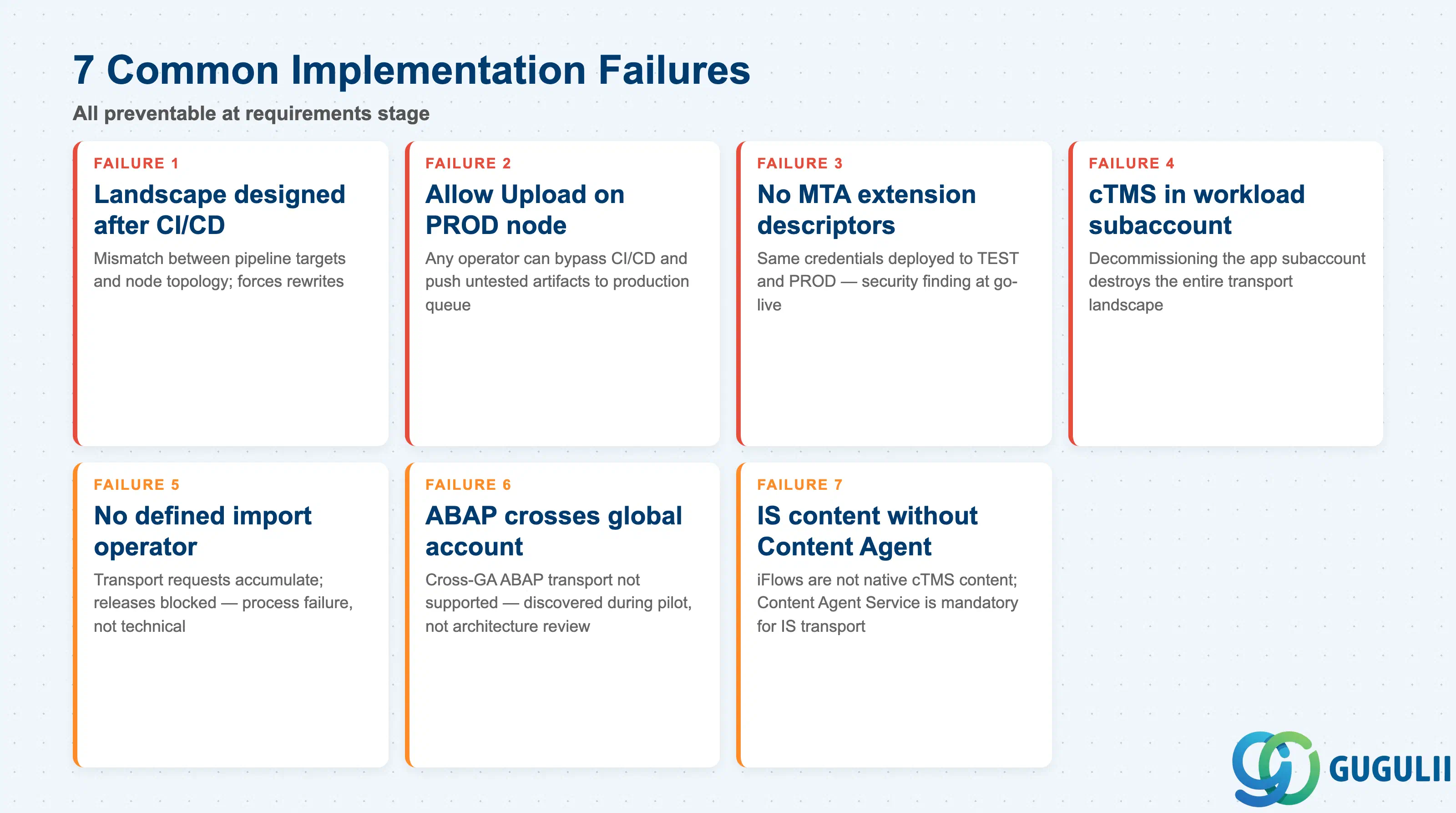
Failure 1: Landscape designed after CI/CD pipeline is already built
Teams stand up the CI/CD pipeline first and add cTMS transport nodes later as an afterthought. The result is a mismatch between the pipeline’s target environment assumptions and the actual node topology, requiring rewrites, re-testing, and schedule slippage. Design the cTMS landscape, node names, and forward mode settings before a single pipeline job is written.
Failure 2: Production node has Allow Upload enabled
When a node has Allow Upload set to true, any user with the TMS Import Operator role can upload an artifact directly to that node’s import queue without going through the CI/CD pipeline. This bypasses build qualification, unit tests, and compliance checks. The Allow Upload flag on production nodes must be disabled; only the designated source node should have it enabled.
Failure 3: No MTA extension descriptors planned for multi-environment credentials
A project ships with environment-specific credentials hard-coded inside the base .mtar archive, deploying the same artifact to TEST and PROD with the same credentials. MTA extension descriptor files (.mtaext) are the correct pattern for injecting environment-specific values per node. Failing to plan them at requirements stage creates a security finding at go-live.
Failure 4: cTMS subscription placed in a workload subaccount
When cTMS is created in the same subaccount as the application workload, restructuring the application team or decommissioning the subaccount destroys the entire transport landscape configuration. SAP’s best practice is a dedicated central administrative subaccount. This also simplifies access control: the operations team accesses the central subaccount without needing access to each workload subaccount.
Failure 5: No defined operator for the import queue
The CI/CD pipeline successfully uploads artifacts, but no one owns the responsibility of reviewing and importing from the queue. Transport requests accumulate without being actioned, blocking releases. This is a process failure, not a technical one. The TMS Import Operator role must be assigned to a named individual or team with an agreed response SLA before go-live.
Failure 6: ABAP environment landscape crosses global account boundary
A project designs a cTMS landscape with DEV in one global account and PROD in a second global account — common in large enterprises with separate global accounts per business unit. This is discovered during pilot deployment rather than architecture review. Validate the cross-global-account constraint for ABAP content at architecture review, not during deployment.
Failure 7: Integration Suite content transport configured without Content Agent Service
A project expects to transport SAP Integration Suite iFlows using cTMS directly, treating them like MTA archives. Integration Suite content is not a native cTMS content type. The Content Agent Service assembles iFlow packages on the source and deploys them on the target; cTMS manages the transport request, but Content Agent executes the content operations. Omitting Content Agent Service from the architecture means the transport setup cannot function for Integration Suite content.
Q: Can cTMS be used for on-premise ABAP transport requests (classic ABAP TMS)?
No. cTMS manages transport of artifacts and content that run on SAP BTP. Classic ABAP transport requests — ABAP workbench objects, customizing — are handled by the on-premise ABAP Transport Management System and optionally governed by SAP Solution Manager ChaRM. In hybrid landscapes, SAP Cloud ALM or Solution Manager can provide a unified view across both transport domains, but cTMS itself does not handle on-premise ABAP change transport.
Q: What is the licensing cost of cTMS, and is it included in anything?
The standard plan is consumption-based: charges accrue per 1 GB monthly block of data uploaded to cTMS. For organizations that have licensed SAP Integration Suite Premium Edition, cTMS is bundled at no incremental cost. For CPEA and PAYG commercial models, consumption is metered against BTP cloud credits. A free tier exists (2 GB storage, 7-day artifact retention) and is adequate for prototypes, but the 7-day retention window is too short for most enterprise deployment cadences.
Q: When should cTMS be descoped from a BTP project?
Consider descoping cTMS when: the deployment cadence is extremely low (less than one deployment per month), the team is a single developer with no separation of development and operations roles, the application is a short-lived prototype with no production environment, or the customer is already using a Kubernetes-native GitOps tool for promotion and the overhead of an additional governance layer is not justified. For Kyma-based workloads specifically, SAP’s own best practices guide suggests CI/CD pipelines for Docker/Helm deployment rather than cTMS.
Q: How should the cTMS transport landscape be documented in a requirements specification?
Document each transport node with: node name, target environment (subaccount name and environment type), content type, Allow Upload flag, Forward Mode setting, and the BTP destination reference. Document each transport route as a directed sequence of node names (e.g., DEV → TEST → PROD). Include the role collection assignments for TMS Import Operator and TMS Admin, the CI/CD integration pattern chosen, and the credential storage location. This documentation is the minimum needed to reproduce the landscape in a new tenant or after an accidental configuration deletion.
Q: Can the same cTMS instance manage multiple application landscapes?
Yes. A single cTMS subscription in a central administrative subaccount can host transport nodes and routes for multiple applications — this is the recommended pattern. Each application has its own set of nodes and routes kept logically separate by naming convention. The central operations team manages imports across all application landscapes from a single cTMS Fiori application, providing a single audit trail entry point for the entire BTP estate.
Q: Is cTMS compatible with GitHub Actions or Azure DevOps pipelines?
Yes, via the TMS v2 REST API. The API accepts OAuth 2.0 client credentials (from the cTMS service key) and exposes endpoints for file upload (POST /v2/files/upload) and transport request management. Any CI/CD tool that can execute an HTTP request and handle OAuth token refresh can integrate with cTMS. Project Piper’s tmsUpload step is Jenkins-native, but the underlying HTTP calls can be replicated in a GitHub Actions workflow or Azure DevOps pipeline task using standard shell scripts.
Q: What happens when a transport request fails during import?
A failed import request changes its status to “Failed” in the import queue. The failure does not automatically propagate to downstream nodes — the request stays at the failing node. The import log records the error details. Operators can reset the request status and retry the import after the root cause is addressed. If the error is in the MTA itself, a corrected artifact must be uploaded as a new transport request; resetting the status does not change the artifact content.
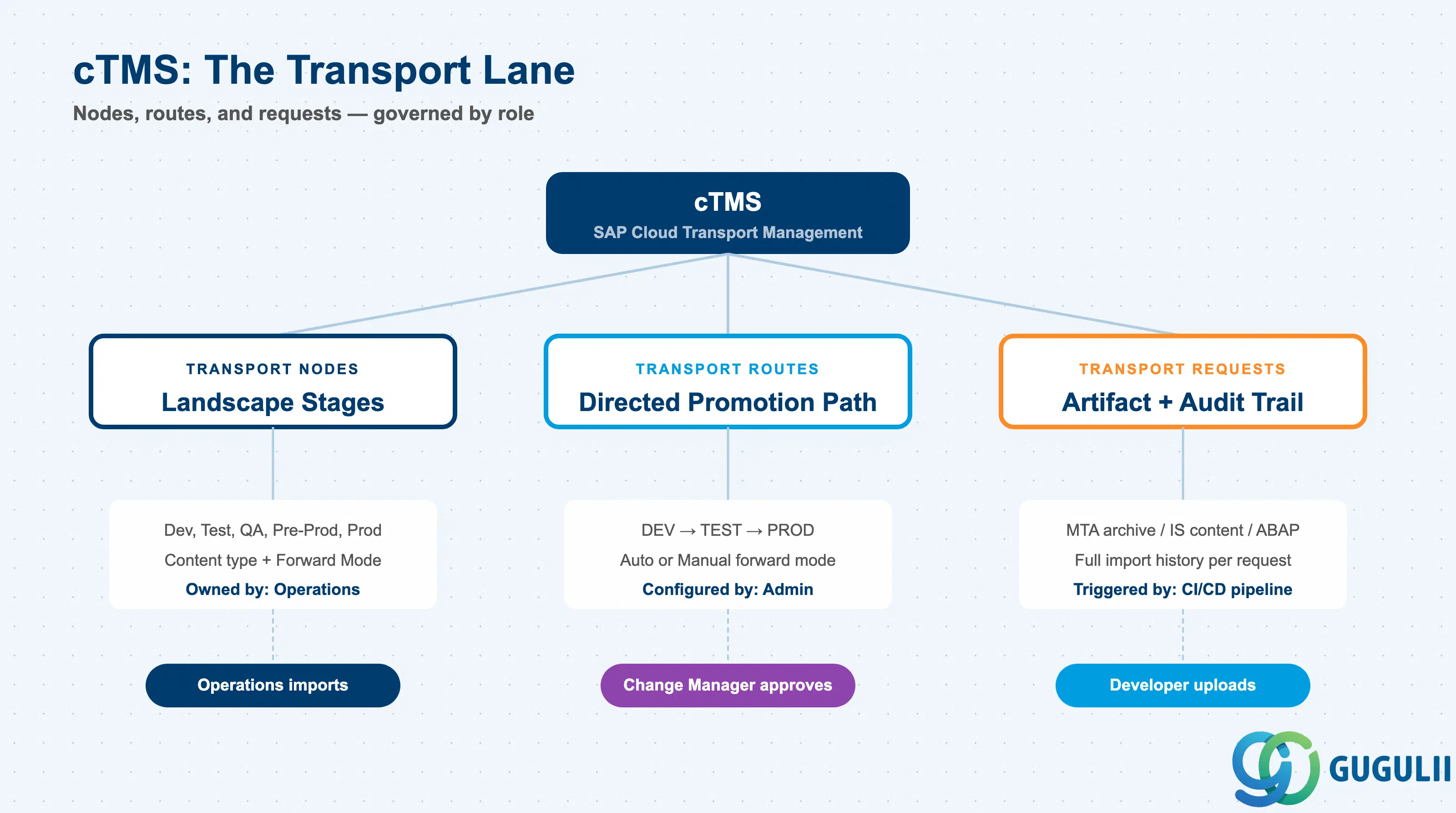
SAP Cloud Transport Management provides the controlled promotion layer that bridges BTP application development and production operations. Its three-component architecture — transport nodes, routes, and requests — maps cleanly onto the separation of concerns between developer, operations, and change manager roles.
The critical design decisions that must be made at requirements stage are: how many nodes the landscape requires, which nodes use Auto versus Manual forward mode, which CI/CD integration pattern fits the team’s infrastructure, and whether SAP Cloud ALM or Solution Manager integration is in scope. Decisions deferred to implementation consistently produce the failure patterns documented in §6 — particularly allow-upload misconfigurations, missing MTA extension descriptors, and undefined import operators.
cTMS does not replace a deployment mechanism, an approval workflow, or a change management system. It is the transport lane that connects those pieces. Designing the lane correctly, with explicit node topology and role assignments, is the foundation of a BTP change management implementation that holds in production.