Title here
Summary here

| article_id | title | component | scope |
|---|---|---|---|
| BTP-F02 | Subaccount Design: Patterns and Principles (this article) | Subaccount Design | Patterns and Principles |
| BTP-F03 | Entitlement and Quota Management: Patterns and Principles | Entitlement and Quota Management | Patterns and Principles |
| BTP-F04 | Role Collection Design: Patterns and Principles | Role Collection Design | Patterns and Principles |
| BTP-F05 | Naming Conventions: Patterns and Principles | Naming Conventions | Patterns and Principles |
| BTP-F06 | CI/CD and Transport Management: Patterns and Principles | CI/CD and Transport Management | Patterns and Principles |
| BTP-F07 | BTP Architecture Design: Use Cases and Decision Patterns | BTP Architecture Design | Use Cases and Decision Patterns |
| Resource | URL |
|---|---|
| SAP BTP Account Model | help.sap.com → |
| Best Practices for SAP BTP | help.sap.com → |
| Account Models with Directories and Subaccounts | help.sap.com → |
| Entitlements and Quotas | help.sap.com → |
| SAP BTP Discovery Center: Landscape Setup | discovery-center.cloud.sap → |
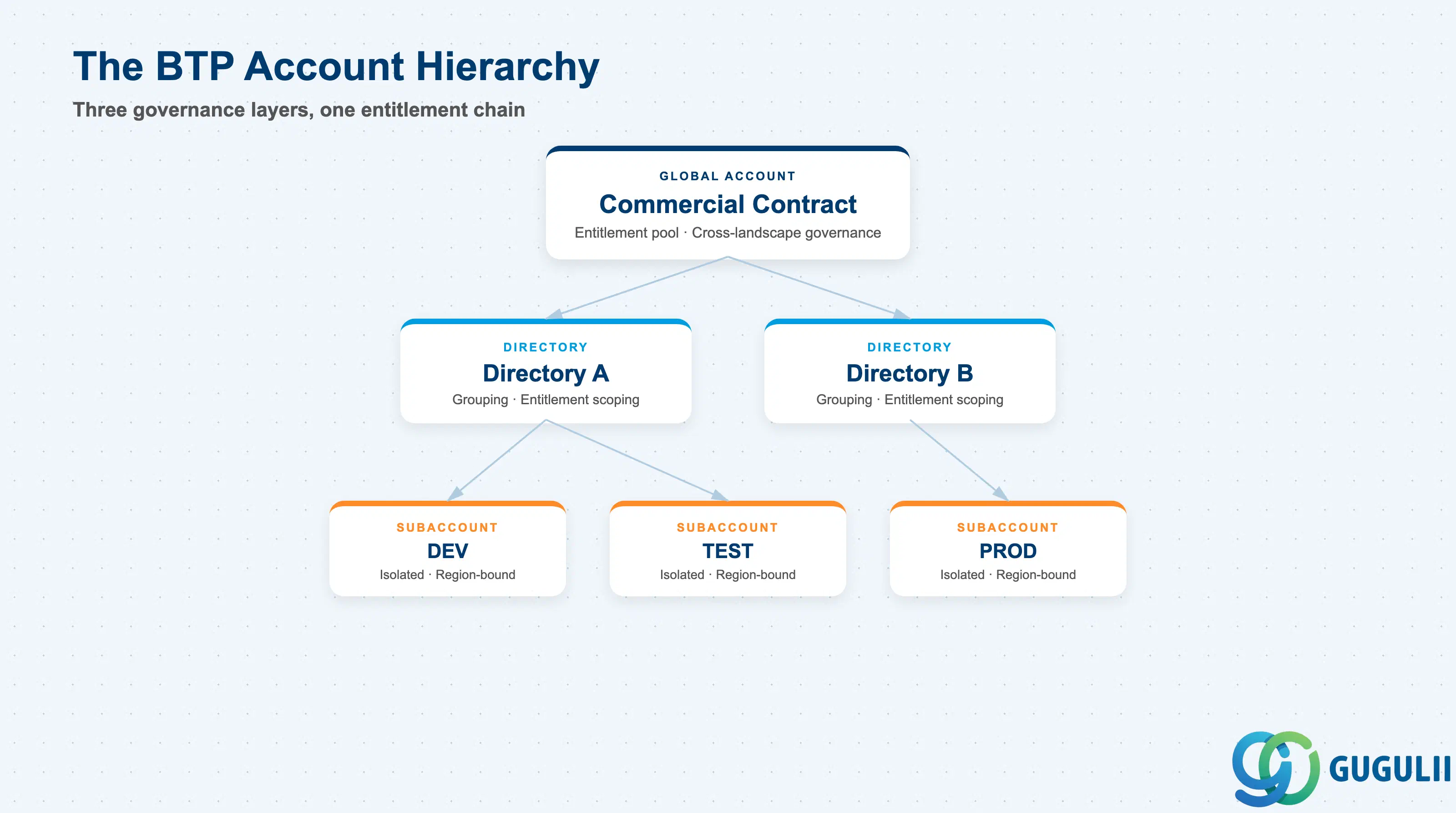
SAP BTP organizes platform resources through a three-level account hierarchy. Each level serves a distinct governance role, and they are not interchangeable ( SAP BTP Account Model).
| Construct | What it does | Primary administrator |
|---|---|---|
| Global Account | Represents the commercial contract with SAP; holds the entitlement pool; governs cross-landscape members | Global Account Administrator |
| Directory | Optional grouping container for subaccounts; up to 5 directory levels between global account and subaccount | Directory Administrator |
| Subaccount | Isolated execution environment; region-bound; independent security, user management, and service consumption | Subaccount Administrator |
| Managed Directory | A directory with entitlement management enabled; restricts which quotas child subaccounts can access | Global Account Administrator |
| Label | User-defined metadata tag (up to 10 values each); applied at any hierarchy level; supports cockpit filtering and cost allocation | Any level administrator |
Global Account, Directory, and Subaccount each own a distinct governance layer. They are not substitutes.
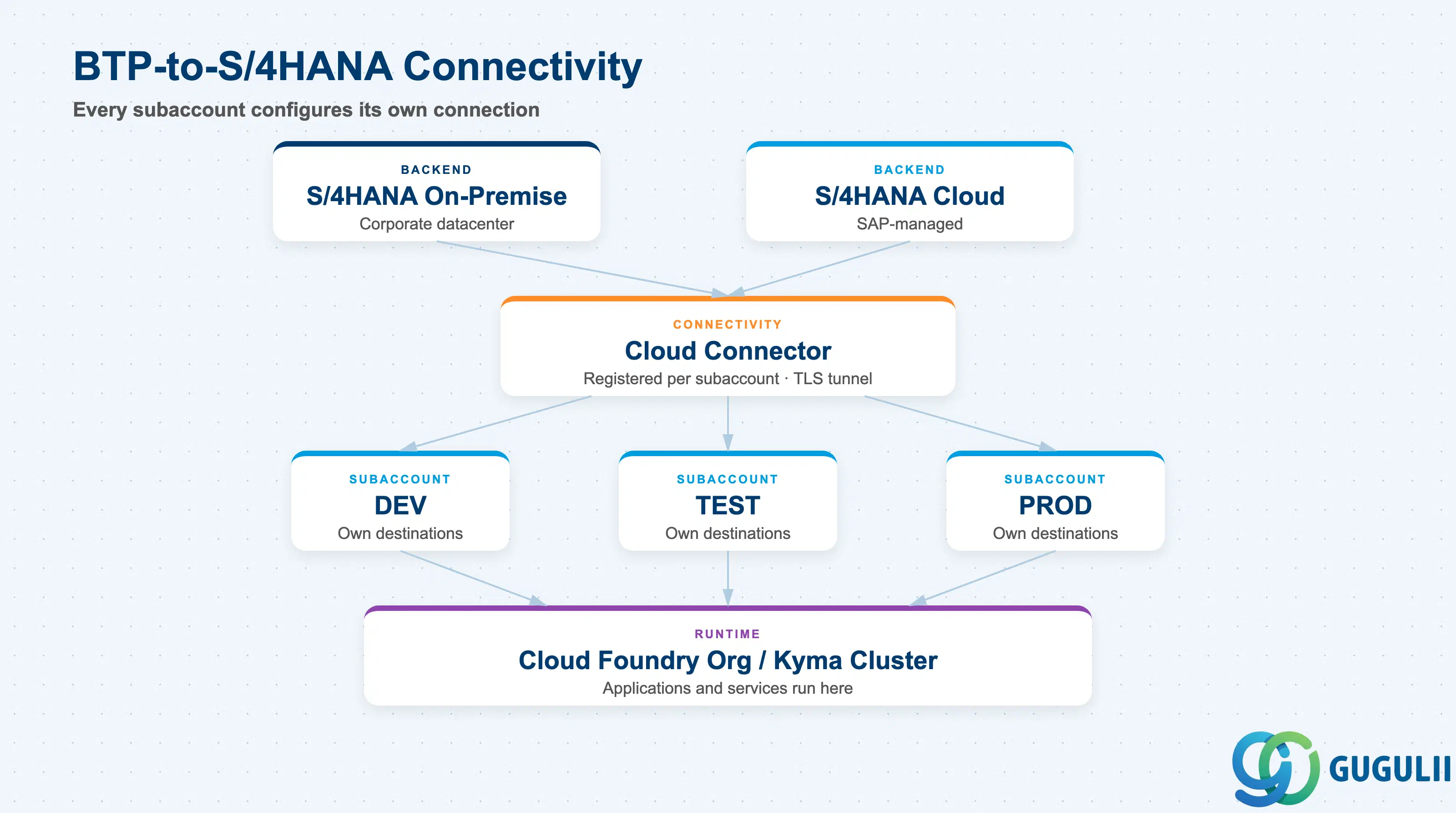
Every subaccount in a BTP landscape that needs to communicate with on-premise S/4HANA requires its own Cloud Connector instance registration. This is the most frequently underestimated connectivity cost of subaccount multiplication ( Best Practices for SAP BTP).
[S/4HANA on-premise]
        │
  [Cloud Connector]    ←── registered per subaccount
        │
  ┌─────┴──────────────────────────────────────┐
  │  BTP Global Account                         │
  │  ┌──────────────┐  ┌──────────────────────┐ │
  │  │ Dev Directory│  │ Prod Directory       │ │
  │  │ ┌──────────┐ │  │ ┌──────────────────┐ │ │
  │  │ │ DEV sub  │ │  │ │ Consolidation    │ │ │
  │  │ └──────────┘ │  │ │ sub              │ │ │
  │  │ ┌──────────┐ │  │ └──────────────────┘ │ │
  │  │ │ TEST sub │ │  │ ┌──────────────────┐ │ │
  │  │ └──────────┘ │  │ │ PROD sub         │ │ │
  │  └──────────────┘  │ └──────────────────┘ │ │
  │                    └──────────────────────┘ │
  │  ┌──────────────────────┐                   │
  │  │ Services Directory   │                   │
  │  │ CI/CD sub, WZ sub    │                   │
  │  └──────────────────────┘                   │
  └─────────────────────────────────────────────┘
        │
[SAP S/4HANA Cloud]  ←── destination configuration per subaccount
Key point: Cloud Connector tunnels, destination configurations, and trust configurations are all subaccount-scoped. Adding subaccounts to your landscape multiplies this operational overhead by design — plan for it, do not discover it.
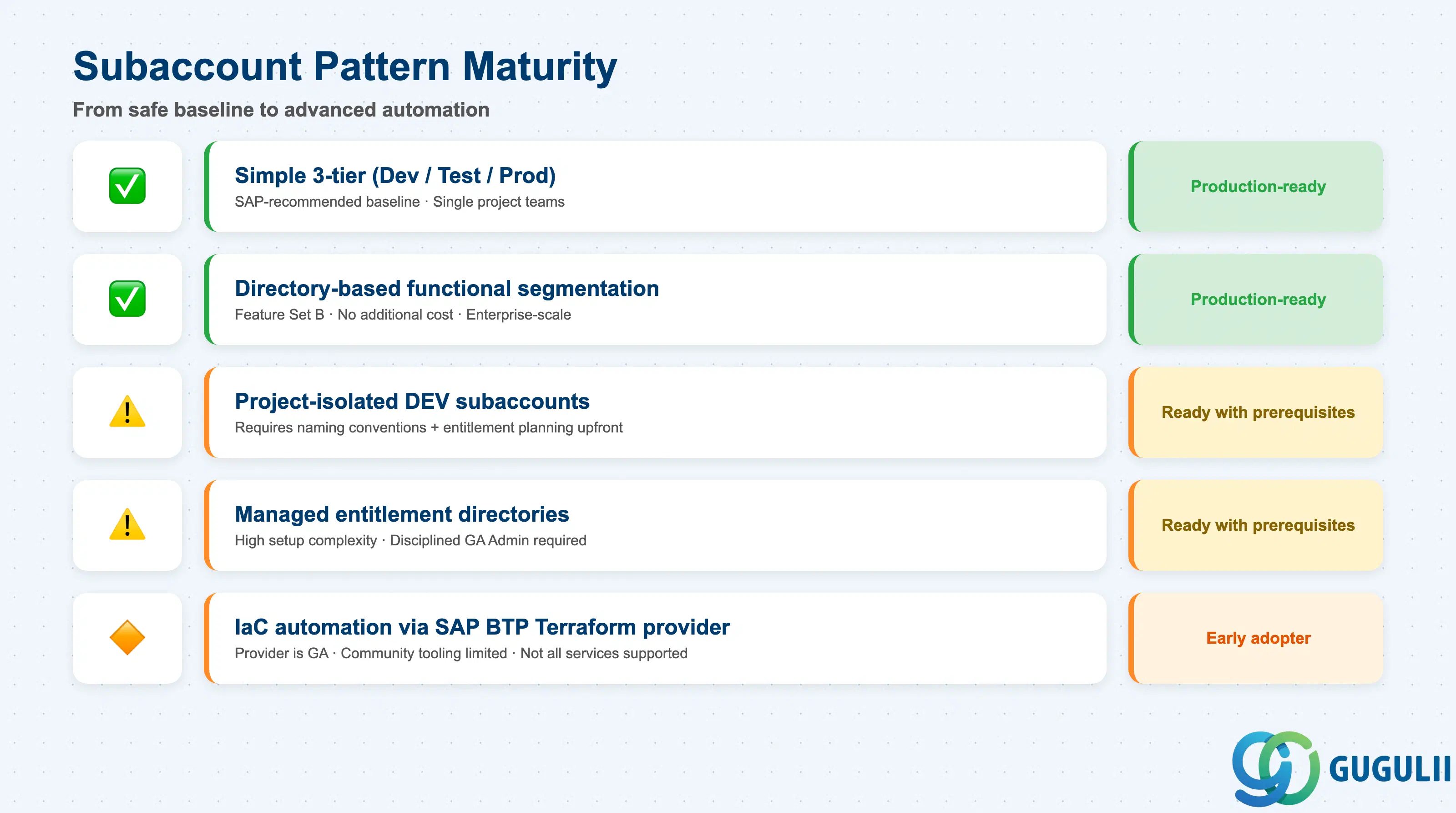
Not all subaccount design patterns carry equal production-readiness. The simpler models are unconditionally production-ready; the more sophisticated ones require governance prerequisites that many organizations skip ( SAP BTP Account Models with Directories and Subaccounts).
| Pattern | Maturity | Notes |
|---|---|---|
| Simple 3-tier (Dev, Test, Prod) | ✅ Production-ready | SAP-recommended baseline; appropriate for single-project teams up to ~5 developers |
| Directory-based functional segmentation | ✅ Production-ready | Available since Feature Set B; no additional cost; scales to large enterprises |
| Project-isolated DEV subaccounts | ⚠️ Ready with prerequisites | Requires naming conventions, entitlement planning, and Cloud Connector mapping defined upfront |
| Managed entitlement directories | ⚠️ Ready with prerequisites | Setup complexity is high; requires disciplined Global Account Administrator governance |
| IaC automation via SAP BTP Terraform provider | 🔶 Early adopter | Provider is GA but community tooling is limited; not all BTP services are supported |
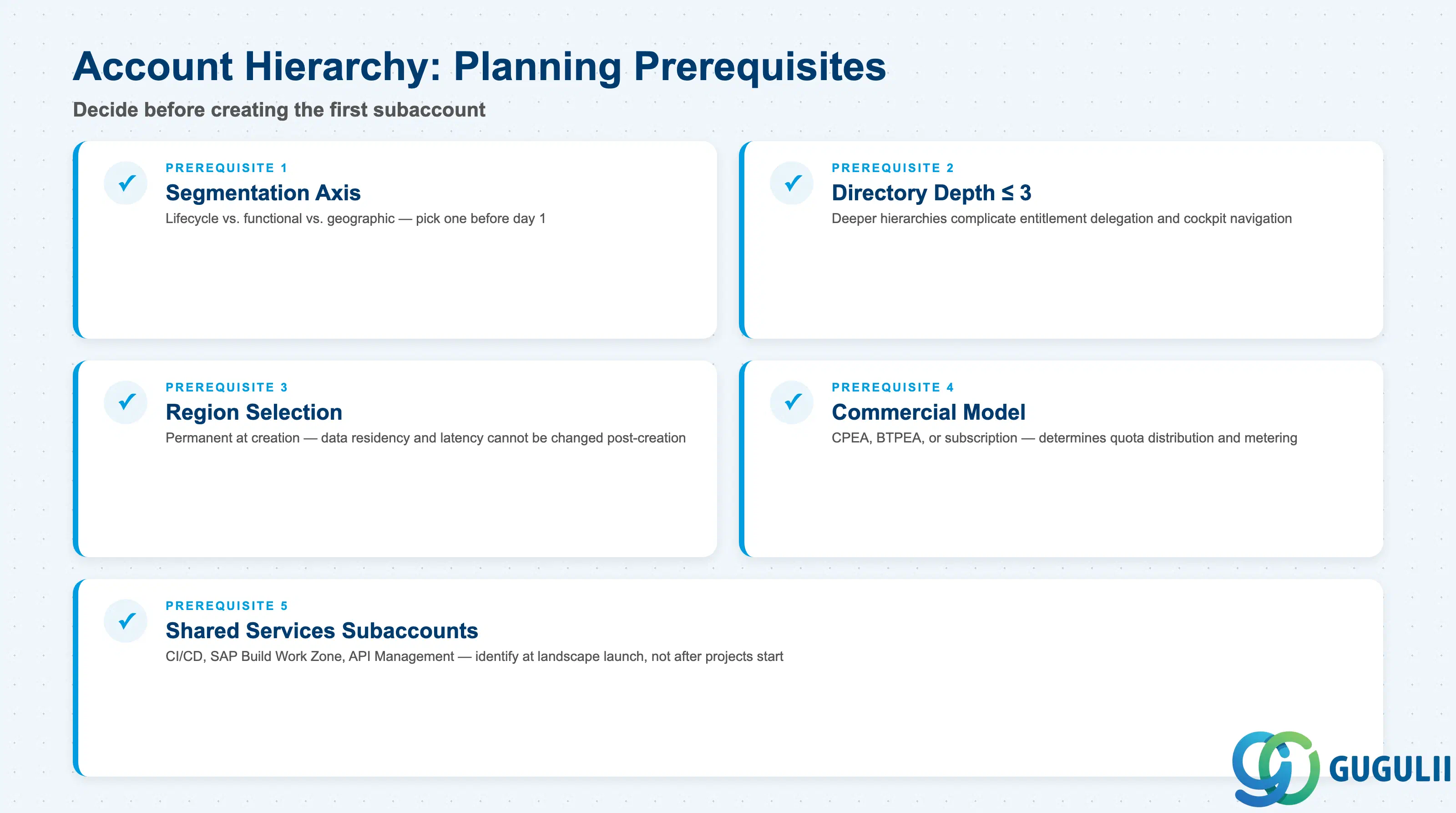
| Checklist item | Why it matters |
|---|---|
| Define the primary segmentation axis (lifecycle vs. org vs. geography) before creating any subaccount | The three segmentation models produce incompatible directory hierarchies; switching axis after the fact requires recreating subaccounts and re-assigning all entitlements |
| Document maximum directory depth (recommend ≤ 3 levels) | Deeper hierarchies complicate entitlement delegation and reduce cockpit usability at scale |
| Identify which subaccounts require a specific region at creation time | Region selection is permanent — subaccounts cannot be moved to a different region post-creation |
| Confirm the global account commercial model (CPEA, BTPEA, or subscription) | The commercial model determines how entitlements are distributed and whether quota overage is metered or blocked |
| Identify shared-services subaccounts required at landscape launch | CI/CD, SAP Build Work Zone, and API Management need dedicated subaccounts; deferring this adds complexity later |
| Checklist item | Why it matters |
|---|---|
| Minimum 3 subaccounts per independent workload (Dev, Test, Prod) | SAP’s baseline recommendation; fewer than 3 collapses the isolation boundary between development and production data ( SAP BTP Discovery Center) |
| Separate subaccounts for central services (CI/CD, SAP Build Work Zone, API Management) | These services span all projects; mixing them into project subaccounts entangles governance and billing |
| Project-isolated DEV subaccounts for each concurrent development initiative | A single shared DEV subaccount allows service instance conflicts — recreating a database in one project destroys data for others in the same subaccount |
| Add a consolidation subaccount between project DEV and shared Prod | The consolidation layer tests schema compatibility and cross-project service interactions before production deployment; the traditional 3-tier model lacks this |
| Confirm on-premise connectivity requirement per subaccount | Each subaccount connecting to on-premise systems needs its own Cloud Connector system mapping and destination configuration |
| Plan separate production lanes for internal vs. external users | Different user populations often require different trust configurations and application URLs; shared production subaccounts create RBAC complexity |
| Document which non-production environments are production-equivalent | Integration and pre-production subaccounts often handle real customer data and require production-grade data governance even if not the “production” subaccount |
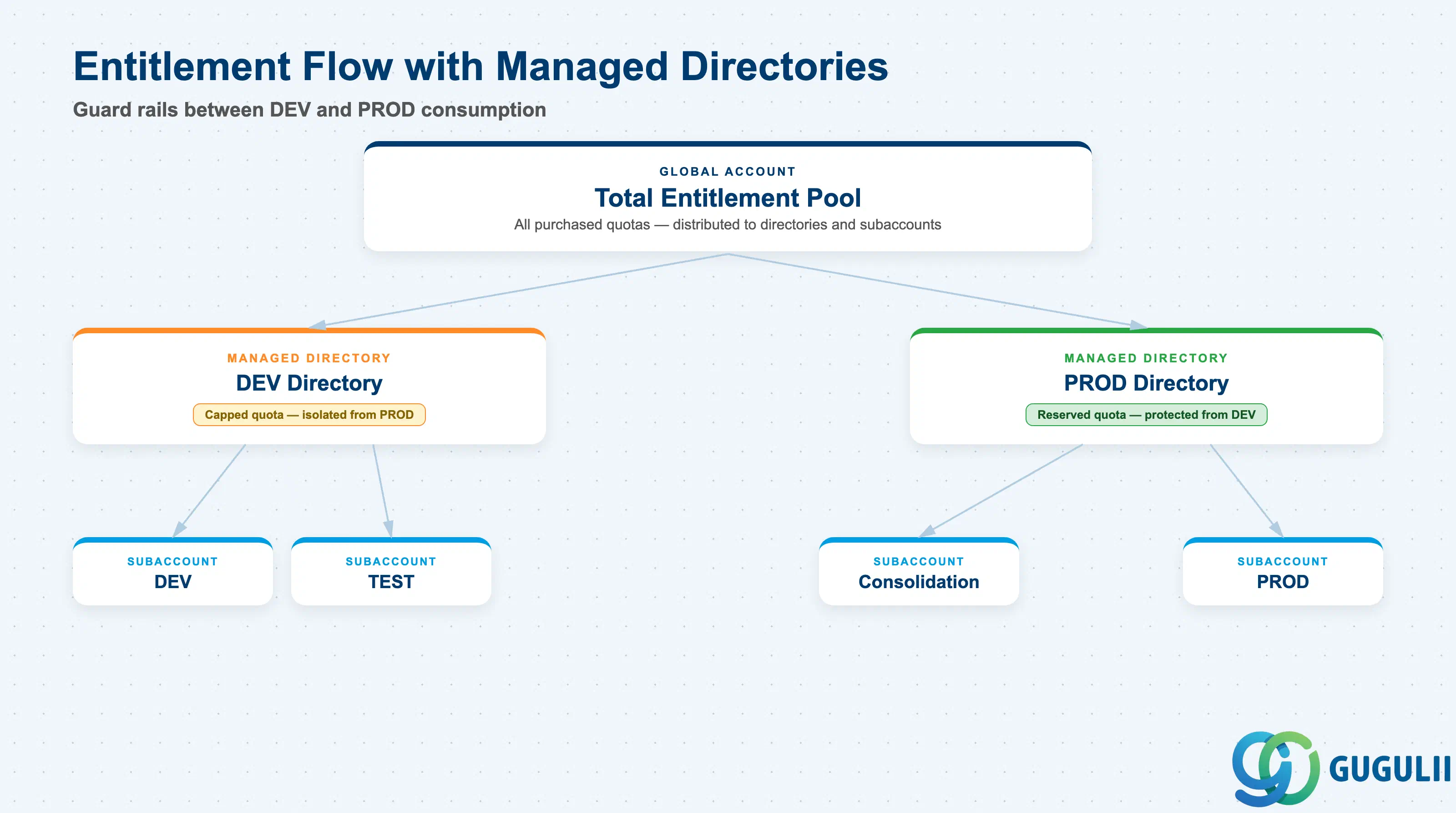
| Checklist item | Why it matters |
|---|---|
| Enable entitlement management on development-tier directories | Without this, DEV subaccounts draw from the same entitlement pool as production, creating unintended quota competition ( Entitlements and Quotas) |
| Document entitlement assignment and quota limit per subaccount | Quota exhaustion causes provisioning failures with no prior warning; teams discover the limit only when deployment fails |
| Set explicit quota limits on consumption-based service plans | Consumption plans have no hard stop by default; runaway usage accrues costs at the global account level |
| Define a quarterly entitlement review cadence | Project scaling changes consumption patterns; reviews prevent both waste (over-allocated dormant subaccounts) and shortage |
| Assign a named owner for each subaccount group | Ownership gaps result in orphaned subaccounts that continue consuming quota after projects end |
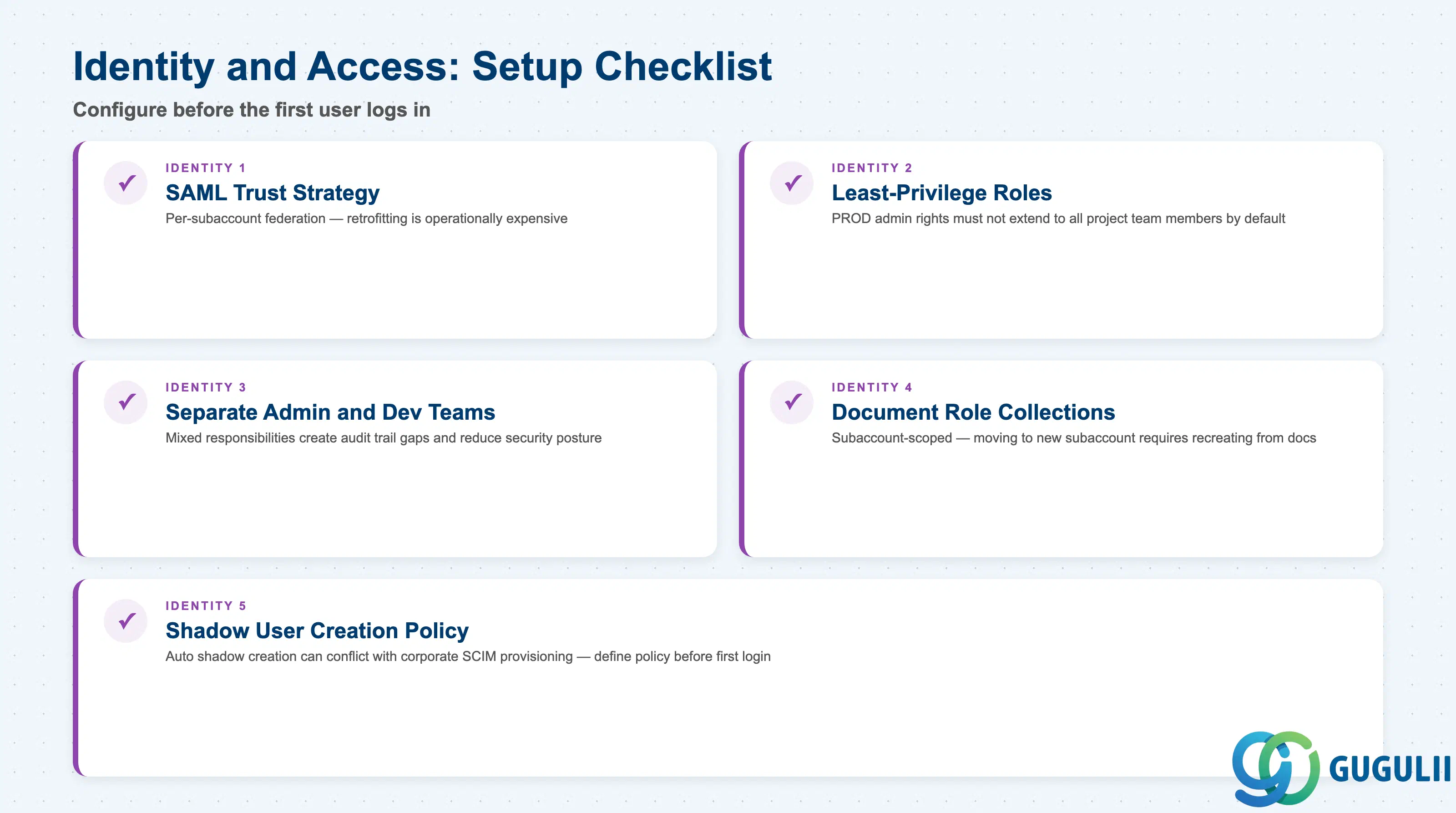
| Checklist item | Why it matters |
|---|---|
| Define SAML trust configuration strategy before creating subaccounts | Trust configurations are per-subaccount; retrofitting federation to an existing landscape requires re-testing every subaccount separately |
| Enforce least-privilege role assignment from day one | Production subaccount administrator roles must not extend to all project team members by default |
| Separate the Cloud Administration Team from Cloud Development Teams | Mixed responsibilities create audit trail gaps; the administration team manages the landscape, development teams manage their applications |
| Document role collection assignments per subaccount | Role collections are subaccount-scoped; moving to a new subaccount requires recreating role assignments from documentation |
| Define shadow user creation policy before first user logs in | Automatic shadow user creation conflicts with some corporate SCIM provisioning setups, causing duplicate or orphaned user records |
| Checklist item | Why it matters |
|---|---|
| Define naming conventions before the first subaccount is created | Account Explorer search, Terraform state files, and monitoring dashboards all depend on consistent naming; retroactive renaming requires recreating subaccounts |
| Apply cost-center labels at directory and subaccount level | Cost allocation relies on label inheritance; labels added after consumption has occurred do not retroactively tag prior billing |
| Tag responsible team and project owner on every subaccount | Governance audits use ownership tags; untagged subaccounts are unaccountable subaccounts |
| Use versioned naming for long-lived landscapes | A project-xyz-dev subaccount becomes ambiguous after a project rewrite; versioned suffixes (-v1, -v2) preserve audit trail clarity |
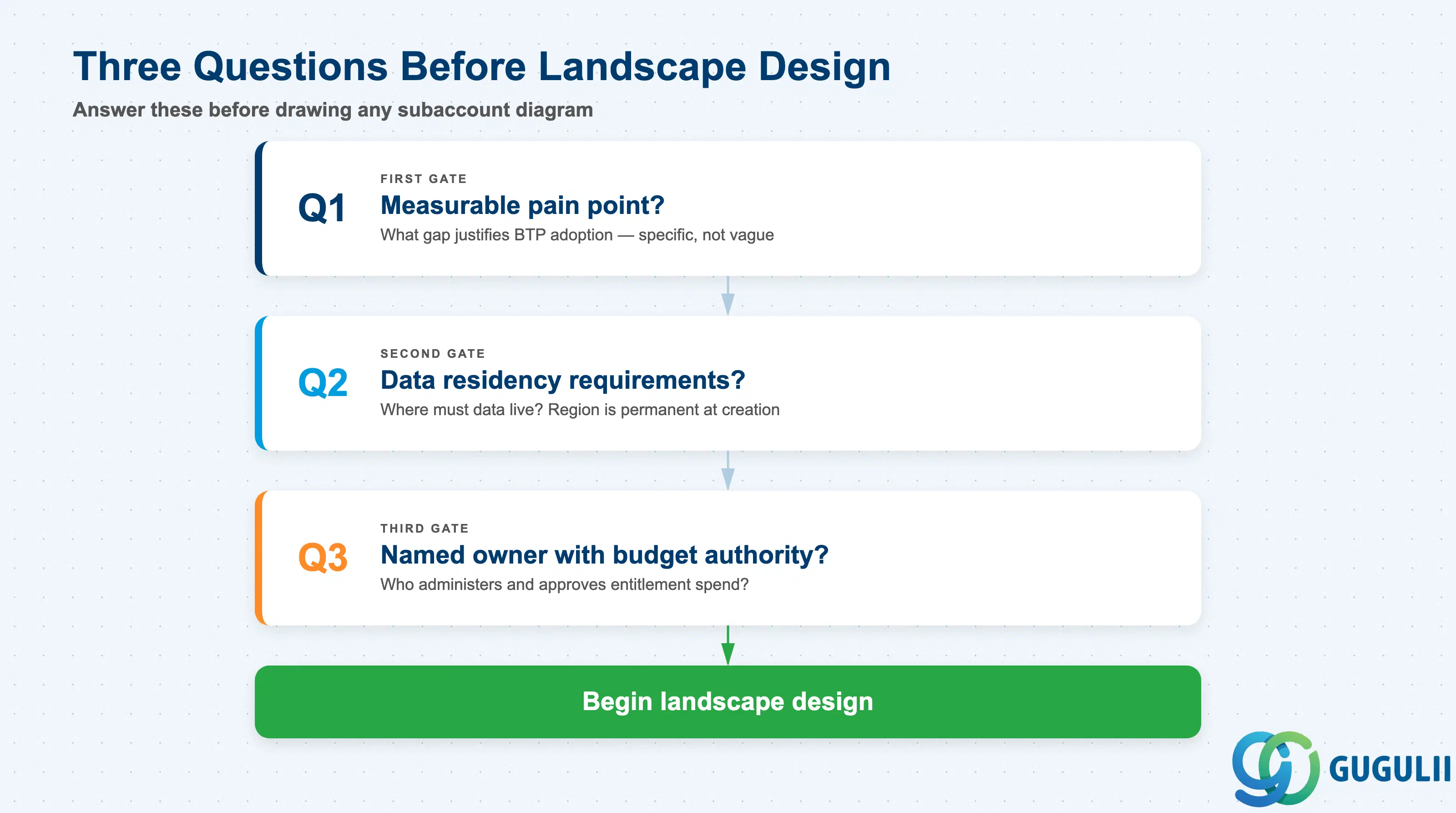
Q1. What is the measurable integration or operational gap this BTP project solves?
BTP subaccount complexity scales with scope. A team automating a single approval workflow needs a simple 3-tier landscape. A team running six parallel integration streams needs project isolation. Define the specific pain point before designing the landscape — a vague “we need BTP” mandate produces a landscape sized for an unknown future.
Q2. What data sovereignty, residency, and isolation requirements apply to this workload?
Data isolation in BTP exists at the subaccount boundary, not at the Cloud Foundry space level ( SAP BTP Account Model). If two applications must never share the same database instance due to regulatory or contractual requirements, they require separate subaccounts. Region selection at subaccount creation permanently anchors data residency to a specific hyperscaler datacenter — this cannot be changed post-creation.
Q3. Which team owns the BTP landscape administration, and do they have budget authority?
Global Account Administrator access carries entitlement management authority ( Entitlements and Quotas). Without a named, empowered administrator, entitlements go unmanaged, quota exhaustion goes undetected, and governance breaks down. The landscape sponsor must have both technical access and the organizational authority to approve subaccount creation requests.
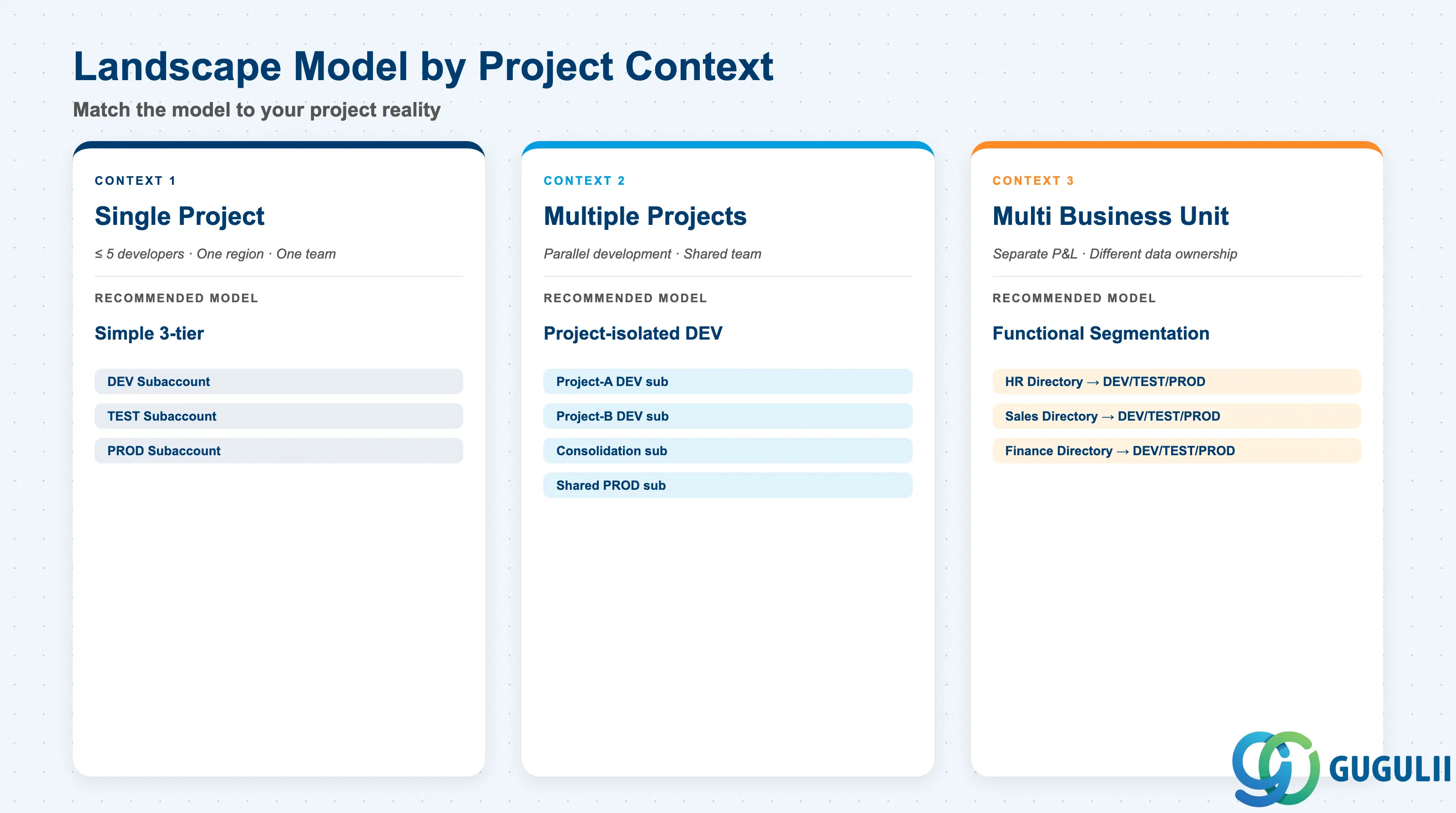
| Project context | Recommended starting model |
|---|---|
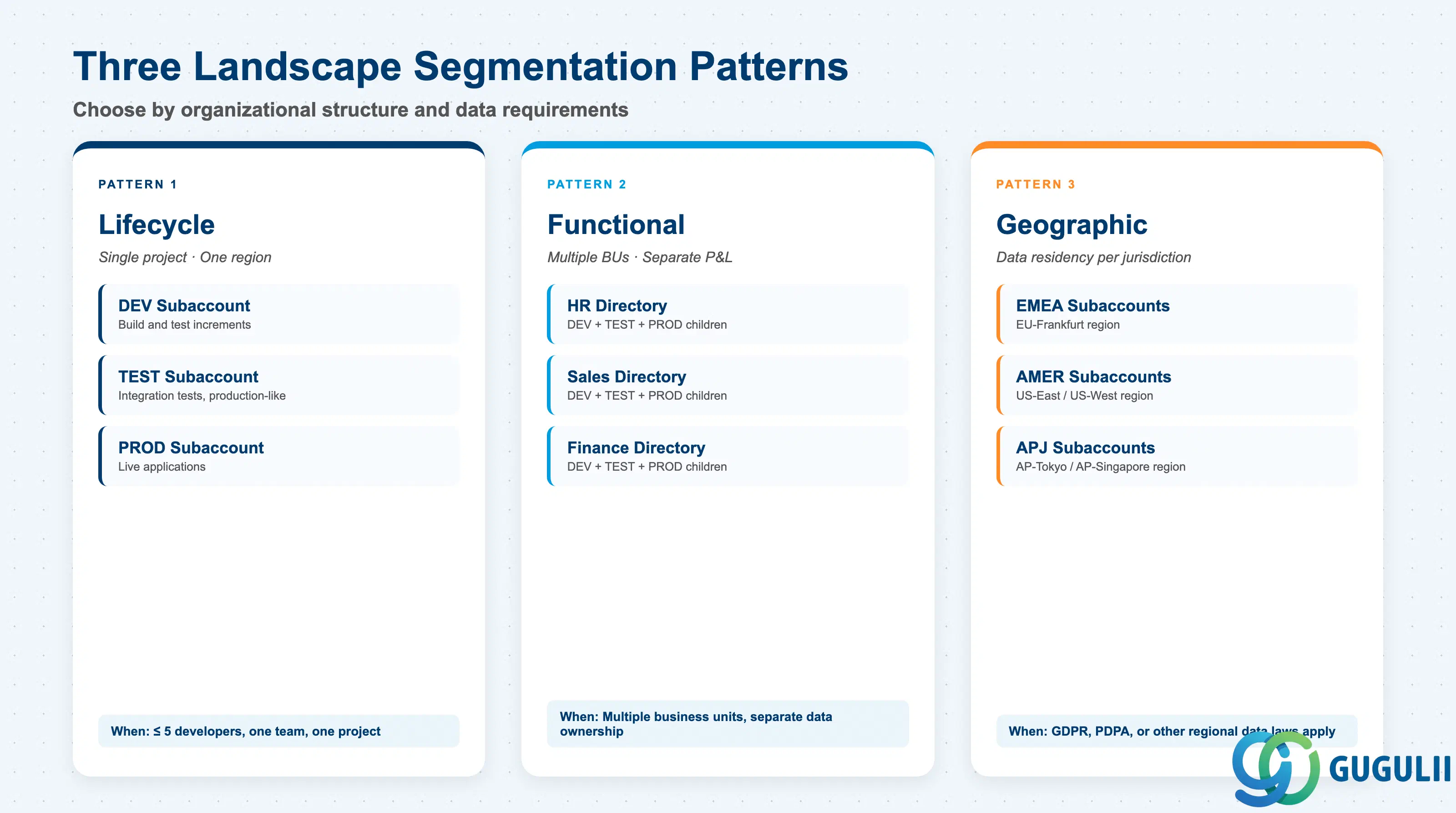
| Single project, ≤ 5 developers, one region | Simple 3-tier: Dev, Test, Prod |
| Multiple concurrent projects sharing a team | Project-isolated DEV subaccounts + shared Consolidation + Prod |
| Multiple business units with separate P&L accountability | Functional segmentation — one directory per unit, Dev/Test/Prod children under each |
| Strict data residency per regulatory jurisdiction | Geographic segmentation — region-locked subaccounts per jurisdiction |
| Central shared services deployment only (CI/CD, API Management) | Dedicated service subaccounts; no project subaccounts needed at this stage |
| No clear pain point identified yet | Stop. Go back to Q1. |
| Construct | Licensing model | Key question to ask |
|---|---|---|
| Global Account | CPEA (credit pool) or BTPEA (capacity units) or subscription per service | Is our contract structured for predictable capacity or variable consumption? |
| Directory | No separate cost — pure governance layer | None; design for governance, not cost impact |
| Subaccount | No separate cost — services within consume global account entitlements | How many concurrent service instances will run, and what quota do they require? |
| Cloud Connector | Basic version included in BTP; Advanced Edition (HA pair) via separate license | Do we need high-availability connectivity or load-balanced on-premise tunnels? |
| SAP BTP Terraform Provider | Open-source; no license cost | Does the team have Terraform expertise and a remote state backend in place? |
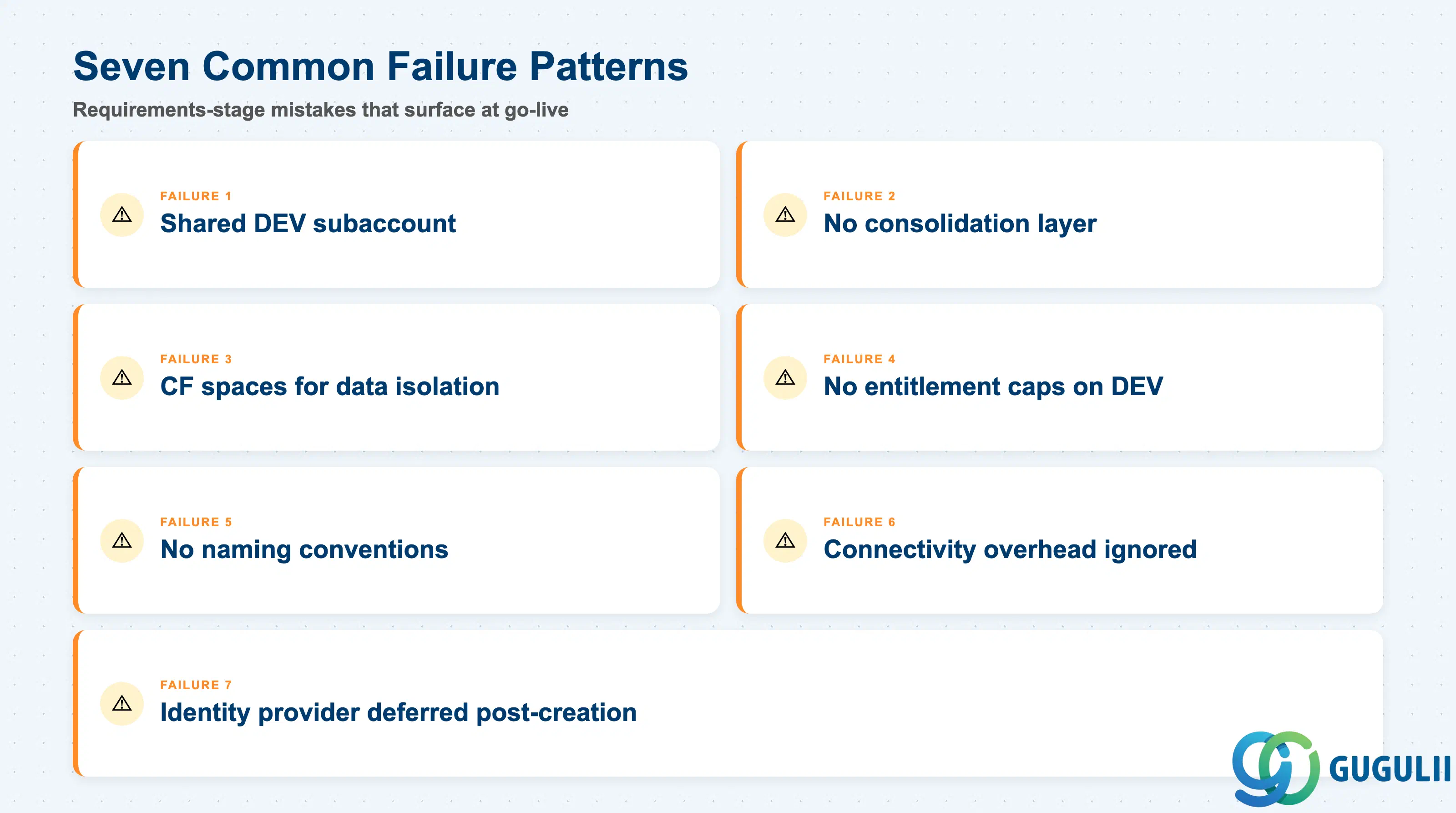
Failure 1: Sharing a DEV subaccount across multiple concurrent projects
Multiple projects sharing one DEV subaccount creates shared service instance dependencies. When one project re-instantiates a PostgreSQL or Redis instance, other projects using the same instance lose their data. The side effects are unavoidable at the subaccount level. Fix: one project, one DEV subaccount.
Failure 2: Skipping the consolidation layer
The traditional Dev/Test/Prod model moves directly from project-level DEV to shared Production. Integration failures — schema incompatibilities, conflicting service bindings, data migration issues — surface only in production where the cost of failure is highest. A consolidation subaccount catches these issues in a controlled environment that mirrors production topology without production data risk.
Failure 3: Using Cloud Foundry spaces for data isolation
Data access and data visibility are separated at the subaccount boundary, not at the CF space boundary ( Best Practices for SAP BTP). Teams that use CF spaces to isolate data between projects or between tenants are operating on a false security assumption. Two applications in different spaces within the same subaccount can share service instances and access the same database. Data isolation requires separate subaccounts.
Failure 4: No entitlement caps on development directories
Without managed entitlement directories, every subaccount draws from the same global account entitlement pool ( Account Models with Directories and Subaccounts). Development and testing subaccounts — where developers freely provision services for experimentation — can silently consume quota reserved for production. The failure mode is production service provisioning failing during go-live because the quota was already consumed by a development experiment three months earlier.
Failure 5: Undefined naming conventions at landscape launch
Account Explorer search relies on subaccount names. Monitoring dashboards and Terraform state files reference subaccount names. When names are chosen ad hoc by each project team, the landscape becomes unsearchable at 50+ subaccounts. Renaming subaccounts requires recreating them because names are baked into destination configurations and role collection assignments. Define a naming schema — <org>-<project>-<environment>-<region> — before the first subaccount is created.
Failure 6: Connectivity overhead ignored at design time
Cloud Connector system mappings, destination configurations, and SAP S/4HANA Cloud API credentials are all per-subaccount configurations. A landscape design that multiplies subaccounts (correctly, for isolation) without accounting for connectivity setup overhead underestimates the operational maintenance cost. Every new subaccount that requires on-premise access is a Cloud Connector entry, a destination, and a technical user to configure and maintain.
Failure 7: Identity provider configuration deferred post-subaccount creation
SAML trust configuration between SAP BTP and a corporate identity provider is a per-subaccount operation. Teams that create subaccounts first and plan federation later face retroactive configuration work across an already-populated landscape. This is operationally expensive and creates a window where users are authenticating against the default SAP ID Service rather than the corporate IdP — which fails corporate security audits.
Q: Can we use one subaccount for both development and testing to save setup overhead?
Short-term, yes. Long-term, you trade setup overhead now for a forced migration later. Development environments receive frequent service restarts, credential rotations, and configuration experiments. Test environments need stable, production-like configurations that hold for a testing sprint. The moment a developer action in DEV resets a service instance your test pipeline depends on, you understand why SAP recommends separate subaccounts. Start with the 3-tier baseline.
Q: How does the number of subaccounts affect our SAP BTP licensing cost?
Subaccounts themselves carry no separate license cost ( Entitlements and Quotas). Cost is driven by the service instances, service subscriptions, and compute resources provisioned within subaccounts. More subaccounts mean more potential isolation — which often correlates with more service instances running in parallel (one per environment). Plan entitlement budget for services, not for the subaccount count itself.
Q: When should we descope subaccount multiplication from an initial project phase?
Descope when the additional subaccounts serve theoretical future requirements rather than the current project’s concrete needs. A project deploying one integration scenario does not need project-isolated DEV subaccounts for parallel development — it needs three subaccounts (Dev, Test, Prod) and a plan for how to scale when the second project arrives. Premature multiplication adds connectivity setup overhead with no immediate benefit.
Q: How do we document subaccount design decisions for governance audits?
Document at minimum: the segmentation axis chosen and why, the naming convention and its components, the entitlement allocation per subaccount and who approved it, the trust configuration applied, and the Cloud Connector system mappings. Store this as an Architecture Decision Record (ADR) alongside your project documentation — not in the BTP cockpit description field, which is not version-controlled.
Q: Does Cloud Foundry space-level isolation replace the need for separate subaccounts?
No. This is the most common and most dangerous misconception in BTP landscape design. Cloud Foundry spaces provide organization and access control separation, but they do not provide data isolation ( SAP BTP Account Model). Service instances can be shared across spaces within the same subaccount. If two teams or two tenants must not share database access, they require separate subaccounts. Relying on CF spaces for data isolation leaves you exposed to a data breach that BTP’s own access model does not protect against.
Q: What is a typical subaccount count for an enterprise-scale BTP landscape?
A mid-sized enterprise running 5–8 BTP projects across two business units typically arrives at 20–35 subaccounts: 3 subaccounts per project (15–24), 1–2 consolidation subaccounts, 1–2 production subaccounts, plus 3–5 service subaccounts (CI/CD, Work Zone, API Management, monitoring). At 50+ subaccounts, Account Explorer navigation and governance tooling (Terraform, monitoring dashboards) become prerequisites, not options.
Q: What happens when a subaccount exhausts its allocated quota?
Service provisioning fails immediately for that subaccount. There is no graceful degradation, no queue, and no user-visible warning before the failure — the provisioning API returns an error. Existing running service instances are not affected; only new provisioning attempts fail. The fix requires a Global Account Administrator to increase the subaccount’s quota allocation — a change that takes effect immediately but requires manual intervention during what is often an active development or release window.
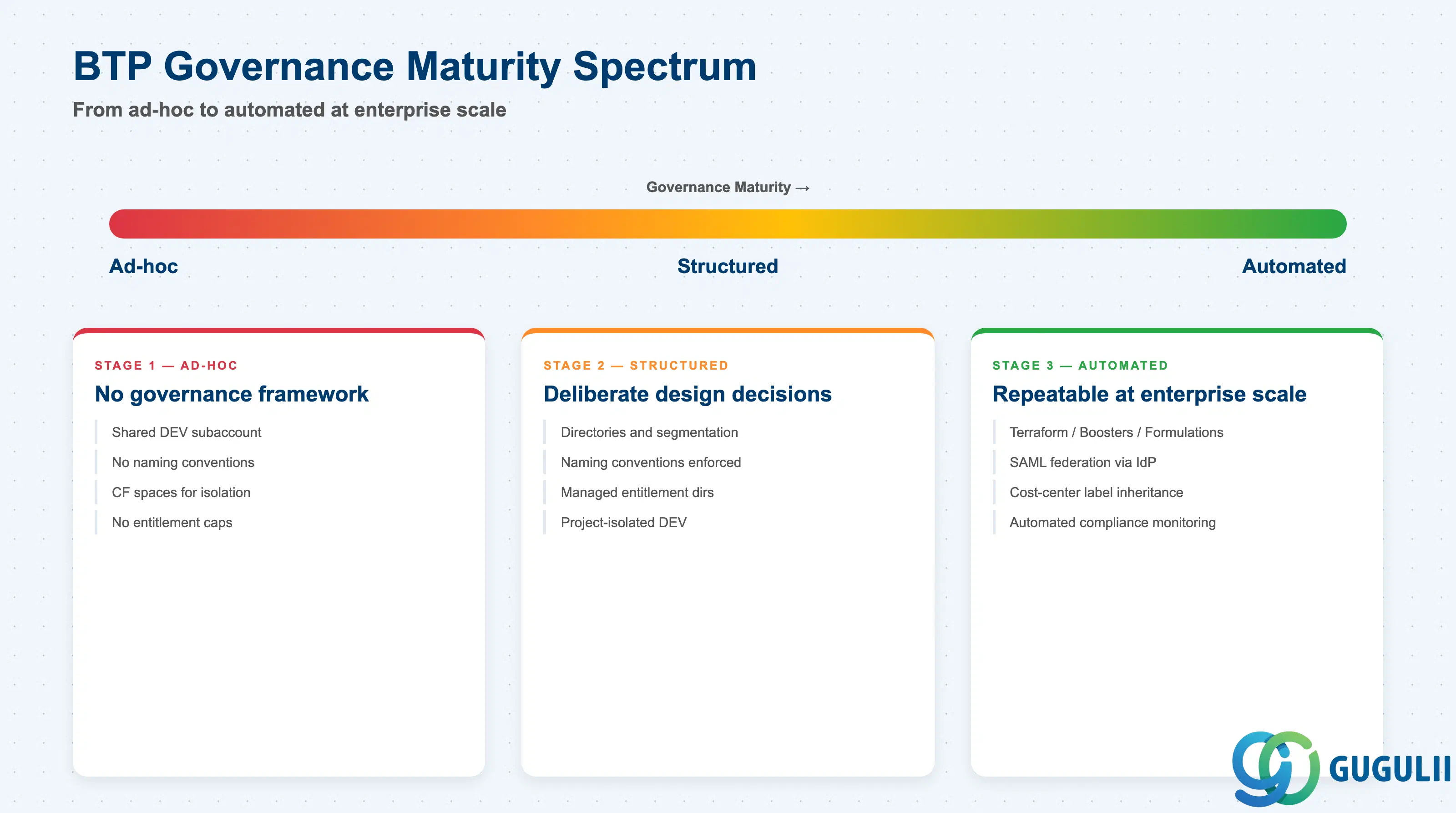
Subaccount design is not a one-time activity — it is the foundational governance decision that shapes every downstream BTP project. The three-tier Dev/Test/Prod model is the correct baseline, but it breaks under multi-project conditions without project-isolated DEV subaccounts and a consolidation layer. Data isolation exists at the subaccount boundary; Cloud Foundry spaces do not substitute for subaccount separation when regulatory or contractual data isolation is required. Entitlement management on directories, naming conventions, and SAML trust configuration are not post-launch cleanup items — they are pre-launch prerequisites. Get the structure right before the first subaccount is created, because restructuring a live landscape means recreating subaccounts, re-assigning entitlements, and reconfiguring every Cloud Connector mapping from scratch.