Title here
Summary here

| ID | Category | Component | Scope |
|---|---|---|---|
| BTP-F01 | Overview | BTP Architecture Design | Overview and Key Decisions |
| BTP-F02 | Account Design (1) | Subaccount Design | Patterns and Principles |
| BTP-F03 | Account Design (2) | Entitlement and Quota Management | Patterns and Principles (this article) |
| BTP-F04 | Authorization (1) | Role Collection Design | Patterns and Principles |
| BTP-F05 | Authorization (2) | Naming Conventions | Patterns and Principles |
| BTP-F06 | Dev & Transport | CI/CD and Transport Management | Patterns and Principles |
| BTP-F07 | Use Cases | BTP Architecture Design | Use Cases and Decision Patterns |
| Resource | URL |
|---|---|
| Entitlements and Quotas | help.sap.com → |
| Configure Entitlements and Quotas for Subaccounts | help.sap.com → |
| Managing Entitlements and Quotas Using the Cockpit | help.sap.com → |
| What Is the Consumption-Based Commercial Model? | help.sap.com → |
| Monitoring Usage and Consumption Costs | help.sap.com → |
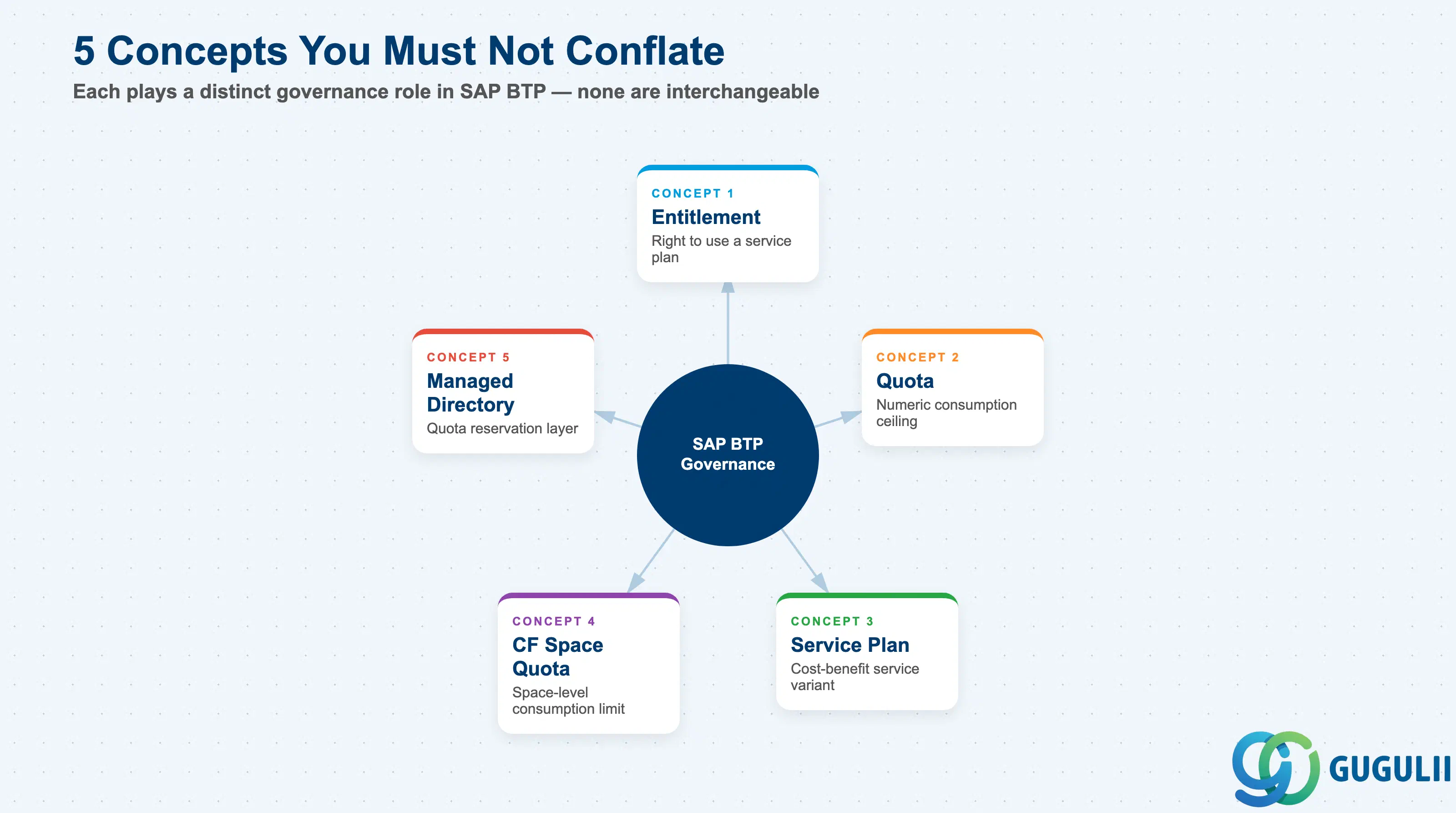
SAP BTP entitlement and quota management operates across five distinct concepts. Each plays a specific role — conflating them leads to governance gaps.
| Concept | What it does | Primary owner |
|---|---|---|
| Entitlement | Contractual right to provision a specific service plan within the global account | Global Account Admin |
| Quota | Numeric ceiling on how much of an entitled service a subaccount can consume | Global Account Admin |
| Service Plan | A cost-benefit variant of a BTP service (e.g., “standard” vs “premium” tiers) | Architect / Developer |
| Managed Directory | Optional organizational layer that reserves and redistributes quota to child subaccounts | Platform Team |
| CF Space Quota | Sub-subaccount limit within a Cloud Foundry space, preventing one team from exhausting the full subaccount allocation | CF Org Manager |
They are not substitutes. Entitlements define what services are available to a subaccount; quotas determine how much of each service can be consumed; managed directories control which subaccounts access specific quota pools; CF space quotas provide a final enforcement layer within Cloud Foundry environments. Each level is independently necessary in a multi-team landscape. [Confidence: high — SAP Help Portal, help.sap.com/docs/btp/sap-business-technology-platform/entitlements-and-quotas]
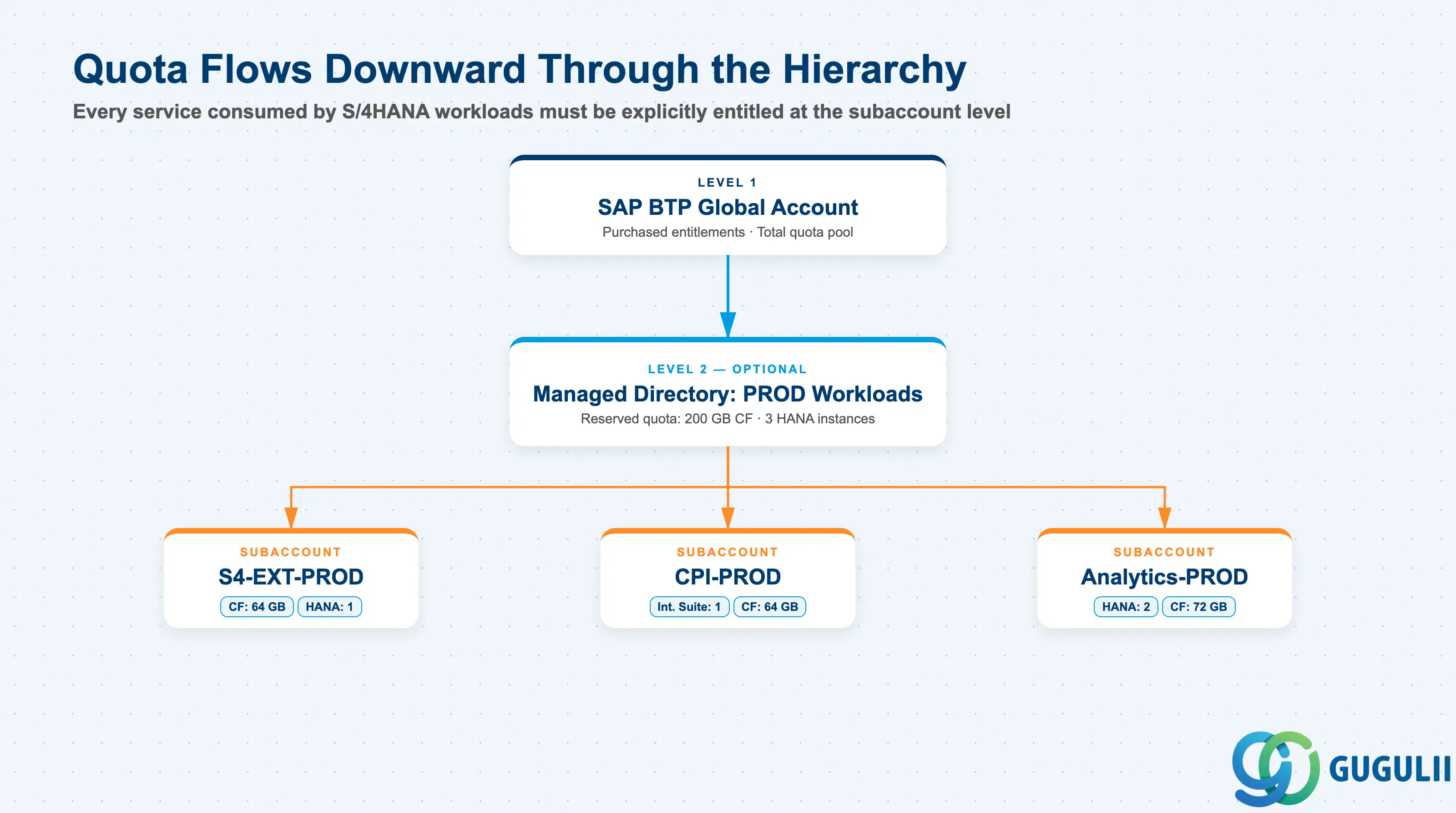
Every BTP service consumed by an S/4HANA extension, integration, or analytics workload must be explicitly entitled to the target subaccount. There is no automatic inheritance from the S/4HANA contract or license. The entitlement layer sits between your global account (purchase agreement) and the subaccount where developers provision services. A missing entitlement does not produce a warning — it produces a hard provisioning failure.
SAP S/4HANA Cloud / On-Premise S/4HANA
        │  Extensions, Integrations, Analytics
        ▼
┌──────────────────────────────────────────────┐
│  SAP BTP Global Account                       │
│  Purchased: CF Runtime, HANA Cloud, CPI,      │
│  SAC, Build Work Zone, Kyma…                  │
│                                               │
│  ┌───────────────────────────────────────┐   │
│  │ Managed Directory: PROD Workloads      │   │
│  │ Reserved quota: 200 GB CF, 3 HANA     │   │
│  │                                        │   │
│  │  Subaccount: S4-EXT-PROD              │   │
│  │    CF: 64 GB  |  HANA Cloud: 1        │   │
│  │                                        │   │
│  │  Subaccount: CPI-PROD                 │   │
│  │    SAP Integration Suite: 1           │   │
│  │    CF: 64 GB                          │   │
│  │                                        │   │
│  │  Subaccount: Analytics-PROD           │   │
│  │    HANA Cloud: 2  |  CF: 72 GB        │   │
│  └───────────────────────────────────────┘   │
└──────────────────────────────────────────────┘
Key point: The SAP S/4HANA Cloud Extensibility service plan requires its own explicit BTP entitlement before the extension API communication arrangement can be created. This dependency is frequently missed during requirements gathering and surfaces as a blocker during the first integration sprint. [Confidence: high — SAP Help Portal]
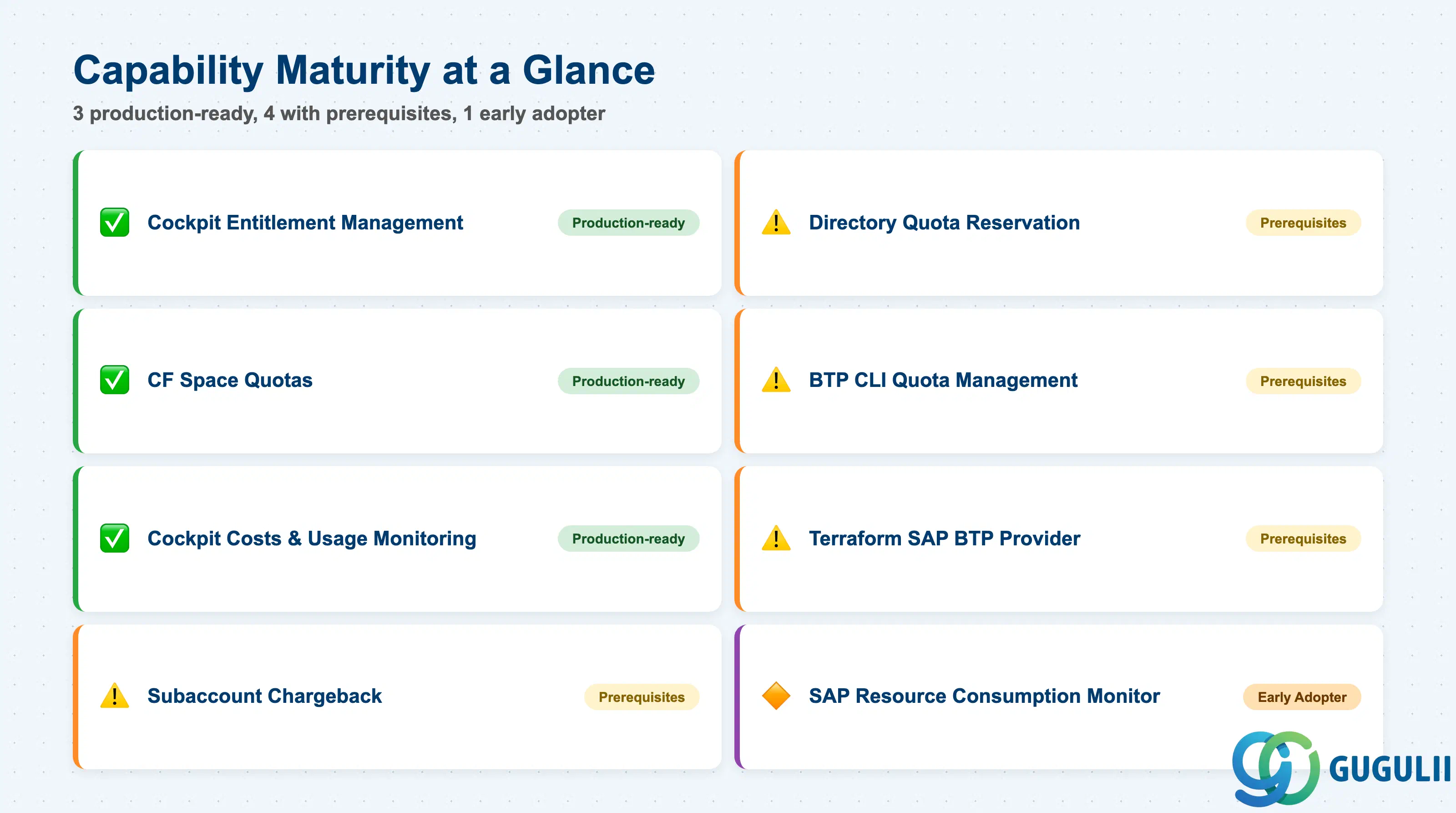
| Capability | Maturity | Notes |
|---|---|---|
| Cockpit-based entitlement management | ✅ Production-ready | Stable, role-controlled, audit-logged. Available in all account types. |
| Directory-level quota reservation | ⚠️ Ready with prerequisites | Requires enabling “Managed Directory” at directory creation. Cannot be added to existing directories without reorganizing child accounts. |
| CF Space Quotas | ✅ Production-ready | Mature CF feature; essential in any shared subaccount with multiple development teams. |
| BTP CLI quota management | ⚠️ Ready with prerequisites | btp CLI supports entitlement commands. Requires toolchain setup and a defined entitlement source of truth. |
| Terraform SAP BTP provider | ⚠️ Ready with prerequisites | hashicorp/btp provider (Community tier) covers entitlement resources. Requires careful state management. |
| Cockpit Costs and Usage monitoring | ✅ Production-ready | Available in all accounts. Configurable threshold alerts. |
| Subaccount chargeback | ⚠️ Ready with prerequisites | Requires consistent labeling from Day 1. No native automated chargeback engine — export and process manually. |
| SAP Resource Consumption Monitor | 🔶 Early adopter | Open-source (SAP-samples on GitHub). Anomaly detection for CPEA. Requires self-hosting. |
Three capabilities are consistently production-ready across all account types: cockpit-based management, CF space quotas, and Costs and Usage monitoring. All remaining capabilities are available but require either organizational setup or toolchain investment before they operate reliably. [Confidence: high — SAP Help Portal, help.sap.com/docs/btp/sap-business-technology-platform/managing-entitlements-and-quotas-using-the-cockpit]
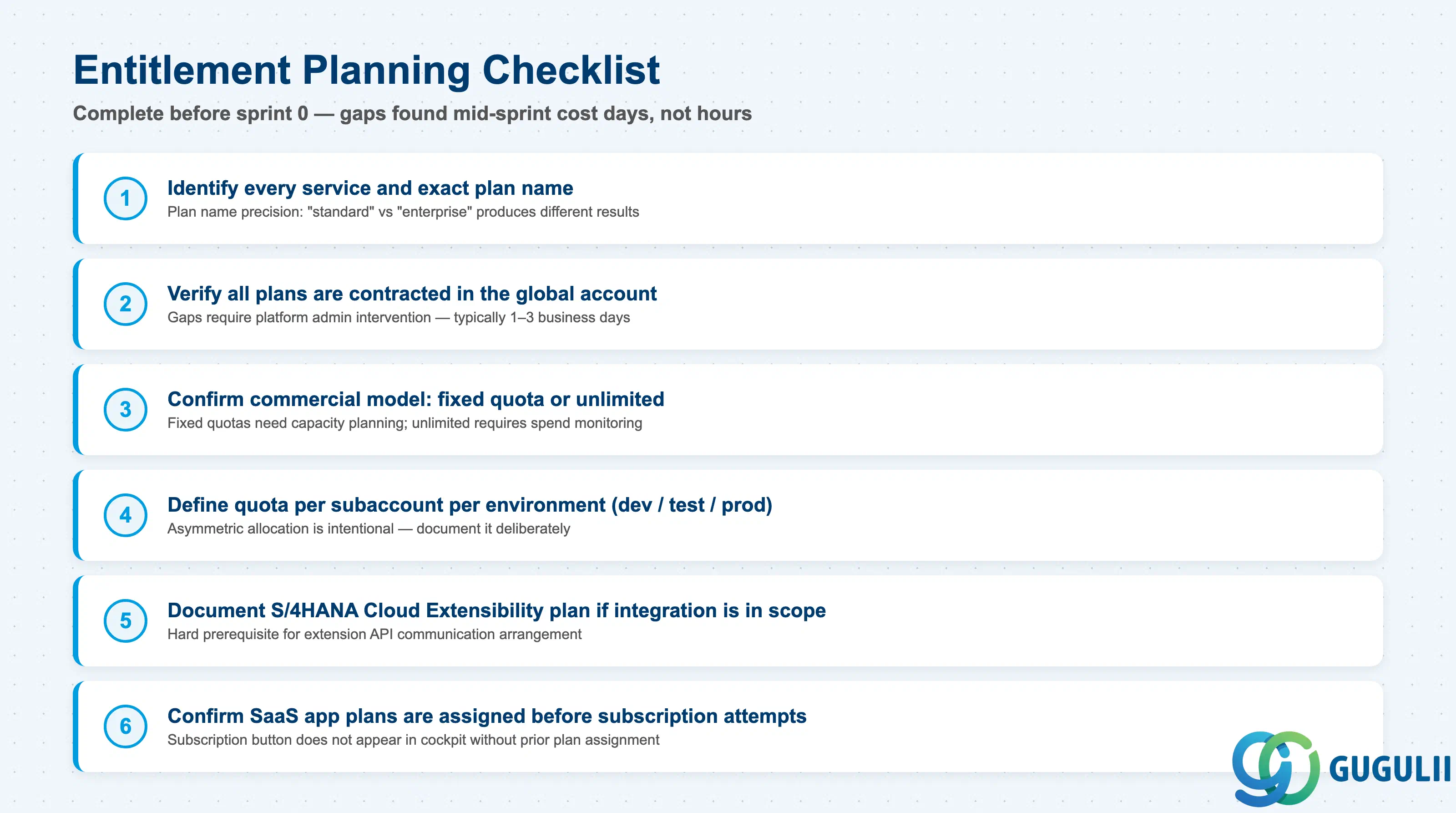
| Checklist item | Why it matters |
|---|---|
| Identify every BTP service the project will consume, with the exact service plan name | Plan name precision matters — “standard” vs “enterprise” produces different provisioning results, with no clear error on mismatch |
| Verify all required plans are contracted in the global account before sprint planning | Entitlement gaps found mid-sprint require platform admin intervention, which typically takes 1–3 business days |
| Confirm whether the commercial model is subscription (fixed quota) or consumption-based (typically unlimited) | Fixed quotas need capacity planning per environment; consumption-based requires spend monitoring |
| List which subaccounts need each service, with quota per environment (dev, test, prod) | Dev environments need lower quotas than production; document asymmetric allocation deliberately |
| Document the SAP S/4HANA Cloud Extensibility plan requirement if S/4HANA Cloud integration is in scope | Hard prerequisite for extension API communication — missing it blocks all cross-system calls |
| Confirm that multitenant SaaS applications have their plan assigned before subscription is attempted | Plan assignment must precede subscription; the subscription option does not appear in the cockpit without it |
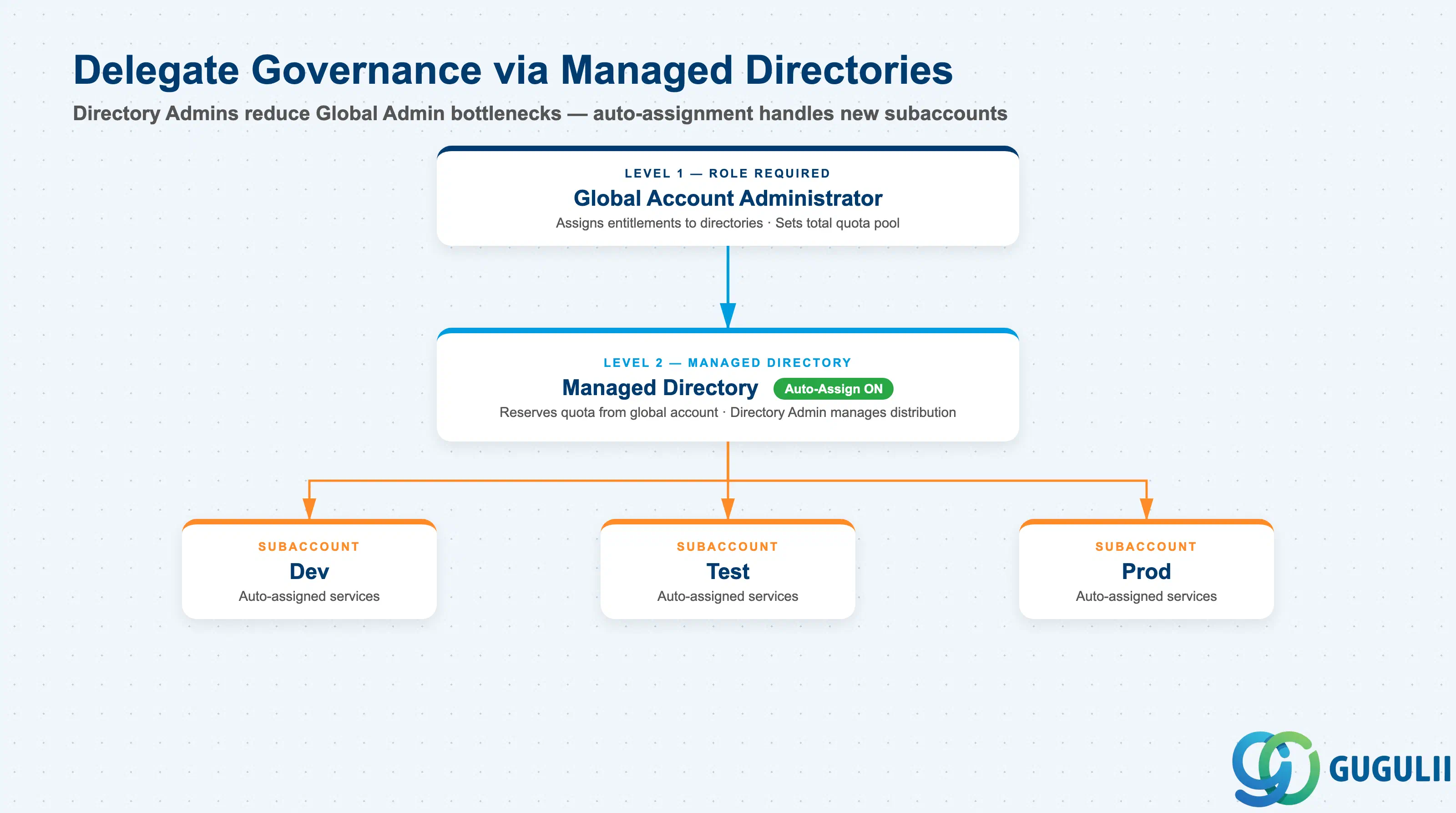
| Checklist item | Why it matters |
|---|---|
| Decide before directory creation whether to use managed or unmanaged directories | Managed status cannot be added retroactively; this is a one-way architectural decision |
| Define the directory hierarchy to match organizational cost ownership | Directory boundaries determine quota scope and cockpit visibility per organizational domain |
| Identify who holds Global Account Administrator and Directory Administrator roles | Only global account admins can assign entitlements; directory admins reduce bottlenecks at scale |
| Enable auto-assignment on managed directories for standard service sets | Manual assignment to every new subaccount is error-prone at scale |
| Establish an approval process for adding new service plans to a subaccount | Without a process, entitlement sprawl accumulates and cost accountability breaks down |
| Checklist item | Why it matters |
|---|---|
| Assign explicit numeric quotas per subaccount even under CPEA/BTPEA unlimited plans | Unlimited at global level does not mean unlimited at subaccount — explicit limits enforce team accountability |
| Set CF space quota plans for each space in shared CF subaccounts | Without space quotas, one team can exhaust the full 200 GB subaccount memory allocation |
| Reserve uncommitted quota buffer at directory level for emergency increases | Allows quota increases without escalating to the global admin for every request |
| Validate that Kyma runtime entitlement is assigned before enabling the runtime | Kyma is not available by default — missing entitlement blocks runtime creation |
| Confirm that dev environment quotas are lower than production and documented | Symmetric quota across environments wastes capacity and blurs environment boundaries |
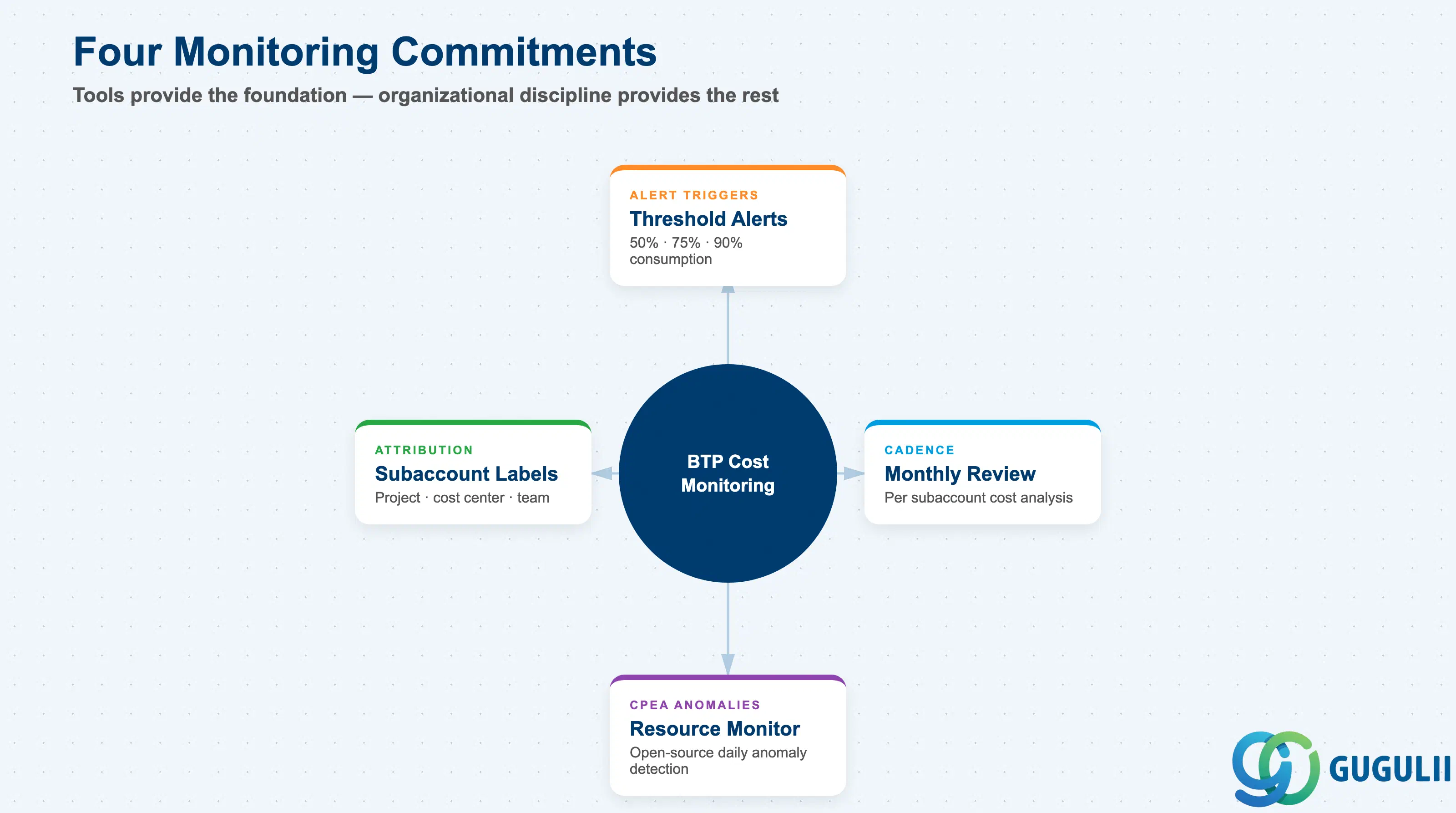
| Checklist item | Why it matters |
|---|---|
| Configure consumption threshold alerts (50%, 75%, 90%) in the BTP cockpit | Silent credit exhaustion is the most common cause of unplanned BTP cost overruns |
| Assign alert recipients with a defined escalation path | Alerts sent to a shared inbox with no owner are effectively no alerts |
| Establish a monthly consumption review per subaccount | Monthly review catches slow-moving anomalies before they compound into credit shortfalls |
| Apply subaccount and service instance labels (project, cost center, team) from Day 1 | Retroactive labeling does not recover historical cost data — labels must be consistent from the start |
| Evaluate the SAP Resource Consumption Monitor for CPEA anomaly detection | The standard cockpit does not provide anomaly detection; the open-source monitor fills this gap |
These four monitoring requirements apply regardless of commercial model. The BTP cockpit provides the alerting and reporting foundation; labeling and review cadence are organizational commitments that tools alone cannot substitute. [Confidence: high — SAP Help Portal, help.sap.com/docs/btp/sap-business-technology-platform/monitoring-usage-and-consumption-costs-in-your-global-account]
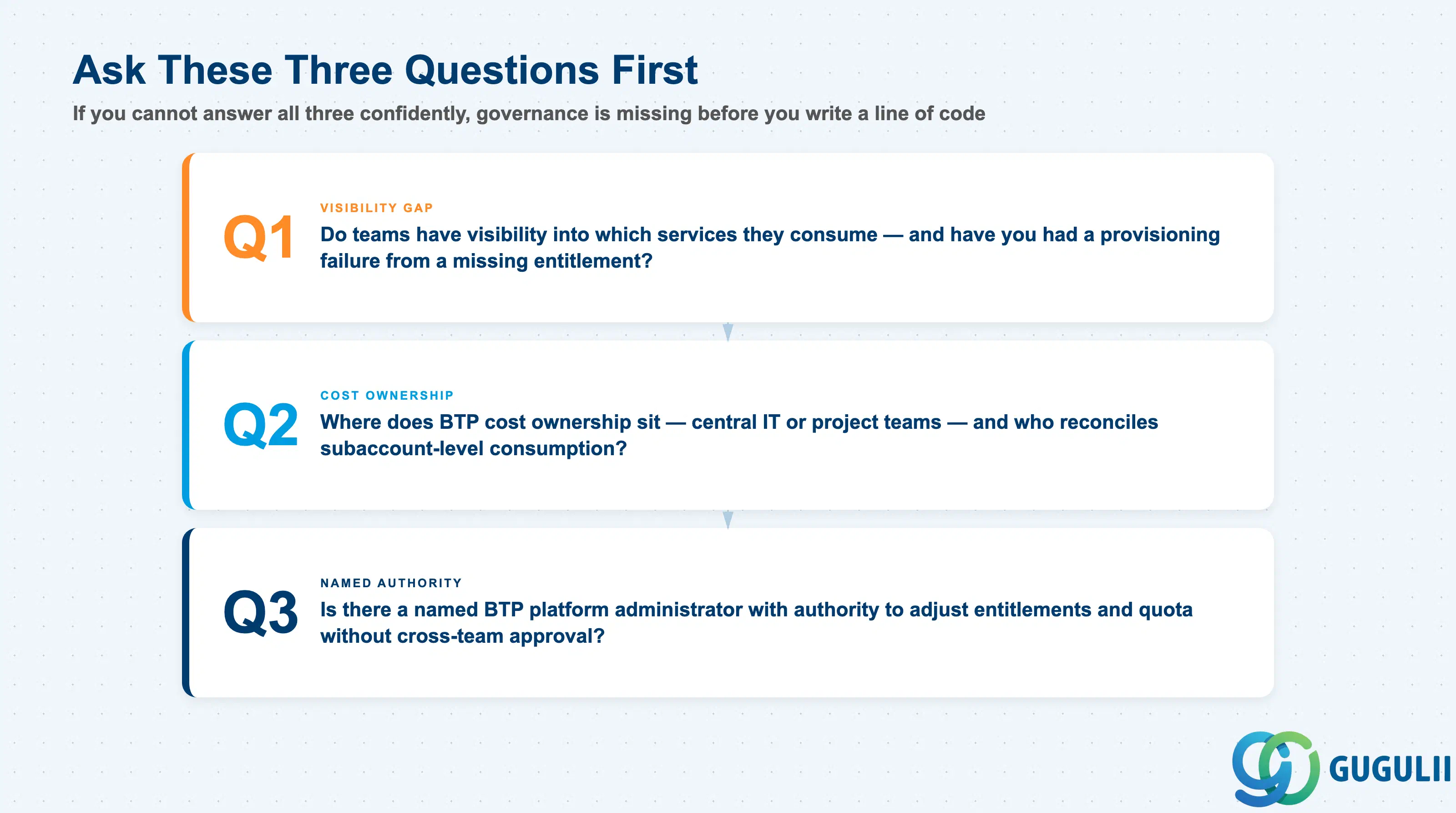
Q1. Do you have multiple BTP subaccounts or project teams with no visibility into service consumption — or have you experienced a provisioning failure due to a missing entitlement or exhausted quota?
If yes, you need an entitlement governance model before the next subaccount is created. Provisioning failures from missing entitlements surface at the worst moment: during integration sprints when team dependencies are highest. A structured entitlement planning process converts this from a runtime blocker into a sprint 0 checklist item. [Confidence: high]
Q2. Where does BTP cost ownership sit — central IT budget, or project teams? Who tracks and reconciles subaccount-level consumption?
This determines whether you need chargeback infrastructure (labels, monthly exports, internal billing) or showback reporting (visibility without financial consequence). Organizations that start with showback often evolve to chargeback once teams see their actual usage. Labeling discipline from Day 1 keeps both options open without rework. [Confidence: medium]
Q3. Is there a named BTP platform administrator with authority to adjust entitlements and quota without project team approval?
Without this role, every entitlement gap becomes a cross-team negotiation. The administrator needs both the technical access (Global Account Administrator role) and the organizational mandate to act promptly. Shared informal responsibility across multiple people with no clear decision authority routinely delays entitlement requests by days.
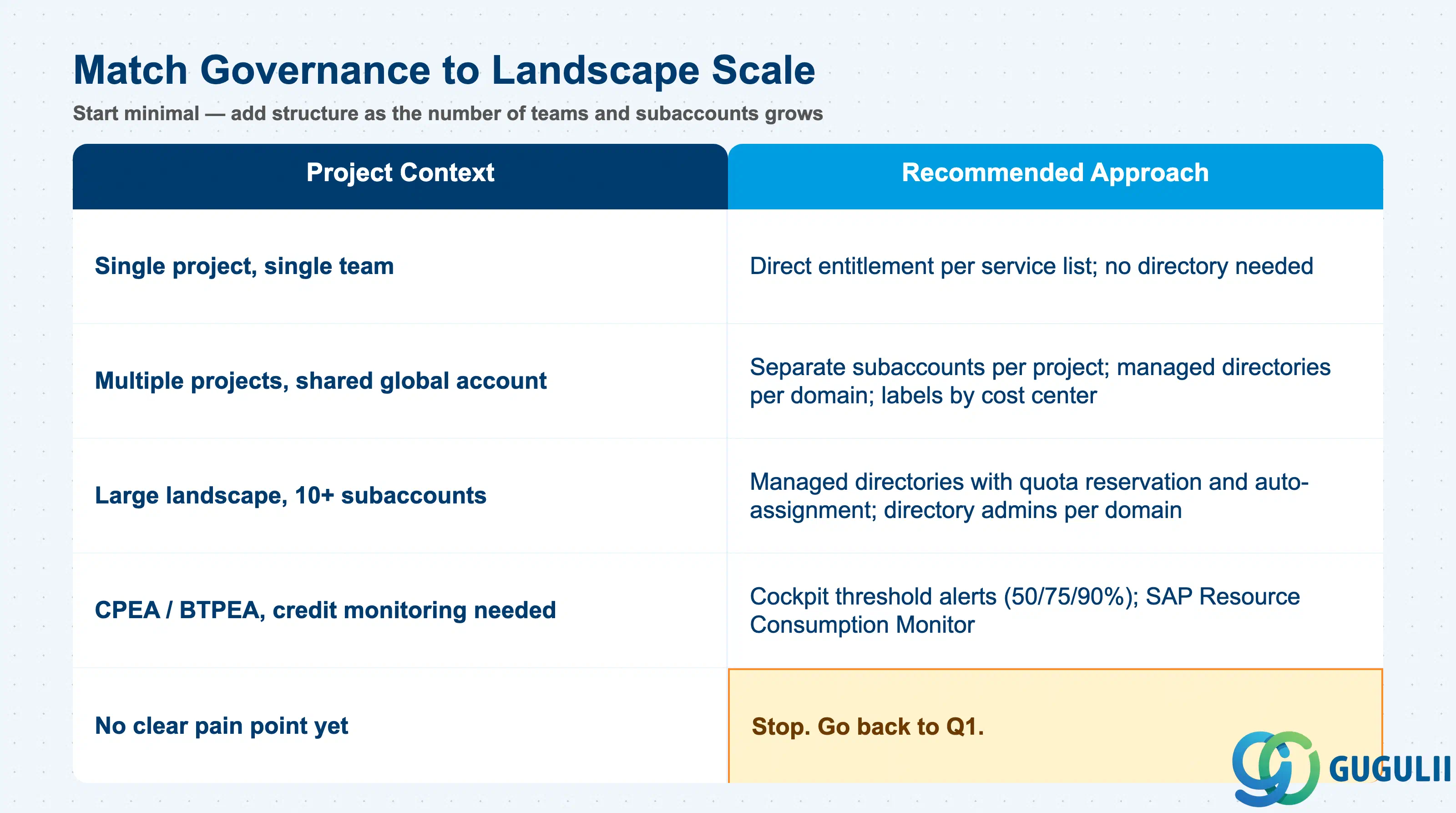
| Project context | Recommended approach |
|---|---|
| Single project, single team, one subaccount | Direct entitlement assignment per service list; no directory needed |
| Multiple projects sharing one global account | Separate subaccounts per project; managed directories per domain; labels by cost center |
| Large landscape with 10+ subaccounts | Managed directories with quota reservation and auto-assignment; directory admins per domain |
| CPEA or BTPEA with credit monitoring needs | Cockpit threshold alerts; SAP Resource Consumption Monitor for anomaly detection |
| Need automatic entitlements for new subaccounts | Managed directory with auto-assignment for standard service set |
| No clear pain point identified yet | Stop. Go back to Q1. |
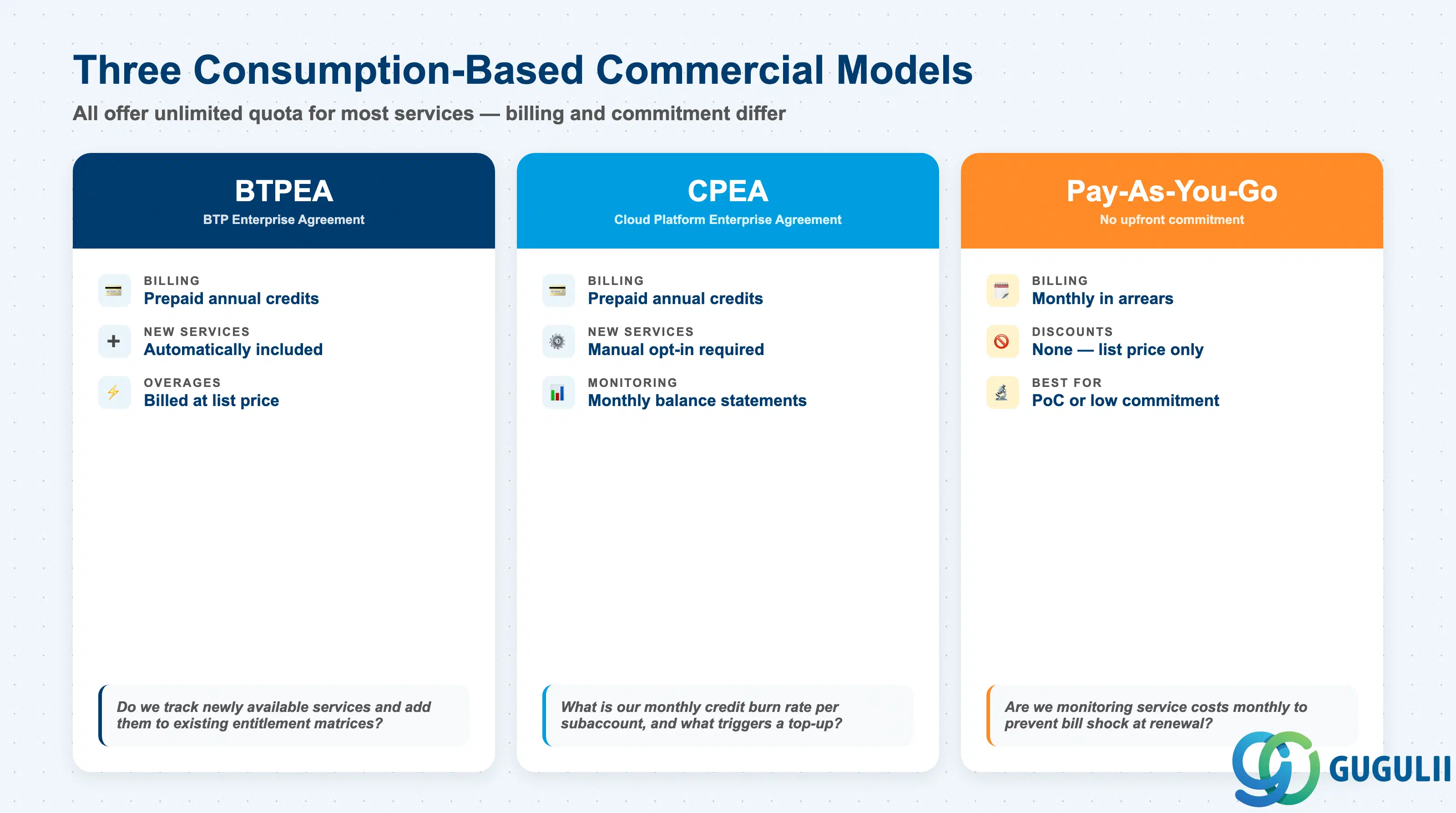
| Commercial model | Licensing model | Key question to ask |
|---|---|---|
| CPEA | Prepaid credits, annual; unlimited quota for most services | What is our monthly credit burn rate per subaccount? |
| BTPEA | Prepaid credits, annual; includes new services; overages at list price | Do we track newly available services and add them to existing entitlement matrices? |
| Pay-As-You-Go | Monthly in arrears; no discount; unlimited quota | Are we monitoring individual service costs monthly to catch bill shock early? |
| Subscription-based | Fixed quota; hard cap | What happens at go-live if dev, test, and prod are provisioned simultaneously and exceed quota? |
| CF Runtime (all models) | 200 GB default per subaccount; billed by actual use in consumption models | Are CF space quotas set to prevent one space from consuming the full 200 GB? |
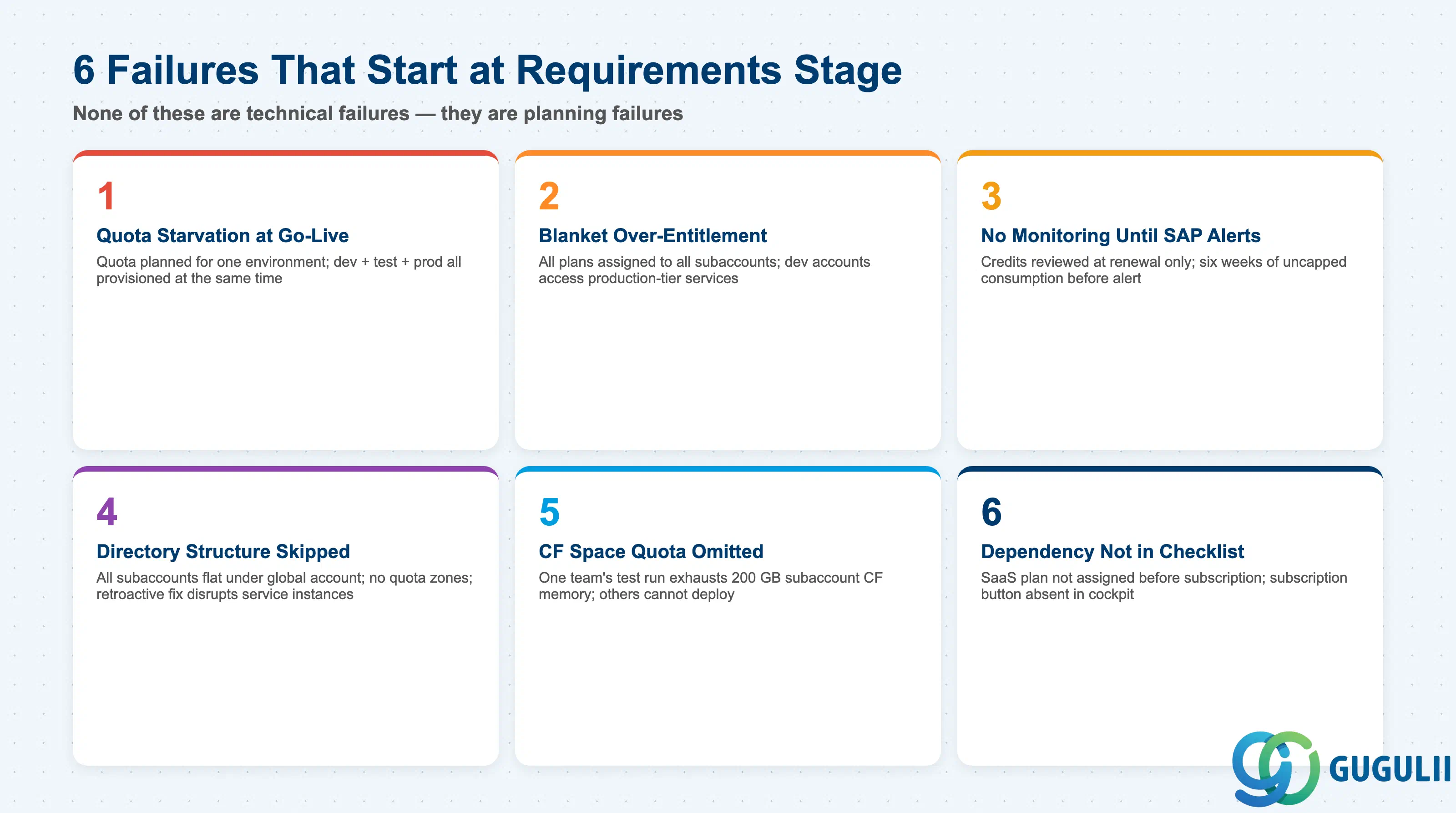
Failure 1: Quota Starvation at Go-Live
A project provisions dev, test, and production subaccounts simultaneously in the final sprint. Each environment requires the same services, but quota covers only two. Production provisioning fails. The quota was planned for a single environment without accounting for all three landscapes existing in parallel. Recovery requires a global admin who is unavailable during a weekend cutover window.
Failure 2: Blanket Over-Entitlement
The global admin assigns all available plans to all subaccounts to reduce request friction. Developer accounts gain access to HANA Cloud and other production-tier services. A cost audit finds instances provisioned in sandbox accounts and never cleaned up. A least-privilege entitlement model — one service list per subaccount reviewed at requirements stage — prevents both the unintended provisioning and the cleanup cost. [Confidence: medium]
Failure 3: No Monitoring Until SAP Sends a Credit Alert
CPEA credit balances are reviewed only at contract renewal. A new project in an uncapped subaccount runs for six weeks before a SAP-generated depletion warning arrives. At 15% remaining, the balance cannot sustain remaining go-lives without emergency top-up negotiation. Cockpit threshold alerts at 50/75/90% and a monthly internal review prevent this. [Confidence: medium — SAP Help Portal monitoring]
Failure 4: Directory Structure Skipped
All subaccounts are placed directly under the global account with no directories. The landscape grows from 3 to 14 subaccounts over 18 months. There is now no organizational boundary between production and development, and no way to reserve quota per domain. Retroactively adding managed directories requires moving subaccounts — affecting service instances, entitlements, and user role assignments — a disruptive change that cannot be done incrementally.
Failure 5: CF Space Quota Omitted
A CF subaccount is shared across three development teams with no space quota plans. One team’s performance test deploys multiple parallel instances and hits the 200 GB subaccount memory limit. The other two teams cannot deploy until the test completes. Space quotas of 50–70 GB per space would have contained the impact to the testing team’s space without affecting others.
Failure 6: Entitlement Dependency Not in the Requirements Checklist
A project requires SAP Build Work Zone as its portal layer. The service plan is not in the entitlement matrix. During the build sprint, the subscription attempt fails because the plan is unassigned. The platform administrator is unavailable until Monday. SAP Build Work Zone is a multitenant application — its plan must be assigned before the subscription option appears in the cockpit. This dependency must be captured at requirements stage, not discovered during implementation.
Q: Does entitlement management work the same way for on-premise S/4HANA extensions as for SAP S/4HANA Cloud?
BTP entitlements apply at the BTP level regardless of whether the backend is on-premise or cloud. The entitlement system has no direct connection to the on-premise ABAP stack. However, when connecting to SAP S/4HANA Cloud, the SAP S/4HANA Cloud Extensibility service plan must be assigned to your BTP subaccount before the API communication arrangement can be created. On-premise connectivity via the SAP Connectivity Service has its own service plan requirements. Both must be captured during BTP architecture planning. [Confidence: high]
Q: Under CPEA or BTPEA, do we still need to set quotas if most services have unlimited quota?
Yes. Unlimited quota at the global level means SAP will not block provisioning, but it gives you no protection against internal governance failures. Without explicit numeric limits per subaccount, any team can provision any entitled service without restriction, making cost chargeback and anomaly detection impossible. Setting subaccount-level quota limits — even conservative ones — creates the governance boundary that enables accountability. You can always raise limits on request; you cannot retroactively explain six months of unmonitored consumption. [Confidence: high — SAP Help Portal]
Q: When should we descope entitlement governance from the initial project scope?
Only in a single-team, single-subaccount, short-term engagement with no plans to expand. If the project has separate dev and prod subaccounts, entitlement planning is a Day 0 requirement, not a Day 2 optimization. The overhead — maintaining an entitlement matrix and a monthly review — is low compared to the recovery cost of a go-live provisioning failure or a mid-project credit exhaustion event. [Confidence: medium]
Q: How do we document entitlement requirements properly?
Maintain an entitlement matrix as part of your BTP architecture documentation. For each subaccount: service name, plan, required quota (or “unlimited”), rationale, and the team that owns consumption. Review the matrix at each project milestone. Include it in your BTP Operations Runbook so platform administrators can validate actual assignments against the target state during operations reviews. [Confidence: medium]
Q: What is the difference between a managed directory and a regular directory?
A regular directory is purely an organizational grouping for navigation and monitoring. A managed directory reserves quota from the global account for its child subaccounts — that quota cannot be assigned elsewhere. Managed directories also support auto-assignment, distributing entitlements automatically to new subaccounts created within them. Managed status must be set at directory creation; it cannot be added retroactively without reorganizing child accounts. This makes the managed-versus-unmanaged decision a permanent architectural choice. [Confidence: high — SAP Help Portal]
Q: How do we prevent one team from consuming all CPEA credits in a shared global account?
Apply numeric quota limits per subaccount in the cockpit, even for services with unlimited global quota. Configure threshold alerts in Costs and Usage at 50%, 75%, and 90% of your expected monthly credit budget, assigned to someone with authority to act. Run a monthly consumption review per subaccount. For landscapes with more than five subaccounts, the SAP Resource Consumption Monitor (SAP-samples on GitHub) adds daily monitoring and anomaly detection beyond the built-in cockpit tools. [Confidence: medium — SAP Community]
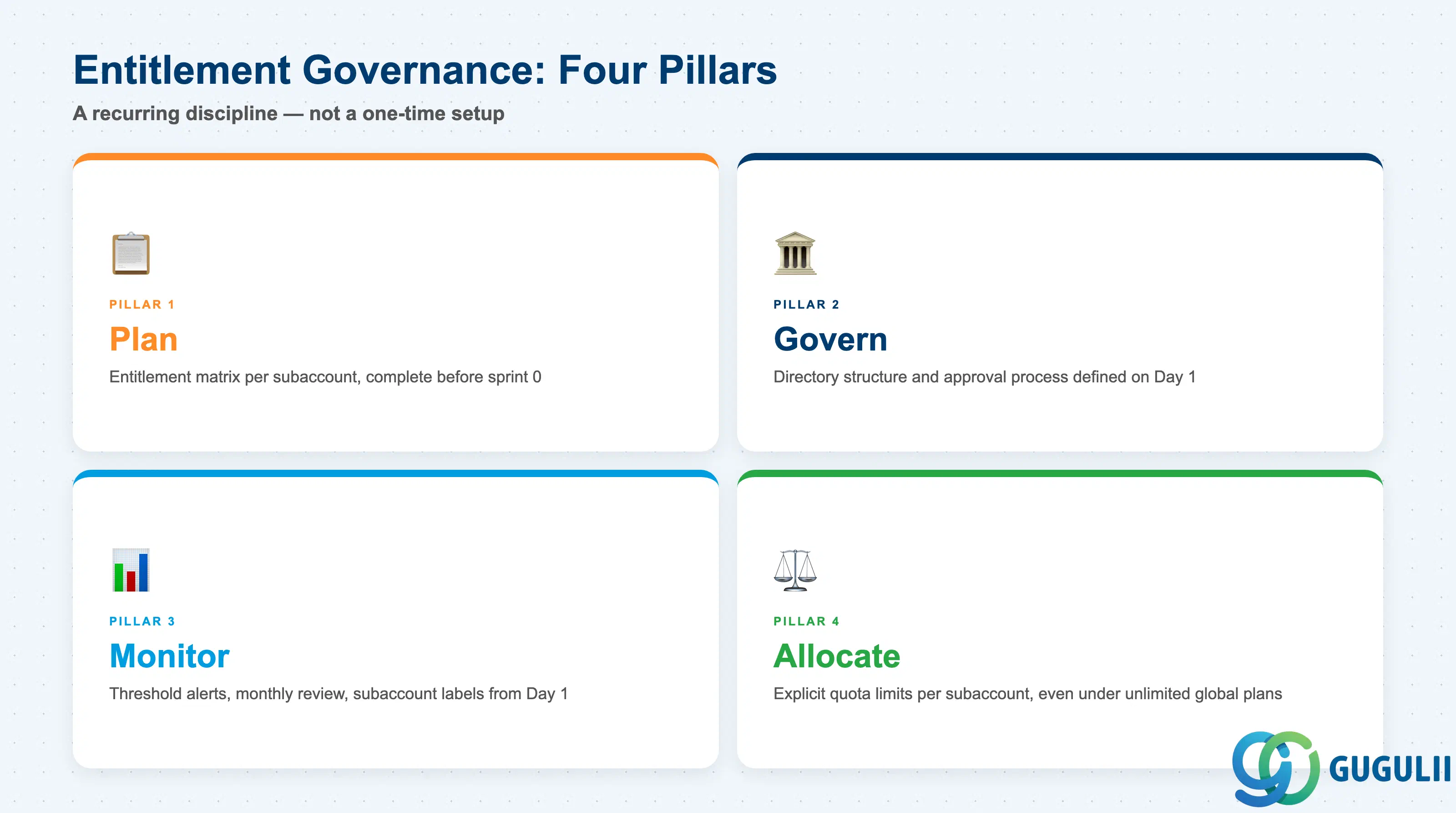
Entitlement and quota management is the governance layer that determines which BTP services each team can use and how much they can consume. The hierarchy runs from the global account (purchased entitlements) through optional managed directories (quota reservation and auto-assignment) to subaccounts (consumption). Under consumption-based models — CPEA, BTPEA, Pay-As-You-Go — most services carry unlimited quota at the global level, but that does not eliminate the need for per-subaccount limits. Without explicit limits, cost accountability and chargeback are impossible.
The most common failures here are not technical — they are planning failures. Missing an entitlement during requirements gathering, skipping the directory structure decision, omitting CF space quotas, and failing to apply labels on Day 1 are all requirements-stage choices that produce operational and financial consequences weeks later. The correct counter-measure is an entitlement matrix and a monthly consumption review — low-overhead disciplines that pay for themselves the first time they prevent a go-live blocker or a credit overrun. [Confidence: high — SAP Help Portal, help.sap.com/docs/btp/sap-business-technology-platform/entitlements-and-quotas]