Title here
Summary here

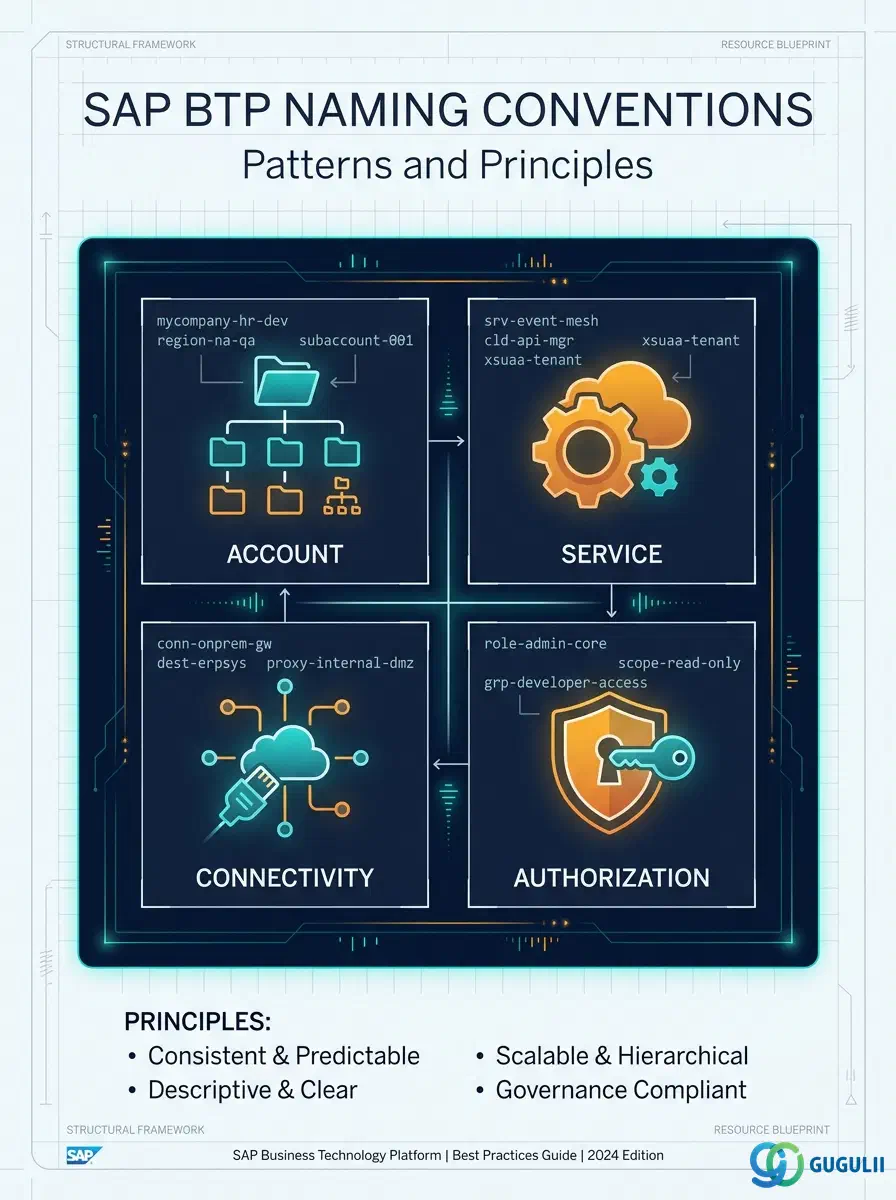
| ID | Category | Component | Scope |
|---|---|---|---|
| BTP-F01 | Overview | BTP Architecture Design | Overview and Key Decisions |
| BTP-F02 | Account Design (1) | Subaccount Design | Patterns and Principles |
| BTP-F03 | Account Design (2) | Entitlement and Quota Management | Patterns and Principles |
| BTP-F04 | Authorization (1) | Role Collection Design | Patterns and Principles |
| BTP-F05 | Authorization (2) | Naming Conventions | Patterns and Principles (this article) |
| BTP-F06 | Dev & Transport | CI/CD and Transport Management | Patterns and Principles |
| BTP-F07 | Use Cases | BTP Architecture Design | Use Cases and Decision Patterns |
| Resource | URL |
|---|---|
| Naming and Directory Templates (BTP Best Practices) | help.sap.com → |
| Account Model (Labels specification) | help.sap.com → |
| Create Service Instances — CF CLI (character constraints) | help.sap.com → |
| Connectivity and Destination Service | help.sap.com → |
| Setting Up Your Account Model | help.sap.com → |
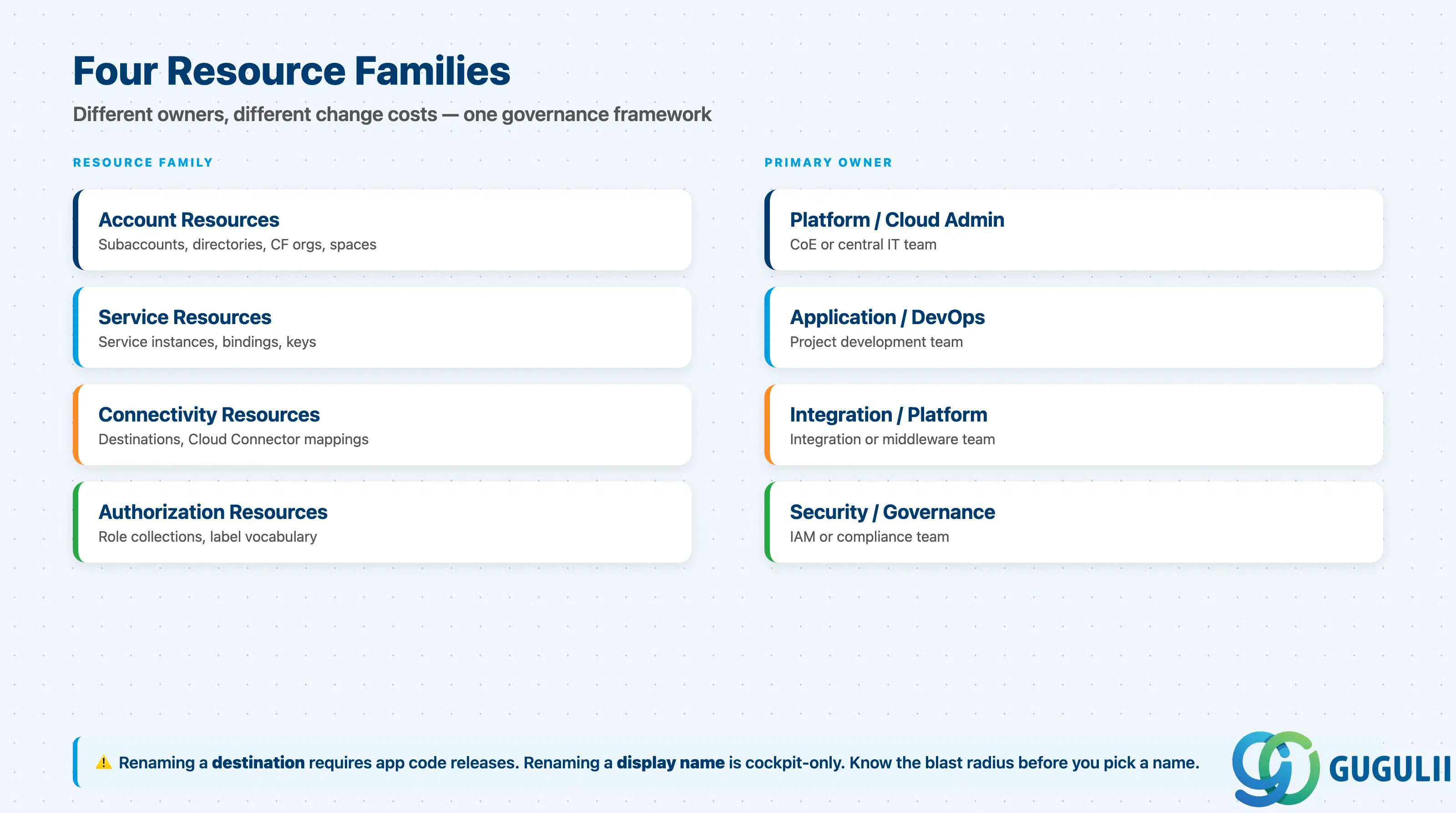
BTP naming conventions cover four distinct resource families. Each family has different technical constraints, different change-cost profiles, and different ownership models.
| Resource Family | What it names | Primary owner |
|---|---|---|
| Account resources | Subaccounts, directories, subdomains, CF orgs, spaces, Kyma clusters, namespaces | Platform / Cloud Admin team |
| Service resources | Service instances, service bindings, service keys | Application / DevOps team |
| Connectivity resources | Destinations, Cloud Connector system mappings | Integration / Platform team |
| Authorization resources | Role collections (custom), label vocabulary | Security / Governance team |
They are not substitutes. A subaccount name organizes the cockpit; a destination name is a runtime lookup key; a service instance name appears in APIs and billing; a role collection name surfaces in IdP group-mapping rules. Renaming any of them has a different blast radius. ( SAP Best Practices)
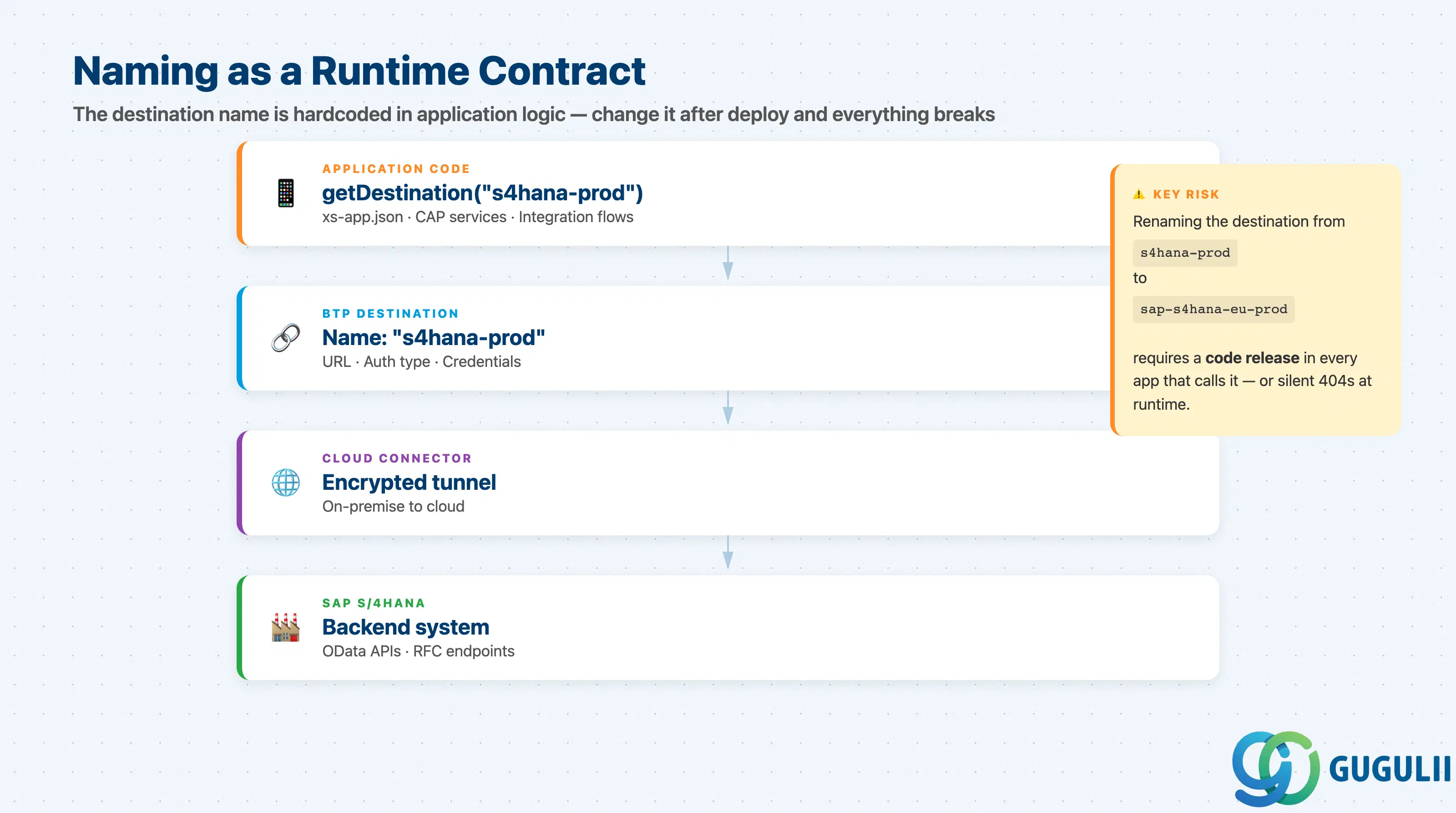
BTP naming conventions become operationally critical where SAP BTP connects to SAP S/4HANA. Three integration points are directly affected by naming decisions:
S/4HANA (ABAP system)
        |
        |  [Cloud Connector tunnel]
        |
BTP Subaccount  ──── Destination: "s4hana-prod"
        |                    ↑
        |             referenced by name
        |             in xs-app.json /
        |             CAP services /
        |             Integration Suite iFlows
        |
Service Instance: "connectivity-svc-integration-prod"
        |
Role Collection: "PROD_S4Integration_Viewer"
Key point: When an application deployed in a BTP subaccount calls destinationService.getDestination("s4hana-prod"), the string "s4hana-prod" is hardcoded in application logic. If operations renames the destination to "sap-s4hana-prod-eu" for consistency, every consumer must be updated simultaneously — or the connection silently breaks with a 404, not a configuration error.
The same lock-in exists for service instance names referenced in Kubernetes deployments, MTA descriptors, and CAP binding configurations. Establish naming before first deployment, not after. ( SAP Best Practices)
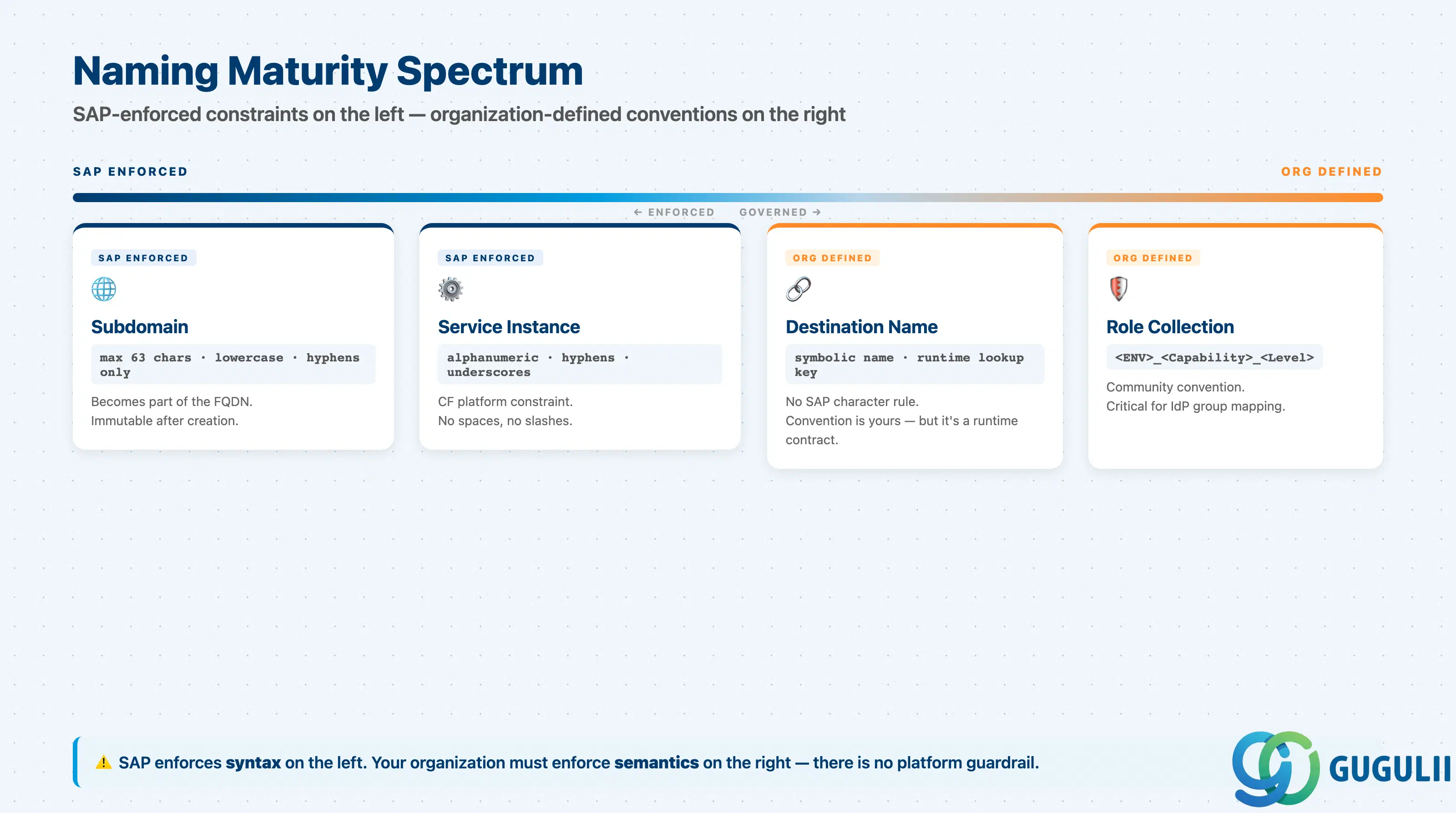
| Resource Type | Maturity | Notes |
|---|---|---|
| Subdomain / CF Org naming | ✅ Production-ready | SAP documents pattern and hard constraint (63 chars, lowercase, hyphens). No deviation possible. |
| Service instance naming | ✅ Production-ready | SAP documents character set (alphanumeric, hyphens, underscores). Pattern is org-defined but constraint is enforced by the platform. |
| Subaccount display name | ⚠️ Ready with prerequisites | SAP provides examples and principles. No technical constraint enforced — consistency depends entirely on governance discipline. |
| Directory naming | ⚠️ Ready with prerequisites | SAP provides guidance (descriptive, functional/geo/subsidiary). No enforcement mechanism beyond human process. |
| Destination naming | ⚠️ Ready with prerequisites | No SAP official pattern. High change-cost after deployment. Requires upfront governance. |
| Role collection naming | 🔶 Early adopter | No SAP official convention. Community patterns exist but are not validated by SAP. Inconsistency across subaccounts creates audit complexity. |
| Label vocabulary | ⚠️ Ready with prerequisites | SAP documents structure (max 10 labels, max 10 values, case-sensitive). Vocabulary governance must be org-defined and enforced before proliferation. ( SAP Help Portal) |
| Checklist item | Why it matters |
|---|---|
| Define a naming pattern before creating the first non-trial subaccount | Account Explorer becomes unsearchable at 50+ subaccounts without a consistent format |
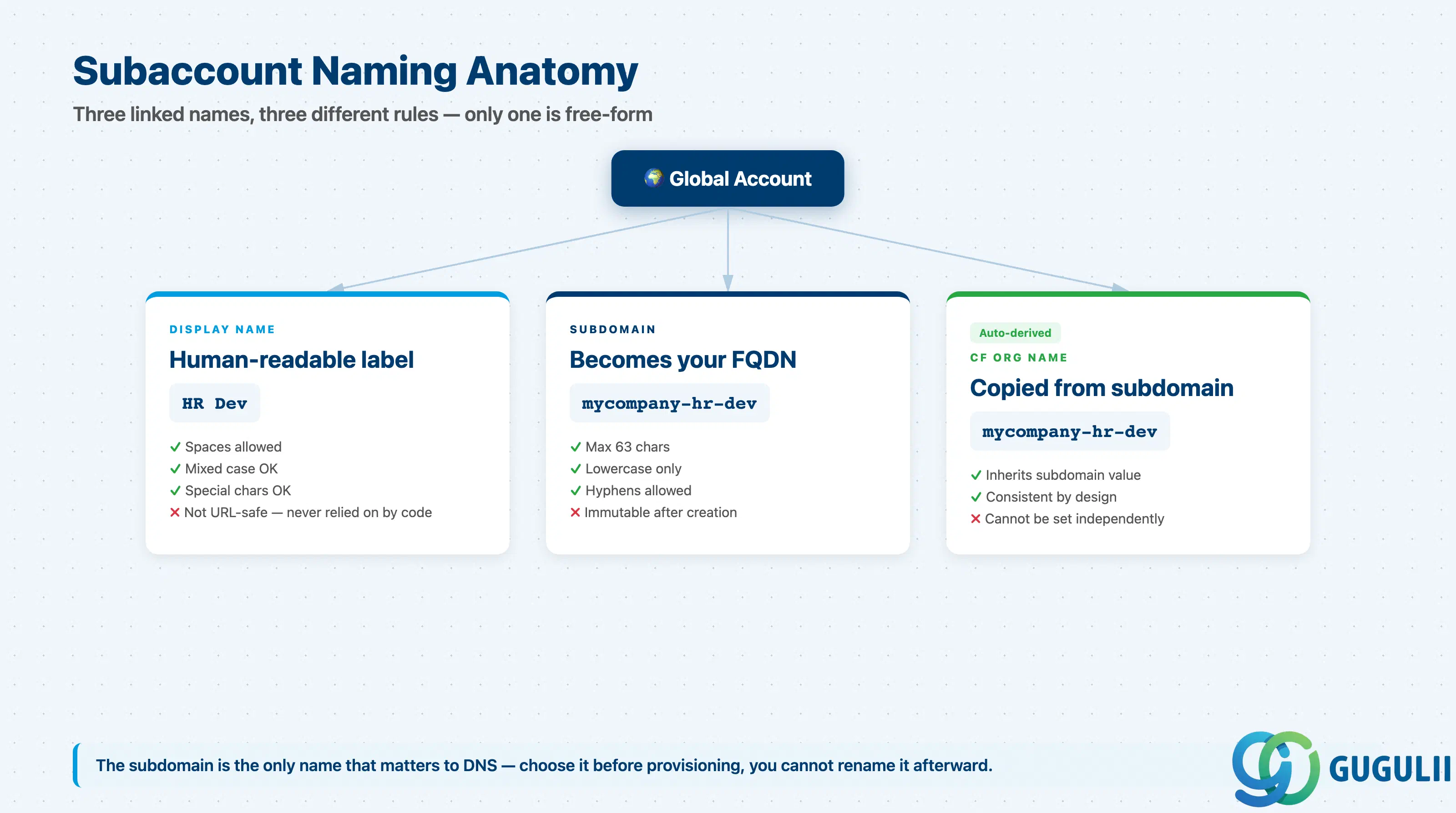
Use natural language with capitalization for display names (e.g., HR Dev, Sales Prod) | Display names appear in the cockpit in the context of the global account; clarity over brevity here |
Derive subdomain and CF org from display name using lowercase + hyphens (e.g., mycompany-hr-dev) | SAP official recommendation; prevents URL encoding conflicts and case-collision issues |
| Keep subdomain to 63 characters or fewer | SAP hard constraint: subdomains appear in URLs that cannot exceed 63 characters |
| Prefix subdomain and CF org name with company identifier | Company prefix prevents collision in multi-tenant or partner-managed landscapes |
| Use identical CF space and Kyma namespace names across DEV/TEST/PROD | No system-level link exists between spaces in different subaccounts; identical names are the only traceability mechanism |
| Use descriptive directory names that reflect the structuring axis (functional, geographic, subsidiary) | Directory name is the only visible grouping label in Account Explorer |
| Document the naming pattern in the governance template before onboarding the first project | Retroactive renaming of subaccounts requires updating Cloud Connector mappings, IAM assignments, and automation scripts |
| Checklist item | Why it matters |
|---|---|
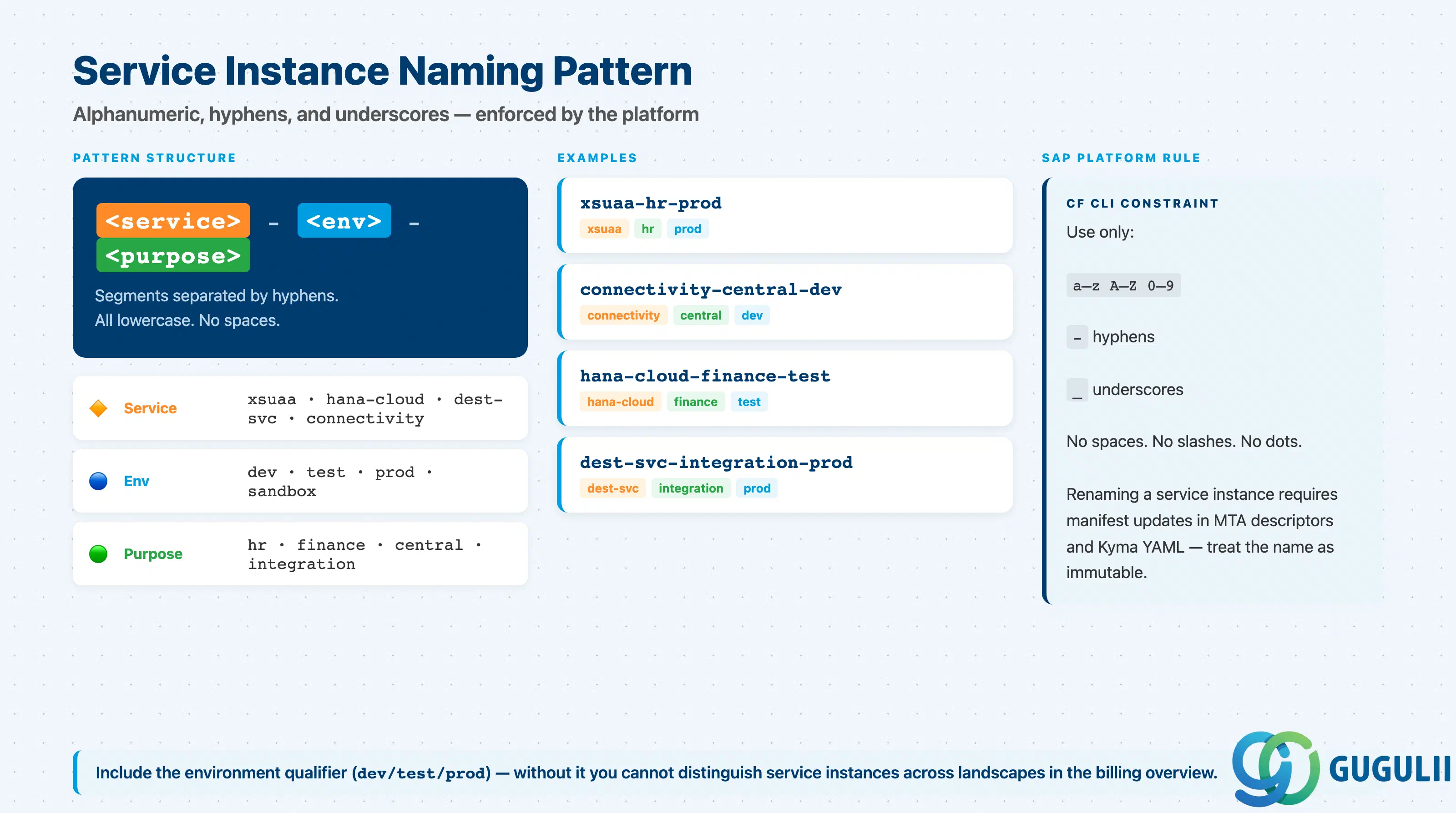
| Use only alphanumeric characters, hyphens, and underscores — no spaces | SAP official constraint enforced by the CF API; spaces cause CLI errors ( SAP Help Portal) |
Embed the service short name in the instance name (e.g., xsuaa-, hana-, dest-svc-) | Service Manager shows instances without service type context; the name must be self-explanatory |
Embed the environment qualifier (e.g., -dev, -test, -prod) | Service instances in different subaccounts are not linked; the name is the only indicator of its landscape stage |
| Embed the application or project identifier where multiple projects share a subaccount | Prevents ops confusion when billing shows multiple instances of the same service |
Define binding and key names using the same convention as the instance (e.g., xsuaa-hr-prod-binding) | Bindings and keys appear in service details and CLI output; consistent naming reduces support time |
| Document maximum one service key per instance for production credentials | Multiple keys per instance create audit risk if old keys are not rotated |
| Checklist item | Why it matters |
|---|---|
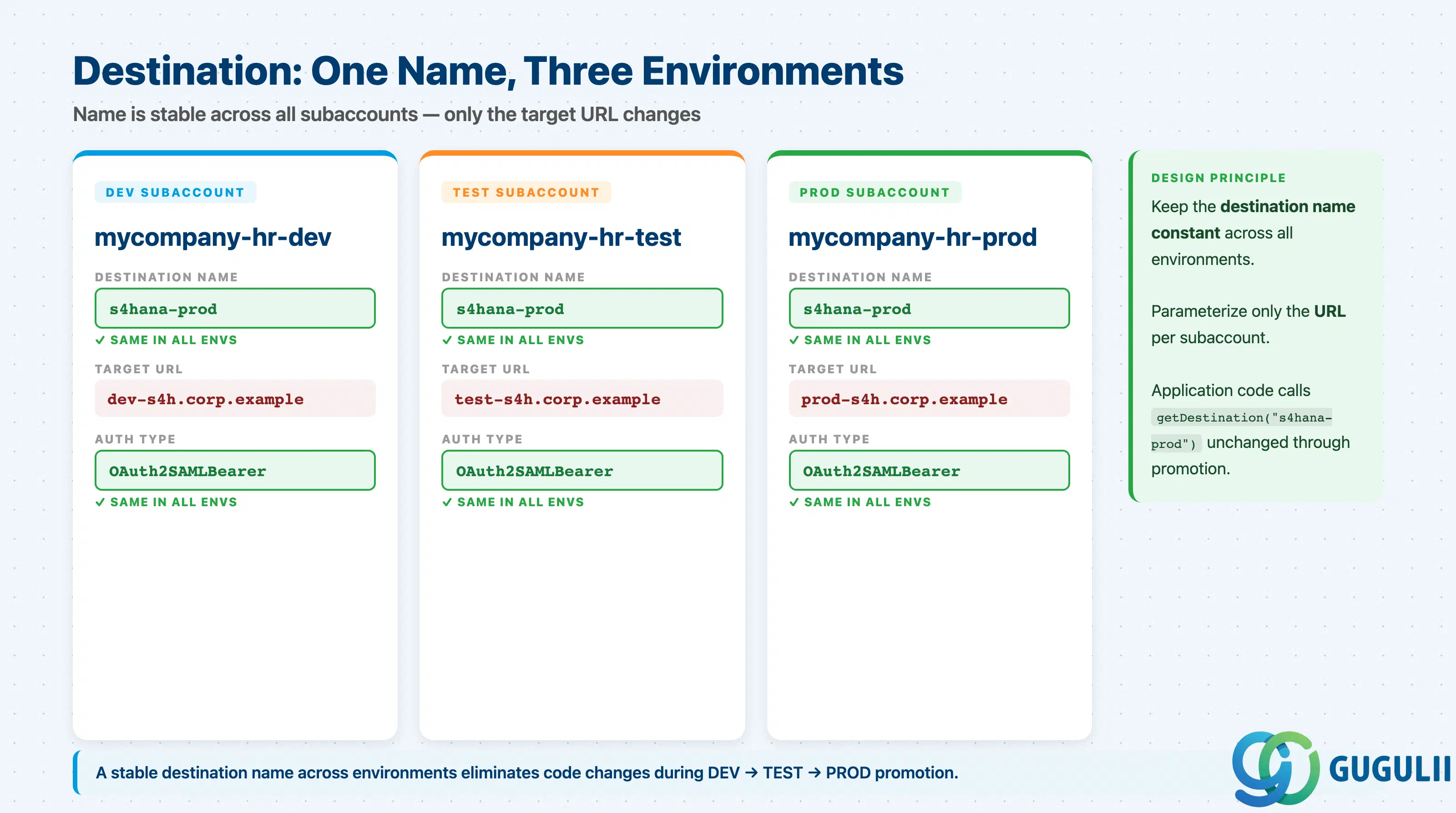
| Treat destination names as public API contracts — define them before first deployment | Application code, MTA descriptors, and integration flows reference destinations by name; changes require code releases ( SAP Help Portal) |
Use a <TargetSystem>-<Environment> or <TargetSystem>-<Protocol> pattern (e.g., s4hana-prod, successfactors-odata-test) | Makes the target and purpose obvious to any operator without reading the destination configuration |
| Omit environment qualifier only when the destination lives in a stage-isolated subaccount | In shared-service subaccounts or multi-tenant scenarios, the qualifier is mandatory |
| Maintain the same destination name across all environments (DEV, TEST, PROD) — change only the target URL | Application code is environment-agnostic; only the BTP cockpit configuration changes per environment |
Avoid generic names like backend or api — they survive the first project but become ambiguous by the third | Ambiguous names force operators to open every destination to identify the target system |
| Document destination name, target system, auth method, and scope in the project architecture document | Destinations are configuration, not code; they have no version history in git unless managed via MTA or Terraform |
| Checklist item | Why it matters |
|---|---|
| Establish a naming pattern for custom role collections before the first custom collection is created | Role collections appear in SAP Cloud Identity Services group-mapping rules; retroactive renaming requires updating every IdP group mapping |
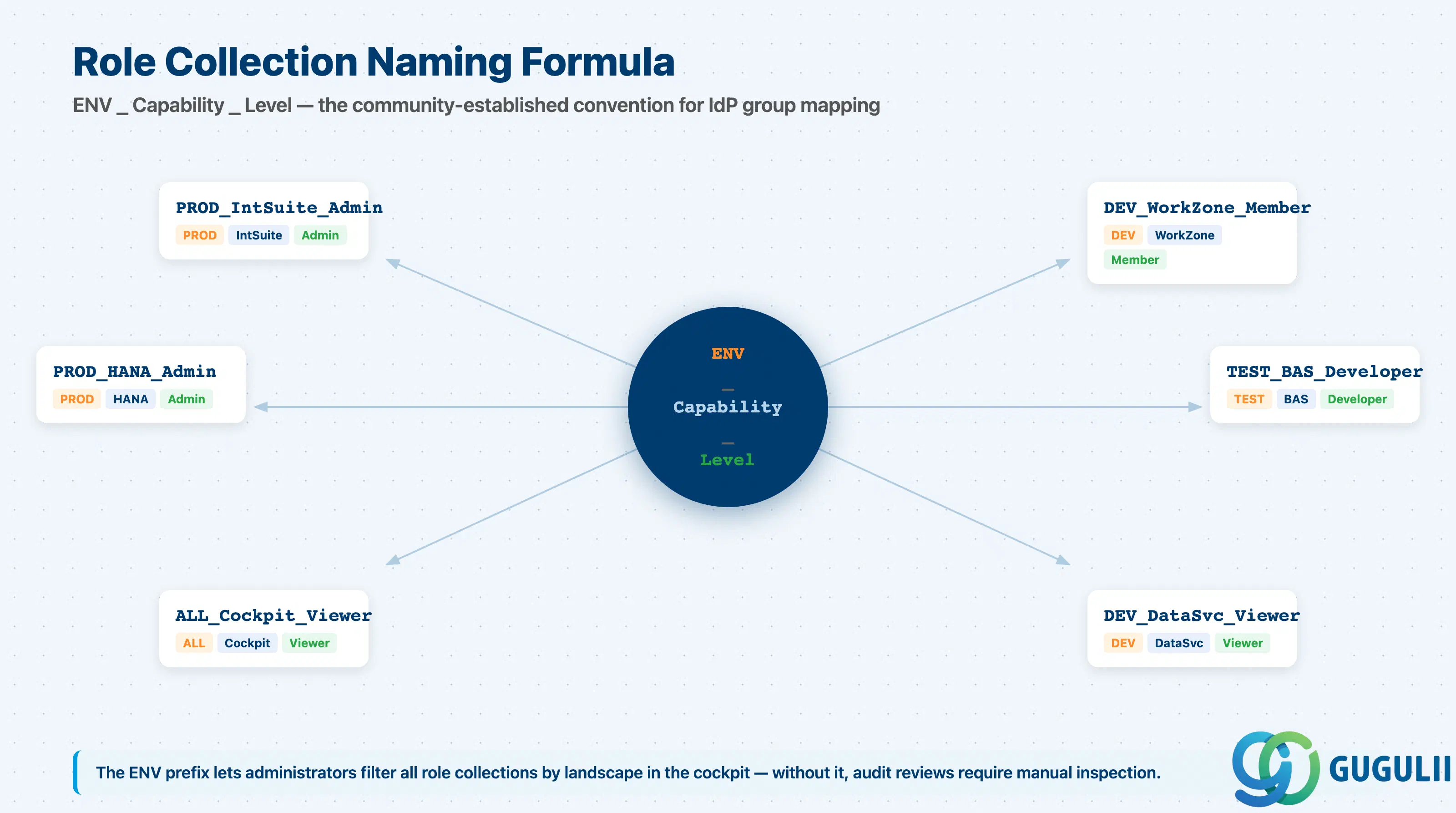
Use a pattern that encodes environment and capability: <Env>_<Capability>_<Level> (e.g., PROD_IntegrationSuite_Admin) | Makes the collection’s scope, target application, and permission level scannable in the cockpit without expanding each collection |
Always differentiate environment (DEV_, TEST_, PROD_) unless the collection is landscape-wide | A Subaccount_Administrator role collection accidentally assigned in production is not recoverable without an audit trail |
Use ALL_ prefix for collections that apply across environments (e.g., ALL_BTPCockpit_Viewer) | Signals intentional cross-environment scope and avoids mistaken environment-specific treatment |
| Mirror SAP’s Admin/Viewer/Auditor suffix convention for the permission level | Consistent suffixes allow IdP group-mapping rules to use prefix patterns, reducing the number of individual mapping rules |
| Document which IdP group maps to each custom role collection before deployment | Without documentation, IdP group-to-role-collection mappings become tribal knowledge that disappears when personnel change |
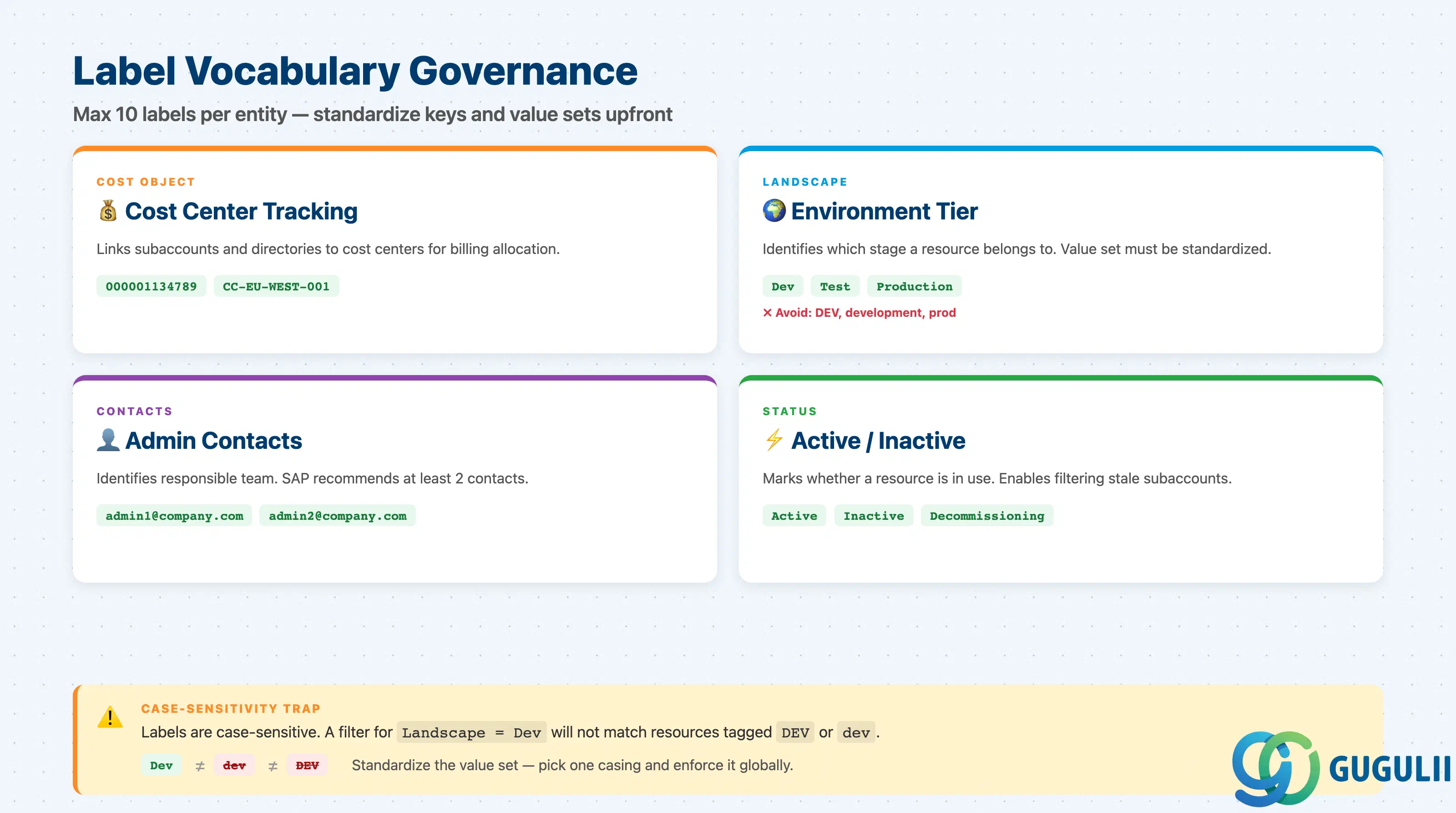
| Checklist item | Why it matters |
|---|---|
| Define the global account label vocabulary before any project creates labels | Labels are case-sensitive; Dev and dev and DEV are three separate labels — filtering breaks when variants exist |
Define at minimum: Cost Object, Landscape, Contacts, Status | SAP official examples; these four cover cost tracking, environment classification, ownership, and lifecycle management |
| Standardize value sets for categorical labels (e.g., `Landscape: Dev | Test |
| Never use labels as the sole mechanism for security segmentation | Labels are metadata only; access control is at the subaccount and role collection level — never at the label level |
Apply Contacts label to every subaccount and directory with at least two values | Single-owner subaccounts create operational risk when the owner leaves |
| Review label vocabulary at least once per quarter as the landscape grows | Labels accumulate; unused keys consume the 10-label-per-entity limit and add noise to cockpit filtering |
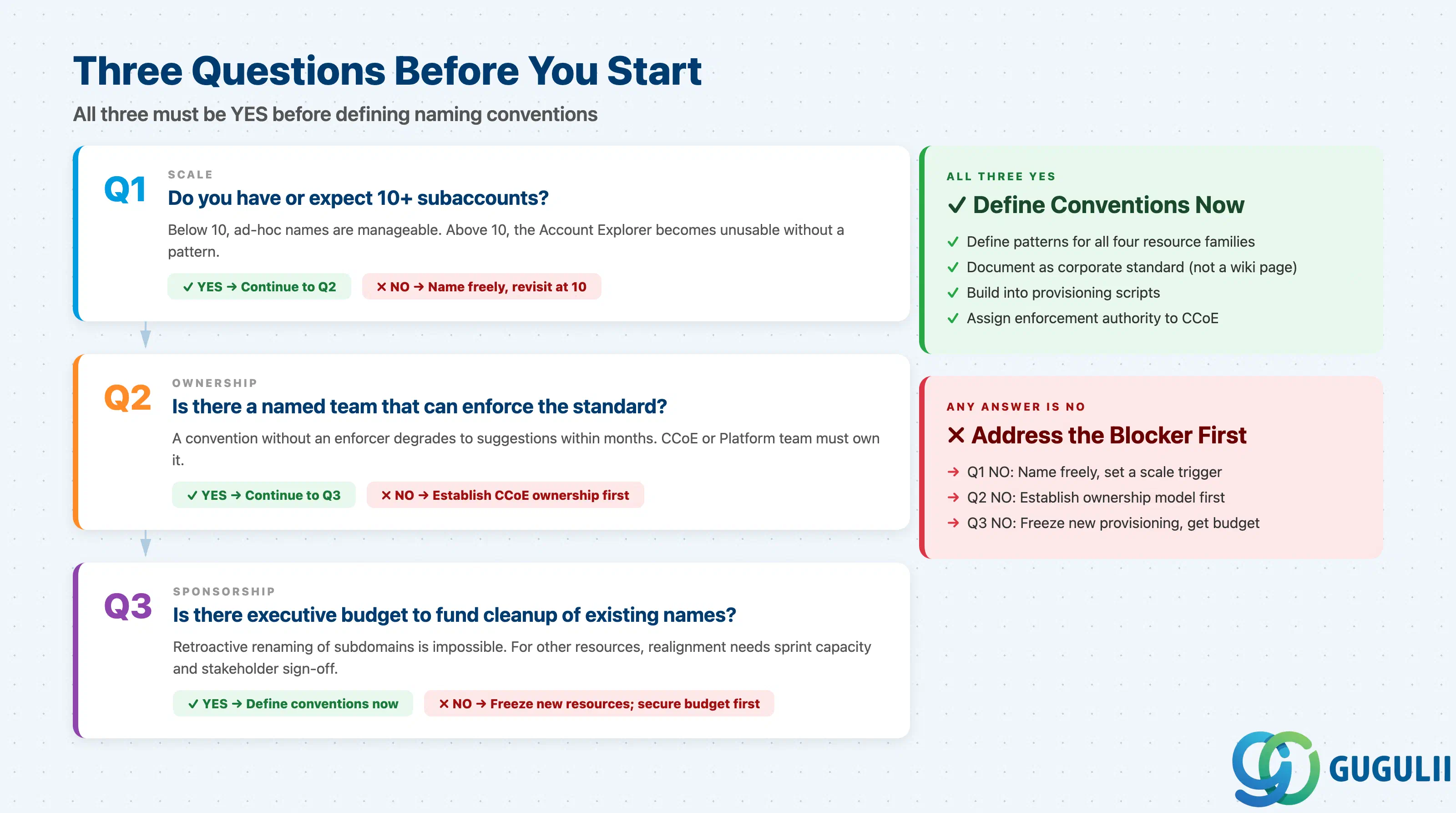
Q1. Do you have more than 10 subaccounts today, or will you reach 10 within the next 6 months?
If yes, naming conventions are not optional — they are infrastructure. Account Explorer search, cost reporting, and IAM reviews all depend on consistent, readable names. The threshold of 10 is not arbitrary: it is the point at which human memory fails to track which subaccount belongs to which project without consistent naming cues. ( SAP Best Practices)
Q2. Who owns the naming convention across teams, and can they enforce it?
Naming conventions fail when ownership is diffuse. Without a named owner — typically the Platform / Cloud Center of Excellence team — individual project teams create names that optimize locally but break globally. The owner must have the authority to reject subaccount creation requests that violate the convention, not just advise on it.
Q3. Is there executive sponsorship for naming governance?
Naming conventions touch developer autonomy (project teams want to name their own resources), operations tooling (automation scripts are brittle to name changes), and finance (cost attribution reports depend on consistent naming). Without a sponsor who can resolve cross-team disputes and fund retroactive cleanup, naming conventions degrade within one year.
| Project context | Naming priority |
|---|---|
| Greenfield BTP implementation, single team | All four resource families; establish before first subaccount |
| Expanding existing landscape (5+ new subaccounts) | Subaccount and destination naming first; service instance and role collection naming in parallel |
| S/4HANA extension project with BTP side-by-side | Destination naming is critical path; establish immediately |
| Multi-team shared platform (CCoE-managed) | All four families plus label vocabulary governance |
| Legacy landscape retrofit (20+ subaccounts already exist) | Audit existing names first; establish forward convention; migrate incrementally by project |
| No clear pain point identified yet | Stop. Align on account model design (BTP-F02) before naming conventions. |
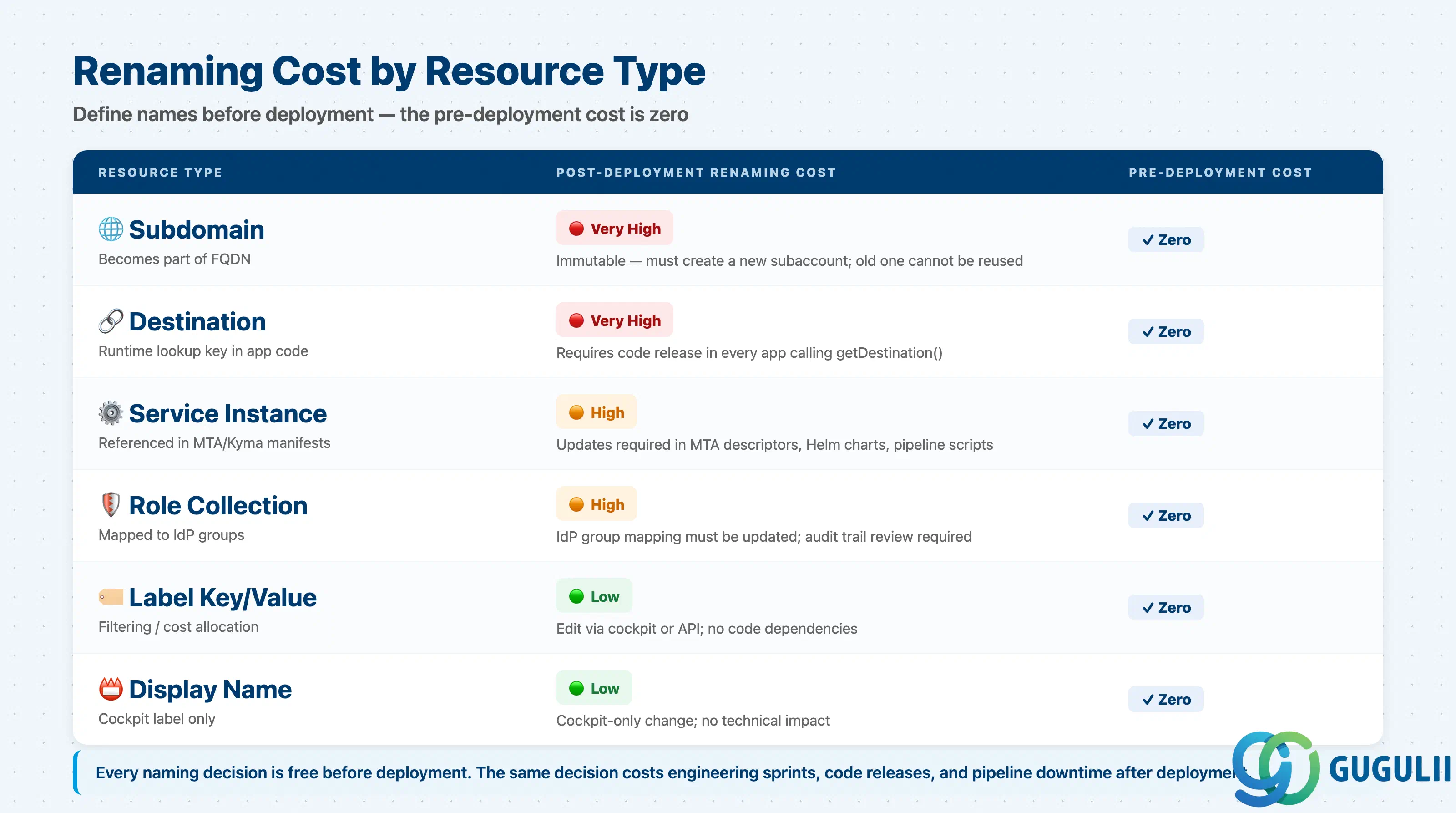
| Resource | Naming cost | Renaming cost |
|---|---|---|
| Subaccount display name | Zero | Low (cockpit only, no downstream impact) |
| Subdomain | Zero | High — requires creating a new subaccount; subdomain is immutable |
| CF org / space | Zero | Medium — requires updating all CF-targeted CI/CD scripts and app manifests |
| Service instance | Zero | High — requires updating MTA descriptors, Kubernetes manifests, CAP bindings, and CI/CD pipelines |
| Destination | Zero | Very high — requires updating all application code consumers and releasing new versions |
| Role collection | Zero | High — requires updating all IdP group-mapping rules in SAP Cloud Identity Services |
| Label key/value | Zero | Low — labels are metadata only; no downstream technical dependency |
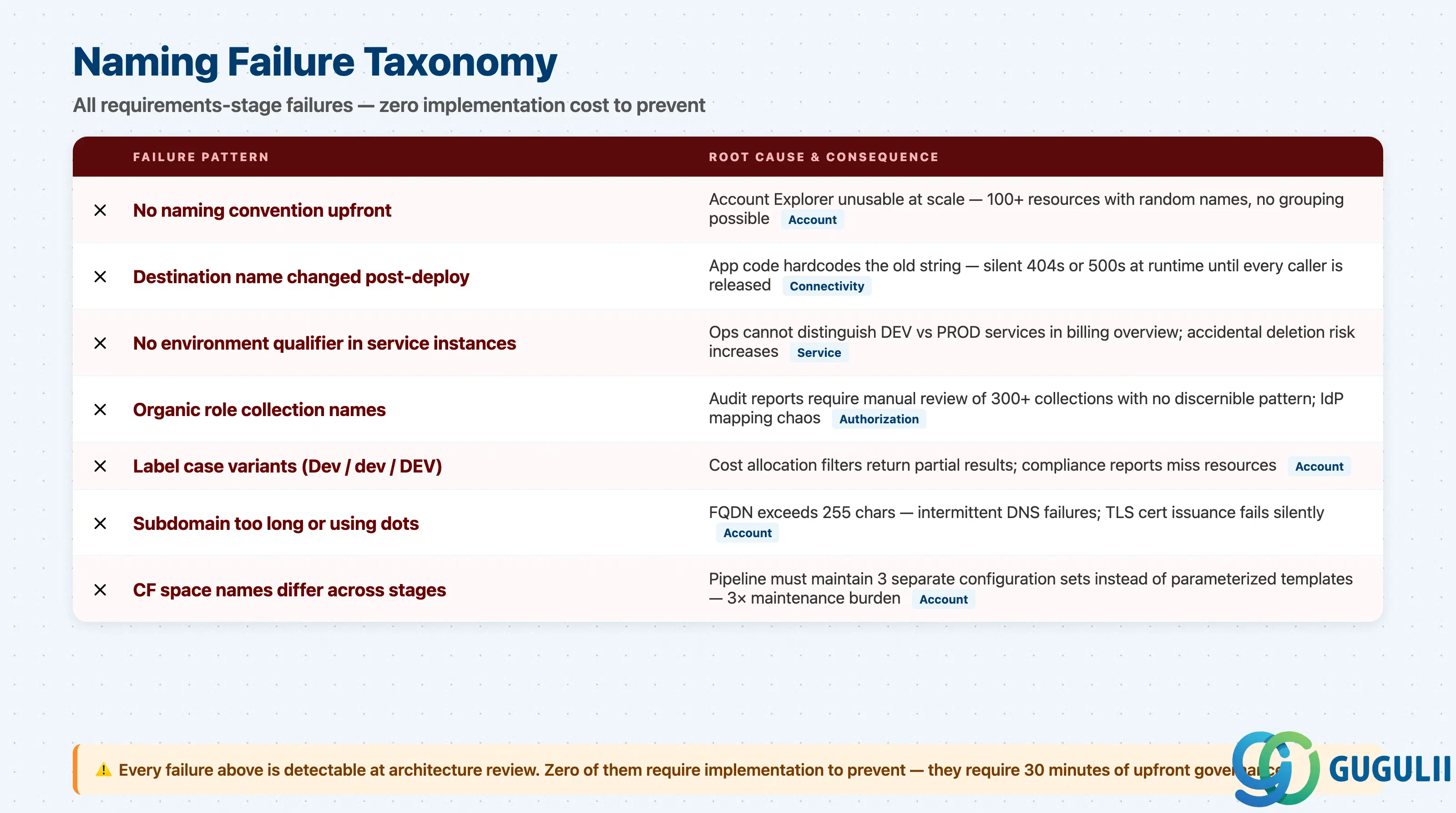
Failure 1: No naming convention before the first production subaccount
The team creates DEV and TEST subaccounts using project-team names (HR-Portal-DEV, portal-hr-d, HumanResources_Dev) because no standard exists yet. By the time a PROD subaccount is created, three inconsistent patterns have been established and the team argues about which to standardize. Resolution requires manual audit and a governance decision under time pressure. (
SAP Best Practices)
Failure 2: Destination names that reflect the initial target, not the logical purpose
A developer creates a destination named s4hana-eu-central-1-system-001 because that is the specific system hostname at project start. Six months later the system is load-balanced across two nodes and the hostname is meaningless. The name is now incorrect and misleading — but cannot be changed without a code release. Correct approach: name the destination after its logical role (s4hana-prod), not its infrastructure identity.
Failure 3: Service instance names without environment qualifier in a multi-stage subaccount
A team manages DEV and TEST workloads in a single subaccount. They create service instances named xsuaa-app and xsuaa-app-v2. Three months later, operations cannot determine which instance is used by which deployment without reading bindings. The environment qualifier (-dev, -test) would have made the distinction immediate.
Failure 4: Role collection names that grow organically
A new application is onboarded. The developer creates role collections named MyApp_Admin and MyApp_User. The next project creates ProjectB_Administrator and ProjectB_ReadOnly. The IdP group-mapping rules accumulate a mix of formats. When a security audit requires reviewing all administrator-level role collections, the team must manually inspect each collection because the names do not encode the permission level consistently.
Failure 5: Label vocabulary drift after the first year
The global account starts with well-governed labels (Landscape: Dev, Landscape: Test, Landscape: Production). Six months in, a new team joins and creates Landscape: DEV and Landscape: development. Cockpit filters for Landscape: Dev now return only a subset of development subaccounts. Cost reports are split across three variants. Because labels are case-sensitive and have no governance enforcement mechanism, correcting this requires touching every subaccount.
Failure 6: Subdomain too long for URL constraints
A project creates a subdomain mycompany-human-resources-development-subaccount (50 characters). This fits the 63-character limit — but the CF API endpoint adds a region suffix, pushing the total URL beyond limits for some tooling. The failure is intermittent and environment-specific. Use abbreviations: mycompany-hr-dev achieves the same result in 16 characters.
Failure 7: CF space names differ across DEV/TEST/PROD
The DEV subaccount has spaces portal-dev while TEST uses portal-qa and PROD uses portal. The CI/CD pipeline requires three separate space-name configurations instead of one parameterized value. SAP explicitly recommends identical space names across all landscape stages because no system-level linkage connects spaces in different subaccounts.
Q: Does SAP enforce naming conventions for BTP resources?
SAP enforces technical constraints — subdomain character set and length, service instance character set — but not organizational naming patterns. The pattern and consistency discipline are the customer’s responsibility. SAP’s Best Practices Guide provides examples and principles; there is no cockpit validation that rejects abc123 versus HR Dev. (
SAP Best Practices)
Q: We have an on-premise SAP landscape with established naming standards. Can we reuse those?
Partially. On-premise conventions (SID three-character system identifiers) operate at the system level, not the BTP resource level. Reuse the environment taxonomy (DEV/QAS/PRD) and functional area taxonomy (HR, FI, MM) as building blocks in BTP names. Do not carry over cryptic BASIS abbreviations that require institutional knowledge to decode.
Q: When should we use labels instead of encoding information in the name?
Encode in the name what is operationally critical: environment, functional owner, and logical purpose. Use labels for cross-cutting metadata added after creation: cost center, compliance flag, data classification, and contacts. Labels are mutable; names are immutable for most resources.
Q: How do we handle naming when multiple subsidiaries share a global account?
Include a subsidiary prefix in subdomains and CF orgs: subsidiary-a-hr-dev, subsidiary-b-sales-prod. Group by subsidiary using directories with entitlement management enabled. This maintains clear billing, access control, and naming boundaries within a single global account.
Q: Should role collection names differ between environments?
Yes, for environment-specific collections. PROD_IntegrationSuite_Admin is distinct from DEV_IntegrationSuite_Admin — they contain roles pointing to different service instances. For landscape-wide read-only collections, use ALL_ to signal cross-environment scope.
Q: How do we document naming conventions so they survive personnel changes?
Store the convention as a corporate standard in your governance framework, not a personal wiki page. Include: the pattern for each resource family, the rationale, examples of correct and incorrect names, and the owner. Keep it alongside your BTP setup automation (Terraform, btp-setup-automator, MTA templates) so pipeline engineers can reference it directly.
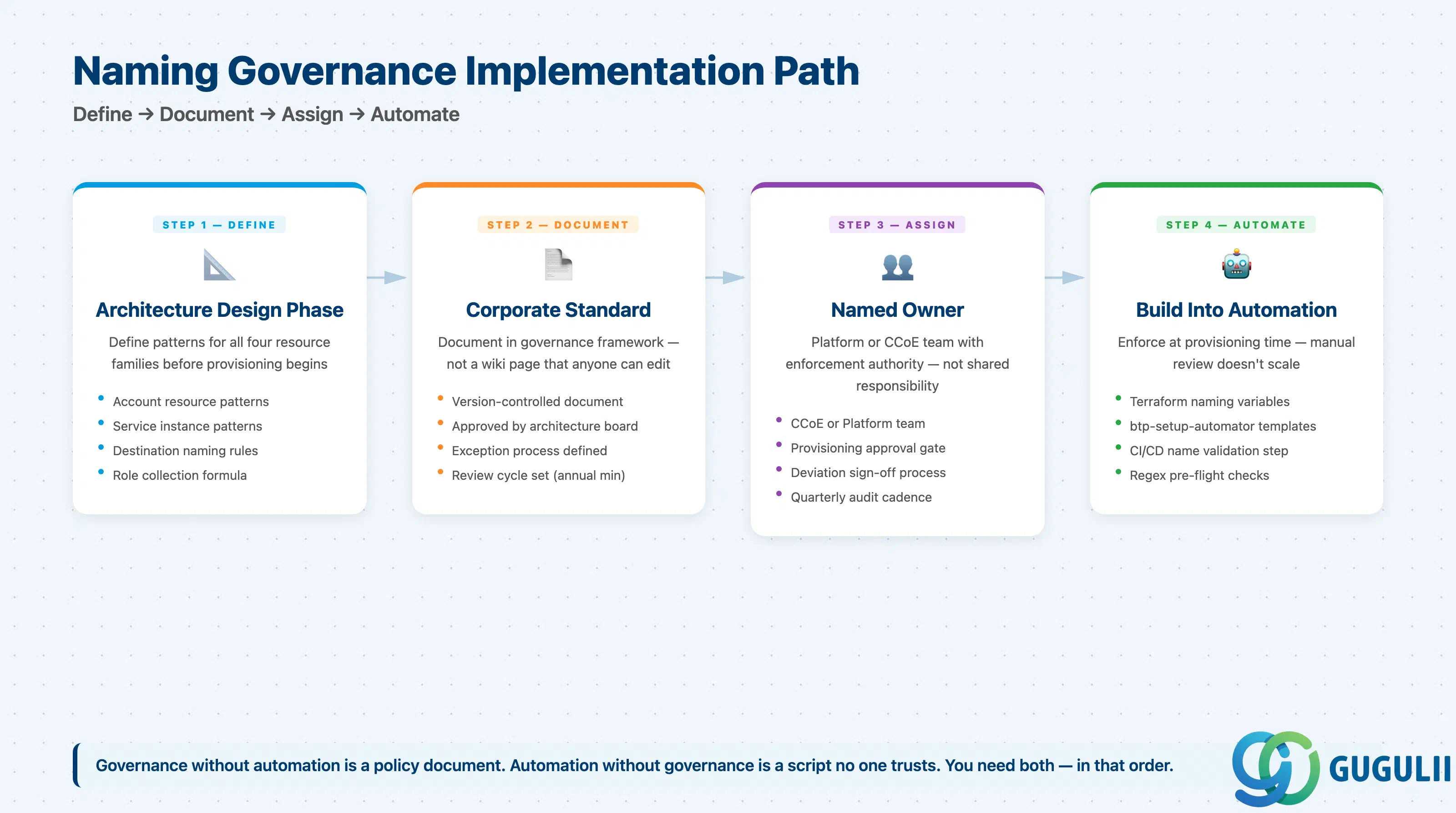
BTP naming conventions sit at the intersection of operations, governance, and architecture. Two resource types — subdomains and service instances — have SAP-enforced technical constraints. The remaining four — destinations, role collections, directories, and labels — require organizational discipline because the platform does not enforce them. ( SAP Best Practices)
The field pattern that consistently works: define the convention during architecture design, document it as a corporate standard, assign a named owner in the Platform team, and build it into your subaccount creation automation. Projects that establish naming after the landscape is live spend disproportionate time on cleanup instead of delivery. The 63-character subdomain limit is a fact; the 50-subaccount cognitive overload is a choice.