Title here
Summary here

| ID | Category | Component | Scope |
|---|---|---|---|
| BTP-F01 | Overview | BTP Architecture Design | Overview and Key Decisions |
| BTP-F02 | Account Design (1) | Subaccount Design | Patterns and Principles |
| BTP-F03 | Account Design (2) | Entitlement and Quota Management | Patterns and Principles |
| BTP-F04 | Authorization (1) | Role Collection Design | Patterns and Principles |
| BTP-F05 | Authorization (2) | Naming Conventions | Patterns and Principles |
| BTP-F06 | Dev & Transport | CI/CD and Transport Management | Patterns and Principles |
| BTP-F07 | Use Cases | BTP Architecture Design | Use Cases and Decision Patterns (this article) |
| Resource | URL |
|---|---|
| SAP BTP Connectivity — What Is SAP BTP Connectivity | help.sap.com → |
| SAP BTP Account Model | help.sap.com → |
| SAP Architecture Center — Multi-Tenant SaaS Reference Architecture | architecture.learning.sap.com → |
| SAP Architecture Center — Secure Connectivity with SAP Private Link | architecture.learning.sap.com → |
| SAP Architecture Center — DevOps with SAP BTP | architecture.learning.sap.com → |
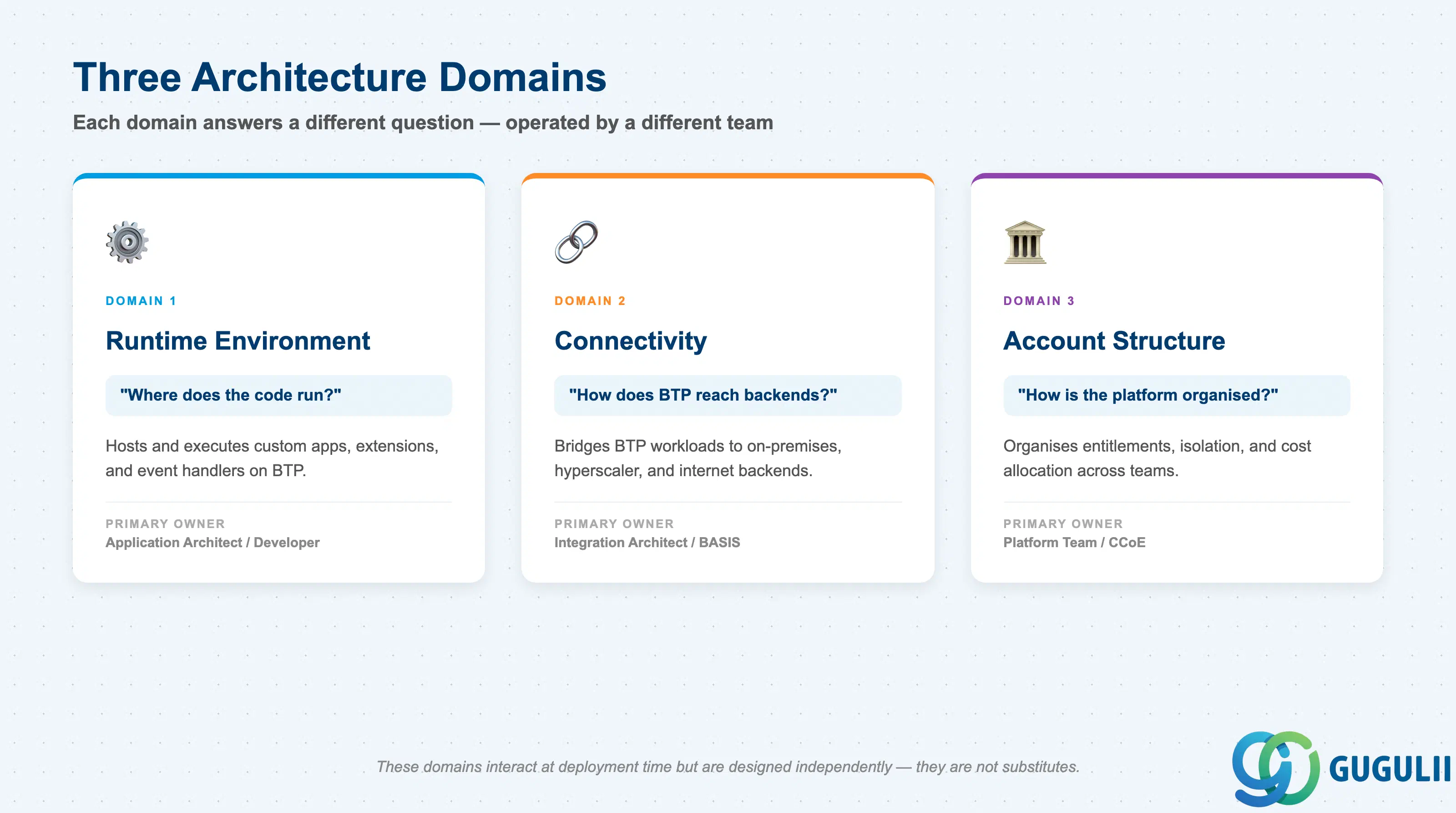
The decisions that shape a BTP architecture cluster into three distinct domains. Each one answers a different question and is operated by a different person ( SAP BTP Account Model).
| Domain | What it does | Primary user |
|---|---|---|
| Runtime environment | Hosts and executes custom applications and extensions | Application architect / developer |
| Connectivity | Bridges BTP workloads to backends (on-premises, hyperscaler, internet) | Integration architect / BASIS |
| Account structure | Organizes entitlements, isolation, and cost allocation across teams | Platform team / CCoE |
These three domains interact at deployment time but are designed independently. They are not substitutes.
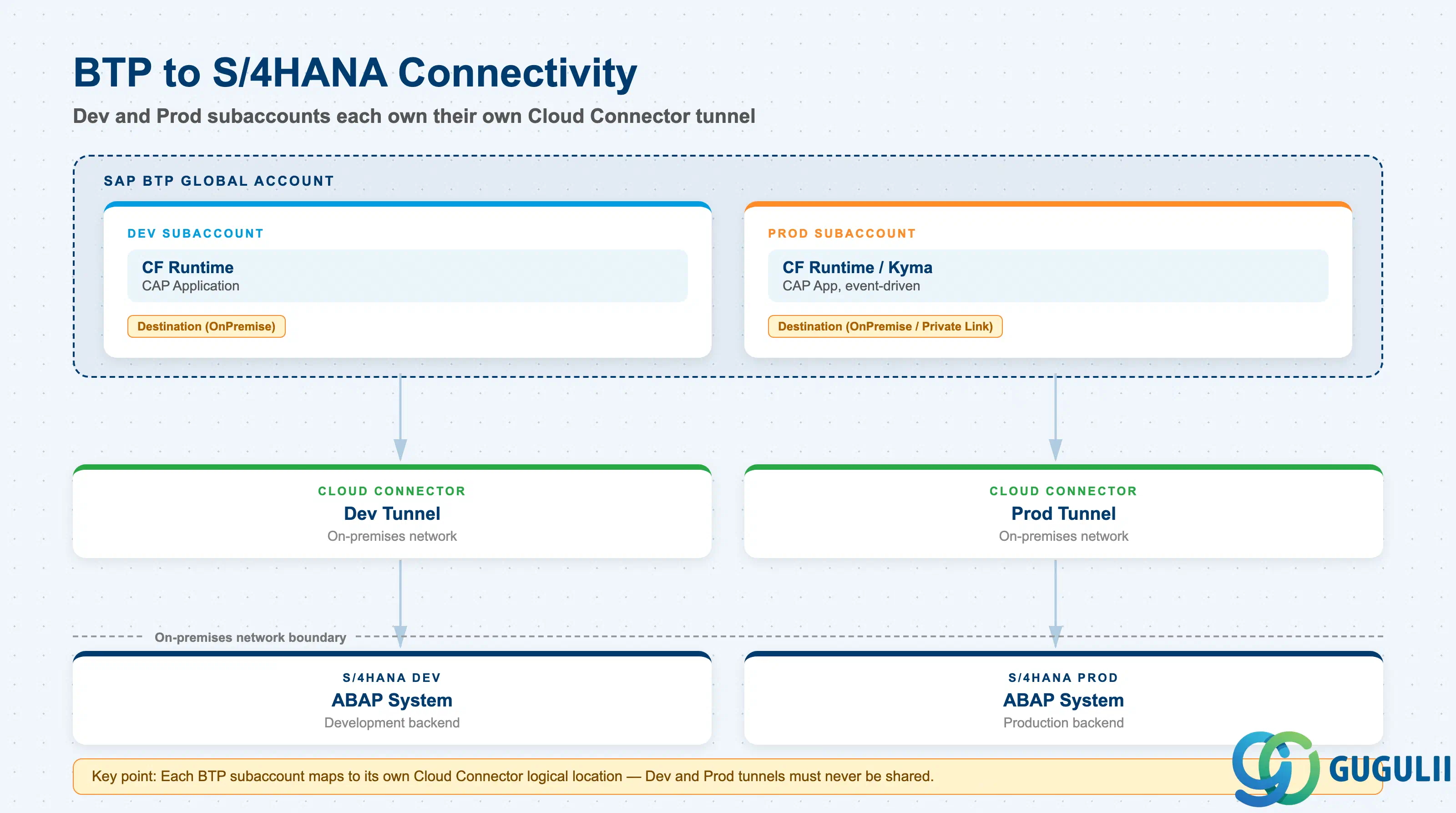
The diagram below represents the typical placement of BTP relative to an S/4HANA backend in a side-by-side extension scenario.
  ┌─────────────────────────────────────────────────────────────┐
  │                   SAP BTP Global Account                    │
  │                                                             │
  │  ┌───────────────────┐   ┌───────────────────────────────┐  │
  │  │  Dev Subaccount   │   │       Prod Subaccount         │  │
  │  │  ┌─────────────┐  │   │  ┌─────────────────────────┐  │  │
  │  │  │  CF Runtime │  │   │  │  CF Runtime / Kyma       │  │  │
  │  │  │  (CAP App)  │  │   │  │  (CAP App, event-driven) │  │  │
  │  │  └──────┬──────┘  │   │  └───────────┬─────────────┘  │  │
  │  └─────────┼─────────┘   └──────────────┼────────────────┘  │
  │            │  Destination service         │ Destination svc   │
  │            │  (OnPremise)                 │ (OnPremise /      │
  │            │                              │  Private Link)    │
  └────────────┼──────────────────────────────┼───────────────────┘
               │                              │
         Cloud Connector               Cloud Connector
         (Dev tunnel)                  (Prod tunnel)
               │                              │
  ─────────────┼──────────────────────────────┼──── On-premises network
               ▼                              ▼
        S/4HANA Dev                    S/4HANA Prod
        (ABAP system)                  (ABAP system)
The Cloud Connector is installed in the customer’s on-premises network and initiates an outbound tunnel to the BTP subaccount — no inbound firewall ports are required ( SAP BTP Connectivity). Applications in BTP consume backend connections through the Destination service, which acts as the runtime configuration store for endpoint URLs and credentials.
Key point: Each BTP subaccount maps to its own Cloud Connector logical location, which is why Dev and Prod subaccounts must be kept separate — you cannot safely share a single Cloud Connector tunnel across lifecycle stages.
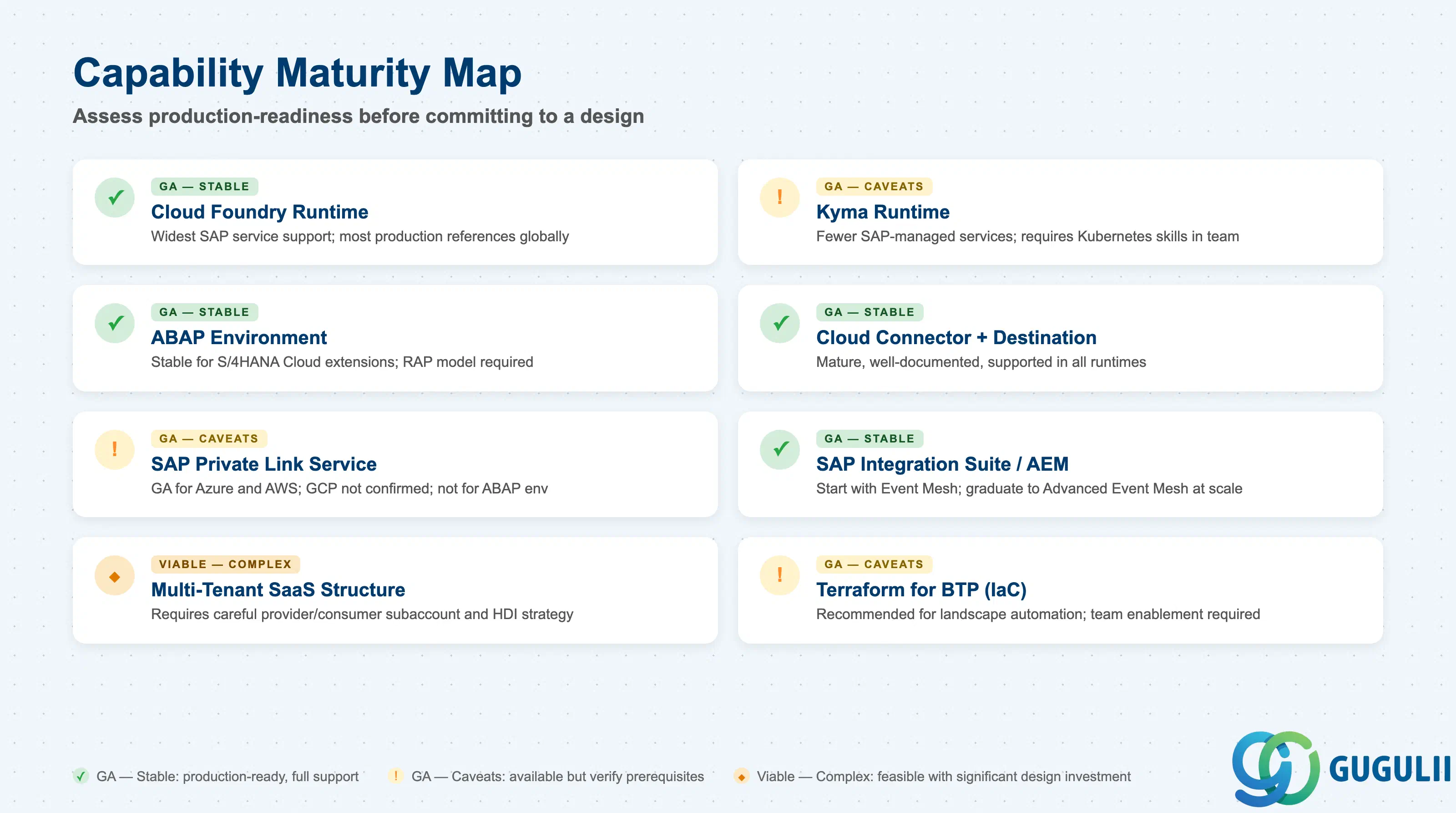
Use this table to assess how production-ready each capability area is before committing to a design. For runtime cost comparisons, see the SAP Architecture Center cost of ownership reference.
| Domain | Maturity | Notes |
|---|---|---|
| Cloud Foundry runtime | ✅ | GA, widest SAP service support, most production references globally |
| Kyma runtime | ⚠️ | GA but fewer SAP-managed services available; requires Kubernetes skills in the team |
| ABAP environment | ✅ | Stable for S/4HANA Cloud extensions; RAP model is the required programming model |
| Cloud Connector + Destination service | ✅ | Mature, well-documented, supported in all runtimes |
| SAP Private Link service | ⚠️ | GA for Azure and AWS; GCP support not confirmed at time of writing; not available for ABAP environment |
| SAP Integration Suite (event mesh / AEM) | ✅ | Start with Event Mesh capability; graduate to Advanced Event Mesh at enterprise scale |
| Multi-tenant SaaS account structure | 🔶 | Viable but requires careful provider/consumer subaccount design and HANA HDI container strategy |
| Infrastructure as Code (Terraform for BTP) | ⚠️ | Available and recommended for landscape automation; team enablement investment required |
The checklists below capture the minimum requirements before you can commit an architecture pattern to a project. Work through each one before the solution design sign-off. The BTP account hierarchy — Global Account → Directories → Subaccounts — is the structural basis for all entries in this section ( SAP BTP Account Model).
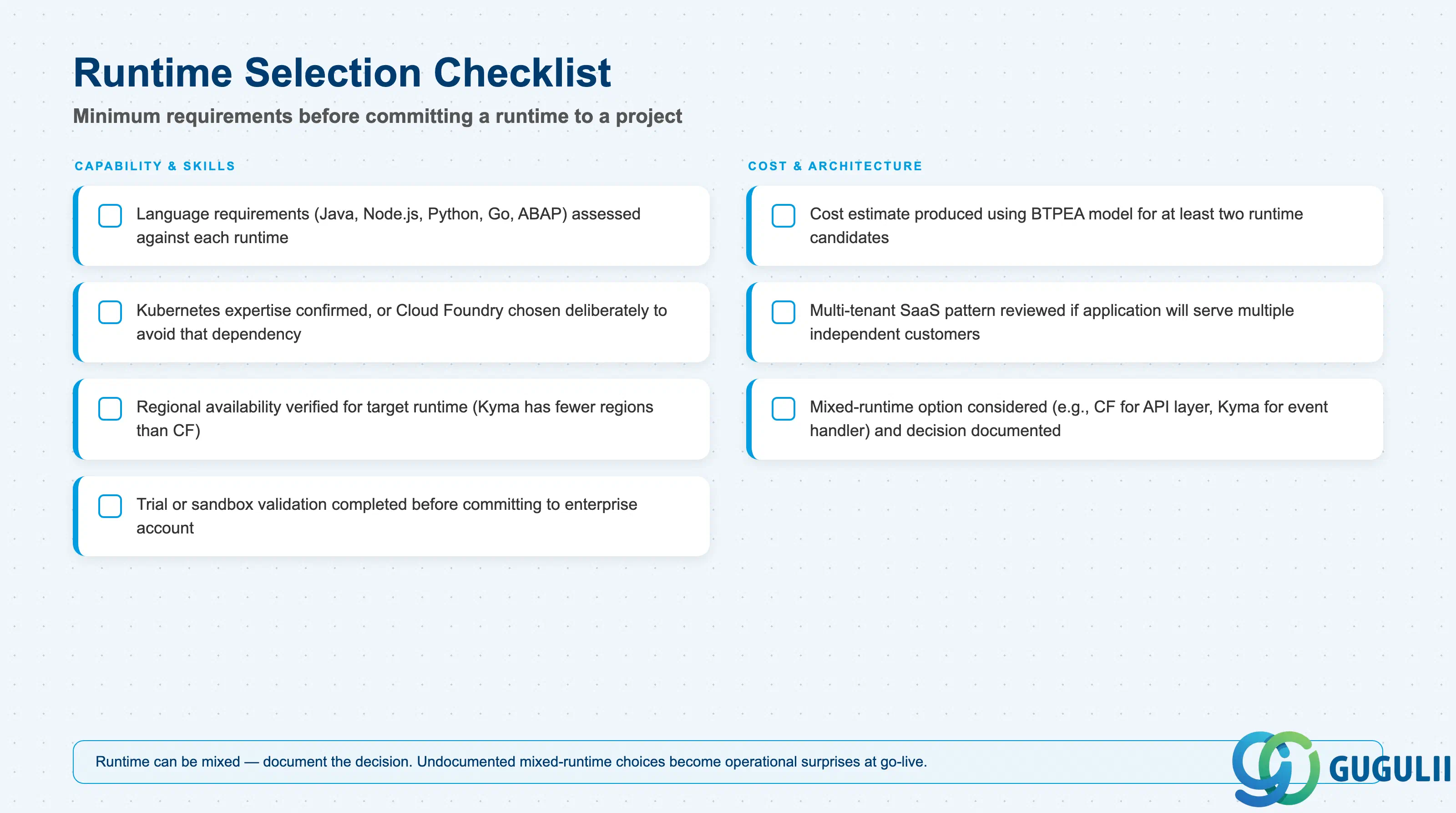
| Requirement | Check |
|---|---|
| Team has assessed language requirements (Java, Node.js, Python, Go, ABAP) against each runtime | ☐ |
| Kubernetes expertise in team confirmed, or Cloud Foundry chosen deliberately to avoid that dependency | ☐ |
| Regional availability verified for target runtime (Kyma is available in fewer regions than Cloud Foundry) | ☐ |
| Trial or sandbox validation completed before committing to enterprise account | ☐ |
| Cost estimate produced using BTPEA model for at least two runtime candidates | ☐ |
| Multi-tenant SaaS pattern reviewed if the application will serve multiple independent customers | ☐ |
| Runtime can be mixed (e.g., Cloud Foundry for API layer, Kyma for event handler) — decision documented | ☐ |
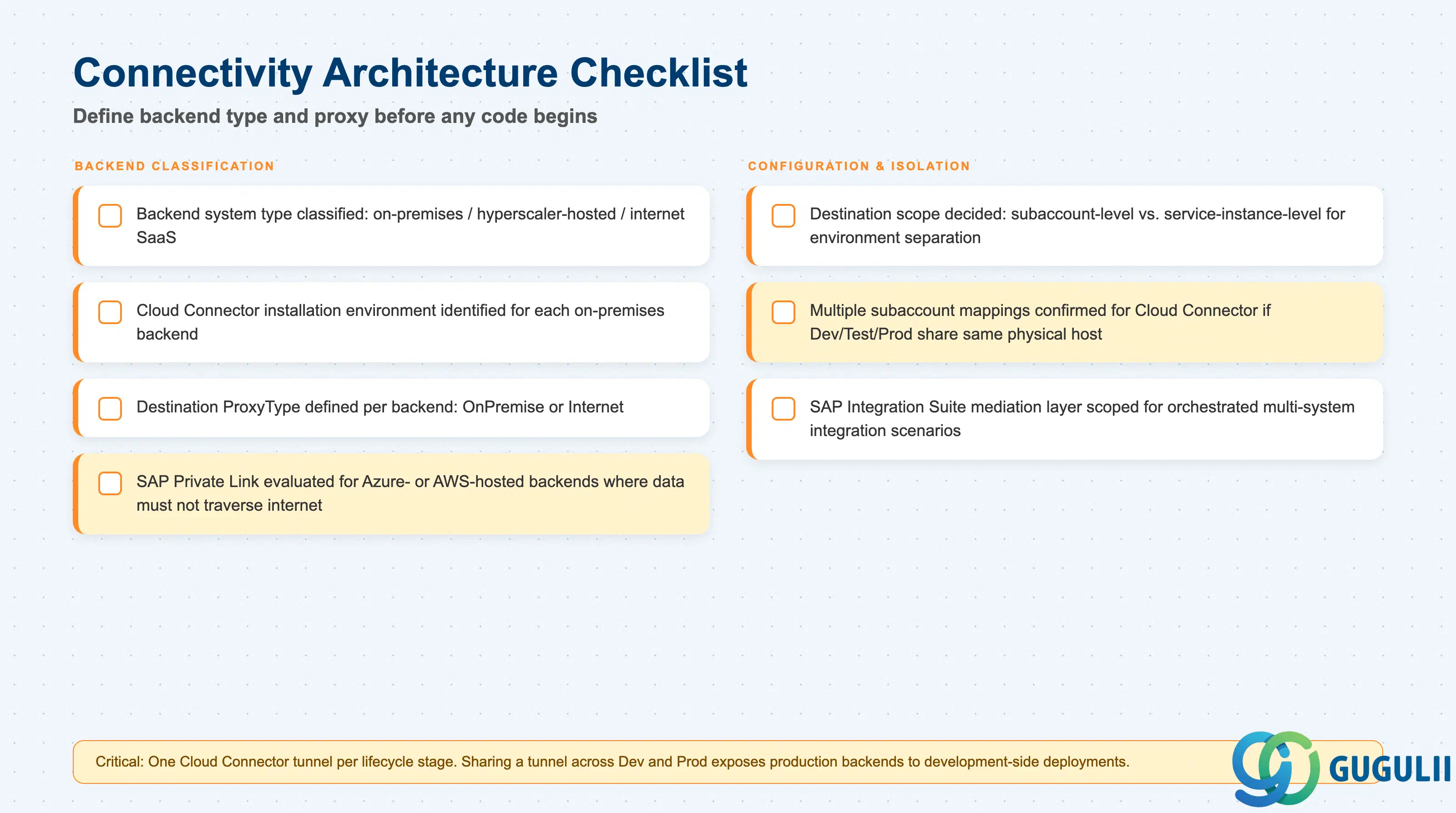
| Requirement | Check |
|---|---|
| Backend system type classified: on-premises / hyperscaler-hosted / internet SaaS | ☐ |
| Cloud Connector installation environment identified for each on-premises backend | ☐ |
Destination ProxyType defined per backend: OnPremise or Internet | ☐ |
| SAP Private Link evaluated for any Azure- or AWS-hosted backends where data must not traverse the internet | ☐ |
| Destination scope decided: subaccount-level vs. service-instance-level (for environment separation) | ☐ |
| Multiple subaccount mappings confirmed for Cloud Connector if Dev/Test/Prod all use the same physical connector host | ☐ |
| SAP Integration Suite mediation layer scoped for orchestrated multi-system integration scenarios | ☐ |
| Requirement | Check |
|---|---|
| Global account owner and entitlement allocation authority identified | ☐ |
| Directory hierarchy depth decided (flat vs. by-department vs. by-geography) | ☐ |
| Dev / Test / Prod subaccount separation confirmed — one subaccount per lifecycle stage per application group | ☐ |
| Shared services subaccount created or planned for SAP Cloud Transport Management and SAP Cloud ALM | ☐ |
| Cost allocation strategy defined at subaccount or directory level | ☐ |
| Data residency requirements checked against available BTP regions before creating subaccounts | ☐ |
| Naming convention agreed and documented before any subaccount is provisioned | ☐ |
| Provider and consumer subaccount structure mapped if building multi-tenant SaaS | ☐ |
| Requirement | Check |
|---|---|
| Event volume estimated: low (starter / Event Mesh) vs. high (Advanced Event Mesh) | ☐ |
| SAP Cloud Application Event Hub evaluated for SAP-native business events (S/4HANA Cloud, SuccessFactors) | ☐ |
| Event consumer runtime selected (Kyma preferred; Cloud Foundry viable with Integration Suite mediation) | ☐ |
| Retry and dead-letter queue strategy defined per event type | ☐ |
| Event schema governance process identified (who owns the event definition, how versions are managed) | ☐ |
| ISA-M integration style classification completed for each integration pattern in scope | ☐ |
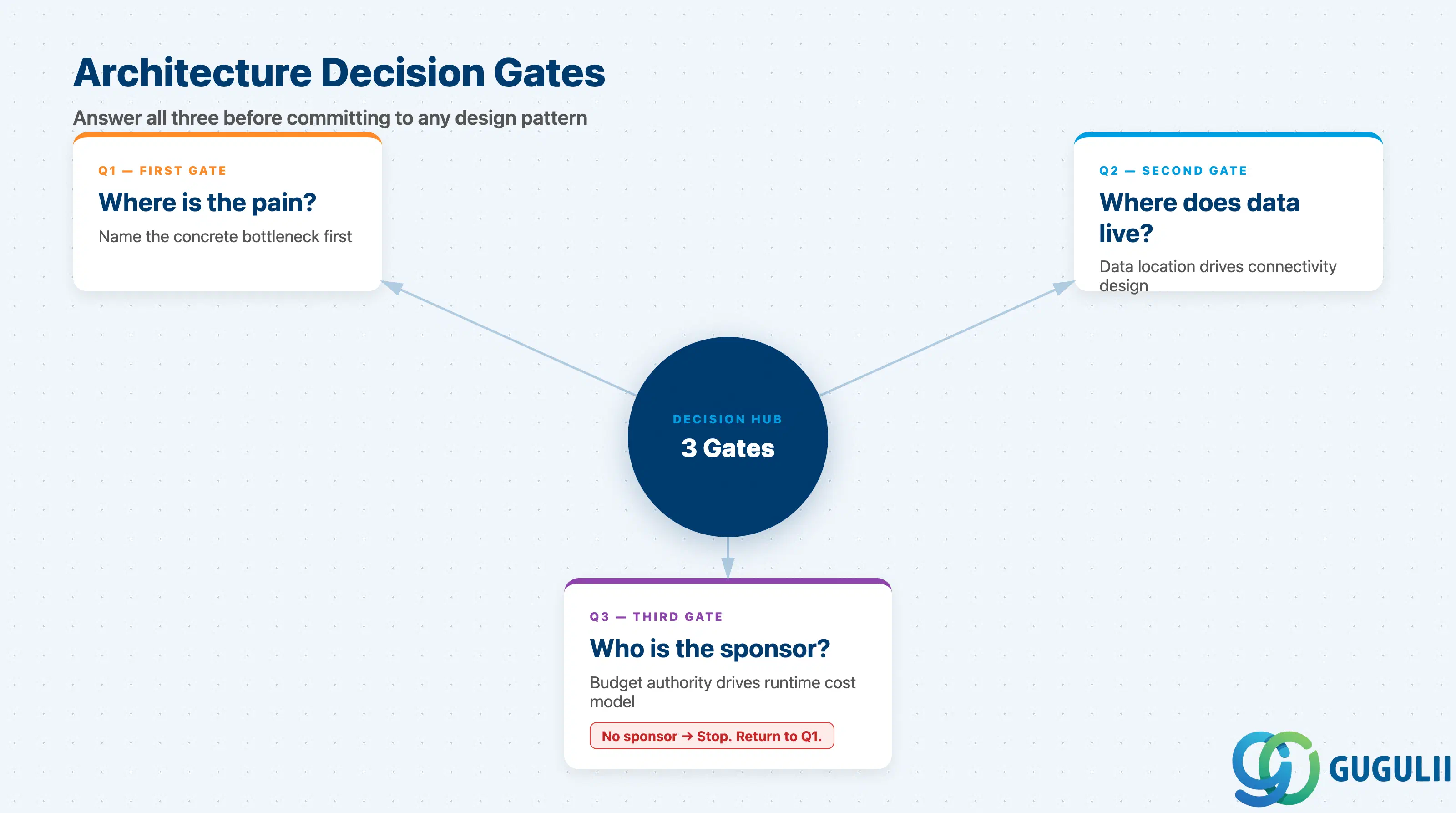
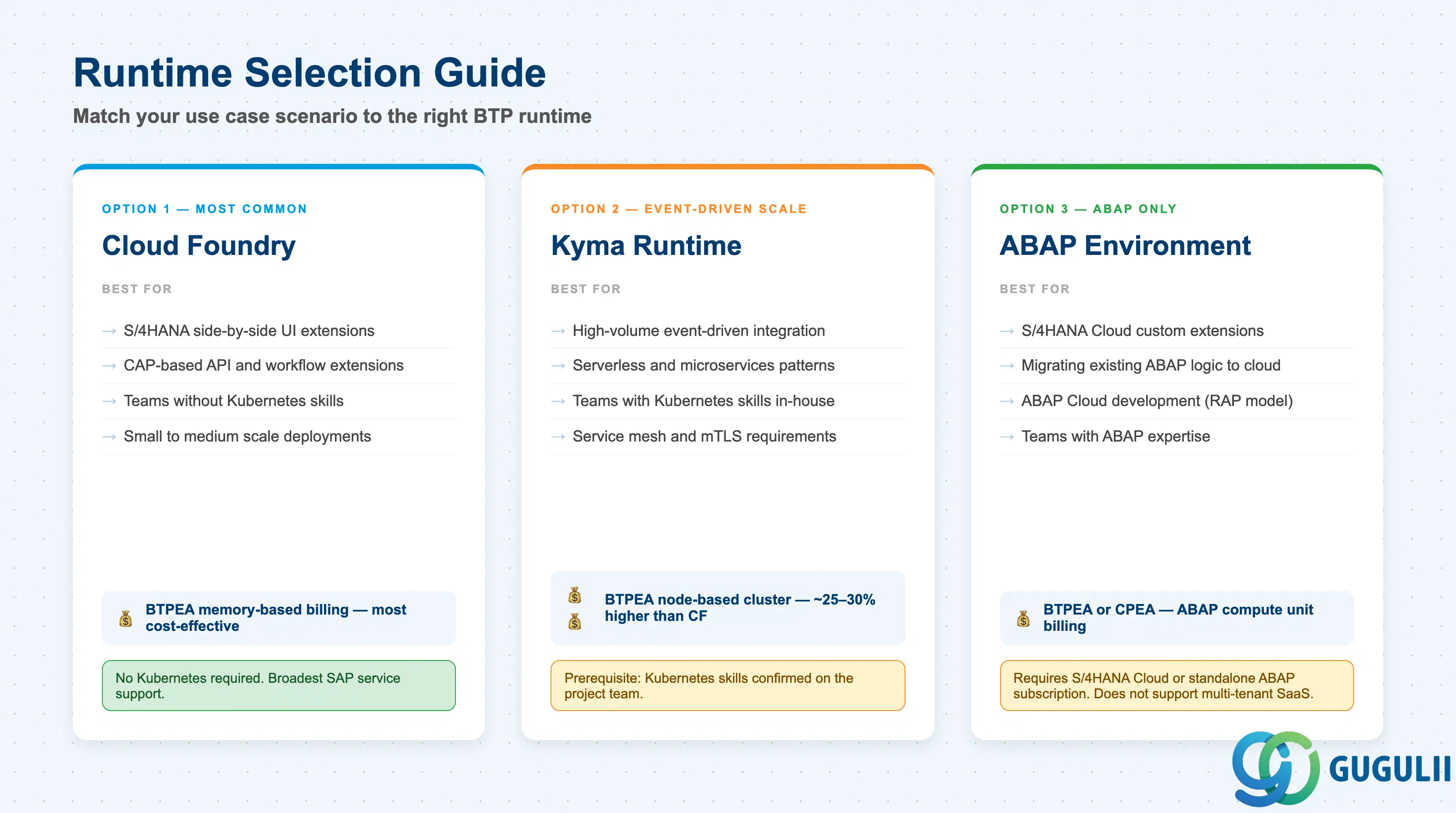
Identify the specific scenario that triggers the BTP investment. Common triggers and their runtime implications:
If the pain cannot be articulated as a specific bottleneck, do not proceed to architecture decisions.
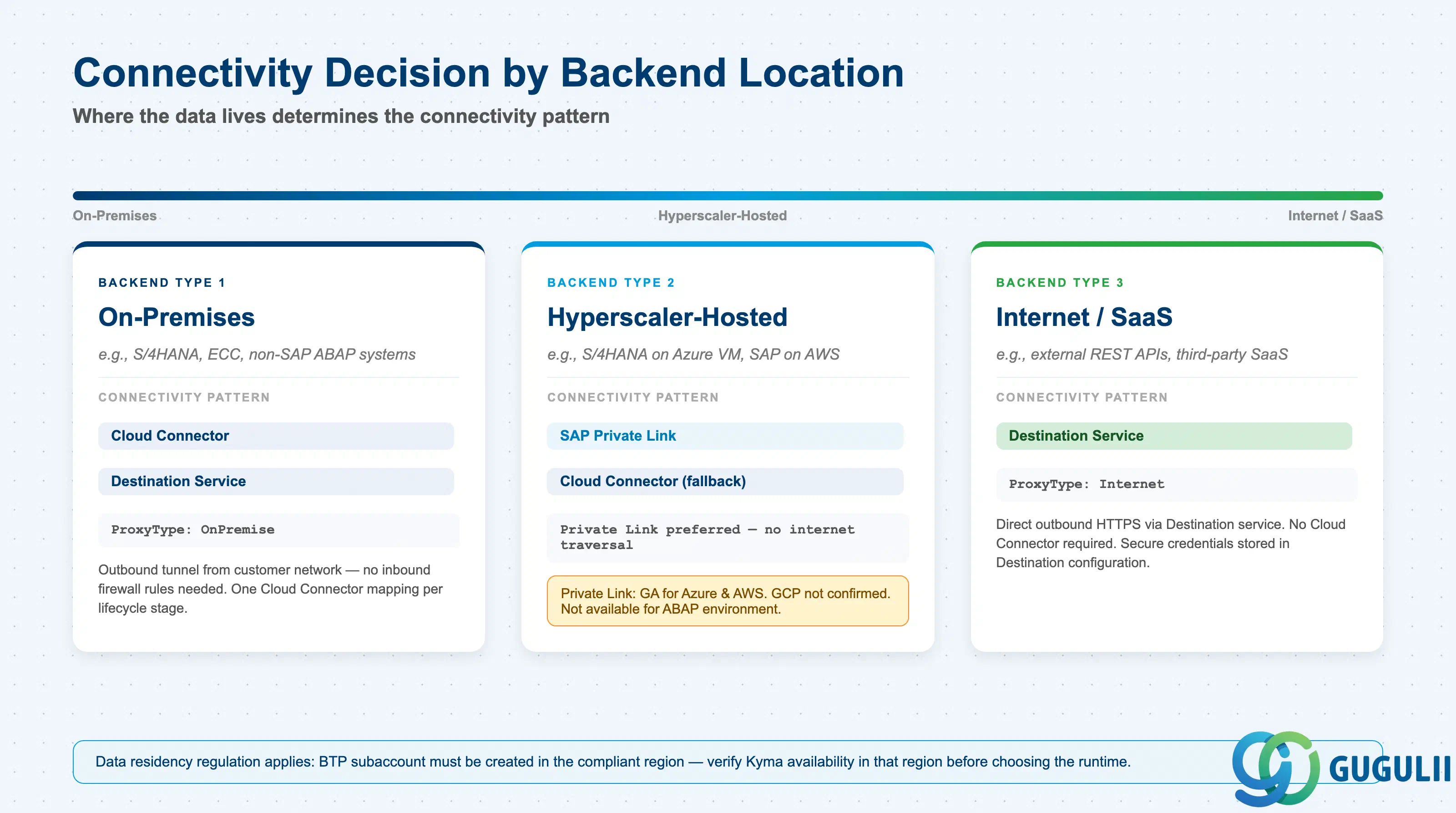
Data residency and ownership determine connectivity architecture and account structure in ways that cannot be refactored cheaply later.
OnPremise.Budget authority and commercial model drive both runtime cost optimization and the licensing table.
| Scenario | Recommended direction |
|---|---|
| Line of business project, single team, limited budget | Cloud Foundry; BTPEA consumption model; no Kyma until Kubernetes skills are in-house |
| Enterprise CCoE-led programme, multiple teams | Directory structure with department-level cost allocation; shared services subaccount from day one |
| ISV building a commercial SaaS product on BTP | Multi-tenant SaaS architecture; provider + consumer subaccount structure; HANA HDI container schema separation |
| Programme with confirmed Kubernetes team | Kyma is justified despite ~25–30% higher runtime cost; service mesh and event infrastructure reduce integration complexity |
| No clear sponsor or budget model confirmed | Stop. Go back to Q1. |
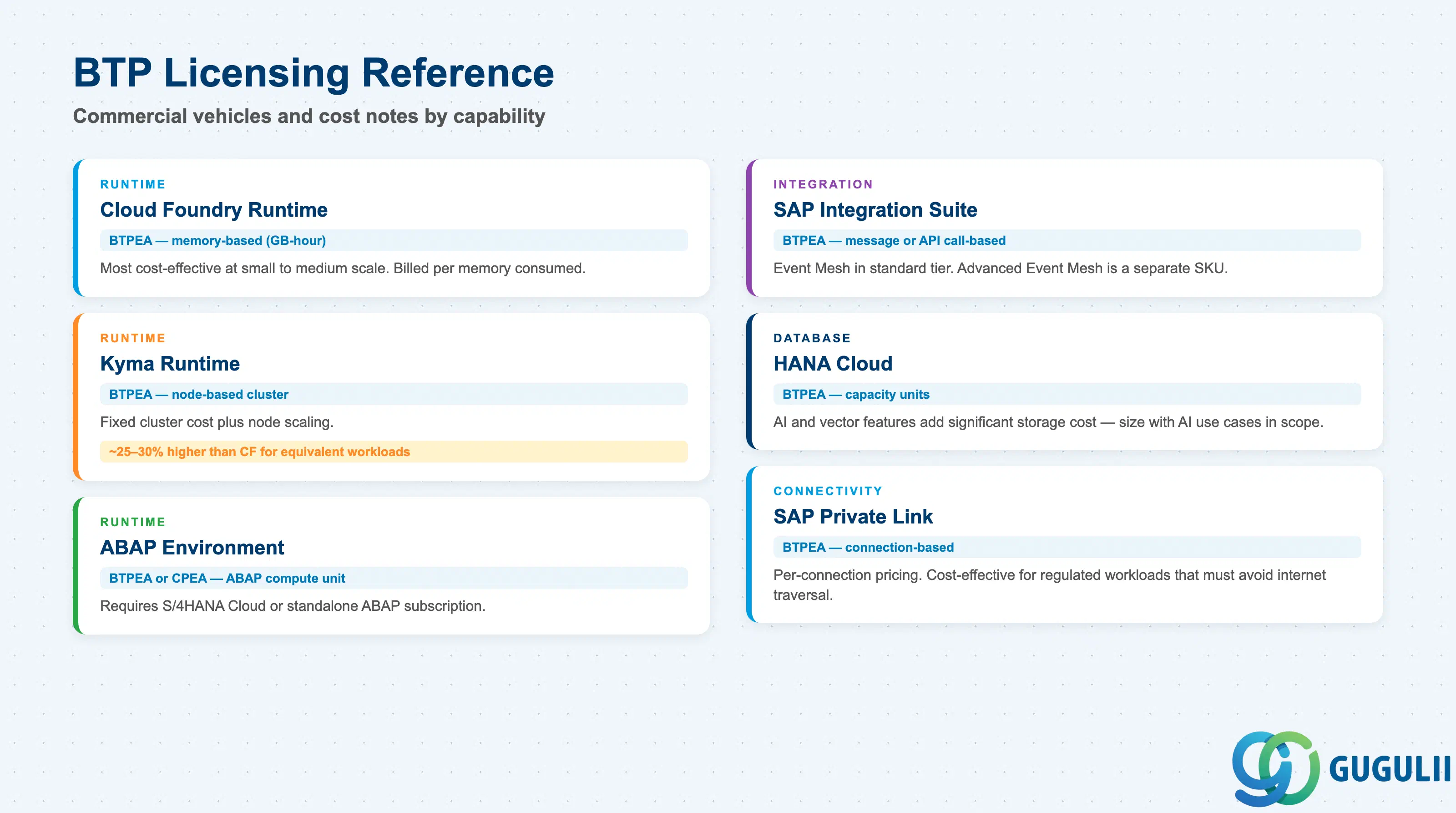
| Capability | Typical commercial vehicle | Notes |
|---|---|---|
| Cloud Foundry runtime | BTP Enterprise Agreement (BTPEA) — memory-based | Billed per GB-hour; most cost-effective at small to medium scale |
| Kyma runtime | BTPEA — node-based cluster | Fixed cluster cost plus node scaling; ~25–30% higher than CF for equivalent workloads |
| ABAP environment | BTPEA or CPEA — ABAP compute unit | Requires S/4HANA Cloud or standalone ABAP subscription |
| SAP Integration Suite | BTPEA — message-based or API call-based | Event Mesh included in standard tier; Advanced Event Mesh is a separate SKU |
| HANA Cloud | BTPEA — capacity units | AI/vector features add significant storage cost; size with AI use cases in scope |
| SAP Private Link | BTPEA — connection-based | Per-connection pricing; cost-effective for regulated workloads that must avoid internet |
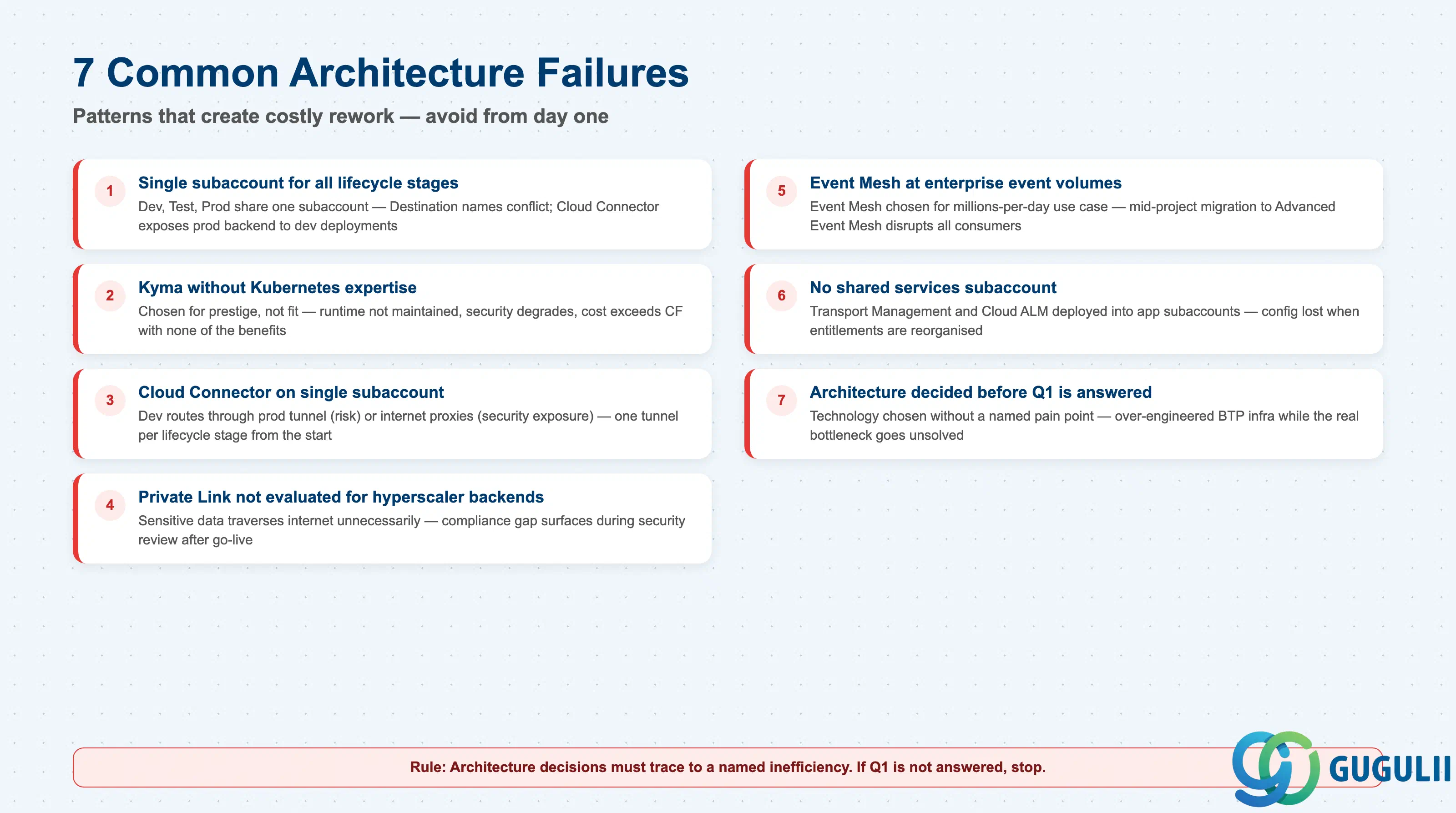
SAP Cloud Transport Management should run in its own dedicated subaccount alongside other shared services to maintain separation of concerns — a principle that underlies several of the failures below ( SAP Architecture Center — DevOps with SAP BTP).
Failure 1: Single subaccount for all lifecycle stages
Teams create one subaccount for Dev, Test, and Prod to reduce overhead, then discover that Destination names must be unique per subaccount and that the Cloud Connector tunnel exposes the production backend to development-side deployments. Untangling this requires recreating service instances and re-deploying all applications, often during a live programme.
Failure 2: Kyma selected without Kubernetes expertise
Kyma is chosen because it sounds more modern or because another team used it, without confirming that the project team can operate Kubernetes CRDs, configure service meshes, or manage Helm charts. The result is a runtime that is nominally running but not maintained, monitored, or tuned — security posture degrades and cost runs above Cloud Foundry without any of the architectural benefits.
Failure 3: Cloud Connector mapped to a single subaccount
A single Cloud Connector instance is mapped only to the production subaccount. When development needs to call on-premises backends, teams either share the production connector (introducing risk) or route through internet-facing proxies (introducing latency and security exposure). The correct pattern is a Cloud Connector mapped separately to each lifecycle-stage subaccount from the start.
Failure 4: Private Link not evaluated for hyperscaler-hosted backends
SAP Private Link is available for workloads hosted on Azure or AWS but is frequently not evaluated during the connectivity design phase because the team is familiar with Cloud Connector. The result is that sensitive backend data (e.g., S/4HANA hosted on Azure VM) travels over the public internet unnecessarily, creating a compliance gap that surfaces during security review after go-live.
Failure 5: Event Mesh selected for enterprise-scale event volumes
A project selects the Event Mesh capability within SAP Integration Suite for a use case that eventually processes millions of events per day across heterogeneous brokers. Event Mesh is appropriate for starter and moderate workloads; the migration to Advanced Event Mesh mid-project disrupts event schema governance, requires rebinding of all consumer applications, and incurs unplanned licensing cost.
Failure 6: No shared services subaccount
SAP Cloud Transport Management, SAP Cloud ALM, and central monitoring are deployed into application subaccounts rather than a dedicated shared services subaccount. When the project entitlements are reorganised or the application subaccount is decommissioned, the transport management configuration is lost. Shared services must be isolated from the beginning to survive application lifecycle changes.
Failure 7: Architecture decided before Q1 pain is articulated
A solution is designed around a technology — “we will use Kyma and Advanced Event Mesh” — without a concrete business pain point driving the choice. Six months later, the project is building infrastructure for integration patterns that the business does not actually need yet, while the real bottleneck (a manual approval workflow in S/4HANA) goes unsolved. Architecture decisions must trace to a named inefficiency.
Q: Our S/4HANA is on-premises. Can we still use Cloud Foundry on BTP?
Yes. Cloud Foundry on BTP connects to on-premises backends through the Cloud Connector and Destination service. The Cloud Connector is installed in your on-premises network and establishes an outbound tunnel to the BTP subaccount — no inbound firewall rules are required on your side (
SAP BTP Connectivity). The BTP application then consumes the on-premises connection using a Destination with ProxyType set to OnPremise. This is the most common connectivity pattern for S/4HANA on-premises extensions.
Q: When does Kyma’s higher cost become worth it?
Kyma costs approximately 25–30% more than Cloud Foundry for equivalent tenant counts, with the primary cost difference coming from the managed Kubernetes cluster. That premium is justified when: (a) the team already has Kubernetes skills and will not pay a learning-curve tax, (b) the workload is event-driven and serverless, where Kyma’s built-in event infrastructure and service mesh reduce custom integration work, or (c) the application requires advanced network security (service mesh, mTLS between services) that Cloud Foundry does not provide natively.
Q: What should we descope if the project timeline is at risk?
Start by descoping the event-driven integration layer — replace Advanced Event Mesh with direct RFC or API calls in the short term and plan a phased upgrade. Second, collapse to a simpler account structure (fewer directories, fewer subaccounts) during initial delivery, but document the target structure so it can be implemented before the first tenant onboarding. Do not descope the Dev/Test/Prod subaccount separation — the rework cost if this is removed and later needs to be restored almost always exceeds the time saved.
Q: How should we document architecture decisions so they survive team turnover?
Architecture Decision Records (ADRs) stored in the project repository are the minimum. Each ADR should record: the decision made, the alternatives considered, the rationale (linked to the Q1 pain point), and the date. For BTP-specific decisions, capture: runtime chosen and why, connectivity pattern per backend system, account structure diagram, and the naming convention document reference (see BTP-F05). These documents are more useful than slide decks because they are versioned alongside the code.
Q: We are building an internal SaaS product for multiple business units. Which runtime and data isolation strategy should we use?
The canonical pattern uses a provider subaccount (hosts the application) plus one consumer subaccount per business unit ( SAP Architecture Center — Multi-Tenant SaaS Reference Architecture). For runtime, Cloud Foundry or Kyma both work — the CAP framework supports both. For data isolation, SAP recommends HANA HDI container schema separation (one HDI container per tenant) as the balance between cost and isolation. Column discriminator is viable only for very low risk data. Dedicated databases per tenant provide maximum isolation but substantially increase HANA Cloud costs. ABAP environment does not support multi-tenant SaaS in this model.
Q: What is the right event tooling for S/4HANA Cloud business event consumption?
SAP Cloud Application Event Hub is the right starting point for consuming native business events from S/4HANA Cloud, SuccessFactors, and other SAP cloud applications. It connects directly to supported SAP cloud applications and exposes events to BTP extension apps without requiring custom event channel configuration. For heterogeneous or high-volume scenarios spanning non-SAP systems, SAP Integration Suite Advanced Event Mesh provides the multi-broker backbone and centralised visibility.
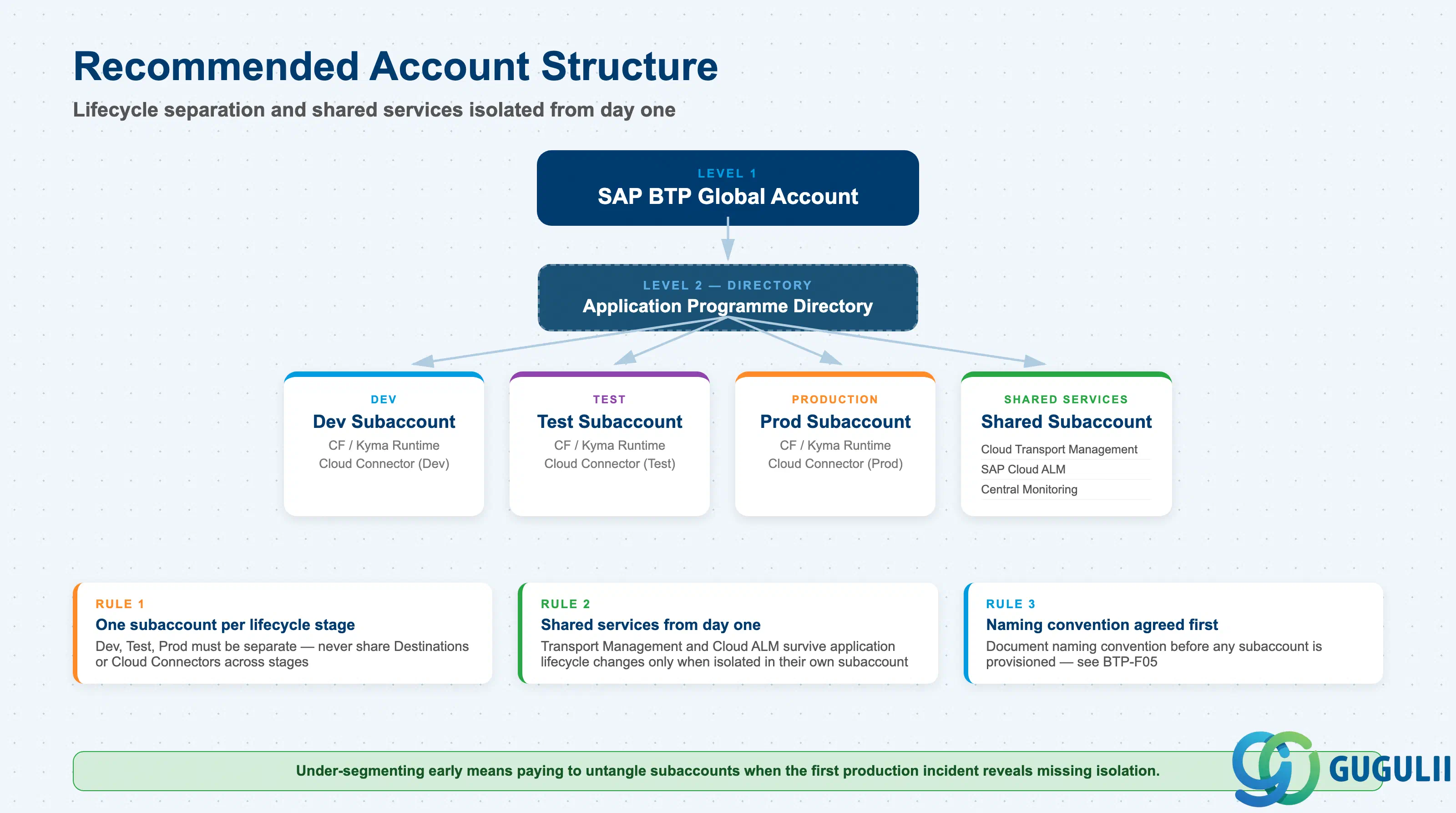
BTP architecture decisions in the real world cluster into three areas: runtime selection, connectivity design, and account structure. These decisions compound — a wrong runtime choice does not stay isolated; it affects the connectivity options available, the cost model, and the operational burden on the team.
The patterns in this article reflect what actually works at enterprise scale: Cloud Foundry for most extension scenarios, Kyma when the team is Kubernetes-capable and event-driven architecture is central, ABAP environment only when ABAP Cloud development is the explicit objective. Connectivity follows the backend’s physical location — on-premises means Cloud Connector, hyperscaler-hosted means Private Link evaluation ( SAP Architecture Center — Secure Connectivity with SAP Private Link), internet means Destination service with ProxyType Internet. Account structure must separate lifecycle stages from day one and must isolate shared services from application subaccounts.
Treat the decision criteria questions (Q1 through Q3) as a gate, not a formality. Projects that skip Q1 — articulating the concrete pain point — routinely over-engineer their BTP architecture and under-deliver on business value.