Title here
Summary here

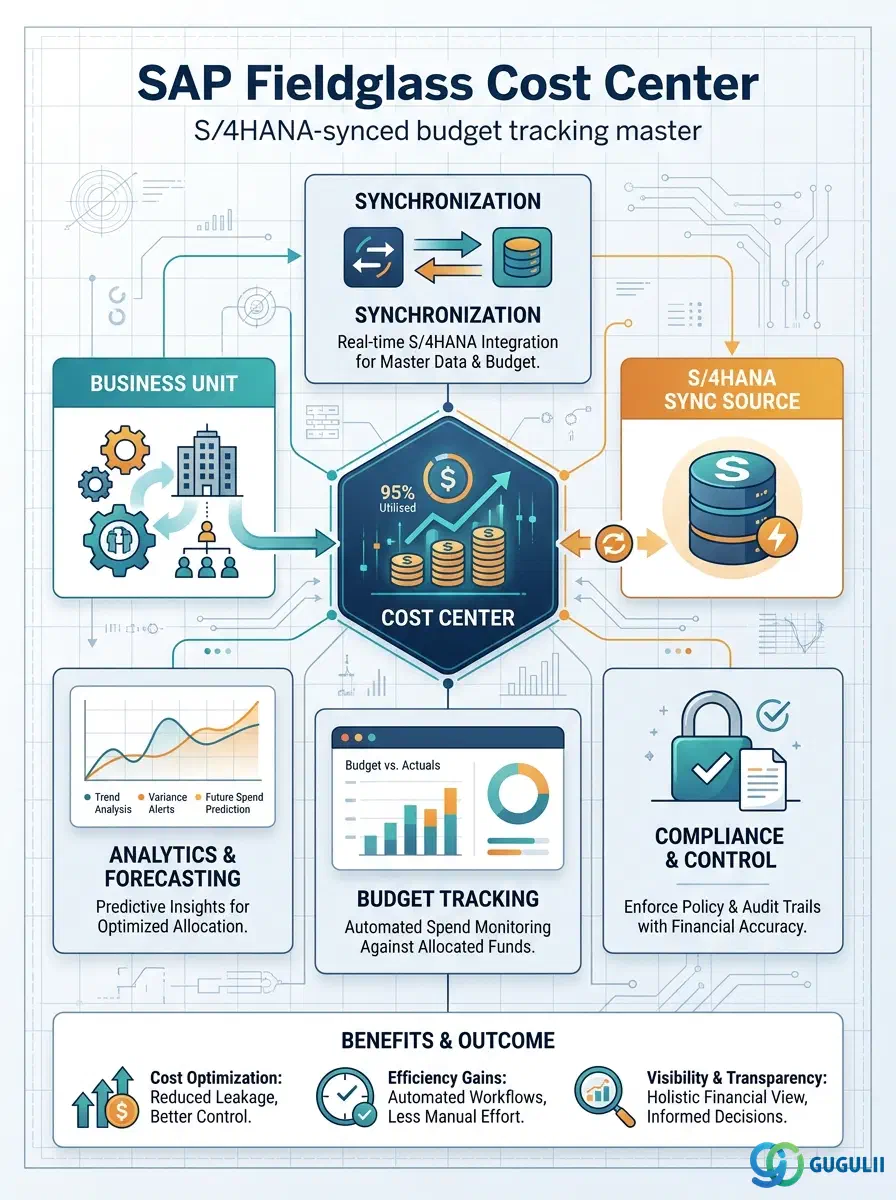
The Cost Center is an optional, flat financial-tracking master in SAP Fieldglass Company Structure — created only when Business Unit-level cost visibility is too coarse for a client’s budget-control requirements, and typically synchronized in from S/4HANA Cost Center (KS03) rather than originated natively in Fieldglass. It is the fourth and final object in the Phase 1 Company Structure setup sequence, created after Business Unit (which it must reference via a mandatory assignment field) but organizationally independent of it — Cost Center sits as its own sibling under the Tenant, not nested underneath Business Unit or Site. This article maps the Cost Center’s core concepts across all Fieldglass capability areas (Part 1), then details every field an administrator and integration team encounter when creating, syncing, and maintaining Cost Center records (Part 2).
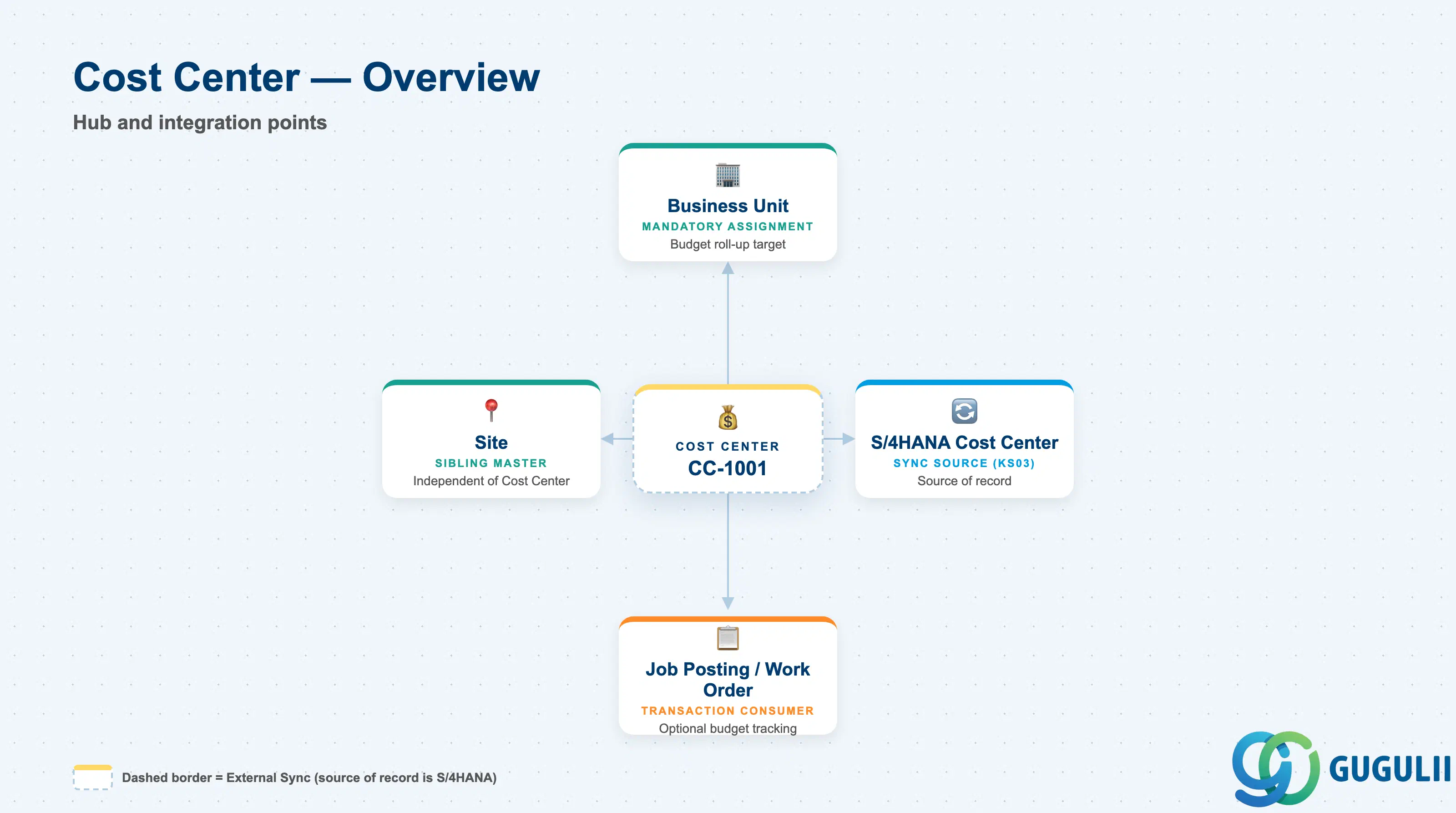
The Cost Center represents a granular financial-tracking unit used to monitor and budget spend below the Business Unit level — a specific project, initiative, or sub-department budget line that a client wants visible independently of its parent Business Unit’s aggregate reporting. Unlike Site and Business Unit, which are Required masters in the Phase 1 setup sequence, Cost Center is Optional: many tenants manage spend adequately at the Business Unit level and never create one.
| Aspect | Details |
|---|---|
| Role | Optional, flat financial-tracking master; provides sub-Business-Unit budget granularity for requisitions that need it |
| Modules using it | Contingent Labor (Job Posting → Work Order), SOW, Time & Expense — any transaction that needs budget tracking finer than the Business Unit level |
| Transactions | Admin > Cost Centers (create/maintain); Cost Center CSV Import/Export, typically loaded after the Business Unit load; source-side maintained via S/4HANA KS01/KS02/KS03 when synchronized |
| Key Tables | No direct ECC/S4 table equivalent on the Fieldglass side — Cost Center is a cloud object native to the Fieldglass tenant; when synchronized, it maps 1:1 to an S/4HANA Cost Center (tables CSKS / CSKT, transaction KS03) |
| S/4HANA note | Cost Center is commonly synchronized from S/4HANA Cost Center (KS03) as its source of record — where this integration is active, treat the Fieldglass Cost Center list as a synced, largely read-only reference rather than a natively originated master. This is distinct from Business Unit, which is a native Fieldglass hierarchy object only optionally mapped to an S/4 Profit Center or Cost Center |
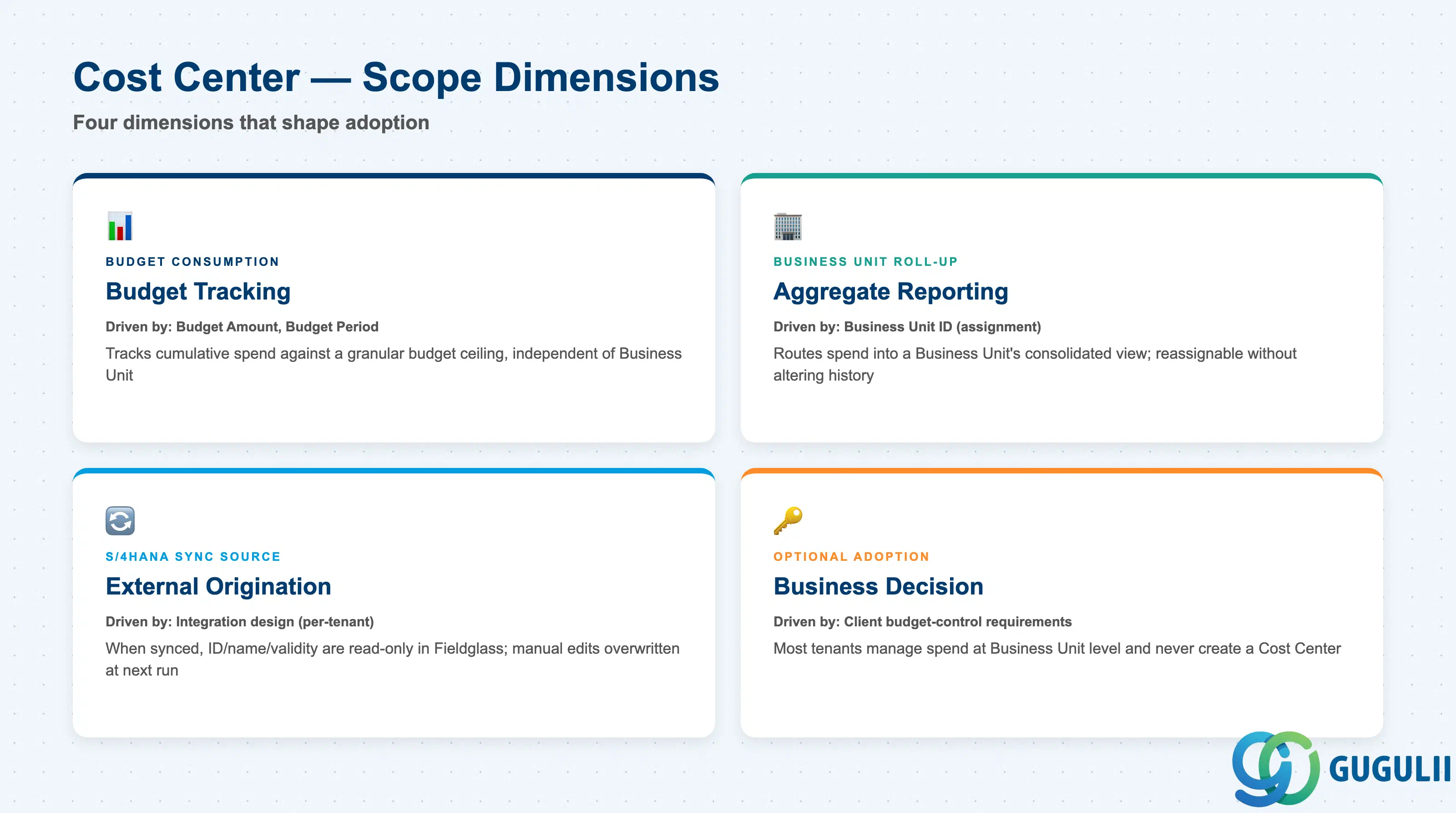
Like Site and Business Unit, Cost Center does not carry a formal “Cost Center Type” field — its influence shows up as a narrow set of scope dimensions layered on top of the Business Unit it is assigned to. Getting the adoption decision wrong (modeling Cost Center reflexively for every Business Unit rather than only where sub-BU budget visibility genuinely matters, or manually editing a synced record) is a common source of unnecessary admin overhead and sync conflicts.
| Scope Dimension | Driven By (Field / Setting) | Use Case | Key Behavior |
|---|---|---|---|
| Budget Consumption Tracking | Budget Amount, Budget Period | Tracks cumulative spend against a specific granular budget line, independent of the parent Business Unit’s own aggregate view | Approval workflows and spend-analysis reports can flag or block requisitions that would push cumulative Cost Center spend past its ceiling |
| Business Unit Roll-Up | Business Unit ID (assignment field) | Determines which Business Unit’s aggregate spend a Cost Center’s activity rolls up into for consolidated reporting | Assignment only, not containment — reassigning a Cost Center to a different Business Unit re-routes future spend roll-up without altering historical postings |
| S/4HANA Sync Source | Integration design (per-tenant) | Determines whether the Cost Center list is Fieldglass-native or synchronized in from an S/4HANA Cost Center | Where synced, ID/name/validity fields should be treated as read-only in Fieldglass; manual edits are typically overwritten on the next sync run |
| Optional Adoption | (business decision, not a field) | Determines whether a client models Cost Center at all | Most tenants that manage spend adequately at the Business Unit level never create a Cost Center; requisitions are raised directly against Business Unit |
Design principle: Model Cost Center only when Business Unit-level cost visibility is too coarse for the client’s budget-control requirements — treating it as a mandatory setup step (like Site or Business Unit) adds administrative and sync overhead without adding budget-control value for tenants that never need sub-BU granularity.
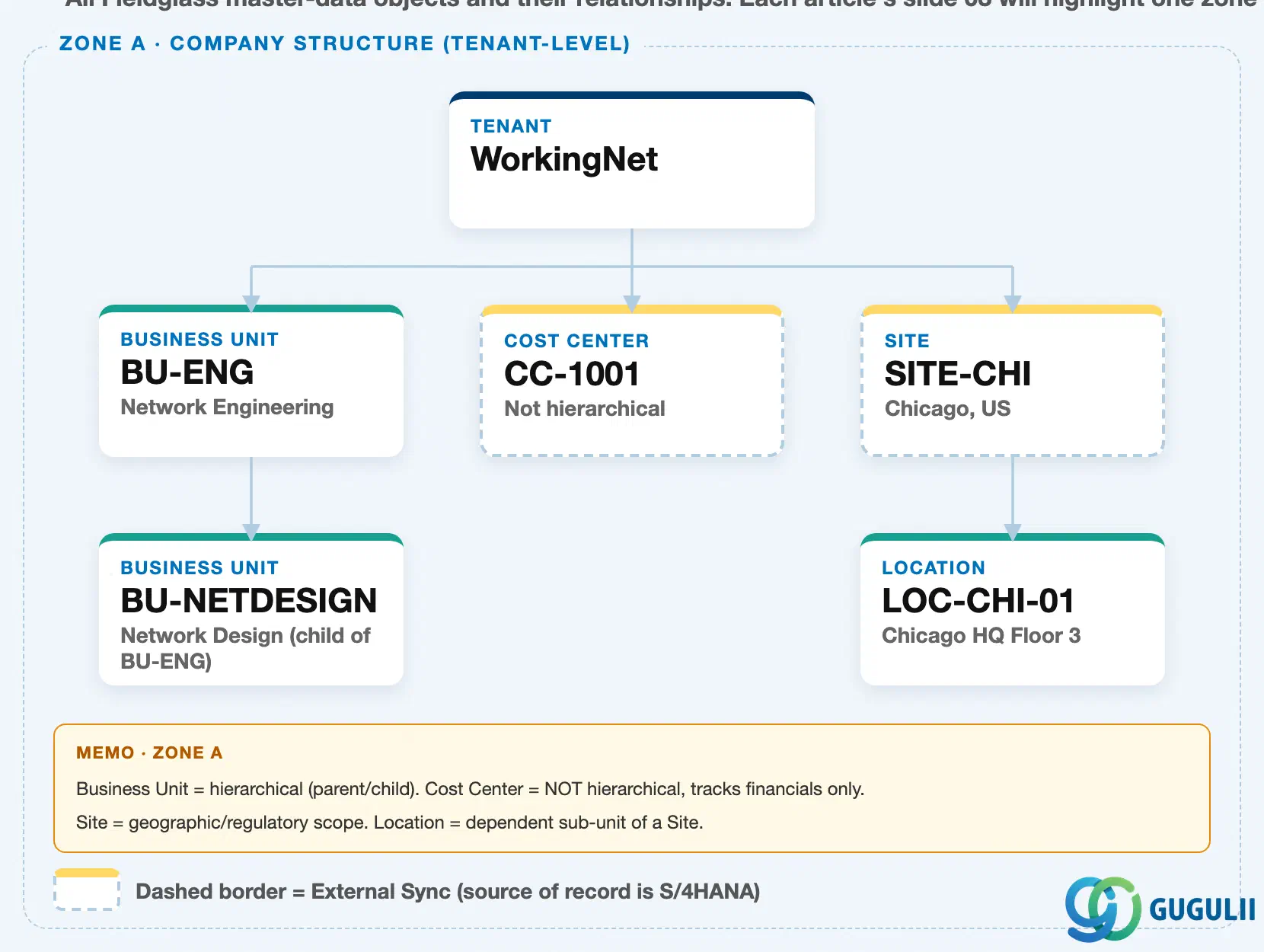
Data hierarchy with a concrete example
Tenant "WorkingNet" (client-level scope)
│
├── Business Unit "BU-ENG" — Network Engineering
│      └── Business Unit "BU-NETDESIGN" — Network Design (child of BU-ENG)
│
├── Cost Center "CC-1001" — flat financial-tracking master (not hierarchical)  ◄── this article
│
└── Site "SITE-CHI" — Chicago, US
       └── Location "LOC-CHI-01" — Chicago HQ Floor 3
Cost Center sits directly under the Tenant, as a sibling of Business Unit and Site — not nested inside either of them, and nothing nests inside it. Unlike Business Unit, which can have child Business Units (as shown by BU-NETDESIGN under BU-ENG) to build a multi-level roll-up hierarchy, Cost Center is a flat, non-hierarchical financial-tracking master: it has no parent or child Cost Center of its own, and no organizational children nest beneath it either.
Cost Center carries a Business Unit ID field that establishes a mandatory assignment to an existing, active Business Unit — required at creation time, matching the Phase 1 setup order in which Cost Center is created after Business Unit. This is an assignment, not organizational containment: Cost Center is not drawn as a child of Business Unit in this landscape, because Business Unit does not own or contain it the way Site owns Location. See Section 1.4 for the assignment relationship in detail.
Cost Center is also marked with a dashed external-sync border in this landscape, the same treatment applied to Site — its source of record is typically S/4HANA Cost Center (KS03), synchronized in rather than natively created. Business Unit, by contrast, carries a solid border in this landscape, reflecting native Fieldglass origination even where an optional S/4 mapping exists.
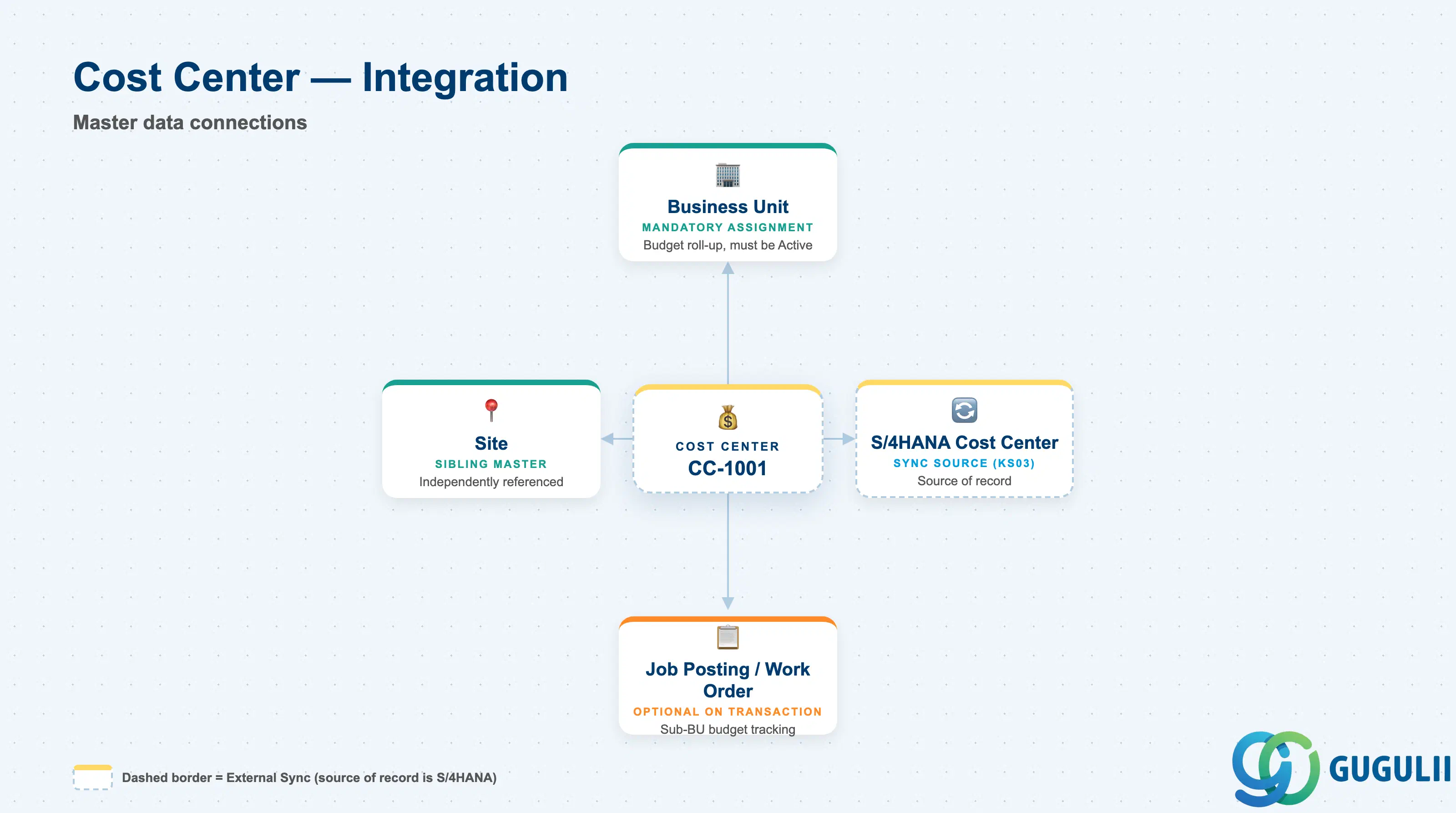
The Cost Center record does not stand alone — it depends on one Phase 1 object for its own creation, is loosely paired with another, and is commonly sourced from one external system.
| Object | Relationship | Practical Notes |
|---|---|---|
| Business Unit | Cost Center references Business Unit via its own Business Unit ID field for budget roll-up and allocation — a mandatory assignment, not an organizational child | Business Unit must exist and be Active before a Cost Center can be created against it; Cost Center creation is blocked without a resolvable Business Unit |
| Site | Sibling under the same Tenant, not organizationally related — Cost Center and Site are independently referenced on transactions where cost tracking and physical work location both need to be captured | A single Cost Center can be associated with activity spanning multiple Sites; a single Site can have requisitions posting to multiple Cost Centers |
| S/4HANA Cost Center (KS03) | Cost Center is commonly synchronized from an S/4HANA Cost Center (tables CSKS / CSKT) via standard integration content, serving as the source of record | Confirm sync direction and frequency with the integration team — treating the Fieldglass Cost Center list as independently editable when a live sync exists creates conflicting records at the next sync run |
| Job Posting / Work Order | Selected optionally alongside Business Unit on a requisition to track spend at a finer budget granularity than the Business Unit level alone | Optional field on the transaction — most requisitions can be raised against a Business Unit alone without ever selecting a Cost Center |
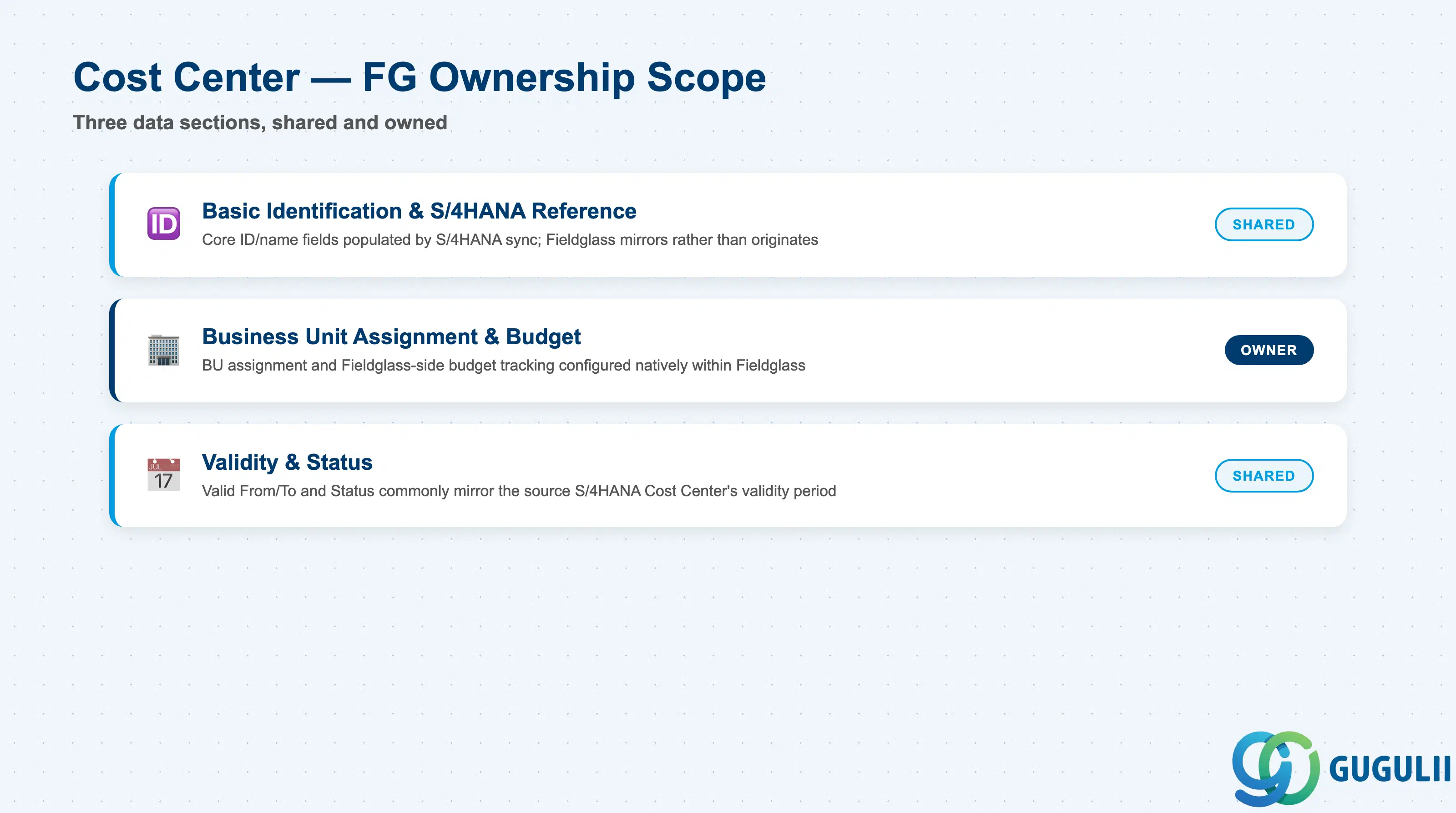
| Data Section | FG Involvement | Notes |
|---|---|---|
| Basic Identification & S/4HANA Reference | ○ Shared with S/4HANA (FI-CO) | Core ID/name fields are typically populated by the S/4HANA Cost Center (KS03) sync where integration is live; Fieldglass mirrors rather than originates them in that scenario |
| Business Unit Assignment & Budget | ◎ Owner | The Business Unit ID assignment field and Fieldglass-side budget tracking are configured and consumed natively within Fieldglass, even when the base Cost Center record itself is synced |
| Validity & Status | ○ Shared with S/4HANA (FI-CO) | Valid From/To and Status commonly mirror the source Cost Center’s validity period, refreshed on each sync run |
Legend: ◎ = Owner / Critical, ○ = Direct involvement
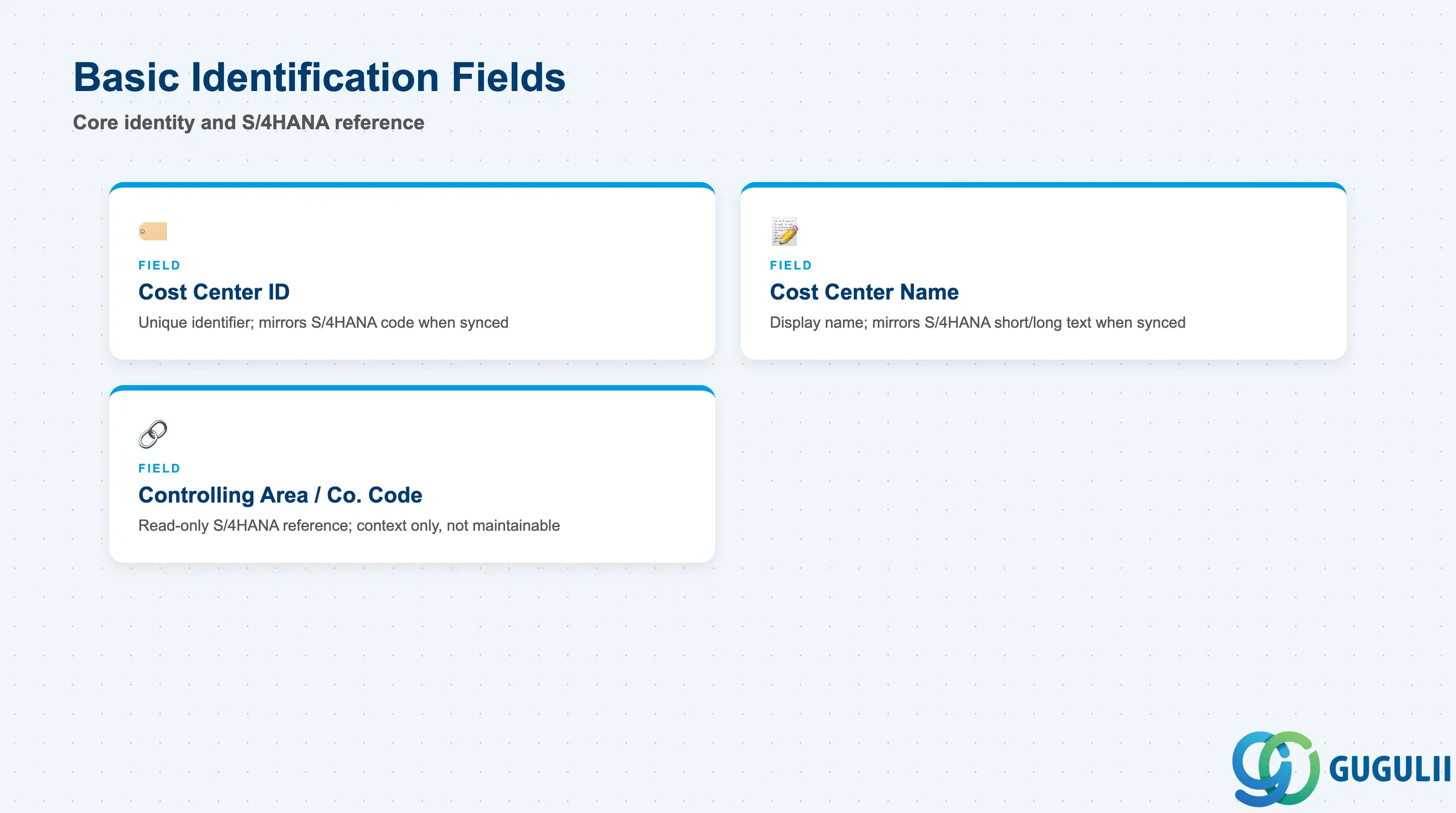
These fields uniquely identify a Cost Center and, where the integration is live, trace it back to its S/4HANA source record.
| Field | Description | Practical Usage |
|---|---|---|
| Cost Center ID | Unique identifier for the Cost Center within the tenant; when synchronized, mirrors the S/4HANA Cost Center code exactly | Do not rename or recode a synced Cost Center ID inside Fieldglass — the next sync run either overwrites the change or creates a duplicate record, depending on the integration’s matching key |
| Cost Center Name / Description | Display name shown throughout the application | Where synced, this typically mirrors the S/4HANA Cost Center’s short/long text (CSKT); confirm which language is used if the tenant operates multi-language |
| Controlling Area / Company Code Reference | Read-only reference to the originating S/4HANA Controlling Area and Company Code, populated only when the Cost Center is sync-sourced | Useful for reconciling a Fieldglass Cost Center back to its S/4 controlling structure; treat as context, not as a Fieldglass-maintainable field |
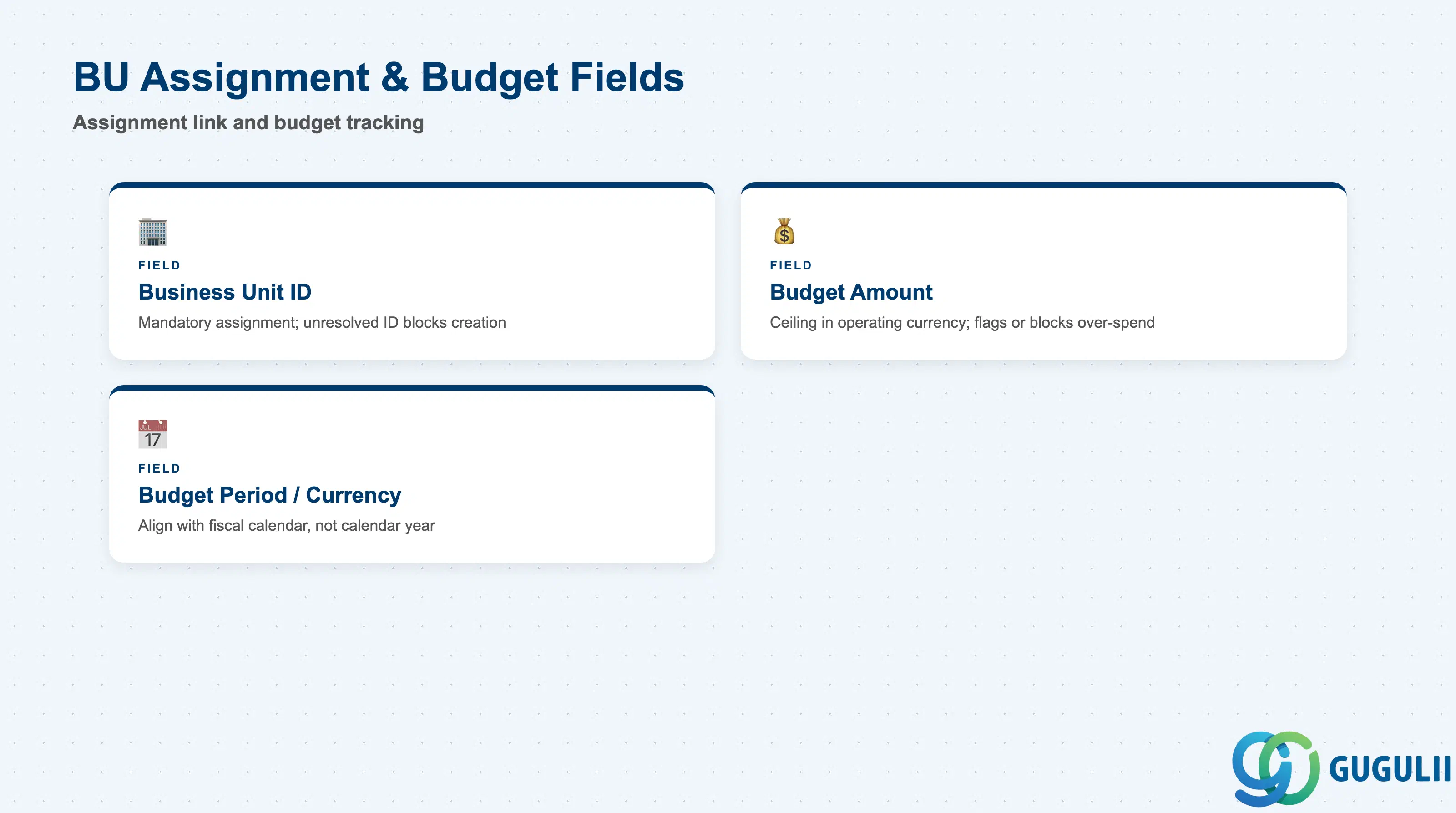
These fields tie the Cost Center to its parent Business Unit and define the budget ceiling that Fieldglass tracks spend against.
| Field | Description | Practical Usage |
|---|---|---|
| Business Unit ID | Reference to the Business Unit this Cost Center is assigned to (mandatory assignment field, not an organizational parent) | Populate carefully during CSV load — an unresolved Business Unit ID blocks Cost Center creation; reassigning it later re-routes future spend roll-up without touching historical postings |
| Budget Amount | The budget ceiling tracked against this Cost Center for a defined period | Set in the Cost Center’s operating currency; approval workflows and spend-analysis reports use this to flag or block requisitions that would exceed it — confirm with Finance whether it is a hard block or a soft warning |
| Budget Period / Currency | The period (e.g., fiscal year) and currency the Budget Amount is expressed in | Align the period boundary with the client’s fiscal calendar, not the calendar year by default — a mismatch resets budget-consumption reporting at the wrong point relative to Finance’s own cycle |
These fields control whether a Cost Center can currently be selected on a new transaction, and for how long.
| Field | Description | Practical Usage |
|---|---|---|
| Valid From / Valid To | Date range during which the Cost Center can be selected on new transactions | Where synced from S/4, these typically mirror the source Cost Center’s own validity period (KS01 Valid From/To) — do not extend them manually if a live sync will overwrite the change on the next run |
| Status | Active/Inactive flag controlling selectability on new requisitions | Deactivate rather than delete a Cost Center once it has been referenced by historical requisitions or budget reports, to preserve reporting integrity; a synced Cost Center’s Status typically follows the source S/4 record’s own blocking flags |
Prerequisite: Business Unit must exist and be Active before a Cost Center can be created and assigned to it.
| ID | Category | Title |
|---|---|---|
| fg-001 | Overview | What is SAP Fieldglass? |
| ID | Category | Title |
|---|---|---|
| fg-a01 | Overview | SAP Fieldglass Master Data: Overview, Hierarchy & Relationships |
| fg-a02-01 | Master Data | SAP Fieldglass Site |
| fg-a02-02 | Master Data | SAP Fieldglass Location |
| fg-a02-03 | Master Data | SAP Fieldglass Business Unit |
| fg-a02-04 | Master Data | SAP Fieldglass Cost Center 📍 |
| fg-a03-01 | Master Data | SAP Fieldglass User Role |
| fg-a03-02 | Master Data | SAP Fieldglass User |
| fg-a03-03 | Master Data | SAP Fieldglass Approval Group |
| fg-a03-04 | Master Data | SAP Fieldglass Distribution List |
| fg-a04-01 | Master Data | SAP Fieldglass Rate Category |
| fg-a04-02 | Master Data | SAP Fieldglass Rate Grid |
| fg-a04-03 | Master Data | SAP Fieldglass Contingent Type |
| fg-a04-04 | Master Data | SAP Fieldglass SOW Template |
| fg-a05-01 | Master Data | SAP Fieldglass MSP Company |
| fg-a05-02 | Master Data | SAP Fieldglass Certification |
| ID | Category | Title |
|---|---|---|
| fg-b01 | Overview | SAP Fieldglass Transactions: Process Flow, Hierarchy & Relationships |