Title here
Summary here

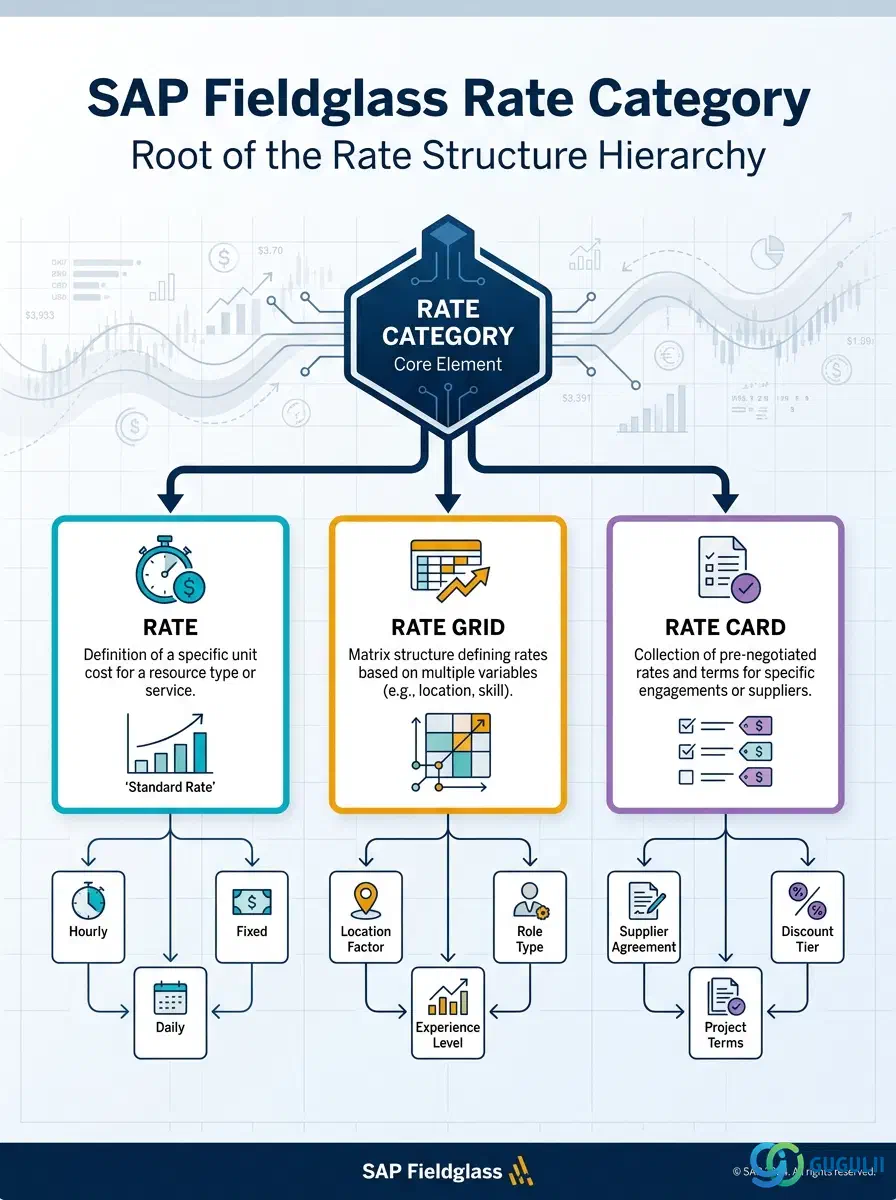
The Rate Category is the foundational master data object in SAP Fieldglass’s Rate Structure — the first configuration decision made in Phase 3, before a single Rate, Rate Grid, or Rate Card can be built. It classifies pay/bill rates by Rate Type (Hourly, Daily, or Monthly) and fixes the Unit of Measure and Currency that every child rate record inherits at creation and can never override. This article first covers the concepts that apply across every Fieldglass process area that touches rates — Contingent Labor, Services Procurement (SOW), and Job Posting — then moves into the field-level detail Fieldglass Administrators configure when setting up a Rate Category.
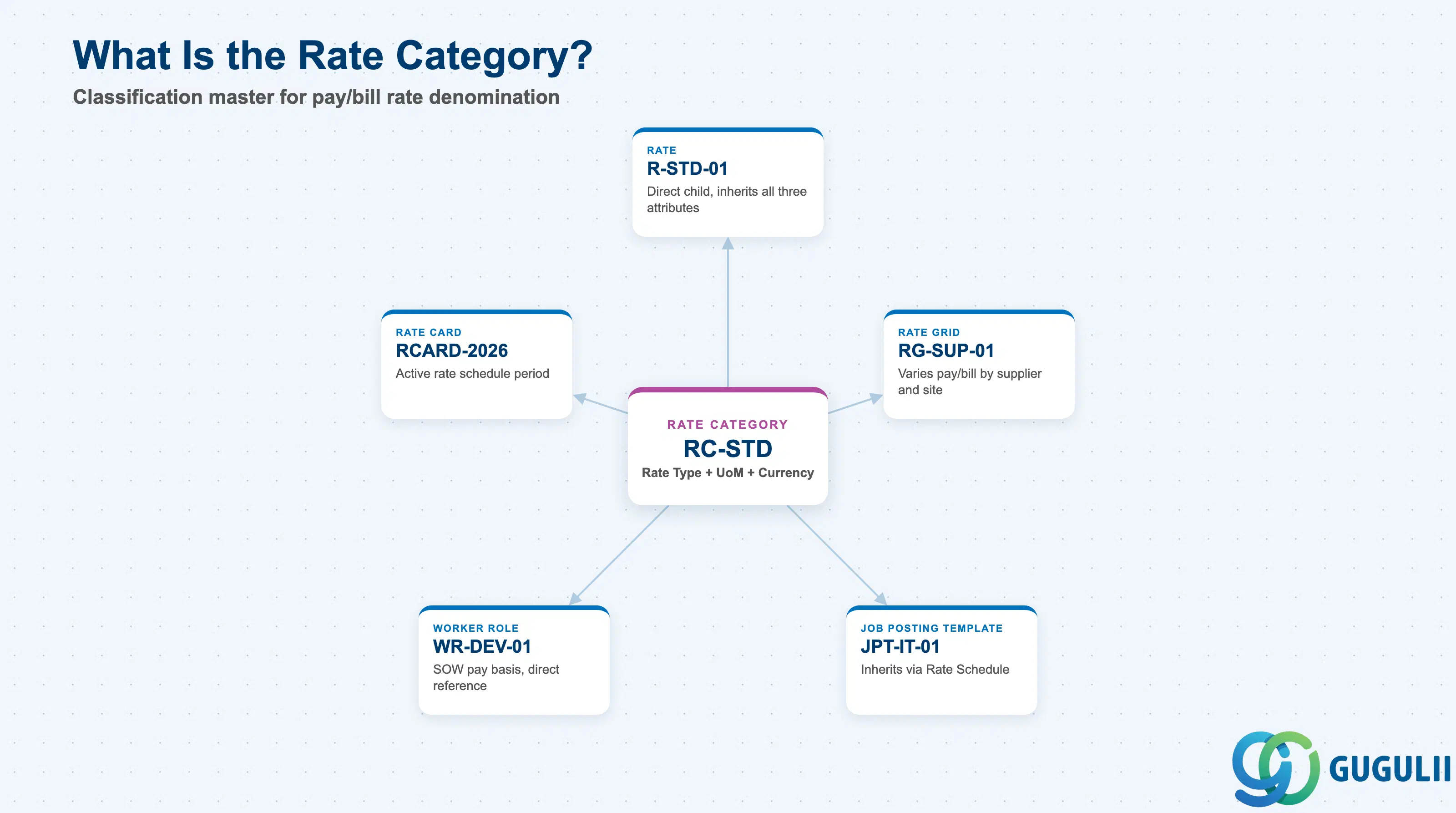
The Rate Category is a classification master that groups pay/bill rates by a common Rate Type, Unit of Measure, and Currency. It does not itself hold a price — the price lives one level down, on the Rate or Rate Grid — but every downstream rate record depends on the Rate Category for its basic denomination. Getting the Rate Category design right up front (how many categories, split by what dimension) shapes how easy rate governance is for the life of the tenant.
| Aspect | Details |
|---|---|
| Role | Defines the Rate Type, Unit of Measure, and Currency that every child Rate, Rate Grid, and Rate Card must inherit |
| Modules using it | Contingent Workforce Management (Rate / Rate Grid / Rate Card, Timesheet-to-Pay calculation), Services Procurement / SOW (Worker Role pay basis), Job Posting (indirectly, via the Rate Schedule referenced on a Job Posting Template) |
| Transactions | Admin > Rate Categories (create/maintain) — Fieldglass is a browser-based SaaS admin console; there are no ABAP-style transaction codes |
| Key Tables | Not applicable — Fieldglass is a multi-tenant SaaS platform. Rate Category configuration is stored in the tenant’s Admin configuration layer, not in a client-accessible database table |
| Platform note | Rate Category is Fieldglass-native with no S/4HANA counterpart. Unlike Site, Business Unit, or Supplier, it is never synchronized from S/4HANA — it must be configured directly in Fieldglass Admin |
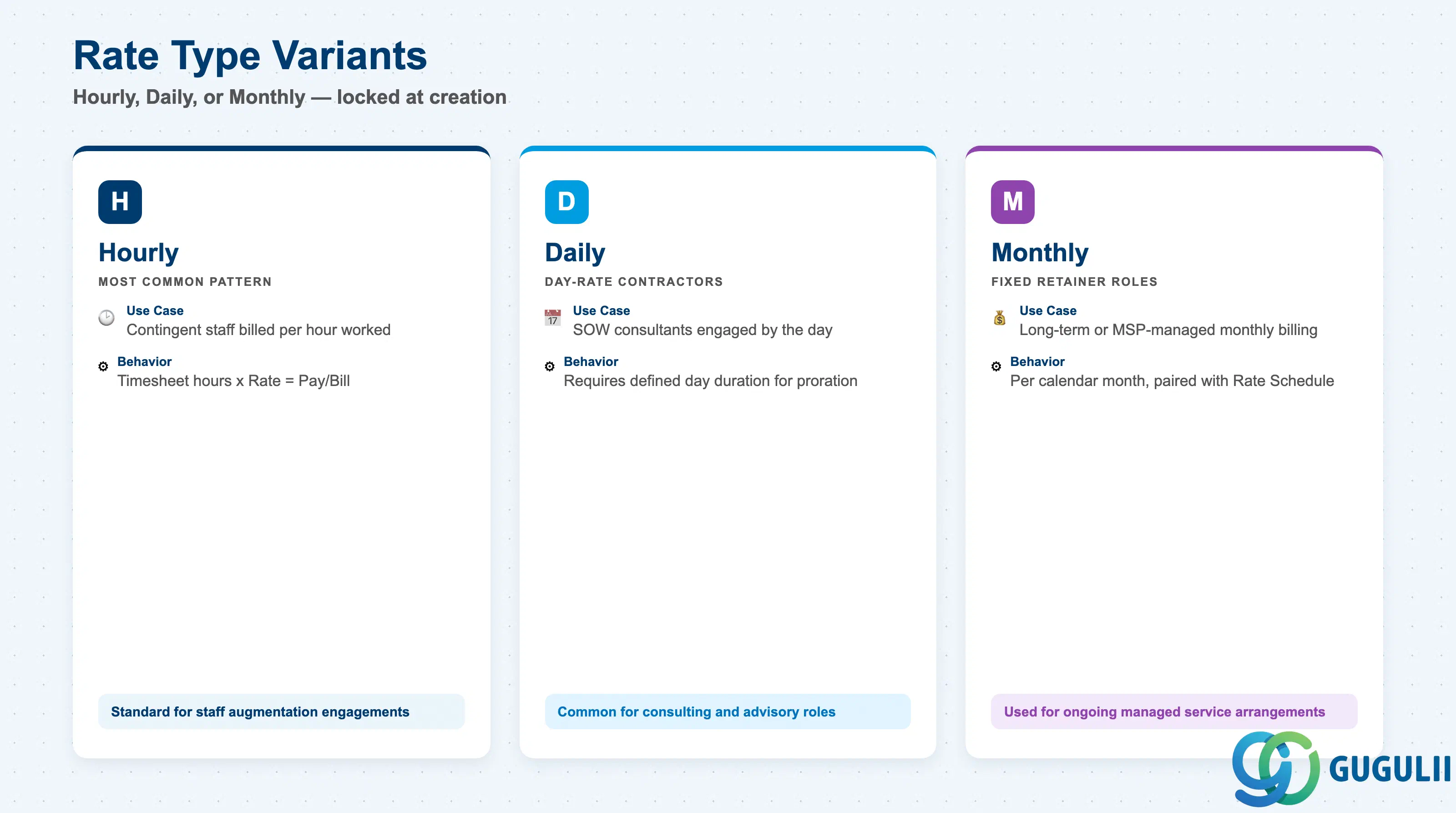
The Rate Type is the single most consequential attribute on a Rate Category — it determines the cadence at which every downstream Rate value is expressed, and it cannot be changed once Rates exist beneath the category. Picking the wrong Rate Type for a worker population forces a full rebuild of the Rate, Rate Grid, and any Rate Cards or Worker Roles already pointing at it.
| Rate Type | Code | Use Case | Key Behavior |
|---|---|---|---|
| Hourly | H | Contingent staff augmentation billed/paid per hour worked (the most common pattern) | Rate values are expressed per hour; Fieldglass Time multiplies approved timesheet hours × Rate to calculate Pay Rate and Bill Rate amounts. |
| Daily | D | Day-rate contractors and SOW-based consultants engaged by the day rather than the hour | Rate values are expressed per day; requires a defined “day” duration (e.g. 8 hours) elsewhere in configuration for partial-day and overtime proration. |
| Monthly | M | Fixed monthly retainer roles — long-term contractors or MSP-managed monthly billing arrangements | Rate values are expressed per calendar month; typically paired with a Rate Schedule rather than raw timesheet-hour multiplication. |
Design principle: A Rate Category bundles Rate Type + Unit of Measure + Currency as one indivisible unit. Since every child Rate, Rate Grid, and Rate Card inherits all three at creation and none can be overridden downstream, changing any one of them after Rates have been built requires creating a new Rate Category rather than editing the existing one.
Zone C — Rate Structure (this object’s own zone): Rate Category sits at the top of the Rate Structure zone, branching into a flat Rate on one side and a supplier/site-varying Rate Grid on the other.
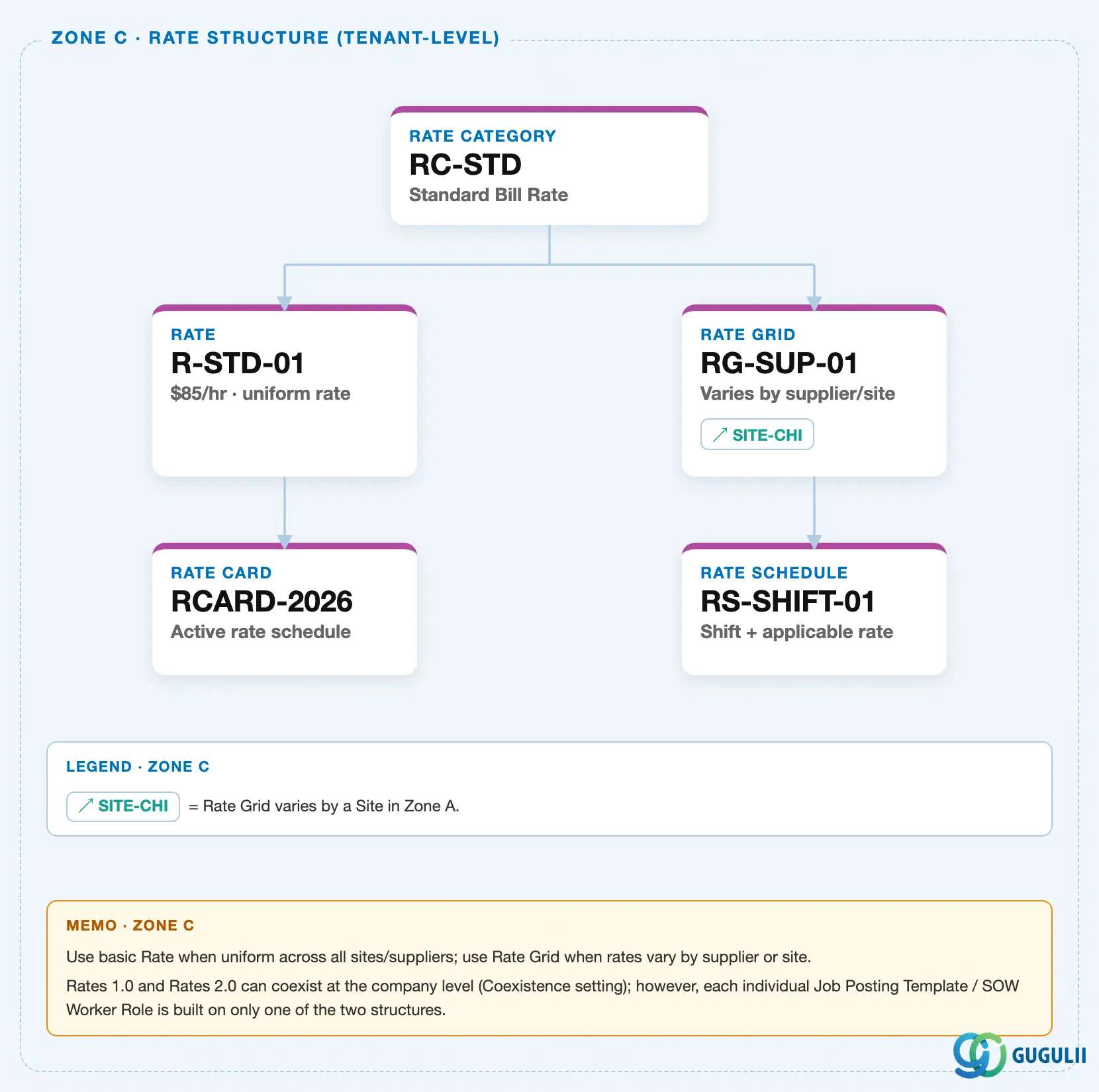
Zone D — Job Posting · SOW · MSP: Worker Role carries an inbound ↗ RC-STD reference chip back to this Rate Category, since a Worker Role’s Rate Structure is inherited from the Rate Category at creation time and cannot be changed later.
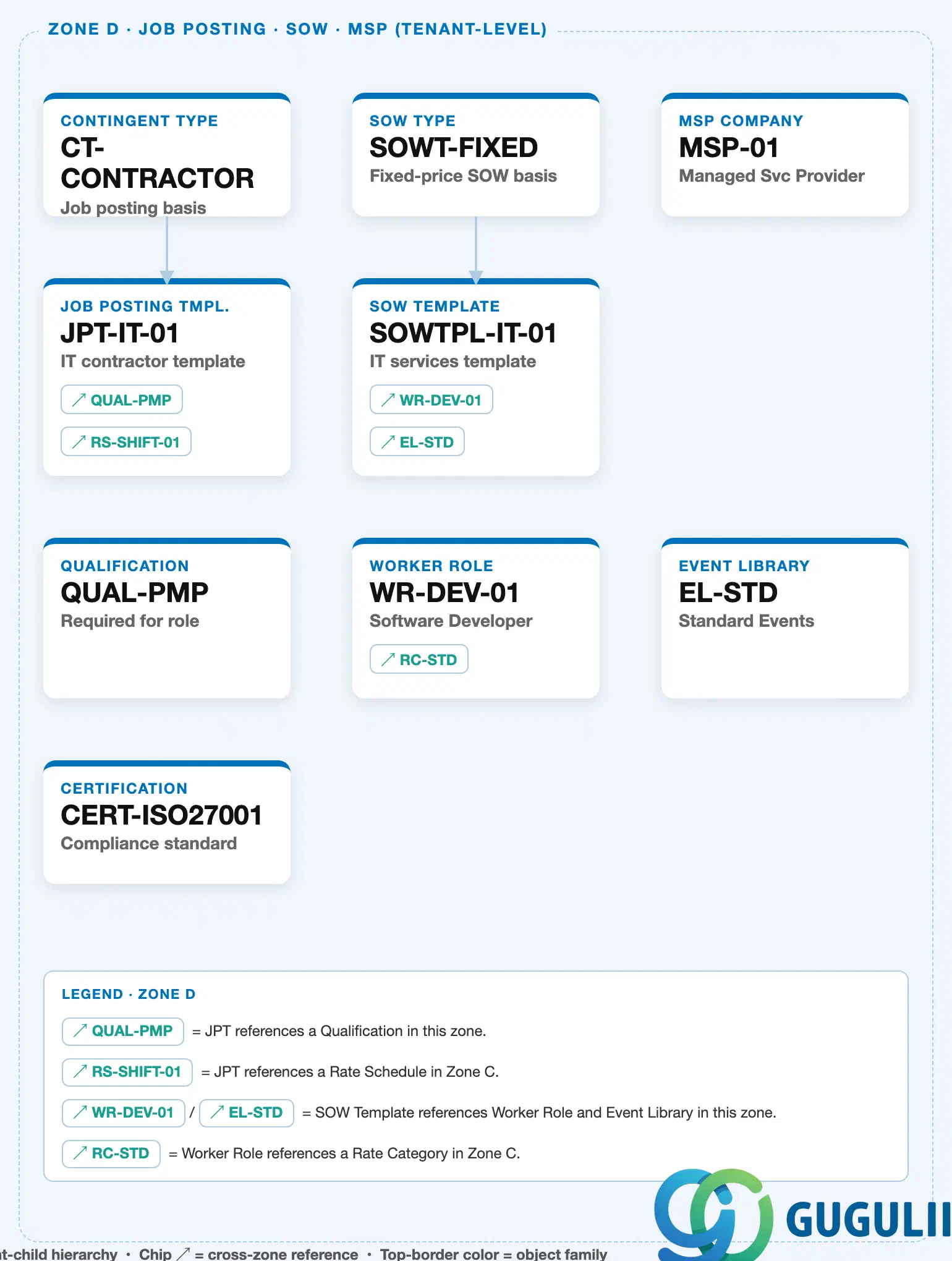
Data hierarchy with a concrete example
Rate Category "RC-STD" — Standard Bill Rate
   │
   ├── Rate "R-STD-01" — $85/hr, uniform rate across all suppliers/sites
   │      │
   │      └── Rate Card "RCARD-2026" — active rate schedule
   │
   └── Rate Grid "RG-SUP-01" — varies by supplier/site
          │      ── assigned to ──> Site "SITE-CHI" (Chicago, US)
          │
          └── Rate Schedule "RS-SHIFT-01" — shift + applicable rate

Referenced by (Zone D — Job Posting / SOW):
   Worker Role "WR-DEV-01" ── inherits Rate Structure from ──> Rate Category "RC-STD"
Coexistence note: Rates 1.0 and Rates 2.0 (the Rate Category → Rate/Rate Grid → Rate Card/Rate Schedule structure shown above) can coexist at the tenant level, but each individual Job Posting Template or SOW Worker Role is built on only one of the two — never a mix.
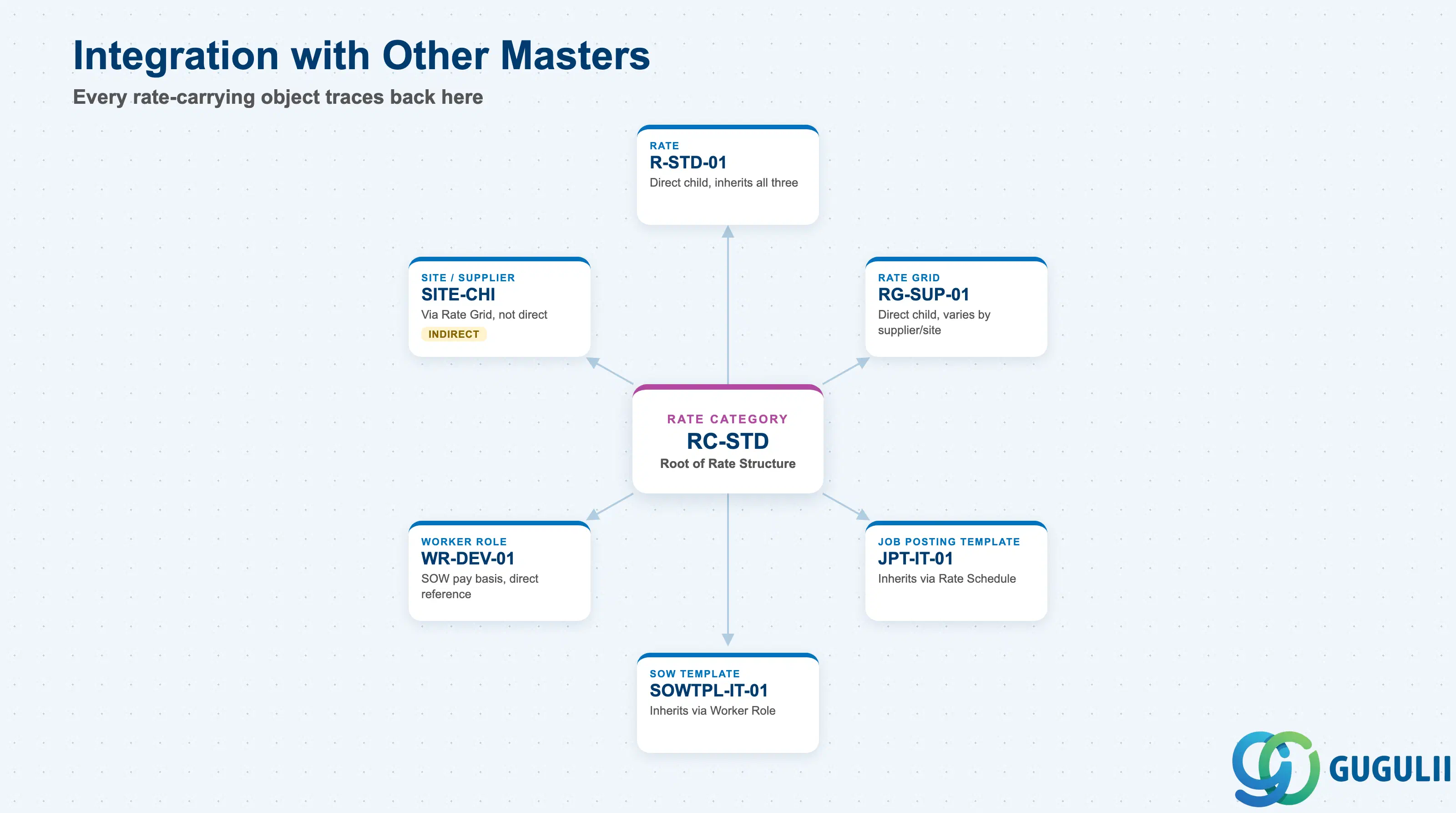
The Rate Category does not stand alone — it is the point every rate-carrying object in Fieldglass ultimately traces back to, whether directly or through one intermediate layer.
| Object | Relationship | Practical Notes |
|---|---|---|
| Rate | Direct child — every Rate is created under exactly one Rate Category | Rate inherits Rate Type, Unit of Measure, and Currency from its parent Category; none of the three can be overridden at the Rate level. |
| Rate Grid | Also a direct child, varying pay/bill values by Supplier and Site | A single Rate Category can carry both a flat Rate and one or more supplier/site-varying Rate Grids beneath it at the same time. |
| Worker Role | SOW Worker Roles reference a Rate Category directly to define the pay basis for a SOW-based worker | Because Worker Role skips the Rate/Rate Grid layer and points straight at the Rate Category, SOW rate governance is looser than Contingent Labor’s — a common audit finding in SOW-heavy programs. |
| Job Posting Template | Inherits its Rate Structure indirectly via the Rate Schedule assigned on the template | The Rate Structure family is locked in at template creation and cannot be changed later — confirm the correct Rate Category before templates are cloned across job families. |
| SOW Template | Inherits Rate Structure from the Worker Role(s) attached to it, which in turn reference a Rate Category | Multiple Worker Roles on one SOW Template can reference different Rate Categories (e.g., Hourly for support staff, Daily for lead consultants) within the same statement of work. |
| Site / Supplier | Indirect — referenced by Rate Grid, not by Rate Category itself | Rate Category has no direct dependency on Site or Supplier; supplier/site-specific variation is introduced one level down, at the Rate Grid. |
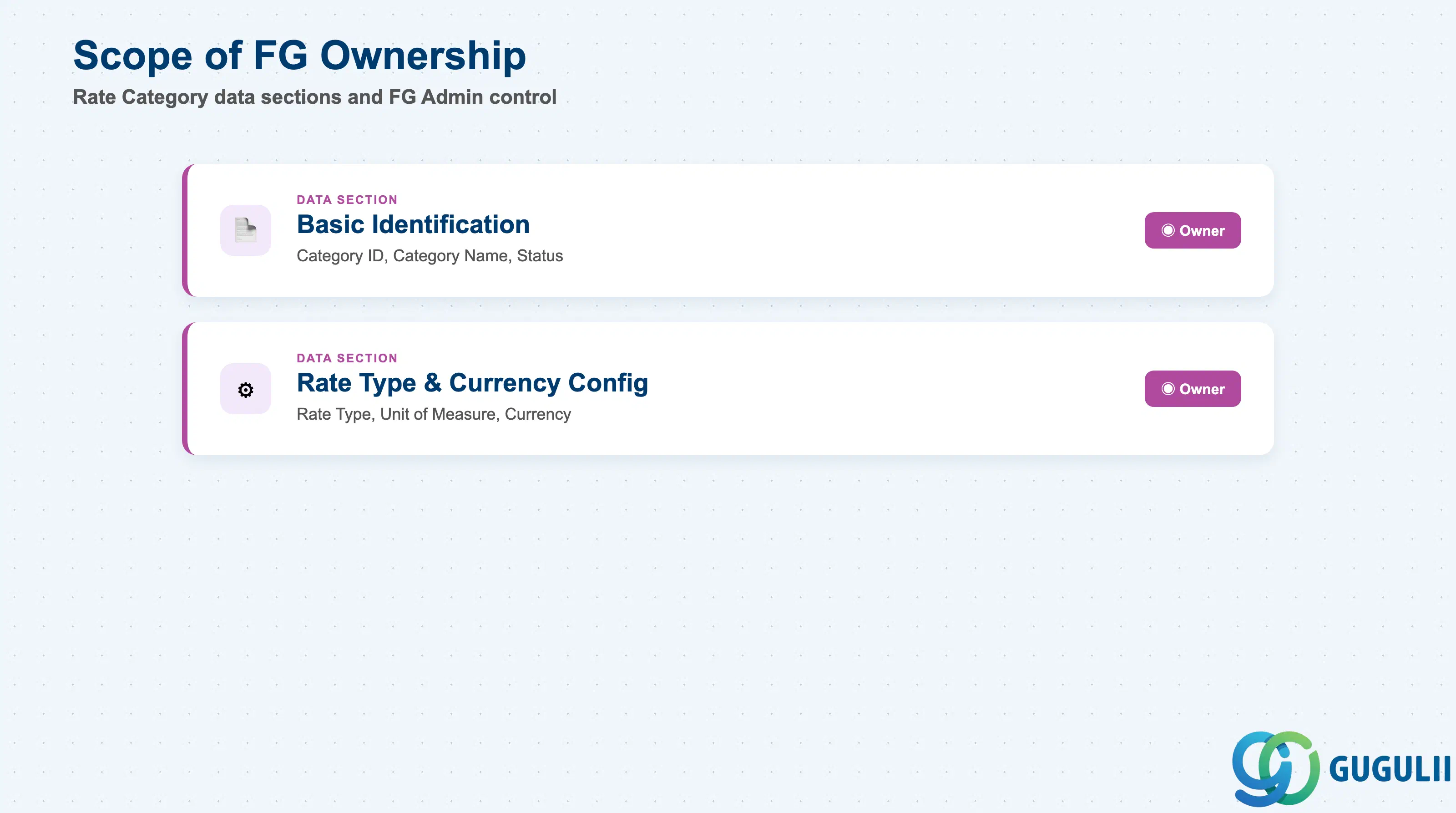
| Data Section | FG Involvement | Notes |
|---|---|---|
| Basic Identification | ◎ Owner | Category ID, Category Name, Status — created and maintained entirely in Fieldglass Admin |
| Rate Type & Currency Configuration | ◎ Owner | Rate Type, Unit of Measure, Currency — define what every child Rate, Rate Grid, and Worker Role must inherit |
Legend: ◎ = Owner / Critical, ○ = Direct involvement
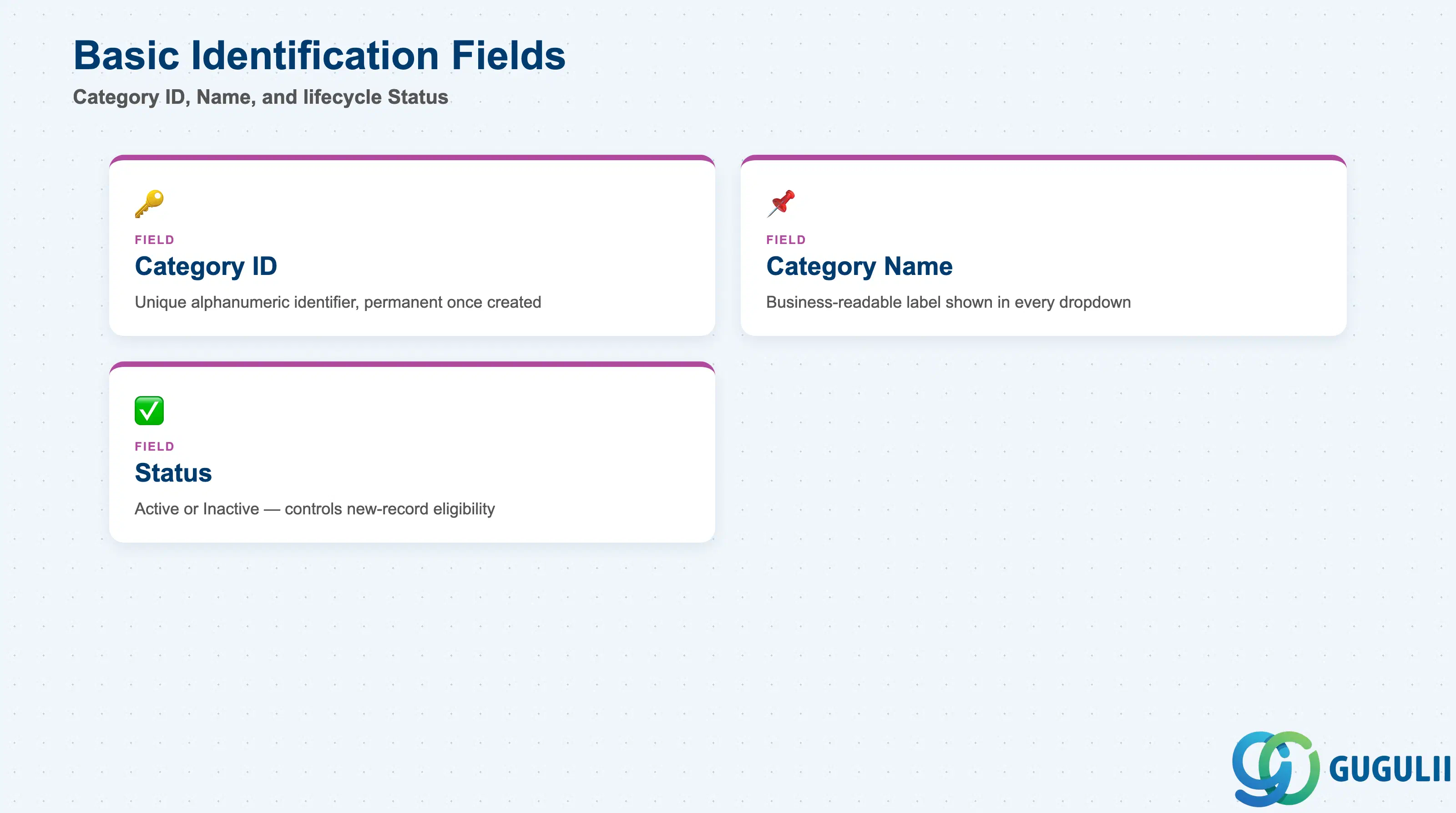
Basic Identification carries the fields that give the Rate Category its name and lifecycle state — the attributes a Fieldglass Administrator sees first in every dropdown and list view.
| Field | Description | Practical Usage |
|---|---|---|
| Category ID | Unique alphanumeric identifier for the Rate Category (e.g. RC-HOURLY, RC-STD) | Chosen once at go-live and effectively permanent — downstream Rate, Rate Grid, and Worker Role records reference it by ID, so renaming later means creating a new category and re-pointing every dependent record. Agree a naming convention up front (e.g. RC-<RateType>-<Country/BU>) before multiple business units start creating categories independently. |
| Category Name | Business-readable label shown throughout the Admin console | Appears in every dropdown where a Rate Category must be selected (creating a Rate, assigning a Worker Role). Keep names descriptive enough that a non-technical hiring manager can distinguish “IT Contractor Hourly” from “Manufacturing Hourly” without opening the record. |
| Status | Active / Inactive | Inactivating a Rate Category blocks it from being selected on new Rates or Worker Role assignments, but does not retroactively affect Rate or Rate Card records already built against it — open Work Orders and timesheets continue unaffected. Use Inactive rather than delete when retiring a legacy rate structure; delete is blocked while any child Rate record exists. |
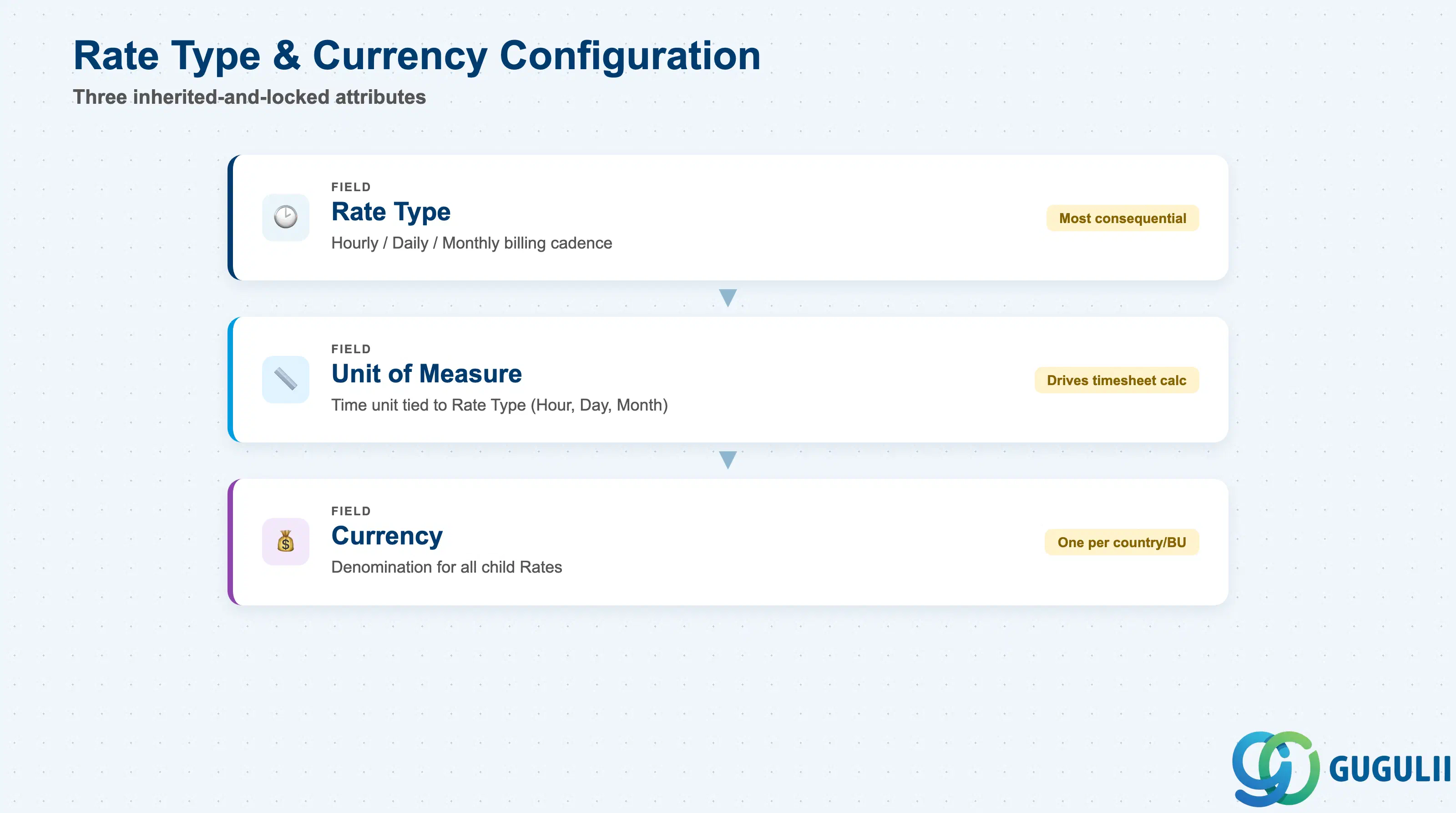
This is the operational core of the Rate Category — the three attributes every downstream Rate, Rate Grid, and Rate Card inherits and can never override, so they must be right before any child record is built.
| Field | Description | Practical Usage |
|---|---|---|
| Rate Type | Hourly / Daily / Monthly — the billing and pay cadence | The single most consequential field on the record. It determines whether downstream Rate values are entered as per-hour, per-day, or per-month amounts, and it cannot be changed once Rates have been built against the category. Confirm Rate Type per worker population during blueprint (contingent staff = typically Hourly; SOW day-rate consultants = typically Daily), not after go-live. |
| Unit of Measure | The time unit tied to the Rate Type (Hour, Day, Month) | Drives how Fieldglass Time timesheets multiply against the Rate to calculate Pay and Bill amounts. Must align with the client’s overtime and proration rules configured elsewhere — an Hourly category with a mismatched Unit of Measure will break automatic timesheet-to-invoice calculation. |
| Currency | The currency the category, and every Rate within it, is denominated in | Global rollouts commonly create one Rate Category per currency/country combination rather than a single worldwide category, since Fieldglass does not auto-convert FX within a single Rate Category. Confirm with FI during blueprint whether Bill Rate currency must match the requesting Company Code’s local currency or may differ for cross-border billing scenarios. |
| ID | Category | Title |
|---|---|---|
| fg-001 | Overview | What is SAP Fieldglass? |
| ID | Category | Title |
|---|---|---|
| fg-a01 | Overview | SAP Fieldglass Master Data: Overview, Hierarchy & Relationships |
| fg-a02-01 | Master Data | SAP Fieldglass Site |
| fg-a02-02 | Master Data | SAP Fieldglass Location |
| fg-a02-03 | Master Data | SAP Fieldglass Business Unit |
| fg-a02-04 | Master Data | SAP Fieldglass Cost Center |
| fg-a03-01 | Master Data | SAP Fieldglass User Role |
| fg-a03-02 | Master Data | SAP Fieldglass User |
| fg-a03-03 | Master Data | SAP Fieldglass Approval Group |
| fg-a03-04 | Master Data | SAP Fieldglass Distribution List |
| fg-a04-01 | Master Data | SAP Fieldglass Rate Category 📍 |
| fg-a04-02 | Master Data | SAP Fieldglass Rate Grid |
| fg-a04-03 | Master Data | SAP Fieldglass Contingent Type |
| fg-a04-04 | Master Data | SAP Fieldglass SOW Template |
| fg-a05-01 | Master Data | SAP Fieldglass MSP Company |
| fg-a05-02 | Master Data | SAP Fieldglass Certification |
| ID | Category | Title |
|---|---|---|
| fg-b01 | Overview | SAP Fieldglass Transactions: Process Flow, Hierarchy & Relationships |