Title here
Summary here

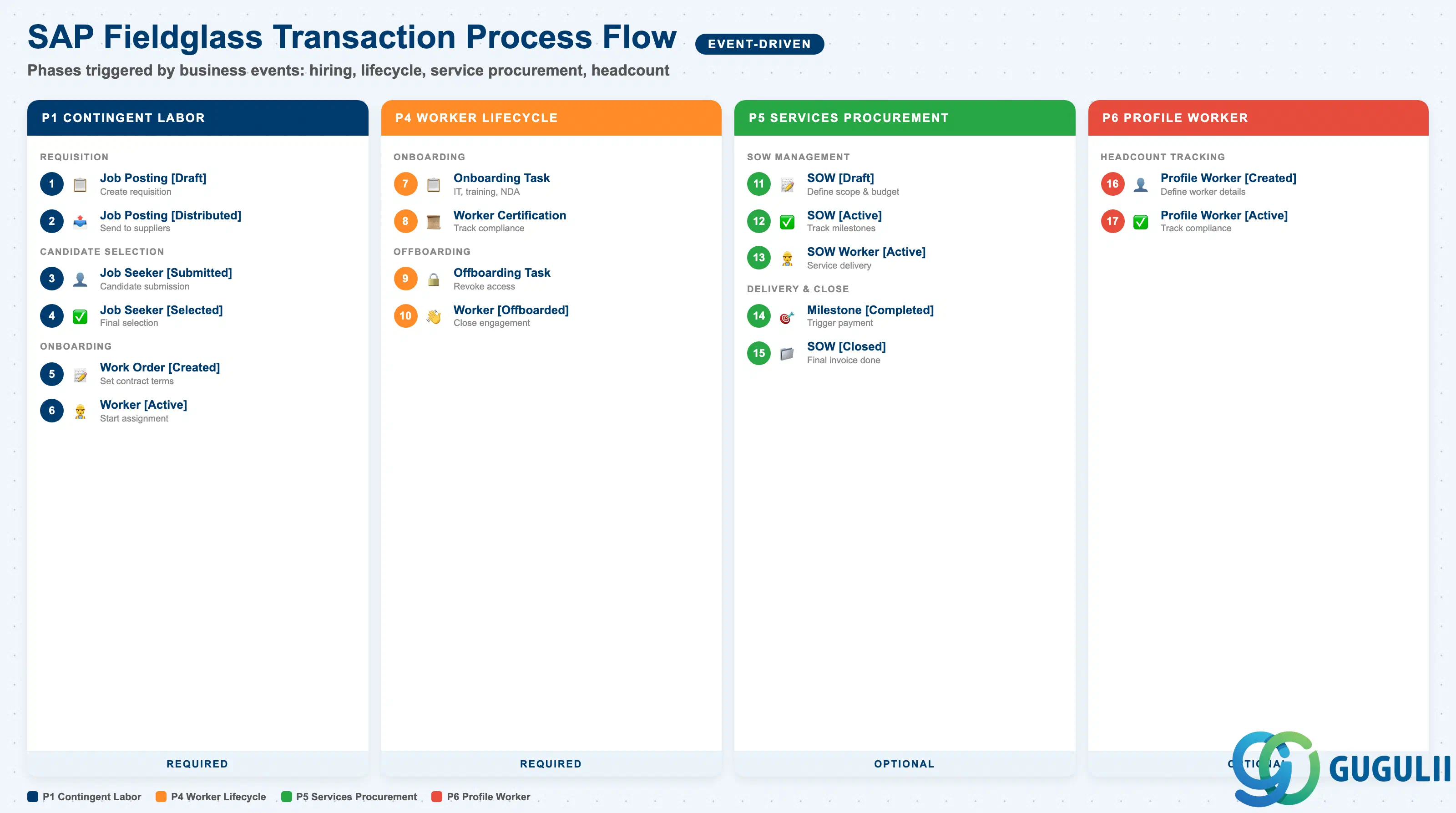
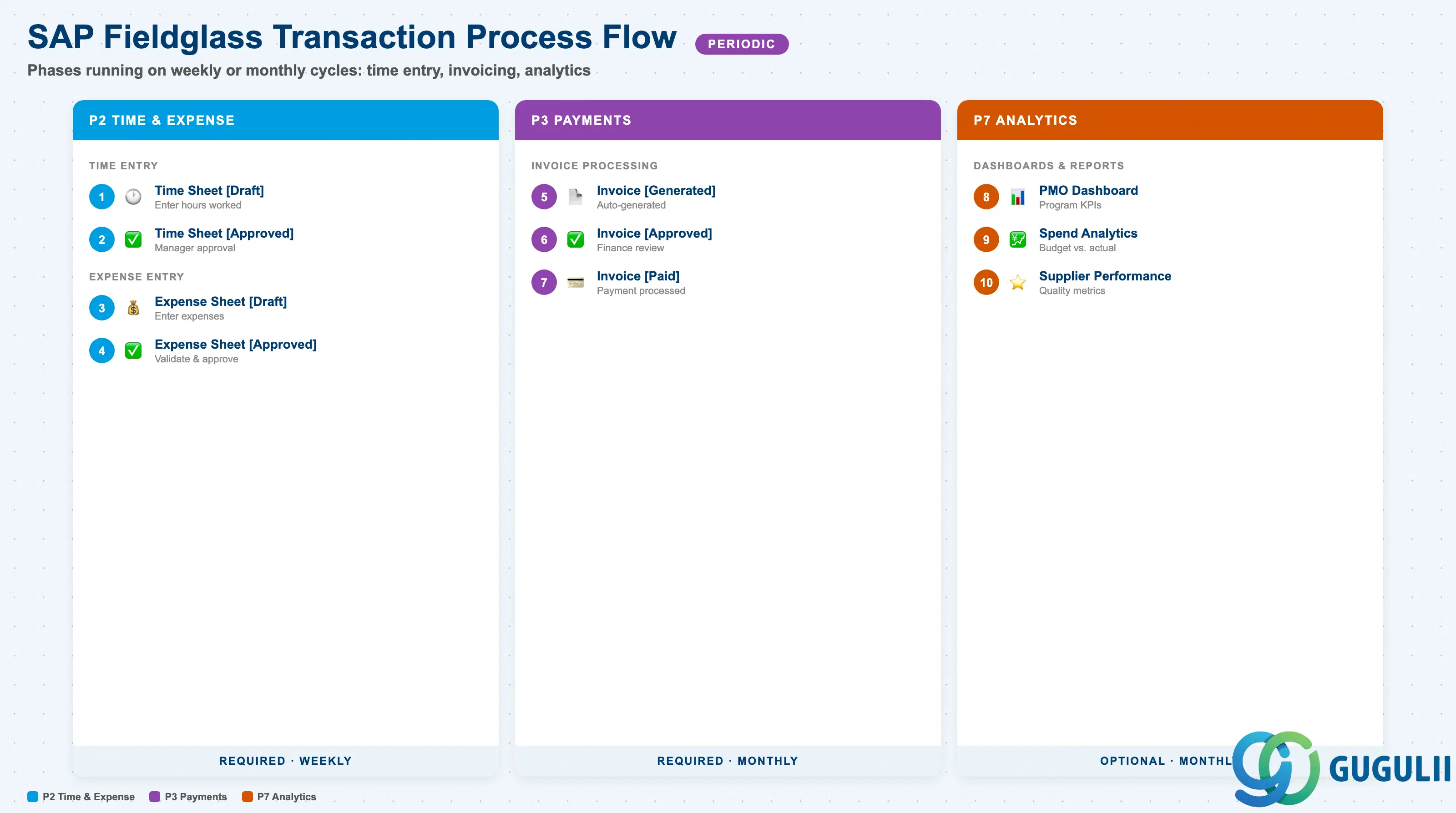
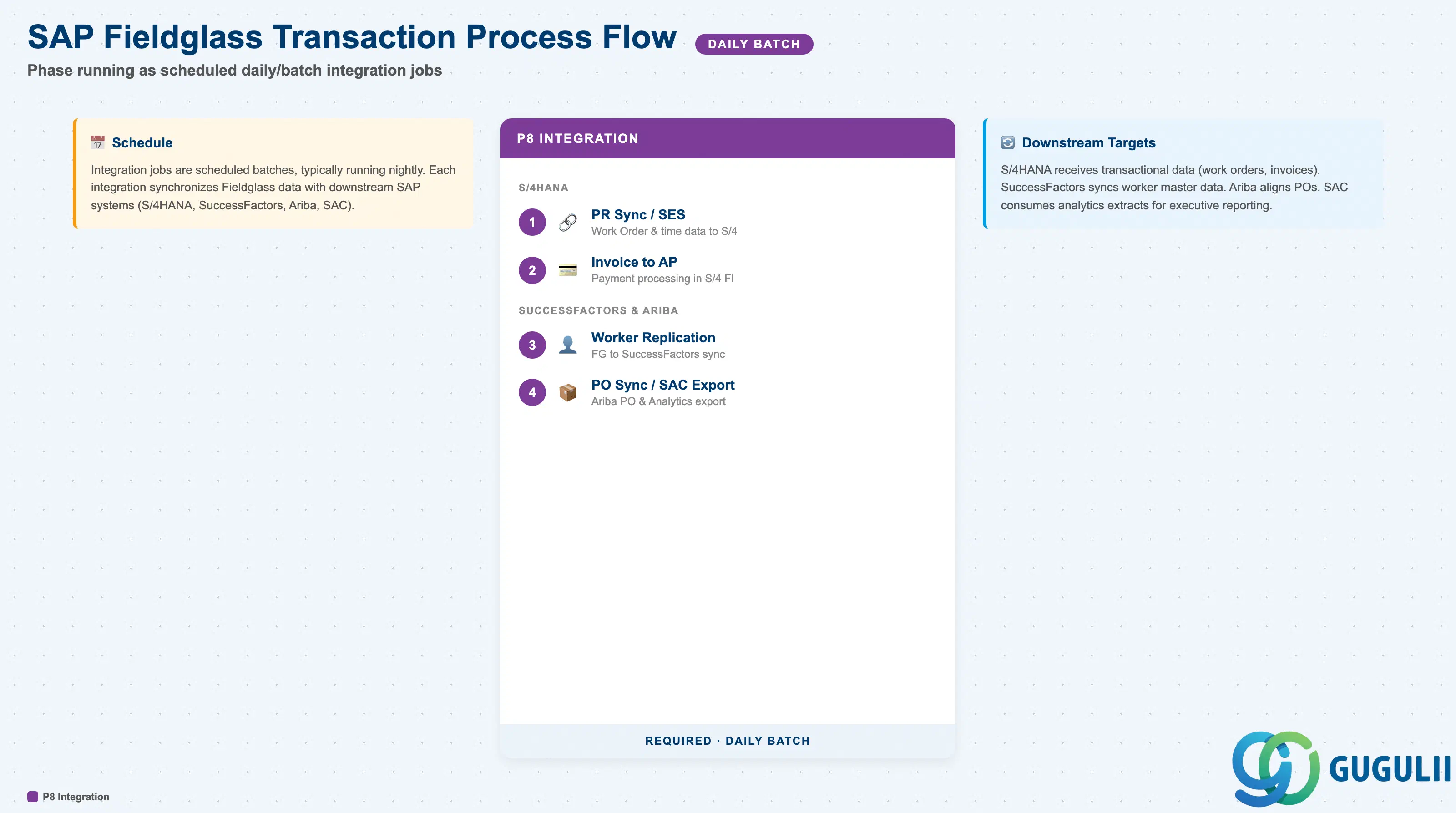
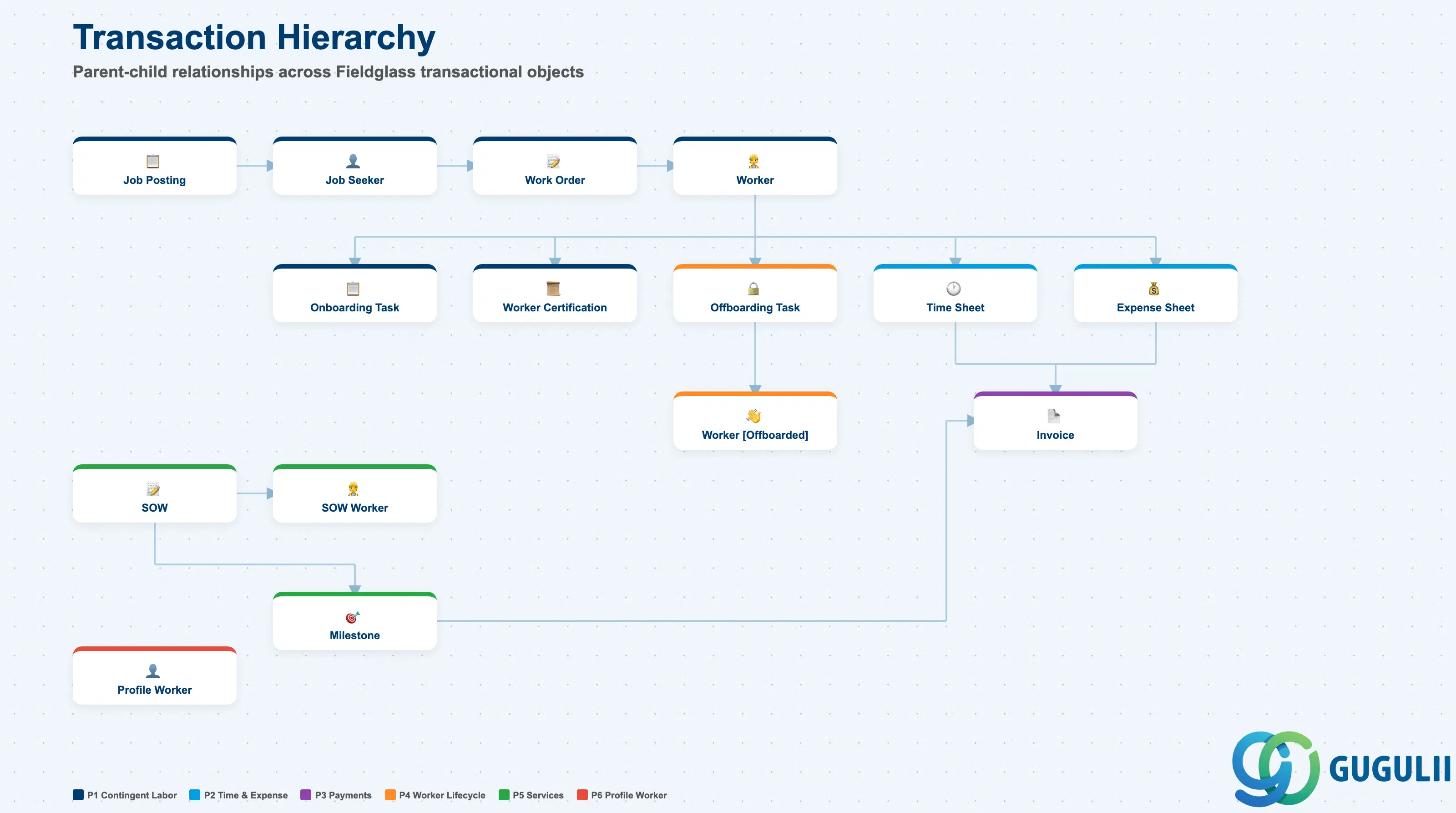
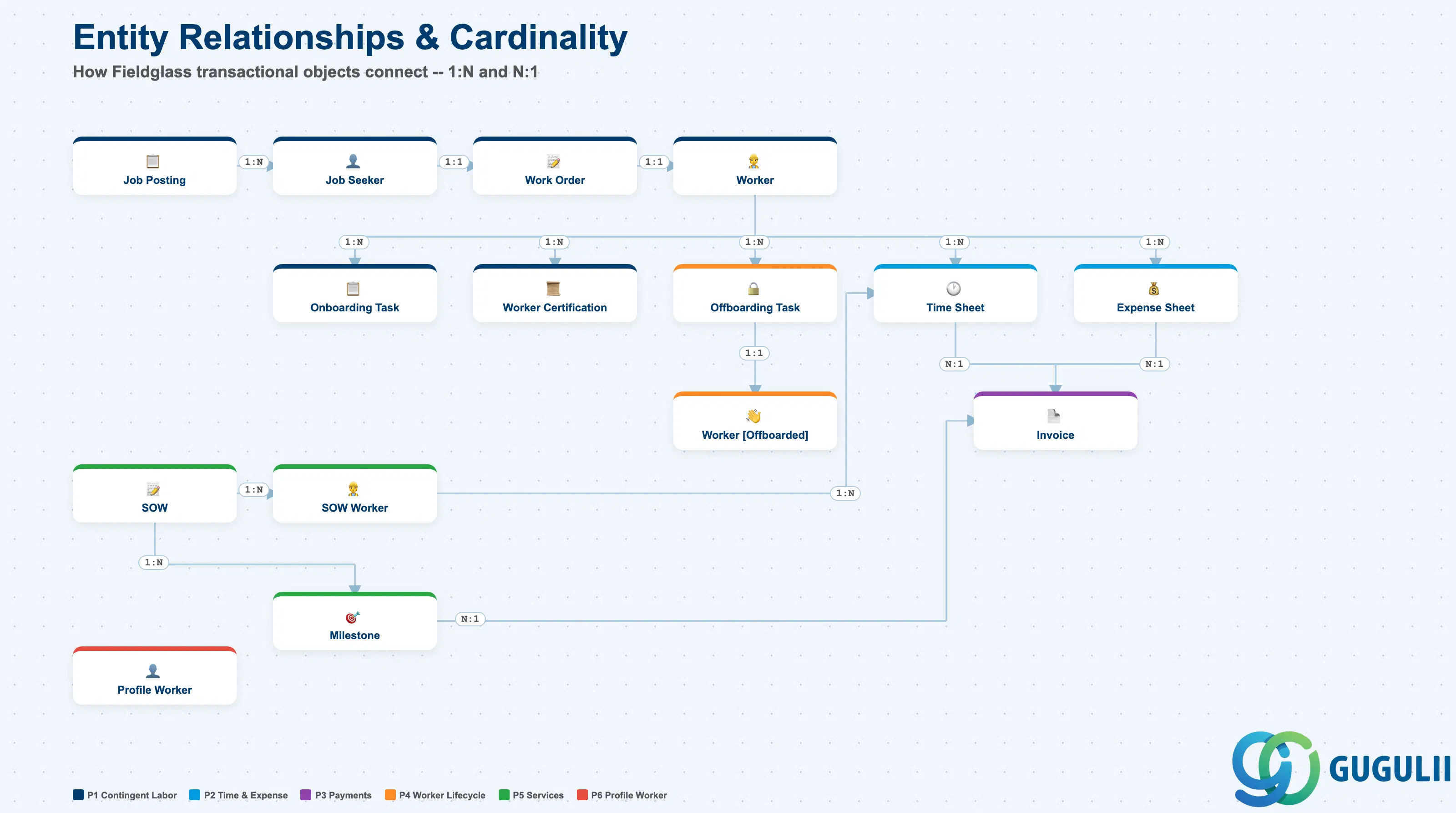
| Phase | Object | Integration | Planned | Actual | Prerequisite | Menu | Description | Practical Examples | Role |
|---|---|---|---|---|---|---|---|---|---|
| 1 Contingent Labor | Job Posting [Draft] | - | Planned | - | Job Posting Template | Contingent Labor > Job Postings | Create job posting, define requirements, and set rates | Create an IT engineer requisition: Java developer, Tokyo, 6-month contract | Hiring Manager |
| Job Posting [Pending Approval] | - | Planned | Actual | Job Posting [Draft] | Contingent Labor > Job Postings | Review job posting, validate details, and submit for approval | PMO verifies job posting content, validates rate and duration, then submits for approval | PMO | |
| Job Posting [Approved] | - | Planned | Actual | Job Posting [Pending Approval], Approval Group | Contingent Labor > Job Postings | Approve job posting and prepare for distribution | Department head approves and confirms budget; prepare for supplier distribution | Approver | |
| Job Posting [Distributed] | - | - | Actual | Job Posting [Approved], Distribution List | Contingent Labor > Job Postings | Distribute to suppliers, notify MSP, and track responses | Distribute to five registered suppliers simultaneously; notify MSP of candidate submission deadline | PMO | |
| Job Seeker [Submitted] | - | Planned | - | Job Posting [Distributed], Supplier | Contingent Labor > Job Seekers | Receive candidate submission, review resume, and AI assessment | Supplier submits candidate; AI assessment rates skills match at 85% | Supplier | |
| Job Seeker [Shortlisted] | - | Planned | Actual | Job Seeker [Submitted] | Contingent Labor > Job Seekers | Shortlist candidate, compare qualifications, and prepare interview | Compare eight submissions by experience and skill; shortlist top three candidates | Hiring Manager | |
| Job Seeker [Interviewed] | - | Planned | Actual | Job Seeker [Shortlisted] | Contingent Labor > Job Seekers | Conduct interview, evaluate candidate, and provide feedback | Conduct online interview; rate technical skills and communication on a 5-point scale | Hiring Manager | |
| Job Seeker [Selected] | - | Planned | Actual | Job Seeker [Interviewed] | Contingent Labor > Job Seekers | Select candidate, negotiate rate, and initiate work order | Select final candidate and agree on rate; initiate work order creation | Hiring Manager | |
| Work Order [Created] | FG→S/4 | Planned | Actual | Job Seeker [Selected] | Worker > Work Orders | Create work order, set terms, and submit for supplier acceptance | Create work order: start date 04/01, end date 09/30, weekly 40 hours | Hiring Manager | |
| Work Order [Accepted] | - | Planned | Actual | Work Order [Created] | Worker > Work Orders | Accept work order, confirm terms, and initiate worker registration | Supplier reviews and accepts contract terms; initiates worker registration | Supplier | |
| Worker [Registered] | - | Planned | Actual | Work Order [Accepted] | Worker > Workers | Register worker, complete profile, and assign security ID | Register worker profile, issue security ID, enroll in security training | Worker / Supplier | |
| Onboarding Task [Pending] | - | Planned | - | Worker [Registered] | Worker > Activities | Create onboarding task, assign to actor, and set due date | Create tasks for IT environment setup, security training, and NDA signing with due dates | Hiring Manager | |
| Onboarding Task [Completed] | - | - | Actual | Onboarding Task [Pending] | Worker > Activities | Complete task, verify compliance, and update worker status | All onboarding tasks completed: PC issued, training attended, NDA signed | Worker / Supplier | |
| Worker [Active] | FG→SF | Planned | Actual | Onboarding Task [Completed] | Worker > Workers | Activate worker, complete onboarding, and start assignment | Worker starts assignment; worker data automatically replicated to SuccessFactors | Hiring Manager | |
| Worker Certification | - | - | - | Worker [Active], Certification | Worker > Workers | Assign certification to worker, track expiration, and verify compliance | Register AWS certification with expiry date and set renewal alert | Hiring Manager | |
| 2 Time & Expense | Time Sheet [Draft] | - | Planned | - | Worker [Active] | Worker > Time Sheets | Enter time worked, select tasks, and add comments | Create weekly time sheet: 8 hours per day Mon–Fri, Project A development work | Worker |
| Time Sheet [Submitted] | - | Planned | Actual | Time Sheet [Draft] | Worker > Time Sheets | Submit time sheet, attach documentation, and route for approval | Submit 40-hour time sheet with work report attached for approval routing | Worker | |
| Time Sheet [Approved] | FG→S/4 | Planned | Actual | Time Sheet [Submitted] | Worker > Time Sheets | Review time sheet, validate hours, and approve for invoicing | Hiring Manager verifies actual hours and approves; SES integration to S/4HANA triggered | Hiring Manager | |
| Expense Sheet [Draft] | - | Planned | - | Worker [Active] | Worker > Expense Sheets | Enter expenses, attach receipts, and select expense codes | Enter travel expenses with receipts attached for approval | Worker | |
| Expense Sheet [Submitted] | - | Planned | Actual | Expense Sheet [Draft] | Worker > Expense Sheets | Submit expense sheet and route for approval | Submit expense sheet and route for approval | Worker | |
| Expense Sheet [Approved] | FG→S/4 | - | Actual | Expense Sheet [Submitted] | Worker > Expense Sheets | Review expenses, validate receipts, and approve for reimbursement | Review receipts and approve expenses; SES integration to S/4HANA triggered | Hiring Manager | |
| 3 Payments | Invoice [Generated] | - | Planned | Actual | Time Sheet [Approved], Expense Sheet [Approved] | Payments > Invoices | Generate invoice from approved time/expense or milestone completion | Invoice automatically generated from approved time sheets and expense sheets | - (System) |
| Invoice [Approved] | - | Planned | Actual | Invoice [Generated] | Payments > Invoices | Review invoice, validate amounts, and approve for payment | Finance reviews invoice amount and line items and approves for payment | Finance | |
| Invoice [Paid] | FG→S/4, FG→Ariba | - | Actual | Invoice [Approved] | Payments > Invoices | Process payment, update status, and reconcile with AP | Payment processed through S/4HANA; AP cleared and bank transfer executed | Finance | |
| 4 Worker | Offboarding Task [Pending] | - | Planned | - | Worker [Active] | Worker > Activities | Create offboarding task, revoke access, and retrieve assets | Create offboarding tasks 30 days before contract end: PC return, badge retrieval, access deletion | Hiring Manager |
| Offboarding Task [Completed] | - | - | Actual | Offboarding Task [Pending] | Worker > Activities | Complete offboarding, confirm asset return, and close engagement | All assets returned, system access deleted, final time sheet approved | Hiring Manager | |
| Worker [Offboarded] | FG→SF | - | Actual | Offboarding Task [Completed] | Worker > Workers | Offboard worker, revoke access, and retrieve assets | Worker offboarding complete; contingent worker record in SuccessFactors updated | Hiring Manager | |
| 5 Services | SOW [Draft] | - | Planned | - | SOW Template | Services > SOW | Create SOW, define scope, and set payment characteristics | Create system development SOW: scope definition, budget, 6-month duration | Buyer |
| SOW [Pending Approval] | - | Planned | Actual | SOW [Draft] | Services > SOW | Review SOW, validate budget, and submit for approval | PMO validates SOW content and budget, confirms scope and deliverables, then submits for approval | PMO | |
| SOW [Approved] | - | Planned | Actual | SOW [Pending Approval], Approval Group | Services > SOW | Approve SOW and send to supplier for acceptance | Department head approves SOW and sends acceptance request to supplier | Approver | |
| SOW [Accepted] | FG→S/4 | Planned | Actual | SOW [Approved], Supplier | Services > SOW | Accept SOW terms, negotiate changes via redlining, and confirm | Supplier negotiates terms using redlining feature and accepts; PR sync to S/4HANA | Supplier | |
| SOW [Active] | - | Planned | Actual | SOW [Accepted] | Services > SOW | Activate SOW, track milestones, and manage deliverables | SOW activated; three milestones configured and progress tracking started | Buyer | |
| SOW Worker [Created] | - | Planned | - | SOW [Active], Worker Role | Services > SOW Workers | Create SOW worker, assign role, and set rate | Create SOW worker: Project Manager role with monthly rate | Supplier | |
| SOW Worker [Approved] | - | Planned | Actual | SOW Worker [Created] | Services > SOW Workers | Approve SOW worker and initiate registration | Buyer verifies SOW worker skills and rate, then approves | Buyer | |
| SOW Worker [Registered] | - | Planned | Actual | SOW Worker [Approved] | Services > SOW Workers | Register SOW worker, complete onboarding, and assign security ID | SOW worker registration complete; security ID issued and project environment access granted | Supplier | |
| SOW Worker [Active] | FG→SF | - | Actual | SOW Worker [Registered] | Services > SOW Workers | Activate worker, start time tracking, and begin service delivery | SOW worker activated; time entry enabled and SuccessFactors replication triggered | Buyer | |
| Milestone [Pending] | - | Planned | - | SOW [Active] | Services > SOW | Define milestone, set due date, and track progress | Define Milestone 1 “Basic Design Complete” with due date and payment amount | Buyer | |
| Milestone [Completed] | - | - | Actual | Milestone [Pending] | Services > SOW | Complete milestone, confirm delivery, and trigger payment | Basic design deliverable accepted; invoice generation triggered | Buyer | |
| SOW [Closed] | - | - | Actual | Milestone [Completed] | Services > SOW | Close SOW, complete final deliverables, and process final invoice | All milestones complete; final invoice processed and SOW closed | Buyer | |
| 6 Worker | Profile Worker [Created] | - | Planned | - | Business Unit | Worker > Profile Workers | Create profile worker, define details, and track headcount | Create profile worker for headcount tracking in IT department | Administrator |
| Profile Worker [Active] | - | - | Actual | Profile Worker [Created] | Worker > Profile Workers | Activate profile worker, assign security ID, and track compliance | Profile worker activated; security ID issued and compliance tracking started | Administrator | |
| 7 Analytics | PMO Dashboard | - | - | - | Work Order, SOW, Invoice | Analytics > PMO Dashboard | View program KPIs, monitor spend, and track compliance | KPI dashboard: 50 active workers, monthly spend, SLA achievement rate | PMO / Administrator |
| Spend Analytics | - | - | - | Invoice | Analytics > Reports | Analyze spend by category, compare to budget, and identify savings | IT staffing spend: budget utilization vs. prior year, category-level spend breakdown | PMO / Finance | |
| Supplier Performance | - | - | - | Work Order, SOW, Job Seeker | Analytics > Reports | Track supplier metrics, measure quality, and compare performance | Supplier A: candidate fill rate 90%, average days to fill 5, quality score 4.2/5 | PMO | |
| 8 Integration | Purchase Requisition Sync | FG→S/4HANA | - | - | Work Order [Created], SOW [Accepted] | - | Sync work order/SOW to S/4HANA purchase requisition | Work order creation automatically syncs to S/4HANA as purchase requisition | - (System) |
| Service Entry Sheet | FG→S/4HANA | - | - | Time Sheet [Approved], Expense Sheet [Approved] | - | Create service entry sheet from approved time/expense | Approved time sheet automatically creates service entry sheet in S/4HANA | - (System) | |
| Invoice to AP | FG→S/4HANA | - | - | Invoice [Approved] | - | Send approved invoice to S/4HANA Accounts Payable | Approved invoice sent to S/4HANA AP module; supplier invoice created | - (System) | |
| Position Integration | SF→FG | - | - | Position (SF) | - | Create job posting from Employee Central position | SuccessFactors position data automatically generates Fieldglass job posting | - (System) | |
| Worker Replication | FG→SF | - | - | Worker [Active] | - | Replicate worker data to Employee Central | Active worker data replicated to Employee Central as contingent worker record | - (System) | |
| PO Sync | FG→Ariba | - | - | Work Order [Created], SOW [Accepted] | - | Sync work order/SOW to Ariba Purchase Order | Work order / SOW information synced to Ariba as purchase order | - (System) | |
| Invoice to Ariba | FG→Ariba | - | - | Invoice [Approved] | - | Send invoice to Ariba Invoice Processing | Approved invoice sent to Ariba invoice processing module | - (System) | |
| Spend Data Export | FG→SAC | - | - | Invoice [Paid] | - | Export spend data to SAP Analytics Cloud | Paid invoice data exported to SAC for spend analysis data model | - (System) |
| ID | Category | Title |
|---|---|---|
| fg-001 | Overview | What is SAP Fieldglass? |
| ID | Category | Title |
|---|---|---|
| fg-a01 | Overview | SAP Fieldglass Master Data: Overview, Hierarchy & Relationships |
| fg-a02-01 | Master Data | SAP Fieldglass Site |
| fg-a02-02 | Master Data | SAP Fieldglass Location |
| fg-a02-03 | Master Data | SAP Fieldglass Business Unit |
| fg-a02-04 | Master Data | SAP Fieldglass Cost Center |
| fg-a03-01 | Master Data | SAP Fieldglass User Role |
| fg-a03-02 | Master Data | SAP Fieldglass User |
| fg-a03-03 | Master Data | SAP Fieldglass Approval Group |
| fg-a03-04 | Master Data | SAP Fieldglass Distribution List |
| fg-a04-01 | Master Data | SAP Fieldglass Rate Category |
| fg-a04-02 | Master Data | SAP Fieldglass Rate Grid |
| fg-a04-03 | Master Data | SAP Fieldglass Contingent Type |
| fg-a04-04 | Master Data | SAP Fieldglass SOW Template |
| fg-a05-01 | Master Data | SAP Fieldglass MSP Company |
| fg-a05-02 | Master Data | SAP Fieldglass Certification |
| ID | Category | Title |
|---|---|---|
| fg-b01 | Overview | SAP Fieldglass Transactions: Process Flow, Hierarchy & Relationships 📍 |