Title here
Summary here

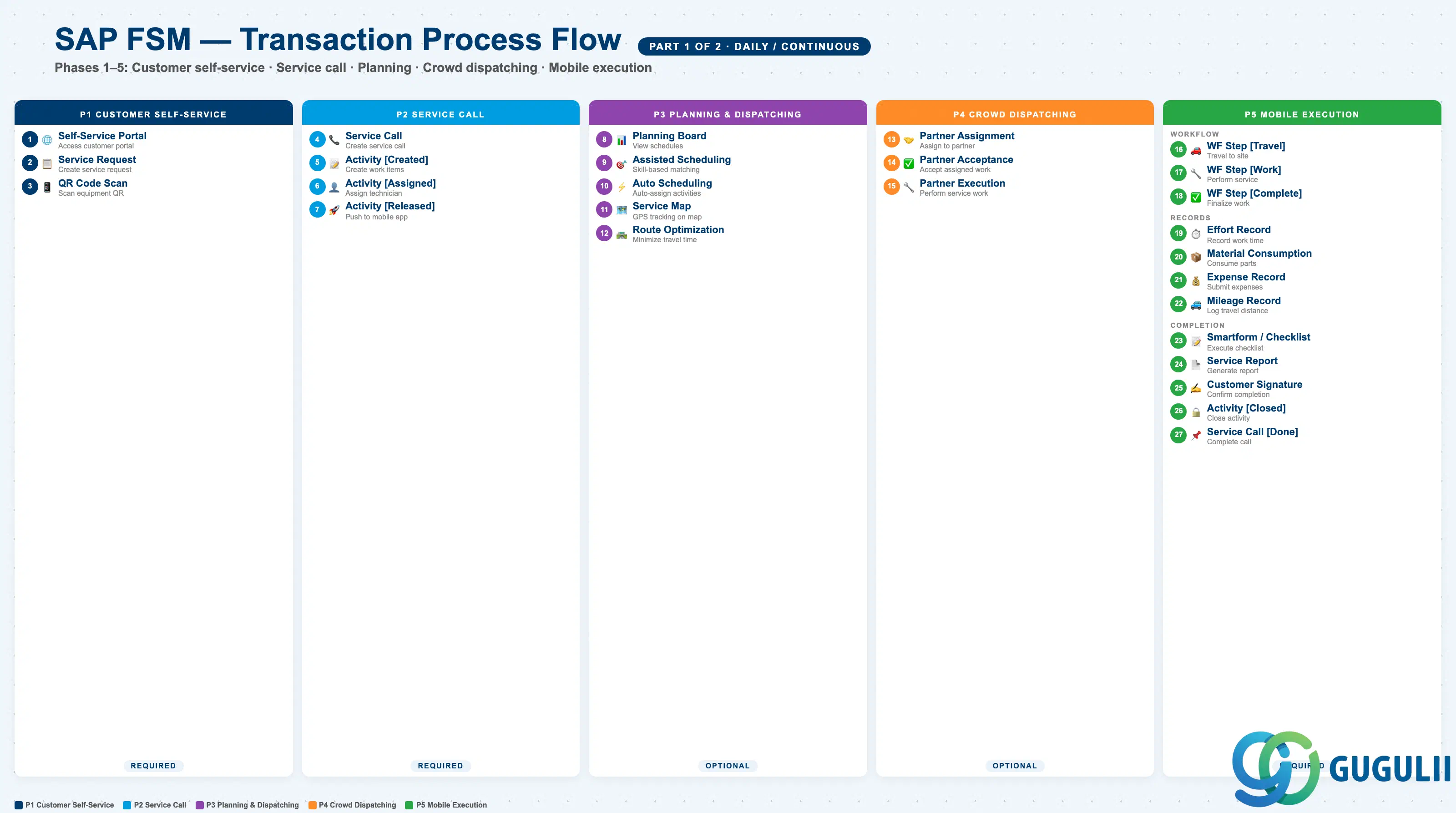
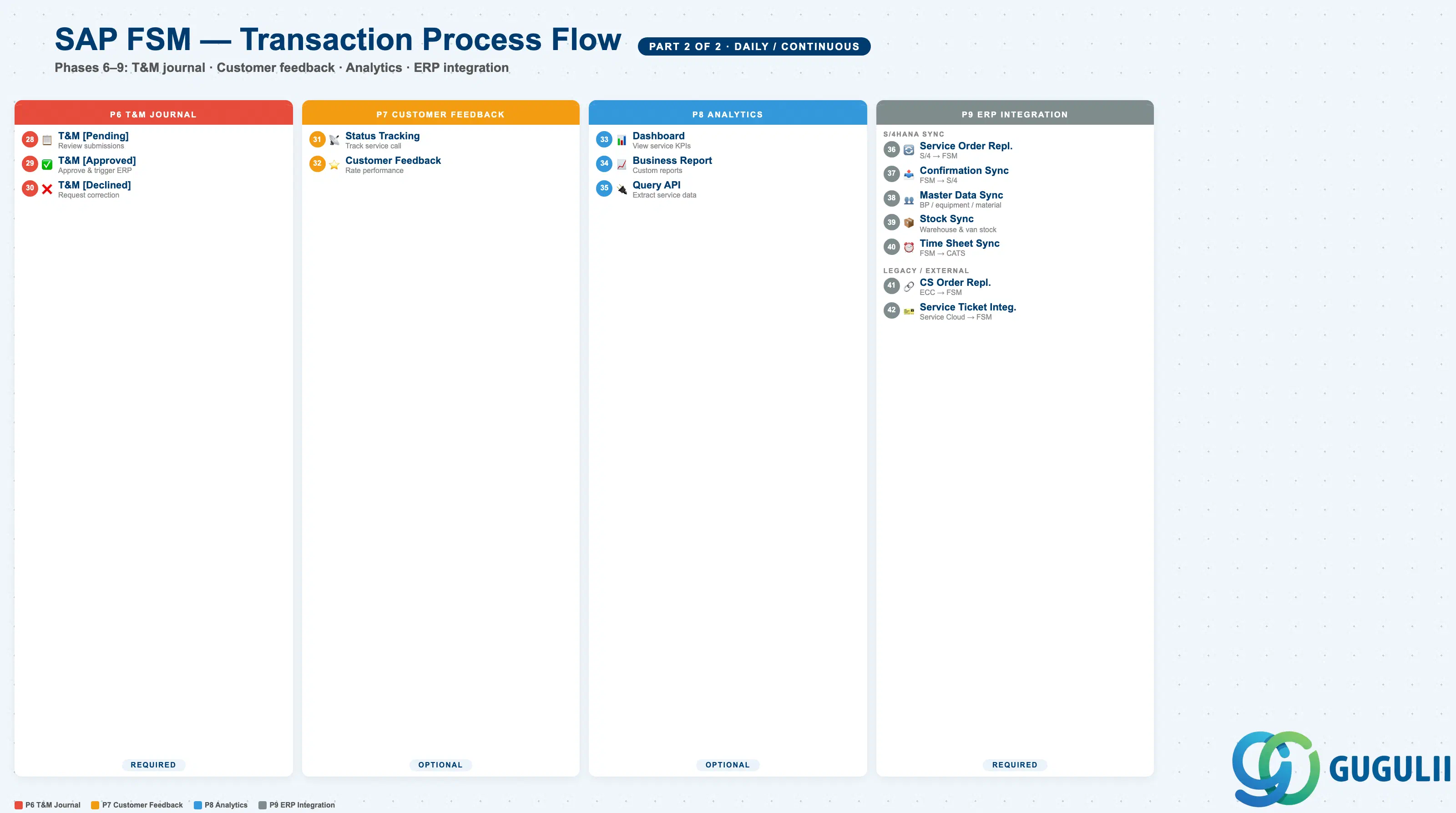
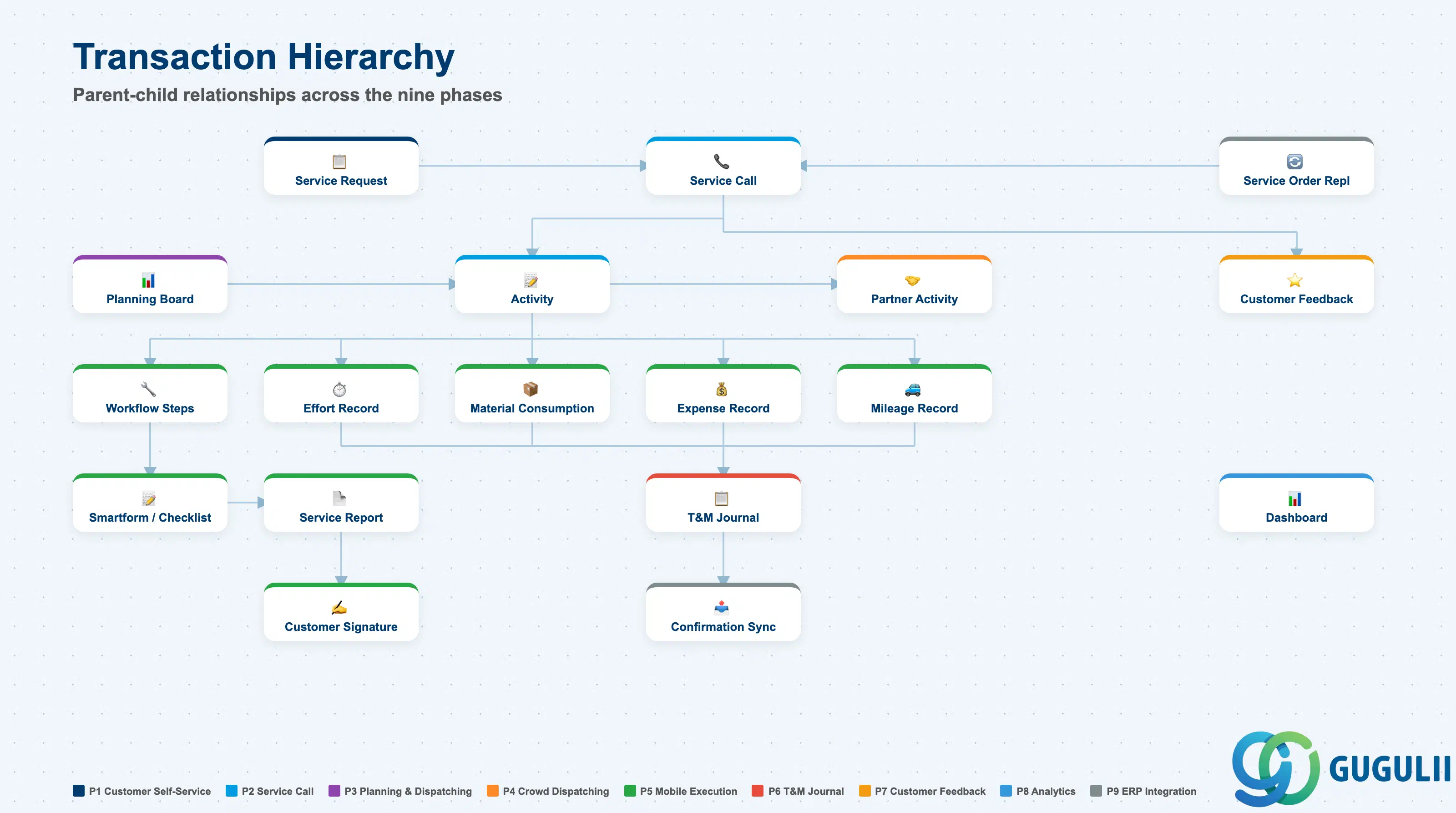
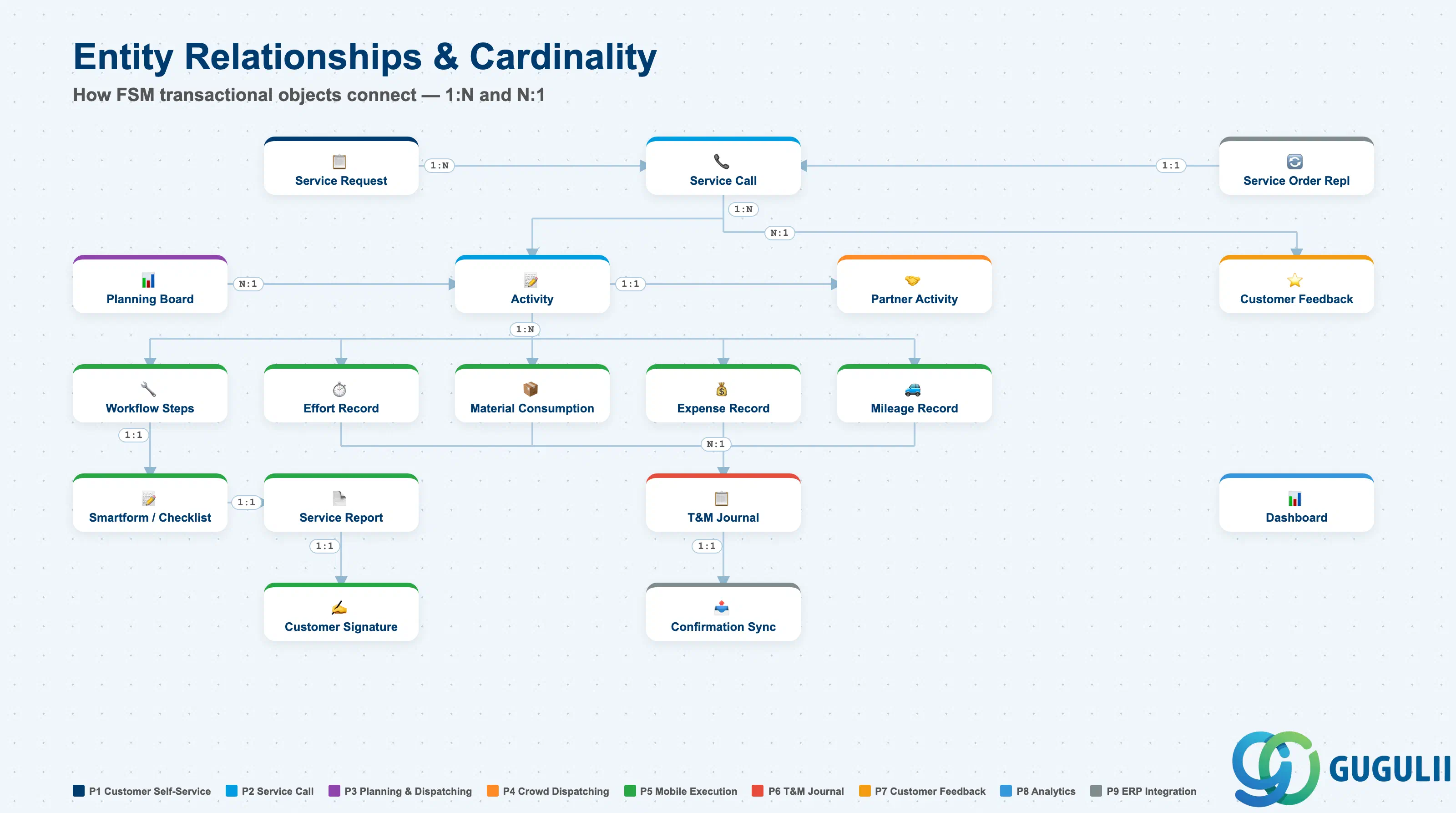
| Phase | Object | Integration | Planned | Actual | Prerequisite | Application Name | Description | Practical Examples | Role |
|---|---|---|---|---|---|---|---|---|---|
| 1 Customer Self-Service | Self-Service Portal | - | - | - | Equipment, Business Partner | Customer Self-Service Portal | Access customer portal, view equipment information, and check service history | Customer logs into portal, views owned equipment information and service history | End Customer |
| Service Request [Created] | - | Planned(Service Request [Created]) | - | Self-Service Portal | Customer Self-Service Portal | Create service request, describe issue, and request technician visit | Report abnormal noise from air conditioning unit and request a technician visit | End Customer | |
| QR Code Scan | - | - | - | Equipment | Customer Self-Service Portal | Scan equipment QR code, access product information, and initiate service request | Scan QR code on equipment with a smartphone to instantly create a service request | End Customer | |
| 2 Service Call | Service Call [Created] | S/4HANA→FSM | Planned(Service Call [Created]) | Actual(Service Request [Created]) | Service Request [Created], Business Partner, Equipment | Planning and Dispatching | Create service call, define service requirements, link customer/equipment, and inherit skills | Register customer repair request as a service call, set required skills and priority | Dispatcher |
| Activity [Created] | - | Planned(Activity [Created]) | Actual(Service Call [Created]) | Service Call [Created] | Planning and Dispatching | Create activity, define work items, and prepare for technician assignment | Create two activities under the service call — one for inspection and one for parts replacement | Dispatcher | |
| Activity [Assigned] | - | - | - | Activity [Created], Person/Technician | Planning and Dispatching | Assign technician to activity, schedule date/time, and reserve resources | Select a skill-matched technician and assign a visit for 10:00 the next morning | Dispatcher | |
| Activity [Released] | - | Planned(Activity [Released]) | Actual(Activity [Created]) | Activity [Assigned] | Planning and Dispatching | Release activity to technician, push to mobile app, and enable execution | Release the assigned activity to push the work instruction to the technician’s mobile app | Dispatcher | |
| 3 Planning & Dispatching | Planning Board | - | - | - | Person/Technician, Activity | Planning and Dispatching | View technician schedules, drag-and-drop assignment, and manage capacity | View technician availability on the planning board and assign work by drag-and-drop | Dispatcher |
| Assisted Scheduling | - | - | - | Activity [Created], Skill, Region | Planning and Dispatching | Find matching technicians, evaluate skills/availability, and suggest optimal assignment | Auto-evaluate required skills, geographic proximity, and availability to recommend the best technician | Dispatcher | |
| Auto Scheduling | - | - | - | Activity [Created], Skill, Region | Planning and Dispatching | Automatically assign activities, optimize route/schedule, and balance workload | Auto-assign all activities for the next day, optimizing travel distance and workload | Dispatcher | |
| Service Map | - | - | - | Person/Technician, Activity | Planning and Dispatching | View technician locations, track GPS positions, and visualize service calls on map | Visualize real-time technician positions and unassigned service calls on a map | Dispatcher | |
| Route Optimization | - | - | - | Activity [Assigned] | Planning and Dispatching | Calculate optimal routes, minimize travel time, and improve first-time fix rate | Reorder five scheduled visits into the shortest route, reducing travel time by 30% | Dispatcher | |
| 4 Crowd Dispatching | Activity [Assigned to Partner] | - | Planned(Activity [Assigned to Partner]) | - | Activity [Released], Crowd Partner | Planning and Dispatching | Assign activity to crowd partner, trigger procurement process, and notify partner | Delegate an activity to a certified partner company when in-house technicians are unavailable | Dispatcher |
| Partner Activity Acceptance | - | - | Actual(Activity [Assigned to Partner]) | Activity [Assigned to Partner] | Partner Portal | Accept assigned activity, assign to partner technician, and confirm schedule | Partner administrator accepts the work on the portal and assigns it to their own technician | Partner Admin | |
| Partner Technician Execution | - | - | - | Partner Activity Acceptance | Mobile Field Service App | Execute service as partner technician, record time/material, and complete activity | Partner technician performs repairs on-site and records work time and parts used | Partner Technician | |
| 5 Mobile Execution | Activity [In Execution] | - | - | - | Activity [Released] | Mobile Field Service App | Start activity execution, follow workflow steps, and update status in real-time | Technician records activity start after arriving on-site via mobile app | Technician |
| Workflow Step [Travel] | - | - | - | Activity [In Execution] | Mobile Field Service App | Start travel to customer site, record travel time, and update GPS location | Start travel to customer site and auto-record location and travel time via GPS | Technician | |
| Workflow Step [Work] | - | - | - | Workflow Step [Travel] | Mobile Field Service App | Perform service work, execute checklist, and record work time | Perform equipment inspection following the checklist and record work time | Technician | |
| Workflow Step [Complete] | - | - | - | Workflow Step [Work] | Mobile Field Service App | Complete workflow, finalize documentation, and prepare for checkout | Complete all work steps and perform final review of the service report | Technician | |
| Effort Record | - | Planned(Effort Record) | - | Activity [In Execution] | Mobile Field Service App | Record working time, specify effort type, and submit for approval | Record 2 hours regular work plus 1 hour overtime and submit for approval | Technician | |
| Material Consumption | - | Planned(Material Consumption) | - | Activity [In Execution], Van Stock | Mobile Field Service App | Record material usage, consume from van stock, and update inventory | Consume one filter replacement part from van stock and auto-update inventory count | Technician | |
| Expense Record | - | Planned(Expense Record) | - | Activity [In Execution] | Mobile Field Service App | Record expenses, attach receipts, and submit for reimbursement | Photograph a parking receipt and submit an expense claim | Technician | |
| Mileage Record | - | Planned(Mileage Record) | - | Activity [In Execution] | Mobile Field Service App | Record travel distance, calculate mileage cost, and submit for approval | Record 45 km round trip to customer site and auto-calculate mileage allowance | Technician | |
| FSM Smartform/Checklist | - | - | - | Activity [In Execution] | Mobile Field Service App | Execute checklist, capture EHS inspections, and record equipment data | Execute EHS safety inspection checklist and record equipment measurement data | Technician | |
| Service Report | - | - | - | FSM Smartform/Checklist | Mobile Field Service App | Generate service report, obtain customer signature, and send confirmation email | Generate a service report summarizing work performed, parts used, and inspection results | Technician | |
| Customer Signature | - | - | - | Service Report | Mobile Field Service App | Capture customer signature, confirm service completion, and finalize report | Obtain customer’s electronic signature on a tablet to confirm service completion | Technician | |
| Activity [Closed] | - | Planned(Activity [Closed]) | Actual(Activity [Released]) | Customer Signature | Mobile Field Service App | Close activity, sync data to backend, and complete service execution | Close the activity after obtaining customer signature and sync data to the backend | Technician | |
| Service Call [Completed] | FSM→S/4HANA | - | Actual(Activity [Closed]) | Activity [Closed] | Planning and Dispatching | Complete service call, finalize all activities, and trigger backend confirmation | Complete the service call after all activities are done and send confirmation data to S/4HANA | Dispatcher | |
| 6 T&M Journal | T&M Journal [Pending] | - | Planned(T&M Journal [Pending]) | Actual(Effort Record), Actual(Material Consumption), Actual(Expense Record), Actual(Mileage Record) | Effort Record, Material Consumption, Expense Record, Mileage Record | Time and Material Journal | Review submitted efforts/expenses, verify accuracy, and prepare for approval | Review technician submission of 3h work, 2 parts, and 3,000 JPY expenses | Administrator |
| T&M Journal [Approved] | FSM→S/4HANA | - | Actual(T&M Journal [Pending]) | T&M Journal [Pending] | Time and Material Journal | Approve time/material/expense, trigger ERP integration, and enable billing | Approve the journal to initiate S/4HANA integration and start billing processing | Administrator | |
| T&M Journal [Declined] | - | - | - | T&M Journal [Pending] | Time and Material Journal | Decline submission, request correction, and notify technician | Decline due to incorrect time entry and request technician to correct the record | Administrator | |
| 7 Customer Feedback | Service Status Tracking | - | - | - | Service Call [Created] | Customer Self-Service Portal | Track service call status, view technician ETA, and receive notifications | Customer checks service call progress and technician estimated arrival time on the portal | End Customer |
| Customer Feedback | - | - | - | Service Call [Completed] | Customer Self-Service Portal | Provide service feedback, rate technician performance, and submit satisfaction survey | Submit a 5-point rating with comments on technician performance after service completion | End Customer | |
| 8 Analytics | Dashboard | - | - | - | Service Call, Activity | Analytics | View service KPIs, monitor technician utilization, and track first-time fix rate | Check service KPI dashboard showing 85% first-time fix rate and 78% technician utilization | Administrator, Dispatcher |
| Business Report | - | - | - | Service Call, Activity, T&M Journal | Analytics | Generate custom reports, export data, and analyze service trends | Generate monthly service report and analyze service volume and revenue trends vs. prior month | Administrator | |
| Query API | - | - | - | All Transactions | Analytics | Execute custom queries, extract service data, and integrate with BI tools | Extract service data via Query API and build custom analysis reports in a BI tool | Administrator | |
| 9 ERP Integration | Service Order Replication | S/4HANA→FSM | - | - | Service Order (S/4HANA) | FSM Cloud Connector | Receive service order from S/4HANA, create FSM service call, and sync status updates | Auto-replicate S/4HANA service order to FSM to create a service call | System |
| Service Confirmation Sync | FSM→S/4HANA | - | - | T&M Journal [Approved] | FSM Cloud Connector | Send confirmation to S/4HANA, sync time/material data, and trigger billing | Send approved T&M data to S/4HANA to auto-create a service confirmation document | System | |
| Master Data Sync | S/4HANA→FSM | - | - | Business Partner, Equipment, Item (S/4HANA) | FSM Cloud Connector | Sync business partner/equipment/material from S/4HANA, maintain data consistency | Periodically sync customer master, equipment master, and material master from S/4HANA to FSM | System | |
| Stock Sync | S/4HANA↔FSM | - | - | Warehouse, Van Stock | FSM Cloud Connector | Sync inventory data from S/4HANA, update van stock, and post goods movements | Bidirectionally sync warehouse and van stock quantities with S/4HANA and post inventory movements | System | |
| Time Sheet Sync | FSM→S/4HANA | - | - | T&M Journal [Approved] | FSM Cloud Connector | Send approved efforts to CATS, sync time data, and enable payroll processing | Send approved work hours to CATS as the basis for payroll calculation | System | |
| CS Service Order Replication | ECC→FSM | - | - | CS Service Order (ECC) | FSM Cloud Connector | Receive CS service order from ECC, create FSM service call, and sync confirmation | Replicate ECC CS service order to FSM and auto-create a service call | System | |
| Service Ticket Integration | Service Cloud→FSM | - | - | Service Ticket (Service Cloud) | FSM Cloud Connector | Receive service ticket from Service Cloud, create FSM service call, and update ticket status | Receive a Service Cloud service ticket and create an FSM service call with status sync | System |
| ID | Category | Title |
|---|---|---|
| fsm-001 | Overview | What is SAP FSM? |
| ID | Category | Title |
|---|---|---|
| fsm-a01 | Overview | SAP FSM Master Data: Overview, Hierarchy & Relationships |
| fsm-a02-02 | Master Data | SAP FSM Contact |
| fsm-a02-03 | Master Data | SAP FSM Address |
| fsm-a03-01 | Master Data | SAP FSM Equipment |
| fsm-a03-02 | Master Data | SAP FSM Equipment Hierarchy |
| fsm-a03-03 | Master Data | SAP FSM Service History |
| fsm-a04-01 | Master Data | SAP FSM Skill |
| fsm-a04-02 | Master Data | SAP FSM Work Time Pattern |
| fsm-a04-03 | Master Data | SAP FSM Region |
| fsm-a04-04 | Master Data | SAP FSM Technician |
| fsm-a04-05 | Master Data | SAP FSM Crew |
| fsm-a04-06 | Master Data | SAP FSM Absence |
| fsm-a04-07 | Master Data | SAP FSM Skill Requirement |
| fsm-a05-02 | Master Data | SAP FSM Generic Tool |
| fsm-a05-03 | Master Data | SAP FSM Serialized Tool |
| fsm-a05-04 | Master Data | SAP FSM Warehouse |
| fsm-a05-05 | Master Data | SAP FSM Van Stock |
| fsm-a06-01 | Master Data | SAP FSM Partner Invitation |
| fsm-a06-02 | Master Data | SAP FSM Partner Registration |
| fsm-a06-03 | Master Data | SAP FSM Crowd Partner |
| fsm-a06-04 | Master Data | SAP FSM Partner Technician |
| ID | Category | Title |
|---|---|---|
| fsm-b01 | Overview | SAP FSM Transactions: Process Flow, Hierarchy & Relationships 📍 |