Title here
Summary here

A Version — commonly called a Planning Version, and referred to simply as “Version” throughout the SAP IBP UI and this article — is a full, independently-stored copy or snapshot of an activated Planning Area’s data. It is not a filter, a view, or a live pointer into a shared set of numbers: it is a genuinely separate data instance that must be explicitly created (copied) and, to reflect later changes to its source, explicitly re-copied. A single Planning Area (IBP-A03-03) routinely holds several Versions side by side — typically Baseline, Working, Simulation, and Consensus. This article assumes the reader already understands what a Planning Area is and how it is activated (see IBP-A03-03) and goes deep on the Version object itself: the four Version Types, the Version-vs-Scenario distinction every consultant gets asked about, version-specific vs. version-independent data, and how Versions are created, copied, and deleted.
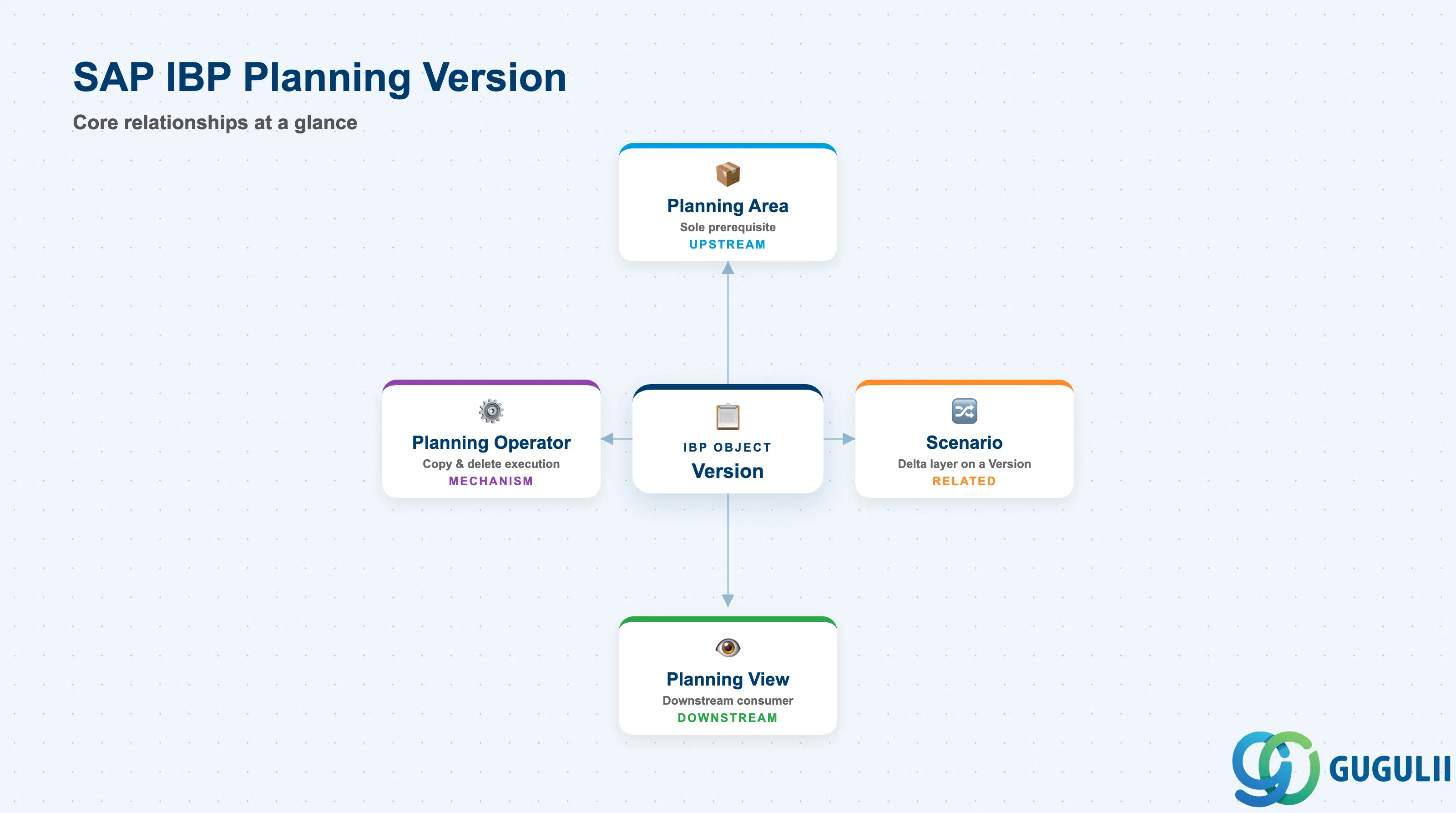
A Version holds no data of its own until it is created — it is a full copy of its source Planning Area’s data (master data and/or key-figure values, depending on configuration), frozen at the point of creation or last copy. It is a downstream dependent of Planning Area, not a peer configuration object: a Planning Area must already exist and be activated before any Version of it can be created.
| Aspect | Details |
|---|---|
| Role | A full, independently-stored copy/snapshot of an activated Planning Area’s data, used to hold an alternate plan (approved, working, what-if, or consensus) side by side with the Planning Area’s other Versions |
| Prerequisite | Planning Area only (IBP-A03-03) — a single-prerequisite object, like Key Figure and Time Profile, unlike Planning Area’s own four-way convergence |
| Where it’s configured | The Manage Versions and Scenarios app — Versions are created at Planning-Area-configuration time by an administrator, via the Planning Areas app, choosing Versions, then New; this is a deliberate configuration action, not something an end user spins up ad hoc |
| Downstream dependent | Planning View (IBP-A03-05) — a Planning View is built against a Planning Area, a specific Version, and a set of Key Figures; it is the display/edit layer through which a planner works with a chosen Version’s data |
| Classification | Not listed in the internal knowledge base’s Required/Optional Master table at all, despite having its own dedicated configuration settings and Notes-row caveat — a minor internal-source inconsistency, flagged rather than resolved by assertion. In practice, most productive Planning Areas run with at least a Baseline Version populated |
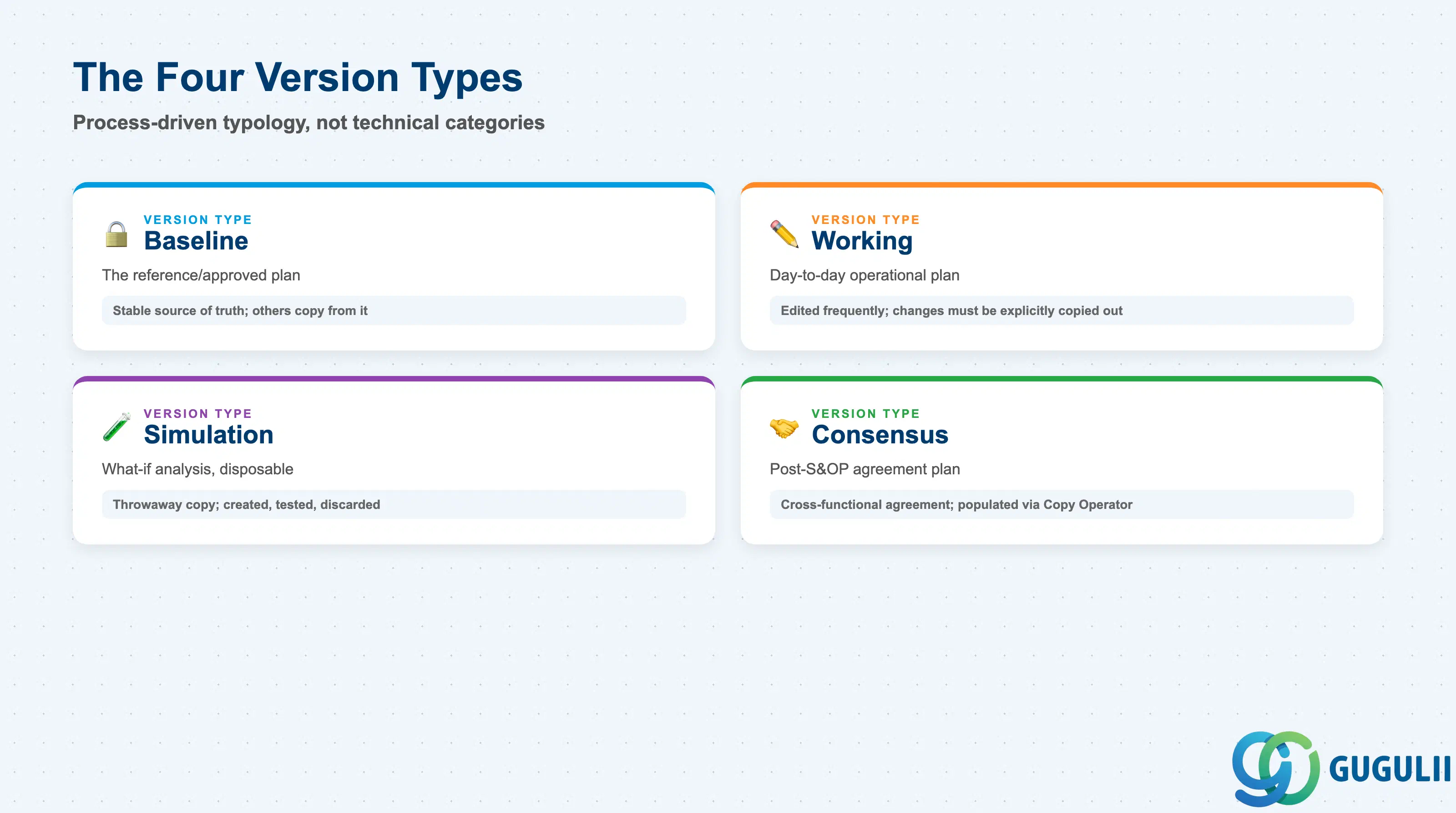
The four Version Types are not four different technical mechanisms — every Version is built and copied the same way under the hood. They are a process-driven typology: naming and usage conventions for how an organization applies the identical Version mechanism at different stages of its planning cycle. Getting the typology right matters because it sets expectations about who edits which Version, and when a Version’s numbers are safe to treat as “official.”
| Version Type | Purpose | Use Case | Key Behavior |
|---|---|---|---|
| Baseline | The reference/approved version | Storing the officially-approved plan | Treated as the stable source of truth; other Versions are typically copied from it, not the reverse |
| Working | The day-to-day operational version | Planners’ daily planning work | Edited frequently; changes here do not automatically reach other Versions — they must be explicitly copied out |
| Simulation | The what-if analysis version | Testing alternative assumptions without touching Baseline | A disposable, throwaway copy by design — created to test a scenario at the Version level, then discarded or discarded-and-recreated, not merged back automatically |
| Consensus | The integrated post-S&OP version | Holding the cross-functional plan after the Sales & Operations Planning approval cycle | Represents an organizational agreement point; typically populated by a Copy Operator run pulling from Working/Simulation once consensus is reached |
Design principle: These four names are conventions, not enforced technical categories — nothing stops a customer from creating additional Versions with other names for other purposes. The internal source’s own Notes-row caveat (“formulate a version strategy before go-live”) exists precisely because this naming/purpose design is a deliberate up-front decision, not something to grow organically after a Planning Area is already live with real data.
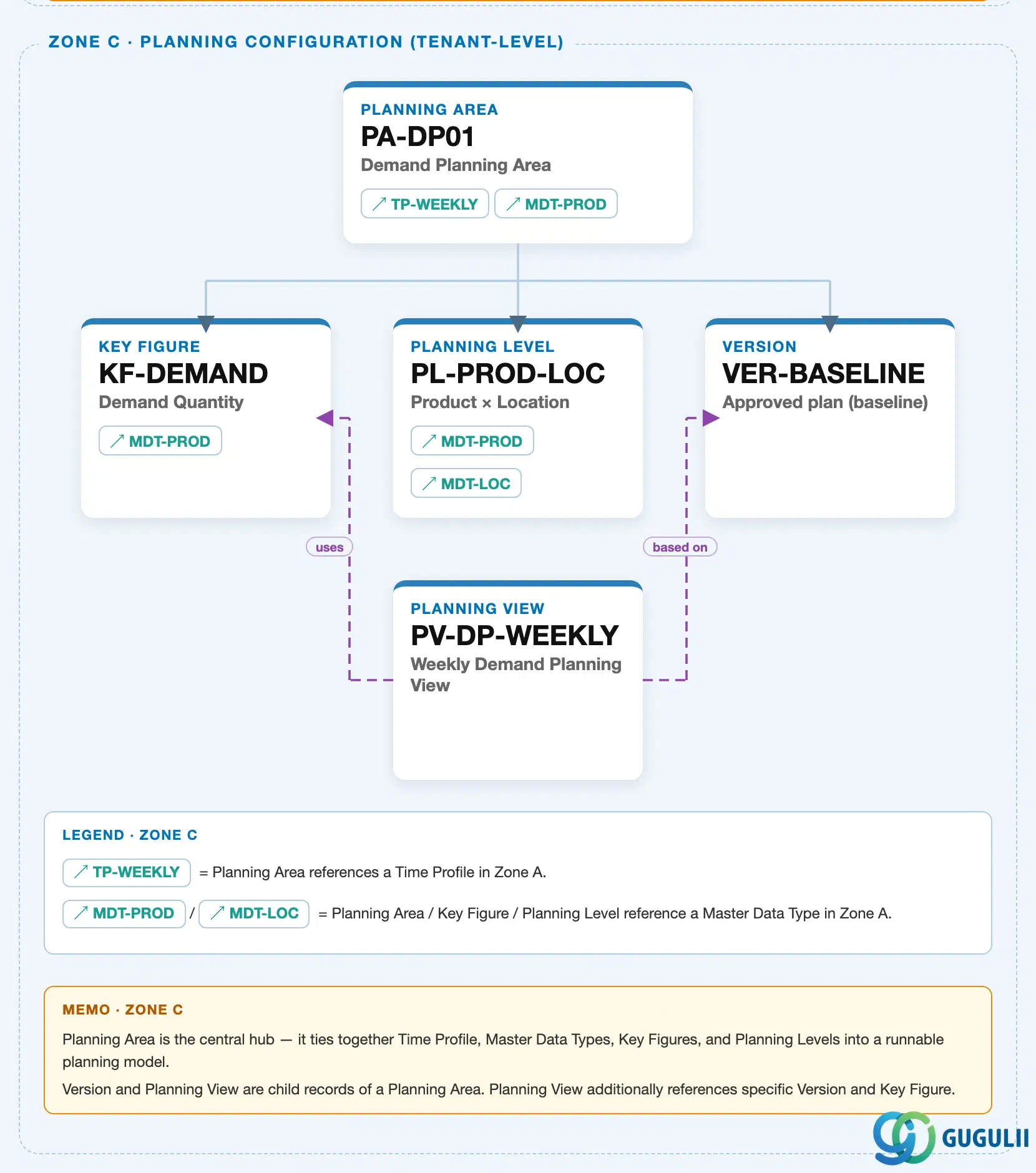
Data hierarchy with a concrete example
Client (SAP IBP Tenant)
   │
   └── Planning Area "PA-DP01" — Demand Planning Planning Area          (IBP-A03-03)
          │
          ├── Key Figure "KF-DEMAND" — Demand Quantity                    (IBP-A03-01)
          │
          ├── Planning Level "PL-PROD-LOC" — Product x Location            (IBP-A03-02)
          │
          ├── Version "VER-BASELINE" — Approved plan (baseline)            [this article's object]
          │
          └── Planning View "PV-DP-WEEKLY" — Weekly Demand Planning View   (IBP-A03-05)
Design principle: All Versions hang directly off the same activated Planning Area (1:N) as independent, sibling copies alongside Key Figure and Planning Level — none nests inside another, and none is “the real one” that others are variants of at the data-model level (Baseline is only the conventional source of truth, not a structurally privileged Version). The landscape’s Zone C shows only VER-BASELINE as the representative Version instance; the four Version Types (Baseline, Working, Simulation, Consensus) and the ad-hoc Scenario concept are covered in this article’s later sections (2.1-2.2), not in the org-hierarchy position shown here.
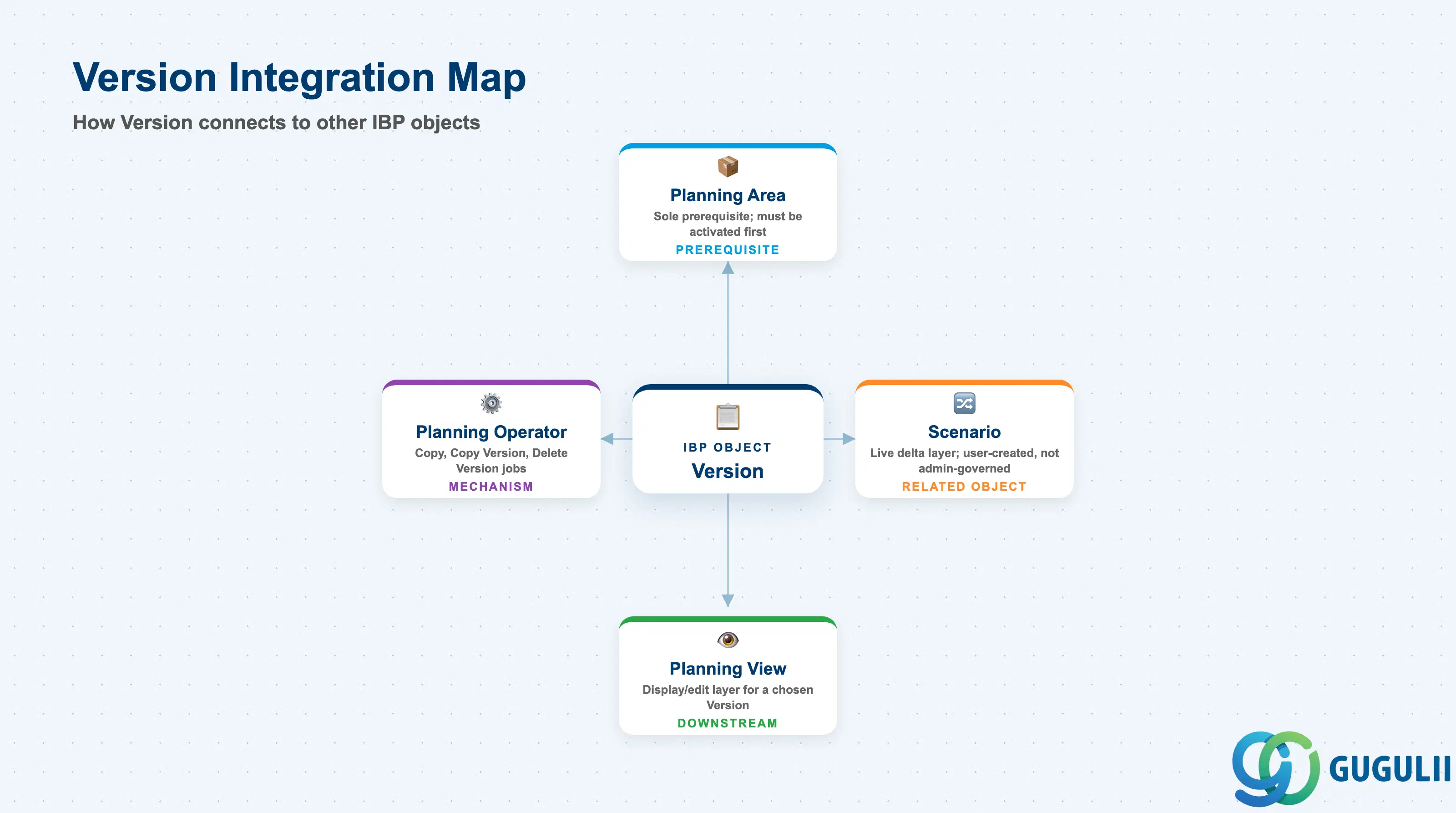
A Version does not stand alone — it exists only because a Planning Area was already activated, and everything a planner actually touches (Planning Views, Scenarios) is built on top of a specific Version.
| Object | Relationship | Practical Notes |
|---|---|---|
| Planning Area | Sole prerequisite — a Version is a full copy of one activated Planning Area’s data | Full mechanics in IBP-A03-03. A Planning Area routinely has many Versions; the Planning Area’s activation validates the Versions activated together with it. |
| Scenario | A conceptually related but architecturally distinct object — a live delta layer created ad hoc by an end user on top of a chosen Version | Not covered in a dedicated article this session; the Version-vs-Scenario distinction is covered in full in Section 2.2 of this article, since it is one of the most frequently asked practical questions about this object. |
| Planning View | Downstream consumer — a Planning View is built against a Planning Area, a specific Version, and a set of Key Figures | Full mechanics in IBP-A03-05 (next article) — this article treats Planning View only as a forward pointer: a planner opens a view scoped to “Working” to enter numbers, or to “Simulation” to test a what-if. |
| Planning Operator | Execution mechanism behind copying and deleting Version data — Copy Operator, Copy Version Operator, and Delete Version Operator all run as Planning Operator jobs | Full mechanics in a later Phase 4 article, IBP-A05-01 — this article treats the operators only from the Version-configuration side (Section 2.4). |
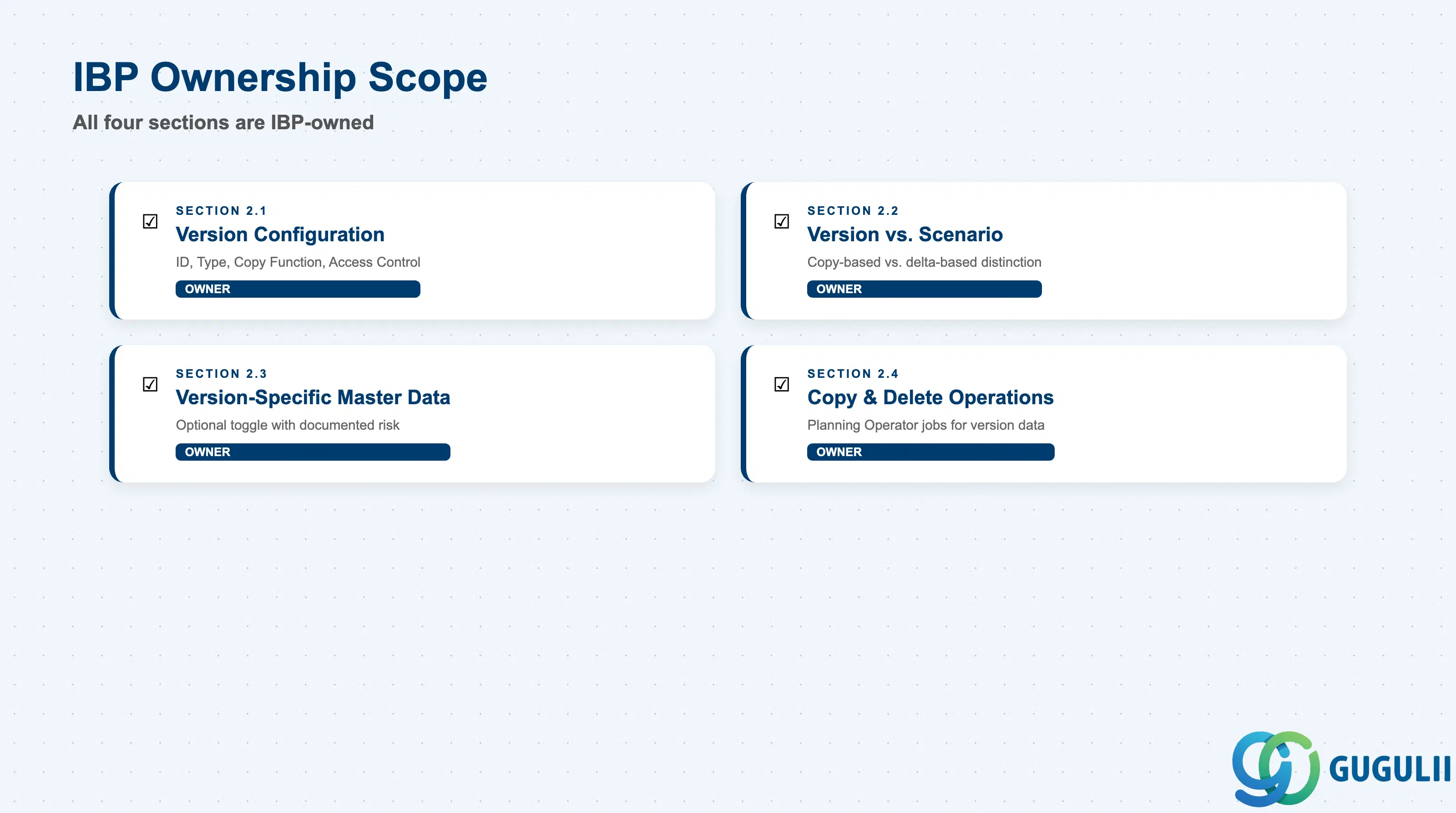
| Data Section | IBP Involvement | Notes |
|---|---|---|
| Version Configuration | ◎ Owner | The four core settings set when a Version is created: Version ID, Version Type, Copy Function, Access Control |
| Version vs. Scenario | ◎ Owner | Not a configuration field, but a distinction the consultant must be able to explain correctly — copy-based/fixed vs. delta-based/unlimited |
| Version-Specific Master Data (VSMD) | ◎ Owner | An optional, riskier configuration; documented data-loss risk if toggled reactively rather than planned up front |
| Copy & Delete Operations | ◎ Owner | Copying and deleting Version data is executed as a Planning Operator job, not an instant UI action |
Legend: ◎ = Owner / Critical
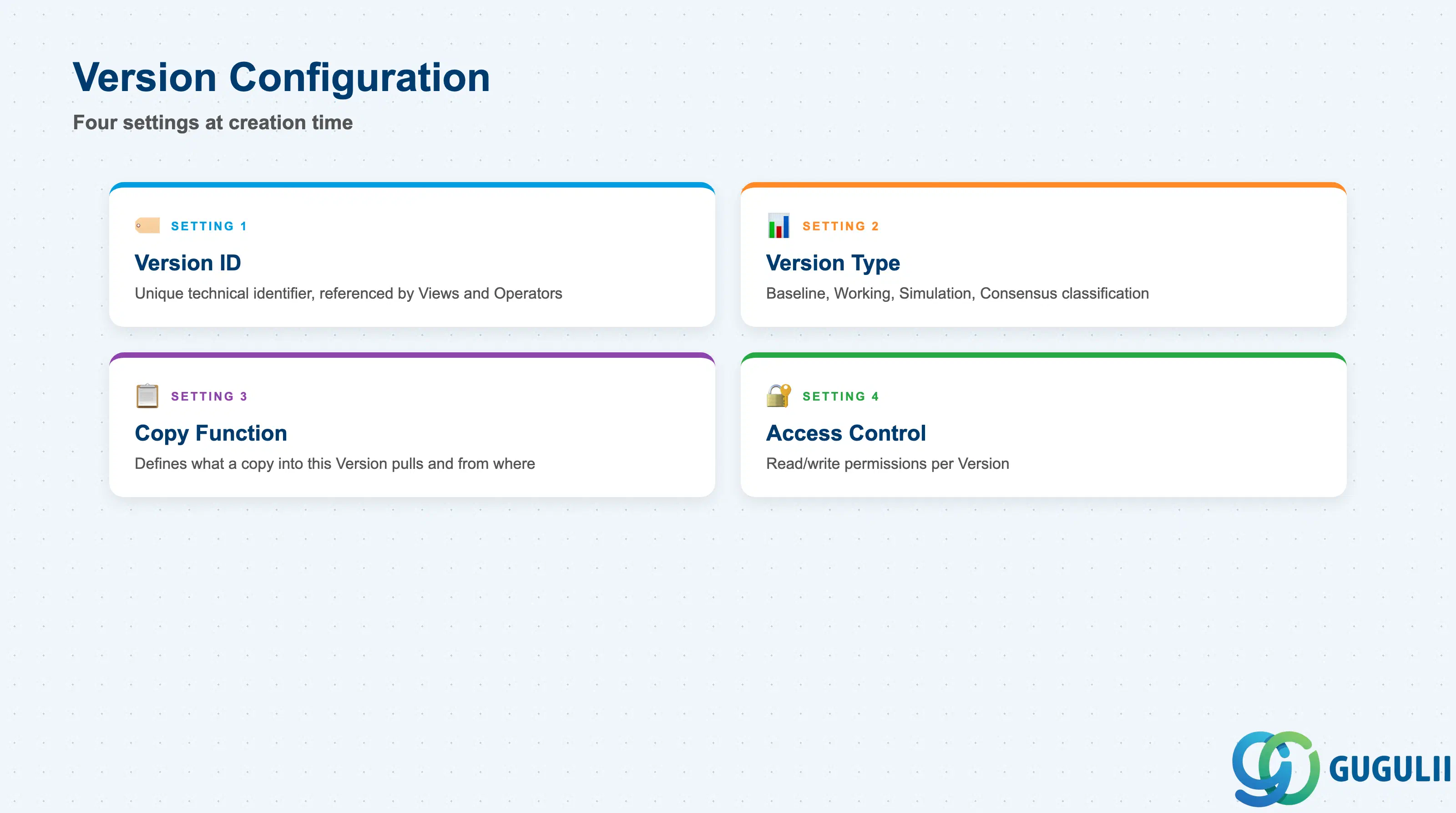
These are the four settings the internal knowledge base’s Version settings table lists — set when a Version is created inside the Manage Versions and Scenarios app.
| Field | Description | Practical Usage |
|---|---|---|
| Version ID | Unique technical identifier for the Version | Keep naming consistent with the Version Type it represents (e.g. BASELINE01, WORKING01) — other objects (Planning Views, Copy Operator profiles) reference this ID directly, so avoid renaming after go-live. |
| Version Type | Classifies the Version as Baseline, Working, Simulation, Consensus, or another organization-defined category | This is a labeling/process convention, not a technical constraint (Section 1.2) — align it with how the customer’s planning process actually names its stages, rather than forcing the four textbook names onto a process that uses different terminology. |
| Copy Function | Configuration governing how data is copied from another Version into this one | This is the field-level configuration counterpart to the Copy Operator described in Section 2.4 — defines what a copy into this Version pulls and from where. |
| Access Control | Read/write permission settings for the Version | Use this to prevent planners from accidentally editing Baseline or Consensus directly — a common real-world control is read-only Baseline/Consensus, read-write Working. |
Notes-row caveat (internal source): “Formulate a version strategy before go-live.” Version design — how many Versions, what each represents, who can write to which — is something to plan deliberately up front. Retrofitting version structure (especially enabling Version-Specific Master Data, Section 2.3) after a Planning Area has gone live and accumulated data carries real, documented risk.
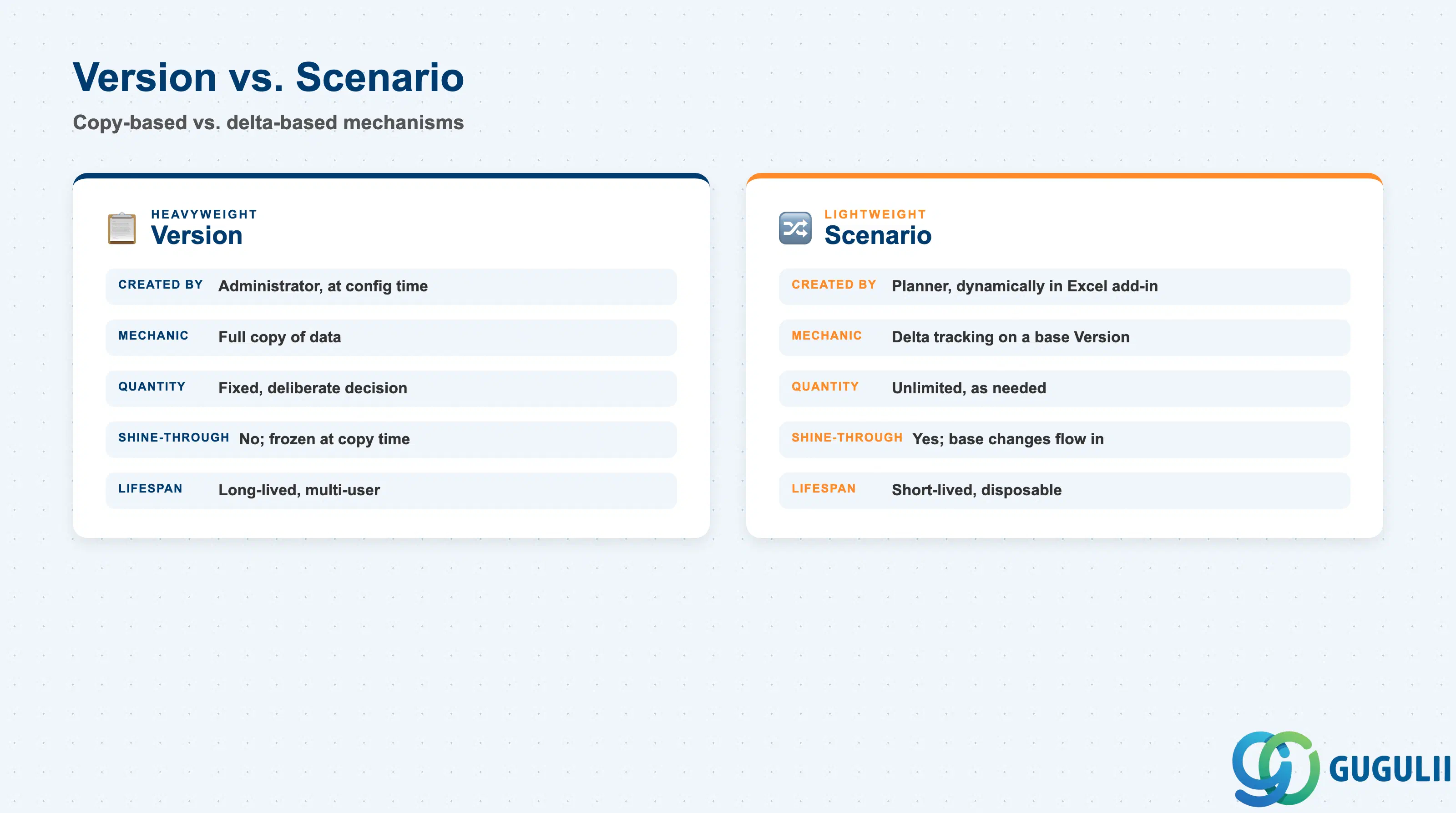
This distinction is not covered in the internal knowledge base at all, but it is one of the most-asked, most practically relevant questions about this object in public SAP IBP documentation and community discussion — a consultant will be asked about it constantly. Versions and Scenarios can both serve “what-if” purposes, but they are architecturally very different mechanisms.
| Aspect | Version | Scenario |
|---|---|---|
| Created by | An administrator, at Planning-Area-configuration time | A planner or end user, dynamically, while working in the system |
| How it’s created | Planning Areas app → Versions → New | IBP Excel add-in → Scenarios group → Create |
| Quantity | Fixed — the number of Versions is a deliberate configuration decision | Unlimited — created as needed, no fixed quantity limit |
| Underlying mechanic | A copy (or an overlay of multiple copies) of data | Delta tracking — the system records changed key-figure values as delta records layered on top of a base Version |
| Behavior when the source changes | No automatic shine-through — a Version is a frozen-at-copy-time snapshot until explicitly re-copied | Automatic shine-through — base-Version changes flow into the Scenario automatically, unless the Scenario has its own conflicting delta for that value, in which case the Scenario’s delta takes precedence |
| Typical lifespan | Long-lived, multi-user, governed | Short-lived, single-user or shared ad hoc, disposable |
In short: Versions are heavyweight, administrator-governed, copy-based, long-lived plans; Scenarios are lightweight, user-created, delta-based, short-lived what-ifs layered on top of a Version. Both can answer “what if,” but a Simulation-type Version and an ad hoc Scenario are not the same mechanism and should not be conflated when scoping or explaining this object to a client.
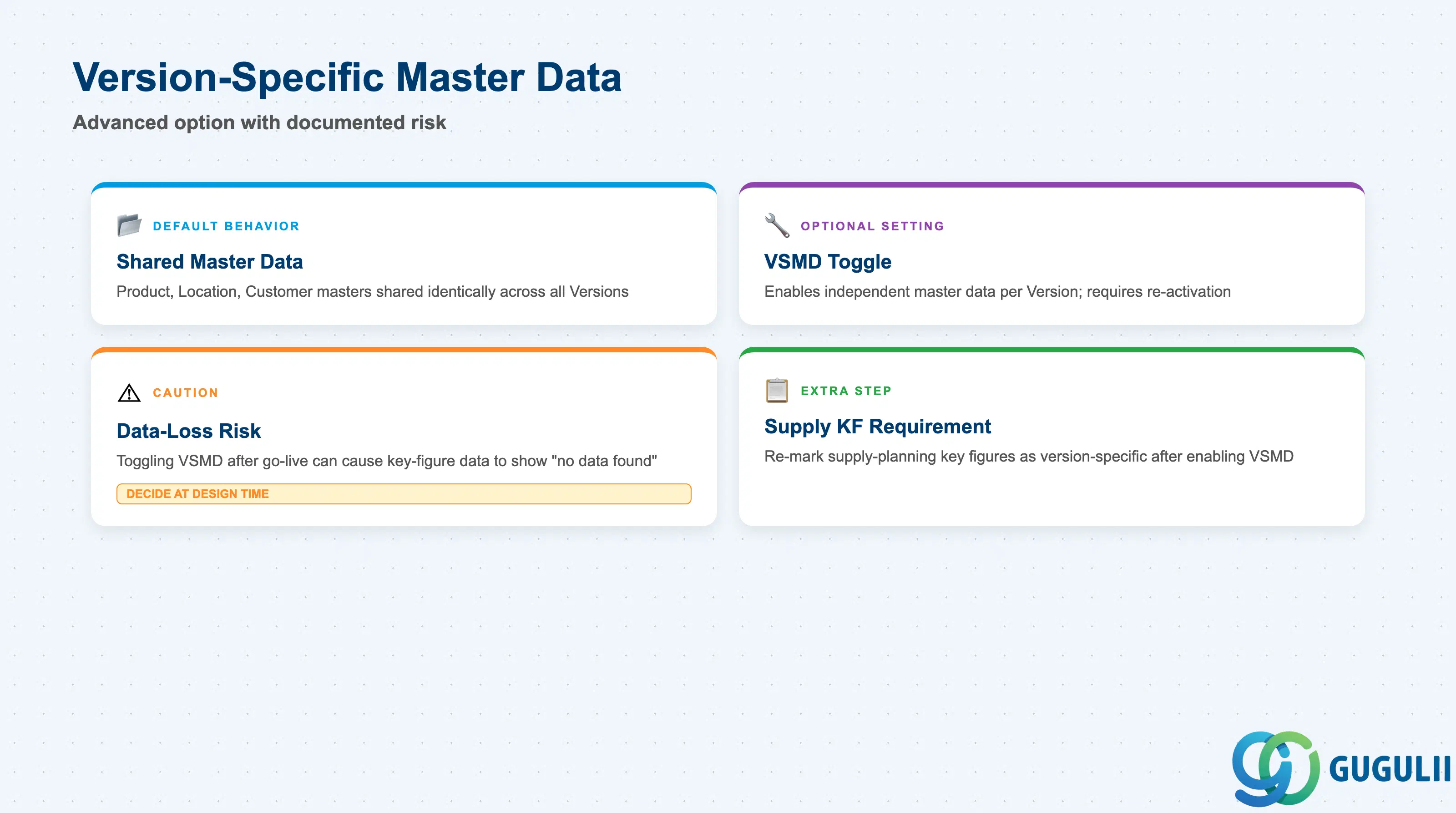
By default, master data is version-independent — every Version of a Planning Area shares the same Product, Location, and Customer master (and Attributes). Key-figure (transactional/planning) data, by contrast, is inherently version-specific by design: this is the entire point of having multiple Versions, since each one stores its own distinct key-figure values. VSMD is an optional configuration that changes the master-data side of this default — presented here as an advanced, caution-flagged option, not the default behavior.
| Field / Concept | Description | Practical Usage |
|---|---|---|
| Default: shared master data | Product, Location, Customer master and their Attributes are, by default, one shared set visible identically across all Versions | This is the normal state for most Versions — do not enable VSMD unless a Version genuinely needs to diverge from Baseline’s master data. |
| Version-Specific Master Data (VSMD) toggle | An optional setting, enabled in the Configuration app by selecting Version, choosing the target Planning Area and Version, and checking “Version-Specific Master Data,” followed by re-activating the Planning Area | Once enabled, master data can be modified independently within that one Version — e.g. simulating a proposed product hierarchy change without touching Baseline’s actual master data. Master data records must then be explicitly copied from Baseline into the new Version. |
| Documented data-loss risk | Switching a Version’s configuration to enable VSMD after the fact, then re-activating the Planning Area, can result in existing key-figure data for that Version being effectively lost or showing “no data found” | This is a documented, named failure mode, not an abstract best-practice platitude — it directly corroborates the internal source’s “formulate a version strategy before go-live” caveat. Decide VSMD needs at design time, not reactively on a live Version. |
| Supply-planning key figure requirement | For Planning Areas enabled for time-series-based supply planning, turning on VSMD for a Version also requires explicitly re-marking the relevant supply-planning key figures as version-specific | An extra, non-obvious step beyond checking the VSMD box — confirm this requirement applies before enabling VSMD on a supply-planning Planning Area. |
| Performance guidance | Using shared Baseline key figures as reference key figures for other Versions is the recommended default; version-specific key figures and VSMD should be used selectively | Reserve VSMD for Versions that genuinely need to diverge (e.g. a what-if master-data simulation), not applied broadly across all Versions by default. |
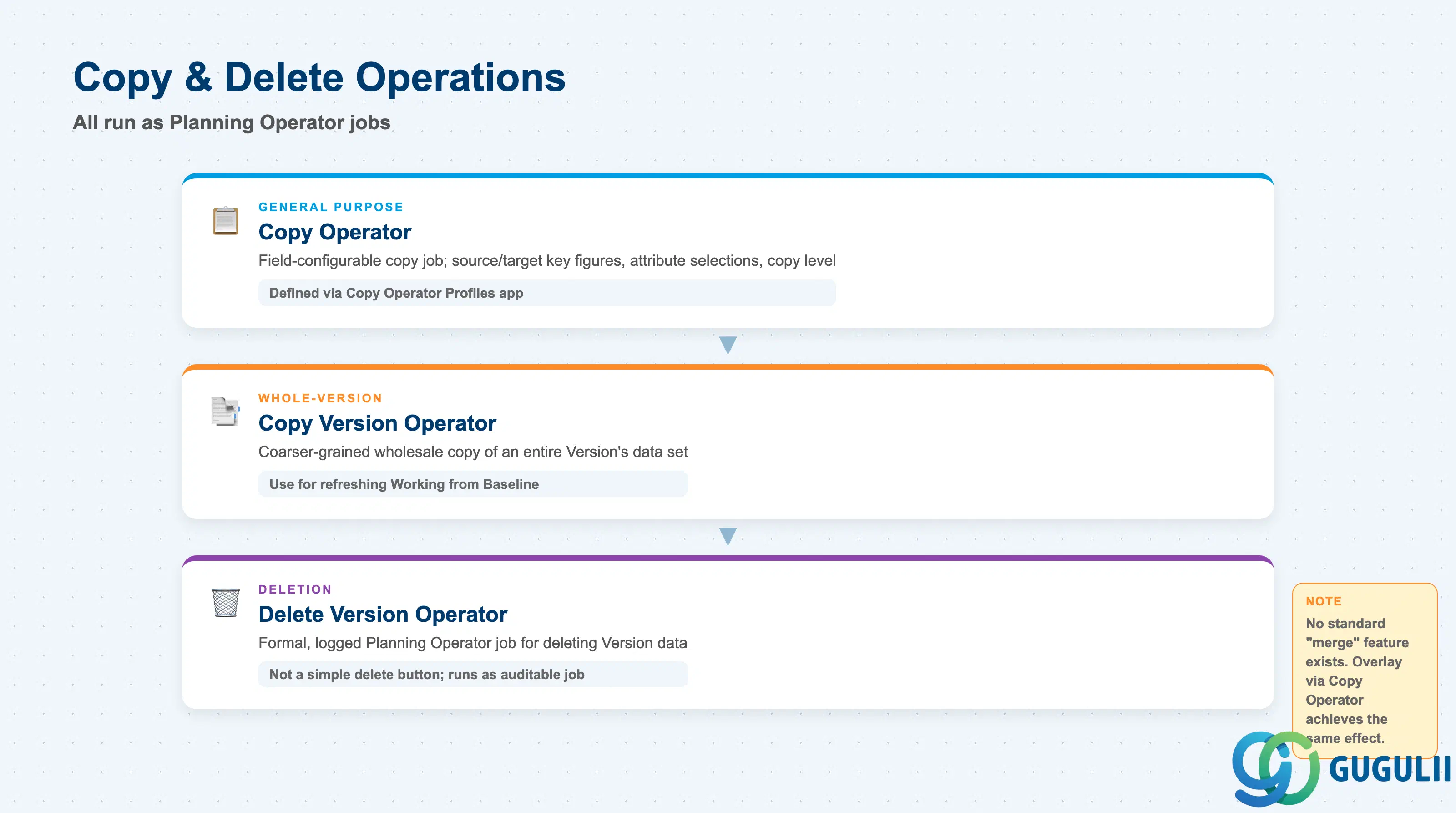
Significant Version-data operations in SAP IBP are implemented as auditable, schedulable Planning Operator jobs — not instant, one-click UI actions. No public source found this session documents a distinctly-named “merge” feature for Versions; what gets colloquially called “merging” two Versions’ data is better understood as a Copy Operator run with an overlay of multiple source copies onto one target Version.
| Field / Concept | Description | Practical Usage |
|---|---|---|
| Copy Operator | A general, field-configurable copy job (source/target key figures, attribute selections, copy level) defined via the Copy Operator Profiles app and run on-demand or scheduled | The general-purpose mechanism for copying key-figure values and/or master data between Versions, or between two Planning Areas. Corresponds directly to the internal source’s Operator Type entry “Copy Operator — inter-version copy.” |
| Copy Version Operator / Copy Version and Scenarios Operator | A more specialized, coarser-grained operator for copying an entire Version’s (or Version+Scenario’s) data set wholesale from a source Version to a target Version | Use for a whole-Version copy (e.g. refreshing Working from Baseline); the precise functional boundary against the general Copy Operator was not independently verified this session — treat these as two related but distinct copy mechanisms rather than one universal rule. |
| Delete Version Operator | A formal, logged Planning Operator job that deletes a Version’s data | Deleting a Version is not a simple delete button in Manage Versions — it runs as an auditable operator job, consistent with how significant version-data operations are generally implemented in SAP IBP. |
| Cross-Planning-Area copy constraint | If a copy is run between two different Planning Areas rather than between Versions within the same Planning Area, the time selection and Version/Scenario cannot be changed at execution/schedule time for that run | Plan cross-Planning-Area copy jobs with this constraint in mind — it is not adjustable after the fact for a given scheduled run. |
| No standard “merge” feature | No public source uses “merge” as a documented SAP IBP term for combining two Versions’ data | Describe the effect of “merging” to a client as what a Copy Operator run with an overlay of multiple source copies achieves — do not present it as a separate, named Merge Version feature. |
Prerequisite: All three operators (Copy Operator, Copy Version Operator, Delete Version Operator) execute as Planning Operator jobs — full execution mechanics (scheduling, monitoring, job chains) are covered in IBP-A05-01 (Planning Operator, Phase 4).
| ID | Category | Title |
|---|---|---|
| ibp-001 | Overview | What is SAP IBP? |
| ID | Category | Title |
|---|---|---|
| ibp-a01 | Overview | SAP IBP Master Data: Overview, Hierarchy & Relationships |
| ibp-a02-01 | Master Data | SAP IBP Master Data Types |
| ibp-a02-02 | Master Data | SAP IBP Attribute |
| ibp-a02-03 | Master Data | SAP IBP Time Profile |
| ibp-a02-05 | Master Data | SAP IBP Location Master |
| ibp-a03-01 | Master Data | SAP IBP Key Figure |
| ibp-a03-02 | Master Data | SAP IBP Planning Level |
| ibp-a03-03 | Master Data | SAP IBP Planning Area |
| ibp-a03-04 | Master Data | SAP IBP Planning Version 📍 |
| ibp-a03-05 | Master Data | SAP IBP Planning View |
| ibp-a04-01 | Master Data | SAP IBP Integration Model |
| ibp-a05-01 | Master Data | SAP IBP Planning Operator |
| ID | Category | Title |
|---|---|---|
| ibp-b01 | Overview | SAP IBP Transactions: Process Flow, Hierarchy & Relationships |