Title here
Summary here

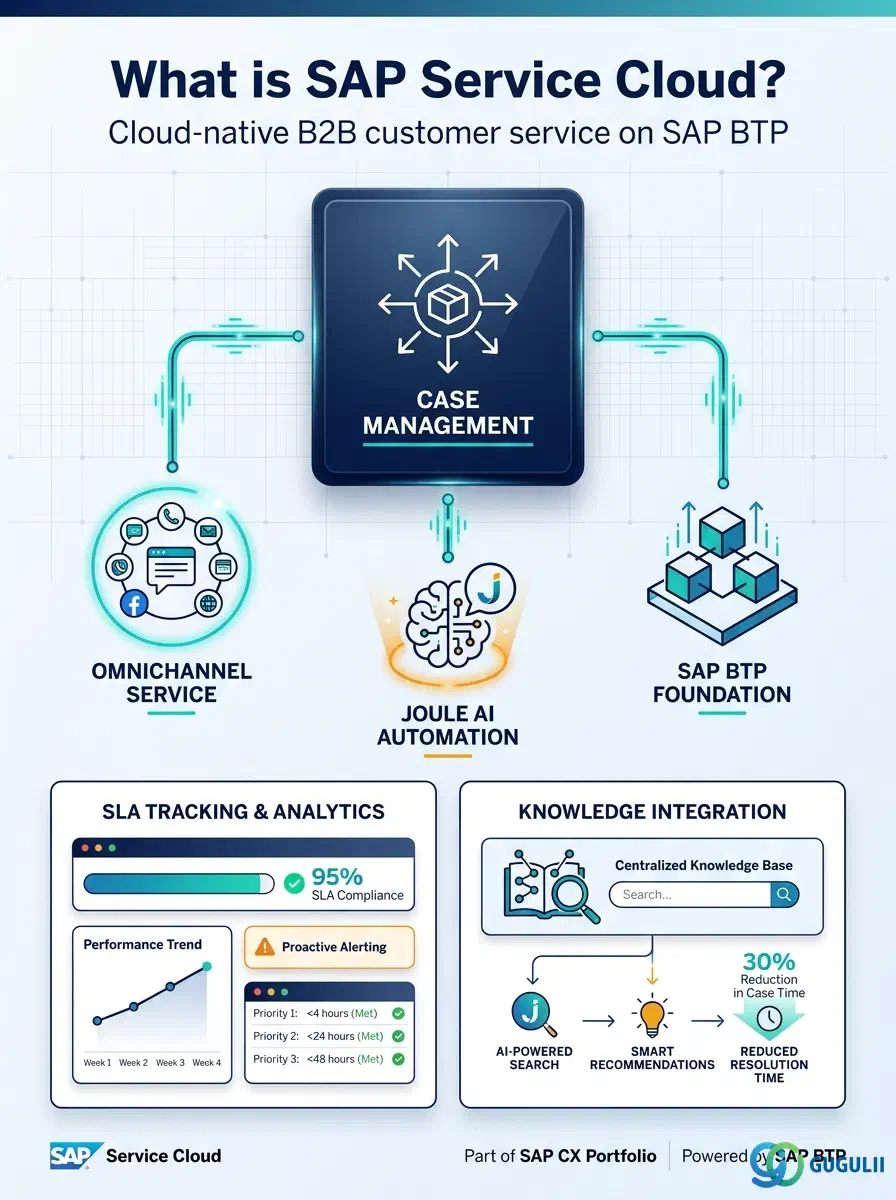
SAP Service Cloud Version 2 (Service Cloud V2) is a cloud-native B2B customer service platform built on SAP BTP and HANA Cloud. It is the designated successor to SAP Cloud for Customer (C4C), commonly referred to as “Service Cloud V1.” V2 is a full reimplementation — there is no upgrade path — and V1 receives no new features as it approaches end-of-life.
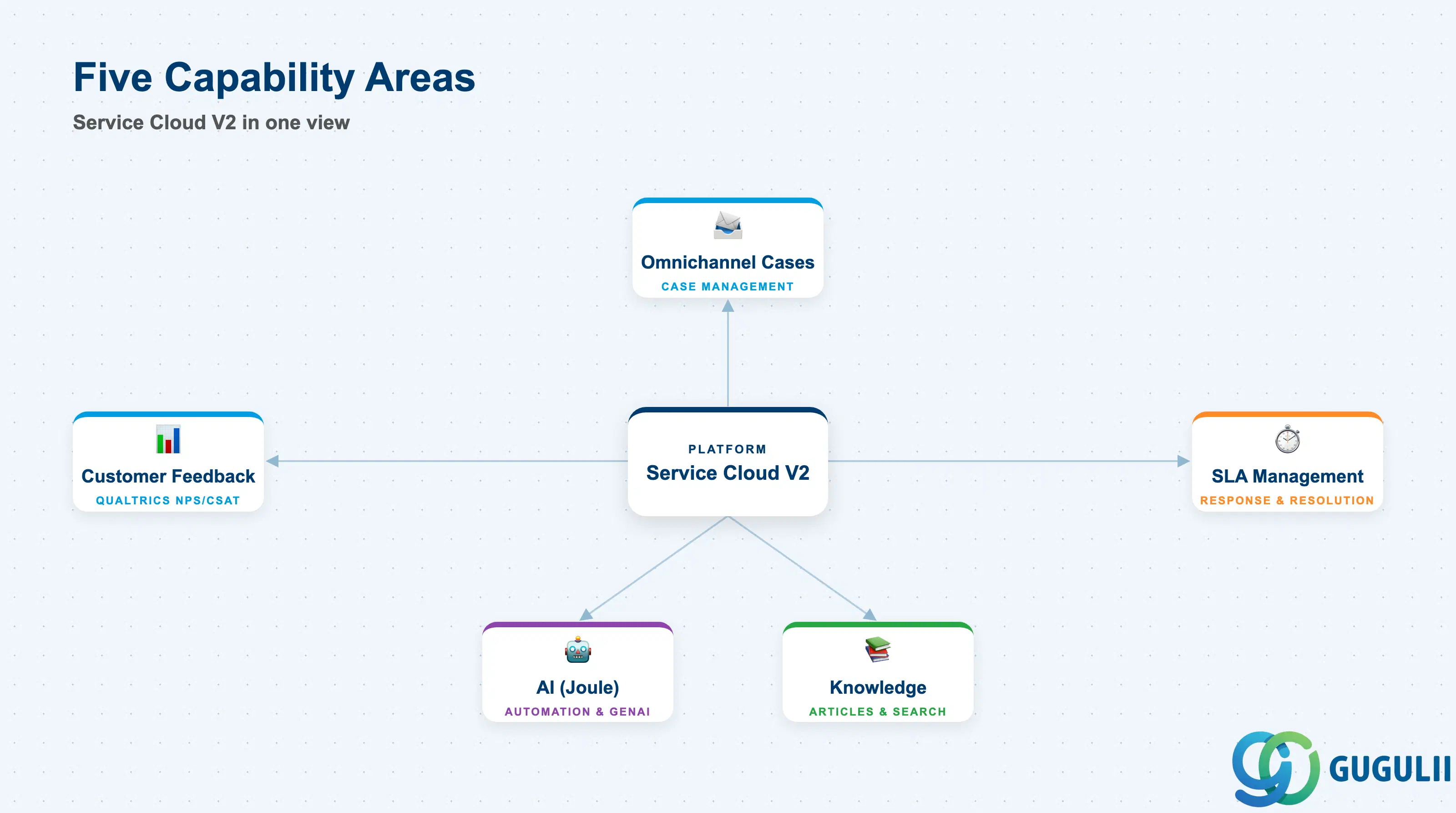
The platform organizes its capabilities into five functional areas: omnichannel case management, SLA management, knowledge integration, AI automation, and customer feedback via Qualtrics.
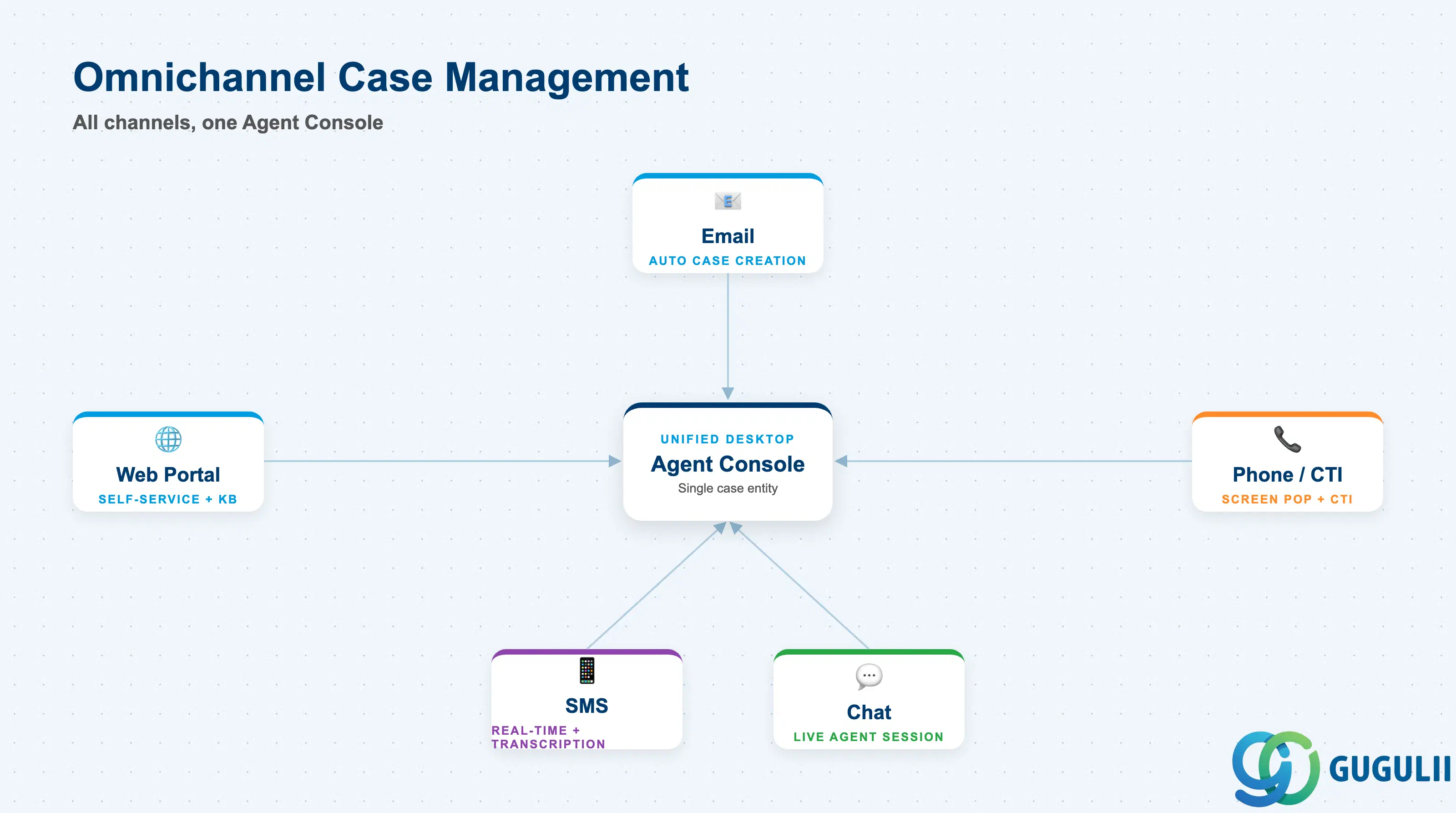
Service Cloud V2 consolidates customer interactions from all inbound channels into a single case entity. Agents work from the Agent Console — a unified desktop — without switching applications.
| Channel | Details |
|---|---|
| Formatted text, inline images; automatic case creation from inbound email; default Case Type assigned per email address | |
| Phone / CTI | Widget-based computer telephony integration; screen pop on inbound call; automatic customer identification |
| Chat | Third-party chat provider integration; live agent session within Agent Console |
| SMS | Real-time inbound and outbound; transcription support |
| Web Portal | Customer self-service portal with case submission and knowledge base access |
The Agent Inbox (released Q1 2026) provides a unified real-time command center that consolidates cases, tasks, and service orders in a single view with visual SLA risk indicators, case volume by priority, and age distribution — giving agents an at-a-glance workload picture.
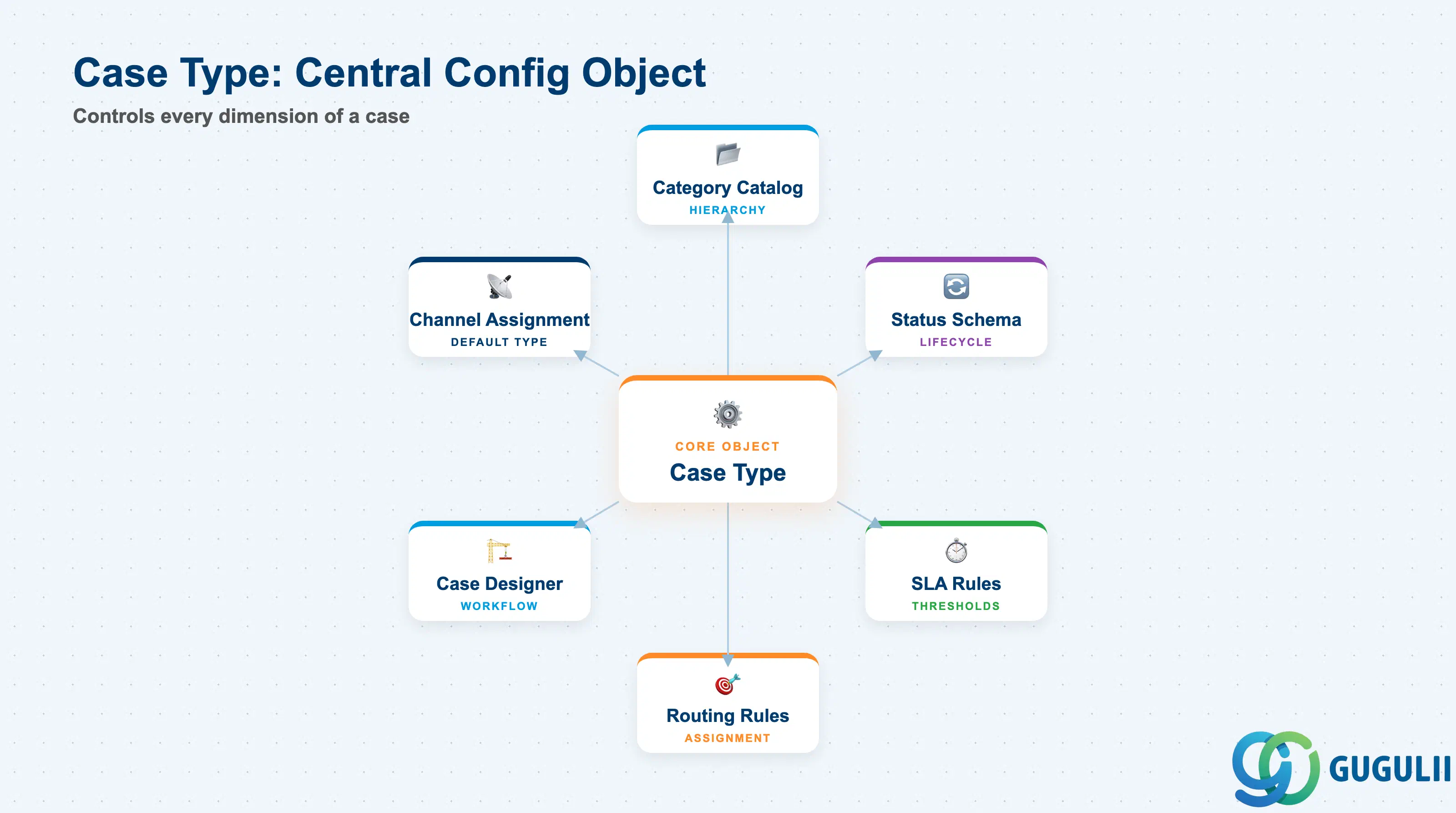
Case Type is the central configuration object that controls the entire case experience. See Section 2 for how Case Type governs category catalogs, status schemas, SLA rules, routing rules, and Case Designer workflows.
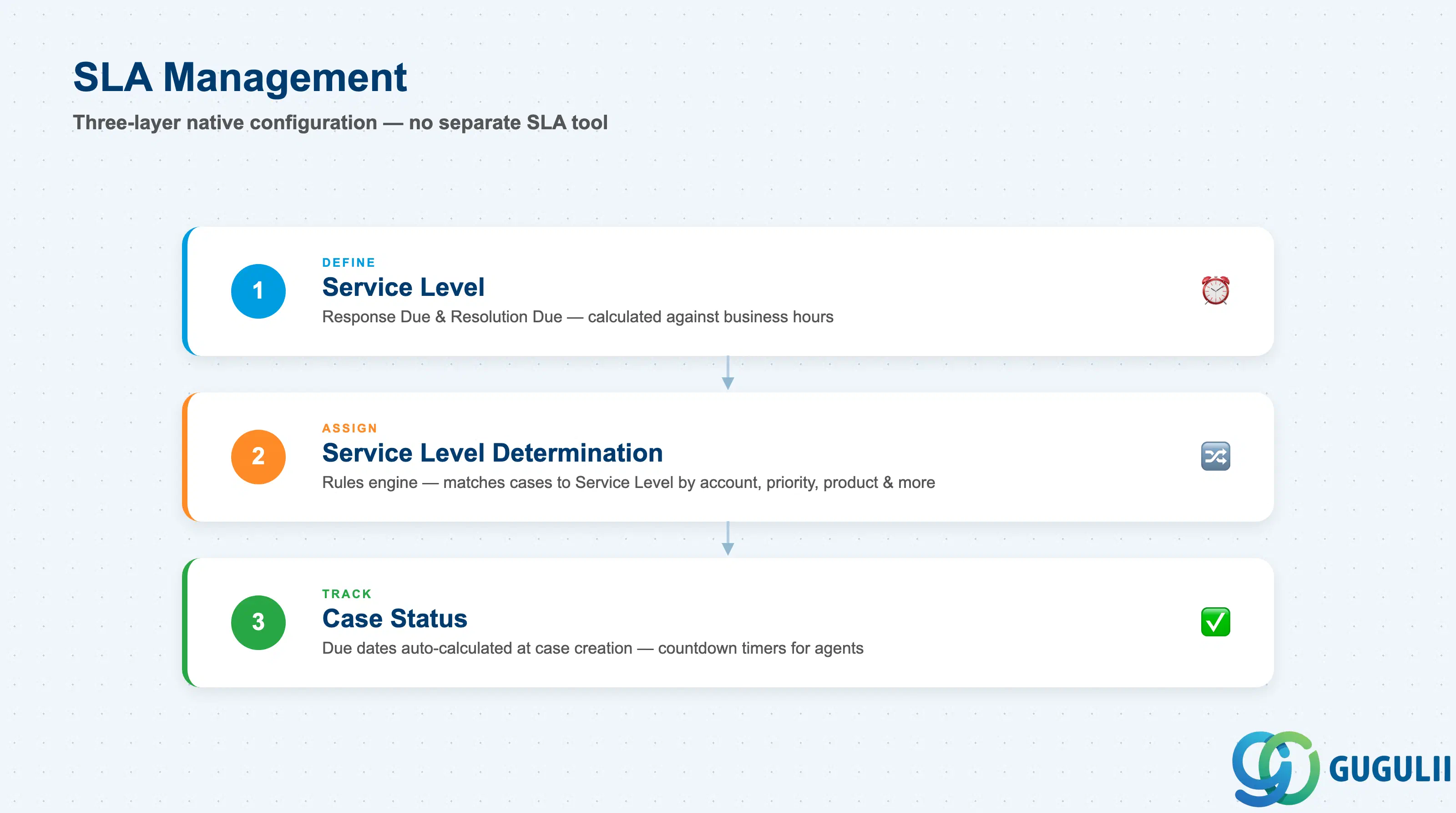
SLA management is embedded natively in the Case entity — no separate SLA tool is required.
| SLA Configuration Object | Description |
|---|---|
| Service Level | Defines threshold values: Response Due timeframe and Resolution Due timeframe, calculated against business hours |
| Service Level Determination | Rules engine that assigns the correct Service Level to a case based on condition attributes |
| Case Status | Response Due Date and Resolution Due Date are auto-calculated at case creation when a Service Level is matched |
SLA determination conditions available for rule matching: Account, Country, ABC Classification, Case Status, Priority, Service Team, Product, Product Category, Service Category, and custom fields.
Configuration path: Settings → Case Management → Service Levels (define thresholds) + Settings → Case Management → Service Level Determination (define selection rules).
Agents see countdown timers on each case. Managers access compliance dashboards. The SLA status can also be used as a trigger in Autoflow automation (for example, auto-escalate when SLA reaches at-risk threshold). The Q1 2026 Agent Inbox adds SLA risk indicators at the inbox level, allowing agents to prioritize before opening individual cases.
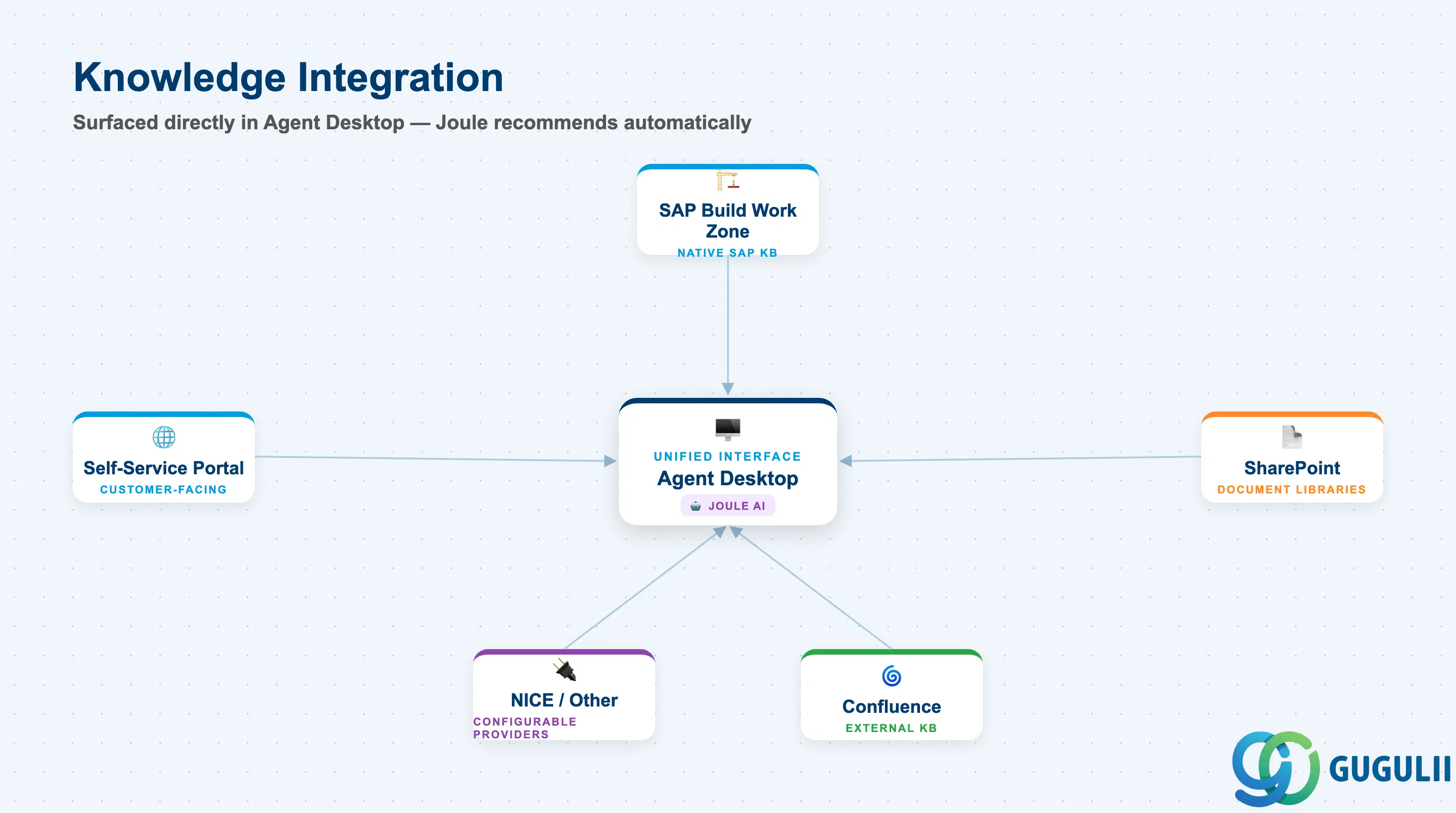
Service Cloud V2 surfaces knowledge articles directly within the Agent Desktop, reducing the need to search external systems during case handling.
| Knowledge Source | Notes |
|---|---|
| SAP Build Work Zone (Solution Finder) | Native SAP knowledge platform; deep integration with Agent Desktop |
| SharePoint | External document libraries accessible from Agent Desktop |
| Confluence | External knowledge base integration |
| NICE | External knowledge provider |
| Other configurable providers | Extensible via Knowledge Base Provider configuration |
Joule-powered recommendations surface relevant articles automatically based on case context — agents do not need to manually search in standard configuration. From the customer side, the self-service portal exposes the same knowledge base for first-contact resolution without agent involvement.
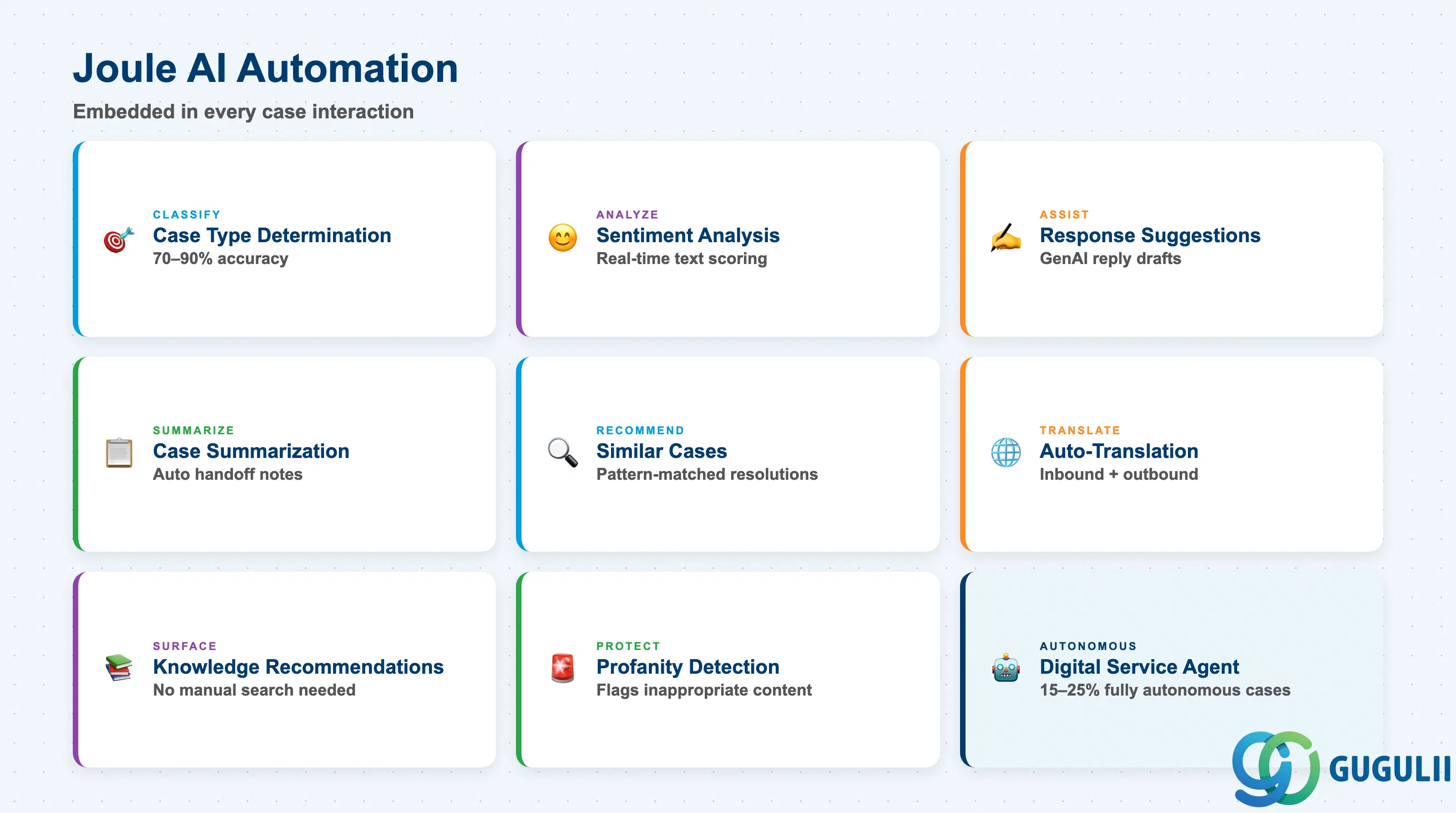
Joule is SAP’s conversational AI layer embedded in Service Cloud V2. It automates routine case handling tasks and provides agents with real-time intelligence.
| Joule Feature | Description |
|---|---|
| Case Type Determination | ML classifies incoming cases to the correct Case Type at creation; 70–90% accuracy, improving to 85–90% within 3–4 months as agent feedback refines the model |
| Sentiment Analysis | Real-time analysis of customer interaction text |
| Response Suggestions | GenAI-generated reply drafts for agents to review and send |
| Case Summarization | Automated summary of case history for agent handoffs |
| Similar Case Recommendation | Surfaces resolved cases with matching patterns for faster resolution |
| Auto-Translation | Translates incoming requests and outgoing replies across languages |
| Profanity Detection | Flags inappropriate content in inbound interactions |
| Knowledge Recommendations | Relevant knowledge articles surfaced without manual search |
| Digital Service Agent | Autonomous end-to-end case resolution for routine requests (handles 15–25% of cases fully autonomously); escalates complex cases to human agents |
| Joule Studio | Low-code platform for building custom AI agents beyond standard capabilities |
Licensing note: Joule requires an SAP AI Foundation entitlement on BTP, which is separate from the Service Cloud V2 base license. Some newer contracts include basic Joule features; advanced custom agents via Joule Studio may incur additional cost.
Planned 2026 releases: Three autonomous Joule service assistants are planned for GA in November 2026 — a customer-facing Self-Service Assistant, a Case Management Assistant (routing, resolution, follow-up), and a Service Management Assistant (service order creation and technician dispatch spanning Service Cloud V2 and S/4HANA).
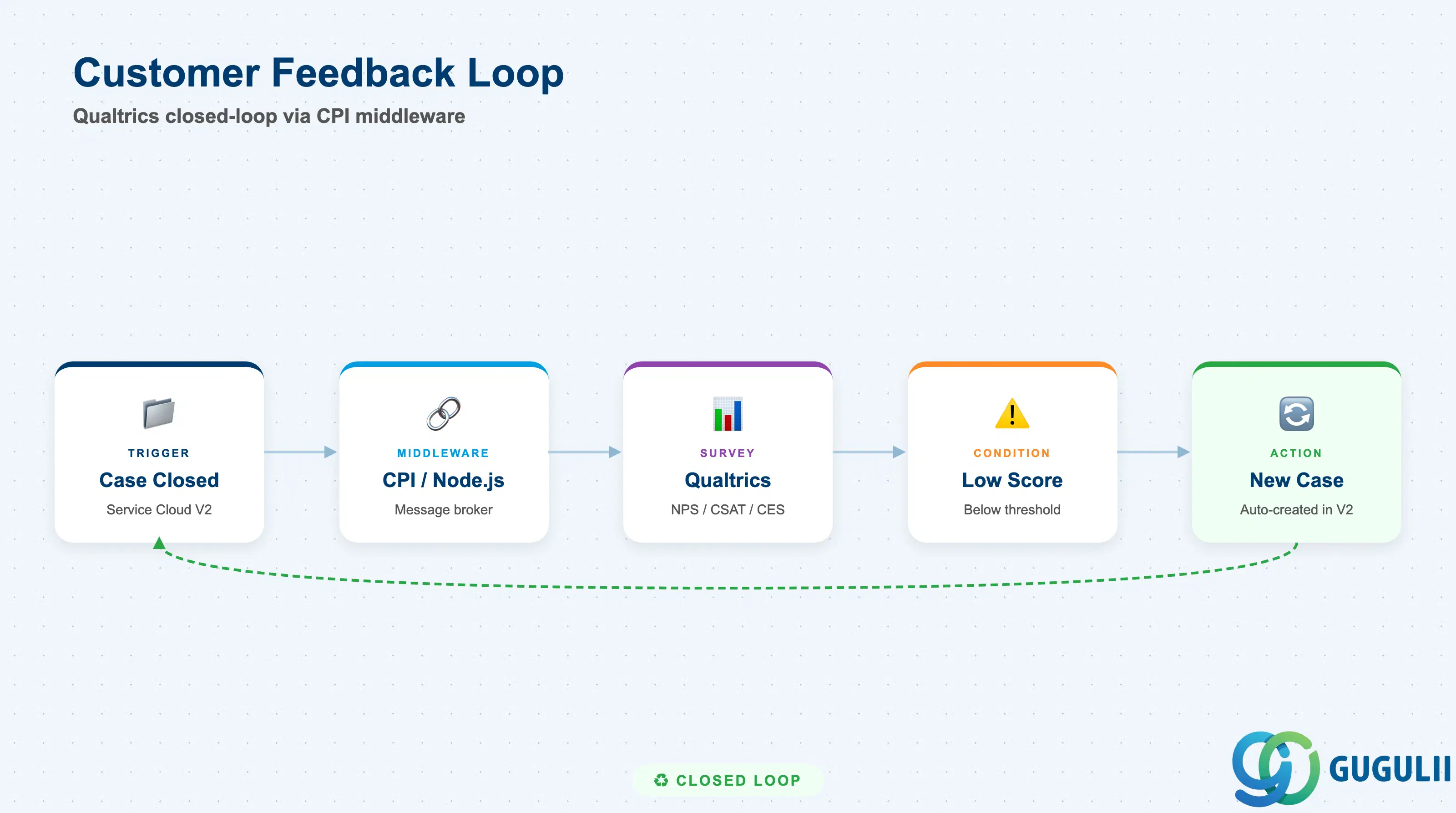
Service Cloud V2 integrates with SAP Experience Management (Qualtrics) to capture post-case customer feedback.
| Integration Point | Details |
|---|---|
| Trigger event | Case closure in Service Cloud V2 automatically triggers survey distribution |
| Survey types | NPS, CSAT, CES |
| Technical architecture | SAP Cloud Integration (CPI) / Node.js as message broker between Qualtrics and Service Cloud V2 |
| Prepackaged content | Available on SAP API Business Hub (Qualtrics Integration with SAP Sales and Service Cloud V2) |
| Closed-loop | Low survey scores auto-trigger a new service case in Service Cloud V2 |
Configuration path: Settings → Business Flow → Feedback → Add New Rule (for Case object); the email channel used for survey distribution must be flagged for Feedback association.
Technical setup requirement: The Qualtrics survey must include a contextId embedded data field (populated from URL) as a mandatory placeholder for the integration to function.
Ownership boundaries to address in requirements definition: Qualtrics survey content and distribution are owned by the Qualtrics / CX team; Service Cloud V2 owns the trigger event (case closure) and the action item creation from low scores.
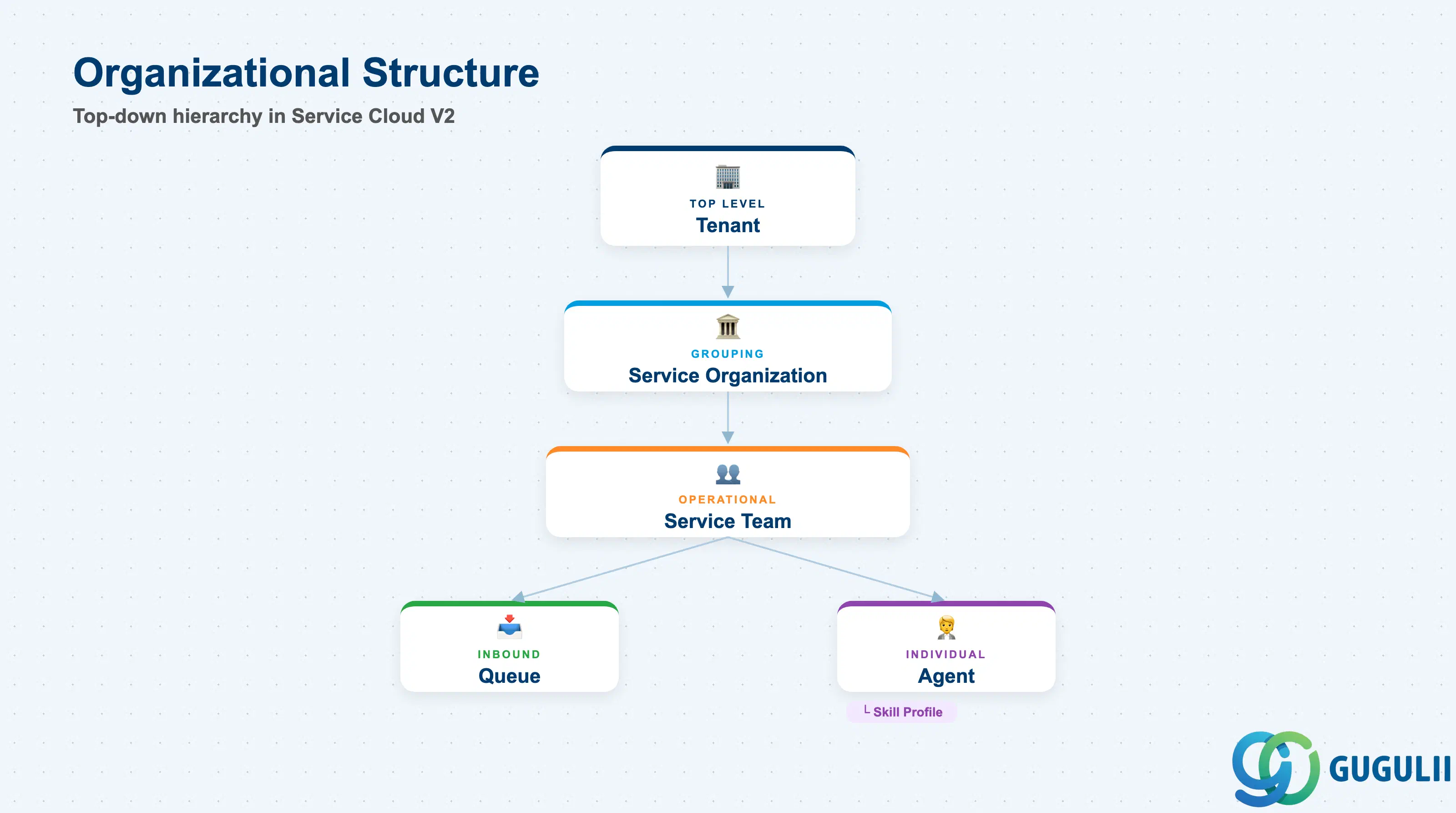
Service Cloud V2 organizes its configuration and operational data within a tenant structure that maps to your enterprise’s service organization.
| Organizational Unit | Description |
|---|---|
| Tenant | Single Service Cloud V2 instance; BTP subaccount-level isolation |
| Service Organization | Top-level grouping for service teams; used in SLA determination and routing |
| Service Team | Operational group of agents; used in case routing rules and SLA determination |
| Queue | Channel-level virtual container; inbound interactions land in a queue before routing to a team or agent |
| Agent (Employee) | Individual service representative; assigned to one or more service teams; has a business role and skill profile |
| Skill Profile | Agent capability set evaluated during skills-based routing to match cases to the most qualified agent |
Relationship structure (top-down):
Tenant
└── Service Organization
    └── Service Team
        ├── Queue (one or more, per channel)
        └── Agent
            └── Skill Profile
Key design decision: Define your service team and queue structure before configuring Case Types. Routing rules reference service teams as targets, and SLA determination rules reference service teams as conditions. Changes to team structure after go-live require re-evaluation of routing and SLA rules.
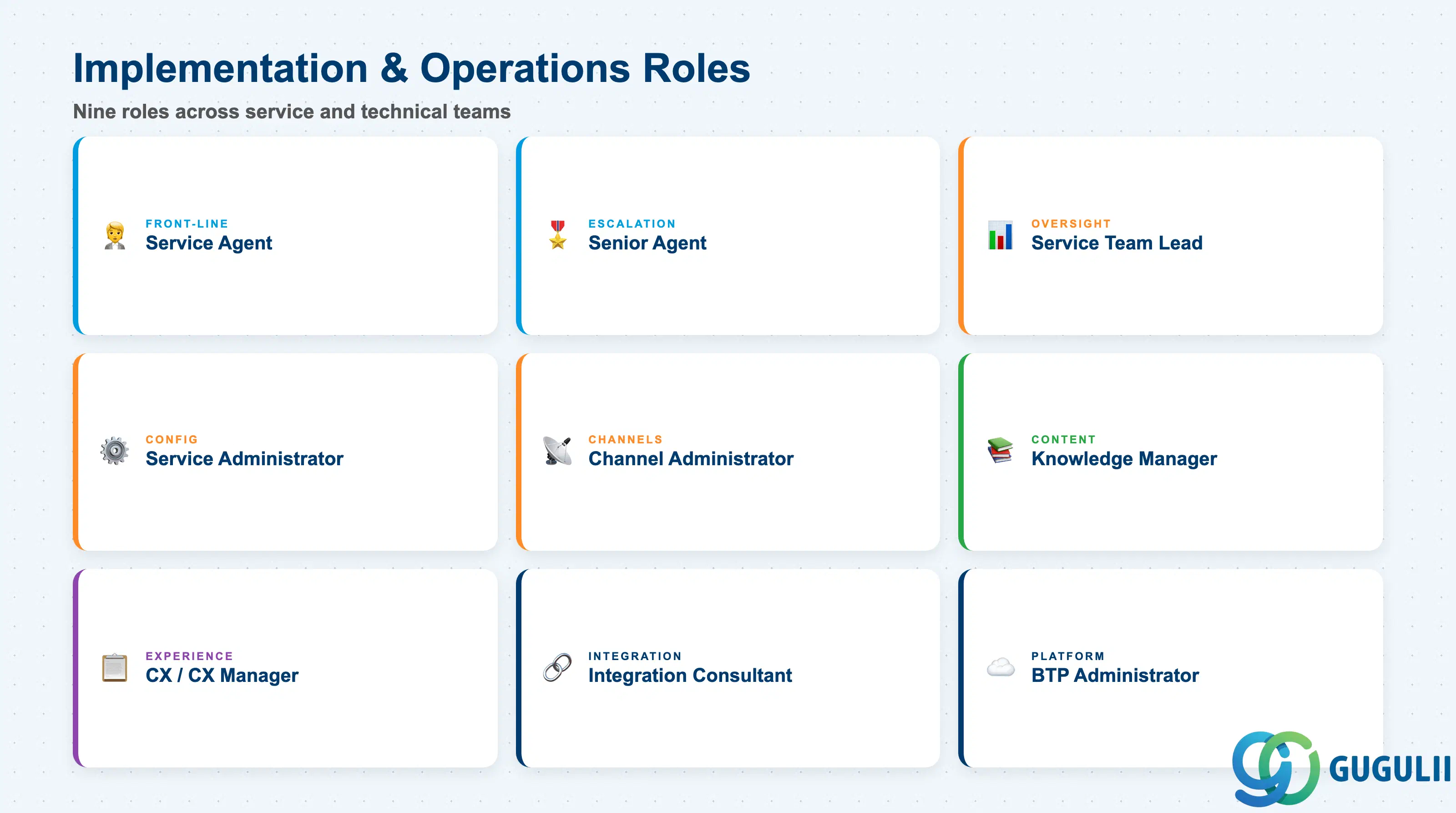
The following roles are involved in implementing and operating Service Cloud V2.
| Role | Primary Activities |
|---|---|
| Service Agent | Handles inbound cases from Agent Console; uses Joule suggestions; applies knowledge articles; updates case status and category |
| Senior / Escalation Agent | Receives cases escalated due to SLA breach or complexity; manages parent-child case relationships; coordinates with back-office |
| Service Team Lead | Monitors team workload via Agent Inbox; reviews SLA compliance dashboards; adjusts routing and queue prioritization |
| Service Administrator | Configures Case Types, Status Schemas, Category Catalogs, SLA determination rules, and routing rules in Settings; creates and maintains agent business roles |
| Channel Administrator | Configures inbound channels (email addresses, chat widgets, telephony queues, SMS); maps channels to default Case Types; sets Case Type Determination Rules |
| Knowledge Manager | Authors and maintains knowledge articles; configures knowledge base provider connections; monitors knowledge base usage and feedback |
| CX / Experience Manager | Owns Qualtrics survey content and distribution settings; reviews NPS/CSAT/CES dashboards; triggers closed-loop case creation for low scores |
| Integration Consultant | Designs and implements Service Cloud V2 ↔ S/4HANA Service integration (prepackaged content on API Business Hub); coordinates the two-hop FSM architecture via S/4HANA; manages CPI flows for Qualtrics |
| Basis / BTP Administrator | Manages BTP subaccount, identity provisioning, Joule/AI Foundation entitlement, and tenant lifecycle |
SAP Service Cloud Version 2 delivers a cloud-native customer service platform that consolidates omnichannel case management, SLA tracking, knowledge surfacing, and Joule-powered AI automation on a single BTP foundation. The platform’s key architectural concept is the Case Type: every incoming case is assigned a Case Type that controls its category hierarchy, status lifecycle, SLA rules, routing targets, and Case Designer workflow. Designing your Case Type taxonomy upfront — one Case Type per major business process (complaint, warranty claim, technical support, billing inquiry) — is the most consequential requirements definition decision for any implementation.
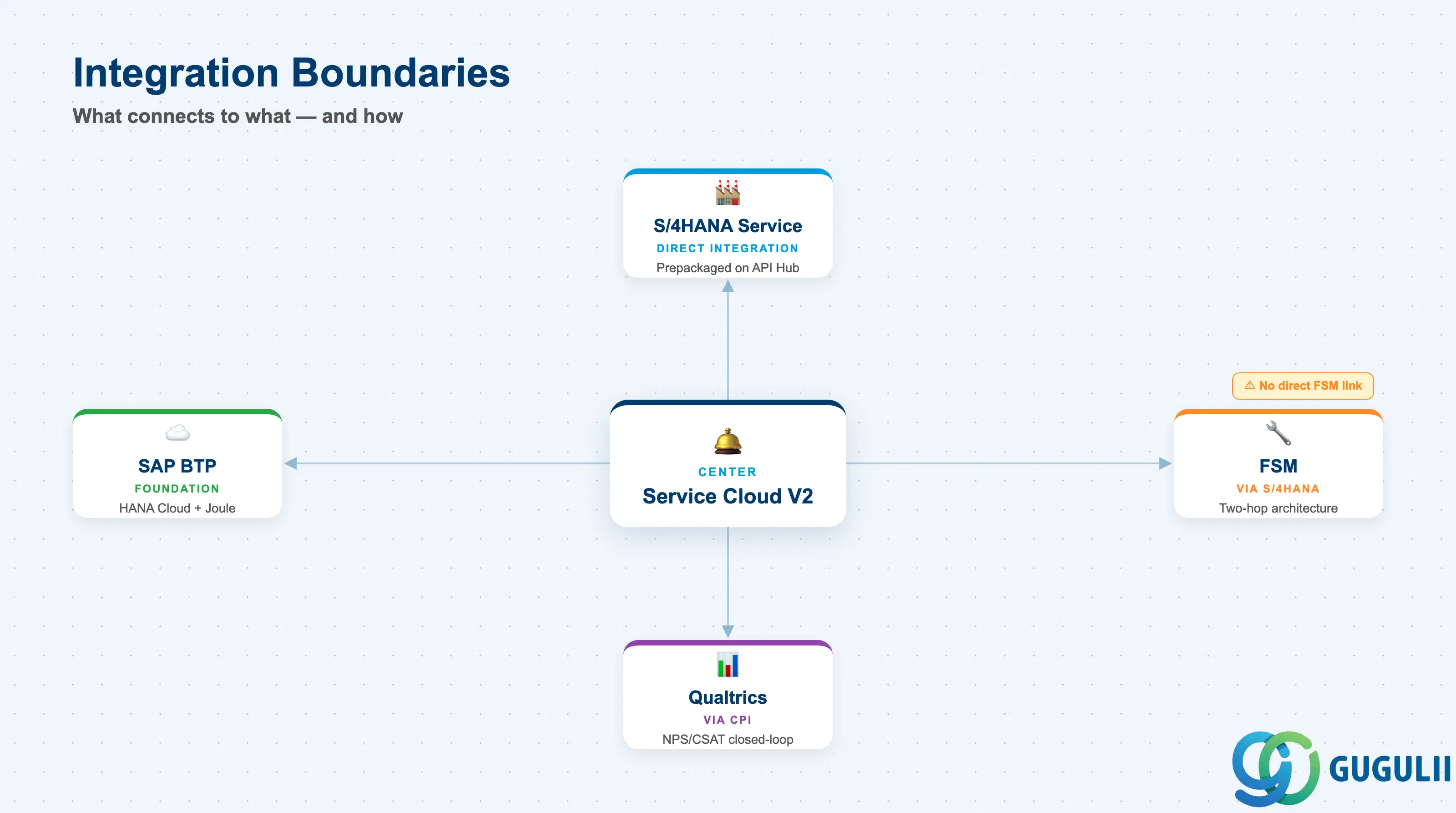
Integration boundaries are equally critical to define early. Service Cloud V2 connects to S/4HANA Service via a prepackaged integration on the API Business Hub; FSM connectivity runs through S/4HANA Service as an intermediary. Organizations without S/4HANA Service that need FSM will require either a custom integration or must implement S/4HANA Service as the bridge. On the feedback side, Qualtrics integration is prepackaged but requires CPI middleware and a contextId field in every survey; ownership boundaries between the CX team (survey content) and the service team (trigger events and closed-loop actions) must be agreed before configuration begins.
The next article in this series — SC-002: Business Processes & Integration — covers the end-to-end case process flows across channels, the S/4HANA service order escalation path, and the FSM dispatch cycle in detail.
| ID | Category | Title |
|---|---|---|
| sc-001 | Overview | What is SAP Service Cloud? 📍 |
| ID | Category | Title |
|---|---|---|
| sc-a01 | Overview | SAP Service Cloud Master Data: Overview, Hierarchy & Relationships |
| sc-a02-01 | Master Data | SAP Service Cloud Organizational Unit |
| sc-a02-02 | Master Data | SAP Service Cloud Employee |
| sc-a02-03 | Master Data | SAP Service Cloud Business Role |
| sc-a02-04 | Master Data | SAP Service Cloud Business User |
| sc-a02-05 | Master Data | SAP Service Cloud Team |
| sc-a03-01 | Master Data | SAP Service Cloud Email Channel |
| sc-a03-02 | Master Data | SAP Service Cloud Email Template |
| sc-a04-01 | Master Data | SAP Service Cloud Knowledge Base Provider |
| sc-a05-01 | Master Data | SAP Service Cloud Service Catalog |
| sc-a05-02 | Master Data | SAP Service Cloud Service Category |
| sc-a05-03 | Master Data | SAP Service Cloud Case Type |
| sc-a06-01 | Master Data | SAP Service Cloud Service Level |
| sc-a06-02 | Master Data | SAP Service Cloud Service Level Determination |
| sc-a07-01 | Master Data | SAP Service Cloud Case Routing Rules |
| sc-a10-04 | Master Data | SAP Service Cloud Warranty |
| sc-a11-01 | Master Data | SAP Service Cloud Installed Base |
| sc-a11-02 | Master Data | SAP Service Cloud Functional Location |
| ID | Category | Title |
|---|---|---|
| sc-b01 | Overview | SAP Service Cloud Transactions: Process Flow, Hierarchy & Relationships |