Title here
Summary here

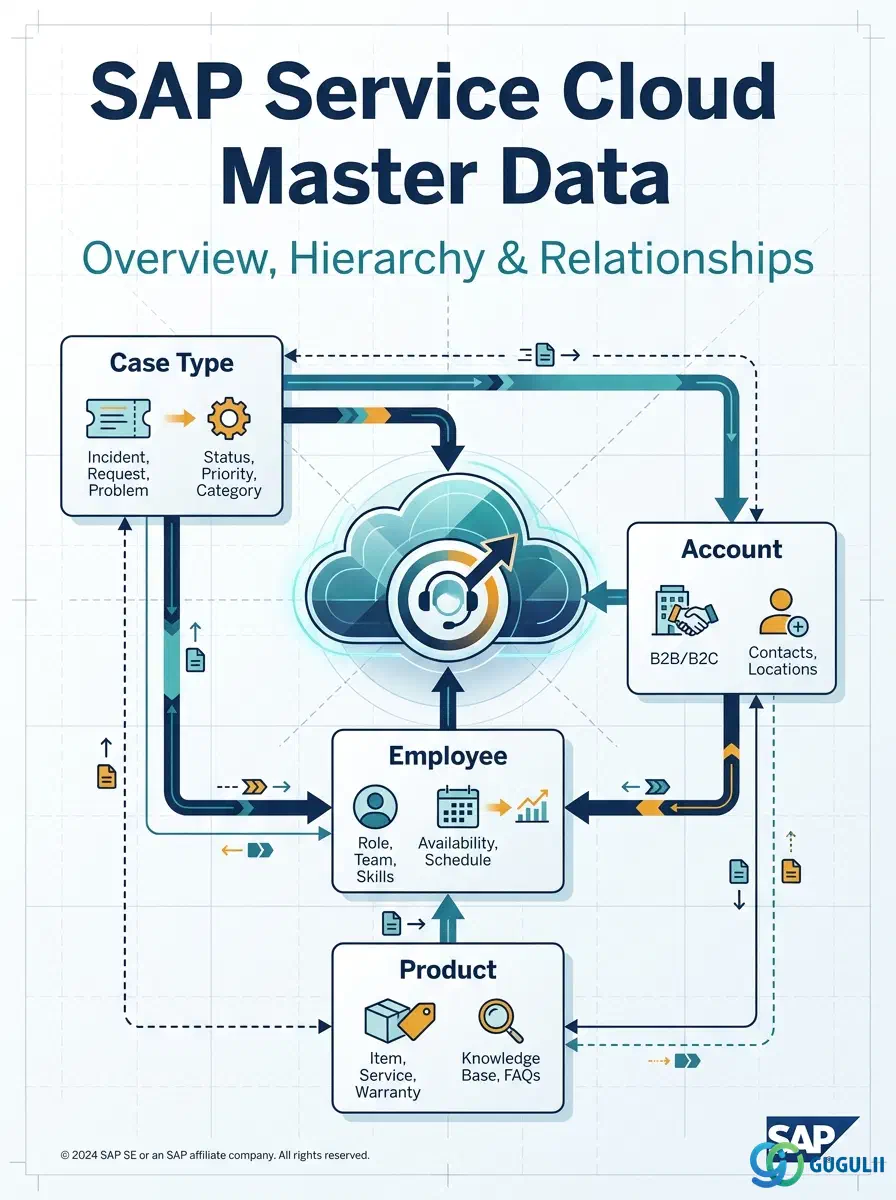
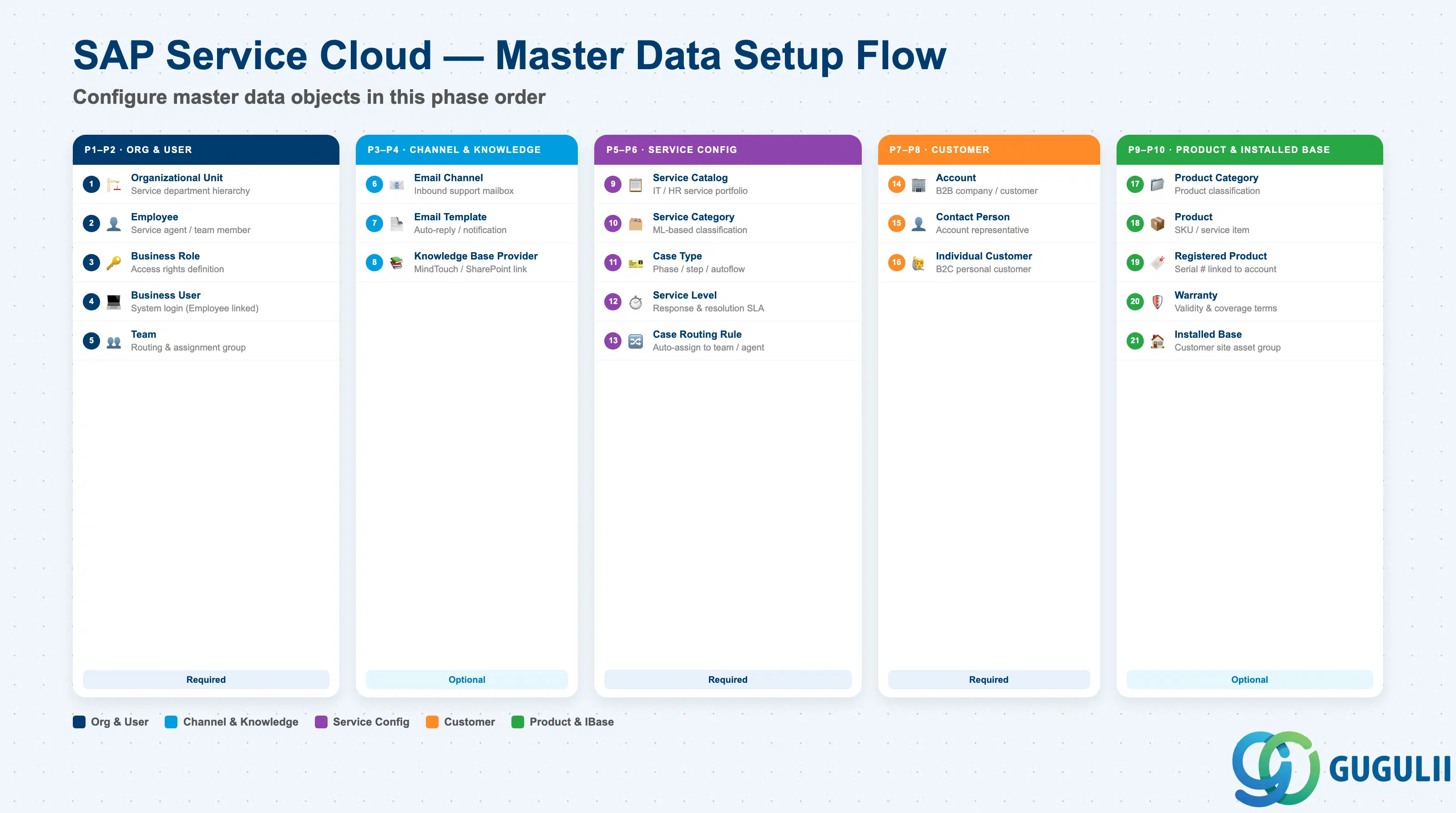
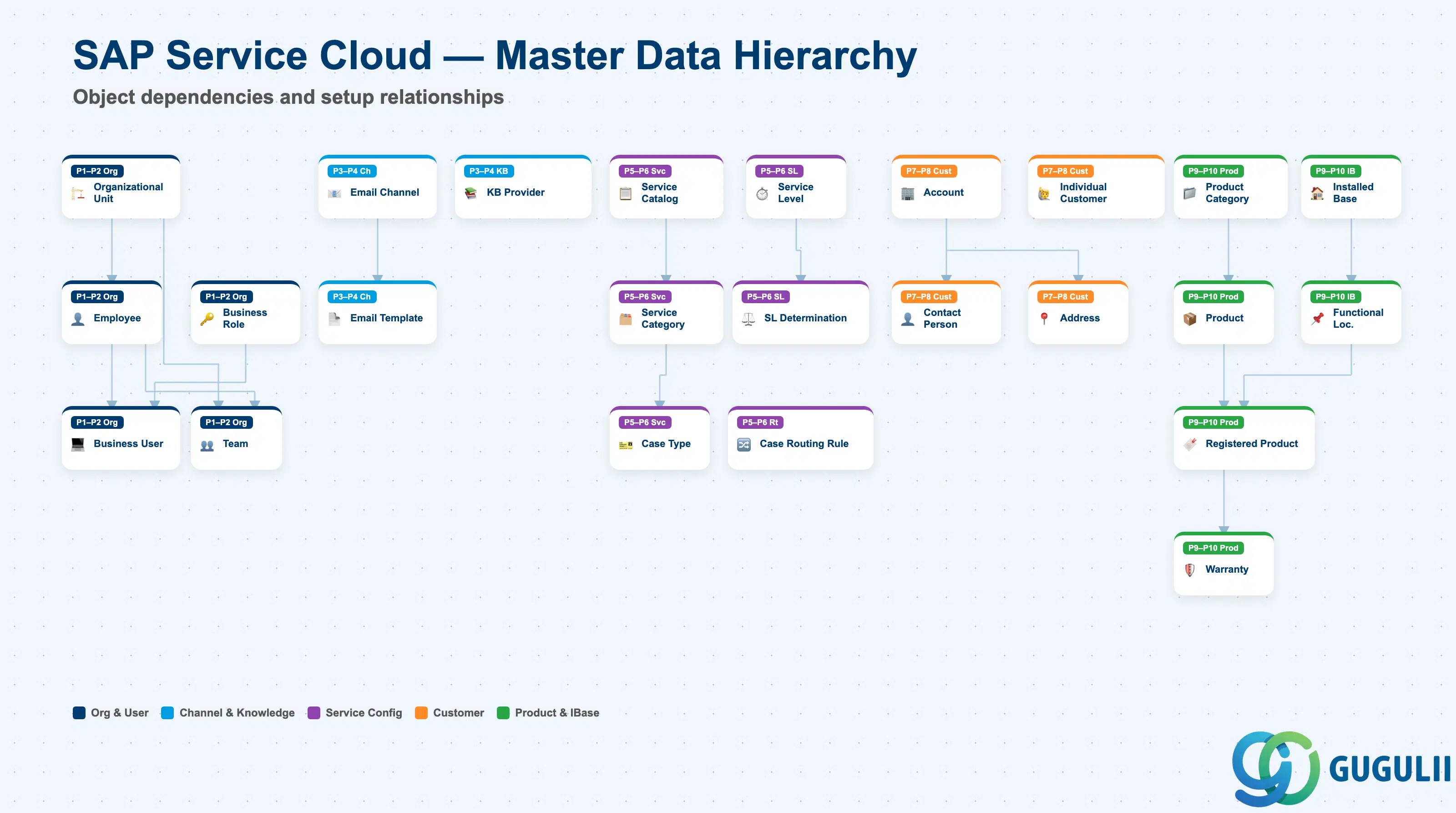
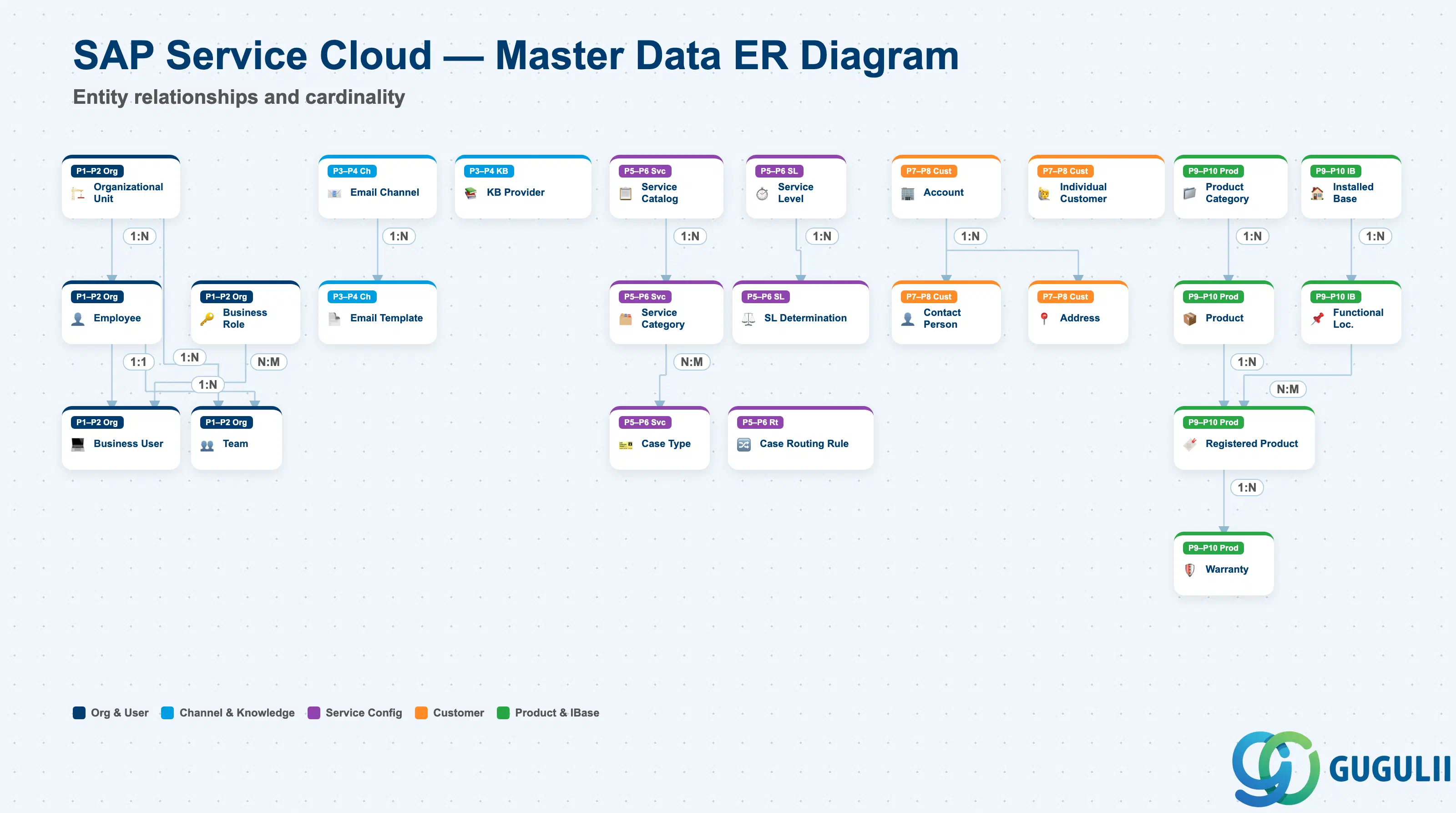
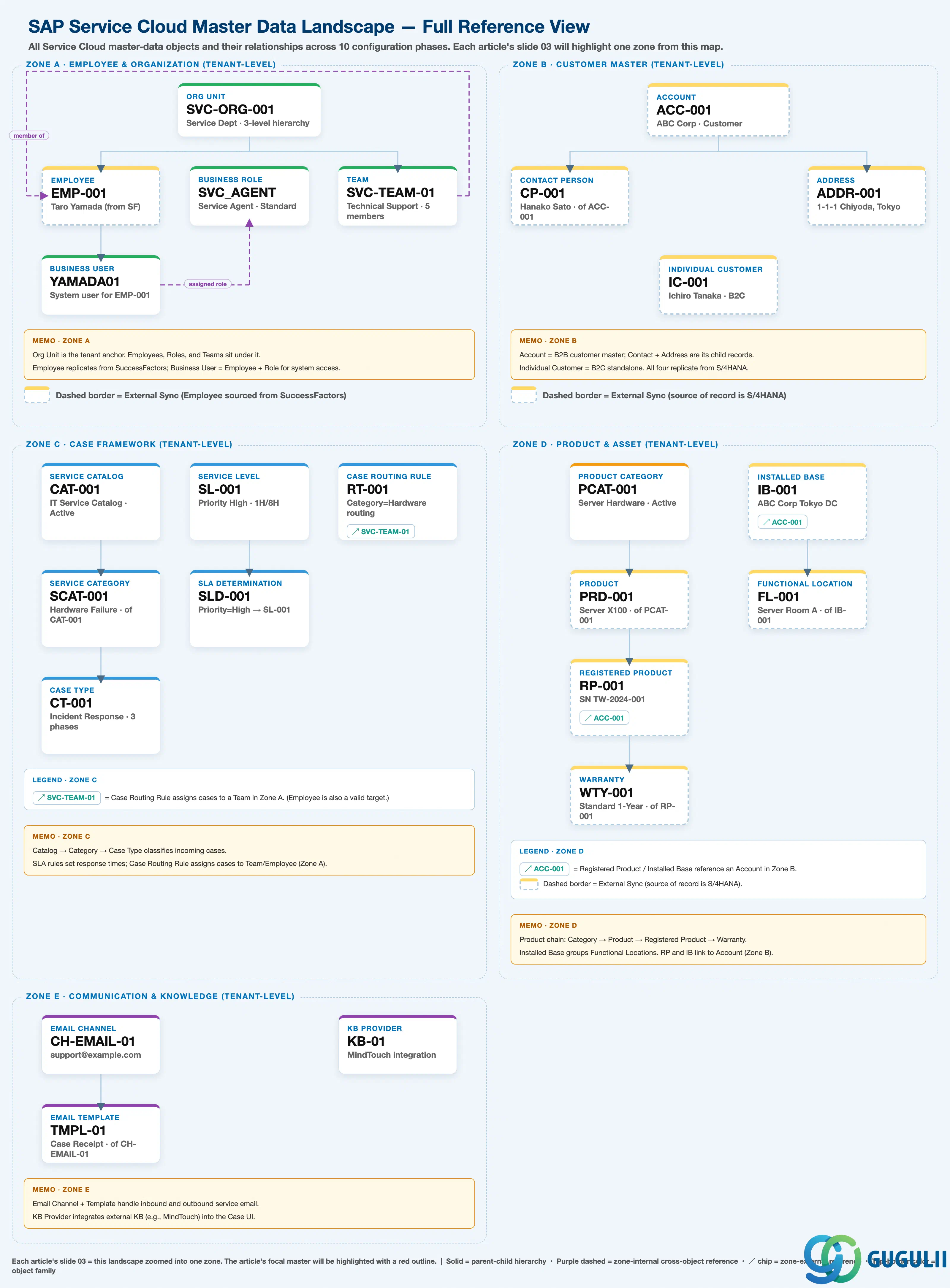
| Phase | Object | Integration | Prerequisite | Work Center View | Description | Practical Examples | Role |
|---|---|---|---|---|---|---|---|
| 1 Employee & Org | Organizational Unit | - | - | Settings > Org Structures | Create org unit, define hierarchy, and assign employees | OrgUnit “SVC-ORG-001” (Service Dept), hierarchy “3 levels” (HQ → Dept → Section) | Administrator |
| Employee | SuccessFactors → SVC | Organizational Unit | Settings > Employees | Create employee record, set employee details, and assign to org unit | Employee “EMP-001” (Taro Yamada), Email “yamada@example.com”, OrgUnit “SVC-ORG-001” | Administrator | |
| Business Role | - | - | Settings > Business Roles | Define access rights, assign business services, and set restrictions | Role “SVC_AGENT” (Service Agent), Type “Standard” | Administrator | |
| Business User | - | Employee, Business Role | Settings > Business Users | Create system user, link to employee, and assign business role | User “YAMADA01”, linked to Employee “EMP-001”, Role “SVC_AGENT” assigned | Administrator | |
| Team | - | Employee, Organizational Unit | Settings > Teams | Create service team, assign members, and define team lead | Team “SVC-TEAM-01” (Technical Support Team), Lead “EMP-001”, 5 members | Administrator | |
| 2 Channel | Email Channel | - | - | Settings > Email Channels | Configure email channel, set technical address, and define routing | Channel “CH-EMAIL-01” (Technical Support Inbox), Address “support@example.com” | Administrator |
| Email Template | - | Email Channel | Settings > Email Templates | Create email template, define placeholders, and set template type | Template “TMPL-01” (Case Receipt Confirmation), Type “Notification”, Channel “CH-EMAIL-01” | Administrator | |
| 3 Knowledge | Knowledge Base Provider | External KB | - | Settings > Knowledge Base | Configure KB provider, set connection details, and enable integration | Provider “KB-01” (MindTouch integration), Type “MindTouch”, URL “https://kb.example.com” | Administrator |
| 4 Service Catalog | Service Catalog | - | - | Settings > Service Catalog | Create service catalog, define structure, and assign to channels | Catalog “CAT-001” (IT Service Catalog), Status “Active” | Administrator |
| Service Category | - | Service Catalog | Settings > Service Catalog | Define service categories, create hierarchy, and enable ML categorization | Category “SCAT-001” (Hardware Failure), Catalog “CAT-001”, Parent “SCAT-ROOT” | Administrator | |
| Case Type | - | Service Category | Settings > Case Types | Define case type, configure phases/steps, and set workflow | CaseType “CT-001” (Incident Response), Category “SCAT-001”, Phases “3 stages” | Administrator | |
| 5 Service Level | Service Level | - | - | Settings > Service Levels | Define SLA terms, set response/resolution times, and configure operating hours | SLA “SL-001” (Priority High), Initial Response “1H”, Resolution “8H” | Administrator |
| Service Level Determination | - | Service Level | Settings > Service Level Determination | Create determination rules, set conditions, and assign service levels | Rule “SLD-001”, Condition “Priority=High”, SLA “SL-001” assigned | Administrator | |
| 6 Case Configuration | Case Routing Rule | - | Team, Employee | Settings > Case Routing | Create routing rules, define conditions, and assign to team/employee | Rule “RT-001”, Condition “Category=Hardware”, Target “SVC-TEAM-01” | Administrator |
| 7 Account | Account | S/4HANA → SVC | - | Customers > Accounts | Create/maintain account, define customer information, and manage account team | Account “ACC-001” (ABC Corp), Type “Customer”, Status “Active” | Administrator |
| Contact Person | S/4HANA → SVC | Account | Customers > Contacts | Create contact person, define communication details, and link to account | Contact “CP-001” (Hanako Sato), Email “sato@abc.co.jp”, Account “ACC-001” | Administrator | |
| Address | S/4HANA → SVC | Account | Customers > Accounts | Register address, define primary address, and link to account/contact | Address “ADDR-001” (1-1-1 Chiyoda, Tokyo), Country “JP”, PostalCode “100-0001” | Administrator | |
| 8 Individual Customer | Individual Customer | S/4HANA → SVC | - | Customers > Individual Customers | Create individual customer, define personal information, and manage preferences | Customer “IC-001” (Ichiro Tanaka), Email “tanaka@example.com”, Status “Active” | Administrator |
| 9 Product | Product Category | - | - | Settings > Products | Define product categories, create hierarchy, and assign products | Category “PCAT-001” (Server Hardware), Parent “PCAT-ROOT”, Status “Active” | Administrator |
| Product | S/4HANA → SVC | Product Category | Products > Products | Create product master, define product category, and set attributes | Product “PRD-001” (Server X100), Category “PCAT-001”, Status “Active” | Administrator | |
| Registered Product | S/4HANA → SVC | Product, Account | Registered Products > Registered Products | Register product instance, assign serial number, and link to account | RegisteredProduct “RP-001”, Serial “SN-2024-001”, Product “PRD-001”, Account “ACC-001” | Administrator | |
| Warranty | - | Registered Product | Registered Products > Registered Products | Define warranty terms, set validity period, and link to registered product | Warranty “WTY-001” (Standard 1-Year Warranty), ValidFrom “2024/04/01”, ValidTo “2025/03/31” | Administrator | |
| 10 Installed Base | Installed Base | S/4HANA → SVC | Account | Installed Bases > Installed Bases | Create installed base, define hierarchy, and link registered products | InstalledBase “IB-001” (ABC Corp Tokyo DC), Account “ACC-001”, Status “Active” | Administrator |
| Functional Location | S/4HANA → SVC | Installed Base | Installed Bases > Installed Bases | Define installation point, set location details, and assign to installed base | Location “FL-001” (Server Room A), InstalledBase “IB-001”, Address “Tokyo” | Administrator |
| ID | Category | Title |
|---|---|---|
| sc-001 | Overview | What is SAP Service Cloud? |
| ID | Category | Title |
|---|---|---|
| sc-a01 | Overview | SAP Service Cloud Master Data: Overview, Hierarchy & Relationships 📍 |
| sc-a02-01 | Master Data | SAP Service Cloud Organizational Unit |
| sc-a02-02 | Master Data | SAP Service Cloud Employee |
| sc-a02-03 | Master Data | SAP Service Cloud Business Role |
| sc-a02-04 | Master Data | SAP Service Cloud Business User |
| sc-a02-05 | Master Data | SAP Service Cloud Team |
| sc-a03-01 | Master Data | SAP Service Cloud Email Channel |
| sc-a03-02 | Master Data | SAP Service Cloud Email Template |
| sc-a04-01 | Master Data | SAP Service Cloud Knowledge Base Provider |
| sc-a05-01 | Master Data | SAP Service Cloud Service Catalog |
| sc-a05-02 | Master Data | SAP Service Cloud Service Category |
| sc-a05-03 | Master Data | SAP Service Cloud Case Type |
| sc-a06-01 | Master Data | SAP Service Cloud Service Level |
| sc-a06-02 | Master Data | SAP Service Cloud Service Level Determination |
| sc-a07-01 | Master Data | SAP Service Cloud Case Routing Rules |
| sc-a10-04 | Master Data | SAP Service Cloud Warranty |
| sc-a11-01 | Master Data | SAP Service Cloud Installed Base |
| sc-a11-02 | Master Data | SAP Service Cloud Functional Location |
| ID | Category | Title |
|---|---|---|
| sc-b01 | Overview | SAP Service Cloud Transactions: Process Flow, Hierarchy & Relationships |