Title here
Summary here

A Service Level is not the rule that decides which SLA a Case gets — it is the SLA target itself: a set of Milestone due-dates (Response, Initial Review, Completion, Resolution) measured against an embedded Operating Hours definition, and nothing more. There is no Priority field on the record, and no reference back to Case Type or to any determination rule. This article covers what a Service Level record actually owns, how hour-based and day-based Durations behave differently against Operating Hours, resolves the common assumption that a single Service Level can vary its targets by priority internally, and establishes the one-directional relationship in which Service Level Determination (SC-A06-02) consumes Service Level — never the reverse. It also flags a naming collision worth watching: “Service Level”/“SLA” is used for at least three other, unrelated concepts elsewhere in the SAP portfolio.
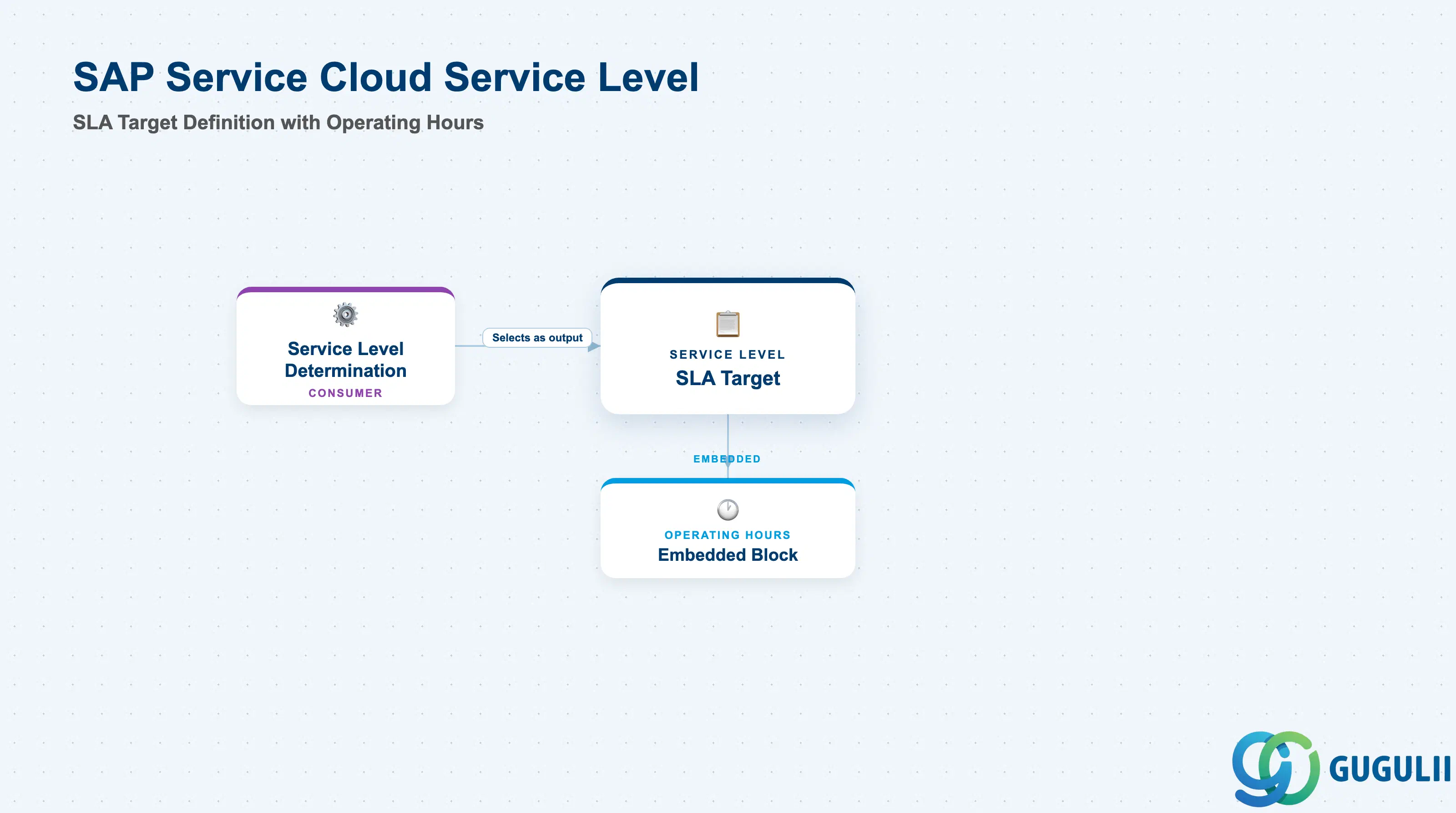
A Service Level exists to define, in one reusable record, how fast a Case must be handled and during which hours that speed is actually measured. It carries four Milestones — Response Due, Initial Review Due, Completion Due, Resolution Due — each with its own calculation anchor, duration, and optional extension, plus an embedded Operating Hours block that determines whether the clock pauses outside business hours or keeps counting through every calendar day. Once activated, a Service Level becomes selectable only as the target value inside a separate rules engine (Service Level Determination) — it never reaches out and picks itself for a Case.
| Aspect | Details |
|---|---|
| Role | Activatable master-data object that defines a Case’s SLA Milestone due-dates and the Operating Hours they are measured against — the “what the target is,” never the “which target applies” |
| Modules using it | SAP Service Cloud (sole owner); consumed by Service Level Determination (SC-A06-02, output/target value) and surfaced (read-only, indirectly) on the Case object once assigned |
| Transactions | User profile menu (top right) → Settings → All Settings tab → search “Case” → Service Level (equivalently documented as Settings → Case Management → Service Levels) |
| Key Tables | SAP Service Cloud: Service Level business object (Admin/Core API OData entity, configured through the Service Level settings screen, not a bulk-import field template). SAP Service Cloud is a multi-tenant SaaS solution and does not expose classical ABAP tables to consultants. |
| S/4HANA note | Service Level is configured natively inside the Service Cloud tenant; it has no S/4HANA equivalent. Naming collision to watch for — see the callout below for full detail: “Service Level”/“SLA” is separately used for SAP’s own contractual cloud-uptime SLA, the classic SAP Cloud for Customer/Service Cloud V1 “SLA Setup,” and SAP Solution Manager’s ITSM/ChaRM SLA — none of these are the object described in this article, despite sharing the same Response/Resolution Time vocabulary. |
Naming collision — “Service Level”/“SLA” is a quadruple-overloaded term across the SAP portfolio. At least four genuinely different things share this name: (a) SAP’s own contractual cloud-uptime Service Level Agreement document (sap.com → About → SAP Agreements → SAP Cloud Services Customers), covering platform availability commitments and unrelated to any in-app case data; (b) the classic SAP Cloud for Customer / Service Cloud V1 “SLA Setup” (Administrator → Service and Social → SLA Setup — a scoping-and-metrics process using Response Time / Resolution Time / Availability metrics); (c) SAP Solution Manager’s ITSM/ChaRM SLA (Service Profiles, IRT/MPT/OLA, configured via
SOLMAN_SETUP— an on-premise, ABAP-stack ticket-management concept); and (d) the SAP Service Cloud V2 Service Level object covered in this article (Milestones + embedded Operating Hours, configured under Settings → Case Management → Service Levels). All four genuinely share Response/Resolution Time vocabulary, which makes this collision riskier to conflate than most other naming collisions covered elsewhere in this framework — confirm which of the four a piece of documentation, a support ticket, or a colleague’s comment is actually describing before applying it here.
Common misconception — Service Level is not Service Level Determination. Service Level (this article) is the SLA target definition itself — Milestones, Durations, and an embedded Operating Hours block. Service Level Determination (SC-A06-02) is a separate rules engine that decides which Service Level applies to a given Case, matching on inputs like Case Type and Priority Code, and requires activation after creation as its own configuration step. Service Level carries no field referencing Case Type, Priority, or any Determination Rule — the dependency runs one way: Service Level Determination consumes Service Level as an output/target value, never the reverse.
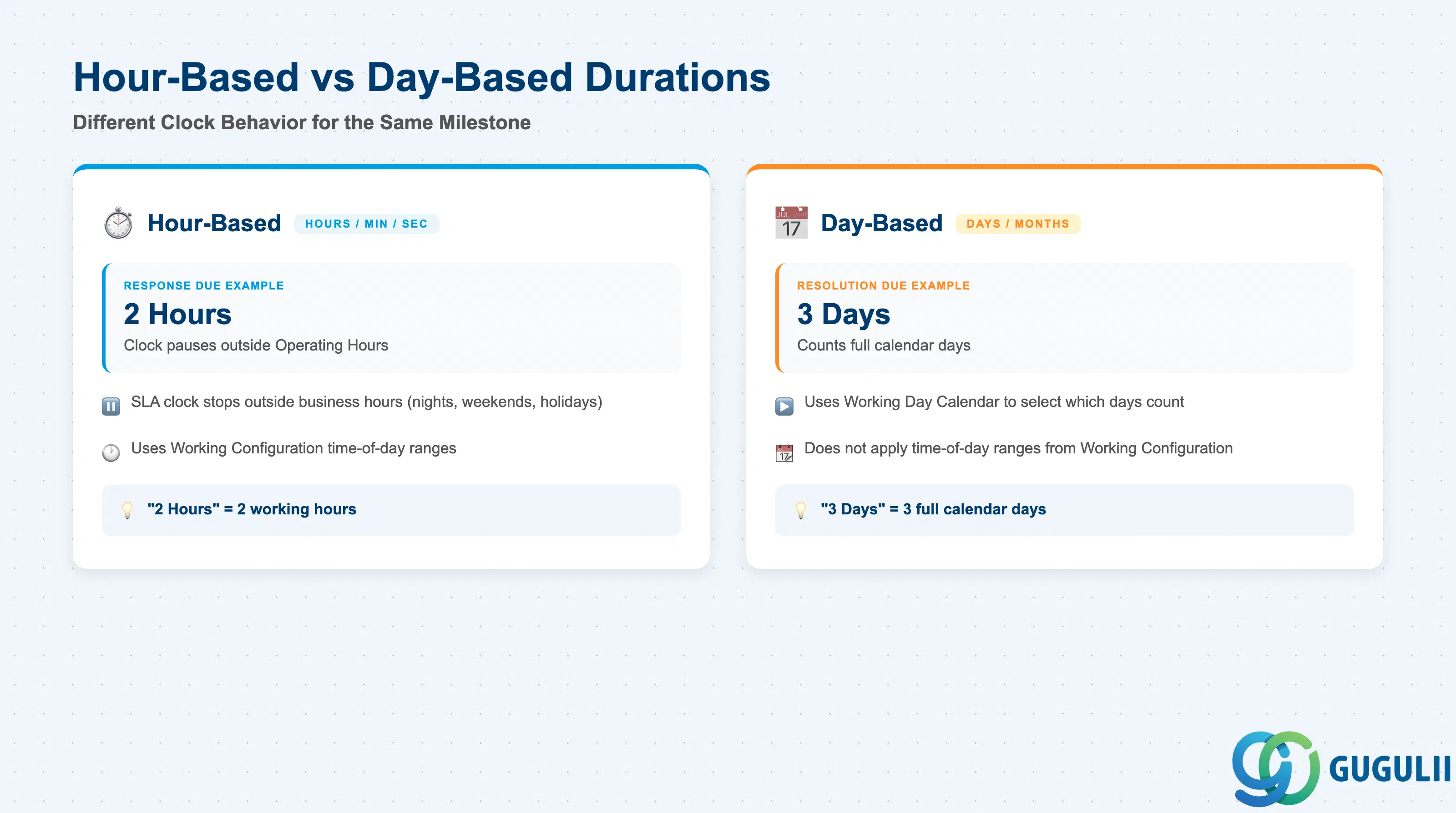
Getting the difference between an hour-based and a day-based Duration wrong is not a cosmetic mistake — it changes whether the SLA clock pauses outside business hours or keeps ticking through nights, weekends, and holidays, and SAP documents the two behaviors as genuinely different calculation paths, not a rounding nuance.
| Milestone | Based On | Duration & Additional Hours | Completes When (Case field) |
|---|---|---|---|
| Response Due | Case “Created On” or “Reported On” | Duration in Day/Month/Hours/Minutes/Seconds; optional Additional Hours (e.g., “duration with customer”) extends the clock while status sits in Customer Action / Requestor Action | Outbound email sent, or status changes to Requestor Action (responseCompletedOn) |
| Initial Review Due | Case “Created On” or “Reported On” | Same Duration/Additional Hours model as above | Status changes from Open to In Progress (initialReviewCompletedOn) |
| Completion Due | Case “Created On” or “Reported On” | Same Duration/Additional Hours model as above | Status is set to Requestor Action (assignedToCustomerOn) |
| Resolution Due | Case “Created On” or “Reported On” | Same Duration/Additional Hours model as above | Status changes to Completed (completedOn); resets if the case is reopened |
Design principle — hour-based Durations respect Operating Hours; day-based Durations count full calendar days. If a Milestone’s Duration is entered in hours (or minutes/seconds), the system counts only time that falls inside the Service Level’s Operating Hours — the SLA clock effectively pauses outside business hours, so “24 hours” means 24 working hours, not 24 wall-clock hours. If Duration is entered in days (or months), the system uses the Working Day Calendar to decide which days count, but does not apply the Working Configuration’s specific time-of-day ranges — each qualifying day counts as one full calendar day regardless of when work actually happens on it. Supported Duration units are Day, Month, Hours, Minutes, and Seconds; choose the unit deliberately, since it changes the calculation path, not just the displayed number.
Common misconception — a Service Level record has no Priority field (V2). Unlike the classic V1 “SLA Setup,” a single V2 Service Level record cannot vary its Milestone targets by priority internally. If Gold-tier cases need a 2-hour Response Due and Silver-tier cases need an 8-hour Response Due, that requires two separate Service Level records — one per tier — not one record with a priority-dependent field. Priority Code only becomes relevant one layer up, as a match parameter inside a Service Level Determination rule (SC-A06-02) that selects which of the two records applies to a given Case.
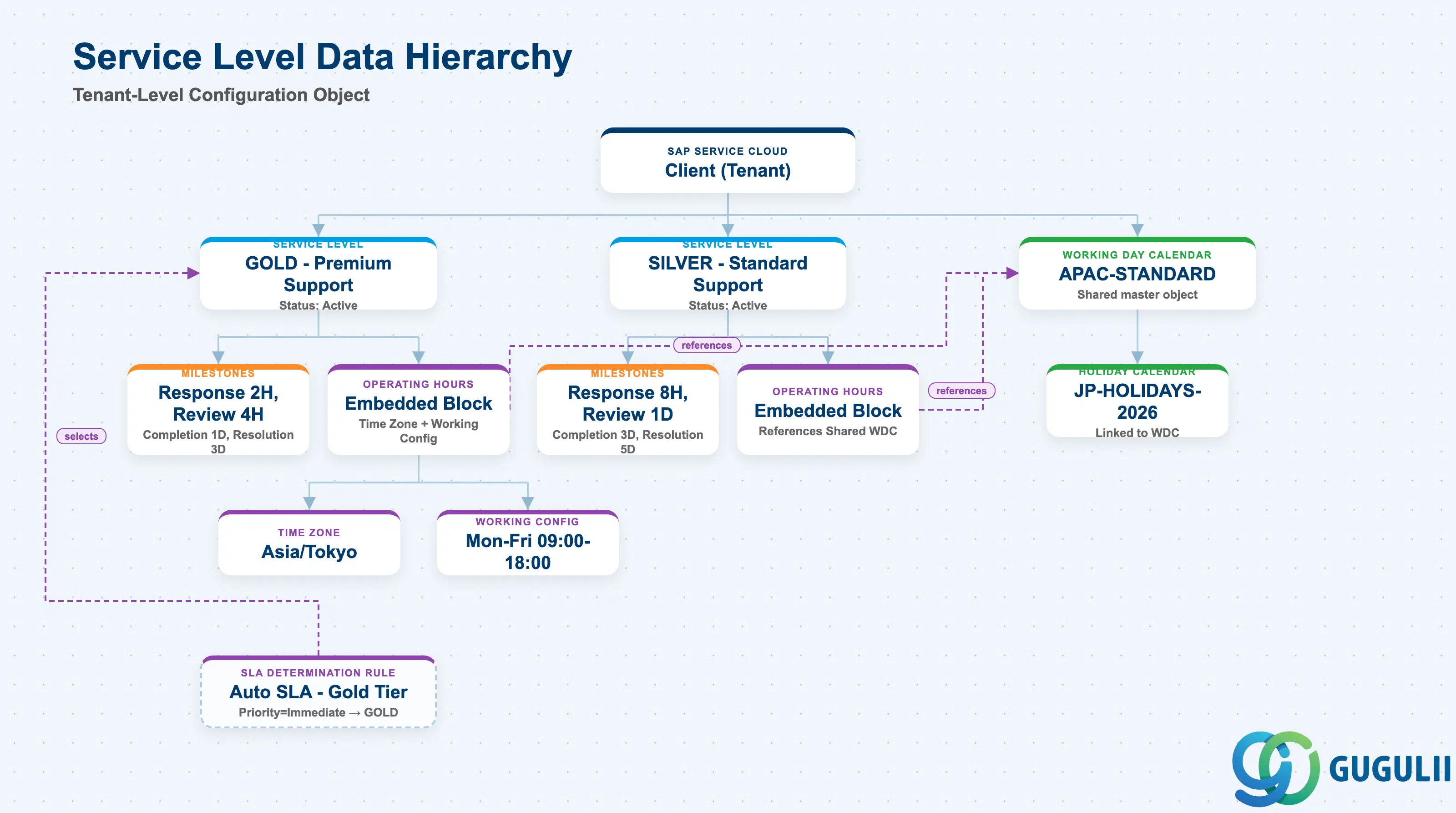
Data hierarchy with a concrete example (tenant-level; SAP Service Cloud has no Company Code / Plant scoping above this)
Client (SAP Service Cloud Tenant)
   │
   ├── Service Level "GOLD - Premium Support" (Status: Active)
   │        │
   │        ├── Milestones: Response Due (2 Hours), Initial Review Due (4 Hours),
   │        │               Completion Due (1 Day), Resolution Due (3 Days)
   │        │
   │        └── Operating Hours (embedded) ── references ──> Working Day Calendar "APAC-STANDARD"
   │                                                              │
   │                                                              └── linked Holiday Calendar "JP-HOLIDAYS-2026"
   │             Time Zone: Asia/Tokyo
   │             Working Configuration: Mon–Fri 09:00–18:00 (single slot)
   │
   ├── Service Level "SILVER - Standard Support" (Status: Active)
   │        │
   │        ├── Milestones: Response Due (8 Hours), Initial Review Due (1 Day),
   │        │               Completion Due (3 Days), Resolution Due (5 Days)
   │        │
   │        └── Operating Hours (embedded) ── references ──> Working Day Calendar "APAC-STANDARD" (shared)
   │
   └── Working Day Calendar "APAC-STANDARD" — shared master object, maintained under
            Settings → Calendar → Working Day Calendar (not created fresh per Service Level)

   Service Level Determination Rule "Auto SLA - Gold Tier"
      ── matches on (Case Type = "Customer Service Case" AND Priority Code = "01 - Immediate") ──>
      selects Service Level "GOLD - Premium Support"
Design principle — the Working Day Calendar is a shared, separately-maintained master, not a value entered fresh on each Service Level. Working Day Calendar (and its linked Holiday Calendar) is its own configuration object with its own fields (Working Calendar Name/Code, Valid From/To, applicable countries/regions, per-day toggles, First Day of Week) — a Service Level’s Operating Hours block only references it. Two Service Levels for the same region (Gold and Silver tiers, for example) typically point at the same Working Day Calendar while differing only in their Milestone Durations. This calendar object is also used elsewhere in the platform (confirmed on the equivalent SAP Sales Cloud V2 settings page; treat as shared infrastructure across Sales and Service Cloud V2 with medium confidence rather than a Service-Cloud-only object). Time Zone and Working Configuration, by contrast, are set directly on the Service Level’s own Operating Hours block, not referenced from elsewhere.
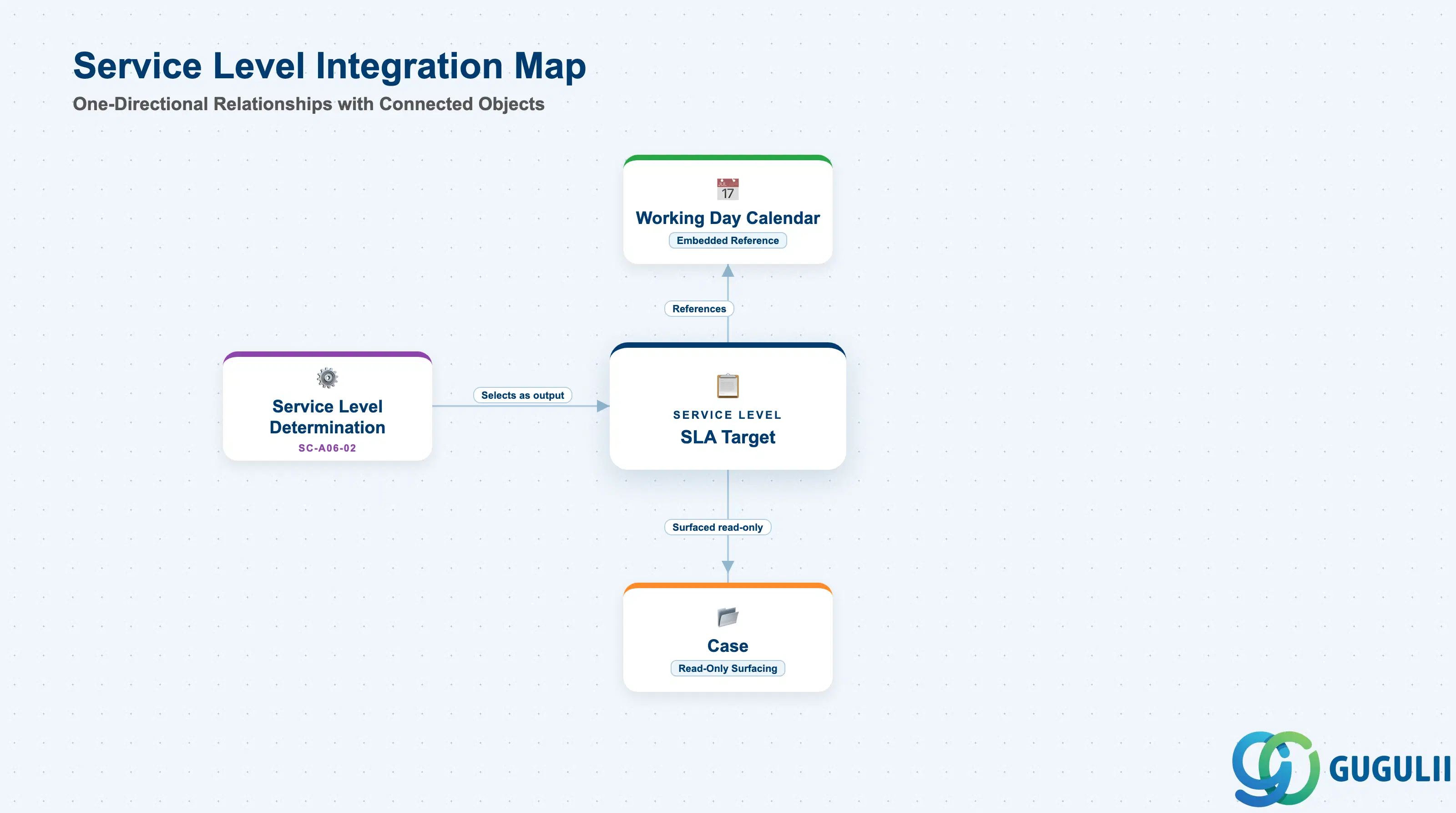
A Service Level touches several other objects, but in two clearly different directions: it optionally references one master (Working Day Calendar) as its source, and it is the target that a downstream rules engine selects. The table below is explicit about which direction each relationship runs, and flags the items the source material could not fully confirm.
| Object | Relationship | Practical Notes |
|---|---|---|
| Service Level Determination (SC-A06-02) | Downstream — Service Level is the output/target value, never the reverse | Once activated, a Service Level becomes selectable as the target inside a Determination rule (e.g., “WHEN Priority == ‘Immediate’ THEN Service Level = ‘GOLD’”). Service Level itself carries no field referencing back to a Determination Rule. |
| Case Type | Indirect — via Determination only, no direct field | Case Type is one of the match parameters a Service Level Determination rule uses to pick a Service Level; the Service Level record has no field pointing at any Case Type. |
| Priority Code | Indirect — via Determination only, no direct field (see Section 1.2 misconception) | Priority Code is consumed only as a match parameter at the Determination Rule layer. A separate Service Level record is required per priority tier; there is no Priority field on the Service Level record itself in V2. |
| Working Day Calendar | Direct, embedded reference | The Operating Hours block on a Service Level references a shared, separately-maintained Working Day Calendar master (Section 1.3) rather than storing calendar rules inline. |
| Case (transaction object) | Downstream, read-only surfacing — Service Level is assigned, not owned, by the Case | Once a Service Level Determination rule assigns a Service Level to a Case, the Case’s details facet is reported (medium confidence — search-index summary only, primary help page could not be rendered during research) to surface the assigned Service Level’s name alongside Initial Review Due On, Completion Due On, Resolution Due On, and related fields such as Duration with Agent and Escalated On. |
| Escalation logic | Adjacent, separately configurable — not a field on Service Level | SAP describes “operating hours, pause rules, and escalation logic” together as SLA-related capabilities, but escalation is documented as its own configurable layer rather than a field stored on the Service Level record (medium confidence, capability-level source only). |
| Contractual Cloud SLA / Classic V1 “SLA Setup” / Solution Manager ITSM SLA | No relationship — naming collision only (Section 1.1) | These share only the name “Service Level”/“SLA” with the object in this article. Each is a different object model, in a different product, with a different admin path. |
Scope notes: (1) Source material confirms Service Levels follow the same draft-then-active lifecycle pattern seen elsewhere in this framework (Service Catalog, Service Category, Case Type), but the exact re-edit mechanism for an already-Active Service Level (e.g., whether a “Create New Version” action exists, as it does for Case Type) was not independently confirmed in this research pass — treat as likely but unconfirmed. (2) The Case-side field group attributed above to a “Case Escalation Metrics” view rests on a search-index summary only; the primary SAP Help Portal page could not be rendered during research, so treat those specific field names as medium confidence, not a confirmed screen layout. (3) Whether SAP Service Cloud V2 publishes a dedicated “SLA breach” event type to SAP Event Mesh could not be confirmed against a primary source — case lifecycle events are published to Event Mesh generally, but a specific SLA-breach event type is not asserted here.
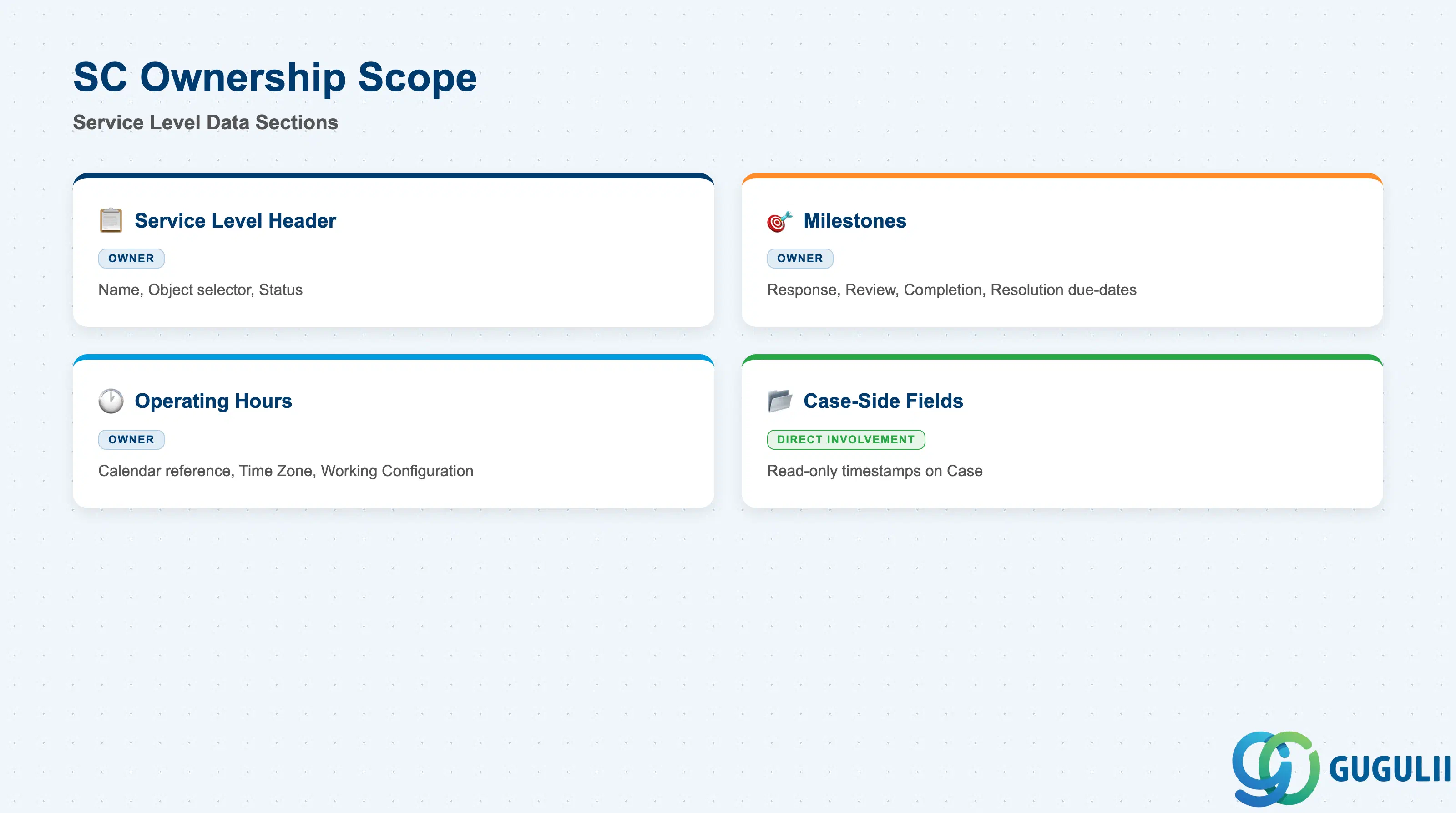
| Data Section | SC Involvement | Notes |
|---|---|---|
| Service Level Header (Base Attributes) | ◎ Owner | Service Level Name, the fixed Object selector (Case), and Status — the identity and lifecycle-state record every Service Level has. |
| Milestones | ◎ Owner | Response Due, Initial Review Due, Completion Due, Resolution Due — each with Based On, Duration, and optional Additional Hours. |
| Operating Hours | ◎ Owner | Working Day Calendar (referenced), Time Zone, and Working Configuration — embedded directly on the Service Level record. |
| Case-Side Milestone Fields | ○ Direct involvement | Read-only completion timestamps written back onto the assigned Case as each Milestone completes; not editable on the Service Level record itself. |
Legend: ◎ = Owner / Critical, ○ = Direct involvement
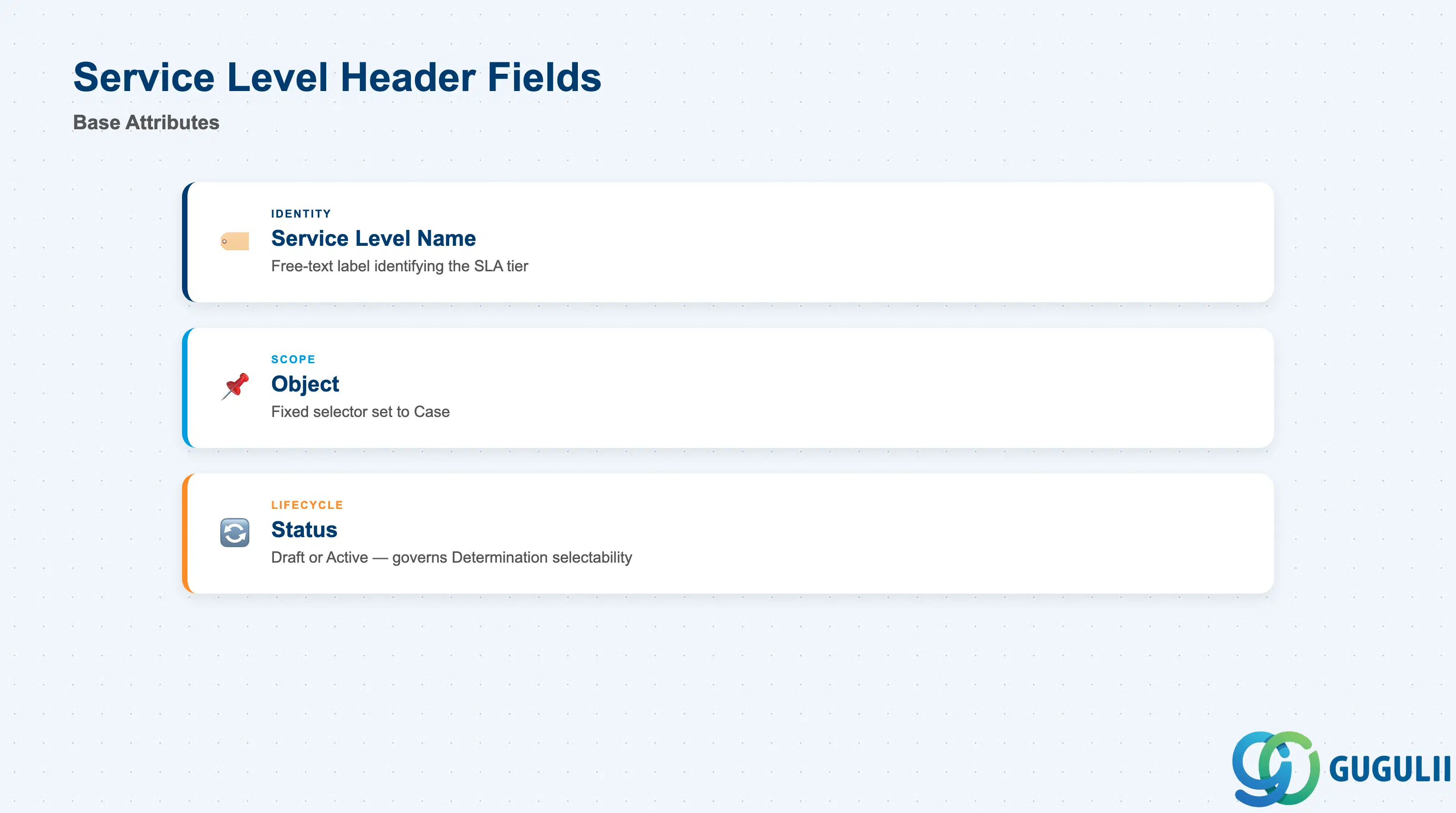
This is the identity record every Service Level has, regardless of which Milestones or Operating Hours it defines — get these fields right and the Service Level is correctly named, correctly statused, and ready to be selected as a Determination target.
| Field | Description | Practical Usage |
|---|---|---|
| Service Level Name | Free-text label identifying the record | The name administrators see when selecting a target inside a Service Level Determination rule — keep it specific to the tier or SLA tier it represents (e.g., “GOLD - Premium Support”) rather than a generic label, since multiple Service Levels will typically coexist per region or product line. |
| Object | Selector fixed/set to Case | Confirms Service Level applies to the Case object; there is no cross-object variant to configure, so this field is largely informational rather than a design decision. |
| Status | Draft or Active | Governs whether the record is usable as a Determination target. New Service Levels start in Draft; an administrator activates the record once Milestones and Operating Hours are configured, mirroring the draft-then-active pattern used elsewhere in this framework (see Section 1.4 Scope note on the unconfirmed re-edit mechanism). |
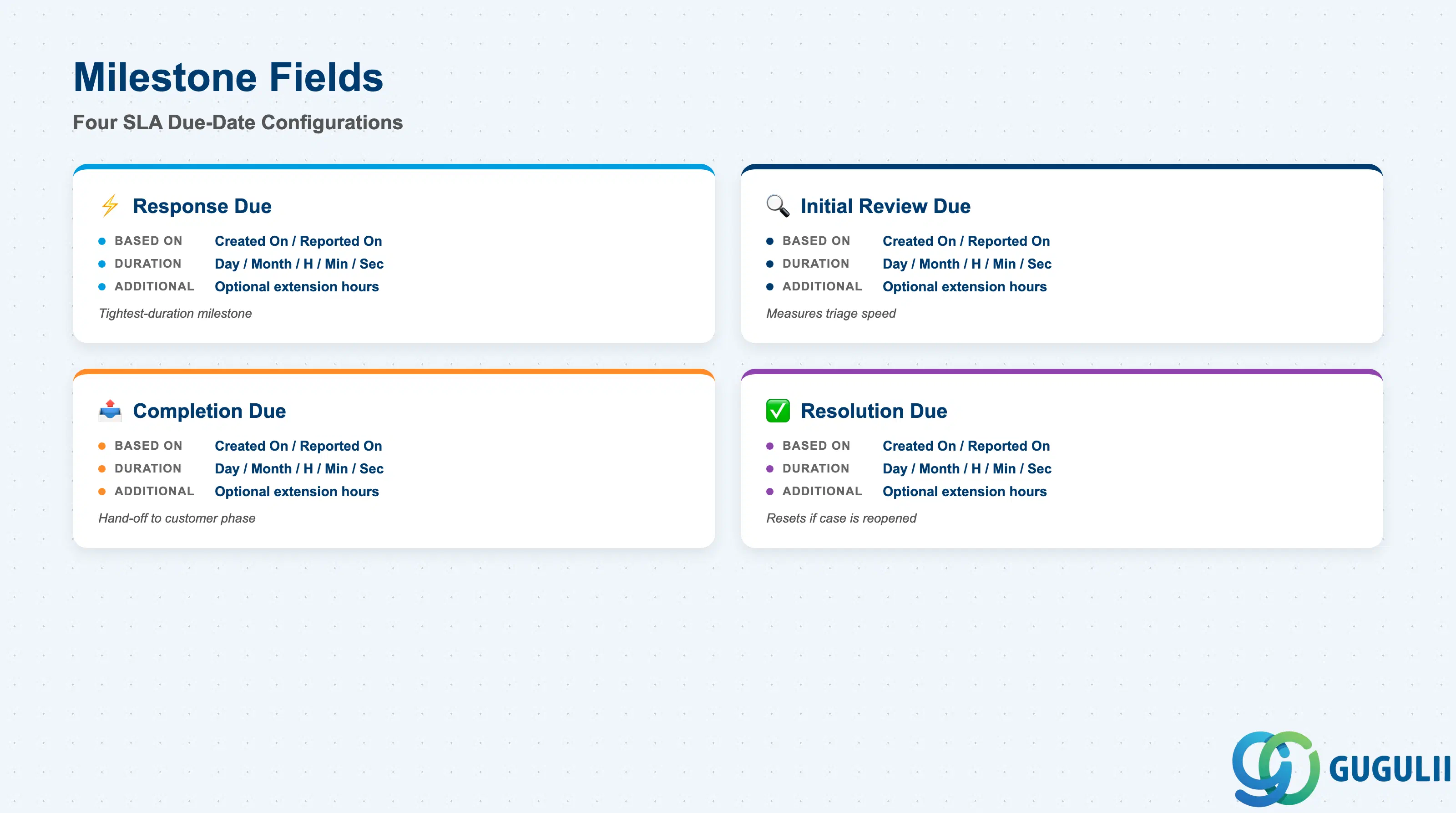
Milestones are the actual SLA promise a Service Level makes — four due-dates, each independently configured, that together define how fast a Case must move through response, review, completion, and resolution.
| Field | Description | Practical Usage |
|---|---|---|
| Response Due | Milestone tracking the SLA target for first response, configured with Based On (Created On/Reported On), Duration, and optional Additional Hours | Completes when an outbound email is sent or the case status changes to Requestor Action (responseCompletedOn); typically the tightest-duration Milestone and the one most visible to agents as a countdown timer. |
| Initial Review Due | Milestone tracking the SLA target for the case’s first substantive review by an agent | Completes when status changes from Open to In Progress (initialReviewCompletedOn); useful for measuring triage speed separately from overall resolution speed. |
| Completion Due | Milestone tracking the SLA target for handing the case to the customer for action | Completes when status is set to Requestor Action (assignedToCustomerOn); pairs naturally with processes that have a distinct “waiting on customer” phase. |
| Resolution Due | Milestone tracking the overall SLA target for case resolution | Completes when status changes to Completed (completedOn); resets if the case is reopened — SAP confirms this reset-on-reopen behavior is by design, not a bug, so build reporting logic that accounts for resets rather than assuming a fixed original target. |
| Additional Hours | Optional extension applied to a Milestone’s Duration, e.g. “duration with customer” adds elapsed time back onto the clock while the case sits in a Customer Action / Requestor Action status | Configure Additional Hours when a process legitimately pauses the SLA clock for reasons other than Operating Hours (e.g., waiting on the customer); without it, time spent waiting for the customer would otherwise count against the agent’s SLA target. |
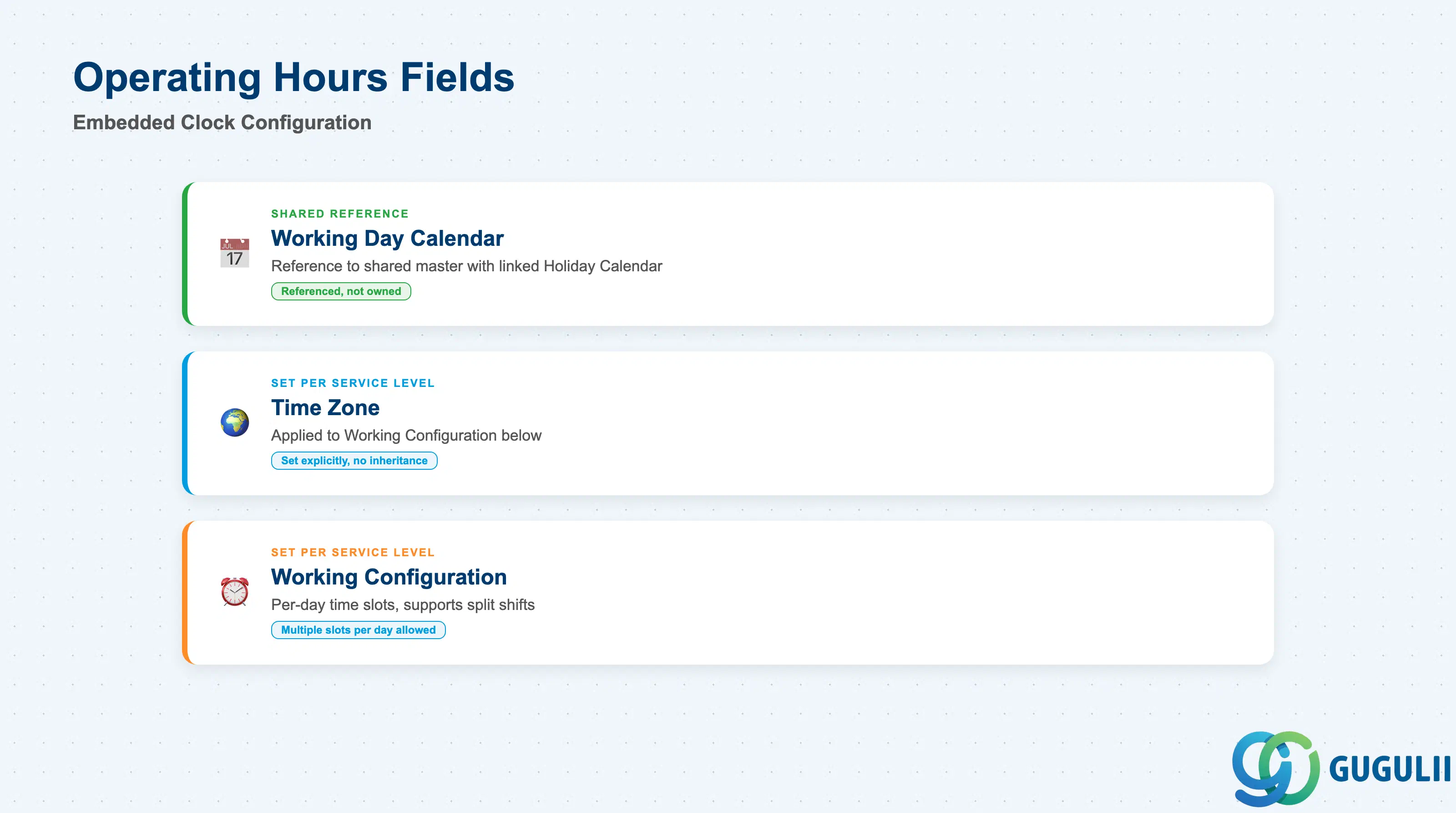
Operating Hours is the block embedded directly on the Service Level record that decides whether an hour-based Duration’s clock pauses outside business hours — see Section 1.2 for the underlying calculation logic.
| Field | Description | Practical Usage |
|---|---|---|
| Working Day Calendar | Reference to a shared, separately-maintained calendar master (country/region-aware, with a linked Holiday Calendar) | Reuse the same Working Day Calendar across multiple Service Levels covering the same region (e.g., Gold and Silver tiers both referencing “APAC-STANDARD”) rather than maintaining near-duplicate calendars per Service Level. |
| Time Zone | Time zone specification applied to the Working Configuration below | Set explicitly per Service Level rather than assuming it inherits from the tenant default — mismatched time zones between a Service Level and its intended region are a common source of Response Due timestamps that look “off by a few hours” to agents. |
| Working Configuration | Per-day-of-week time-slot definition, supporting multiple slots per day (e.g., split shifts) | Model genuine split shifts (e.g., 09:00–12:00 and 13:00–18:00) as two slots on the same day rather than one wide slot, if hour-based Durations should actually pause during a lunch closure. |
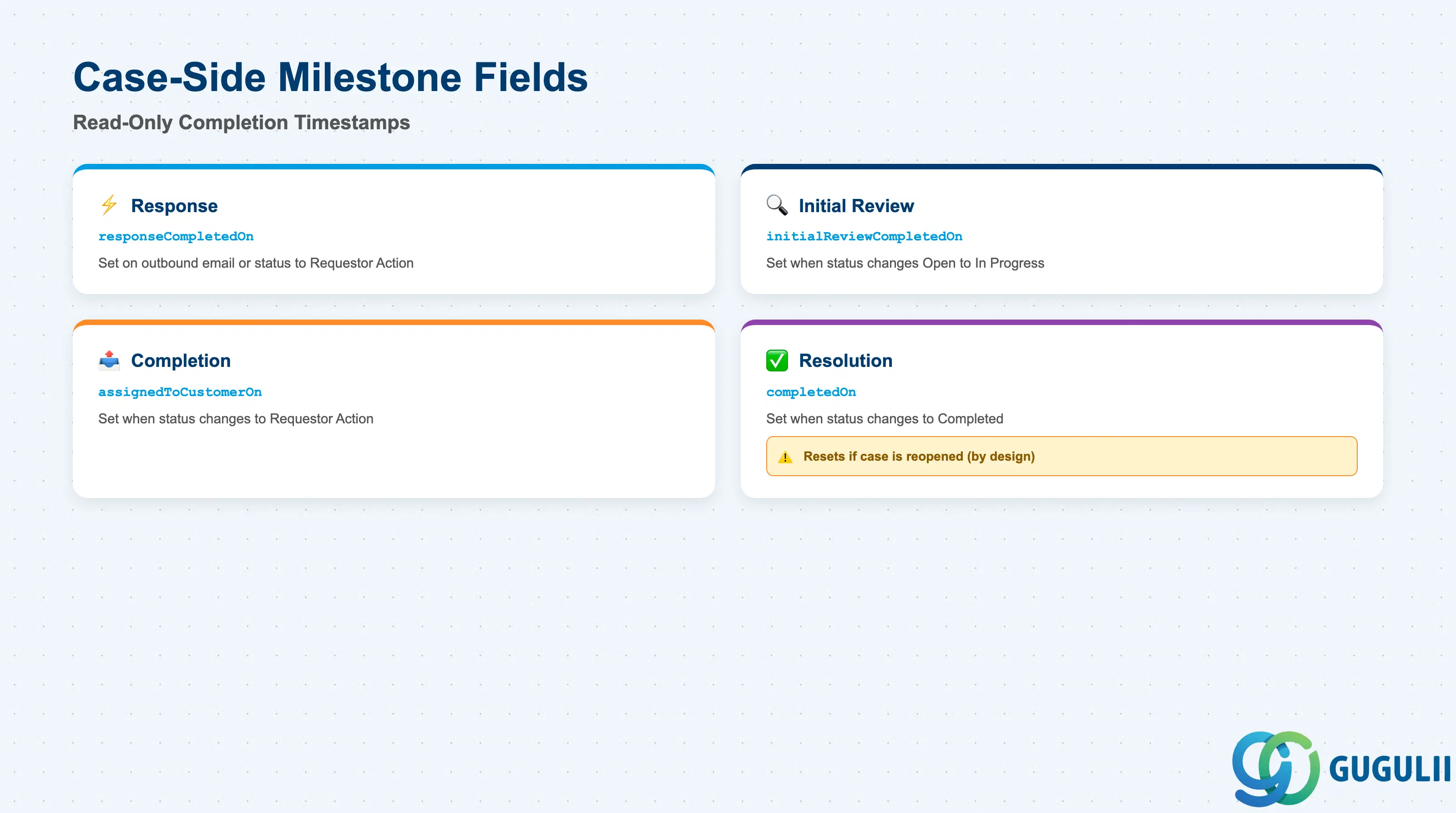
These are the read-only attributes written back onto the assigned Case as each Service Level Milestone completes — not fields configured on the Service Level record itself, but the observable result of it.
| Field | Description | Practical Usage |
|---|---|---|
responseCompletedOn | Completion timestamp for the Response Due Milestone | Set when an outbound email is sent, or when case status changes to Requestor Action. Reflects the actual response time achieved, for comparison against the Response Due target. |
initialReviewCompletedOn | Completion timestamp for the Initial Review Due Milestone | Set when case status changes from Open to In Progress. Useful for triage-speed reporting independent of final resolution speed. |
assignedToCustomerOn | Completion timestamp for the Completion Due Milestone | Set when case status is set to Requestor Action. |
completedOn | Completion timestamp for the Resolution Due Milestone | Set when case status changes to Completed. Resets if the case is reopened — SAP has confirmed via support ticket that this reset-on-reopen and reset-on-status-transition behavior is “by design,” not a bug, with no configuration override currently available (the recommended path for requesting different behavior is the SAP Customer Influence program). Do not build reporting logic that assumes these timestamps are immutable once set. |
| ID | Category | Title |
|---|---|---|
| sc-001 | Overview | What is SAP Service Cloud? |
| ID | Category | Title |
|---|---|---|
| sc-a01 | Overview | SAP Service Cloud Master Data: Overview, Hierarchy & Relationships |
| sc-a02-01 | Master Data | SAP Service Cloud Organizational Unit |
| sc-a02-02 | Master Data | SAP Service Cloud Employee |
| sc-a02-03 | Master Data | SAP Service Cloud Business Role |
| sc-a02-04 | Master Data | SAP Service Cloud Business User |
| sc-a02-05 | Master Data | SAP Service Cloud Team |
| sc-a03-01 | Master Data | SAP Service Cloud Email Channel |
| sc-a03-02 | Master Data | SAP Service Cloud Email Template |
| sc-a04-01 | Master Data | SAP Service Cloud Knowledge Base Provider |
| sc-a05-01 | Master Data | SAP Service Cloud Service Catalog |
| sc-a05-02 | Master Data | SAP Service Cloud Service Category |
| sc-a05-03 | Master Data | SAP Service Cloud Case Type |
| sc-a06-01 | Master Data | SAP Service Cloud Service Level 📍 |
| sc-a06-02 | Master Data | SAP Service Cloud Service Level Determination |
| sc-a07-01 | Master Data | SAP Service Cloud Case Routing Rules |
| sc-a10-04 | Master Data | SAP Service Cloud Warranty |
| sc-a11-01 | Master Data | SAP Service Cloud Installed Base |
| sc-a11-02 | Master Data | SAP Service Cloud Functional Location |
| ID | Category | Title |
|---|---|---|
| sc-b01 | Overview | SAP Service Cloud Transactions: Process Flow, Hierarchy & Relationships |