Title here
Summary here

A Warranty in SAP Service Cloud is a deliberately thin record — at creation, only a Name and a Duration are entered, yet the object sits inside a genuinely two-directional data model that the Feature Scope Description’s one-line summary does not fully capture. Registered Product and Functional Location (SC-A11-02) each hold a direct Warranty UUID reference plus cached Start/End dates, meaning they point to Warranty rather than the reverse; Installed Base (SC-A11-01) and Case never carry that reference and only see warranty information indirectly, through whichever Functional Location or Registered Product they contain or reference. This article maps that reference direction precisely, resolves a real documentation conflict between the Feature Scope Description and the Setup Guide’s field-level model, flags three unrelated SAP concepts that also use the word “Warranty,” and confirms that Case Routing Rule and Service Level Determination have no relationship to warranty coverage at all.
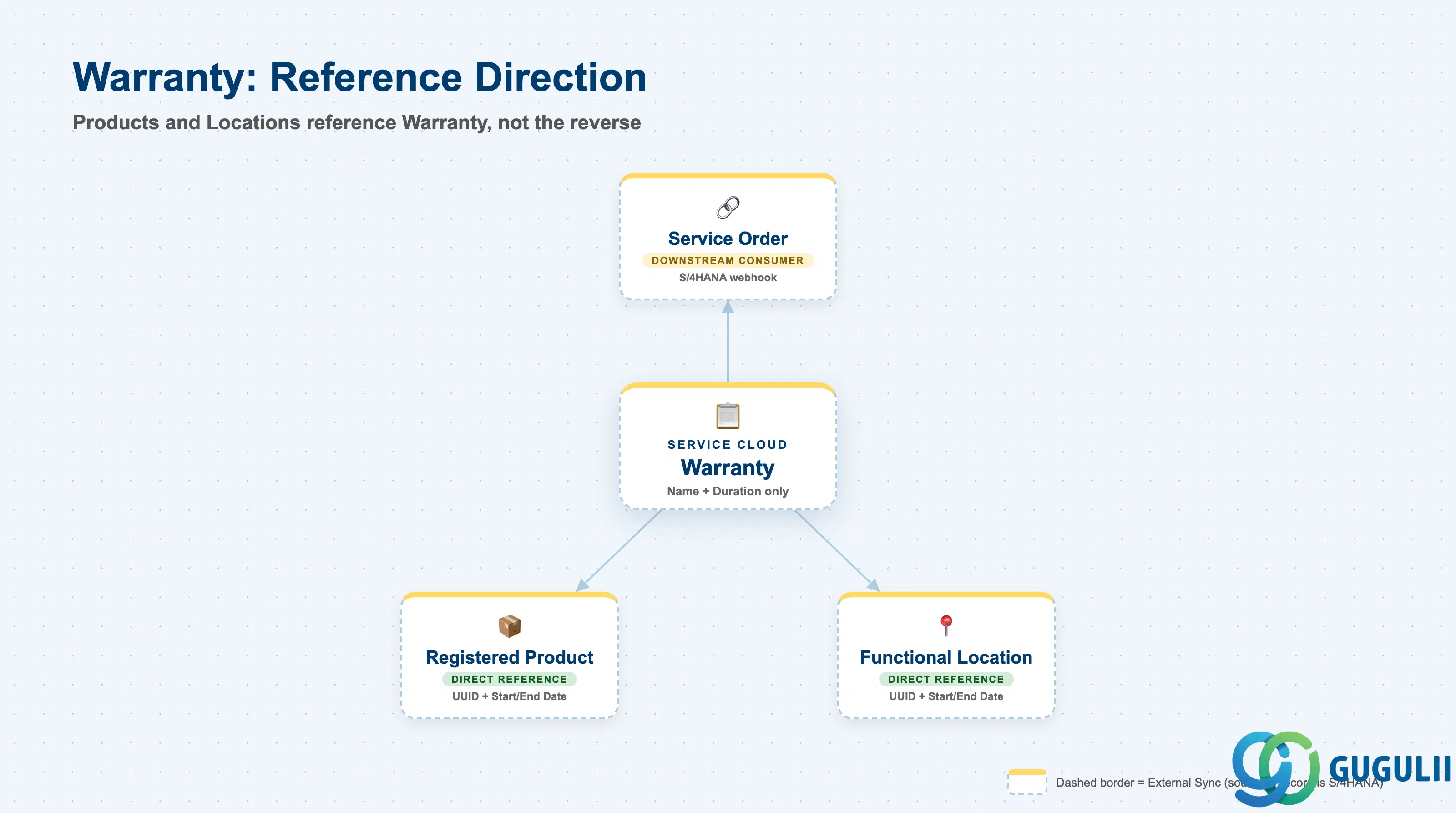
A warranty exists to answer one question: for how long, and under what named coverage, is a given product or location protected? SAP Service Cloud answers this with a small, standalone record — Warranty — that other objects point to, rather than a record that reaches out and attaches itself to anything. Registered Product and Functional Location are the only two objects confirmed to hold a direct field-level reference to a Warranty; Warranty itself stores no back-reference to either.
| Aspect | Details |
|---|---|
| Role | A manually-created coverage-duration record (Name + Duration required at creation) that Registered Product and Functional Location reference by UUID; Warranty does not itself decide when coverage applies to a Case — that rule-based determination happens downstream, at the Service Order level, via a synchronous webhook to an external system |
| Modules using it | SAP Service Cloud (sole owner of the Warranty object, its worklist, and its work-center tile); SAP S/4HANA consumed as an external system for coverage determination only (webhook-based, at Service Order level) — Service Cloud is not the system of record for entitlement/coverage logic once it is replicated |
| Transactions | Warranties worklist (click Create → enter Name and Duration → Save); dedicated work-center tile Warranty (technical name sap.crm.service.warrantyService, UI app sap.crm.warrantyservice.uiapp.warranty), access granted per Business User via Business Role assignment |
| Key Tables | Warranty header entity (external_key, Status, Duration) plus two child entities, Warranty External IDs and Warranty Descriptions; SAP Service Cloud is multi-tenant SaaS and exposes these only as OData/import-export field templates, not classical ABAP tables |
| S/4HANA note | No S/4HANA counterpart exists inside Service Cloud’s own data model. S/4HANA is reached only at runtime, as the external system a Service Order calls via webhook (“External Warranty and Contract Determination”) to retrieve warranty and contract values — the external system, not Service Cloud, is documented as “the ultimate source of truth” for those values once replicated |
Naming collision — “Warranty” means at least three unrelated things elsewhere in SAP. This object shares nothing but a name with: (1) SAP S/4HANA Warranty Claim Management (component LO-WTY) — Fiori apps for processing inbound customer claims and outbound supplier recovery claims after a repair (scope items 63Y / 5HR), a financial reimbursement process, not a coverage-assignment object; (2) the classic, on-premise SAP Plant Maintenance / EAM warranty subscreen on Equipment or Functional Location (transactions
IE02/IL02, screen group 110 — corroborated via community sources; verify against your system) — note that this legacy on-premise “Functional Location” is a different, unrelated technical object from SAP Service Cloud’s cloud “Functional Location” (SC-A11-02), a naming trap worth flagging again on that sibling article; and (3) a distinct SAP CRM (on-premise) Warranty object in the classic CRM service module. Treat all three as unrelated concepts that merely reuse a common English word.
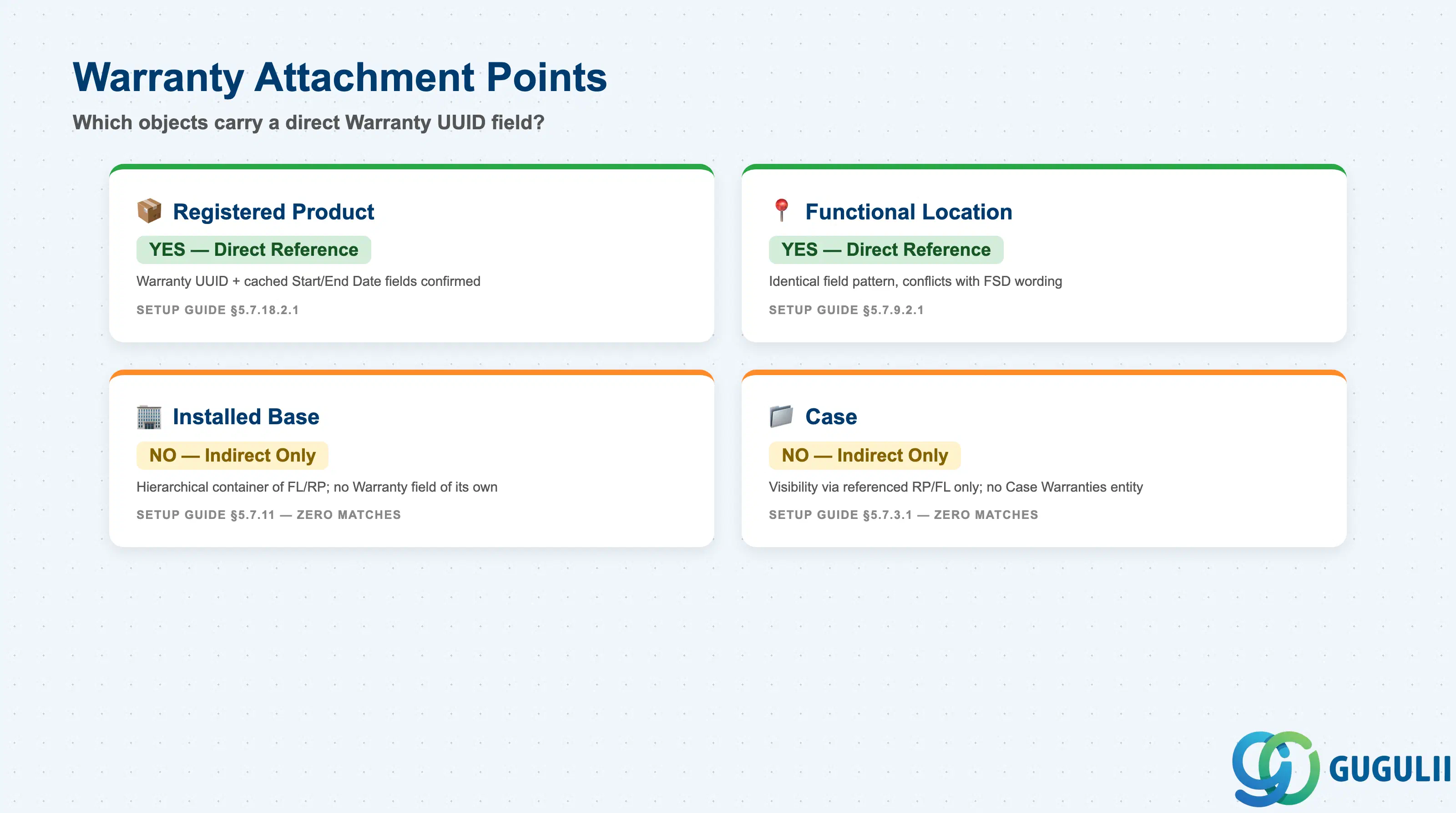
The FSD’s marketing-style summary states Warranty applies “to registered products” — a genuinely incomplete description once the field-level import templates are inspected. There is no configurable “coverage type” on Warranty itself; the meaningful variation is which objects a given Warranty is actually wired to, confirmed one entity at a time from the Setup Guide’s dependency tables and field templates.
| Attachment Point | Direct Warranty Reference? | Confirmed By | Practical Note |
|---|---|---|---|
| Registered Product | Yes — Warranty_Warranty UUID, Warranty_Warranty Start Date, Warranty_Warranty End Date | Setup Guide §5.7.18.2.1 field template; dependency list also names Warranty | The only attachment point named in the FSD’s one-line scope summary. |
| Functional Location (SC-A11-02) | Yes — identical field pattern: Warranty_Warranty UUID, Warranty_Warranty Start Date, Warranty_Warranty End Date | Setup Guide §5.7.9.2.1 field template; §5.7.9.1 dependency table also names Warranty | Confirmed in the field-level data model but not mentioned in the FSD’s Warranty scope line — a genuine documentation conflict (see design principle below). Chapter 12 separately confirms Functional Location “supports warranty” as a named capability. |
| Installed Base (SC-A11-01) | No — no Warranty_* field in the full field template; dependency table does not list Warranty | Setup Guide §5.7.11 dependency table and field template (full-text search returned zero matches) | Reaches Warranty only indirectly, as the hierarchical container of the Functional Locations / Registered Products that hold the direct reference. |
| Case | No — the formal Case Dependencies table (§5.7.3.1) lists only Hypernotes and Attachments; no “Case Warranties” join-subentity exists | Setup Guide §5.7.3.1 (contrast with the confirmed Case Registered Products / Case Functional Locations / Case Installed Bases subentities, which do exist) | Warranty visibility reaches an agent only once a Registered Product or Functional Location is added to the Case — never via a direct Case field. |
Design principle — the FSD is a scope summary, not the data model. The Feature Scope Description is legally binding for licensing purposes but is written as a terse, one-line marketing summary; it names only Registered Product. The Setup Guide’s field-level import template is the more granular and more reliable source for what the system actually stores, and it independently confirms Functional Location carries the identical
Warranty UUID/ Start Date / End Date fields. Treat “Warranty applies to registered products only” as technically incomplete — this article documents Functional Location as a second, independently confirmed attachment point, and flags the conflict rather than silently resolving it in either direction.
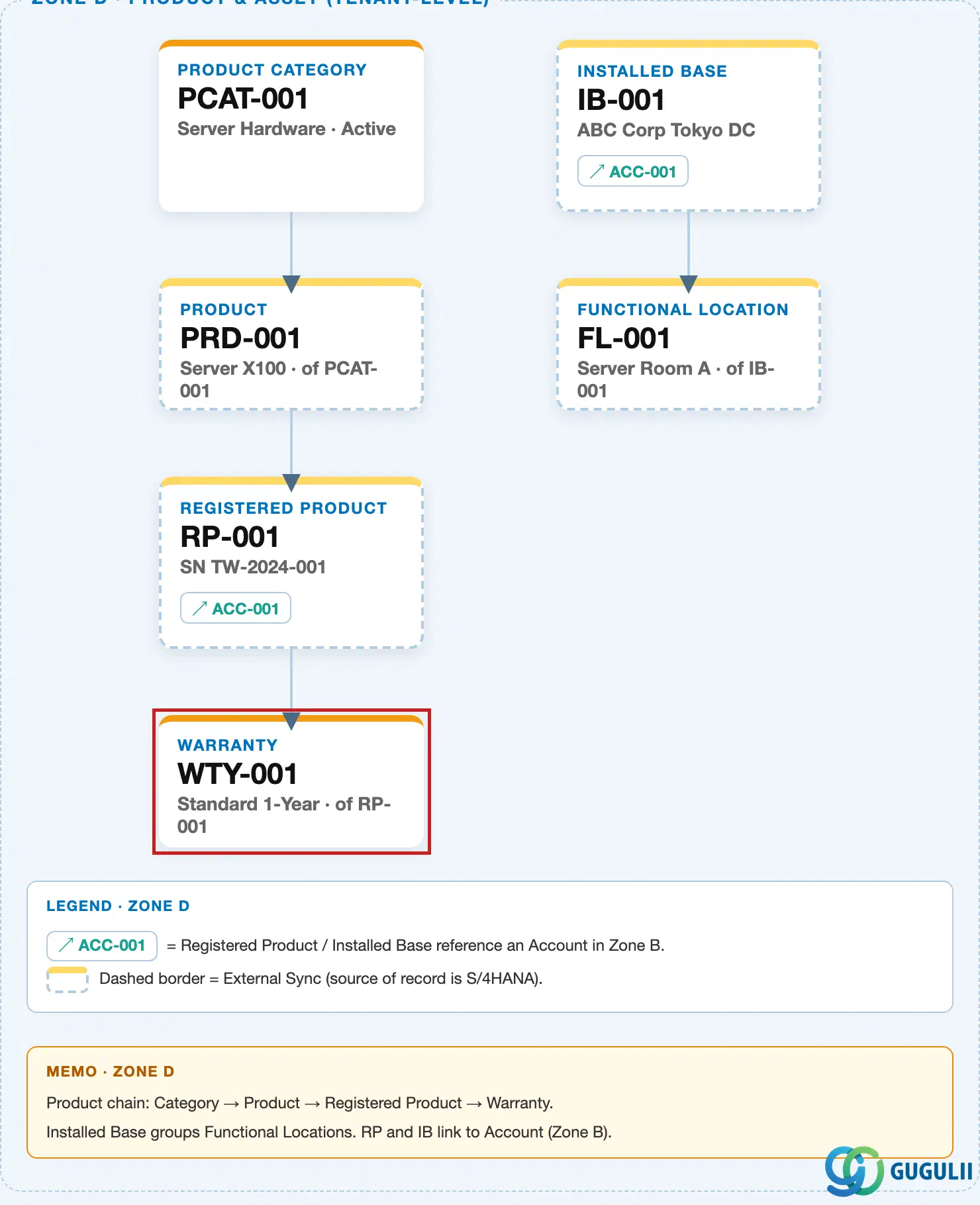
Data hierarchy with a concrete example (tenant-level; SAP Service Cloud has no Company Code / Plant scoping above this)
Client (SAP Service Cloud Tenant)
   │
   ├── Installed Base "IB-40021 — Acme Manufacturing, Packaging Line 2" (Status: Active, illustrative)
   │        │        (container only — Installed Base carries no Warranty field of its own;
   │        │         it reaches Warranty only indirectly, through the two child objects below)
   │        │
   │        ├── Functional Location "FL-2200 — Packaging Robot Arm"
   │        │        ── references ──> Warranty "WTY-10045 — 24-Month Extended Coverage"
   │        │             (Warranty UUID + cached Warranty Start/End Date fields)
   │        │
   │        └── Registered Product "RP-88231 — Serial# ROB-2024-3390"
   │                 ── references ──> Warranty "WTY-10045 — 24-Month Extended Coverage"
   │                      (Warranty UUID + cached Warranty Start/End Date fields)
   │
   ├── Warranty "WTY-10045 — 24-Month Extended Coverage" (Duration: 24 months)
   │        (own record; only Name + Duration are entered at create — no back-reference
   │         field to Functional Location or Registered Product exists on Warranty itself)
   │
   └── Case "CS-500192 — Robot arm malfunction, no power"
            ── references ──> Registered Product "RP-88231"
                 (Case has no direct Warranty field; warranty visibility reaches the agent
                  only indirectly, through whichever Registered Product or Functional
                  Location the Case references — see Solution Guide Ch. 28)
Design principle — the reference runs from the product/location to the warranty, never the reverse. Both Functional Location and Registered Product hold a
Warranty UUIDforeign key plus their own cached copy of the Start and End dates; Warranty holds no list of what it is attached to. This means a single Warranty record could, in principle, be referenced from more than one Functional Location or Registered Product (a many-to-one shape), though no source in this research confirms or denies whether the UI enforces a one-to-one assignment in practice — treat the cardinality as directionally confirmed (product/location → Warranty) but not exhaustively bounded. Installed Base sits one level above both children and is never itself the reference point.
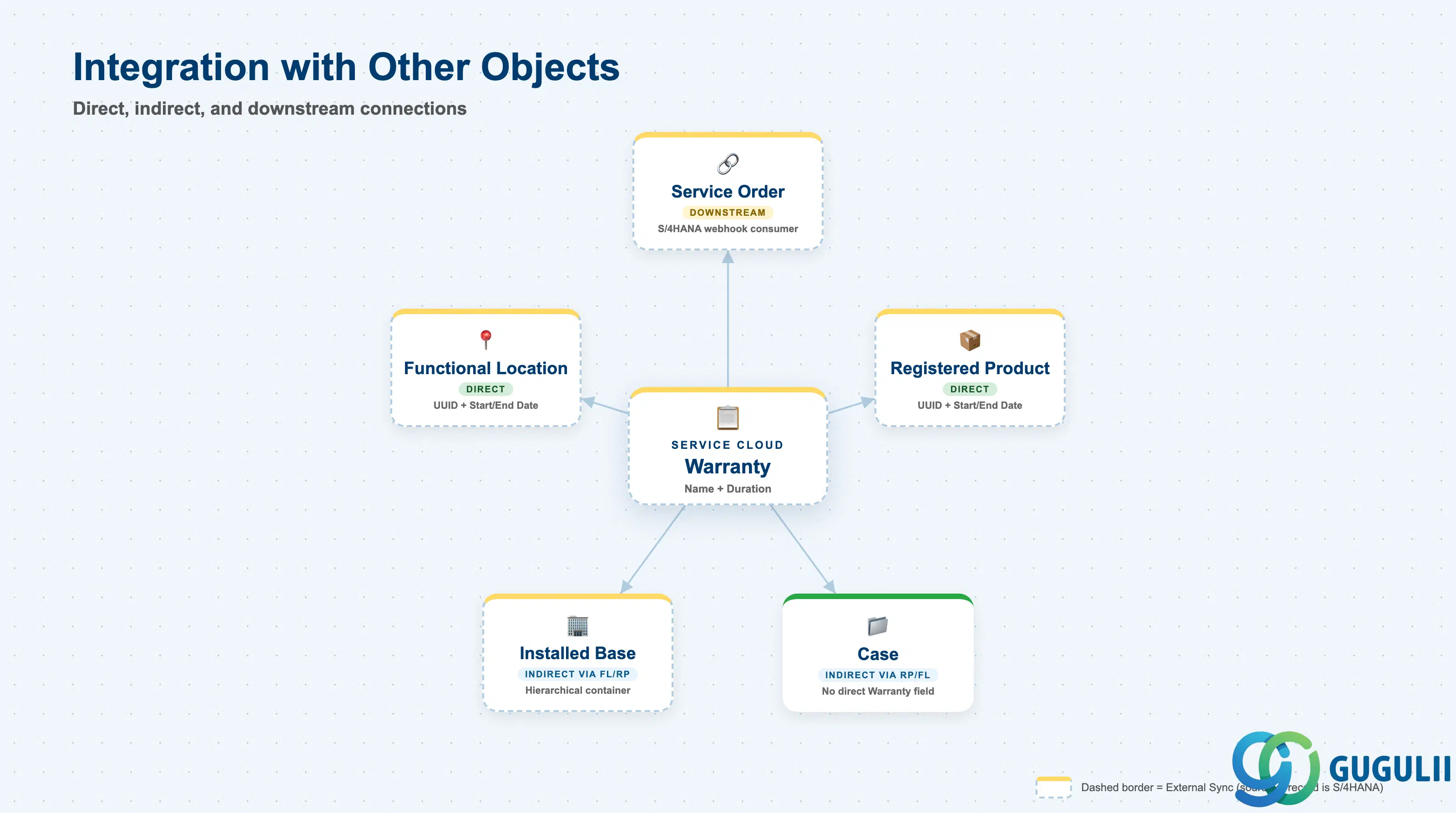
Warranty touches other objects in exactly two directions: it is referenced by Registered Product and Functional Location (inbound), and its coverage is ultimately determined downstream at the Service Order level by an external system (outbound, informational only — Warranty itself stores no result of that determination). The table below is explicit about which relationships are sourced and which are confirmed non-relationships.
| Object | Relationship | Practical Notes |
|---|---|---|
| Registered Product | Direct — holds Warranty UUID + cached Start/End Date | Confirmed field-level template (Setup Guide §5.7.18.2.1); the only attachment point named in the FSD’s scope line. |
| Functional Location (SC-A11-02) | Direct — holds Warranty UUID + cached Start/End Date | Confirmed field-level template (Setup Guide §5.7.9.2.1); conflicts with the FSD’s “registered products only” wording — see Section 1.2 design principle. |
| Installed Base (SC-A11-01) | Indirect only — hierarchical container of Functional Location / Registered Product; no direct Warranty field of its own | Dependency table and full field template both confirmed absent for Installed Base. |
| Case | Indirect only — no direct Case→Warranty field; visibility surfaces only via whichever Registered Product or Functional Location the Case references | Case Dependencies table (§5.7.3.1) lists no Warranty subentity, unlike the confirmed Case Registered Products / Case Functional Locations subentities. |
| Service Order (SAP S/4HANA, external) | Downstream consumer, not owned by Service Cloud — rule-based coverage determination executes here via a synchronous webhook call, triggered automatically on Service Order creation and re-invocable manually | Solution Guide §23.1.8.2 “External Warranty and Contract Determination”; the external system, once replicated, is documented as “the ultimate source of truth” for these values. |
| Case Routing Rule (SC-A07-01) | No relationship | An exhaustive full-text search of the Solution Guide’s Case Routing to Employee, Case Routing to Team, and Service Level Determination chapter range returned zero matches for “warranty.” |
| Service Level Determination (SC-A06-02) | No relationship | Same exhaustive search, same zero-match result — see myth-busting note below. |
Myth-busting — Warranty does not gate Case Routing or SLA assignment. It is tempting to assume a Case’s warranty status might influence which employee, team, or Service Level it gets routed to — it does not. Case Routing Rule and Service Level Determination were both exhaustively searched (full-text, across their entire configuration chapter range) and confirmed to contain zero mentions of “warranty.” The actual coverage-gating logic lives entirely at the Service Order level, executed via a synchronous webhook call to SAP S/4HANA — SAP Service Cloud consumes the result of that external determination; it does not evaluate warranty coverage itself anywhere in Case or Case-routing configuration.
Scope notes: (1) No official, single, canonical list of “coverage type” values was found — the Warranty entity’s own field template exposes only
StatusandDuration(plus Name/ID/External ID at the UI level); do not present a specific coverage-type value set as officially confirmed. (2) No explicit Start Date / End Date input field is documented on the Warranty create form itself (only Duration is entered); the cached Start/End Date fields that exist on Registered Product and Functional Location suggest these are computed from an install/delivery date plus Duration, but no source documents the exact computation logic — do not assert a specific formula.
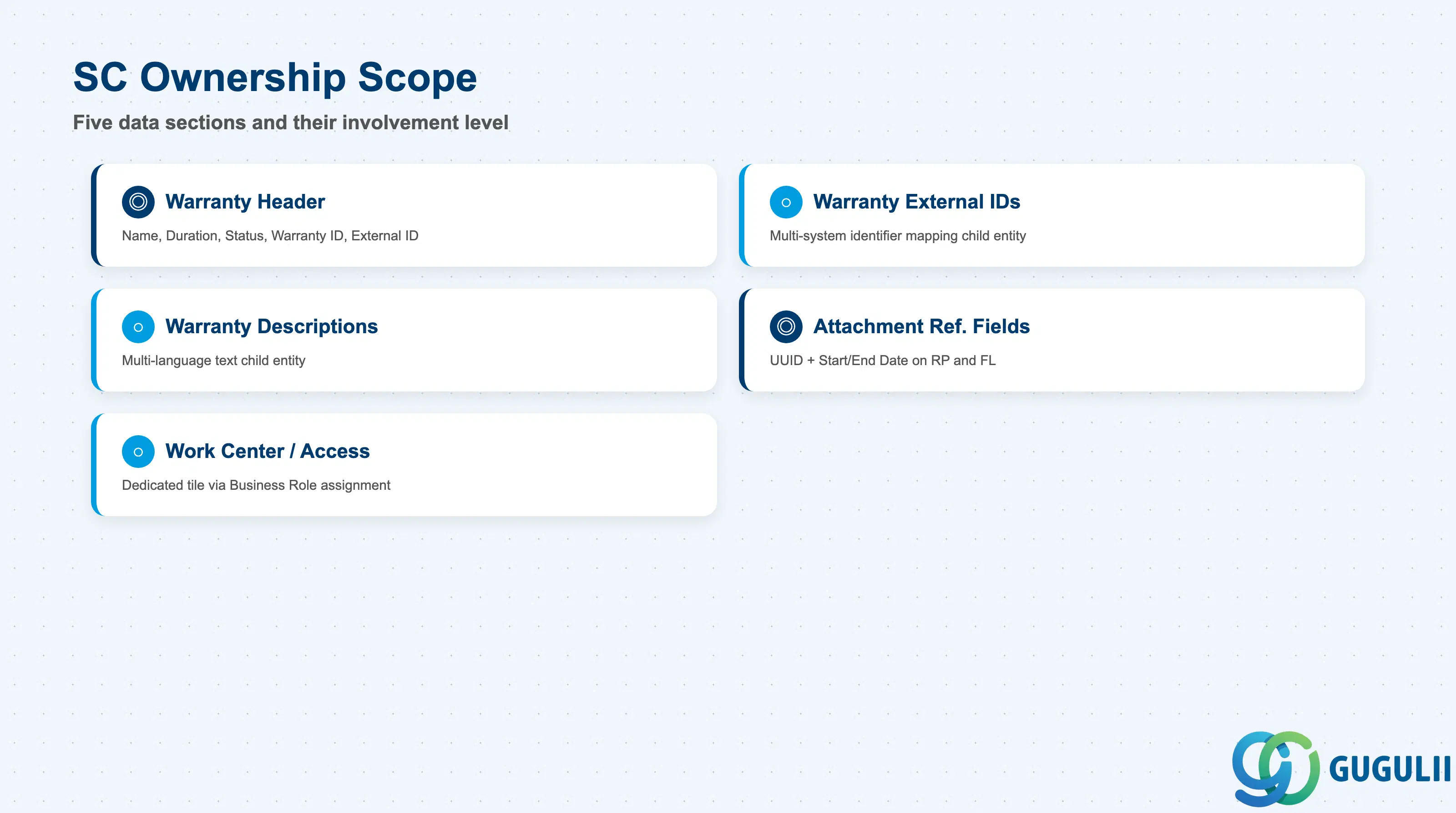
| Data Section | SC Involvement | Notes |
|---|---|---|
| Warranty Header (Name, Duration, Status, Warranty ID, External ID) | ◎ Owner | Only Name and Duration are exposed on the manual create procedure; Status, Warranty ID, and External ID appear afterward on the quick view. |
| Warranty External IDs (child entity) | ○ Direct involvement | Optional child records mapping a Warranty to identifiers in external/communication systems. |
| Warranty Descriptions (child entity) | ○ Direct involvement | Optional multi-language description text, keyed by language code — for localized warranty terms and conditions text. |
| Attachment Reference Fields (on Registered Product / Functional Location) | ◎ Owner | The Warranty UUID + cached Start/End Date fields that actually connect a Warranty to a product or location live on the referencing record, not on Warranty itself. |
| Work Center / Access Control | ○ Direct involvement | Dedicated Warranties work-center tile, granted per Business User via Business Role assignment. |
Legend: ◎ = Owner / Critical, ○ = Direct involvement
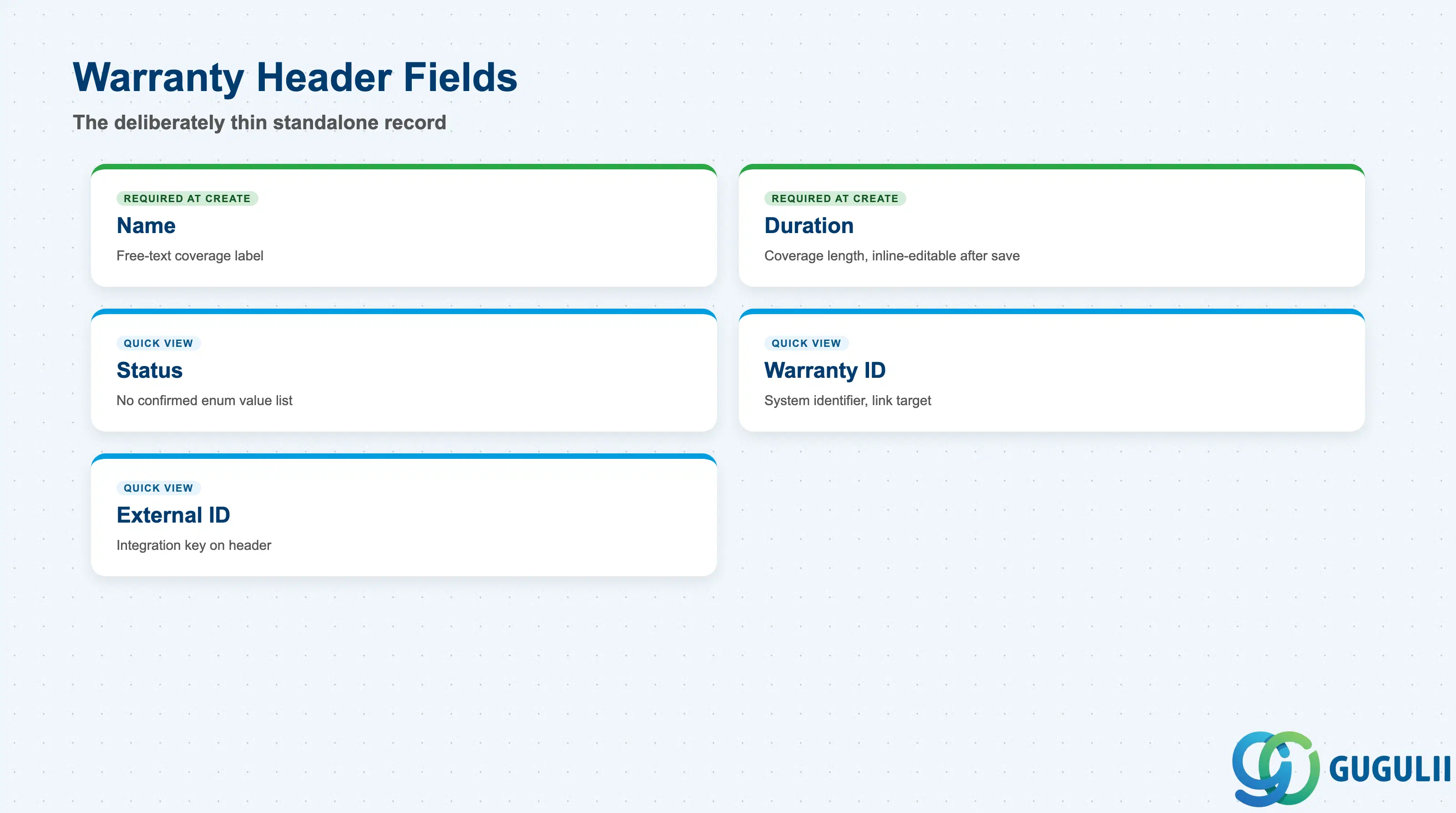
This is the standalone record itself — deliberately thin, with more fields visible after creation than are asked for during creation.
| Field | Description | Practical Usage |
|---|---|---|
| Name | Free-text label entered on create, e.g. “24-Month Extended Coverage” | One of only two fields required to create a Warranty; name it descriptively enough that an agent recognizes the coverage terms from the label alone — there is no separate “coverage type” field to fall back on. |
| Duration | Length of coverage entered on create; remains inline-editable from the quick view afterward | The only coverage-length input on the Warranty record itself; no source documents whether this is stored as a fixed date range or as a rolling duration recalculated against a reference date on the referencing Registered Product/Functional Location — confirm actual behavior in a sandbox before relying on a specific interpretation. |
| Status | Present on the quick view; no official enumerated value list was found in this research pass | Do not present a specific Status value set (e.g. Active/Expired/Draft) as officially confirmed — treat as a genuine coverage gap. |
| Warranty ID | System identifier, used as the link target when an agent clicks into the quick view | Internal identifier only; use External ID (below) for any integration or import/export key matching. |
| External ID | Present on the quick view; distinct from the child “Warranty External IDs” entity described in Section 2.2 | Confirm with the implementation team whether this header-level External ID and the child External IDs entity serve the same or different integration purposes before designing a data migration — the Setup Guide documents both but does not state how they relate to each other. |
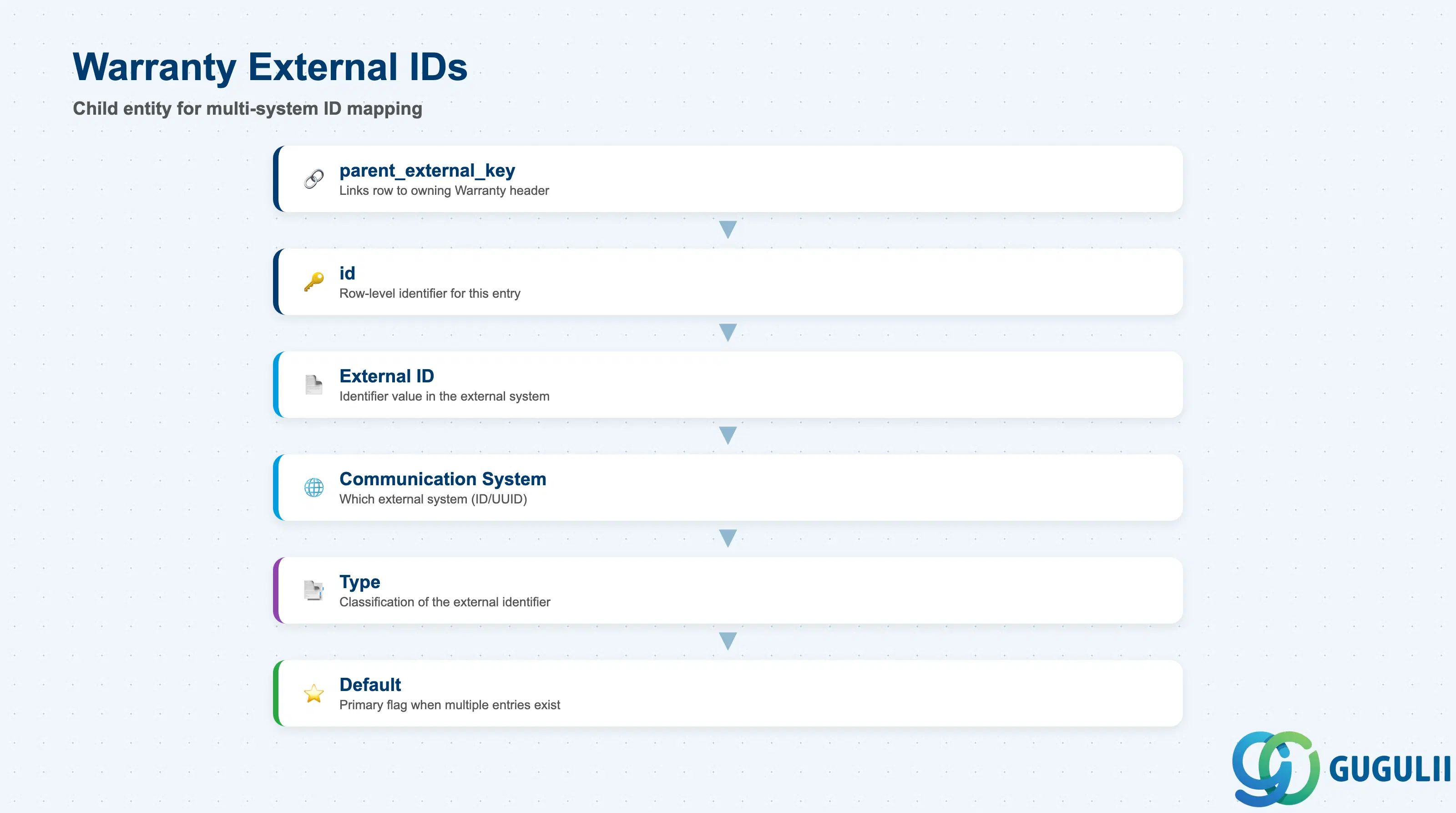
A child entity used for mass import/export, mapping one Warranty to one or more identifiers in other, external communication systems.
| Field | Description | Practical Usage |
|---|---|---|
| parent_external_key | Links this External ID row back to its owning Warranty header record | Mandatory for any bulk import — an External IDs row with no valid parent key will fail to load. |
| id | Row-level identifier for this specific External ID entry | Distinct from both the Warranty header’s own Warranty ID and External ID fields (Section 2.1) — this is a child-entity-level key, not the Warranty’s own identifier. |
| External ID | The actual identifier value as known in the external system | Use for reconciling Warranty records against a source-of-record system during data migration or ongoing integration. |
| Communication System ID/UUID | Identifies which external communication system this External ID entry pertains to | A single Warranty can, by this entity’s design, carry more than one External ID row — one per external system it needs to be identifiable in. |
| Type | Classifies the kind of external identifier being stored | No official enumerated value list was found for this field in this research pass — treat any specific value as illustrative only. |
| Default | Flags which External ID entry (if more than one exists) should be treated as primary | Set explicitly whenever a Warranty carries multiple External ID rows, to avoid ambiguity about which one downstream integrations should prefer. |
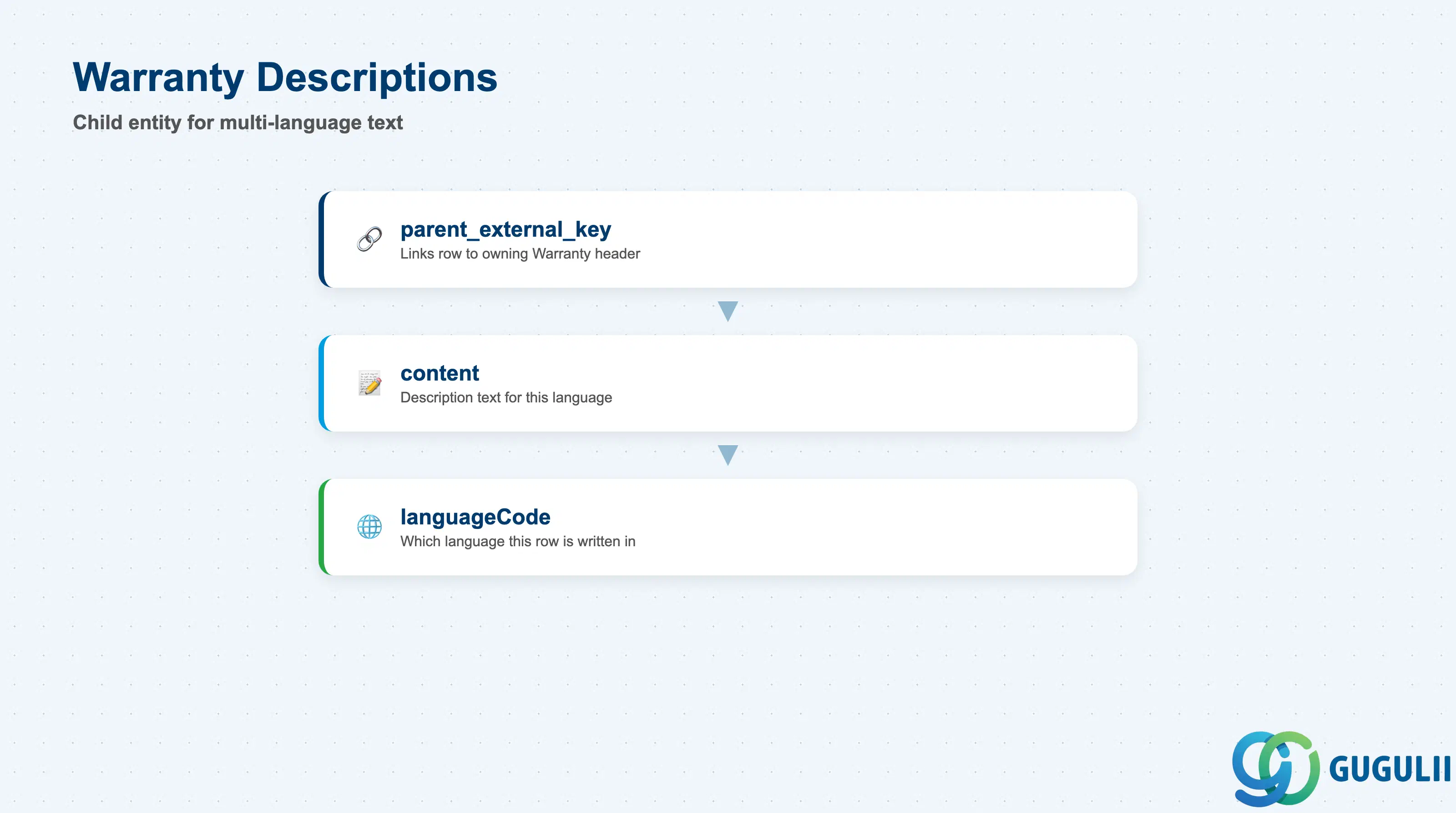
A second child entity, purely for multi-language warranty text — kept separate from the header so a single Warranty can carry its terms in more than one language.
| Field | Description | Practical Usage |
|---|---|---|
| parent_external_key | Links this Description row back to its owning Warranty header record | Same pattern as Warranty External IDs (Section 2.2) — mandatory for bulk import. |
| content | The actual description text for this language | Use for warranty terms and conditions text, coverage summaries, or any other free text a business wants localized per Warranty. |
| languageCode | The language this specific content row is written in | A Warranty intended for a multi-region rollout should have one Descriptions row per required language rather than relying on a single-language field. |
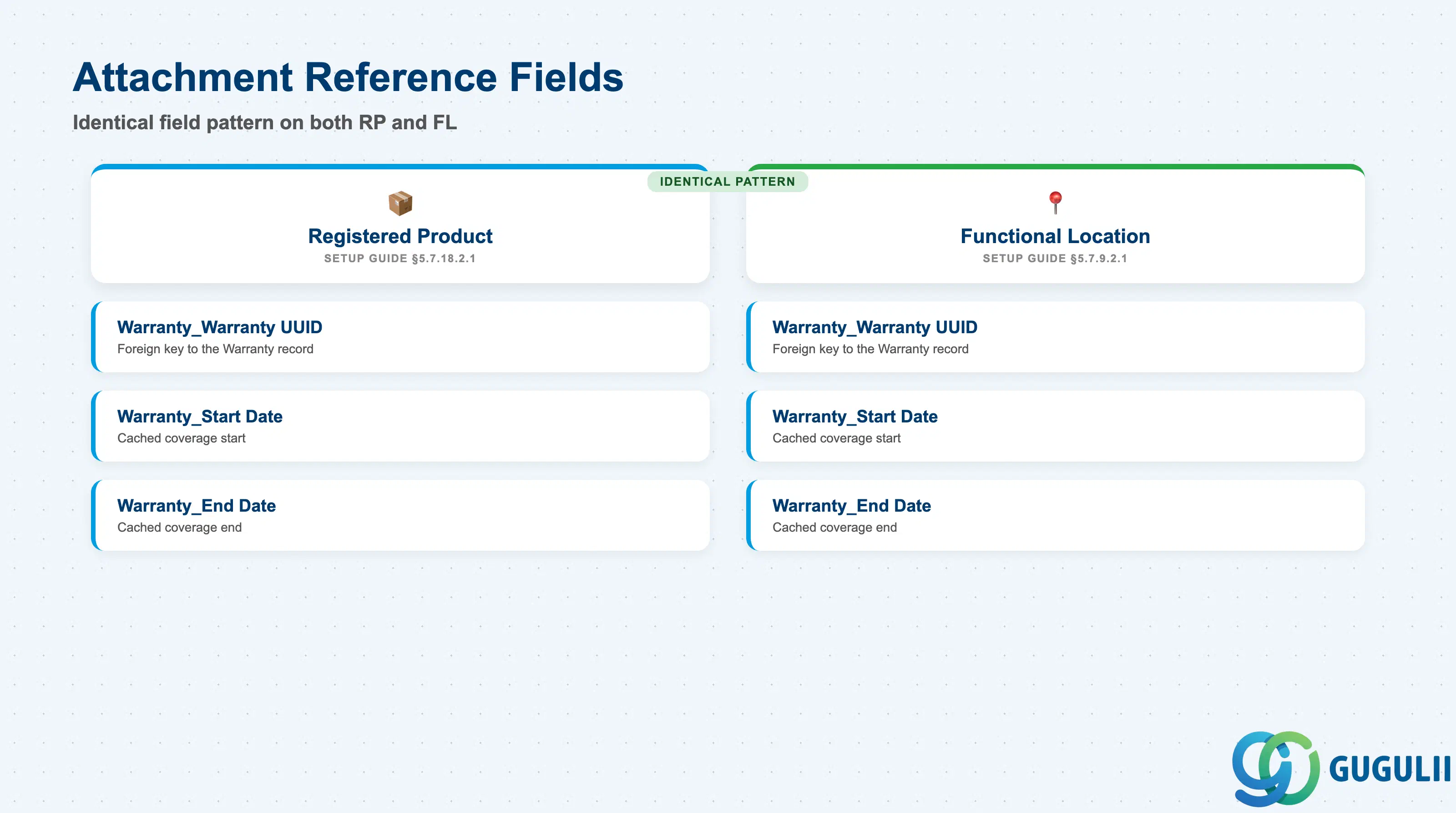
These three fields are documented on Registered Product and Functional Location, not on Warranty itself — but they are the actual mechanism that connects a Warranty to a real-world product or location, so they belong in this article’s field-level scope.
| Field | Description | Practical Usage |
|---|---|---|
| Warranty_Warranty UUID | Foreign-key reference to the Warranty record; identical field name and type on both Registered Product (§5.7.18.2.1) and Functional Location (§5.7.9.2.1) | This is the actual attachment mechanism — populate this field on the Registered Product or Functional Location record, not on Warranty, to link the two. |
| Warranty_Warranty Start Date | Cached copy of the linked Warranty’s coverage start date | Denormalized for query/display performance on the referencing record; no source documents whether this is kept in sync automatically if the source Warranty’s dates change — confirm in a sandbox before assuming live sync. |
| Warranty_Warranty End Date | Cached copy of the linked Warranty’s coverage end date | Same caching pattern and same open question on sync behavior as Start Date above. |
Prerequisite: Populating these three fields is what actually creates the Warranty attachment on a Registered Product or Functional Location — creating a Warranty record alone (Section 2.1) does not attach it to anything by itself.
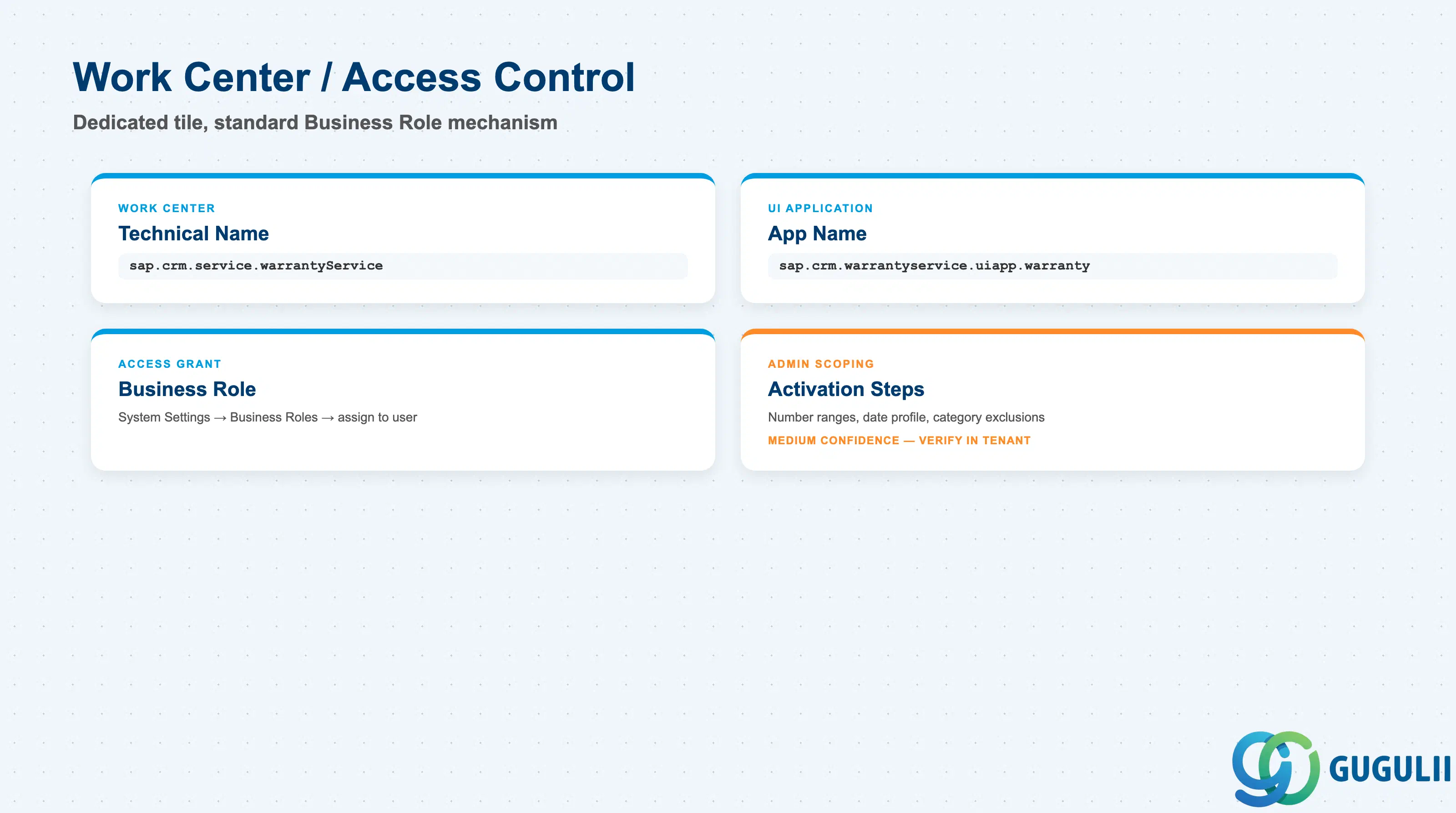
Like the other master-data objects in this batch, access to the Warranties worklist is governed entirely through Business Role assignment, not through any field on the Warranty record itself.
| Field | Description | Practical Usage |
|---|---|---|
| Work Center Technical Name | sap.crm.service.warrantyService | Stable technical identifier for the Warranty work center — use this when scripting or auditing Business Role assignments rather than relying on the display label alone. |
| UI App Name | sap.crm.warrantyservice.uiapp.warranty | The specific UI app tied to the work center tile; confirms Warranty has its own dedicated app rather than being a tab inside another object’s screen. |
| Business Role Assignment | Grants a Business User access to the Warranties work center via System Settings → Business Roles | Follows the identical access-control pattern already confirmed for other Service Cloud master-data objects in this batch (e.g., Service Catalog, Case Type) — no Warranty-specific authorization object exists beyond the standard Business Role mechanism. |
| Scoping / activation steps (medium confidence — SAP Learning training material, not independently corroborated in the two primary Guide PDFs) | Activating Warranty Management under Entitlement Management in scoping; number ranges for internal/external warranties; a date profile controlling how many days after product delivery a warranty takes effect; a category-based exclusion mechanism that can reject warranty coverage for certain incident categories | Treat these as plausible, admin-oriented configuration detail rather than confirmed Help Portal procedure — verify each against the current tenant’s actual scoping screens before relying on them in a build. |
| ID | Category | Title |
|---|---|---|
| sc-001 | Overview | What is SAP Service Cloud? |
| ID | Category | Title |
|---|---|---|
| sc-a01 | Overview | SAP Service Cloud Master Data: Overview, Hierarchy & Relationships |
| sc-a02-01 | Master Data | SAP Service Cloud Organizational Unit |
| sc-a02-02 | Master Data | SAP Service Cloud Employee |
| sc-a02-03 | Master Data | SAP Service Cloud Business Role |
| sc-a02-04 | Master Data | SAP Service Cloud Business User |
| sc-a02-05 | Master Data | SAP Service Cloud Team |
| sc-a03-01 | Master Data | SAP Service Cloud Email Channel |
| sc-a03-02 | Master Data | SAP Service Cloud Email Template |
| sc-a04-01 | Master Data | SAP Service Cloud Knowledge Base Provider |
| sc-a05-01 | Master Data | SAP Service Cloud Service Catalog |
| sc-a05-02 | Master Data | SAP Service Cloud Service Category |
| sc-a05-03 | Master Data | SAP Service Cloud Case Type |
| sc-a06-01 | Master Data | SAP Service Cloud Service Level |
| sc-a06-02 | Master Data | SAP Service Cloud Service Level Determination |
| sc-a07-01 | Master Data | SAP Service Cloud Case Routing Rules |
| sc-a10-04 | Master Data | SAP Service Cloud Warranty 📍 |
| sc-a11-01 | Master Data | SAP Service Cloud Installed Base |
| sc-a11-02 | Master Data | SAP Service Cloud Functional Location |
| ID | Category | Title |
|---|---|---|
| sc-b01 | Overview | SAP Service Cloud Transactions: Process Flow, Hierarchy & Relationships |