Title here
Summary here

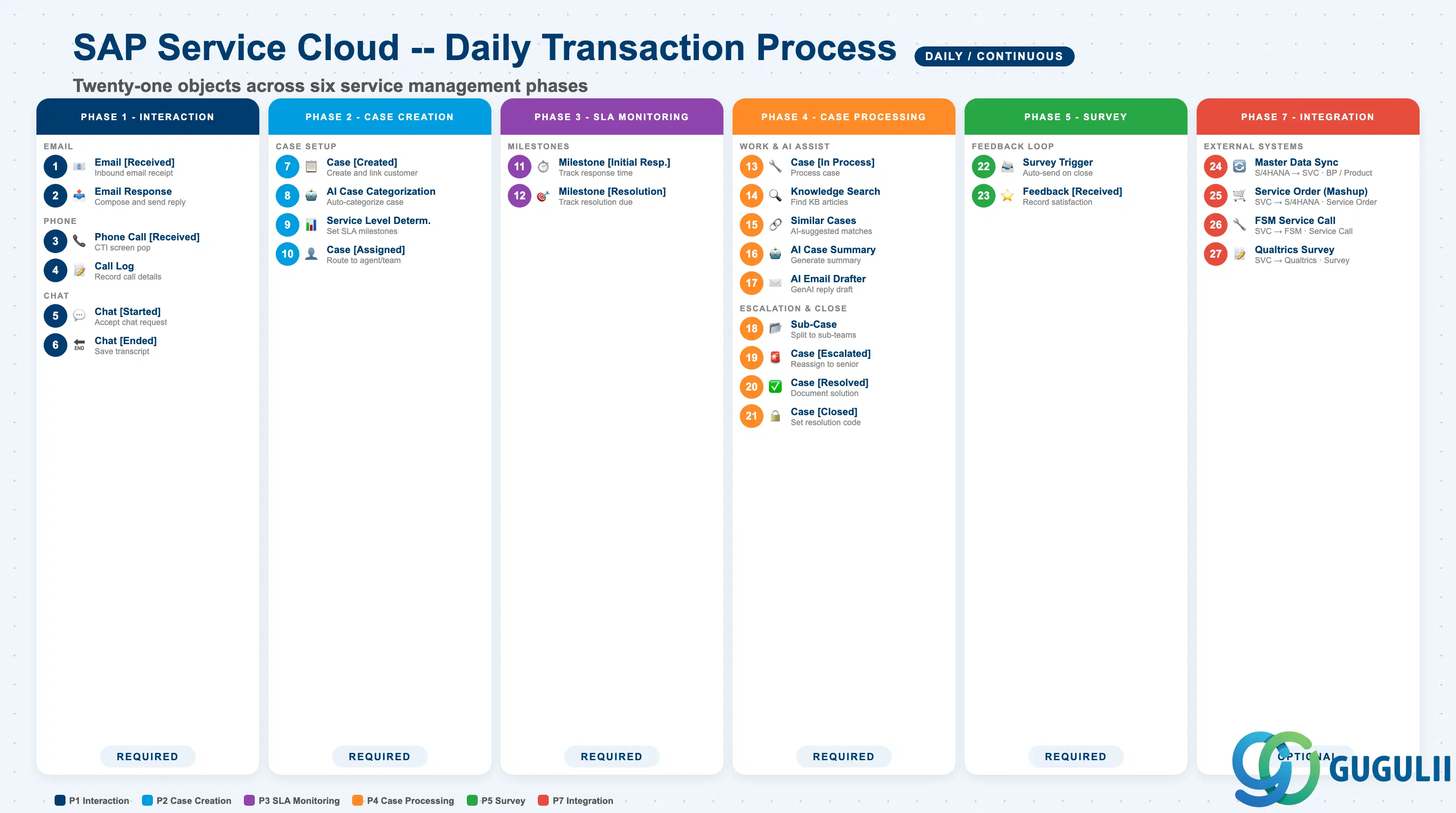
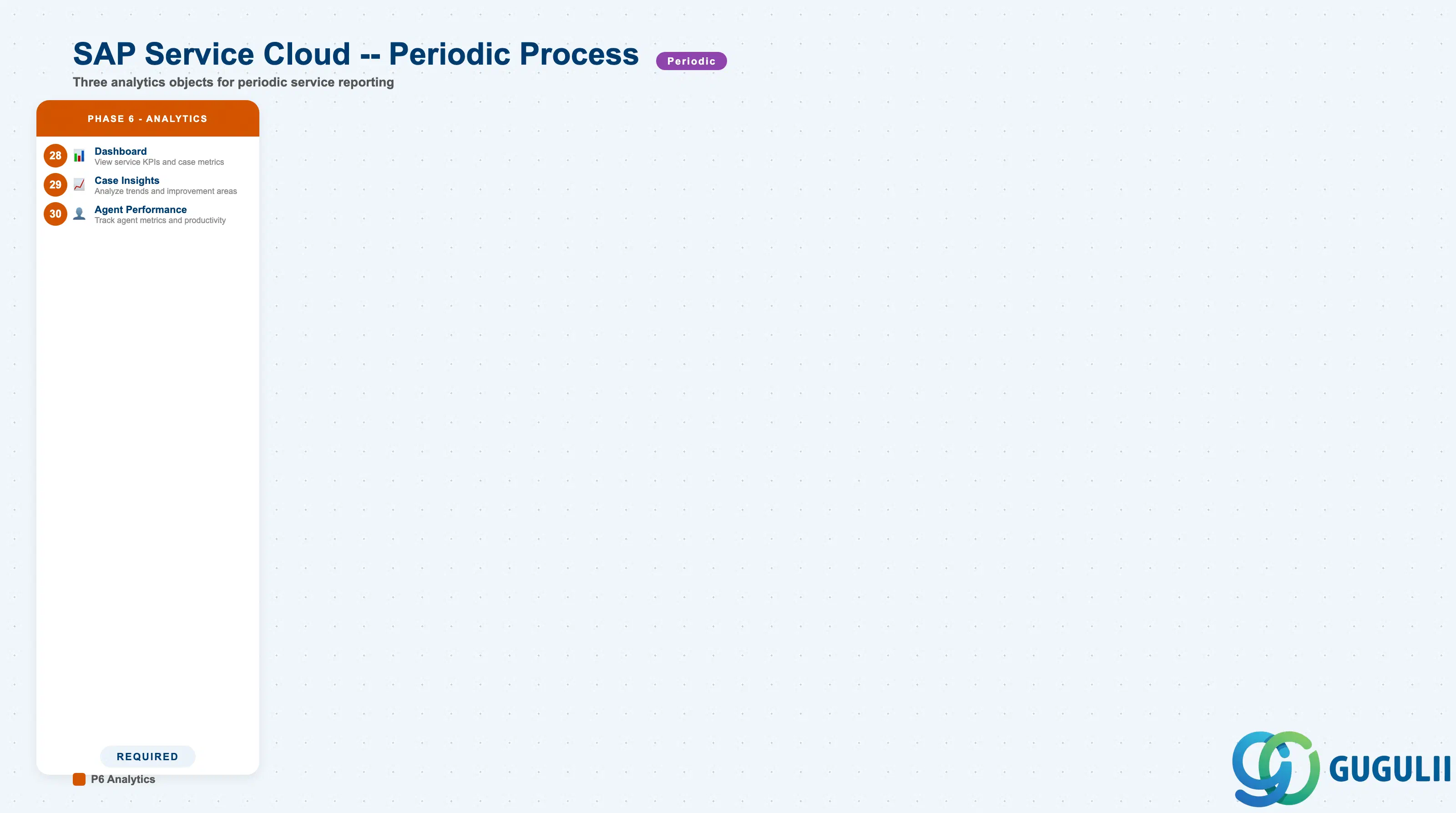
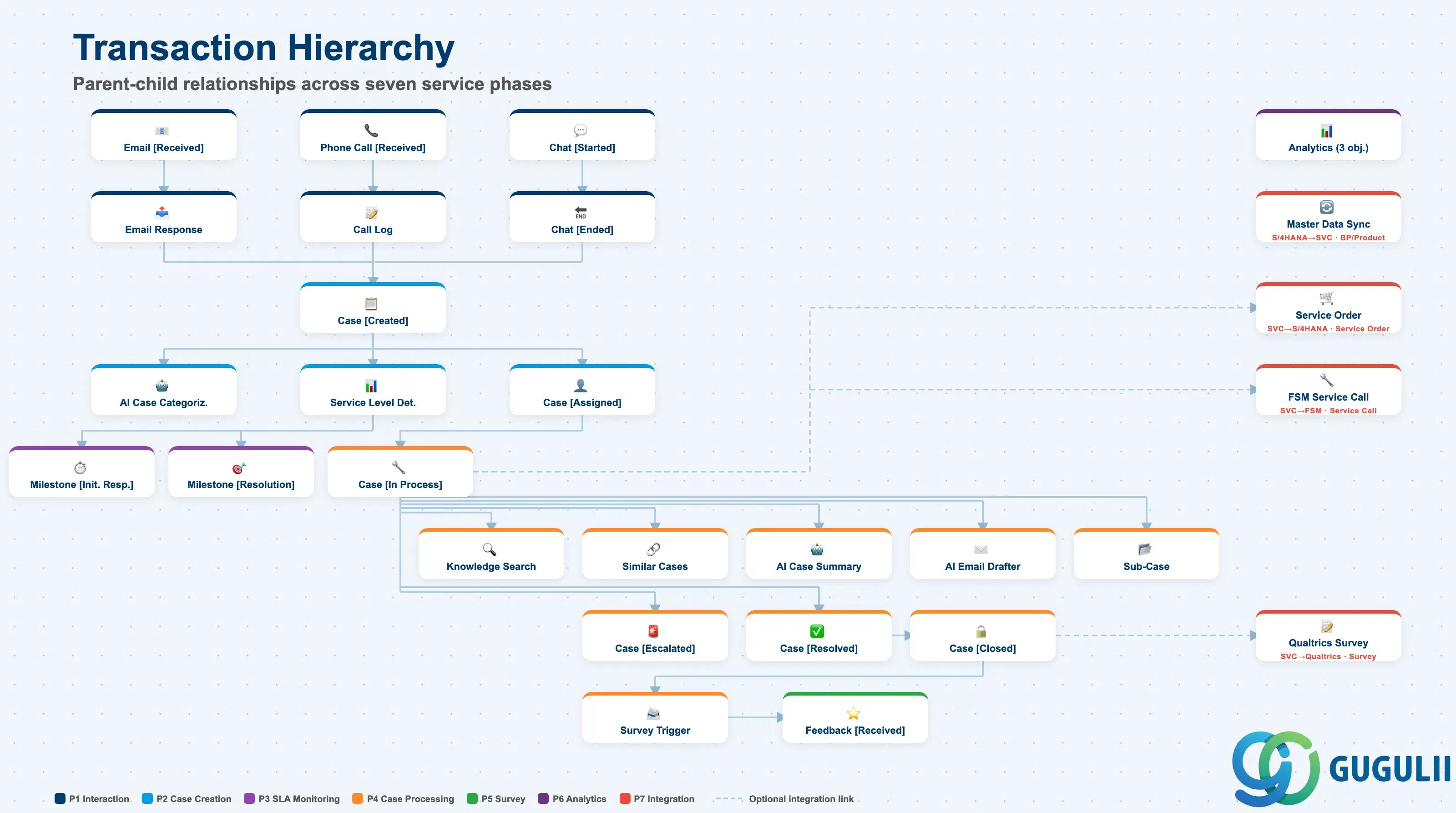
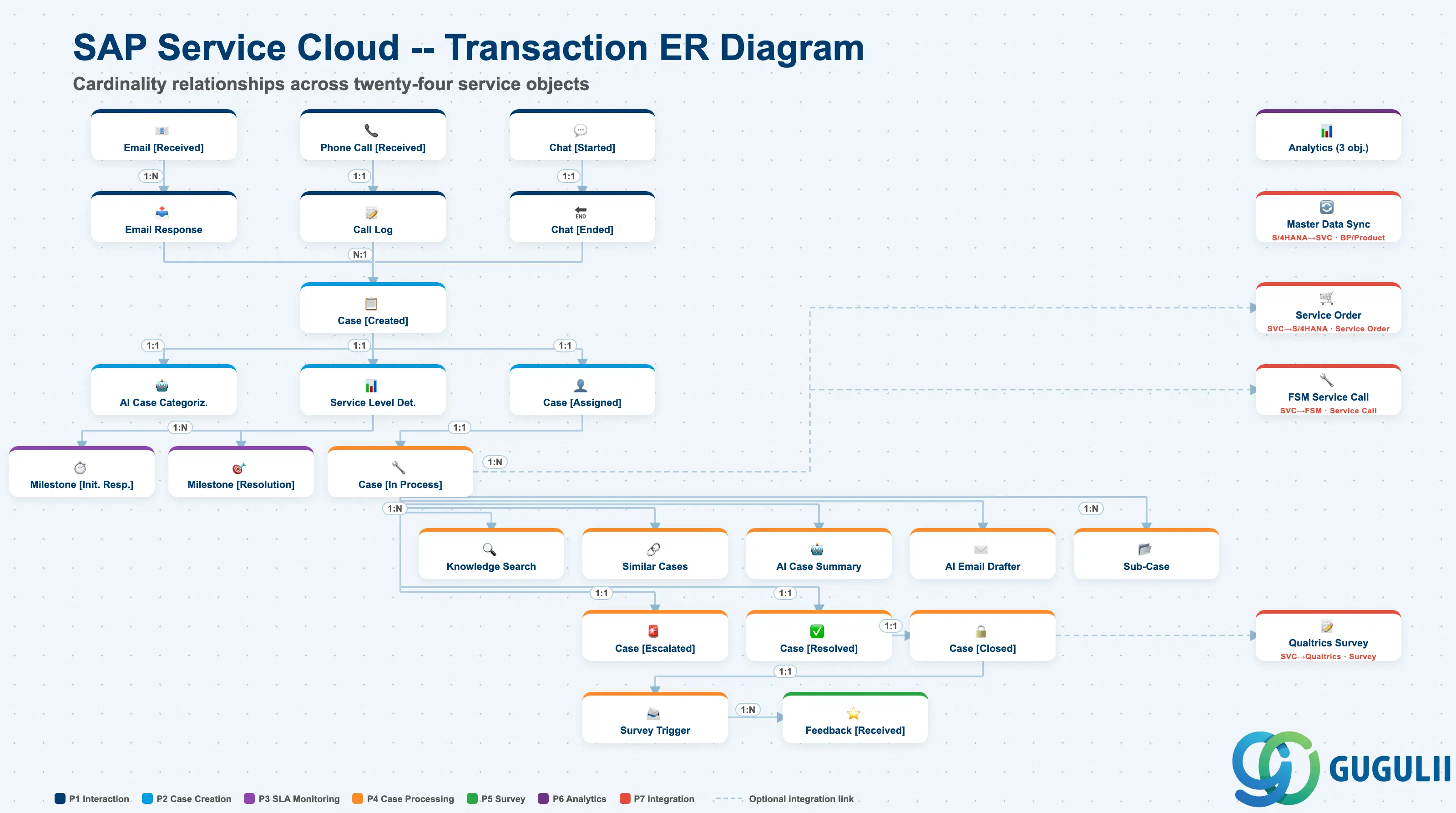
| Phase | Object | Integration | Planned | Actual | Prerequisite | Work Center View | Description | Practical Examples | Role |
|---|---|---|---|---|---|---|---|---|---|
| 1 Interaction | Email [Received] | - | Planned (Email [Received]) | - | Email Channel | Agent Desktop > Interaction Log | Receive inbound email, identify customer, and display in agent desktop | Customer fault report email received; account auto-identified and linked | Service Agent |
| Email Response | - | - | Actual (Email [Received]) | Email [Received] | Agent Desktop > Email | Compose email response, use template, and send to customer | Template-based reply composed with FAQ link attached and sent | Service Agent | |
| Phone Call [Received] | - | Planned (Phone Call [Received]) | - | - | Agent Desktop > Phone | Receive inbound call, CTI screen pop, and identify customer | CTI integration displays customer info popup on incoming call; past case history shown | Service Agent | |
| Call Log | - | - | Actual (Phone Call [Received]) | Phone Call [Received] | Agent Desktop > Interaction Log | Record call details, log interaction, and link to case | Call content recorded, handle time 5 min, linked to case ID for history management | Service Agent | |
| Chat [Started] | - | Planned (Chat [Started]) | - | - | Agent Desktop > Chat | Accept chat request, identify customer, and start conversation | Chat request from website accepted; conversation started after customer authentication | Service Agent | |
| Chat [Ended] | - | - | Actual (Chat [Started]) | Chat [Started] | Agent Desktop > Chat | End chat session, save transcript, and link to case | Chat ended; transcript auto-saved and linked to case | Service Agent | |
| 2 Case Creation | Case [Created] | - | Planned (Case [Created]) | Actual (Email [Received] / Phone Call [Received] / Chat [Started]) | Account / Individual Customer, Case Type | Cases > Case Worklist | Create case, set case type, link customer/product, and trigger SLA | Case auto-created from email; Case Type set to “Inquiry”, priority “Medium” | Service Agent |
| AI Case Categorization | - | - | - | Case [Created] | Cases > Case Worklist | Auto-categorize case, suggest category, and improve accuracy over time | AI analyzes subject and body to propose “Product Defect” category at 85% confidence | - (System) | |
| Service Level Determination | - | - | - | Case [Created], Service Level | Cases > Case Details | Determine applicable SLA, set milestones, and start SLA clock | Priority “High” triggers SLA: initial response 1 hour, resolution 8 hours | - (System) | |
| Case [Assigned] | - | Planned (Case [Assigned]) | Actual (Case [Created]) | Case [Created], Case Routing Rule | Cases > Case Worklist | Assign case to agent/team, apply routing rules, and notify assignee | Routing rule auto-assigns to product-category team; email notification sent | Service Agent / Dispatcher | |
| 3 SLA Monitoring | Milestone [Initial Response] | - | - | - | Service Level Determination | Cases > Case Details | Track initial response time, check SLA compliance, and trigger warning | Initial response deadline 1 hour; warning alert displayed at 15 minutes remaining | Service Agent |
| Milestone [Resolution Due] | - | - | - | Service Level Determination | Cases > Case Details | Track resolution due date, monitor SLA status, and trigger escalation | Resolution deadline 8 hours; auto-escalation to service manager on breach | Service Agent | |
| 4 Case Processing | Case [In Process] | - | Planned (Case [In Process]) | Actual (Case [Assigned]) | Case [Assigned] | Agent Desktop > Customer Hub | Process case, search knowledge base, and communicate with customer | Customer Hub displays customer info and past case list; case handling begins | Service Agent |
| Knowledge Search | - | - | - | Case [In Process], Knowledge Base Provider | Agent Desktop > Knowledge Base | Search knowledge base, find relevant articles, and attach to case | Search for “connection error” in KB; matching article attached to case and sent to customer | Service Agent | |
| Similar Cases | - | - | - | Case [In Process] | Agent Desktop > Customer Hub | View AI-suggested similar cases, review past solutions, and apply resolution | AI proposes 3 similar cases; past resolutions referenced to address current case | Service Agent | |
| AI Case Summary | - | - | - | Case [In Process] | Agent Desktop > Customer Hub | Generate case summary, highlight key points, and assist handover | AI summary generated at handover showing case history and current status | Service Agent | |
| AI Email Drafter | - | - | - | Case [In Process] | Agent Desktop > Email | Generate email draft, use GenAI, and personalize response | GenAI auto-generates reply incorporating customer name and issue details | Service Agent | |
| Sub-Case | - | - | - | Case [In Process] | Cases > Case Worklist | Create sub-case, link to parent case, and assign separately | Issue requiring multiple teams split into sub-cases; each team assigned individually | Service Agent | |
| Case [Escalated] | - | - | - | Case [In Process] | Cases > Case Worklist | Escalate case, reassign to senior agent, and notify stakeholders | SLA breach risk triggers escalation to senior agent; manager notified | Service Agent / Service Manager | |
| Case [Resolved] | - | Planned (Case [Resolved]) | Actual (Case [In Process]) | Case [In Process] | Agent Desktop > Customer Hub | Resolve case, document solution, and prepare for closure | Resolution code “Information Provided” set; resolution registered as knowledge article | Service Agent | |
| Case [Closed] | - | - | Actual (Case [Resolved]) | Case [Resolved] | Cases > Case Worklist | Close case, set resolution code, and trigger survey | Case closed; customer satisfaction survey auto-triggered | Service Agent | |
| 5 Survey | Survey Trigger | - | Planned (Survey Trigger) | Actual (Case [Closed]) | Case [Closed], Autoflow | Settings > Autoflow | Trigger survey on case close, send email with link, and track response | Survey email auto-sent via Autoflow on case closure | - (System) |
| Feedback [Received] | - | - | Actual (Survey Trigger) | Survey Trigger | Cases > Case Details | Receive customer feedback, update case, and analyze satisfaction | Customer response received; satisfaction score 4/5 with comment recorded | Service Agent | |
| 6 Analytics | Dashboard | - | - | - | Case, Interaction | Analytics > Stories | View service KPIs, monitor case metrics, and track SLA compliance | Daily KPI check: open case count, SLA compliance rate 95%, average response time | Service Manager / Administrator |
| Case Insights | - | - | - | Case | Analytics > Case Insights | Analyze case trends, view agent performance, and identify improvement areas | Weekly trend analysis: growing case categories identified; improvement actions planned | Service Manager | |
| Agent Performance | - | - | - | Case, Employee | Analytics > Agent Performance | Track agent metrics, measure productivity, and compare performance | Agent-by-agent resolution rate and response time comparison; top performers recognized | Service Manager | |
| 7 Integration | Master Data Sync | S/4HANA → SVC | - | - | Account, Product | - | Sync business partner/product from S/4HANA and maintain data consistency | Initial sync of BP and product master from S/4HANA; delta updates maintain consistency | - (System) |
| Service Order (Mashup) | SVC → S/4HANA | - | - | Case [In Process] | Agent Desktop > Service Order | Create S/4HANA service order, trigger via mashup, and sync status | S/4HANA service order created from Agent Desktop via Mashup | Service Agent | |
| FSM Service Call | SVC → FSM | - | - | Case [In Process] | Agent Desktop > Service Call | Create FSM service call, dispatch technician, and receive completion | FSM call created when field service required; technician dispatched; completion received | Service Agent | |
| Qualtrics Survey | SVC → Qualtrics | - | - | Case [Closed] | - | Send survey via Qualtrics, receive responses, and update case | Detailed survey sent via Qualtrics; NPS and CSAT responses reflected in case | - (System) |
| ID | Category | Title |
|---|---|---|
| sc-001 | Overview | What is SAP Service Cloud? |
| ID | Category | Title |
|---|---|---|
| sc-a01 | Overview | SAP Service Cloud Master Data: Overview, Hierarchy & Relationships |
| sc-a02-01 | Master Data | SAP Service Cloud Organizational Unit |
| sc-a02-02 | Master Data | SAP Service Cloud Employee |
| sc-a02-03 | Master Data | SAP Service Cloud Business Role |
| sc-a02-04 | Master Data | SAP Service Cloud Business User |
| sc-a02-05 | Master Data | SAP Service Cloud Team |
| sc-a03-01 | Master Data | SAP Service Cloud Email Channel |
| sc-a03-02 | Master Data | SAP Service Cloud Email Template |
| sc-a04-01 | Master Data | SAP Service Cloud Knowledge Base Provider |
| sc-a05-01 | Master Data | SAP Service Cloud Service Catalog |
| sc-a05-02 | Master Data | SAP Service Cloud Service Category |
| sc-a05-03 | Master Data | SAP Service Cloud Case Type |
| sc-a06-01 | Master Data | SAP Service Cloud Service Level |
| sc-a06-02 | Master Data | SAP Service Cloud Service Level Determination |
| sc-a07-01 | Master Data | SAP Service Cloud Case Routing Rules |
| sc-a10-04 | Master Data | SAP Service Cloud Warranty |
| sc-a11-01 | Master Data | SAP Service Cloud Installed Base |
| sc-a11-02 | Master Data | SAP Service Cloud Functional Location |
| ID | Category | Title |
|---|---|---|
| sc-b01 | Overview | SAP Service Cloud Transactions: Process Flow, Hierarchy & Relationships 📍 |