Title here
Summary here

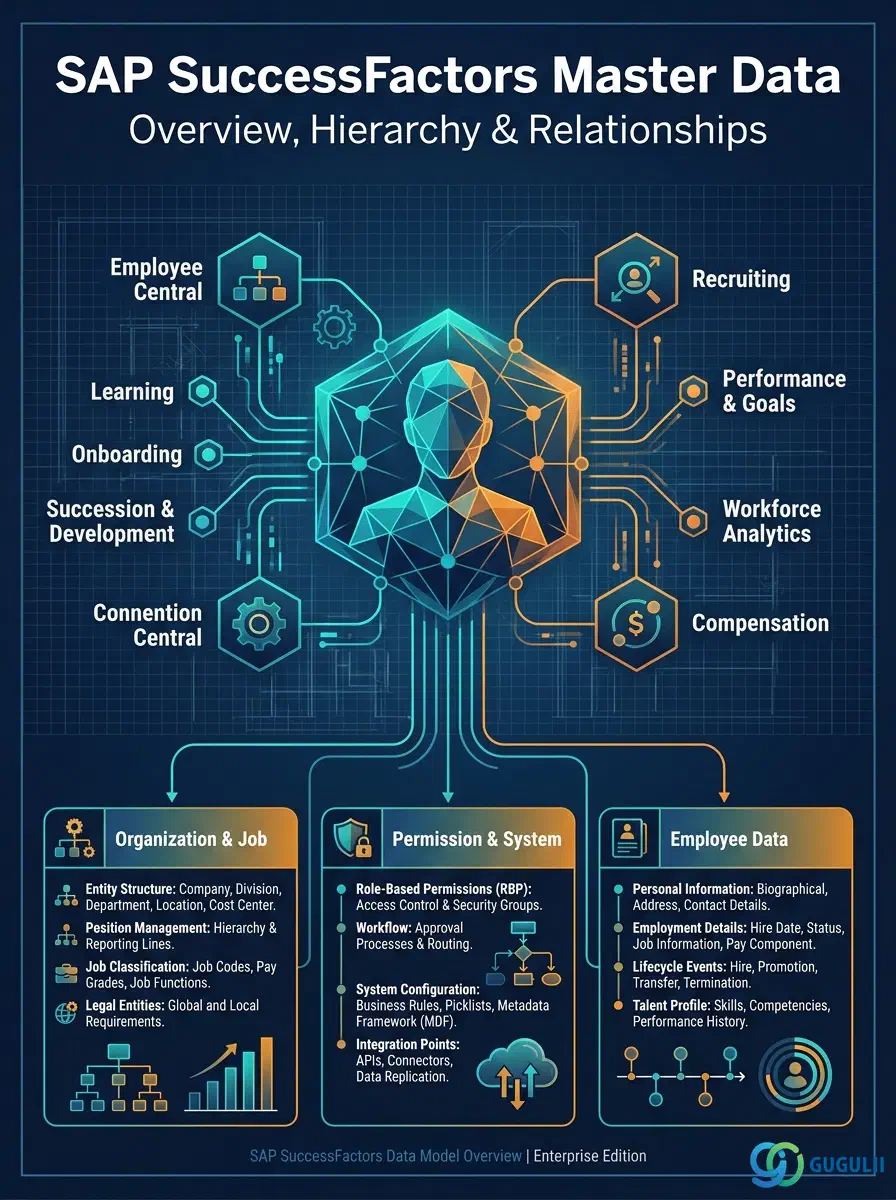
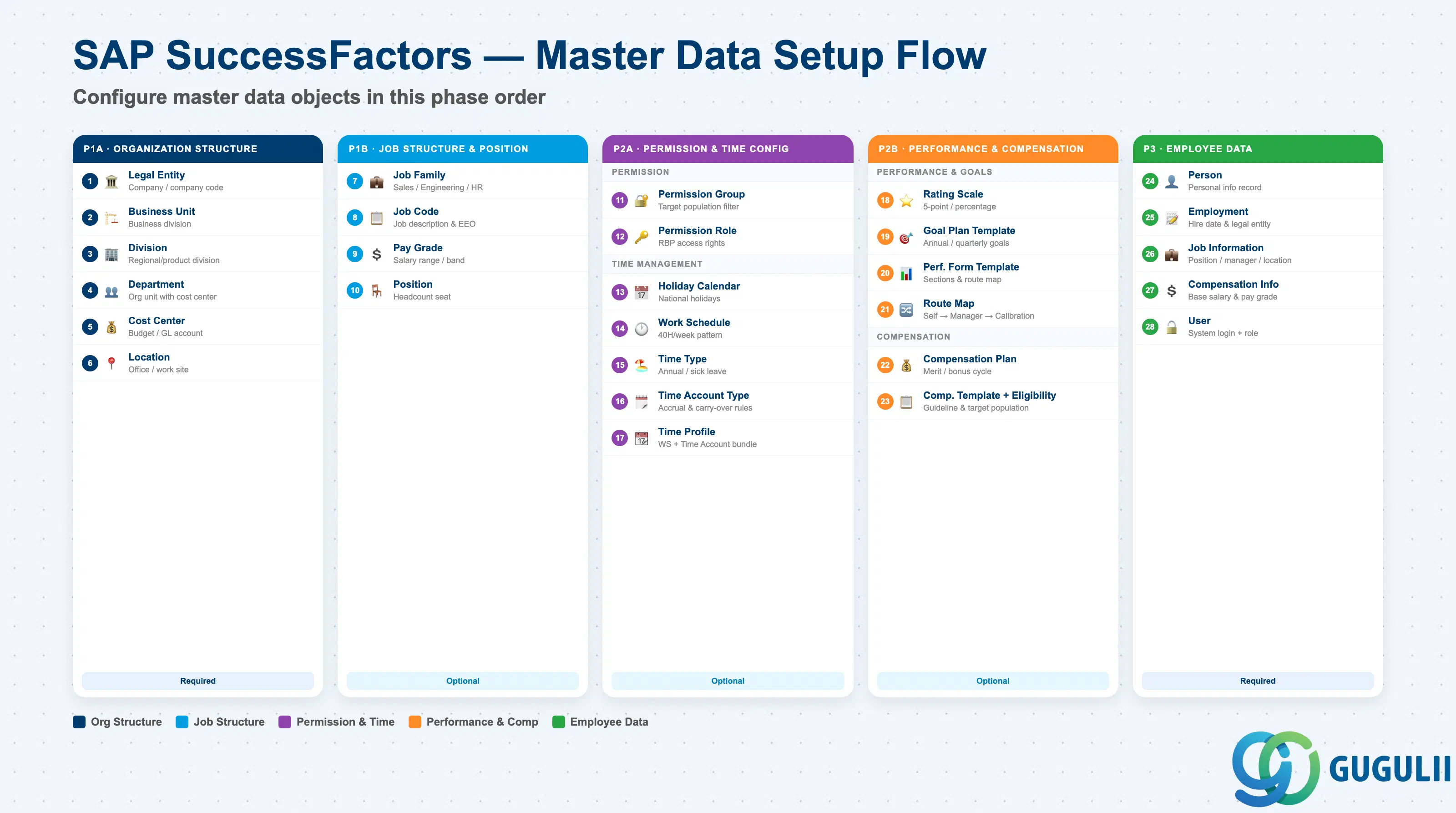
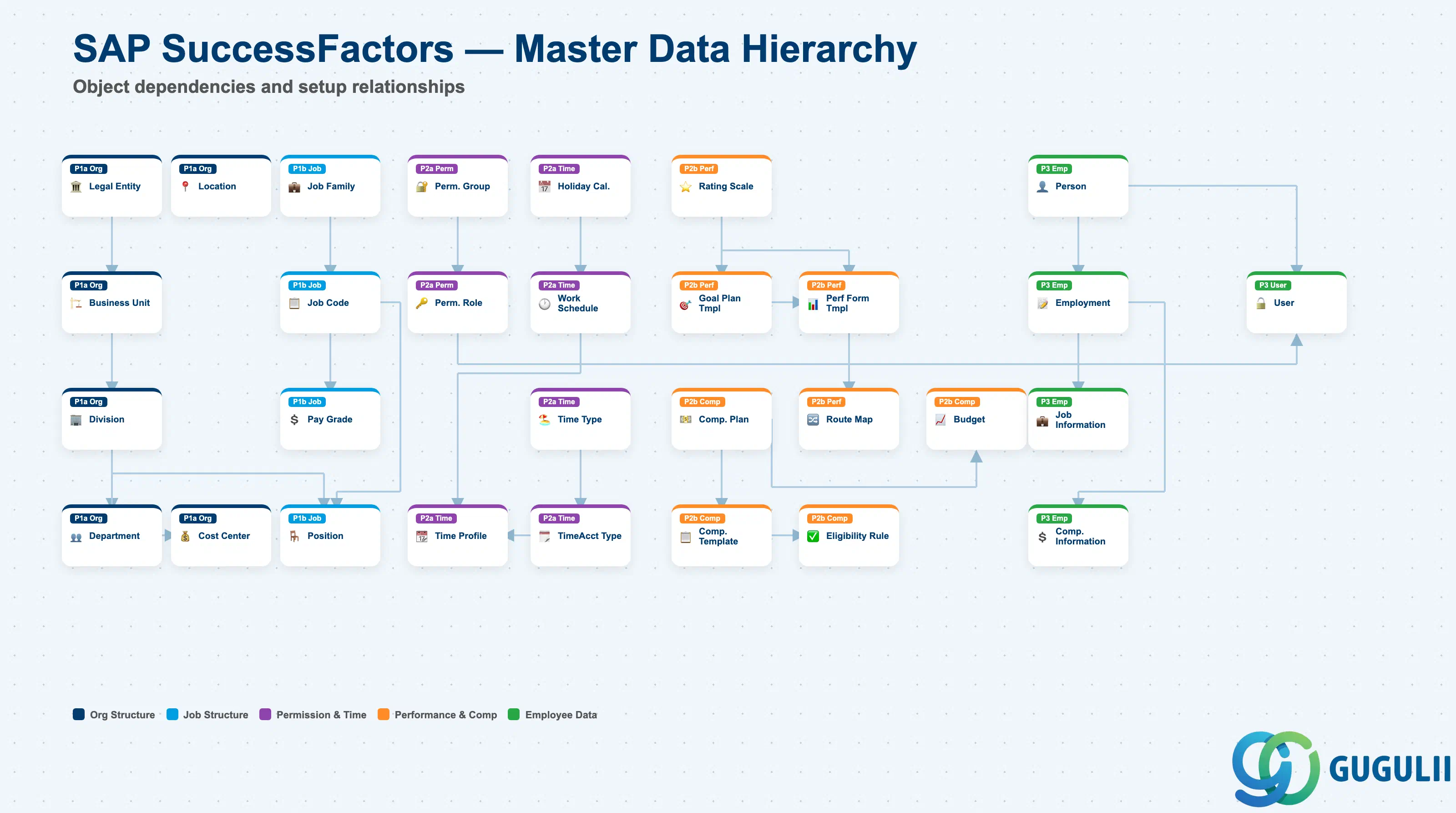
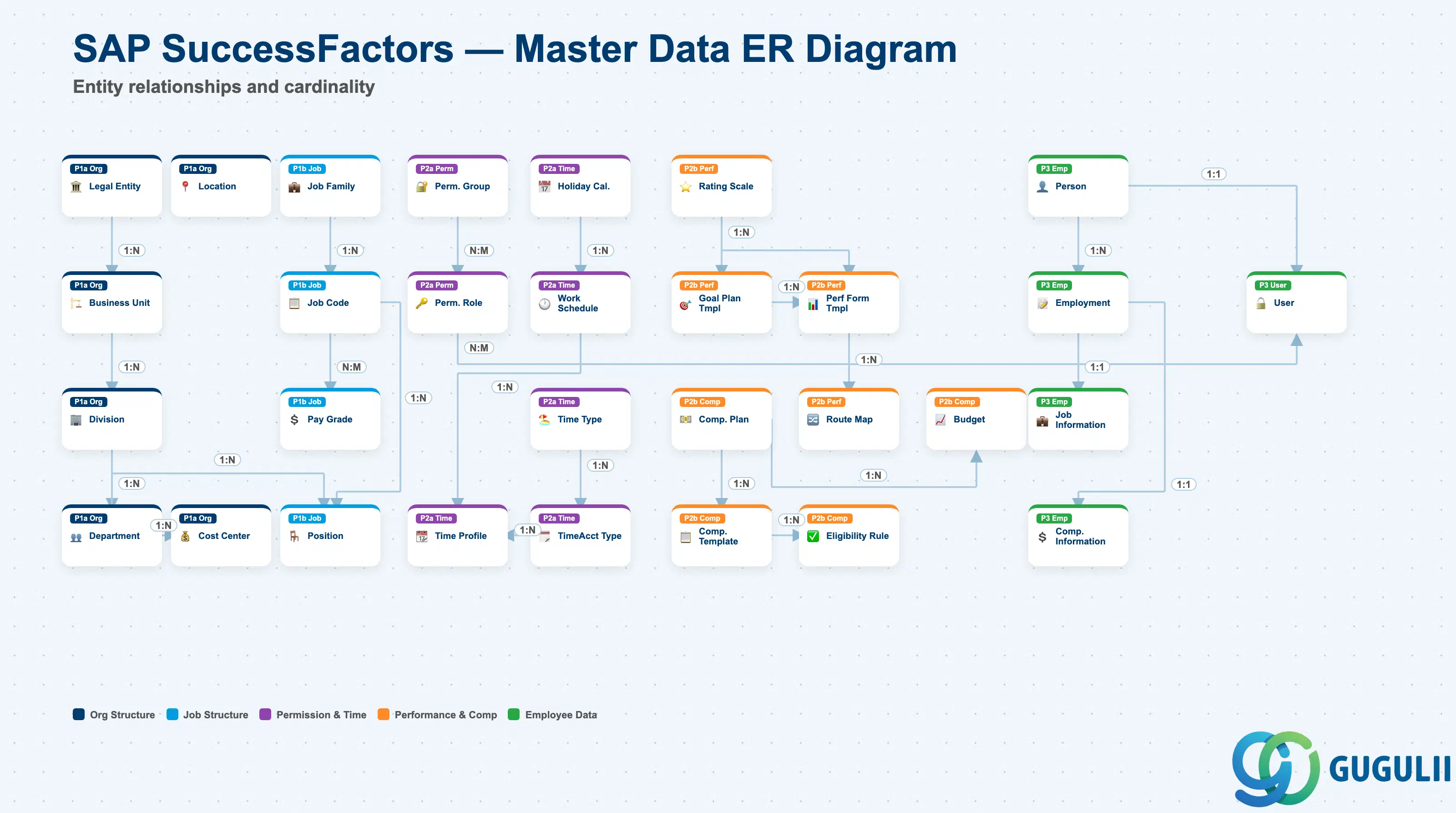
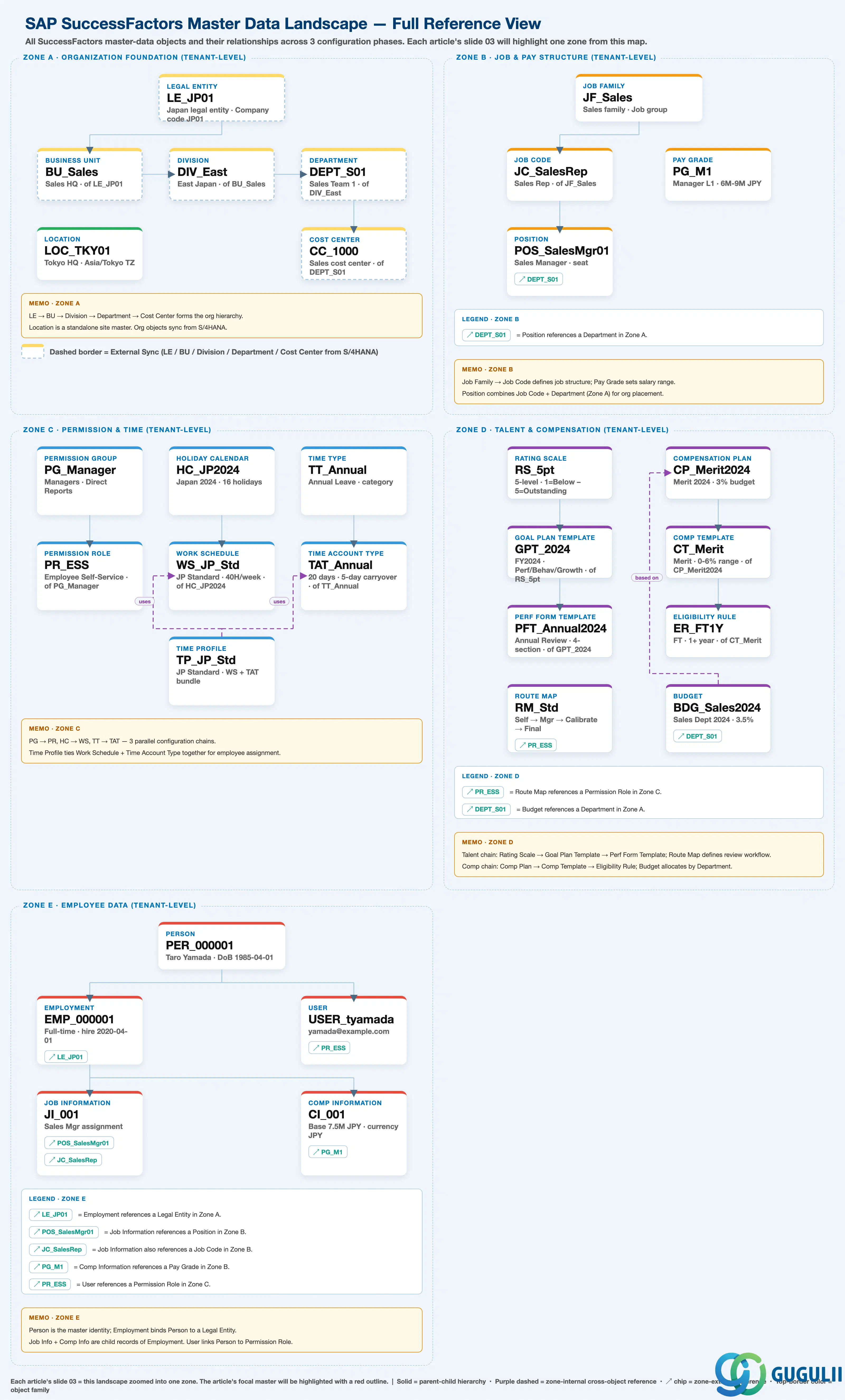
| Phase | Object | Integration | Prerequisite | App | Description | Practical Examples | Role |
|---|---|---|---|---|---|---|---|
| 1 Organization & Job Foundation | Legal Entity | S/4HANA | - | Employee Central | Register legal entity, define company code, configure country/region | Legal Entity “LE_JP01” (Japan entity), company code “JP01”, country “JP” | Administrator |
| Business Unit | S/4HANA | Legal Entity | Employee Central | Create business unit, define hierarchy, assign to legal entity | Business Unit “BU_Sales” (Sales HQ), assigned to legal entity “LE_JP01” | Administrator | |
| Division | S/4HANA | Business Unit | Employee Central | Create division, configure division code, link to business unit | Division “DIV_East” (East Japan), under business unit “BU_Sales” | Administrator | |
| Department | S/4HANA | Division | Employee Central | Create department, define structure, assign to cost center | Department “DEPT_Sales01” (Sales Team 1), cost center “CC_1000” assigned | Administrator | |
| Cost Center | S/4HANA | Department | Employee Central | Create cost center, configure GL account, define validity period | Cost Center “CC_1000” (Sales Team 1), controlling area “1000” | Administrator | |
| Location | - | - | Employee Central | Create location, define address, configure timezone | Location “LOC_TKY01” (Tokyo HQ), timezone “Asia/Tokyo” | Administrator | |
| Job Family | - | - | Employee Central | Create job family, define job group, set description | Job Family “JF_Sales” (Sales), “JF_Eng” (Engineering) | Administrator | |
| Job Code | - | Job Family | Employee Central | Create job code, link to job family, define job description | Job Code “JC_SalesRep” (Sales Representative), family “JF_Sales” | Administrator | |
| Pay Grade | - | - | Employee Central | Create pay grade, configure salary range, define compensation components | Pay Grade “PG_M1” (Manager Level 1), range “6M–9M JPY” | Administrator | |
| Position | - | Job Code, Department | Employee Central | Create position, assign job code, link to organizational unit | Position “POS_SalesMgr01” (Sales Manager), job code “JC_SalesMgr” | Administrator | |
| 2 Permission & System Configuration | Permission Group | - | - | Admin Center | Create permission group, define target population, configure access | Permission Group “PG_Manager” (Managers), target population “Direct Reports” | Administrator |
| Permission Role | - | Permission Group | Admin Center | Create permission role, assign permissions, link to group | Role “PR_ESS” (Employee Self-Service), “PR_MSS” (Manager Self-Service) | Administrator | |
| Holiday Calendar | - | - | Employee Central | Create holiday calendar, define holiday dates, configure country/region | Calendar “HC_JP2024” (Japan 2024), 16 public holidays defined | Administrator | |
| Work Schedule | - | Holiday Calendar | Employee Central | Create work schedule, define work pattern, assign calendar | Schedule “WS_JP_Std” (Japan Standard, 40H/week), Mon–Fri 9:00–18:00 | Administrator | |
| Time Type | - | - | Employee Central | Create time type, configure leave category, define accrual rules | Time Type “TT_Annual” (Annual Leave), “TT_Sick” (Sick Leave) | Administrator | |
| Time Account Type | - | Time Type | Employee Central | Create time account type, configure accrual/deduction rules, set carryover | Time Account “TAT_Annual” (Annual Leave — 20 days granted, 5-day carryover cap) | Administrator | |
| Time Profile | - | Work Schedule, Time Account Type | Employee Central | Create time profile, assign to employees, configure leave rules | Profile “TP_JP_Std” (Japan Standard), work schedule + leave rules bundled | Administrator | |
| Rating Scale | - | - | Performance & Goals | Create rating scale, define rating labels, configure score range | Scale “RS_5pt” (5-level: 1=Below Expectations – 5=Outstanding) | Administrator | |
| Goal Plan Template | - | Rating Scale | Performance & Goals | Create goal plan template, define goal categories, configure weighting | Template “GPT_2024” (FY2024 Goals), 3 categories (Performance / Behavior / Growth) | Administrator | |
| Performance Form Template | - | Rating Scale, Goal Plan Template | Performance & Goals | Create performance form template, define sections, configure route | Template “PFT_Annual2024” (Annual Review), 4-section structure | Administrator | |
| Route Map | - | Permission Role | Performance & Goals | Create route map, define review steps, configure approvers | Route Map “RM_Std” (Self Review → Manager Review → Calibration → Finalize) | Administrator | |
| Compensation Plan | - | - | Compensation | Create compensation plan, configure plan type, define budget | Compensation Plan “CP_Merit2024” (2024 Merit Increase), 3% budget | Compensation Admin | |
| Compensation Template | - | Compensation Plan | Compensation | Create compensation template, define components, configure calculation rules | Template “CT_Merit” (Merit Template), guideline range 0–6% | Compensation Admin | |
| Eligibility Rule | - | Compensation Template | Compensation | Create eligibility rule, define target conditions, configure exclusions | Rule “ER_FT1Y” (Full-time employees with 1+ year of service) | Compensation Admin | |
| Budget | - | Compensation Plan, Department | Compensation | Create budget, configure budget allocation, define approval process | Budget “BDG_Sales2024” (Sales Dept. 2024, 3.5% allocation) | Compensation Admin | |
| 3 Employee Data | Person | - | - | Employee Central | Create person record, configure personal data, define ID | Person “PER_000001” (Taro Yamada), date of birth “1985-04-01” | HR Administrator |
| Employment | - | Person, Legal Entity | Employee Central | Create employment, configure employment type, assign to legal entity | Employment “EMP_000001” (Full-time), hire date “2020-04-01”, legal entity “LE_JP01” | HR Administrator | |
| Job Information | - | Employment, Position, Job Code | Employee Central | Assign job code/position, configure manager, define work location | Job Information: position “POS_SalesMgr01” assigned, manager “EMP_000100” | HR Administrator | |
| Compensation Information | - | Employment, Pay Grade | Employee Central | Configure base salary, assign pay grade, define compensation components | Compensation: base salary “7.5M JPY”, grade “PG_M1”, currency “JPY” | HR Administrator | |
| User | - | Person, Permission Role | Admin Center | Create user account, configure login credentials, assign permissions | User “USER_tyamada” (yamada@example.com), roles “PR_ESS, PR_MSS” | Administrator |
| ID | Category | Title |
|---|---|---|
| sf-001 | Overview | What is SAP SuccessFactors? |
| ID | Category | Title |
|---|---|---|
| sf-b01 | Overview | SAP SuccessFactors Transactions: Process Flow, Hierarchy & Relationships |