Title here
Summary here

Position is the master data object that represents a single, fillable seat in the org structure — combining a Job Code (what the work is) and a Department (where it sits organizationally) into one addressable slot that an employee’s Job Information record occupies. It is the terminal node of the Job Structure Management branch in SuccessFactors Employee Central: unlike Job Family and Job Code, which classify work in the abstract, a Position is concrete — it can be vacant, filled, frozen, or planned ahead of a future hire, and it carries its own reporting line (“Reports To”) independent of Department nesting. This article covers what Position is, how it terminates the Job Family → Job Code → Position chain while also being directly referenced from Employee Data, and every field an Employee Central consultant configures for it.
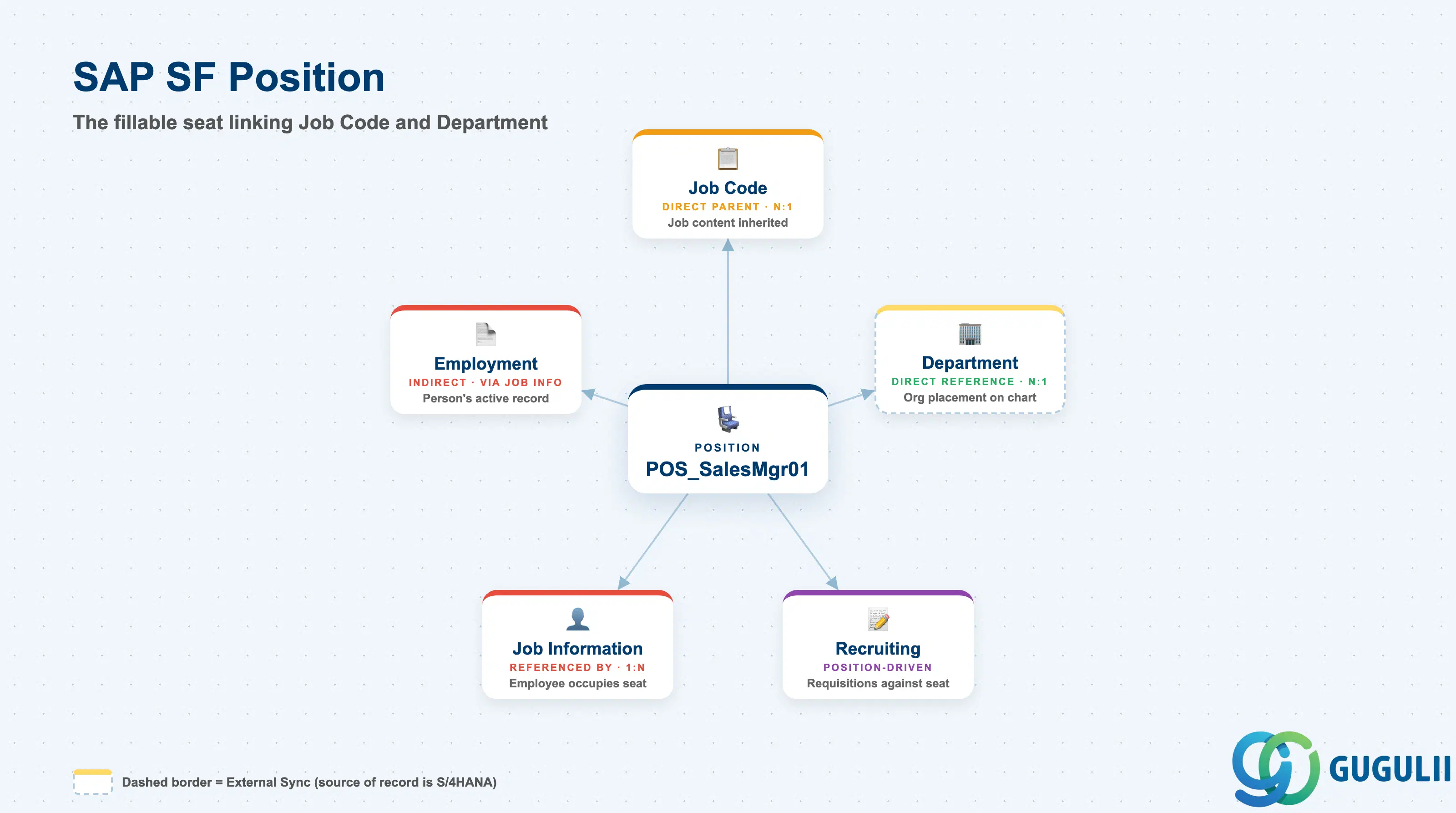
Position is the seat object — it does not classify job content the way Job Code does, and it does not classify organizational placement the way Department does. It is the concrete, addressable unit that combines both: every Position points to exactly one Job Code for its job content and exactly one Department for its org placement, and it is that combined unit — not Job Code or Department alone — that an employee’s Job Information record occupies when they are hired into or moved into the seat.
| Aspect | Details |
|---|---|
| Role | Terminal node of the Job Structure Management branch — combines Job Code and Department into a single fillable seat that an employee’s Job Information record occupies |
| Modules using it | Employee Central (owner — Foundation Object framework, and the optional Position Management add-on when a client runs position-centric mode), Recruiting (position-driven Job Requisitions can be opened directly against a specific vacant Position rather than a generic Job Code), Workforce Planning / People Analytics (headcount, vacancy, and org-chart reporting is most granular at the Position level), Compensation (indirectly — a seat’s budget/headcount context feeds planning, though pay-range resolution itself happens through the incumbent’s Compensation Information, not through Position) |
| Transactions | Admin Center → “Manage Organization, Pay and Job Structures” (create/edit Position Foundation Object); “Manage Positions” / Position Org Chart view (when the Position Management add-on is enabled); “Import and Export Data” (mass load via CSV) |
| Key Tables | OData API entity FOPosition (Foundation Object) — SuccessFactors has no classic ABAP table; each record is effective-dated rather than table-row based. Extended Position Management attributes (when the add-on is active) are stored as additional MDF fields on the same entity |
| S/4HANA note | Position maps conceptually to Position (Planstelle) in classic SAP HCM Organizational Management (PO13/PP01) — both represent a single fillable seat distinct from its occupant — but no delivered synchronization ships between SuccessFactors Position and an on-premise S/4HANA HCM Position; where both exist, alignment is manual or custom-built |
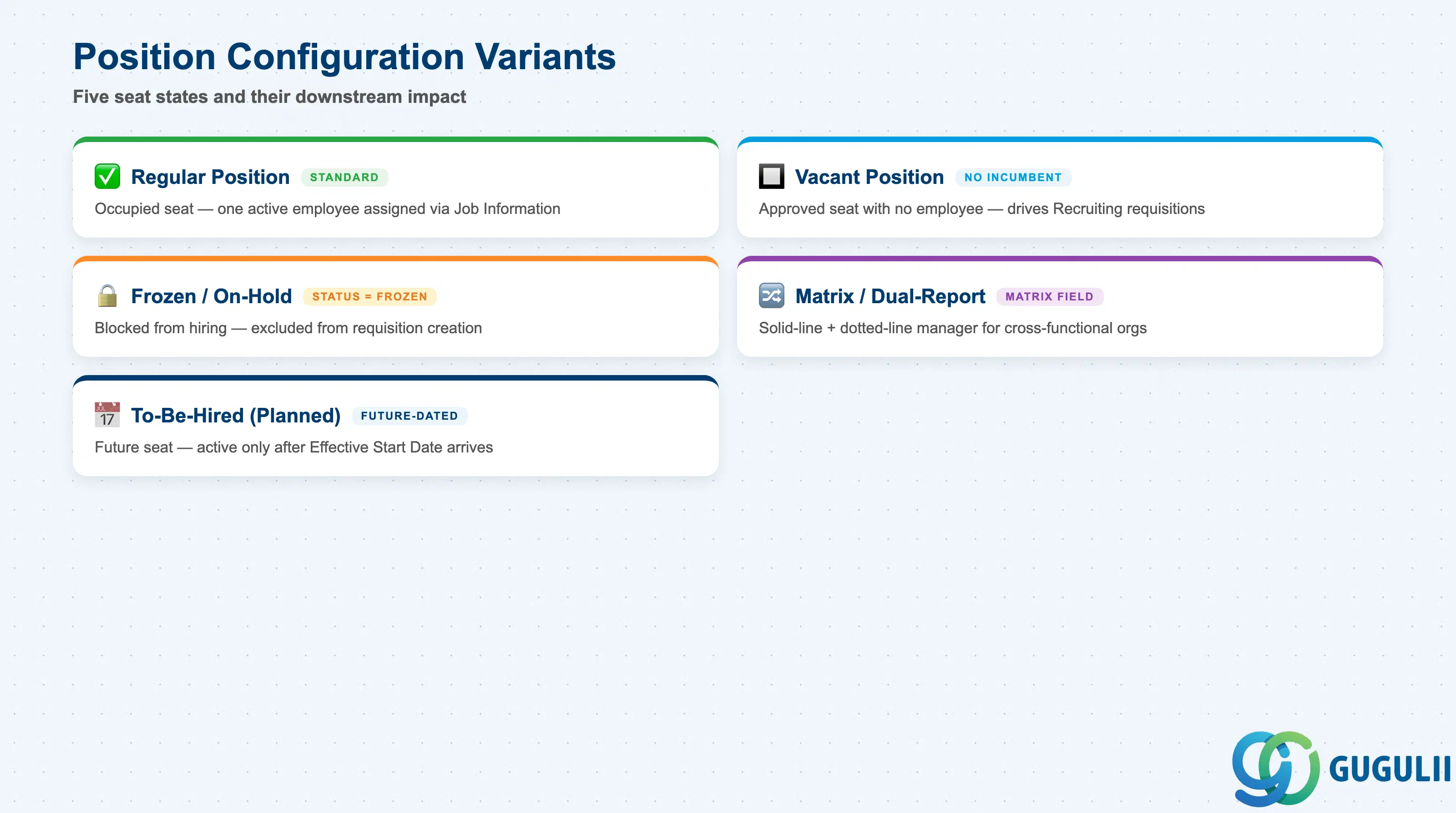
Position does not come from a fixed SAP-delivered list of types the way, say, an EEO Category does — every Position is a client-created seat. What varies is the seat’s current state and reporting configuration, and getting these wrong has direct, visible consequences: a Vacant Position left un-flagged skews headcount reports, and a Frozen Position left active lets Recruiting open a requisition against headcount that was never actually approved.
| Position Variant | Code / Flag | Use Case | Key Behavior |
|---|---|---|---|
| Regular Position | Standard (no special flag) | A seat currently occupied by one active employee | Default state; the seat’s Job Information reference resolves to exactly one active employee record |
| Vacant Position | Incumbent reference empty | An approved, budgeted seat with no employee currently assigned | Drives position-driven Recruiting requisitions and vacancy/headcount reporting; the seat keeps its Job Code and Department context even with no incumbent |
| Frozen / On-Hold Position | Status = Frozen | Approved headcount temporarily blocked from hiring (hiring freeze, budget review, reorg pending) | Excluded from position-driven requisition creation while frozen, without deleting the underlying seat or its history |
| Matrix / Dual-Report Position | Matrix Relationship field populated | Seat reports solid-line to one manager’s Position and dotted-line to a second | Adds a secondary “Matrix Manager” Position reference alongside the primary “Reports To” Position, used for cross-functional or regional matrix org structures |
| To-Be-Hired (Planned) Position | Planned/Budgeted flag, future Effective Start Date | A future-dated seat created ahead of an anticipated hire or reorg | Effective-dated forward; becomes active and selectable on Job Information only once its Effective Start Date arrives |
Design principle: Whether a client runs position-centric (Position Management enabled, every hire tied to an existing Position) or position-less (Job Information carries Job Code and Department directly, with no Position layer) is a foundational blueprint decision, not a toggle to revisit casually — retrofitting Position Management onto an already-live position-less instance requires backfilling one Position record for every current employee.
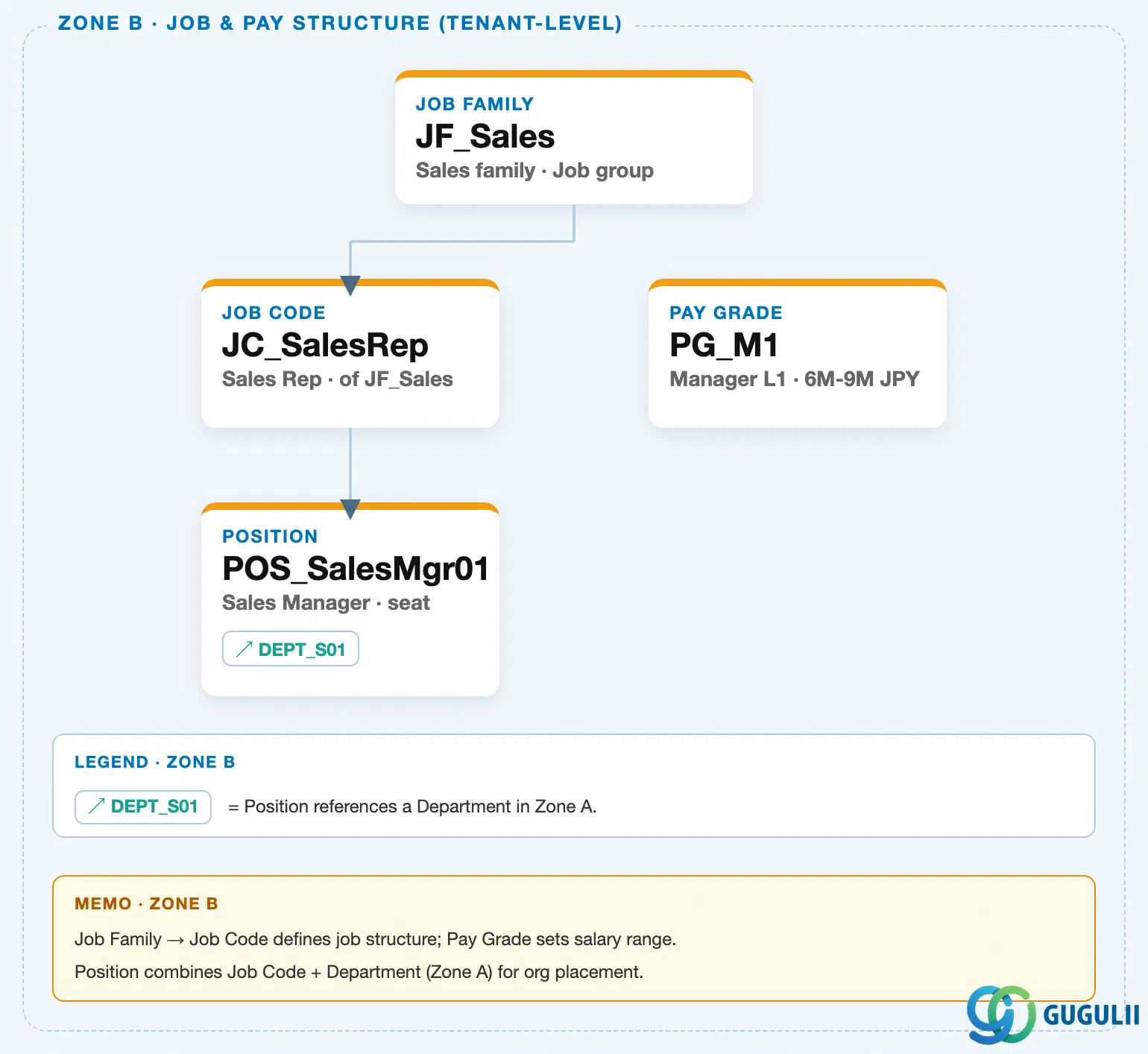
Data hierarchy with a concrete example
Client (SuccessFactors Instance)
   │
   └── Job Family "JF_Sales" — Sales family, Job group
          │
          └── Job Code "JC_SalesRep" — Sales Representative, of JF_Sales
                 │
                 └── Position "POS_SalesMgr01" — Sales Manager, seat
                        │
                        └── assigned to ──> Department "DEPT_S01" — Sales Team 1 (org hierarchy chain, Zone A)

Employment "EMP_000001" (Employee Data branch, Zone E)
   │
   └── Job Information "JI_001" — Sales Mgr assignment
          ├── references ──> Position "POS_SalesMgr01" (seat occupied)
          └── references ──> Job Code "JC_SalesRep" (job content, direct — not resolved only through Position)
MANDATORY landscape verification note: the module Master.md’s Setup Flow and ER Diagram describe “Position ← (Job Code, Department)” and “Job Information ← (Employment, Position, Job Code)” in prose. The published SuccessFactors Master Data Landscape (
sf-a01/images/04-sf-a01-master-landscape.html) confirms both exactly as drawn: a solid parent-child connector runs from Job Code to Position within Zone B, a↗ DEPT_S01reference chip runs from Position to Department in Zone A, and — from Zone E — Job Information carries two separate reference chips,↗ POS_SalesMgr01and↗ JC_SalesRep, meaning Job Information references Position and Job Code independently rather than resolving Job Code only by traversing through Position. Unlike the Job Code↔Pay Grade discrepancy found from both sides in SF-A02-08 and SF-A02-09, Position shows no discrepancy between source prose and drawn topology. One finding worth flagging: the landscape draws no connector at all between Position and Pay Grade — a seat’s compensation range is never resolved through Position; it is resolved only when Compensation Information is entered against the employee occupying the seat, referencing Pay Grade directly.
Design principle: Position is the terminal node of the Job Structure Management branch (Job Family → Job Code → Position) and is also the only object in that branch referenced back from the Employee Data branch — every Job Information record that assigns a seat to an employee points to Position directly. Because Position is fed by two upstream objects (Job Code for job content, Department for org placement) but referenced by a downstream Employee Data object, any Position redesign — splitting one seat into two, or re-pointing a seat’s Department — is best evaluated by checking active Job Information references first, not treated as a config-only change with no employee-facing consequence.
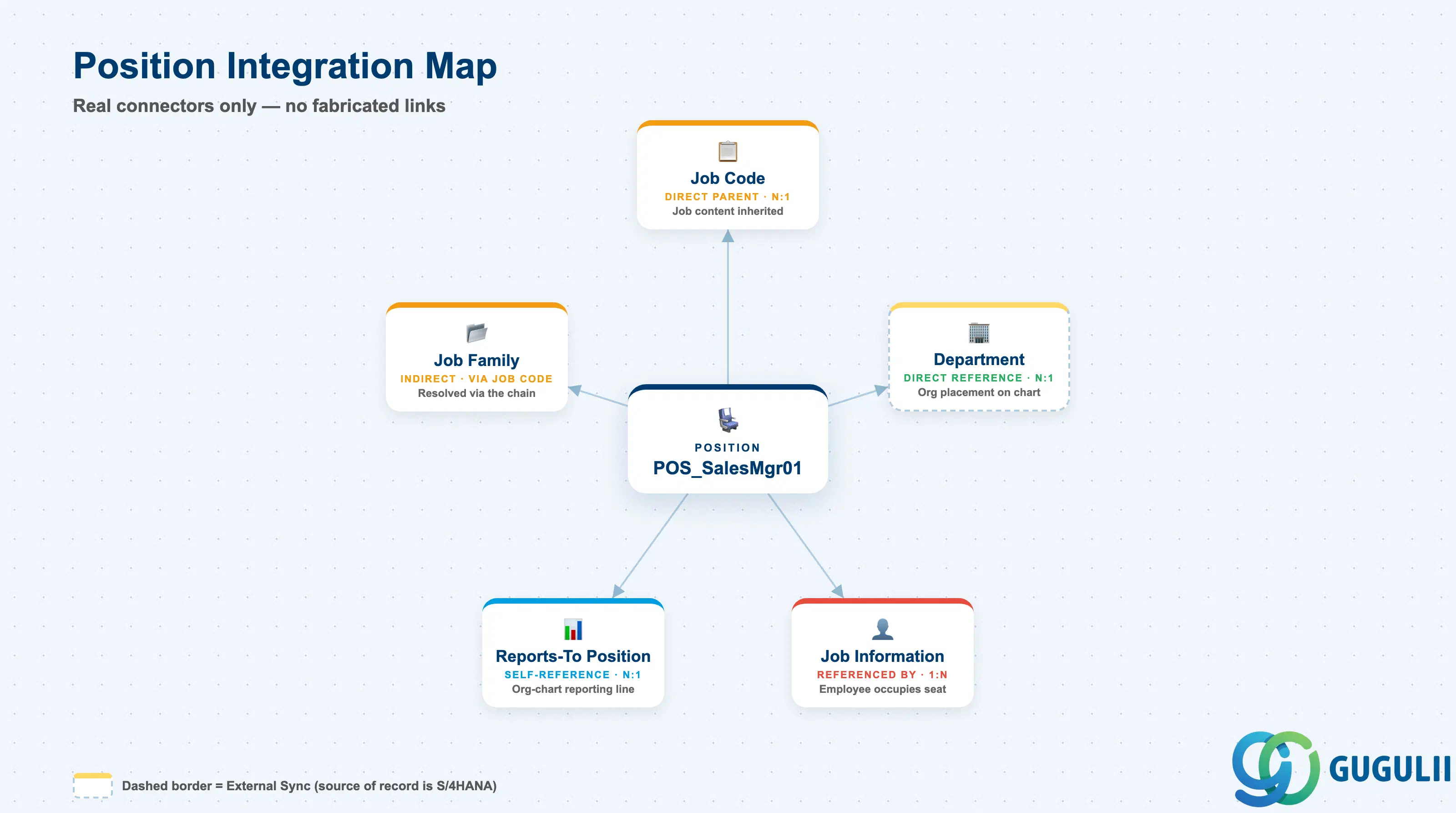
Position sits at a junction point: it is the only object in the Job Structure Management branch that both consumes references (from Job Code and Department) and is itself consumed by a reference (from Job Information) — which is what makes it the object most org-chart and headcount reporting actually keys off, rather than Job Code or Department individually.
| Object | Relationship | Practical Notes |
|---|---|---|
| Job Code | Direct parent (N:1) — every Position references exactly one Job Code for its job content | This configured link is what gives the seat its job title, description, and EEO classification; see SF-A02-08 for Job Code’s own field detail. Reassigning a Position’s Job Code — a promotion or role redefinition for the seat itself, distinct from replacing its incumbent — is a routine Position Management transaction. |
| Department | Direct reference (N:1) — every Position references exactly one Department for organizational placement | This is what actually drives the seat’s place in the org chart and reporting-line rollups, not Job Code. A Position’s Department can move independently of its Job Code — e.g. a “Sales Representative” seat reassigned from one regional Department to another without changing the job content. |
| Job Family | Indirect only, via Job Code — Position carries no direct Job Family reference | Job-Family-level headcount reporting on Position data resolves through the Position → Job Code → Job Family chain; there is no shortcut reference directly from Position to Job Family. |
| Pay Grade | No direct link — the landscape draws no connector between Position and Pay Grade at all | A seat’s expected compensation range is never resolved through Position. It is resolved only at the employee-record level, when Compensation Information (a child of Employment) references Pay Grade directly for whoever occupies the seat — see SF-A02-09 for the same finding confirmed from Pay Grade’s side. |
| Job Information (Employment) | Referenced by (1:N, direct) — every Job Information record that assigns an employee to a seat references exactly one Position | This is the reverse of the Job Code/Department relationships above: here Position is the target, not the source. Job Information also references Job Code independently of Position (see the 1.3 verification note), so a Position and its incumbent’s Job Information can, in principle, momentarily disagree on Job Code during a transition — most implementations add a business rule to keep the two synchronized. |
| Reports-To Position (self-reference) | Self-reference (N:1) — a Position’s “Reports To” field points to another Position, building the org-chart reporting line | Not a separate object type, so it is not drawn as a cross-object landscape connector — it is a field on Position itself. This is how the position-based org chart is rendered independently of Department nesting: two Positions in different Departments can still report directly to one another (e.g. a regional seat reporting to a headquarters seat). |
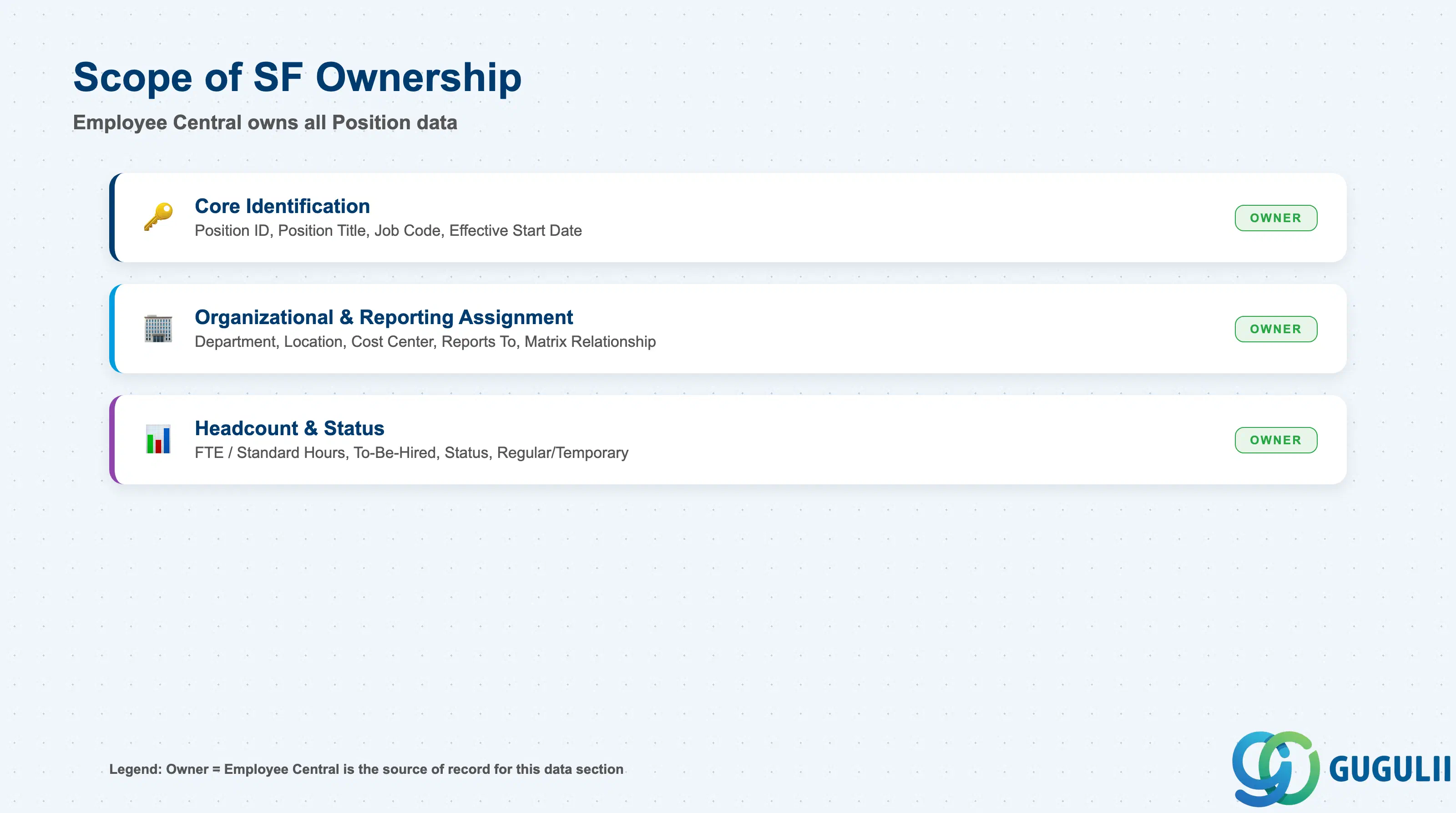
| Data Section | SF Involvement | Notes |
|---|---|---|
| Core Identification | ◎ Owner | Position ID, Position Title, Job Code, Effective Start Date |
| Organizational & Reporting Assignment | ◎ Owner | Department, Location, Cost Center, Reports To (Higher Position), Matrix Relationship |
| Headcount & Status | ◎ Owner | FTE / Standard Hours, To-Be-Hired / Vacancy Flag, Status, Regular/Temporary Indicator |
Legend: ◎ = Owner / Critical, ○ = Direct involvement
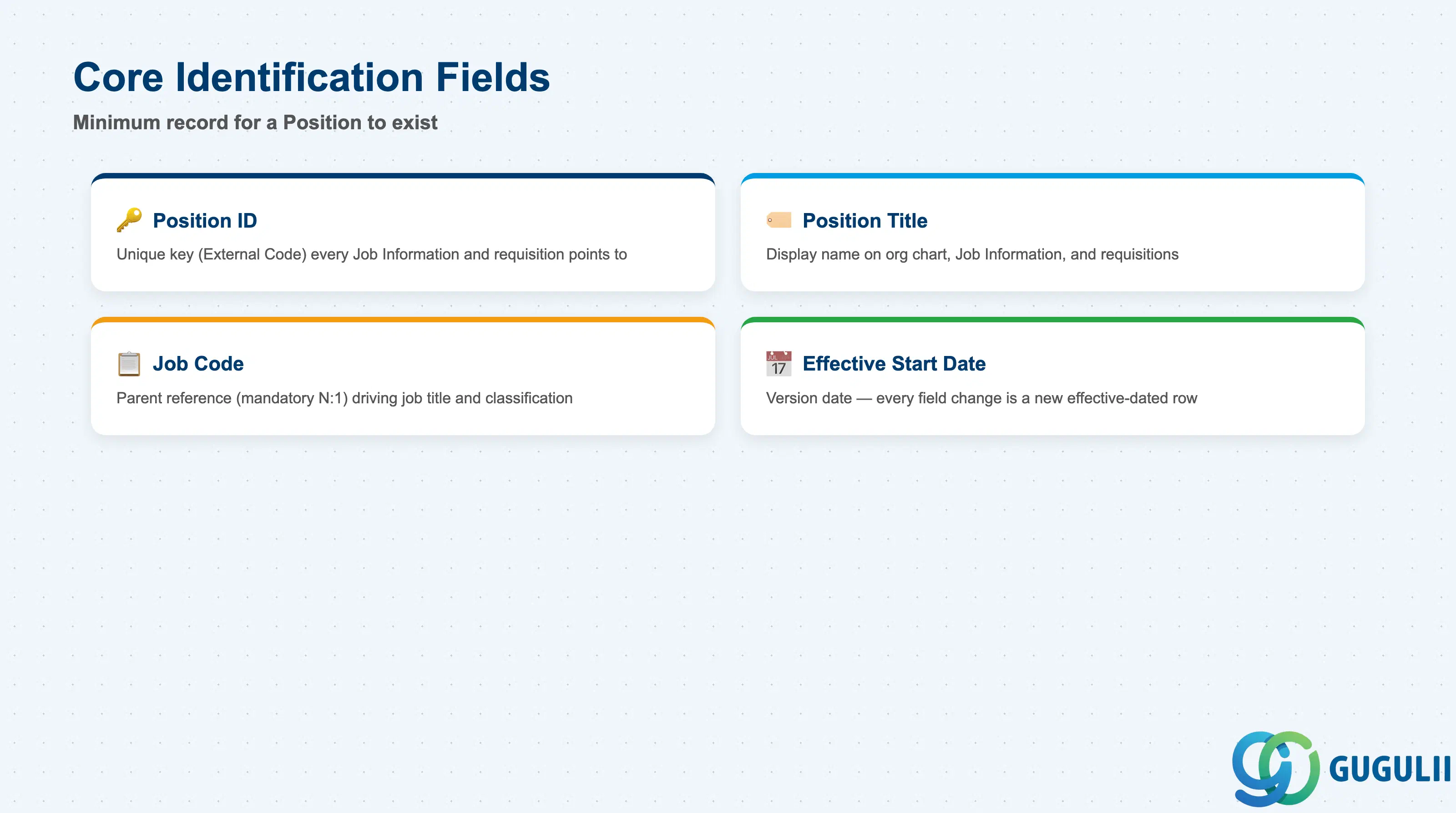
Core Identification is the minimum record a Position needs to exist — it is what every Job Information record occupying it, and every Position-filtered org-chart or headcount report, resolves back to.
| Field | Description | Practical Usage |
|---|---|---|
| Position ID | Unique identifier for the Position (External Code) | The key value every Job Information record’s Position reference, and every position-driven Job Requisition, points to. Agree the coding convention (e.g. Department prefix + sequence) once with the HRIS team; renumbering after go-live requires re-mapping every incumbent and open requisition attached to it. |
| Position Title | Display name of the seat, shown on Job Information, the org chart, and position-driven Job Requisitions | Commonly mirrors the Job Code Name but can be overridden per seat (e.g. “Sales Manager — East Region”) to reflect the specific seat’s scope. Keep this consistent with what the incumbent’s own title actually says on business cards and email signatures — a mismatch here is a frequent source of employee-facing confusion. |
| Job Code | The parent Job Code this Position references (mandatory, N:1) | Drives the job title, description, and EEO/statutory classification the seat inherits. Changing it after go-live is a real reclassification event for the seat and its current incumbent, not a cosmetic edit. |
| Effective Start Date | Date this version of the record becomes active | Every field change — a Department move, a Job Code reassignment, a status change — is captured as a new effective-dated row rather than an overwrite, following the same effective-dating pattern used across the SF Foundation Object framework. |
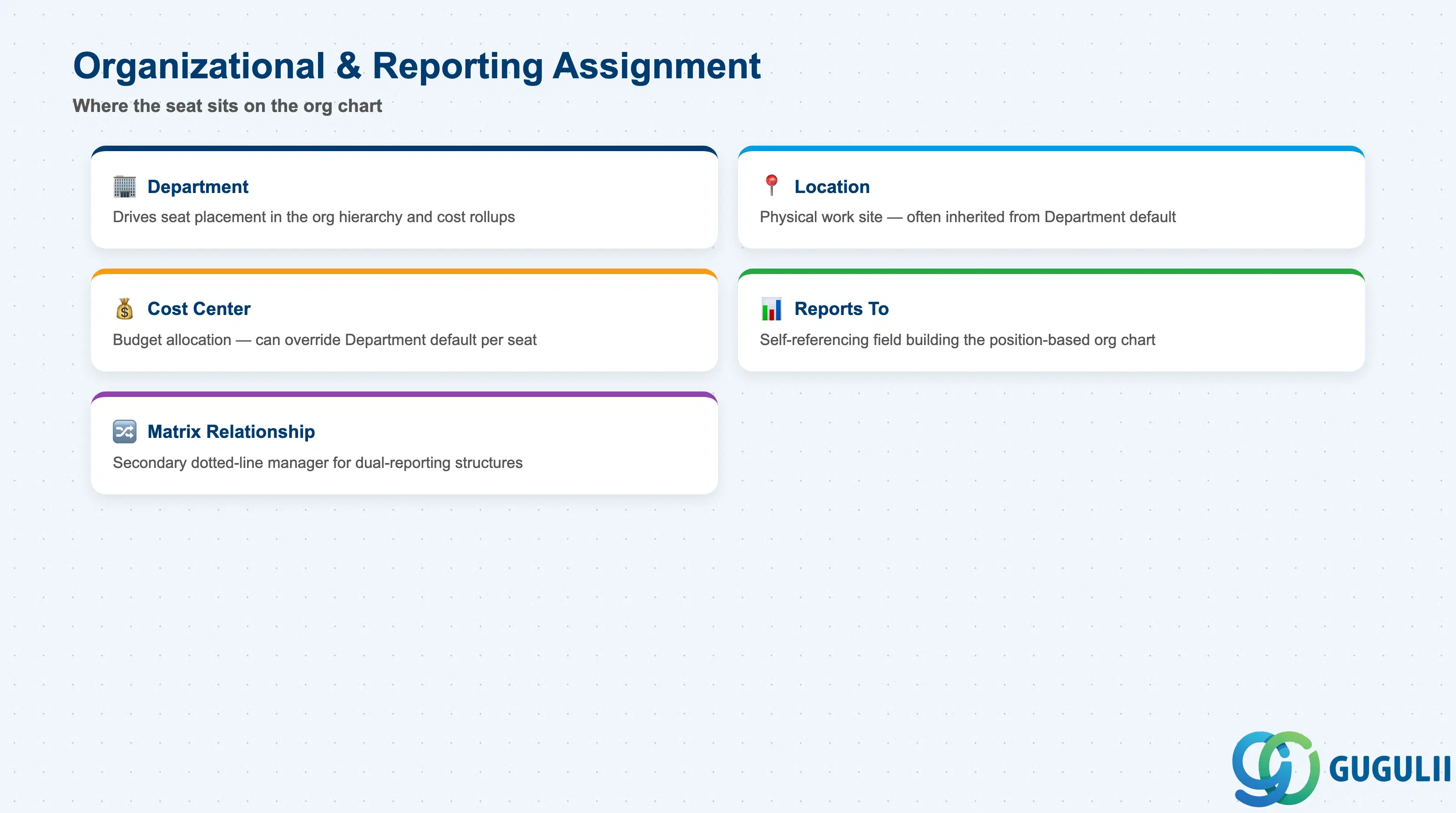
This section is what actually places the seat on the org chart and in the reporting-line structure — separate from the job-content fields in Core Identification.
| Field | Description | Practical Usage |
|---|---|---|
| Department | The Department this Position belongs to (mandatory, N:1) | This — not Job Code — is what drives the seat’s place in the Legal Entity → Business Unit → Division → Department chain and its cost/reporting rollups. Moving a Position between Departments is a routine reorg transaction and does not, by itself, require changing the incumbent’s Job Code. |
| Location | The physical work location associated with the seat | Frequently, though not always, inherited from the Department’s default Location; can be overridden on the Position for a specific remote or field-based seat. Feeds the incumbent’s default work-site assignment on hire. |
| Cost Center | The Cost Center this Position’s headcount is budgeted against | Often mirrors the Department’s Cost Center by default but can be overridden — for example, a seat funded by a different budget owner than the rest of its Department. This is the field Finance and Workforce Planning actually reconcile against for headcount-vs.-budget tracking, not the Department’s default Cost Center alone. |
| Reports To (Higher Position) | Self-referencing field pointing to the Position this seat reports to | Builds the position-based org chart independently of Department nesting — two Positions in different Departments can still have a direct reporting line. Leaving this blank on a non-top seat breaks the org-chart rendering for that branch, a common data-quality gap after a bulk Position load. |
| Matrix Relationship | Secondary self-referencing field for a dotted-line “Matrix Manager” Position | Populated only for seats with a genuine dual-reporting structure (cross-functional, regional matrix). Leaving it populated after a matrix relationship ends is a frequent stale-data issue, since nothing forces a review of this field on its own cadence. |
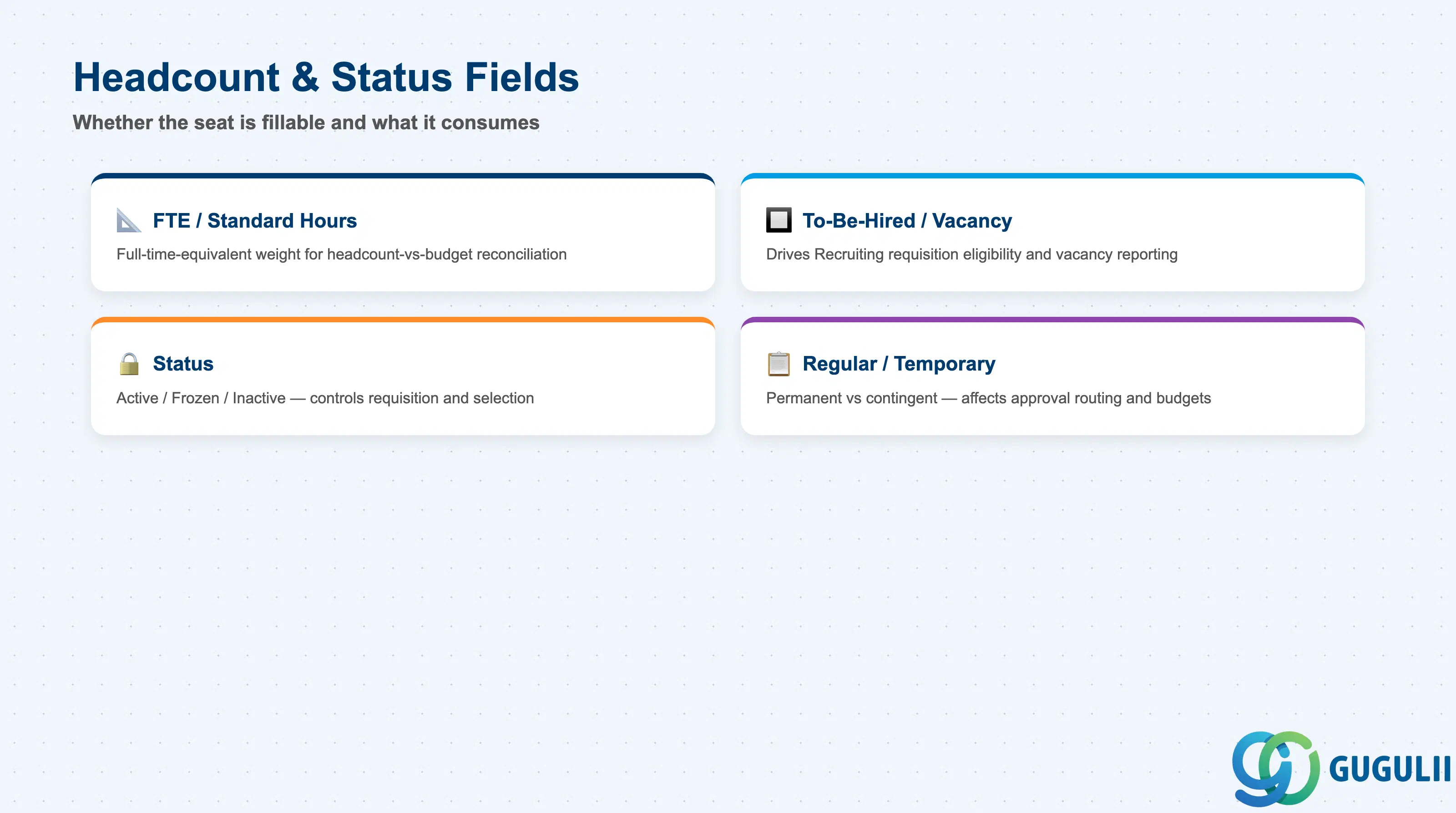
These fields govern whether the seat is currently fillable, how much headcount it consumes, and what kind of employment it is intended for — the fields Workforce Planning and Recruiting actually query when deciding whether a seat can be opened.
| Field | Description | Practical Usage |
|---|---|---|
| FTE / Standard Hours | Full-time-equivalent value or standard weekly hours the seat is budgeted for | Used to reconcile headcount reporting against a client’s approved FTE budget rather than raw employee counts — two 0.5-FTE Positions consuming the same headcount as one 1.0-FTE Position is a distinction Finance cares about, not just HR. |
| To-Be-Hired / Vacancy Flag | Indicates whether the seat currently has no incumbent | Drives whether a Position is eligible for a position-driven Job Requisition in Recruiting. Left un-flagged after an employee’s Job Information moves off the seat, this field silently understates vacancy reporting until someone reconciles it. |
| Status | Active / Frozen / Inactive | Frozen blocks new Recruiting requisitions against the seat without deleting it — used during hiring freezes or reorg reviews. Inactive removes it from selection entirely; check for any Job Information record still referencing it before setting a Position Inactive. |
| Regular/Temporary Indicator | Flags whether the seat is intended for a permanent or temporary/contingent assignment | Frequently defaults from the parent Job Code but can be overridden per seat — a client may run a temporary Position against an otherwise permanent Job Code for a fixed-term project role. Feeds downstream requisition-approval routing and workforce-planning headcount budgets differently depending on the value. |
| ID | Category | Title |
|---|---|---|
| sf-001 | Overview | What is SAP SuccessFactors? |
| ID | Category | Title |
|---|---|---|
| sf-b01 | Overview | SAP SuccessFactors Transactions: Process Flow, Hierarchy & Relationships |