Title here
Summary here

Employee Profile is the aggregated read view that surfaces an individual’s biographical identity — Person, covered in SF-A04-01 — and job/contract detail — Employment, Job Information, and Compensation Information, covered in SF-A04-02 — as a single consolidated screen. It does not own a person’s identity or job placement itself; those records belong to Person and Employment respectively. What Employee Profile does own is the profile-specific data that has nowhere else to live: the Profile Header aggregation, Job Relationships (additional relationship links such as HR Rep and Matrix Manager), and Background Elements such as Work Experience and Education. It closes out Phase 3 (Employee Data): where Person opened the phase as the root biographical identity and Employment carried the operational job/contract detail, Employee Profile is the presentation and extension layer built on top of both. This article covers what Employee Profile is, its view-type and visibility variants, how it sits atop Zone E’s Person / Employment / Job Information / Compensation Information without adding a landscape node of its own, and every profile-specific field an Employee Central consultant configures across Profile Header, Job Relationships, Work Experience, and Education.
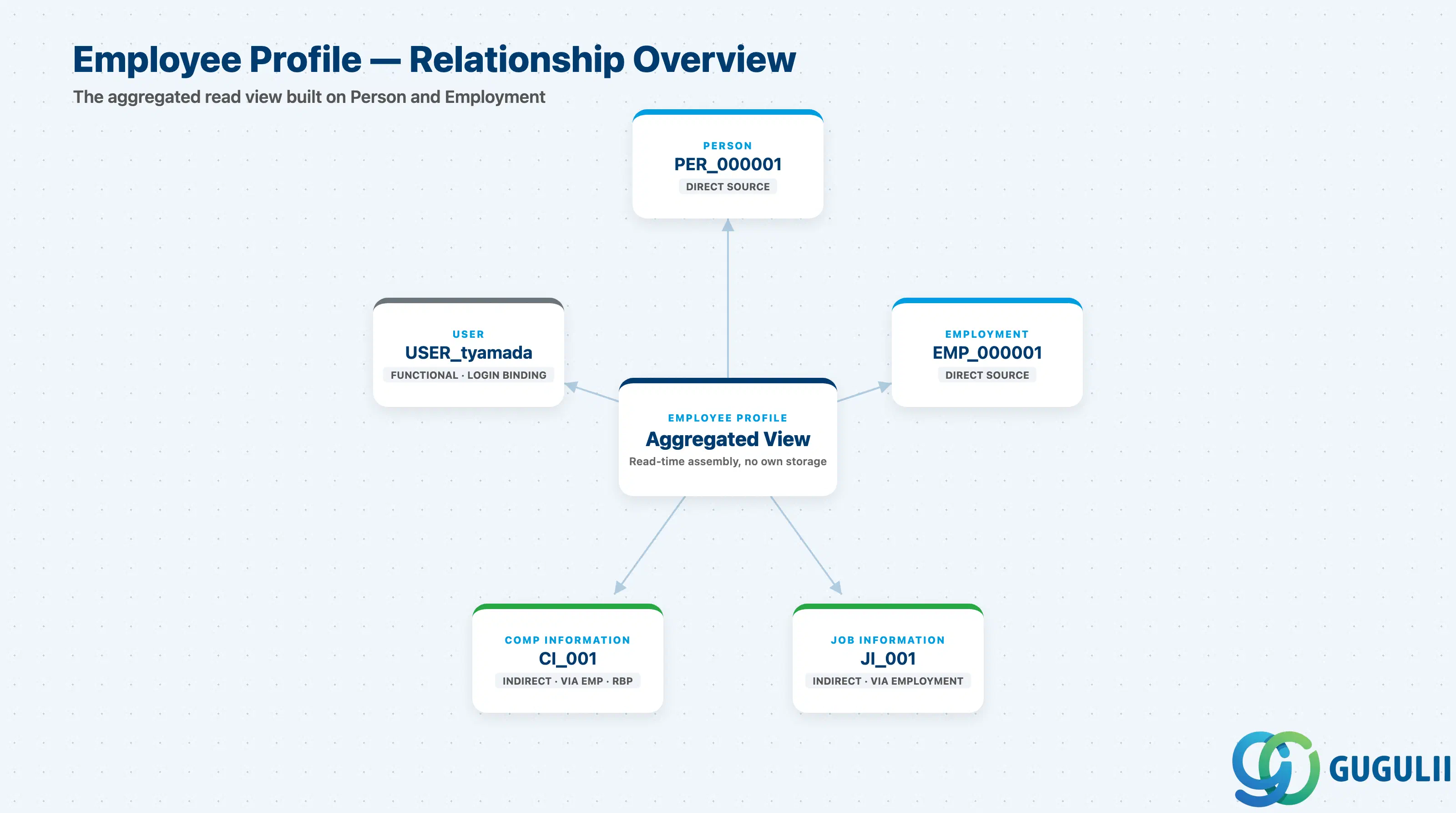
Employee Profile is not an owning master record the way Person or Employment are — it is the request-time aggregation layer that assembles those records, plus its own profile-specific extensions, into the single screen a consultant, manager, or employee actually looks at. Because it has no biographical or job data of its own to maintain, it is deliberately the least “stable” object in the Employee Data zone in one sense (it re-renders every time the underlying Person or Employment data changes) and the most extensible in another (Job Relationships and Background Elements are configured and grown here, independent of Person’s and Employment’s own field sets).
| Aspect | Details |
|---|---|
| Role | The aggregated, read-optimized profile view of an individual — surfaces Person, Employment, Job Information, and Compensation Information together on one screen, and additionally owns Job Relationships and Background Elements (Work Experience, Education, etc.) that are not part of any other master object |
| Modules using it | Owned by Employee Central as the profile/portlet presentation layer; Performance & Goals, Compensation, Recruiting (internal candidate profile), and Learning all read from Employee Profile as the consolidated “who is this person” screen rather than querying Person and Employment separately |
| Transactions | Employee Central “Employee Profile” screen (primary entry point, reached from Company Org Chart, People Search, or a direct link); Admin Center → “Manage Background Elements” (configure Work Experience / Education / other Background Element types and their field groups); Admin Center → “Configure Employee Files” (configure which portlets/blocks appear on the Profile layout, by role) |
| Key Tables | No dedicated OData root entity family the way Employment has EmpEmployment / EmpJob / EmpCompensation — Employee Profile surfaces PerPerson, EmpEmployment, EmpJob, and EmpCompensation at read time, and separately owns EmpJobRelationships (the Job Relationships block) and the generic Background Element entity family (each Background Element type, e.g. Work Experience or Education, is its own configured object type) |
| S/4HANA note | No delivered 1:1 mapping to an on-premise HCM object exists. The loosest analogue is a PA20/PA30 multi-infotype “Overview” display pulling together IT0002 (Personal Data), IT0001 (Org Assignment), and IT0008 (Basic Pay) on one screen — but that is a transaction-based edit view over individual infotypes, not a unified read-aggregation layer. Employee Profile’s Background Elements loosely map to IT0022 (Education) and IT0023 (Other/Previous Employers) in classic HCM, though modeled very differently as configurable Generic-Object-style Background Elements in Employee Central |
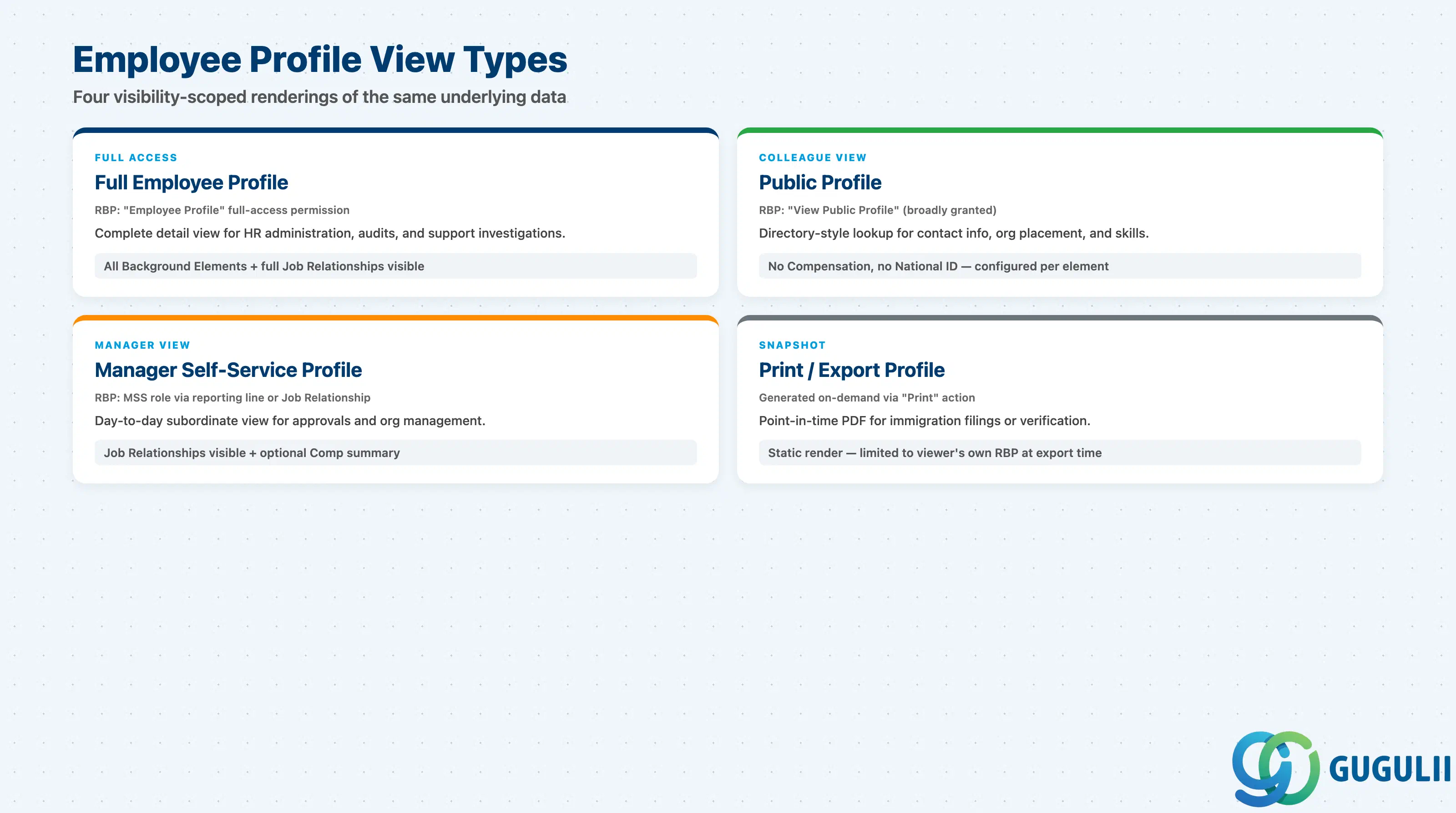
Employee Profile itself carries no “type” field — what varies is which subset of the underlying Person, Employment, and Background Element data a given viewer is permitted to see, and that subset is entirely governed by RBP layered per portlet and per Background Element rather than by anything on the object itself. Getting this distinction wrong is a common source of “why can’t this manager see the field I just configured” support tickets, because a field being technically present on Person or Job Information does not mean it renders on every profile view.
| Type | Code | Use Case | Key Behavior |
|---|---|---|---|
| Full Employee Profile (Admin/HR view) | Governed by the “Employee Profile” full-access RBP permission category | Complete detail access for HR administration, audits, and support investigations | Surfaces every Background Element field group and the full Job Relationships block, subject to the viewing HR Administrator’s own field-level RBP grants |
| Public Profile (colleague-facing view) | Governed by the “View Public Profile” RBP permission (typically granted broadly) | Directory-style lookup any employee uses to find a colleague’s contact info, org placement, and skills | Deliberately narrower field set — no Compensation Information, no National ID (SF-A04-01 §2.2); which Background Elements appear on Public Profile is configured per element, not inherited automatically from Full Profile |
| Manager Self-Service Profile (subordinate view) | Governed by MSS role, resolved via the reporting-line Employment or a Job Relationship (e.g. Matrix Manager) | A manager’s day-to-day view of a direct or matrix report, used for approvals and org management tasks | Includes Job Relationships and, if the Compensation Information View MSS permission is separately granted, a pay summary not shown on Public Profile |
| Print/Export Profile (PDF snapshot) | Generated on demand via the “Print” action | Point-in-time documentation for immigration filings, verification requests, or archival purposes | A static, non-live rendering limited to whichever portlets the requesting user’s own RBP permits at the moment of generation — it does not update after export |
Design principle: never assume a field visible on one profile view is automatically visible on another. Full Profile, Public Profile, and Manager Self-Service Profile can each show a different subset of the exact same underlying Person / Employment / Background Element data — always confirm which view type a requirement is describing before configuring field visibility.
Data hierarchy with a concrete example
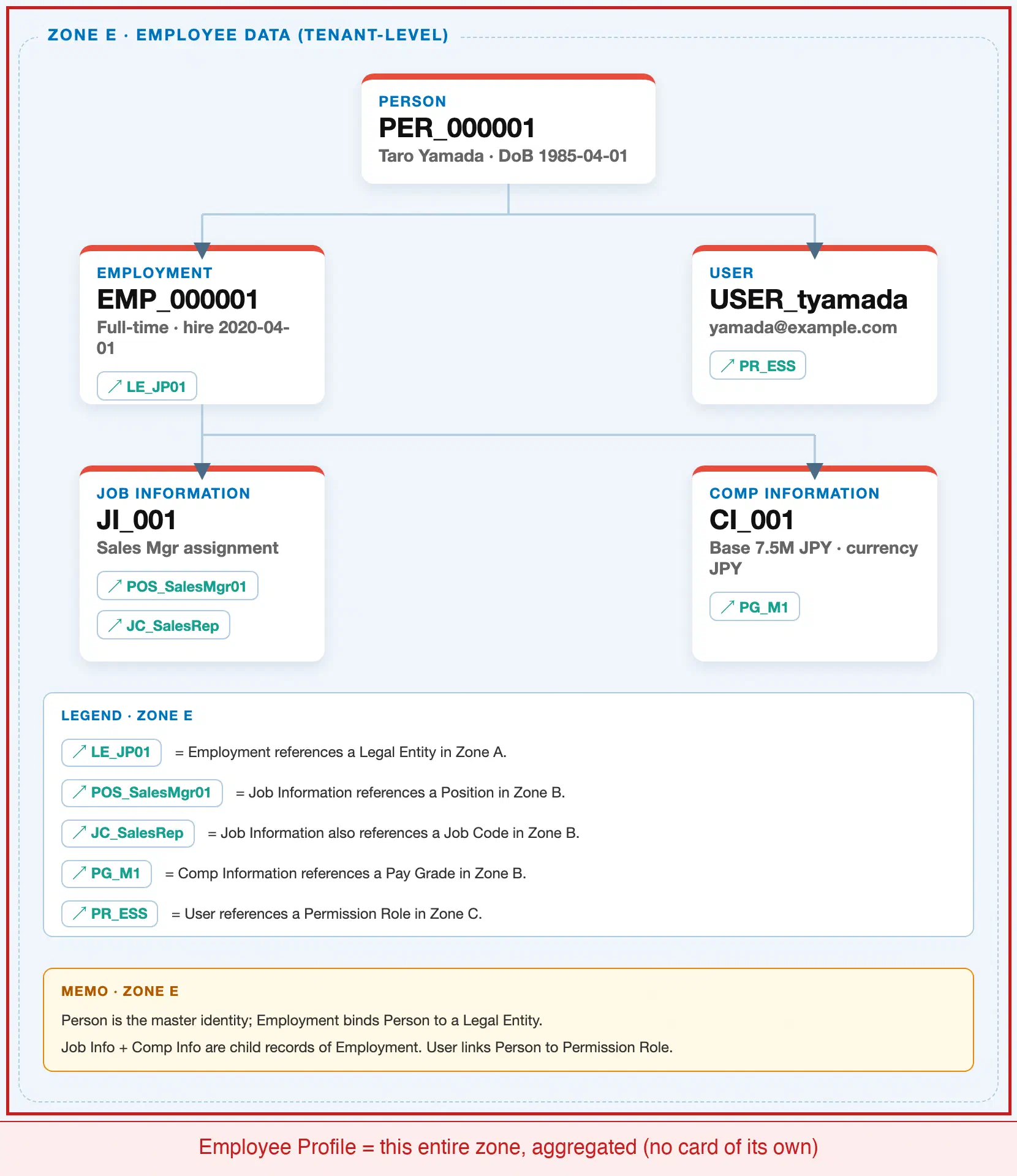
Employee Profile has no dedicated position of its own in the tenant-level “Employee Data” zone of the SuccessFactors Master Data Landscape — it is not one of the module’s 30 Setup Flow steps. Instead, it sits conceptually above the existing Zone E structure, assembling Person, the active Employment, Job Information, Compensation Information, and User at request time, while separately attaching its own Job Relationships (on Job Information) and Background Elements (on Person):
Client (SuccessFactors Instance)
   │
   └── Person "PER_000001" — Taro Yamada, DoB 1985-04-01
          │
          ├── Employment "EMP_000001" — Full-time, hire 2020-04-01, Active
          │      │
          │      ├── Job Information "JI_001" — Sales Mgr assignment
          │      │      └── Job Relationships — HR Rep "EMP_000250", Matrix Manager "EMP_000180"
          │      │
          │      └── Compensation Information "CI_001" — Base 7.5M JPY
          │
          ├── Background Element: Work Experience "WE_001" — "XYZ Corp", Sales Associate, 2016-2020
          ├── Background Element: Education "ED_001" — Waseda University, BA Commerce, 2016
          │
          └── User "USER_tyamada" — yamada@example.com

   Employee Profile (this article)
      = the read-aggregated screen assembled from all of the above:
        Person + the active Employment's Job Information/Compensation Information
        + Person-level Background Elements + Job Information's Job Relationships
      — with no dedicated storage layer of its own beyond EmpJobRelationships
        and the Background Element entities noted above.
MANDATORY landscape verification note: the module Master.md’s Setup Flow and ER Diagram list exactly 5 objects in Phase 3 (Employee Data): Person, Employment, Job Information, Compensation Information, and User — Employee Profile is not among them, because it is a UI/read-aggregation construct rather than a maintained master record. The published SuccessFactors Master Data Landscape (
sf-a01/images/04-sf-a01-master-landscape.html, Zone E) accordingly has no card for it. This is consistent with how SF-A04-01 and SF-A04-02 each describe Employee Profile — “the aggregated read view built on top of both” Person and Employment — and this article’s Section 1.3 crop reuses the identical Zone E region those two sibling articles use, rather than inventing a new node. Job Relationships (attached to Job Information, since the relevant HR Rep / Matrix Manager can change with a job change) and Background Elements (attached to Person, since Work Experience and Education are biographical and follow the individual across Employments) are genuine Employee-Profile-owned extensions, but because they are configuration-level additions rather than Setup Flow objects, they are not drawn as separate landscape cards either — they are called out in the tree above as attachment points on the existing Zone E nodes.Design principle: because Employee Profile aggregates rather than owns the identity and job data it displays, any correction to Person or Employment (SF-A04-01, SF-A04-02) is immediately reflected on Employee Profile with no separate update step — but a correction to a Background Element or Job Relationship must be made directly on Employee Profile’s own data, since neither Person’s nor Employment’s field tables contain it.
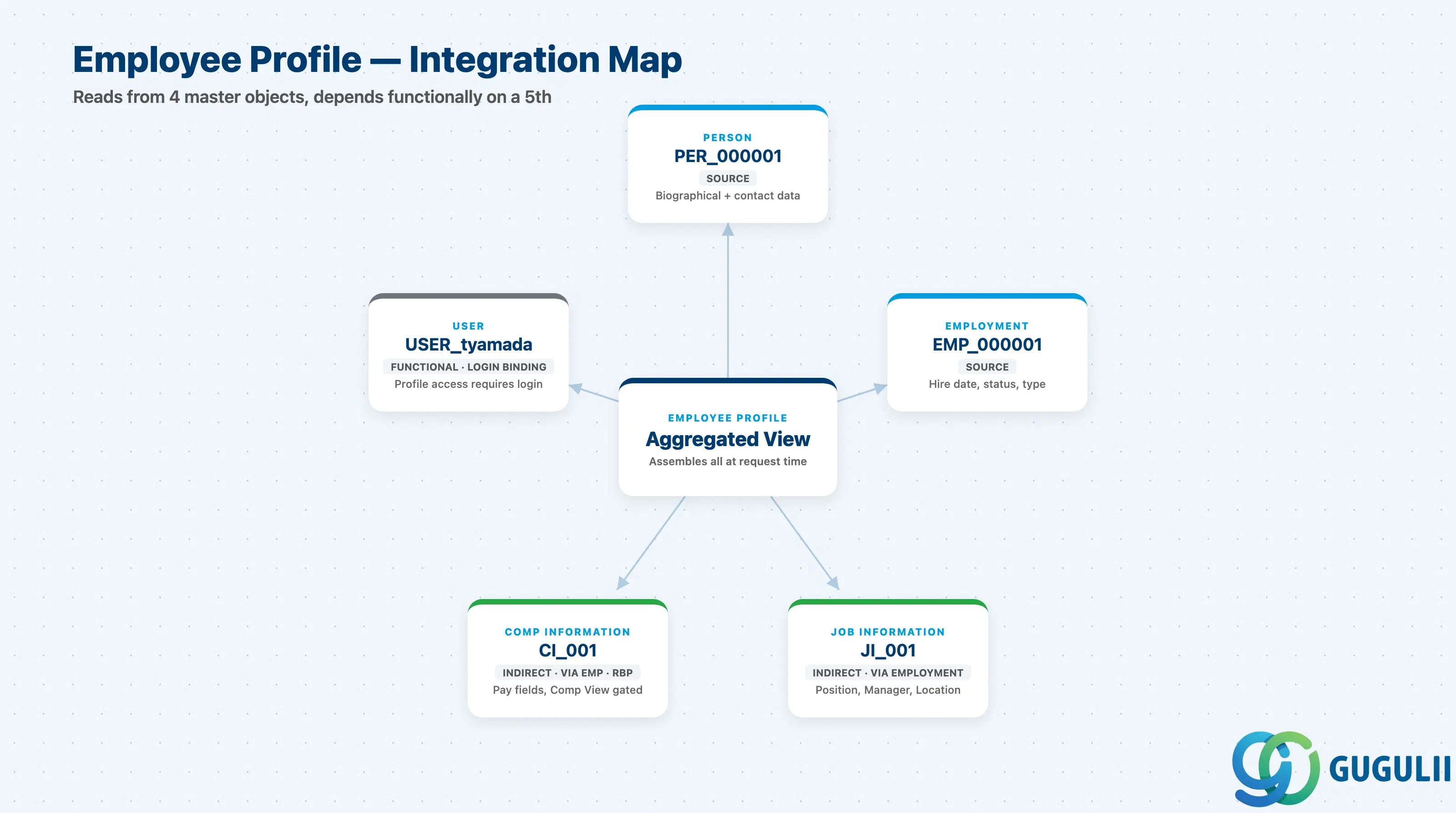
Employee Profile does not stand alone: every field it shows is either sourced directly from Person or Employment, sourced indirectly through Employment’s own child records, or dependent on User for the viewer to reach it at all.
| Object | Relationship | Practical Notes |
|---|---|---|
| Person | Source (reads from) — Employee Profile surfaces Person’s biographical and contact data as its own header and detail data | Any edit made on the Person record (SF-A04-01) is reflected on Employee Profile immediately — there is no separate profile-level copy of these fields to keep in sync. |
| Employment | Source (reads from) — Employee Profile surfaces the individual’s active Employment(s), including hire date, employment type, and status | A Global Assignment Person with two concurrent Employments (SF-A04-02 §1.2) typically renders as two selectable “employment” contexts within the same Employee Profile, not two separate profiles. |
| Job Information | Source (indirect, via Employment) — org-placement fields (Position, Manager, Location) are read from Job Information, not stored by Employee Profile | Job Relationships (this article, Section 2.2) attach to Job Information rather than to Employee Profile directly, precisely because they can change when a job change occurs. |
| Compensation Information | Source (indirect, via Employment, RBP-gated) — pay fields are read from Compensation Information only when the viewer holds Compensation View permission | Commonly hidden entirely on Public Profile (Section 1.2) even when the viewer can see every other section, since pay visibility is one of the most tightly scoped RBP categories in most tenants. |
| User | Functional dependency (not a data source) — Employee Profile requires the individual to have an active User account for anyone, including the individual, to view or edit it | Profile access itself is governed by the viewing User’s own Permission Role, not by anything stored on Employee Profile — see SF-A04-01 Section 1.4 for how User attaches to Person. |
| Permission Role | Indirect (via User) — same RBP mechanism described in SF-A04-01 §1.4 and SF-A03-01/02 | Field-level visibility differences across the Profile View Types in Section 1.2 are ultimately resolved through this same Permission Role chain, applied per portlet and per Background Element rather than to the profile as a whole. |
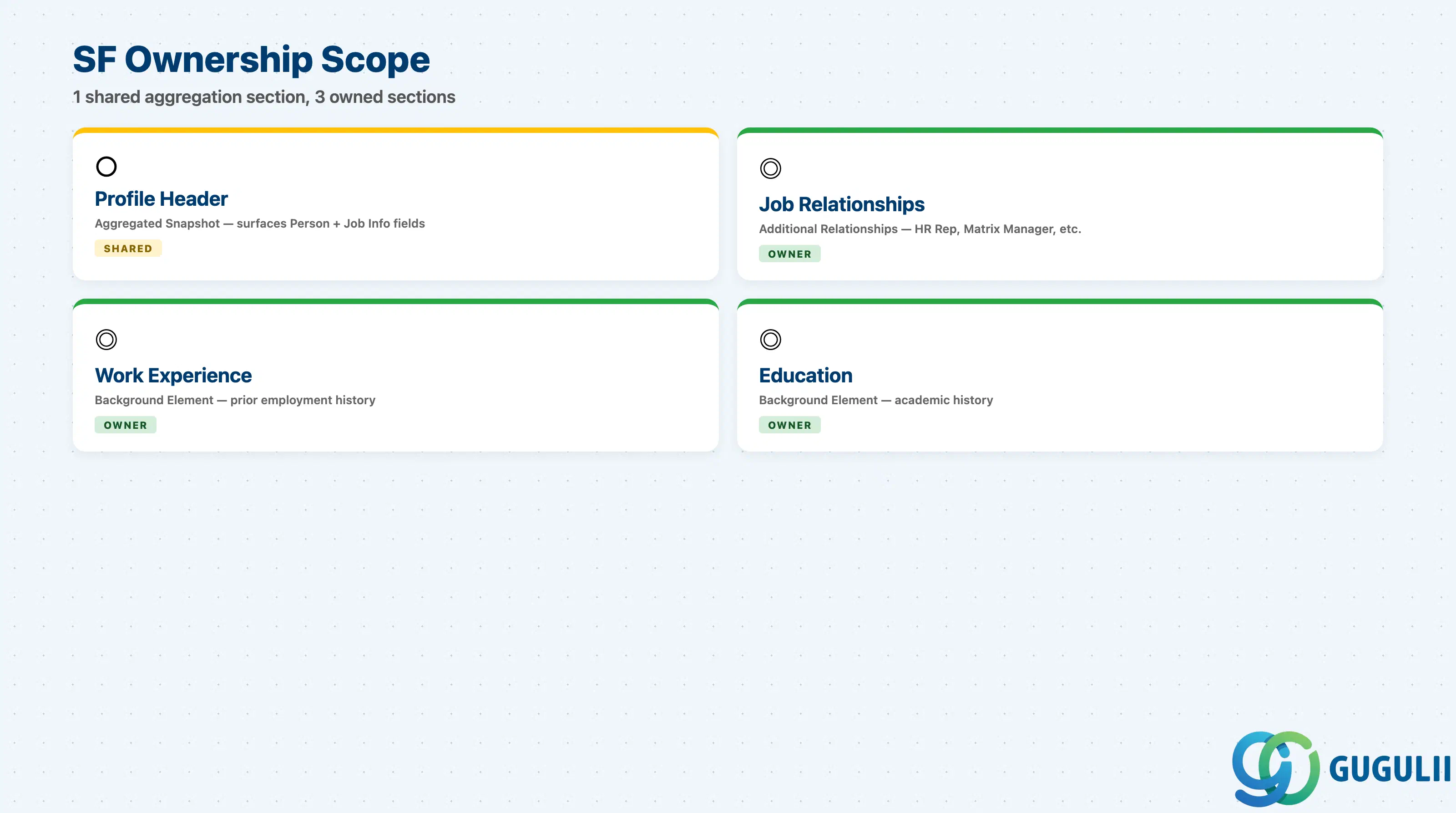
| Data Section | SF Involvement | Notes |
|---|---|---|
| Profile Header (Aggregated Snapshot) | ○ Shared with Person / Employment | Aggregates existing Person and Job Information fields into a display-only header — no dedicated fields of its own beyond Profile Photo |
| Job Relationships (Additional Relationships) | ◎ Owner | HR Rep, Matrix Manager, Second Manager, and custom relationship types — genuinely owned by Employee Profile’s Job Relationships block, attached to Job Information, not duplicated from Person or Employment |
| Background Elements — Work Experience | ◎ Owner | Prior external employment history, and optionally auto-generated internal history rows depending on configuration |
| Background Elements — Education | ◎ Owner | Institution, qualification, and graduation data maintained as a repeating Background Element attached to Person |
Legend: ◎ = Owner / Critical, ○ = Direct involvement
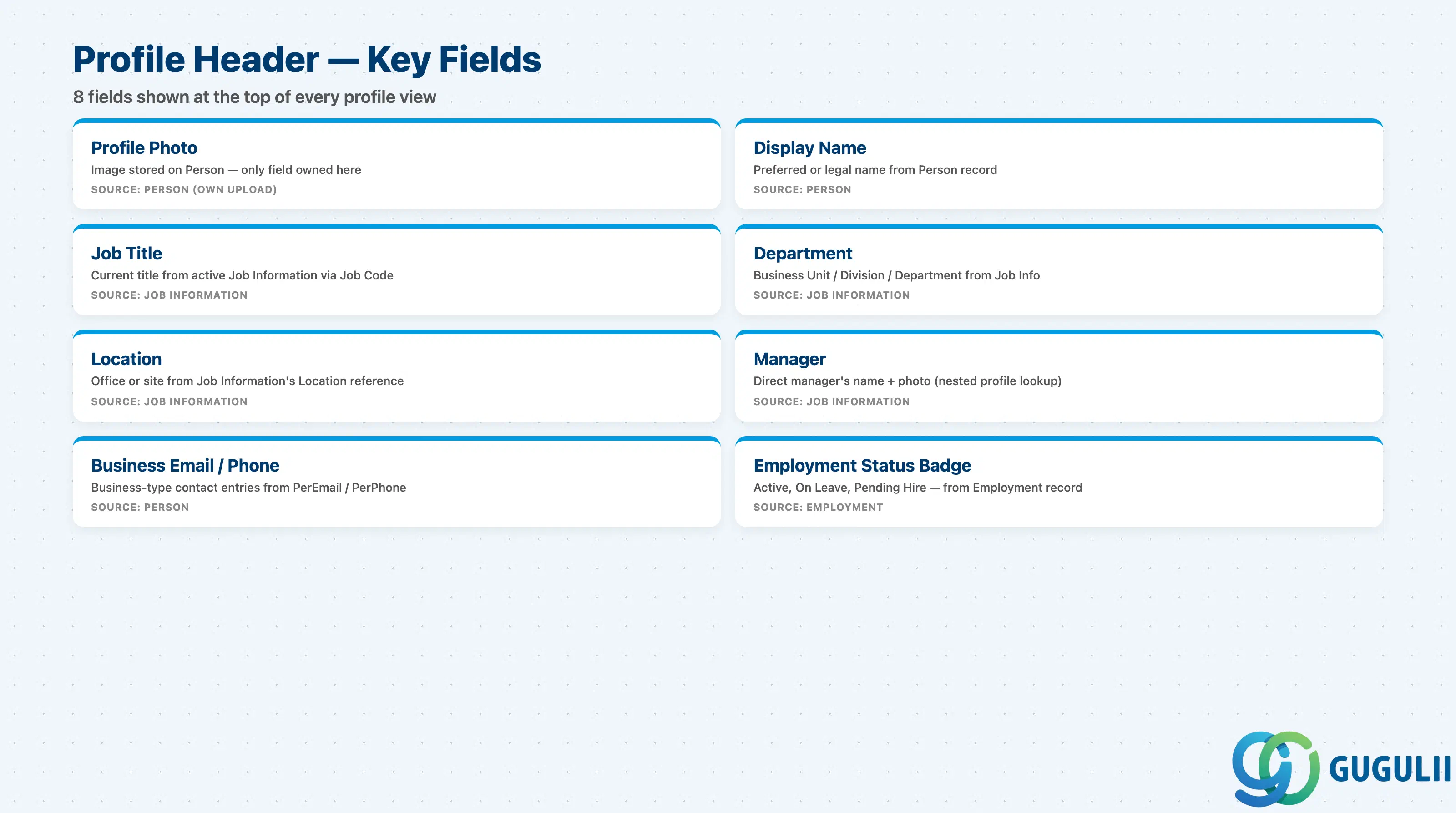
Profile Header is the summary card every viewer sees first — it deliberately carries no field of its own that isn’t already sourced from Person or Job Information, with the single exception of Profile Photo.
| Field | Description | Practical Usage |
|---|---|---|
| Profile Photo | Image stored against the Person and surfaced in the header of every profile view | The only field in this section not sourced from Person’s or Employment’s own field tables. Photo upload permission is commonly self-service, but many tenants route a new or changed photo through an HR-review workflow before it goes live, to prevent inappropriate images. |
| Display Name | Aggregated from Person’s Preferred/Display Name (or legal name if no preferred name is set) — see SF-A04-01 §2.1 | Read-only on Employee Profile itself; correcting it means editing the Person record, not the profile. |
| Job Title | Aggregated from the active Employment’s Job Information (via Job Code) | Reflects the current dated Job Information row — a pending future promotion with a future effective date does not appear here until that date arrives. |
| Department | Aggregated from Job Information’s Business Unit/Division/Department chain (SF-A04-02 §2.3) | Drives the org-chart “reports to” navigation shown alongside the header; a Department reorg is reflected here as soon as the Job Information effective-dated row takes effect. |
| Location | Aggregated from Job Information’s Location reference | Used by directory-style lookups (Public Profile) to show which office or site the individual is based at, distinct from the Legal Entity’s registered address. |
| Manager | Aggregated from Job Information’s Manager ID reference | Displays the direct manager’s own Display Name and Photo (a nested Profile Header lookup) — a common integration failure mode is a broken chain when a Manager ID points to a Terminated Employment. |
| Business Email / Business Phone | Business-type entries from Person’s Email/Phone family (PerEmail/PerPhone with Type = Business), distinct from the Personal Email/Phone covered in SF-A04-01 §2.3 | Because these live on Person, not on Employment or Job Information, a Global Assignment Person’s business contact detail must be maintained per relevant country context rather than assumed to change automatically with the host Employment. |
| Employment Status Badge | Aggregated from the active Employment’s Employment Status (SF-A04-02 §2.2) | Renders as a visible badge (e.g. “On Leave,” “Pending Hire”) on Full and Manager Self-Service views; commonly suppressed on Public Profile to avoid broadcasting sensitive status changes tenant-wide. |
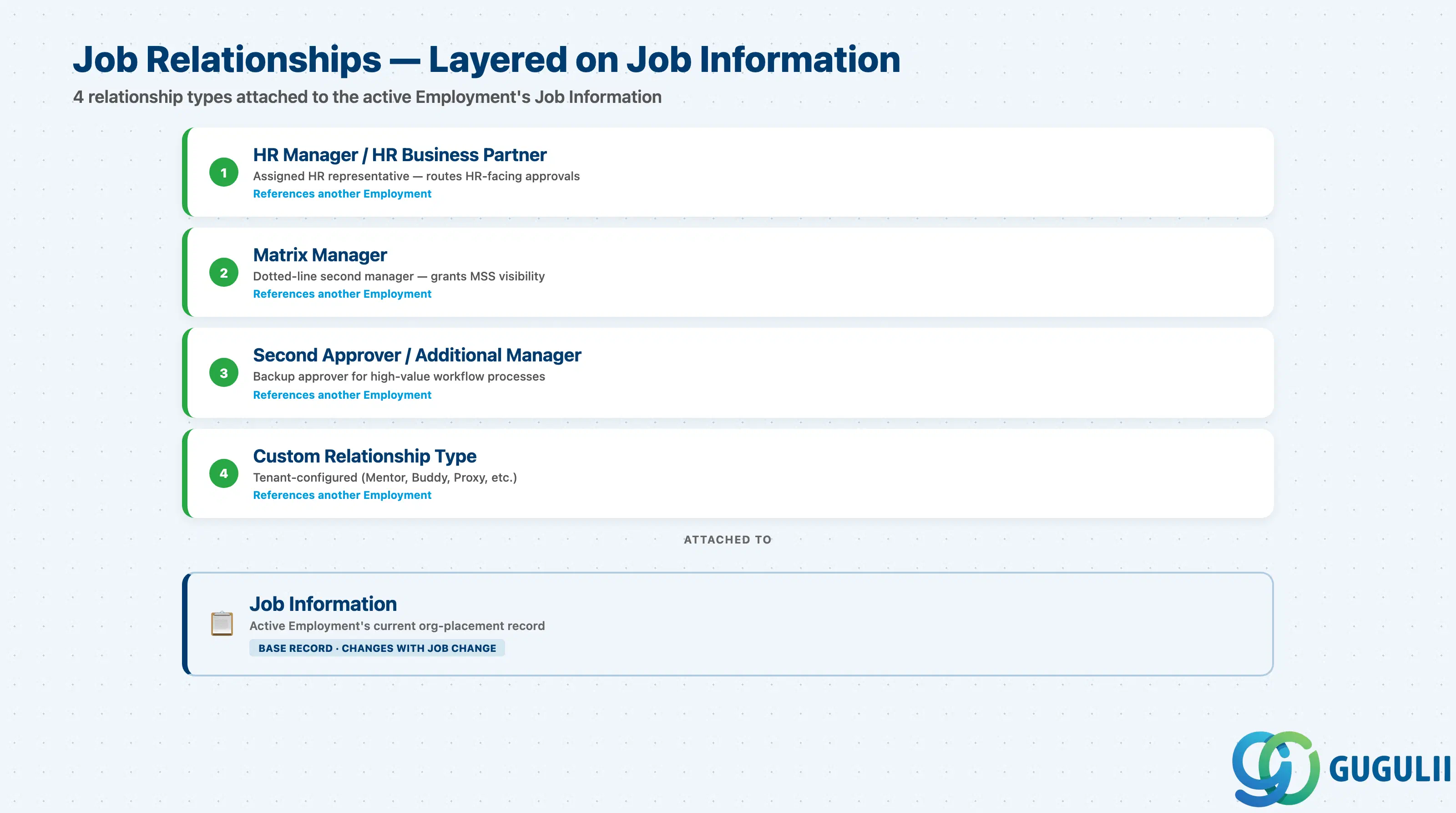
Job Relationships is a configurable block attached to Job Information that captures reporting-line-style connections beyond the single primary Manager field — this is genuinely Employee Profile’s own data, not a restatement of anything already covered on Person or Employment.
| Field | Description | Practical Usage |
|---|---|---|
| HR Manager / HR Business Partner | Reference to the Employment of the individual’s assigned HR representative | Used to route HR-facing workflow approvals and to populate “Contact HR” links on the profile; typically resolved by Department or Location rather than entered per individual, but stored as a Job Relationship once resolved. |
| Matrix Manager | Reference to a second manager’s Employment, for a dotted-line reporting structure | Common in global-project or product-line organizations where an individual reports operationally to one manager and functionally to another; Matrix Manager relationships also grant that second manager MSS visibility into the individual’s profile (Section 1.2). |
| Second Approver / Additional Manager | Reference to another Employment used as a backup or secondary approver in workflow routing | Frequently configured for high-value approval processes (compensation changes, time-off for direct reports) where a single point of approval failure is unacceptable. |
| Custom Relationship Type | Tenant-configured relationship categories beyond the standard set (e.g. Mentor, Onboarding Buddy, Timesheet Approver Proxy) | Configured via the same Job Relationships object definition; each custom type can independently drive its own workflow routing or MSS visibility rule, so audit which processes depend on a given custom relationship before removing it. |
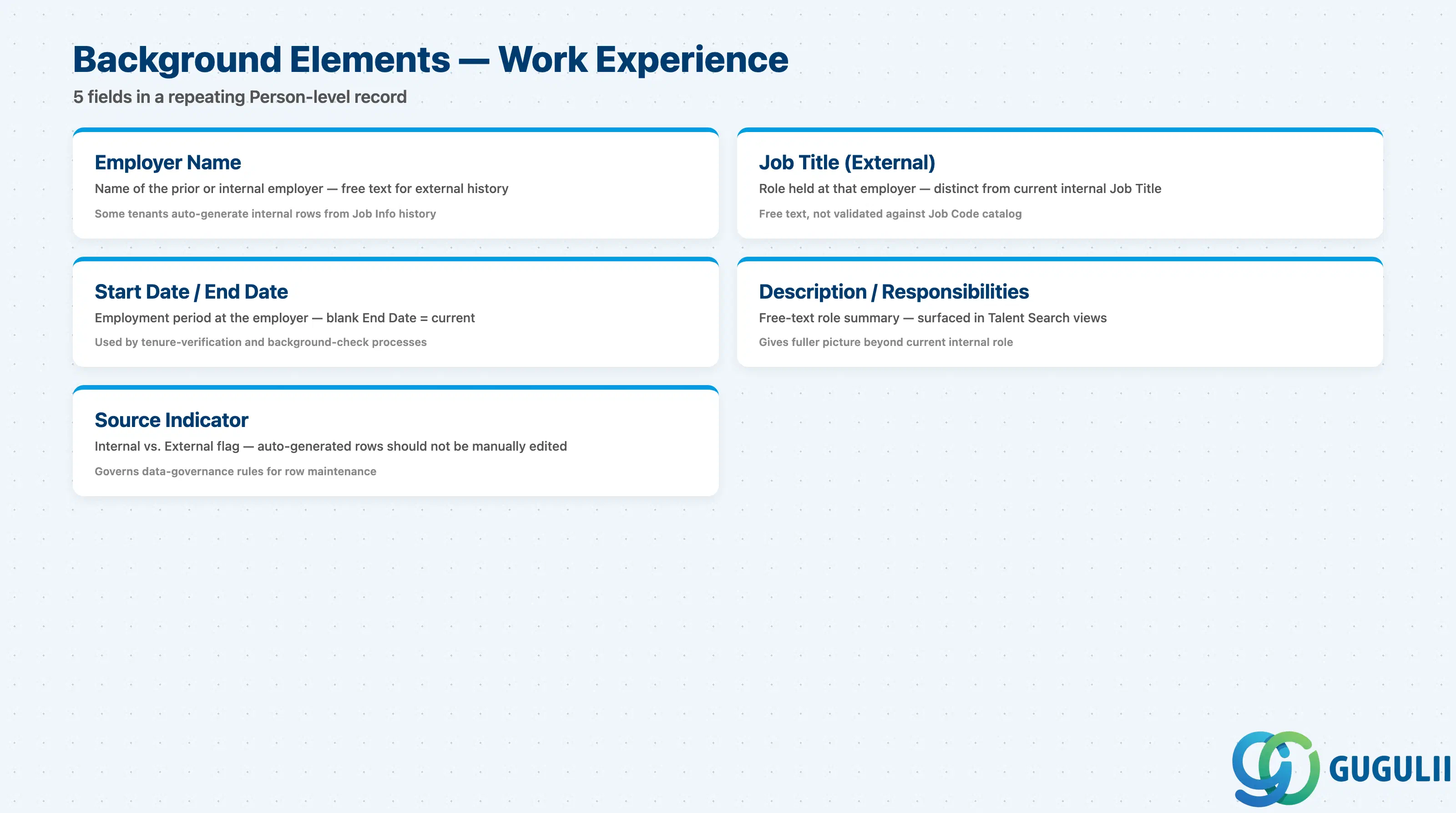
Work Experience is a repeating Background Element attached to Person — the same individual’s Work Experience rows persist across a rehire or a Global Assignment, since they are not tied to any single Employment.
| Field | Description | Practical Usage |
|---|---|---|
| Employer Name | Name of the prior (or, in some configurations, internal) employer | For external history this is free text; some tenants additionally auto-generate internal Work Experience rows from the individual’s own Job Information history at each promotion or transfer, depending on Background Element configuration. |
| Job Title (External) | The role held at that employer | Distinct from the profile’s own Job Title field (Section 2.1), which reflects the current internal role only — external Job Title is free text and not validated against the tenant’s Job Code catalog. |
| Start Date / End Date | The employment period at that employer | Used by tenure-verification and background-check processes; a blank End Date is treated by most configurations as “current” if the row represents ongoing external employment (e.g. a concurrent contingent engagement disclosed by the individual). |
| Description / Responsibilities | Free-text summary of the role | Frequently surfaced in Talent Search and succession-planning profile views to give a fuller picture of a candidate’s background beyond their current internal role. |
| Source Indicator (Internal / External) | Flags whether the row was entered manually by the individual/HR or auto-generated from internal Job Information history | Matters for data-governance purposes — auto-generated internal rows should not be manually edited, since the next Job Information change will regenerate or supersede them depending on configuration. |
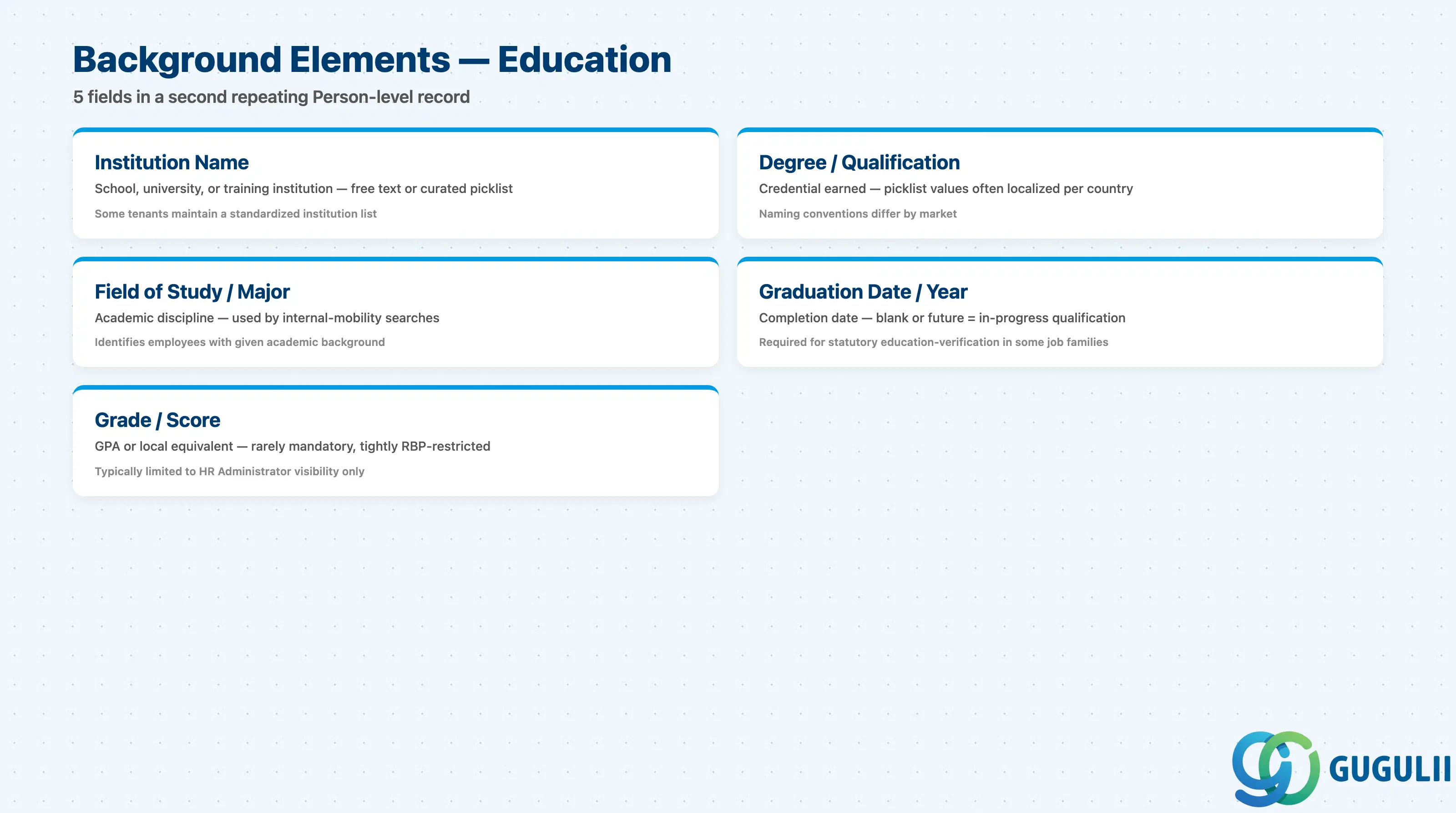
Education is a second repeating Background Element attached to Person, structured similarly to Work Experience but with its own field set tailored to academic history.
| Field | Description | Practical Usage |
|---|---|---|
| Institution Name | Name of the school, university, or training institution | Free text in most tenants, though some maintain a curated institution picklist for standardized reporting or diploma-verification integrations. |
| Degree / Qualification | The credential earned (e.g. Bachelor’s, Master’s, professional certification) | Picklist values and required-field rules are commonly localized per country, since qualification naming conventions differ significantly across markets. |
| Field of Study / Major | The academic discipline studied | Used by some Recruiting-adjacent internal-mobility searches to identify employees with a given academic background for project staffing. |
| Graduation Date / Year | Date or year the qualification was completed | Some tenants require this for statutory education-verification obligations tied to specific job families (e.g. regulated professions); an in-progress qualification is typically represented with a future or blank Graduation Date depending on configuration. |
| Grade / Score | GPA or local-equivalent grading result | Rarely mandatory and, where captured, is one of the more tightly RBP-restricted Background Element fields — most tenants limit visibility to HR Administrator roles rather than exposing it on Public or Manager Self-Service Profile. |
| ID | Category | Title |
|---|---|---|
| sf-001 | Overview | What is SAP SuccessFactors? |
| ID | Category | Title |
|---|---|---|
| sf-b01 | Overview | SAP SuccessFactors Transactions: Process Flow, Hierarchy & Relationships |